Paper2Wire
– A Case Study of User-Centred Development of
Machine Learning Tools for UX Designers
Daniel Buschek
[email protected] Research Group HCI + AI, Department of Computer Science,
University of Bayreuth Bayreuth, Germany
Charlotte Anlau
�
charlotte.anlau�@gmail.com LMU Munich Munich, GermanyFlorian Lachner
∗ �orian.lachner@i�.lmu.de LMU Munich Munich, GermanyABSTRACT
This paper re�ects on a case study of a user-centred concept de-velopment process for a Machine Learning (ML) based design tool, conducted at an industry partner. The resulting concept uses ML to match graphical user interface elements in sketches on paper to their digital counterparts to create consistent wireframes. A user study (N=20) with a working prototype shows that this concept is preferred by designers, compared to the previous manual pro-cedure. Re�ecting on our process and�ndings we discuss lessons learned for developing ML tools that respect practitioners’ needs and practices.
CCS CONCEPTS
•Human-centered computing!Interface design prototyp-ing;HCI design and evaluation methods.
KEYWORDS
Machine learning; paper prototyping; wireframes; design process
ACM Reference Format:
Daniel Buschek, Charlotte Anlau�, and Florian Lachner. 2020.Paper2Wire
– A Case Study of User-Centred Development of Machine Learning Tools
for UX Designers. InMensch und Computer 2020 (MuC’20), September 6–
9, 2020, Magdeburg, Germany.ACM, New York, NY, USA, 9 pages. https: //doi.org/10.1145/3404983.3405506
1 INTRODUCTION
Machine learning (ML) has become a key component of many digital products and services. Despite its successful applications, ML has remained underexplored for supporting thedesignof such applications in the�rst place: Re�ecting across projects on ML and UX/UI design, Yang [28] concludes that ML is not yet systematically integrated into design patterns, design education, or prototyping tools; uses of ML are often “driven by data availability and leaner performance rather than a deliberate user-centered vision”. This gap
∗Now at Google
Permission to make digital or hard copies of all or part of this work for personal or classroom use is granted without fee provided that copies are not made or distributed for pro�t or commercial advantage and that copies bear this notice and the full citation on the�rst page. Copyrights for components of this work owned by others than the author(s) must be honored. Abstracting with credit is permitted. To copy otherwise, or republish, to post on servers or to redistribute to lists, requires prior speci�c permission and/or a fee. Request permissions from [email protected].
MuC’20, September 6–9, 2020, Magdeburg, Germany
© 2020 Copyright held by the owner/author(s). Publication rights licensed to ACM. ACM ISBN 978-1-4503-7540-5/20/09...$15.00
https://doi.org/10.1145/3404983.3405506
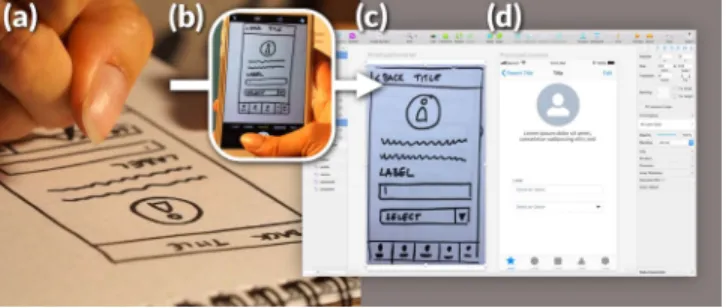
Figure 1: From paper sketch to digital wireframe with our concept and prototype: (a) A designer sketches a GUI on paper, (b)then takes a photo of it to (c) import it into a wireframing software (Sketch), for(d)further modi�cation. Based on this example case, we re�ect on lessons learned for developing ML tools, not opportunistically, but in a user-centred way that respects practioners’ needs and practices.
motivates our work here: We report and re�ect on a user-centred development process for the example case of developing a concrete ML tool for designers at an industry partner.
Integrating ML into design work is challenging since creative practices can clash with automation, uncertainty or loss of control through ML [9]. This hinders the vision of ML leverage for designers. Ideally, ML tools could increase our design capabilities [10] and alleviate repetitive steps, thus freeing time for exploration, user research, and high-level decisions [18]. Promising examples include tools for optimising layouts [25], vectorising visual designs [24], and evaluating GUIs [19].
Conceptually, tools are often developed with a focus on tech-nically enabling new functionality (e.g. [6]) with little reporting on how this is then integrated into concrete work practices. This makes it di�cult to build up knowledge in the research community about the designers’ practical perspectives and experiences with such ML tools.
To address this gap we report on lessons learned from designing an ML tool for UI/UX designers in industry. Our goal in this case study is not to innovate ML but to advance our understanding of how to investigate ML opportunities for design tools in practice. We explore two research questions:
(1) How might we identify opportunities for integrating ML into an established design process in industry?
(2) And as a concrete case study for this:How might we support designers in early prototyping stages with ML?
Investigating these questions, our key contribution is a set of insights and lessons learned from an in-depth concept development process with designers in industry. This resulted in a tool concept and prototype,Paper2Wire(Figure 1), which we see as a concrete example output of such a process. Overall, we contribute to an ongoing discourse on how to integrate ML into creative human work practices.
2 RELATED WORK
At the intersection of ML and UX/UI design, current research often focuses on studying how ML can improve interactive systems for the users, for example, in recommender systems, a�ective comput-ing, or intelligent user interfaces [29]. In contrast, in this paper we focus on using ML to support UX/UIdesign work, in particular in early design stages.
Therefore, in the following sections we relate our work to re-search on ML-based design tools, considerations on prototyping and early design stages, the use of ML therein, and industry tools to support such design work.
2.1 Research on ML-based Creative Tools
In general, while ML is envisioned to provide tangible bene�ts for designers, it remains unclear how to integrate it into design practices [28], resulting in unused potential [9]. This fundamentally motivates our investigations in this paper to gain insights into suitable methodology for identifying opportunities and developing concepts for integrating ML into design work practices.Today’s interest in supporting creative human work with ML can be traced back to much earlier ideas of technoglogy-assisted creativity, as conceptualised, for example, by Simon’s optimisation-based design [23], Shneiderman’s “creativity support tools” [22] and Horvitz’ “mixed-initiative user interfaces” [11]. These ideas also have been revisited recently in the context of GUI design (using combinatorial optimisation) [18], physiological sensing [21], and (generative) ML/AI [8, 13]. We see our work here as extending such investigations with a focus on adevelopment processthat centres around respecting the perspective of industry practitioners.
More speci�cally, recent related research provides several moti-vating examples of ML-based GUI design tools: For instance, such tools optimise GUI layouts with formal models to ful�l objective performance criteria [25], automatically vectorise existing digital GUI designs (using computer vision) to quickly transfer them to new projects [24], or enable quanti�able evaluations of given GUIs through a set of models of user perception and attention [19]. More-over, recent work by Chen et al. [6] targeted the transformation of digital UI mockups into UI code descriptions (e.g. Android layout XML), using deep learning. In constrast, we address the earlier step of going from paper to digital mockups.
Overall, while most prior work has focused on algorithmically enabling such transformations, we address the designers’ perspec-tive and the integration of such tool concepts into the wider design process.
2.2 Prototyping and ML in Early Design Stages
One important question that designers often face early on is whether to focus more on low-�delity (e.g. paper-based) or high-�delity (e.g. digital) prototypes: Whereas low-�delity prototypes foster an e� -cient and creativity-focused design approach [2], high-�delity pro-totypes allow for better understanding of design opportunities, par-ticularly in design processes with high client involvement [16, 26]. Found di�erences also include, for example, e�ects on estimations of task completion time and ratings of attractiveness [20]. Conse-quently, according to Walker et al. [26], designers should choose the medium and�delity best suitable for the respective design goal and requirements. Taking this design process consideration as an example, how might ML support designers in their work?Previous design research (e.g. Landay and Myers [14], Kara and Stahovich [12]) and design tools (e.g. Google’s Autodraw1),
show-case how ML can speed up established design tasks. Returning to the question of prototype�delity, current e�orts are mainly based on designers providing a digital sketch as a basis for the transfor-mation from low to high�delity (also see tools in next section). This motivates us to identify further possibilities of how ML can support work in early design stages and how it can be integrated into designers’ work processes.
2.3 Existing Industry Tools
There is an abundance of digital tools on the market that support wireframing as a prototyping activity, such asAxure2,Balsamiq3or Adobe XD4. Although not primarily designed for wireframing pur-poses,Sketch5is named as the most popular tool (48%) for wirefram-ing in a survey conducted by uxtools.co6.Sketchis a vector-based
design tool�rst released in 2010 and supports external plugins which complement the basic functionalities and allow for a variety of uses. Motivated by integrating and studying new ML concepts in designers’ actually used industry tools, our prototype for this paper is implemented as such a plugin forSketch.
Few design tools support the automatic transition from paper to digital content: Pilot projects by Microsoft [1] and Airbnb [27] convert paper sketches directly into GUI code, skipping large parts of the digital wireframing phase. This may hinder manual modi� ca-tion, creative intervenca-tion, and control by designers and motivates our investigation of ML to support the transition to wireframing instead of skipping this step. Other work used deep neural net-works to “reverse engineer” UIs by generating UI code from UI screenshots [3], preceding development towards aUIzardtool to turn sketches/wireframes into higher�delity artboards7.
Another approach is used by tools likeMarvel8, which allows GUI designers to take photos of paper sketches and manually
de-�ne interaction areas to connect these. Since the photos are used directly without ML, GUI elements are not detected automatically
1https://www.autodraw.com/ 2https://www.axure.com/ 3https://www.balsamiq.com/ 4https://www.adobe.com/de/products/xd.html 5https://www.sketchapp.com/ 6http://uxtools.co/survey-2018 7https://uizard.io/
and no digital modi�able wireframe is created. In contrast, the ap-proach investigated in this paper uses ML to enable designers to automatically create digital wireframes from photos of hand-drawn GUI sketches.
Finally, while the introduction of ML into industry design tools also motivates our research, the employed concept development methods for these tools are not known. As an HCI research commu-nity, we are also interested in research methodology for identifying opportunities and investigating and evaluating concepts for ML tools for designers. Next, we thus report on our concept develop-ment in detail.
3 CONCEPT DEVELOPMENT
At the outset of our research we chose to focus onparticipatory design workshops, since these present both a novel use-case for ML in early design stages as well as a crucial activity employed by our industry partner (an IT consulting and software development company), so that our case study could address a real need. We followed a user-centred approach with�ve steps, reported next.
3.1 Step I: Immersion in Existing Practice
As a�rst step of our investigation, we simply participated in a prototyping workshop conducted by our industry partner to get immersed in the design process that we seeked to support. The goal of such workshops is to learn about requirements from stake-holders, to prototype�rst ideas, and to work towards a common product vision [4]. It had�ve active participants (IT consultants), one UX expert facilitator, and two observers to write a protocol. The workshop scenario and use case was an order software for restaurants.The procedure combined participatory design and parallel de-sign [17]: First, in a parallel step, participants sketch ideas for a design challenge in about three minutes (e.g. “How to add an order to the system”). Second, each participant has one minute to present his or her idea. Third, participants collectively discuss and prioritise the ideas. This process is repeated three to four times to iterate on the designs by enabling participants to build on each others’ ideas. We found that the workshop was well-organised with the de-scribed structure, strict timeframes, and clear facilitator instructions. However, a crucial observation for us was that the process of mov-ing on with the ideas from the workshop remained rather fuzzy. In particular, meaningfully making use of the many sketches beyond ideation in the workshop seemed like a daunting task.
In the wider context of our research approach, this�nding high-lights the lesson learned that immersion in design practices is impor-tant for developing ML-based design tools: While we had initially expected to potentially employ ML to support activities during the workshop, this observation was a�rst hint at a possible other direction and integration opportunity, namely using ML to support the use of workshop outcomes for further design steps.
However, to go further, we required a deeper understanding of designers’ use of and interest in these workshops and the results. We thus conducted expert interviews.
3.2 Step II: Understanding Practitioners’ Views
We conducted semi-structured 30 minute interviews with four (se-nior) UI/UX consultants (two female, age 26-30) working at our industry partner. We asked about the role and embedding of the participatory design workshops in their work process. The inter-views were analyzed following Corbin and Strauss [7]: First, we labelled relevant phrases in the transcripts, regarding concepts, activities, opinions, di�culties, and roles. Second, we coded and described sub-themes by grouping the labelled statements. Third, we created overarching themes by grouping these codes. In this report we focus on the results most relevant to the�nal concept and our later discussion.3.2.1 Results.Bene�ts and di�culties:The experts said the
work-shops helped them to learn about user needs (P1, P2, P3), to foster positive team dynamics (P2, P3) and communication among stake-holders (P1, P3, P4), to value stakeholder opinions (P4), and to build common understanding (P3, P4). Downsides were the time and e�ort required to prepare, run, and evaluate workshops (P1).
Experts’ role and responsibilities:During the workshop, the ex-perts should be attentive, lead the activities, and manage time (P1, P2, P3, P4). Near the end of the workshop, facilitators should man-age participants’ expectations (P3, P4), such as clarifying that their ideas inform the product but may not be implemented exactly as sketched in the workshop (P2, P4).
Further use of workshop outcomes:The experts merge resulting sketches into paper prototypes, which they value for early testing, honest feedback, and avoiding aesthetic focus (P1, P4). However, paper prototypes can grow complex and are hard to adapt (P1, P2, P3) and not suitable for dynamic interaction (P4). Many clients also request digital prototypes (P3). These issues motivate our experts to transition to digital prototypes: Here, they highlighted time and e�ort spent on transferring sketches to wireframes (P2, P3, P4).
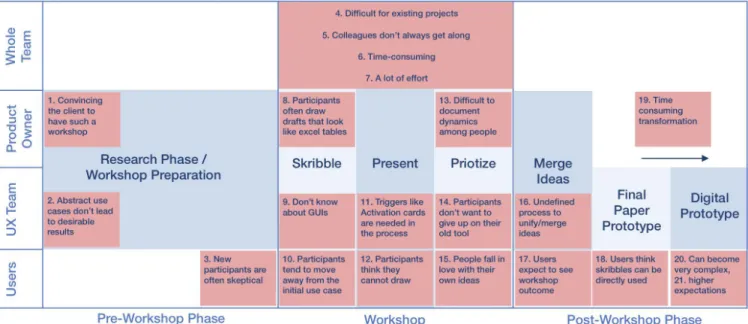
3.2.2 Conclusion.Figure 2 presents an overview of our�ndings:
This was created by structuring challenges identi�ed from com-ments in the interviews and workshop observations and locating them in the procedure of the participatory design workshops.
A major�nding is that crucial bene�ts of the design workshops can be related to interpersonal communication. Reviewing the prob-lems in Figure 2, many are anchored in the workshop phase and tied to human factors. For example, many details and desires can be derived from statements and actions during the workshops – and these are not always evident from sketches (challenge 13). The facilitators thus try to catch “live” if a requirement was talked about and if it was important enough for a person to make it into their drawings. This presents a challenge for integrating ML: If such human activities and communication were to be replaced by a ma-chine, it is questionable if the workshops could still serve their role in the design process as valued by the experts.
However, several problems are connected to a lack of time, such as high e�ort (challenge 7), time-consuming transformation (chal-lenge 19), unde�ned merging process (challenge 16), and users’ expectations to see a clear workshop outcome soon (challenge 17). While ML might not suitably substitute any of the “social factors”
Figure 2: Overview of the studied participatory design workshop procedure as conducted at our industry partner, with a sum-mary of main results of our in-situ observations and expert interviews: In particular, the identi�ed challenges are annotated in red (referenced by their numbers in the text).
mentioned above, it could reduce such time-related issues, in par-ticular byautomating post-workshop activities. We thus decided to focus on this aspect – using ML for post-workshop processing.
3.3 Step III: Concept & Prototype
With these insights, we summarised our focus and goals in two “How might we?” questions [5]: 1) How might we minimise the e�ort of translating a paper prototype into a digital version? 2) How might we quickly provide participants of prototyping workshops with a presentation of their results? We conducted a brainstorming session to address these questions and arrive at a concrete concept –Paper2Wire. As an overview, consider the following user�ow:
(1) Take photo of prototype:Designers take a snapshot of the paper prototype(s) with their phones after the workshop. (2) Receive digital prototype:ThePaper2Wiretool automatically
transforms the photo into a wireframe. It detects GUI element types and layout/positioning (e.g.Buttonatx,y) to create a wireframe with the corresponding digital GUI components. (3) Modify digital prototype:The designers can further work with the wireframe as usual (e.g. making adjustments, working towards an interactive prototype).
(4) Further design steps:The designers use the digital prototype(s) in further design steps (e.g. sharing with team and/or stake-holders, user testing, etc.).
From this, we derived basic requirements for a functional proto-type, which we realised as a plugin for theSketchsoftware. Note that our focus was on testing the concept,noton innovating under-lying ML techniques. Thus, we chose an established ML platform,
Microsoft Custom Vision9, as a trade-o�between e�ciently
proto-typing an ML-based application and accurate predictions. We used this platform to train and run a model for detecting GUI elements in photos of paper sketches.
Microsoft Custom Vision already provides a high-quality base model trained on extensive general image data. For additional train-ing for our speci�c case, we created a set of photos of GUI sketches, plus manual labels. Figure 3 shows the training interface. We trained the model on sketches similar to the ones used in the study (see User Study section) to ensure high performance in the study without the need for more extensive data collection. This was motivated by our focus on the designer’s perspective, not on evaluating Microsoft Custom Vision. Nevertheless, it is a limitation of the current pro-totype that it would not readily generalise for real practical use. In terms of the architecture, our prototype is�exible and could be extended for a real deployment in the future. This would require training/testing on more (and more diverse) examples, which suit-able represent a much richer variety of potential input sketches, as expected in practice.
OurSketchplugin calls this model to detect GUI element types and their locations and then generates the digital wireframe by
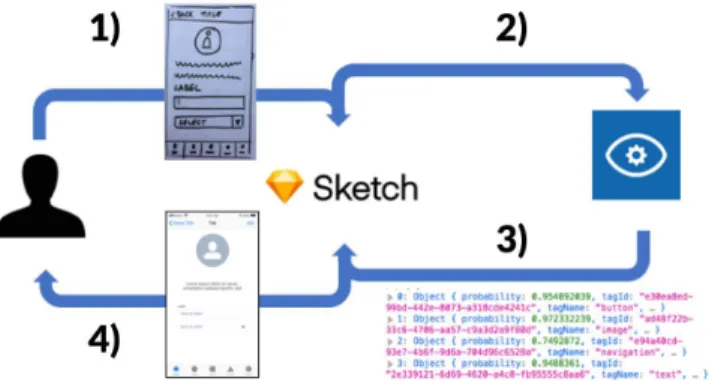
�nding the corresponding GUI components provided inSketch (e.g. placing aSketchbutton widget at the location of a drawn button detected in the paper sketch). Interactivity is not added automatically (cf. click dummies), since this is not clearly de�ned in the hand-drawn sketches. Figure 4 visualises the overall process.
Figure 3: Training UI in Microsoft Custom Vision, with ex-amples (left), and a closeup (right) with labelled GUI ele-ment types (colours), and locations (bounding boxes). The trained model learns to distinguish these types and detect these locations.
Figure 4: Overview of ourPaper2Wireplugin for theSketch wireframing software: 1) The designer opens an image of a paper prototype inSketch, 2) which is then sent to an ob-ject detection API (Microsoft Custom Visison). 3) The API reports detected objects to our plugin, 4) which composes the resulting GUI inSketch. The designer can then further work on this wireframe.
3.4 Step IV: Iteration
We evaluated the functional prototype with�ve designers (2 female, age 25-44). They were given�ve prepared hand-drawn sketches, in-troduced as results from a participatory design workshop. First, they were asked to translate one of the hand-drawn sketches manually, using the tools inSketch. They were encouraged to “think aloud” while doing so. In particular,Sketchallows users to choose GUI components (e.g. a button) from a drop-down menu and place them directly onto the canvas. Second, participants translated another sketch using ourPaper2Wireplugin: They imported a photo and ran the plugin, followed by manual modi�cation of the wireframe, if desired. Figure 5 shows example results.
We asked open questions (e.g.What did you like/dislike about the manual process? Would you implement it into your design rou-tine? How?). Based on the feedback and insights we made several changes, adding: a side-by-side view of photo and wireframe, a
Figure 5: Example result from the prestudy, comparing an in-put sketch (left) with the manually created wireframe (cen-tre) and the automatically created wireframe (right). progress indicator while processing the photo, and simple grid-based automatic alignment correction of GUI elements, which are obviously not perfectly aligned in hand-drawn sketches yet should be in the wireframes according to the designers’ expectations.
4 USER STUDY
Following the prestudy, we evaluated user perception and perfor-mance with the improvedPaper2Wireprototype in a user study.
4.1 Study Design
The study overall followed the design of the prestudy. We used a within subject design with the independent variablemethod (man-ual vsPaper2Wire). Since our focus was on the pracitioners’ user experience we favoured qualitative/subjective measures to gain rich insights into the potential integration of the concept in a practical setting.
4.2 Apparatus
Participants used theSketchsoftware on a provided laptop with mouse, while sitting at a desk. In themanualcondition, they had access to the fullSketchtools, but not to ourPaper2Wireplugin. In thetoolcondition, they had also access to our�nal prototype as a plugin inSketch.
We used the User Experience Questionnaire (UEQ) to assess sub-jecive ratings for both manual process and our tool [15]. The UEQ covers aspects such as speed, transparency, ease of use, creativity, usage in practice, and quality of results.
4.3 Participants and Procedure
We recruited 20 people with backgrounds in design, development, and business from our industry partner and working students (nine female, age 19-54). We invited them to our lab and explained the study procedure. Participants were given�ve GUI sketches on paper (e.g. see Figure 5 left) and were�rst asked to translate these into digital wireframes in Sketch. They then repeated the task using our Paper2Wireplugin. Participants were encouraged to “think aloud”. This order was motivated by building on the long known process from our industry partner, which participants were used to. We
Figure 6: Comparison of UEQ scores (scale level) for the man-ual process and ourPaper2Wireprototype plugin.
recorded their comments during and after the task as well as their ratings on the UEQ. Finally, we asked them for further comments and feedback.
5 RESULTS
We structure the following report of the results by themes that emerged from the comments, combined with the UEQ categories. For all measures and statistical analyses we used the analysis tools provided directly by the UEQ authors10. As a�rst overview, Figure 6 summarises the quantitative UEQ results. In addition, the UEQ results also distinguish pragmatic quality (PQ, task related qualities) and hedonic quality (HQ, non-task related qualities), which both were in favour ofPaper2Wire: PQ manual 1.14, tool 2.05; HQ manual -0.26, tool 1.78.
We found statistically signi�cant di�erences in favour of Pa-per2Wirefor all categories/scales (? < 0.05), except for depend-ability. Overall, following the benchmark comparison provided by the authors of the UEQ test, ourPaper2Wireprototype reached “excellent” in all scales, except fordependability(“above average”).
5.1 Speed / E
�
ciency
Our tool received highest ratings onspeedwith a mean of 2.9 on the UEQ scale from -3 to 3. In comparison, the manual process was rated at 0.3. In related comments, some participants found our tool “e�cient”, others perceived the speed to be advantageous “to present something easily and without e�ort to clients” (P10). Further, they found that the tool saves e�ort and allows to get early feedback (P10, P13). However, one professionalSketchuser claimed that “I am already very quick at positioning it manually, so it would not really be that bene�cial for me” (P9).
5.2 Perspicuity and Ease of Use
Our tool also scored very highly on the itemeasy to learn, with a mean rating of 2.8, compared to 1.8 for the manual process. The overarching scale,perspicuity, reached a high mean value of 2.4 for our tool (vs 1.4 for the manual process). As revealed by our study observations, especially people without a dedicated background in UI design had di�culties with�nding the right elements (e.g. mixing up two variations of input�elds). Also, depending on the complexity of the GUI, the process becomes rather repetitive, until all GUI elements have been added. This was also criticised by the 10See https://www.ueq-online.org/,last accessed 12.03.2020
participants. For instance, two stated that it is annoying to select the elements “one by one” (P1, P8). Another participant described it as “double work” (P14). These two issues –�nding the right ele-ments and the repetitive process – were eliminated byPaper2Wire, explaining the signi�cantly better ratings.
5.3 Novelty and Creativity
For thenoveltyscale,Paper2Wirereceived a mean rating of 1.8, compared to -0.6 for the manual process. Looking at items in this scale, participants found the tool to be veryinnovative(mean 2.7). For the item oncreativity,Paper2Wireachieved a mean of 0.3. Ac-cording to the UEQ questionnaire guidelines, values between -0.8 and 0.8 should be treated as neutral. Some participants commented on the reason for their neutral assessment, such as: “The process is not really creative because it’s automated.” (P5).
However, participants still consideredPaper2Wireas more cre-ative than the manual process, which achieved a mean of -0.7 on this item. Comments help to explain this: For instance, one person stated: “Designers are creative people and don’t like doing such manual tasks. The tool would allow me to spend more time on cre-ative tasks” (P2). Similarly, another said: “I can spend more time on thinking about the arrangement of the elements” (P13). In contrast, one participant stated that “the manual process helps me to think about a design. I think it’s quite relaxing” (P10).
5.4 Dependability and Transparency of the
Algorithm
On the one hand, some participants without IT background de-scribed our tool’s e�ect as “magic” (P6) or said that they did not exactly know what to expect (P3). On the other hand, in particular those participants with a strong IT background seemed to be in-terested in what is happening “in the black box”. One person with knowledge in both UX design and IT wished for more indication on which elements had been detected and which not (P13). The feeling of not being able to understand what is happening in the background is also re�ected in the UEQ test: Thedependabilityscale reached the lowest result for the tool with an overall 1.42 (1.46 for the manual process). Looking at speci�c items in this scale, partic-ipants found the new process to be not verysecureorpredictable (both 0.8). However, they rated it as verysupportive(2.6).
5.5 Attractiveness and Stimulation
In the UEQ test, our prototype reached a mean of 1.67 in the stimu-lationscale, compared to 0.08 for the manual process. Concerning the itemboring(mean rating of 1.3 for the prototype) in this scale, one UX designer said: “Well, it’s boring because you cannot in� u-ence the outcome” (P12) – referring to the initial outcome since the wireframe could be further adapted manually. For the scale of attractiveness, our prototype reached a mean score of 2.2, compared to 0.54 for the manual process. However, note that this scale usually points towards the design of a product, which in our case was heav-ily in�uenced by direct integration into the graphical user interface ofSketch. Nevertheless, both manual and prototype conditions hap-pened withinSketch, so the score di�erence clearly indicates higher attractiveness for our tool.
5.6 Further Feedback and Ideas
The study revealed further feedback and ideas on integrating and extendingPaper2Wire. For instance, one designer pointed out that Paper2Wirewould help them to build better products, because it required the team to use the same GUI patterns and GUI elements: “It’s great to keep consistency. Within a team, it is very important to speak the same language. This could be enhanced through such a tool by avoiding that everyone would just build their own [GUI] components” (P10). Some participants also commented on how they would integratePaper2Wireinto their work�ow: For example, one person envisioned it to be especially helpful in combination with an existing library of GUI elements and patterns (e.g. Google’s Material Design) to which the tool maps the sketches. This promises consistency in GUI element selection when working on extending existing products (P10).
Another participant (P18) suggested to extend our tool to detect if a GUI pattern has been used for the wrong purpose: For example, if in a paper sketch several radio buttons are selected, the tool could replace them with check boxes.
The participants did not explicitly comment on the positioning and alignment of the GUI elements, suggesting that the changes after the prestudy improved the prototype. However, one designer suggested to implement an adaptable grid: “I would need a grid, ideally according to the styleguide for the platform I am designing for” (P9).
One visual designer and an IT expert found that results looked too high�delity for a prototype (P9, P11). They would have pre-ferred a less “�nished” look. The IT expert said it is hard to explain to the client that this is not the�nal design but a step inbetween – therefore such a design could raise wrong expectations. This is easily addressed by switching to a more sketch-like look for the digital wireframe components.
6 DISCUSSION
As advocated through our research approach in this case study, we argue that ML tools should not just be “thrown at creative peo-ple” because it is technically possible to build them. In this regard, we expect several lessons learned to be useful more generally for integrating ML tools into creative (design) work:
6.1 Using ML as “Glue” Between Process Steps
Via immersion into the processes at our industry partner weidenti-�ed early on that what designers valued about our target activity (participatory design workshops) was interpersonal communica-tion and relacommunica-tionship-building and thus not suitable for automacommunica-tion. We learned that we could rather leverage ML to make it easier to integrate these workshops into the wider work process. This indi-cates that ML can support creative practices not (only) by targeting a main activity, but by alleviating follow-up repetitive work.
6.2 Respecting Designers’ Knowledge and
Tools
Many comments point towards keeping designers in control and not skipping steps in their process: For instance, they liked that they could manually modify the automatically generated wireframe in their known software. Due to the spontaneous nature of paper
drawings, necessary adaptations sometimes only become visible once transferred to a digital format. This would not have been possible, for example, with ML-based tools that directly output UI code instead of generating a draft on a canvas in a wireframing tool. In turn, the introduction of new tools might also change how designers think about and move through their process. For instance, more easily switching from paper to digital prototypes might tempt designers to make this transition earlier. This should be investigated in the future.
6.3 Supporting “Thinking by Doing”
We found potentially unexpected bene�ts of manually doing repet-itive work: For example, one person found that manual transfer to wireframes helped them to think about the design. Thus, as another aspect of control, ML tools that support design steps should not replace them without a choice: Designers should still be able to do (parts of) the work manually if they desire to do so, since it might play a role for their creative process that goes beyond simply getting the output.
6.4 Meeting Process Assumptions vs ML
Accuracy
Through developing and testing our functional prototype we learned that, in a way, ML can be “too accurate” in some cases: For example, placing GUI elements at the precise locations detected in the hand-drawn sketch was not what the designers expected and needed, since it meant that GUI elements were not pixel-perfectly aligned in the resulting wireframe. Instead of accurately translating the sketch, the ML tool thus needs to be informed with designers’ assumptions and expectations – in this case, our revised prototype interpreted the sketched locations more abstractly (e.g. along an assumed grid).
6.5 Fostering Design Consistency with ML
We found potential for ML to help designers adhere to standards: UI design increasingly relies on prede�ned pattern libraries with many di�erent elements. Using automated detection of GUI ele-ments in sketches, designers no longer need to search and distin-guish between certain GUI elements manually. Several participants positively commented on this aspect when engaging with our tool. However, consistency might also be negatively in�uenced by error cases introduced by an ML tool (e.g. incorrectly detected element types). Future studies could investigate this further, ideally also with regard to the tool’s impact on subsequent steps in the design process.6.6 Re
�
ections on Methodology
Observation and interviews revealed the workshops’ value for de-signers for client understanding and relationships. We thus rec-ommend to study practices with a focus on interpersonal factors that cannot or should not be automated. Moreover, our�rst study showed that GUI element detection was too accurate for designers’ expectations (hand-drawn elements should not be placed exactly as detected but need to be aligned). This is an example of an insight only obtainable from studying ML output in practice – not typical performance metrics (e.g. detection accuracy). Related, prototyping with an actual model (here: Microsoft Custom Vision) is useful, as
feedback such as this seems unlikely to surface in a “Wizard-of-Oz” study. Finally, our user studies revealed challenges of prototyping and testing ML tools in a design context: Few people questioned the ML system, for example, with regard to the limits of detection. This might be explained by factors such as novelty, the “black box” nature of ML, and the study situation. For future studies we thus recommend to consider including tasks that explicitly motivate designers to try and “break” an ML tool.
7 CONCLUSION
We reported on an in-depth development process for an ML-based tool concept for UI/UX designers. The current implementation is limited to a prototype level, yet integrated into a known tool (Sketch), which enabled us to investigate the perspectice of practi-tioners within the context of a concrete design process employed by an industry partner.
In the broader context of integrating ML into design work, our case study highlight aspects such as respecting designers’ knowl-edge and tools, creative “thinking by doing” in the age of automa-tion, and meeting designers’ expectations in practice instead of purely optimising for raw ML measures.
Our case study serves as evidence that design activities in in-dustry practice are crucially valued (also) for their role in human communication and relationship-building, and thus may sometimes present a di�cult target for automation. However, as a key� nd-ing, ML may still support these design practices by making them more attractive and viable through reduction of repetitive manual follow-up work. ML then serves as a “glue” between manual design steps.
We see this work as a case-based demonstration to support the vision that ML tools are not developed opportunistically but in cooperation with practitioners, respecting their processes. This can be seen as a concrete instance of the wider perspective of not replacing humans with automation but enabling them to dedicate more time for valued work.
ACKNOWLEDGMENTS
We thank MaibornWol�for the support, for participating in inter-views on the prototyping practice and for testing.
This project is funded by the Bavarian State Ministry of Science and the Arts in the framework of the Centre Digitisation.Bavaria (ZD.B).
REFERENCES
[1] 2018. Transform sketches into HTML using AI. Microsoft AI. https:
//sketch2code.azurewebsites.net
[2] Michel Beaudouin-Lafon and Wendy Mackay. 2003. Prototyping tools and tech-niques.Human Computer Interaction-Development Process(2003), 122–142. [3] Tony Beltramelli. 2018. Pix2code: Generating Code from a Graphical User
Interface Screenshot. InProceedings of the ACM SIGCHI Symposium on
Engi-neering Interactive Computing Systems(Paris, France)(EICS ’18). Association for Computing Machinery, New York, NY, USA, Article 3, 6 pages. https: //doi.org/10.1145/3220134.3220135
[4] Susanne Bødker and Kaj Grønbæk. 1991. Cooperative prototyping: users and designers in mutual activity.International Journal of Man-Machine Studies34, 3 (mar 1991), 453–478. https://doi.org/10.1016/0020-7373(91)90030-B [5] Maureen Carroll, Shelley Goldman, Leticia Britos, Jaime Koh, Adam Royalty,
and Michael Hornstein. 2010. Destination, Imagination and the Fires Within: Design Thinking in a Middle School Classroom. International Journal of Art & Design Education29, 1 (mar 2010), 37–53. https://doi.org/10.1111/j. 1476-8070.2010.01632.x
[6] Chunyang Chen, Ting Su, Guozhu Meng, Zhenchang Xing, and Yang Liu. 2018. From UI Design Image to GUI Skeleton: A Neural Machine Translator to Bootstrap Mobile GUI Implementation. InProceedings of the 40th International Conference on Software Engineering(Gothenburg, Sweden)(ICSE ’18). ACM, New York, NY, USA, 665–676. https://doi.org/10.1145/3180155.3180240
[7] Juliet Corbin and Anselm Strauss. 2014.Basics of Qualitative Research: Techniques and Procedures for Developing Grounded Theory. SAGE Publications. [8] Sebastian Deterding, Jonathan Hook, Rebecca Fiebrink, Marco Gillies, Jeremy
Gow, Memo Akten, Gillian Smith, Antonios Liapis, and Kate Compton. 2017. Mixed-Initiative Creative Interfaces. InProceedings of the 2017 CHI Conference Extended Abstracts on Human Factors in Computing Systems(Denver, Colorado, USA)(CHI EA ’17). ACM, New York, NY, USA, 628–635. https://doi.org/10.1145/ 3027063.3027072
[9] Graham Dove, Kim Halskov, Jodi Forlizzi, and John Zimmerman. 2017. UX Design Innovation: Challenges for Working with Machine Learning as a Design Material. InProceedings of the 2017 CHI Conference on Human Factors in Computing Systems - CHI ’17. ACM Press, New York, New York, USA, 278–288. https: //doi.org/10.1145/3025453.3025739
[10] Patrick Hebron. 2017. Rethinking Design Tools in the Age of Machine Learning. Medium. https://medium. com/artists-and-machine-intelligence/rethinking-design-tools-in-the-age-of-machine-learning-369f3f07ab6c
[11] Eric Horvitz. 1999. Principles of Mixed-initiative User Interfaces. InProceedings of the SIGCHI Conference on Human Factors in Computing Systems(Pittsburgh,
Pennsylvania, USA)(CHI ’99). ACM, New York, NY, USA, 159–166. https://
doi.org/10.1145/302979.303030
[12] Levent Burak Kara and Thomas F. Stahovich. 2005. An image-based, trainable symbol recognizer for hand-drawn sketches.Computers & Graphics29, 4 (2005), 501–517.
[13] Janin Koch. 2017. Design implications for Designing with a Collaborative AI.
The AAAI 2017 Spring Symposium on Designing the User Experience of Machine Learning Systems Technical Report SS-17-04 Design(2017), 415–418.
[14] James A Landay and Brad A Myers. 2001. Sketching interfaces: Toward more human interface design.Computer34, 3 (2001), 56–64.
[15] Bettina Laugwitz, Theo Held, and Martin Schrepp. 2008. Construction and Evalu-ation of a User Experience Questionnaire. InHCI and Usability for Education and Work, Andreas Holzinger (Ed.). Springer Berlin Heidelberg, Berlin, Heidelberg, 63–76.
[16] Mark W Newman and James A Landay. 2000. Sitemaps, storyboards, and speci� -cations: a sketch of Web site design practice. InProceedings of the 3rd conference on Designing interactive systems: processes, practices, methods, and techniques. ACM, 263–274.
[17] Jakob Nielsen and Heather Desurvire. 1993. Comparative Design Review: An Exercise in Parallel Design. InProceedings of the INTERACT ’93 and CHI ’93 Confer-ence on Human Factors in Computing Systems(Amsterdam, The Netherlands)(CHI ’93). ACM, New York, NY, USA, 414–417. https://doi.org/10.1145/169059.169327 [18] Antti Oulasvirta. 2017. User Interface Design with Combinatorial Optimization.
Computer50, 1 (2017), 40–47. https://doi.org/10.1109/MC.2017.6
[19] Antti Oulasvirta, Samuli De Pascale, Janin Koch, Thomas Langerak, Jussi Joki-nen, Kashyap Todi, Markku Laine, Manoj Kristhombuge, Yuxi Zhu, Aliaksei Miniukovich, Gregorio Palmas, and Tino Weinkauf. 2018. Aalto Interface Metrics (AIM): A Service and Codebase for Computational GUI Evaluation. InThe 31st Annual ACM Symposium on User Interface Software and Technology Adjunct Pro-ceedings(Berlin, Germany)(UIST ’18 Adjunct). ACM, New York, NY, USA, 16–19. https://doi.org/10.1145/3266037.3266087
[20] Juergen Sauer and Andreas Sonderegger. 2009. The in�uence of prototype
�delity and aesthetics of design in usability tests: E�ects on user behaviour, subjective evaluation and emotion.Applied Ergonomics40, 4 (2009), 670 – 677. https://doi.org/10.1016/j.apergo.2008.06.006
[21] A. Schmidt. 2017. Technologies to Amplify the Mind.Computer50, 10 (2017), 102–106. https://doi.org/10.1109/MC.2017.3641644
[22] Ben Shneiderman. 1999. User Interfaces for Creativity Support Tools. In Pro-ceedings of the 3rd Conference on Creativity & Cognition(Loughborough, United Kingdom)(C&C ’99). ACM, New York, NY, USA, 15–22. https://doi.org/10.1145/ 317561.317565
[23] Herbert A. Simon. 1996.The Sciences of the Arti�cial. MIT press.
[24] Amanda Swearngin, Mira Dontcheva, Wilmot Li, Joel Brandt, Morgan Dixon, and Andrew J. Ko. 2018. Rewire: Interface Design Assistance from Examples. In
Proceedings of the 2018 CHI Conference on Human Factors in Computing Systems
(Montreal QC, Canada)(CHI ’18). ACM, New York, NY, USA, Article 504, 12 pages. https://doi.org/10.1145/3173574.3174078
[25] Kashyap Todi, Daryl Weir, and Antti Oulasvirta. 2016. Sketchplore: Sketch and Explore with a Layout Optimiser. InProceedings of the 2016 ACM Conference on Designing Interactive Systems(Brisbane, QLD, Australia)(DIS ’16). ACM, New York, NY, USA, 543–555. https://doi.org/10.1145/2901790.2901817
[26] Miriam Walker, Leila Takayama, and James A Landay. 2002. High-�delity or
low-�delity, paper or computer? Choosing attributes when testing web prototypes. In
Proceedings of the human factors and ergonomics society annual meeting, Vol. 46. SAGE Publications Sage CA: Los Angeles, CA, 661–665.
[27] Benjamin Wilkins. 2018. Sketching Interfaces. Airbnb.Design. https:// airbnb.design/sketching-interfaces
[28] Qian Yang. 2017. The Role of Design in Creating Machine-Learning-Enhanced User Experience.The AAAI 2017 Spring Symposium on Designing the User Ex-perience of Machine Learning Systems Technical Report SS-17-04(2017), 406–411.
http://aaai.org/ocs/index.php/SSS/SSS17/paper/view/15363/14575
[29] Qian Yang, Nikola Banovic, and John Zimmerman. 2018. Mapping Machine Learning Advances from HCI Research to Reveal Starting Places for Design Inno-vation. InProceedings of the 2018 CHI Conference on Human Factors in Computing Systems. ACM, 130.