M
M
S
S
G
G
P
P
a
a
c
c
k
k
a
a
g
g
e
e
:
:
A
A
N
N
o
o
v
v
e
e
l
l
S
S
t
t
a
a
t
t
i
i
s
s
t
t
i
i
c
c
a
a
l
l
S
S
o
o
f
f
t
t
w
w
a
a
r
r
e
e
f
f
o
o
r
r
G
G
e
e
n
n
e
e
r
r
a
a
t
t
i
i
n
n
g
g
R
R
a
a
n
n
d
d
o
o
m
m
S
S
a
a
m
m
p
p
l
l
e
e
s
s
o
o
f
f
D
D
i
i
f
f
f
f
e
e
r
r
e
e
n
n
t
t
F
F
o
o
r
r
m
m
s
s
W
W
a
a
h
h
e
e
e
e
d
d
B
B
a
a
b
b
a
a
t
t
u
u
n
n
d
d
e
e
Y
Y
a
a
h
h
y
y
a
a
,
,
M
M
a
a
h
h
m
m
u
u
d
d
M
M
u
u
h
h
a
a
m
m
m
m
e
e
d
d
Department of Statistics, Faculty of Physical Sciences, University of Ilorin, P.M.B. 1515, Ilorin, Nigeria
ABSTRACT:In this paper, we present a novel statistical software-Multipurpose Sample Generator (MSG 1.0.0) for generating random samples of different forms for statistical research and other related purposes. The new MSG 1.0.0 software easily generates numeric and alpha-numeric random numbers of different forms as may be required by the users. Also, random samples of different forms from the sampling schemes of the simple and stratified random sampling are easily generated by the MSG package. The MSG 1.0.0 is currently packed as a single setup which can be installed directly into any windows operating system. It was developed using the Visual Studio 2010 .NET framework. The MSG is computationally efficient and does not assume basic knowledge of statistics and statistical computing by its users. To be more user friendly, the graphic users’ interface (GUI) was employed in its development. The MSG software is freely available and can be downloaded and installed without restrictions at http://unilorin.edu.ng/msg/yahya_muhammed/msgpage.php
KEYWORDS: Random numbers, Simple Random
Sample, Stratified Random Sample, Random Sample Generator, MSG software.
1. INTRODUCTION
In statistical sample surveys and research, the quality of the inferences drawn depends largely on the degree of representativeness of the population by the sample and the quality of sample employed for analysis. Whenever the sample drawn from a population is not representative of such population, any reference and generalization made about the population based on the results generated from the sample might be bias and grossly unreliable.
To ensure that the sample drawn is fully representative of the population of interest, a number of sampling schemes have been proposed in the literature depending on the nature, structure and natural occurrence of the elements in such population ([MM06]). The most prominent among these are the simple random sampling, stratified random sampling, systematic sampling, and Cluster sampling schemes among others ([Smi76, Y+08]). When the size of a population is very small, it would be easier to practically draw the required sample manually for intended study using appropriate sampling scheme depending on the structure of the population. However, when the
population size is large, as often the case in many real life situations, it could be practically difficult to select the required samples manually.
Due to high volume of data being encountered in many research studies, the use of statistical packages has been particularly helpful to make the selection of appropriate samples from a given population of any size a lot easier. However, some of these existing statistical packages like SPSS (SPSS Corp. Texas, USA), STATA (STATA Corp. Texas, USA), SAS and the like only have interface for generating numeric (simple) random samples. In other words, the procedures for generating character string or alpha-numeric random samples, especially using some of the basic sampling schemes are not available in most of these existing packages.
Not only this, the selection of samples using any of the existing statistical packages requires that the users possess some basic knowledge of statistics and/or statistical computing. However in reality, most users of statistical tools are majorly non-statistical experts ([YA12]), it is therefore imperative to develop a statistical package that would be user friendly to cater for these group of people. All these and many more motivated the development of the novel Multipurpose Sample
Generator (MSG 1.0.0) software presented in this
paper for generating random samples of different kinds.
The MSG software is currently designed to draw simple and stratified random samples as well as random numbers of different forms from any given population. The samples to be generated, and by extension the population of interest could have numeric, alphanumeric or pure character string representations. The MSG software is very user friendly and can be run by users with limited or no background in statistics or statistical computing. The MSG software is not a commercial statistical package. It can be downloaded and installed freely
by any interested users at
2. THE DEVELOPMENT OF THE MSG SOFTWARE
The new MSG software version 1.0.0 was developed for windows platform machines using the .NET framework and the Microsoft Visual Studio 2010 environment. The software has been deployed and packed with .NET windows installer that makes it very easy to install and run independent of the Microsoft Visual Studio environment. A 4.7MB setup file of the MSG software can be downloaded and installed freely at http://unilorin.edu.ng/msg/yahya_muhammed/msgp age.php. Detail on system requirements for the proper installation of the software are provided in the next sub-section.
2.1. System Requirements and Installation
The MSG software can be installed on any 32 or 64 bits Windows XP, Windows Vista, Windows 7 and 8 operating systems. A minimum of 512 MB of RAM and at least 1GB hard disc space is required for optimal performance.
To install MSG 1.0.0, simply double-click on the MSG setup file, a windows installer would pop-up, click “next” to proceed, select users (“Just Me” or
“Everyone”) and choose installation folder, click “next” to complete the installation. After the
installation, the shortcut to MSG icon will be deposited on the desktop and in the user’s program menu. Click on this icon to launch the MSG software.
The installation of MSG package is automatically accompanied by a self-instructive manual in portable document format (pdf). The manual contained detail instructions on how to use the MSG 1.0.0 software. Information on how to export the results to other programs for further uses is provided in the manual. The manual can be viewed and/or downloaded through a click on the “User Manual” on the menu bar. However, installation of
foxit reader may be necessary for better viewing of the manual. The foxit reader setup can be
downloaded freely at:
http://www.foxitsoftware.com/Secure_PDF_Reader/. The authors can be contacted for further information on the usage of the software.
3. APPLICATION OF THE MSG SOFTWARE
In this section, we present details of how the MSG 1.0.0 software can be used to generate random numbers and random samples of different forms. After the MSG 1.0.0 software has been successfully installed, a click on the MSG icon in the program panel or on the MSG shortcut on the desktop would
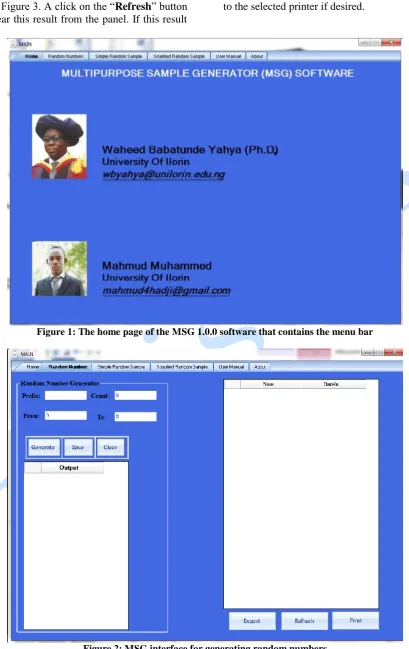
automatically prompt the home page as shown in Figure 1. The home page contains the title bar, the menu bars and a brief description of the software developers/authors.
The menu bars provide the links to “Random Number”, “Simple Random Sampling” and
“Stratified Random Sampling” generation
procedures which are the major tasks performed by the MSG package. Here, the user can click on the type of task he wants to perform. Also, the menu bar has a link to view the user’s manual and another one that provides detail address of the developers.
3.1. Random Numbers
Random numbers are numbers that evolve randomly by chance factor whose values can fall within a specified range of interest and their formation lacks any specific pattern.
3.1.1. Random Numbers Generator
To generate a set of random numbers using MSG software, the user is required to click “Random Number” on the menu bar that would bring out the
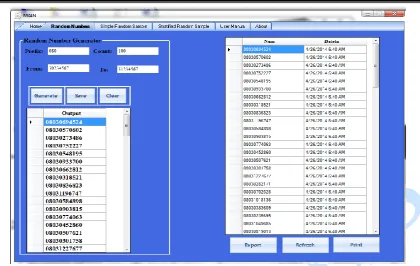
interface for random number generation as shown in Figure 2. On this interface, the user has to specify the range within which the random numbers should be generated using the “From” and “To”
boxes.
The user may specify a combination of numbers between 0 and 9 or a combination of characters from A to Z (either lower or upper case or both) in the “Prefix” box that would precede and uniquely
identify all the numbers to be generated. The number of samples (n) to be generated should be specified in the “Count” box after which the user
would click on the “Generate” button to view the
random numbers generated as shown in Figure 3. Here, the digits “080” was supplied into the “Prefix” box to generate 100 numbers from
“30234567” to “31234567” with the three digits “080” preceding each number generated.
In some practical situations, it may be required that the random numbers to be generated should carry a character prefix, say “UIL”. In such a situation, the “UIL” should be entered into the “Prefix” box to
generate the final out of the type given in Figure 4 using the earlier specifications for other boxes. A dialogue box carrying the message “Generated Successfully” would appear immediately after the
MSG has completed the process of generating the required random numbers and it would disappear by clicking the “OK” button on this box. The random
numbers generated (results) would be displayed on the “Output” box (bottom left panel of Figure 3). A
click on the “Save” button would automatically
re-displayed on the right panel of the MSG page as shown in Figure 3. A click on the “Refresh” button
would clear this result from the panel. If this result
is saved, a click on the “Print” button would send it
to the selected printer if desired.
Figure 1: The home page of the MSG 1.0.0 software that contains the menu bar
Figure 3: MSG interface showing output of part of 100 hypothetical random numbers generated. Each of the random numbers generated was preceded by three digits “080” as required by the user
Figure 4: MSG interface showing output of part of 100 random numbers generated with character string prefix “UIL”
To get the generated result out of the MSG environment, a click on the “Export” button would
export the result into “My Document” directory of
the computer system as a Microsoft Excel file with Comma Separated Values (.csv) extension for users of MS office 2013 and above. For users of lower versions of MS office, the default printer of the computer system has to be changed to either
“OneNote” or “Microsoft XPS” or “Xml” as the
default printer. A click on the printer icon on the “Print Preview” dialogue box would send the
results to “OneNote” or “Microsoft XPS” or “Xml”
as selected after which the results would be displayed for further usage.
The default printer of a computer system can be changed by checking on the “view devices and
printers” in the control panel. Right click on the
preferred printer to set it as default for usage by checking on the “Set as default printer” option.
4. SIMPLE RANDOM SAMPLING
in which a subset of individuals or units (a sample) is randomly selected from a larger set (population) such that all members in the sample set has equal chance (probability) of being chosen into that set ([Coc97; Dal89]). As defined by Moore and
McCabe ([MM06]) and Moore ([Moo07]), a simple random sample of size n consists of n individuals from the population chosen in such a way that every set of n individuals has an equal chance to be in the sample actually selected.
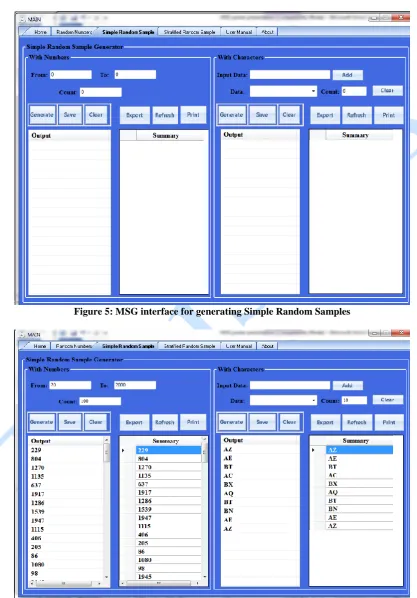
Figure 5: MSG interface for generating Simple Random Samples
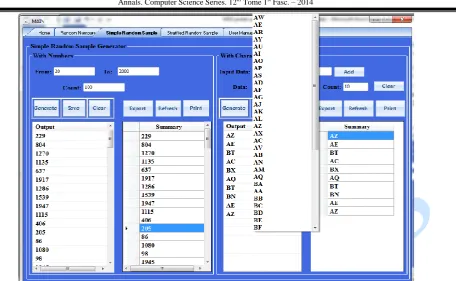
Figure 7: MSG interface for generating 10 Simple Random Samples of character strings from a total of 50 of such character strings (right panel). It should be noted that this interface can be used to generate SRS from populations
that contain only numeric sampling units of any form of sequence
4.1. Simple Random Sample Generator
To generate simple random sample, the user is required to click on the “Simple Random Sampling” option on the menu bar. This would
prompt the MSG SRS interface as shown in Figure 5. Two forms of simple random samples can be generated using MSG software. One form is to generate only numeric SRS. Here, all members in the population from which the sample is to be selected have numerical representations. Here, all the elements in the population are assigned a sequence of numbers 1, 2, … , N that uniquely identify them with N being the total number of elements in the population. A simple random sample of size n, n N can then be drawn from such a sequence of numbers while the sampling units carrying the selected number labels constitute the required sample from such population.
The second form is to generate SRS from a population whose elements have alpha-numeric or pure character representations.
i. Numeric SRS Generator: From the left panel of the SRS interface in Figure 4 labeled “With Numbers”, users are to specify the range
within which the random samples should be selected using the “From” and “To” boxes. The
range could be the interval of the sequence of number-codes used to represent the original sampling units in the population. The number of samples (n) to be generated should be specified in the “Count” box after which the
user would click on the “Generate” button to
generate the required samples. Other steps on how to view and print the results generated are as provided in Section 3.1 for random numbers generation. The output display of the hypothetical 100 simple random samples generated from number codes between 20 to 2000 is shown in the left panel of Figure 6. ii. Character or Alpha-Numeric SRS Generator:
For a data set that contains characters or combinations of characters and numbers (alpha-numeric), the user is required to input the data into through the “Input Data” box on the SRS
interface “With Characters” of the MSG
software. A click on the “Add” button would
store the data inputted into to the “Data” panel
after which the next data entry can be made again through the “Input Data” box.
This process would continue until the last data point in the population is entered. All the data entry can be viewed by clicking on the scroll arrow on the “Data” panel. Specify the number
of samples to be selected in the “Count” box
and click on the “Generate” button to generate
the required samples. Other steps on how to view and print the results generated are as provided in Section 3.1 for random numbers generation.
done with replacement, the reason why some strings were repeated in the selected sample.
5. STRATIFIED RANDOM SAMPLING
In statistical surveys, when subpopulations within an overall population vary, it is advantageous to sample each population group (stratum) independently. Stratified random sampling therefore is a variation of random sampling in which the population is partitioned into h
homogenous sub-groups called strata and a (simple or systematic) random sample is then selected from each stratum ([FMR62]). The results from the strata are then aggregated and studied to make inferences about the population.
In computational statistics, stratified sampling technique is employed to enhance the efficiency of the statistics computed from the sample data and reduce the sampling error. A major advantage of stratified random sampling is that of being the most representative of a population ([SSW92; SSW03]).
5.1.Stratified Random Sample Generator
Like in the SRS, two forms of the stratified random samples can be generated using MSG software. These are numeric and alpha-numeric stratified random samples. To use the numeric stratified random samples interface of the MSG software, all
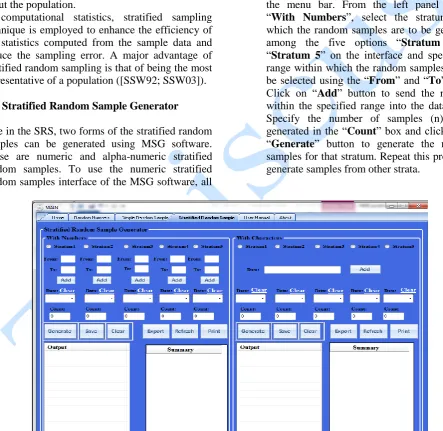
elements in the population in each stratum must have numerical representations in the form of sequence of number labels that uniquely identify them as described in Section 4.1 for SRS generator. The alpha-numeric stratified random samples generator interface generates stratified random samples from a population whose elements have alpha-numeric or pure character representations within each stratum. The MSG interface for generating stratified random samples is shown by Figure 8.
i. Numeric Stratified Random Sample Generator: To generate numeric stratified random sample, the user is required to click on the “Stratified Random Sampling” option on
the menu bar. From the left panel labeled “With Numbers”, select the stratum from
which the random samples are to be generated among the five options “Stratum 1” to
“Stratum 5” on the interface and specify the
range within which the random samples should be selected using the “From” and “To” boxes.
Click on “Add” button to send the numbers
within the specified range into the data panel. Specify the number of samples (n) to be generated in the “Count” box and click on the
“Generate” button to generate the required
samples for that stratum. Repeat this process to generate samples from other strata.
Figure 8: MSG interface for generating Stratified Random Samples
If more than five strata are desired, simply click on “clear” option beside the data panel of strata
1 to clear the initial data and repeat the above process beginning from this stratum to make-up to the number of strata desired. Other steps on
how to view and print the results generated are as provided in Section 3.1 for random numbers generation.
contains characters or combinations of characters and numbers (alpha-numeric), select the stratum from which the random samples are to be generated among the five options “Stratum 1” to “Stratum 5” on the “With Characters” interface and enter the data
through the “Data” panel. A click on the
“Add” button would store the data inputted into
to the “Data” panel after which the next data
entry can be made again through the “Data”
panel. This process would continue until the last data point in the population is entered. All the data entry can be viewed by clicking on the scroll arrow on the “Data” panel. Specify the
number of samples to be selected in the “Count” box and click on the “Generate”
button to generate the required samples for that stratum. Repeat this process to generate samples from other strata.
If more than five strata are desired, simply click on “clear” option beside the data panel of strata
1 to clear the initial data entered and repeat the above process beginning from this stratum to make-up to the number of strata desired. Other steps on how to view and print the results generated are as provided in Section 3.1 for random numbers generation.
6. CONCLUDING REMARKS
A novel statistical package, the MSG version 1.0.0, for generating random numbers and random samples of different form is presented in this work. This software is user-friendly that can be used by researchers with limited knowledge of statistics and/or statistical computing.
The MSG software integrates the procedures of simple random, and stratified random sampling schemes as well as the algorithm for generating random numbers into a single statistical package to ease accessibility and implementations by non-statistical experts and students alike in their research works.
One of the unique features of the MSG 1.0.0 package lies in its ability to generate random numbers with user desired numeric, character or alpha numeric prefix. This feature is lacking in most of the existing statistical packages. Therefore, the MSG package is going to be particularly useful in the fields of Engineering, Information and Telecommunications where the need always arises to work with some specialized numeric or alpha-numeric codes.
Another advantage of the MSG software over some of the existing statistical package is its ability to generate random samples from both the numeric and alpha-numeric values. ,
The MSG 1.0.0 has been evaluated and tested over different platforms and has been found to be computationally efficient and produce reliable results like other existing statistical packages. The software is accompanied with a detailed manual that provides step-by-step procedures on how to use the software and provides few discussions on the basics of random sampling. However, it is important to remark that the MSG manual is not to be substituted for standard statistical textbooks that provide details on the art of sampling and its techniques.
Unlike some of the existing statistical packages, the new MSG package is a free software which can be
downloaded at
http://unilorin.edu.ng/msg/yahya_muhammed/msgpage.php without any restrictions as earlier stated.
7. FUTURE DEVELOPMENT
The first version of the new MSG software (MSG 1.0.0) is presented in this paper. However, other additional features will be incorporated in the subsequent versions of the software to improve its current performance. Part of the development that would accompany the second version of the software (MSG 1.0.1) include the interface that would generate some other sampling schemes such as systematic, cluster and multi-stage random sampling schemes among others.
Also, work is underway to developed MSG application that could be installable on mobile phones mainly to satisfy students’ yearnings. Therefore, users of the current version of the MSG software (MSG 1.0.0) are enjoyed to forward their useful comments and observations that would improve the subsequent versions of the MSG package to the developers.
REFERENCES
[Coc97] Cochran W. G. - Sampling
Techniques. John Wiley and Sons,
London, 1997.
[Dal89] Dalenious T. - Elements of Survey
Sampling. Sarec, Stockholm, 1989.
[FMR62] Fan C. T., Muller M. E., Rezucha I. -
Development of sampling plans by using sequential (item by item)
selection techniques and digital
computer. Journal of the American
[Moo07] Moore D. S. - The Basic Practice of
Statistics, 4th Edition, Freeman. 2007.
[MM06] Moore D. S., McCabe G. P. -
Introduction to the Practice of
Statistics, 5th Edition, Freeman, 2006.
[Smi76] Smith T. M. F. - The foundations of
survey sampling a review. Journal of
the Royal Statistical Society. Series A, Vol.139, 183-195, 1976.
[SSW03] Särndal C. - E., Swensson B., Wretman J. - Stratified Sampling. In:
Model Assisted Survey Sampling.
Springer, New York. 100 –109, 2003. [SSW92] Särndal C. - E., Swensson B.,
Wretman J. - Model Assisted Survey
Sampling. Springer, New York, 1992.
[YA12] Yahya W. B., Adeniyi I. A. - Super QC-Pack: A novel Statistical Software
for analysing Quality Control Data.
Annals. Computer Science Series, 10(1):59-72.Tibiscus University of
Timisoara,
http://anale-informatica.tibiscus.ro/, 2012.
[Y+08] Yates D. S., Moore D. S., Starnes D.
S. - The Practice of Statistics, 3rd Ed.
Freeman, UK, 2008.
[***10] Microsoft Visual Studio 2010: Microsoft cooperation 2010.
[***11a] SPSS Inc., SPSS Base 18.0 for Windows User's Guide. SPSS Inc., Chicago, 2011. www.spss.com
[***11b] STATA corp., STATA 10.0, Texas
77845, USA, 2011.
http://www.stata.com
[***13] R Development Core Team. R: A language and environment for statistical computing. R foundation for Statistical computing, Vienna, Austria, (2013), ISBN 3-900051-07-0, URL