© 2015 IJSRSET | Volume 1 | Issue 6 | Print ISSN : 2395-1990 | Online ISSN : 2394-4099 Themed Section: Engineering and Technology
Computer Viruses – Analysis of Detection Techniques and their
Limitations
Harjit Singh
Punjabi University Neighbourhood Campus, Dehla Seehan (Sangrur), Punjab, India
ABSTRACT
Viruses are designed to run helter-skelter through our computer and caused actual, intentional damage to the computer itself. This can be in the form of corrupting files on our computer, damaging our personal documents, photos, music track, and more to rendering the computer completely unusable. Viruses usually don't have an ulterior motive like spyware programs do, they are made to maliciously damage our computer and cause us problems. Like human viruses, computer viruses also replicate themselves, and spread by embedding into email attachments and other shared files. There are various detection techniques available and used by antivirus software to identify virus infected files and mark those files as infected and also try to clean them if possible. These techniques are successful to detect some specific category of viruses but may fail to detect other category of viruses. Some of the main categories of virus detection techniques are Static Signature Scanning Technique, Generic Signature Scanning Technique, Heuristic Analysis Technique and Integrity Checking Technique. But each of these techniques has its own limitations and the techniques fail to detect viruses with properties beyond the scope of the technique used. So, each antivirus software uses mixed set of techniques to detect virus infections in files. This paper discusses various types of virus threats and analyses various detection techniques in view of their limitations.
Keywords: Virus, Virus History, Types of Virus, Life Cycle of Virus, Virus Detection Techniques, Static Signature Scanning Technique, Generic Signature Scanning Technique, Heuristic Analysis Technique and Integrity Checking Technique.
I.
INTRODUCTION
A computer virus is similar to a biological virus and is not an independent entity. A computer virus must piggyback on a host file (which may be some another program or document) in order to propagate. Viruses are also programs like other computer programs but these are developed to spread themselves from one file to another on a computer.
It can be in the form of corrupting files on your computer, damaging your personal documents, photos, music track, and more to rendering the computer completely unusable. Viruses usually have visible motive and they are made to maliciously damage your computer and cause you problems. Like human viruses, computer viruses also replicate themselves, and spread
by embedding into email attachments and other shared files.
A virus has the capability to rapidly infect every application on a computer, or may slowly infect the document files on that computer, but it does not try intentionally to spread itself from that computer to other computers. In most cases, that’s where humans come in. We send attachments with email, exchange programs through diskettes, or copy files to file servers. When a user receives a virus infected file, the virus is spread to their computer and so on.
then looks for ways to spread. The major things that separate it from other malware are that it has the capability to replicates itself and it also infects other files instead of existing as a standalone file. Viruses can be very harmful (e.g., erasing or damaging files) or they can be relatively benign (e.g., displaying an obscene message to the user on a given date).
If we feel that our computer is acting funny, it is doing something abnormal, it may have been infected with some sort of computer virus. Here are some symptoms to watch for:
Programs quit working or freeze up.
Documents become inaccessible.
Computer freezes up or won’t start properly.
The CAPS LOCK key quits working—or works intermittently.
Files increase in size.
Frequent error messages appear onscreen.
Strange messages or pictures appear onscreen.
Your PC emits strange sounds.
Friends and colleagues inform you that they’ve received strange e-mails from you, that you don’t remember sending.
II.
HOW VIRUS WORKS?
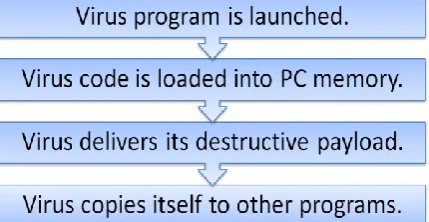
Many viruses are hidden in the code of genuine software programs, we can call host programs. These viruses are called file infector viruses, and when the host program is run, the code for the virus is also executed, and the virus loads itself into the computer memory. From there, the virus searches for other programs on the computer that it can infect. When such a program is found, it adds its code to the new program, and so on. This entire process is shown in Figure 1.
Figure 1: How a virus infects your computer
Most viruses not only replicate themselves, they can also be destructive. For example, virus might delete certain files on a computer. It can overwrite the boot sector of the disk, which makes the disk inaccessible. It might write funny messages on the screen. It might cause the system to produce rude noises. It can also capture an e-mail software and use it to send itself to all our contacts, in this way replicating itself to a huge number of computers.
Most viruses are developed to release their payload when they are executed first time. Viruses are computer code, developed to do as much harm as possible, and to spread themselves to as many computers as possible.
III.
HISTORICAL BACKGROUND
Technically, the concept of a computer virus was first come in picture in 1949, well before computers became common. In 1949, John von Neumann presented a paper with the title “Theory and Organization of Complicated Automata.” In this paper, John von Neumann claimed that a computer program could replicate itself, which is the base of today’s self-replicating virus programs. In 1950s, at Bell Labs, the theories of von Neumann came to life. At Bell Labs, programmers designed a computer game called “Core Wars”, in which two players produce software organisms into a mainframe computer, and observe as the competing programs struggle to take control of the machine. It is just as viruses do today.
In the real world, computer viruses came to the forefront in the early 1980s, with the rise of personal computers. The viruses of those times were commonly spread by users themselves by sharing documents and programs with other users using floppy disks. At that time, a shared floppy was the perfect medium for spreading virus files.
The first intentionally developed virus infected a diskette on Apple II in 1981. The virus went by the name of Elk Cloner, and did not do any real damage. That virus displayed a line on screen:
“It will get on all your disks” “It will infiltrate your chips”
TABLEI
SOME POPULAR MALWARE IN HISTORY
Year Malware About
1981 Elk Cloner Infected Apple II floppy disk. No Real Damage. Display message : “It will get on all your disks…..”
1983 demo Len Adleman developed the first virus for experiments and demonstrated it on a VAX 11/750 1986 Brain Virus It was the first file
infector virus for Microsoft-DOS (MS-DOS)
1986 Trojan Horse First PC-based Trojan horse was released. 1992 Michelangelo One of the first viruses
to spread worldwide. 1999 Melissa Macro virus and worm
were combined that spread itself using e-mail.
2000 Love Bug Much popular and responsible for shutdown of tens of thousands of commercial e-mail systems.
And that continues……….
IV.
TYPES OF VIRUSES
Technically, a computer virus is a piece of software that secretly attaches itself to other useful programs and then does something unexpected. There are other types of malicious programs, such as Trojan horses and worms which do similar damage but do not embed themselves within other program code. These programs are not technically viruses, but they cause the same danger to computer systems. Different Types of Viruses are:-
Boot Sector Viruses
File Infecting Viruses
Macro Viruses
Script VirusesA. Boot Sector Viruses
Boot sector viruses exist in the part of the hard disk or diskette that is loaded into the memory and executed when the computer first boots up. On a floppy disk, it is the boot sector and on a hard disk, that area is called the Master Boot Record (MBR). Once the virus is loaded, it can then infect any other disk attached to the computer. The same virus can infect a disk based boot sector and it can also infect a computer’s hard disk. Most boot sector viruses were spread by floppy disk. Since removable disks are less commonly used today, these viruses have become much less common than they were in the early 1990s.
They work by replacing the original boot code with infected boot code. The original boot sector information is moved to another sector on the same disk by the virus, and mark that sector as a bad sector so that it will not be used in the future. Boot sector viruses may be much complicated to detect because the boot sector contains the first code loaded into memory when a computer boots up. In effect, the virus takes full control of the infected computer.
B. File Infecting Viruses
It is the most conventional form of computer virus, which hides itself within the code of another program. The infected program can be any executable application such as a business application, a tool, or even a game. On Microsoft Windows platform, the files typically with an EXE, COM, SYS, BAT, CMD or MSI extension are targets of such viruses.
When an infected program is launched, the virus code copies itself into the computer memory, typically before the program code is loaded. Since the virus loads itself separately from the host program, it can continue to run in the computer memory, even after the host program is closed down.
rename all files with .COM extensions to .EXE, and then create files with the same name and a .COM extension. These new files are made hidden by setting their attribute. By default, MS-DOS executes the .COM file before the .EXE file so that the .COM file is executed first which loads the virus.
Before the beginning of the Internet and creation of macro viruses, file infector viruses were responsible for probably 85% of all virus infections. Today that number is much lower since the other types of viruses are much easier to spread.
C. Macro Viruses
Some computer viruses are developed using the macro coding languages which are used in many software applications. Macros are tiny programs that are developed to do highly specific tasks within an application program. They are coded in a pseudo-programming language designed to work within the application. The most common macro language, used in all Microsoft applications, is called Visual Basic for Applications (VBA). VBA code can be used in a Word document to create custom menus and perform automatic operations. But that VBA code can also be used by virus writers to modify files and send unwanted e-mail messages.
Macro viruses are more dangerous than boot sector and file infector viruses because they can be attached to document files, so they are difficult to find and stop. Older virus types had to be embedded in executable programs, which made them relatively easy to find and stop. When a user opens any Word or Excel document it could contain a macro virus.
Another reason, we consider macro virus more dangerous, because they are written in the code of application software, they are platform independent and can spread between Windows and Linux and any other system running the targeted application.
D. Script Viruses
Script viruses are based on common scripting languages used in web pages and in some computer applications. Scripting languages are pseudo-programming languages. These viruses are written using JavaScript, VB Script etc.
which often run automatically when a Web page is visited or a Word or Excel application is opened. Now a day, web is very commonly used, so these viruses are becoming more common and dangerous.
Script viruses are able to infect other files, if that file format supports and allows the execution of scripts.
V.
LIFE CYCLE OF A VIRUS
Life of a Virus starts with its creation by its developer and then it is replicated from one PC to other with the help of Human Beings such as using a Flash Drive, Floppy Disk, Downloading Cracked Software etc. When a host program which contains a virus is launched, virus is also loaded into memory and gets activated. It then delivers its destructive payload. When it is discovered, it is documented and anti-virus companies modify their programs to include new virus. Use of that updated antivirus eliminates the virus threat.
Figure 2. Life Cycle of a Virus
VI.
VIRUS DETECTION TECHNIQUES AND
THEIR LIMITATIONS
From the birth of viruses, the techniques to detect viruses are also being developed so as to protect computer systems from these malicious threats. These techniques can be categorised into following different categories:
A. Static Signature Scanning Technique
attaches some specific set of instructions to the file and these instructions need to be executed in the same sequence in order to function. These instructions are actually strings of bits called “virus signatures”. Mostly the computer antivirus software searches for these virus signatures in order to identify the virus infection in a file. If the virus signature is found in a particular file then that file is marked as “virus infected file”. The requirement to this technique is that the virus signature must be stored in some database from where the antivirus program reads that information to find it in the file. If in the database, virus signature of some virus is not stored, then that virus can’t be detected by the antivirus software. More the entries in the virus signature database, more is the capability of antivirus program to detect various types of virus.
The disadvantage of String Scanning technique is that it can detect only those viruses whose signatures are present in the database. It means that the technique is unable to detect unknown viruses. Thus the database needs to be continuously updated with new virus signatures so that the antivirus program can detect new viruses. Finding the signature of a new virus is not so easy task, it requires deep analysis of the virus and it is a task of very skilful researcher. It may take time to find the signature of a new virus, by the time the virus may cause considerable damage to the files without being detected. Also this technique can’t detect dynamic signature viruses because they have the capability to change their signatures after they are attached to a file.
B. Generic Signature Scanning Technique
This is a modified version of Static Signature Scanning technique with wildcards. Some viruses are able to modify their signature after they are attached to a file, so they become difficult to detect. This Generic Signature Scanning technique is used where wildcards are used to compare and search for virus signatures instead of exact matching of string of bits. In this way the antivirus software can detect all variants of same family of viruses. The technique is somewhat similar to regular expression matching where a pattern of string of bits is found from a long string of bits. Mostly new viruses are created from existing ones by changing some pattern so this technique is able to detect those new viruses whose signature’s pattern matches with existing virus signatures.
The disadvantage of this technique is that, it may not be able to detect those viruses whose virus signatures does not match with wildcard scope. If a new virus is created with totally new signatures and its signature does not match with the pattern defined by wildcards, then it can’t be detected by using this technique. Also again there is a main role of database of signatures be present in order to detect viruses.
C. Heuristic Analysis Technique
There are many types of viruses that the Signature Scanning Techniques are unable to detect due to their specific properties. For example in metamorphic viruses, the virus signature continuously keeps on changing so it can’t be detected using signature scanning. Similarly, encryptor/decryptor viruses can’t be detected by using Signature Scanning Techniques because they become unreadable because of encryption. Such type of viruses can be detected by Heuristic Analysis Technique using static or dynamic analysis of the behaviour of infected binary file. This technique probabilistically identifies unknown and new viruses. In static heuristic analysis, there is a database of harmful code fragments they may cause damage to files. The binary file to be inspected is reverse engineered and the obtained code is analysed by comparing it with code fragments stored in the database. Some suspicious behaviour of a virus may include deleting files, adding fake registry entries, replication etc. If some file analysis shows that type of virus like behaviour then it is marked as infected. In dynamic heuristic analysis, the binary file is executed in a virtual environment and it is allowed to perform its functions normally and its behaviour is analysed in that virtual environment. In the analysis if it is observed that the file performs some suspicious functions such as deleting files, adding fake registry entries, replication etc. Then the file is marked as infected. Although, this method is slow but it is more capable to identify an unknown virus.
different ways are there and all those ways need different set of instructions. Although, dynamic heuristic analysis is capable to identify suspicious behaviour but this method is too slow. The delayed identification may cause considerable damage to the files. Also some viruses are activated with some user action such as pressing a button or pressing some combination of keys. In such cases dynamic heuristic analysis will be unable to detect such viruses. Similarly, date or time specific viruses will be activating until that date and time reached. Such viruses will remain undetected.
D. Integrity Checking Technique
Some viruses use vague mechanisms like mutation,
obfuscation and activating periodically. Such viruses are very difficult to detect using Signature Scanning and Heuristic Analysis techniques. In integrity checking technique, the uninfected fingerprint of file is to be stored in a secure location on the disk and while integrity checking, the stored uninfected fingerprint is compared with present fingerprint. In the fresh stage of the system the fingerprints of all the files are calculated and stored at safe location on the disk. There are a number of algorithms like CRD32, MD4, MD5 etc. to calculate fingerprints. The same algorithm is used to calculate present fingerprint of a file while integrity checking. If the fingerprint match occurs, the file is considered as uninfected and is allowed to execute but if there is a mismatch in the stored and presently calculated fingerprint of a file then the file is marked as infected.
The disadvantage of Integrity Checking technique is the lack of accuracy. The method may report false positives because some useful programs may change themselves and are designed to store their configuration or user data in some binary files. The integrity checking technique may mark such programs as infected which is a false positive indication. Also when the fingerprint of files is being stored, it is assumed that the files are uninfected but it may not be true, they may already be infected. Such files are taken as uninfected by integrity checking technique. Above all, the technique is very slow for huge binary files where each time the file is executed it is analysed and takes lot of time for computing checksums.
VII.
CONCLUSION AND SUGGESTIONS
Computer viruses are malicious computer programs, designed to spread rapidly and deliver various types of destructive payloads to infected computers. There are various types of viruses and at the same time various categories of virus detection techniques are available in antivirus software programs. These techniques include Static Signature Scanning Technique, Generic Signature Scanning Technique, Heuristic Analysis Technique and Integrity Checking Technique. Each technique is capable to identify some specific type of viruses but may fail to detect other types of viruses.
The limitations in each analysed technique shows that no technique is perfect in its function and more research need to be performed in the field of virus detection techniques.
VIII.
REFERENCES
[1] Wing Wong, Analysis and Detection of
Metamorphic Computer Viruses, San Jose State University SJSU ScholarWorks, May, 2006 [2] Sulaiman Al Amro, Ali Alkhalifah, A
Comparative Study of Virus Detection
Techniques, International Journal of Computer, Electrical, Automation, Control and Information Engineering Vol:9, No:6, 2015
[3] Computer Associates Virus Information Center (www3.ca.com/virus/).
[4] Essam Al Daoud, Iqbal H. Jebril, Belal Zaqaibeh, Computer Virus Strategies and Detection Methods, Int. J. Open Problems Compt. Math., Vol. 1, No. 2, September 2008 [5] Computer Security Resource Center Virus
Information (csrc.ncsl.nist.gov/virus/).
[6] Prabhat K. Singh, Arun Lakhotia, Analysis and Detection of Computer Viruses and Worms: An Annotated Bibliography, ACM SIGPLAN Notices 29 V. 37(2) February 2002 [7] F-Secure Security Information Center
(www.datafellows.com/virus-info/).
[8] Umakant Mishra, Methods of virus detection And their limitations, http://www.trizsite.com [9] IBM Antivirus Research Project
[10] McAfee AVERT
(www.mcafeeb2b.com/naicommon/avert/). [11] Anita Thengade, Aishwarya Khaire, Devaj
Mitra, Alok Goyal, Virus Detection Techniques and Their Limitations, International Journal of Scientific & Engineering Research, Volume 5, Issue 10, October-2014 ISSN 2229-5518 [12] Sophos Virus Analyses
(www.sophos.com/virusinfo/analyses/). [13] Symantec Security Response
(www.symantec.com).
[14] What You Can Do About Computer Viruses 17. [15] Trend Micro Virus Information Center
(www.antivirus.com/vinfo/).
[16] Virus Bulletin (www.virusbtn.com). [17] Viruslist.com (www.viruslist.com). [18] The WildList Organization International