The
Comlnnection Machine
System
CMMD User's Guide
___.
_____
Version 3.0
May 1993
First printing, May 1993
The iformation in this document is subject to change without notice and should not be construed as a commitment by Thinking Machines Corporation. Thinking Machines reserves the right to make changes to any product described herein.
Although the information in this document has been reviewed and is believed to be reliable, Thinking Machines Corporation assumes no liability for errors in this document. Thinking Machines does not assume any liability
arising from the application or use of any information or product described herein. S
Connection Machine® is a registered trademark of Thinking Machines Corporation.
CM, CM-2, CM-200, CM-5, CM-5 Scale 3, and DataVault are trademarks of Thinking Machines Corporation. CMosr; CMAX, and Prism are trademarks of Thinking Machines Corporation.
C*®is a registered trademark of Thinking Machines Corporation.
Paris, *Lisp, and CM Fortran are trademarks of Thinking Machines Corporation. CMMDI, CMSSL, and CMXI1l are trademarks of Thinking Machines Corporation. Scalable Computing (SC) is a trademark of Thinking Machines Corporation. Thinking Machines® is a registered trademark of Thinking Machines Corporation. SPARC and SPARCstation are trademarks of SPARC International, Inc.
Sun, Sun-4, and Sun Workstation are trademarks of Sun Microsystems, Inc. UNIX is a registered trademark of UNIX System Laboratories, Inc.
The X Window System is a trademark of the Massachusetts Institute of Technology.
L
Copyright © 1993 by Thinking Machines Corporation. All rights reserved.Thinkiag Machines Corporation
,
(
Contents
~
n
~~
--
---About This Manual ... Customer Support ...
Chapter
1 Introduction
...
....
...
1.1 Partitions ...
1.1.1 CM-5 Vector Units ... 1.2 Software Versions Documented ... 1.3 Using a CM-5 System ...
1.3.1 The User's View ... 1.3.2 Keeping Up with System Status ... 1.4 Why Use This Manual? ...
1.4.1 Software to Know About ... 1.4.2 Organization of the Manual ...
Chapter 2 Creating Message-Passing Programs ...
...
2.1 Basic Components of a Message-Passing Program ... 2.2 Hostless Programs ...
2.2.1 Computation and Communication ... 2.2.2 /O ...
2.2.3 Termination ... 2.3 Host/Node Programs ... 2.4 A Few Caveats ... 2.5 Fortran I/O Issues ...
2.5.1 CMMD I/O Mode Restrictions ...
Synchronous I/O Modes ... ... Global Independent I/O Mode ... Local I/O Mode ... 2.5.2 Other Fortran I/O Considerations ...
Initializing Standard O ...
vi ix 1 2 2 3 3 4 5 8 8 9 11 11 12 12 13 13 14 15 16 16 16 17 18 18
...
18
Using the -f Option in Fortran 77 ... Don't Mix F77 I/O and CMF I/O ...
Version 3.0, May 1993 i
Copyright © 1993 Thinking Machines Corporation
ii
CMMD User's GuideChapter 3 Compiling and Linking CMMD Programs ...
19
3.1 Include Files ... 19
3.2 Hostless Programs ... 20
3.2.1 Compiling and Linking Hostless Programs ... 20
Compile as Usual ... 20
Link with cmmd-ld ... 21
3.2.2 Important Note for VU CM-5 Sites: ... 22
3.3 Host/Node Programs ... 22
3.3.1 Executing Host/Node Programs ... 22
Starting the Programs ... 22
The I/O Server ... 23
Terminating the Programs ... 23
3.4 Compiling CM Fortran and C* Programs ... 24
3.5 Fortran 77 Programs ... 24
3.5.1 Use -Nx Option to Increase Symbol Table Limit ... 24
3.5.2 Use -f Option to Align Double Precision Data Correctly ... 25
3.6 Writing Version-Independent CMMD Code ... 25
3.6.1 Important Differences Between Versions 2.0 and 3.0 ... 25
3.6.2 CMMD VERSION Preprocessor Symbol ... 25
3.7 Sample Programs ... 26
3.7.1 Hostless Examples ... 26
3.7.2 Host/Node Examples ... 26
Chapter 4 Executing Programs ...
27
4.1 The Execution Environment ... 27
4.2 Gaining Access ... ... 28
4.3 Checking System Status ... 28
4.4 Executing a Program ... 29
4.5 Executing a Batch Job with NQS ... 30
4.5.1 Submitting a Batch Job ... 30
4.5.2 Checking on NQS ... 31
4.6 Timing a Program ... 31
:onn'..s
,:.
Chapter 5 Error Handling and Error Diagnosis ...
...
33
5.1 Error Handling ... 33
5.1.1 Default Error Handling ... 34
5.1.2 Customized Error Handling ... 35
5.2 CMMD Safety Routine ... 35
5.3 When Your Program Is Terminated ... 36
5.3.1 Using printf ... 36
5.3.2 The Errors File ... 36
5.3.3 Core Files ... 37
5.3.4 CMTSD Files ... 37
5.4 Fortran Tracebacks: A Warning about Synchronization ... 37
Chapter 6 Debugging Your Program ...
39
6.1 Introduction ... .. 39
6.2 High-Level dbx Features Supported ... 40
6.2.1 The Essential Commands ... 40
6.2.2 Other Commands ... 41
6.2.3 Commands Not Supported ... 41
6.3 Summary of Extensions ... 41
6.4 Commands for Low-Level Debugging ... 42
6.5 Compiling and Linking ... 44
6.6 Starting Up pndbx ... ... 44
6.6.1 Using Prism . ... 44
6.6.2 Using dbx . ... 45
6.7 Monitoring the Nodes . ... 45
6.7.1 Asynchronous Monitoring ... 46
6.8 Exiting from pndbx . ... 46
6.9 Using pndbx ... 46
6.9.1 pnstatus ...
...
47
6.9.2 Interrupting Nodes ... 48
6.9.3 Waiting for Breakpoints and Errors ... 48
6.9.4 Using pndbx to Debug Core Files ... 49
6.9.5 Debugging CM Fortran Programs with pndbx ... 49
6.10 Submitting a Bug Report ... 51
6.11 A Sample pndbx Session ... 52
Version 3.0, May 1993
Copyright © 1993 Thinking Machines Corporation
iv CMMD User S Guide
Appendix A Sample Programs ...
A.I1 C Examples ...
A.1.1
roundtrip ...
Round-trip message (host program) ... Round-trip message (node program) ....
A.1.2 ring ...
One-dimensional ring ...
A.1.3 redist block ...
A.1.4 redist nonblock ...
A.1.5 redist nonblk hndlr...
A.1.6 sort ...
A.2 Fortran 77 Examples ...
Appendix B Non-RTS Parallel Memory Allocation
B.1 The Parallel Stack and Parallel Heap ... B.2 VU Regions ...
B.3 Expanding the Stack or Heap ... B.4 Translating Stack and Heap Addresses ... B.5 Using pmalloc to Allocate Memory ...
i
-59 61 61 61 62 63 63 64 65 66 68 71 75 75 76 76 78 79
U-10 I-W-1
About This Manual
.:...Objectives of This Manual
The CMMD User s Guide is written for programmers who are writing or porting message-passing programs to run on the Connection Machine model CM-5. The
User 's Guide does the following:
a It introduces the components and environment of the CM-5 system, as they are used for message-passing programming.
* It provides a brief description of the host/node programming model, and describes how that model is currently implemented on the CM-5. • It introduces the tools currently provided on the CM-5 to assist in the
development of message-passing programs.
* It provides a useful "do's and don't's" for the successful creation and execution of message-passing programs on the CM-5.
This user's guide is intended to be used in conjunction with the CMMD Reference Manual, which describes the functions provided by the CM-S's message-passing library, CMMD. Both manuals assume that the programmer has some experience in writing message-passing programs in the language of his or her choice. This edition of the manual documents Version 3.0 of the CMMD library and Version 7.2 of the CMosT operating system.
Version 3.0, May 1993
ri
M UrG
Notation Conventions
The table below displays the notation conventions observed in this manual.
Convention Meaning
bold typewriter
italics
CMMD functions and UNIX and CM System Soft-ware commands, command options, and filenames, when they appear embedded in text. Also program-ming language syntax statements, and language elements such as keywords, operators, and func-tion names, when they appear embedded in text. Argument names and placeholders in function and command formats.
typewriter
% bold typewriter regular typewriter
Code examples and code fragments.
In interactive examples, user input is shown in
bold typewriter and system output is shown in
regular typewriter font.
IJ.Is
Customer Support
·m M. - - I I 11 1 16 E
Thinking Machines Customer Support encourages customers to report errors in Connection Machine operation and to suggest improvements in our products. When reporting an error, please provide as much information as possible to help us identify and correct the problem. A code example that failed to execute, a session transcript, the record of a backtrace, or other such information can greatly reduce the time it takes Thinking Machines to respond to the report. If your site has an applications engineer or a local site coordinator, please contact that person directly for support. Otherwise, please contact Thinking Machines' home office customer support staff:
Internet
Electronic Mail:
uucp
Electronic Mail:
U.S. Mail:
Telephone:
ames!think!customer-support
Thinking Machines Corporation
Customer Support 245 First Street
Cambridge, Massachusetts 02142-1264
(617) 234-4000
Version 3.0, May 1993
Chapter 1
Introduction
This manual provides information on CMMD, the CMosT operating system, and associated utilities for programmers who are interested in node-level, message-passing programming on the CM-5 supercomputer.
Two current models exist for such programming on the CM-5:
* The hosVnode model: a host program executing on the host starts up and monitors a node program running in multiple copies on each of a number of processing nodes. This programming model is currently supported for the C, C++, and Fortran 77 programming languages.
Implementation Note: Currently, the host/node programming model is
not supported in C*.
* The hostless model: a single node program executes in multiple copies on the processing nodes, while the host runs a CMMD-supplied I/O server program. This programming model is currently supported for the C, C++ and Fortran 77 programming languages, and for the parallel CM program-ming languages CM Fortran and C*, when executing in "on-a-node" style. In both of these programming models, the number of processing nodes is deter-mined by the size of the CM-5 partition in use (see below).
CMMD is the software library used for interprocessor communication - that is, for the message passing between nodes in the hostless model, and between host and nodes in the host/node model.
CMMD User Guide
1.1
Partitions
The CM-5 is a highly scalable parallel processing computer. The number of com-putational processors (or nodes) on a CM-5 ranges from fairly small to very large. No matter what its size, however, a CM-5 provides for both space-sharing and timesharing.
* Space-sharing occurs when the system administrator partitions the CM-5, allotting so many nodes to one partition, so many to another. The system administrator also decides which users have access to a given partition. Administrators can change partition sizes or access rules as needed to meet the needs of their sites.
* All partitions run the CMosT operating system, an enhanced UNIX operat-ing system. Therefore, timesharoperat-ing is the natural mode on all partitions. Users of the CM-5 have access to all UNIX facilities that normally form part of the SunOS version of UNIX. In addition, they have access to special tools and utilities provided by CM software to facilitate parallel programming.
1.1.1 CM-5 Vector Units
In a CM-5 with vector unit accelerators (VUs) installed, each processing node has four associated VU accelerators. In this case, you have two options:
* You can run your code without the VUs (in any of the supported lan-guages).
* You can run your code with VUs (in the parallel programming languages C* and CM Fortran, or by calling a DPEAC routine from C).
The VU accelerators provide enhanced performance for parallel programs that are largely arithmetic in nature.
Version 3.0, May 1993 Copyright © 1993 Thinking Machines Corporation
2 If t
Chp e r .Itouto
1.2 Software Versions Documented
This edition of the CMMD User Guide documents tools and utilities that are part of Version 7.2 of the CM operating system, CMOST.
It does not document the cc or f 77 compilers, which you would use for compil-ing message-passcompil-ing programs written in these languages; please see SunOS documentation for that information.
1.3 Using a CM-5 System
The CM-5 is a massively parallel supercomputer. It contains tens, hundreds, or thousands of processors. These processors are divided into two categories: pro-cessing nodes and control processors.
Processing nodes (PNs) make up the vast majority of processors inside the CM-5 system. They are the processors that do the actual computations on parallel data, communicating with each other to share data as necessary. System software occasionally refers to these processors as processing elements, or PEs. (Note: On CM-5's with vector units, the four VUs associated with each node are considered part of the processing node.)
Control processors (CPs) manage the CM-5's processing nodes and I/O devices. These processors provide major OS services for the system, handling the sys-tem's user interface, its I/O and network interfaces, and its system administration and diagnostic interfaces.
A group of processing nodes under the control of a single control processor is called a partition. The control processor managing the partition is known as the partition manager (PM). In message-passing programming, the partition
man-ager is the host, while the processing nodes are - naturally - the nodes. Interprocessor communication networks connect all processors, of both types, to provide rapid, high-bandwidth communication between processors.
CMMD User s Guide
1.3.1 The User's View
Figure 1 illustrates a sample CM-5 system as it appears to a user. This particular system has two partition managers, which have been named Mars and Venus. Each of these PMs is currently managing a partition of 256 nodes. The system also has control processors managing some I/O peripherals, and one that is dedi-cated as a system console, for the system administrator's use.
Figure 1. A sample CM-5 system.
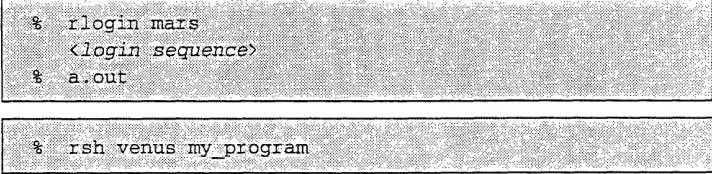
Users (shown here at workstations "somewhere on the network") access the CM-5 system by accessing one of the PMs. They can log in remotely or use remote shells to run programs on either partition, assuming they have been granted access. Two examples might be:
%::::::i.:::..::::·i~ a·oi· ..
% ·: rsh venus`: my':::::::::i:·'i::::progii~~l~ i:':'::::: ' ''`''''~s h :`y'ii · q g a i :::'',::::::..:..::::ii iilii:: ii:ii:i:il·':::
A program rums on a single partition, using all the nodes on the partition for its parallel operations. If a program needs access outside the partition - to read
Version 3.0, May 1993 Copyright 1993 Thinking Machines Corporation
4
e
l
Chapter 1. Introduction 5 : :''!...-'.' ' '~' .~'' Ne;... "":':' .R i 'i 'Yx.:' ~ .' i f" ~-' .-" ~ :. .': ~~ i :. ' ; ~ ::B
from an I/O device, for example, or to pass data to a process running on another partition - it goes through the partition manager to do so. (The partition man-ager, running in supervisor mode, can access any address in the system. The nodes, running the user's program in user mode, can access only addresses within their own partition.)
1.3.2 Keeping Up with System Status
Partitions are not immutable. They are defined by the system administrator to meet the site's needs, and can be changed as needed. The system shown in Figure 1, for example, could be reconfigured as a single partition, with Venus controlling all the parallel nodes and Mars either inactive or acting as a stand-alone compile server. Similarly, if some nodes needed to be taken out of service temporarily, the partition could be reconfigured around them.
The cmps command, given on a partition manager, tells users how many nodes the PM currently controls and what jobs it is running. For more information on this command (which is modeled after the UNIX pa command), see Chapter 4.
... ... .. .. .... .. ... . .. ... W. .. . ... ... ... .... ..4: .. ... . . ... ... ....
... .. ... ... :X : ... ... ...
...
...X . X.:.,
.. ... ...
...
...
X . . ... . . ... ... ... ....
.. ... . ... ... ...
::X ... ...
. .... .... ... . ... ... ... X--.%' N : ... ... ... . ... ...
... .. . .. ... ... . . .... ... ... . ...
tser&.f ar.-.,. :::w
... ... .. ... ... ... I .. . ... .. .. ... ...X
-X .. ... an g p4::: .... ... .:,Us M e :-,-AC M 4
... ... .. .. .. . ... ... ... ... . ...... ... ... . ... .. ... .... .... ... . . e.: 0 XXX .. ... . .
.. ... ... ` :X :Cadillac d 'd o
... ... .... .... . ... ... .... ... I... .... ... X
... .. ... . ttac ... X
... ....
.... ... ... ... ... ...
...
...
.. ...
e r
...
... ... ... . ... ... ... ... ...
.:Brita in" . . .... ... ... ... ... .... % ... ... ... .... ... .. .... ... ... .. . ... ... ... ... . ... ... ... ... ... ... .. ... ... ... ... .... ... ... .. ... ... ... .... ... .... .... .. . .. ...
yet, on:"
. .... . ... ...
... ... ... ... ... ... ... ..
I ... ... . ... . .... ... ... ... ...... .... .. . .... ... .... ...
06 ., ... ... .... ... . ...
... ... ... ...
6 . ... Q CMM U.er Guide
* SIMD stands for Single Instruction, Multiple Data, and MIMD stands for Multiple Instructions, Multiple Data. These terms are sometimes used to describe programming styles as well as hardware. They are not, however, entirely accurate as software descriptors. Data parallel programming, as implemented on the CM-5 system, includes MIMD as well as SIMD capabilities, while message-passing programming often makes use of SIMD techniques.
Version 3.0, May 1993 Copyright © 1993 Thinking Machines Corporation ·:-. .··: ::':::. :" I::"'~~~~:~~: ::''::.: ·.
...
... iA Noe o Uer from Other~Oter Sytm :-··~·r:~ i ~i~you';
,umay notiesevera difrecs
CM environment: ms,"ewenit
n iomntad h
That uses every one of them~~~~~~~...
rgra tht.a.o..o.6.oes.an.en.os f t
tim
doigcomptaon
myfn tefmc oeeel
,
balanced.
bentwencmutto n cm uiaio
hni
ruso evcneral
rge r nmbeo
no.Ipsoecss
.... ... this. .. m ay... ma e...i nk..ig.. o...s. algorithms. advisable.
M en:i:i::::u. m- hnilur·' ... ... X.,
i:::::~::::i i:: .: i: ··:::: ·iIi~i'
.. ... ... .... :·::j:: ::·i . ... ... :::i-:::..::::ij:.::· ::·
m
essag!;·:.:: ·tpass ... .... .~··:·.::
n meram::· ~::.P~:-iil~n::· essa ye- assm&:n -':a:::'· ...
.... .... ... ~ ~ ~ u, ··, · ..,
-I:::':
i~~~~~~Z O M P
....
...
...:i:::·i~... ~~~~~~~~~~~~~~~· ...:.:i:: ...-'·:::i:::~il
'::i·
~~b~~j::j
b:.::
j~ iiiilizii~iiiii~~ii~ii~i8;l
ma'::·
:iineii~
i
:;·-····:e.
C
may b~~~~~~~~~~~~~·~,,,l':;:ijjjj:j~jj
...::l ': : :i:':ll:l'i~~liiliil:: l~:
.. .. .. ...
jar-:iC:7iil'~~~~~~~~~~~i.~~~~i'iiiii
...~~~~~~~~~~~~~~~~~~~~~~~~~~~~~~~~~~~~~~~~~~~~~~~~~~~~~~~~::::~::::iI~; ~ ·~·:II·- l~ ~ ~ ~ ~
...
...
...
... .. .. . ... .. ... ... . .. .. . .. . . -X .. !-,X
Capter 1. Introduction 7
2. Yo onthaeto: ,::compete:for:nodes wih'other:processe t
PAIS-rn tms .oa p aitionsl areti s e (T i
.the PM is wapped in r out, allitsICII:·- nodeC. L progrms e edia~~:
... ... ... ...
~....:::
... :. .-.. .:.... :~
a .%;~
ii~ilii ·in re ou swlhs n oeprgasbigtetda s Kgl
grain:
ccess a PM
once
you
rioin,
a
rh or
a
hatch
coin-partition
by that....
controlled.
PM...
.
...
fom.
revnfrm.or.ohor.
.. Mtht.otrl
....
..
2.nodes..today
may.
coto. 12nds.oor~
j'-~~l·~ You c.UI~anhoeer out
Pla~ncg
roram.(Foristance,:it
na atiioszebinfaciliate
power of~ii~·:i.:~liiii.
two: ...th.,
use of
.smuan
so~:astomakeoptimal'0
. akeo.
laotdeiinsa untm
use of partitions of.vario.s.ize. Youca. ue.he.m..om an a message-passou inProgram to report thel current patiio
5.Becaus.CMMD.'s
...
sof.war
designed.specifically
global routines take advan~tageiof hardware.e.
tpefracwh
:,is-susetof ~Y..Z. 9·L ~ ..··-... he ode in th patiton.... ::::~Y -·... ii:~li · ':l~ii:::ii::·i:1~~ii~i:::::l:18~'~~j I~nap~ore _ -·::YOUT~i... ...
i·:::~i~~~i8::i 1i::~·rx ::·'·..··:·::·: :- y :-·:·:·::-~'.":' -····: ::·:m ··
.. .. ... ...~ ~ ~ ~ ~ ~ ~ ~ ~ ~ ~~ ~ ~~~~~~~~~~~~---· :i·::'~:-'~'; · " · ··
...
.. ...~~~~~~~~~~~~~~~~~~~~~~~~ifjiiap~ii~is m~ ~a
iraili~~~~~~~~~~~~ilili~~~~~~~~~i~~~~i~~~~j~~~~Oir~~~~~~lii ~ ~~ ~ ~ ~ ~ ...
.·:::~ I1I :m q so m ~t~ .. . ...
::::::::iii:::::~~~~~~~i~~i:~~~~·:·:·:·:·:·:
·
·
fa:
c-·i
::·:·; · ::··:: ··:: ·:::::::::~:::::i ::··::::;-::::: -::- 'i~:::::j::::: ... :·::::::I:: .::: ·: ···: ... ... :·::··.. :::,-.:·:::::- ...·~::::·:i
:.:::.:::~~~~j:::::i:::::~~~'i'.... .. .... . .... ... ...
::~:::j::::::::::.~:
:.·:.-·i:
:-o
i··'··:
:~'T~:.1
~ ~ i ;; ~ av~a...
...
i-I-;
·
itrppdi~urrrn m·: · lartio ;iii''.Y-Ouri'!!Tr
::l~i:::ii'l:I:I~l'::~:":
::::·:::::r::::::... ...
.- 0 :;CmImI
:aiiiiiiI~~~i~hi l·:i I~~~:: ·
~...
.... .... .. ...- .I:.:-.·.::-j::::.
. . ...
':'::
:::::::::::"i~~'~:
... ~ ;ic~~iii
l~iii!
...
:::,e~:~ ·I~I::. ii~: ...
... . . . .. ... ....
.. ... ··1·:-·:·; · ti n -.-::~~~r···-·:- do'-::~',`: 1baol! f:daip
,.rrlrrr ~ ~ ~ ~ ~ ~ ~ e~~~~~ramer·:~~...~ ~ ~ ... . 8~~~-~~~;i~~~~";e~~~~~%~~~~~~~~~~ ... ... ..
-':':'::: ~ ~ ~ ~ ~ ~ ~ ~ ~ ~ ~ ~ ~ ~ ~ ~ ~ ~ ...::::i::::-..::::::·:·:::·.:: ·::·: : :·:·:.:·:' '-:·.:,,..
Inili~~~~tnP,:·: ::· ... .... ., .. ... :::::..
:iliijl:'irilii~i'ilii ilil"~ilil~lil~lil~l::... . ..
8., ' · M ser.'
1.4
Why Use This Manual?
This manual describes the CMosT tools and utilities that support message-pass-ing programmmessage-pass-ing on the CM-5. It should be used in conjunction with the CMMD Reference Manual, which describes the message-passing library itself.
1.4.1 Software to Know About
This manual explains the following commands and tools, which are useful to programmers writing message-passing programs on the CM-5 system.
cmps The CM version of the UNIX ps command, cmps tells you how large a partition is and what processes are currently running on it. See Chapter 4, or the on-line man page.
cmmd-ld The CMMD version of the UNIX ld linker, documented in Chap-ter 3 of this manual and in an on-line man page.
pndbx The CM's node-level debugger, documented in Chapter 6 of this
K
*
manual and the on-line man page.qsub The NQS command by which users submit jobs for batch execu-tion on the CM-5. See Chapter 4, or the on-line manual page, or NQS for the CM-5, Version 2.0.
CMMD timers
Node-level timers, which allow timing of code running on indi-vidual nodes. See Chapter 4, or the on-line man page for any of
the timer commands.
CM panic
CMPN panic
CMOST calls that handle errors in host and node processes; by default, they halt the program, print an error message, and dump core. See Chapter 5, or the on-line man page.
CMDerror
The CMMD interface to the CM panic and CMPN panic
func-tions. See Chapter 5, or the on-line man page.
Version 3.0, May 1993 Copyright © 1993 Thinking Machines Corporation
Chpe 1. Itouin9
core dump files error files
Files created by CMosT to help diagnose program errors, docu-mented in Chapter 5 of this manual.
rlogin The standard UNIX remote login command, used to log in to a
CM partition.
rsh The standard UNIX remote shell execution command, used to run a program interactively on a CM partition without logging in.
1.4.,2 Organization of the Manual
Within this user's guide,
* Chapter 2 describes the basic components of a message-passing program and explains what happens during program execution.
* Chapter 3 describes how to compile and link message-passing programs. * Chapter 4 describes how to execute your programs. It also describes the
CMMD timers and the cmps command.
* Chapter 5 describes some OS facilities for handling and diagnosing pro-gram errors.
* Chapter 6 describes how to debug message-passing programs using
pndbx in conjunction with Prism or with dbx.
,:
*.,
l9
,t , ,jj
Chapter 2
Creating Message-Passing Programs
_'E _
This chapter discusses the mechanics of creating a message-passing program, and describes briefly what happens when such a program runs on the CM-5. The next chapter discusses compiling and linking message-passing programs.
2.1 Basic Components of a Message-Passing Program
The source code for a CM-5 message-passing program depends on the program-ming model in use:
* For a hostless program there is a single set of source code files for the nodes. In the hostless programming model, the host merely initiates execution of the node program, and thereafter acts as an I/O server for the nodes. This is the recommended method for writing CMMD programs. * For a host/node program there are two sets of source code files, one for
the host and one for the nodes. The host program must explicitly start and monitor the execution of the node programs.
12 CMMD User's Guide
2,,2
Hostless Programs
Hostless programming is the recommended method for using CMMD in a mes-sage-passing program. In hostless mode, the user writes a single node program, which will run on all the nodes. This program does all computation and commu-nication; it does not communicate explicitly with the host.
Each node executes its code asynchronously, fetching data and instructions from its local memory. It synchronizes with other nodes only when required to do so for message-passing purposes (e.g., to send or receive a synchronous message, or to participate in a global instruction, to do I/O, etc.).
What runs on the host, in this mode, is an internal server program provided by the CMMD library itself. This program
* Enables CMMD.
· Downloads the user code to the nodes, which then begin executing it. * Goes into a polling loop as an I/O server, so that it can communicate with
I/O devices on behalf of the nodes. This allows node programs to do I/O. Hostless CMMD programming is supported for the following languages: C,
C++, Fortran 77, CM Fortran, and C*.
2.2.1 Computation and Communication
The code that runs on the nodes performs all the normal tasks of an application program. Computation on each node is written normally.
Communication among nodes uses CMMD function calls. Communication can be point-to-point, when one node sends a message to a second node; or it can be global, with all nodes contributing to the message (and, usually, with all nodes receiving the result). Global communications synchronize all the nodes; point-to-point communications can be either synchronous or asynchronous.
Chptr.Cret
2.2.2
1/0
CMMD provides four modes of I/O:
* local independent - each node opens and accesses files directly
* global independent - a single file is opened on all nodes simultaneously, with each node having its own, independently-moveable file position
indi-cator.
* global synchronous broadcast - a global file is accessed by all nodes simultaneously, with each node reading (or writing) the same data * global synchronous sequential - a global file is accessed by all nodes
simultaneously, with each node reading (or writing) its own portion of the
file.
A file or stream opened in any one of the three global modes can be changed to one of the other global modes at any time; in fact, a single node can indepen-dently change its own view of the mode of a file to facilitiate its own purposes, without affecting the mode of the file as seen by other nodes.
i, , The global modes allow all nodes to open and access a file simultaneously, using
only a single UNIX file descriptor. (In local independent mode each node can potentially access a different file, and a separate file descriptor is needed for each file opened by each node.) Because UNIX sets a limit on the number of files that can be open at any one time, the global file modes provide a significant increase in flexibility, allowing the nodes to access multiple files simultaneously without the threat of running out of file descriptors.
The usual UNIX streams - stdin, stdout, and stderr - are available to the nodes. Since a CMMD program is a single process, all nodes share the same streams. Therefore, they must take care not to overwrite each other's contribu-tions to the streams. This is usually accomplished by putting the streams into
append mode; see the CMMD Reference Manual for details.
2.2.3 Termination
To terminate a hostless program normally, all nodes should call exit () . Execu-tion of this call on all nodes releases the host from the I/O server and allows the host program to exit normally. Note that exit () is called automatically when the main routine returns.
4ICMMDUser'sGuide
2.3 Host/Node Programs
Host/node programs have a user-written main program that runs on the host (that is, on the partition manager).
In this model, the host program starts parallel operations by calling
CMMDenable (). This function:· gathers argv, argc, environment variables, and process data in a process control block.
* downloads node code, and thus allows the nodes to start running. * downloads the process control block.
* starts up the CMMD I/O server, which goes into a polling loop, waiting for I/O requests from the nodes. The server stops only when (1) it is explicitly disabled, or (2) the program terminates abnormally.
NOTE
If any other CM node activity has taken place, the user must
ensure that the activity has finished before calling
CMMD enable.The node program must have all nodes call CMm _enable_host (). This
func-tion disables the host I/O server, and allows the host to return from the
CtMD_enable call and execute the rest of the user-written host program.
In order to perform I/O, the node program will have to re-enable the I/O server. CMMD provides server functions for this purpose, as explained in the chapter on host/node programming in the CMMD Reference Manual.
Code that runs on the host (that is, on the partition manager) may contain any-thing ordinarily included in a program running on a Sun computer. This includes system calls, I/O calls, Xll routines, and calls to other specialized libraries. Host programs, when used, generally perform computations, make CMMD calls to communicate with the nodes (perhaps to provide input or receive output from them), and make calls to other libraries or routines.
Version 3.0, May 1993 Copyright 1993 Thinking Machines Corporation
CN. 2. CsP
The CMMD library provides specific functions for communication between host and nodes; these are discussed in the CMMD Reference Manual, in the chapter on host/node programming.
Host/node programs terminate only when the host program calls exit () . Hav-ing the node program call exit () merely puts the nodes into a busy-wait state in the OS dispatch loop.
Host/node CMMD programming is supported for these languages: C, Fortran 77, and CM Fortran. Note: Host/node programming is not yet supported for C*, and for CM Fortran programs the host program cannot be written in CM Fortran.
2.4 A Few Caveats
1. If your program hangs, a node is probably waiting for a message that has not been sent.
2. Allowing host code to become disordered so that the host calls for results (e.g., via CMMD_reducefrom_nodes) before invoking the node routine that contains the matching call (e.g., CMMD_reduce_to host) is a sur-prisingly common method for achieving such program hangs.
3. If your program fails with the message:
Ts-daemon failed to set up user memory on PE Error: Couldn't register with the TS daemon!
it means your program requires more memory than is currently available on each node.
4. In host/node programs, the host is responsible for periodically polling the network for I/O client requests. Neglecting to do this is a frequent source of problems. (See the CMMD Reference Manual for more information.) 5. For the reasons mentioned above, we recommend that before formulating
any program in a host/node style, you consider whether it is possible to write your program in a hostless style. This avoids many of the potential problems involved in host/node programming.
16 CMMD User ~ Guide
2.5 Fortran
I/0
Issues
CMMD I/O is based on UNIX /O. UNIX expects file I/O to be unbuffered, and expects user applications to have a relatively high degree of control over the tim-ing of opens, reads, writes, etc. Fortran I/O, on the other hand, is based on buffered I/O. This causes certain problems for synchronous I/O, as explained below.
2.5.1 CMMD I/O Mode Restrictions
Buffered I/O, by its nature, removes the user's control over when the underlying read or write occurs. For instance, if stdio is used to write to a file, the actual UNIX write call will occur when the total number of bytes written to the file reaches the buffer size (typically 8K), rather than at each call to a stdio library routine. This means that it is difficult or impossible for the programmer to guar-antee synchronous calls across the partition to the underlying I/O routines. Situations in which contributions to a write from some nodes fit into the I/O
buffer, while contributions from other nodes overfill the buffer, and thus require 1 v multiple writes, are particularly troublesome.
Synchronous I/O Modes
This restriction results in a difficulty for Fortran I/O under synchronous
sequen-tial and synchronous broadcast modes, as the only provided Fortran I/O
mechanisms are built on top of a layer of buffering. (Synchronous broadcast mode may work correctly, as long as the number of bytes read or written, and any line buffering done, is identical on each node.)Two workarounds are possible for I/O in synchronous modes:
* Fortran 77 programs may be able to modify their I/O buffer sizes so that an entire read or write for each node fits into the buffer. (Use the Sun
fileopt='BUFFER=n' extension to the open statement, where n is the desired buffer size.)
* To allow Fortran programmers to access the underlying, unbuffered, UNIX I/O calls, CMMD provides global routines that resolve to these read and write calls.
Version 3.0, May 1993 Copyright © 1993 Thinking Machines Corporation
-Chpe 2*.?Ceain
Message-PasngPoras1
The global I/O CMMD routines are global read and write calls:
INTEGER FUNCTION CMMD_global_read(unit, buffer, length) INTEGER FUNCTION CMMD_global_write(unit, buffer, length)
character*(*) buffer integer unit, length
The unit argument is a standard Fortran file unit number; length is the number of bytes to be read or written. On success, these functions return the number of bytes written or read; they return -1 on error. A program can use standard Fortran I/O functions to write data into character buffers, and then call the global CMMD
I/O functions with the character data buffers as arguments.
Programmers should note the following issues regarding these functions: * These functions take unit numbers as arguments. Any flags (for example,
status=new) that are checked at the time the units are opened are still
checked. Any other flags that affect writing to the unit (such as record for-mat, etc.) are ignored.
* The global I/O functions can be called only on file units in synchronous-sequential or synchronous-broadcast mode. They will return errors if called on file units that are in local or in global independent mode. * You can access any given file unit either by Fortran read and write
statements, or by these CMMD functions, but not by both. (Using both may work, but this usage is not supported.)
*
The files created by CM!D_global_write will be normal UNIX files, not standard Fortran files; in particular, they won't have record separators. (This may or may not be a problem for a given application.)Global Independent I/O Mode
There also can be problems using global independent mode from Fortran 77 and CM Fortran.
In Fortran 77 you can handle any buffering problems by explicitly using the fileopt='BUFFER=n' option. (While this may not always be necessary, it is good practice to set this flag explicity, nevertheless.)
In CM Fortran the proper method to avoid potential problems is to state explicitly the number of bytes being read or written in the read and write commands. (In other words, don't use the "*" specification.)
18,CMDUer.sGuid
Local I/O Mode
I/O
in local mode is not affected by these buffering problems.2.5.2 Other Fortran 1/O Considerations
Initializing Standard I/O
CM Fortran initializes standard I/O on demand, rather than at the beginning of a program. Thus, the user cannot change the I/O mode of the standard units until they are used. An application should, therefore, use a standard unit once with its default mode; then change it to the desired mode.
The default mode for the standard I/O ports is sync_bc_mode; independent mode is generally preferred for stdout and stderr.
Note: This problem will be fixed in a forthcoming release of CMF.
g,
I
I¢) . ',
Using the -f Option in Fortran 77
It is possible for a Fortran 77 program to contain double precision data which is not doubleword aligned in memory (Fortran 77 does not force double alignment by default). The Fortran 77 versions of certain CMMD routines will get a bus error and crash the program if they are called on such data. ( This is because CMMD 3.0 routines always attempt double loads when dereferencing double pointers.) To avoid this problem, compile with the -f option.
Don't Mix F77 I/O and CMF I/O
If your main program is in Fortran 77, you should use Fortran 77 for all I/O; if your main program is in CM Fortran, you should use CM Fortran I/O throughout. Do not try to mix Fortran 77 1/ with CM Fortran I/O.
Version 3.0, May 1993 Copyright © 1993 Thinking Machines Corporation
I l CMMD User S Guide
Chapter 3
Compiling and Linking CMMD
Programs
~.~ :::...1..
..
In CMMD Version 3.0, there are two kinds of programs: * hostless programs
* host/node programs
The compiling and linking steps for these two program types are described in detail in the sections below. (Note that compilation of CM Fortran and C* pro-grams is described in a separate section below.)
3.1 Include Files
For both hostless and host/node programs, the include files required by CMMD are the same:
For C-based programs (that is, programs written in C, C++, and C*), the include file to use is:
#include <cm/cmmd.h>
For Fortran-based programs (programs written in Fortran 77 and CM Fortran), the include file is:
20. CMMD..,User.'s...Guide:
3.2 Hostless Programs
In hostless mode, the user writes a single C, C++, or Fortran 77 program, which will run on all the nodes. The program does all computation and communication
on the nodes; it does not communicate explicitly with the host.
Note: See Section 3.4 for special information about compiling CMMD programs written in CM Fortran or C*.
What runs on the host, in this mode, is a server program provided by the CMMD library itself. This program
* Enables CMMD.
· Downloads user code to the nodes, which immediately start processing it. * Goes into a polling loop as an I/O server, so it can communicate with I/O devices on behalf of the nodes. This allows user programs to do node I/O. To terminate a hostless program normally, all nodes should call exit () . Execu-tion of this call on all nodes releases the host from the I/O server and allows the host program to exit normally. Note that exit () is called automatically when the main routine returns.
3.2.1 Compiling and Linking Hostless Programs
Compile as Usual
You compile a hostless program just as you would an ordinary C, C++, or Fortran 77 program. You use whatever compiler (Sun or GNU) you would nor-mally use, and you supply your own makefile. The following compiler versions are supported:
* Sun F77 versions 1.* are supported. Version 2.0 will compile and run, but is not supported by the pndbx debugger.
* All Sun bundled C compilers are supported. Versions of acc (unbundled Sun C) prior to version 2.0 are supported. Version 2.0 will compile and run, but is not supported by the pndbx debugger.
* All versions of GNU C up to and including version 2.3.3 are supported. The Sun CFront (C++) compiler version 1.0 is supported. The GNU G++ (C++) compiler version 2.3.3 and earlier is supported.
Version 3.0, May 1993 Copyright 1993 Thinking Machines Corporation
MIe 3 m n d k M P
Link with cmmd-ld
After compiling your program, you must link it using the customized linker, cmmd-ld. Some options are:
-comp comp Required. Specifies the command to be used for linking
(cmf, gcc, f77, etc.)
-comphost comp
Optional. Selects different command to be used for host files in host/node linking (see Section 3.4 below). -vu Optional for CM-5 systems with vector units. Indicates
that code should be linked with a VU-compatible library.
-node object_code.o library.a...
Required. Specifies the object code and library files that you want linked for the node programs.
-host objectcode.o library.a ...
Optional. Specifies alternative object code and library files that you want linked for the host program.
-o executable-name
Optional. Specifies executable name (default a. out). -g Optional. Links in the CMMD debugging libraries. -v Optional. Requests verbose descriptions of the linking
process.
-1, -L, etc. Optional. Pathnames of any required user libraries. (Same as corresponding argument of Sun d.)
-cmosroot
path
Optional. Tells the linker where to find the CMOS system software, if not in /usr/lib.
-cmmdroot
path
Optional. Tells the linker where to find the CMMD library,
if not in /usr/lib.
cmmd-ld first uses the specified compiler to link the program in the normal man-ner; it then customizes the resulting file for execution with CMMD, adding its own host program. An on-line manual page is available for cmmd-ld.
22N C U
Usage Note: If you attempt to compile a program with many source files or very
long pathnames, you may run into cmmd-ld's command line length limit, which is currently 4K characters. A simple workaround for this limit is to collapse a number of the object files you are linking by using ld:
id -r -o <output>.o <list of input .o's>
3.2,2 Important Note for VU CM-5 Sites:
If your CM-5 has Vector Units, you can use the -vu switch to cause cmmd-ld to link with the VU version of the software, and thereby make use of the VUs.
Note: You must supply this switch when linking a CMMD program written in
a parallel language like CM Fortran or C*.
3.3
Host/Node Programs
You compile and link hostlnode programs in almost the same way as hostless programs. For host/node programs, however,
* You must specify your own host program.
* When you compile the host program, you must specify -DCP_CODE. This allows the use of appropriate include files for the control processor, rather than those for the nodes.
* When linking, you must specify the -host option as well as the -node option. (The -host option specifies the host objects to be linked.)
Note: See Section 3.4 for special information about compiling CMMD programs
written in CM Fortran or C*.
3.3.1 Executing Host/Node Programs
Starting the Programs
Host programs must start parallel operation by calling CMIDenable (). The node program cannot run until the host program has made this call.
Version 3.0, May 1993 Copyright © 1993 Thinking Machines Corporation
lng a
Node programs must similarly call CMMD_enable_hos t () ; until they make this global call, the host program cannot progress beyond its own CMmD_enable () call. The reasons for this concern the CMMD I/O server, and are explained in the section on the server, below.
The I/0 Server
When a host program starts running on the partition manager, it must call
CMMD enable.
CMMDenable, when called, does the following:
* It gathers argv, argc, environment variables, and process data in an pro-cess control block.
* It downloads node code, and thus allows the nodes to start running. * It downloads the process control block.
* It starts up the CMMD I/O server, which goes into a polling loop, waiting for I/O requests from the nodes. The server stops only when (1) it is explic-itly disabled, or (2) the program terminates abnormally.
While the server is running the host processor cannot do anything else; in partic-ular, it cannot run any code in your host program.
CIMD_enablehost (), when issued by each of the processing nodes, turns off the server, and thus allows user-written host code to execute.
If the node program needs to do I/O, it must either supply its own I/O server pro-gram, or re-enable the CMMD server program. Use the server routines described in the CMMD Reference Manual to do this.
Terminating the Programs
A host/node program terminates normally when the host program calls exit () . A call to exit () made on a node merely terminates the node program.
24 CMMD User's Guide
3.4 Compiling CM Fortran and C* Programs
To compile and link a hostless CMMD program written in CM Fortran (that is, to use CM Fortran "on-a-node"), use the CM Fortran compiler (cmf) as usual, and specify the -node switch to indicate on-a-node CM Fortran execution. (When compiling on a CM with vector units, you must also supply the -vu switch to insure proper linking of the program.)
To compile and link a host/node CMMD program written in CM Fortran, you can use the parallel compiler (cmf) to compile and link the host and node programs by preceding each host source file with the -host switch, and supplying the -comphost switch to specify the compiler to be used for the host program.
(Important: The host program currently cannot be written in CM Fortran, and
the -comphost argument cannot be the cmf compiler.)
To compile and link a hostless CMMD program written in C*, use the C*
com-piler (cs) as usual, and specify the -node switch to indicate on-a-node
execution. (When compiling on a CM with vector units, you must also supply the -vu switch to insure proper linking of the program.)Note: In a hostless C* program, the node program's main routine must be written and compiled in C* so that C*-specific initializations are included.
The host/node programming model is currently not supported for C*.
3.5
Fortran 77 Programs
3.5.1 Use -Nx Option to Increase Symbol Table Limit
Fortran 77 programmers may find that the default Fortran 77 symbol table size is not large enough to contain the symbols used in a CMMD program. You can tell this is the case if you see the following error when you try to compile a program:
f77 program.pn.F
Compiler error: Too many external symbols.
A simple workaround is to specify the -Nx option to increase the
size of the symbol table:
f77 program.pn.F ... -Nx500
Version 3.0, May 1993 Copyright © 1993 Thinking Machines Corporation
Chpe
.CmiigadLnigCM rgas2
3.5.2 Use -f Option to Align Double Precision Data Correctly
It is possible for an Fortran 77 program to contain double precision data which is not double aligned (Fortran 77 does not force double alignment by default). The Fortran 77 versions of certain CMMD routines will get a bus error and crash the program if they are called on such data. (This is because CMMD 3.0 routines always attempt double loads when dereferencing double pointers.) To avoid this problem, compile with the -f (or -dalign) options.
3.6 Writing Version-Independent
CMMD Code
3.6.1 Important Differences Between Versions 2.0 and 3.0
CMMD 3.0 programs must not include the header file cmmd-io. h (a compile-time error is signalled if this is done). The cmmd-io.h file is automatically included by cmmd.h.
The Version 2.0 error function cmmd error is called CMMD error in Version
3.0.
Functions that have handlers (eg. CMmsend async) are extended in 3.0 to include an extra argument that is passed to the handler function when it is called. This extra argument is specified as void *, and thus can be a pointer to any-thing that the programmer wishes.
Handler functions in C are passed a pointer to a CMM _mcb, thus requiring an extra level of indirection than was required in Version 2.0. This is in contrast to Fortran handler functions, which are passed a CMmD mcb instead. The reason for this difference is Fortran's call-by-reference strategy, which implicitly includes the extra level of indirection. By providing the same extra indirection in C pro-grams, CMMD can use the same internal interface for both languages.
3.6.2 CMMD_VERSION Preprocessor Symbol
There is a C preprocessor symbol, cmD VERSION, that you can use to make your code compatible with both Version 2.0 and Version 3.0 of CMMD. Version 3.0 defines it as: #define CMMD VERSION 30
>':.
Version 2.0 defines it as: #define CMD IVERSION 20
This allows you to include constructs like the following in your code:
#if CMMDVERSION = 20
#include <cm/cmmd-io.h> #endif
3.7 Sample Programs
A number of sample CMMD programs are included with this release, and can be found in the directory:
/usr/examples/cmmd/{hostless, hostnode /language/example
3.7.1 Hostless Examples
C Examples:
am_fetch_ring am_performance
channelperf_parallel channelperf_serial
hello int_parallel_perf io master
mp_serial_perf performance
portperf_serial redist_nonblk_hndlr
Fortran 77/CM Fortran Examples: sim]
io-1
am_store_ring channel wave
intserial_perf
mp_parallel_perf
portperf_parallel
subset broadcast
ple
hello
workaround n-body-bc
C++/G++ Examples: potato
3.7.2 Host/Node Examples
C Examples:
cmmdcanned host ioplus
global_perf performance
hello
x io server
Fortran 77 Example: simple
Version 3.0, May 1993 Copyright 1993 Thinking Machines Corporation
Chapter 4
Executing Programs
This chapter discusses * checking system status
* executing programs interactively * submitting batch jobs
* timing programs · printing output
4.1
The Execution Environment
The program execution environment on the CM-5 is similar to that of any UNIX system, with enhancements to handle parallel processing.
As with any system, you * gain access
28
'~'g,~*~'-~'~'
CMMD User's Guide'i"
,"
~ i4.2 Gaining Access
To gain access to a CM-5, you must know the name of one of its partition
manag-ers. In addition, you must have been granted access rights by the system
administrator.The CM-5 is usually accessed across a network, either by logging in remotely (via the UNIX rlogin command), by running a remote shell (via the rsh com-mand), or by submitting a batch job (via the qsub command).
Once you have logged in or established your shell, you are operating in the CMosT timesharing environment, with the following resources available to you: * A partition manager (equivalent to a UNIX workstation). You initiate pro-gram execution on this processor, which utilizes parallel nodes and I/O devices as needed.
All the parallel nodes in the partition. Under the CMosT timesharing envi-ronment, all the nodes are available to, and used by, all the parallel programs running on that partition.
* All the I/O devices on the CM-5 (assuming the system administrator has granted you access to the appropriate file systems).
4.3 Checking System Status
The two most common questions about system status on a CM-5 are * How large is this partition at this time?
* How many users are running on it?
You can use the cmps command (modeled after the UNIX ps command) to answer these questions. The cmps command provides information about the partition on which the command runs. If you're logged on to Mars, the command cmps provides information on Mars. To find out about conditions on Venus, you would use a remote shell and type rsh venus cmps.
Chapter 4.> Executing Programs. 29S
In either case, the cmps output would look something like this:
The first line of the cmps output provides general information about the parti-tion, including the number of nodes (or PNs) it contains. The columns give information about each process.
The time column indicates the amount of time that the CMosT timesharing dae-mon has made available to the process, regardless of whether the process actually utilized the nodes. For timing information on how your program uses the nodes, use the timer functions described later in this chapter.
The memory columns refer only to the nodes. The stack is the UNIX process stack on each node, while pstack and pheap refer to parallel memory allocated for user data. To find comparable data for the partition manager, use the UNIX
ps command.
4.4 Executing a Program
The CMosT operating system treats the partition manager and its nodes as a single unit. Thus, you execute a message-passing program, or other parallel pro-gram, simply by executing the host program on the PM, as you would any UNIX program on any UNIX system:
... -...
. ...
.'..'' ; '. '.'.' .'' ' ' :S X -' ....
~~...
... ...,,....,.'',"'"'' '''"' '''' ' ' '"''"'"'''"""""''' ";"" '''. '' ': ,.... .. .. ...
VI
30 CMMD User 's Guide
You can also execute a program in the background or by means of the at or batch command, as on any UNIX system, or via the NQS batch system's qsub command (described in the next section).
4.5 Executing a Batch Job with NQS
In a batch system, you submit one or more programs as a request to a queue. The batch system in turn submits the queued requests for execution. Your request is generally executed when it reaches the head of the queue. The CM system admin-istrator is in charge of configuring queues to meet the needs of the site, and of informing users what queues are available when.
The CM batch system is based on the standard Network Queueing System (NQS). NQS provides four user commands:
qsub Submit a batch request. qdel Delete a batch request.
qstat Display the status of queues and batch requests.
qlimit Display the resource limits that can be placed on batch
requests.
The following sections present a very brief introduction to the qsub and qstat commands. For full information on using the NQS batch system, please see NQS for the CM-5. You can also refer to the on-line manual pages for information on
specific NQS commands.
4.5.1 Submitting a Batch Job
To submit a program for batch execution, you first create a file. A script-file is simply a script-file containing one or more program names. It may also contain instructions as to how NQS is to handle the program queueing and execution. You then invoke NQS with the qsub command, and give it the name of the script-file. For example,
%
qsub
myscript
Version 3.0, May 1993
Chapter 4. Executing Programs 31
You can add options to the qsub command that supplement or override those in the script-file. For example,
% qsub -q marsl myscript
This command line submits the script-file myscript to the queue marsi, no matter what queue the script-file specifies.
When your programs execute, output and error messages are written to files. By default, these files are placed in your current working directory. However, you can use qsub options to control their names and placement.
4.5.2 Checking on NOS
To find out the status of all your NQS requests, type
% qstat
To narrow your request to jobs on a specific queue, specify the queue name. To request status on all jobs (not just yours), use the -a option. Thus, to see the status of all jobs on queue marsl, type
% qstat: -a marsl
For information on the queues themselves, use the -b option. See the on-line manual page and NQS for the CM-5 for information on these options and on
qstat in general.
4.6 Timing a Program
To time a message-passing program, insert calls to the CMMD timers within the program. These timers are much like the CM timers used to time data parallel code; but where those timers treat all the nodes as a unit, the CMMD timers treat each node separately. Each node can have up to 64 timers active (identified by integers from 0 - 63). Each node's timers record times only for that node. Note that these timers execute on the nodes only. CMMD no longer offers timers that execute on the host.
32 CMMD User s Guide
Timers measure three values:
* Busy time is the time during which the user program is executing user code.
* Idle time is the time during which the user program is looping in the oper-ating system's dispatch loop. By design, this does not occur in CMMD. * Elapsed time is the sum of busy time and idle time. It represents the
amount of time during which the process was scheduled for execution on the CM-5. Thus, it measures time only during this program's timeslices. Timers give most accurate results when the program being timed has exclusive use of the partition. System load under timesharing can affect program timings. Note: The CMMD timers do not measure wall-clock time. The UNIX functions gettimeof day() and ctime (), callable on the node (or on the host), can provide this measure.
The CMMD timing functions are
int CMMD
node timer clear(int
timer)int
CMMDnode timer
start(int
timer)
int CMMD
nodetimerstop
(int
timer)
double CD_node
timer_busy(int
timer)
double CMMD_node_timer_elapsed
(int
timer)
double CMMnode timer idle (int timer)
For more information on using timers, see the CMMD Reference Manual, or the on-line manual pages.
4.6.1
Using
CMosT Timers
It is
also legal
to
use CMOST
timing routines
(CM_timer_start,CM_timer_clear, CM_timer_stop) in your CMMD code -
the two sets of
timers are separate and compatible, and operate similarly. When called from CM Fortran, for example, the CMosT functions gather timing information indepen-dently on each. node. You must, however, remember to include the appropriate CMosT header files for the timers you use. For example, the CM Fortran inter-face to the CMOST timers is given by the header file#include <cm/timer-fort.h>
Chapter 5
Error Handling and Error Diagnosis
There are several features built into the CM software that make debugging and error handling more convenient. The node-level debugger, pndbx, discussed in the next chapter, is one such feature. Various files that contain helpful informa-tion in the event of errors are another. Those files are discussed briefly in this chapter, along with the CM condition-handling routines, CM anic and CMPN_
panic, and their CMMD interface, CoMD_error.
5.1
Error
Handling
The Connection Machine operating system provides two error handlers: CM an
c
("error_message") for host programsCMPN
panic
("error-message ") for node programs CMMD provides an equivalent function,int CMMD_error("error_format", [args] ... )
34o
CMMD User'sGuideThe cMMerr:or function can be used on either host or node programs; it calls
the appropriate OS function in either case. Users are encouraged to use
CnMM_error, rather than the OS functions. It provides the cleanest method for terminating a program in case of error.Both the OS fmctions and the CMMD function allow you to supply your own error message. You can word your error messages to be as helpful as possible. Using different: prefixes for different routines, for example, or otherwise identi-fying the source (and, to the extent possible, the cause) of the error is often useful, especially if you are writing code for others to use.
NOTE
Having any node call the exit routine (EXIT or STOP in Fortran, exit () in C) does not terminate the program; it merely halts that particular node, which then waits for all other nodes to exit.
5.1.1 Default Error Handling
The default behavior for the panic routines is to abort the currently running
pro-cess after printing the specified error message to the user's stderr and
producing core dumps for the node and host processes. Both routines use the PM and the timesharing daemon to do this. (For details of the default behavior, see the CM panic (1) man page.)If you are running your code in the debuggers (Prism or dbx for the host code, plus pndbx for the node code), the debuggers will trap the error signal and halt your code. This allows you to examine and analyze the state of the failed pro-gram. (See Chapter 6 for information on using the debuggers.)
(I
Version 3.0, May 1993 Copyright © 1993 Thinking Machines Corporation
5.1.2 Customized Error Handling
You can alter the default behavior of CM panic and CMPN anic (and therefore of cm_error) in a number of ways.
* You can set the environment variable CM_NO_PN CORE, to disable the creation of the errors file and the node core dumps, stack file, and heap file. (The command line setenv CM_NO_PN_CORE accomplishes this.)
* The default behavior of both routines culminates in the host process receiving a SIGTERM signal. You may choose to install a different error handler for SIGTERM, or, alternatively, to have your program ignore the SIGTERM signal. (If the signal is ignored, the CMpanic routine simply returns; the program may or may not be able to recover.)
Please note that only experienced UNIX programmers (wizards, in other words) should use these methods, and regardless of level of experience should consult the manual pages for CMos_abort and CM longimp.
5.2 CMMD Safety Routine
CMMD 3.0 includes a pair of routines that can be used to enable and disable safety-checking in your program:
CMMDenablesafety()
CMMD_d.:sable_safety ()
36 CMM Usr' Guideam
5.3 When Your Program Is Terminated
If your program is terminated by a SIGTERM signal, you will usually get at least two things: PN (node) core dump(s), and a PN errors file. In addition to those files, Fortran programs may also get a Fortran traceback. The data contained in these three files, combined with some well-placed printf statements in your code, plus the host core file, if any, should help you to track down the cause of the error.
5.3.1 Using printf
Any node can call the printf routine to print out data. The output is printed to
stdout. It is important that the user set the I/O mode for stdout and stderr
(unit 6 and unit 1 in Fortran 77) to independent while debugging. In fact, it is always a good idea to have stderr set to independent mode.
Note that this behavior differs from programs run in back-compatibility mode.
For such programs, output from printf
is stored into the file
(
CMTSDprintf.pn .pid in the current directory (where pid is the process ID ofyour program). Using this form of printf will slow down your program a great deal, so it is best used only for debugging purposes.
Warning: The printf routine, like all I/O functions, does polling, so if your
CMMD program depends on explicit polling for its operation, incautiously inserting printf statements may have unexpected effects.
5.3.2 The Errors File
In the directory from which you executed your program, you should find a file called cMTD_.errors.pid. This file is generated by the timesharing daemon when a user program crashes; it contains a list of the status of each node (and of the PM, if an error was detected there). The errors file will tell you which nodes
crashed, and give you some information about the crash, such as what memory address the node was trying to reference, whether the error was caused by a seg-mentation fault, and so on.