!
"!" # $ $"
% & ''' (
Artificial Neural Network Based Edge Detection Algorithm for Hand Gesture
Recognition
Miss. Shweta K. Yewale*
ME Student
Prof. Ram Meghe Institute of Technology & Research, Badnera
Prof. A. P. Bodkhe
Head of IT Department,
Prof. Ram Meghe Institute of Technology & Research, Badnera
Abstract: Gesture is one of the most natural and expressive ways of communications between human and computer in a real system. We naturally use various gestures to express our own intentions in everyday life. Hand gesture is one of the important methods of non-verbal communication for human beings for its freer in movements and much more expressive than any other body parts. Hand gesture recognition has a number of potential applications in human computer interaction, machine vision, virtual reality, machine control in industry, and so on. The main objective of this paper is recognizing the hand gestures using MATLAB. It also gives the working details of recognition process using Edge detection algorithm.
Keywords: Hand Gesture Recognition, Artificial Neural Network, MATLAB, Edge Detection, Canny Edge Detection Algorithm.
I. INTRODUCTION
Gestures are expressive, meaningful body motions – i.e., physical movements of the fingers, hands, arms, head, face, or body with the intent to convey information or interact with the environment. Gestures can exist in isolation or involve external objects. Free of any object, we wave, beckon, fend off, and to a greater or lesser degree (depending on training) make use of more formal sign languages. With respect to objects, we have a broad range of gestures that are almost universal, including pointing at objects, touching or moving objects, changing object shape, activating objects such as controls. This suggests that gestures can be classified according to their function. [1]
Gesture recognition is the process by which gestures made by the user are made known to the system. [1] Gesture recognition is also important for developing alternative human-computer interaction modalities [2]. It enables human to interface with machine in a more natural way.
Gesture recognition is a technique which used to make computers ‘see’ and interpret intelligently is becoming increasingly popular. Our claim is that just as human beings interpret gestures made in any frame of reference by automatically setting the coordinate system in the brain, so should machines. This would enable the machine to better understand and interpret gestures, somewhat like the human brain does. [3]
A. Hand Gesture Recognition Using MATLAB
Human hand gestures provide the most important means for non-verbal interaction among people. They range from simple manipulative gestures that are used to point at and move objects around to more complex communicative ones that express our feelings and allow us to communicate with others.
Hand gesture recognition based man-machine interface is being developed vigorously in recent years. Due to the effect of lighting and complex background, most visual hand gesture recognition systems work only under restricted environment.
MATLAB is an interactive system whose basic data element is an array that does not require dimensioning. MATLAB is the tool of choice for high-productivity research, development, and analysis.
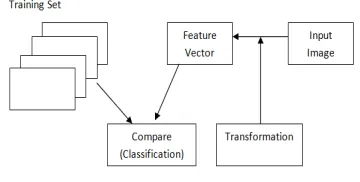
[image:1.612.345.525.506.597.2]The Gesture Recognition system is shown in Figure 1. It shows the flow of system for recognizing the patterns. Some transformation, converts an image into a feature vector, which will be then compared with feature vectors of a training set of gestures. [4]
Figure 1. Gesture Recognition System
B. Artificial Neural Network
The brain is therefore a network of neurons acting in parallel – a Neural Network.
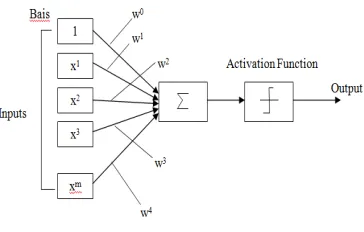
[image:2.612.89.271.145.261.2]Similarly, an Artificial Neural Nets consists of artificial neurons, which are mathematical models of biological neurons. Like the biological neuron, an artificial neuron (called a perceptron), receives numerical values and also outputs a numerical value. The diagram below shows a representation of an artificial neuron.
Figure 2. Representation of an Artificial Neuron
The input into the perceptron consists of the numerical value multiplied by a weight plus a bias. The perceptron only fires an output when the total strength of the input signals exceeds a certain threshold. As in biological neural Networks, this output is fed to other perceptrons.
The weighted input to a perceptron is acted upon by a function (the transfer function) and this will determine the activation or output. Common transfer functions used in Artificial Neural networks include the Hard Limiter, Log-Sigmoid and the Sign function.
An artificial neural network involves a network of simple processing elements (artificial neurons) which can exhibit complex global behavior, determined by the connections between the processing elements and element parameters. It consists of an interconnected group of artificial neurons and processes information using a connectionist approach to computation. In most cases an ANN is an adaptive system that changes its structure based on external or internal information that flows through the network during the learning phase. The supervised learning paradigm is also applicable to sequential data (e.g., for speech and gesture recognition). In MATLAB, Feedforword and Backpropogation algorithms are used for gesture recognition. [5]
II. EDGE DETECTION ALGORITHM FOR
HAND GESTURE RECOGNITION
The procedure of Edge detection algorithm for hand gesture recognition using MATLAB is as follows;
1. Image capturing using a webcam or the front camera of the mobile phone.
2. Converting the captured image into frames. 3. Image pre-processing using Histogram
Equalization.
4. Edge detection of the hand by using an algorithm like Canny Edge Detection.
5. Enlargement of the edges of regions of foreground pixels by using Dilation to get a continuous edge. 6. Filling of the object enclosed by the edge.
7. Storing the boundary of the object in a linear array. 8. Vectorization operation performed for every pixel
on the boundary.
9. Detection of the fingertips.
10. Tracking of the fingertips in consecutive frames to determine the motion.
11. Identification of the gesture based the motion. 12. Insertion of the input stream into the normal input
[image:2.612.345.539.173.351.2]path of the computing device.
Figure 3. Block Diagram Using Edge Detection Algorithm
Figure 3 shows the block diagram using the Edge Detection Approach. The images are first captured using a webcam, separated into frames and converted into grayscale format. The contrast is then improved using Histogram Equalization. After the edges are detected, the images are dilated to fill up the broken edges. The images are then filled up using bwboundaries function in MATLAB, and the boundary pixels are detected and stored sequentially in a linear array. The fingertips are then detected using vectorization technique and the gesture is recognized by the system depending on the relative movement of the fingertips in the different frames.
III. WORKING OF EDGE DETECTION
ALGORITHM
A. Video Capturing using a Camera
The image will be captured with the help of a single web camera, which will then lead to the image pre-processing stage. In case of mobile phones, it will be captured by the front camera of the mobile phones.
B. Frame Separation
The frames of the captured video are saved as images. A MATLAB function is used for this purpose.
C. Object Tracking
then is kept constant for the subsequent frames. Thus, the need of having a common co-ordinate system for all images is eliminated. This sort of a system emulates a human eye i.e. the brain perceives any gesture irrespective of the background.
D. Image Preprocessing
This block will basically concentrate on Histogram Equalization. In this stage we aim to increase the contrast among neighboring pixels, as shown in Figure 4(b). The lowest colored pixel value is reduced to zero and the greatest colored pixel value is made to value 255. The other neighboring pixel values are averaged and spaced out in a similar manner. This helps us to locate our object of interest from the background.
Fig (a) Before Histogram Equalization
Fig (b) After Histogram Equalization
Figure 4. Histogram Equalization Process
E. Edge Detection
After converting this image into grayscale image edge detection is applied. Here we find the points of the image where there are sharp edges or discontinuities or where sharp change in brightness is encountered. We will apply the Canny Edge Detection Algorithm for the purpose of detecting points at which image brightness changes sharply or formally, there are more discontinuities.
The algorithm takes grayscale image on input and returns bi-level image where non-zero pixels mark detected edges. Below the 4-stage algorithm is described. [6]
Stage 1: Image Smoothing
The image data is smoothed by a Gaussian function of width specified by the user parameter.
Considering the Gaussian function in one dimension, this may be expressed
As we go on taking successive derivatives we get smoother image.
Stage 2: Differentiation
The smoothed image, retrieved at Stage 1, is differentiated with respect to the directions x and y. From the computed gradient values x and y, the magnitude and the angle of the gradient can be calculated using the hypotenuse and arctangent function.
Stage 3: Non-Maximum Suppression
After the gradient has been calculated at each point of the image, the edges can be located at the points of local maximum gradient magnitude. It is done via suppression of non-maximum points, that is, points whose gradient magnitudes are not local maximums. However, in this case the non-maximums perpendicular to the edge direction, rather than those in the edge direction, have to be suppressed, since the edge strength is expected to continue along an extended contour.
At each point the center element of the neighborhood is compared with its two neighbors along line of the gradient given by the sector value. If the central value is non-maximum, that is, not greater than the neighbors, it is suppressed.
Stage 4: Edge Thresholding
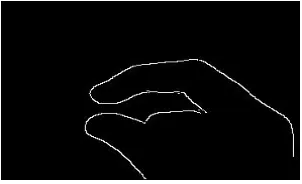
[image:3.612.73.275.248.331.2]The Canny operator uses the so-called “hysteresis” thresholding. Most thresholders use a single threshold limit, which means that if the edge values fluctuate above and below this value, the line appears broken. This phenomenon is commonly referred to as “streaking”. Hysteresis counters streaking by setting an upper and lower edge value limit. Considering a line segment, if a value lies above the upper threshold limit it is immediately accepted. If the value lies below the low threshold it is immediately rejected. Points which lie between the two limits are accepted if they are connected to pixels which exhibit strong response. The likelihood of streaking is reduced drastically since the line segment points must fluctuate above the upper limit and below the lower limit for streaking to occur. The Canny Algorithm recommends the ratio of high to low limit to be in the range of two or three to one, based on predicted signal-to-noise ratios. Fig.5 shows the edge-detected hand.
[image:3.612.64.271.387.477.2] [image:3.612.367.518.602.694.2]F. Dilation
After applying edge detection, due to lighting conditions at times the edges are broken. So we dilate the edges by thickening them.
The mathematical definition of dilation for binary images is as follows:
1. Suppose that X is the set of Euclidean coordinates corresponding to the input binary image, and that K is the set of coordinates for the structuring element. Let
Kx denote the translation of K so that its origin is at x. 2. Then the dilation of X by K is simply the set of all
points x such that the intersection of Kx with X is non-empty.
Greyscale dilation with a flat disk shaped structuring element will generally brighten the image. Bright regions surrounded by dark regions grow in size, and dark regions surrounded by bright regions shrink in size. Small dark spots in images will disappear as they are `filled in' to the surrounding intensity value. Small bright spots will become larger spots. The effect is most marked at places in the image where the intensity changes rapidly and regions of fairly uniform intensity will be largely unchanged except at their edges.
Figure 6 (a) Graph of Dilation
Fig 6(b) Dilated Image
G. Image Filling and Boundary Detection
From the hand contour obtained from the preprocessing steps, the feature of interest is the set of fingertips, which, in turn, is a subset of the boundary of the hand. We use
bwboundaries, a MATLAB function to store the boundary
of the hand contour in a linear array, formed sequentially from the topmost and leftmost boundary pixel, which is on.
bwboundaries detects boundaries of filled images or holes
[image:4.612.374.512.54.167.2]within filled objects. Thus, we fill the continuous edge of the hand contour with white pixels as shown in Fig.7.
Figure 7. Filled Image
Further, we detect boundaries of all objects in a cell array, each cell corresponding to the boundary of one object, and each element in every cell corresponding to a pixel on the boundary of that object. Since the hand should ideally correspond to the largest object in the image, we detect the largest cell array for use in vectorization. This eliminates any adverse effects noisy background might have on fingertip detection.
H. Vectorization
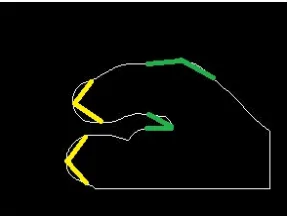
In order to reduce computing complexity we define the angle C(i) between two vectors [P(i-k), p(i)] and [P(i), p(i+k)] as curvature, where k is a constant. The points along the edge where the curvature reached a local extreme, that is the local features, are then identified. Some of these local features are labeled as “peak” or “valley”. We use this algorithm to compute curvatures at every point, and thus detect positions of the fingertip in the boundary detected hand contour as shown in Figure 8 below.
Figure 8. Vectorization: Yellow vectors denote curvatures belonging to a fingertip;
green vectors denote curvatures, which do not belong to a fingertip
I. Fingertip tracking and gesture identification
[image:4.612.78.279.321.550.2]In fingertip tracking and Gesture Identification; we can use ANN algorithm, to train the system and accordingly give us the necessary output. Artificial neurons are much simpler than the biological neuron; figure shows the basics of artificial neurons.
[image:4.612.371.515.395.504.2] [image:4.612.354.540.644.713.2]The ability of neural networks to discover nonlinear relationships in input data makes them ideal for modeling nonlinear dynamic systems such as the stock market.
1. Training a Neural Network
A neural network must be trained on some input data. The two major problems in implementing this training discussed are:
1. Defining the set of input to be used (the learning environment)
2. Deciding on an algorithm to train the network
2. The Learning Environment
One of the most important factors in constructing a neural network is deciding on what the network will learn. The goal of most of these networks is to decide when to buy or sell securities based on previous market indicators. The challenge is determining which indicators and input data will be used, and gathering enough training data to train the system appropriately. The input data may be raw data on volume, price, or daily change, but it may also include derived data such as technical indicators or fundamental indicators. Determining the proper input data is the first step in training the network. The second step is presenting the input data in a way that allows the network to learn properly without overtraining.
3. Network Training
[image:5.612.335.552.554.716.2]Training a network involves presenting input patterns in a way so that the system minimizes its error and improves its performance. The training algorithm may vary depending on the network architecture, but the most common training algorithm used when designing financial neural networks is the backpropagation algorithm. [6]
Figure 10. Backpropagation Network
The most common network architecture for financial neural networks is a multilayer feedforward network trained using backpropagation. Backpropagation is the process of backpropagating errors through the system from the output layer towards the input layer during training. Backpropagation is necessary because hidden units have no training target value that can be used, so they must be trained based on errors from previous layers. The output layer is the only layer which has a target value for which to compare. As the errors are back propagated through the nodes, the connection weights are changed. Training occurs until the errors in the weights are sufficiently small to be accepted.
During feed forward, each input unit receives an input signal and broadcasts this signal to each of the hidden units. Each hidden unit then computes its activation and sends its
signal to each output unit. Each output unit computes its activation to form the response for the given input pattern.
During back propagation of associated error, the output from the output units are compared with the target value associated with output unit and error is calculated. This error is then backpropagated back to the hidden units and similarly the errors from hidden layers are back propagated to the input layer.
We detect fingertips in every frame of the gesture, and based on the positions of the fingertips in successive frames, and in all frames as a whole; we decide which gesture was performed. In order to overcome errors caused by false fingertip detection in some frames, we average the positions of fingertips in a few frames to better detect possible positions of the fingertip successively.
The translation of the fingertips from the start of the gesture to the end decides which gesture was performed.
IV. EXPERIMENTAL RESULT
As edge detection is a fundamental step in computer vision, it is necessary to point out the true edges to get the best results from the matching process. For edge detection Canny edge detection algorithm is used. The algorithm runs in 5 separate steps:
1.
Smoothing: Blurring of the image to remove noise.2.
Finding gradients: The edges should be marked where the gradients of the image has large magnitudes.3.
Non-maximum suppression: Only local maxima should be marked as edges.4.
Double thresholding: Potential edges are determined by thresholding.5.
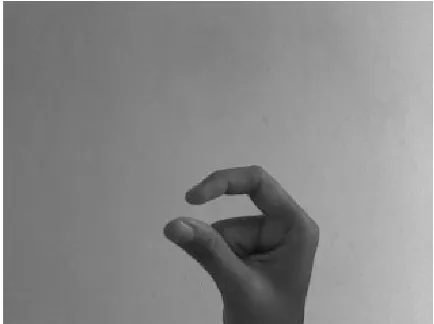
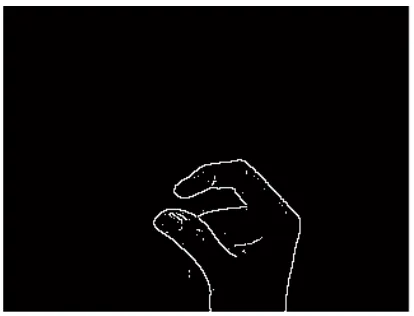
Edge tracking by hysteresis: Final edges are determined by suppressing all edges that are not connected to a very certain (strong) edge.Take one image from webcam and after that edge detection algorithm is applied on that image in MATLAB. Once image is taken, read that image from the MATLAB code. Then apply this edge detection algorithm. The output of this algorithm is given in figure 11.
Figure11 (a) shows the original image and Figure11 (b) shows the output image with edges detected using edge detection algorithm.
Figure (b) After Edge Detection
Figure 11. Experimental Result of Edge detection
As shown in figure, Canny yielded the best results. An adaptive edge-detection algorithm is necessary to provide a robust solution that is adaptable to the varying noise levels of these images to help distinguish valid image contents from visual artifacts introduced by noise. The performance of the Canny algorithm depends heavily on the adjustable parameters, and the threshold values
IV. CONCLUSION
Human hand gestures provide the most important means for non-verbal interaction among people. At present, artificial neural networks are emerging as the technology of choice for many applications, such as pattern recognition, gesture recognition, prediction, system identification, and control. ANN provides good and powerful solution for gesture recognition in MATLAB. ANN has a fast
computational ability. The ability of neural nets to generalize makes them a natural for gesture recognition.
Edge detection algorithm based on ANN provides the emerging approach for hand gesture recognition. This algorithm also gives the recognized output from start of the gesture to the end which gesture was performed. By using this algorithm fingertip tracking is possible. So it provides the solution for controlling the various operations on fingertip for better Human-Computer Interaction.
IV. REFERENCES
[1] Kay M. Stanney, “A Handbook of Virtual Environments: Design, Implementation, and Applications”, Lawrence Erlbum Associates, Mahwah, NJ. Publication, page 223, 2002.
[2] Aditya Ramamoorthy, Namrata Vaswani, Santanu Chaudhury and Subhashis Banerjee, “Recognition of dynamic hand gestures”, Pattern Recognition 36 (2003) 2069 – 2081, The Journal of Pattern Recognition Society. Elsevier Science Ltd. vol. 36, no. 9, pp 2069-2081, October 2002.
[3] http://en.wikipedia.org/wiki/Gesture_recognition. [4] Rajeshree Rokade, Dharmpal Doye, Manesh Kokare,
“Hand Gesture Recognition by Thinning Method”, ICDIP, International Conference on Digital Image Processing, IEEE Computer Society, pp.284-287, 2009. [5] Peter Wentworth. “An Investigation into Gesture
[image:6.612.78.285.61.219.2]