Mouse Control using a Web Camera and Hand
Gestures with Colour Tapes
Akshay Ishwar Pawar Sahil Prakash Tumbare
Department of Computer Engineering Department of Computer Engineering STES’s Smt. Kashibai Navale College of Engineering Pune,
India
STES’s Smt. Kashibai Navale College of Engineering Pune, India
Tejal Avinash Godse Tejaswini Wagh
Department of Computer Engineering Department of Computer Engineering STES’s Smt. Kashibai Navale College of Engineering Pune,
India
STES’s Smt. Kashibai Navale College of Engineering Pune, India
Dr. K.N. Honwadkar Department of Computer Engineering
STES’s Smt. Kashibai Navale College of Engineering Pune, India
Abstract
As we know, for every electronic device, we need to perform some actions to control them. For example, in computers we use mouse cursor movements (left click, right click, double click) to perform different actions. There are mainly three ways to control mouse: wired mouse, touch-pad for laptops, joystick, touch screen technology and gesture recognition (facial expressions, hand, head, voice).In this paper, we represent a novel approach for better human computer interaction (HCI) where we are using hand gesture recognition using real-time camera in order to overcome the drawbacks of existing methods and make the system cheaper and more user friendly. Our method is to use a camera and computer vision technology, such as image segmentation and gesture recognition, to control mouse tasks. Hand gestures are acquired using web camera based on color detection. In this paper two color tapes (dynamic colors) are used on fingers. The tapes will be used for controlling cursor movement and the relative distance between the two colored tapes will be used for click events of the mouse. Through web camera the real time video is captured. After that image processing is performed on each frame of that video in order to detect the colour. And accordingly particular actions are performed on the screen. This will be useful to promote controlling applications like computer games, browsing images etc.
Keywords: Hand gesture, colour detection, human computer interaction (HCI), HSV Color Model, Web camera
________________________________________________________________________________________________________
I. INTRODUCTION
II. MOTIVATION
We all are living in digital world in which we are dealing with different technologies. The most important inventions are computers, laptops, and mobiles etc. which have become part and parcel of our life. We complete our all tasks with the help of these technologies. Because of this our life becomes faster, easy and more relaxed. In the present day scenario most of the mobile phones are using touch screen technology to interact with the user. Also we are using different devices like mouse, joysticks in order to handle laptops, computers .But these are all hardware devices and these may get damage over a period of time. We need to handle such devices very carefully in order to overcome from such hardware problems .There is another technology like touchscreen technology which works better than mouse or other devices but there are also some drawbacks of such technology like touch sensations may decrease over a period of time. And it is still not cheap to be used in desktops and laptops .And it will become difficult to handle such problems. So we thought there should be one system which will overcome such drawbacks and works more effectively .And most important is it should be more cost effective and user friendly .Hand gesture recognition using color tapes(random colors) gives better performance. Such system already implemented in Sony Vaio but in such system they used sensors which are present besides camera which increases its cost. So we thought instead of using sensors, we can use only web camera so that cost of the system will get reduced greatly. And also in this system there will not be used any external hardware so that performance will get constantly maintained. And hence all expected drawbacks will get greatly reduced.
III. RELATED WORK
In reference [1], Erden et al have used a camera and computer vision technology, such as image segmentation and gesture recognition, to control mouse tasks. Another approach was developed by Chu-Feng Lien [2] had He used only the finger-tips to control the mouse cursor and click. His clicking method was based on image density, and required the user to hold the
Mouse cursor on the desired spot for a short period of time. Kamran Niyazi [3] et al used Web camera to detect color tapes for cursor movement. The clicking actions were performed by calculating the distance between two colored tapes in the fingers. In their paper [4] K N Shah et al have represented some of the innovative methods of the finger tracking used to interact with a computer system using computer vision. They have divided the approaches used in Human Computer Interaction (HCI) in two categories: 1. HCI without using interface and 2. HCI using interface. Moreover they have mentioned some useful applications using finger. Paul [5] et al,[used still another method to click. They used the motion of the thumb (from a ‘thumbs-up’ position to a fist) to mark a clicking event thumb. Movement of the hand while making a special hand sign moved the mouse pointer. . Our project was inspired by a paper of Hojoon Park [6] where he used Computer vision technology and Web camera to control mouse movements. However, he used finger-tips to control the mouse cursor and the angle between the thumb and index finger was used to perform clicking actions tracking through computer vision.
IV. GAP ANALYSIS
Here present systems for controlling mouse movements are compared with respect to different parameters: Table – 1
GAP Analysis Parameter H/W usage like mouse,
joystick etc.
Touchscreen technology
Hand gestures based on sensors
Hand gestures based on color detection
Cost High High Moderate Low
Expernal
Hardware Yes No No No
Performance High Low Low Moderate
Accuracy High Moderate Moderate Moderate
User Friendly Yes Yes Yes Yes
Complexity High High High Moderate
V. PROPOSED WORK
image which contains the detected object as a patch of grey surrounded by black space. That gray scale Image will be converted into Binary scale Image. Finally Centroid of an object will be found out and different clicking actions will be performed on the screen.
Fig. 1: System Architecture VI. USE CASE
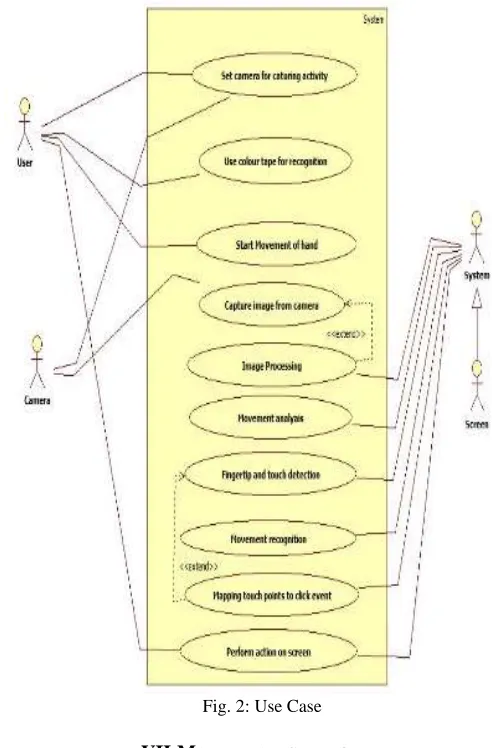
Use Case Name:
Mouse Control using a Web Camera and Hand Gestures with colour tapes Primary Actor:
User
Secondary Actor: Screen
Fig. 1: Entity Relationship Diagram Condition:
Background should be of stable colour such that this color should not present on fingers. Use Case Description:
Fig. 2: Use Case VII. MATHEMATICAL MODEL
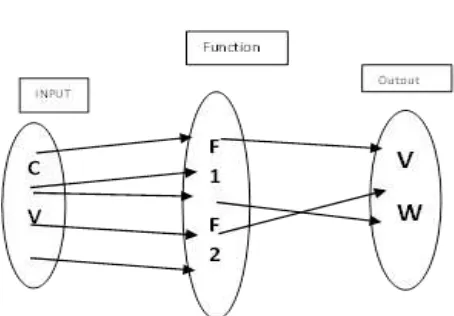
Input
S = { C, V, B, K …}
C= {C1, C2, C3, … |’C’ gives the camera}
V = {V1, V2, V3, …| ‘V’ gives live camera feed as video} K = {K1, K2, K3, …| ‘K’ gives the key
Output:
S = {C, V, B, W, K…
V = {V1, V2, V3, …| ‘V’ gives live camera feed as video} W= {W1, W2 …| ‘W’ gives the select and other actions on screen} K = {K1, K2, K3, …| ‘K’ gives the key pressed}
Functions:
S = {C, V, I, A, F…
F = { F1(), F2(), F3(), F4(), F5()} F1 (C):: Fetch camera feed as video
F2 (V):: Process video i.e. Image Processing to detect finger movement F3 (V):: Detect Key pressed
F4 (K):: display mouse action on screen
F5 (B):: use colored tape on fingers to detect finger movement and adjust the camera. Success Conditions:
VIII. CONCLUSIONS AND FUTURE SCOPE
In this paper, an object tracking based virtual mouse application has been developed and implemented using a webcam. The system has been implemented in JAVA environment. We implemented all mouse tasks such as left and right clicking, double clicking, and scrolling. In the future, we plan to add more features such as enlarging and shrinking windows, closing window, etc. This technology has wide applications in the fields of augmented reality, computer graphics, computer gaming, prosthetics, and biomedical instrumentation. Furthermore a similar technology can be applied to create applications like a digital canvas which is gaining popularity among artists. In case of computer graphics and gaming this technology has been applied in modern gaming consoles to create interactive games where a person’s motions are tracked and interpreted as commands. Most of the applications require additional hardware which is often very costly. Our motive was to create this technology in the cheapest possible way and also to create it under a standardized operating system. Various application programs can be written exclusively for this technology to create a wide range of applications with the minimum requirement of resources.
REFERENCES
[1] A. Erdem, E. Yardimci, Y. Atalay, V. Cetin, A. E. “Computer vision based mouse”, Acoustics, Speech, and Signal Processing, Proceedings. (ICASS). IEEE
International Conference, 2002
[2] Hojoon Park, “A Method for Controlling the Mouse Movement using a Real Time Camera”, Brown University, Providence, RI, USA, Department of computer
science, 2008
[3] Chu-Feng Lien, “Portable Vision-Based HCI – A Realtime Hand Mouse System on Handheld Devices”, National Taiwan University, Computer Science and
Information Engineering Department
[4] Kamran Niyazi, Vikram Kumar, Swapnil Mahe, Swapnil Vyawahare, “Mouse Simulation Using Two Coloured Tapes”, Department of Computer Science,