FileCloud
Cloud Filesystem based Processing Offloading
Tiago Amaral Almeida Lima
Thesis to obtain the Master of Science Degree in
Information Systems and Computer Engineering
Examination Committee
Chairperson:
Professor Jos ´e Carlos Alves Pereira Monteiro
Supervisor:
Professor Jo ˜ao Nuno de Oliveira e Silva
Member of the Committee:
Professor Renato Jorge Caleira Nunes
Agradecimentos
Tenho muito a agradecer a v ´arias pessoas pela ajuda prestada e disponibilidade durante a realizac¸ ˜ao desta dissertac¸ ˜ao, especialmente:
• Ao meu orientador Jo ˜ao Nuno de Oliveira e Silva, pela oportunidade e confianc¸a dada para a realizac¸ ˜ao deste projeto. Por todos os esclarecimentos durante todas as fases do projeto, e pela disponibilidade para ler e comentar o meu trabalho, permitindo-me obter um melhor resultado final.
• Um obrigado muito especial aos meus pais, Jorge Lima e Ana Almeida, por todo o incentivo, paci ˆencia, e especialmente, pelo grande esforc¸o financeiro que fizeram durante a minha vida acad ´emica.
• Ao meu irm ˜ao, Pedro Lima, por todo o incentivo dado.
• A minha namorada, Carolina Gomes, pelo apoio e carinho dado durante esta fase.`
• Ao INESC-ID, por me ter fornecido todas as condic¸ ˜oes de trabalho necess ´arias para a realizac¸ ˜ao deste projeto.
• Aos meus colegas pela partilha de conhecimentos e pelas cr´ıticas construtivas. Um agradec-imento especial ao Hugo Pimentel e ao Andr ´e Ribeiro, pela disponibilidade para me ajudarem durante a fase de testes.
Resumo
Hoje em dia, os dispositivos m ´oveis, como smartphones ou tablets, t ˆem a capacidade de estarem conectados `a Internet, onde quer que estejam, com velocidades razo ´aveis. Portanto, os utilizadores conseguem aceder aos servic¸os nacloudsempre que quiserem.
Para al ´em disso, os dispositivos m ´oveis est ˜ao a tornar-se muito poderosos, pelo que os utilizadores atualmente conseguem realizar tarefas t ˜ao exigentes, que h ´a poucos anos, apenas computadores pes-soais conseguiam desempenhar. Apesar das baterias e dos ecr ˜as estarem a evoluir, a capacidade da bateria e o tamanho do ecr ˜a continuam a ser um fator de limitac¸ ˜ao, para que o utilizador consiga usar estes dispositivos com efici ˆencia.
Ooffload do processamento ´e uma soluc¸ ˜ao vi ´avel para ultrapassar estas limitac¸ ˜oes, melhorando
assim tanto a efici ˆencia do consumo de energia, como a experi ˆencia de utilizador. O FileCloud une os dispositivos m ´oveis com computadores n ˜ao usados na vizinhanc¸a, permitindo o processamento de ficheiros no dispositivo com melhores caracter´ısticas. Estes ficheiros podem ser armazenados num sistema de ficheiros baseado nacloud, estando dispon´ıveis para ambos os dispositivos, ou podem ser transferidos diretamente do dispositivo m ´ovel para o computador. O FileCloud reduz os problemas de usabilidade, porque os ficheiros podem ser acedidos no computador, reduzindo o consumo de energia no dispositivo m ´oveis, j ´a que este entra no estado inativo.
O FileCloud ´e completamente transparente para o utilizador (no que diz respeito `a descoberta e selec¸ ˜ao dos recursos dispon´ıveis, e execuc¸ ˜ao da aplicac¸ ˜ao), permite um consumo de energia mais eficiente na maioria das tarefas e reduz o tempo despendido pelo utilizador.
Palavras-chave:
Cloud,Offloadde computac¸ ˜ao, Economia de energia, Poder de computac¸ ˜ao,Abstract
Nowadays, mobile devices, such as smartphones or tablets, have the ability to be connected to the Internet anywhere and anytime with very reasonable speeds. With this feature, users can access the cloud services wherever they are, whenever they want. Furthermore, mobile devices are also becoming very powerful, so that users start doing there demanding tasks, that some years ago only desktop or laptop computers could perform. Although battery and display technologies are improving, battery capacity and display size are still limiting factors for the user to use mobile devices efficiently.
Processing offloading (in order to user remote, but nearby desktop computers) is a viable solution to overcome battery and display limitations, increasing energy efficiency and usability. FileCloud unifies mobile devices with nearby idle desktop computers in the neighborhood, allowing the processing of files on the device with better characteristics. These files can be stored in a Cloud based FileSystem, thus being available to both devices, on can be transferred directly from the mobile device to the desktop computers. With FileCloud, usability issues are reduced since files can be accessed on desktop com-puters, thus the energy consumption is reduced on the mobile devices since they become idle after the offload of the task.
FileCloud is completely transparent to the user (w.r.t. the discovery and selection of the best host and application to be launched), allows gains in the energy consumption on most tasks (e.g. video visualization) and reduces the time spent by the user (in task such as image editing).
Contents
Agradecimentos . . . i
Resumo . . . iii
Abstract . . . v
List of Tables . . . ix
List of Figures . . . xii
1 Introduction 1 1.1 Motivation . . . 1 1.2 Objectives . . . 2 1.3 Dissertation outline . . . 2 2 Related Work 3 2.1 Cyber foraging . . . 3 2.2 SPADE . . . 4 2.3 CloneCloud . . . 5 2.4 Jupiter . . . 7 2.5 Cuckoo Framework . . . 8
2.6 Virtual Network Computing . . . 9
2.7 Media Centers . . . 10
2.8 Distributed User Interfaces . . . 11
2.9 Resource Discovery . . . 12
2.10 Current solutions limitations . . . 15
3 Target Environment 17 3.1 Operating System . . . 17
3.1.1 Android SDK . . . 18
3.1.2 Other Android programming tools . . . 19
3.2 Cloud services . . . 20
3.3 Cloud-based File System . . . 21
3.4 Connectivity . . . 21
3.4.1 Wi-Fi . . . 21
3.4.3 Mobile Cellular Systems . . . 23 4 FileCloud 25 4.1 Architecture . . . 26 4.1.1 Client Architecture . . . 26 4.1.2 Server Architecture . . . 27 4.2 Execution Flow . . . 28
4.2.1 Resource Discovery Phase . . . 29
4.2.2 Offloading Task Phase . . . 29
4.3 Implementation . . . 30
4.3.1 Installation and configuration . . . 31
4.3.2 File System . . . 31 4.3.3 Task Manager . . . 31 4.3.4 FileGetter . . . 32 4.3.5 Resource Discovery . . . 33 4.3.6 Offloader . . . 35 4.3.7 Request Listener . . . 35 4.3.8 Application Management . . . 35 4.4 User Interaction . . . 37 4.4.1 Client UI . . . 37 4.4.2 Server UI . . . 38 4.5 Interoperability . . . 39 4.5.1 Mono on Xubuntu 12.10 . . . 40 5 Evaluation 41 5.1 Video Visualization . . . 41 5.2 Image Editing . . . 43 5.2.1 Invert colors . . . 43 5.2.2 Crop . . . 44 5.3 Writing . . . 45 5.4 Overheads . . . 46 5.5 Discussion . . . 46 6 Conclusions 47 6.1 Future Work . . . 48 Bibliography 51
List of Tables
5.1 Hardware specifications. . . 41
5.2 Properties of the video samples. . . 41
5.3 Video visualization tests overview. . . 42
5.4 Results of Invert colors test. . . 43
List of Figures
2.1 CloneCloud system model. . . 6
2.2 Cuckoo Framework. . . 9
2.3 VNC architecture. . . 9
2.4 HTPC architecture. . . 10
2.5 UPnP protocols stack. . . 13
2.6 STARC architecture. . . 14
3.1 Mobile Operating System market share. . . 17
3.2 Android architecture . . . 18
3.3 Wi-Fi usage example. . . 22
3.4 Bluetooth usage example. . . 23
3.5 3G usage example. . . 23
4.1 FileCloud usage overview. . . 25
4.2 Architecture overview. . . 26
4.3 Client architecture. . . 26
4.4 Server architecture. . . 27
4.5 Execution Flow. . . 28
4.6 Execution flow of the resource discovery phase. . . 29
4.7 Execution flow of the offloading task phase. . . 30
4.8 FileGetter mapping. . . 32
4.9 File mapping. . . 33
4.10 Information sent on Resource Discovery’s LAN Broadcast. . . 34
4.11 Information sent to start the task . . . 35
4.12 Application found and launched for the image file selected. . . 36
4.13 Launching Google Docs editors. . . 36
4.14 Client File Explorer. . . 37
4.15 Client action selector. . . 37
4.16 FileCloud Server UI. . . 38
4.17 FileCloud usage example. . . 38
5.1 Video visualization results . . . 42
5.2 Invert colors test. . . 43
5.3 Invert colors test results. . . 44
5.4 Crop test. . . 44
5.5 Crop test results . . . 45
5.6 Writing test results . . . 45
Chapter 1
Introduction
1.1
Motivation
Nowadays, mobile devices, like smartphones and tablets, have the ability of being connected to the Internet anywhere and anytime with very reasonable speeds by using LTE or 3G network, or even by Wi-Fi connection. With this, either the users can access the cloud services whenever they want. This is useful because, in some way, cloud resources can be used to reduce hardware limitations of mobile devices [1].
Over the past few years, several cloud services were developed for many different purposes. Storage cloud services are those more used by regular users, for example, Dropbox1 or Google Drive2. With these services the users can store their files in the cloud and access them anywhere, every time they are connected to the Internet.
Mobile devices are also becoming very powerful. So powerful that they can perform some demanding tasks that some years ago only desktop or laptop computers could do, for example, video visualization or word processing. But running these tasks introduces some problems to the user. The battery tech-nology has improved over the past years, but processors’ power has also increased and due to this, the battery continues to drain fast [13]. To address this problem, many systems implemented the concept of Computation Offloading. This concept consists in assigning part, or even all of the workload onto devices in the neighborhood or in the cloud, freeing the device of this work and saving battery power.
But there is one specific problem that has never been addressed by these kinds of systems: how to take advantage of nearby idle computers to complement and augment mobile devices. It would be very useful for the users to take advantage of desktop applications, which provides a much richer user experience. For example, currently, the applications available for video or word document editing aren’t even comparable to the desktop ones. They lack many features that the user may want to use.
Nowadays, users working on a smart-phone or tablet can’t, in an easy and straightforward manner, take advantage of nearby computers to execute tasks that are slow or cumbersome to execute on the mobile device (such as image edition of word processing: user must to walk to his desktop computer or
1Dropbox, https://www.dropbox.com/ 2Google Drive, https://drive.google.com
laptop, search again for the file and open the appropriate application. All this process is a burden for the user.
1.2
Objectives
This document presents FileCloud, a system that unifies the following resources: mobile devices, cloud storage and nearby desktop PCs. With FileCloud the user can take advantage of idle desktop computer to execute some actions that are not suited to run on a mobile device. Also, the better processor on the desktop computer helps a lot doing these tasks, because the majority of the mobile devices still have very weak processors, and lack a large display and keyboard.
With FileCloud, the user opens a file on the mobile device, but transparently FileCloud searches for a suitable device to open this file, and transfers the processing (or visualization) to such computer. When the user reaches the computer the application was already launched and ready for the user to do what they want. FileCloud also allows the user to take advantage of the better user interface of the desktop application, and at the same time take advantage of a bigger display.
FileCloud implements a client-server architecture: a client installed on a mobile device and servers on a neighbor desktop computers. On the client after the user selects a file, stored in the cloud, FileCloud scans the neighborhood for available computers and communicates, in order to know their specifications, together with the actions that can be made for that file type, depending on the installed applications. When the action is selected the client sends the information needed for the server installed in the desktop computer. Then the appropriate application is selected automatically and launched for the user. In sections 4.1 and 4.2 the architecture and execution flow are explained in more detail.
1.3
Dissertation outline
Chapter 2 addresses the current state of the art, describing some systems currently available related to FileCloud. On Chapter 3 is described the technologies studied to use on FileCloud. Then, Chapter 4 describes FileCloud in more detail. It presents the architecture, execution flow and its implementation. On Chapter 5 the evaluation results are presented and discussed. Finally, on Chapter 6 the conclusions are presented, together with the achievements of this project and some ideas for the future work.
Chapter 2
Related Work
In this section is described some system that are related to FileCloud. The systems and architectures here described fall in one of the following categories: Processing Offloading, Mobile Cloud, User In-terface (UI) mobility and Home Entertainment Systems. Although the systems try to solve the same problem as FileCloud, none of them use the existing Cloud file systems as a data communication to layer and use neighbor computer to provide a better user experience on a mobile environment.
2.1
Cyber foraging
Cyber foraging [1] [20] [7] is a mechanism to augment the computational and storage capabilities of mobile devices. It uses discovered servers in the environment to improve the performance of applications and distributed file systems on mobile clients.
Cyber foraging solves the problem of making mobile devices smaller, lighter and long-running without compromises their computing capabilities. This is because the user has an ever-growing expectation that requires computing and data storage ability beyond that of a tiny mobile computer with a small battery. The idea is to dynamically augment the computing resources of a wireless mobile computer by exploiting nearby compute and data staging servers.
In [1], it was believed that in the future public spaces such as airport lounges or coffee shops will be equipped with compute and data staging servers [5] connected to the wired Internet through high-bandwidth networks. When hardware in the wired infrastructure plays this role, it is called a surrogate of the mobile computer it is temporarily assisting. These surrogates are untrusted and unmanaged, so it is the responsibility of the mobile clients to establish adequate trust in the surrogates they choose to use.
The following challenges must be overcome in order to utilize the idea of cyber foraging:
• Developing mechanisms whereby a potential surrogate can make some of its resources available to resource-constrained clients.
• Providing a means for surrogates to advertise their availability and clients to locate surrogates with appropriate available resources.
• Developing a mechanism whereby clients can transfer tasks to the surrogate.
• Making the remote execution of surrogate tasks be (largely) transparent and easy to program.
• Developing security and trust mechanisms so that surrogates can be assured that they (and their neighbors) will not be abused by surrogate computations.
In [7], some work has been done in order for the user to have secure cyber foraging infrastructures without requiring a heavyweight middleware system. The goal was to support cyber foraging on a conventional platform, without a large middleware layer, and demonstrate its use on real applications and systems. In order to achieve this goal, it was built a surrogate framework on top of widely available technology. It is used machine virtualization technology, such as VServer1and Xen [2], to provide basic
isolation. As the foundation of the security and authentication infrastructure, it uses publicly available encryption technologies, both public and private key. To locate potential surrogates, it was used a lightweight discovery protocol.
This work demonstrated the basic value of cyber foraging and shown how it can be used to en-able interesting applications on small (potentially embedded) devices, but many challenges must still be overcome before this long term vision will come to fruition.
In eyeDentify [11], Ibis, which is a Java based high performance distributed middleware [26], is explored for cyber foraging on mobile devices. It was used the Ibis Distributed Deployment to deploy the heavy weight computations onto surrogates and the Ibis High-Performance Programming System to efficiently communicate with them.
In order to evaluate Ibis, it was developed eyeDentify, a smartphone application, which can perform object recognition using the phone’s camera sensor. Two versions of eyeDentify were developed: a standalone version that runs on the phone itself and a distributed version that uses Ibis cyber foraging to offload computation. The Ibis cyber foraging improved the responsiveness of the application, with speedups of around 60 times, while the energy efficiency was about 40 times better.
The following systems implement cyber foraging in multiple ways. These systems allow, for example, the offloading of the computation of tasks to remote computers, but the user can’t take advantage of all the resources available on those computers. FileCloud aims to offload the computation to computers in the neighborhood, so the user can use all the resources available.
2.2
SPADE
SPADE [23] is a scheduler for parallel and distributed execution. SPADE can accelerate the manipulation of a batch of files using idle remote computer through jobs. These jobs that run on remote computers are composed of simpler tasks.
Using a simple user interface, a user with minimum computer knowledge can define the jobs, what is usable and how they can possibly be divided. Then SPADE transparently selects a computer on the
LAN and automatically uploads the files to the remote computer, executes the application defined by the user and downloads the resulting files back to the mobile device.
With quick tasks SPADE should not be used because the time being spent on sending the files and the jobs to the remote computer do not compensate. Therefore, SPADE is more useful if a user wants to perform lengthy tasks, such as repetitive data analysis of batches of files. Furthermore, to be accelerated, they have to be partitioned in a natural way, for example, batch image processing or statistical analysis of different data sets where each task processes a different input. Another example is to generate a movie with POV-Ray2, where each task has a numerical argument ranging from 0 to N,
being this number the frame being generated by that task.
FileCloud aims to be completely transparent to the user, i.e., the user only selects the proper file and the desired action and the system automatically stars the appropriate desktop application in the remote computer. So, SPADE does not solve our problem because it only uses the remote computer to process batches of files, not allowing the user to take advantage of the bigger screen and of the desktop applications to have a more complete environment for editing the files. SPADE also does not take advantages of the cloud storage. Every time the user wants to process a file, this file has to be sent to the remote computer and back to the mobile device. Furthermore, SPADE requires that the user have to define the application to run and the arguments.
2.3
CloneCloud
CloneCloud [3] is a system that automatically transforms mobile applications to benefit from the cloud, by optimizing the execution time and the energy used in the mobile device. The system solves problems such as bringing a demanding mobile application to needed cloud resources. It tends to be inflexible since an application is either written as a monolithic process, cramming all it needs to do on to the mobile device, or it is split in the traditional client-server paradigm, pushing most computation to the remote server, or it is perhaps tailored to match an expected combination of client, environment and service. But what might be the right split for a low-end mobile device with good connectivity may be the wrong split for a high-end mobile device with intermittent connectivity.
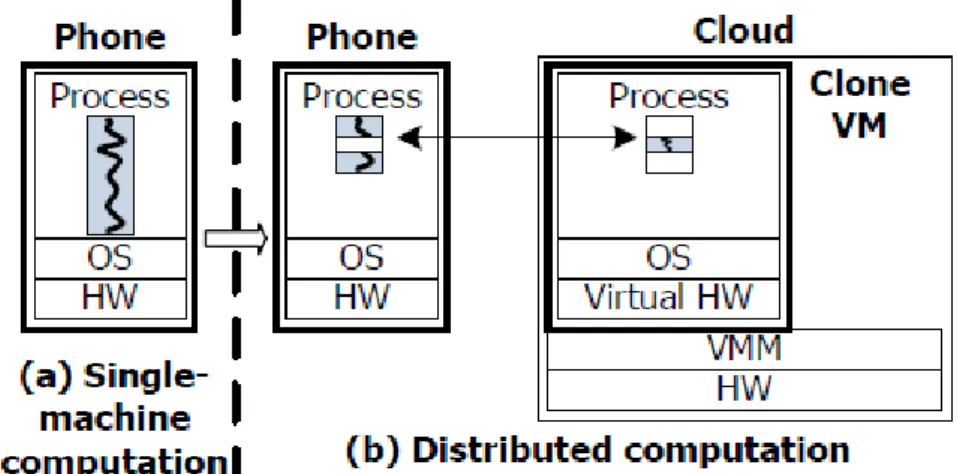
As Figure 2.1 shows, CloneCloud transforms a single-machine application into a distributed one, by rewriting an unmodified application executable. While the modified executable is running, at auto-matically chosen points individual threads migrate from the mobile device to a device clone in a cloud. The remaining functionality on the mobile device keeps executing, but blocks if it attempts to access migrated state. The migrated thread executes on the clone, possibly accessing native features of the hosting platform such as the fast CPU, network, hardware accelerators, storage, etc. Eventually, the thread returns back to the mobile device, along with remotely created state, which it merges back into the original process. The choice of where to migrate is made by a partitioning component, which uses static analysis to discover constraints on possible migration points, and dynamic profiling to build a cost model for execution and migration. A mathematical optimizer chooses migration points that optimize
objective (such as total execution time or mobile-device energy consumption) given the application and the cost model. Finally, the run-time system chooses what partition to use.
Figure 2.1: CloneCloud system model. CloneCloud transforms a single-machine execution (mobile device computation) into a distributed execution (mobile device and cloud computation) automatically.
By offloading the right portion of the applications execution onto the device clones that are operating in the cloud, CloneCloud can boost these applications since they can take advantage, for example, of a better processing power of the remote computer reducing the execution time. But there are other ”variables” that are analyzed before starting partitioning the execution, for example, if the execution on the clone is more reliable or more secure it may be worth it to take advantage of that. The partitioning of the application depends on the expected workload, such as CPU speed or network performance. It may be more fine-grained or not depending on these factors. This means that the same application run on different times may be partitioned differently.
Some design goals for CloneCloud are: to allow such fine-grained flexibility on what to run where and to take the programmer out of the burden of application partitioning.
The work made by the authors applies primarily to application-layer virtual machines (VMs), such as the Java VM3, DalvikVM4from the Android Platform5, and Microsoft’s .NET6. They chose to work with
application-layer VMs since they are widely used in mobile platforms.
CloneCloud takes advantage of the resources in the remote computer, but partitioning applications is not a good solution for our execution environment. The main feature of FileCloud is to take advantage of neighbor computers’ larger screens and better processors in the use of applications with a graphical user interface. Partitioning a user interface is very difficult, but does not free the mobile device from complex computations.
3Java, http://www.java.com/
4DalvikVM, http://code.google.com/p/dalvik/ 5Android Developers, http://developer.android.com/ 6Microsoft .NET, http://www.microsoft.com/net/
2.4
Jupiter
Jupiter [8] is a system to augment the capabilities of smartphones transparently and with the support of cloud computing. One or more cloud servers can be employed as the extension of the storage and computing capabilities of smartphones. The cloud provides storage of applications and user data, and also provides virtual machines to execute large applications that cannot be on smartphones due to resource constraints. Jupiter aims to achieve three primary goals.
The first goal was for mobile application management to be transparent to the user. To achieve this goal, the authors developed a customized application library, called the AppLib, as the storage of pre-certified applications. Applications (.apk) are processed before they are added to AppLib, such that the whole meta information can be extracted and converted to a searchable format. Sometimes this process required Human intervention. These applications can be upgraded and installed via the AppLib. When a user wants to run an application, the AppLib searches and compares all the applications and retrieves only the most appropriate one. When retrieved, the application is installed and launched without any intervention of the user. To upgrade one application transparently, new versions are update in the AppLib, either automatically or with human intervention. Then when the users run the application on their smartphones, the new version is loaded. When the phone storage is full, the applications less frequently used are removed without the notice of the user. The configurations and the data of these removed applications are kept in a transparent data storage, which is the second goal, and is restored automatically the next time the user requests an application.
The second goal was to create a transparent data storage. In order to create this data storage, the authors developed a mobile file system named TransFS, in which each user will have its space and provides the transparent data storage for their Android applications. The data and configurations can be stored at the server-side and accessed through the TransFS file system in a transparent way.
The third and final goal was a transparent desktop application execution. When a smartphone does not have capabilities to run an application or when a user requires a desktop application that do not have a mobile version, the virtual machine technology on the server is employed, with virtual network computing (VNC) capabilities implemented on the Android, the users can execute desktop applications just as they are executed on a desktop computer on their smartphones.
There are two ways to load an application. The first one is choosing an application in the Android Launcher. Jupiter maintains a list of applications, which are stored in the AppLib and the required application is loaded through a click. The second way is ”on-demand”, in which an application is loaded through another, for example, when a user wants to view an attachment file in an email client, Jupiter loads the corresponding viewer automatically from the AppLib based on the file. Desktop application can also be loaded similarly through the above two ways.
Jupiter introduces some concepts that are wanted for this project, such as executing desktop appli-cation or loading an appliappli-cation based on the file, but there are some differences. Jupiter does not take advantage of bigger screens on the neighbor when loading a desktop application. A bigger screen is very useful when editing an image or a video.
2.5
Cuckoo Framework
The Cuckoo framework [10] simplifies the development of smartphone applications that benefit from computation offloading and provides a dynamic runtime system that decides, at runtime, if a part of an application is going to be executed locally or remotely. This framework can be used to easily write and efficiently run applications that can offload computation.
Cuckoo offers a very simple programming model that is prepared for mobile environments. This programming model offers the developers an interface of the system, so it should be easy to use and understand. It must support both local and remote execution since when the mobile devices are not connected to the Internet, the cloud resources are unreachable. It must also allow the remote method implementation to be different from the local implementation. For example, the remote method could be parallelized in order to get full performance from the remote resources.
If an Android application that contains compute intensive operations is well programmed, there is already an interface available. If not, an interface can easily be extracted from the code. This interface is implemented as a local service that has a proxy object at the activity. Next to this local interface, the Cuckoo framework generates another interface for the remote implementation. In the beginning, the implementation of this new interface contains only dummy methods, in which the developer then replaces with real method implementations to be executed at the remote location. These methods can be equal to the local ones, but may also be different, since the remote implementation can run a different algorithm, use a different library, run in parallel, etc. During runtime, the method invocations to services are intercepted at the service side of the Stub/Proxy pair, which is at the Stub. Then, Cuckoo decides if the method should be invoked locally or remotely. Cuckoo also queries the Cuckoo Resource Manager for any available resources to see if they are reachable, and if so, use them.
Using Cuckoo for computation offloading, an application can offload its computation to any remote server, which runs a Java Virtual Machine. The user runs the server, written in Java, on the remote resource to enable it to be used for computation offloading. This server does nothing by itself, but services can be installed on it. The Android IPC mechanism directs the activity’s method invocation of a service through the proxy and the kernel to the stub. In a normal situation, this stub invokes the local implementation of the method and then return the result to the proxy, but Cuckoo intercepts all method calls and decides if it’s beneficial to offload the method invocation to a server, or not.
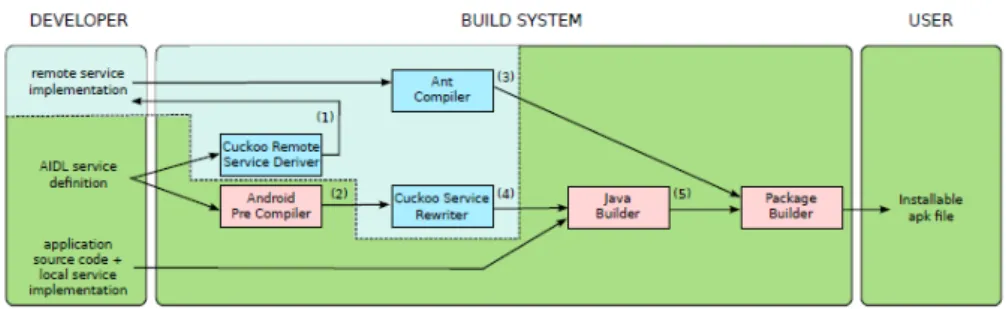
In order for the mobile device to be able to execute methods on a remote resource, it has to commu-nicate with that resource. For this, Cuckoo uses Ibis communication middleware [25], since it offers a simple and effective interface that abstracts from the actual used network (Wi-Fi, Cellular or Bluetooth). Figure 2.2 shows the process of building an Android application from source code to a user installable apk file. To enable an application for computation offloading, the only thing the developer has to do is to overwrite remote service dummy implementations (1) generated by the Cuckoo Remote Service Deriver. Cuckoo has a different goal of FileCloud. The goal of Cuckoo is to provide a programming model to simplify the development of applications that benefit from computation offloading. The use of pre-existing applications is not possible with Cuckoo.
Figure 2.2: Schematic overview of the build process of an Android application using Cuckoo Framework.
2.6
Virtual Network Computing
VNC [19] is an ultra-thin client system based on a simple platform independent display protocol that frees the user of the burden of carrying around the hardware all the time.
The network computer (NC) aims to give users access to centralized resources from simple, inexpen-sive devices. These devices operate as clients to powerful server machines that are connected to the network. These servers provide applications, data and storage for the user. VNC takes a stage further by providing applications and data, as well as the entire desktop environment. This can be accessed from any machine connected to the Internet.
Unlike many recent Internet applications, VNC focuses on providing access to home computing environments from anywhere in the world instead of giving users access to resources located anywhere in the world from their home computing environments.
Therefore, VNC provides mobile computing and the user does not have to carry around any sort of device. VNC also allows a single desktop to be accessed from different locations at the same time, supporting application sharing in the style of computer-supported cooperative work (CSCW).
The simplicity of the simple remote display protocol underlying VNC is what makes it so powerful. This protocol allows remote access to graphical user interfaces. Since it works at the framebuffer level, it applies to all operating systems, windowing systems, and applications. The protocol operates over any reliable transport such as TCP/IP. The endpoint with which the user interacts,i.e., displays or input de-vices, is called the VNC client or viewer. The endpoint where changes to the framebuffer are performed,
i.e., the windowing system and applications, is known as the VNC server (see Figure 2.3). Its design
makes very few requirements of the client, and therefore simplifies the task of creating clients to run on a wide range of hardware.
VNC does not solve the problem that FileCloud aims to solve, because the goal of FileCloud is not to access the mobile device’s entire environment on remote computers. The goal is to take advantage of the bigger display and of the better user interface of desktop applications for certain types of tasks.
2.7
Media Centers
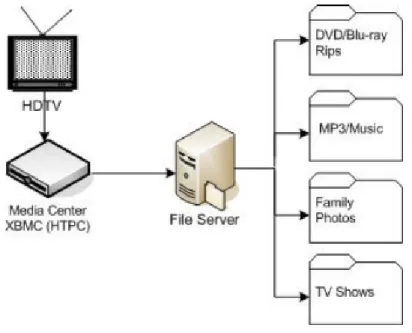
A Media Center or a Home Theater PC (HTPC) is a device that has the goal of integrating televisions with PCs, in order to access remote media content, stored in File Servers, on a TV display. Figure 2.4 illustrates a typical HTPC architecture. It consists of a television, a Home Theater PC that runs a media center software and a file server that hosts all sorts of media, for example, DVD/Blu-Rays, music, photos, etc.
Figure 2.4: HTPC architecture.
There is no single standard protocol, however there is several systems that offer the functionality of a Media Center.
XBMC7[17] is a free and open source media center developed by XBMC Foundation and it’s available
for multiple operating systems and hardware platforms. It allows users to play and view most videos, music and all common digital media files from local and network storage media.
Boxee8 is a fork of XBMC that provides social network features. It allows the users to view, rate and recommend content to their friends through social networks. It is known as the first ”Social Media Center”.
Windows Media Center9 is a digital video recorder and media player developed by Microsoft. It
7XBMC, http://xbmc.org/
8Dlink’s Boxee Box, http://www.dlink.com/us/en/home-solutions/boxee-box/
allows the users to organize and play their slideshows, videos and music, as well as view and record live television. The media can be played on computer monitors or on televisions through the use of a Windows Media Center Extender10 device, such as a Xbox 36011, and can be stored in local hard
drives, optical drives and network locations. Windows Media Center can also use services like Netflix12
to stream, for example, movies and TV shows.
Digital Living Network Alliance (DLNA)13enables wireless sharing of media content between devices.
It uses Universal Plug and Play (UPnP)14 [16] for media management, control and discovery. UPnP defines the type of device that DLNA supports and the mechanisms for accessing media over a network. Then, the DLNA guidelines apply a layer of restrictions over the types of media file format, encodings and resolutions that a device must support.
Media Transfer Protocol is a protocol described and introduced by Microsoft. It is compatible with Picture Transfer Protocol (PTP), which was designed to download photos from digital cameras. MTP supports the transfer of music files on digital audio players, media files on portable media players and personal information on personal digital assistants. It was originally implemented for use across USB, but later was extended for use across TCP/IP and Bluetooth.
Media Centers’ main goal is to take advantage of a bigger screen like a TV, for playing media content such as videos and music. With FileCloud, the user can offload the same content to play in a bigger screen, together with other features such as edit, print and open links, which is not possible with Media Centers. The DLNA, MTP and PTP protocols will not be used in FileCloud since the files will stored in the cloud. Also, the initiation of the task in each system is different. On the media centers the file is selected on the device where the task will be started, and then the file is downloaded from the File Server. On FileCloud, the mobile device notifies the computer which file was selected, and then the file is retrieved from the cloud.
2.8
Distributed User Interfaces
Distributed User Interfaces (DUIs) [27] become a new field of research and development in Human-Computer Interaction (HCI). DUIs are those interfaces whose different parts can be distributed in time and space on different monitors, screens, and computing platforms.
DUIs attempt to surpass user interfaces that are manipulated by only one user, always on the same computing platform and environment, with little to no variations among of the user or the execution environment.
A UI can be distributed by one of the following distribution types:
• Multi-monitor usage: a single user using a single computing platform distributes the UI across
multiple monitors connected to the same platform.
10Windows Media Center Extender, http://windows.microsoft.com/en-US/windows7/Set-up-a-Windows-Media-Center-Extender/ 11Xbox 360, http://www.xbox.com/
12Netflix, https://www.netflix.com/ 13DLNA, http://www.dlna.org/ 14UPnP Forum, http://www.upnp.org/
• Multi-device usage:a single user uses several different devices together, even if they are running the same operating system or not.
• Multi-platform usage:a single user uses different computing platforms, probably running different
operating systems.
• Multi-display usage:a single user distributes the UI across multiple monitors and devices
simul-taneously.
• Multi-user: one or many users may distribute parts or whole of the UI across several monitors,
devices, platforms, or displays.
In order to understand and classify existing approaches for DUIs, as well as to identify underexplored situations, a reference model was introduced. This reference model examines DUIs according to the 4C [4] dimensions:
• Computation:What is distributed?
• Communication:When is it distributed?
• Coordination:Who is distributed?
• Configuration:From where and to where is the distribution operated?
In order to obtain a flexible user interface distribution across multiple devices a model-based user interface language was extended in order to address the specification of distribution at various user interface granularities [15]. The language was extended in order to be able to specify DUIs and was also designed a solution to generate implementations of such DUIs. These DUIs can dynamically change how the user interface elements are distributed according to user requests or other events.
The approach developed aims to satisfy the two following requirements:
• Flexible support able to address a wide variety of granularities in terms of user interface compo-nents to distribute.
• Small and simple set of primitives to indicate how to perform the distribution.
DUIs do not support the offloading of computation: optimizes user interaction, but power consumption remains high. FileCloud differentiates from DUI’s because the goal is not to distribute the user interface of the mobile application. The goal is to use the user interface of an application installed on a neighbor desktop computer.
2.9
Resource Discovery
Universal Plug and Play (UPnP) is a set of networking protocols that allows devices that are connected to the Internet to discover each other’s presence. It also establishes a functional network services so that these devices can, for example, share data and communicate between them.
UPnP architecture enables pervasive peer-to-peer network connectivity between all sort of devices. It is a distributed, open networking architecture that leverages TCP/IP and Web technologies to enable seamless proximity networking. The architecture supports zero-configuration networking and automatic discovery of devices. The devices can also leave the network automatically without leaving any remain-ing unwanted state information.
UPnP is universal because:
• It uses common standard protocols instead of proprietary drivers made by the vendors.
• It is independent of the underlying physical media and transports.
• It is compatible with all programming languages and operating systems.
• It leverages HTTP and other Internet technologies like XML and SOAP.
• It enables vendor control the device’s user interface and interaction through a browser.
• It enables conventional application programmatic control.
• Vendors can extend the basic control protocols when needed.
• Vendors agree on UPnP control protocols on a per-device-class basis.
Figure 2.5: UPnP protocols stack.
Figure 2.5 illustrates the protocol stack that UPnP Device Architecture defines for the communication between the UPnP control points and devices. Next is described the sic phases if interaction specified by the architecture:
• Addressing:Phase where the device obtains an IP address.
• Discovery:Phase where the control points become aware of the existence of devices.
• Control:Phase where the control points invoke service actions.
• Eventing:Phase where the devices notify the control points of changes in state.
• Presentation:Phase where the devices allows for status and control interactions by presenting a
web page to the control points.
UPnP can be used by FileCloud for the discovery the available desktop computers in the neighbor-hood. However, UPnP does not provide information about the applications installed on those computers. For this, a new step has to be implemented in order to get this information.
STARC is a middleware platform that allows the resource discovery to be more adaptive via extensi-bility and increased flexiextensi-bility. This means that STARC has the aextensi-bility to incorporate new resources and increased expressiveness in requirement description, utility function depreciation on partial fulfillment, and employing fuzzy-logic to combine multiple requirements.
STARC is able to interface with different network topologies, for example, LAN and P2P (Peer-to-Peer). Its extensibility not only allows the evaluation of the most usual resources, such as CPU speed and number of cores, but also the evaluation of new characteristics dynamically included, for example, presence of specific applications or services.
As for flexibility, STARC uses XML files in order to application requirements. Logic operator states the relation between the several relevant resource characteristics with associated value ranges and utility depreciation, for the case that only partial fulfillment is possible. The Hosts responses range from no availability (0.0), to requirements fully met (1.0). If requirements are only partially met, a value between 0.0 and 1.0 is returned (partial-utility). This value takes into account the partial fulfillment ranges and the associated utility depreciations, as well as the evaluation policies provided by the client. These utility depreciations can also be applicable to individual resource alternatives not enclosed within ranges, for example, OS family.
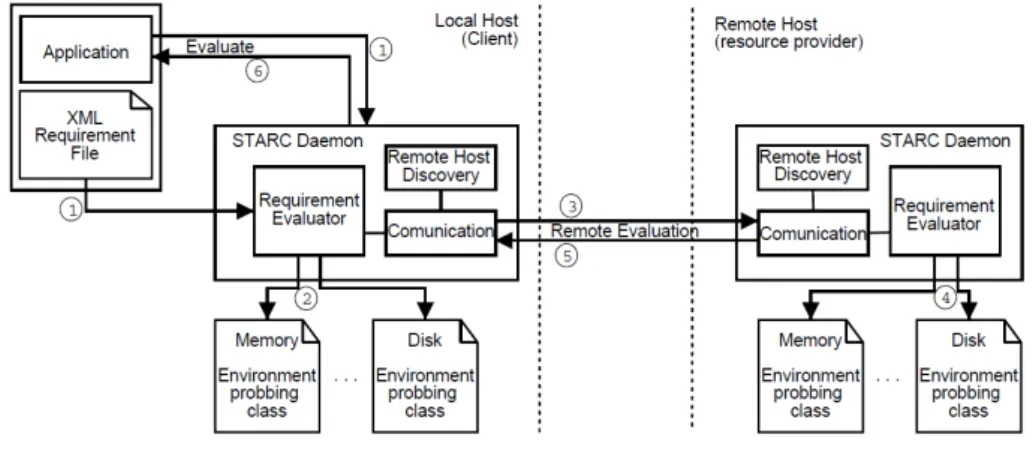
Figure 2.6: STARC architecture.
Figure 2.6 illustrates the architecture of STARC, as well as the steps to use the STARC middleware. For the applications to discover, evaluate and select the resources present and available in remote com-puters as well as services and software provided by them, they use the STARC middleware platform, an assemblage of components (STARC daemons), that execute both in clients and in resource providers.
Each daemon handles all requirement evaluation requests. This means that they handle the require-ments generated from a local application, as well as the remote requests generated by other remote daemons.
In order for an apllication to use STARC, it must provide the local daemon a XML Requirement File (step 1). After reading the requirements, the relevant Environment Probing Classes are executed in order to know if they are fully, partially not at all fulfilled by the resources available (step 2). After evaluating the local resources, if the request was originated from a local application, the STARC daemon contacts the remote daemons (steps 3). Each contacted daemon evaluates the requirements (step 4) and returns the resulting value (Step 5). The Remote Host Discovery module finds hosts that have a STARC daemon running. This component abstracts the middleware from different network topologies. It interfaces with the rest of the middleware uniquely by providing for each request a list of available hosts. These hosts are later contacted by the Communication component.
STARC is a middleware that can be very useful to FileCloud, since we need to not only know the available resources, but also other important information, such as, what actions can a a PC perform to a file, depending on the applications installed.
2.10
Current solutions limitations
In this section is summarized the limitations, of the systems described above, that FileCloud aims to solve.
The following systems implement cyber foraging in multiple ways. These systems allow, for example, the offloading of the computation of tasks to remote computers, but the user can’t take advantage of all the resources available on those computers. FileCloud aims to offload the computation to computers in the neighborhood, so the user can use all the resources available.
FileCloud aims to be completely transparent to the user, i.e., the user only selects the proper file and the desired action and the system automatically stars the appropriate desktop application in the remote computer. So, SPADE does not solve our problem because it only uses the remote computer to process batches of files, not allowing the user to take advantage of the bigger screen and of the desktop applications to have a more complete environment for editing the files. SPADE also does not take advantages of the cloud storage. Every time the user wants to process a file, this file has to be sent to the remote computer and back to the mobile device. Furthermore, SPADE requires that the user have to define the application to run and the arguments.
CloneCloud takes advantage of the resources in the remote computer, but partitioning applications is not a good solution for our execution environment. The main feature of FileCloud is to take advantage of neighbor computers’ larger screens and better processors in the use of applications with a graphical user interface. Partitioning a user interface is very difficult, but does not free the mobile device from complex computations.
Jupiter introduces some concepts that are wanted for this project, such as executing desktop appli-cation or loading an appliappli-cation based on the file, but there are some differences. Jupiter does not take
advantage of bigger screens on the neighbor when loading a desktop application. A bigger screen is very useful when editing an image or a video.
Cuckoo has a different goal of FileCloud. The goal of Cuckoo is to provide a programming model to simplify the development of applications that benefit from computation offloading. The use of pre-existing applications is not possible with Cuckoo.
VNC does not solve the problem that FileCloud aims to solve, because the goal of FileCloud is not to access the mobile device’s entire environment on remote computers. The goal is to take advantage of the bigger display and of the better user interface of desktop applications for certain types of tasks.
Media Centers’ main goal is to take advantage of a bigger screen like a TV, for playing media content such as videos and music. With FileCloud, the user can offload the same content to play in a bigger screen, together with other features such as edit, print and open links, which is not possible with Media Centers. The DLNA, MTP and PTP protocols will not be used in FileCloud since the files will stored in the cloud. Also, the initiation of the task in each system is different. On the media centers the file is selected on the device where the task will be started, and then the file is downloaded from the File Server. On FileCloud, the mobile device notifies the computer which file was selected, and then the file is retrieved from the cloud.
DUIs do not support the offloading of computation: optimizes user interaction, but power consumption remains high. FileCloud differentiates from DUI’s because the goal is not to distribute the user interface of the mobile application. The goal is to use the user interface of an application installed on a neighbor desktop computer.
Chapter 3
Target Environment
3.1
Operating System
There are several Mobile Operating Systems available nowadays. The most popular ones are Apple iOS1, Google Android and Microsoft Windows Phone2. The choice here goes to Google Android.
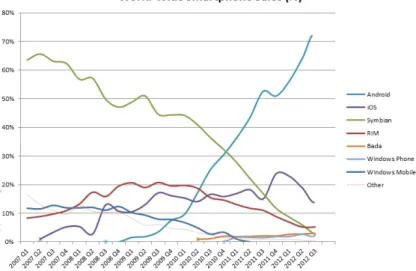
An-droid is an open-source mobile operating system and because of that is the OS with biggest market share at the time this article is being written as is shown in Fig. 3.1. Being the OS installed on most mobile devices currently is a factor of motivation to develop for this platform.
Figure 3.1: Mobile Operating System market share.
The latest version of Android is 4.3 Jelly Bean, but this version is currently available for only a few mobile devices. The version most used is still the version 2.3 Gingerbread. This is due the fact that unlike iOS and Windows Phone, Android is used in a lot of entry level devices, which brands do not support for a long time or even at all, and those users can’t afford buying newer devices frequently. Due to this fact, FileCloud should be developed for this version despite being a little old, so that it can run on
1Apple Developer, http://developer.apple.com/
almost all Android devices out there.
Figure 3.2: Android architecture
Figure 3.2 illustrates Android architecture. It is built on top of a Linux Kernel, with some architectural changes made by Google. Here is where all the drivers needed are, for example the Display or Wi-Fi drivers.
The next layer has the libraries and the Android Runtime. These libraries are written in C/C++3and
they are specific for a particular device’s hardware. The Android Runtime consists of DalvikVM and Core Java Libraries. The DalvikVM is a modified Java Virtual Machine designed especially for Android. One difference between the two is that DalvikVM uses a register-based architecture instead of the stack-based used in JVM.
Above this layer is the Application Framework layer. The blocks on this layer are the ones that the applications interact with, for example, the Location Manager or Activity Manager.
Finally there is an Application layer, which is where FileCloud application will fit. Since Android is an open-source OS, the developers can do whatever they want to with their applications.
3.1.1
Android SDK
The Android SDK4was the platform chosen to develop the application. It’s the most used development
kit for Android in the world. The SDK includes: a debugger, libraries, a handset emulator based on QEMU, documentation, sample code, and tutorials. The debugger provided, is very useful to detect possible bugs and errors during the implementation phase, which is something other SDKs do not have included. The following operating systems versions are currently supported development platforms:
• Linux (any modern desktop Linux distribution)
• Mac OS X 10.5.8 or later
3GNU C Compiler, http://gcc.gnu.org/
• Windows XP or later
The official supported IDE is Eclipse5with the official plug-in provided by Google, Android Develop-ment Tool (ADT). However, other IDEs also support Android programming, such as NetBeans6or IntelliJ
IDEA7.
The applications are written in Java, so they run natively on the Android. With this development kit, the developers have direct access to all Android APIs, thus having total control of the application, both on design and on the core code. Having this fine-grained development, allows us to implement the application with more detail and implement modules that we can’t with other development kits, for example, develop communication modules, such as Socket or have access to a remote WebService.
3.1.2
Other Android programming tools
In this section is presented some alternatives available to develop application to the Android platform. PhoneGap8 is a mobile development framework supported by Adobe Systems. PhoneGap allows
the user to develop their application without using device-specific programming language, as Java for Android or Objective-C for iOS. These applications are developed using JavaScript, HTML5 and CSS3. The result is a hybrid application, which is neither native nor completely web-based, since besides being web apps, they have the ability to access native device APIs.
Adobe AIR supports Flash applications by running them in a contained Flash Player instance. It also supports HTML/JavaScript/Ajax web applications by running them in the included WebKit rendering en-gine. To start developing with AIR, the user needs to set up the developing environment, which consists in: Adobe Flash Professional9(a 30 day free trial is available for all), AIR for Android extension10, AIR SDK11and Android SDK. Also the user needs to install Adobe AIR on the mobile device12before using the application developed. With the environment ready to use, the developer can start implementing the on the Flash Professional IDE, as it were a normal Flash application. After the application is developed, AIR for Android in cooperation with the Android SDK is able to publish the .apk package, ready to install on the mobile device.
The MIT App Inventor13is a Web-based visual development environment for novice programmers.
It’s based on MIT’s Open Blocks Java library and provides access to Android devices’ GPS, accelerom-eter and orientation data, phone functions, text messaging, speech-to-text conversion, contact data, persistent storage, and Web services.
5Eclipse, http://www.eclipse.org/ 6NetBeans IDE, https://netbeans.org/
7IntelliJ IDEA IDE, http://www.jetbrains.com/idea/ 8PhoneGap, http://phonegap.com/
9Adobe Flash Professional, http://www.adobe.com/br/products/flash.html 10AIR for Android extension, http://labs.adobe.com/technologies/air2/android/ 11AIR SDK, http://www.adobe.com/devnet/air/air-sdk-download.html
12Adobe AIR for Android devices, https://play.google.com/store/apps/details?id=com.adobe.air 13MIT App Inventor, http://appinventor.mit.edu/
3.2
Cloud services
Over the past few years, several cloud services were developed for many different purposes. There are three type of service models: Infrastructure as a Service (IaaS) [12] (e.g. Dropbox, Amazon EC214,
etc.), Platform as a Service (PaaS) [9] (e.g. Google App Engine15, Windows Azure Compute16, etc.)
and Software as a Service (SaaS) [28] (e.g. Google Apps17, Microsoft Office 36518, etc.) and some
work was done integrating it with mobile computing.
Usingcloudets[21], a user with a poor-resource device, can be empowered by exploiting the virtual machine (VM) technology to rapidly instantiate a customized service software. Acloudlet is a trusted, resource-rich computer or cluster of computers that’s well-connected to the Internet and available for use by nearby mobile devices.
Some years ago, there was only two ways to run an application: on the phone or run on the server and accesses remotely by the user. To overcome this limitation, a middleware platform was presented to automatically distribute different layers of an application between the phone and the servers [6]. With this, a variety of objective functions are of attained, for example, latency and data transferred, can be optimized improving the performance and the user experience from mobile phones.
Another model to augment the capabilities of a mobile device was presented [29]. This model enables seamless and transparent use of cloud resources to augment the capability of resource constrained mobile devices. The features of this model include the partition of a single application into multiple components called weblets, and a dynamic adaptation of weblet execution configuration. The weblet can run on a mobile device or migrated to the cloud,i.e., run on one or more nodes offered by an IaaS provider.
The IaaS model is the most relevant for this project, since it provides storage for the users using, for example, Dropbox or Google Drive19. With these services the users can store their files in the cloud and
access them anywhere, every time they are connected to the Internet. Although the storage capacity is increasing over the past years, flash storage that is used in this kind of devices is still quite expensive. Due to this fact, the majority of the devices have very limited storage resources, making the access to this kind of cloud service very useful. Also, with this service the users can have their files replicated through multiple devices. When updating one file, it is automatically updated in all other devices when connected to the Internet.
The SaaS model is another model relevant to the project, since if there is no application available, or a Google Docs document is selected, the Google Docs editors can be launched, on a web browser, for the user.
14Amazon EC2, http://aws.amazon.com/pt/ec2/
15Google App Engine, https://developers.google.com/appengine/
16Windows Azure, http://www.windowsazure.com/en-us/develop/net/compute/ 17Google Apps, http://www.google.com/apps/
18Microsoft Office 365, http://www.microsoft.com/en-us/office365/ 19Google Drive, https://drive.google.com/
3.3
Cloud-based File System
Google Drive is a file storage and synchronization service. In addition to storage, since the old Google Docs service is integrated in Google Drive, the users can take advantage of a suite of productivity applications, such as documents, spreadsheets and presentation, etc. This service also allows sharing a folder or a specific file with other users. Google SDK20allows the users to integrate their own mobile applications with Google Drive for Android.
The other possibility to use as file system is Dropbox. Like Google Drive, it is a file storage and synchronization service. In the other hand, it does not offer a suite of productivity applications and does not allow sharing only a specific file with other users.
The Dropbox API21 allows the users to download and upload files from Dropbox. It also provides
them with methods to securely read and write files. Finally, the users also have access to features like sharing, search and restoring previous versions of files.
When developing with the API, the user needs to choose one of the following levels of Dropbox access:
• App folder: The application only has read and write access to a dedicated folder created within
the App folder of the user.
• Full Dropbox: The application get full access to all files and folders of the user. But for security
reason, the developers need to provide a good reason to request this kind of access level before the application is approved for release.
The security features of the Full Dropbox level of access can be a reason to choose Google Drive over Dropbox.
3.4
Connectivity
In this section is described possible communication protocols, in which the FileCloud daemons can possibly use to contact with each other.
3.4.1
Wi-Fi
Wi-Fi is the most used technology in the world that allows a device to exchange data or connect to the internet, without the use of wires using radio waves. Wi-Fi is defined by the Wi-Fi Alliance as any ”wireless local area network (WLAN) products that are based on the Institute of Electrical and Electronics Engineers’ (IEEE) 802.11 standards”.
Wi-Fi is not as secure as wired connections, such as Ethernet, since the possible attacker does not need a physical connection. This way, a variety of encryption technologies, such as WPA and WPA2,
20Google Drive SDK, https://developers.google.com/drive/ 21Dropbox - Developers, https://www.dropbox.com/developers/
were added to Wi-Fi because unencrypted internet access can easily be detected by these attackers. The WPA2 protocol is considered secure, as long as the user uses a strong password.
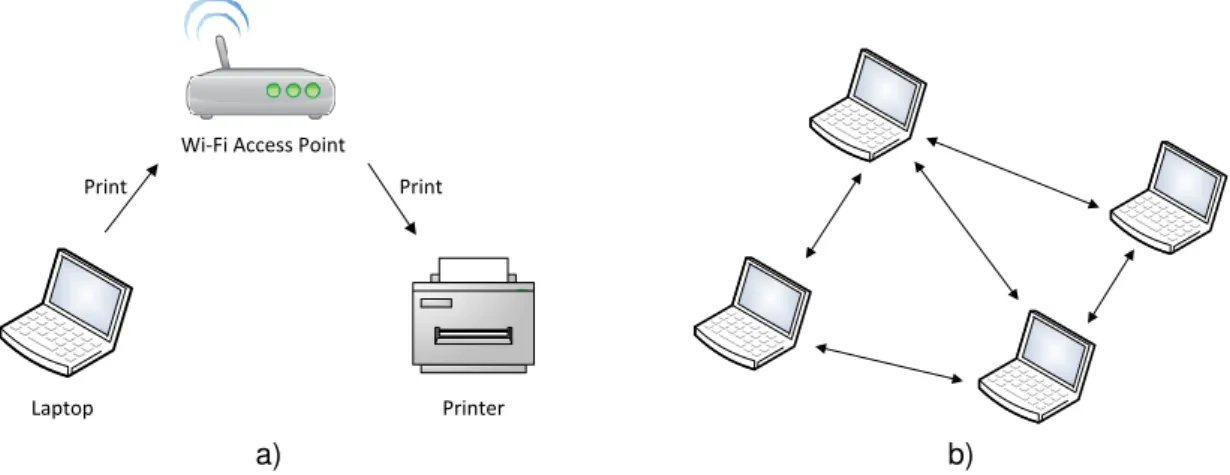
Figure 3.3 illustrates how devices can communicate with each other wirelessly.
Laptop Printer
Wi-Fi Access Point
Print Print
a) b)
Figure 3.3: Wi-Fi usage example: a) The computer uses a wireless access point to communicate with a printer instead of using the traditional wires. b) The computers communicate with each other in an ad-hoc network.
The devices are aware of the existence of other devices connected to the same network. In order for devices to communicate with each other with Wi-Fi, they either need to be connected to a wireless access point or to an ad-hoc network. The access point allows the devices to connect to a wired network using Wi-Fi, while ad-hoc network works by two or more devices communicating between each other without the use of an access point. Using an access point, the devices can communicate with each other as long as they are connected to the same network. This means, that the devices can be localized far away from each other and still be able to communicate, while in an ad-hoc network, the devices can only communicate as long as they are in range of each other.
Wi-Fi Direct defines a new pre-association discovery method, allowing Wi-Fi Direct-certified devices to discover devices and limited information about device services. With this pre-association discovery, the users can know if a desired device, such as a printer, is available on the network before connecting.
3.4.2
Bluetooth
Bluetooth22is a wireless technology standard for exchanging data over short distances between devices,
such as faxes, mobile phones or smartphones, creating personal area networks (PANs) with high levels of security.
A device to be marketed as a Bluetooth device must met the standards defined by the Bluetooth SIG. A network of patents is required in order to implement the technology. This network of patents is licensed only for the qualifying device.
A Bluetooth device can discover other devices, provided that they are in range. A master Bluetooth device can communicate with a maximum of seven devices in a piconet (a network created by using a
wireless Bluetooth connection), but not all the devices reach this maximum. These devices can switch roles, and thus the master can become a slave, while a slave becomes the master.
After the network is established, data can be transferred between the master and one of the slaves at any time. The master selects which slave device to address, and can typically switch rapidly from one device to another.
Smartphone Bluetooth printer
Figure 3.4: Bluetooth usage example. Unlike the Wi-Fi technology, with bluetooth the smartphone communicates directly with the printer.
Figure 3.4 illustrates an example where a smartphone uses the Bluetooth technology to communicate with a printer.
3.4.3
Mobile Cellular Systems
Mobile technology is the technology used for cellular communication. This technology allowed the mobile devices to communicate and exchange data between them. Most recently, this technology has been integrated on tablets, allowing them to have access to the Internet everywhere, similarly to the current smartphones.
3G is the third generation of mobile telecommunications technology. Lately, mobile carriers have provided services, often denoted as 3.5G. These services allow the mobile devices to have a broadband access of several Mbit/s.
Regarding the discovery of other devices, this technology does not offer such services, like Wi-Fi and Bluetooth do.
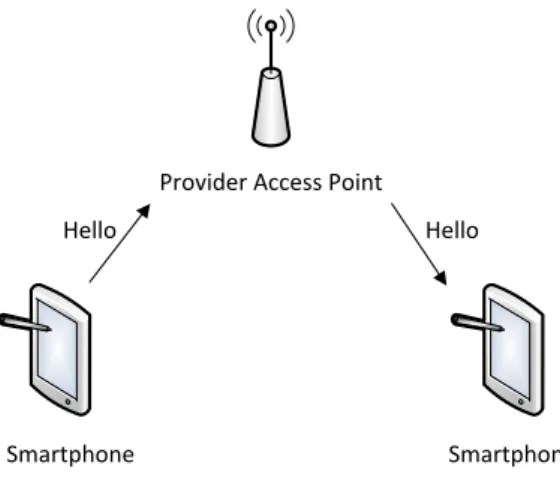
Figure 3.5 shows an example of a mobile device sending a message to another using the 3G network.
Smartphone Smartphone Provider Access Point
Hello Hello
Figure 3.5: 3G usage example. In this example a smartphone send a message to another one. Like the Wi-Fi technology, an access point is used. In this case, the service provider access point.
Chapter 4
FileCloud
FileCloud tries to unify the following three resources: mobile devices, use of idle desktop computers in the neighborhood and the access to files stored in the cloud. Systems like Dropbox or Google Drive allows the access to the user’s personal files any-time, anywhere. With FileCloud the user can take advantage of idle desktop computer to execute some actions that are not suited to run on a mobile device for several reasons, such as the excessive battery drain. Also, the better processor on the desktop computer helps a lot, because the majority of the mobile devices still have very weak processors.
Services to offload tasks[24] already exist, but these services are too complex to configure by the average mobile device user. FileCloud aims to optimize this through a transparent execution on a remote computer and automatically providing the following usual tasks: i) File open, ii) File Edit, and iii) File Print.
Resource Discovery Offloading Task
Best PC Select File Application Launched Get File 1 2 3 Select Action 4 5
Figure 4.1: FileCloud usage overview.
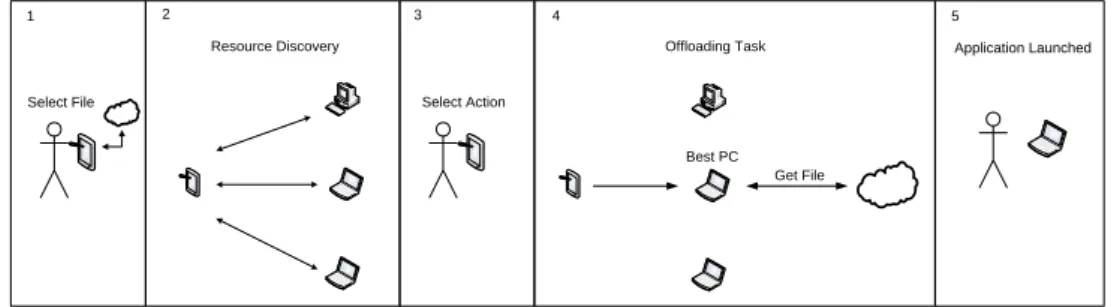
Figure 4.1 illustrates how FileCloud works. After the user selects the desired file from his cloud-based file system, to work with, the system starts searching for available PCs in the neighborhood (Resource Discovery Phase). Then, after the user selects the action he wants to do (open, edit or print), FileCloud selects the best PC to perform the task and offloads it (Offloading Phase). Finally, the proper application automatically starts on the PC. In section 4.2, the execution flow of the system is described in more detail.
4.1
Architecture
In order for the system to run, it needs two daemons: one installed on the mobile device and another on at least one PC in the neighborhood. As illustrated in Figure 4.2, the architecture of both daemons is very similar. Both have three layers: the User Interfaces which the user directly interacts with, the Core and a layer with the communication modules. This architecture is described in more detail in the following sections.
Client
UI
Core
Comm
Server
UI
Core
Comm
FileCloud
Figure 4.2: Architecture overview.
4.1.1
Client Architecture
Communication File System
Client UI
Task Manager
FileGetter Resource Discovery Offloader Action Selector UI
Figure 4.3: Client architecture. In gray are the modules implemented during the project and in white are the already existing technologies, which FileCloud will use.
As aforementioned, the client is composed by three layers. The upper layer is the one the user directly interacts. This layer is implemented by two modules. TheClient UIis the main interface of the client. It is responsible to show all the file information of the user’s Cloud-based File System account and is where the user can select the wanted file. We also have theAction Selector UI. This interface is where the user can select the action he wants to perform on the file selected.
The middle layer is the core of the client. This is where all the information is processed in order to offload the task. TheTask Managermodule is responsible to coordinate the execution flow, by calling the other modules whenever they are needed. The FileGettermodule communicates with the cloud-based File System and gets all the file information needed from it. TheResource Discovery module searches for available PCs and communicates with them in order to obtain information about them. The
Offloader is the module responsible to assemble all the information the user inserted and start the
offload of the task.
Finally, we have the bottom layer. This layer is implemented by two modules: theCommunication
that offers the mechanisms to communicate with the PCs and theFile System, which is where all the file meta-data is stored. These modules are implemented by existing technologies that will be used by FileCloud.
4.1.2
Server Architecture
Communication File System
Server UI Task Manager Request Listener Resource Discovery Application Management Application UI User Credentials UI FileGetter
Figure 4.4: Server architecture. In gray are the modules implemented during the project and in white are the already existing technologies, which FileCloud will use.
Similarly to the client, the server is also composed by three layers. The upper layer is implemented by three modules. TheServer UI is the main interface of the server, where the user can view all the important information about the state of the server. The Application UIis not explicitly implemented since it is the interface of the chosen application to do the task. TheUser Credentials UIis the interface where the user can input his File System’s credentials so FileCloud can have access to it.