Pôles Universitaires Français, Ho Chi Minh City
Internship Report
Master of Software Engineering (2008-2010)
Web Automated Test for SharePoint
Author:
Pham Hoang Bich Tram
Supervisors:
Le Do Anh Phong
Nguyen Huu Hung
Abstract
Testing is a repeated task in software development. Every time source code are changed or before each release, testing should be repeated to make sure no error. To manually test costs man power, time and money. In addition, repeating tests might cause boredom for testers and human errors are unavoided so automated test is indeed necessary. Also, GUI1 automated test
is difficult because it breaks easily especial in the first stage of project.
I am tasked to provide an automated test for SharePoint web. It is challenging to automate this kind of web because the way JavaScripts are used. Maintain test script that works with changing UI2 will mostly depending on a chosen automated testing tool. If selecting a tool that locate object by its identify, the work is simpler because it is independent from GUI. Moreover, this web is made from SharePoint 2007 so it just works well on Internet Explorer. In ELCA Company, the developer has to do the tests and time for tests is limited so the language of test script should be same with them. So the chosen web automated test tool must meet that requirements. I use WatiN to automate the tests. It is a free tool but has many good features: automates all major HTML elements, find elements by multiple attributes, supports AJAX, frames and iframes, popup dialogs, etc. In addition, it is easy to use WatiN to create test script with C# language without learning new language.
I have completed my assignments using WatiN and found a bigger challenge in this project on how to automate SharePoint context menus and the solution is left to my future work.
1Graphical User Interface 2User Interface
Contents
Abstract 1 Acknowledgement 5 1 Introduction 6 1.1 Context . . . 6 1.2 ELCA Company . . . 6 1.3 Microsoft SharePoint . . . 6 1.4 My tasks . . . 7 2 Automated test 8 2.1 Term in testing . . . 82.2 Automated test overview . . . 8
2.2.1 Definition of automated test . . . 8
2.2.2 Pros and cons of automated test . . . 8
2.3 What test case should be automated? . . . 9
2.4 How to create automated tests which are independent of UI changes . . . 9
2.5 Web automated test tool selection . . . 10
3 Implementation 12 3.1 Class diagram of test scenarios . . . 12
3.2 The tools . . . 13
3.3 How to create and run test scripts . . . 13
3.4 Problems and solutions during automated test . . . 14
3.4.1 Ensure the same starting point for every run . . . 14
3.4.2 How to create easy maintenance test data to automatically fill in cre-ate/edit forms . . . 15
3.4.3 Can’t add a web part into web page . . . 15
3.4.4 Can’t select item in select column in grid view . . . 16
3.4.5 Can’t record dynamic element . . . 17
4 Results and future works 19 4.1 Results . . . 19
4.2 Future works . . . 19 1
List of Figures
2.1 Login Screen . . . 11
3.1 Class diagram of test scenarios . . . 12
3.2 Add reference . . . 13
3.3 Results of running test suite successfully . . . 14
3.4 Test data for registering users . . . 15
3.5 Web part dialog . . . 16
3.6 Grid view of contacts list before and after executing JavaScript . . . 17
3.7 SharePoint context menus . . . 18
List of Tables
Acknowledgements
I would like to thank Jean-Paul Tschumi - General Director of ELCA Information Technology Limited Company in Vietnam for giving me a chance to do my internship at ELCA.
I would like to thank my supervisors, Le Do Anh Phong - project leader of the project that I am tasked to provide automated test and Nguyen Huu Hung - group leader for all their guidance and support.
Chapter 1
Introduction
1.1
Context
My internship at ELCA Company is a requirement for completing my Master degree of Software Engineering at the Pôles Universitaires Français1, Ho Chi Minh City . My internship lasted
4 months from the beginning of July 2010. Software verification is one of the challenging and interesting topics that I have chosen to do with ELCA. And I was tasked to provide automated test for the web.
1.2
ELCA Company
ELCA2 is an IT Services Company of Switzerland. It is established in 1968 and present in
Vietnam since 1998. It supplies services in software development, system integration and business consulting. ELCA Vietnam is the group’s first offshore software development center. Its main mission is to support the mother company (the Contractor) serving clients throughout Europe and the world. Every year, ELCA has more than 200 projects in many domains such as Banking, Insurance, Healthcare, Government, Transportation and Ticketing. It has achieved CMMI3 standards.
1.3
Microsoft SharePoint
SharePoint4 is a family of software products developed by Microsoft for collaboration, file sharing and web publishing. Microsoft SharePoint is a powerful software package that help people to work together. Using SharePoint, people can set up Web sites to share information with others, manage documents, publish reports and eventually helps everyone makes better decisions.
1http://www.puf.edu.vn 2http://elca.ch
3http://www.sas.sei.cmu.edu/pars/pars_detail.aspx?a=14657 4http://sharepoint.microsoft.com
1.4
My tasks
ELCA Company is building an extranet for an international organization to allow controlled access to its remote clients from outside under a collaborative platform. ELCA is responsible for delivering softwares and also build new services, functions and add-ons to released products per clients’ request while maintaining current system, making updates and corrective releases to previous versions. Every time new services are developed, regression test must be done to detect errors and ensure the web still works with the new development. I’m tasked to provide automated tests for the web focusing on regression tests and functional tests. The task is broken down as followed:
• Study automated test
• Study the business of project
• Select an appropriate tool to use for automated test
• Create a test suite including all test requirements
• Maintain an dynamic test suite which reacts to source code changes
Chapter 2
Automated test
2.1
Term in testing
Manual testing: is a part of software testing that testers run the test and input parameters manually.
Regression testing: is the testing of a previously tested programs to ensure original func-tions of the program are not compromised when producing new modificafunc-tions.
Functional testing: is a test to make sure software is meeting requirements and error free.
2.2
Automated test overview
2.2.1
Definition of automated test
Test automation1 is the process of using certain software for the purpose of controlling the
implementation and execution of tests, comparing the results or outcomes of the same to those which were predicted or foreseen.
2.2.2
Pros and cons of automated test
Automated test has many advantages and disadvantages2.
Pros:
• Reusability: Test suite can be used on different software versions or on different support environments
1http://en.wikipedia.org/wiki/Test_automation
• Repeatability: Repeat tests every time source code changes to detect regression errors more quickly without human errors
• Better quality:
Increase the test frequency to ensure quality Improve test coverage with minimum resources Save time for manual testers to do other tests
Improve reliability and consistency of the testing process as well as increase confidence in software quality
Cons:
High cost:
• Select an appropriate tool and learning curve time
• Hard to write an easily maintainable test suite which is suitable to all source code changes
• Maintain test script is costly if you just record and playback the test because it easily breaks when UI changes
2.3
What test case should be automated?
It is important to choose what test cases should be automated [1]. Test cases for automation are:
• Tests that run frequently:
Tests run on many different environments - all support operating systems and hard-ware configurations.
Functions are used frequently.
• Tests that consume a lot of time when do manually and require a lot of input data.
2.4
How to create automated tests which are independent
of UI changes
Create automated tests which are resistant to UI changes [1] are the most important thing to cut down the maintenance cost. To do this, it depends on your chosen tool and the way you write your code. There are a lot of ways to locate an object on the screen by relying on all its attributes but the best way is to rely on its identity. With that way, when the UI changes, the tests are still resistant.
• Create a unique name for each control when you develop the project
• Choose an automated testing tool which relies on that unique name to find the control
2.5
Web automated test tool selection
I am tasked to select one of the 4 following tools that the project leader suggested:
• Canoo Web Test3 • Selenium4
• Squish5
• WatiN6
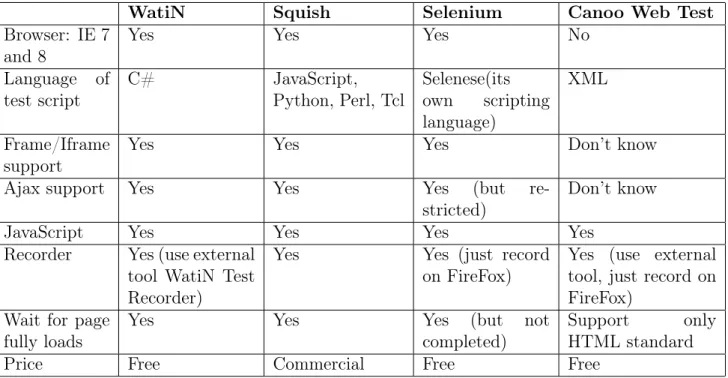
This project is made from SharePoint 2007 so it just works best on Windows Server and Internet Explorer 7 and 8. Base on its support environment, the web automated test tool must have the following criteria (see table 2.1). I selected WatiN for the following reasons:
• Meet all requirements of tool selection
• It is free
• C# is the test script language that the ELCA developers are using. In ELCA, developer does the test so it is easy for them to write test script without learning new language.
• In SharePoint, identify of control is a sequence of character that is automatically gener-ated. It has two parts: the head of the sequence is not the same in every run. The end of the sequence is the name of the control so it is difficult to find the control with whole sequence of identify. We just find the control by using the end of the sequence. And WatiN has method EndW iths(string) that is suitable to locate the control in this case (see example in the next page).
3http://www.webtest.canoo.com 4http://www.seleniumhq.org 5http://frologic.com
Example: ID of text field User name:
Figure 2.1: Login Screen Find that control by simple way:
m _ i e . T e x t F i e l d ( F i n d . B y I d ( i t e m = > i t e m . E n d W i t h (" U s e r N a m e ") ) ) . T y p e T e x t (" l o g i n N a m e ") ;
WatiN Squish Selenium Canoo Web Test
Browser: IE 7 and 8
Yes Yes Yes No
Language of test script C# JavaScript, Python, Perl, Tcl Selenese(its own scripting language) XML Frame/Iframe support
Yes Yes Yes Don’t know Ajax support Yes Yes Yes (but
re-stricted)
Don’t know JavaScript Yes Yes Yes Yes
Recorder Yes (use external tool WatiN Test Recorder)
Yes Yes (just record on FireFox)
Yes (use external tool, just record on FireFox)
Wait for page fully loads
Yes Yes Yes (but not completed)
Support only HTML standard Price Free Commercial Free Free
Chapter 3
Implementation
3.1
Class diagram of test scenarios
In this project, I am tasked to provide automated test for a part of project which is NocNetTest. Because of confidentiality, ELCA requires me not to talk about their customers so all pictures or screens in this report are not same with the real project. And the following picture is a part of class diagram of test.
Figure 3.1: Class diagram of test scenarios
BaseTest class: Contents methods SetU p(), T earDown() and all methods are used com-monly for all test parts. SetU p() is used to instantiate objects needed to run test and
T earDown() is used to clean up and dispose of objects after running test. Each test scenarios begins with SetU p()and finishes with T earDown().
NocNetTest class: Contents all test scenarios of my part.
3.2
The tools
These are tools that I used to provide automated test for the web:
• Microsoft Visual Studio 2008 Standard Edition1 • WatiN 2.0
• WatiN Test Recorder 1.32 • NUnit 2.5.23
Microsoft Visual Studio and WatiN were used to create test suite. If you are new in WatiN, you should have WatiN Test Recorder to help create test script easily by its record function. Then, use NUnit to execute the test suite.
3.3
How to create and run test scripts
To create test scripts, the following steps must be followed:
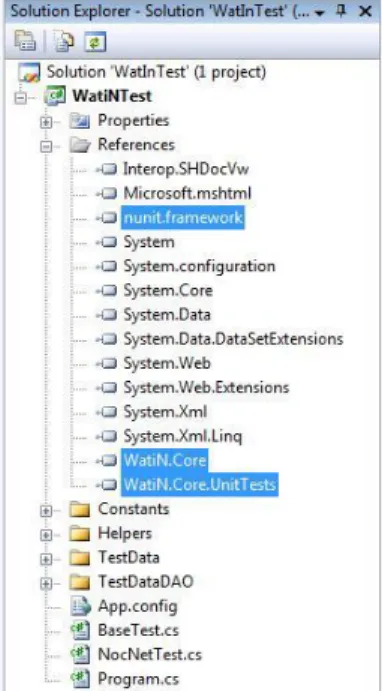
Figure 3.2: Add reference 1. Create a project in Microsoft Visual Studio and in
Ref-erence of the project, add nunit.framework of NUnit and WatiN.Core, WatiN.Core.UnitTests of WatiN (see figure 3.2). Then, create test script normally.
2. Build project into an .dll file or .exe file.
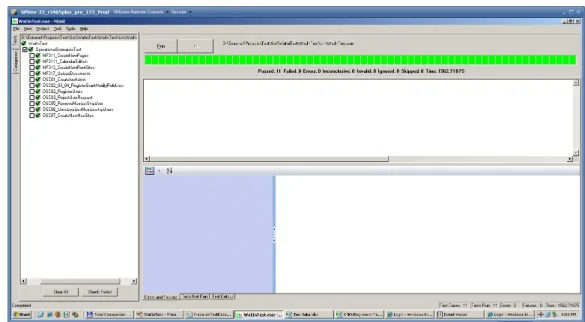
3. Launch NUnit and open above .dll/.exe file. Click Run
button to execute tests, if results of all tests are same with the expected results, the progress bar is colored green, and red if there are any failures (see figure 3.3).
1http://www.microsoft.com/visualstudio/en-us/products/2008-editions 2http://watintestrecord.sourceforge.net/
Figure 3.3: Results of running test suite successfully
3.4
Problems and solutions during automated test
3.4.1
Ensure the same starting point for every run
We must prepare all predefined test data and use same predefined test data to begin the tests. After running the tests, we must come back to initial state of the web to run the tests again.
Solution 1:
Backup and restore database before and after running tests: require the testers know how to backup and restore database.
Solution 2: easier than solution 2
Use snapshot function of VMware 4 application.
- Prepare test environment and then take a snapshot of VMware. - Run tests.
- Revert to snapshot which has just been taken to have same starting point for next test.
3.4.2
How to create easy maintenance test data to automatically fill
in create/edit forms
I used hard coded test data with a sequence number as suffixes. Each time a test is executed, that sequence number is automatically increased one unit. For example, when I test register user function, I use login name asuserSquenceN umber. When the test is first run, login name will be user1, and user2 for the second run, etc. Doing this way, I don’t need to back up and restore database before and after running tests because the test data are always unique. Problem, it is difficult to check data that are existed in the web after creating new or editing an object. In particular, we can’t determine which page that object is in when the data are growing and are contained in many pages.
Solution: I use a free test data generator tool at web site http://www.generatedata.com to generate test data in an Excel sheet. All input data for each specific group of test cases is organized like a table. We can read data from Excel sheet like reading a table in database and it is easy to edit or modify data in Excel sheet.
For example: test data for registering users:
Figure 3.4: Test data for registering users
3.4.3
Can’t add a web part into web page
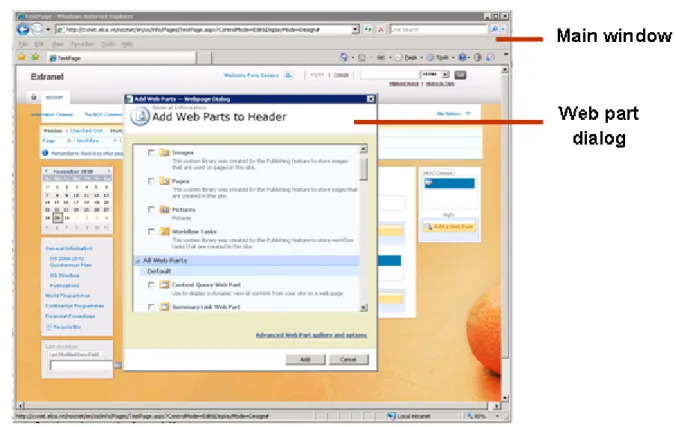
Web part5 is an integrated set of controls that end users can add into a web page .It enable
end users to modify the content, appearance, and behavior of Web pages directly in a browser.
Solution: Consider Web part dialog as an HtmlDialog, add a AlertAndConfirmDialogHan-dler into browser m_iExplorer to control that Web part dialog. This is code for adding a web part into web page:
// add web p a r t i n t o p a g e A l e r t A n d C o n f i r m D i a l o g H a n d l e r w e b P a r t H a n d l e r = new A l e r t A n d C o n f i r m D i a l o g H a n d l e r () ; H t m l D i a l o g w e b P a r t D i a l o g ; // add a A l e r t A n d C o n f i r m D i a l o g H a n d l e r to b r o w s e r b e f o r e o p e n i n g web p a r t d i a l o g m _ i E x p l o r e r . A d d D i a l o g H a n d l e r ( w e b P a r t H a n d l e r ) ; 5http://msdn.microsoft.com/en-us/library/e0s9t4ck.aspx
Figure 3.5: Web part dialog
// o p e n web p a r t d i a l o g
m _ i E x p l o r e r . L i n k ( F i n d . B y T i t l e (" Add a Web P a rt ( o p e n s in new w i n d o w ) ") ) . C l i c k N o W a i t () ;
w e b P a r t D i a l o g = m _ i E x p l o r e r . H t m l D i a l o g ( F i n d . B y T i t l e (" Add Web P a r t s ") ) ; // s e l e c t a web p a r t t h a t you w a n t to add i n t o web p a ge
w e b P a r t D i a l o g . C h e c k B o x ( F i n d . B y T i t l e ( i t e m = >
i t e m . C o n t a i n s ( p a g e I n f o r m a t i o n [" W e b P a r t "]. T o S t r i n g () ) ) ) . C h e c k e d = t r u e ; w e b P a r t D i a l o g . B u t t o n ( Fi n d . B y I d ( i t e m = > i t e m . E n d s W i t h (" b t n O k ") ) ) . C l i c k () ; // c l o s e web p a r t d i a l o g
w e b P a r t D i a l o g . C l o s e () ;
3.4.4
Can’t select item in select column in grid view
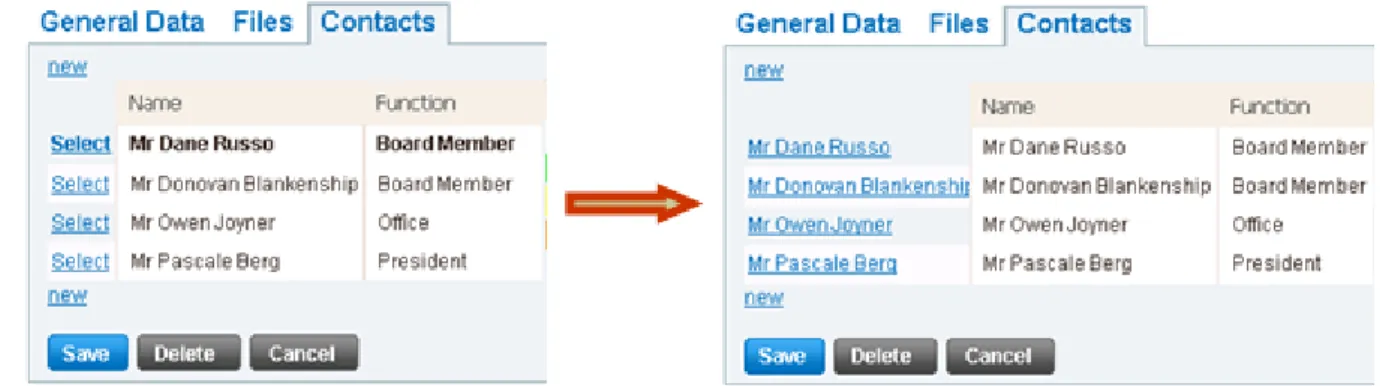
In grid view, can’t select item that we want because it has only one same text attribute for all items in column that has select link. So we can’t distinguish items.
Solution: Execute JavaScript on the page to replace "Select" by corresponding name in Name column and now it is easy to select whatever contact name that you need.
Figure 3.6: Grid view of contacts list before and after executing JavaScript This is the JavaScript code:
// run s c r i p t to r e p l a c e " S e l e c t " by the n a m e in n e x t c o l u m n m _ i E x p l o r e r . R u n S c r i p t ( @ " var t a b l e = $ ( ’ t a b l e . ms - l i s t v i e w t a b l e ’) [ 0 ]; for ( var i = 1; i < t a b l e . r o w s . l e n g t h ; i ++) { var s e l e c t = t a b l e . r o w s [ i ]. c e l l s [ 0 ] . f i r s t C h i l d ; if ( s e l e c t != n u l l ) { var t e x t = t a b l e . r o w s [ i ]. c e l l s [1 ] . f i r s t C h i l d . i n n e r H T M L ; s e l e c t . i n n e r H T M L = t e x t ; } }") ; // s e l e c t c o n t a c t n a m e t h a t you w a n t m _ i E x p l o r e r . L i n k ( F i n d . B y T e x t ( c o n t a c t N a m e ) ) . C l i c k () ;
3.4.5
Can’t record dynamic element
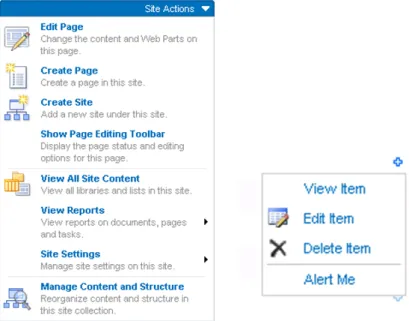
SharePoint web has a lot of context menus that are made from JavaScript and automatically generated with tag < ie : menuitem... >< /ie : menuitem >. It is not the standard HTML tag so the tool doesn’t understand these tags.
Example: Source code of Create Page menu item
< ie : m e n u i t e m id =" c t l 0 0 _ P l a c e H o l d e r M a i n N a v i g a t i o n _ S i t e A c t i o n s M e n u M a i n _ c t l 0 0 _ w s a C r e a t e P a g e " t y p e =" o p t i o n " i c o n S r c ="/ i m a g e s / c r t p a g e . gif " o n M e n u C l i c k =" w i n d o w . l o c a t i o n = ’/ C r e a t e P a g e . aspx ’;" t e x t =" C r e a t e P a g e " d e s c r i p t i o n =" C r e a t e a p ag e in t h i s s i t e ." m e n u G r o u p I d ="100" > </ ie : m e n u i t e m >
Figure 3.7: SharePoint context menus
Solution: There is no good solution for this challenge till now. I try to find many ways to automate the menus but they almost don’t work. With the following code, WatiN tool finds the Create Page menu item and clicks on it but the browser doesn’t go to URL of that menu item: // o p e n c o n t e x t m e n u S i t e A c t i o n s m _ i E x p l o r e r . L i n k ( F i n d . B y I d ( it e m = > i t e m . E n d s W i t h (" S i t e A c t i o n s M e n u ") ) ) . C l i c k () ; // f i n d C r e a t e P a g e m e n u i t e m and c l i c k on it m _ i E x p l o r e r . T a b l e C e l l ( F i n d . By I d ( i t e m = > i t e m . E n d s W i t h (" C r e a t e P a g e ") ) ) . C l i c k () ;
In order to continue my works, I temporarily work around by going directly to URL of corresponding menu item.
// go d i r e c t l y to URL of C r e a t e P a g e m e n u i t e m m _ i E x p l o r e r . G o T o (" r e p l a c e by url of C r e a t e P a g e ") ;
Chapter 4
Results and future works
4.1
Results
I have finished all my tasks. This internship gives me a lot of knowledge about testing.
• Create test suite includes all requirement test cases.
• Project manager uses test suite weekly for regression test and functional test before each delivery.
4.2
Future works
There is a challenge in section 3.4.5 that has not had good solution yet. In the future, find the appropriate solution for this challenge.
Bibliography
[1] SmartBear Software. 6 tips to get started with automated testing. White paper. Available online (7 pages).