Data Sheet
ADT7470
Rev. E Document Feedback
Information furnished by Analog Devices is believed to be accurate and reliable. However, no responsibility is assumed by Analog Devices for its use, nor for any infringements of patents or other rights of third parties that may result from its use. Specifications subject to change without notice. No license is granted by implication or otherwise under any patent or patent rights of Analog Devices.
One Technology Way, P.O. Box 9106, Norwood, MA 02062-9106, U.S.A. Tel: 781.329.4700 ©2004–2013 Analog Devices, Inc. All rights reserved.
FEATURES
Monitors up to 10 remote temperature sensors
Monitors and controls speed of up to 4 fans independently PWM outputs drive each fan under software control FULL_SPEED input allows fans to be blasted to maximum
speed by external hardware
SMBALERTinterrupt signals failures to system controller Three-state ADDR pin allows up to 3 devices on a single bus Temperature decoder interprets TMP05 temperature sensors
and communicates values over I2C bus
Limit comparison of all monitored values Supports fast I2C standard (400 kHz max)
Meets SMBus 2.0 electrical specifications (fully SMBus 1.1-compliant)
APPLICATIONS
Servers
Networking and telecommunications equipment Desktops
GENERAL DESCRIPTION
The ADT74701 controller is a multichannel temperature sensor and PWM fan controller and fan speed monitor for systems requiring active cooling. It is designed to interface directly to an I2C® bus. The ADT7470 can monitor up to 10 daisy-chained TMP05 temperature sensors. It can also monitor and control the speed of four fans, in automatic or in manual control loops. A FULL_SPEED input is provided to allow the fans to be blasted to maximum speed, via external hardware control, under extreme thermal conditions or on system startup. An SMBALERT interrupt communicates error conditions such as fan under speed and over temperature measurements to the system service processor. Individual error conditions can then be read from status registers over the I2C bus.
FUNCTIONAL BLOCK DIAGRAM
FULL_SPEED PWM1 PWM2 PWM3 PWM4 TACH1 TACH2 TACH3 TACH4 TMP_START TMP_IN
ADDR SDA SCL SMBALERT
ADDRESS POINTER REGISTER PWM CONFIG REGISTERS INTERRUPT MASKING INTERRUPT STATUS REGISTERS LIMIT COMPARATORS VALUE AND LIMIT REGISTERS SERIAL BUS INTERFACE SMBus ADDRESS SELECTION AUTOMATIC FAN SPEED CONTROL PWM REGISTERS AND CONTROLLERS FAN SPEED COUNTERS TEMPERATURE DECODER 04684-0-001 ADT7470 Figure 1.
TABLE OF CONTENTS
Features ... 1
Applications ... 1
General Description ... 1
Functional Block Diagram ... 1
Revision History ... 2
Specifications ... 3
Serial Bus Timing Specifications ... 4
Absolute Maximum Ratings ... 5
Thermal Characteristics ... 5
ESD Caution ... 5
Pin Configuration and Function Descriptions ... 6
Functional Description ... 7
General Description ... 7
Configuration Register 1 (Address 0x40)... 7
Configuration Register 2 (Address 0x74)... 7
ID Registers ... 7
General-Purpose I/O Pins (Open Drain) ... 8
SMBus/I2C Serial Interface ... 9
Address Selection ... 9
Serial Bus Protocol ... 9
Write Operations ... 11
Read Operations ... 12
SMBus Timeout ... 12
Temperature Measurement Using TMP05/TMP06 ... 13
Measuring Temperature ... 13
Temperature ReadBack By the Host ... 14
Temperature Data Format ... 14
Temperature Measurement Limits ... 15
Thermal Zones for Automatic Fan Control ... 15
Limit and Status Registers ... 16
Limit Values ... 16
Temperature Limits ... 16
Fan Speed Limits ... 16
Out-of-Limit Comparisons ... 16
Status Registers ... 17
SMBALERT Interrupt ... 18
Fan Drive Using PWM Control ... 20
High Frequency Fan Drive ... 20
Low Frequency Fan Drive ... 20
Setting the Fan Drive Frequency ... 21
Inverted PWM Output ... 21
Fan Full Speed Function ... 21
Fan Speed Measurement ... 22
Tach Inputs ... 22
Fan Speed Measurement ... 23
Manual Fan Speed Control ... 25
Setting the PWM Duty Cycle ... 25
Automatic Fan Speed Control ... 26
Register Map ... 27
Detailed Register Descriptions ... 29
Outline Dimensions ... 39
Ordering Guide ... 39
REVISION HISTORY
4/13—Rev. D to Rev. E Changed Input Low Voltage, VIL from 0.4 V to 1.0 V and Added Test Conditions/Comments; Table 1 ... 33/13—Rev. C to Rev. D Changes to Calculating Fan Speed and Tachometer Limits Section ... 24
Changes to Bit 3, Table 43... 35
Updated Outline Dimensions ... 39
7/09—Rev. B to Rev. C Additions to Manual Fan Speed Control Section ... 25
Additions to Automatic Fan Speed Control Section ... 26
7/05—Rev. A to Rev. B References to PWM_IN changed to TMP_IN ... Universal Changes to TMIN Registers Section ... 7
Added Address Selection Section ... 7
Added Thermal Zones Section ... 12
Added Temperature Reading Section ... 13
SPECIFICATIONS
TA = −40oC to +125oC, VCC = 3.0 V to 5.5 V, unless otherwise noted.
Table 1.
Parameter1, 2, 3, 4, 5 Min Typ Max Unit Test Conditions/Comments POWER SUPPLY1
Supply Voltage 3.0 3.3 5.5 V
Supply Current, ICC 0.5 0.8 mA
Standby Current, ICC 4 µA
FAN RPM-TO-DIGITAL CONVERTER
Accuracy ±12 %
Full-Scale Count 65,535
Nominal Input RPM 109 RPM Fan count = 0xBFFF
329 RPM Fan count = 0x3FFF
5,000 RPM Fan count = 0x0438
10,000 RPM Fan count = 0x021C
OPEN-DRAIN DIGITAL OUTPUTS, PWM1 to PWM4, SMBALERT
Output Low Voltage, VOL 0.4 V IOUT = –8.0 mA, VCC = +3.3 V
High Level Output Current, IOH 0.1 1 µA VOUT = VCC
OPEN-DRAIN SERIAL DATA BUS OUTPUT (SDA)
Output Low Voltage, VOL 0.4 V IOUT = –4.0 mA, VCC = +3.3 V
High Level Output Current, IOH 0.1 1 µA VOUT = VCC
SMBus DIGITAL INPUTS (SCL, SDA)
Input High Voltage, VIH 2.4 V
Input Low Voltage, VIL 1.0 V VCC = 3.3 V
Hysteresis 500 mV
DIGITAL INPUT LOGIC LEVELS (TACH INPUTS, FULL_SPEED, GPIO)
Input High Voltage, VIH 2.4 V
Input Low Voltage, VIL 0.8 V
Hysteresis 50 mV p-p
DIGITAL INPUT LOGIC LEVELS (TMP_IN)
Input High Voltage, VIH VDD – 0.3 V
Input Low Voltage, VIL 0.4 V
DIGITAL INPUT CURRENT
Input High Current, IIH –5 µA VIN = VCC
Input Low Current, IIL 5 µA VIN = 0
Input Capacitance, CIN 5 pF
1 VDD should never be floated in the presence of SCL/SDA activity. Charge injection can be sufficient to induce approximately 0.6 V on VDD. 2 All voltages are measured with respect to GND, unless otherwise specified.
3 Typical values are at %A = 25°C and represent the most likely parametric norm.
4 Logic inputs accept input high voltages up to 5 V even when the device is operating at supply voltages below 5 V. 5 Timing specifications are tested at logic levels of VIL = 0.8 V for a falling edge and VIH = 2.0 V for a rising edge.
SERIAL BUS TIMING SPECIFICATIONS
Table 2.
Parameter1, 2, 3, 4, 5 Min Typ Max Unit Test Conditions/Comments
SERIAL BUS TIMING
Clock Frequency, fSCLK 400 kHz See Figure 2
Glitch Immunity, tSW 50 ns See Figure 2
Bus Free Time, tBUF 1.3 μs See Figure 2
Start Setup Time, tSU;STA 600 ns See Figure 2
Start Hold Time, tHD;STA 600 ns See Figure 2
SCL Low Time, tLOW 1.3 μs See Figure 2
SCL High Time, tHIGH 0.6 μs See Figure 2
SCL, SDA Rise Time, tr 300 ns See Figure 2
SCL, SDA Fall Time, tf 300 ns See Figure 2
Data Setup Time, tSU;DAT 100 ns See Figure 2
Detect Clock Low Timeout, tTIMEOUT 25 28 31 ms Can be optionally disabled,
via Configuration Register 1 (see Table 6)
1 VDD should never be floated in the presence of SCL/SDA activity. Charge injection can be sufficient to induce approximately 0.6 V on VDD. 2 All voltages are measured with respect to GND, unless otherwise specified.
3 Typical values are at %A = 25°C and represent the most likely parametric norm.
4 Logic inputs accept input high voltages up to 5 V even when the device is operating at supply voltages below 5 V. 5 Timing specifications are tested at logic levels of VIL = 0.8 V for a falling edge and VIH = 2.0 V for a rising edge.
04684-0-002 SCL SDA P S tBUF tHD;STA tHD;DAT tHIGH tSU;DAT tHD;STA tSU;STA tSU;STO tLOW tR tF S P
ABSOLUTE MAXIMUM RATINGS
Table 3.
Parameter Rating
Positive Supply Voltage (VCC) 6.5 V
Voltage on Any TACH or PWM Pin –0.3 V to +6.5 V Voltage on Any Input or Output Pin –0.3 V to VCC + 0.3 V Maximum Junction Temperature (TJ max) 150°C
Storage Temperature Range –65°C to +150°C
Lead Temperature, Soldering
Vapor Phase, 60 sec 215°C
Infrared, 15 sec 200°C
ESD Rating (HBM) 3000 V
THERMAL CHARACTERISTICS
16-Lead QSOP Package:θJA = 105°C/W θJC = 39°C/W
Stresses above those listed under Absolute Maximum Ratings may cause permanent damage to the device. This is a stress rating only; functional operation of the device at these or any other conditions above those indicated in the operational section of this specification is not implied. Exposure to absolute maximum rating conditions for extended periods may affect device reliability.
PIN CONFIGURATION AND FUNCTION DESCRIPTIONS
04684-0-003 1 2 3 4 5 6 7 8 16 15 14 13 12 11 10 9 GND VCC TACH3 TACH2 TACH1 PWM2 SCL PWM1 SMBALERT FULL_SPEED/TMP_START PWM4 PWM3 TACH4 ADDR TMP_IN SDA ADT7470 TOP VIEW (Not to Scale)Figure 3. Pin Configuration
Table 4. Pin Function Descriptions
Pin No. Mnemonic Description
1 SCL Digital Input (Open Drain). SMBus serial clock input. Requires SMBus pull-up, typically 2k2Ω.
2 GND Ground Pin.
3 VCC Power Supply Pin.
4 TACH3 Digital Input (Open Drain). Fan tachometer input to measure the speed of Fan 3.
5 PWM2 Digital I/O (Open Drain). Requires 10 kΩ typical pull-up. Pulse-width modulated output to control the speed of Fan 2. Can be configured as GPIO by setting Bit 0x7F[2] = 1.
6 TACH1 Digital Input (Open Drain). Fan tachometer input to measure the speed of Fan 1. 7 TACH2 Digital Input (Open Drain). Fan tachometer input to measure the speed of Fan 2. 8 PWM3 Digital I/O (Open Drain). Pulse-width modulated output to control the speed of Fan 3.
Requires 10 kΩ typical pull-up. Can be configured as GPIO by setting Bit 0x7F[1] = 1. 9 TACH4 Digital Input (Open Drain). Fan tachometer input to measure the speed of Fan 4. 10 PWM4 Digital I/O (Open Drain). Pulse-width modulated output to control the speed of Fan 4.
Requires 10 kΩ typical pull-up. Can be configured as GPIO by setting Bit 0x7F[0] = 1. 11 ADDR Three-state Input. Used to set the SMBus device address.
12 TMP_IN Digital Input (Open Drain). PWM input to PWM processing engine that interprets daisy-chained output from multiple TMP05 temperature sensors. Readings from individual TMP05 temperature sensors are available by reading the temperature reading registers over the SMBus.
13 FULL_SPEED Digital Input Active Low (Open Drain). This input blasts the fans to maximum speed when the pin is pulled low externally. Do not leave pin 13 open when not I use, tie to VCC.
13 TMP_START Digital Output (Open Drain). This pin can be used as an output to start daisy-chained temperature measurements from TMP05 or TMP06 temperature sensors. Requires 10 kΩ typical pull-up.
14 SMBALERT Digital Output Active Low (Open Drain). This pin can be reconfigured as an SMBALERT interrupt output to signal out-of-limit conditions such as fan failures.
15 PWM1 Digital I/O (Open Drain). Pulse-width modulated output to control the speed of Fan 1. Requires 10 kΩ typical pull-up. Can be configured as GPIO by setting Bit 0x7F[3] = 1.
FUNCTIONAL DESCRIPTION
GENERAL DESCRIPTION
The ADT7470 is a multichannel, pulse-width modulation (PWM) fan controller and monitor for any system requiring monitoring and cooling. The device communicates with the system via a serial system management bus. The device has a single address line for address selection (Pin 11), a serial data line for reading and writing addresses and data (Pin 16), and an input line for the serial clock (Pin 1). All control and programming functions of the ADT7470 are performed over the serial bus, which supports both SMBus and fast I2C speci-fications. In addition, an SMBALERT interrupt output is provided to indicate out-of-limit conditions.
When the ADT7470 monitoring sequence is started, it cycles through each fan tach input to measure fan speed. Measured values from these inputs are stored in value registers. These can be read out over the serial bus, or they can be automatically compared with programmed limits stored in the limit registers. The results of out-of-limit comparisons are stored in the status registers, which can be read over the serial bus to flag out-of-limit conditions. If fan speeds drop below preset levels or a fan stalls, an interrupt is generated. Likewise, the ADT7470 can flag fan over speed conditions by using limits set in the fan tach maximum registers.
ADT7470 Monitoring Cycle
The monitoring cycle begins when a 1 is written to the start bit (Bit 0) of Configuration Register 1 (Register 0x40). Each fan tach input is monitored in turn, and, as each measurement is completed, the result is automatically stored in the appropri-ate value register. Multiple temperature channels can also be monitored by clocking in temperatures using the TMP_IN pin. The temperature measurement function is addressed in hardware and requires no software intervention. The monitoring cycle continues unless disabled by writing a 0 to Bit 7 of Configuration Register 1.
The rate of temperature measurement updates depends on the nominal conversion rate of the TMP05/TMP06 temperature
sensor (approximately 120 ms) and on the number of TMP05s daisy-chained together. The total monitoring cycle time is the temperature conversion time multiplied by the number of temperature channels being monitored.
Fan tach measurements are taken in parallel and are not syn-chronized with the temperature measurements in any way
CONFIGURATION REGISTER 1 (ADDRESS 0X40)
This register contains the STRT bit, Bit 0, which begins the monitoring cycle on the ADT7470.The SMBus timeout can be disabled , fast tach enabled, and the registers locked, by writing to this register.
Control of high or low frequency fan drive, and the config-uration for Pin 13, can be accessed via this register. See Table 31 for more details.
CONFIGURATION REGISTER 2 (ADDRESS 0X74)
Writing a 1 to Bit 0 in this register puts the ADT7470 in shutdown mode, which puts the part into a low current consumption mode.The PWM frequency for each fan is controlled via this register. Fan speed measurement can be disabled for each fan by writing to this register.
See Table 44 for more details.
ID REGISTERS
The ADT7470 has three read-only registers for identifying the part and silicon revision.
The device ID register is located at address 0x3D, and is set to 0x70.
The company ID register, located at address 0x3E, is set to 0x41. The revision number register is at address 0x3F, and contains the revision number of the ADT7470 silicon.
GENERAL-PURPOSE I/O PINS (OPEN DRAIN)
The ADT7470 has four pins that can be configured as either general-purpose logic pins or as PWM outputs. Each GPIO pin has a corresponding enable, direction, polarity and status bit.
Pin Function Register Address and Bit
GPIO1 Enable 0x7F [3] Direction 0x80 [7] Polarity 0x80 [6] Status 0x81 [4] GPIO2 Enable 0x7F [2] Direction 0x80 [5] Polarity 0x80 [4] Status 0x81 [5] GPIO3 Enable 0x7F [1] Direction 0x80 [3] Polarity 0x80 [2] Status 0x81 [6] GPIO4 Enable 0x7F [0] Direction 0x80 [1] Polarity 0x80 [0] Status 0x81 [7]
To enable the PWM output on the ADT7470 as GPIOs, the enable bits in Register 0x7F must be set to 1.
Setting a direction bit to 1 in the GPIO configuration register makes the corresponding GPIO pin an output. Clearing the direction bit to 0 makes it an input.
Setting a polarity bit to 1 makes the corresponding GPIO pin active high. Clearing the polarity bit to 0 makes it active low.
When a GPIO pin is configured as an input, the corresponding bit in the GPIO status register is read-only and is set when the input is asserted. When a GPIO pin is configured as an output, the corresponding bit in one of the GPIO status registers becomes read/write. Setting this bit asserts the GPIO output. Note that whether a GPIO pin is configured as an input or as an output, asserted can be high or low, depending on the setting of the polarity bit.
SMBUS/I
2C SERIAL INTERFACE
Control of the ADT7470 is carried out using the serial system management bus (SMBus). This interface is fully compatible with SMBus 2.0 electrical specifications and meets 400 pF bus capacitance requirements. The device also supports fast I2C (400 kHz max). The ADT7470 is connected to the bus as a slave device under the control of a master controller or service processor.
ADDRESS SELECTION
The ADT7470 has a 7-bit serial bus address. When the device is powered up with Pin 11 (ADDR) high, the ADT7470 has an SMBus address of 010 1111 or 0x5E (left-justified). Because the address is 7 bits, it can be left- or right-justified; this determines whether the address reads as 0x5x or 0x2x. Pin 11 can be left floating or tied low for other addressing options, as shown in Table 5. See also Figure 4, Figure 5, and Figure 6.
Table 5. ADT7470 Address Select Mode
Pin 11 (ADDR) State Address
High (10 kΩ to VCC) 010 1111 (0x5E left-justified or 0x2F right-justified)
Low (10 kΩ to GND) 010 1100 (0x58 left-justified or 0x2C right-justified)
Floating (no pull-up) 010 1110 (0x5C left-justified or 0x2E right-justified) VCC 10kΩ TYP ADDR 04684-0-004 1 2 3 4 5 6 7 8 16 15 14 13 12 11 10 9 ADT7470
Figure 4. SMBus Address = 0x5E or 0x2F (Pin 11 = 1)
ADDR 10kΩ TYP 04684-0-005 1 2 3 4 5 6 7 8 16 15 14 13 12 11 10 9 ADT7470
Figure 5. SMBus Address = 0x58 or 0x2C (Pin 11 = 0)
ADDR 04684-0-006 1 2 3 4 5 6 7 8 16 15 14 13 12 11 10 9 ADT7470
Figure 6. SMBus Address = 0x5C or 0x2E (Pin 11 = Floating) The device address is sampled and latched on the first valid SMBus transaction, so any additional attempted addressing changes have no immediate effect. The facility to make hardwired changes to the SMBus slave address allows the user to avoid conflicts with other devices sharing the same serial bus, for example, if more than one ADT7470 is used in a system.
SERIAL BUS PROTOCOL
The serial bus protocol operates as follows:
1. The master initiates data transfer by establishing a start condition, defined as a high-to-low transition on the serial data line, SDA, while the serial clock line, SCL, remains high. This indicates that an address/data stream follows. All slave peripherals connected to the serial bus respond to the start condition, and shift in the next 8 bits, consist-ing of a 7-bit address (MSB first) and an R/W bit. This determines the direction of the data transfer, that is, whether data is written to or read from the slave device. The peripheral whose address corresponds to the transmit-ted address responds by pulling the data line low during the low period before the 9th clock pulse, known as the acknowledge bit. All other devices on the bus now remain idle while the selected device waits for data to be read from or written to it. If the R/W bit is 0, the master writes to the slave device. If the R/W bit is 1, the master reads from the slave device.
2. Data is sent over the serial bus in sequences of 9 clock pulses: 8 bits of data followed by an acknowledge bit from the slave device. Transitions on the data line must occur during the low period of the clock signal and remain stable during the high period. This is because a low-to-high transition when the clock is high might be interpreted as a stop signal. The number of data bytes that can be transmitted over the serial bus in a single read or write operation is limited only by what the master and slave devices can handle.
3. After all data bytes are read or written, stop conditions are established. In write mode, the master pulls the data line high during the 10th clock pulse to assert a stop condition. In read mode, the master device overrides the acknowledge bit by pulling the data line high during the low period before the 9th clock pulse. This is known as No Acknowledge. The master then takes the data line low
during the low period before the 10th clock pulse, then high during the 10th clock pulse to assert a stop condition. Any number of bytes of data can be transferred over the serial bus in one operation. However, it is not possible to mix read and write in one operation, because the type of operation is determined at the beginning and subsequently cannot be changed without starting a new operation.
In the ADT7470, write operations contain either one or two bytes, and read operations contain one byte and perform the following functions.
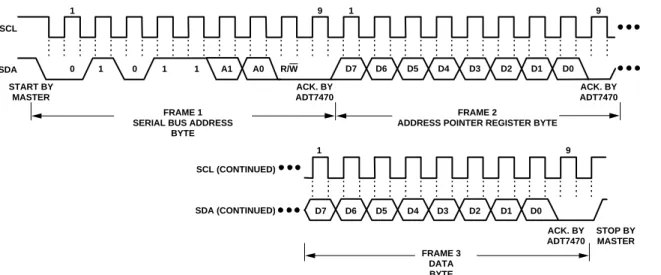
To write data to one of the device data registers or read data from it, the address pointer register must be set so that the correct data register is addressed. Then data can be written into that register or read from it. The first byte of a write operation always contains an address that is stored in the address pointer register. If data is to be written to the device, the write operation contains a second data byte that is written to the register selected by the address pointer register.
This is illustrated in Figure 7. The device address is sent over the bus followed by R/W set to 0. This is followed by two data bytes.
04684-0-007 1 0 1 0 1 1 A1 A0 R/W 9 1 9 1 D7 D6 D5 D4 D3 D2 D1 D0 9 D7 D6 D5 D4 D3 D2 D1 D0 SCL SDA SCL (CONTINUED) SDA (CONTINUED) START BY MASTER ACK. BY ADT7470 ACK. BY ADT7470 ACK. BY ADT7470 STOP BY MASTER FRAME 1
SERIAL BUS ADDRESS BYTE
FRAME 2
ADDRESS POINTER REGISTER BYTE
FRAME 3 DATA BYTE
Figure 7. Writing a Register Address to the Address Pointer Register, Then Writing Data to the Selected Register
SCL SDA 1 0 1 0 1 1 A1 A0 START BY MASTER FRAME 1 SERIAL BUS ADDRESS
BYTE
FRAME 2
ADDRESS POINTER REGISTER BYTE
STOP BY MASTER ACK. BY ADT7470 ACK. BY ADT7470 R/W D7 D6 D5 D4 D3 D2 D1 D0 9 1 9 04684-0-008
Figure 8. Writing to the Address Pointer Register Only
04684-0-009 SCL SDA 1 0 1 0 1 1 A1 A0 START BY MASTER FRAME 1 SERIAL BUS ADDRESS
BYTE
FRAME 2 DATA BYTE FROM
ADT7470 STOP BY MASTER ACK. BY ADT7470 NO ACK. BY MASTER R/W D7 D6 D5 D4 D3 D2 D1 D0 9 1 9
The first data byte is the address of the internal data register to be written to, which is stored in the address pointer register. The second data byte is the data to be written to the internal data register.
How data is read from a register depends on whether or not the address pointer register value is known.
If the ADT7470 address pointer register value is unknown or not the desired value, it is first necessary to set it to the correct value before data can be read from the desired data register. This is done by performing a write to the ADT7470 as before, but only the data byte containing the register address is sent, because data cannot be written to the register. This is shown in Figure 8.
A read operation is then performed consisting of the serial bus address, R/W bit set to 1, followed by the data byte read from the data register. This is shown in Figure 9.
If the address pointer register is known to be already at the desired address, data can be read from the corresponding data register without first writing to the address pointer register, so the operation shown in Figure 8 can be omitted. Note the following:
• Although it is possible to read a data byte from a data register without first writing to the address pointer register if the address pointer register is already at the correct value, it is not possible to write data to a register without writing to the address pointer register. This is because the first data byte of a write is always written to the address pointer register.
• In Figure 7 to Figure 9, the serial bus address is shown as the default value 01011(A1)(A0), where A1 and A0 are set by the address select mode function previously defined. • In addition to supporting the send byte and receive byte
protocols, the ADT7470 also supports the read byte protocol. See System Management Bus Specifications Rev. 2.0 for more information.
• If it is required to perform several read or write operations in succession, the master can send a repeat start condition instead of a stop condition to begin a new operation.
WRITE OPERATIONS
The SMBus specification defines several protocols for different types of read and write operations. The protocols used in the ADT7470 are discussed in the following sections. The following abbreviations are used in the diagrams:
S—Start P—Stop R—Read W—Write A—Acknowledge A—No Acknowledge
The ADT7470 uses the following SMBus write protocols.
Send Byte
In this protocol, the master device sends a single command byte to a slave device, as follows:
1. The master device asserts a start condition on SDA. 2. The master sends the 7-bit slave address followed by
the write bit (low).
3. The addressed slave device asserts ACK on SDA.
4. The master sends a command code.
5. The slave asserts ACK on SDA.
6. The master asserts a stop condition on SDA, and the transaction ends.
For the ADT7470, the send byte protocol is used to write a register address to RAM for a subsequent single byte read from the same address. This is shown in Figure 10.
1 2 3 4 5 6 S SLAVE W A A P ADDRESS REGISTER ADDRESS 04684-0-010
Figure 10. Setting a Register Address for Subsequent Read If it is required to read data from the register immediately after setting up the address, the master can assert a repeat start con-dition immediately after the final ACK and carry out a single-byte read without asserting an intermediate stop condition. Write Byte
In this operation, the master device sends a command byte and one data byte to the slave device, as follows:
1. The master device asserts a start condition on SDA. 2. The master sends the 7-bit slave address followed by the
write bit (low).
3. The addressed slave device asserts ACK on SDA.
4. The master sends a command code.
5. The slave asserts ACK on SDA.
6. The master sends a data byte.
7. The slave asserts ACK on SDA.
8. The master asserts a stop condition on SDA to end the transaction.
This is shown in Figure 11.
1 2 3 4 5 6 7 8 S SLAVE W A A DATA A P ADDRESS REGISTER ADDRESS 04684-0-011
READ OPERATIONS
The ADT7470 uses the following SMBus read protocols. Receive Byte
This is useful when repeatedly reading a single register. The register address must be set up previously. In this operation, the master device receives a single byte from a slave device, as follows:
1. The master device asserts a start condition on SDA. 2. The master sends the 7-bit slave address followed by
the read bit (high).
3. The addressed slave device asserts ACK on SDA.
4. The master receives a data byte.
5. The master asserts NO ACK on SDA.
6. The master asserts a stop condition on SDA
and the transaction ends.
In the ADT7470, the receive byte protocol is used to read a single byte of data from a register whose address was previously set by a send byte or write byte operation.
1 2 3 4 5 6
S SLAVE R A DATA A P
ADDRESS
04684-0-012
Figure 12. Single-Byte Write from a Register Alert Response Address
Alert response address (ARA) is a feature of SMBus devices, which allows an interrupting device to identify itself to the host when multiple devices exist on the same bus.
The SMBALERT output can be used as an interrupt output or can be used as an SMBALERT. One or more outputs can be connected to a common SMBALERT line connected to the master. If a device’s SMBALERT line goes low, the following occurs:
1. SMBALERT is pulled low.
2. The master initiates a read operation and sends the alert response address (ARA = 000 1100). This is a general call address that must not be used as a specific device address.
3. The device whose SMBALERT output is low responds to
the alert response address, and the master reads its device address. The address of the device is now known, and it can be interrogated in the usual way.
4. If more than one device’s SMBALERT output is low,
the one with the lowest device address has priority, in accordance with normal SMBus arbitration.
5. Once the ADT7470 responds to the alert response
address, the master must read the status registers, and the SMBALERT is cleared only if the error condition is gone.
SMBus TIMEOUT
The ADT7470 includes an SMBus timeout feature. If there is no SMBus activity for more than 31 ms, the ADT7470 assumes that the bus is locked and releases the bus. This prevents the device from locking or holding the SMBus expecting data. Some SMBus controllers cannot handle the SMBus timeout feature, so it can be disabled.
Table 6. Configuration Register 1—Register 0x40
Bit Address and Value Description
Bit 3 TODIS = 0 SMBus timeout enabled (default). Bit 3 TODIS = 1 SMBus timeout disabled.
Although the ADT7470 supports packet error checking (PEC), its use is optional. It is triggered by supplying the extra clock for the PEC byte. The PEC byte is calculated using CRC-8. The frame check sequence (FCS) conforms to CRC-8 by the following polynomial:
C(x) = x8 + x2 + x1+ 1
Consult the SMBus 1.1 Specification for more information by searching online.
TEMPERATURE MEASUREMENT USING TMP05/TMP06
MEASURING TEMPERATURE
The ADT7470 can be connected with up to 10 daisy-chained TMP05/TMP06 devices for temperature measurement. Each TMP05/TMP06 performs an ambient temperature measure-ment, and outputs a PWM signal. The ADT7470 decodes the PWM into a temperature measurement, and stores the result in the temperature reading registers, listed in Table 7.The maximum temperature read back from all TMP05 temperature readings is stored in register 0x78.
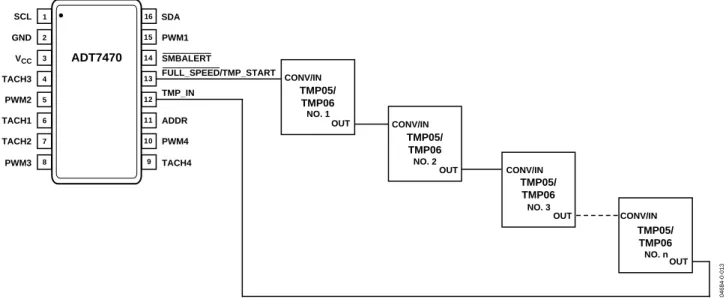
To use the ADT7470 with TMP05/TMP06, the parts should be connected as shown in Figure 13. Pin 13 on the ADT7470 should be configured as TMP_START, by setting Configuration Register 1 Bit 7 to Bit 1. (Register address 0x40 Bit[7] =1). The start pulse required by the TMP05/06 will be output on the TMP_START pin. The OUT pin on the last TMP05/06 in the daisy-chain should be connected to Pin 12 on the ADT7470, TMP_IN. For more information on the TMP05/06, refer to the TMP05/TMP06 data sheet.
Reporting of 8-bit temperature values occurs only if the TMP_IN function is used and if TMP05/TMP06s are daisy-chained according to their data sheet and connected as shown. The ADT7470 does not have any temperature measurement capability when used as a standalone device without TMP05s and TMP06s connected.
Table 7. Temperature Reading Registers
Register Reading Default
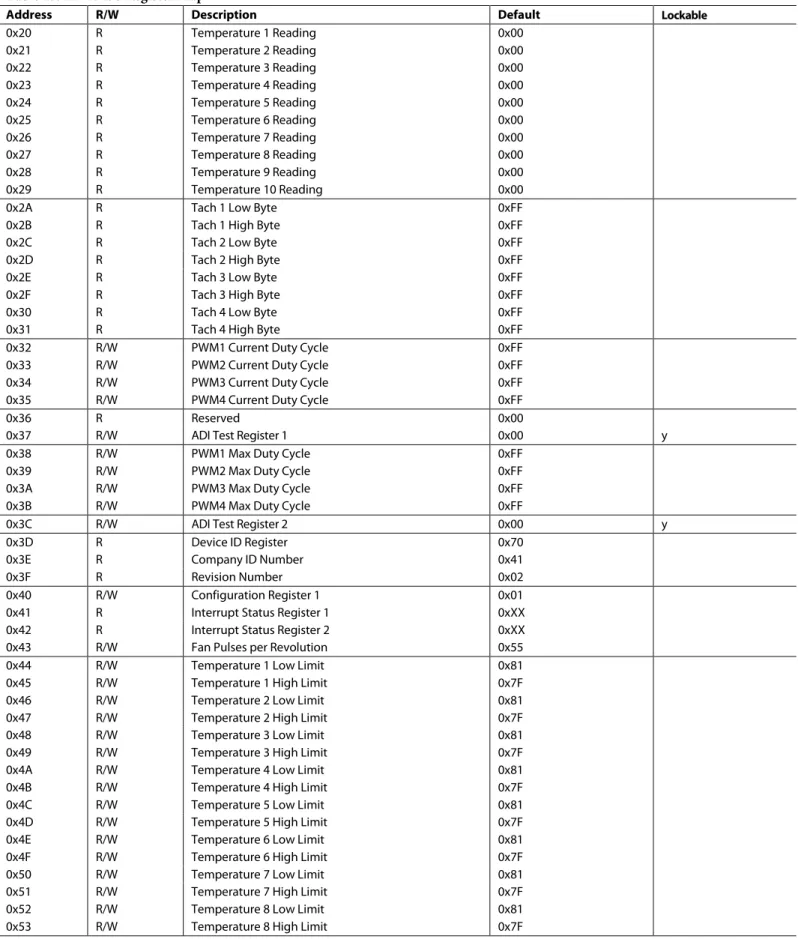
0x20 Temperature 1 reading 0x00 0x21 Temperature 2 reading 0x00 0x22 Temperature 3 reading 0x00 0x23 Temperature 4 reading 0x00 0x24 Temperature 5 reading 0x00 0x25 Temperature 6 reading 0x00 0x26 Temperature 7 reading 0x00 0x27 Temperature 8 reading 0x00 0x28 Temperature 9 reading 0x00 0x29 Temperature 10 reading 0x00 0x78 Max TMP05 temperature 0x00 TMP05/TMP06 Decoder
The ADT7470 includes a PWM processing engine to decode the daisy-chained PWM output from multiple TMP05s and TMP06s. It then passes each decoded temperature value to the temper-ature value registers. This allows the ADT7470 to do high/ low limit comparisons of temperature and to automatically control fan speed based on measured temperature. The PWM processing engine contains all necessary logic to initiate start conversions on the first daisy-chained TMP05/TMP06 and to synchronize with each temperature value as it is fed back to the device through the daisy chain. The start function is multi-plexed onto the same pin that can be used to blast the fans to full speed. The start conversion for TMP05/TMP06 temp-erature measurement is fully transparent to the user and does not require any software intervention to function.
NO. 1 CONV/IN OUT NO. 2 CONV/IN OUT NO. 3 NO. n CONV/IN OUT CONV/IN OUT 04684-0-013 TMP05/ TMP06 TMP05/ TMP06 TMP05/ TMP06 TMP05/ TMP06 1 2 3 4 5 6 7 8 16 15 14 13 12 11 10 9 GND VCC TACH3 TACH2 TACH1 PWM2 SCL PWM1 SMBALERT PWM4 PWM3 TACH4 ADDR TMP_IN SDA ADT7470 FULL_SPEED/TMP_START
TEMPERATURE READBACK BY THE HOST
The user cannot read the ADT7470 temperature register values if the ADT7470 is in the process of a temperature measurement. The user must wait until the data from all the TMP05s and TMP06s in the chain are received by the ADT7470 before reading these values. Otherwise, the temperature registers may store an incorrect value. It is recommended to wait at least 200 ms for each TMP05 and TMP06 in the chain. The recommended procedure is as follows:
1. Set Register 40 Bit[7] = 1. This starts the temperature measurements.
2. Wait 200 ms for each TMP05/TMP06 in the loop.
3. Set Register 40 Bit[7] = 0. 4. Read the temperature registers.
TEMPERATURE DATA FORMAT
Temperature data on the ADT7470 is stored in an 8-bit format, with the 7 LSBs being the temperature, and the MSB acting as the sign bit. Use the following formulae when reading back from the temperature registers, o calculate the temperature: Positive Temperature = ADC Code (decimal)
Negative Temperature = ADC (decimal) minus 256
For negative temperature readings, the MSB is always set to 1.
Example:
1. Temperature read back from register 0x20: 0xFF.
2. Convert into decimal format. 0xFF = 255 (decimal).
3. Check if MSB is set to 1. It is in this example. Therefore, use negative temperature formula, ADC (d) minus 256.
4. Temperature = 255 − 256 = −1°C.
Table 8. Temperature Data Format
Temperature (°C) Digital Output (8 Bit)
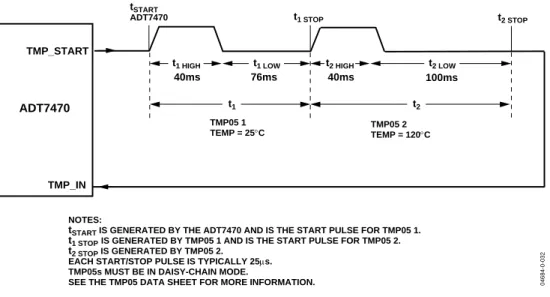
−128 1000 0000 −125 1000 0011 −100 1001 1100 −75 1011 0101 −50 1100 1110 −25 1110 0111 −10 1111 0110 +0 0000 0000 +10 0000 1010 +25 0001 1001 +50 0011 0010 +75 0100 1011 +100 0110 0100 +125 0111 1101 +175 0111 1111 40ms 40ms 76ms 100ms tSTART
ADT7470 t1 STOP t2 STOP
TMP_START TMP_IN ADT7470 TMP05 1 TEMP = 25°C TMP05 2 TEMP = 120°C NOTES:
tSTART IS GENERATED BY THE ADT7470 AND IS THE START PULSE FOR TMP05 1.
t1 STOPIS GENERATED BY TMP05 1 AND IS THE START PULSE FOR TMP05 2.
t2 STOP IS GENERATED BY TMP05 2.
EACH START/STOP PULSE IS TYPICALLY 25µs. TMP05s MUST BE IN DAISY-CHAIN MODE.
SEE THE TMP05 DATA SHEET FOR MORE INFORMATION.
t2
t1
t1 LOW
t1 HIGH t2 HIGH t2 LOW
04684-0-032
TEMPERATURE MEASUREMENT LIMITS
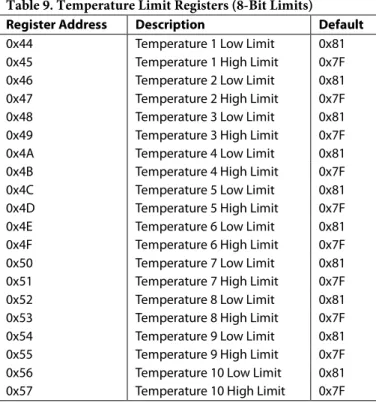
High and low temperature limits can be individually set for each of the TMP05/06s that the ADT7470 is monitoring. The temperature limit registers are at address 0x44 to 0x57. The power-on default value for all TMP05/06 lower limits is −127°C (0x81). The power –on default value for all TMP05/06 upper limits is +127°C (0x7F). See Table 9 for details on the temperature limit registers.If the temperature measured from a TMP05/06 exceeds the upper or lower limit, then a status bit in the Interrupt Status registers will be set to 1. See Table 12 and Table 13 for more details on the temperature status bits.
SMBALERT will assert is any temperature exceeds either the upper or lower limits. The temperature measurements can be masked as interrupt sources for SMBALERT using the interrupt mask registers, 0x72 and 0x73. See Table 14 and Table 15 for more details on the interrupt mask registers.
THERMAL ZONES FOR AUTOMATIC FAN CONTROL
The ADT7470 can control up to four independent thermal zones with individual fans. The user can configure which TMP05 controls which fan via register 0x7C and 0x7D.For each of the four thermal zones, an individual TMP05, or the hottest TMP05 in the daisy chain, can control the fan. In a system with n TMP05s, it is possible to have 1 or n TMP05s controlling each fan.Thermal Zone TMIN
For each of the four thermal zones, the user can configure the minimum temperature at which the fans run. Registers 0x6E to 0x71 should be configured with the minimum temperature for each thermal zone. When the temperature exceeds TMIN for that thermal zone, the fans run at minimum speed (PWMMIN). The fan speed increases to maximum speed (PWMMAX) at [TMIN + 20°C]. Fan on/off hysteresis is set at 4°C so that the fans turn off 4°C below the temperature at which they turn on. This prevents fan chatter in the system.
LIMIT AND STATUS REGISTERS
LIMIT VALUES
Associated with each measurement channel on the ADT7470 are high and low limits. These can form the basis of system status monitoring; a status bit can be set for any out-of-limit condition and be detected by polling the device. Alternatively, SMBALERT interrupts can be generated to automatically flag a service processor or microcontroller for out-of-limit conditions as they occur.
TEMPERATURE LIMITS
Table 9 lists the 8-bit temperature limits on the ADT7470.
Table 9. Temperature Limit Registers (8-Bit Limits)
Register Address Description Default
0x44 Temperature 1 Low Limit 0x81
0x45 Temperature 1 High Limit 0x7F
0x46 Temperature 2 Low Limit 0x81
0x47 Temperature 2 High Limit 0x7F
0x48 Temperature 3 Low Limit 0x81
0x49 Temperature 3 High Limit 0x7F
0x4A Temperature 4 Low Limit 0x81
0x4B Temperature 4 High Limit 0x7F
0x4C Temperature 5 Low Limit 0x81
0x4D Temperature 5 High Limit 0x7F
0x4E Temperature 6 Low Limit 0x81
0x4F Temperature 6 High Limit 0x7F
0x50 Temperature 7 Low Limit 0x81
0x51 Temperature 7 High Limit 0x7F
0x52 Temperature 8 Low Limit 0x81
0x53 Temperature 8 High Limit 0x7F
0x54 Temperature 9 Low Limit 0x81
0x55 Temperature 9 High Limit 0x7F
0x56 Temperature 10 Low Limit 0x81
0x57 Temperature 10 High Limit 0x7F
FAN SPEED LIMITS
The fan tach measurements are 16-bit results. The fan tach limits are also 16 bits, consisting of two bytes: a high byte and low byte. On the ADT7470 it is possible to set both high and low speed fan limits for over speed and under speed or stall con-ditions. Be aware that, because the fan tach period is actually being measured, exceeding the limit by 1 indicates a slow or stalled fan. Likewise, exceeding the high speed limit by 1 generates an over speed condition.
Table 10. Fan Underspeed Limit Registers
Register Address Description Default
0x58 Tach 1 Min Low Byte 0xFF
0x59 Tach 1 Min High Byte 0xFF
0x5A Tach 2 Min Low Byte 0xFF
0x5B Tach 2 Min High Byte 0xFF
0x5C Tach 3 Min Low Byte 0xFF
0x5D Tach 3 Min High Byte 0xFF
0x5E Tach 4 Min Low Byte 0xFF
0x5F Tach 4 Min High Byte 0xFF
Table 11. Fan Overspeed Limit Registers
Register Address Description Default
0x60 Tach 1 Max Low Byte 0x00
0x61 Tach 1 Max High Byte 0x00
0x62 Tach 2 Max Low Byte 0x00
0x63 Tach 2 Max High Byte 0x00
0x64 Tach 3 Max Low Byte 0x00
0x65 Tach 3 Max High Byte 0x00
0x66 Tach 4 Max Low Byte 0x00
0x67 Tach 4 Max High Byte 0x00
OUT-OF-LIMIT COMPARISONS
Once all limits are programmed, the ADT7470 can be enabled to begin monitoring. The ADT7470 measures all parameters in round-robin format and sets the appropriate status bit for out-of-limit conditions.
Comparisons are done differently depending on whether the measured value is compared to a high limit or a low limit. High Limit: > Comparison Performed
STATUS REGISTERS
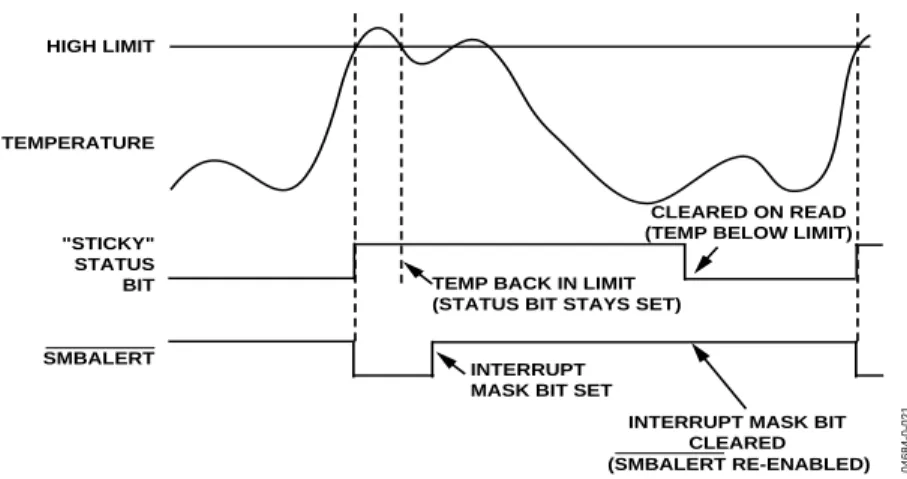
The results of limit comparisons are stored in Status Register 1 and Status Register 2. The status register bit for each channel reflects the status of the last measurement and limit comparison on that channel. If a measurement is within limits, the corre-sponding status register bit is cleared to 0. If the measurement is out of limit, the corresponding status register bit is set to 1. The state of the various measurement channels can be polled by reading the status registers over the serial bus. When Bit 7 (OOL) of Status Register 1 (Register 0x41) is a 1, an out-of-limit event has been flagged in Status Register 2. This means that Status Register 2 must be read only when the OOL bit is set. Reading the status registers clears the appropriate status bit as long as the error condition that caused the interrupt has cleared. Status register bits are sticky. Whenever a status bit is set, indicating an out-of-limit condition, it remains set even if the event that caused it has gone away (until read). The only way to clear the status bit is to read the status register when the event has gone away.
Interrupt status mask registers (Register 0x72 and Register 0x73) allow individual interrupt sources to be masked from causing an SMBALERT. However, if one of these masked interrupt sources goes out of limit, its associated status bit is still set in the interrupt status registers. This allows the device to be periodically polled to determine if an error condition has subsided, without unnecessarily tying up precious system resources handling interrupt service routines. The issue is that the device could potentially interrupt the system every monitoring cycle (< 1 sec) as long as a measurement parameter remains out of limit. Masking eliminates unwanted system interrupts.
The OOL bit (Register 0x41 Bit[7]), and the NORM bit (Register 0x42 Bit[3]) do not activate SMBALERT.
Table 12. Interrupt Status Register 1 (Register 0x41)
Bit No. Mnemonic Description
7 OOL A 1 denotes that a bit in Status Register 2 is set and Status Register 2 should now be read.
6 R7T A 1 indicates that TMP05 Temperature 7 high or low limit has been exceeded.
5 R6T A 1 indicates that TMP05 Temperature 6 high or low limit has been exceeded.
4 R5T A 1 indicates that TMP05 Temperature 5 high or low limit has been exceeded.
3 R4T A 1 indicates that TMP05 Temperature 4 high or low limit has been exceeded.
2 R3T A 1 indicates that TMP05 Temperature 3 high or low limit has been exceeded.
1 R2T A 1 indicates that TMP05 Temperature 2 high or low limit has been exceeded.
0 R1T A 1 indicates that TMP05 Temperature 1 high or low limit has been exceeded.
Table 13. Interrupt Status Register 2 (Register 0x42)
Bit No. Mnemonic Description
7 Fan 4 A 1 indicates that Fan 4 has dropped below minimum speed or is above maximum speed.
6 Fan 3 A 1 indicates that Fan 3 has dropped below minimum speed or is above maximum speed.
5 Fan 2 A 1 indicates that Fan 2 has dropped below minimum speed or is above maximum speed.
4 Fan 1 A 1 indicates that Fan 1 has dropped below minimum speed or is above maximum speed.
3 NORM A 1 indicates that the temperatures are below TMIN and that the fans are supposed to be off.
2 R10T A 1 indicates that TMP05 Temperature 10 high or low limit has been exceeded.
1 R9T A 1 indicates that TMP05 Temperature 9 high or low limit has been exceeded.
SMBALERT INTERRUPT
The ADT7470 can be polled for status, or an SMBALERT interrupt can be generated for out-of-limit conditions. Note how the SMBALERT output and status bits behave when writing interrupt handler software.
Figure 15 shows how the SMBALERT output and sticky status bits behave. Once a limit is exceeded, the corresponding status bit is set to 1. The status bit remains set until the error condition subsides the status register is read. The status bits are referred to as sticky because they remain set until read by software. This ensures that an out-of-limit event cannot be missed if software is polling the device periodically. The SMBALERT output remains low for the duration that a reading is out of limit until the status register is read. This has implications for how software handles the interrupt.
Handling SMBALERT Interrupts
To prevent the system from being tied up servicing interrupts, handle the SMBALERT interrupt as follows:
1. Detect the SMBALERT assertion. 2. Enter the interrupt handler.
3. Read the status registers to identify the interrupt source. 4. Mask the interrupt source by setting the appropriate mask
bit in the interrupt mask registers (Register 0x72 and Register 0x73).
5. Take the appropriate action for a given interrupt source. 6. Exit the interrupt handler.
7. Periodically poll the status registers. If the interrupt status bit is cleared, reset the corresponding interrupt mask bit to 0. This causes the SMBALERT output and status bits to behave as shown in Figure 16.
"STICKY" STATUS BIT HIGH LIMIT TEMPERATURE SMBALERT CLEARED ON READ (TEMP BELOW LIMIT) TEMP BACK IN LIMIT
(STATUS BIT STAYS SET)
04684-0-020
Figure 15. SMBALERT and Status Bit Behavior
"STICKY" STATUS BIT HIGH LIMIT TEMPERATURE SMBALERT CLEARED ON READ (TEMP BELOW LIMIT)
TEMP BACK IN LIMIT (STATUS BIT STAYS SET)
INTERRUPT MASK BIT SET
INTERRUPT MASK BIT CLEARED
(SMBALERT RE-ENABLED)
04684-
0-021
Masking Interrupt Sources
Interrupt Mask Register 1 and Interrupt Mask Register 2 are located at Address 0x72 and Address 0x73. These allow indi-vidual interrupt sources to be masked out to prevent unwanted SMBALERT interrupts. Masking an interrupt source prevents only the SMBALERT output from being asserted; the appro-priate status bit is still set as usual. This is useful if the system polls the monitoring devices periodically to determine whether or not out-of-limit conditions have subsided, without tying up time-critical system resources.
Enabling the SMBALERT Interrupt Output
The SMBALERT interrupt output is a dedicated function pro-vided on Pin 14 to signal out-of-limit conditions to a host or system processor. Because this is a dedicated function, it is important that limit registers be programmed before monitoring is enabled to prevent spurious interrupts from occurring on the SMBALERT pin. Although the SMBALERT output cannot be specifically disabled, interrupt sources can be masked to prevent SMBALERT assertions. Monitoring is enabled when Bit 0 (STRT) of Configuration Register 1 (Register 0x40) is set to 1.
Table 14. Interrupt Mask Register 1 (Register 0x72)
Bit No. Mnemonic Description
7 Unused Unused.
6 R7T A 1 masks the SMBALERT for TMP05 Temperature 7.
5 R6T A 1 masks the SMBALERT for TMP05 Temperature 6.
4 R5T A 1 masks the SMBALERT for TMP05 Temperature 5.
3 R4T A 1 masks the SMBALERT for TMP05 Temperature 4.
2 R3T A 1 masks the SMBALERT for TMP05 Temperature 3.
1 R2T A 1 masks the SMBALERT for TMP05 Temperature 2.
0 R1T A 1 masks the SMBALERT for TMP05 Temperature 1.
Table 15. Interrupt Mask Register 2 (Register 0x73)
Bit No. Mnemonic Description
7 Fan 4 A 1 masks the SMBALERT for Fan 4 overspeed/underspeed conditions.
6 Fan 3 A 1 masks the SMBALERT for Fan 3 overspeed/underspeed conditions.
5 Fan 2 A 1 masks the SMBALERT for Fan 2 overspeed/underspeed conditions.
4 Fan 1 A 1 masks the SMBALERT for Fan 1 overspeed/underspeed conditions.
3 Unused Unused.
2 R10T A 1 masks the SMBALERT for TMP05 Temperature 10.
1 R9T A 1 masks the SMBALERT for TMP05 Temperature 9.
FAN DRIVE USING PWM CONTROL
The ADT7470 uses pulse-width modulation (PWM) to control fan speed. This relies on varying the duty cycle (or on/off ratio) of a square wave applied to the fan to vary the fan speed. Two main control schemes are used: low frequency and high fre-quency PWM.
Configuration Register 1 Bit[6], at address 0x40, configures the fan drive for high or low frequency operation. If this bit is set to 0, which is the default, high frequency fan drive is selected. If this bit is set to 1, low frequency fan drive is selected. All four PWM outputs on the ADT7470 have the same drive frequency.
HIGH FREQUENCY FAN DRIVE
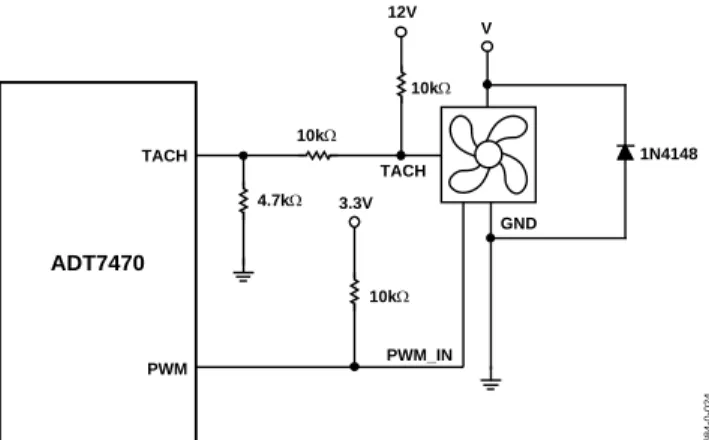
One of the important features of fan controllers is the PWM drive frequency. Most fans are driven asynchronously at low frequency (30 Hz to 100 Hz). Increasingly, the devices drive fans at greater than 20 kHz. These controllers are meant to drive 4-wire fans with PWM control built-in internal to the fan in Figure 17. The ADT7470 supports high frequency PWM (great than 20 kHz), as well as 1.4 kHz and other low frequency PWM. This allows the user to drive 3-wire or 4-wire fans.
If using 3-wire fans this mode, care should be taken to ensure that incomplete tach information does not occur at low PWM duty cycles, or short PWM pulse widths.
V PWM 3.3V 10kΩ TACH ADT7470 12V 10kΩ TACH 10kΩ 4.7kΩ 1N4148 04684-0-024 GND PWM_IN
Figure 17. Driving a 4-Wire Fan
LOW FREQUENCY FAN DRIVE
For low frequency, low-side drive, the external circuitry required to drive a fan using PWM control is extremely simple. A single NMOS FET is the only drive device required. The specifications of the MOSFET depend on the maximum current required by the fan being driven. Typical notebook fans draw a nominal 170 mA; therefore, SOT devices can be used where board space is a concern. In desktops, fans can typically draw 250 mA to 300 mA each. If the user needs to drive several fans in parallel from a single PWM output or drive larger server fans, the MOSFET needs to handle the higher current requirements. The only other stipulation is that the MOSFET should have a gate voltage drive, VGS, less than 3.3 V, for direct interfacing to the PWM pin of the ADT7470. VGS of the chosen MOSFET can be greater than 3.3 V as long as the pull-up on its gate is tied to 5 V. The MOSFET should also have a low on resistance to ensure that there is not significant voltage drop across the FET. This would reduce the voltage applied across the fan and, therefore, the maximum operating speed of the fan.
Figure 18 shows how a 3-wire fan can be driven using low frequency PWM control where the control method is low-side, low frequency switching.
Figure 18 shows the ideal interface when interfacing a tach signal from a 12 V fan (or greater voltage) to a 5 V (or less) logic device. In all cases, the tach signal from the fan must be kept below 5 V maximum to prevent damage to the ADT7470. The three resistors in Figure 18 ensure that the tach voltage is kept within safe levels for typical desktop and notebook systems. 12V Q1 NDT3055L PWM 3.3V 10kΩ 12V FAN TACH/AIN ADT7470 12V 10kΩ TACH 10kΩ 4.7kΩ 1N4148 04684-0-022
Figure 19 shows a fan drive circuit using an NPN transistor such as a general-purpose MMBT2222. While these devices are inexpensive, they tend to have much lower current handling capabilities and higher on resistance than MOSFETs. When choosing a transistor, care should be taken to ensure that it meets the fan’s current requirements. This is the only major difference between a MOSFET and NPN transistor fan driver circuit.
When using transistors, ensure that the base resistor is chosen such that the transistor is fully saturated when the fan is powered on. Otherwise, there are power inefficiencies in the implementation. 12V Q1 MMBT2222 PWM 3.3V 470Ω 12V FAN TACH/AIN ADT7470 12V 10kΩ TACH 10kΩ 4.7kΩ 1N4148 04684-0-023
Figure 19. Driving a 3-Wire Fan Using an NPN Transistor Low Frequency
SETTING THE FAN DRIVE FREQUENCY
Configuration Register 2 Bits[6:4] configure the fan drive frequency in both high and low frequency drive mode.
Table 16. Fan Drive Frequency
Register
0x74[6:4] High Frequency Drive (0x40[6] = 0) Low Frequency Drive (0x40[6] = 1)
000 1.4 kHz 11 Hz 001 22.5 kHz 14.7 Hz 010 22.5 kHz 22.1 Hz 011 22.5 kHz 29.4 Hz 100 22.5 kHz 35.3 Hz 101 22.5 kHz 44.1 Hz 110 22.5 kHz 58.8 Hz 111 22.5 kHz 88.2 Hz
INVERTED PWM OUTPUT
The PWM duty cycle can be inverted by writing to the PWM Configuration registers. If the PWM duty cycle is inverted, then a PWM duty cycle setting of 33% results in an output duty cycle of 66%, as the PWM waveform is inverted.
Table 17. PWM1/PWM2 Configuration (Register 0x68)
Bit No. Mnemonic Description
5 INV1 0 = PWM1 duty cycle not inverted
(default).
1 = PWM1 duty cycle inverted.
4 INV2 0 = PWM2 duty cycle not inverted
(default).
1 = PWM2 duty cycle inverted. Table 18. PWM3/PWM4 Configuration (Register 0x69)
Bit No. Mnemonic Description
5 INV3 0 = PWM3 duty cycle not inverted
(default).
1 = PWM3 duty cycle inverted.
4 INV4 0 = PWM4 duty cycle not inverted
(default).
1 = PWM4 duty cycle inverted.
FAN FULL SPEED FUNCTION
When Pin 13 is configured for full speed operation, pulling the pin low will cause all fans to run at the maximum PWM duty cycle. A Logic 1 is output on the PWM pins in this case.
FAN SPEED MEASUREMENT
TACH INPUTS
Pin 6, Pin 7, Pin 4, and Pin 9 are open-drain tach inputs intended for fan speed measurement.
Signal conditioning in the ADT7470 accommodates the slow rise and fall times typical of fan tachometer outputs. The maxi-mum input signal range is 0 V to 5 V, even where VCC is less
than 5 V. If these inputs are supplied from fan outputs that exceed 0 V to 5 V, either resistive attenuation of the fan signal or diode clamping must be included to keep inputs within an acceptable range. Figure 20 to Figure 23 show circuits for most common fan tach outputs.
If the fan tach output has a resistive pull-up to VCC, it can be
connected directly to the fan input, as shown in Figure 20. 12V FAN SPEED COUNTER TACH PULLUP 4.7k TYP TACH OUTPUT VCC ADT7470 04684- 0-025
Figure 20. Fan with Tach Pull-Up to VCC
If the fan output has a resistive pull-up to 12 V (or other voltage greater than 5 V), the fan output can be clamped with a Zener diode, as shown in Figure 21. The Zener diode voltage should be chosen so that it is greater than VIH of the tach input but less
than 5 V, allowing for the voltage tolerance of the Zener. A value of between 3 V and 5 V is suitable.
12V FAN SPEED COUNTER TACH TACH OUTPUT ZD1* ZENER PULLUP 4.7k TYP
*CHOOSE ZD1 VOLTAGE APPROX. 0.8 VCC VCC
ADT7470
04684-0-026
Figure 21. Fan with Tach.
Pull-Up to voltage > 5 V, for example, 12 V clamped with Zener diode.
If the fan output has a resistive pull-up to 12 V (or other voltage greater than 5 V), the fan output can be clamped with a Zener diode, as shown in Figure 21. The Zener diode voltage should be chosen so that it is greater than VIH of the tach input but less
than 5 V, allowing for the voltage tolerance of the Zener. A value of between 3 V and 5 V is suitable.
If the fan has a strong pull-up (less than 1 kΩ) to 12 V, or a totem-pole output, a series resistor can be added to limit the
R1 and R2 should be chosen such that
2 V < VPULL-UP × R2/(RPULL-UP + R1 + R2) < 5 V
The fan inputs have an input resistance of nominally 160 kΩ to ground, which should be taken into account when calculating resistor values.
With a pull-up voltage of 12 V and pull-up resistor less than 1 kΩ, suitable values for R1 and R2 are 100 kΩ and 47 kΩ. This gives a high input voltage of 3.83 V.
12V FAN SPEED COUNTER TACH PULLUP TYP. <1k OR TOTEM-POLE ZD1 ZENER* R1 10k TACH O/P
*CHOOSE ZD1 VOLTAGE APPROX. 0.8 VCC VCC
ADT7470
04684-0-027
Figure 22. Fan with Strong Tach.
Pull-Up to > VCC or Totem-Pole Output, Clamped with Zener and Resistor.
12V FAN SPEED COUNTER TACH TACH OUTPUT R1* R2* <1k VCC *SEE TEXT ADT7470 04684-0-028
Figure 23. Fan with Strong Tach.
Pull-Up to > VCC or Totem-Pole Output, Attenuated with R1/R2. Pulse Stretching
Pulse stretching of the PWM output is performed automatically in low frequency fan drive mode, to ensure that sufficient tach readings are taken from the fan.
However, in high frequency fan drive mode, pulse stretching is disabled. If using 3-wire fans this mode, care should be taken to ensure that incomplete tach information does not occur at low PWM duty cycles, or short PWM pulse widths.
Disabling Tach measurement
The tach measurement for each fan can be disabled by writing to Configuration Register 2 Bits[3:0], at Address 0x74.
FAN SPEED MEASUREMENT
The fan counter does not count the fan tach output pulses directly, because the fan speed may be less than 1000 RPM, and it would take several seconds to accumulate a reasonably large and accurate count. Instead, the period of the fan revolution is measured by gating an on-chip 90 kHz oscillator into the input of a 16-bit counter for N periods of the fan tach output, as shown in Figure 24, so the accumulated count is actually proportional to the fan tachometer period and inversely proportional to the fan speed.
N, the number of pulses counted, is determined by the settings of Register 0x43 (fan pulses per revolution register). This register contains two bits for each fan, allowing 1, 2 (default), 3, or 4 tach pulses to be counted.
CLOCK PWM TACH 1 2 3 4 04684- 0-029
Figure 24. Fan Speed Measurement
Fan Speed Measurement Registers
The fan tachometer readings are 16-bit values consisting of a 2-byte read from the ADT7470.
Table 19. Fan Speed Measurement Registers Register Address Description Default
0x2A Tach 1 low byte 0x00 0x2B Tach 1 high byte 0x00 0x2C Tach 2 low byte 0x00 0x2D Tach 2 high byte 0x00 0x2E Tach 3 low byte 0x00 0x2F Tach 3 high byte 0x00 0x30 Tach 4 low byte 0x00 0x31 Tach 4 high byte 0x00
Reading Fan Speed from the ADT7470
Measuring fan speed involves a 2-register read for each meas-urement. The low byte should be read first. This causes the high byte to be frozen until both high and low byte registers are read from, preventing erroneous tach readings.
The fan tachometer reading registers report back the number of 11.11 ms period clocks (90 kHz oscillator) gated to the fan speed counter, from the rising edge of the first fan tach pulse to the rising edge of the third fan tach pulse (assuming 2 pulses per revolution are being counted). Since the device is essentially measuring the fan tach period, the higher the count value, the slower the fan is actually running. A 16-bit fan tachometer reading of 0xFFFF indicates either that the fan has stalled or is running very slowly (<100 RPM).
Fan Tach Limit Registers
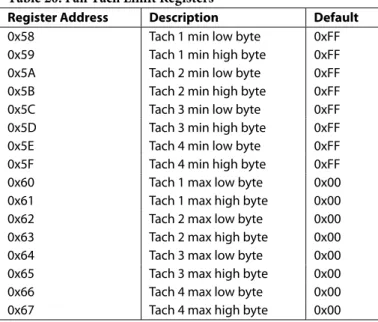
The fan tach limit registers are 16-bit values consisting of two bytes. Minimum limits determine fan under speed settings, while maximum limits determine fan over speed settings.
Table 20. Fan Tach Limit Registers
Register Address Description Default
0x58 Tach 1 min low byte 0xFF 0x59 Tach 1 min high byte 0xFF 0x5A Tach 2 min low byte 0xFF 0x5B Tach 2 min high byte 0xFF 0x5C Tach 3 min low byte 0xFF 0x5D Tach 3 min high byte 0xFF 0x5E Tach 4 min low byte 0xFF 0x5F Tach 4 min high byte 0xFF 0x60 Tach 1 max low byte 0x00 0x61 Tach 1 max high byte 0x00 0x62 Tach 2 max low byte 0x00 0x63 Tach 2 max high byte 0x00 0x64 Tach 3 max low byte 0x00 0x65 Tach 3 max high byte 0x00 0x66 Tach 4 max low byte 0x00 0x67 Tach 4 max high byte 0x00
High Limit: Comparison
Because the actual fan tach period is being measured, exceeding a fan tach limit by 1 sets the appropriate status bit and can be used to generate an SMBALERT.
Fan Speed Measurement Rate
The fan tach readings are updated once every second by default. The fast tach bit (Register 0x40 Bit[5]) controls the frequency of tach measurements. Setting this bit to 1 increases the tach measurements from one per second, to one every 250 ms.
Calculating Fan Speed and Tachometer Limits
Assuming that the measured number of tach pulses per rotation corresponds to the number of pulses counted as set in register 0x43, fan speed is calculated by
Fan Speed (RPM) = (90,000 × 60)/Fan Tach Reading where Fan Tach Reading is the 16-bit fan tachometer reading. For example:
Tach 1 High Byte (Reg 0x2B) = 0x17 Tach 1 Low Byte (Reg 0x2A) = 0xFF What is Fan 1 speed in RPM?
Fan 1 tach reading = 0x17FF = 6143 decimal RPM = (f × 60)/Fan 1 tach reading
RPM = (90000 × 60)/6143 Fan Speed = 879 RPM
Calculate the tachometer maximum and minimum limits at 1000 RPM and 500 RPM as follows: 1000 RPM (90,000 × 60)/1000 = 5400 decimal 5400 decimal = 1518 hex Tach 1 maximum = 1518 500 RPM (90,000 × 60)/500 = 10800 decimal 10800 decimal = 2A30 hex Tach 1 minimum = 2A30
Fan Pulses per Revolution
Different fan models can output either 1, 2, 3, or 4 tach pulses per revolution. The number of tach pulses per rotation for each fan should be programmed into the fan pulses per revolution register (Register 0x43). If an incorrect value is programmed, then the fan speed cannot be determined using the equation in the Calculating Fan Speed section.
Alternatively, if the number of tach pulses per rotation is not know, this register can be used in determining the number of pulses/revolution output by a given fan. By plotting fan speed measurements at maximum speed with different pulses/ revolution settings, the smoothest graph with the lowest ripple determines the correct pulses/revolution value.
MANUAL FAN SPEED CONTROL
Manual fan speed control on the ADT7470 allows the user to control the PWM duty cycle for each fan via the registers. The ADT7470 powers-up in manual fan control mode, with all PWM duty cycles set to maximum. The PWM Configuration registers determine whether the fans are in manual or automatic fan control mode.
SETTING THE PWM DUTY CYCLE
The ADT7470 allows the duty cycle of any PWM output to be manually adjusted. This can be useful if users want to change fan speed in software or want to adjust PWM duty cycle output for test purposes. The PWM current duty cycle registers (Register 0x32 to Register 0x35) can be written with 8-bit values in manual fan speed control mode to manually adjust the speeds of the cooling fans.
The PWM duty cycle for each output can be set anywhere from 0% to 100%, in steps of 0.39%.
The value to be programmed into the PWM Current Duty Cycle registers can be calculated as follows:
Value (decimal) = DesiredPWM duty cycle/0.39 Example 1: For a PWM Duty Cycle of 50%
Value (decimal) = 50/0.39 = 128 decimal Value = 128 decimal or 80 hex
Example 2: For a PWM Duty Cycle of 33% Value (decimal) = 33/0.39 = 85 decimal Value = 85 decimal or 54 hex
Table 21. PWM Current Duty Cycle Registers
Register Address Description Default
0x32 PWM1 duty cycle 0xFF (100%)
0x33 PWM2 duty cycle 0xFF (100%)
0x34 PWM3 duty cycle 0xFF (100%)
0x35 PWM4 duty cycle 0xFF (100%)
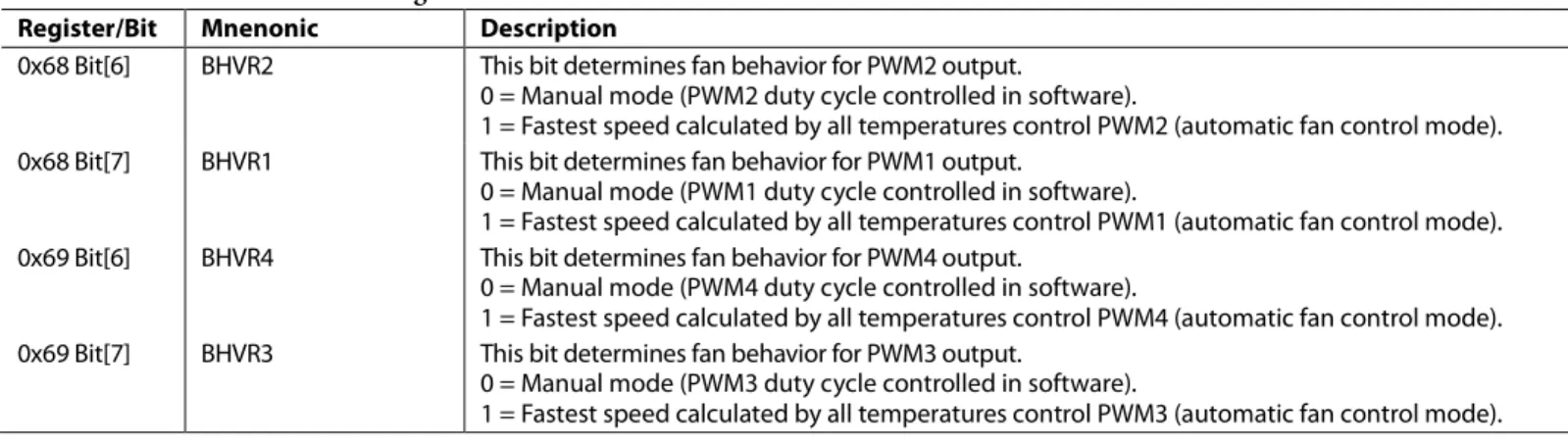
Table 22.Fan Control Mode Configuration
Register/Bit Mnenonic Description
0x68 Bit[6] BHVR2 This bit determines fan behavior for PWM2 output.
0 = Manual mode (PWM2 duty cycle controlled in software).
1 = Fastest speed calculated by all temperatures control PWM2 (automatic fan control mode). 0x68 Bit[7] BHVR1 This bit determines fan behavior for PWM1 output.
0 = Manual mode (PWM1 duty cycle controlled in software).
1 = Fastest speed calculated by all temperatures control PWM1 (automatic fan control mode). 0x69 Bit[6] BHVR4 This bit determines fan behavior for PWM4 output.
0 = Manual mode (PWM4 duty cycle controlled in software).
1 = Fastest speed calculated by all temperatures control PWM4 (automatic fan control mode). 0x69 Bit[7] BHVR3 This bit determines fan behavior for PWM3 output.
0 = Manual mode (PWM3 duty cycle controlled in software).