Rynhardt Pieter Kruger
Thesis presented in partial fullment of the requirements for
the degree of Master of Science in Computer Science in the
Faculty of Science at Stellenbosch University
Department of Mathematical Sciences, Computer Science Division,
University of Stellenbosch,
Private Bag X1, Matieland 7602, South Africa.
Supervisor: Prof. L. van Zijl
Declaration
By submitting this thesis electronically, I declare that the entirety of the work contained therein is my own, original work, that I am the sole author thereof (save to the extent explicitly otherwise stated), that reproduction and publication thereof by Stellenbosch University will not infringe any third party rights and that I have not previously in its entirety or in part submitted it for obtaining any qualification.
December 2014
Copyright © 2014 Stellenbosch University All rights reserved
Abstract
Virtual World Accessibility: a Multitool Approach
R.P. Kruger
Department of Mathematical Sciences, Computer Science Division,
University of Stellenbosch,
Private Bag X1, Matieland 7602, South Africa.
Thesis: MSc Computer Science September 2014
Computer-based virtual worlds are increasingly used for activities which previously required physical environments. However, in its mainstream form, such a virtual world provides output on a graphical display and is thus inaccessible to a blind user. To achieve accessibility for blind users, an alternative to graphical output must be used. Audio and text are two output methods that can be considered. However, when using audio, care must be taken not to overload the audio channel. Channel overloading is possible with audio since it is not a selective output medium like the visual channel, that is, the user cannot choose what he/she wants to hear. Text should also be treated as audio, since a blind user consumes textual information as synthesized speech. In this research we discuss one possible solution to the problem of channel overloading, by the use of multiple exploration and navigation tools. These tools should allow the user to shape the information provided as audio output. Specically, we discuss the development of a virtual world client called Perspective,
enabling non-visual access to virtual worlds by the use of multiple navigation and exploration tools. Perspective also serves as a framework for tool implementation and evaluation. Finally we give recommendations for improvements to current virtual world building practices and protocols, as to work toward an accessibility standard.
Rekenaargebaseerde virtuele wêrelde word toenemend gebruik vir aktiwiteite wat voorheen siese omgewings benodig het. Tog verskaf so 'n virtuele wêreld, in sy standaard vorm, afvoer as 'n graese beeld en is dus ontoeganklik vir 'n blinde gebruiker. Om toeganklikheid vir blinde gebruikers te bewerkstellig, moet 'n al-ternatief vir die graese beeld gebruik word. Klank en teks is twee alternatiewe wat beskou kan word. Tog moet klank versigtig gebruik word, aangesien die klankkanaal oorlaai kan word. Die klankkanaal kan oorlaai word aangesien dit nie 'n selektiewe kanaal soos die visuele kanaal is nie, met ander woorde, die gebruiker kan nie kies wat hy/sy wil hoor nie. Teks moet ook as klank beskou word, aangesien 'n blinde gebruiker teks in die vorm van gesintetiseerde spraak inneem. Met hierdie navorsing bespreek ons een oplossing vir die probleem van kanaaloorlading, deur die gebruik van verskeie navigasie- en verkenningsgereedskapstukke. Hierdie gereed-skapstukke behoort die gebruiker in staat te stel om die inligting wat as klank oorgedra word, te bepaal. Ons bespreek spesiek die ontwikkeling van 'n virtuele wêreld-kliënt genaamd Perspective, wat nie-visuele toegang tot virtuele wêrelde bewerkstellig deur die gebruik van meervoudige navigasie- en verkenningsgereed-skapstukke. Perspective dien ook as 'n raamwerk vir die ontwikkeling en evalu-ering van gereedskapstukke. Laastens verskaf ons voorstelle vir verbetevalu-eringe van die boutegnieke en protokolle van huidige virtuele wêrelde, as eerste stap na 'n toeganklikheidsstandaard vir virtuele wêrelde.
This work is dedicated to my parents, who taught me what I needed to know, long before I started programming.
Acknowledgements
I would like to thank my supervisor. This work would not have been possible without your guidance and advice. And, I will never write its as it's again. I would also like to thank MIH for providing the funds necessary to pursue this degree.
Lastly I would like to thank my family and friends. You all supported me and contributed to keeping my mind in balance. Whether it was by giving me something besides the thesis to talk about, or ensuring that I go to dance class.
Contents
Abstract i Contents v 1 Introduction 1 2 Literature Survey 4 2.1 Second Life . . . 4 2.2 Audio Games . . . 82.3 Graphical User Interface Accessibility . . . 13
2.4 Summary . . . 18
3 Design and Implementation 20 3.1 Background . . . 20
3.2 Implementation . . . 22
3.3 Exploration Tools . . . 30
3.4 Summary . . . 37
4 Analysis of the Framework 39 4.1 Performing Tasks . . . 40
4.2 Analysis of the Tools . . . 43
4.3 Analysis of the Framework . . . 46
4.4 User Evaluation of the Viewer . . . 47
4.5 Summary . . . 50
5 Accessibility Recommendations 52 5.1 Building Practices . . . 52
5.2 Improvements to the Protocol . . . 53 5.3 Summary . . . 57
6 Conclusion and Future Work 59
Chapter 1
Introduction
Virtual worlds are being used today in many areas in place of the physical en-vironment. For example, it is used in education to portray real-life locations or situations; in communication it is used to create a meeting place for people who may be many kilometers apart; and it is used to simulate events which may be costly or dangerous to attempt in the real world. Finally, it is used in gaming and recreation to simulate places and environments purely for the players' entertain-ment.
Current virtual world implementations use the visual display as the primary method of communicating the state of the world to the user. Audio is sometimes used as well, but to a lesser extent. As the visual display is inaccessible to a blind user, most virtual worlds are currently not accessible to the blind population. In this thesis, we investigate methods to make virtual worlds more accessible to the blind population.
In real life a blind person relies on his/her remaining four senses to obtain inform-ation about the environment. This informinform-ation includes:
audio cues, including sounds from the environment, as well as acoustic prop-erties of objects such as sound reections from objects (echolocation); touch, to gather information about the size and shape of objects; and
orientation and mobility (O and M) skills, including using objects as naviga-tional beacons.
Most of the above information is dicult if not impossible to obtain with current implementations of virtual worlds. Some, like O and M skills and adequate audio information, result from limitations in currently available software. The sense of touch can however not currently be fully simulated because of hardware limitations. To enable better access to virtual worlds for blind and visually impaired users, the most natural approach is to simulate the environmental cues that a blind person might expect from his/her environment. Alternative ways must also be found to convey information which cannot be simulated due to hardware limitations, such as the sense of touch. A number of solutions has been proposed in the literature to solve this problem. However, the main focus is on either text only representations of the virtual world, or hardware devices not readily available [4, 7, 10]. Although audio has been used to some extent in making video games accessible to blind people [24], it has not been used for mainstream virtual worlds specically.
As an aid, audio can be used in two ways. One way is to simulate audio cues the user would use in the real world such as the sound of equipment. A second way is to provide secondary audio cues not available in the real world, but which nonetheless makes information available in a 3-dimensional format1 not attainable
via text-only descriptions. Examples of such audio cues may include a beep to indicate the position of a door opening, or the name of an object played as audio from the direction of its position.
When using the audio channel, care must be taken not to overload it. This over-loading occurs because the audio channel is not selective, as opposed to sight which is selective. One way of overcoming this overloading problem is to provide the user with tools which can be used to explore the environment, and thereby select the information which should be communicated over the audio channel. The problem then becomes to nd the right set of tools to enable the best balance between
ef-13D audio, or 3D sound, is sound played within 3D space relative to the listener's position.
The direction and distance from the listener to each sound is calculated, and HRTF (head related transfer function) lters are applied to simulate the eect that the shape of the listener's head would have had on the sound in real life.
ciency for the user when retrieving information, and the optimal use of the audio channel.
In this research we explore accessibility to virtual worlds through the use of audio cues and textual descriptions. In particular, we explore the optimal use of the audio channel through the use of exploration tools. To this end, we describe a framework which can be used to explore dierent combinations of exploration tools.
We design, implement and explore a framework which serves as a viewer for Second Life and compatible virtual worlds. The viewer should be designed to be completely accessible and usable by blind and visually impaired users. The viewer serves three goals: rstly, the viewer should be usable by blind and visually impaired users to access mainstream virtual worlds. Secondly, it should serve as a framework which can be used to evaluate dierent navigation and exploration tools, in order to op-timize the use of the audio channel. Thirdly, we use this viewer to evaluate the overall accessibility of virtual worlds, with the ultimate goal of proposing improve-ments to both the Second Life API, as well as virtual world building practices. This last goal is thus similar to the accessibility standard maintained by the World Wide Web consortium [25, 26], which ensures that websites are designed to be accessible to all users, including blind and visually impaired users.
In Chapter 2 a survey of previous work done towards virtual world accessibility for blind users is given. Chapter 3 discusses our implementation of an accessible virtual world viewer, which also serves as a research framework for tool development and evaluation. Chapter 4 describes our ndings using the accessible viewer. In Chapter 5 further work and recommendations for accessibility practices needed to ensure a better experience for blind users using virtual worlds, are discussed. Finally, Chapter 6 serves as the conclusion.
Chapter 2
Literature Survey
In this chapter a survey of previous work related to virtual world accessibility is given. Second Life, the virtual world we intend to use for the research, is described rst. We then discuss previous work done on Second Life and other virtual worlds to increase accessibility for these environments. Audio games are similar to virtual worlds, as they also employ a model of the real world. We examine the methods employed by audio games, and how they can be applied to mainstream virtual worlds. Lastly, we look at accessibility APIs, a method for making 2D environments accessible that can also be applied to 3D environments like virtual worlds.
2.1 Second Life
Second Life is an online multiuser virtual environment created and hosted by Linden Labs [12]. The server maintains the state of the world, which consists of virtual objects with content (graphics and audio) and attached scripts. Users connect to Second Life by using a viewer, which is similar in function to a web browser. When interacting or moving around in Second Life, the user's display is updated continuously to show the surrounding environment, as well as the user's avatar, which is the virtual representation of his/her character.
Content in Second Life is mostly created by the users themselves, using 3D modeling tools provided by the viewer. Once created, an object is represented in the world by a set of primitive shapes like boxes and cylinders. The shape of an object on
the user's display, as well as any other content attached to it, is uploaded by the user. The user also provides the object with a name and description, but a default name (object) and an empty description is provided by the creation tools.
2.1.1 Second Life Accessibility
White et al reported on the state of accessibility in Second Life [28]. They identied various problems with the current accessibility of Second Life, including:
Most objects in Second Life are only rendered visually usually no textual descriptions or sounds are attached;
The user interface of the default Linden Labs viewer does not implement an accessibility API, making it impossible for a blind user to navigate the interface with a screen reader;
The default operation of Second Life requires the user to interact with objects using a mouse, which cannot be accomplished by a blind person in its current form; and
Although a blind user should be able to program objects using the Linden scripting language, the object construction tools are not accessible.
White et al suggested some solutions to these problems, such as:
Implementing an accessibility API within the user interface of the viewer. This will enable accessibility to the user interface for screen reader users; Implementing alternative methods of presenting the state of the virtual world
to blind users, which may be in the form of textual descriptions, audio feed-back, or haptic (tactile) feedback; and
Developing a database containing user contributed descriptions for objects in the virtual environment.
In this thesis, we build on the work by White et al. In particular, we focus on nding alternative representations of the virtual world. We also examine current
accessibility APIs, and how they can be applied to virtual worlds, as suggested in [28].
2.1.2 TextSL
TextSL is a Second Life viewer developed by Folmer et al [7]. The focus of their work is to present objects in the virtual world by the use of textual descriptions. The user controls the avatar by issuing textual commands, loosely resembling natural sentences. The authors argue that a textual representation of the world is preferred over an audio representation because of the number of objects around the avatar in a usual Second Life setting. They argue that sounds may overload the user's audio channel and that sounds cannot be as easily reviewed as a textual description. Although our solution will not focus entirely on textual descriptions to provide vir-tual world accessibility like TextSL, the description engine of TextSL will contribute much to our combined solution.
2.1.3 Haptic Feedback in Second Life
Depascale et al extended the Second Life viewer to provide haptic feedback to the user by using a force feedback device like a joystick [4]. Their solution can be used by a blind person to navigate the world, as well as explore his/her surroundings. The system described in [4] consists of two functions mapped to a joystick. The navigational system lets the user move his/her avatar by pushing the joystick in the direction in which movement is desired. The joystick provides force feedback if a collision occurs; for example, when the avatar moves into a wall. In exploration mode the operation of the joystick is analogous to the white cane used by a blind person in the real world. As the user moves the joystick, the direction of interest is calculated relative to the direction in which the cane would have been pointing in the real world. If an object is present in that direction, the joystick will vibrate with an intensity inversely related to the distance to the object.
Although the system was not tested by blind users, the methods employed can be useful as part of a combined solution. Specically, the methods can aid in
navigation around objects. However, it is not suitable for examining objects, as the system cannot present detailed information.
2.1.4 Tactile Virtual World Accessibility
Iglesias et al described a hardware device designed to make 3D objects accessible to the blind [10]. They cite a number of uses for this device, including the application of exploring virtual worlds. The device enables the user to explore 3D objects by using two ngers. Pressure is applied on a nger which encounters an edge of the object being explored. The device thus enables the user to feel the object with two ngers.
The problem with such a hardware device is that the user needs to acquire the device in question before accessibility to virtual worlds can be accomplished. This device was designed specically for the task and will thus be costly to produce and acquire by the user, as blind users represent a small market. This is currently the case with specialized equipment like Braille embossers and refreshable Braille displays. The use of sound to convey information about the virtual world does not have this problem, as it only uses stereo speakers or headphones, which is equipment most users will already own. The device described by Iglesias et al [10] may however be useful to users who may not be able to use sound as an output medium, for example, the deaf-blind community.
2.1.5 Audemes
Ferati et al described the use of audemes as a method of conveying information to blind users [6].
An audeme is a short duration sound (5 to 7 seconds) which can be used to identify a concept. An example would be the sound of cars to represent a street. In the context of a virtual world, objects can be represented by audemes played in 3D sound relative to the user's position. The user might for example hear leaves rustling to the left, which represents a tree in that direction.
Ferati et al demonstrated the use of audemes in an information reviewing tool for blind children. However, audemes can also be applied to other kinds of information
such as objects in a virtual world [20].
2.2 Audio Games
Audio games are games that make use of audio as the primary feedback method [21]. They are usually designed for blind players. Many audio games are developed by blind developers [21]. Some research has also been done on making mainstream games accessible to the blind [2].
Audio games make extensive use of stereo sound, and is usually played with head-phones. Stereo sound serves as a horizontal axis which can be used to indicate direction. Side scrollers are common, as they can be naturally adapted to use ste-reo sound as an output medium. An object may be represented by a sound clip; for example, the footsteps of an enemy soldier. A footstep may start o being played very softly on the right speaker alone, indicating that the enemy is to the right and far away. As the enemy moves closer, the sound will get louder, and the sound will gradually be panned from the right to the middle, and nally to the left if the enemy is moving past.
Side scrollers are easy to represent in audio as they are mostly two dimensional. Stereo sound can be used for the X-axis, and the pitch of the sound for the Y-axis. Stereo sound is, however, not suitable for representing a 3D environment, such as that used in a rst person shooter or a virtual world like Second Life. Here, 3D audio is required.
3D audio can be used to play sounds in 3D space, simulating the audio that should be heard by the user. This is usually accomplished by calculating the direction of the sound and using the direction to play the sound through a surround sound system [22]. The volume of the sound is set relative to the distance of the sound from the listener. There are also implementations which can utilize normal headphones. This is accomplished by using the stereo position of the sound to indicate direction, and applying head related transfer functions (HRTF) on the sound source, which simulates the eect that the user's head would have on the sound in the real world. From this, the brain is able to calculate the approximate position of the sound [22].
Audio games can provide possible methods of rendering a 3D scene in audio. Al-though most audio games make use of 2-dimensional game worlds, a few games have been created that incorporate a 3-dimensional world. Examples include Shades Of Doom (an audio game resembling graphical Doom) [8] and Terraformers (a game playable in both audio and graphics) [27].
One important dierence between games and general virtual worlds is that games are designed to be challenging. Thus searching for objects and locations are often designed to be dicult, as the searching action itself is as important as the nding of the object. This is not the case with virtual worlds. Audio games also have to maintain a ne balance between giving the user enough information about his/her environment, but not enough to beat the game too quickly. In contrast, the main objective of social virtual worlds like Second Life is to facilitate communication. Thus the user should be able to nd information as quickly as possible, to increase productivity.
We will now look at specic examples of audio games and the techniques they employ to enable accessibility.
2.2.1 Terraformers
Terraformers was created by Westin [27]. It is a game that uses both 3D graphics and 3D audio and is playable by both sighted and blind players.
Terraformers includes several aids that can be used by the blind player to explore and navigate the environment. A virtual sonar can be activated by a key on the keyboard. The sonar plays a sound indicating the distance to the nearest object in the direction that the player is facing. A key command can then be used to identify the object. A virtual compass is also provided and consists of a sound indicating north, as well as a key command to speak the direction that the user is facing, such as north or northeast.
The audio compass and the sonar are two innovations of Terraformers which we intend to implement as tools in our implementation.
2.2.2 PowerUp
Trewin et al describe a game called PowerUp, which is accessible to people with dierent disabilities [24]. PowerUp enables accessibility for blind users through the use of sounds attached to each object in the 3D environment. Commands are also provided for exploration of the virtual world or to aid in navigation.
While playing PowerUp, the user can at any time hear the name of the object that his/her avatar is looking at, by the press of a key. Keys are also provided to hear the name of the object to the left or the right of the avatar. To aid in navigation, a command is provided to turn the avatar towards the nearest object to either the left or the right. When facing an object, the user can initiate a continuous walk towards the object in question. This command will also follow the object if it is a moving object, such as a car or another avatar.
Although PowerUp is a game and not a mainstream virtual world, the innovations described by Trewin et al are applicable to a virtual world like Second Life. The directional commands in particular can enable the user to explore and interact with his/her surroundings more eectively.
2.2.3 Audio Quake
The AGRIP project aimed to make the graphical game Quake, as well as its sup-porting software and services like level editing and score boards, accessible to blind gamers [2]. The initial project, called Audio Quake (previously Accessible Quake) consisted of a modied Quake 3 game engine using the game data les distributed by IDSoft (creaters of Quake). It also incorporated an accessible menu system instead of the graphical menu system used by visual Quake. The program was compiled for both Windows OS and Unix-like systems. It used Microsoft Speech Application Programming Interface (SAPI) on Windows to provide additional in-formation to blind players in the form of synthesized speech, and Emacspeak speech servers on Unix-like systems.
Audio Quake augmented the sounds assigned to objects and events provided by the original Quake, to create an accessible experience for blind gamers. Most movable objects in Quake-like non-player characters had sounds attached to them in the
original Quake, such as footsteps when they are moving. Audio Quake augmented this with sounds for when the objects are silent, with a beep to indicate the position of an enemy. They also used dierent beeps to indicate whether the object is above, below, or equal with the player's vertical position. Audio Quake also includes sounds to notify the user about circumstances which cannot be deduced from the sounds of objects alone. One example is a scraping sound indicating that the user is partially walking into a wall, hampering movement speed.
As noted above, the Audio Quake menu system is dierent from the usual Quake graphical menu system, which was not accessible. Audio Quake uses a single key command system at its entry screen: the user can, for example, press b to begin or d to hear the demo. The in-game console provided by Quake has also been made accessible, enabling the user to use the console just like his/her sighted counterparts, including entering cheat codes.
Throughout the game, narrated descriptions of events are given to the user, in-dicating the current situation. The user may for instance hear that the character is walking through water, or that the character is near a pit. Functions like the graphical compass provided by Quake were also replaced by an audio compass, al-lowing the user to hear the direction that the character is facing, by pressing a key on the keyboard.
The AGRIP project included a level editing system allowing blind users to create their own levels. Rather than an interactive application, the map editor allows the user to create maps by writing a textual representation of the map, which is then compiled into a data le compatible with the Quake engine. The program uses a textual format based on XML, allowing the user to dene structures as XML tags, and specifying their properties as tag attributes. The nested syntax of XML allows users to create structures inside each other, like a staircase within a room.
AGRIP modied a mainstream 3D game to be accessible to blind users. The modi-cations implemented with Audio Quake can also be applied to make mainstream virtual worlds accessible.
2.2.4 Shades of Doom
Shades of Doom is an audio game created by GMAGames, a company creating audio games for the visually impaired [8]. The game is based on the graphical game Doom, but with its own background story. The player navigates an abandoned military installation and needs to shut down a failed experiment. The player has to explore several maze-like levels, the shape of which is communicated to the player by special acoustical properties. Like Terraformers, a compass is provided for the player to identify the direction that he/she is facing.
Shades of Doom uses the sound of wind to communicate the layout of the immediate area to the player. For example, wind from the front means that the area is open in that direction. The echoing of footsteps is also used to communicate open passages to the user. The user might for instance hear his/her footsteps echoing to the left, meaning that a passage to the left is available. The wind sounds, as well as the use of footstep echoes as an additional navigational aid, are two innovations of Shades of Doom which can contribute to our solution.
In Shades of Doom, objects are identied to the user in three ways. Firstly, objects like walls are presented by the absence of footstep echoes and wind in that direction. A modied footstep sound is also played when the user is about to bump into a wall, indicating that the user should stop movement in that particular direction. Secondly, objects like monsters or equipment are denoted by a continuous sound played at the position of the object in 3D space. Shades of Doom makes extensive use of dierent equipment (air conditioners and other machines) in each room. This results in the player being able to recognize a room by the equipment inside it. Thirdly, silent objects such as weapons on the ground, or pits the player can fall into, are denoted by a special beep played at the position of the object in 3D space. When the user hears this beep, he/she can issue a command to the game which will identify the specic object, as well as its approximate distance from the player.
2.3 Graphical User Interface Accessibility
Graphical user interface accessibility is another area that must be examined in this research. Not only for the sake of following best accessibility practices when designing the client's user interface, but also for the sake of nding analogs to 2D accessibility aspects in 3D environments. This will enable an easier transition for the user to 3D environment accessibility by using familiar concepts.
A blind user will typically access a GUI by using a software program called a screen reader. A screen reader reads out any information attached to the currently-focused component using synthesized speech, or displays it on a braille display. The user navigates through the interface using keyboard commands provided by the graphical toolkit. Key commands are also provided by the screen reader to read out parts of the interface not reachable with usual keyboard navigation. This is accomplished by maintaining a virtual focus independent from the one provided by the toolkit.
2.3.1 Accessibility APIs
Accessibility APIs are implemented by toolkits to enable assistive technologies to retrieve extra information about UI components, or to enable programmatic inter-action by assistive technologies. These APIs are commonly used by screen readers to retrieve information about the current state of the graphical interface. Alternat-ive input systems may also use these APIs to interact with the UI components on behalf of the user. Examples of accessibility APIs include Microsoft Active Access-ibility (MSAA) [14], the Assistive Technology Service Provider Interface on Unix systems (ATSPI) [23], and the Android Accessibility API [1].
An accessibility API exposes the UI of the current application (the application with focus) to assistive technologies. Each graphical component of the UI such as check-boxes or pushbuttons are represented by an object maintained by the accessibility API. By querying an object, the assistive technology implementation can identify which component it is, and how to present it to the user. All objects are contained in a tree structure representing the UI hierarchy of the application.
have a tree of accessible objects as follows (see also Figure 2.1): the main window object, containing:
the menu bar, containing all menus, with each menu in turn containing all menu items of that menu;
the toolbar, containing accessible objects representing all toolbar but-tons;
the textbox; and the status bar.
MAIN WINDOW OBJECT Menu bar
Toolbar
Text input area...
Text box
Status bar
Figure 2.1: The main window object
Roles, states, and properties are three types of information provided by accessibility APIs. roles are used to dene the behaviors which may be expected from a UI component. For example a button would for example perform an action when clicked. States indicate the current state of a component. Such as a checkbox which is either checked or unchecked. Properties are used to discover additional information about a component, such as the label of a button.
To take the text box of the Notepad example above, it may have the following roles, states and properties:
Text box attributes Roles Properties
Enter/display text Position on screen (x,y) Size of text box (w,h) State Current text in text box Text box cursor position
2
Editable Start of text selection Text font type 2
Focused Text size
Although accessibility APIs are mainly used to convey information about 2-dimensional graphical user interfaces like computer desktops or web pages, the information provided by these APIs are also relevant to virtual worlds. The specic inform-ation may be dierent, but the types of informinform-ation needed to describe objects in a virtual world are the same as those used by graphical components in a user interface. For example, a role may indicate what an object will do when the user interacts with it, as the user may not always be able to deduce it from the name of the object. States can indicate the state of the virtual objects, such as whether a door is open or closed. Properties can indicate additional information like the shape of the object or its size.
One area where virtual world objects dier from graphical user interface compon-ents, is that the position and relative placement of virtual objects are often just as important to the user as their properties, states, and roles. Although accessibil-ity APIs will often publish the position of components to assistive technologies, a screen reader may not indicate the position to the user, as the component's name, state, and role are much more important. The way the user will interact with graphical components may also be dierent from the conventional mouse-driven method, making screen positions irrelevant. In a virtual world, however, objects are designed to simulate real-life objects and the user might expect to translate his/her real-life methods of discovering information to the virtual world. To this end the user may need to know the positions of objects as well as their relative placement to each other.
2.3.2 Accessibility on the Web
The World Wide Web Consortium supports accessibility on the web by main-taining two best practices standards. The Web Content Accessibility Guidelines (WCAG) [26] is a set of guidelines which should be followed when designing a web page or application which will result in an accessible product. The Accessible Rich Internet Applications standard (ARIA) [25] is both a set of HTML 5 tags, and guidelines on how to use the tags, which enable accessibility for rich internet ap-plications such as desktop style apps like GMail, or custom controls like text boxes with autocomplete menus.
2.3.2.1 Web Content Accessibility Guidelines
The WCAG describes practices that should be followed to ensure that a web page designed with standard HTML elements is accessible [26]. A screen reader or other assistive technology program examines a web page by using the accessibility API provided by the operating system or platform. The web browser exposes both its own components, such as the menu bar, as well as the components of the web page, like paragraphs or links, via the accessibility API. The web browser can however only expose the components as they are dened by the web page, and the assistive technology can only present the information provided by the accessibility API. The result is that a website which is not designed to be accessible, will be dicult for the user to use and understand. An example is the use of an image to present a link. The WCAG recommends the use of the alt attribute on the image element to specify alternative text describing the image. This information will then be provided by the browser to the assistive technology via the accessibility API, resulting in a blind user being read a description of the image, and the motor impaired user being able to click on the image by identifying it via a voice command. When the alt attribute is not used, the screen reader will only be able to notify the user that the link is denoted with an image, but not the content of the image. The WCAG also recommends practices to make a website accessible to users who may not need a specic assistive technology, but who may benet from specic design decisions. The guide recommends that a web site be designed to be device and platform independent. Another recommendation is that the elements on the
page be easy to distinguish, and that it be designed with sucient colour contrast. Blinking text should also be avoided, so as not to cause a seizure in some users. Controls on a web page should also be entirely operable with a keyboard.
The WCAG is not limited to HTML alone. The guide species how additional media on a page should be implemented and handled, such as PDF, Flash, and audio and video clips. PDF documents should be tags to specify the reading order of the text included in the documents. Alternative forms of information should be provided for media clips, like transcripts for podcasts and captions for videos. Com-ponents designed with Flash or Silverlight should also follow the same guidelines as for web pages, including being operable with a keyboard and having text altern-atives for image content.
Many of the guidelines contained within the WCAG suggest alternative representa-tions to media which might not be accessible to people with disabilities. Alternative representations are also needed in virtual worlds. This is true in particular for ob-jects in virtual worlds. For example, all obob-jects should have a clear textual name attached.
2.3.2.2 Accessible Rich Internet Applications
The Accessible Rich Internet Applications (ARIA) specications solve the problem of making custom controls accessible on the web [25]. HTML 5 is used not only to write pages, but also applications much like one would nd in a desktop environ-ment. In such applications the developer may often use custom code to implement a control with advance functionality. One example is a document editing area which supports formatting changes and layout options. ARIA is a way for developers to assign roles to controls so that the controls react in a way that assistive technology would expect. Thus ARIA enables the browser to publish the controls correctly with the platform's accessibility API, so that the controls can be identied by the assistive technology application.
The ARIA specication was designed to enable web developers to add roles to custom components, to make it possible for screenreaders to present and identify the components correctly. A similar specication is needed for virtual worlds.
Objects in virtual worlds can also be categorized into roles. Roles can enable a user to understand the object's purpose.
2.4 Summary
This chapter provided an overview of some previous work on virtual world access-ibility for blind people. Second Life and compatible virtual worlds were described, and examples were given of some activities commonly performed using a virtual world. Known accessibility problems with Second Life were described, together with possible solutions to those problems. Systems that were developed for Second Life accessibility were noted. Specically, TextSL provides a textual interface for Second Life, and haptic feedback is provided by a modied Second Life client. These last two approaches to accessibility can form part of a combined solution. Another possibility is a hardware approach to virtual world accessibility, which enables the user to explore 3D structures with two ngers. A hardware device is however not suitable for mainstream virtual world accessibility, as the user will need to acquire the device before access can be achieved. Lastly audemesare considered, as an audio based approach of conveying information about objects.
A review of audio games, and the techniques commonly employed for conveying information in audio, was given. Audio games are relevant to study in the context of virtual world accessibility, as many audio games employ a virtual world model which is similar to the one utilized by social virtual worlds. It was noted that games are designed to pose a challenge to the user, while social virtual worlds are not. Techniques used in specic audio games, including Shades of Doom, Audio Quake, and PowerUp, were described.
Finally, accessibility as implemented for graphical user interfaces and the web was described. The attributes of an accessible component, including its properties and states, were noted. The importance of the tree structure in which accessible com-ponents are contained, was highlighted. Two standards designed to connect content on the web with graphical user interface accessibility APIs were described, namely, the WCAG and the ARIA standards. The WCAG is a set of best practices which, when followed, results in useful information for accessibility tools. The ARIA
stand-ard on the other hand, serves as a method for translating custom components on the web to accessible components.
Chapter 3
Design and Implementation
3.1 Background
The objective of this research is to develop a framework which will aid in the evaluation of exploration and navigational tools. The use of tools enables the user to select relevant information to hear, which eases the load on the audio channel [21]. Our solution was developed as a framework in the form of a Second Life and OpenSim virtual world client. The client (called Perspective) will allow the invest-igation of dierent exploration and navinvest-igation tools, and the evaluation of their contribution to virtual world accessibility. Specically, a framework will allow:
1. Exploration of dierent accessibility tools to nd the best combination for optimizing the load on the audio channel;
2. Evaluation of the accessibility of virtual worlds and guidance towards a best practices standard to increase information available to the blind user, similar to the W3C standard for accessibility on the world wide web [25].
3. Provision of an accessible way for blind users to use mainstream virtual worlds.
An implementation of a framework of this nature should conform to a strict spe-cication. This specication will ensure that the program is usable by its main
target audience (namely blind virtual world users and developers of that eld), as well as being an eective research tool. A number of requirements to meet such a specication is outlined below.
As noted above, the framework should be designed such that exploration and nav-igation tools can be evaluated. This requires that the tools be implemented as modules on top of the core framework. This modular approach will allow for easy adaptation and modication of tools. It will also enable tools to be switched on or o for the evaluation of specic combinations of tools.
The framework should also enable the end-user to enable or disable tools without any knowledge about the implementation of the client itself. Hence, a conguration utility should be provided as part of the user interface for tools to be enabled or disabled.
As tools should be developed on top of the framework, the framework should also serve as an API for tool implementations. Core functionality that may be utilized by multiple tools should be implemented as part of the core framework and be available for use by other modules.
One of the core functionalities provided by the framework should be a method of playing sounds in 3D audio. Tools could then be able to utilize this to convey information more eectively to the user. When 3D sound is used to convey inform-ation about an object, the user will be able to determine the object's position by the direction and perceived distance of the sound.
As the program is targeted at blind computer users, it should be possible to control it entirely using the keyboard. Blind users do not use the mouse for interacting with the computer, and thus keyboard operation is more natural for them [3]. The client should be able to connect to both Second Life and OpenSim [18] servers. Second Life is currently one of the most popular and widely-used virtual worlds. OpenSim, on the other hand, is more cost eective to use for research purposes, as it can be hosted locally and does not require the user to hire Second Life land. Many virtual conferences are also hosted with OpenSim.
The core of the program should be user interface independent. This will make it easier to port the program to other platforms, like a mobile platform or the browser,
at a later stage. The non-graphical nature of the proposed design will lend itself to be ported to devices with limited graphical capability.
The program should present information both textually and through the use of audio cues. Audio cues are fast to understand and use, and are thus easy to use for navigation in a virtual world. Text, on the other hand, is useful for more detail about an object such as its exact size, or the spelling of an avatar's name.
The user should be able to read the textual output of the program letter by letter. This is necessary to enable the user to verify the spelling of a particular word like a name, or an address in a chat message.
3.2 Implementation
The Perspective implementation serves as both an accessible virtual world viewer, as well as a framework for developing dierent exploration and navigation tools. Information about the virtual world is conveyed using synthesized speech and audio cues. The user provides input to the program as either keystrokes or commands prexed with a slash (/). Keystrokes may either be single key presses, or a com-bination with one or more modier keys. Two types of key commands are available at all times:
Reading keys enable the user to review previously spoken information by discrete units. Units may either be lines, words, or individual characters. These key commands stay constant throughout the execution of the program; and
Action keys enable the user to control the avatar in the virtual world, or to modify the operation of the program. These keys may vary depending on the current action of the user. Arrow keys may for instance be used for moving the avatar in the virtual world, but may also cycle through menu options while a menu is displayed.
The program makes use of libraries for input and output. The program utilizes the libOpenMetaverse library [17] to connect to Second Life and OpenSim based vir-tual worlds. The libOpenMetaverse library is also the library used by the OpenSim
project itself. Speech is generated by using Microsoft SAPI [15] on Windows, and the Espeak software synthesizer [5] on other platforms. Graphical output, key-board input, and 3D audio playback uses the Simple and Fast Multimedia Library (SFML) [9].
3.2.1 Components of the Program
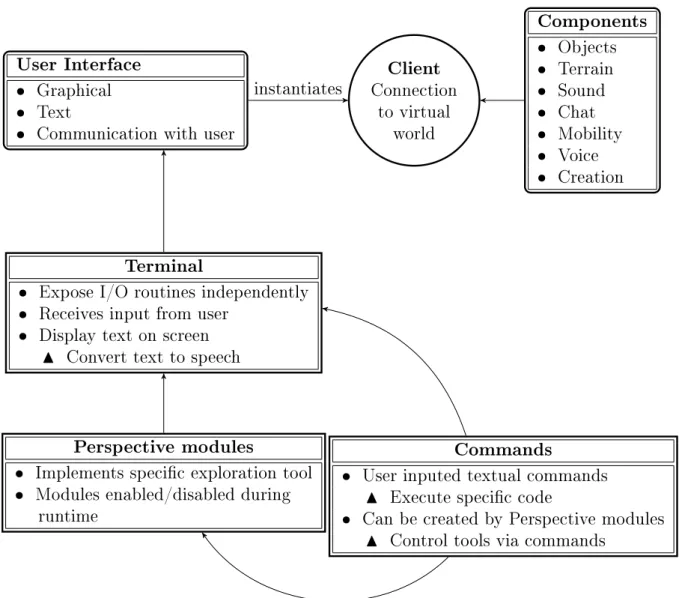
The program consists of the components described below. For an overview, see Figure 3.1:
User interface maintains communication with the user. At present, both a text mode and graphical mode user interface is implemented;
Terminal exposes input and output routines in a user interface independent way. Used by program to receive input from the user, or display text on screen (and convert it to speech) irrespective of the current user interface; Client maintains the connection to the virtual world. Instantiated by user
interface;
Several components encapsulating specic functionality of the client includ-ing:
Object describes objects received from virtual world; Terrain exposes information about the terrain; Sound manages the playing of in-world sounds;
Chat manages the receiving and sending of chat messages; Mobility enables avatar movement;
Voice encapsulates voice communication; and
Creation functionality for creating and modifying objects in world. Several Perspective Modules, each implementing a specic exploration tool.
Several commands contain code executed when the user types a specic textual commands. Commands can also be bound to a single-key keystroke. Commands can be created by Perspective modules, enabling tools to be con-trolled via commands.
User Interface Graphical Text
Communication with user
Client Connection to virtual world Components Objects Terrain Sound Chat Mobility Voice Creation Terminal
Expose I/O routines independently Receives input from user
Display text on screen
N Convert text to speech
Perspective modules
Implements specic exploration tool Modules enabled/disabled during
runtime
Commands
User inputed textual commands
N Execute specic code
Can be created by Perspective modules
N Control tools via commands
instantiates
3.2.2 Program Execution
After invocation, the behaviour of the program depends on whether arguments are passed to it on the command line. If this is the case, the program directly logs in to the virtual world specied by the arguments. If not, the program displays a user interface enabling the user to enter the virtual world address and login informa-tion. With the graphical user interface, synthesized speech is used at this point to speak all information, and reading keys are available to the user. After the login procedure, the client is instantiated. It opens the connection to the virtual world and initializes all components. The saved settings are read from the conguration le, and Perspective modules are loaded according to the conguration. At this point the user is in control of the avatar, and all built-in commands as well as dynamic commands are available to the user. This includes the command to read the help documentation (bound to F1) and the command to end the execution of the program (bound to q). Several commands will open a menu to receive further instruction from the user. When a menu is displayed, the commands available to the user dier according to the type of menu. All menus allow the user to cycle through options by using the up and down arrows on the keyboard. Editable menus enable the user to change the value of each option by pressing the enter key on an option and entering a new value. FOr example, these menus are used in the settings editor and the object editor.
3.2.2.1 Focus
When using a graphical viewer, the user typically interacts with objects by using the mouse. An object is manipulated by clicking on it with the mouse, additionally clicking a toolbar button or selecting an option from a context menu. Since the Perspective viewer is a non-graphical client entirely driven by the keyboard, there must be an alternative method for interacting with objects. One way would be to let the user select the object from a menu of nearby objects each time an action is performed. The user would for instance press a key indicating that the avatar should sit, and the program prompts the user for the desired object to sit on. The problem with this approach is that the user may need to do several actions on the same object, such as examining an object, moving to it, sitting on it, and clicking it to adjust it. Folmer et al [7] handle this problem in their TextSL viewer by the
structure of textual commands. As TextSL is a text based client, all actions are performed with textual commands. The name of the object is always an argument of a command; for example, describe chair to describe an object named chair. However, this would not be desirable for the Perspective viewer, as Perspective is driven by keystrokes as well.
Perspective handles this problem by maintaining a reference to an object, called the focused object. The focus acts like a cursor or highlighted area in a dialog box. When any action is performed, such as sitting or clicking, it is performed on the object in focus. Several commands are available to the user to change the focused object. The user may select the focused object from a menu, or search for an object containing a certain piece of text in its name. Commands are available to turn right or left to the nearest object in that direction, and to automatically make it the new focused object. The focus can also be continuously set to the nearest object to the user's avatar, by using the Auto Focus module (see Section 3.3.4). Lastly, the user can also change the focused object when exploring the world with the grid explorer (see Section 3.3.13).
When the user had selected the desired object as the focused object, several actions can be performed on that object. A key command will move the user's avatar closer to the object. The user can then click on the object with the enter key, which will perform an action specied by the implementation of the specic object. This may for instance open a door with most door implementations. The user can also decide to sit on the object if it is a chair; this will also activate a teleporter. A key command will give the user detailed information about the object, including its description, exact position, size, price and so on. The user may also buy the object if it is for sale. If the object is an avatar, the user may direct that a private message should be sent to that avatar. Finally the user can move the object to his/her inventory if it is an object that may be taken.
3.2.2.2 Object Labels
Within the Second Life protocol, each object is uniquely identied by its Universally Unique Identier (UUID). In the Perspective viewer, however, the name of the object is used to identify the object to the user. A problem with this name-based
approach is that not all objects are named; some may have a generic name like object or primitive, and some objects may have excessively long names like black hardwood chair with white cushion v1.423 by jan.
To counter the problem of object names, the Perspective viewer maintains two lists of objects that can be requested by tools in local scope, and presented to the user. The one list contains all objects, while the other contains only labeled objects. A label is dened as the name of an object, except if it is a generic name like object or primitive. The list of labeled objects is ltered by removing all objects with identical names (not considering case) except the one nearest the user's avatar. The list is also ltered by removing all objects not in direct line of sight to the user. Removing duplicate objects avoids the situation where a room was formed by many wall objects, each called wall. Hence the user will only be notied of the wall nearest to his/her avatar. The other walls will be presented to the user as he/she moves around and they become the new nearest wall object. Removing occluded objects will also keep the user from trying to interact with objects that are in a dierent room. This eases navigation, as the user may otherwise make corrections to his/her path of movement based on objects not actually relevant. TextSL [7] presents only labeled objects to the user. Objects are also ltered so that only the nearest ve objects are presented to the user. However, this approach may again lead to objects being invisible to the user, as discussed above.
3.2.2.3 Root and Component Objects
In Second Life and compatible virtual worlds, complex objects can be formed by combining two or more basic objects (called primitives) into a link set. A link set consists of a root object with one or more children. Link sets cannot be nested, so all objects are either root objects (the parent is null), or children objects (the parent is a root object). When presenting objects to the user, it is necessary to decide whether to present only root objects, or all objects. Presenting only root objects may make it easier for the user as the amount of information is reduced. Also, most important objects like other avatars are root objects. The problem with this approach is that an object may have components that are important. For example, a projector may have a button that can be clicked. An avatar which sits
on another object is also considered to be the child of that object, and would thus be invisible to the user if only root objects are considered. The TextSL viewer does not indicate the locations of all the objects in 3D space, as it is a text only client. Perspective needs to indicate the positions of all objects to give an adequate auditory image to the user. Audio games like Terraformers [27] do not have to consider this problem as the content is created to be consumed in audio format, and thus the objects present in the world are the objects important to the user. Perspective uses a combined approach. All labeled objects are presented to the user by default, with some tools like the click module and the occlusion module presenting unlabeled objects as well. The user can however lter objects when using the scan left or scan right tools to place the focus only on root objects. 3.2.2.4 Global and Local Scope
The tools available to the user of the Perspective viewer can be divided into tools that present local information, and tools that present global information. Global scope is dened as the area spanning the whole region. In Second Life and related virtual worlds, a region is usually 255 by 255 meters. Tools that present global information will thus consider all objects in that area. Local scope is the area within a 10 meter radius of the user's avatar. Local scope is dened by the Perspective viewer itself, and is therefore not dependent on the Second Life protocol.
Using local scope, the user is informed of the objects which may be of immediate interest, and have those objects further described and examined by tools. The local scope is thus where the user's area of interest would be. Some tools, such as the grid explorer (see Section 3.3.13), work only on global scope. Other tools, such as the positional speech tool (Section 3.3.12) and the material sound module (Section 3.3.11), work only with objects in local scope. The occlusion tool works with an area smaller than local scope, as it is used to navigate around objects. Several tools work in both scopes a list of objects can be requested in menu form for the local or global scope, and objects can also be searched in either local or global scope.
Local scope is dened with a distance based approach, to include all objects within a 10 meter radius. An alternative would have been to dene a certain number of
nearest objects as local scope, for example the eight closest objects from the user's avatar. The drawback with the latter approach is that the user may be interested in an object, but is not notied about it as there are too many objects near it. For example, a counter may have eight or more bar stools before it. Using the distance based approach, there can be no blind spots. When an object is within 10 meters of the user, the user is notied of its existence, and it can be focused and examined. We decided on 10 meters as the radius of the local scope as it coincides with the chat range of Second Life. Within Second Life, a chat message from an avatar or object is broadcast to all objects within a 10 meter radius. Using this approach, the user knows exactly which objects or avatars would receive a chat message. TextSL [7] provides commands to examine and interact with the virtual world. Most of the commands operate in local scope, but a command is provided to locate an object in global scope. In TextSL the default local scope is also 10 meters, although this can be changed by the user. This may create the eect that an object sends a text message which the user will not receive, even though the user can perceive the object. This problem is not considered in Terraformers [27] or other audio game like Shades of Doom [8], as these mostly operate in local scope alone. This results from the game-like nature of these projects the user should not know of objects outside his/her viewpoint, as part of a game is exploring the world. This is dierent with virtual worlds for social interaction and communication, where being familiar with the environment may increase productivity.
3.2.2.5 Attachments
Second Life and compatible virtual worlds contain a special kind of object called an attachment. An attachment is any object that is in any way attached to an avatar. Attachments may be shoes or clothing, a backpack, or even a beard or hair. Attachments are commonly used to completely change the appearance of an avatar from the standard human shape to another, like a robot.
The attachment feature of Second Life and compatible virtual worlds is implemen-ted using the same method as the link set described above. That is, the avatar serves as the root of the link set, with the attachments as the children. As with a link set, every child has an oset, which species its position in the virtual world
relative to the root or the avatar to which it is attached. Attachments have an additional property called an attachment point, which species the specic body part to which it attaches. Common attachment points are the ears, skull, feet and so on.
Attachments are important to a user of a virtual world as it inuences how one appears to other users. The blind user should have the capability to add and remove attachments to his/her avatar, as well as examine which attachments are currently in use. The Perspective viewer presents attachments in a menu. The user can issue a command which will present a menu of all attachments currently attached to his/her avatar. Each menu item contains the name of the attachment, the attachment point, as well as the oset of the attachment from the avatar. When this menu is presented and an item selected, the user can issue a command which will remove the attachment presented by the menu item from his/her avatar. Two other inventory menus are also provided. The user can request a menu of all objects carried by his/her avatar, as well as other items like note cards (small documents) and media clips. In Second Life compatible virtual worlds, objects can have inventory items as well. The second inventory menu is provided to the user for requesting the inventory of the object with focus. When an inventory menu is displayed, commands can be used to rez an item (place it in the current region), or to delete it. A command can also be used to attach it to the user's body.
3.3 Exploration Tools
The Perspective viewer allows the user to explore the region and his/her immediate surroundings by using several exploration tools. Tools are implemented as modules, which enables each tool to be toggled on or o individually. The Perspective viewer provides a high level API complementing the libOpenMetaverse API which can be used to implement tools. Some tools are also built-in tools in Perspective, such as the audio compass (see Section 3.3.1).
Tools can be categorized as having either continuous output, or output on activa-tion. Tools with continuous output will continuously send information to the audio channel. They will thus continuously inform the user about the state of the virtual
world. These tools are useful for notifying the user about changes that do not oc-cur to his/her surroundings because of action on the user's part, like movement of other avatars or objects. Tools with continuous output can also be toggled either on or o, which allows the user to further control the information that is sent to the audio channel at any particular time.
Tools which provide output when activated are useful to nd specic information from the surroundings, or to examine an object more closely. These tools also in-clude the grid explorer, which allows the user to examine the entire region, without having to move his/her avatar at all. The search features are also an example of tools which provide output on activation.
Some of the tools provided by the Perspective viewer had previously been described in the literature. This includes the key commands for turning left or right to face the next object [24], and the sonar tool for identifying objects around the user's avatar [27]. Other tools we have developed ourselves. These include the grid explorer for examining the layout of the region, and the positional speech module. The use of white noise (wind) to indicate direction has not been described in the literature before, but has been used in audio games; specically, Shades of Doom [8].
3.3.1 Audio Compass
The audio compass enables the user to identify the current heading faced by the avatar. Compass headings are given both in degrees (with north as 0, east as 90 and so on), as well as by a descriptive name such as north-northwest. An audio compass is also available in Terraformers [27].
There are two ways in which the user can utilize the compass. When the user presses the navigational keystrokes to turn 90 degrees clockwise or counterclockwise, the new heading is spoken using the format described above. The heading will also be announced when the user uses the turning commands to face an object near his/her avatar. The second method of utilizing the audio compass is by pressing a key on the keyboard assigned to the audio compass function. This enables the user to conrm the direction that the avatar is facing at any time.
3.3.2 Turning Keys
The Perspective viewer allows the user to turn slightly (ve degrees) or execute a corner-like turn (90 degrees) either right or left, by pressing the specic key for the desired direction and turn distance. This is similar to the functions available in audio games like Audio Quake [2] and Shades of Doom [8]. Commands are also available to the user for turning either clockwise, or counter clockwise, so that the avatar is facing the next object in that direction. A similar tool was described by Trewin et al [24] in their PowerUp accessible game.
For this tool, only objects in direct line of sight from the avatar are considered. The user can continuously press the keys activating the tool, which will cycle through all objects around the avatar's position, enabling the user to identify all objects in direct line of sight. Each time the user utilizes this tool, the new object faced by the avatar is identied, and its direction and distance from the avatar is spoken. The object is also focused, allowing the user to interact with the object using any of the other available commands. The user can for instance get more information about the object, or directly teleport to its position with the press of a key. This tool also allows the user to lter the type of objects under consideration. The user can cycle through a list of available categories, and only the objects conforming to the selected category will be considered when cycling through the objects. The following categories are available:
Any all objects;
Labeled only objects with a valid name as described in Section 3.2.2.2; Chair an object the avatar can sit on, such as chairs, seats, or teleporters; Large only root objects; and
Avatars only other avatars.
3.3.3 Sonar
A simulated sonar tool is available for the user to identify the objects which are 90 degrees to the left or right of his/her avatar. Such a sonar was also described by
Westen et al [27]. When this feature is activated, all objects within line of sight of the user's avatar, and within 90 degrees of either left or right (thus similar to the eld of vision of a sighted person in real life) are placed in a collection. For each object in the collection, the program will then omit a short beep at the location of the object using 3D audio, and the name of the object is spoken. Once the object's name has been spoken, the next object in the collection is considered. This tool considers only labeled objects as described in Section 3.2.2.2.
3.3.4 Auto Focus
The auto focus tool is a tool which operates continuously, and the user can toggle it on or o. This tool computes the nearest object to the user's avatar, each time the avatar moves. The focus is then set to this nearest object, and the name of the object is spoken along with the word focused. This tool enables the user to explore the environment by walking around. Each object will be announced as the user is closest to it. If two or more objects are an equal distance from the user's avatar, the object rst considered by the algorithm will be focused.
One of the drawbacks of this tool is that some objects may never be focused, as they are occluded by other objects, keeping the user's avatar from getting close enough for them to be the closest object. This may be a problem for users relying on the tool as their primary means of gathering information. The automatic focus changing may also interfere with other tools setting the focus, resulting in the user being unable to select a desired object with which to interact. An example occurs when the user is using a tool like the directional commands to change the focus. When the user then attempts to position him/herself relative to the selected object, the auto focus tool may move the focus away from the selected object. This tool may however be quite useful for new users, as it is similar to moving around in real life, identifying the closest object by touch.
3.3.5 Footstep Module
The footstep module continuously plays a footstep sound while the user's avatar is moving. As the Second Life protocol does not have the capability of notifying clients about movement, this is accomplished by continuously comparing the user's
location to the location previously stored. The advantage of this approach is that the footstep sound is played even when the user is using auto pilot, or when the user is moved because of scripts inside the virtual world.
The footstep module enables the user to verify that the avatar has indeed moved after a movement command was issued. This also allows the user to notice the sides of objects encountered during a move operation, as the footstep sound will not be played when the movement is blocked by an object. This helps the user to follow the sides of objects, in order to nd an exit from a room. The user would issue the move forward operation until a wall is encountered, and then continuously move sideways while intermittently issuing the forward move operation again until an opening in the wall is encountered.
3.3.6 Directional Look Commands
Three directional look commands, operating in local scope, are to the user's dis-posal. These commands will speak the name of the object to the left, the front, and the right of the user's avatar respectively. These commands can be used to identify an object blocking the user's path, or to verify that the user is facing a particular object.
The directional look commands were designed as a navigational aid, as they can be used to verify that a wall is to the user's left, front, or right. The word nothing is spoken when no object is detected in the particular direction. This indicates that the user may move in that direction without encountering an obstruction.
3.3.7 Search Commands
The client contains two search functions for the user to nd a specic object of interest. One is provided for local scope, and one for global scope. The user is prompted for a string of text, after which the string is matched to the names (case insensitively) of all objects in either local or global scope. The search results are then presented to the user in a menu form.
The search results menu allows the user to set focus to the desired object, after which the user can interact with the object. The user may for instance examine
the object or teleport to its position.
3.3.8 Object Menus
Two object menus are available to the user of the Perspective viewer. These menus allow the user to select an object of interest from a menu. One menu contains all objects in local scope, and the other one all objects in global scope. After an object is selected from the menu, focus is set to that object, and the user can then interact further with the object. This tool is similar to functionality described by Westen [27].
A similar menu is also available for all avatars in the current region. Each menu item displays the name of the avatar along with its location within the region. This serves as a quick way for the user to verify where people of interest are, and whether interaction with them is possible or not.
3.3.9 Directional Noise
The directional noise module implements a continuous tool that can be enabled or disabled by the user at will. This tool plays a continuous sound of narrow band noise for each major compass direction where no obstruction or object is present. The noise sounds are positioned 10 meters away from the user within 3D space, in the direction of the particular compass bearing. Each compass direction is denoted by a band of noise with a frequency dierent from the other three, and thus this tool can also be used as an alternative audio compass by recognizing the band of noise at each direction. Although this tool has not been described in the literature, a similar idea has been utilized in the game Shades of Doom [8], where wind sounds were used to indicate the direction of hallways.
3.3.10 Echo Module
The echo module implements a continuous tool which emulates echoes bouncing from objects when the user's avatar moves. This is accomplished by playing a short click at the position of each object in local scope. The tool is triggered each time the user performs one of the movement commands. The clicks are played in sequence
one after th