
1681 0 evphsamp pdf
92
0
0
Full text
(2) 119_email_FM. 10/6/00. 12:07 AM. Page 4. Syngress Publishing, Inc., the author(s), and any person or firm involved in the writing, editing, or production (collectively “Makers”) of this book (“the Work”) do not guarantee or warrant the results to be obtained from the Work. There is no guarantee of any kind, expressed or implied, regarding the Work or its contents. The Work is sold AS IS and WITHOUT WARRANTY. You may have other legal rights, which vary from state to state. In no event will Makers be liable to you for damages, including any loss of profits, lost savings, or other incidental or consequential damages arising out from the Work or its contents. Because some states do not allow the exclusion or limitation of liability for consequential or incidental damages, the above limitation may not apply to you. You should always use reasonable case, including backup and other appropriate precautions, when working with computers, networks, data, and files. Syngress Media® and Syngress® are registered trademarks of Syngress Media, Inc. “Career Advancement Through Skill Enhancement™,” “Ask the Author™,” “Ask the Author UPDATE™,” “Mission Critical™,” and “Hack Proofing™” are trademarks of Syngress Publishing, Inc. Brands and product names mentioned in this book are trademarks or service marks of their respective companies. KEY 001 002 003 004 005 006 007 008 009 010. SERIAL NUMBER 9TM1L2ADSE XPS1697TC4 CLNKK98FV7 DC5EPL4RL6 Z74DQ81524 PJ62NT41NB 4W2VANZX44 V8DF743RTD 65Q2M94ZTS SM654PSMRN. PUBLISHED BY Syngress Publishing, Inc. 800 Hingham Street Rockland, MA 02370 E-mail Virus Protection Handbook Copyright © 2000 by Syngress Publishing, Inc. All rights reserved. Printed in the United States of America. Except as permitted under the Copyright Act of 1976, no part of this publication may be reproduced or distributed in any form or by any means, or stored in a database or retrieval system, without the prior written permission of the publisher, with the exception that the program listings may be entered, stored, and executed in a computer system, but they may not be reproduced for publication. Printed in the United States of America 1 2 3 4 5 6 7 8 9 0 ISBN: 1-928994-23-7 Copy edit by: Eileen Kramer Technical edit by: James Stanger Index by: Rober Saigh Project Editor: Katharine Glennon Distributed by Publishers Group West. Proofreading by: Adrienne Rebello Technical Review by: Stace Cunningham Page Layout and Art by: Shannon Tozier Co-Publisher: Richard Kristof.
(3) 119_email_FM. 10/6/00. 12:07 AM. Page v. Acknowledgments We would like to acknowledge the following people for their kindness and support in making this book possible. Richard Kristof, Duncan Anderson, Jennifer Gould, Robert Woodruff, Kevin Murray, Dale Leatherwood, Shelley Everett, Laurie Hedrick, Rhonda Harmon, Lisa Lavallee, and Robert Sanregret of Global Knowledge, for their generous access to the IT industry’s best courses, instructors and training facilities. Ralph Troupe and the team at Rt. 1 Solutions for their invaluable insight into the challenges of designing, deploying and supporting world-class enterprise networks. Karen Cross, Kim Wylie, Harry Kirchner, John Hays, Bill Richter, Kevin Votel, Brittin Clark, Sarah Schaffer, Luke Kreinberg, Ellen Lafferty and Sarah MacLachlan of Publishers Group West for sharing their incredible marketing experience and expertise. Peter Hoenigsberg, Mary Ging, Caroline Hird, Simon Beale, Julia Oldknow, Kelly Burrows, Jonathan Bunkell, Catherine Anderson, Peet Kruger, Pia Rasmussen, Denelise L'Ecluse, Rosanna Ramacciotti, Marek Lewinson, Marc Appels, Paul Chrystal, Femi Otesanya, and Tracey Alcock of Harcourt International for making certain that our vision remains worldwide in scope. Special thanks to the professionals at Osborne with whom we are proud to publish the best-selling Global Knowledge Certification Press series.. v.
(4) 119_email_FM. 10/6/00. 12:07 AM. Page vi. From Global Knowledge At Global Knowledge we strive to support the multiplicity of learning styles required by our students to achieve success as technical professionals. As the world's largest IT training company, Global Knowledge is uniquely positioned to offer these books. The expertise gained each year from providing instructor-led training to hundreds of thousands of students worldwide has been captured in book form to enhance your learning experience. We hope that the quality of these books demonstrates our commitment to your lifelong learning success. Whether you choose to learn through the written word, computer based training, Web delivery, or instructor-led training, Global Knowledge is committed to providing you with the very best in each of these categories. For those of you who know Global Knowledge, or those of you who have just found us for the first time, our goal is to be your lifelong competency partner. Thank your for the opportunity to serve you. We look forward to serving your needs again in the future. Warmest regards,. Duncan Anderson President and Chief Executive Officer, Global Knowledge. vi.
(5) 119_email_FM. 10/6/00. 12:07 AM. Page vii. Contributors Philip Baczewski is the Associate Director of Academic Computing Services at the University of North Texas Computing Center. He serves as project manager for university student Internet services, and works with client server implementations of IMAP, IMSP, SMTP, and LDAP protocols. Philip also provides technical consultation support in the areas of mainframe and UNIX programming, data management, electronic mail, and Internet services. Philip holds his Doctorate in Musical Arts, Composition from the University of North Texas. Brian Bagnall is a Sun Certified Java Programmer and Developer. His current project is designing and programming a distributed computing effort for Distco.com. Brian would like to say thanks to Deck Reyes for his help with the material. He would also like to thank his family for their support. Contact Brian at [email protected]. Chris O. Broomes (MCSE, MCP+I, MCT, CCNA) has over seven years of networking experience. He started his career as a consultant at Temple University, and has worked with organizations such as Morgan, Lewis & Bockius, Temple University Dental School, and Dynamic Technologies, Inc. Currently, Chris works in Philadelphia as a Network Administrator at EXE Technologies, Inc., a global provider of business-to-business e-fulfillment solutions.. vii.
(6) 119_email_FM. 10/6/00. 12:07 AM. Page viii. Patrick T. Lane (MCSE, MCP+I, MCT, CIW Foundations, CIW Server Administrator, CIW Internetworking Professional, and CompTIA Network+ and i-Net+) is a Content Architect for ProsoftTraining.com who assisted in the creation of the Certified Internet Webmaster (CIW) program. He holds a Master’s degree in Education. Lane began working with computers in 1984, and has developed curriculum and trained students across the computer industry since 1994. He is the author of more than 20 technical courses, the director of the CIW Foundations and CIW Internetworking Professional series, and a member of the CompTIA Network+ Advisory Committee. Lane’s work has been published in six languages, and he has been a featured speaker at Internet World. Michael Marfino is the IS Operations Manager for EDS in Las Vegas, Nevada. He earned a Bachelor’s of Science degree in Management Information Systems from Canisius College in Buffalo, N.Y. He has over a decade of technical industry experience, working in hardware/software support, e-mail administration, system administration, network administration, and IT management. His tenure includes positions at MCI Worldcom and Softbank. Eriq Oliver Neale is a full-time computing technology professional, part-time author and teacher, and occasional musician. He has worked in the computer support industry for over 13 years, and has been on the anti-virus bandwagon since before Michelangelo hit the national media. His recommendations for practicing “safe hex” have been presented in numerous articles and seminars. Eriq lives in the North Texas area with his wife and their two dogs, seven cats, and a school of Mollies that are reproducing faster than believed possible. Eriq has been known to teach the occasional class in web development and attend major league baseball games when not otherwise occupied.. viii.
(7) 119_email_FM. 10/6/00. 12:07 AM. Page ix. Ryan Russell (CCNA, CCNP) has been been employed in the networking field for over ten years, including more than five years working with Cisco equipment. He has held IT positions ranging from help desk support to network design, providing him with a good perspective on the challenges that face a network manager. Recently, Ryan has been doing mostly information security work involving network security and firewalls. He has completed his CCNP, and holds a Bachelor’s of Science degree in computer science. Henk-Evert Sonder (CCNA) has about 15 years of experience as an Information and Communication Technologies (ICT) professional, building and maintaining ICT infrastructures. In recent years he has specialized in integrating ICT infrastructures with business applications and the security that comes with it. His mission is to raise the level of companies security awareness about their networks. According to Henk, “So many people talk about the security threats coming from the Internet, but they can forget that the threats from within are equally dangerous.” Currently he works as a senior consultant for a large Dutch ICT solutions provider. His own company, IT Selective, helps retailers get e-connected.. ix.
(8) 119_email_FM. 10/6/00. 12:07 AM. Page x. Technical Editor James Stanger (Ph.D., MCSE, MCT, CIW Security Professional) is a writer and systems analyst currently living in Washington State, where he works for ProsoftTraining.com’s research and development department. He also consults for companies such as Axent, IBM, DigitalThink, and Evinci concerning attack detection and analysis. In addition to Windows 2000 and Linux security issues, his areas of expertise include e-mail and DNS server security, firewall and proxy server deployment, and securing Web servers in enterprise environments. He is currently an acting member of the Linux Professional Institute (LPI), Linux+, and Server+ advisory boards, and leads development concerning the Certified Internet Webmaster security certification. A prolific author, he has written titles concerning network security auditing, advanced systems administration, network monitoring with SNMP, I-Net+ certification, Samba, and articles concerning William Blake, the nineteenth-century British Romantic poet and artist. When not writing or consulting, he enjoys bridge and cliff jumping, preferably into large, deep bodies of water.. x.
(9) 119_email_FM. 10/6/00. 12:07 AM. Page xi. Technical Reviewer Stace Cunningham (CCNA, MCSE, CLSE, COS/2E, CLSI, COS/2I, CLSA, MCPS, A+) is a Systems Engineer with SDC Consulting located in Biloxi, MS. SDC Consulting specializes in the design, engineering, and installation of networks. Stace is also certified as an IBM Certified LAN Server Engineer, IBM Certified OS/2 Engineer, IBM Certified LAN Server Administrator, IBM Certified LAN Server Instructor, IBM Certified OS/2 Instructor. Stace has participated as a Technical Contributor for the IIS 3.0 exam, SMS 1.2 exam, Proxy Server 1.0 exam, Exchange Server 5.0 and 5.5 exams, Proxy Server 2.0 exam, IIS 4.0 exam, IEAK exam, and the revised Windows 95 exam. In addition, he has coauthored or technical edited about 30 books published by Microsoft Press, Osborne/McGraw-Hill, and Syngress Media as well as contributed to publications from The SANS Institute and Internet Security Advisor magazine. His wife Martha and daughter Marissa are very supportive of the time he spends with his computers, routers, and firewalls in the “lab” of their house. Without their love and support he would not be able to accomplish the goals he has set for himself.. xi.
(10) 119_email_FM. 10/6/00. 12:07 AM. Page xii.
(11) 119_email_toc. 10/6/00. 2:31 AM. Page xiii. Contents. Introduction Chapter 1: Understanding the Threats: E-mail Viruses, Trojans, Mail Bombers, Worms, and Illicit Servers Introduction Essential Concepts Servers, Services, and Clients Authentication and Access Control Hackers and Attack Types What Do Hackers Do? Attack Types Overview of E-mail Clients and Servers Understanding a Mail User Agent and a Mail Transfer Agent The Mail Delivery Agent When Are Security Problems Introduced? History of E-mail Attacks The MTA and the Robert Morris Internet Worm MDA Attacks Analyzing Famous Attacks Case Study Learning from Past Attacks Viruses Worms Types of Worms Trojans Illicit Servers Differentiating between Trojans and Illicit Servers. xxvi. 1 2 3 3 3 4 4 5 7 7 9 10 10 11 12 12 14 14 15 15 16 17 17 18. xiii.
(12) 119_email_toc. xiv. 10/6/00. 2:31 AM. Page xiv. Contents. E-mail Bombing Sniffing Attacks Carnivore Spamming and Security Common Authoring Languages Protecting Your E-mail Protecting E-mail Clients Third-party Applications Encryption Hash Encryption and Document Signing Protecting the Server Summary FAQs. 19 19 20 21 22 23 23 23 24 27 27 28 29. Chapter 2: Securing Outlook 2000. 31. Introduction Common Targets, Exploits, and Weaknesses The Address Book The Mail Folders Visual Basic Files Attacks Specific to This Client No Attachment Security Default Settings Are Not Secure Zone Security Word 2000 as the Outlook E-mail Editor Security Updates Enabling Filtering Junk E-mail Filtering Keywords Mail Settings and Options HTML Messages Zone Settings Attachment Security Attachment Security After Applying Outlook E-mail Security Update Enabling S/MIME Why You Should Use Public Key Encryption Installing and Enabling Pretty Good Privacy (PGP) Installing PGP. 32 33 35 36 37 38 38 38 39 39 39 42 42 44 44 45 46 48 51 54 56 57 58.
(13) 119_email_toc. 10/6/00. 2:31 AM. Page xv. Contents. Understanding Public Key Encryption Generating a Key Pair Exchanging Keys Key Distribution Sites Summary FAQs. 62 65 67 69 70 71. Chapter 3: Securing Outlook Express 5.0 and Eudora 4.3. 75. Introduction Outlook Express for Windows Security Settings Secure Mail Security Zones Attachments Outlook Express for Macintosh Junk Mail Filter Message Rules Attachments Case Study: Automated Virus Scanning of Mail Attachments Eudora for Windows and Macintosh Security Attachments Filtering Enabling PGP for both Outlook Express and Eudora Sending and Receiving PGP-Secured Messages Eudora for Windows Outlook Express for Windows Eudora for Macintosh Outlook Express for Macintosh Automatic Processing of Messages File Attachments and PGP Case Study: Securing File Attachments with PGP Summary FAQs. 76 76 77 78 80 82 85 85 88 89 90 91 91 91 93 95 96 97 101 103 105 107 108 109 113 115. Chapter 4: Web-based Mail Issues. 119. Introduction. 120. xv.
(14) 119_email_toc. xvi. 10/6/00. 2:31 AM. Page xvi. Contents. Choices in Web-based E-mail Services 121 Why Is Web-based E-mail So Popular? 122 The Cost of Convenience 122 Specific Weaknesses 124 Internet Architecture and the Transmission Path 124 Reading Passwords 126 Case Study 128 Specific Sniffer Applications 131 Code-based Attacks 133 The PHF Bug 134 Hostile Code 135 Taking Advantage of System Trusts 135 Cracking the Account with a “Brute Force” or Dictionary Application 136 Physical Attacks 137 Cookies and Their Associated Risks 138 Solving the Problem 139 Using Secure Sockets Layer (SSL) 139 Secure HTTP 139 Practical Implementations 140 Local E-mail Servers 141 Using PGP with Web-based E-mail 141 Making Yourself Anonymous 142 Summary 143 FAQs 144. Chapter 5: Client-Side Anti-Virus Applications. 147. Introduction McAfee VirusScan 5 Availability of VirusScan Updates of Virus Definition Files Installation of VirusScan 5 Configuration of VirusScan 5 Norton AntiVirus 2000 Availability of Norton AntiVirus 2000 Updates of Norton AntiVirus 2000 Definition Files Installation of Norton AntiVirus 2000 Configuration of Norton AntiVirus 2000 Trend Micro PC-cillin 2000. 148 150 151 152 152 156 163 163 164 165 167 176.
(15) 119_email_toc. 10/6/00. 2:31 AM. Page xvii. Contents. Availability of Trend Micro PC-cillin 2000 Updates of PC-cillin Virus Definition Files Installation of Trend Micro PC-cillin 2000 Configuration of Trend Micro PC-cillin 2000 Trend PC-cillin 2000 Configuration Settings Trend Micro PC-cillin 2000 Links Summary FAQs. 176 177 178 181 185 188 189 190. Chapter 6: Mobile Code Protection. 195. Introduction Dynamic E-mail Active Content Taking Advantage of Dynamic E-mail Composing an HTML E-mail Inserting Your Own HTML File Sending an Entire Web Page Dangers No Hiding Behind the Firewall Mobile Code Java Security Model Playing in the Sandbox Playing Outside the Sandbox Points of Weakness Background Threads Hogging System Resources I Swear I Didn’t Send That E-mail Scanning for Files How Hackers Take Advantage Spam Verification Theft of Processing Power Unscrupulous Market Research Applets Are Not That Scary Precautions You Can Take JavaScript Security Model Points of Weakness How Hackers Take Advantage Web-Based E-mail Attacks. 196 196 197 197 198 198 200 200 201 201 202 203 203 205 205 206 206 207 207 207 207 208 208 208 208 211 211 212 213 213. xvii.
(16) 119_email_toc. xviii. 10/6/00. 2:31 AM. Page xviii. Contents. Are Plug-in Commands a Threat? Social Engineering Precautions to Take ActiveX Security Model Safe for Scripting Points of Weakness How Hackers Can Take Advantage Preinstalled ActiveX Controls Bugs Open the Door Intentionally Malicious ActiveX My Mistake... Trojan Horse Attacks Precautions to Take VBScript Security Model Points of Weakness VBScript, Meet ActiveX How Hackers Take Advantage Social Engineering Exploits VBScript-ActiveX Can Double Team Your Security Precautions to Take Summary FAQs. 213 213 214 215 215 216 217 218 218 219 219 220 220 220 221 222 222 222 223 223 223 224 225 226. Chapter 7: Personal Firewalls. 227. Introduction What Is a Personal Firewall? Blocks Ports Block IP Addresses Access Control List (ACL) Execution Control List (ECL) Intrusion Detection Personal Firewalls and E-mail Clients Levels of Protection False Positives Network Ice BlackICE Defender 2.1 Installation Configuration E-mail and BlackICE. 228 228 230 230 231 232 233 234 235 235 236 236 239 248.
(17) 119_email_toc. 10/6/00. 2:31 AM. Page xix. Contents. Aladdin Networks’ eSafe, Version 2.2 Installation Configuration E-mail and ESafe Norton Personal Firewall 2000 2.0 Installation Configuration ZoneAlarm 2.1 Installation Configuration E-mail and ZoneAlarm Summary FAQs. 248 248 252 269 269 270 274 283 284 287 291 292 292. Chapter 8: Securing Windows 2000 Advanced Server and Red Hat Linux 6 for E-mail Services. 295. Introduction Updating the Operating System Microsoft Service Packs Red Hat Linux Updates and Errata Service Packages Disabling Unnecessary Services and Ports Windows 2000 Advanced Server—Services to Disable The Server Service Internet Information Services (IIS) Red Hat Linux—Services to Disable Inetd.conf Rlogin Locking Down Ports Well-Known and Registered Ports Determining Ports to Block Blocking Ports in Windows Blocking Ports in Linux Inetd Services Stand-Alone Services Maintenance Issues Microsoft Service Pack Updates, Hot Fixes, and Security Patches Case Study Red Hat Linux Errata: Fixes and Advisories Case Study. 296 296 296 297 299 299 300 302 304 304 305 305 306 308 308 310 310 310 311 312 313 314 316. xix.
(18) 119_email_toc. xx. 10/6/00. 2:31 AM. Page xx. Contents. Windows Vulnerability Scanner (ISS System Scanner) Linux Vulnerability Scanner (WebTrends Security Analyzer) Logging Windows 2000 Advanced Server Linux Common Security Applications Firewall Placement Summary FAQs. 320 325 325 325 326 327 330 331. Chapter 9: Microsoft Exchange Server 5.5. 333. Introduction Securing the Exchange Server from Spam Configuring the IMS To Block E-mail Attacks Exchange and Virus Attacks: Myths and Realities Learning from Recent Attacks Case Study: Preparing for Virus Attacks Exchange Maintenance Service Packs Plug-ins and Add-ons Third-party Add-ons Microsoft Utilities Content Filtering Case Study: Content Scanning Attachment Scanning Recovery Backing Up Data Restoring Data Summary FAQs. 334 334 335 341 343 345 347 347 351 351 352 353 356 357 359 360 363 363 365. Chapter 10: Sendmail and IMAP Security. 367. Introduction Sendmail and Security: A Contradiction in Terms? Sendmail’s History Threats to SendMail Security Anatomy of a Buffer Overflow A Buffer Overflow Illustrated. 368 368 368 370 370 371. 317.
(19) 119_email_toc. 10/6/00. 2:31 AM. Page xxi. Contents. Sendmail and the Root Privilege Fixes Stay Current Stay Informed Protect Your Resources Minimize Risk Alternatives: Postfix and Qmail Postfix Qmail Comparing Your Options Configuring Sendmail Internet Message Access Protocol (IMAP) The IMAP Advantage Understanding IMAP Implementations UW IMAP Cyrus IMAP One IMAP, Many Choices Administering the Server The Users The Mail Store Protecting the Messages Strengthening Authentication Securing Access From the Client Side IMAP Summary Recovery Backing Up Data Restoring Data The Bottom Line on Backup Summary FAQs. 372 373 373 374 375 375 377 377 378 379 380 381 381 383 383 384 385 385 385 386 387 387 388 390 390 391 392 393 393 394 394. Chapter 11: Deploying Server-side E-mail Content Filters and Scanners. 397. Introduction Overview of Content Filtering Filtering by Sender Filtering by Receiver Subject Headings and Message Body Overview of Attachment Scanning. 398 398 403 403 404 404. xxi.
(20) 119_email_toc. xxii. 10/6/00. 2:31 AM. Page xxii. Contents. Attachment Size Attachment Type (Visual Basic, Java, ActiveX) McAfee GroupShield Installation of GroupShield Configuration Specific Settings Trend Micro ScanMail for Exchange Server Installation of ScanMail Configuration Specific Settings Additional ScanMail Offerings Content Technologies’ MAILsweeper for Exchange 5.5 Installation of MAILsweeper Configuration Specific Settings Firewall and E-mail Content Scanning Content Technologies’ MIMEsweeper for CheckPoint’s Firewall-1 Axent Raptor Firewall Attack Detection and System Scanning Attacks Real-time, Third-party Services Evinci Securify Summary FAQs. 407 407 408 408 412 418 419 419 421 422 424 425 425 427 428 428. Appendix: Secrets. 437. Lesser-known Shortcuts Under-documented Features and Functions Disable an ActiveX Control For Experts Only (Advanced features) Web Pages on Mobile Code Security Topics Outlook Web Access (OWA) Using SendMail To Refuse E-mails with the Love Letter Virus Troubleshooting and Optimization Tips. 438 438 440 441 441 442. Index. 447. 429 430 431 431 433 434 434 435 435. 442 444.
(21) 119_email_intro. 10/6/00. 12:11 AM. Page xxiii. Introduction. One of the lessons I learned early in life is to never confess the stupid things that I have done in public—unless there’s a good punch line at the end of the story. Well, there is really no punch line at the end of the story I am about to tell you, but I am going to tell it anyway, because it helps introduce some of the key issues and concepts involved when securing e-mail clients and servers. In 1994, I was browsing the Web with my trusty version of Netscape Navigator (version 1.0—yes, the one that ran just great on a Windows 3.11 machine that screamed along on top of an ultra-fast 486 processor). While browsing, I found a Web page that was selling a really nifty Telnet client. This piece of software had everything: I could use Kermit, Xmodem, and Zmodem to transfer files, and it even allowed automatic redial in case of a dropped connection. I just had to have it, and I had to have it right away; there was no waiting for it to arrive via “snail mail.” I wanted to download it immediately. Things being the way they were in 1994, the site’s Web page invited me to either call their 800 number, or e-mail my Visa information for quicker processing. I’m something of a night owl, and it was about 2:30 a.m., and no one was manning the phones at the time. Rather than wait, I naïvely decided to use my Eudora e-mail client and send my Visa card number and expiration date to the site. Two things happened as a result of this choice: I received an e-mail message response right away, complete with an access code that allowed me to download the software. With my new purchase, I was able to use Telnet as no one had ever used it before. That was the good part. The second thing happened two days after I began Telnetting my way across the world: I received a phone call from my Visa card company, asking me if I had authorized the use of this card for $250.00 in telephone charges, and around $375.00 for shoes. I hadn’t. Someone xxiii.
(22) 119_email_intro. xxiv. 10/6/00. 12:11 AM. Page xxiv. Introduction. was using my Visa card to make telephone calls to Hawaii and purchase really expensive Nike’s. Before I had a chance to say anything to the Visa customer service representative (my profound response to her was a long “uuuhhh…”), she informed me that my charges were nearly identical to several others, all of which belonged to users who had sent e-mail messages to a certain site on the Internet. I remember the way she said the words “e-mail” and “Internet,” because she said them as if she had never seen nor heard the words before. I told her that yes, I had visited the site on the Internet, and that I had sent an e-mail message containing my Visa information. I also told her that I had not made any purchases on the card lately. She quickly reversed the charges, cancelled the card, and issued me a new one. As I hung up the phone, I remember feeling both grateful and frightened: I had just been the victim of an Internet hacker who had obtained my Visa information via e-mail, presumably by “sniffing” it as it passed across the Internet, or by breaking into the site itself. Now, alas, you have probably lost all confidence in me, the technical editor for this book. You may feel just like a person who is about to embark on a three-day journey through the great woods of the Pacific Northwest with no one else but a thin, nervous Forest Service guide who has poison ivy rashes all over his face. After all, I have helped write this book, and yet I have fallen victim to a hacker. Some expert I must be, right? Well, in some ways, I don’t blame you if you feel a bit nervous about this book, at least at first. I still sometimes ask myself what was I thinking when I clicked the Send button. How could I be so foolish? What was I thinking? How could I be so lucky that my credit card company contacted me about this incident, rather than the other way around? Do you have any idea about the kind of runaround I would get in trying to reverse these illicit charges if it was only my idea? And that’s just the beginning of the questions I asked myself on the day I found out I had been “hacked.” Trust me: Most of the remaining questions I ask myself are pretty harsh. After all, sending important information without first encrypting it is, to put it bluntly, pretty silly. But one thing that helps me regain some sort of self-confidence is the knowledge that I learn quickly from my mistakes. Nowadays, I congratulate myself by knowing exactly how I got hacked, and, even more important, how I can use today’s cutting-edge technologies to help keep anything like this from ever happening again. I now understand how an e-mail message is passed from the end user’s. www.syngress.com.
(23) 119_email_intro. 10/6/00. 12:11 AM. Page xxv. Introduction. xxv. client machine through e-mail servers across the Internet. I have, in essence, empowered myself with knowledge concerning how e-mail messages are sent, processed, and received. I didn’t learn these things as a direct result of getting hacked. Still, it has been very helpful for me to think back to that incident as I subsequently learned about arcane bits of knowledge relevant to e-mail (the Simple Mail Transfer Protocol (SMTP), the Domain Name System (DNS), packet sniffing applications, and encryption, etc.). As I think back to that incident, I consider another question that is really quite intriguing: What was it that made me almost immediately go back to my computer, fire up my e-mail client, and keep sending email messages? After all, I had been hacked. Yet, as silly as I felt, I still needed to communicate via e-mail. The sheer speed, convenience, and usefulness of the medium made it far too important and compelling to stop using it. End-users, power users, and systems administrators all use e-mail every day, in spite of the security problems found in current e-mail technologies. This book explains how to implement specific security measures for e-mail clients and servers that make communication via e-mail both secure and convenient. In this book, you will learn about the problems associated with e-mail, including specific attacks that malicious users, sometimes called hackers, can wage against e-mail servers. First, you will learn about how these attacks are waged, and why. Once you understand the hacker’s perspective, you can then begin to approach your e-mail client and server software from a more informed perspective. This book will show you how to encrypt e-mail messages using the freeware Pretty Good Privacy (PGP) application, one of the most successful software packages ever. You will also learn about problems associated with Web-based e-mail, and how to solve some of them by using more secure options. Later chapters discuss how to install and configure the latest anti-virus applications, and also how to install “personal firewall” software, which is designed to isolate your computer’s operating system so that it is not as susceptible to attacks waged by malicious users. Once this book has thoroughly discussed how to secure e-mail clients, it then turns to the server side. Remember, once you click the Send button, you then involve two types of e-mail servers: The first type is designed to send e-mail messages across the Internet. The second type is designed to store e-mail messages, then allow you to log in remotely in order to read and download them. In the second section,. www.syngress.com.
(24) 119_email_intro. xxvi. 10/6/00. 12:11 AM. Page xxvi. Introduction. you will learn how to harden the operating system so that it can properly house an e-mail server. You will then learn about how to protect your system against malicious code by invoking third-party software, which is designed to scan e-mail messages (and attachments) for malicious content. This book is unique because it discusses the latest methods for securing both the e-mail client and the e-mail server from the most common threats. These threats include “sniffing” attacks that illicitly obtain e-mail message information, denial of service attacks, that attempt to crash e-mail clients and servers, and authentication-based attacks, that attempt to defeat the user names and passwords that we use every day to secure our systems. Time will not eliminate these threats. In fact, it is likely that these will become even more serious. As e-mail becomes even more central to business practice, you will find this book very handy as a desktop reference for installing the latest email security software. Even after the software discussed in this book becomes outdated, you will find that the concepts and principles enacted in this book will remain timely and useful. This is the book that I wish I had back in 1994. With this book, I would have been able to use my nifty Telnet client with full peace of mind, because I would have waited until the proper technologies were available in order to send my confidential e-mail message. The authors we have assembled for this book are all authorities in network security. They are a diverse group. Some of the authors are experts in creating public key encryption solutions and knowing how to harden an operating system so that it can safely house an e-mail server. Others are experienced software coders who have deep knowledge of just what malicious code can do. Some of the authors presented in this book are seasoned IT professionals, while others have had extensive contact with the very hackers that are currently lurking the Internet, looking for unwitting victims who have not yet bought and read this book (here’s hoping you have bought this book, and have not checked it out from the library!). As diverse as this group is, all have one thing in common: Each is sincere in the wish to teach you how to secure your system. Each has learned through extensive study and experience about the industry best practices to follow when deploying software solutions. What is more, each of these authors has taken the time to share insights. I hope you enjoy this book. I have enjoyed editing it, as well as contributing a chapter or two. After you have read this book, you will be able to encrypt your e-mails, scan for malicious code on both the client. www.syngress.com.
(25) 119_email_intro. 10/6/00. 12:11 AM. Page xxvii. Introduction. xxvii. and the server side, and thoroughly understand what happens when you click the Send button, or double-click an attachment. So, as you read the Case Studies, all of which are provided as realworld examples from real-world companies, and as you thumb through the details provided in this book, consider that you are now able to take advantage of the shared wisdom of many different authors. It is even possible that some of them have made a few mistakes along the way, just so that you can benefit from the lessons they learned.. www.syngress.com.
(26) 119_email_intro. 10/6/00. 12:11 AM. Page xxviii.
(27) 119_email_01. 10/4/00. 9:23 PM. Page 1. Chapter 1. Understanding the Threats: E-mail Viruses, Trojans, Mail Bombers, Worms, and Illicit Servers. Solutions in this chapter: ■. Sending and Receiving E-mail. ■. Understanding E-mail Attacks. ■. Identifying the Impact of a Sniffing Attack. ■. Protecting E-mail Clients and Servers. ■. Encrypting E-mail. 1.
(28) 119_email_01. 2. 10/4/00. 9:23 PM. Page 2. Chapter 1 • Understanding the Threats. Introduction E-mail is the essential killer application of the Internet. Although Webbased commerce, business to business (B2B) transactions, and Application Service Providers (ASPs) have become the latest trends, each of these technologies is dependent upon the e-mail client/server relationship. E-mail has become the “telephone” of Internet-based economy; without e-mail, a business today is as stranded as a business of 50 years ago that lost its telephone connection. Consider that 52 percent of Fortune 500 companies have standardized to Microsoft’s Exchange Server for its business solutions (see http://serverwatch.internet.com/reviews/mail-exchange2000_1.html). Increasingly, e-mail has become the preferred means of conducting business transactions. For example, the United States Congress has passed the Electronic Signatures in Global and National Commerce Act. Effective October 2000, e-mail signatures will have the same weight as pen-and-paper signatures, which will enable businesses to close multi-billion dollar deals with properly authenticated e-mail messages. Considering these two facts alone, you can see that e-mail has become critical in the global economy. Unfortunately, now that businesses have become reliant upon e-mail servers, it is possible for e-mail software to become killer applications in an entirely different sense—if they’re down, they can kill your business. There is no clear process defined to help systems administrators, management, and end-users secure their e-mail. This is not to say that no solutions exist; there are many (perhaps even too many) in the marketplace—thus, the need for this book. In this introductory chapter, you will learn how e-mail servers work, and about the scope of vulnerabilities and attacks common to e-mail clients and servers. This chapter also provides a summary of the content of the book. First, you will get a brief overview of how e-mail works, and then learn about historical and recent attacks. Although some of these attacks, such as the Robert Morris Internet Worm and the Melissa virus, happened some time ago, much can still be learned from them. Chief among the lessons to learn is that systems administrators need to address system bugs introduced by software manufacturers. The second lesson is that both systems administrators and end-users need to become more aware of the default settings on their clients and servers. This chapter will also discuss the nature of viruses, Trojan horses, worms, and illicit servers. This book is designed to provide real-world solutions to real-world problems. You will learn how to secure both client and server software from known attacks, and how to take a proactive stance against possible new attacks. From learning about encrypting e-mail messages with Pretty Good Privacy (PGP) to using anti-virus and personal firewall software, to. www.syngress.com.
(29) 119_email_01. 10/4/00. 9:23 PM. Page 3. Understanding the Threats • Chapter 1. actually securing your operating system from attack, this book is designed to provide a comprehensive solution. Before you learn more about how to scan e-mail attachments and encrypt transmissions, you should first learn about some of the basics.. Essential Concepts It is helpful to define terms clearly before proceeding. This section provides a guide to many terms used throughout this book.. Servers, Services, and Clients A server is a full-fledged machine and operating system, such as an Intel system that is running the Red Hat 6.2 Linux operating system, or a Sparc system that is running Solaris 8. A service is a process that runs by itself and accepts network requests; it then processes the requests. In the UNIX/ Linux world, a service is called a daemon. Examples of services include those that accept Web (HTTP, or Hypertext Transfer Protocol), e-mail, and File Transfer Protocol (FTP) requests. A client is any application or system that requests services from a server. Whenever you use your e-mail client software (such as Microsoft Outlook), this piece of software is acting as a client to an e-mail server. An entire machine can become a client as well. For example, when your machine uses the Domain Name System (DNS) to resolve human readable names to IP addresses when surfing the Internet, it is acting as a client to a remote DNS server.. Authentication and Access Control Authentication is the practice of proving the identity of a person or machine. Generally, authentication is achieved by proving that you know some unique information, such as a user name and a password. It is also possible to authenticate via something you may have, such as a key, an ATM card, or a smart card, which is like a credit card, except that it has a specialized, programmable computer chip that holds information. It is also possible to authenticate based on fingerprints, retinal eye scans, and voice prints. Regardless of method, it is vital that your servers authenticate using industry-accepted means. Once a user or system is authenticated, most operating systems invoke some form of access control. Any network operating system (NOS) contains a sophisticated series of applications and processes that enforce uniform authentication throughout the system. Do not confuse authentication with access control. Just because you get authenticated by a server at work does not mean you are allowed access to every. www.syngress.com. 3.
(30) 119_email_01. 4. 10/4/00. 9:23 PM. Page 4. Chapter 1 • Understanding the Threats. computer in your company. Rather, your computers maintain databases, called access control lists. These lists are components of complex subsystems that are meant to ensure proper access control, usually based on individual users and/or groups of users. Hackers usually focus their activities on trying to defeat these authentication and access control methods. Now that you understand how authentication and access control works, let’s review a few more terms.. Hackers and Attack Types You are probably reading this book because you are: 1. Interested in protecting your system against intrusions from unauthorized users. 2. Tasked with defending your system against attacks that can crash it. 3. A fledgling hacker who wishes to learn more about how to crash or break into systems. To many, a hacker is simply a bad guy who breaks into systems or tries to crash them so that they cannot function as intended. However, many in the security industry make a distinction between white hat hackers, who are benign and helpful types, and black hat hackers, who actually cross the line into criminal behavior, such as breaking into systems unsolicited, or simply crashing them. Others define themselves as grey hat hackers, in that they are not criminal, but do not consider themselves tainted (as a strict white hat would) by associating with black hats. Some security professionals refer to white hat hackers as hackers, and to black hat hackers as crackers. Another hacker term, script kiddie, describes those who use previously-written scripts from people who are more adept. As you might suspect, script kiddie is a derisive term. Many professionals who are simply very talented users proudly refer to themselves as hackers, not because they break into systems, but because they have been able to learn a great deal of information over the years. These professionals are often offended by the negative connotation that the word hacker now has. So, when does a hacker become a cracker? When does a cracker become a benign hacker? Well, it all depends upon the perspective of the people involved. Nevertheless, this book will use the terms hacker, cracker, and malicious user interchangeably.. What Do Hackers Do? Truly talented hackers know a great deal about the following:. www.syngress.com.
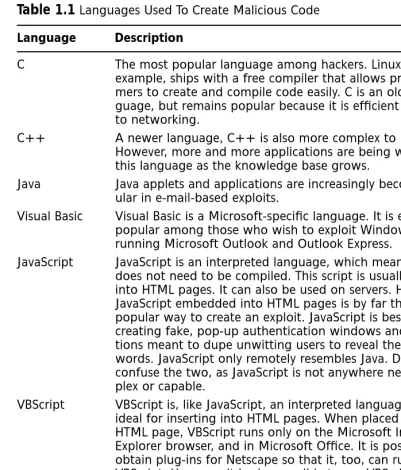
(31) 119_email_01. 10/4/00. 9:23 PM. Page 5. Understanding the Threats • Chapter 1. 1. Programming languages, such as C, C++, Java, Perl, JavaScript, and VBScript. 2. How operating systems work. A serious security professional or hacker understands not only how to click the right spot on an interface, but also understands what happens under the hood when that interface is clicked. 3. The history of local-area-network (LAN)- and Internet-based services, such as the Network File System (NFS), Web servers, Server Message Block (SMB, which is what allows Microsoft systems to share file and printing services), and of course e-mail servers. 4. Many hackers attack the protocols used in networks. The Internet uses Transmission Control Protocol/Internet Protocol (TCP/IP), which is a fast, efficient, and powerful transport and addressing method. This protocol is in fact an entire suite of protocols. Some of these include Telnet, DNS, the File Transfer Protocol (FTP), and all protocols associated with e-mail servers, which include the Simple Mail Transfer Protocol (SMTP), Post Office Protocol 3 (POP3), and the Internet Messaging Application Protocol (IMAP). 5. How applications interact with each other. Today’s operating systems contain components that allow applications to “talk” to each other efficiently. For example, using Microsoft’s Component Object Model (COM) and other technologies, one application, such as Word, can send commands to others on the local machine, or even on remote machines. Hackers understand these subtle relationships, and craft applications to take advantage of them. A talented hacker can quickly create powerful scripts in order to exploit a system.. Attack Types Don’t make the mistake of thinking that hackers simply attack systems. Many different types of attacks exist. Some require more knowledge than others, and it is often necessary to conduct one type of attack before conducting another. Below is a list of the common attacks waged against all network-addressable servers: ■. Scanning Most of the time, hackers do not know the nature of the network they wish to compromise or attack. By using TCP/IP programs such as ping, traceroute, and netstat, a hacker can learn about the physical makeup (topology) of a network. Once a hacker knows more about the machines, it is possible to attack or compromise them.. www.syngress.com. 5.
(32) 119_email_01. 6. 10/4/00. 9:23 PM. Page 6. Chapter 1 • Understanding the Threats ■. Denial of service (DoS) This type of attack usually results in a crashed server. As a result, the server is no longer capable of offering services. Thus, the attack denies these services to the public. Many of the attacks waged against e-mail servers have been denial of service attacks. However, do not confuse a DoS attack with other attacks that try to gather information or obtain authentication information.. ■. Sniffing and/or man-in-the-middle This attack captures information as it flows between a client and a server. Usually, a hacker attempts to capture TCP/IP transmissions, because they may contain information such as user names, passwords, or the actual contents of an e-mail message. A sniffing attack is often classified as a man-in-the-middle attack, because in order to capture packets from a user, the machine capturing packets must lie in between the two systems that are communicating (a man-in-themiddle attack can also be waged on one of the two systems).. ■. Hijacking and/or man-in-the-middle Another form of a man-inthe-middle attack is where a malicious third party is able to actually take over a connection as it is being made between two users. Suppose that a malicious user wants to gain access to machine A, which is beginning a connection with machine B. First, the malicious user creates a denial of service attack against machine B; once the hacker knocks machine B off of the network, he or she can then assume that machine’s identity and collect information from machine A.. ■. Physical Thus far, you have learned about attacks that are waged from one remote system to another. It is also possible to walk up to the machine and log in. For example, how many times do you or your work-mates simply walk away from a machine after having logged in? A wily hacker may be waiting just outside your cubicle to take over your system and assume your identity. Other, more sophisticated, attacks involve using specialized floppy disks and other tools meant to defeat authentication.. ■. System bug/back door No operating system, daemon, or client is perfect. Hackers usually maintain large databases of software that have problems that lead to system compromise. A system bug attack takes advantage of such attacks. A back door attack involves taking advantage of an undocumented subroutine or (if you are lucky) a password left behind by the creator of the application. Most back doors remain unknown. However, when they are discovered, they can lead to serious compromises.. www.syngress.com.
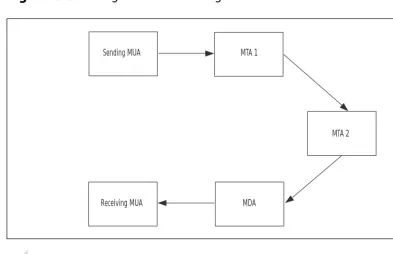
(33) 119_email_01. 10/4/00. 9:23 PM. Page 7. Understanding the Threats • Chapter 1 ■. Social engineering The motto of a good social engineer is: Why do all the work when you can get someone else to do it for you? Social engineering is computer-speak for the practice of conning someone into divulging too much information. Many social engineers are good at impersonating systems administrators. Another example of social engineering is the temporary agency that is, in reality, a group of highly skilled hackers who infiltrate companies in order to conduct industrial espionage.. Overview of E-mail Clients and Servers When you click on a button to receive an e-mail message, the message that you read is the product of a rather involved process. This process involves at least two protocols, any number of servers, and software that exists on both the client and the server side. Suppose that you want to send an e-mail to a friend. You generate the message using client software, such as Microsoft Outlook, Netscape Messenger, or Eudora Pro. Once you click the Send button, the message is sent to a server, which then often has to communicate with several other servers before your message is finally delivered to a central server, where the message waits. Your friend then must log in to this central server and download the message to read it.. Understanding a Mail User Agent and a Mail Transfer Agent When you create an e-mail message, the client software you use is called a Mail User Agent (MUA). When you send your message, you send it to a server called a Mail Transfer Agent (MTA). As you might suspect, an MTA is responsible for transferring your message to a single server or collection of additional MTA servers, where it is finally delivered. The server that holds the message so that it can be read is called a Mail Delivery Agent (MDA). You should note that an MDA and an MTA can reside on the same server, or on separate servers. Your friend can then use his or her MUA to communicate with the MDA to download your message. Figure 1.1 shows how a sending MUA communicates with an MTA (MTA 1), which then communicates with another MTA. The message is then delivered to an MDA, where the receiving MUA downloads the message. Each of these agents must cooperate in order for your message to get through. One of the ways that they cooperate is that they use different protocols. In regards to the Internet, the MTA uses a protocol called the Simple Mail Transfer Protocol (SMTP), which does nothing more than. www.syngress.com. 7.
(34) 119_email_01. 8. 10/4/00. 9:23 PM. Page 8. Chapter 1 • Understanding the Threats. deliver messages from one server to another. When you click the Send button, your client software (i.e., your MUA) communicates directly with an SMTP server.. Figure 1.1 Tracing an e-mail message.. Sending MUA. MTA 1. MTA 2. Receiving MUA. MDA. NOTE All systems that are connected to a network (such as the Internet) must have open ports, which are openings to your system that allow information to pass in and out of your system. Many times these ports must remain open. However, there are times when you should close them. You will learn how to close ports in Chapter 8.. An MTA using SMTP on the Internet uses TCP port 25. Once an MTA receives a message, its sole purpose is to deliver it to the e-mail address you have specified. If the MTA is lucky, it only needs to find a user defined locally (i.e., on itself). If the user is in fact defined locally, then the MTA simply places the e-mail in the inbox designated for the recipient. If the user is not defined locally, then the MTA has more work to do. It will contact other servers in its search for the proper destination server. This search involves using the Domain Name System to find the correct domain name. If, for example, your friend’s e-mail address is [email protected], then the MTA will find the syngress.com domain name, then search for the e-mail server that is designated for this DNS domain.. www.syngress.com.
(35) 119_email_01. 10/4/00. 9:23 PM. Page 9. Understanding the Threats • Chapter 1. NOTE An MTA finds the correct domain name by consulting a special DNS entry called a mail exchanger (MX) record. This record defines the authoritative e-mail server for this domain. Using an MX record allows an e-mail message to be addressed to [email protected], instead of james@ mailserver.syngress.com. This is because an MX record ensures that any message sent to the syngress.com domain automatically gets sent to the machine named mailserver.syngress.com. This feature of DNS greatly simplifies e-mail addresses, and is in use everywhere.. The Mail Delivery Agent Once an MTA delivers the e-mail you have sent to your friend, it resides in a drop directory. The recipient, James, then has at least two options: 1. He can log on to the server and access the message. Whether he logs on locally or remotely, he can use an MUA to read the message. 2. He can use his own e-mail client and log on remotely using either the POP3 or IMAP protocol. The Post Office Protocol 3 is the third version of a protocol that allows you to quickly log into a central server, download messages, and read them. This protocol listens for authentication requests on TCP port 110. With this protocol, you must first authenticate using a user name and a password, and then download the messages. After the recipient downloads the message you sent, his MUA will tell the server to delete it, unless he configures it to leave messages on the server. The Internet Message Access Protocol (IMAP) is a more sophisticated protocol. Like POP3, it requires a user to authenticate with a user name and password. Unlike POP3, an IMAP server does not require that you first download your e-mail messages before you read them. After logging in, the recipient can simply read the messages, rearrange them onto directories that exist on the MDA server’s hard drive, or delete them. He will never have to download the messages to his own hard drive if he doesn’t want to. An IMAP server usually listens on TCP port 143.. www.syngress.com. 9.
(36) 119_email_01. 10. 10/4/00. 9:23 PM. Page 10. Chapter 1 • Understanding the Threats. When Are Security Problems Introduced? Because this is a book on security, you may be wondering when, during this process, security problems are introduced. The answer is that they are usually introduced by the MUA. There are several reasons for this: ■. MUA software, such as Netscape Messenger, is designed for convenience rather than security.. ■. The software is often upgraded, quickly produced, and is not meant to conceal information.. ■. The applications are often used by naïve end-users who use default settings.. ■. When the MUA logs in to the MDA POP3 or IMAP server, authentication information is often sent in clear text format. In other words, the password information is not encrypted, and can be sniffed off the Internet by malicious users.. ■. Users will often double-click an e-mail attachment without knowing its origin. If this attachment contains malicious code, a chain reaction will occur, which usually involves having the MUA send unsolicited messages to other MUAs. The result is an everincreasing stream of traffic that can bog down the sending servers (the MTAs), as well as the MDA.. It is possible for problems to be introduced at the MTA level, as well as at the MDA level. To learn more about these problems, let’s take a look at some of the older attacks and the specific weaknesses of the servers we use every day.. History of E-mail Attacks It may be tempting to think that attacks on e-mail clients and servers are recent events. The Melissa, BubbleBoy, and Life Stages attacks were all waged in the last year, for example. Each of these attacks is essentially the same. They take advantage of the sophisticated relationship between an e-mail client and the rest of the operating system. By simply double-clicking on an attachment, an unwitting user can infect their own system, then begin a process where additional users are sent malicious files. The process continues from there. It would certainly seem that such attacks are closely associated with the world’s embrace of the Internet. However, e-mail servers have been the target of some of the oldest attacks on record.. www.syngress.com.
(37) 119_email_01. 10/4/00. 9:23 PM. Page 11. Understanding the Threats • Chapter 1. 11. The MTA and the Robert Morris Internet Worm In 1988, a graduate student named Robert Morris created a software program that took advantage of a popular MTA server named Sendmail. Sendmail is arguably the most popular MTA on UNIX and Linux servers (it is covered in detail in Chapter 10). Back in 1989, it was the only MTA capable of routing e-mail messages across the Internet. The particular version of Sendmail popular in 1989 was subject to a bug where it would run on the system and forward any request given to it. Morris created code that took advantage of the open nature of Sendmail. The code was designed to first attack a little-documented Sendmail debugging feature that allowed the server to execute commands directly on the system. Morris’ program was specifically designed to: ■. Run itself automatically on the local system.. ■. Use the local system to query for additional target systems that also had the Sendmail debugging feature. For example, it would use applications such as traceroute and netstat to discover other machines on the network.. ■. Cause a daemon called finger to crash. The finger daemon is designed to inform a person about the users currently logged on to a system. Morris’s worm caused this daemon to crash by sending it too much information. As a result, the finger daemon’s memory space, called a buffer, overflowed itself and overwrote memory that was actually allocated to another system. This problem is called a buffer overflow. As a result, the worm was able to crash the daemon and then use memory left behind to execute itself.. ■. Change its name before moving to another system.. ■. Propagate itself automatically to other systems. Often, this was accomplished by exploiting system trusts, which allow trusted systems to log on without first authenticating.. ■. Log on to other servers, then execute itself to spread to another system.. ■. Execute itself repeatedly on the system, thereby drawing on system resources until the system crashed.. Thus, the code could move from server to server without human intervention. The code also worked quickly, running multiple copies of itself on one system. The result was a series of system crashes that invaded between four to six thousand servers in less than 24 hours. Almost two thirds of the known Internet was brought down in one night.. www.syngress.com.
(38) 119_email_01. 12. 10/4/00. 9:23 PM. Page 12. Chapter 1 • Understanding the Threats. MDA Attacks In Chapter 2, you will learn how Web-based e-mail servers such as HotMail have fallen prey to attacks. Most of these attacks involve code that is designed to thwart authentication. Sometimes, the attacks focus on code meant to dupe unsuspecting users into thinking that they are logging in, when in fact they are actually sending their passwords to a malicious user. Other attacks are more global. These involve scripts that completely defeat the authentication process and allow a hacker to log in to any account without a password. Once a hacker has logged in, he or she can: 1. Assume the identity of a valid user and send bogus e-mail messages to unsuspecting users. 2. Obtain the passwords of the rightful user. This practice may not seem to be very fruitful, but consider this: Many people use the same password for multiple purposes; a person’s e-mail password may also be his or her bank card PIN, home security password, or network login password. 3. Manipulate e-mail messages that are waiting to be read. In addition to simply deleting such messages, a malicious user can actually alter incoming messages so that they contain bogus information.. Analyzing Famous Attacks The following is a brief discussion of additional attacks. As you read about them, notice that although they no longer involve Sendmail and the finger daemon, they still take advantage of internal and external system trusts: Melissa Perhaps the most famous e-mail attack, the Melissa virus was released in February of 1999. Melissa was the first popularly known e-mail virus that spread from user to user via e-mail. The chief reason for its success was that it was able to take advantage of Microsoft Outlook’s address book. It read the address book and sent infected e-mail to the first 50 people listed on the address book. Because the infected e-mails appeared to originate from friends, many people double-clicked the attachment, which allowed the virus to spread at a rapid rate. Now that it has been out for some time, different versions of Melissa have appeared. These mutations have essentially the same effect, although they have slightly different names. Melissa’s creator attacked Microsoft technology, so the virus was not able to use the MUAs residing on Macintosh, UNIX, or Linux systems. Melissa succeeded in crashing the e-mail servers for several major sites, including military installations and Internet service providers (ISPs) such as America Online.. www.syngress.com.
(39) 119_email_01. 10/4/00. 9:23 PM. Page 13. Understanding the Threats • Chapter 1. 13. BubbleBoy Like Melissa, this attack targets Microsoft-specific MUAs, specifically Microsoft Outlook and Outlook Express. When activated, it will send itself to all names in your personal address book. All messages sent from infected machines have the following line in the Subject field: “BubbleBoy is back!” One of the chief differences between this virus and others is that it does not require direct user intervention to spread. Whereas Melissa required a naïve user to double-click on an attachment, BubbleBoy activates when the Preview Pane option is activated in Microsoft Outlook or Outlook Express. The virus is specific to Microsoft Windows 98 and 2000 that have Internet Explorer 5 installed on them. Furthermore, the Window Scripting Host option must be enabled in Internet Explorer (a default selection). This requirement may seem to be a limitation, but considering the ubiquitous nature of Windows, you can quickly get an idea of how quickly this virus can spread. Mutations of BubbleBoy have appeared since it was originally introduced to the Internet in November of 1999. Some of these mutations can have destructive effects. Love Letter This worm was released from a computer in the Philippines. It targets MUAs that are designed to run Visual Basic scripts (again, Microsoft Outlook and Outlook Express). The attachment, which reads “LOVE-LETTER-FOR-YOU.TXT.vbs,” contains malicious script that has your MUA (usually Microsoft Outlook or Outlook Express) automatically send copies of itself to all of the contacts it finds in your address book. Not only does this particular worm alter various files (such as .jpg, .mp3, .wav, .doc, .gif, and .htm), but it also attempts to download a binary called WINBUGSFIX.EXE, which attempts to collect password information from the host. This worm also spreads via Internet Relay Chat (IRC) programs. The indirect result of this virus was that many corporate MTAs and MDAs crashed because they couldn’t handle all the traffic. Life Stages Introduced in June of 2000, this worm spreads primarily through e-mail, although it can also spread through IRC and ICQ (“I Seek You,” a chat program provided by Mirabilis, at www.mirabilis.com). This virus is characterized by an e-mail message apparently sent by a friend that contains a message such as “Life Stages,” “Jokes,” or “Funny.” One of the unique elements of this worm is that it is able to change itself to avoid detection. When a worm or virus can alter itself, it is said to be polymorphic. Although this worm requires some user intervention, it is not as sneaky as BubbleBoy; a user must double-click on an attachment before it spreads to all users listed in your address book.. www.syngress.com.
(40) 119_email_01. 14. 10/4/00. 9:23 PM. Page 14. Chapter 1 • Understanding the Threats. Case Study In June of 2000, a medium-sized company (just over 200 employees) was attacked by a variant of the Love Letter virus. The attack was immediately noticed around 8:10 a.m., when the majority of people in the company had logged in and checked their e-mail. Most of the users who fell prey to the attack were new to the company and had not yet been trained how to open attachments safely. In fact, several of the users double-clicked on the attachments several times, because nothing visible occurred. The end-users expected an image or a movie, and so they just kept clicking on the mouse. The result of this attack was that the e-mail server had to be restarted, and about fifteen employees had to update their anti-virus definitions. Furthermore, the systems administrator promptly circulated an e-mail reminding users about being careful about opening e-mail attachments and updating their antivirus software.. Learning from Past Attacks Clearly, there is much to learn from all of these attacks. One of the first lessons is that the Internet is still very much prone to a similar attack. The Life Stages, BubbleBoy, and Melissa programs demonstrate how vulnerable e-mail clients and servers are to illicit code. Without third-party software and custom configuration, your software is extremely vulnerable. Second, the Morris worm was able to spread because many systems blindly trusted each other to do the right thing. If your system trusts others blindly, then you are vulnerable. Most servers that allow clients to log in and pass on e-mails without first conducting a scan are far too trusting. Third, the internal software components of each server also blindly trusted each other. One illicit application sent from one server to the next was able to cause a massive amount of damage. This fundamental pattern has not changed. Likewise, most server components still blindly trust each other, which means that one compromised element of the operating system can then cause a malicious application to spread throughout the system and crash it. When it comes to e-mail servers, the domino theory applies today: If one server or client falls to a virus, chances are that many others will, as well. Fourth, applications that make things simple can cause problems. Any e-mail application that automatically opens attachments, provides preview panes, and allows information to pass unchecked back and forth between applications is helping to contribute to security breaches and attacks. Fifth, these attacks all suggest that unchecked system bugs can help cause problems. Although it is impossible to eliminate all system bugs from all of your software, you should make every effort to keep your sys-. www.syngress.com.
(41) 119_email_01. 10/4/00. 9:23 PM. Page 15. Understanding the Threats • Chapter 1. 15. tems current. Such proactive steps will save you countless headaches in the future. Finally, poor programming practice and application design helps contribute to e-mail attacks. When checking your software, remember that to one person, a particular feature of an application or server may appear as a bug or security flaw. Always consider the ramifications of various features of the software that you use.. Viruses Now that you have a good understanding of the behavior of e-mail server attacks, it is necessary to further define some of the terms used in this chapter. A virus is any binary file that meets the following criteria: 1. It requires direct human intervention in order to spread. Unlike a worm, which spreads automatically, a virus requires a user to download and double-click a binary file, or transfer it using an infected medium, such as a floppy disk. 2. It has a payload, which can be destructive behavior (deleting or altering files), or annoying messages left on the screen, or both. 3. A virus spreads quickly to all documents in an operating system. A virus never spreads itself to other systems automatically. Although many others exist, macro viruses are by far the most common. Word processors and spreadsheets, such as Microsoft Word and Excel, allow users to create powerful, convenient mini-applications that reside within the word processor. These macros are meant to simplify life by cutting down on repetitive tasks. The problem with macros is that many end-users allow macros to run without first establishing controls over what they can do. The macro facilities in office suites, such as MS Office, are almost always powerful enough to launch applications, delete files, and begin a sequence of events that can seriously damage the system. A malicious user can take advantage of powerful macro facilities. In fact, the Melissa virus is a macro virus. Many others exist that are not as ambitious, but which are still powerful.. Worms The chief difference between a worm and a virus is that a worm spreads to other systems. Furthermore, a worm is able to spread with little or no user intervention. Remember, in order for a virus to spread, a user must first install it by copying a file or inserting a floppy disk. A worm can spread. www.syngress.com.
(42) 119_email_01. 16. 10/4/00. 9:23 PM. Page 16. Chapter 1 • Understanding the Threats. itself upon activation. By simply double-clicking a file, the worm can be activated, and deliver its payload (if any), then spread by taking advantage of system settings, macros, and applications (called application programming interfaces, or APIs) that reside on a system. Whereas a virus is generally designed to spread throughout an entire machine, a worm is designed to propagate itself to all systems on a network. There are four factors that allow a worm to spread rapidly: 1. Networks that use one operating system. For example, an exclusively Microsoft or Novell network stands a greater risk of rapid infection than a heterogeneous network that uses UNIX, Novell, and Microsoft servers. 2. Networks that standardize to one MUA, such as Microsoft Outlook. Just as networks that have one operating system are vulnerable, a company that uses one MUA is liable to experience an event where a virus is propagated quickly. Also, because Outlook is so popular, hackers are more familiar with it. Therefore, a hacker can create an application that exploits it. 3. Operating systems, such as those vended by Microsoft, that provide interpreters and models, such as the Component Object Model (COM), which make it easy to create powerful applications in just a few steps. 4. Networks that use TCP/IP. Although TCP/IP is a powerful, efficient protocol, it was not designed with security in mind. Although the next version of IP, called IPv6, improves security, this version of IP has not been implemented widely. The current version of IP, called IPv4 allows a malicious user to imitate (i.e., spoof) the origin of an IP address. As a result, it can be very difficult to find the true attacker in case of an incident.. Types of Worms Below is a brief discussion of the three major types of worms: 1. True worms Requires no human intervention to spread. This type of worm is rare, because it requires great skill on the part of the programmer, and will function only on a homogeneous network. A true worm is also rare because it uses the programming language of the e-mail server itself. For example, to create a worm for the Netscape Enterprise e-mail server, you would have to write the application using the language that Netscape Enterprise Server uses.. www.syngress.com.
(43) 119_email_01. 10/4/00. 9:23 PM. Page 17. Understanding the Threats • Chapter 1. 17. 2. Protocol worms Any worm that uses a transport protocol, such as TCP/IP, to spread. The Robert Morris worm, for example, used elements of TCP/IP, including finger and Sendmail (which uses SMTP), to spread itself. This type of worm can also spread without any direct human intervention. 3. Hybrid worms A worm that requires a low level of user intervention to spread, but also acts like a virus. A simple click on a malicious attachment does not mean that this user is ready to copy or transmit an application. However, a click still represents user intervention. Most of the worms discussed in this chapter, such as BubbleBoy, Melissa, and Life Stages are hybrid worms, because they behave like viruses in that they deliver a payload. However, they also exhibit worm-like behavior, because they are able to spread automatically from system to system.. Trojans A Trojan horse, or Trojan, is nothing more than an application that purports to do one thing, but in fact does another. Trojans are named after the mythic Trojan horse in Homer’s Iliad. In the legend, the Greeks created a wooden horse, then gave it to the citizens of Troy as a peace offering. However, before the horse was presented, Greek soldiers hid inside it. The horse was brought inside the city gates, and when the city was asleep, the Greek soldiers emerged and were able to conquer Troy. Similarly, a Trojan looks like a benign or useful program, but contains a payload. For example, a Trojan can: ■. Launch an application that defeats standard authentication procedures.. ■. Delete files.. ■. Format the hard drive.. ■. Launch legitimate applications with the intent of defeating security.. Many Trojans have a payload. A common payload is to delete a file, many files, or even an entire partition. Perhaps the most common payload is an illicit server.. Illicit Servers An illicit server is nothing more than a simple service or daemon that defeats a server’s authentication mechanisms. A valid server, such as an. www.syngress.com.
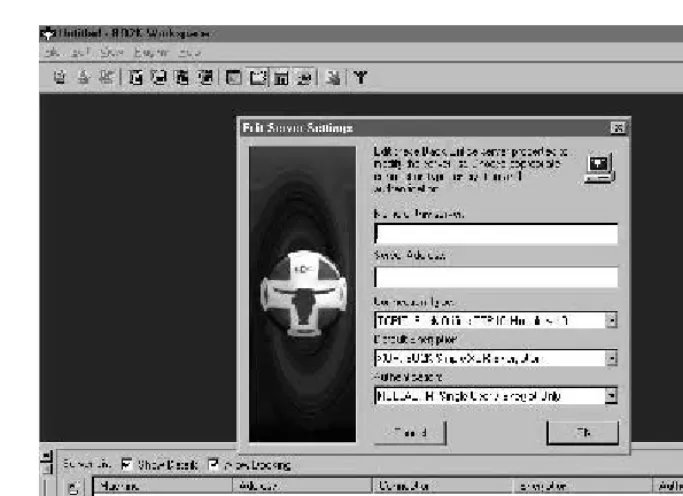
(44) 119_email_01. 18. 10/4/00. 9:23 PM. Page 18. Chapter 1 • Understanding the Threats. e-mail or Web server, always has authentication mechanisms that allow only certain users. Illicit servers have the following characteristics: 1. They open up an ephemeral TCP or UDP port (over 1024). 2. They attempt to hide any trace of their existence. They do not show up in a task bar or in a task list. 3. Most of the time, an illicit server is a very small binary that is easy to conceal as a hidden file, or it is one small file in the midst of several others. Using such a server, a malicious user can compromise your e-mail server. Examples of illicit servers include: NetBus and NetBus Professional Although many professionals consider NetBus Professional to be perfectly legitimate, each of these applications can be used to gain unauthorized control of a system. NetBus has a client and a server. Usually, a hacker will engage in social engineering or other means in order to get the server installed on the victim’s system. Back Orifice and Back Orifice 2000 More ambitious than NetBus, these illicit servers allow you to open FTP and HTTP connections on any port you specify. Using these servers, a malicious user can read the entire hard drive of any Windows system, as well as upload, download, and delete files. Back Orifice 2000 even allows a malicious user to specify a password, encrypt transmissions, and even destroy the server to avoid detection. Like NetBus, Back Orifice uses a client and a server. Figure 1.2 shows the client. Netcat Although a legitimate tool, it is possible for a malicious user to use this application to create an illicit server. Many other illicit servers exist, most of which you will never hear about; after all, why would a hacker give up trade secrets? Usually, a hacker will trojanize these servers in an attempt to trick end-users into installing them. Such social engineering practices are common. One of the more infamous examples of social engineering is where a hacker took a version of the Whack-A-Mole game and linked it to NetBus. Then, the hacker began sending this game to various people, who then played it and unwittingly installed the NetBus server on their systems.. Differentiating between Trojans and Illicit Servers Do not use the terms Trojan and illicit server interchangeably. An illicit server is often presented to users in trojanized form, but an illicit server is not necessarily a Trojan. For example, unless you disguise NetBus as another application, it is simply an illicit server.. www.syngress.com.
(45) 119_email_01. 10/4/00. 9:23 PM. Page 19. Understanding the Threats • Chapter 1. 19. Figure 1.2 The Back Orifice client.. E-mail Bombing Another form of attack involves sending hundreds, if not thousands, of large e-mail messages to an account on a server. Due to the large volume of e-mail messages (not to mention their size), the victim account will remain unusable until the systems administrator removes all of the messages, or creates another account. Many easy-to-use applications exist that are meant to enable the most untalented user to send an e-mail bomb. You will learn how to thwart such attacks in subsequent chapters.. Sniffing Attacks TCP/IP is an inherently insecure protocol, because it does not encrypt transmissions by default. Therefore, it is possible for a malicious user to use a protocol analyzer (also called a packet sniffer) to capture and then view packets. Applications such as Sniffer Basic and TCPdump are specially designed to place a Network Interface Card (NIC) into promiscuous mode. Once in promiscuous mode, a NIC can then capture any packets that are passing through your particular portion of the network.. www.syngress.com.
Figure
+2
Related documents
Through an active asset allocation strategy, the Adviser may increase or decrease asset class exposures relative to the neutral asset allocations by up to 10 percentage points
Get together with a group of friends (for example, horn, trombone, electronic keyboard and drums), play through the piece twice, then take turns to improvise over the
In both the Roman Catholic Church and the Episcopal Church, the ritual of ordination contains a promise of obedience, for deacons and priests to their bishops, and for bishops in
Departing from the discussion of the regionally led facilitation in Burundi, we show that the respective national elites and African interveners referred to different scales in
5 Fax2Mail sends an email with a PDF attachment to the mail server (SMTP).. Application Note 14 Document
[r]
Apreciamos las asociaciones entre redes sociales e identificación territorial a partir de tres aspectos claves: el déficit de apoyo social, según la valoración de
Checking where young people are, by phoning them, can be perceived as a perfectly innocuous, accept- able act: [Mother] wanted me to call her when I was coming back from school
