DATA COMMUNICATION
[As per Choice Based Credit System (CBCS) scheme] (Effective from the academic year 2016 -2017)
SEMESTER – IV
Subject Code
15CS46
IA Marks 20Number of Lecture Hours/Week 04 Exam Marks 80
Total Number of Lecture Hours 50 Exam Hours 03
CREDITS – 04 Course objectives: This course will enable students to
Comprehend the transmission technique of digital data between two or more computers and a computer network that allows computers to exchange data.
Explain with the basics of data communication and various types of computer networks;
Illustrate TCP/IP protocol suite and switching criteria.
Demonstrate Medium Access Control protocols for reliable and noisy channels.
Expose wireless and wired LANs along with IP version.
Illustrate basic computer network technology.
Identify the different types of network topologies and protocols.
Enumerate the layers of the OSI model and TCP/IP functions of each layer.
Make out the different types of network devices and their functions within a network
Contents
Teaching Hours Module 1
Introduction: Data Communications, Networks, Network Types, Internet History, Standards and Administration, Networks Models: Protocol Layering, TCP/IP Protocol suite, The OSI model, Introduction to Physical Layer-1: Data and Signals, Digital Signals, Transmission Impairment, Data Rate limits, Performance, Digital Transmission:
Digital to digital conversion (Only Line coding: Polar, Bipolar and Manchester coding). 10 Hours Module 2
Physical Layer-2: Analog to digital conversion (only PCM), Transmission Modes, Analog Transmission: Digital to analog conversion, Bandwidth Utilization: Multiplexing and Spread Spectrum, Switching: Introduction, Circuit Switched Networks
and Packet switching. 10 Hours
Module 3
Error Detection and Correction: Introduction, Block coding, Cyclic codes, Checksum, Forward error correction, Data link control: DLC services, Data link layer protocols,
HDLC, and Point to Point protocol (Framing, Transition phases only). 10 Hours Module 4
Media Access control: Random Access, Controlled Access and Channelization, Wired LANs Ethernet: Ethernet Protocol, Standard Ethernet, Fast Ethernet, Gigabit Ethernet and 10 Gigabit Ethernet, Wireless LANs: Introduction, IEEE 802.11 Project
and Bluetooth. 10 Hours
Module 5
Other wireless Networks: WIMAX, Cellular Telephony, Satellite networks, Network layer Protocols : Internet Protocol, ICMPv4,Mobile IP, Next generation IP: IPv6
Dept of ISE,CITECH
Course Outcomes: The students should be able to: Illustrate basic computer network technology.
Identify the different types of network topologies and protocols.
Enumerate the layers of the OSI model and TCP/IP functions of each layer.
Make out the different types of network devices and their functions within a network Demonstrate the skills of subnetting and routing mechanisms.
Graduate Attributes
1. Engineering Knowledge
2. Design Development of solution(Partly) 3. Modern Tool Usage
4. Problem Analysis 10904383 Question paper pattern:
The question paper will have ten questions. There will be 2 questions from each module.
Each question will have questions covering all the topics under a module.
The students will have to answer 5 full questions, selecting one full question from each module.
Text Book:
Behrouz A. Forouzan, Data Communications and Networking 5E, 5th Edition, Tata McGraw-Hill, 2013. (Chapters 1.1 to 1.5, 2.1 to 2.3, 3.1, 3.3 to 3.6, 4.1 to 4.3, 5.1, 6.1, 6.2, 8.1 to 8.3, 10.1 to 10.5, 11.1 to 11.4, 12.1 to 12.3, 13.1 to 13.5, 15.1 to 15.3, 16.1 to 16.3, 19.1 to 19.3, 22.1 to 22.4)
Reference Books:
1. Alberto Leon-Garcia and Indra Widjaja: Communication Networks - Fundamental Concepts and Key architectures, 2nd Edition Tata McGraw-Hill, 2004.
2. William Stallings: Data and Computer Communication, 8th Edition, Pearson Education, 2007. 3. Larry L. Peterson and Bruce S. Davie: Computer Networks – A Systems Approach, 4th
Edition, Elsevier, 2007.
MODULE 1
Chapter 1
Introduction
1.1 DATA COMMUNICATIONS
Data communications are the exchange of data between two devices via some form of transmission medium such as a wire cable. For data communications to occur, the communicating devices must be part of a communication system made up of a combination of hardware (physical equipment) and software (programs). The effectiveness of a data communications system depends on four fundamental characteristics: delivery, accuracy, timeliness, and jitter.
1. Delivery. The system must deliver data to the correct destination. Data must be received by the intended device or user and only by that device or user.
2. Accuracy. The system must deliver the data accurately. Data that have been altered in transmission and left uncorrected are unusable.
3.Timeliness. The system must deliver data in a timely manner. Data delivered late are useless. In the case of video and audio, timely delivery means delivering data as they are produced, in the same order that they are produced, and without significant delay. This kind of delivery is called real-time transmission.
4. Jitter. Jitter refers to the variation in the packet arrival time. It is the uneven delay in the delivery of audio or video packets. For example, let us assume that video packets are sent every 30 ms. If some of the packets arrive with 30-ms delay and others with 40-ms delay, an uneven quality in the video is the result.
Components
A data communications system has five components:
1.Message. The message is the information (data) to be communicated. Popular forms of information include text,numbers, pictures, audio, and video.
2. Sender. The sender is the device that sends the data message.It can be a computer,workstation, telephone handset, video camera, and so on.
3. Receiver. The receiver is the device that receives the message. It can be a computer,workstation, telephone handset, television, and so on.
wire,coaxial cable, fiber-optic cable, and radio waves.
5. Protocol. A protocol is a set of rules that govern data communications. It represents an agreement between the communicating devices. Without a protocol, two devices may be connected but not communicating.
Data Representation
Information today comes in different forms such as text, numbers, images, audio, and video.
Text
In data communications, text is represented as a bit pattern, a sequence of bits (0s or 1s).Different sets of bit patterns have been designed to represent text symbols. Each set is called a code, and the process of representing symbols is called coding. Today, the prevalent coding system is called Unicode, which uses 32 bits to represent a symbol or character used in any language in the world.
Numbers
Numbers are also represented by bit patterns.However, a code such as ASCII is not used to represent numbers; the number is directly converted to a binary number to simplify mathematical operations.
Images
Images are also represented by bit patterns. In its simplest form, an image is composed of a matrix of pixels (picture elements), where each pixel is a small dot. The size of the pixel depends on the resolution. For example, an image can be divided into 1000 pixels or 10,000 pixels. In the second case, there is a better representation of the image (better resolution), but more memory is needed to store the image.
After an image is divided into pixels, each pixel is assigned a bit pattern. The size and the value of the pattern depend on the image. For an image made of only black- and-white dots (e.g.,a chessboard), a 1-bit pattern is enough to represent a pixel.
There are several methods to represent color images. One method is called RGB, so called because each color is made of a combination of three primary colors: red, green, and blue.
Audio
Audio refers to the recording or broadcasting of sound or music. Audio is by nature different from text, numbers, or images. It is continuous, not discrete. Even when we use a microphone to change voice or music to an electric signal, we create a continuous signal.
Video
Video refers to the recording or broadcasting of a picture or movie. Video can either be produced as a continuous entity (e.g., by a TV camera), or it can be a combination of images, each a discrete entity, arranged to convey the idea of motion.
Data Flow
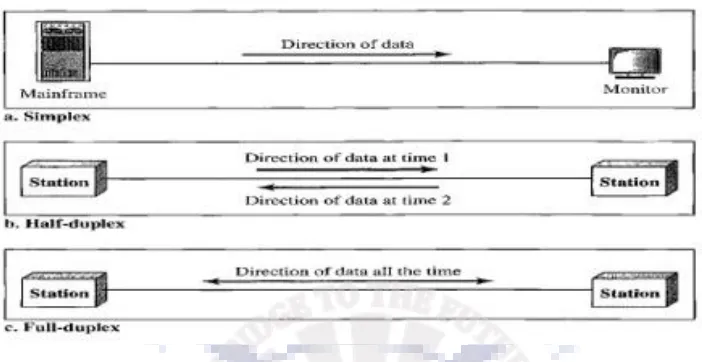
figure.
Simplex
In simplex mode, the communication is unidirectional, as on a one-way street. Only one of the two devices on a link can transmit; the other can only receive. Keyboards and traditional monitors are examples of simplex devices. The keyboard can only introduce input; the monitor can only accept output. The simplex mode can use the entire capacity of the channel to send data in one direction.
Half-Duplex
In half-duplex mode, each station can both transmit and receive, but not at the same time. When one device is sending, the other can only receive, and vice versa. In a half-duplex transmission,the entire capacity of a channel is taken over by whichever of the two devices is transmitting at the time. Walkie-talkies and CB (citizens band) radios are both half-duplex systems.
The half-duplex mode is used in cases where there is no need for communication in both directions at the same time; the entire capacity of the channel can be utilized for each direction.
Full-Duplex
In full-duplex made (also, called duplex), both stations can transmit and receive simultaneously.In full-duplex mode, signals going in one direction share the capacity of the link with signals going in the other direction. This sharing can occur in two ways: Either the link must contain two physically separate transmission paths, one for sending and the other for receiving; or the capacity of the channel is divided between signals travelling in both directions. One common example of duplex communication is the telephone network. The full-duplex mode is used when communication in both directions is required all the time. The capacity of the channel, however, must be divided between the two directions.
1.2 NETWORKS
router, which connects the network to other networks, a switch, which connects devices together, a modem (modulator-demodulator), which changes the form of data, and so on. These devices in a network are connected using wired or wireless transmission media such as cable or air.
Network Criteria
A network must be able to meet a certain number of criteria. The most important of these are performance, reliability, and security.
Performance
Performance can be measured in many ways, including transit time and response time. Transit time is the amount of time required for a message to travel from one device to another. Response time is the elapsed time between an inquiry and a response. The performance of a network depends on a number of factors, including the number of users, the type of transmission medium,the capabilities of the connected hardware, and the efficiency of the software. Performance is often evaluated by two networking metrics: throughput and delay.We often need more throughput and less delay.
Reliability
In addition to accuracy of delivery, network reliability is measured by the frequency of failure,the time it takes a link to recover from a failure, and the network's robustness in a catastrophe.
Security
Network security issues include protecting data from unauthorized access, protecting data from damage and development, and implementing policies and procedures for recovery from breaches and data losses.
Physical Structures
Type of Connection
A network is two or more devices connected through links. A link is a communications pathway that transfers data from one device to another. For communication to occur, two devices must be connected in some way to the same link at the same time. There are two possible types of connections: point-to-point and multipoint.
Point-to-Point A point-to-point connection provides a dedicated link between two devices. The entire capacity of the link is reserved for transmission between those two devices. Most point-to-point connections use an actual length of wire or cable to connect the two ends, but other options, such as microwave or satellite links, are also possible.
shared, either spatially or temporally. If several devices can use the link simultaneously, it is a spatially shared connection. If users must take turns, it is a timeshared connection.
Physical Topology
The term physical topology refers to the way in which a network is laid out physically. Two or more devices connect to a link; two or more links form a topology. The topology of a network is the geometric representation of the relationship of all the links and linking devices (usually called nodes) to one another. There are four basic topologies possible: mesh, star, bus, and ring.
Mesh In a mesh topology, every device has a dedicated point-to-point link to every other device.The term dedicated means that the link carries traffic only between the two devices it connects.To find the number of physical links in a fully connected mesh network with n nodes, we first consider that each node must be connected to every other node. Node 1 must be connected to n-1 nodes, node 2 must be connected to n-1 nodes, and finally node n must be connected to n-1 nodes. We need n(n-1) physical links. However, if each physical link allows communication in both directions (duplex mode), we can divide the number of links by 2. In other words, we can say that in a mesh topology, we need
A mesh offers several advantages over other network topologies.
1 .The use of dedicated links guarantees that each connection can carry its own data load, thus eliminating the traffic problems that can occur when links must be shared by multiple devices.
2. A mesh topology is robust. If one link becomes unusable, it does not incapacitate the entire system.
3. There is the advantage of privacy or security. When every message travels along a dedicated line, only the intended recipient sees it. Physical boundaries prevent other users from gaining access to messages.
4. Point-to-point links make fault identification and fault isolation easy. Traffic can be routed to avoid links with suspected problems. This facility enables the network manager to discover the precise location of the fault and aids in finding its cause and solution.
The main disadvantages of a mesh are related to the amount of cabling and the number of I/Oports required.
1. Because every device must be connected to every other device, installation and reconnection are difficult. 2. The sheer bulk of the wiring can be greater than the available space (in walls, ceilings, or floors) can accommodate.
3. The hardware required to connect each link (I/O ports and cable) can be prohibitivelyexpensive.
For these reasons a mesh topology is usually implemented in a limited fashion, for example, as abackbone
connecting the main computers of a hybrid network that can include several othertopologies.
Star Topology In a star topology, each device has a dedicated point-to-point link only to a central controller,
usually called a hub. The devices are not directly linked to one another. Unlike a mesh topology, a star
topology does not allow direct traffic between devices. The controlleracts as an exchange: If one device wants
to send data to another, it sends the data to the controller, which then relays the data to the other connected device.
Advantages:
1. A star topology is less expensive than a mesh topology. In a star, each device needs only one link and
reconfigure. Far less cabling needs to be housed, and additions, moves,and deletions involve only one connection: between that device and the hub.
2. Other advantages include robustness. If one link fails, only that link is affected. All otherlinks remain active.This factor also lends itself to easy fault identification and fault isolation. As long as the hub is working, it can be used to monitor link problems and bypass defective links.
Disadvantages:
1. One big disadvantage of a star topology is the dependency of the whole topology on onesingle point, the
hub. If the hub goes down, the whole system is dead.
2. Although a star requires far less cable than a mesh, each node must be linked to a central hub. For this
reason, often more cabling is required in a star than in some other topologies.
Bus Topology The preceding examples all describe point-to-point connections. A bus topology,on the other
hand, is multipoint. One long cable acts as a backbone to link all the devices in anetwork.
Nodes are connected to the bus cable by drop lines and taps. A drop line is a connection running between the
device and the main cable. A tap is a connector that either splices into the main cable or punctures the
sheathing of a cable to create a contact with the metallic core. As a signaltravels along the backbone, some of
its energy is transformed into heat. Therefore, it becomesweaker and weaker as it travels farther and farther.
For this reason there is a limit on the numberof taps a bus can support and on the distance between those taps.
Advantages:
1. Advantages of a bus topology include ease of installation. Backbone cable can be laid along the most efficient path, then connected to the nodes by drop lines of various lengths. In this way, a bus uses less cabling than mesh or star topologies.
2. In a bus, redundancy is eliminated. Only the backbone cable stretches through the entiry facility. Each drop line has to reach only as far as the nearest point on the backbone.
Disadvantages:
1. Disadvantages include difficult reconnection and fault isolation. A bus is usually designed to be optimally efficient at installation. It can therefore be difficult to add new devices.
2. Signal reflection at the taps can cause degradation in quality. This degradation can be controlled by limiting the number and spacing of devices connected to a given length of cable. Adding new devices may therefore require modification or replacement of the backbone.
3. A fault or break in the bus cable stops all transmission, even between devices on the same side of the
problem. The damaged area reflects signals back in the direction of origin, creating noise in both directions.
Ring Topology In a ring topology, each device has a dedicated point-to-point connection withonly the two devices on either side of it. A signal is passed along the ring in one direction, fromdevice to device, until it reaches its destination. Each device in the ring incorporates a repeater.When a device receives a signal
Advantages:
1. A ring is relatively easy to install and reconfigure. Each device is linked to only itsimmediate neighbors. 2. To add or delete a device requires changing only two connections. The only constraints are media and traffic considerations (maximum ring length and number of devices).
3. In addition, fault isolation is simplified. Generally in a ring, a signal is circulating at alltimes. If one device does not receive a signal within a specified period, it can issue an alarm. The alarm alerts the network operator to the problem and its location.
Disadvantages:
1. Unidirectional traffic can be a disadvantage. In a simple ring, a break in the ring (such as a disabled
station) can disable the entire network. This weakness can be solved by using as dual ring or a switch
capable of closing off the break.
Hybrid Topology A network can be hybrid. For example, we can have a main star topology with each branch connecting several stations in a bus topology as shown:
1.3 NETWORK TYPES
1.3.1 Local Area Network
A local area network (LAN) is usually privately owned and links the devices in a single office,building, or campus. Depending on the needs of an organization and the type of technology used,a LAN can be as simple
as two PCs and a printer in someone's home office; or it can extendthroughout a company and include audio
and video peripherals. Currently, LAN size is limited toa few kilometers.
common example of a LAN, found in many business environments, links a workgroup of task-related
computers, for example, engineering workstations or accounting PCs. One of the computers may be given a
large capacity disk driveand may become a server to clients. Software can be stored on this central server and
used asneeded by the whole group.
In addition to size, LANs are distinguished from other types of networks by theirtransmission media and
topology. In general, a given LAN will use only one type of transmission medium.The most common LAN topologies are bus, ring, and star.
In the past, all hosts in a network were connected through a common cable, which meant that a packet sent from one host to another was received by all hosts. The intended recipient kept the packet; the others dropped the packet. Today, most LANs use a smart connecting switch, which is able to recognize the destination address of the packet and guide the packet to its destination without sending it to all other hosts. The switch alleviates the traffic in the LAN and allows more than one pair to communicate with each other at the same time if there is no common source and destination among them. Note that the above definition of a LAN does not define the minimum or maximum number of hosts in a LAN. Figure 1.8 shows a LAN using either a common cable or a switch.
1.3.2 Wide Area Network
A wide area network (WAN) provides long-distance transmission of data, image, audio, andvideo information
over large geographic areas that may comprise a country, a continent, or eventhe whole world.A WAN can be
computer to the Internet. We see two distinct examples of WANs today: point-to-point WANs and switched WANs.
A point-to-point WAN is a network that connects two communicating devices through a transmission media (cable or air). We will see examples of these WANs when we discuss how to connect the networks to one another. Figure 1.9 shows an example of a point-to-point WAN.
A switched WAN is a network with more than two ends. A switched WAN, as we will see shortly, is used in the backbone of global communication today. We can say that a switched WAN is a combination of several point-to-point WANs that are connected by switches. Figure 1.10 shows an example of a switched WAN.
LANs
Interconnection of Networks: Internetwork
Today, it is very rare to see a LAN, a MAN, or a LAN in isolation; they are connected to one another. When
two or more networks are connected, they become an internetwork, or internet.
When a host in the west coast office sends a message to another host in the same office, the router blocks the message, but the switch directs the message to the destination. On the other hand, when a host on the west coast sends a message to a host on the east coast, router R1 routes the packet to router R2, and the
packet reaches the destination. Figure 1.12 shows another internet with several LANs and WANs
1.3.3 Switching
An internet is a switched network in which a switch connects at least two links together. A switch needs to forward data from a network to another network when required. The two most common types of switched networks are circuit-switched and packet-switched networks.
Circuit-Switched Network:
In a circuit-switched network, a dedicated connection, called a circuit, is always available between the two end systems; the switch can only make it active or inactive. Figure 1.13 shows a very simple switched network that connects four telephones to each end. We have used telephone sets instead of computers as an end system because circuit switching was very common in telephone networks in the past, although part of the telephone network today is a packet-switched network.
Packet-Switched Network
A router in a packet-switched network has a queue that can store and forward the packet. However, if packets arrive at one router when the thick line is already working at its full capacity, the packets should be stored and forwarded in the order they arrived
1.3.4 THE INTERNET
The most notable internet is called the Internet , and is composed of thousands of interconnected networks. Figure 1.15 shows a conceptual (not geographical) view of the Internet. The figure shows the Internet as several backbones, provider networks, and customer networks.
At the top level, the backbones are large networks owned by some communication companies
such as Sprint, Verizon (MCI), AT&T, and NTT.
The backbone networks are connected through some complex switching systems, called peering
points.
At the second level, there are smaller networks, called provider networks, that use the services of
the backbones for a fee.
The provider networks are connected to backbones and sometimes to other provider networks.
The customer networks are networks at the edge of the Internet that actually use the services provided by the Internet. They pay fees to provider networks for receiving services.
Backbones and provider networks are also called Internet Service Providers (ISPs).
The backbones are often referred to as international ISPs; the provider networks are often referred
1.3.5 Accessing the Internet
The Internet today is an internetwork that allows any user to become part of it. The user, however, needs to be physically connected to an ISP. The physical connection is normally done through a point-to-point WAN.
Using Telephone Networks: Today most residences and small businesses have telephone service, which means they are connected to a telephone network. Since most telephone networks have already connected themselves to the Internet, one option for residences and small businesses to connect to the Internet is to change the voice line between the residence or business and the telephone center to a point-to-point WAN. This can be done in two ways.
❑ Dial-up service. The first solution is to add to the telephone line a modem that converts data to voice. The software installed on the computer dials the ISP and imitates making a telephone connection. Unfortunately, the dial-up service is very slow, and when the line is used for Internet connection, it cannot be used for telephone (voice) connection. It is only useful for small residences.
❑ DSL Service. Since the advent of the Internet, some telephone companies have
upgraded their telephone lines to provide higher speed Internet services to residences or small businesses. The DSL service also allows the line to be used simultaneously for voice and data communication..
residence or a small business can be connected to the Internet by using this service. It provides a higher speed connection, but the speed varies depending on the number of neighbors that use the same cable.
Using Wireless Networks:Wireless connectivity has recently become increasingly popular. A household or a small business can use a combination of wireless and wired connections to access the Internet. With the growing wireless WAN access, a household or a small business can be connected to the Internet through a wireless WAN.
Direct Connection to the Internet: A large organization or a large corporation can itself become a local ISP and be connected to the Internet. This can be done if the organization or the corporation leases a high-speed WAN from a carrier provider and connects itself to a regional ISP. For example, a large university with several campuses can create an internetwork and then connect the internetwork to the Internet.
1.4 INTERNET HISTORY
1.4.1 Early History
There were some communication networks, such as telegraph and telephone networks, before 1960. These networks were suitable for constant-rate communication at that time, which means that after a connection was made between two users, the encoded message (telegraphy) or voice (telephony) could be exchanged.
A computer network, on the other hand, should be able to handle bursty data, which means data received at variable rates at different times. The world needed to wait for the packet-switched network to be invented.
Birth of Packet-Switched Networks: The theory of packet switching for bursty traffic was first presented by Leonard Kleinrock in 1961 at MIT. At the same time, two other researchers, Paul Baran at Rand Institute and Donald Davies at National Physical Laboratory in England, published some papers about packet-switched networks.
ARPANET: In the mid-1960s, mainframe computers in research organizations were stand-alone devices. Computers from different manufacturers were unable to communicate with one another. The Advanced Research Projects Agency (ARPA) in the Department of Defense (DOD) was interested in finding a way to connect computers so that the researchers they funded could share their findings, thereby reducing costs and eliminating duplication of effort.
In 1967, at an Association for Computing Machinery (ACM) meeting, ARPA presented its ideas for the Advanced Research Projects Agency Network (ARPANET), a small network of connected computers. The idea was that each host computer (not necessarily from the same manufacturer) would be attached to a specialized computer, called an interface message processor (IMP). The IMPs, in turn, would be connected to each other. Each IMP had to be able to communicate with other IMPs as well as with its own attached host.
1.4.2 Birth of the Internet: In 1972, Vint Cerf and Bob Kahn, both of whom were part of the core ARPANET group, collaborated on what they called the Internetting Project. They wanted to link dissimilar networks so that a host on one network could communicate with a host on another. Cerf and Kahn devised the idea of a device called a gateway to serve as the intermediary hardware to transfer data from one network to another.
TCP/IP: Cerf and Kahn’s landmark 1973 paper outlined the protocols to achieve end-to-end delivery of data. This was a new version of NCP. This paper on transmission control protocol (TCP) included concepts such as encapsulation, the datagram, and the functions of a gateway. A radical idea was the transfer of responsibility for error correction from the IMP to the host machine. This ARPA Internet now became the focus of the communication effort. Around this time, responsibility for the ARPANET was handed over to the Defense Communication Agency (DCA).
In October 1977, an internet consisting of three different networks (ARPANET, packet radio, and packet satellite) was successfully demonstrated. Communication between networks was now possible.
Shortly thereafter, authorities made a decision to split TCP into two protocols: Transmission Control Protocol (TCP) and Internet Protocol (IP). IP would handle datagram routing while TCP would be responsible for higher level functions such as segmentation, reassembly, and error detection. The new combination became known as TCP/IP.
In 1981, under a Defence Department contract, UC Berkeley modified the UNIX operating system to include TCP/IP. This inclusion of network software along with a popular operating system did much for the popularity of internetworking. The open (non-manufacturer-specific) implementation of the Berkeley UNIX gave every manufacturer a working code base on which they could build their products.
In 1983, authorities abolished the original ARPANET protocols, and TCP/IP became the official protocol for the ARPANET. Those who wanted to use the Internet to access a computer on a different network had to be running TCP/IP.
MILNET: In 1983, ARPANET split into two networks: Military Network (MILNET) for military users and ARPANET for nonmilitary users.
CSNET: Another milestone in Internet history was the creation of CSNET in 1981. Computer Science Network (CSNET) was a network sponsored by the National Science Foundation (NSF). The network was conceived by universities that were ineligible to join ARPANET due to an absence of ties to the Department of Defense. CSNET was a less expensive network; there were no redundant links and the transmission rate was slower. By the mid-1980s, most U.S. universities with computer science departments were part of CSNET. Other institutions and companies were also forming their own networks and using TCP/IP to interconnect. The term Internet, originally associated with government-funded connected networks, now referred to the connected networks using TCP/IP protocols.
ANSNET:In 1991, the U.S. government decided that NSFNET was not capable of supporting the rapidly increasing Internet traffic. Three companies, IBM, Merit, and Verizon, filled the void by forming a nonprofit organization called Advanced Network & Services (ANS) to build a new, high-speed Internet backbone called Advanced Network Services Network (ANSNET).
1.4.3 Internet Today Today, we witness a rapid growth both in the infrastructure and new applications. The Internet today is a set of pier networks that provide services to the whole world. What has made the Internet so popular is the invention of new applications.
World Wide Web The 1990s saw the explosion of Internet applications due to the emergence of the World Wide Web (WWW). The Web was invented at CERN by Tim Berners-Lee. This invention has added the commercial applications to the Internet.
Multimedia Recent developments in the multimedia applications such as voice over IP (telephony), video over IP (Skype), view sharing (YouTube), and television over IP (PPLive) has increased the number of users and the amount of time each user spends on the network.
Peer-to-Peer Applications Peer-to-peer networking is also a new area of communication with a lot of potential.
1.5
STANDARDS AND ADMINISTRATION
1.5.1 Internet Standards: An Internet standard is a thoroughly tested specification that is useful to and adhered to by those who work with the Internet. It is a formalized regulation that must be followed. There is a strict procedure by which a specification attains Internet standard status. A specification begins as an Internet draft.
An Internet draft is a working document (a work in progress) with no official status and a six-month lifetime. Upon recommendation from the Internet authorities, a draft may be published as a Request for Comment (RFC).
Each RFC is edited, assigned a number, and made available to all interested parties. RFCs go through maturity levels and are categorized according to their requirement level.
Maturity Levels: An RFC, during its lifetime, falls into one of six maturity levels: proposed standard, draft standard, Internet standard, historic, experimental, and informational (see Figure 1.16).
❑ Proposed Standard: A proposed standard is a specification that is stable, well understood, and of sufficient interest to the Internet community. At this level, the specification is usually tested and implemented by several different groups.
Draft Standard. A proposed standard is elevated to draft standard status after at least two successful independent and interoperable implementations. Barring difficulties, a draft standard, with modifications if specific problems are encountered, normally becomes an Internet standard. ❑ Internet Standard:A draft standard reaches Internet standard status after demonstrations of successful implementation.
❑ Historic: The historic RFCs are significant from a historical perspective. They either have been superseded by later specifications or have never passed the necessary maturity levels to become an Internet standard.
situation that does not affect the operation of the Internet. Such an RFC should not be implemented in any functional Internet service.
❑ Informational: An RFC classified as informational contains general, historical, or tutorial information related to the Internet. It is usually written by someone in a non-Internet organization, such as a vendor.
Requirement Levels: RFCs are classified into five requirement levels: required, recommended, elective, limited use, and not recommended.
❑ Required. An RFC is labeled required if it must be implemented by all Internet systems to achieve minimum conformance. For example, IP and ICMP are required protocols.
❑Recommended. An RFC labeled recommended is not required for minimum conformance; it is recommended because of its usefulness. For example, FTP and TELNET) are recommended protocols.
❑ Elective. An RFC labeled elective is not required and not recommended. However, a system can use it for its own benefit.
❑ Limited Use. An RFC labeled limited use should be used only in limited situations. Most of the experimental RFCs fall under this category.
❑ Not Recommended. An RFC labeled not recommended is inappropriate for general use. Normally a historic (deprecated) RFC may fall under this category
1.5.2 Internet Administration
ISOC: The Internet Society (ISOC) is an international, nonprofit organization formed in 1992 to provide support for the Internet standards process. ISOC accomplishes this through maintaining and supporting other Internet administrative bodies such as IAB, IETF, IRTF, and IANA. ISOC also promotes research and other scholarly activities relating to the Internet.
IAB The Internet Architecture Board (IAB) is the technical advisor to the ISOC. The main purposes of the IAB are to oversee the continuing development of the TCP/IP Protocol Suite and to serve in a technical advisory capacity to research members of the Internet community. IAB accomplishes this through its two primary components, the Internet Engineering Task Force (IETF) and the Internet Research Task Force (IRTF). Another responsibility of the IAB is the editorial management of the RFCs, described earlier. IAB is also the external liaison between the Internet and other standards organizations and forums.
IETF The Internet Engineering Task Force (IETF) is a forum of working groups managed by the Internet Engineering Steering Group (IESG). IETF is responsible for identifying operational problems and proposing solutions to these problems. IETF also develops and reviews specifications intended as Internet standards. The working groups are collected into areas, and each area concentrates on a specific topic. Currently nine areas have been defined. The areas include applications, protocols, routing and security.
Chapter 2: Network Models
2.1
PROTOCOL LAYERING
In data communication and networking, a protocol defines the rules that both the sender and receiver and all intermediate devices need to follow to be able to communicate effectively. When communication is simple, we may need only one simple protocol; when the communication is complex, we may need to divide the task between different layers, in which case we need a protocol at each layer, or protocol layering.
2.1.1 Scenarios Let us develop two simple scenarios to better understand the need for protocol layering.
First Scenario: In the first scenario, communication is so simple that it can occur in only one layer. Assume Maria and Ann are neighbors with a lot of common ideas. Communication between Maria and Ann takes place in one layer, face to face, in the same language, as shown in Figure 2.1.
Even in this simple scenario, we can see that a set of rules needs to be followed. First, Maria and Ann know that they should greet each other when they meet. Second, they know that they should confine their vocabulary to the level of their friendship. Third, each party knows that she should refrain from speaking when the other party is speaking. Fourth, each party knows that the conversation should be a dialog, not a monolog: both should have the opportunity to talk about the issue. Fifth, they should exchange some nice words when they leave.
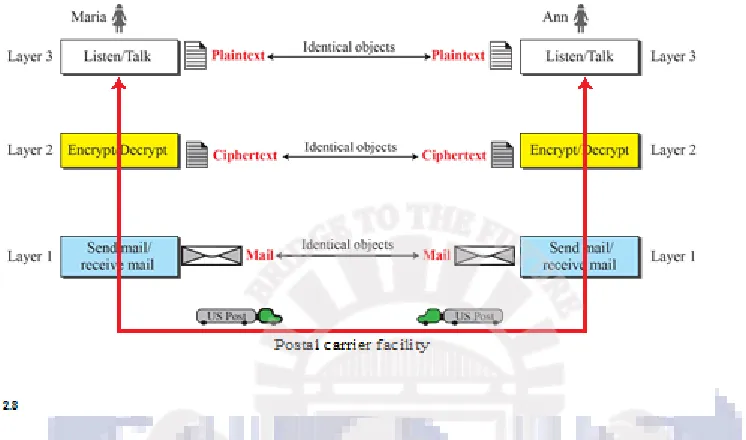
Let us assume that Maria sends the first letter to Ann. Maria talks to the machine at the third layer as though the machine is Ann and is listening to her. The third layer machine listens to what Maria says and creates the plaintext (a letter in English), which is passed to the second layer machine. The second layer machine takes the plaintext, encrypts it, and creates the ciphertext, which is passed to the first layer machine. The first layer machine, presumably a robot, takes the ciphertext, puts it in an envelope, adds the sender and receiver addresses, and mails it.
At Ann’s side, the first layer machine picks up the letter from Ann’s mail box, recognizing the letter from Maria by the sender address. The machine takes out the ciphertext from the envelope and delivers it to the second layer machine. The second layer machine decrypts the message, creates the plaintext, and passes the plaintext to the third-layer machine. The third layer machine takes the plaintext and reads it as though Maria is speaking.
Protocol layering enables us to divide a complex task into several smaller and simpler tasks. For example, in Figure 2.2, we could have used only one machine to do the job of all three machines. However, if Maria and Ann decide that the encryption/ decryption done by the machine is not enough to protect their secrecy, they would have to change the whole machine. In the present situation, they need to change only the second layer machine; the other two can remain the same. This is referred to as modularity. Modularity in this case means independent layers.
One of the advantages of protocol layering is that it allows us to separate the services from the implementation. A layer needs to be able to receive a set of services from the lower layer and to give the services to the upper layer; we don’t care about how the layer is implemented. For example, Maria may decide not to buy the machine (robot) for the first layer; she can do the job herself. As long as Maria can do the tasks provided by the first layer, in both directions, the communication system works.
2.1.2 Principles of Protocol Layering
First Principle The first principle dictates that if we want bidirectional communication, we need to make each layer so that it is able to perform two opposite tasks, one in each direction. For example, the third layer task is to listen (in one direction) and talk (in the other direction). The second layer needs to be able to encrypt and decrypt. The first layer needs to send and receive mail.
Second Principle The second principle that we need to follow in protocol layering is that the two objects under each layer at both sites should be identical. For example, the object under layer 3 at both sites should be a plaintext letter. The object under layer 2 at both sites should be a ciphertext letter. The object under layer 1 at both sites should be a piece of mail.
2.1.3 Logical Connections: After following the above two principles, we can think about logical connection between each layer as shown in Figure 2.3. This means that we have layer-to-layer communication. Maria and Ann can think that there is a logical (imaginary) connection at each layer through which they can send the object created from that layer.
2.2
TCP/IP PROTOCOL SUITE
2.2.1 Layered Architecture
Let us assume that computer A communicates with computer B. As the figure shows, we have five communicating devices in this communication: source host (computer A), the link-layer switch in link 1, the router, the link-layer switch in link 2, and the destination host (computer B). Each device is involved with a set of layers depending on the role of the device in the internet. The two hosts are involved in all five layers; the source host needs to create a message in the application layer and send it down the layers so that it is physically sent to the destination host. The destination host needs to receive the communication at the physical layer and then deliver it through the other layers to the application layer.
The router is involved in only three layers.Although a router is always involved in one network layer, it is involved in n combinations of link and physical layers in which n is the number of links the router is connected to. The reason is that each link may use its own data-link or physical protocol. For example, in the above figure, the router is involved in three links, but the message sent from source A to destination B is involved in two links. Each link may be using different link-layer and physical-layer protocols; the router needs to receive a packet from link 1 based on one pair of protocols and deliver it to link 2 based on another pair of protocols.
A link-layer switch in a link, however, is involved only in two layers, data-link and physical. Although each switch in the above figure has two different connections, the connections are in the same link, which uses only one set of protocols. This means that, unlike a router, a link-layer switch is involved only in one data-link and one physical layer.
2.2.2 Layers in the TCP/IP Protocol Suite
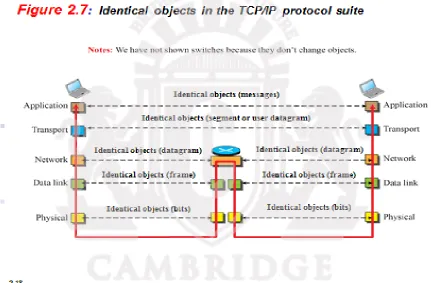
Using logical connections makes it easier for us to think about the duty of each layer. As the figure shows, the duty of the application, transport, and network layers is end-to-end. However, the duty of the data-link and physical layers is hop-to-hop, in which a hop is a host or router. In other words, the domain of duty of the top three layers is the internet, and the domain of duty of the two lower layers is the link. Another way of thinking of the logical connections is to think about the data unit created from each layer. In the top three layers, the data unit (packets) should not be changed by any router or link-layer switch. In the bottom two layers, the packet created by the host is changed only by the routers, not by the link-layer switches.
Figure 2.7 shows the second principle discussed previously for protocol layering. We show the identical objects below each layer related to each device.
Note that, although the logical connection at the network layer is between the two hosts, we can only say that identical objects exist between two hops in this case because a router may fragment the packet at the network layer and send more packets than received .Note that the link between two hops does not change the object.
2.2.3 Description of Each Layer
Physical Layer
the physical layer with respect to the transmission medium and the data link layer.
The physical layer is also concerned with the following:
Physical characteristics of interfaces and medium. The physical layer defines the characteristics of the interface between the devices and the transmission medium. It also defines the type of transmission medium.
Representation of bits. The physical layer data consists of a stream of bits (sequence of0s or ls) with no interpretation. To be transmitted, bits must be encoded into signals-electrical or optical. The physical layer defines the type of encoding (how 0s and 1s are changed to signals).
Data rate. The transmission rate--the number of bits sent each second--is also defined by the physical layer. In other words, the physical layer defines the duration of a bit, which is how long it lasts.
Synchronization of bits.The sender and receiver not only must use the same bit rate but also must be synchronized at the bit level. In other words, the sender and the receiverclocks must be synchronized. Line configuration. The physical layer is concerned with the connection of devices to the media. In a point-to-point configuration, two devices are connected through adedicated link. In a multipoint configuration, a link is shared among several devices.
Physical topology. The physical topology defines how devices are connected to make anetwork. Devices can be connected by using a mesh topology (every device is connectedto every other device), a star topology (devices are connected through a central device), aring topology (each device is connected to the next, forming a ring), a bus topology(every device is on a common link), or a hybrid topology (this is a combination of two or more topologies).
Transmission mode. The physical layer also defines the direction of transmissionbetween two devices: simplex, half-duplex, or full-duplex. In simplex mode, only onedevice can send; the other can only receive.The simplex mode is a one-way communication. In the half-duplex mode, two devices can send and receive, but not at the same time. In a full-duplex (or simply duplex) mode, two devices can send and receive atthe same time.
Data Link Layer
Other responsibilities of the data link layer include the following:
Framing. The data link layer divides the stream of bits received from the network layer into manageable data units called frames.
Physical addressing. If frames are to be distributed to different systems on the network, the data link layer adds a header to the frame to define the sender and/or receiver of theframe.If the frame is intended for a system outside the sender's network, the receiver address is the address of the device that connects the network to the next one.
Flow control. If the rate at which the data are absorbed by the receiver is less than therate at which data are produced in the sender, the data link layer imposes a flow control mechanism to avoid overwhelming the receiver.
Error control. The data link layer adds reliability to the physical layer by adding mechanisms to detect and retransmit damaged or lost frames. It also uses a mechanism to recognize duplicate frames. Error control is normally achieved through a trailer added to the end of the frame.
Access control. When two or more devices are connected to the same link, data link layer protocols are necessary to determine which device has control over the link at any given time.
Communication at the data link layer occurs between two adjacent nodes. To send data from A to F, three partial deliveries are made. First, the data link layer at A sends a frame to the data link layer at B (a router).
Second, the data link layer at B sends a new frame to the data link layer atE. Finally, the data link layer at E
sends a new frame to the data link layer at F.
Network Layer
The network layer is responsible for the source-to-destination delivery of a packet, possibly across multiple
networks (links). Whereas the data link layer oversees the delivery of the packet between two systems on the
same network (links), the network layer ensures that each packet gets from its point of origin to its final destination.
If two systems are connected to the same link, there is usually no need for a network layer. However, if the two
systems are attached to different networks (links) with connecting devicesbetween the networks (links), there
is often a need for the network layer to accomplish source-to-destination delivery. The figure shows the relationship of the network layer to the data link andtransport layers.
Other responsibilities of the network layer include the following:
Logicaladdressing.The physical addressing implemented by the data link layer handles the addressing problem locally.If a packet passes the network boundary, we need another addressing system to help distinguish the source and destination systems. The network layer adds a header to the packet coming from the upper layer that, among other things includes the logical addresses of the sender and receiver.
The figure illustrates end-to-end delivery by the network layer.
The network layer at A sends the packet to the network layer at B. When the packet arrives at router B, the
router makes a decision based on the final destination (F) of the packet. As we will see in laterchapters, router B uses its routing table to find that the next hop is router E. The network layer atB, therefore, sends the packet to the network layer at E. The network layer at E, in turn, sends thepacket to the network layer at F.
Transport Layer
The transport layer is responsible for process-to-process delivery of the entire message.A process is an application program running on a host. Whereas the network layer oversees source-to-destination delivery of
individual packets, it does not recognize any relationship between those packets. It treats each one
Other responsibilities of the transport layer include the following:
Service-point addressing. Computers often run several programs at the same time. For this reason, source-to-destination delivery means delivery not only from one computer to the next but also from a specific process (running program) on one computer to a specific process (running program) on the other. The transport layer header must therefore include a type of address called a service-point address (or port address). The network layer gets each packet to the correct computer; the transport layer gets the entire message to the correct process on that computer.
Segmentation and reassembly. A message is divided into transmittable segments, with each segment containing a sequence number. These numbers enable the transport layer to reassemble the message correctly upon arriving at the destination and to identify and replace packets that were lost in transmission.
Connection control. The transport layer can be either connectionless or connection-oriented. A connectionless transport layer treats each segment as an independent packet and delivers it to the transport layer at the destination machine. A connection-oriented transport layer makes a connection with the transport layer at the destination machine first before delivering the packets. After all the data are transferred, the connection is terminated.
Flow control. Like the data link layer, the transport layer is responsible for flow control.However, flow control at this layer is performed end to end rather than across a single link.
Error control. Like the data link layer, the transport layer is responsible for error control. However, error control at this layer is performed process-to-process rather than across a single link. The sending transport layer makes sure that the entire message arrives at the receiving transport layer without error (damage, loss, or duplication). Error correction is usually achieved through retransmission.
Application Layer
The application layer enables the user, whether human or software, to access the network. The two application layers exchange messages between each other as though there were a bridge between the two layers. However, we should know that the communication is done through all the layers. Communication at the application layer is between two processes (two programs running at this layer). To communicate, a process sends a request to the other process and receives a response. Process-to-process communication is the duty of the application layer. The application layer in the Internet includes many predefined protocols, but a user can also create a pair
of processes to be run at the two hosts.It provides user interfaces and support for services such as electronic
mail, remote file access andtransfer, shared database management, and other types of distributed information
services.
The Hypertext Transfer Protocol (HTTP) is a vehicle for accessing the World Wide Web (WWW).
The Simple Mail Transfer Protocol (SMTP) is the main protocol used in electronic mail (e-mail) service.
The Terminal Network (TELNET) and Secure Shell (SSH) are used for accessing a site remotely.
The Simple Network Management Protocol (SNMP) is used by an administrator to manage the
Internet at global and local levels.
The Domain Name System (DNS) is used by other protocols to find the network-layer address of a computer.
2.2.4 Encapsulation and Decapsulation
One of the important concepts in protocol layering in the Internet is encapsulation/ decapsulation. Figure 2.8 shows this concept for the small internet in Figure 2.5.
In Figure 2.8, we show the encapsulation in the source host, decapsulation in the destination host, and encapsulation and decapsulation in the router.
Encapsulation at the Source Host: At the source, we have only encapsulation.
1. At the application layer, the data to be exchanged is referred to as a message. A message normally does not contain any header or trailer, but if it does, we refer to the whole as the message. The message is passed to the transport layer.
2. The transport layer takes the message as the payload, the load that the transport layer should take care of. It adds the transport layer header to the payload, which contains the identifiers of the source and destination application programs that want to communicate plus some more information that is needed for the end-to-end delivery of the message, such as information needed for flow, error control, or congestion control. The result is the transport-layer packet, which is called the segment (in TCP) and the user datagram (in UDP). The transport layer then passes the packet to the network layer.
information, and so on. The result is the network-layer packet, called a datagram. The network layer then passes the packet to the data-link layer.
4. The data-link layer takes the network-layer packet as data or payload and adds its own header, which contains the link-layer addresses of the host or the next hop (the router). The result is the link-layer packet, which is called a frame. The frame is passed to the physical layer for transmission.
Decapsulation and Encapsulation at the Router
At the router, we have both decapsulation and encapsulation because the router is connected to two or more links.
1. After the set of bits are delivered to the data-link layer, this layer decapsulates the datagram from the frame and passes it to the network layer.
2. The network layer only inspects the source and destination addresses in the datagram header and consults its forwarding table to find the next hop to which the datagram is to be delivered. The contents of the datagram should not be changed by the network layer in the router unless there is a need to fragment the datagram if it is too big to be passed through the next link. The datagram is then passed to the data-link layer of the next link.
3. The data-link layer of the next link encapsulates the datagram in a frame and passes it to the physical layer for transmission.
Decapsulation at the Destination Host
At the destination host, each layer only decapsulates the packet received, removes the payload, and delivers the payload to the next-higher layer protocol until the message reaches the application layer. It is necessary to say that decapsulation in the host involves error checking.
2.2.5 Addressing
Any communication that involves two parties needs two addresses: source address and destination address. Although it looks as if we need five pairs of addresses, one pair per layer, we normally have only four because the physical layer does not need addresses; the unit of data exchange at the physical layer is a bit, which definitely cannot have an address. Figure 2.9 shows the addressing at each layer.
As the figure shows, there is a relationship between the layer, the address used in that layer, and the packet name at that layer.
At the application layer, we normally use names to define the site that provides services, such as someorg.com, or the e-mail address, such as [email protected].
At the transport layer, addresses are called port numbers, and these define the application-layer programs at the source and destination. Port numbers are local addresses that distinguish between several programs running at the same time.
At the network-layer, the addresses are global, with the whole Internet as the scope. A network-layer address uniquely defines the connection of a device to the Internet.
2.2.6 Multiplexing and Demultiplexing
Since the TCP/IP protocol suite uses several protocols at some layers, we can say that we have multiplexing at the source and demultiplexing at the destination. Multiplexing in this case means that a protocol at a layer can encapsulate a packet from several next-higher layer protocols (one at a time); demultiplexing means that a protocol can decapsulate and deliver a packet to several next-higher layer protocols (one at a time). Figure 2.10 shows the concept of multiplexing and demultiplexing at the three upper layers.
2.3
THE OSI MODEL
The OSI model is a layered framework for the design of network systems that allows communication between all types of computer systems. It consists of seven separate but related layers, each of which defines a part of the process of moving information across a network. Established in 1947, the International Organization for Standardization (ISO) is a multinational body dedicated to worldwide agreement on international standards. Almost three-fourths of the countries in the world are represented in the ISO. An ISO standard that covers all aspects of network communications is the Open Systems Interconnection (OSI) model. It was first introduced in the late 1970s.
2.3.1 OSI versus TCP/IP
When we compare the two models, we find that two layers, session and presentation, are missing from the TCP/IP protocol suite. These two layers were not added to the TCP/IP protocol suite after the publication of the OSI model. The application layer in the suite is usually considered to be the combination of three layers in the OSI model, as shown in Figure 2.12.
Two reasons were mentioned for this decision. First, TCP/IP has more than one transport-layer protocol. Some of the functionalities of the session layer are available in some of the transport-layer protocols. Second, the application transport-layer is not only one piece of software. Many applications can be developed at this layer. If some of the functionalities mentioned in the session and presentation layers are needed for a particular application, they can be included in the development of that piece of software.
Sl.No. OSI TCP/IP
1. It expands to Open System Interconnection
It expands to Transmission control protocol/Internet Protocol
2. It is a theoretical model which is used for computing system.
It is a client server model used for transmission of data over the internet.
3. It is developed by International
Standard Organisation(ISO)
It is developed by Department of
Defence(DoD).
4. This model is never used This model is mostly used.
5. OSI is a generic, protocol independent standard, acting as a communication gateway between the network and end user.
TCP/IP model is based on standard protocols around which the Internet has developed. It is a communication protocol, which allows connection of hosts over a network.
6. OSI model has a separate Presentation layer and Session layer
TCP/IP does not have a separate Presentation layer or Session layer
7. OSI is a reference model around which the networks are built. Generally it is used as a guidance tool.
TCP/IP model is, in a way implementation of the OSI model.
8. Network layer of OSI model provides both connection oriented and connectionless service.
The Network layer in TCP/IP model provides connectionless service.
9. Protocols are hidden in OSI model and are easily replaced as the technology changes.
In TCP/IP replacing protocol is not easy.
10. OSI model defines services, interfaces and protocols very clearly and makes clear distinction between them. It is protocol independent.
In TCP/IP, services, interfaces and protocols are not clearly separated. It is also protocol dependent.
11. It has 7 layers It has 5 layers
2.3.2 Lack of OSI Model’s Success
The OSI model appeared after the TCP/IP protocol suite. Most experts were at first excited and thought that the TCP/IP protocol would be fully replaced by the OSI model. This did not happen for several reasons, but we describe only three, which are agreed upon by all experts in the field.
First, OSI was completed when TCP/IP was fully in place and a lot of time and money had been spent on the suite; changing it would cost a lot.
the services provided by the presentation and the session layers were listed in the document, actual protocols for these two layers were not fully defined, nor were they fully described, and the corresponding software was not fully developed.
CAMBRIDGE INSTITUTE OF TECHNOLOGY
Department of CSE and ISE
DATA COMMUNICATIONS (15CS46) QUESTION BANK
Module 1: CO-1,2,3
1. What is data communication? What are its characteristics and components? Explain 2. Explain data representation.
3. What are the modes of transfer of data? Explain
4. What is the difference between half-duplex and full-duplex transmission modes? 5. What are the three criteria necessary for an effective and efficient network?
6. Explain the types of connections. What are the advantages of a multipoint connection over a point-to-point Connection?
7. When a party makes a local telephone call to another party, is this a point-to-point or multipoint connection? Explain your answer.
8. Name the four basic network topologies, and cite an advantage of each type.
9. Explain with a neat diagram mesh topology and star topology with the application for each.
10.Assume that fifty devices are arranged in a mesh topology. How many links are needed? How many ports are needed for each device?
11.In bus topology, what happens if one of the stations is unplugged? 12.Give the comparison between LAN,WAN & MAN with an example.
Or
What are the different types of networks.Explain
13.What are some of the factors that determine whether a communication system is a LAN or WAN?
14.What is switching? Explain two types of switched networks. 15.Explain the conceptual view of internet
16.How do you access the internet?Explain 17.Explain internet history.
18.Distinguish between Internet standard and Internet draft. 19.Why are standards needed?
20.What is an RFC ?Explain the different maturity levels and Requirement Levels Or
What is an internet standard? Explain.
21.Explain the general organization of Internet administration. 22.Discuss Protocol layering with example?
23.What is a protocol?
24.Write the two principles of protocol layering. Discuss with the help of TCP/IP protocol suite.
26.What are the responsibilities of the network layer in the Internet model? 27.What are the responsibilities of the transport layer in the Internet model?
28.Name some of the services provided by the application layer in the Internet model. 29.List responsibilities of DLL.
30.What are the concerns of the physical layer?
31.Explain Encapsulation and Decapsulation in protocol layering with an example. 32.Explain the concept of multiplexing and demultiplexing in TCP/IP Protocol suite 33.Discuss briefly about OSI model.
34.How do the layers of the Internet model correlate to the layers of the OSI model? 35.List out the differences between TCP/IP model and OSI model.