ArcAid Interactive Archery Assistant
Jeroen Vervaeke,
Jente Ameye, Sievert van Esch
ISP Department (ELA-ICT / IO) Ghent University, Kortrijk, Belgium
{jeroen.vervaeke,jente.ameye,sievert.vanesch}@ugent.be
Jelle Saldien
Industrial Design Center,ISP Department
Ghent University, Kortrijk, Belgium [email protected]
Steven Verstockt
Multimedia Lab, ELIS Department Ghent University – iMinds, Ghent, Belgium
Abstract—This paper describes the design process of a bow aiming system, called ArcAid, which is an interactive archery assistant. The main goal of ArcAid is to introduce a way for beginner Robin Hoods to learn the art of archery to its fullest. In order to achieve this goal, our smartphone-based design focuses on a fun and interactive learning process that gives constant feedback to the user on how to hit a certain goal. A SPIKE high-end laser sensor is used for the distance measurement and the smartphone’s accelerometer is used to define the angle of inclination. To measure the force on the arrow and the displacement of the string, a flex sensor is attached upon one of the arcs of the bow. All sensor data is processed in an Arduino Nano microprocessor and feedback to the user is given by a dedicated smartphone app. In this paper, we mainly focus on the construction, mechanics and electronics of the ArcAid bow and on the design of the mobile app, which is the game controller. Furthermore, we briefly discuss some future development ideas.
Keywords-archery;feedback;interaction;user experience;mobile app; gaming with a purpose; mechatronics; sensors.
I. INTRODUCTION
Archery, i.e., the practice or skill of propelling arrows with the use of a bow, is one of the oldest sports know to the human race. Over the years, archers have used the bow and arrow for hunting, self-defense, warfare, competition and recreation. Due to the large amount of parameters that needs to be taken into account it is a difficult art to master. It requires a lot of skills to hit a stationary target. As such, the sport isn’t as accessible for beginners as for professionals, requiring a lot of experience, especially for long range goals. With our interactive laser-assisted ArcAid bow, we want to take away several of the difficult parameter estimation steps and support beginner Robin Hoods in their mission to hit the bull’s eye. Furthermore, by lowering the startup barriers, we also hope to get more interest in these kinds of traditional sports and get more kids playing outside, i.e., a nice side effect of our technology.
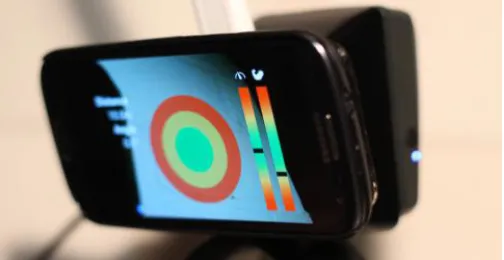
The name ArcAid is a combination of ‘Arc - archery’, ‘Aid’ and ‘Arcade’. As the name indicates, the system helps you to aim your bow in an arcade like way. You can attach and connect your smartphone to the system in a ‘click-and-go’ way and load the specifically designed application to get it started, as shown in Figure 1. The ArcAid interface shows you how to shoot to hit the target by providing continuous feedback on your actions. In this way, the user will be able to learn how to master the bow in a step-by-step way.
Figure 1. ArcAid App running a on smartphone which is attached to the bow using the specifically designed ArcAid holder.
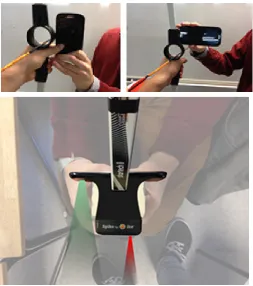
The ArcAid application uses information gathered from several sensors (with low computational cost) that are attached to the bow to measure the angle of the bow and the distance to the target and its height. Furthermore, we continuously monitor the tension on the string of the bow to forecast the trajectory of the arrow. This flow of constant information changing throughout time is translated into shooting guidelines using a set of mathematical formulas and send to the smartphone showcasing the feedback to the user in a fun and interactive way (as shown in Figure 2). By using the information given on the smartphone the user can adjust the drawback on the bow string or adapt the angle of the bow that is given to be able to hit the target.
iMinds, Flanders' digital research center INTETAIN 2015, June 10-12, Torino, Italy Copyright © 2015 ICST
Figure 2. ArcAid in action. By using the app information on the smartphone, the user can adjust the drawback on the bow string or adapt the angle of the bow to be able to hit the target.
II. ARCAID WORKFLOW
The ArcAid workflow can be divided into 3 main actions: the target locking, the trajectory calculation and a real-time feedback mechanism. In the following subsections, we will discuss each of these groups in more detail.
A. Target locking
The Spike sensor, shown in Figure 3, has the capability to measure the distance to a single point in space, right in front of the infra-red camera. By combining this information with the information of the location of the sensor in space (using the data from the accelerometer in the phone), we can define the distance and height of the target point in comparison to the current location of the sensor. This point in space (together with its location information), can then be locked by pressing the bull’s eye on the ArcAid smartphone app (Figure 1).
Figure 3. Spike – Ike. Laser accurate Smartphone measurement.
B. Trajectory calculation
As soon as the location of the target in space is defined, we continuously estimate [1] the trajectory of the arrow, being able to hit the target. In this calculation phase, there are two variables that have the ability to change, being the drawback force on the bowstring and the angle of the bow (angle of arrow departure). The Arduino Nano microprocessor, which handles these calculations, is constantly recalculating the trajectory of the arrow in the current situation. The formulas and mathematical derivation of the bow parameters can be found in the ArcAid scripts, that are available for download. A detailed study of these formulas is out of the scope of the paper (which focus is on the design process), however, experimental results prove that the current formulas are appropriate for the intended goals.
C. Feedback mechanism
The microprocessor is responsible to continuously send feedback signals to the smartphone’s app which displays both the needed drawback on the bowstring and the best angle the bow is held at for the arrow to be able to hit the target. This information is derived from the accelerometer on the smartphone and the flex sensor that is attached upon one of the arcs of the bow. More details on the sensors is given in Section IV. We will first give more information on the ArcAid bow set-up, i.e., how to attach the ArcAid sensors/app to the bow.
III. ARCAID BOW SET-UP
The ArcAid bow set-up is divided in the following 6 steps:
• attaching ArcAid system to the bow
• connecting smartphone
• start-up Spike and ArcAid application
• aim your target
• fine-tune your launch
• hit the bull’s eye
For the construction of the ArcAid prototype we worked with a specific type of bow, i.e., the Geologic Startech 2 Bow, which is shown in Figure 4. One of the major advantages of this type of bows is that it can be disassembled very easily and quickly, allowing a smooth integration of the ArcAid sensor modules in the bow its holder. To attach the holder, you have to shove it over the grip until it fits into place and assemble the rest of the bow. Afterwards the smartphone has to be attached onto the holder and connected to the build-in microprocessor using a USB-cable (Figure 5). Next step is starting-up the software, activating the Spike sensor and loading the app on the smartphone. Now you’re ready to aim!
Figure 5. Ergonomic ArcAid holder for smoothless/detachable connection of ArcAid sensors and smartphone to the Geologic Startech 2 Bow.
The target can be selected easily in the ArcAid app (Figure 6) by using the viewer on the smartphone that shows the distance to the object. When bull’s eye is set onto the object, the user can save the target by confirming on the smartphone with a touch on the screen. Now we let the microprocessor compute the needed force and angle to hit it right in the spot.
Figure 6. Spike-based target selection with ArcAid app.
Fine-tuning your launch happens in an interactive game-wise way by making the color bars match in the green spot. This should be your perfect shot to hit the bull’s eye.
IV. ARCAID BUILDING BLOCKS
A. Sensor overview
The Spike sensor, which is used for the target locking, is a high-end laser distance measurement sensor developed by Ike (i.e., a New-Zealand based company specialized in geo-applications as well as tracking and measuring locations). The most remarkable - in comparison to other laser distance sensors - is its long range and accuracy of the Spike sensor. This sensor can measure an object up to 650 feet (200 m) away with an accuracy of ± 3%. Due to this long range and high accuracy, the sensor is also quite expensive. The sensor can easily be attached to the smartphone and communicates with it using Bluetooth 4.0 technology – which is available on the most recent smartphones.
Next to the Spike sensor for distance measurement, the build-in accelerometer of the smartphone is used do define the angle of inclination. To measure the force on the arrow and the displacement of the string, a flex sensor is attached upon one of the arcs of the bow, as illustrated in Figure 7. A Weathstone bridge is used for higher accuracy and OpAmps for signal amplification. Laboratory-based experiments have shown that this approach is feasible.
Figure 7. Flex sensor measurements. The sensor is permanently attached to the bow arc and measures the force on the arrow and the string displacement.
B. Data processing
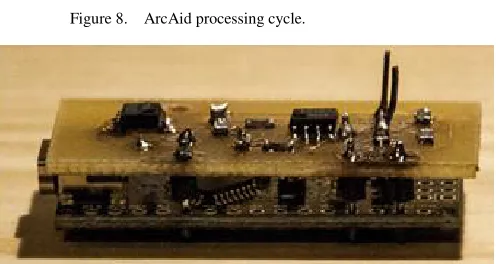
The incoming flex sensor values, accelerometer and Spike data are processed in the Arduino Nano microprocessor, as shown in Figure 8. Based on kinematic equations and practical tests, we have developed a set of formulas to calculate the force on and inclination of the bow to hit your selected target as close as possible. By fine-tuning this equation we were able to calculate the launch variables being the force on the string and angle of departure so that we could hit the target within a 10cm radius when the arrow is launched from approximately 8m away. The microprocessor, shown in Figure 9, returns the calculated data to the smartphone, where the application shows it in an interactive way to the user.
Figure 8. ArcAid processing cycle.
C. Interaction
A specially designed application delivers interaction with the user. The bull’s eye is displayed on top of the camera image of the smartphone. In addition, two arcade style bars indicate the angle of the bow and the force on the string (as shown in Figure 10). Both bars and the bull’s eye on the smartphone are divided in color zones to give the user visual feedback of where the arrow will probably hit. As with other (arcade) games you have to try to get everything into the green zone when launching for a perfect shot.
Figure 10. Screenshot of the ArcAid smartphone application.
D. Design
Besides the ArcAid software/sensor part, a physical object was needed to attach all the hardware. A good looking detachable holder was designed, where the form follows the function. Other things we had to think of where the implementation of the microprocessor and connections onto it. The holder we made is a detachable case which slides onto the bow’s handle when disassembled and fits into place giving it a sturdy position to hold, as illustrated in Figure 11.
Figure 11. Disassemblable electrical connection and sensor placements of ArcAid bow.
Figure 12. Optimal ArcAid hardware placement experiments.
Several tests were performed for optimal placement of the ArcAid sensor module. Finally, we were able to place the holder in a way that it does not hinder the bow, as illustrated in Figure 12. Space is foreseen within the holder itself for the printboard and sensor/smartphone connections, leading to a seamless/closed design.
V. FUTURE PLANS
There are still a few technical hurdles and improvements that can be made, considering the current version of the proposed system shown in Figure 13. First of all, we do not take into account the wind conditions. In order to do this, we should integrate a wind speed and direction meter. Secondly, we now use a dedicated holder which is made for the specific type of bow used for this project, a learning bow for beginners. This could be redesigned to fit most other bows as well.
Figure 13. 4-step process of the interactive archery assistant.
VI. CONCLUSIONS
ArcAid is an interactive archery assistant that aims to assist beginners to learn the art of archery. The smartphone-based design focuses on a fun and interactive learning process that gives constant feedback to the user. The current sensor set-up consists of a SPIKE high-end laser sensor for the distance measurement, the smartphone’s accelerometer to define the angle of inclination and a flex sensor to measure the force on the arrow and the displacement of the string. All sensor data is processed in an Arduino Nano microprocessor and feedback to the user is given by a dedicated smartphone app. We hope to have convinced the reader that the ArcAid interactive bow add-on can help attracting and introducing new users to the archery sport.
ACKNOWLEDGMENT
The research activities as described in this paper were funded by Ghent University, iMinds, the Industrial Design Center, the Institute for the Promotion of Innovation by Science and Technology in Flanders (IWT), the Fund for Scientific Research-Flanders, the Belgian Federal Science Policy Office (BFSPO) and the EU.
REFERENCES
[1] R. C. H. Hibbeler, Engineering Mechanics Dynamics, 13th ed., Prentice
Hall PTR, New Jersey, 2012.
[2] T. Sasayama, I. Oka, S. Ata, T.T. Zin, H. Watanabe, H. Sasano, "Archery sight-system by magnetic sensors for visually impaired persons," International Conference on Advanced Technologies for Communications (ATC), pp.559,562, 2013.
[3] Y.L. Loke, A.A. Gopalai, B.H. Khoo, S.M.N.A. Senanayake, "Smart system for archery using ultrasound sensors," IEEE/ASME International Conference on Advanced Intelligent Mechatronics (AIM), pp.1160,1164, 2009.