Lincoln
University
Digital
Thesis
Copyright
Statement
The
digital
copy
of
this
thesis
is
protected
by
the
Copyright
Act
1994
(New
Zealand).
This
thesis
may
be
consulted
by
you,
provided
you
comply
with
the
provisions
of
the
Act
and
the
following
conditions
of
use:
you
will
use
the
copy
only
for
the
purposes
of
research
or
private
study
you
will
recognise
the
author's
right
to
be
identified
as
the
author
of
the
thesis
and
due
acknowledgement
will
be
made
to
the
author
where
appropriate
you
will
obtain
the
author's
permission
before
publishing
any
material
from
the
thesis.
A thesis
. submitted in partial fulfilment of the requirements for the Degree of
Master of Applied Science
at
Lincoln University
by
D. E. Robson
Lincoln University
2006
Abstract of a thesis submitted in partial fulfilment of the requirements for the Degree ofM.Appl.Sc.
Development of Educational Software for Learning Equation Solving
by D. E. Robson
Research into the contribution made by educational software to student learning has shown mixed results. More needs to be known about how to include learning theories in the design of educational software, particularly in the area of mathematics. This study investigates the effects of interactive software on students' learning of equation solving.
When solving equations, students need to understand overall equation solving strategies as well as the procedures for individual steps. There is a need for more emphasis to be placed on helping students understand the concepts of equation solving strategies.
In this study, software was developed to encourage students to develop strategies for solving equations. Strategies were emphasised by allowing students to focus on making decisions about equation solving strategies while the software carried out the procedures. Students were able to search for multiple solution strategies. In addition, the feedback given to students emphasised strategies and included equations which showed the consequences of students' strategic decisions.
The software was tested, and data were collected on students' equation solving performance, strategies students used and students' attitudes to the software. Results showed that most students found the software and its emphasis on strategies helped them learn. The activity in which students searched for multiple solution strategies for each equation appeared to be suited to students who could already solve an equation using one strategy. More improvement in performance was shown by students studying in a lower level course.
Analysis focussed on the students who showed the most improvement in equation solving performance, and this led to suggestions for additional learning activities to suit the other students. These suggestions have been summarised as a framework of learning goals for helping students learn to solve equations. The proposed framework, which includes practical guidelines for emphasising the concepts of equation solving strategies, will help teachers to strpcture lessons and software developers to plan learning activities.
Keywords: learning equation solving; educational software design; online math
- -: .~>. :
-:;-:<.:~:~,:~~,:::-.;:'::
.... ' ... -, '.', ~ ",>-,
1',"'- ",' ,
r
::-. -.-~ ._'-'-'
Preface
Ever since computers were introduced into New Zealand classrooms, I have been interested in their potential to help students learn. Yet, many years later, I use educational mathematics software to help students learn in only a limited way.
This study has provided me with the opportunity to investigate the potential of computers to enhance learning. I was able to explore the design of software that is based on learning theories that are not practical to use in standard classroom environments. I am grateful to Christchurch Polytechnic Institute of Technology and Lincoln University for this opportunity and for their financial support.
I would like to thank my supervisors who provided guidance, shared in my journey, and made this study such a wonderful experience. Walt Abell, the principal supervisor and computing specialist, provided leadership and expertise. He provoked many lively discussions with his questions and challenges. Dr Therese Boustead, a specialist in mathematics education, shared her knowledge, offered helpful advice and encouragement, and hosted our regular meetings. Dr Keith Unsworth was expected to take a supporting role, but he became actively involved and contributed useful ideas and suggestions.
I have appreciated the comments, interest and support from my colleagues and past
colleagues, Karl Dodds, Mark Hutchinson, Lydia McKinnon and Dr Joe Dobinson. I would also like to thank the students who so willingly participated in the study.
Contents
1 Introduction ... 1
2 Literature Review ... 4
2.1 Introduction ... 4
2.2 Computers in education ... 4
2.2.1 Computers for learning ... 4
2.2.2 Student attitudes to computers for learning ... 6
2.3 Learning theories ... 6
2.3.1 Behaviourism ... 7
2.3.2 Cognitivism ... 7
2.3.3 Constructivism ... 7
2.3.4 Comparison oflearning theories ... 8
2.4 Learning mathematics and equation solving ... 8
2.4.1 Conceptual and procedural understanding ... 8
2.4.2 Versatile thinking ... 10
2.4.3 Mental representations and visualisation ... 10
2.4.4 Equation solving ... 11
2.4.4.1 Problem solving theory ... 11
2.4.4.2 Flexibility in equation solving ... 12
2.4.4.3 Multiple strategies ... 13
2.4.4.4 Required prior knowledge ... 13
2.5 Software development ... 14
2.5.1 Software design and learning theories ... 14
2.5.1.1 Scaffolding ... 15
2.5.1.2 Cognitive load ... 15
2.5.1.3 Learner level ... 15
2.5.1.4 Motivation ... 16
2.5.2 2.5.3 2.5.4 Instructional design ... 16
Analysis ... 17
Design ... 17
---,:,'-'.-'.
2.5.4.1 Interactivity ... 17
2.5.4.2 Feedback ... 18
2.5.4.3 Visual interfaces ... 19
2.5.4.4 User interface design ... 21
2.5.5 Development, Implementation and Evaluation ... 22
2.5.5.1 Rapid prototyping ... 22
2.5.5.2 Usability testing ... 23
2.5.5.3 Software trials ... 23
2.6 2.6.1 2.6.2 2.6.3 Review of equation solving software ... 24
Behaviourist software ... 24
Cognitive software ... 25
Constructivist software ... 27
2.6.3.1 Microworlds ... 27
2.6.3.2 . Intelligenttutoring systems ... 28
2.6.3.3 Computer algebra systems ... 28
2.6.4 Guided exploration ... 29
2.7 Research needed ... 29
2.8 Summary ... 30
3 Proposed Research ... 32
3.1 Research question ... 32
3.2 Research overview ... 33
3.2.1 Software design ... 33
3.2.2 Software trials ... 34
3.2.3 Study Setting ... 34
4 Softw"are Development ... 36
4.1 Introduction ... 36
4.2 Software development process ... 37
4.3 Analysis ... 38
4.3.1 Students ... 38
4.3.2 Content ... 38
4.3.2.1 Types of equations ... 38
4.3.2.2 Equations in Equations2go ... 39
4.3.2.3 Instructional model ... 39
, , -, .-~ ... ~ -,
4.4 Design of software ... 40
4.4.1 Learning theories ... 41
4.4.2 Strategies ... 41
4.4.2.1 Strategic decisions separated ... 41
4.4.2.2 Multiple solution strategies ... 42
4.4.2.3 Strategies accepted by Equations2go ... .42
4.4.3 Feedback ... 43
4.4.3.1 Amount of feedback ... 43
4.4.3.2 Nature offeedback ... 44
4.4.3.3 Timing ... 46
4.4.4 Visual interactive interface ... 47
4.4.4.1 Interactivity ... 47
4.4.4.2 Metaphor ... 47
4.4.4.3 Graphics ... 47
4.4.4.4 Hot spots and menus ... 48
4.4.4.5 Buttons ... 51
4.4.4.6 Stones and Trails ... 51
4.4.4.6.1 Stones ... 51
4.4.4.6.2 Trails ... 52
4.4.4.7 Screen layout ... 52
4.4.4.8 Scoring system ... 52
4.4.4.9 Instructions ... 53
4.5 Development ... 54
4.6 Implementation ... 55
4.7 Software design and learning benefits ... 55
4.8 Summary ... 56
5 Trials ... 58
5.1 Pilot study ... 58
5.2 Sample ... 59
5.3 Ethics ... 59
5.4 Trials ... 60
5.4.1 Trial procedure ... 60
5.4.2 Data collection ... 62
5.5.1 5.5.2
Marking scheme applied to a correct solution ... 64
Marking scheme applied to incorrect solutions ... 64
5.5.3 5.6 Marking scheme and Equations2go score ... 66
Data analysis ... 67
5.7 Summary ... 67
6 Results and Discussion ... 69
6.1 Introduction ... 69
6.2 Sample ... 69
6.2.1 Participants ... 69
6.2.2 Discussion groups ... 70
6.3 Student performance .... · ... 71
6.3.1 Student performance in pre-test and post-test ... 71
6.3.2 Student performance ineach question ... 71
6.3.3 Performance groups ... 74
6.3.4 Characteristics ofImproved group ... 75
6.3.4.1 Gender ... 76
6.3.4.2 Level of study ... 78
6.3.5 Student attitudes ... 78
6.4 Student strategies ... 79
6.4.1 Strategies for equations which include fractions ... 80
6.4.2 Examples of student strategies ... 81
6.4.2.1 Strategies used by Student A ... 81
6.4.2.2 Strategies used by Student B ... 82
6.4.2.3 Strategies of Improved group ... 83
6.4.3 Multiple solution strategies ... 84
6.4.3.1 Use of multiple strategies ... 84
6.4.3.2 Student attitudes to multiple strategies ... 84
6.4.3.2.1 Multiple strategies helpful ... 85
6.4.3.2.2 Multiple strategies unhelpful ... 85
6.4.3.3 Strategies accepted by Equations2go ... 86
6.4.3.4 Interface design for multiple strategies ... 86
6.4.4 Strategies and procedures ... 87
6.4.4.1 Strategies separated ... 87
6.4.4.2 Strategic and procedural errors ... 89
:.: ... , ... ' ..
6.5 6.5.1 6.5.2
Other software features ... 91
Quick tip and explanations ... 92
Graphics ... 93
6.5.3 6.5.4 6.5.5 6.5.6 6.5.7 Undo button ... 93
Other buttons ... 94
Location of buttons ... 94
Instructions ... 94
Score ... 95
6.6 6.7 Student attitudes ... 95
Summary ... 97
7 Conclusion ... -... 98
7.1 Main findings ... 98
7.1.1 Effects of software on student performance ... 98
7.1.2 Characteristics of students who benefited ... 99
7.1. 3 Effects of emphasising strategies ... 100
7.1.3.1 Separation of strategies from procedures ... 100
7.1.3.2 Multiple solution strategies ... 101
7.1.3.3 Feedback ... 101
7.1.4 Effects ofthe way the software was used ... 102
7.1.5 Effects of usability ... 102
7.2 7.3 Limitations of the study ... 103
Proposed framework of learning goals ... 104
7.4 Future research and development ... 105
7.4.1 Development and further uses ofthe software ... 105
7.4.1.1 Providing goals for students ... 106
7.4.1.2 Feedback ... 106
7.4.1.3 Further uses ofEquations2go ... 106
7.4.1.4 Other uses of the main principle of Equations2go ... 107
7.4.2 Future research related to framework oflearning goals ... 107
7.4.2.1 Understanding prior algebraic concepts ... 107
7.4.2.2 7.4.2.3 Learning equation solving strategies ... 108
Using efficient strategies ... 108
7.4.2.4 Reducing procedural errors ... 108
7.4.2.6 Validating the framework ... 109
7.4.2.7 Further uses of the framework oflearning goals ... 109
7.4.2.8 Applications of the main principle of the framework oflearning goals ... 109
7.5 Contribution of this study ... 109
8 References ... 111
9 Appendices ... 120
Appendix A: Pre- and post-questionnaires ... 121
Appendix B: Pre- and post-tests ... 124
Appendix C: Discussion group questions ... 126
List of Tables
Table 2-1 Conceptual and procedural understanding ... 9
Table 5-1 Activities in software trials ... 61
Table 5-2 Data collection ... 63
Table 5-3 Marking scheme: Example A ... 64
Table 5-4 Marking scheme: Example B ... 65
Table 5-5 Marking scheme: Example C ... 65
Table 6-1 Main field of study of participants ... 70
Table 6-2 Table 6.,3 Table 6-4 Table 6-5 Table 6-6 Table 6-7 Table 6-8 Table 6-9 Age groups of participants ... 70
Average strategy marks per question in pre-test and post-test ... 72 . .
Percentage of students who gained full marks for strategy ... 73
Performance groups ... 74
Average marks in pre-test and post-test for each group of students ... 75
Performance and gender of students ... 76
Main field of study and gender ... 77
Performance of Levelland Level 2 students in Question 6 ... 78
Table 6-10 Fractions equation in pre-test, post-test and Equations2go ... 80
Table 6-11 Strategies accepted by Equations2go for the equation with fractions ... 80
Table 6-12 Student A: Strategies explored in fractions equation of Equations2go ... 81
Table 6-13 Student A: Solutions to Question 6 in pre-test and post-test.. ... 82
Table 6-14 Student B: Strategies explored in fractions equation of Equations2go ... 83
Table 6-15 Number of strategies explored by students ... 84
Table 6-16 Discussion group comments about strategies being separated ... 87
Table 6-17 Student C's solutions to Questions 3 and 4 in pre-test and post-test ... 88
Table 6-18 Strategic and procedural errors in pre-test ... 90
Table 6-19 Percentage of students with procedural errors in each group ... 91
Table 6-20 Helpfulness to learning of features in Equations2go ... 92
List of Figures
Figure 2-1 Algebra linear equations quiz (Syvum, 1999-2006) ... 25
Figure 2-2 Algebra Balance Scales (NLVM, 1999) ... 25
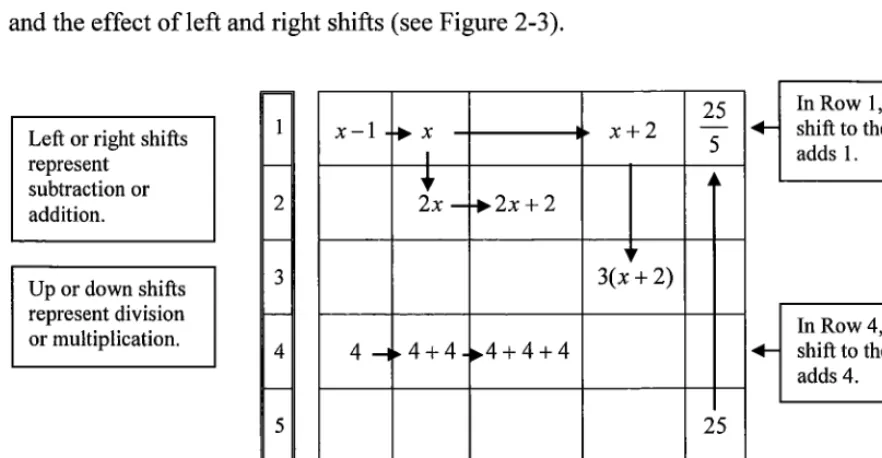
Figure 2-3 Grid Algebra (Hewitt, 1996) ... 26
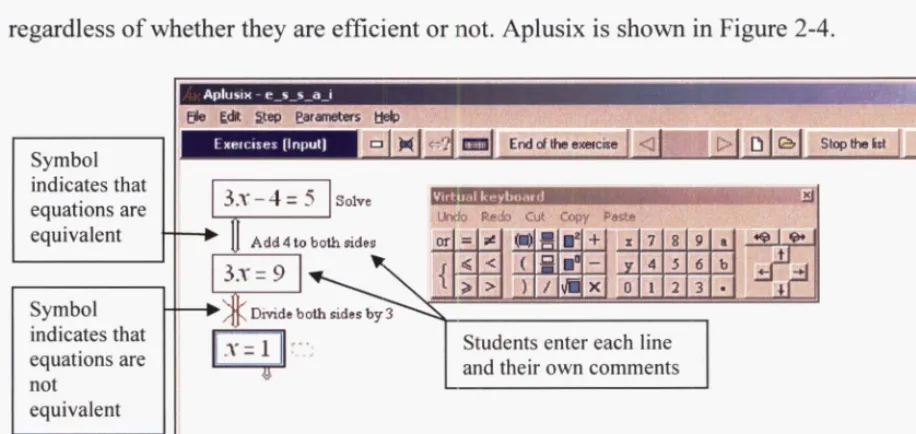
Figure 2-4 Aplusix (Nicaud et aI., 2003) ... 27
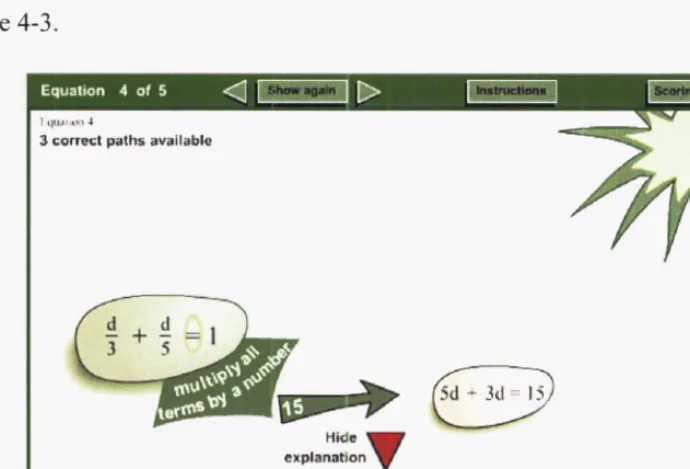
Figure 4-1 Partially solved equation in Equations2go ... 37
Figure 4-2 Feedback for a strategic decision not accepted by Equations2go ... .44
Figure 4-3 Feedback for a strategic decision accepted by Equations2go ... .45
Figure 4-4 Visual feedback for an accepted strategy ... .46
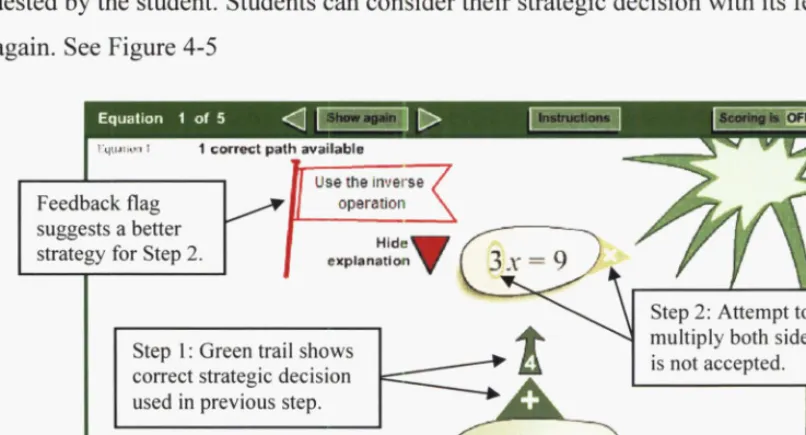
Figure 4-5 First step complete. Second step not accepted. Student can try again ... .46
Figure 4-6 Opposing directions for inverse operations ... .48
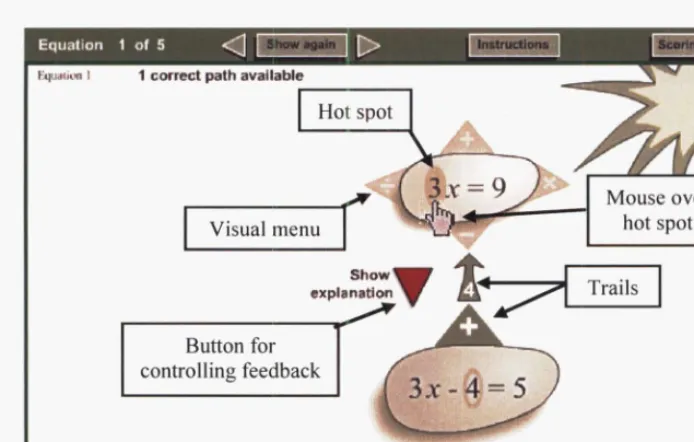
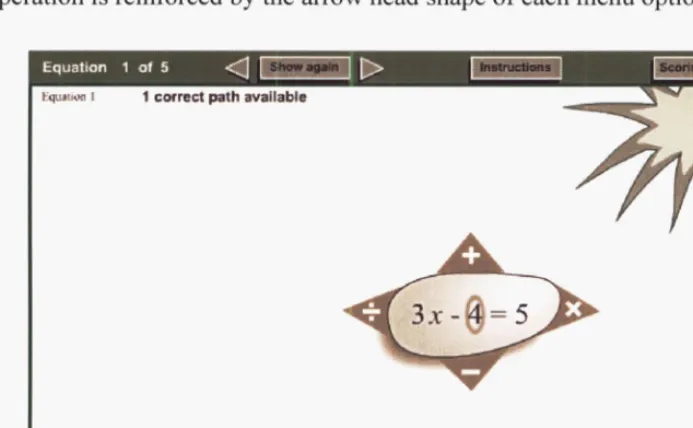
Figure 4-7 Hot spots and menus ... 49
Figure 4-8 Example of menu on an equals sign ... .49
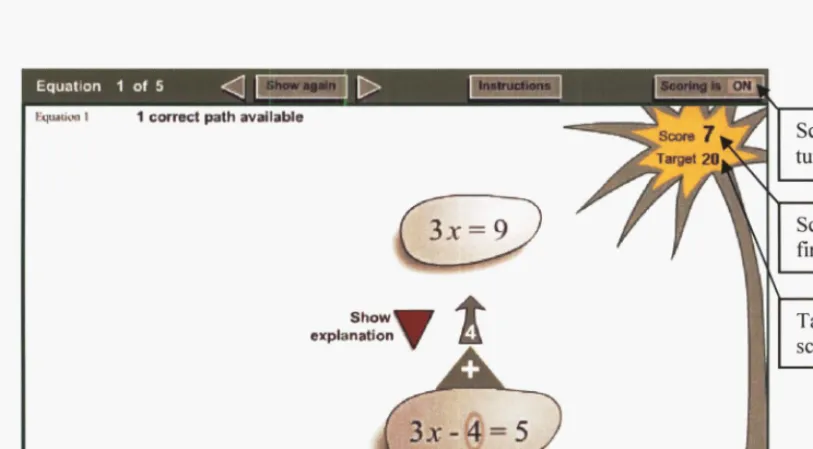
Figure 4-9 Score after first step is completed ... 53
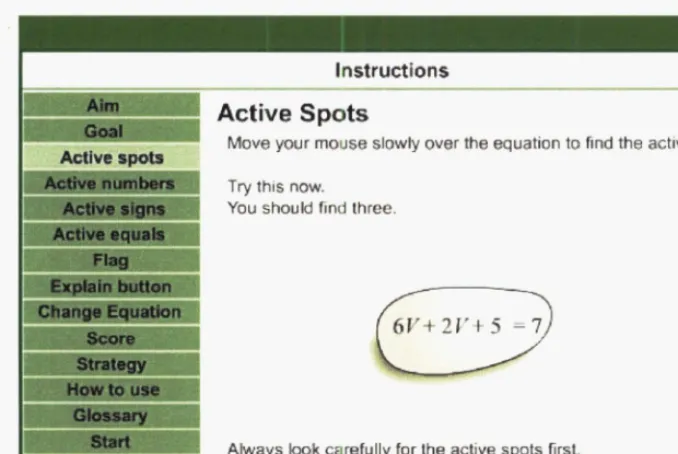
Figure 4-10 Instructions for active spots ... 54
Figure 6-1 Characteristics oflmproved group and whole sample ... 76
Adult students undertaking tertiary study in applied fields such as engineering, science or computing need to be able to use and apply mathematical formulae relevant to their field. To use and transpose formulae, students need to be able to solve equations. Hence a thorough understanding of equation solving is important when applying mathematics to technical subjects.
Adult students enter mathematics courses with a range of prior knowledge of equation solving and therefore have a variety of learning needs. Students who have never solved equations before need a thorough introduction to basic concepts, whereas students with prior knowledge of equation solving can progress much faster.
For many years, the potential for computers to improve learning has been recognised (Gayeski, 2005), but this potential has often not been achieved (Kirkup & Kirkwood, 2005; Hokanson & Hooper, 2000). However, computers are widely used in education, and their recent increase in use for online learning is being driven by students' needs to study at flexible times and locations (Inglis, Ling & Joosten, 1999).
Software designed to help students learn to solve equations needs to be based on relevant learning theories, but more needs to be known about how to apply learning theories to learning activities that use technology (Tallent-Runnels et aI., 2006). There is also a need for more research into using computers for learning that concentrates on mathematics,
particularly in topics other than geometry (Atkinson, 2005). This study makes a contribution to these needs by investigating the application of learning theories to the design of educational software for helping students learn equation solving.
..-'.-.',--'..:--..;;.':'.
'-- .. ;."
Solving an equation involves being able to change back and forth between a conceptual understanding of an overall equation solving strategy and a procedural understanding of the algebraic manipulation for individual steps. Thomas and Tall (1988) have described this combination of conceptual and procedural understanding as "versatile thinking".
Conceptual understanding of an equation requires each side of an equation to be viewed as an object, and the equals sign to be seen as showing the equivalence of these objects (Sfard &
Linchevski, 1994). An equation must be understood in this way in order to understand an equation solving strategy as a series of strategic decisions which maintain the equivalence of both sides of an equation. Conceptual understanding of equation solving also includes
understanding the relationships between the strategic decisions of individual steps and the goal of the overall strategy (Skemp, 1971),
Procedural understanding involves being able to accurately carry out the procedure for each step. It is possible to learn how to carry out procedures by rote or repetitive learning, but this shows a limited form of understanding (Star & Seifert, 2006). Students generally gain a procedural understanding first and from this develop conceptual understanding, although the latter is much harder to achieve (Sfard & Linchevski, 1994).
Many textbooks and teachers emphasise procedures (Beeson, 2002), but there is a need to place more emphasis on conceptual understanding with its concepts, overview of strategies and mental representations (Kieran, 1992). Graphical representations can help students visualise concepts (Mayer & Gallini, 1990). Therefore educational software, which includes visual elements such as images or graphics, may be suited to helping students visualise the strategies of equation solving. A need for visualisation such as this is required for graphics to contribute to learning (Rieber, 1994).
Thus, there is potential to use graphics and to emphasise strategies in the design of interactive software for helping students learn equation solving. The main research question for this study is "What effect does visual interactive software which emphasises equation solving strategies have on performance and equation solving strategies of students?"
In this study, software that emphasises equation solving strategies was designed and developed. Software trials were conducted so that the effects of specific features of the
softwar~ on student learning could be investigated. Features investigated were separation of
interface. In addition, the characteristics of students who gained the most learning benefit from the software were investigated.
The first stage of this study was to review the literature relevant to the design of educational software and its effects on learning. There are two main topics, learning theories and
principles of interface design, and these are reviewed in Chapter 2. Examples of existing software for helping students learn to solve equations are also presented.
The proposed research is described in Chapter 3. Included are the research questions, an overview of the software design, and an outline of the software trials conducted with students so that the research questions could be investigated.
After considering learning theories and interface design guidelines, a learning activity was designed and the software developed. The design decisions and software development process are described in Chapter 4.
Trials were conducted in which students used the software, and data about the effects of features of the software on learning were collected. The procedure followed in the software trials is described in Chapter 5. The results and analysis are presented in Chapter 6.
The main findings ofthis study are summarised in Chapter 7, and their contribution to
2
Literature Review
2.1
Introduction
With the focus of this study being the design of visual interactive software for helping
students learn to. solve equations, this literature review first considers the use of computers for helping students learn and then concentrates on two main areas: theories of learning and principles of software design relevant to educational software. Types of learning theories are described, as well as the mathematical understanding needed for equation solving. In addition, principles for the design and development of educational software are considered with
particular emphasis on interactivity, feedback, visual interface design and instructional design.
Examples of existing software for helping students learn to solve equations are shown to illustrate how learning theories and software design principles can be combined in the design of educational software.
2.2
2.2.1
Computers in education
Computers for learning
The potential for using computers to improve learning has been recognised for many years, so there is much interest in using computers for this purpose. For example, the government in New Zealand encourages the innovative use of computers as teaching and learning tools (Ministry of Education, 2003).
Despite the expectations that using computers could improve learning, in practice this has been difficult to achieve (Kirkup & Kirkwood, 2005; Rieber, 2005). Many studies have investigated the contribution computers made to learning by comparing learning outcomes of
traditional face to face courses with those delivered by media. Russell (2001) searched for studies which identified cases where technology resulted in more learning than traditional courses and was surprised to find that there were very few. However, he found and
documented 355 studies that showed no significant difference when learning outcomes were compared. Reeves (2005) agreed that learning outcomes were usually similar whether computers were used or not.
The promised benefits of learning with computers have long been challenged. More than 20 years ago, Clark (1983) claimed that "media do not affect learning" and after much debate he continues to point out that instructional methods are more likely to encourage learning than delivery media (Clark & Feldon, 2005). This view is supported by Berge (2005) who tries to "take the distance out of distance education" because the education is important for learning rather than the media.
Although learning benefits are unclear, computers can allow education to be more flexible in terms of time, place, pace, entry and exit points. Indeed, it is this flexibility that is driving the increased use of computers for learning (Inglis et aI., 1999) with adults in particular wanting to study at their own choice of time and location (Szabo, 2000). It is also becoming
increasingly practical to use computers in education because they are now widely available and affordable (Romiszowski, 2005) as well as being more reliable with technical support available (Kearsley, 2000).
The current trend for increased use of computers should not be followed without ensuring that learning needs are being met (Romiszowski, 2005). New technologies have been introduced to education in the past and lessons from these should be learned. For example, large amounts of money were spent on many interactive videodisc developments in the 1980s but most did not live up to expectations and 80% of big initiatives were abandoned before completion (Gayeski, 2005). Educational television and programmed instruction also showed promise but fell out of favour, not because of lack of learning benefits, but because of how they were implemented into educational systems.
Computers, however, are widely used and successfully implemented into tertiary education systems, so now the potential for computers to improve learning needs to be investigated. Education is a major field of research and much is already known about how students learn. Established learning theories should continue to be followed when any change in education occurs such as an advance in technology (Inglis et aI., 1999). Successful learning is the result
~":'~T - .
..
"--...'--~-.:~--~~~:i;_~:·/-~·',--: .
of the alignment of learning goals, learning activities, feedback and evaluation (Berge, 2005). As in face to face delivery, these need to be designed for the learning needs of students and should take into account their learning styles and existing knowledge (Romiszowski, 2005).
Throughout history, the individual learning needs of students have been met by teaching students individually (Bork, 2005). There is a need to investigate the contribution computers can make to the individual learning needs of students (Szabo, 2000) as there is potential for software to focus on specific problems and to interact with students individually. This use of computers has contributed to a shift towards student centred learning (Seidel, 2005).
2.2.2
Student attitudes to computers for learning
Students generally have positive attitudes to using computers for learning (Garland & Noyes, 2005; Sanders & Morrison-Shetlar, 2001). These attitudes can improve further after students use computers as part of a course (Abbot & Faris, 2000) with students being more willing to undertake online courses in2003 than in 1999 (Brinkerhoff & Koroghlanian, 2005). It has also been found that students with prior experience of computers were more satisfied with online courses (Tallent-Runnels et ai., 2006).
Computers are seen to have the potential to motivate students to learn, but the evidence shows only that they motivate students to choose courses which use computers and that there is no evidence of additional learning (Clark & Feldon, 2005). After initial interest in using a computer for learning, students are often bored by the quality of the interactivity (Gayeski, 2005).
The widespread use of computers in tertiary education may be because adults, with their mature attitudes, tend to be motivated and capable of independent study. (Kearsley, 2000). As students tend to have positive attitudes to using computers for learning and much potential is seen for them to improve learning, many different types of educational software have been developed. In this study, educational software will be considered according to the type of learning theory on which it is based.
2.3
Learning theories
There are three broad categories of learning theories: behaviourist, cognitivist and constructivist. In this section each is described.
:::, ... ':':"~'
::;:~~;:~~~~~i
.-.--', . -.',"~-'
2.3.1
Behaviourism
Behaviourist learning theories are based on stimuli and responses. An activity (stimulus) is provided which causes a response from the student (Burton, Moore & Magliaro, 2004). Feedback is given to provide consequences or reinforcement. Behaviourist learning theories lead to a very structured learning environment and should be used when the content is suited to this, for example learning multiplication tables. Behaviourist learning theories have been criticised for encouraging passive learning in which the student is a recipient (Grabowski, 1996). However behaviourism was not developed as a passive theory; it is based on stimuli and responses and the student is expected to take an active part (Burton et aI., 2004). An example of a behaviourist learning activity is students practising to factorise quadratic expressions using a specific procedure.
2.3.2
Cognitivism
Cognitive perspectives were.added to behaviourism to try to explain situations where a stimulus resulted in unpredictable responses. Cognitive learning theories emphasise thought processes that cause behaviour rather than the behaviour itself. Mental representations of knowledge are considered, e.g visual images, verbal processes and mental models (Winn, 2004). An example of a cognitive learning activity for factorising quadratic expressions is a discussion about a given procedure and why it works, followed by students using the
procedure and checking their solutions by expanding. A follow up discussion about why the procedure worked could complete the learning activity.
2.3.3
Constructivism
Constructivist learning theories add a further dimension. Students are encouraged to construct their own understanding as a result of experiences and activities, while the role of an
instructor is to support this process (Duffy & Cunningham, 2004). As part of his constructivist learning theories, Vygotsky (1978, p84-91) proposed that "an essential feature oflearning is that it creates the Zone of Proximal Development". In this zone, students are able to solve problems which they are unable to solve on their own. The provision of appropriate guidance and support, called scaffolding, enables the higher level problem solving. The scaffolding is usually provided through interaction with a teacher or a peer and the social contribution to learning is acknowledged. An example of a constructivist learning activity is for students to expand expressions such as (x - 3)( x
+
4) and then to explore ideas for a procedure for factorising the answer. A class discussion of student procedures would provide feedback and scaffolding so that students could modify their procedures and try them on new examples.',.,-. ···,·, ... ·:-~·7-~ ;~~t~~]~?~~~~
-.',".;;-",':";-:'-",'
Theories of adult learning are generally constructivist with the emphasis being on the student (Huang, 2002). The most important feature of adult learning is that adults need to have active input into their own learning. Adults also need a supportive learning environment tailored to their prior knowledge and learning needs (Knowles, 1984). For example, adults appreciate useful feedback and being able to work at their own speed (Rieber, 1994).
2.3.4
Comparison of learning theories
All three types of learning theories have similarities. As well as the common goal of helping students learn, importance is placed on encouraging students to take an active part in their learning (Deubel, 2003) and providing feedback to students.
The three main types of learning theories differ in the amount of direction given to students. Behaviourist learning activities are the most prescriptive, providing clear steps for students, whereas constructivist learning activities are the least prescriptive, encouraging the student to take control of exploring their ideas and building their own understanding.
2.4
Learning mathematics and equation solving
In order to choose appropriate learning theories for mathematics, and in particular algebra and equation solving, the cognitive processes of mathematics are examined.
2.4.1
Conceptual and procedural understanding
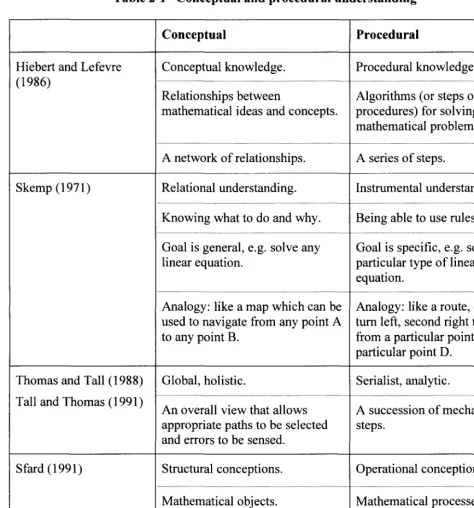
Mathematical thinking, or mathematical understanding, is often considered to be of two main types, and these have been discussed in depth and summarised by various terms. One type of mathematical understanding involves concepts whereas the other involves procedures, and in this study the terms conceptual and procedural are used, as suggested by Hiebert and Lefevre (1986). Conceptual understanding involves concepts and how they relate to each other whereas procedural understanding involves carrying out procedures. Conceptual
Table 2-1 Conceptual and procedural understanding
Conceptual Procedural
Hiebert and Lefevre Conceptual knowledge. Procedural knowledge. (1986)
Relationships between Algorithms (or steps or mathematical ideas and concepts. procedures) for solving mathematical problems.
A network of relationships. A series of steps.
Skemp (1971) Relational understanding. Instrumental understanding.
Knowing what to do and why. Being able to use rules.
Goal is general, e.g. solve any Goal is specific, e.g. solve a linear equation. particular type of linear
equation.
Analogy: like a map which can be Analogy: like a route, e.g. used to navigate from any point A tum left, second right to get to any point B. from a particular point C to a
particular point D.
Thomas and Tall (1988) Global, holistic. Serialist, analytic.
Tall and Thomas (1991) An overall view that allows A succession of mechanistic appropriate paths to be selected steps.
and errors to be sensed.
Sfard (1991) Structural conceptions. Operational conceptions.
Mathematical objects. Mathematical processes.
Supported by visual imagery. Supported by verbal representations.
Much discussion has occurred about the nature and relative importance of conceptual and procedural understanding. Conceptual understanding with its emphasis on relationships between concepts and strategies is generally acknowledged to be higher level thinking and to be essential for a thorough understanding of mathematics. For example, Skemp (1971) stated that for meaningful learning to take place, relationships must be created or become
states that although procedural understanding is important, more emphasis needs to be placed on conceptual understanding, including strategies. Beeson (1998) agreed that many textbooks concentrate on procedures and rules. He encourages the teaching of concepts and strategies, but also points out that procedural understanding should not be ignored.
There are different theories on the order that concepts and procedures should be learnt (Carpenter, 1986). Students generally start with procedures and gradually build conceptual understanding but this reification can be difficult to achieve (Sfard and Linchevski, 1994). Skemp suggests that the order depends on whether a student is trying to understand
conceptually or procedurally and recommends that the initial teaching style should match the student's learning style.
2.4.2
Versatile thinking
Thomas and Tall (1988) have explained the need for both conceptual and procedural understanding and describe a combination of both as "versatile thinking". They quote Scott-Hodgetts' definition of versatile thinking in which students need to frequently switch between a local analytical view (procedural) and a global overview (conceptual) in order to help them understand how the procedures fit into the whole structure. (Scott-Hodgetts, 1986 as cited in Thomas & Tall, 1988). It is often the lack of conceptual thinking that causes students to be unable to think with versatility (Thomas, 1995).
2.4.3
Mental representations and visualisation
According to Paivio (1990), information recorded by the mind can be ofthree types: real events and objects, structures and processes, or theoretical models of structures and processes. The ways that information is stored in the mind are called mental representations. These are generally considered to be stored in two modes: verbal descriptions and visual images. Paivio's Dual Coding Theory assumes that these modes are processed by separate cognitive channels. Paivio suggests that the use of both channels leads to more powerful learning and improved problem solving ability.
Mental representations have been linked to conceptual understanding. In a study to investigate mathematical mental representations, a talented mathematics student was studied as he
developed his understanding of conceptual relationships in mathematics (Pinto and Tall, 2002). He formed mental representations that were a combination of descriptions and visual images, and he gradually modified these as his conceptual understanding developed. He used both verbal and visual channels for his representations.
~- ~ -
..
-. ,2 Literature Review 11
In the context of algebra, Thomas and Tall (1988) have linked visual mental images to the development of conceptual thinking. They suggest that the relationship occurs because imagery and conceptual thinking are both associated with the thinking that occurs in the right hemisphere of the brain. Mayer and Gallini (1990) describe how illustrations helped students build mental representations that were helpful for learning and understanding concepts. Sfard (1991) also describes the connection between visual imagery and conceptual understanding.
Thomas and Tall explored ways of improving conceptual thinking. They concluded that using a computer program that encouraged the formation of mental models for concepts could improve conceptual thinking and in turn encourage more versatile thinking. Sfard and Linchevski (1994) agreed that there is potential for computers to help with conceptual understanding.
In an attempt to help students develop conceptual understanding of equation solving, various models have been proposed. For example, a visual model such as balance scales emphasises the concept of equivalence of both sides of an equation (Vlassis, 2002). In this model, the equation itself is viewed as an object, and the equivalence or balance is maintained visually when appropriate operations are performed.
2.4.4
2.4.4.1
Equation solving
Problem solving theory
VanLehn (1989) has described equation solving as an example of a multi-step problem. Such problems consist of three components: an initial state, operators which change the problem to a new state, and a test for whether a problem state is a solution. The search for a solution starts with the development of an understanding of the objects in the problem and the relationships between them. Suitable operators are chosen and applied to create a new state which needs to be reconciled with the rest of the problem. VanLehn also described schemas which experienced problem solvers develop for a class of problems. A schema consists of information about the type of problem and information about the solution. Before using a schema, the problem solver must recognise the class of problem, select an appropriate schema and adapt it for the current problem.
VanLehn's analysis of solving multi-step problems such as equations includes descriptions of conceptual understanding of relationships and procedural understanding of the application of operators. VanLehn also described the need to combine the procedures for each step with an overview of the relationship of each step to the problem as a whole.
-,~ .. -,', ' .. ,
:::J.:~~:.;.;::~.:
2.4.4.2 Flexibility in equation solving
Star (2005) observed that researchers have placed much importance on students' development of deep conceptual understanding, whereas procedural understanding is often considered to be a shallow form of understanding in which rules are learnt and applied in a repetitive fashion. Star's investigations led to his description of a deep procedural understanding, in which students plan procedures taking into account the goals of each step, the order of steps and the characteristics ofthe particular equation being considered (Star, 2000). This deep procedural understanding was later described as "flexibility" in equation solving (Star and Madnani, 2004). According to Star and Madnani, students with a sophisticated view of efficient strategies for solving equations also showed conceptual understanding, flexibility in their thinking and an ability to think strategically. These students were also better at solving
"transfer equations" (i.e. equations with unfamiliar features) than students with naIve views of efficient strategies.
The flexibility in equation solving described by Star and Madnani is similar to the versatile thinking described by Tall and Thomas (1991) in that both involve considering equation solving from different points of view. Another similarity is that encouraging students to think with either versatility or flexibility is seen as a way of helping students develop conceptual understanding. However, they are different in that versatile thinking is a combination of conceptual and procedural understanding, whereas flexibility in equation solving is a deeper form of procedural understanding which involves solving an equation using several different strategies.
Star and Madnani have pointed out that it is difficult to define the most efficient equation solving strategy because criteria such as number of steps, time taken, amount of mental effort or aesthetics can yield conflicting results, even amongst mathematicians. In a later study, Star and Seifert (2006) define a standard strategy for solving equations, including those with brackets but not fractions, and describe a strategy as inefficient if it uses more steps than their standard strategy. Star and Madnani also state that although it is well recognised that analysis of strategies for efficiency is important in equation solving, there is very little research into how students learn to do this analysis.
2.4.4.3 Multiple strategies
Learning activities which help students think with the flexibility needed for equations solving include finding and comparing multiple strategies (Star & Seifert, 2006) and thinking about which strategy is best (Star & Madnani, 2004). In order to compare strategies and develop an opinion about which is best, students must first develop knowledge of multiple strategies. The ability to use and select from multiple strategies is widely associated with mathematical expertise. For example, versatile thinking includes being able to use a number of different strategies (Pegg & Tall, 2002). Another example is the New Zealand Numeracy Project which describes eight levels of numeracy. The higher levels are characterised by the ability of students to use a range of different strategies and apply these appropriately according to the nature of the problem (Ministry of Education, 2005; Hughes, 2002).
Encouraging students to develop multiple strategies is not a common theme in the literature but several researchers do suggest this. Jonassen (2000) has suggested that as research shows that experts are able to view problems in multiple ways, this needs to be specifically taught. Beeson (1998) recommends that students need to be taught how to recognise which of several strategies would be most appropriate. In a study on multiple strategies, Gucler and Star (2005) found that students needed direct instruction to initiate the most efficient strategies as they did not discover them on their own.
Thus, expert equation solvers choose from a range of strategies, but students tend to learn only one strategy unless they are specifically taught others. This suggests that there may be potential for encouraging students to explore multiple strategies.
2.4.4.4 Required prior knowledge
Students find it difficult to solve equations if prior concepts are not understood (Kuchemann, 1981; Kieran, 1992). The importance of required prior knowledge is highlighted by Beeson (1998) who found that 80% of errors in a calculus exam were due to mistakes in algebra and trigonometry. These were required prior knowledge for the calculus course. Like calculus, equation solving depends on prior concepts being understood.
Kuchemann described six levels of understanding of a letter in an algebraic expression or equation. Solving equations requires at least a level four understanding of a letter, in which it is seen as standing for one particular value that is not yet known. However, in order to apply equations and formulae to practical situations, a level six understanding is required, in which letters are seen as variables.
Several concepts related to algebraic expressions need to be understood when solving equations. Kieran described a common error called the deletion error in which students simplify an expression such as 13x - 3 to lOx. Tall and Thomas (1991) observed that equivalent mathematical expressions can describe different processes. For example, in
3( a
+
b) = 3a+
3b both sides are equivalent, but the left side describes the process of addinga and b then multiplying the result by 3, whereas the right side describes the process of multiplying each of a and b by 3 then adding the results. They also pointed out that
expressions are not necessarily processed from left to right, for example in both 2
+
3x and3x
+
2 multiplication takes precedence over addition, so in both expressions the x should be multiplied by 3 before the 2 is added.Kieran described how the concept of an equals sign causes difficulties for some students as it can represent a different concept in algebra from that learnt in arithmetic. In arithmetic, students often expect the nulllber on the right hand side of an equals sign to be the answer to the process on the left hand side, e.g. 5
+
4=
9. For algebraic equations, it also needs to be understood that an equals sign indicates the equivalence of both sides, e.g 3x+
2=
2x - 4.2.5
Software development
When designing educational software for mathematics, learning theories should be chosen that are suited to both the content and its delivery by computer. The incorporation of learning theories and content into the design of the software can be co-ordinated by following the principles of instructional design.
The term, multimedia learning is used in this study according to the definition of Mayer (2001) and refers to learning activities which include both text and images. On a cognitive level, this definition relates to the verbal and visual channels described by Paivio (1990). The term, visual interactive interface is used in this study to refer to a software interface which includes both graphics and interactivity.
2.5.1
Software design and learning theories
When designing learning activities for problem solving, the way students think must be considered (Jonassen, 2000). Equation solving is therefore suited to learning activities that are based on cognitive learning theories. It is important that educational software does not
cognitively overload students (Sweller, 2005), and the level of the learner must also be taken into account (Kalyuga, 2005).
2.5.1.1 Scaffolding
There is potential for visual interactive interfaces to provide scaffolding to support students as they learn. Scaffolding could be provided during the interaction of a student with another person, for example in emails or online discussion. It could also be provided during the interaction of a student with the software. An example of scaffolding being provided by software is when calculations are carried out by computer. Students can focus on conceptual understanding by reflecting on both the calculations and feedback provided by the software (Healy, Pozzi & Sutherland, 2001). Another example of scaffolding is software which does not allow students to make incorrect steps and provides guidance when students need it (Beeson, 2002).
2.5.1.2 Cognitive load
The term cognitive load refers to the amount of a student's working memory being used. This is limited, so students need to process information in a way that allows them to construct schemas which can be stored in their long term memory. Instructional design should
encourage students to develop these schemas and hence minimise the cognitive load (Sweller, 2005).
2.5.1.3 Learner level
As for any learning environment, multimedia learning environments should be tailored to the level ofthe learner (Kalyuga, 2005). Scaffolding recommended for multimedia instruction includes complementary words and pictures, highlighted elements and worked examples. These generally help low level learners, but Kalyuga has also described studies in which these same features may hinder students who have more experience in the domain. He recommends more research be done on how to tailor activities to different learner levels and that
consideration be given to gradually reducing scaffolding as the learner progresses.
-> ...•
, . '~,-.--: '
c- --~.
~;..-. _.':,f .-."-. ",.
2.5.1.4 Motivation
Motivation can be considered to be oftwo types: intrinsic motivation which arises from within a student as a result of their own feelings, and extrinsic motivation which is a result of external rewards or deterrents (Lee & Boling, 1999).
In the ARCS model of motivation (Keller, 1987), four components are identified: Attention, Relevance, Confidence and Satisfaction. After students' attention is attracted, it needs to be retained. For this to happen, students need to recognise the relevance of the activity to their own learning goals. They also need to experience success which leads to confidence in their ability and a feeling of achievement. A simplified version of Keller's ARCS model of motivation has been validated for use in e-Iearning environments (Keller and Suzuki, 2004).
2.5.2
Instructional design
Instructional design is a systematic process for incorporating learning theories into the design oflessons and learning systems~ Rieber (1994) recommends that standard principles of
instructional design should be followed when developing educational software.
Early systems of instructional design were based on behaviourist learning theories and these still form the basis of most instructional design systems, although some cognitive and
constructivist principles have been incorporated as for example in the popular Dick and Carey Systems Approach Model (Dick, Carey & Carey, 2001, p5). The generally behaviourist and systematic nature of instructional design systems ensure all components of instructional design are completed. However, the type oflearning theories chosen as the basis ofthe lessons or learning activities should be appropriate to the content and may be behaviourist, cognitivist or constructivist as appropriate.
A generic model for instructional design systems, ADDIE, has five components: Analysis, Design, Development, Implementation and Evaluation (Gustafson & Branch, 1997). Although the process has been criticised for being too linear (Kearsley, 2000), the order of the
components can be modified, with components being revisited as often as required (Crawford, 2004). This makes the ADDIE model flexible and easy to apply as well as ensuring all
instructional design aspects are considered. Appropriate use of this model is an effective means of ensuring quality learning activities (Hannum, 2005) and is used to provide a framework for the instructional design in this study. In the following sections, each
2.5.3
Analysis
The purpose of the first phase, Analysis, is to ensure that the eventual design of a learning activity meets the goal for the learning and is appropriate to the target learners. An
understanding of the characteristics of both the students and the content needs to be gained. This information is used to develop objectives and select appropriate learning theories. Relevant characteristics of students are their age, gender, prior knowledge and context for the learning. Required prior knowledge for learning the content also needs to be known. The prior knowledge of the students needs to be compared to that needed for the content so that
objectives can be chosen to bridge any gaps (Dick et aI., 2001, p95).
2.5.4
Design
In the Design phase, an instructional strategy is developed by choosing relevant learning theories. The choice of learning theories is important and should be made on the basis of the relevance and suitability to both the content and the learner (Mergel, 1998). Learning
activities include student actions for which they receive feedback. This interactivity between the student and the software must be designed so that it helps students learn. The contribution of graphics must also be considered if a visual interface is used. In this section, the
relationship between learning and the following features of a visual interactive interface are considered: interactivity, feedback, graphics and user interface design.
2.5.4.1 Interactivity
Interactivity between students and software allows students to take an active part in their learning. It also allows scaffolding to be provided to guide and support student learning (Gill ani & Relan, 1997). Interactivity has been shown to contribute to motivation, positive student attitudes, more meaningful learning, faster learning and improved achievement (e.g. Sutton, 2001; Najjar, 1998).
With the benefits of inter activity for learning being so clear, Prensky (2003) looked at the intense interactivity of computer games. He compared principles of game design with principles of learning and found that many overlap. He also noted that whereas learning
• Avoid large amounts of reading
• Provide meaningful decisions for students to make
• Provide clear short-term, medium-term and long-term goals • Provide alternative paths
• Provide frequent rewards
2.5.4.2 Feedback
Feedback makes a valuable contribution to learning as it provides communication to students after they have performed a learning task. Most feedback is intended to either acknowledge a correct response or provide information about an incorrect response allowing students to learn from both their successes and their errors.
Although feedback is recognised as an important aid to learning, studies which investigated specific features of feedback such as amount, timing and frequency are inconsistent (Mory, 1996; Mason & Bruning, 2001); It is however generally agreed that feedback improves learning if it encourages students to think actively. For example, Lyster and Ranta (1997) found that immersion language students were more likely to correct their errors after receiving feedback that required more than a yes/no response or just repeating the correct answer.
When reviewing the recommended amount of feedback found to help learning, Mory (1996) observed that some studies found more information helped learners develop their
understanding whereas others found this increased the cognitive load or distracted the learner. To balance these conflicting findings, the option for students to request additional feedback is suggested, although once again results are inconsistent (Mason & Bruning, 2001).
Timing and frequency of feedback are related and there are many recommendations. When a learning activity involves a step which depends on a previous one, immediate feedback is usually more effective than delayed feedback (Fleming, 1987). Students should not be able to look at the answer before giving a response (Mory, 1996). The opportunity to try again after receiving feedback about an error has been found to be helpful (Dihoff, Brosvic, Epstein &
Cook, 2005). When choosing frequency of feedback the student's stage in the learning process needs to be considered. Frequent feedback may be desirable in early stages of learning to reduce accumulation of errors (Wlodkowski, 1999), but learning benefits can be gained by gradually removing feedback as the student progresses (Sedighian & Klawe, 1996).
Feedback can be private to the learner without any personal judgement from a teacher (Schulmeister, 1997). It can be presented in different ways, such as in the current window or
'j-by opening a new window (Dalgarno, 1998), and features such as amount and timing can be controlled by either the learner or the software. Different feedback can even be provided according to the response of the learner; N arc iss and Huth (2004) found this improved learning.
Thus, recommendations from studies of feedback are varied and sometimes conflicting. As the studies were done in a wide variety of contexts, it is relevant to consider a study of feedback for algebra. Nguyen-Xuan, Nicaud and Gelis (1997) tested different types of feedback and found that it should be short, include consequences of errors, give enough information for students to see why their response was incorrect, but allow them to work out the next step themselves.
Mory (2004) has stated that feedback has long been acknowledged as very important for learning, but the nature of feedback suited to different learning environments is a complex issue in need of further research. Mory, recommends that feedback in computer-based learning environments should be investigated in combination with learning theories.
2.5.4.3 Visual interfaces
Developments in computer technology continue rapidly and each new feature offers fresh promises of benefits for learning. It is currently common for educational software to include video clips, graphics, animation, audio, simulations and interactivity. The expression "visual interface" is used in this study to refer to software interfaces in which graphics are an integral part. The graphics may be static (e.g. diagrams) or dynamic (animations).
Visual interfaces have the potential to help students learn by helping them form mental representations. Graphics can allow students to use both visual and verbal channels. Students can analyse visual images, observe patterns and spot relationships (Pfitzner, Hobbs & Powers, 2001). This can help students develop their understanding of relationships, including those in algebra (Hewitt, 1996).
Research on whether graphics contribute to learning is varied. Some studies found that both static and dynamic graphics helped learning more than text only (Harrison, 1995; ChanLin, 2000). Many studies found no significant difference between graphics and text only (e.g. Rieber, 1994; Morrison & Tversky, 2001). Other studies found that in some cases, visual interfaces decreased learning (Najjar, 1998). One study found that although students preferred animations, they tended not to read the associated text, and the text only group retained their learning longer (Palmiter and Elkerton, 1991).
... , -,'-,"
-Rieber (1994) claimed that an important criterion for the use of a visual interface is a need for visualisation, i.e. the need to form a mental picture. This need may be with either the content or the student and many researchers support this (e.g. Betrancourt 2000; Iskander & Curtis, 2005).
The type of content should determine the type of media to be included. In other words, any graphics must be integral to the topic and the learning, and should be included for a specific reason (Rieber, 1994). The Congruence Principle states that the structure and content of the visual interface must correspond to the structure and content of the mental representation (Tversky, Morrison & Betrancourt 2002). This congruence of the visual interface and the content may be with either the representation of physical objects or the structure of abstract concepts. (Betrancourt, 2005).
The spatial ability of students may influence the helpfulness of a visual interface. In some studies, visual interfaces were of more benefit to students with a high spatial ability (Mayer, 2001; Klein, 2004). In other cases, visual interfaces were of more benefit to students with a low spatial ability (Morrison and Tversky, 2001). A visual interface that helps students with high spatial ability, may cognitively overload students with low spatial ability (ChanLin, 2000). In contrast, a simple visual interface may simplify concepts and assist low spatial ability students to visualise them (Hewitt, 1996), but may be unhelpful to students with high spatial ability. Therefore the design of a visual interface needs to be suited to the spatial ability of students.
Visual interfaces may be suited to students with low prior knowledge (Mayer and Gallini, 1990; Rieber, 1996), but interfaces that help beginners learn may be unhelpful to students at later stages of learning. Visual interfaces need to be suited to the level of understanding of the student and more needs to be known about how interfaces should be designed to do this (Kalyuga, 2005).
There does not appear to have been much empirical research about the use of visual interfaces in mathematics when compared to other domains, including science. (Atkinson, 2005).
Furthermore, Atkinson states that it is critical that sub-domains other than geometry be investigated. After reviewing the modest number of studies available that investigated visual interfaces for mathematics, Atkinson recommends a number of design principles which have been shown to help students learn. When both graphics and equations are included these should support each other, as the need to locate and match graphics with equations adds to the
.~.'~ -'~"'" -" .j ••
::~~\:~~~~:~~~~~; ·1-·-.>,- ,.",
students' cognitive load. Visual interfaces should encourage students to build mental representations. Dynamic graphics with text offer more benefit to high achieving and high spatial ability students. Atkinson recommends that more research is needed to help understand how to design animation so it helps students learn mathematics. He also recommends that more research be done to investigate how the design of graphics and animation can contribute to students' learning and understanding of mathematics.
According to Najjar (1998), many design principles for visual interfaces for learning are based on a limited number of empirical studies in specific situations. More research is needed to further understand when and why visual interfaces help students learn (Najjar, 1998) and how they can be designed to help students learn (Betrancourt, 2005).
2.5.4.4 User interface design
When designing a user interface, the needs of the user and the purpose of the interface need to be considered as the interface should empower the user to achieve the goal of the software (Nielsen, 2005). User interfaces that are difficult to use can interfere with the instructional value ofthe program (Frye & Soloway, 1987). Poor screen design can lead to students taking longer and being less likely to complete lessons, although their achievement was not affected (Szabo, 2000). Poor interface design affected student motivation as students lost interest when they became confused (Vonderwell & Zachariah, 2005).
Eight "golden rules" of interface design have been described by Shneiderman (1987) and are well established principles. Interfaces should be consistent, suit different types of users, provide informative feedback, indicate completion of actions, prevent user errors, permit actions to be reversed, minimise cognitive load and allow the user to feel in control.
According to Norman (1995), enough information about the current state of the system must be provided with possible actions clearly visible so that users can predict the effect of their actions (Norman, 1995).
In addition to these broad guidelines for interface design, Watzman (2003) has described specific recommendations for screen design. The overall layout should be balanced and elements should work well together with related elements in close proximity. Typefaces should be easy to read and text should be placed so that it is easy to find. Graphics should be simple, consistent and appropriate to the content. Colours should be chosen taking into account their purpose and effect. The appearance of colours on different monitors and the needs of colour-deficient users must be considered. In addition, Nielsen (1993) recommends
that the visibility of objects should relate to the needs ofthe user. These guidelines contribute to students' motivation and help prevent them from losing interest (Lee & Boling, 1999).
Nielsen (1993) has recommended that cognitive load should be minimised. To help with this, the user should need only a few rules to use the interface. Also, as every element on the screen adds to the cognitive load, fewer elements make an interface easier to use. Nielsen suggests putting only the most important information on the main screen with additional information on other screens. For example, he suggests dividing messages into two levels so that a short message is displayed and a longer message available when requested.
Metaphors can be used to assist learning as well as provide structure to the interface design (Nielsen, 2000). For example, a "home page", with its icon of a house is the main starting point for a web site. The metaphor suggests that the user is being welcomed, and that it is a safe place to return to if the user becomes confused by the web site. An effective metaphor also allows users to apply knowledge of the metaphor to the activity. It must be easily understood but free of meanings which could mislead the user (Erickson, 1995).
There are many interface design guidelines which need to be taken into account, and Nielsen points out that a designer must often decide which of two considerations is more important.
2.5.5
Development, Implementation and Evaluation
In the Development phase, software is produced on the basis of the preceding Analysis and Design phases. Rapid prototyping can improve the efficiency of this process. The
Implementation phase ensures the delivery of the software to students, and the Evaluation phase consists of two types: usability testing of the interface and trials of the software in context. Rapid prototyping and usability testing are considered here and software trials are described in Chapter 5.
2.5.5.1 Rapid prototyping
Instructional design principles can be applied to the planning of any learning experience but a problem which arose when it was applied to the design of educational software was the time and cost of making changes during the development process. To address this issue, a rapid prototyping model was adapted from software engineering and proposed for use in the development of educational software (Bichelmayer, 2004).
In rapid prototyping, a brief analysis is done to determine initial objectives. A series of quick software prototypes are designed and developed. After each prototype is evaluated by
designers and students, objectives may be modified before the next quick prototype is
designed and developed. In this way the design can be modified as required with the changes causing minimum waste of resources.
2.5.5.2
Usability testingA usable system is easy to learn, easy to remember, pleasant and efficient to use, and prevents user errors (Nielsen, 1993). The interface should not distract from the main purpose of the software which in this case is to help students learn. To achieve this usability, students should be involved in usability testing ofthe interface at an early stage and such testing should continue throughout the development process (Gould, 1995). Ellender (2003) agrees and points out that the greatest cost benefits come from the earliest usability testing.
Nielsen (1993) has suggested that the most effective form of usability testing is the "think aloud" method with real users. Users are observed one at a time and are asked to think aloud while doing specific tasks with the software. The observer takes notes which can be used to work out the reasons for users' actions. One variation of the think aloud method is to include two users, with the advantage being that people find it easier to discuss an interface than to think aloud and therefore more comments are made. Another variation is the "coaching" method in which a coach answers a user's questions. The purpose of this coaching is to find out what additional information users need to use the software.
Questionnaires are described by Nielsen as being useful for finding out about features that users like or dislike. They are good for recording attitudes that are difficult to measure objectively with the most useful answers obtained when the questionnaires are completed immediately after using the software. However, Nielsen also noted that there can be low correlation between users' predictions about a new feature and their later satisfaction with it.
Data can be logged automatically by software and this can provide additional detailed data about how software is used. The easiest way to collect this data is to modify the software being evaluated (Nielsen, 1993).
2.5.5.3
Software trialsA single group, pre- and post-test design is suited to an investigation which seeks to understand how a learning activity such as software is being used (Bamberger, Rugh &