COMPARATIVE STUDY OF DIFFERENT MOUSE DESIGNS ON HUMAN
PERFORMANCE
Taufeeque Hasan1, Mohd Farhan Zafar1*, Lokesh Singh2, Ajendra Singh2 1
Department of Mechanical Engineering, Z.H.C.E.T., A.M.U., Aligarh, U.P., India
2
Department of Mechanical Engineering, Amity University, Haryana
ABSTRACT
The objective of this study was to record and compare the effect of mouse type on index finger
and wrist angle deviation and on time duration to complete the assigned task. After performing
the statistical analyses for the data of finger flexion angle , wrist extension and ulnar deviation,
the results, showed that the flexion angle, wrist extension and ulnar deviation to complete the
task were dependent on the mouse geometries. The wrist injuries were mostly due to awkward
posture and improper support. This extension of wrist can be reduced by using the keypad.
KEYWORDS Computer Mouse, Index Finger, Wrist Angle Deviation, Time duration
1. INTRODUCTION
A leading hypothesis is that mouse users are exposed to prolonged, static working postures
involving hand and wrist extension [1-3]. During data input mouse use and/or keyboarding,
extensor muscle loading is more to hold the fingers over the keys [4]. Maintaining wrist and
elbow postures for extended periods during typing creates static loading in the wrist extensor
muscles [5]. Out of several input interfaces (e.g. keyboard, joysticks, touch pads etc.) the most
common input device used today is the computer mouse. Long periods of working at a computer
can increase the chance of developing an injury. Typical software programs for word processing,
spreadsheet, database and graphics operations may require computer mouse use for up to
two-thirds of the time [6]. Repeated Stress injuries are caused by repeated physical movements that
can cause damage to the tendons, nerves, muscles and other body tissues that are primarily soft.
b) Tenosynovitis : Inflammation of tendon sheath. When the repeated activity exceeds the
tendon sheath’s ability to lubricate the tendon, the tendon sheath thickens and causes
pain.
c) Bursitis : Swelling or irritation of the connective tissue that surrounds a joint- usually the
shoulder joint.
d) Synovitis : Swelling or irritation of a synovial (joint) lining.
e) DeQuervains’s Disease : A kind of Synovitis that occurs at the base of the thumb.
f) Cervical Radiculopathy: Compression of nerve roots in the neck.
g) Ulnar Nerve Entrapment: Compression of ulnar nerve in the wrist.
h) Low Back Disorder: These may be caused by prolonged poor body mechanics, or faulty
posture.
i) Carpal Tunnel Syndrome: This is caused by compression of the median nerve. It is
known to be triggered by prolonged, continuous, quick movements of the wrist. In this
condition, an irritation of the median nerve is caused by swelling and inflammation of the
soft tissue. Common symptoms of carpal tunnel syndrome include numbness and/ or a
tingling or burning sensation (paresthesia) in the thumb, index finger, middle finger and a
portion of the ring finger.
In one year prospective study among computer workers, intensive mouse usage was found to be
a major risk factor for forearm pain while keyboard user to a smaller degree pain [7]. Computer
mouse use is associated with a number of upper extremity musculoskeletal disorders and pain [7,
8]. In 1994 a study compared upper body postures using keyboard and using a mouse and
keyboard to edit text in the results. Wrist ulnar deviation was significantly greater during mouse
use (17.6°) compared with non-mouse use (1.8°). During mouse use subjects spent 34% of the
time working in ulnar deviation between 15°-30° and 30% of the time working in ulnar deviation
greater than 30°compared with only 2% and 0% respectively during non-mouse use [9].Several
other research studies have shown that extremes of flexion/extension and radial/ulnar deviated
wrist postures beyond 20° raise intracarpal pressure which increases the risk of wrist and hand
injuries [10-12]. Subjects reported that discomfort in their mousing hand was associated with
support also affect wrist posture. The least wrist extension occurs when the mousing surface is
between 120%-140% of seated elbow height and when there is wrist supports present [13].
The sustained, static muscular activation patterns of the finger extensor muscles required to lift
the fingers during mouse use [4,14] , in combination with extended wrist posture already
observed from previous mouse studies [9,15] may play a role in the occurrence of forearm and
hand/wrist pain during intensive mouse use .
2. METHODOLOGY
2.1. Subjects
Five subjects volunteered to perform the experimental task. The mean age of the participants was
23.8years and standard deviation of their age was 4.025. All subject used right hand as their
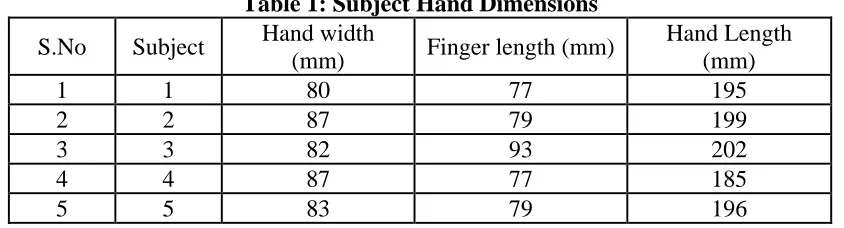
mousing hand. The dimensions of the hand of the subjects were recorded prior to experiment (as
[image:3.612.96.518.361.475.2]presented in table 1).
Table 1: Subject Hand Dimensions
S.No Subject Hand width
(mm) Finger length (mm)
Hand Length (mm)
1 1 80 77 195
2 2 87 79 199
3 3 82 93 202
4 4 87 77 185
5 5 83 79 196
2.2. Types of mouses
The different types of mouse available, we selected the mouse which is most commonly used by
the computer user i.e. Intelli mouse. Intelli mouse is also known as a wheel mouse or a scroll
mouse, it is a mouse developed by Microsoft in 1996 that has a wheel between the left and right
mouse buttons that enables the users to easily scroll up and down using the wheel. Because of its
great functionality, this type of mouse becomes most popularly used with all new computers. The
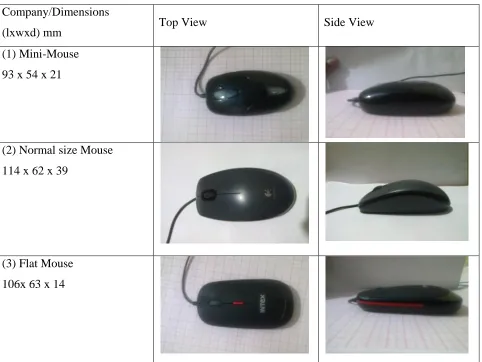
different company of intelli mouse has different geometries and specifications. Different mice
used in this study have dimensions as shown in the table 2 below.
Company/Dimensions
(lxwxd) mm Top View Side View
(1) Mini-Mouse
93 x 54 x 21
(2) Normal size Mouse
114 x 62 x 39
(3) Flat Mouse
[image:4.612.70.552.83.445.2]106x 63 x 14
Figure 2 shows the computer mouse and its dimensioning.
[image:4.612.203.412.491.656.2]2.3. Dependent Variables
In this study two variables (time & angle) were considered as performance measuring
parameters. These were time to complete the task and angular deviation of flexion of the index
finger and also wrist flexion/extension and radial/ulnar deviation. The null hypothesis was that
these parameters had no effect on the geometry of the computer mouse. To investigate this,
following task was given to the participants.
2.4. Task
The task involved the typing of Microsoft word document content of 77 words. The oral
instruction of the task was given to the subjects. The typing of the content was done by clicking
the mouse button on the specific character of the virtual keyboard instead of the hardware
Figure 3 Screenshot of the typing task
[image:6.612.171.437.151.335.2]2.5. Data Acquisition/Interfacing
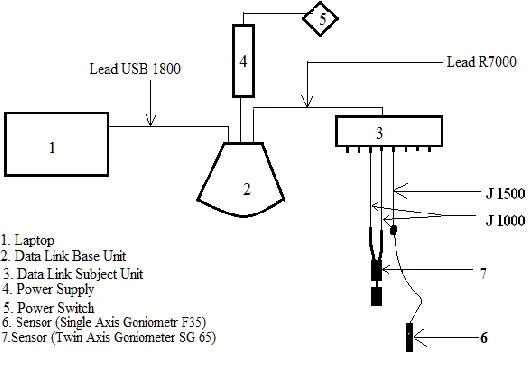
Figure 4 shows the layout / connection of the component used in the experimental set up.
Figure 4 Schematic diagram of Experimental Set up
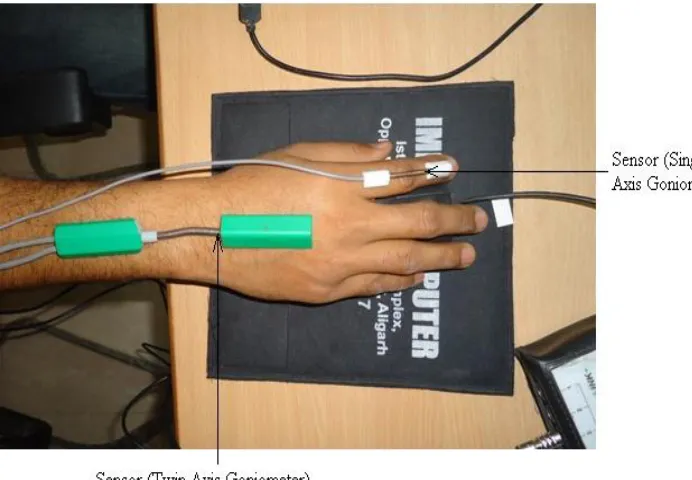
Single axis goniometer Type 35 sensor was attached on the mousing hand index finger of the
subject to sense the angle deviation (index finger), while twin axis goniometer (7) was attached
on the wrist of the subject (shown in figure) to measure flexion/extension and ulnar/radial
deviation of the wrist. The other end of the single axis goniometer was attached to J1500 lead,
while twin axis goniometer was attached to two J1000 (one to measure flexion/extension & other
for ulnar/radial deviation). The other end of these connecting lead were connected to any three
different channels out of eight available in the Data Link Subject Unit. This Data Link Subject
Unit was connected to the Data link Base Unit. The Data Link Base Unit was further connected
by power supply and laptop (USB port). The Data Link Software was installed in the laptop
which read the muscle activity on which sensor was attached. After completion of the task the
recorder was stop and saved. The reading was exported to the desired file format for further
Figure 5 Screen shot of the data
3. APPRATUS USED
3.1.Experimental Setup
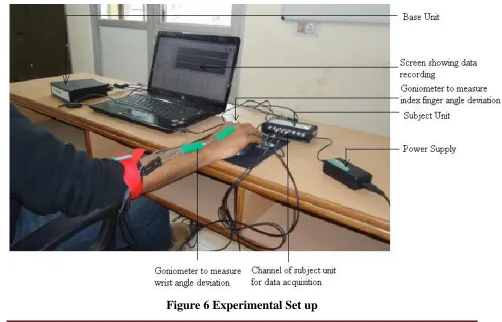
The study was conducted in the Ergonomics Research Division at Z.H.C.E.T., A.M.U (Aligarh, India). The set up and instrument used to record the data was shown in Figure 6.
[image:7.612.64.566.383.705.2]3.2.Data Recording
In this experiment, the Data Link software and hardware of M/s Biometric Ltd. (UK) was used to
record the muscle activity. The recording was done at the sampling rate of 200/sec using Single
axis goniometer sensor (Type: F35; Make: Biometrics Ltd. UK). The signal of goniometer was
interfaced on the laptop (HP based on Core2Dual Processor) using 8 channel subject unit of Data
Link (DLk900: No. M11138 2009-09: Make) using R7000 Lead (Make Biometrics Ltd. UK) and
then transferred to base unit after then to the laptop using connection lead (USB 1800 Make:
Biometrics. Ltd. UK).
4. PROCEDURE
First of all single axis goniometer type F35 sensor was attached to the selected muscles i.e.
mousing hand index finger to measure the angle deviation (flexion and extension). The
goniometers were taped to the index finger using double sided medical tape and adhesive tape. .
The goniometer was fixed while the participants were sitting, elbows at 90o with their index
finger in the neutral position and forearms in pronation resting on the desk surface. The wrist
band was locked over goniometer, so the setting must not get disturb while performing the task.
Reference position 00(flexion and deviation) was defined as the index finger angles when the
forearms were supported on the tabletop, elbows at 900 , forearms in pronation. The angular
movement of index finger was measured. Also the duration of time to complete the given typing
task was also recorded for analysis.
Each subject performed given task while seated, before starting the task, subject’s hand geometry
was measured. Computer, Computer peripherals, workstation and content were identical. Height
of the chair, screen and mousing hand (right hand) was same for all the subjects. Subjects were
allowed to adjust their chair according to their comfort level. Each subject performed the same
task using each of the six mouses consecutively, after a rest period of at least five minutes in
between two consecutive tasks so that get relaxed.
Goniometers were calibrated in a neutral position.. The angle movement of index finger was
measured and compared with the help of SPSS software. The simultaneous comparison of the
mouse was done on the basis:
2. Angle deviation of the index finger while doing the task.
3. Angle deviation of the wrist.
[image:9.612.132.478.158.398.2]The sensor attached to the subject was shown in Figure 7.
Figure 7 Subject performing the Task
5. RESULTS
5.1. Time duration
Table 3 shows the summarized reading of time taken to complete the task by the participants for
the given experimental task using virtual keyboard on screen. It was noticed that with decrease in
size of computer mouse time to complete the task increases. The size of mouse 1 was least
[image:9.612.80.540.558.705.2](93mm) and mean time to complete the task was maximum (5.776 minutes)
Table 3 Time to complete the task using mouse of different geometries.
Type of Mouse
Subject (1) Mini-Mouse (2) Normal Sized Mouse (3) Flat Mouse
1 4.36 4.26 4.26
2 6.2 5.59 5.58
3 6.58 6.16 6.25
4 7.2 5.47 5.45
5 4.54 4.38 4.48
Mean 5.776 5.172 5.204
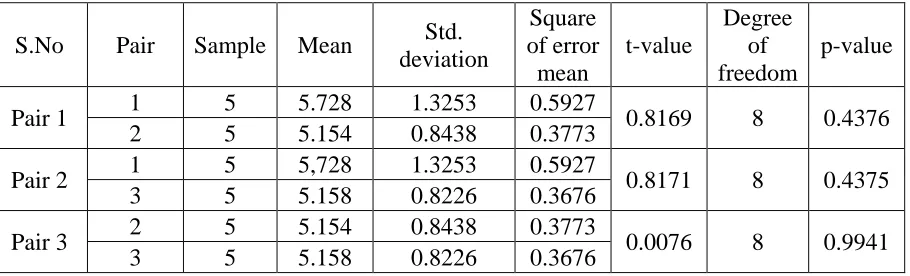
The statistical tool was applied to compare the mouse design on the basis of task completion time. The t-test was used so that each pair of mouse can be compared individually. The Table 4 shows the results of the t-tests comparing the use of the mouses based on task completion time.
Table 4 Paired t-test on the different mouse pair for time taken to complete the task
S.No Pair Sample Mean Std.
deviation Square of error mean t-value Degree of freedom p-value
Pair 1 1 5 5.728 1.3253 0.5927 0.8169 8 0.4376
2 5 5.154 0.8438 0.3773
Pair 2 1 5 5,728 1.3253 0.5927 0.8171 8 0.4375
3 5 5.158 0.8226 0.3676
Pair 3 2 5 5.154 0.8438 0.3773 0.0076 8 0.9941
3 5 5.158 0.8226 0.3676
The data were analyzed at 95% confidence level. There was no significant main effect of mouse
design on task completion time.
5.2. Angle deviation of wrist
Wrist awkward posture cause wrist deviations, if extended for long duration may result in
disorder.
Risk factor for the wrist deviations:
Ulnar deviation > 240 ; Radial deviation > 150 ; Extension of wrist > 20.60 ; Flexion > 20.60[16].
5.3. Wrist flexion/extension
The SPSS software was used for all statistical analysis in this study. The t-test was used to
compare each pair of mouse on the basis of wrist flexion/extension angle during mousing task.
The table 5 showed results of the t-test over the data of wrist extension.
Table 5 Comparison of mouse on extension of wrist
S.No Pair Sample Mean Std.
deviation SEM t Df p
Pair 1 1 75743 1.9096 1.6614 .006 249.8025 245674 <0.0001
2 169933 5.6293 3.9451 0.0096
[image:10.612.71.540.601.705.2]Pair 3 2 169933 5.6293 3.9451 0.0096 42.4315 195221 <0.0001
3 119480 4.9573 3.0216 0.0087
The data were analyzed at 95% confidence level. Since the sample number of the pairs varies, so
unpaired t-test was used. There was significant main effect of different mouse types on the
extension of wrist. This means that the geometry of mouse has very important effect on the
[image:11.612.147.466.210.393.2]extension of wrist.
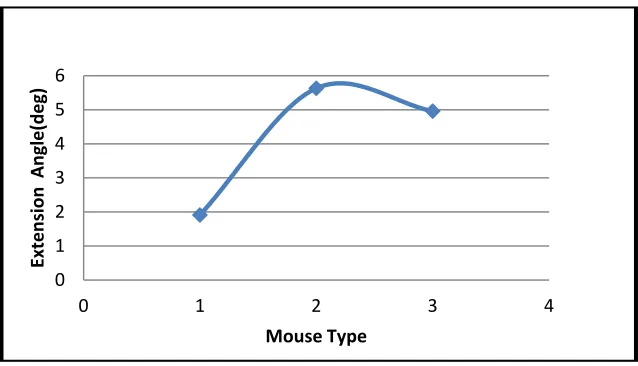
Figure 8 Extension Angle of wrist vs Mouse Type
5.4.Ulnar deviation
There was significant main effect of mouse design on mean ulnar deviation. Mean ulnar
deviation for Mouse 1 was 6.530 4.870 , Mouse 2 was 5.640 3.960 , and Mouse 3 was 7.160
5.000.
Table 6 Comparison of mouse on ulnar deviation of wrist
S.No Pair Sample Mean Std.
deviation SEM T df P
Pair 1 1 184878 6.5286 4.8665 0.01132 55.5019 323011 <0.0001
2 138135 5.6402 3.958 0.01065
Pair 2 1 184878 6.5286 4.8665 0.01132 39.5799 378841 <0.0001
3 193965 7.16359 5.0016 .01136
Pair3 2 138135 5.6402 3.958 0.01065 94.1382 332098 <0.0001
3 193965 7.16359 5.0016 .01136
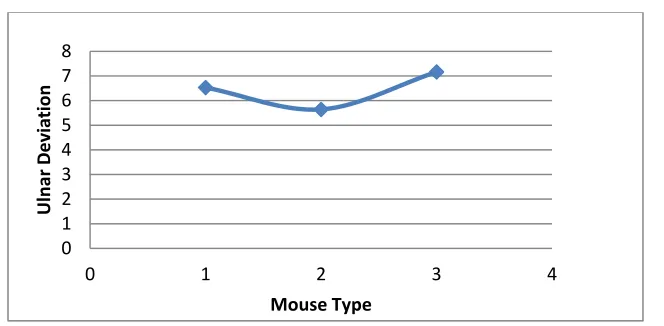
The data were analyzed at 95% confidence level. It was found that Mouse 2 has minimum ulnar deviation
0 1 2 3 4 5 6
0 1 2 3 4
Extens
ion
Angle(deg)
[image:11.612.72.542.511.644.2]Figure 9 Ulnar deviation vs Mouse Type
5.5. Flexion of index finger
There was significant main effect of mouse design on mean ulnar deviation. Mean ulnar
deviation for Mouse 1 was -3.980 4.090 , Mouse 2 was -4.130 2.740 , and Mouse 3 was
-2.940 1.780.
Table 7 Comparison of mouse on index finger flexion
S.No Pair Sample Mean Std.
deviation SEM t df p
Pair 1 1 109622 -3. 9782 4.0892 0.01235 7.1754 153270 <0.0001
2 43650 -4.13062 2.7406 0.0131
Pair 2 1 109622 -3. 9782 4.0892 0.01235 79.0118 225922 <0.0001
3 116302 -2.94025 1.7762 0.0052
Pair 3 2 43650 -4.13062 2.7406 0.0131 101.7539 159950 <0.0001
3 116302 -2.94025 1.7762 0.0052
The data were analyzed at 95% confidence level. There was significant main effect on the index finger flexion
0 1 2 3 4 5 6 7 8
0 1 2 3 4
Ulnar
Devia
tion
Figure 10 Flexion of index finger
6. DISCUSSION
Table 3 showed task completion time has no significant effect on the geometry of the mouse. It
may be because the given task was of very little duration. But a trend of increase in time was
noticed, with the decrease in size of the mouse.The Mouse 2 has the least completion mean time
(5.17 minutes).
Table 4 shows, extension of wrist has significant effect on the geometry of the mouse. This mean
extension of wrist can be reduced by modifying the geometry of the mouse, Figure 8 shows, that
the extension was minimum for the Mouse 1 and maximum for the Mouse 2 having more depth
(39mm). Mouse 1 has smallest (1.910) and Mouse 2 has largest (5.630) extension. The smaller
and flatter mouse has less wrist extension, hence reduce extensor static load [1-3].
Table 6 shows, ulnar deviation of wrist has significant effect on the geometry of the mouse.
Figure 9 shows Mouse2 has less ulnar deviation (5.640), while Mouse 3 (flat, 14mm) has more
ulnar deviation (7.160).
Table 7 shows index finger flexion has significant effect on the geometry of the mouse. Figure
10 shows, flatter mouse have less deviation (-2.940) and Mouse 2 have the maximum (-4.130)
[17].
7. CONCLUSIONS
The repeated action of clicking with the index finger may cause discomfort, injuries and also
effect the performance.
-4.5 -4 -3.5 -3 -2.5 -2 -1.5 -1 -0.5 0
0 1 2 3 4
Flex
ion
Angle
A increase meantime of the task completion with decrease in size.Mouse 1 had minimum size
(93mm) take maximum meantime (5.776 minutes) to complete the task, while Mouse 2 had
larger size (114mm) take minimum meantime (5.17 minutes) to complete the task.
The extension angle was minimum for the Mouse 1 and maximum for the Mouse 3 having more
depth (39mm). Mouse 1 has smallest (1.910) and Mouse 2 has largest (5.630) extension.
This study showed that 2% of the total data recording Mouse 2 was above the risk zone (wrist
extension), while Mouse 3 (flat) has very low percentage (less than 0.001) of the total data
recorded was above the risk zone.
The wrist injuries were mostly due to awkward posture and improper support. This extension of
wrist can be reduced by using the keypad. Dr. Julio Abel Segalle reported that he most relaxed
position of wrist is in hand shake position, considering this ortho-mouse was designed. The
ortho-mouse is designed in a way the uneven activation of key is removed, also provide a proper
base for wrist rest.
REFERENCES
[1] Burgess - Limerick, R., Shemmell, J., Scadden, R., Plooy, A., 1999, Wrist posture during
computer pointing device use, Clin. Biomech. 14, 280–286.
[2] Delisle, A., Imbeau, D., Santos, B., Plamondon, A., Montpetit, Y., 2004,Left-handed versus
right-handed computer mouse use: effect on upper extremity posture,Appl. Ergon. 35, 21–28.
[3] Jensen, C., Borg, V., Finsen, L., Hansen, K., Juul-Kristensen, B., 1998, Christensen, H., Job
demands, muscle activity and musculoskeletal symptoms in relation to work with the computer
mouse, Scand. J. Work. Environ. Health, 24, 418–424.
[4] Gerard, M.J., Armstrong, T.J., Foulke, J.A., Martin, B.J., 1996, Effects of key stiffness on
force and the development of fatigue while typing, Am. Ind. Hyg. Assoc. J. 57, 849–854.
[5] Keir, P.J., Wells, R.P., 2002, The effect of typing posture on wrist extensor muscle loading,
Hum Factors, 44, 392–403.
[6] Johnson, P.E., Dropkin, J., Hewes, J., and Rempel, D.,1993 Office Ergonomics.
[7] Kryger, A.I., Andersen, J.H., Lassen, C.F., Brandt, L.P., Vilstrup, I., Overgaard, E.,
Thomsen, J.F., Mikkelsen, S., 2003, Does computer use pose an occupational hazard for forearm
[8] Lassen, C.F., Mikkelsen, S., Kryger, A.I., Brandt, L.P., Overgaard, E., Thomsen, J.F.,
Vilstrup, I., Andersen, J.H., 2004, Elbow and wrist/hand symptoms among 6,943 computer
operators: a 1year follow-up study (the NUDATA study), Am. J. Ind. Med. 46, 521–533.
[9] Karlqvist, L., Hagberg, M., Selin, K., 1994, Variation in upper limb posture and movement
during word processing with and without mouse use, Ergonomics 37, 1261–1267.
[10] Keir, P., Bach, J., and Rempel, D., 1998, Effects of finger posture on carpal tunnelpressure
during wrist motion, Journal of Hand Surgery, 23A(6), 1004-9.
[11] Rempel, D. and Gordon, L., 1998, Effects of forearm pronation/supination on carpal tunnel
pressure, Journal of Hand Surgery,23A(1), 38-42.
[12] Rempel, D., Manojilovic, R., Levinsohn, D., Bloom, T., and Gordon, L. Theeffect of
wearing a flexible wrist splint on carpal tunnel pressure during repetitive hand activity,1994,
Journal of Hand Surgery, 19A(1), 106-110.
[13] Damann, E.A., and Kroemer, K.H.E., 1995, Wrist posture during computer mouse usage,
Proceedings of the Human Factors and Ergonomics Society,Vol. 1, HFES, Santa MonicaCA,
625-629.
[14] Sogaard, K., Sjogaard, G., Finsen, L., Olsen, H.B., Christensen, H., Motor unit activity
during stereotyped finger tasks and computer mouse work, 2001, J. Electromyogr. Kinesiol, 11,
197–206.
[15] Keir, P., Bach, J., Rempel, D.,1999, Effects of computer mouse design and task on carpal
tunnel pressure. Ergonomics, 42, 1350-60.
[16] Bergamasco, R., Girola, C, Colombini, D., 1998, Guidelines for designing jobs featuring
repetitive tasks Ergonomics 41, 1364-1383.
[17] Muss, M.T., and Barrero, M., 1999, Comparative study of two computer mouse designs,