Systems Reference Library
File Number S360 Mod 195 S370-30 Order Number GC21-5097-0
OS and OS/VS Programming Support for the
IBM 3505 Card Reader and IBM 3525 Card Punch
This publication is intended for application programmers who are famil iar with the BSAM and OSAM access methods for OS or OS/VS systems. It describes the macro instructions and services which are provided to support the 3505 Card Reader and the 3525 Card Punch.
Before using this publication you should be familiar with the informa-tion contained in:
PREFACE
This publication contains descriptions of the
as
and OS/VS support for the 3505 Card Reader and 3525 Card Punch and the optional features for both devices.It is divided into three parts:
3505 Card Reader - This section describes the data sets and access methods used with the 3505 and provides information about the data management macro instruc-tions pertinent to the device.
3525 Card Punch - This section describes the data sets and access methods used with the 3525 and provides information about the data management macro instructions pertinent to the device. Special emphasis is placed on the usage of associated data sets for the various combinations of read, punch, and print operations.
Appendixes - This section includes information about the diagnostics available for the 3505/3525. It also contains a sample program demonstrating the use of the 3525 for a read, punch, and print job with program controlled line positioning.
Prerequ isite Pu bl ications
as
or OS/VS Data Management Macro Instructions (GC26-3794 or GC26-3793)as
or OS/VS Data Management Services Guide (GC26-3746 or GC26-3783)IBM 3504 Card Reader/IBM 3505 Card Reader and IBM 3525 Card Punch Sub-system (GA21-9124)
First Edition (July 1973)
This publication corresponds to OS Release 21, VS1 Release 2, and VS2 Release 1 and to all subsequent releases. It contains the special programming considerations for the 3505 Card Reader and the 3525 Card Punch that were previously described in the Appendix of the OS Data Management Services Guide, GC26-3746-1 and in the Appendix of the OS/VS Data Management Services Guide, GC26-3783-1.
Information in this publication is subject to change from time to time. Any such change will be reported in subsequent revisions or technical newsletters. Before using this publication in connection with the operation of I BM systems, consult the latest IBM System/360 and 370 SRL Newsletter, GN2Q-0360, for the editions that are applicable and correct.
Requests for copies of IBM publications should be made to your IBM representative or to the IBM Branch Office serving your locality.
Forms are provided at the back of this publication for reader's comments. If they have been removed, comments may be addressed to International Business Machines Corporation,
Department 058, Building 706-2, Box 390, Poughkeepsie, New York 12602,.
CONTENTS
3505 CARD READER. PRTOV 14
3505 Optional Features PUT 14
3505 Data Sets 3525 Interpret Punch 15
3505 Access Methods 2 3525 Print Only. 15
Macro Instructions (3505) 2 Two-Line Print Option 16
READ 3 Multiline Print Option 16
CHECK 3 Printing Control. 16
CNTRl (for Stacker Selection) 4 CNTRl 17
GET 4 ASCII Control Characters 17
3505 Read with Optional Stacker. 4 Machine Code Control Characters. 17
3505 Optical Mark Read 5 Automatic Line Positioning 18
Read Column Eliminate (3505/3525) 7 Program Controlled Line Positioning Summary . 18
3525 Associated Data Sets . 19
3525 CARD PUNCH 9 FUNC Operand 20
3525 Optional Features 9 READ and PUNCH . 20
Card Read 9 READ, PUNCH, and PRINT 21
Two-Line Print 9 READ and PRINT 21
Multiline Print 10 PUNCH and PRINT. 22
3525 Data Sets 10 Data Protection . 22
Punch. 10 Opening Associated Data Sets. 24
Read 10 Closing Associated Data Sets . 24
Print 10 Restrictions for Associated Data Sets. 25
Interpret Punch 10
Special Considerations 11 APPENDIX A. MESSAGES AND CODES 27
3525 Access Methods 11
Macro Instructions (3525) 12 APPENDIX B. SAMPLE PROGRAM 30
WRITE 12
3505 CARD READER
The IBM 3505 is a medium-speed serial 80-column card reader. It comes in. two models, B 1 and B2. The maximum throughput on the model B 1 is 800 cards per minute; on the model B2 it is 1200 cards per minute. Both models are channel attached to System/370 and System/360 Model 195.
The 3505 provides faster read capabilities and more innovative functions than either the IBM 2501 Card Reader or the read portion of the IBM 2540 Card Read Punch. Standard features include:
• An 80-column card image buffer which allows both a reread function and its associated channel error recovery.
• One logical stacker that consists of two physical stacker mechanisms called stacker 1 left and stacker 1 right.
• Card reading in either EBCDIC or column binary mode.
• Read Column Eliminate (RCE), which suppresses the reading of data from specified card columns.
Program support provided for existing readers applies to the standard 3505 with no modifications. Buffering is the same, including the buffering for normal reading and stacker selection. This includes compatible 2540 channel programs. The 3505 is supported as a system input device.
3505 OPTIONAL FEATURES
Optional features on the 3505 Card Reader include:
• A selective stacker (stacker 2). This includes a third stacker and a stacker wait station.
• Optical Mark Read (OMR), which provides the ability to read up to 40 columns per card of pencilled marks
(#2
lead or softer), and machine-printed, non-reflective ink marks from caras.The 3505 is not supported as a system input device when using OM R or RCE.
3505 DATA SETS
BSAM/QSAM programs currently used with 2540, 2501, 2520, or 1442 may be executed without change to the logic or JCl except where a device has been expli-citly specified (such as UNIT=2540 in the DD statement). However, if the DD statement is modified to indicate 3505, the current user program will execute identically, assuming the 3505 has identical features.
If column binary mode is used, it must be specified in either a DCB statement at ,assembly time or in the DCB subparameter of a DD statement at execution time. Validity checking is suspended in column binary mode because all characters are considered valid. If data mode is not specified, EBCDIC is assumed. Once data mode is established, it cannot be changed during execution of the program, except at the EXCP level.
Read Column Eliminate must also be specified in either a DCB statement at assembly time or in the DCB subparameter of a DD statement at execution time. (See Read Column Eliminate.) The RCE format does not become effective until the data set is opened and remains in effect until the data set is closed.
The MODE operand of the DCB statement is used to indicate that RCE or OMR is to be used by the program for the 3505.
The user is responsible for assigning, via a DD statement, a 3505 which has the feature required for the job. The Scheduler will not allocate a 3505 by feature. However, the Scheduler will allocate a 3505 as a reader without concern for any optional features.
3505 ACCESS METHODS
The operating system, via the assembler, uses a set of macro instructions to initiate the data management access methods used by the 3505. These instructions initiate:
• the Basic Sequential Access Method (BSAM)
• the Queued Sequential Access Method (QSAM)
A detailed description of the macros that are used for these access methods can be found in OS or OS/VS Data Management Macro Instructions (3794 or GC26-3793).
Both access methods and the macro instructions are used with the two major configurations of the IBM System/360 or 370 operating system:
• Multiprogramming with a Fixed number of Tasks (MFT), or VS1.
• Multiprogramming with a Variable number of Tasks (MVT), or VS2.
The data control block (DCB) macro instruction defines the data set for BSAM and QSAM.
MACRO INSTRUCTIONS (3505)
The macro instructions which are used with OSAM for 3505 input operations are GET, CNTRL, OPEN, and CLOSE. The CNTRL, OPEN, and CLOSE macro instructions are the same for OSAM and BSAM (except a test for completion of input operations is not required for the CNTRL macro instruction for OSAM before it is issued).
READ
The READ macro instruction initiates an input operation. After the instruction is issued, control is returned to the problem program so that it may perform
operations which do not involve the input buffer specified in the READ instruction. A data event control block (DECB) is constructed as part of the READ macro expansion. A DECB:
1. passes parameters to the controlling program; and
2. aids in controlling the READ operation.
The READ macro instruction for BSAM is written as follows:
[symbol]
. {length}
DECB name, type, DCB address, area address, '5'
• DECB name - the name assigned to the DECB created during the macro expansion.
• type - the type of READ operation; SF (normal retrieve) must be coded for 3505 programs.
• DCB address - the address of the DCB for the data set which is read.
• area address - the address of the area into which the record is placed.
• length - the number of data bytes which are read (maximum 32,760); if '5' is coded, the number of bytes is taken from the DCB. (The length operand is ignored if the records are either in F or V format.)
CHECK
The CHECK macro instruction checks for a completed input operation. If the operation is complete, the instruction checks for error indications. If the operation is incomplete, the task waits for completion. The CH ECK macro instruction is written as follows:
I
[symbol]I
CHECK DECB addressI
CNTRl(FOR STACKER SELECTION)
GET
The CNTRl macro instruction is used to control stacker selection for both QSAM and BSAM. Under BSAM, all input operations must be tested for completion before the CNTRl macro instruction is issued. If stacker selection is required:
1. the CNTRl macro instruction must be issued whenever it is necessary to read a new card.
2. the BUFNO field of the DCB must be coded as one.
The CNTRl macro instruction is written as follows:
I
[symbol]I
CNTRL DCB address,ss.{:}• DCB address - the address of the DCB for the card reader.
• SS - the stacker select option (one or two).
Note: See the OS or OS/VS Data Management Macro Instructions, GC26-3794 or
GC26-3793 for a more detailed description of the CNTRl macro instruction.
The GET macro instruction causes the control program to retrieve the next record. The instruction can be issued in either the locate, move, or substitute mode. The GET macro instruction is written as follows:
[symbol] DCB address [,area address]
• DCB address - the address of the DCB for the data set which is being retrieved.
• area address - there are three modes of retrieval; these may not be intermixed within a specified DCB.
1. I n locate mode, the area address is omitted. The address which is returned in register 1 references the buffer which contains the record.
2. In move mode, the area address specifies the address of the area in the problem program into which the system will move the record.
3. In substitute mode, the area address specifies the address of an area in the problem program that will be exchanged for the buffer containing the record. The system returns the address of the buffer containing the record in register 1.
3505 READ WITH OPTIONAL STACKER
Stacker 1 is the default stacker if the 3505 has only one logical stacker and a command is issued indicating stacker 2 or 3. Stacker 2 is the default stacker if a command is issued indicating stacker 3 and the 3505 has the optional stacker. Stacker selection default is not diagnosed.
If stacker control is required, BUFNO=1 must be specified. This is the only way the user can be sure a particular card is going to the desired stacker.
3505 OPTICAL MARK READ
OMR provides the facility to read up to 40 columns of marked data with the OMR data physically located on the card in alternating columns. If OMR is specified, a format descriptor card must be provided as the first card of the data deck. The format descriptor card specifies the columns from which optical marks are to be read. Abnormal termination results if a format descriptor card is not supplied. If checkpoint/restart is used, the format of the OMR data set must be re-established when the job is restarted.
Format Descriptor Card: The word FORMAT must be coded starting in column 2
of the first card of the data deck (column 1 must be blank), followed by a blank and the parameters that specify the columns to be read in OM R mode. For example, if columns 3,5, 7, 9,70,72, 74, 76, 78, and 80 are to be read in OMR mode, the format descriptor card would be coded as follows:
V> FORMATV> (3;9),(70,80)
Continuation cards can be coded if:
1. a continuation character (non-blank) is entered in column 72 of the card; and
2. the continued field begins in column 16 of the next line.
Acontinued field is coded in one of two ways:
1. the operand field is coded through column 71 with no blanks, and is then continued in column 16 of the next card, or
2. the operand field is truncated by a comma and then continued in column 16 of the next card.
OMR Data Records: The following rules apply to coding an OMR record.
• Mark columns within a field must be separated by at least one blank (not a punch or mark).
• Mark and punch fields must be separated by at least one blank (not a punch or mark).
• Mark fields in odd columns and mark fields in even columns must be separated by at least two blanks (not punches or marks).
Although OMR data is physically located on the card in alternating columns, the data is compressed in the channel. The blank following an optical mark is not transferred to the input buffer by the channel.
The format data is stored in the system and may contain either a digit (0 through 9) or a letter (A through Z) for each card column that is to contain OMR data. All other format bytes are blanks (X'40'). Figure 3505-1, Format of OMR Data, illustrates how the data appears in the card, the system, and in the channel and input buffer.
Card Column 1 2 3 4 5 6 7 8 9 10 11 12 13 14 15
Card Data HI H2
®
M4®
M6® ®
M9®
MIl®
HI3 HI4 HIsFormat Data I) I) b F4 - F6 I) F9 - FII - I) l'> b
~ ~ ~/
switch from switch from switch from hole to mark even to odd marks mark to hole
Channel Data HI H2 I) M4 M6 b M9 Mill HI3 HI4 HIs
®
must not have hole or mark data.I) hexadecimal 40
[image:10.620.58.479.77.684.2]- may be either character or blank Hx hole data in Column X
Mx
mark data in Column X Fx format data for Column XFigure 3505-1. Format of OMR Data
When a marginal mark, weak mark, or poor erasure is detected, that column's data is replaced with X'3F' in EBCDIC mode or with X'3F3F' in column binary mode. X'3F' is also placed in column 80 for EBCDIC and column 160 for column binary. The user is responsible for checking for OM R reading errors.
If OM R is used, it must be specified in either a DCB statement at assembly time (MODE=O), or the DCB subparameter of a DO statement at execution time
The OMR format becomes effective only after the data set is opened. The OPEN macro instruction must be followed by a READ and CHECK, or a GET macro instruction. A CNTR L macro instruction must also be issued if stacker selection is required. If stacker selection is used, BUFNO=1 must be specified. The format remains in effect until the data set is closed. When the CLOSE macro instruction is issued or when the device runs out of cards at end of file (EOF), the device is automatically reset to read all 80 columns in normal mode.
Stacking more than one job utilizing card columns 1 or 2 for OM R is not recommended. The normal file delimiter (/*), which occupies these columns, cannot be recognized if OM R uses these columns.
The following example illustrates how OMR can be specified via the DD statement:
READD DCB DDNAME=OMR,DSORG=PS,MACRF=GMC, ....
I
tNTRL Move Mode GET!/OMR DD UNIT=3505,DCB=(MODE=EO,BU FNO=1, ... . where MODE=EO specifies EBCDIC and OMR mode, and BUFNO=1 is specified because the CNTR L macro is being used.
Note: Chain channel scheduling and the user totaling facility is not supported
when using OM R.
READ COLUMN ELIMINATE
(3505/3525)If RCE is specified, a format descriptor card must be provided as the first card of the data deck. The format descriptor card specifies the columns which are to be eliminated. Abnormal termination results if a format descriptor card is not supplied. If checkpoint/restart is used, the format of the RCE data set must be reestabl ished when the job is restarted.
Format Descriptor Card: The word FORMAT must be coded starting in column 2
of the first card of the data deck (column 1 must be blank), followed by a blank and the parameters that specify the columns to be eliminated in RCE mode.
For example, if columns 20 through 30 and 52 through 76 are not to be read, the format descriptor card would be coded as follows:
~ FORMAT~ (20,30),(52,76) Continuation cards can be coded if:
1. a continuation character (non-blank) is entered in column 72 of the card; and
2. the continued field begins in column 16 of the next card.
A continued field is coded in one of two ways:
1. the operand field is coded through column 71 with no blanks, and is then continued in column 16 of the next card, or
If RCE is used, it must be specified in either a DCB statement at assembly time (MODE=R), or in the DCB subparameter of a DD statement at execution time
(MODE=
{~}R). If the MODE operand for a 3505 or 3525 is specified in the
DCB subparameter of a DD statement, either C or E (for column binary or EBCDIC)' must be specified if R is specified.The RCE format becomes effective only after the data set is opened. The OPEN macro instruction must be followed by a READ and CHECK, or a GET macro instruction. A CNTR L macro instruction must also be issued if stacker selection is required. If stacker selection is used, BUFNO=1 must be specified. The format remains in effect until the data set is closed. When the CLOSE macro instruction is issued, or when the device runs out of cards at end of file (EOF), the device is automatically reset to read all 80 columns in normal mode.
Stacking more than one job utilizing card columns 1 or 2 for RCE is not recommended. The normal file delimiter (/*), which occupies these columns, cannot be recognized if RCE uses these columns.
The following example illustrates how RCE can be specified via the DCB statement:
READD DCB
//RCE DD
DDNAME=RCE,DSORG=PS,MACRF=GL,MODE=R, ...
I
Locate Mode GETUNIT=3525, ... .
where MODE=R specifies RCE mode (EBCDIC is the default for data mode).
Note: Chain channel scheduling and the user totaling facility is not supported
3525 CARD PUNCH
The IBM 3525 is an 80-column card punch. The 3525 models and their respective performance capabilities are:
• 3525-P 1 Card Punch • 3525-P2 Card Punch • 3525-P3 Card Punch
100 Cards per Minute Maximum 200 Cards Per Minute Maximum 300 Cards Per Minute Maximum
All of these models can be attached to System/360 Model 195 and System/370.
The 3525 must be used in conjunction with the 3505. Its attachment to the using system is through a channel attachment to a control unit in either model of the 3505.
The 3525 has one hopper from which it passes its data cards. There are two program-controlled selectable stackers, stacker 1 (on the right) and stacker 2 (on the left). A card traversing the feed path will pass from the hopper to a dummy station (card read station if the option is installed), to the card punch station, then to another dummy station (card print station if the option is installed), and into one of the two program selectable stackers. If a card is found to be mispunched (during a punch only job), It is passed to a third stacker and two cards are punched automatically. One of the two cards is fed to the third stacker with the error card and the second card replaces the one in error in the normal stacker. The repunching of cards is a hardware function.
3525 OPTIONAL FEATURES
All models of the 3525 can include the following optional features:
Card Read
This feature provides the ability to read punched-hole data, under program control, from a card during a single pass of the card through the machine. The data can be EBCDIC or column binary. Read Column Eliminate is also included with this feature (see Read Column Eliminate).
Two-Line Print
Multiline Print
This feature provides the ability to print up to 25 lines of data, under program control, on a card during a single pass of the card through the machine. This feature has the same character set and print span as the Two-Line print feature.
3525 DATA SETS
The punch and read data sets must be designated as output and input data sets, according to the methods specified in OS or OS/VS Data Management Macro
Instructions (GC26-3794 or GC26-3793). The print and interpret punch
functions must be designated by the FUNC operand in either a DCB statement or the DCB subparameter of a DD statement. (Also see the 3525 Associated Data Sets
section of this book.)
BSAM/OSAM programs currently used with a 2540, 2501, 1442, or 2520 may be executed without change to the logic or JCl, except where a device has been explicitly specified on the DD statement (such as UNIT=2540). If the DD state-ment is modified to indicate 3525, the current program will execute identically, assuming the 3525 has identical features.
Punch
Read
The 3525 has the same BSAM and OSAM support as other IBM pu nches. Data management also supports the previously discussed optional features. The 3525 is supported as a SYSOUT device for punch only data sets.
The 3525 has standard I BM reader support for BSAM and OSAM. Data manage-ment also supports the RCE feature. If RCE is used, it must be specified in either a DCB statement at assembly time or in the DCB subparameter of a DD statement at execution time. A first card descriptor statement must be used to specify which columns are to be eliminated. For a detailed discussion of RCE mode, see Read
Column Eliminate. The 3525 is supported as a SYSIN device for read only data
sets if RCE is not specified.
The 3525 has BSAM and OSAM support for printing. Macro support includes CNTR land PRTOV with each card regarded as a print page.
I nterpret Punch
Special Considerations
If column binary mode is used, it must be specified in either a DCB statement at assembly time or in the DCB subparameter of a DD statement at execution time. If data mode is not specified, EBCDIC is assumed. Once the data mode is established, it cannot be changed during execution of the program, except at the EXCP level.
Operands which are new or have been modified for use with the 3525 include:
MODE - The MODE operand of the DCB statement is also used to indicate whether RCE mode is to be used.
FUNC The FUNC operand of the DCB statement defines the type of data set to be opened. It must be used with print only and associated data sets, and can be used with read only and punch only data sets. See
3525 Associated Data Sets for more information.
FCB The FCB operand of a DD statement is used to indicate that Data Protection Image (OPI) is associated with a particular data set. See
Associated Data Sets for more information.
3525 ACCESS METHODS
The operating system, via the sasembler, uses a set of macro instructions to initiate the data management access methods of the 3525. These instructions initiate:
• the Basic Sequential Access Method (BSAM)
• the Queued Sequential Access Method (QSAM)
A detailed description of the macros that are used for these access methods can be found in OS or OS/VS Data Management Macro Instructions (GC26-3794 or GC26-3793) .
Both access methods and the macro instructions are used with the two major configurations of the System/360 Model 195 and System/370 operating systems:
• Multiprogramming with a Fixed number of Tasks (MFT), or VS1
• Multiprogramming with a Variable number of Tasks (MVT), or VS2
MACRO INSTRUCTIONS (3525)
The macro instructions used with BSAM for the 3525 are:
Input - - - READ, CHECK, and CNTRl
Output - - - WRITE, CHECK, CNTRl, and PRTOV The macro instructions for READ, CHECK, and CNTRl (for stacker selection), are discussed under Macro Instructions in the 3505 section of this book.
The macro instructions used with OSAM for the 3525 are:
Input - - - GET and CNTR l
Output - - - PUT, CNTRl, and PRTOV
The GET and CNTRl (for stacker selection) macro instructions are discussed under
Macro Instructions in the 3505 section of this book.
See OS or OS/VS Data Management Macro Instructions, GC26-3794 or GC26-3793, for OPEN and CLOSE.
WRITE
The WRITE macro instruction initiates an output operation. After the instruction is issued, control is returned to the problem program so that it may perform operations which do not involve the buffer specified in the particular instruction. A data event control block (DECB) is constructed as part of the write macro expansion. A DECB:
1. passes parameters to the controlling program; 2. aids in the controlling of the write operation; and
3. receives indication of the success or failure of the write operation.
Note: The operating system returns control to the program before the write operation is complete, so that output operations can be overlapped with CPU processing.
The WR ITE macro instruction for BSAM is written as follows:
[symbol] {
length} DECB name,SF ,DCBaddress,area address,
's'
• DECB name - the name which is assigned to the DECB.
• SF - is codes as shown.
• DCB address - the address of the DCB for the data set which is created.
• area address - the address of the main storage area which contains the block.
eNTRl
The CNTRl macro instruction is used to control printing and stacker selection on the 3525 under both BSAM and QSAM (CNTRl for stacker selection is discussed under Macro Instructions in the 3505 section of this book). Under BSAM, all output operations must be tested for completion before the CNTR l instruction is issued.
The numbers of the lines on an individual card correspond to the channel numbers as designated in the following figure.
Line Number Channel Number
1
2
3 4 5 6 7 8 9 10 11 12 13 14 15 16 17 18 19 20 2122
23 24 252
3
4
5
6
7
8
9 (overflow)
_ _ _ _ _ _ _ _ 10
_ _ _ _ _ _ _ _ 11
_ _ _ _ _ _ _ _ 12 (overflow)
The channels all correspond to odd numbered lines; an even numbered line can be designated by skipping to the channel which immediately precedes it and then spacing.
The CNTRl macro instruction is written as follows:
[symbol]
I
CNTRLf
P
'
~ ~ ~
(
I
DCB address, SK,{~~} ~
• DCB address - the address of the DCB for the output device• SP - space (one, two, or three) lines on a card.
• SK - skip to a ,channel (1 through 12) on a card.
Note: A line can also be designated for printing using standard ASCII control
PRTOV
PUT
The PRTOV macro instruction tests for overflow channels nine and twleve. An overflow condition on either of these channels causes:
1. a transfer of control to the overflow processing routine (if the address of this routine is specified in the overflow exit address entry); or
2. a skip to channel one to begin printing on the nextcard for print only.
The PRTOV macro instruction is written as follows:
[symbol] DCB address,
~1
:fL
overflow exit addressl• DCB address - the address of the print DCB .
• l1
92f
-tests for either channel nine or twelve.
• overflow exit address - the address of the user-supplied routine which gains control when an overflow condition is detected on the specified channel.
If this address is omitted, the 3525 feeds a new card (by performing a skip to channell), before executing the next WR ITE or PUT instruction. (This condition would abnormally end with associated data sets.) When the overflow routine is given control, the contents of:
• registers 0 and 1 are destroyed.
• registers 2 through 13 remain the same.
• register 14 is the return address.
• register 15 is the overflow exit routine address.
The PUT macro instruction causes the control program to write a record in a sequential data set.
The controlling program uses the length which is specified in the record length (lRECl) field of the DCB as the length of the record which is to be written.
The PUT macro instruction is written as follows:
[symbol] PUT
I
DCB address Larea add._re.,...s_sl _ _ ..-....-_ ...• DCB address - The address of the DCB for the data set .
• area address - There are three modes of retrieval; these may not be intermixed within a specified DCB.
• In move mode, the area address refers to the main storage area, which contains the record which is to be written.
• In substitute mode, the area address specifies the address of a main storage area in the problem program that contains the next record to be written. The area is exchanged for an empty buffer. The address of the empty buffer is returned in register 1.
3525 I NTE RPR ET PUNCH
If the Interpret Punch function is designated, via the FUNC operand in a DCB or the DCB subparameter in a DD statement, an existing output data set will be interpreted as well as punched. Specifying the Interpret Punch function in the DD statement as shown below, allows the function to be done without reassembling the program.
//PUNCH DD UNIT=3525,DCB=(FUNC=I), ...
One macro instruction is all that is needed to both punch and interpret the punches on a card.
The Punch Output Writer takes advantage of the interpret punch function. That is, the writer has the ability to interpret an output file with no changes to the routine. The DCB can be modified via the console as follows:
using unit address using device I D
S WTR,013,DCB=(FUNC=I) or, S WTR,3525,DCB=(FUNC=\)'
It
can also be specified via a DD statement as follows://OUTPUT DD SYSQUT=(B,INTRPRT)
Where INTRPRT is a user written routine that is cataloged on the system. FUNC=I must be specified in the DCB in the cataloged writer routine. The writer routine can be keyed via the console as follows:
S WTR.INTRPRT,3525
Note: The output record must be 80 bytes, or 81 bytes if first character control is
being used.
3525 PRINT ONLY
Two-Line Print Option
The two-line print option is specified in the FUNC operand in the DCB statement or the DCB subparameter of the DD statement. The operand must be coded FUNC=WT for print only as shown in the following example:
/ /PRI NT DD UNIT=3525,DCB=(FUNC=WT,LRECL=64,BUFNO=10)
The Tin FUNC=WT specifies that the information will be printed on lines one and three regardless of whether the hardware supports the two-line or the multiline print feature.
Multiline Print Option
The multiline print option is specified in the FUNC operand in the DCB statement or the DCB subparameter of the DD statement. The operand is coded FUNC=W. (Omitting the T for the two-line-print option automatically selects the multiline print option.)
Printing Control
Line positioning and card feeding can be controlled by using the CNTRL macro instruction, ASCII control characters, machine code control characters, or automatic line positioning. The numbers of the lines on an individual card correspond to the channel numbers as designated in the following figure.
Line Number
2 3 4 5 6 7 8 9 10 11 12 13 14 15 16 17 18 19 20 21 22 23 24 25
Channel Number
-2
3
4
5
6
8
9 (overflow)
10
11
12 (overflow)
CNTRL
The CNTR l macro instruction is described under Macro Instructions in the 3525
section of this book.
ACSII Control Characters
A line can be designated for printing by specifying standard ASCII
character control in the RECFM operand of the DCB. The CNTR l macro instruction cannot be issued if first character control is specified in the DCB. If ASCII control characters are used and an attempt is made to print beyond line 3 (two-line print option), or beyond line 25 (multiline print option), a new card is fed and the informa-tion is printed on the first line of that card.
When using ASCII control characters, spacing occurs before the I ine is printed. For line 1 positioning, the user must specify a blank as the ASCII control character. This is necessary because hardware automatically positioned the card at line 1 when it was fed. The blank ASCII control character allows data management to increment . the internal line counter it uses, to monitor line position, from 0 to 1, without
changing card position for line 1 only.
Machine Code Control Characters
A line can also be designated for printing through the use of machine operation codes. The use of such codes must be designated in the RECFM operand of the DCB. The CNTRl macro instruction cannot be issued if machine codes are designated. The print operation command codes are as follows:
0---Bits---7
XXXXX101 line Position Bits
1
I
These five binary bits specify the lineposition on which data moved by this instruction will be printed.
Example: 00011 11001
Line position 3 Line position 25
If machine code control characters are used, these conditions cause the print line command to be rejected:
• A line position other than 1 or 3 is specified for a 3525 equipped with a two-line card print feature.
• A line position greater than 25 has been specified.
• The 3525 is not equipped with either card print feature.
Note: See 3504 Card Reader/IBM 3505 Card Reader and IBM 3525 Card Punch Subsystem, GA21-9124, for the machine code control characters for punching and
Automatic Line Positioning
If printing control is not specified by the CNTRl macro instruction or by using con-t.rol characters. print lines are positioned automatically. If consecutive WR ITEs or PUTs are issued, output is automatically single-spaced. If T is specified in the FUNC operand (for the two-line print option), consecutive WRITEs or PUTs print on lines 1 and 3.
Under automatic line positioning for a print only job, card feeding varies according to the print option being used. If the two-line feature is in effect, a WRITE or PUT following a WRITE or PUT on line 3 causes a card feed, and the information for the last WRITE or PUT is printed on line 1 of the following card. If the multi-line feature is being used, a WRITE or PUT following a WRITE or PUT on multi-line 25 causes a card feed, and the information for the last WRITE or PUT is printed on line 1 of the following card.
Note: Card feeding must be controlled by the read or punch data set when associated
data sets are used. This automatically positions the card at line 1 (see Associated Data Sets).
Program-Controlled Line Positioning Summary
The program may control printing through either the CNTR L macro instruction, ASCII control characters, or machine code control characters.
If printing is program-controlled, the program is totally responsible for all line posi-tioning (skipping and spacing). Under these methods of control, the two-line and multiline print supports are identical. However, printing is not allowed on any lines other than 1 or 3 with the two-line print option.
Skipping to a channel of a number equal to or less than the present channel posi-tion results in line posiposi-tioning at that channel locaposi-tion on the following card. Skipping to a channel of a number greater than the present channel position re-sults in line positioning at that channel location on the same card. Attempts to overprint by using space suppress (printing twice on the same line,) will result in a space and print.
No user facility is provided to vary stacker selection for a print only operation. How-ever, the user can specify stacker selection via the STACK=operand in the DCB.
If STACK=is not specified, the default is stacker 1.
The following options are not supported for 3525 print:
1. Chain channel scheduling.
2. Fixed blocked, variable or undefined records.
3. The user totaling facility.
3525 ASSOCIATED DATA SETS
More than one operation can be performed on each card during the execution of a program. For example, you may read a card, punch additional data into the card, and print data on the same card. The data used for each operation must be in an individual data set. Each data set must have a separate DCB. In this case three DCBs must be specified. These three data sets are called associated data sets. That is, three separate data sets, but all for the same device. Associated data sets are specified by coding the proper character(s) for FUNC in each DCB. This example would be coded as follows:
Associated} Data Sets
See OS or OS/VS Data Management Macro Instruction (GC26-3794 or GC26-3793), and the following pages for other FUNC characters to be coded for other associated data sets.
The unit affinity operand of the DD statement must also be used to indicate that the data sets are associated with the same device. On the first DD statement for an associated data set the coding is UNIT=3525, or UNIT=unit-address; on the DD statements for the other associated data sets the coding is UNIT=AFF=READ, where READ is the name of the first DD statement. Records used with associated data sets must be fixed (RECFM=F).
A particular sequence of BSAM and QSAM macro instructions must be followed when associated data sets are being used. Only four combinations of 3525 functions are allowed for associated data sets and must be performed in the sequence shown in the following for each:
• READ and PUNCH
• READ, PUNCH and PRINT
. • READ and PRINT
• PUNCH and PRINT
A print operation can be omitted or repeated, but the first line on a card cannot be printed until the card has been punched or, if the card is not to be punched, until the card has been read.
Note: When using locate mode for the punch or printer, the initial PUT (to retrieve
FUNC Operand
The FUNC operand defines the type of data set which is to be opened. The valid characters are:
P
R W
PUNCH READ PRINT
INTERPRET PUNCH
The following characters are used to further define the data set:
X D T
PRINTER
DATA PROTECTION TWO-LINE PRINT
An X is used to distinguish the 3525 printer output data set from the 3525 punch output data set, when either a read, punch, and print or a punch and print associated data set is opened. (See examples on the following pages.)
A D indicates the use of the data protection feature. Data protection is used to protect data which might otherwise be obliterated by punching in columns which already contain data.
A T indicates the use of the two-line print option. If it is not specified, the multiline print option is used automatically.
Valid combinations of characters which indicate the use of the 3525 features include;
P
R
W[T] I RP RW [T] PW[XT] RPW [XT] RP [D] RPW [D]
READ and PUNCH
PUNCH ONLY READ ONLY PRINT ONLY INTERPRET PUNCH READ and PUNCH READ and PRINT PUNCH and PRINT
READ, PUNCH, and PRINT
DATA PROTECTION
The FUNC operand must be coded in either a DCB or the DCB subparameter of a DD statement. The unit must also be specified in the DD statement. In the follow-ing example, READ is the DDNAME of the input data set; PUNCH is the DDNAME of the output data set.
//READ DD
//PUNCH DD
UN IT=3525,DCB=(FUNC=RP) UNIT=AFF=READ,DCB=(FUNC=RP)
Read and punch associated data sets are supported by normal control characters for dynamic stacker selection for a punch output data set. If static stacker selection is used, the STACK=
{~
} operand of the DCB should be specified. The data pro-tection option may also be used with the PUNCH data set.READ, PUNCH, and PRINT
Read, punch, and print associated data sets enable the 3525 to read data cards, punch additional data into them, and print on them. The data to be read must be specified as an input data set; the data to be punched, and that to be printed, must be specified as individual output data sets. The data control block for each associated data set
must be opened. If dynamic stacker selection is used, standard ASCII control char-acters should be specified for the punch output data set. If static stacker selection is used, the STACK=
{~}
operand of the DCB should be specified.Line positioning for the cards being printed can be specified by either first character control in the print record, or through the CNTRL macro instruction. Automatic line positioning may also be used. The card is then regarded as a print page with the channel assignments shown in the 3525 Print Only section of this book. A
maximum of 25 lines can be printed on a single card.
The FUNC operand must be coded in either a DCB or the DCB subparameter of a DD statement. The unit must also be specified in the DD statement. In the following example, READ is the DDNAME of the input data set; PUNCH and PRINT are the DDNAMES of the two output data sets.
//READ //PUNCH //PRINT
READ and PRINT
DD DD DD
UNIT=3525,DCB=(FUNC=RPW) UNIT=AFF=READ,DCB=(FUNC=RPW) UNIT=AFF=READ,DCB=(FUNC=RPWX)
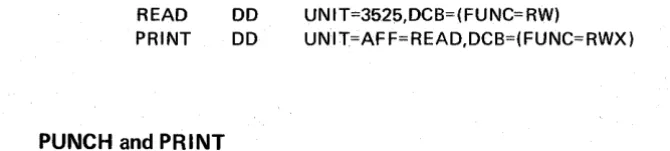
Read and print associated data sets enable the 3525 to read cards and then print on them. The cards to be read are specified as an input data set; the cards to be printed are specified as an output data set. The data control block for each associated data set must be opened.
The FUNC operand must be coded in either a DCB or the DCB subparameter of the DD statement. The unit must also be specified in the DD statement. In the follow-ing example, READ is the DDNAME of the input data set; PRINT is the DDNAME of the output data set.
READ PRINT
PUNCH
and
DO DO
UNIT=352p,DCB=(FUNC=RW)
UNIT=AFF=READ,DCB=(FUNC=RWX)
Punch and print associated data sets are supported in the same manner as read, punch, and print associated data sets, except that no input data set is specified. Both the cards which are to be punched and the cards which are to be printed must be speci-fied as individual output data sets. The data control block for each associated data set must be opened.
As in the cases of read, punch, and print; and read and print associated data sets, line positioning for the print data set can be specified by control characters, or through the CNTR L macro instruction. Automatic line positioning may also be used.
The FUNC operand must be coded in either a DCB or the DCB subparameter of a DD statement. The unit must also be specified in the DO statement. In the follow-ing example, PUNCH and PRINT are the DDNAMES of the two output data sets.
//PUNCH //PRINT
Data Protection
DD DO
UNIT=3525,DCB=(FUNC=PW)
UNIT=AFF=PUNCH,DCB=(FUNC=PWX)
Data protection is used to protect pre-punched data that might otherwise be oblit-erated during a punch operation. An 80-byte Data Protection Image (DP!) must be stored in SYS1.IMAGELIB for use with data protection. The DPI must contain blanks in the colums to be protected an alphameric characters in the columns to be punched. The 80-byte format descriptor corresponds to the 80 column card on a column-per-column basis.
The member name for the image in the CSECT and LKED statements cannot exceed eight bytes. The first four characters of this member name must be FORM. The characters that follow FORM identify the FCB image and are referred to as the image
[image:26.615.119.454.111.186.2]identifier. The image identifier must be specified on a DD statement to load the image in the FCB buffer.
• A standard card form, IBM electro 6509, IS available for punching source statements from this form Insrrucrions for using this form are m any IBM System/360 Assembler Reference Manual. Address comments concernmg this form co IBM Nvrdlc Laboratory, Publications Development, 80x 962 S· 181 09 Lidingo 9, Sweden.
Figure 3525-1. Coding for Data Protection
The data card used with the data protection image shown in Figure 3525-1 would be in the format shown in Figure 3525-2, Data Card Format.
II 1111111 111111111 111111111
111111111 111111111 111111111
( ) I
Q~~p,nOoooooOOOOOOOOOOuOOOOIIIIIIIIOOOPOOOOOPOOOOOOOOII11111100000000000000000011
123 I I" ~ 910 1121J"1516111'<\~'OZ1222'2l2:lS111~19]0312'333!31.l6],,8;l4~4142434445'64748495051525354555657585960616263&.165666168691011121314/51611781980
1111111111 I 11 I 1 1 111 11111 11 11111111111111111111111111 J J 1 J 11 J 111111111111111111111
llcolumnS2222222~1?227222122222222122222222122222221222222221222222221222222217
J3 to 1333333331 all other columns, are protected on the data card 31333313 31
1 : be 41 ! 4 4 4 4 4 4 4.4 4 4 4 4 4 4.4 4 4 4 4 4 4 4 • 4 4 r, ~ , 4 ~ ~ • ~ , 4 4 4 4 4 • C 4 " • 4 q • • • • Q • • • & 4 411 4 1 1 ! : ~
~5Punched55155555555155555551555555551555555551555555515555~555155555555155555~
6~ 6~f~~~6~~61~6666~€6166666661666666661~~66fEf6166666661~6666666If6666~661~r;~C6
17 1777 77 77 77 717 17 77 77 7177 7 7 7 7 7177 77 7 7 17177 77 17 7717 77 7 7 77177 7711 7717 17 7 7177177 17
8 8 8 8 8 8 8 8 8 8 8 8 8 81B 8 8 8 8 8 8 81B 8 8 8 8 8 818 8 8 8 8 8 8 818 8 8 8 8 8 8 818 8 8 8 8 8 818 8 8 8 8 8 8 818 0 S 8 8 8 8 818 8 8 9 9 9 9 9 9 9 9 9 ~ 9 9 9 9 919 9 9 9 9 9 9 919 9 9 9 9 9 919 9 9 9 9 9 9 919 9 9 9 9 9 9 919 9 9 9 9 9 919 9 9 9 9 9 9 919 a 9 9 9 9 9 919 9
" 12 45678 91: ~~15161l181920212223242526212829303132'33~3536373i3940414143444546414849505152535455565758596011626364656667686910117273'147;1611787980 ~
Figure 3525-2. Data Card Format
Data protection can be specified as shown in the following example:
//READ DD UNIT=3525,DCB=(FUNC=RP,LRECL=80,BUFL=
80,BUFNO=1 )
//PUNCH DD UNIT=AFF=READ,DCB=(FUNC=RPD,LRECL=
80,BUFNO=1 ),FCB=DPI
The D (in the DCB operand FUNC=RPD), which specifies the use of data protection, follows the description of the function which is to be performed; it must be either READ and PUNCH; or READ, PUNCH, and PRINT. If D is specified, data manage-ment assumes that the data protection image has been stored in SYS1.IMAGELI B.
The data protection option is not supported for column binary mode.
Opening Associated Data Sets
Associated data sets can be opened in any order, but an associated data set cannot be processed unless all associated data sets are open.
Closing Associated Data Sets
Associated data sets can be closed in any order, but once an associated data set is closed, I/O operations cannot be requested for any of t,he associated data sets.
CLOSE causes a feed command to be issued when the associated data set that causes feeding is closed. This ensures that the last data card is moved from the card trans-port to the stacker. If the data set that causes card feeds is not closed before the job terminates, the last data card will remain in the card transport. The operation which causes a card feed (via CLOSE) for 3525 data sets and associated data sets is as follows:
Data Set
Read Punch Print
I nterpret Punch Read and Punch Read, Punch, and Print Read and Print Punch and Print
Operation Causing A Card Feed Read Punch Print Punch Read Read Read Punch
The following restrictions will prevent the loss of the last data card when data sets are closed:
• All associated data sets must be closed before termination of the job step with-out intervening I/O operations for any of the associated data sets.
• If any data set is reopened, the appropriate associations must be reestablished.
• If the data set was read in read column eliminate (RCE) mode, a card feed will b~ issued to reset the RCE mode to normal mode when the data set is closed.
Note: In aSAM locate mode, the user must issue a"PUT for the last record of an
associated data set using the 3525 punch and/or print.
Restrictions for Associated Data Sets
• I/O operations on a single card must be completed in read, punch, print sequence. Two reads in succession or two punches in succession cause abnormal termination if performed on the read and punch data sets or the read, punch, and print data sets. A print operation can be omitted or repeated, but the first line on a card cannot be printed until the card has been punched or, if the card is not to be punched, until the card has been read. (If using locate mode, the initial PUT precludes th is restriction.)
• You can use either BSAM or aSAM to process associated data sets, but the same access method mus~ be used on all associated data sets for the same 3525.
• The FUNC operand must be coded in a DCB or the DCB subparameter of a DD statement for each associated data set.
• Associated data sets cannot be allocated to SYSIN or SYSOUT. You must re-quest the specific device type or unit address in the UNIT operand of the DD statement.
• BUFNO=1 must be specified for a read or punch associated data set.
• When one of the associated data sets is to be punched, stacker selection can occur only with the punch data set. You can accomplish this by using the CNTR l macro, control characters, or the STACK operand of the DCB macro instruction. For the read and print associated data sets where no punch data set is used, stacker selection can be specified only with the read data set through the CNTRl macro instruction or STACK operand.
• Data protection applies only to the read, punch, and print; and read and punch associated data sets. It is requested via the FUNC operand of the DCB macro instruction and by specifying the image to be used via the FCB operand.
• All associated data sets must be opened before I/O is performed for any of them ..
• A data delimiter card must neither be punched nor printed on.
• An attempt to space suppress and print on the same line (overprint) will result in abnormal termination.
1. Skip to 1. (If ASCII control characters are being used to control line posi~
tion, specify a blank (X'40') as the line 1 control character.)
2. Skipping to a channel of a number equal to or less than the present channel
position.
3. An attempt to print past line 3 (two-line print option), or line 25
(multi-line print option).
4. A space after printing on line 3 (two-line print option), or line 25
(multi-line print option).
5. The use of control characters to position the card at line 1 of the next card.
Card feeding is controlled by the read or punch data set when associated data sets are used. The card is automatically positioned at print line 1 of the following card. For ASCII control characters, data management mon-itors line position internally with a counter that is set to zeroes at each card feed for ASCII only. The user of ASCII control characters specifies a blank as the control character to print line 1. This causes the data management internal line counter to be advanced by 1 without changing the hardware card position.
• The following options are not supported for associated data sets:
1. Chain channel scheduling.
2. Fixed blocked, variable or undefined records. Records used with associated
data sets must be fixed (RECFM=F).
APPENDIX A. MESSAGES AND CODES
COMPLETION MESSAGE MESSAGES
CODE CODE
003 IEC9501 "003-1 3525 Associated Data Set I/O Sequence Error." This error occurred because of a read I/O sequence error.
For read and punch; and read, punch, and print associa-ted data sets, the user must maintain the READ/WRITE
(or GET/PUT) sequence for normal operation. Every READ (or GET) must be followed by a WRITE (or PUT) to punch the card. If the user does not want to punch information, he must punch blanks. The initial PUT to punch when using locate mode precludes this restriction.
003 IEC9501 "003-2 3525 Associated Data Set I/O Sequence Error." This error occurred because of a punch I/O sequence error. For read and punch; and read, punch, and print associated data sets, the GET and PUT (or READ and WRITE) for the read and punch portion of the associa-ted data set must be execuassocia-ted in the proper sequence
(GET or READ followed by a PUT or WRITE to punch) for every card. The initial PUT to punch when using locate mode precludes this restriction.
003 I EC9501 "003-33525 Associated Data Set I/O Sequence Error." This error occurred because of a print I/O sequence error. For a read and print, and punch and print associa-ted data sets, the READ and PUNCH operation for a particular card must be executed before the PRINT operation is executed for that card. However, printing can be performed up to 25 times on that same card. If an attempt is made to skip to another card during the PRINT operation of an associated data set, the program is abnormally ended. The initial PUT to print when using locate mode precludes this restriction.
COMPLETION MESSAG E
CODE CODE
004 IEC9521
004 IEC9531
MESSAGES
"004 Conflicting/Invalid DCB FUNC or Related Parame-ters."
The meaning of the return codes in register 15 are as follows:
1 - Indicates invalid DCB FUNC parameters. 2 - Indicates invalid/FUNC/CNTRL combinations. 3 - Indicates conflicting associated data set access
methods.
4 - Indicates an invalid DCB for a 3505 or 3525.
"004 Data Protection Image Was Not Found."
Register 15 contains a. return code of 6. Possible reasons for this error are:
1. Image was never loaded in SYS1. IMAGE LIB. 2. Volume on which SYS1. IMAGELIB resides was not
mounted.
I I
I
I
I
II I
I
I
(J)
~
I
Q) 3 "0
I
CD -0a
~ Q) 3DECEMBER $5.95
"
NOVEMBER•
$5.95I I
•
OCTOBER $5.95
$5.95
$5.95
JULY $5.95
•
JUNE $5.95
•
MAY $5.95
I
I
I I
I
I
I I
APRIL
MARCH
FEBRUARY
JANUARY
I
I
I I
I
II
I
I
I
I
I
$5.95 $5.95 $5.95 $5.95I
I
I I
I
I
I
I I
I .
I
\
MR. JOHN DOE
3525 ANY STREET
ANYNAME CITY, USA 00000
"
PLEASE RETURN THIS BILL CARD WITH YOUR PAYMENT.
;I
»
CD
"
-
Q."
m
0- Z
§. 0
:::::J X
co
\
en'
Q) ~:::::J
en
\
CD»
x
Q)
3:
~
"0 3"
CD r-
m
0
-
"
.-t :lJ
:T
CD
0
0- Q
Q)
.-t :lJ
\
Q)»
C')
Q)
3:
a.
\
VIc
VI
\
CD0-~ .-t :T CD VI Q) 3 "0 CD
"0 -: 0
co
-:
Q)
lEF298I '1'30102 SYSOUT= B.
//~30102 JOB (0000,
//9430,366943,15921),'HOLBERT',MSGLEVEL=1 I I EIEC AS!fCLG,PAR~.ASM=·DECK,LOAD'
IllS.. EXEC PGPI=IEUAS!!,PARI'I=' LOA£, NODECK',REGION=78K IISYSPRINT DD SYSOUT=A
115Y5GO DD DS NA/'IE= & LOADS ET, U N IT=SY S SQ, SPAC E= (8 0, (200,50) ) ,
I I DISP=(P10D,PASS)
IISrSOTl DD DSNAI'IE=&SYSUT1,UNIT=SYSDA,SPACE=(1700. (400,50» IISISOT2 DD DS NAllE=&SYSUT 2, UN IT=SYSSQ, SPACE= (1700,(400,50) )
IISY5U~3 DD DSNAI'IE=8SYSUT3,SPACE=(1700,(400,50»,
I I UNIT=SY5DA
11515LIB DD DSRAPlE=SYS1.P1ACLIB,DISP=SHR 1/1SB.SY5PONCH DD SYSOUT=B
1/1511.S15I11 DD
*
11.3361 ALLOC. FOR T30102 IEP237I 133 ALLOCATED TO IIP2371 130 ALLOCATED TO 18P2371 131 ALLOCATED TO I1P237I 132 ALLOCATED TO I1P2371 133 ALLOCATED TO IEP237I 130 ALLOCATED '1'0IEP2371 250 ALLOCATED TO lEP2371 132 ALLOCATED TO
ASM SYSPRINT
SYSGO S YSUT 1
SYSUT2 SYSUT3 SYSLIB SYSPUNCH
SYSIN
x
EXTERNAL SYMBOL DICTIONARY PAGE 1
SYI!BOL TYPE 10 AODR LENGtH LO 1D 15.12 6/22/13
LOC OBJECT CODE 000000 000001 000002 000003 000004 000005 000006 000007 000008 000009 000001 000008 OOOOOC 000000 OOOOOE OOOOor 000000
000000 90EC DOOC 000004 OSCO 000006
OOOO~ 50DO C20E 0000(11, 188D
'oooooe 41 DO C20 A
000010 SOD8 0008
0000"4
0-00014 4510 C016 000018 8P 000019 0004EO 00"'<1 0113
00.0-1. 1&11-0 C4D1
00.0022 4100 C2F8 000026 S8PO 1030
ADDRl ADOR2 STMT SOURCE STATEMENT FO 10CT71
OOOOC 00214 00210 00008 0001C 004EO 002FE 00030
1 RPWPG I'!
2 *
3 **
4
**
5
**
6 **7
**
8 **
9 ** 10 **
11
*
12 ** 13 ***
14 **
15
*
16 R 1 17 R2 18 a319 R4 20 as
21 R6
22 R7 23 R8
24 R9 25 alO
26 Rll 27 R12 28 R 13
29 R14 30 R 15
31
**
32 ***33
**
34 35+ 36+ 37 38 39 ~O 41 42
43
**
44 *** 45 ** 46 47+ 48t-49+ 50t-51+ 52 53+ 54+ 55+ srARTTHIS PROGRAM CAUSES DATA TO BE PUNCHED FROM THE 2540 PUNCH~
'rHEN, THAT SAME DATA IS READ FROM AND PRIN'rED ON THE BILL CARD BY TH~ 3525 DEVICE. IT, ALSO, IS PUNCHED IN THE BILL CARD AGAlN • • AFT ER ALL OF THIS IS DONE, THE NA~E AND ADDRESS OF THE CUSTOMER IS PRINTED ON THE BILL CARD FOR MAILING
PU RPOS E5.
EQUATES
EQU 1
EQU 2
EQU 3
EQU 4
EQU 5
EQU 6
EQU 7
EQU 8
EOIl 9
EQU 10
EQU 11
EQU 12 EQtJ 13 EQU 14 EQU 15
LINKAG~ CONVENTIONS AND ADDRESSABILITY (14,12) OH SAVE OS STH BAtR USING ST
1 4 , 12, 1 2 ( 1 3) R 12, I)
SAV E REGISTERS
LR LA ST
*,R12
R 13,SAVAREA+4 R8, R 13 R 1 3, SA VAREA
R13,8 (R8)
ESTABLISH ADDRESS ABILITY OF PG! SET UP BASE REGISTER
GET SAVE AREA ADDRESS STORE SAVE AREA ADDRESS
OPEN (PCIIDeB, (OUT PUT) ) OPEN PUNCH DCB TO PUNCH DAT1 CNO·P 0,4
BAL 1, *+8 LOAD REG1 W/LIST ADDR~
DC AL1(1IO) OPTION BYTE DC AL3(PCHDCB) DCB ADDRESS SVC 19 ISSU E OPEN SV C
PUT PCHDCB,DATA1 PUNCH BILL CARD FOR JANUARY LA 1, PCHDCB LOAD PARA!'! ETER REG 1
LA O,DATAl LOAD PARA!'IETEF REG 0 L 15,48(0,1) LOAD PUT ROUTINE ADDR.
PAGE 2
Loe OBJ EeT CODE ADORl ADDR2 S'fMT SOURCE STATEMENT FO 10CT7 1 6/22/73
00002A 05EF 'i6+ BAtR 14,1<; LINK TO PUT ROUTINE
57 PUT PCRDCB,DATA2 PUNCH BILL CARD POR FEBRO ARY 00002e 4110 C4DA 004EO 58+ LA 1,PCHDCB LOAD PARAMETER REG 1
0000]0 11100 C30C 00312 59+ LA a,DATA2 LOAD PARAMETER REG a 000034 58FO 1030 COO30 60+ L 15,48 (0,1) LOAD PUT ROUTINE ADDR. 000038 05EF ,61+ BAtR 14,15 LINK TO PUT ROUTINE
62 PUT PCHDCB,DATA3 PUNCH BILL CARD FOR MARCH 000031 4110 ClmA 004EO 63+ LA 1,PCRDCB LOAD PARAMETER REG 1
00003E 4100 C320 00326 64+ LA 0,DATA3 LOAD PARAMETER REG 0 0000112 58FO 10]0 00030 65+ L 15,48 (0,1) LOAD PUT ROUTIN E lDDR. 000046 05EF 66+ BlLR 11l,1<; LINK TO PUT ROUTINE
67 FUT PCHDCB,DATA4 PUNCH BILL CARD FOR APRIL 000048 4110 CIlDA OOIlEC 68+ LA 1,PCHDCE LOAD PARAMETER REG 1
OOOOIlC 4100 C334~ 0033A 69+ LA O,DATA4 LOAD PARAMETER REG 0 000050 58FO 10]0 00030 10+ L 15,48(0,1) LOAD PUT ROUTINE ADDR. 000054 05EF 11+ BALR 14,15 LINK TO PUT ROUTINE
72 PUT PCHDCB,DATAS PUNCH BILL CARD FOR MAY 000056 4110 C4DA oe4EO 73+ LA 1,PCHDCE LOAD PARAMETER REG 1
OOOOSA 4100 C]48 0034 E 14+ LA 0,DATA5 LOAD PARAMETER REG 0 OOOOS! 58FO 1030 00030 15+ L 15,48 (0, 1) LOAD PUT ROUTIN E ADDR. 000062 OSEF 76+ BALR 14,15 LINK TO PUT ROUTINE
77 PUT PCHDCB, DATA6 PUNCH BILL CARD FOR JlJ NE 000064 4110 C4DA 004EO 78+ LA 1,PCHDCB LOAD PARAMETER REG 1
000068 4100 e35C 00362 79+ LA O,DATA6 LOAD PARAMETER REG 0 00006e 58FO 1030 00030 80+ L 15,48 (0, 1) LOAD PUT ROUTIN E ADDR.
000070 OSEF 81+ BUR 14,15 LINK TO PUT ROUTINB
A2 PUT PCHDCB, DATA 7 PlJNCH BILL CARD FOR JULY 000072 4110 C4DA COlfEO 83+ LA 1,PCHDCE LOAD PARAM ETER REG 1
000076 4100 C370 00376 84+ LA O,OATA7 LOAD PARAMETER REG 0 oooon S8FO 1030 C0030 85+ L 15,48(0,1) LOAD PUT ROUTINE ADDR. 00007E OSEP 86+ BAtR 14,15 LINK TO PUT ROUTINE
87 PUT PCffDCB, DATA 8 PUNCH BILL CARD FOR AUGlJST 000080 4110 C4DA 004EO 88+ LA 1,PCHDCB LOAD PARAMETER REG 1
000084 4100 C384 0038A A9+ LA 0,DATA8 ~OAD PARAMETER REG 0 000088 58PO 1030 00030 90+ L 15,48 (0,1) LOAD PUT ROUTIN E IDDR. 00008C OSEF 91+ BALR 14,15 LINK TO PUT ROUTINE
92 PUT PCH tCB,DATA 9 PUNCH B1.LL CARD FOR SEPTEMBER 00008E 4110 C4DA 004f,O 93+ LA 1,PCHDCE LOAD PARAMETER REG 1
000092 4100 C398 0039 E 94+ LA O,DATA9 LOAD PARAMETER REG 0 000096 S8FO 1030 C0030 95+ L 15,4A (0,1) LOAD PUT ROUTINE ADDR. 00009A OSEF 96+ BAtR 14,15 LINK TO PUT ROUTINE
97 PUT PCHDCE,DATA10 PUNCH BILL CABO FOR OCTOBER 00009C 4110 C4DA 0041': 0 98+ LA 1,PCHDCE LOAD PARA!'IETER REG 1
OOOOAO 4100 C3AC 003B2 99+ LA O,DATA10 LOAD PARAMETER REG 0 0000A4 S8FO 1030 00030 100+ L 1'i,48 (0, 1) LOAD PUT ROUTIN E ADDR. 0000A8 OSEF 101+ BALR 14,15 LINK TO PUT ROUTINE
102 PUT PCHDCB .. DATA 11 PlJNCH BILL CARD FOR NOVEMBER OOOOu 4110 C4DA 004EO 103+ LA 1,PCHDCB LOAD PARAMETER REG 1
OOOOAE 4100 C3CO 00]C6 104+ LA O,DATA11 LOAD PAPAMETER REG 0 0000B2 !i8FO 1030 00030 105+ L 15,48 (0, 1) LOAD PUT ROUTINE ADDR. 0000B6 05 EF 106+ BALR 14,15 LINK TO PUT ROUTINE
107 PUT PCH tCB, DA TA 12 PUNCH BILL CARC FOR DECEMBER 0000B8 4110 C4DA 004EO 108+ LA ',PCHDCB LeAD PARAMETER REG 1
LOC OBJ ECT CODE ADDRl ADDR2 STMT SOURCE STATE['lENT PO 10CT71
0000C4 05EP
0000C6 0700 0000C8 4510 COCA OOOOCC 80 OOOOCD 0003EO OOOODO OA13
OOOOD2 0700 OOOOD4 4510 CODA OOOOD8 OF 0000D9 000480 OOOODC 81' OOOODD 000430 OOOOEO OA13
0000E24110 C42A 0000E6 58PO 1030 OOOOE! 05EF OOOOEC 1841
OOOOEE 4110 C47A
000012 58FO 1030
000016 05EF 0000P8 1851
OOOOF!
OOOOFA' 4110 C3DA OOOOlE 581'0 1030 000102 OSEF 000104 1831
000106 D213 4000 C252 00010C D213 4014 30CO
000112 4110 C42A 000116 58PO 1030 000111 05EF 00011C 1841
00000 OODEO 00430 000 30 00480 00030 003EO 000 30
00000 00258 00014 00000
00430 00030
00011E D213 5000 C252 00000 00258 111+ 112 ** 113 *** 114 ** 115 116 +
117+ 118+ 119 + 120+ 121 122+ 123+ 124+ 125+ 126+ 127+ 128+ 129 ** 130 *** 131 *** 132 *** 133 *** 134 *** 135 **
136 137+ 138+ 139+ 140 141 142+ 143 .. 144+ 145 146 ** 147 *** 148 ** 149 READCARD 150 151+ 152" 153+ 154 155 156 157 158+ 159+ 160+ 161 162 ** 163 *** 164 ** 165
BALR 14,15 LINK TO PUT ROUTINE
OPEN (FEADIN, (INPUT» OPEN ASSOCIATED DCBS TO CO"PLETE CNOP 0,4
BAL 1,*+8 LOAD REGl W/LIST ADDR. DC ALl (128) OPTION BYTE DC AL3(READIN) DCB ADDRESS SVC 19 ISSUE OPEN SVC
OPEN (PRINTOUT, (OUTPUT) ,PUNCHOUT, (OUTPUT» INFO ON BILL CARDS CNOP 0,4
BAL 1,*+12 LOAD REGl W/LIST ADDR. DC AL1(15) OPTION BYTE
DC AL3(PRINTOUT) DCB ADDRESS DC ALl (143) OPTION BYTE DC AL3(PUNCHOUT) DCB ADDRESS SVC 19 ISSU E OPEN SVC
THE FOLLOWING 'PUTS' TO THE PUNCH AND PRINT DATA SETS GET THE ADDRESS OF THE BUFFERS. THE FIRST 'PUT' IN LOCATE "ODE CAUSES NO INPUT/OUTPUT OPERATION. THEREFORE, NO SEQUENCE CHECKING IS PERFORMED DURING THE FIRST 'PUT' ISSUED POR THE ASSOCIATED DATA SETS.
PUT PUNCHOUT GET ADDS OF BUFFER paR PONCH DCB LA 1, PU NCHOUT LOAD PARAI'! ETER REG 1
L 15,48(0,1) LOAD PUT ROUTINE ADDR.
BALR 14,15 LINK TO PUT ROUTINE
LR R4, Rl SAVE BUFFER ADDR IN REGISTER 4 PUT PR INTOUT GET ADDR OF BU FFEB POB PRINT DCB
LA 1, PRINTOUT LOAD PARAMETER REG 1 L 15,48(0,1) LOAD PUT ROUTINE ADDB. BUR 14,15 LINK TO PUT ROUTIN E
LR R5, R 1 SAVE BUFFER ADDS IN REGISTER 5
EQU
*
GET READIN READ THE DATA CARD LA 1,BEADIN LOAD PARAMETER REG 1
L 15~48 (0,1) LOAD GET ROUTINE ADDR. BALF 14,15 LINK TO GET ROUTINE
LR R3, Rl SAVE BUFFER ADDR FOR PURTHER USE MVC 0(20,R4) ,BLANKS CLEAR FIRST BYTES OF BUFFER [we 20 (20, R4) ,0 (R3) MOVE DATA INTO PUNCH BUFPER PUT PUNCHOUT PUNCH DATA INTO CARD LA 1,PUNCHOUT LOAD PARAMETER REG 1
L 15,48(O,l} LOAD PUT ROUTINE ADDR. BALR 14,15 LINK TO PUT ROUTINE
LR R4,R1 SAVE BUFFER ADDRESS
MVC o (20, R5) , BLANKS CL EAR FIRST BYTES OF BUPFER
PAGE 3
PAGE 4
LOC OBJECT CODE ADDRl ADDR 2 STMT SOURCE STATEMENT PO 10CT71 6/22/13 000124 D22B 5014 3000 OOCl ij 00000 166 MVC 20 (44,R5) ,0(R3) MOVE DATA INTO PRINT BUFFER
167 PUT PRINTOUT PRI NT FIRST LINE OF DATA ON CARD
00012~ 4110 C47A 00480 168+ LA 1, PRINTOUT LOAD PARAMETER REG 1 00012E 58PO 1030 00030 169+ L 15,48(0,1) LOAD PUT ROUTINE ADDR. 000132 05EF 110+ BALR 14,lS LINK TO PUT ROUTINE
000134 1851 171 LR R5, Rl SAVE BUFFER ADDRESS 172 **
173 *** 174 **
000136 0227 5000 C252 00000 0025!:! 115 IIVC o (40, RS), ELANKS CLEAR FIRST BYTES OF BUFFER 00013C 0211 5028 C27A 00028 0028(' 176 MVC 40(24.R5) ,NAKE MOVE PRINT OAT A INTO BU PFER
171 **
118 *** THE • eN TRL' MACRO IS USED TO REGULATE LINE POSITIONING. 179 *** SKIPS AND SPACES AR E USED SO THAT PRI NT