City, University of London Institutional Repository
Citation
:
Booth, T., Bird, J., Stumpf, S. ORCID: 0000-0001-6482-1973 and Jones, S (2019). Designing Troubleshooting Support Cards for Novice End-User Developers of Physical Computing Prototypes. In: Malizia, A., Valtolina, S., Morch, A., Serrano, A. and Stratton, A. (Eds.), End-User Development. IS-EUD 2019. Lecture Notes in Computer Science, 11553. (pp. 191-199). Cham: Springer. ISBN 978-3-030-24780-5This is the accepted version of the paper.
This version of the publication may differ from the final published
version.
Permanent repository link: http://openaccess.city.ac.uk/id/eprint/22514/
Link to published version
:
http://dx.doi.org/10.1007/978-3-030-24781-2_15Copyright and reuse:
City Research Online aims to make research
outputs of City, University of London available to a wider audience.
Copyright and Moral Rights remain with the author(s) and/or copyright
holders. URLs from City Research Online may be freely distributed and
linked to.
City Research Online: http://openaccess.city.ac.uk/ [email protected]
End-User Developers of Physical Computing Prototypes
Tracey Booth1, Jon Bird3, Simone Stumpf1 and Sara Jones2
1 Centre for Human-Computer Interaction Design; City, University of London, London, UK 2 Centre for Creativity in Professional Practice; City, University of London, London, UK
{tracey.booth.1, simone.stumpf.1, s.v.jones}@city.ac.uk
3 Department of Computer Science; University of Bristol, Bristol, UK
Abstract. Previous work has shown that end-user developers (EUDs) find diagnosing and fixing circuit bugs in physical computing prototypes challenging. This paper reports on the design of a card deck to support troubleshooting by novice EUDs. The deck provides EUDs with ideas for different troubleshooting tactics and guides them in their use by encouraging reflection to help build EUDs’ troubleshooting knowledge and skill. We describe the design process and the resulting card deck. Our work contributes a new way of supporting EUDs in troubleshooting physical computing prototypes.
Keywords: End-user development, Physical computing, Troubleshooting, Cards, Support tools
1
Introduction
Previous work [3] has established that end-user developers (EUDs) experience numerous problems when developing physical computing prototypes and that circuit bugs, rather than software bugs, are most likely to prevent successful development of a working prototype. EUDs often choose speculative, unproductive troubleshooting strategies, rather than performing systematic inspection or focused tests to narrow in on the cause of a problem. While support tools such as the Idea Garden [4] exist for end-user programmers (EUPs) only limited support is available for end-user developers of physical computing prototypes to overcome these challenges, e.g. [7].
2
2
What support do EUDs need when troubleshooting?
Our earlier work [3] investigated the problems that EUDs encounter when developing physical computing prototypes using Arduino [1]. We found that participants experienced many obstacles and that the majority who did not complete their prototype did so due to unresolved circuit bugs. Further analysis showed that two thirds of the changes that EUDs made to their prototypes when troubleshooting were speculative— they did not know what or where the error was, or were not sure how to fix it. On average, speculative changes led to three times as many new bugs being introduced into the prototypes compared to the number of bugs that were fixed.
On the basis of our earlier work, we have identified three overarching principles to support EUD troubleshooting. First, we need to encourage EUDs to be more reflective when troubleshooting and to avoid making speculative changes that typically result in more new bugs being introduced than fixed. Drawing on the work of Dewey [12], and Fleck and Fitzpatrick [8], our focus is on supporting EUDs to enter a reflective problem solving cycle (defining the problem; diagnosing and formulating a working hypothesis; reasoning; and testing the hypothesis through action) in which they think about what they should do and why— generating hypotheses, considering alternatives and the potential impact of their actions, questioning their assumptions— and evaluate their fix attempts. Secondly, support should facilitate EUDs persisting with systematic troubleshooting. Several EUDs in our study gave up troubleshooting and continued building, even when they had not solved their problems, because they ran out of ideas for things to investigate or try. This added further complexity to their prototypes, making problem diagnosis even more challenging. Finally, EUDs would benefit from support in planning and tracking their troubleshooting. This would help them to carry out all necessary steps and enable them to remember what they had tried and what the results were.
We also believe EUDs require specific support for different troubleshooting activities. Particular aspects of diagnosis/evaluation that require support include recognising symptoms of failure (determining whether something is or is not doing what it is supposed to), defining the problem/failure (identifying the symptoms and running tests to establish under what conditions failure occurs), inspection (closely and systematically inspecting a prototype for bugs and being aware of different bug types to look for), problem decomposition (breaking down a complex prototype into smaller, isolated parts which can help to establish the boundaries of failure and home in on the cause), and testing (knowing what tests to perform and how to evaluate the results).
3
Developing cards to support troubleshooting
To develop our tool for supporting EUDs in troubleshooting physical computing bugs in a more reflective manner, we looked to other domains for inspiration. A popular method used to generate ideas and provide low-tech, process support in other domains, either in general, or for particular activities, involves the use of physical cards.
3.1 Why cards?
Numerous card-based tools exist to support the generation and development of ideas within a creative or design process and/or to provide specific knowledge during one. Domain, problem or activity-specific card tools include: MRG Cards (mixed reality games design [15]), DSD Cards (designing technology for children [2]), Exertion Cards (exertion games design [14]), PLEX Cards (design for playfulness [11]), Tango Cards (tangible learning games design [6]), Envisioning Cards (considering human values during design [9]), and Tiles IoT Toolkit (designing IoT prototypes [13]).
Cards afford several benefits. For example, they externalise ideas [13] and act as memory prompts [6], of relevant information or where a user is in a process. As cards can be moved next to one another or grouped, they facilitate comparisons [2] and can also help to break down a problem into steps [14] or to plan actions in order of priority. Arranging cards can support the framing and reframing of a problem, leading to hypotheses, while cards containing less-specific information can also help spark ideas [15]. As EUDs can easily arrange physical cards to explore relations or configure them into meaningful spatial arrangements, we feel this to be an appropriate medium for encouraging reflective troubleshooting, and planning and tracking activity.
3.2 Considerations when designing cards
To gain insight into designing our card-based tool, we looked to both the academic literature (design, creativity, HCI and education) and non-academic examples. Our intention was to gain an understanding of how the design of these tools supported their purposes, and to uncover the different factors important in the process of designing a card-based tool and delivering information in this medium. Based on our review of the academic literature, we identified four key categories of design considerations:
Physical form. This should take usage into account, for example, handling and placement during activities. Properties such as size and thickness of cards matter [2], and card orientation has potential implications for both handling and positioning, as does sidedness: only one side of a card can be seen unless the user turns it over.
4
activity flow [6]. Descriptions should therefore be succinct and easy to digest [11] and information should be written in simple, everyday language, avoiding jargon [2, 6, 14].
Visual appearance. Visual design can reinforce information architecture and improve searchability [6], by using spatial layout, colour, iconography and typography to make it easy to find specific cards, categories or content types [2]. It should be easy to differentiate cards (and categories) from one another [6] and if a card is double-sided, the two sides should be visually distinct [2]). Care should be taken with imagery—some can be confusing or open to misinterpretation [6, 11].
Structure. An effective information architecture will aid users in navigating a card set and finding the information they need. It should support visual scanning [6] of the deck and of the information types on a card. Categories should be simple and understandable; tabs are a way to physically separate different card types or categories [6].
3.3 A study to inform the card deck design
Building on our review of the literature, we conducted a small study to help design our card deck. We ran two focus group sessions, each involving a pair of EUDs (30-42 years old; one female pair, one male-female pair) who were new to Arduino, and therefore representative of the intended users of our card deck. All had limited experience of both programming and electronics. Prior to the focus groups, we developed some example cards and content. From our literature review (e.g. [5]), we had identified a set of 34 tactics that novice EUDs might be encouraged to use when troubleshooting Arduino-based prototypes, and tentatively grouped these into seven categories. During the sessions, participants were asked for feedback in terms of information content, physical form and visual appearance, as well as categorisation. We video-recorded the focus groups and took notes during them. We used the notes and transcripts of the video recordings for analysis.
Physical form, information content, and visual appearance. Participants considered four physical formats—playing card size and double that size, in both landscape and portrait orientations—and ranked these by preference, given the physical limitations of an environment of prototype development. Participants much preferred the smaller cards, in portrait orientation, being a standard playing card size and easier to handle than the larger cards: “All card games are this size. There is a
very good reason for it. They feel very nice in the hand and you can flick through them very easily. (PB1)”. They felt that smaller cards would take up less space and be laid out more easily, and that landscape cards would be harder to hold and flip through.
• ‘Questions to ask’—Designed to encourage thought or reflection. For example: “How could this help narrow in on the cause of failure, or rule something out?”.
• ‘Can apply to’—Information to guide troubleshooting to the bug location. For example: “Jump wire ends in breadboard holes or Arduino pins”.
• ‘Ways to apply’—Things to do, supporting specific trouble-shooting activities. For example: “Check component legs in the breadboard”.
‘Questions to ask’ was ranked as most useful, followed by ‘Ways to apply’. Encouraging reflection was appreciated "[…]to spark some thinking in myself, so I
could kind of direct my investigations. (PB2)" However, some novices may simply prefer to be told what to do: "No, I want it to tell me ‘do this, do this’ (laughs) (PA1)”.
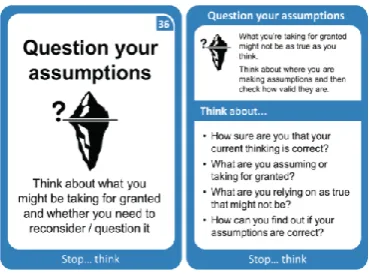
Participants then considered 30 different designs, each for a potential front or back of a card. As well as in size, orientation and information, designs differed in colour coding, typography, titling, and iconography. Each pair chose three potential ‘whole card’ designs, ranked by preference. All felt that, as novices, having iconography and colour coding would aid understanding, recognition and selection, and that single-word titles were too ambiguous. The top-ranked card created by each pair was identical: a smaller-sized, portrait-oriented, double-sided card, with a distinct, uncluttered front (full title, large icon, brief summary) and more detailed information on the rear.
Categorisation (card deck structure). Finally, participants performed a sorting exercise, using the set of 34 tactic titles and seven category titles, in order to inform the information architecture of our card deck. Participants discussed each tactic and, as a pair, agreed on which category to put it into. If unsure, they could also place tactics into a “?” category. While both pairs sorted the majority of tactics into the categories to which we had originally assigned them (Pair A 26/34; Pair B 20/34), this exercise helped us to identify some confusing or ambiguous wording, for example, “type” and “look for”, and the need for some categorisation changes.
4
The final card set
Informed by the focus group findings, we revised the card set. Twelve tactics and two categories were renamed, to make them easier to understand. We also reassigned five tactics to different categories and removed two categories. Further discussion within the research team led to a new category of tactic: ‘Stop… think’. Although not used in the focus group study, the final card deck also contains two other card types: Best Practice cards, which have their own category, and Component Information cards, currently assigned to the ‘Get Help’ category, as they hold factual information about components.
6
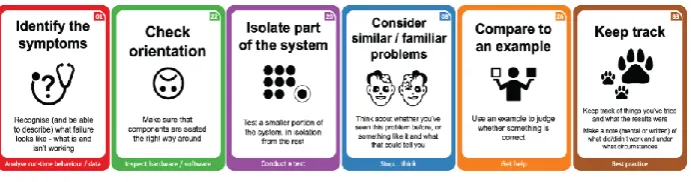
Fig. 1. Example cards from each category
4.1 Tactics categories
The tactics we have chosen for the card set—drawn from a review of both academic and non-academic debugging and troubleshooting literature, and our previous work— aim to guide novice EUDs in diagnosing their problems instead of making haphazard speculative changes to their prototypes, as our previous work has shown they tend to do. The first three categories present three broad tactical approaches EUDs might take: The ‘Analyse run-time behaviour/output’ category contains eight tactics to guide users in using what is—or can be made—visible at run-time to diagnose their problems, suggesting specific things they might look for. The ‘Inspect
hardware/software’ category contains 14 tactics that suggest different types of visual checks EUDs might do, i.e. inspecting the circuit, program, IDE or computer connection—several of the bugs we observed in our previous study could have been identified through visual inspection, had participants known where to look and what to look for. The ‘Conduct a test’ category contains seven tactics that involve making changes, however the aim is to encourage novices to be more systematic in these, conducting focused tests with an idea of what they are looking for. As well as electronics-specific tactics, such as checking the orientation of components, this category contains higher-level tactics, for example, decomposing problems into smaller ones, to isolate cause of failure to a particular area of the prototype. In contrast, the ‘Stop…think’ category contains four tactics that encourage novices to step back from doing and focus on thinking, especially if they are stuck. Finally, the
‘Get help’ category suggests three ways in which novices might use external information, rather than their own knowledge alone, to diagnose and fix their problems.
4.2 Card designs
Fig. 2. Tactic card design, front (left) and rear (right)
The top panel of the card rear repeats the icon in a smaller size, for continued visual recognition if the card is turned over, flanked by a short description of why/how the tactic might be useful. The lower panel contains a list of open questions, which aim to prompt reflection. The category name appears at the bottom of both sides and the title of the card is repeated at the top of the rear, so the card can still be identified when turned over. Categories are colour-coded, using a colour scheme designed for maximum visual difference [10]; cards are bordered in their category colour and a band of the same colour visually separates the two information panels on the rear.
Best Practice, Component Information and Category cards. The best practice cards follow a similar design to the tactic cards but are currently single-sided and contain a description rather than questions, as the aim is to inform, rather than to prompt thinking something through. The component information cards are larger (89mm x 128mm), as they contain far more information and more complex imagery, including component pinout images, specifying correct connection types, and basic circuit wiring information, as well as other information key to using or controlling the component. The category cards are the same width as the tactic and best practice cards but are slightly taller, so that their titles are visible above the other cards, making it easy to see and select cards from a particular category. On the rear of each category card is a bulleted list of the cards it contains.
Additional materials: Playmat and Cards stand. Our previous work suggests that EUDs could benefit from support in structuring and planning their troubleshooting. Inspired by boardgames, we designed a playmat, which provides a ‘shortlist’ area where EUDs can place a selection of tactics to try and an ‘active’ area, for the current card(s). It also reinforces the cycle of ‘diagnose, fix, evaluate’, encouraging EUDs to diagnose before attempting fixes, and to evaluate the result of any fix attempts.
8
5
Discussion and conclusion
We have described the design of a card-based toolkit to support EUDs troubleshooting physical computing bugs, inspired by tools that support a creative or design process. Our aim was to facilitate reflection and encourage more directed exploration when troubleshooting, to improve diagnosis of bugs and evaluation of fixes, and build up novices EUDs’ troubleshooting knowledge and skill. The main contribution of this paper is a novel set of troubleshooting cards, to support EUDs in diagnosing and resolving physical computing bugs.
Our research suggests that a ‘try it and see what happens’ approach is generally a poor way of troubleshooting, which creates a tension with Arduino’s philosophy of people 'having a go', learning from their hands-on experiences and ‘tinkering’ [1]. How to strike the right balance between this and a more structured approach to troubleshooting is still an open research question.
While it is possible to create software-based support, we feel that a card-based, physical tool not only affords the benefits described in section 3.1, it additionally does not give novice EUDS more technology to contend with when troubleshooting problems. The format also encourages flexibility of use, for example, the cards could be used by individuals or collaboratively, and in formal or informal learning environments. We have already received interest from educators teaching physical computing in schools and adult education.
We are currently evaluating our toolkit in an empirical study with EUDs, to investigate the effects of using the cards in hands-on troubleshooting tasks. We intend to refine the cards in light of the results of this study, and make the toolkit available for download, extension, and customisation. We see toolkits such as ours as a vital step towards greater adoption and continued use of physical computing technology by novices.
References
1. Banzi, M.: Getting Started with Arduino. Make: Books, O’Reilly Media, Inc., Sebastopol, CA, USA (2009).
2. Bekker, T., Antle, A.N.: Developmentally situated design (DSD): Making theoretical knowledge accessible to designers of children’s technology. In: Proceedings of CHI '11. pp. 2531–2540 ACM, New York, NY, USA (2011).
3. Booth, T. et al.: Crossed Wires: Investigating the problems of end-user developers in a physical computing task. In: Proc. of CHI '16. pp.3485–3497 ACM, NY, USA (2016). 4. Cao, J. et al.: Idea Garden: Situated support for problem solving by end-user programmers.
Interacting with Computers. 27, 6, 640–660 (2015).
5. Craft, B.: Ten Troubleshooting Tips. In: Arduino Projects For Dummies. pp. 359–367 John Wiley & Sons, Ltd., Chichester, West Sussex, UK (2013).
6. Deng, Y. et al.: Tango cards: A card-based design tool for informing the design of tangible learning games. In: Proc. of DIS '14 (Vancouver, Canada). pp. 695–704 ACM, NY,(2014). 7. Drew, D. et al.: The Toastboard: Ubiquitous instrumentation and automated checking of
8. Fleck, R., Fitzpatrick, G.: Reflecting on reflection: framing a design landscape. In: Proceedings of OzCHI '10. pp. 216-223 ACM, New York, NY, USA (2010).
9. Friedman, B., Hendry, D.: The Envisioning cards: A toolkit for catalyzing humanistic and technical imaginations. In: Proc. of CHI '12. pp1145–1148 ACM, New York, USA (2012). 10. Harrower, M., Brewer, C.A.: Colorbrewer.org: An online tool for selecting colour schemes
for maps. The Cartographic Journal. 40, 1, 27–37 (2003).
11. Lucero, A., Arrasvuori, J.: PLEX Cards: a source of inspiration when designing for playfulness. In: Proc. of the 3rd Int. Conference on Fun and Games. ACM, NY, USA (2010)
12. Miettinen, R.: The concept of experiential learning and John Dewey’s theory of reflective thought and action. International Journal of Lifelong Education. 19, 1, 54–72 (2000). 13. Mora, S. et al.: Tiles: A card-based ideation toolkit for the Internet of Things. In:
Proceedings of DIS ’17. pp. 587–598 ACM, New York, NY, USA (2017).
14. Mueller, F. et al.: Supporting the creative game design process with exertion cards. In: Proceedings of CHI '14. pp. 2211–2220 ACM, New York, NY, USA (2014).