
Vol. 3, Nos. 1–2 (2009) 1–137 c
2010 O. Shaer and E. Hornecker DOI: 10.1561/1100000026
Tangible User Interfaces: Past, Present, and
Future Directions
By Orit Shaer and Eva Hornecker
Contents
1 Introduction 3
2 Origins of Tangible User Interfaces 6
2.1 Graspable User Interface 7
2.2 Tangible Bits 8
2.3 Precursors of Tangible User Interfaces 10
3 Tangible Interfaces in a Broader Context 14
3.1 Related Research Areas 14
3.2 Unifying Perspectives 17
3.3 Reality-Based Interaction 19
4 Application Domains 22
4.1 TUIs for Learning 23
4.2 Problem Solving and Planning 27 4.3 Information Visualization 31
4.4 Tangible Programming 33
4.5 Entertainment, Play, and Edutainment 36
4.7 Social Communication 43 4.8 Tangible Reminders and Tags 44
5 Frameworks and Taxonomies 46
5.1 Properties of Graspable User Interfaces 47 5.2 Conceptualization of TUIs and the MCRit
Interaction Model 48
5.3 Classifications of TUIs 49
5.4 Frameworks on Mappings: Coupling the Physical
with the Digital 51
5.5 Tokens and Constraints 54
5.6 Frameworks for Tangible and Sensor-Based Interaction 56 5.7 Domain-Specific Frameworks 59
6 Conceptual Foundations 62
6.1 Cuing Interaction: Affordances, Constraints, Mappings
and Image Schemas 62
6.2 Embodiment and Phenomenology 64 6.3 External Representation and Distributed Cognition 66
6.4 Two-Handed Interaction 69
6.5 Semiotics 70
7 Implementation Technologies 73
7.1 RFID 74
7.2 Computer Vision 75
7.3 Microcontrollers, Sensors, and Actuators 77 7.4 Comparison of Implementation Technologies 79 7.5 Tool Support for Tangible Interaction 81
8 Design and Evaluation Methods 88
8.1 Design and Implementation 88
Tangible User Interfaces 96
9.1 Strengths 97
9.2 Limitations 105
10 Research Directions 109
10.1 Actuation 109
10.2 From Tangible User Interfaces to Organic User Interfaces 111 10.3 From Tangible Representation to Tangible Resources for
Action 112
10.4 Whole-Body Interaction and Performative Tangible
Interaction 114
10.5 Aesthetics 115
10.6 Long-Term Interaction Studies 115
11 Summary 118
Acknowledgments 120
Foundations and TrendsR in Human–Computer Interaction Vol. 3, Nos. 1–2 (2009) 1–137
c
2010 O. Shaer and E. Hornecker DOI: 10.1561/1100000026
Tangible User Interfaces: Past, Present, and
Future Directions
Orit Shaer
1and Eva Hornecker
21 Wellesley College, 106 Central St., Wellesley, MA, 02481, USA,
2 University of Strathclyde, 26 Richmond Street, Glasgow, Scotland,
G1 1XH, UK, [email protected]
Abstract
In the last two decades, Tangible User Interfaces (TUIs) have emerged as a new interface type that interlinks the digital and physical worlds. Drawing upon users’ knowledge and skills of interaction with the real non-digital world, TUIs show a potential to enhance the way in which people interact with and leverage digital information. However, TUI research is still in its infancy and extensive research is required in order to fully understand the implications of tangible user interfaces, to develop technologies that further bridge the digital and the physical, and to guide TUI design with empirical knowledge.
1
Introduction
“We live in a complex world, filled with myriad objects, tools, toys, and people. Our lives are spent in diverse interaction with this environment. Yet, for the most part, our computing takes place sitting in front of, and staring at, a single glowing screen attached to an array of buttons and a mouse.” [253]
For a long time, it seemed as if the human–computer interface was to be limited to working on a desktop computer, using a mouse and a key-board to interact with windows, icons, menus, and pointers (WIMP). While the detailed design was being refined with ever more polished graphics, WIMP interfaces seemed undisputed and no alternative inter-action styles existed. For any application domain, from productivity tools to games, the same generic input devices were employed.
Over the past two decades, human–computer interaction (HCI) researchers have developed a wide range of interaction styles and inter-faces that diverge from the WIMP interface. Technological advance-ments and a better understanding of the psychological and social aspects of HCI have lead to a recent explosion of new post-WIMP
interaction styles. Novel input devices that draw on users’ skill of inter-action with the real non-digital world gain increasing popularity (e.g., the Wii Remote controller, multi-touch surfaces). Simultaneously, an invisible revolution takes place: computers become embedded in every-day objects and environments, and products integrate computational and mechatronic components,
This monograph provides a survey of the research on Tangible User Interfaces (TUIs), an emerging post-WIMP interface type that is concerned with providing tangible representations to digital infor-mation and controls, allowing users to quite literally grasp data with their hands. Implemented using a variety of technologies and materi-als, TUIs computationally augment physical objects by coupling them to digital data. Serving as direct, tangible representations of digital information, these augmented physical objects often function as both input and output devices providing users with parallel feedback loops:
physical, passive haptic feedback that informs users that a certain phys-ical manipulation is complete; and digital, visual or auditory feedback that informs users of the computational interpretation of their action [237]. Interaction with TUIs is therefore not limited to the visual and aural senses, but also relies on the sense of touch. Furthermore, TUIs are not limited to two-dimensional images on a screen; interaction can become three-dimensional. Because TUIs are an emerging field of research, the design space of TUIs is constantly evolving. Thus, the goal of this monograph is not to bound what a TUI is or is not. Rather, it describes common characteristics of TUIs and discusses a range of perspectives so as to provide readers with means for thinking about particular designs.
Tangible Interfaces have an instant appeal to a broad range of users. They draw upon the human urge to be active and creative with one’s hands [257], and can provide a means to interact with computational applications in ways that leverage users’ knowledge and skills of inter-action with the everyday, non-digital, world [119].
5
Following diverse workshops related to tangible interfaces at different conferences, the first conference fully devoted to tangible interfaces and, more generally, tangible interaction, took place in 2007 in Baton Rouge, Louisiana. Since then, the annual TEI Conference (Tangible, Embedded and Embodied Interaction) serves as a focal point for a diverse commu-nity that consists of HCI researchers, technologists, product designers, artists, and others.
This monograph is the result of a systematic review of the body of work on tangible user interfaces. Our aim has been to provide a useful and unbiased overview of history, research trends, intellectual lineages, background theories, and technologies, and open research questions for anyone who wants to start working in this area, be it in developing systems or analyzing and evaluating them. We first surveyed seminal work on tangible user interfaces to expose lines of intellectual influence. Then, in order to clarify the scope of this monograph we examined past TEI and CHI proceedings for emerging themes. We then identified a set of questions to be answered by this monograph and conducted dedicated literature research on each of these questions.
2
Origins of Tangible User Interfaces
The development of the notion of a “tangible interface” is closely tied to the initial motivation for Augmented Reality and Ubiquitous Com-puting. In 1993, a special issue of the Communications of the ACM titled “Back to the Real World” [253] argued that both desktop com-puters and virtual reality estrange humans from their “natural environ-ment”. The issue suggested that rather than forcing users to enter a virtual world, one should augment and enrich the real world with digital functionality. This approach was motivated by the desire to retain the richness and situatedness of physical interaction, and by the attempt to embed computing in existing environments and human practices to enable fluid transitions between “the digital” and “the real”. Ideas from ethnography, situated cognition, and phenomenology became influen-tial in the argumentation for Augmented Reality and Ubiquitous Com-puting: “humans are of and in the everyday world” [251]. Tangible Interfaces emerged as part of this trend.
While underlying ideas for tangible user interfaces had been discussed in the “Back to the Real World” special issue, it took a few years for these ideas to evolve into an interaction style in its own right. In 1995, Fitzmaurice et al. [67] introduced the notion of a Graspable Interface, where graspable handles are used to manipu-late digital objects. Ishii and his students [117] presented the more
2.1 Graspable User Interface 7
comprehensive vision of Tangible Bits in 1997. Their vision centered on turning the physical world into an interface by connecting objects and surfaces with digital data. Based on this work, the tangible user interface has emerged as a new interface and interaction style.
While Ishii and his students developed a rich research agenda to fur-ther investigate their Tangible Bits vision, ofur-ther research teams focused on specific application domains and the support of established work practices through the augmentation of existing media and artifacts. Such efforts often resulted in systems that can also be classified as Tan-gible Interfaces. Particularly notable is the work of Wendy Mackay on the use of flight strips in air traffic control and on augmented paper in video storyboarding [150]. Similar ideas were developed simultaneously worldwide, indicating a felt need for a countermovement to the increas-ing digitization and virtualization. Examples include the German Real Reality approach for simultaneous building of real and digital models [24, 25], and the work of Rauterberg and his group in Switzerland. The latter extended Fitzmaurice’s graspable interface idea and devel-oped Build-IT, an augmented reality tabletop planning tool that is interacted via the principle of graspable handles. In Japan, Suzuki and Kato [230, 231] developed AlgoBlocks to support groups of children in learning to program. Cohen et al. [41] developed Logjam to support video logging and coding.
For most of the decade following the proposition of TUIs as a novel interface style, research focused on developing systems that explore technical possibilities. In recent years, this proof-of-concept phase has led on to a more mature stage of research with increased emphasis on conceptual design, user and field tests, critical reflection, theory, and building of design knowledge. Connections with related developments in the design disciplines became stronger, especially since a range of toolkits have become available which considerably lower the threshold for developing TUIs.
2.1 Graspable User Interface
digital objects. Their aim was to increase the directness and manipu-lability of graphical user interfaces. A block is anchored to a graphical object on the monitor by placing it on top of it. Moving and rotating the block has the graphic object moving in synchrony. Placing two blocks on two corners of an object activates a zoom as the two corners will be dragged along with the blocks. This allowed for the kinds of two-handed or two-fingered interactions that we nowadays know from multi-touch surfaces. A further focus was the use of functionally dedicated input tools.
Graspable handles in combination with functionally dedicated input tools were argued to distribute input in space instead of time, effec-tively de-sequentializing interaction, to support bimanual action and to reduce the mediation between input devices and interaction objects. A system that directly builds on this idea is Rauterberg’s Build-IT [69]. This utilizes said input mechanisms in combination with Aug-mented Reality visualizations for architectural and factory planning tasks.
2.2 Tangible Bits
Only a few years later, Hiroshi Ishii and his students introduced the notion of Tangible Bits which soon led to proposition of a Tangible User Interface [117]. The aim was to make bits directly accessible and manipulable, using the real world as a display and as medium for manipulation – the entire world could become an interface. Data could be connected with physical artifacts and architectonic surfaces, making bits tangible. Ambient displays on the other hand would represent information through sound, lights, air, or water movement. The artwork of Natalie Jeremijenko, in particular LiveWire, a dangling, dancing string hanging from the ceiling with its movement visualizing network and website traffic served as an inspiration for the concept of ambient displays.
2.2 Tangible Bits 9
includes multisensory perception:
“GUIs fall short of embracing the richness of human senses and skills people have developed through a life-time of interaction with the physical world. Our attempt is to change ‘painted bits’ into ‘tangible bits’ by taking advantage of multiple senses and the multimodality of human interactions with the real world. We believe the use of graspable objects and ambient media will lead us to a much richer multi-sensory experience of digital information.” [117]
Ishii’s work focused on using tangible objects to both manipulate and represent digital content. One of the first TUI prototypes was Tan-gible Geospace, an interactive map of the MIT Campus on a projection table. Placing physical icons onto the table, e.g., a plexiglas model of the MIT dome, had the map reposition itself so that the model was positioned over the respective building on the map. Adding another tangible model made the map zoom and turn to match the buildings. Small movable monitors served as a magic lens showing a 3D repre-sentation of the underlying area. These interfaces built on the gras-pable interface’s interaction principle of bimanual direct manipulation, but replaced its abstract and generic blocks with iconic and symbolic stand-ins.
Fig. 2.1 Urp [241], a TUI for urban planning that combines physical models with interactive simualation. Projections show the flow of wind, and a wind probe (the circular object) is used to investigate wind speed (photo: by E. Hornecker).
changes affect the digital shadows that are projected and the wind simulation.
2.3 Precursors of Tangible User Interfaces
Several precursors to the work of Ishii and his students have influenced the field. These addressed issues in specific application domains such as architecture, product design, and educational technology. The ideas introduced by these systems later inspired HCI researchers in their pursuit to develop new interface and interaction concepts.
2.3.1 The Slot Machine
2.3 Precursors of Tangible User Interfaces 11
forms are created in space, writing programs was difficult for younger children and impossible for preschoolers who could not type. Perlman believed that these difficulties result not only from the language syn-tax, but also from the user interface. Her first prototype consisted of a box with a set of buttons that allowed devising simple programs from actions and numbers. The box then was used as a remote control for the turtle. This device could also record and replay the turtle movement, providing a programming-by-demonstration mode. Her final prototype was the Slot Machine, which allowed modifying programs and proce-dure calls.
In the Slot Machine, each programming language construct (an action, number, variable, or condition) is represented by a plastic card. To specify a program, sequences of cards are inserted into one of three differently colored racks on the machine. On the left of the rack is a “Do It” button, that causes the turtle to execute the commands from left to right. Stacking cards of different type onto each other creates complex commands such as “move forward twice”. Placing a special colored card in a rack invokes a procedure call for the respectively col-ored rack that upon execution returns to the remainder of the rack. This mechanism implements function calls as well as simple recursion.
2.3.2 The Marble Answering Machine
Often mentioned as inspiration for the development of tangible inter-faces [117] are the works of product designer Durrell Bishop. During his studies at the Royal College of Art, Bishop designed the Marble Answering Machine as a concept sketch [1, 190]. In the Marble Answer-ing Machine, incomAnswer-ing calls are represented with colored marbles that roll into a bowl embedded in the machine (see Figure 2.2). Placed into an indentation, the messages are played back. Putting a marble onto an indentation on the phone calls the number from which the call originated.
Fig. 2.2 The Marble Answering Machine [1]. Left: new messages have arrived and the user chooses to keepsake one to hear later. Right: the user plays back the selected message (graphics by Yvonne Baier, reprinted from form+zweck No. 22 www.formundzweck.de).
Fig. 2.3 Frazer and Frazer [71] envisioned an intelligent 3D modeling system that creates a virtual model from tangible manipulation (graphic courtesy: John Frazer).
users’ emotions and associations. Most striking is how Bishop’s works assign new meanings to objects (object mapping), turning them into pointers to something else, into containers for data and references to other objects in a network. Many of his designs further employ spatial mappings, deriving meaning from the context of an action (e.g., its place). Bishop’s designs use known objects as legible references to the aesthetics of new electronic projects, yet they refrain from simplistic lit-eral metaphors. Playfully recombining meanings and actions, Bishop’s designs have remained a challenge and inspiration.
2.3.3 Intelligent 3D Modeling
[image:15.612.188.425.296.411.2]2.3 Precursors of Tangible User Interfaces 13
alternatives to architectural CAD systems which at that time were clunky and cumbersome. These two groups were motivated by simi-lar ideas. They sought to enable the future inhabitants of buildings to partake in design discussions with architects, to simplify the “man– machine dialog” with CAD, and to support rapid idea testing.
Thus, both came up with the idea of using physical models as input devices for CAD systems. Aish described his approach in 1979 [3], argu-ing that numerical CAD-modelargu-ing languages discourage rapid testargu-ing and alteration of ideas. Frazer was then first to build a working proto-type, demoed live at the Computer Graphics conference in 1980. Aish and Frazer both developed systems for “3D modelling” where users build a physical model from provided blocks. The computer then inter-rogates or scans the assembly, deduces location, orientation and type of each component, and creates a digital model. Users can configure the digital properties of blocks and let the computer perform calcu-lations such as floor space, water piping, or energy consumption. The underlying computer simulation could also provide suggestions on how to improve the design. Once the user is satisfied, the machine can pro-duce the plans and working drawings.
3
Tangible Interfaces in a Broader Context
In this section, we survey research areas that are related to and overlap with TUIs. We also discuss literature that interprets TUIs as part of an emerging generation of HCI, or a larger research endeavor. We begin by describing the fields of Tangible Augmented Reality, Tangible Table-top Interaction, Ambient displays, and Embodied Interaction. We then discuss unifying perspectives such as Tangible Computing, Tangible Interaction, and Reality-Based Interaction.
3.1 Related Research Areas
Various technological approaches in the area of next generation user interfaces have been influencing each other, resulting in mixed approaches that combine different ideas or interaction mechanisms. Some approaches, such as ambient displays, were originally conceived as part of the Tangible Bits vision, others can be considered a specialized type of TUI or as sharing characteristics with TUIs.
3.1.1 Tangible Augmented Reality
Tangible Augmented Reality (Tangible AR) interfaces [132, 148, 263] combine tangible input with an augmented reality display or output.
3.1 Related Research Areas 15
The virtual objects are “attached” to physical objects that the user manipulates. A 3D-visualization of the virtual object is overlaid onto the physical manipulative which is tagged with a visual marker (detectable with computer vision). The digital imagery becomes vis-ible through a display, often in the form of see-through glasses, a magic lens, or an augmented mirror. Such a display typically shows a video image where the digital imagery is inserted at the same location and 3D orientation as the visual marker. Examples of this approach include augmented books [18, 263] and tangible tiles [148].
3.1.2 Tangible Tabletop Interaction
Tangible tabletop interaction combines interaction techniques and tech-nologies of interactive multi-touch surfaces and TUIs. Many tangible interfaces use a tabletop surface as base for interaction, embedding the tracking mechanism in the surface. With the advancement in interac-tive and multi-touch surfaces the terminology has become more specific, tabletop interaction referring predominantly to finger-touch or pen-based interaction. But simultaneously, studies within the research area of interactive surfaces increasingly investigate mixed technologies [135], typically utilizing a few dedicated tangible input devices and artifacts on a multi-touch table. Research in this field is starting to investi-gate the differences between pure touch-based interaction and tangible handles (e.g., [232]) and to develop new techniques for optical object sensing through the surface (e.g., [118]). Toolkits such as reacTIVi-sion [125] enable a blend of tangible input and multi-touch, the most prominent example being the reacTable [125], a tool for computer music performers.
3.1.3 Ambient Displays
Greenberg and Fitchett [82] describe a range of student projects that used the Phidgets toolkit to build physical awareness devices, for example, a flower that blooms to convey the availability of a work colleague. The active-Hydra project [83] introduced a backchannel, where user’s proximity to and handling of a figurine affect the fidelity of audio and video in a media window (an always-on teleconference). Some more recent projects employ tangible interfaces as ambient dis-plays. Many support distributed groups in maintaining awareness [23], using physical artifacts for input as well as output. Commercial applica-tions include the Nabaztag bunnies, which in response to digital events received via a network connection blink and move their ears. Edge and Blackwell [51] suggest that tangible objects can drift between focus and periphery of a user’s attention and present an example of peripheral (and thus ambient) interaction with tangibles. Here tangible objects on a surface next to an office worker’s workspace represent tasks and documents, supporting personal and group task management and coor-dination.
3.1.4 Embodied User Interfaces
The idea of embodied user interfaces [54, 64] acknowledges that com-putation is becoming embedded and embodied in physical devices and appliances. The manual interaction with a device can thus become an integral part of using an integrated physical–virtual device, using its body as part of the interface:
“So, why can’t users manipulate devices in a variety of ways - squeeze, shake, flick, tilt - as an integral part of using them? (...) We want to take user interface design a step further by more tightly integrating the physical body of the device with the virtual contents inside and the graphical display of the content.” [64]
3.2 Unifying Perspectives 17
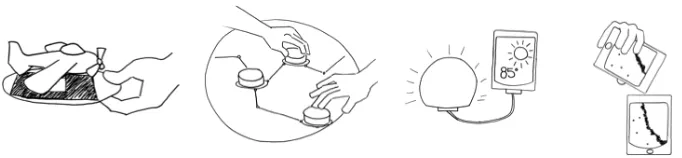
Fig. 3.1 Research areas related to TUIs. From left to right: Tangible Augmented Reality, virtual objects (e.g., airplane) are “attached” to physically manipulated objects (e.g., card); Tangible Tabletop Interaction, physical objects are manipulated upon a multi-touch surface; Ambient Displays, physical objects are used as ambient displays; Embodied User Interfaces, physical devices are integrated with their digital content.
computational functionality can be considered a specialized type of tangible interface where there is only one physical input object (which may have different parts that can be manipulated).
3.2 Unifying Perspectives
3.2.1 Tangible Computing
Dourish [50] discusses multiple concepts that are based on the idea of integrating computation into our everyday world under the term
tangible computing. These concepts include TUIs, Ubiquitous Comput-ing, Augmented Reality, Reactive Rooms, and Context-Aware Devices. Tangible Computing covers three trends: distributing computation over many specialized and networked devices in the environment, augment-ing the everyday world computationally so that it is able to react to the user, and enabling users to interact by manipulating physical objects. The concepts share three characteristics [50]:
• no single locus of control or interaction. Instead of just one input device, there is a coordinated interplay of different devices and objects;
• no enforced sequentiality (order of actions) and no modal interaction; and
Embedding computation in the environment creates embodied inter-action — it is socially and physically situated. As a core research ques-tion Dourish [50] identifies the relaques-tion of acques-tions with the space in which they are performed. This refers to the configuration of the envi-ronment effecting computational functionality, and the position and orientation of the user being relevant for how actions are interpreted (e.g., a device is activated if one walks toward it). The term tangible computingemphasizes the material manifestation of the interface (this is where tangible interfaces go the farthest) and the embedding of com-puting in the environment.
Tangible Interfaces differ from the other approaches by making evi-dent that representations are artifacts in their own right that the user can directly act upon, lift up, rearrange, sort and manipulate [50]. In particular, at one moment in time, several levels of meaning can be present. Moving a prism token in Illuminating Light (a physics learn-ing system that emulates a laser light installation with laser beams and prisms on a surface) [240] can be done simply to make space, to explore the system response, as moving the prism (seeing the token as stand-in), as moving the laser beam (using the token as a tool), or to manipulate the mathematical simulation underneath (the entire system is a tool). The user can freely switch attention between these different levels. This seamless nesting of levels is made possible through the embodiment of computation.
3.2.2 Tangible Interaction
3.3 Reality-Based Interaction 19
expressiveness and meaning of bodily movement and less on the phys-ical device employed in generating this movement or the “data” being manipulated.
The tangible interface definition “using physical objects to rep-resent and manipulate digital data” is identified as a data-centered viewbecause this phrasing indicates that data is the starting point for design. The expressive-movement view, in contrast, focuses on bodily movement, rich expression and physical skill, and starts design by thinking about the interactions and actions involved. In the arts, a
space-centered view is more dominant, emphasizing interactive and reactive spaces where computing and tangible elements are means to an end and the spectator’s body movement can become an integral part of an art installation. Interaction designers have also developed an interest in bodily interaction, which can be pure movement (gestures, dance) or is related to physical objects.
Tangible Interaction adopts a terminology preferred by the design community, which focuses on the user experience and interaction with a system [14, 243]. As an encompassing perspective it emphasizes tangi-bility and materiality, physical embodiment of data, bodily interaction, and the embedding of systems in real spaces and contexts. This embed-dedness is why tangible interaction is always situated in physical and social contexts (cf. [50]).
3.3 Reality-Based Interaction
Jacob et al. [119] proposed the notion of reality-based interaction as a unifying framework that ties together a large subset of emerging inter-action styles and views them as a new generation of HCI. This notion encompasses a broad range of interaction styles including virtual real-ity, augmented realreal-ity, ubiquitous and pervasive computing, handheld interaction, and tangible interaction [119].
Fig. 3.2 Four themes of reality-based interaction [119].
Furthermore, emerging interaction styles transform interaction from a segregated activity that takes place at a desk to a fluid free form activity that takes place within the non-digital environment. Jacob et al. [119] identified four themes of interaction with the real world that are typically leveraged (see Figure 3.2):
• Na¨ıve Physics: the common sense knowledge people have about the physical world.
• Body Awareness and Skills: the awareness people have of their own physical bodies and their skills of controlling and coordinating their bodies.
• Environment Awareness and Skills: the sense of surroundings people have for their environment and their skills of manip-ulating and navigating their environment.
• Social Awareness and Skills: the awareness people have that other people share their environment, their skills of interact-ing with each other verbally or non verbally, and their ability to work together to accomplish a common goal.
3.3 Reality-Based Interaction 21
Jacob et al. further suggest that the trend toward increasing reality-based interaction is a positive one, because basing interaction on pre-existing skills and knowledge from the non-digital world may reduce the mental effort required to operate a system. By drawing upon pre-existing skills and knowledge, emerging interaction styles often reduce the gulf of execution [168], the gap between users’ goals for actions and the means to execute those goals. Thus, Jacob et al. encourage interaction designers to design their interfaces so that they leverage reality-based skills and metaphors as much as possible and give up on reality only after explicit consideration and in return for other desired qualities such as expressive power, efficiency, versatility, ergonomics, accessibility, and practicality.
4
Application Domains
In this section we discuss a sample of existing TUIs. While some of the interfaces we discuss here are central examples that are obviously considered a TUI, others are more peripheral and have TUI-like char-acteristics. The goal of the paper is to describe these characteristics and provide readers with ways for thinking and discussing them rather than bounding what a TUI is or is not. Dominant application areas for TUIs seem to be learning, support of planning and problem solving, programming and simulation tools, support of information visualiza-tion and exploravisualiza-tion, entertainment, play, performance and music, and also social communication. Recently, we have seen an even wider expan-sion of application examples into areas such as facilitating discusexpan-sions about health information among women in rural India [179], tracking and managing office work [51], or invoice verification and posting [112]. The domains we discuss here are not mutually exclusive, as very often a TUI can be, for example, a playful learning tool. For some areas there are already specialized accounts. An excellent and detailed overview of the argumentations for learning with tangibles and of the research literature available in 2004 is provided in a Futurelab report on Tangibles and Learning [174]. Jorda [124] provides an overview of the history of and motivation for music performance tangible interfaces.
4.1 TUIs for Learning 23
4.1 TUIs for Learning
A large number of TUIs can be classified as computer-supported learn-ing tools or environments. There are several underlylearn-ing reasons for this. First, learning researchers and toy designers have always followed the strategy of augmenting toys to increase their functionality and attrac-tiveness. Second, physical learning environments engage all senses and thereby support the overall development of the child. With reference to Bruner and Piaget, research and theory on learning stresses the role of embodiment, physical movement, and multimodal interaction (cf. [6, 174]). Furthermore, studies on gesture have shown how gesturing supports thinking and learning [80]. Moreover, if a system supports learning the fundamentals of a particular domain and is thus aimed at beginners, it rarely needs to cater for complex or large examples. TUI developers thus evade some of the design problems inherent for TUIs (see Section 9 on strength and limitations of TUIs), such as scaling up to large numbers of objects or connections between objects and of screen estate or “physical space”. A TUI might also abstract from some of the details that beginners do not deal with yet.
A range of learning systems relates to the categories of problem solv-ing, plannsolv-ing, and simulation systems, which are described in detail later-on. These include, for example, Tinkersheets, which supports learning about logistics [267], and Illuminating Light [240], a learning environment for holography and optics. Many TUI systems also com-bine learning with entertainment, as is the case for educational toys or museum installations. We here mention some learning-related systems that also belong to other categories, but defer the discussion of TUIs for tangible programming to a separate section.
Fig. 4.1 The Flow Blocks [266] allow children to explore concepts relevant for understanding causality. The blocks can be annotated to represent a real-world system such as virus spread in a population. The blocks light up to show the data flow, and children can probe the current values being propagated through a block by sticking a little display onto it (image courtesy of Oren Zuckerman).
children to build their own apparatus for scientific experiments from sensors, actuators, and robotic parts (http://www.picocricket.com/).
4.1 TUIs for Learning 25
Fig. 4.2 Topobo [196] consists of connectible movable parts that are attached to an “active” joint (the slightly bigger, blue part) that can record and replay motion of attached parts (images from http://www.topobo.com/topobo-hires/index.html courtesy: Hayes Raffle).
one joint. As a learning tool, Topobo enables children to learn about balance, movement dynamics, and anatomy.
A more recent development is TUI’s supporting learning forchildren with special needs. Digital construction kits such as Topobo [196] and Lego MindstormsTM are increasingly used within educational robotics specifically for special needs education [248]. Hengeveld has system-atically explored the design space for speech therapy through story-reading for severely handicapped toddlers in the Linguabytes project [93, 94], see Figure 4.3. Physical interaction here has benefits of slowing down interaction, training perceptual-motor skills, providing sensorial experience, supporting collaborative use, and giving more control to the toddler. Overall, a tangible interface can provide access to a rich learning environment with more opportunities for cognitive, linguistic, and social learning than a traditional GUI system.
4.2 Problem Solving and Planning 27
A few TUIs have also been developed for diagnostic purposes, exploiting the capability of the digitized structure to log manipulation. The kinds of mistakes and steps taken in building a spatial structure after a given model can indicate the level of cognitive spatial abilities a child has developed or the effects of a brain injury on adults [218]. Other projects develop toys that record interaction, providing data to assess a child’s manual and cognitive development [256].
4.2 Problem Solving and Planning
Three aspects of TUIs have been demonstrated as effective in support-ing problem solvsupport-ing: (1) epistemic actions, (2) physical constraints, and (3) tangible representations of a problem. Epistemic actions [137] are the non-pragmatic manipulations of artifacts aimed at better under-standing a task’s context. Such actions have been shown to facilitate mental work [137]. TUIs support a wide range of epistemic actions rang-ing from rotatrang-ing physical objects in space to arrangrang-ing them upon a surface. Physical constraints can make use of physical affordance to communicate interaction syntax and to limit the solution space. Thus, physical constraints can decrease the need for learning explicit rules and lower the threshold for using a computational system for a particular task [239]. Finally, tangible representation is most compelling in spatial or geometric application domains such as urban planning and architec-ture where the physical arrangement and manipulation of objects has a direct mapping to the represented problem. It has been found that using a TUI can support designers’ spatial cognition, reduce cognitive load, and enable more creative immersion in the problem [134]. How-ever, several studies have also demonstrated the benefits of tangible interaction with abstract information tasks [120, 180].
Following, we describe several TUI instances aimed at problem solving, planning, and simulation. We first review TUIs that repre-sent domains with direct physical mapping. Then, we review TUIs for abstract information tasks.
proximities, reflections, wind, and visual space. While users place and manipulate building models upon the surface, the interface overlays digital information onto the surface, activating and updating multiple simulations. In addition to physical building models, Urp also provides a collection of physical tools for manipulating environmental conditions such as time of day and wind direction. By allowing users to collabo-ratively interact with physical objects, Urp provides an intuitive way to interact with complex computational simulations.
[image:31.612.149.465.403.612.2]Similar to Urp, MouseHaus Table [108] enables urban planners to intuitively and collaboratively interact with a pedestrian simulation program by placing and manipulating everyday objects upon a surface. The ColorTable [154] supports urban planners and diverse stakeholders in envisioning urban change by providing them with means for co-constructing mixed-reality scenes against a background. The interface supports users in collaboratively building, animating, and changing a scene. SandScape and Illuminating Clay [115] are TUIs for designing and understanding landscapes (Figure 4.4). The users can alter the
4.2 Problem Solving and Planning 29
Fig. 4.5 Pico [181] is an interactive surface that supports solving complex spatial layout problems through improvization, Pico allows users to employ everyday physical objects as interface elements that serve as mechanical constraints within the problem space (Photo courtesy: James Patten).
form of a landscape model by manipulating sand or clay while seeing the resultant effects of computational analysis generated and projected on the landscape in real time.
Beyond architecture and urban planning, several TUI instances were developed to support problem solving and simulation in application domains of topological nature. Examples include Illuminating Light [240], a learning environment for holography and optics where plas-tic objects replace the real (and expensive) elements. Light beams are projected onto the setup from above, simulating light beams emitted from a light source and diverted by mirrors and prisms. In addition, angles, distances, and path length are projected into the simulation. Another example is an interactive surface for collaborative IP network design [141], which supports collaborative network design and simula-tion by a group of experts and customers. Using this system, users can directly manipulate network topologies, control parameters of nodes and links using physical pucks on the interaction table, and simultane-ously see the simulation results projected onto the table in real time. Additional examples include a hub and strut TUI for exploring graph theory [212] and a constructive assembly for learning about system dynamics [266].
4.3 Information Visualization 31
Fig. 4.6 Tinkersheets [267] supports learning about warehouse logistics and enables users to set simulation parameters through interaction with paper forms where small black magnets are placed onto parameter slots (photo: E. Hornecker).
4.3 Information Visualization
By offering rich multimodal representation and allowing for two-handed input, tangible user interfaces hold a potential for enhancing the inter-action with visualizations. Several systems illustrate the use of tangi-ble interaction techniques for exploring and manipulating information visualizations. Following we describe some example TUIs. We focus on TUIs that were fully implemented and evaluated with users.
or selection handles upon the projected map. The system was eval-uated with geophysicists at their work place. The evaluation showed that users of the tangible user interface performed better than users of a standard GUI for a cutting line selection task on a geographical subsoil map.
[image:35.612.145.471.343.585.2]Ullmer et al. [239] developed two tangible query interface pro-totypes that use physical tokens to represent database parameters (Figure 4.7). These tokens are manipulated upon physical constraints such as tracks and slots, which map compositions of tokens onto inter-pretations including database queries, views, and Boolean operations. This approach was evaluated and shown to be a feasible approach for constructing simple database queries, however, the evaluation did not show a performance advantage over a traditional GUI interface. Gillet
4.4 Tangible Programming 33
et al. [78] present a tangible user interface for structural molecular biology. It augments a current molecular viewer by allowing users to interact with tangible models of molecules to manipulate virtual rep-resentations (such as electrostatic field) that are overlaid upon the tangible models. Preliminary user studies show that this system pro-vides several advantages over current molecular viewer applications. However, to fully understand the benefits of this approach the system requires further evaluation.
4.4 Tangible Programming
The concept of tangible programming, the use of tangible interaction techniques for constructing computer programs, has been around for almost three decades since Radia Perlman’s Slot Machine interface [185] was developed to allow young children to create physical Logo pro-grams. Suzuki and Kato coined the term Tangible Programming in 1993 to describe their AlgoBlocks system [230]. McNerney [161] provides an excellent historical overview of electronic toys developed mainly at MIT that are aimed at helping children to develop advanced problem-solving skills. Edge and Blackwell [52] present a set of correlates of the Cog-nitive Dimensions (CDs) of Notations frameworks specialized for TUIs and apply this framework to tangible programming systems. Their CDs analysis provides means for considering how the physical properties of tangible programming languages influence the manipulability of the information structure created by a particular language. Following, we discuss a number of TUIs that have presented techniques for program-ming, mainly in the context of teaching abstract concepts in elementary education.
Several TUIs allow children to teach an electronic toy to move by repeating a set of guiding motions or gestures. Examples include Topobo [196], Curlybot [73], and StoryKits [223]. This approach for programming is often referred to asprogramming by demonstration[43] or, as suggested by Laurel, programming by rehearsal [146]. Other sys-tems support the construction of physical algorithmic structures for controlling on-screen virtual objects (e.g., AlgoBlocks [230]), or phys-ical lego structures and robots (e.g., Digital Construction Sets [161], Electronic Blocks [258], and Tern [103]). Such systems could be clas-sified as constructive assemblies [239], systems in which users connect modular pieces to create a structure.
[image:37.612.138.477.531.603.2]Many tangible programming systems use physical constraints to form a physical syntax that adheres to the syntax of a programming language. For example, Tern [103] (see Figure 4.8), consists of a col-lection of blocks shaped like jigsaw puzzle pieces, where each piece represents either a command (e.g., repeat) or a variable (e.g., 2). The physical form of Tern’s pieces determines what type of blocks (com-mand or variables) and how many blocks can be connected to each piece. Fernaeus and Tholander [57] developed a distinct approach to tangible programming that enables children to program their own sim-ulation games while sitting on a floor mat in front of a projection. Instead of representing an entire program through tangible artifacts, an RFID reader has to be placed onto the mat (which spatially cor-responds to the grid) and any new programming cards, representing objects or behaviors, are then placed on the reader. This approach can be characterized by a loose and only temporary coupling between
4.4 Tangible Programming 35
the physical and the screen, but was found to allow for more complex programs to be developed.
It is important to note that many tangible programming systems were designed to teach through free play and exploration and are hence perceived to hold an entertainment value. This perception may be one of the contributing factors for the wide acceptance and popularity of the tangible programming approach. However, until lately only little evi-dence has been provided that tangible programming offers educational benefits beyond those provided by visual programming languages. In a recent study Horn et al. compared the use of a tangible and a graphical interface as part of an interactive computer programming exhibit in the Boston Museum of Science [102]. The collected observations from 260 museum visitors and interviews with thirteen family groups provide evi-dence that children are more likely to approach, and are more actively engaged in a tangible programming exhibit. The effect seems to be especially strong for girls. This evidence shows that carefully designed tangible programming systems can indeed offer concrete educational benefits.
electronics [21, 28, 62]. Tangible programming by demonstration was utilized to program event-based simulations of material flow on con-veyor belts in plants [208]. Users can define simple rules (e.g., “if machine A is occupied and machine B is free then route pallets to B”) by placing tags on a physical model and moving tokens. This generates a Petri Net, which is finally transformed into SPSS code. Researchers at the Mads Clausen Institute in Denmark investigate the use of tangi-ble interfaces in the context of industrial work in plants, in particular for supporting configuration work by service technicians [225]. This research attempts to bring back some of the advantages of traditional mechanical interfaces, such as exploitation of motor memory and phys-ical skills, situatedness, and visibility of action.
4.5 Entertainment, Play, and Edutainment
TUI-related toys, entertainment and edutainment TUIs are overlapping application areas. The Nintendo Wii is probably the best example for a tangible device in entertainment, and its commercial success demon-strates the market potential of TUI-related systems. But we should not overlook other examples that more closely fit the TUI definition. Many modern educational toys employ the principles of physical input, tangi-ble representation, and digital augmentation. For example, Neurosmith markets the MusicBlocks, which allow children to create musical scores by inserting colored blocks into the toy body, varying and combining the basic elements, and the SonicTiles, which allow children to play with the alphabet.
4.5 Entertainment, Play, and Edutainment 37
Fig. 4.9 The Inside DNA exhibition at the Glasgow Science Centre. Left: visitors create a DNA strand by stacking colored blocks with barcodes onto a shaft, and the strand is then read by rotating the tower past a reader. Right: at another exhibit, rotating the lighted tubes selects DNA. An attached screen then explains which kind of animal has been created (images courtesy: Glasgow Science Centre, 2009).
Children’s museum in Boston placing two printed blocks in a recess to form the picture of a musical instrument triggers its sound.
Various systems attempt to bring digital activities such as sound and video capture back into the physical world. Labrune and Mackay [144] present Tangicam, a tangible camera that lets children capture and edit pictures and videos. Tangicam is shaped as a big circular handle with two embedded cameras. Holding the camera up frames the picture, and pressing the handle starts recording. Placed on an interactive table, the handle frame becomes a display space and can be used to slide through the video. Zigelbaum et al. [264] introduce the Tangible Video Editor, a tangible interface for editing digital video clips (see Figure 4.10). Clips are represented by physical tokens and can be manipulated by picking them up, arranging them in the work area (e.g., sorting and sequencing them), or attaching transition tokens between clips. IOBrush [205] is a digital drawing tool for young chil-dren to explore color, texture, and movement. Using a paintbrush that contains a video camera, they can “pick up” moving images, and then draw on a dedicated canvas (Figure 4.11). Jabberstamp [195] enables children to create drawings with embedded audio recordings using a rubber stamp in combination with a microphone to record and a toy trumpet as playback tool.
[image:41.612.140.475.501.610.2]Hinske et al. [97] present guidelines for the design of augmented toy environments, and present an augmented version of a Playmobile Knights’ Castle where movement of the figures triggers audio output (e.g., smoke). Interactive playgrounds can be seen as large-scale TUIs that users move around in. The Cardboard Box Garden [61] is an
4.6 Music and Performance 39
Fig. 4.11 I/O Brush [205] is a physical drawing tool to explore colors, textures, and move-ments found in everyday materials by allowing users to “pick up” images and draw with them (photo courtesy of Kimiko Ryokai).
interactive musical play environment for children built from large card-board boxes. Some boxes start a sound recording whenever opened, others replay one of these tracks, and others control sound parame-ters. Stacking and moving boxes effects the overall sound arrangement. Sturm et al. [229] propose a research agenda for interactive playgrounds that react to children’s interactions and actively encourage play. As key design issues they identify support of social interaction, simplicity com-bined with adequate challenge, goals (either open-ended or explicit) and motivating system feedback.
4.6 Music and Performance
[image:42.612.219.396.139.317.2]interaction. An overview of example systems is provided on Martin Kaltenbrunner’s website [129]. Generally, we can distinguish between four high-level approaches for TUI music applications:instrumentssuch as the reacTable [125], that are fully controllable sound generators or synthesizers, sequencer TUIs that mix and play audio samples,sound toyswith limited user control, andcontrollersthat remotely control an arbitrary synthesizer.
Music TUIs are either designed for the novice where they provide an intuitive and easily accessible toy, or aim at the professional that appre-ciates physical expressiveness, legibility, and visibility when performing electronic music in front of an audience. Besides of being an intriguing application area for research projects, many music TUIs are developed by professionals, such as electronic music artists. The NIME conference series (New Instruments for Musical Expression) is the most important conference venue in this area. The development of new hybrid instru-ments that make use of physical input and seemingly old-fashioned materials to enable users to experiment with sound has been pursued for several decades by renowned research and artist groups, such as the HyperInstruments group at MIT [250], or STEIM, an independent interdisciplinary studio for performance art in Amsterdam.
[image:43.612.138.476.486.603.2]Tangible music interfaces have become visible at the forefront of TUI research through the reacTable [125] (Figure 4.12), a tabletop sys-tem that has given a new interface to modular synthesis programming
4.6 Music and Performance 41
and became a YouTube favorite after songstress Bj¨ork purchased one for her 2007 world tour. Each physical token on the reacTable has a ded-icated function, for example, generating sound, filtering audio, or con-trolling sound parameters. Visual programming becomes easier through dynamic patching, where compatible input and output “slots” automat-ically attract each other through proximity. The “foremost goal was to design an attractive, intuitive and non-intimidating musical instrument for multi-user electronic music performance” [124] that is engaging from the first minute but also is complex, subtle and allows for endless varia-tion. Another commercially available system is the AudioCubes [209]. It consists of a handful of cubes that detect each other’s vicinity and com-municate with each other. Each cube sends and receives audio through its faces. The cubes also act as speakers and light up in colors accord-ing to their configuration. Block Jam [167] is a dynamic polyrhythmic sequencer built from cubes attaching to each other.
The Audiopad system [182] allows users to manipulate and mix sound samples by placing tangible tokens onto an augmented surface (see Figure 4.13). New samples can be dragged onto the surface from a menu on the rim. mixiTUI [183] is a tangible sequencer for sound samples and edited music, which adds loops, controls, and effects onto sounds, and utilizes interaction mechanisms (in particular dynamic patching) from the ReacTable.
[image:44.612.138.476.515.610.2]Kaltenbrunner [129], on his overview website, distinguishes between the following types of tangible musical interfaces. Tangible musical artifacts have music “contained” within a sensorized object, and
different interactions, like rubbing, squeezing, or plucking trigger a different replay (e.g., the Squeezables [250]). Musical building blocks (e.g., [167]) consist of blocks that continuously generate or manipulate sound and can be stacked, attached, or simply placed in each other’s vicinity. With some systems, blocks work independently of each other, with others the spatial arrangement modifies sound, which is trans-mitted and processed through sequencing blocks. With token-based sequencers a surface is repeatedly scanned and each slice of the scan generates sound, location of a token, or other attributes like color deter-mining the note or rhythm played. Furthermore, there are touch-based music tables and tangible music tables (e.g., AudioPad [182], reacTable [125]) which interpret interactions with tangible tokens on an interac-tive table surface. Finally, there are a range of commercial tangible music toys such as Neurosmith’s MusicBlocks and Fisher-Price’s play zone music table. These usually allow selection and placement of tan-gible objects into slots, activating associated sounds modified by the position and overall configuration of elements.
4.7 Social Communication 43
4.7 Social Communication
Since their early days, TUIs were employed as communication sup-port tools. Tangible objects seem suited to represent people and can be positioned in the periphery of attention to support ambient awareness, while staying at hand. As one among several alternative interfaces for Somewire, an audio-only media space, tangible figurines could be posi-tioned on a rack to determine audibility and directionality of sound [224]. The TUI was evaluated as more adequate for the task than two GUI-based prototypes. Greenberg and Kuzuoka [83] employed physi-cal figurines as “digitally controlled physiphysi-cal surrogates of distant team members” for a video-conferencing system. The peek-a-boo surrogate for instance faces to the wall when the remote person is away, and rotates into view once activity is sensed at their desk (Figure 4.14). Moving the surrogates furthermore effects the fidelity of the transmis-sion and thus serves as privacy mechanism.
[image:46.612.139.475.425.573.2]A range of recent projects focus onremote awareness within social networks, for example of groups of friends as in the case of Con-nectibles [128], or distributed work groups [23] where physical objects
transmit awareness information and abstract messages. Edge and Blackwell [51] employ tangibles for task management in office work, and highlight their potential for symbolic social communication, as handing over a token can represent handing on the responsibility for a task or document.
A range of prototypes addresses remote intimacy. In this context, researchers often experiment with different sensory modalities. For example, Strong and Gaver [228] present “feather, scent and shaker”. Squeezing a small device when thinking of the other triggers feathers to fall down a tube, activating a scent, and shaking it makes the other device vibrate. LumiTouch communicates the action of touching a pic-ture frame [34]. Partners can establish a simple vocabulary of touches, or touching may convey an abstract “I think of you”. Lovers Cup [35] has a glass light up when the remote partner uses his/hers in support of the shared ritual of drinking wine together. InTouch [22] consists of two interconnected rollers that transmit movement, and is one of the earliest proponents of using the haptic or tactile modality for remote communication and intimacy. United Pulse [255] transmits the part-ner’s pulse between two rings. Other projects transmit hugs or touches via networked clothing (falling into the domain of wearable computing). The Interactive Pillows project [53] lets a distant pillow light up with dynamic patterns when another pillow is touched, hugged, or pressed.
4.8 Tangible Reminders and Tags
Tangibles lend themselves to tagging and mapping applications where the tangible object is utilized to trigger digital information or func-tions. This use of digital linkages is somewhat related to the “internet of things” vision, but does not include autonomous and “intelligent” objects. Instead, it tends to require explicit interactions, such as placing a particular object in proximity of a reader.
4.8 Tangible Reminders and Tags 45
5
Frameworks and Taxonomies
As the field matures, researchers have developed frameworks and tax-onomies that aim to provide TUI developers with explanatory power, enable them to analyze and compare TUI instances, and apply lessons learned from the development of previous TUI instances to future efforts. Some frameworks may have a generative role, suggesting new directions to explore, and uncovering open opportunities in the TUI design space. Frameworks can be characterized as providing a concep-tual structure for thinking through a problem or application. Thus, frameworks can inform and guide design and analysis. Taxonomies are a specific type of framework that classify entities according to their properties, ideally unambiguously.
In this section we review a range of frameworks and taxonomies for tangible interfaces. As the field has developed, a greater number of frameworks relevant for the broader context were proposed as well as domain-specific frameworks and frameworks that focus on the user experience. Such frameworks were rare (cf. [160]) in the early days of TUI research, as early work tended to focus on taxonomies and termi-nologies, analyzing potential mappings between the physical and digi-tal, or investigated affordances and physical form. Our survey covers a
5.1 Properties of Graspable User Interfaces 47
different range of publications than Mazalek and van den Hoven’s [160] overview of frameworks on tangible interaction (the broader context). However, similarly, we find that to date only few frameworks provide guidance or tools for building new systems.
5.1 Properties of Graspable User Interfaces
Fitzmaurice [65] defined a graspable user interface as providing a “phys-ical handle to a virtual function where the phys“phys-ical handle serves as a dedicated functional manipulator”. Users have “concurrent access to multiple, specialized input devices which can serve as dedicated phys-ical interface widgets” and afford physphys-ical manipulation and spatial arrangement.
A core property of graspable user interfaces [65, 67] is space-multiplexing, which is a very powerful concept. When only one input device is available, it is necessarily time-multiplexed: the user has to repeatedly select and deselect objects and functions. A graspable user interface on the other hand offers multiple input devices so that input and output are distributed over space, enabling the user to select an object or function with only one movement by reaching for its physi-cal handle. This allows for simultaneous, but independent and poten-tially persistent selection of objects. Moreover, we can have dedicated functionally specific input/output devices which directly embody func-tionality [66]. For example, a user may select a few functions (physical blocks) for later use and arrange them as a reminder and as a “tangible plan”. TUIs can be interpreted as a radical continuation of these ideas. The speed and accuracy of manipulating graphical objects this way was tested in empirical experiments [66]. These revealed that space-multiplexing is effective by reducing “switching cost”, exploit-ing innate motor skills, and hand–eye coordination. It may further offload demands on visual perception. Fitzmaurice [65] describes five basic properties of graspable interfaces, with the latter four enabled (but not necessitated) by the first:
• space-multiplexing,
• use of strong-specific devices (instead of weak-general, that is generic and non-iconic),
• spatial awareness of the devices, and
• spatial reconfigurability.
A subsequent discussion of a range of systems makes evident that rating systems along these properties is not a clear-cut decision. Does a system need to be spatially aware under all circumstances or is it sufficient if the user keeps to certain rules? Is an iconic or symbolic physical form a core requirement for a graspable interface? What if the application area is intrinsically abstract and does not lend itself to iconic representations? Should concurrent manipulation always be feasible? How do we distinguish between the system concept and its technical implementation? Thinking about these properties probably serves as a useful thought exercise, helping to understand the properties and limitations of different systems, but should not result in in–out listings.
5.2 Conceptualization of TUIs and the MCRit Interaction Model
5.3 Classifications of TUIs 49
Fig. 5.1 The MCRit model (redrawn based on [238]) eliminates the distinction between input and output devices.
This “seamless integration of representation and control” means that tangible objects embody both the means of representation and the means of manipulating digital data. The MCRit model (Figure 5.1) illustrates three central relations, which translate to properties of TUIs. A fourth property results from integrating the first three:
• tangible objects are coupled via computerized functionality with digital data (computational coupling);
• the tangible objects represent the means of interactive con-trol. Moving and manipulating objects is the dominant form of control;
• the tangible objects are perceptually coupled with digitally produced representations (e.g., audio and visuals); and
• the state of the tangible objects embodies core aspects of the entire system’s state (representational significance). (the system is thus at least partially legible if power is cut).
5.3 Classifications of TUIs
Ullmer et al. [239] identify several dominant approaches or types of TUIs:
Fig. 5.2 The three dominant types of TUIs: tangible objects on interactive surfaces, con-structive assemblies of modular connecting blocks, and token–constraint systems.
• Constructive Assembly. Modular and connectable elements are attached to each other similar to the model of physical construction kits. Both the spatial organization and the order of actions might be interpreted by the system. Typical exam-ples for constructive assembly systems are the “intelligent 3D modeling” toolkits by Aish [3] and Frazer and Frazer [72], or as newer examples, BlockJam [167] and Topobo [196].
• Token+Constraint systems combine two types of physical– digital objects. Constraints provide structure (stacks, slots, racks) which limit the positioning and movement of tokens mechanically and can assist the user by providing tactile guidance. The constraints can express and enforce the inter-action syntax. Typical examples for this type of TUI are the Marble Answering Machine and the Slot Machine [185].
These classifications are not always evident how to apply. For exam-ple, tokens can act as a constraint for other tokens and constraints might be placed within other constraints. Many systems cross these categories, e.g., having constraints placed on an interactive surface. Moreover, in the case of SandScape [116] users shape the sand (or transparent plastic beads) in a box to alter the topography of a land-scape model. The sand provides a continuous material, rendering the term “token” somewhat meaningless.
5.4 Frameworks on Mappings: Coupling the Physical with the Digital 51
et al. thus define spatial TUIs as a subset of tangible interfaces that “mediate interaction with shape, space and structure”.
Van den Hoven and Eggen [242] and Edge and Blackwell [51] present examples for and argue for the relevance of non-spatial TUIs, where tokens are not interpreted as a spatial or relational ensemble. With van den Hoven’s photo browser, placing a souvenir on the surface brings up associated photo’s, constituting a one-to-many association. Edge and Blackwell [51] argue that when designing tangibles for dealing with abstract relationships it is better to not use spatial mappings (that is, to disregard spatial configuration) because the disadvantages in terms of the tangible correlates of cognitive dimensions outweigh the advan-tages. The use context of their system is characterized by strong space constraints and a high risk of accidental changes to the spatial config-uration, creating further arguments for intentionally loose mappings. This peripheral interaction surface is furthermore interesting in terms of de-coupling representation and control (counter to the recommenda-tions from Ullmer and Ishii [238]) by requiring the user to use the other hand to twist and push a knob, which makes interaction very explicit and prevents accidental changes.
5.4 Frameworks on Mappings: Coupling the Physical with the Digital
Several frameworks focus on the mappings or couplings between the physical world (objects and manual user input) and digital world (data, system responses). We first discuss approaches that categorize and introduce terminology for describing mappings. We then move on to frameworks that aim to provide a better understanding of mappings in order to improve user interaction with tangible systems.
![Fig. 2.1 Urp [241], a TUI for urban planning that combines physical models with interactivesimualation](https://thumb-us.123doks.com/thumbv2/123dok_us/1696330.123018/13.612.157.453.136.353/fig-urp-urban-planning-combines-physical-models-interactivesimualation.webp)
![Fig. 2.3 Frazer and Frazer [71] envisioned an intelligent 3D modeling system that createsa virtual model from tangible manipulation (graphic courtesy: John Frazer).](https://thumb-us.123doks.com/thumbv2/123dok_us/1696330.123018/15.612.144.473.141.242/envisioned-intelligent-modeling-createsa-virtual-tangible-manipulation-courtesy.webp)
![Fig. 3.2 Four themes of reality-based interaction [119].](https://thumb-us.123doks.com/thumbv2/123dok_us/1696330.123018/23.612.195.418.136.326/fig-four-themes-of-reality-based-interaction.webp)
![Fig. 4.1 The Flow Blocks [266] allow children to explore concepts relevant for understandingcausality](https://thumb-us.123doks.com/thumbv2/123dok_us/1696330.123018/27.612.143.470.139.358/flow-blocks-allow-children-explore-concepts-relevant-understandingcausality.webp)
![Fig. 4.2 Topobo [196] consists of connectible movable parts that are attached to an “active”joint (the slightly bigger, blue part) that can record and replay motion of attached parts(images from http://www.topobo.com/topobo-hires/index.html courtesy: Hayes Raffle).](https://thumb-us.123doks.com/thumbv2/123dok_us/1696330.123018/28.612.142.473.140.263/topobo-consists-connectible-movable-attached-slightly-attached-courtesy.webp)
![Fig. 4.3 Linguabytes [94], a TUI for improving speech-therapy sessions with severelyimpaired children](https://thumb-us.123doks.com/thumbv2/123dok_us/1696330.123018/29.612.139.476.336.564/fig-linguabytes-improving-speech-therapy-sessions-severelyimpaired-children.webp)
![Fig. 4.4 The Sandscape [115] system as exhibited at the Ars Electronica Museum in Linz.The color projected onto the surface depicts the height profile](https://thumb-us.123doks.com/thumbv2/123dok_us/1696330.123018/31.612.149.465.403.612/sandscape-exhibited-electronica-museum-projected-surface-depicts-prole.webp)
![Fig. 4.5 Pico [181] is an interactive surface that supports solving complex spatial layoutproblems through improvization, Pico allows users to employ everyday physical objects asinterface elements that serve as mechanical constraints within the problem space (Photocourtesy: James Patten).](https://thumb-us.123doks.com/thumbv2/123dok_us/1696330.123018/32.612.155.464.139.371/interactive-supports-layoutproblems-improvization-asinterface-mechanical-constraints-photocourtesy.webp)
![Fig. 4.6 Tinkersheets [267] supports learning about warehouse logistics and enables users toset simulation parameters through interaction with paper forms where small black magnetsare placed onto parameter slots (photo: E](https://thumb-us.123doks.com/thumbv2/123dok_us/1696330.123018/34.612.139.474.138.288/tinkersheets-warehouse-logistics-simulation-parameters-interaction-magnetsare-parameter.webp)
