RIT Scholar Works
Theses Thesis/Dissertation Collections
2006
Ad hoc collaborative photo sharing with a tuple
board
Yutao Cheng
Follow this and additional works at:http://scholarworks.rit.edu/theses
This Master's Project is brought to you for free and open access by the Thesis/Dissertation Collections at RIT Scholar Works. It has been accepted for
Recommended Citation
Ad Hoc Collaborative Photo Sharing with a Tuple Board
A Master Project by Yutao Cheng
Committee:
Adviser: Professor Alan Kaminsky __________________________
Reader: Professor James Heliotis __________________________
1 Abstract...4
2 Introduction and Overview... 4
2.1 Tuple Space Concept...4
2.2 Tuple Board vs. Tuple Space...5
2.3 Overview of Similar Research/Projects...6
2.3.1 JavaSpaces...6
2.3.2 LIME... 6
2.3.3 PeerSpaces...6
2.3.4 one.world...7
2.3.5 The Tuple Board Model and Existing Work... 7
2.3.6 Tuple Board Features Introduced in This Projects...8
2.3.7 Comparison of Tuple Board to Other Projects...8
2.4 The Photo Sharing Application Demo...9
3 Tuple Board Functional Specifications... 10
3.1 Tuple Matching...10
3.2 Tuple Board Initialization...11
3.3 Basic Tuple Board Operations...11
3.3.1 Post... 11
3.3.2 Withdraw... 12
3.3.3 Read...13
3.3.4 Iterate...14
3.3.5 Notification...14
3.3.6 Shut down...16
4 Photo Sharing Application Specifications... 17
4.1 Loading Photos... 17
4.2 Viewing Full Size Photo...17
4.3 Multiple Photo Panels...17
4.4 Posting New Photos...18
4.5 Withdrawing a Posted Photo... 18
5 Design and Architecture of the Tuple Board Library...18
5.1 Using M2MP to Send Point-to-point or Broadcast Messages...18
5.1.1 M2MP Message Filtering Feature...18
5.1.2 Design Principles...18
5.1.3 Message Format... 19
5.2 Tuple Board Software Architecture...20
5.2.1 Tuple Board Implementation...20
5.2.2 Tuple/Request Management...23
5.2.3 Tuple Board Remote Invocation... 25
5.3 The Tentative Template Matching Algorithm...27
5.4 Message Call Flows...27
5.4.1 Posting a Tuple...27
5.4.2 Reading/Iterating Tuple(s) Matching a Template... 28
5.4.2.1 Read/Iterate a Template With Matching Tuples... 28
5.4.2.2 Read/Iterate a Template With No Matching Tuples... 29
5.4.2.3 Enforce Requests and Posted Tuples to Other Tuple Board Instances... 30
5.4.4 Large Tuple Fragmentation... 34
5.4.4.1 Multiple Message Fragments With No Packet Loss... 34
5.4.4.2 Multiple Message Fragments With Retry... 35
5.5 The Tuple Keep Alive Algorithm...36
5.6 Tuple Board Logging...37
6 Developing the Photo Sharing Application with Tuple Board...37
6.1 Design Considerations...37
6.2 Demo Application Software Design...37
6.2.1 The MVC Model for Application GUI...37
6.2.2 Architecture and Class Diagram...38
6.2.3 Large Photo Transfer...40
6.2.3.1 Transfer Large Images Using Tuple Board...40
6.2.3.2 Normalize (Compress) Before Transfer...40
6.2.3.3 Transfer Large Images Using URL and External HTTP Server... 41
7 Future Work...41
7.1 Tuple Persistence...41
7.2 Built-in Mechanism for Large Data Transfer... 42
7.3 Security...42
7.4 Develop Design/Programming Patterns... 42
8 Conclusion... 43
9 References...44
10 Appendix...45
10.1 Tuple Board Properties...45
10.2 Build and Run the Project...45
10.2.1 Building the Tuple Board Library... 45
10.2.2 Building Photo Sharing Application... 46
10.3 Running the Photo Sharing Application (User Manual)... 46
10.3.1 Launching the Demo Application... 47
10.3.2 Loading Photos into the Application...47
10.3.3 Select Photos to Add... 47
10.3.4 View the Photo Information... 48
10.3.5 View/Edit Local Photo Information... 49
10.3.6 Share (post) a Local Photo... 50
10.3.7 Create a New View...50
10.3.8 Specify the Criteria for the New View...51
10.3.9 New View...52
10.3.10 Check the Information of Shared Photo... 53
10.3.11 View the Information of a Posted Photo... 54
10.3.12 Zoom in a Posted Photo...55
10.3.13 Close a View... 56
10.3.14 Withdraw a Posted Photo... 57
10.3.15 Quit the Application... 57
1 Abstract
The tuple board [1] is a new parallel computing paradigm based on the tuple space concept invented by Gelernter[8] in 1985. Designed for ad-hoc mobile wireless networks, tuple board is a server-less architecture that differs from the original client server paradigm proposed in tuple space.
In this project, Tuple Board, a tuple board implementation has been developed based on the M2MP protocol [7]. Comparing to the previous implementation in Bondada's work [2], the following improvements have been made: 1) M2MP, in stead of M2MI [10], is used as the
underlying network protocol for data communication; 2) notification is available in the tuple board implementation for tuple status changes; 3) a JavaSpaces [6] Entry like approach is used rather than using Java Class/Object arrays to represent tuple objects.
To further study the strength and the limitations of Tuple Board, a collaborative photo sharing application has been developed. The application allows users in ad hoc mobile networks to share selected photos and view photos posted by other users based on dynamically defined rules. Photos available in the application can be shared or withdrawn by the owner.
2 Introduction and Overview
The tuple board and many tuple space based middleware frameworks are rooted from the original research by Gelernter [8]. In this section, we will introduce the tuple space concept and review some significant derived work to better understand Tuple Board in perspective. The tuple board implementation presented in this project will be referred to as Tuple Board.
2.1 Tuple Space Concept
Tuple space is a distributed computing paradigm first introduced by Gelernter [8]. Originally described in a programming language called Linda[8], tuple space is an abstraction of a globally shared memory buffer distributed among multiple network elements. The unit of the shared memory buffer is called a tuple, which is a collection of associated values. For example, the data set shown in the following table can represent a tuple:
Type String String Date Object String Integer
Value “Trip to
[image:5.612.86.524.587.635.2]Disney” “John Doe” 10/21/2005 “JPG” 102
In this example, the values of the tuple represent photo title, author, date taken, format and photo size in KB, respectively.
In tuple space, the following operations can be performed on a tuple: out (write), in (take) and read. After a tuple is written to the tuple space, all other network elements may read it from there. Any network element may also take a tuple previously written to the tuple space and the tuple will no longer be available to other network elements.
When reading/taking a tuple from the tuple space, the desired tuple is considered content addressable by providing a list of formals [8]. The formals are a list of values to describe the contents of the matching tuples.
2.2 Tuple Board vs.
Tuple Space
The tuple board is a variation of tuple space model in which no central server is assumed and tuples are not persisted. The tuple board equivalent operations of write, take and read from tuple space are called post, withdraw and read. It's worth noting that, unlike out operation in tuple space, a withdraw operation can only be performed by the network element that posted the tuple, i.e. by the owner. As such, we say that the tuple board has the added concept of ownership. The tuple board also introduces a different flavor of the read operation called iterate which iterates over all available tuples that match certain criteria described in a template.
Similar to the list of formals defined in tuple space, a template is a tuple instance, the values of which are used to specify certain rules to identify a set of matching tuples. For instance, a template with the following values:
Type String String Date Object String Integer
Value “Trip to
[image:6.612.88.523.453.513.2]Disney” null null null null
Table 2: An Example of Tuple Template
matches all tuples with the value of “Trip to Disney” in the first field. More details on tuple matching rules are discussed in section 3.1 (Tuple Matching).
JavaSpaces[6] notify operation, in which notification is only sent when a tuple is added to the space.
In an ad hoc mobile network, a federation of tuple board instances can post/withdraw tuples, retrieve and iterate tuples that match given templates. A tuple board instance may post a tuple, which becomes available for any tuple board instances to read/iterate. A tuple board instance may also withdraw a tuple it owns, making it unavailable for any tuple board client. A tuple board instance can read one tuple or iterate multiple tuples matching a particular tuple template from other tuple board instances.
2.3 Overview of Similar Research/Projects
Many research projects have been initiated to build collaborative middleware based on the tuple space concept. JavaSpaces [6], PeerSpaces [3], Lime [4], One.world [5] and Tuple Board [1] are among the existing projects. In the following sections, we will briefly review these projects and list the unique features in this tuple board implementation.
2.3.1 JavaSpaces
JavaSpaces [6] technology is a component of Jini services drafted by the Jini community. Like many other Jini services, JavaSpaces is based on the client server paradigm. A JavaSpaces server stores and serves Entries, much like a traditional database server. An Entry is a collection of typed parameters and implements the net.jini.core.entry.Entry interface. Once an Entry object is created, it can be stored (write operation), read (read operation) and taken (take operation). Read and take operations both take an Entry parameter known as template. The values of the template object is used to match the Entry to be read or withdrawn. The read and take operations will return a
matching Entry object when invoked. The JavaSpaces specification requires transaction support in all of its operations. JavaSpaces also supports notification when an Entry is added to the space.
2.3.2 LIME
LIME [4] stands for Linda in a Mobile Environment. In LIME, a mobile agent is the basic container of a group of physically collocated tuples. The key difference between LIME and all previous Tuple Space implementations is that all tuples are transiently shared in LIME system. Under this design principle, a LIME mobile agent merges the view of available tuples in the network and constantly updates the availability of the tuples when other mobile agents join or depart from the logically shared tuple space. LIME uses a multicast protocol for group
management and a point-to-point protocol for data transfer.
LIME supports multiple Tuple Spaces by using unique names for each individual Tuple Space.
PeerSpaces [3] is a serverless architecture in which no preconfigured network infrastructure is assumed. The targeted applications of PeerSpaces are enterprise computing and desktop
applications. PeerSpaces is modeled after peer-to-peer file sharing applications such as GNUtella [11] and Napster [12]. Hosts in PeerSpaces communicate with their neighbors, which may be connected to their own neighbors. As a result, a PeerSpaces host serves and proxies network queries to and from its neighboring hosts thus a virtual collaboration network is formed.
PeerSpaces uses JXTA project, a peer-to-peer collaborative project sponsored by Sun Microsystems, as the underlying communication mechanism.
2.3.4 one.world
One.world is another server-less tuple space architecture proposed by R. Grimm et al [5]. It attempts to build a common platform for distributed computing by providing tuple space services such as data management, communication, application persistence, security etc. One.world uses a native library (Berkeley DB) as its storage layer and uses event handlers to process asynchronous events. The event handlers can be imported/exported to other remote applications in one.world. Supporting dynamic tuples is a unique feature of one.world, where the fields of a dynamic tuple can be added and removed dynamically.
Compared to other tuple space variations, one.world is a little more intrusive in that it mandates the users to subclass the one.world.core.Tuple class instead of merely implementing an interface. This requirement imposes certain restrictions to the tuple data types.
2.3.5 The Tuple Board Model and Existing Work
The tuple board is a distributed computing paradigm proposed by Kaminsky[1] and first
implemented by Bondada [2]. The tuple board is different from other tuple space based paradigms in the following aspects:
1.Tuple persistence is not mandatory;
2.Multicasting is used for all underlying communication.
These unique features greatly reduce the complexity of the tuple board implementation thus make tuple board a lightweight yet powerful framework for many applications running in ad hoc mobile networks. In his implementation of the tuple board, Bondada developed a conference information demonstration application [2].
supported tuple board post, withdraw, read and iterate operations. However, notification was not implemented.
2.3.6 Tuple Board Features Introduced in This Projects
To address the unresolved issues in the previous implementation of the tuple board , a new tuple board implementation, Tuple Board, has been redesigned and implemented from the ground up. In Tuple Board, the programming model and software architecture differ significantly from Bondada's implementation in the following aspects:
• This project uses the M2MP protocol for the tuple board network communication, as opposed
to M2MI.
• The project implements a notification mechanism for tuple board events.
• The JavaSpaces Entry-like Tuple class is used to represent a tuple instead of using an array of classes and an array of objects. This object-oriented approach greatly improves the usability of Tuple Board and makes application development a more intuitive process.
• Tuple matching is recursive, as further explained in section 3.1 (Tuple Matching).
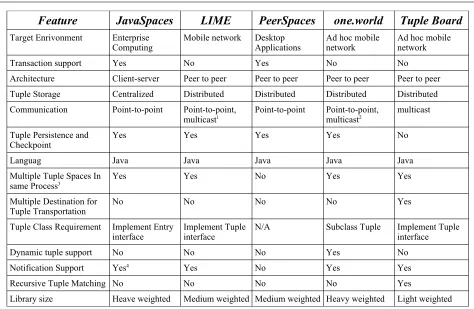
2.3.7 Comparison of Tuple Board to Other Projects
Feature JavaSpaces LIME PeerSpaces one.world Tuple Board
Target Enrivonment Enterprise
Computing Mobile network Desktop Applications Ad hoc mobile network Ad hoc mobile network Transaction support Yes No Yes No No
Architecture Client-server Peer to peer Peer to peer Peer to peer Peer to peer Tuple Storage Centralized Distributed Distributed Distributed Distributed Communication Point-to-point Point-to-point,
multicast1 Point-to-point Point-to-point, multicast2 multicast
Tuple Persistence and
Checkpoint Yes Yes Yes Yes No
Languag Java Java Java Java Java Multiple Tuple Spaces In
same Process3 Yes Yes No Yes Yes
Multiple Destination for
Tuple Transportation No No No No Yes Tuple Class Requirement Implement Entry
interface Implement Tuple interface N/A Subclass Tuple Implement Tuple interface Dynamic tuple support No No No Yes No
Notification Support Yes4 Yes No Yes Yes
Recursive Tuple Matching No No No No Yes
[image:10.612.68.542.90.399.2]Library size Heave weighted Medium weighted Medium weighted Heavy weighted Light weighted
Table 3: Comparison of Tuple Board with Other Tuple Spaces Implementation
From the above comparison, we hypothesize that due to the nature of ad hoc mobile networks, Tuple Board is the most appropriate choice for a particular set of applications in which
1. data (tuple) persistence is not required;
2. the application is running on devices with limited CPU power and small memory capacity; 3. a preconfigured network is not available.
We suggest that these unique features make Tuple Board appealing for many applications designed to run in a proximal ad hoc mobile network.
2.4 The Photo Sharing Application Demo
To test our hypothesis and demonstrate the features developed in this project, a GUI based photo sharing application has been developed using Tuple Board. In the demo application, several
collaborative Tuple Board application instances can share photos, announce addition of new photos and removal of shared photos. The photo sharing application can specify certain criteria as
matching templates in order to only subscribe to the subset of photos of interest. The goal of the
1 For group management only 2 For service discovery only
photo sharing application is to prove the concepts of Tuple Board in a real world application, develop code patterns and explore the advantages as well as limitations of Tuple Board for future applications. Tuple Board is the foundation of the photo sharing application and provides the underlying communication and tuple management functionality.
3 Tuple Board Functional Specifications
There are five basic operations provided in Tuple Board: post, withdraw, read, iterate and notify. A shutdown function is also provided in this implementation to allow a Tuple Board instance to be shut down gracefully. The Tuple Board API is defined in the edu.rit.tupleboard package. There are 6 basic classes defined in the Tuple Board API: TupleBoardFactory, TupleBoard,
TupleBoardListener, TupleBoardIterator, Tuple and TupleRef.
All Tuple classes must implement the edu.rit.tupleboard.Tuple interface, a marker interface for the Tuple objects. The TupleRef class is the handle to a posted Tuple and can be used to withdraw the corresponding Tuple. The TupleBoardIterator interface is an interface to read multiple Tuples that match a given template. TupleBoardListener is a listener interface for a Tuple Board client to register for Tuple Board event callbacks. The roles of the above interfaces/classes are further discussed in the operations of the tuple board in the following sections after we describe the tuple matching rules.
3.1 Tuple Matching
When reading/iterating from the Tuple Board network, templates are used to specify a set of rules to search for matching Tuples. A template is a Tuple that is used for class/value matching. For a Tuple to match a given template, the rules described below must be satisfied. These Tuple
matching rules are derived from the original work by Gelernter [8]. In addition, the JavaSpaces [6] Entry class has been used to model Tuple objects for Java language specific conventions. The following rules apply to any Template 'temp' and any Tuple 'tup' with which it might match.
1.tup must be assignable to the template class. i.e. tup's class should be either the template class or a subclass of the template class;
2.Only public, non-static, non-transient, non-final and non-primitive fields of the template class will be used in template matching. The fields include those inherited from temp's class's super class(es) and will be referred to as matchable fields;
3.For each matchable field, the following rules apply for field matching. All matchable fields must match for tup to match the temp:
a.If temp's field is null and tup's corresponding field is not null, the fields match. This is considered a wild card match;
b.If temp's field is null and tup's field is also null, the fields do not match;
d.If the temp's field is not null and tup's field is not null,
1.If the class of the temp's field implements the Tuple interface, the fields match if and only if the two tuples match;
2.If the type of the template field doesn't implement Tuple interface, the fields match if and only if the template field is the same as the tuple field according to the equals method.
Note that in this project, Tuple matching is recursive as specified in rule 3.d.1. This unique feature provides a convenient mechanism to group a set of associated attributes in a single Tuple class. As shown later, the photo sharing application demo has taken advantage of this recursive matching feature when representing multiple fields in the Date object by one single DateTuple class.
3.2 Tuple Board Initialization
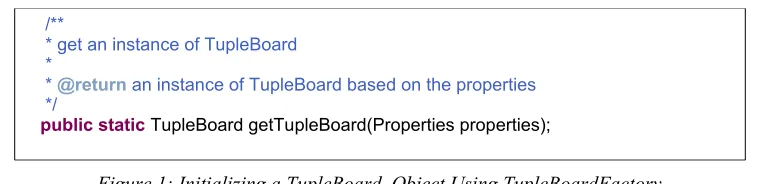
The TupleBoardFactory class uses a factory design pattern to create TupleBoard instances. The method to initialize Tuple Board is defined in the TupleBoardFactory class as in the following code excerpt
.
/**
*getaninstanceofTupleBoard
*
*@return aninstanceofTupleBoard based on the properties
*/
[image:12.612.116.495.351.443.2]publicstatic TupleBoard getTupleBoard(Properties properties);
Figure 1: Initializing a TupleBoard Object Using TupleBoardFactory
The details of all properties used in Tuple Board can be found in the appendix section of this document. Once a TupleBoard instance is created, the underlying communication is configured and the TupleBoard object can be used to read, iterate, post and withdraw Tuple objects.
3.3 Basic Tuple Board Operations
The following operations are implemented in Tuple Board: post, withdraw, read, iterate, notification and shutdown.
3.3.1 Post
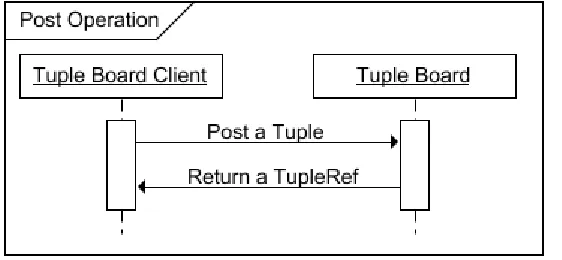
withdrawn individually. The following diagram shows the events of post operation from the Tuple Board client point of view.
A request to post a Tuple object is done by calling the post method in the TupleBoard class, providing the actual Tuple to be posted as the argument. This operation will make the posted tuple available for other Tuple Board instances when a matching read or iterate request arrives. It's very important for the Tuple Board clients to keep the TupleRef reference as it is required to withdraw the Tuple later on. The declaration for the post method is shown in the code excerpt below:
/**
*postatupletothetupleboard
*
*@param tuplethetupletobeposted
*@return referencetothepostedtuple
*/
publicabstract TupleRef post(Tuple tuple);
Figure 3: Tuple Board Post Operation
3.3.2 Withdraw
[image:13.612.167.448.142.272.2]A request to withdraw a Tuple is done by calling the withdraw method in the TupleBoard class, providing the TupleRef obtained in the post operation as the argument. Withdrawing a tuple will make a previously posted Tuple object unavailable to other Tuple Board application instances. Since only the owner of the posted Tuple has the TupleRef reference, no other TupleBoard instances can withdraw the Tuple. The declaration for the withdraw method is shown in the code excerpt below:
/**
*withdrawatuplethathasbeenpreviouslyposted
*
*@param tupleRef
*@return trueifthetuplehasbeensuccessfullywithdrawn,falseifthe
* TupleRefisinvalid
*/
[image:14.612.64.542.89.201.2]publicabstractboolean withdraw(TupleRef tupleRef);
Figure 4: Tuple Board Withdraw Operation
3.3.3 Read
A request to read a Tuple is done by calling one of the read methods defined in the TupleBoard class, providing a Tuple template as the argument. If a timeout value greater than 0 is specified, the read operation returns null if there is no matching Tuple returned within the specified value in milliseconds. If a timeout value of 0 or no timeout is specified, the method will block indefinitely until the first matching Tuple is returned. If multiple Tuples match the template, one will be arbitrarily chosen and returned. The declaration for the read methods is shown in the code excerpt below:
/**
*returnamatchingtuplewithinthetimeoutwhenoneisavailableinthe
*tupleboard,ifnomatchingtupleisavailablewithintimeoutperiod,
*nullisreturned.Ifmultipletuplesmatchthetemplate,anarbitrary
*tuplewillbereturned
*
*@param template
* thetemplatetuple
*@param timeout
* thetimeoutinmilliseconds, >= 0. no timeout if 0
*@return thematchingtuple, null if none returned before timeout
*/
publicabstract Tuple read(Tuple template, long timeout); /**
*returnamatchingtuplewhenitisavailableinthetupleboard,the
*methodblocksindefinitelyifnotuplematchesthetemplate.Ifmultiple
*tuplesmatchthetemplate,anarbitrarytuplewillbereturned. This
*method has no timeout
*
*@param template
*@return thefirstmatchingtuplereturnedfromthetupleboard
*/
publicabstract Tuple read(Tuple template);
[image:14.612.117.492.348.615.2]3.3.4 Iterate
Similar to the read operation, a Tuple Board instance may iterate through the Tuples that match a given template. The iterate operation returns a TupleIterator from the board based on a tuple template. The following method in the TupleBoard class can be used to get a TupleIterator object:
/**
*returnaniteratorofmatchingtuples
*
*@param template
*@return iteratorofmatchingtuples
*/
publicabstract TupleIterator iterate(Tuple template);
Figure 6: Create Tuple Board Iterator From a Template
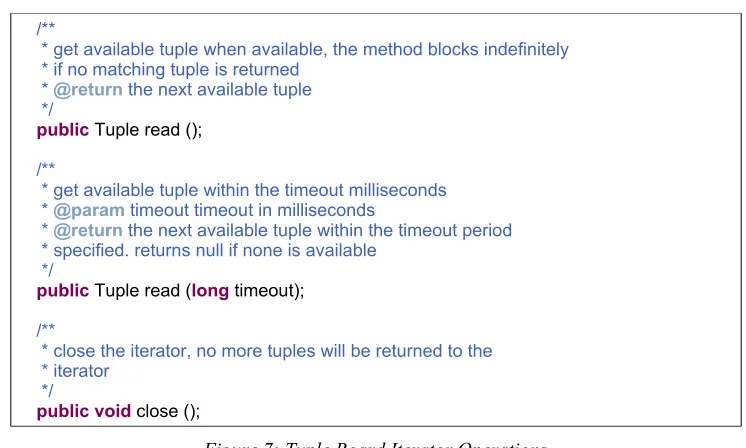
The following excerpt shows the methods defined in the TupleIterator interface to read matching Tuples synchronously. When the application is finished reading, it should call the close method to prevent more Tuples being returned to the iterator.
/**
*getavailabletuplewhenavailable,themethodblocksindefinitely
*ifnomatchingtupleisreturned
*@return thenextavailabletuple
*/
public Tuple read (); /**
*getavailabletuplewithinthetimeoutmilliseconds
*@param timeouttimeoutinmilliseconds
*@return thenextavailabletuplewithinthetimeoutperiod
*specified.returnsnullifnoneisavailable
*/
public Tuple read (long timeout); /**
*closetheiterator,nomoretupleswillbereturnedtothe
*iterator
*/
[image:15.612.118.491.325.549.2]publicvoid close ();
Figure 7: Tuple Board Iterator Operations
3.3.5 Notification
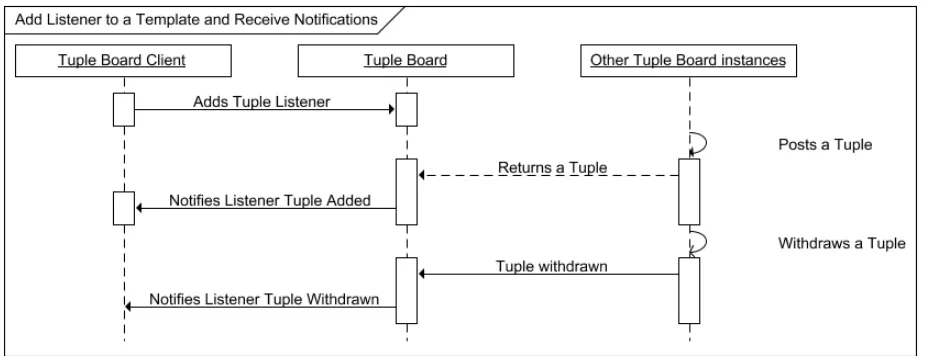
whenever a matching Tuple is posted. Similarly, the listener will receive a notification whenever a matching Tuple is withdrawn.
In read or iterate operation, once a Tuple is read, it is considered to have been consumed, thus its validity in the Tuple Board is no longer guaranteed. In comparison, notification operation provides a mechanism to monitor the activities of the matching Tuples in the Tuple Board network. In analogy, read or iterate is similar to retrieving data from a database and notification is similar to event subscription. The following sequence diagram illustrates the events when Tuples are posted and withdrawn.
Tuple Board listeners can be added to Tuple Board using the following method defined in the TupleBoard class:
/**
*addatupleboardlistenerfortuplechanges
*
*@param listenerthetuplelistener
*@param template thelistenerinterestedin the template
*/
[image:16.612.76.539.242.420.2]publicabstractvoid addTupleBoardListener(TupleBoardListener listener, Tuple template);
Figure 9: Adding an Event Listener on a Tuple Board
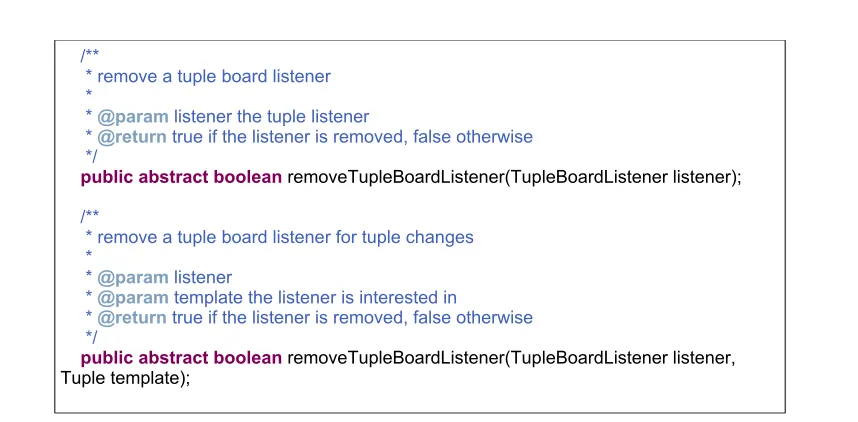
[image:16.612.123.492.501.598.2]The same TupleBoardListener instance may be added to multiple templates and thus receive events from multiple template matching changes. Correspondingly, the TupleListener can be removed from a specific template or all templates by calling the one of methods shown in the following code excerpt:
/**
*removeatupleboardlistener
*
*@param listener thetuplelistener
*@return trueifthelistenerisremoved,falseotherwise
*/
publicabstractboolean removeTupleBoardListener(TupleBoardListener listener); /**
*removeatupleboardlistenerfortuplechanges
*
*@param listener
*@param templatethelistenerisinterestedin
*@return trueifthelistenerisremoved,falseotherwise
*/
[image:17.612.96.525.94.305.2]publicabstractboolean removeTupleBoardListener(TupleBoardListener listener, Tuple template);
Figure 10: Removing Tuple Listeners from a Tuple Board
The next code excerpt shows the callback methods defined in the TupleBoardListener class:
/**
*callbackmethodwhenatupleispostedtothetupleboard
*@param tuplethepostedtuple
*/
publicvoid tuplePosted (Tuple tuple);
/**
*callbackmethodwhenatupleiswithdrawnfromthetupleboard
*@param tuplethewithdrawntuple
*/
[image:17.612.118.495.321.474.2]publicvoid tupleWithdrawn (Tuple tuple);
Figure 11: Operations Defined in the TupleBoardListener Class
3.3.6 Shut down
Shutting down a Tuple Board instance implies all Tuples posted by the instance are withdrawn. This is the method used to make sure that Tuple Board exits gracefully. After the shutdown method is called, the Tuples posted by this Tuple Board instance will no longer be available to any other Tuple Board instances.
/**
*shutdownthisTupleBoard instance.The Tuple Boardwillsendnotificationsto
*allinterestedpartiestoexplicitlywithdrawalltuplespreviously
*postedbythisTuple Board
*/
public abstract void shutdown();
4 Photo Sharing Application Specifications
The Photo Sharing Application demo is a visualization of the Tuple Board features. The
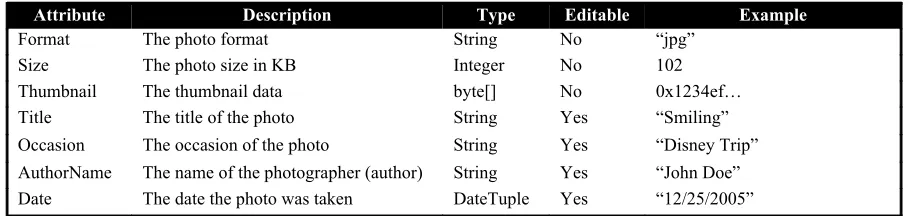
[image:18.612.79.534.231.339.2]application can load photos from local storage, generate thumbnails and view the following photo attributes: title, format, size, occasion of the photo, author's name and time including year, month and day. Among the attributes, photo format, thumbnail data and photo size are read only. All others attributes may be modified. The following is a list of photo attributes supported in the application:
Table 4 Photo Tuple Attributes
Attribute Description Type Editable Example
Format The photo format String No “jpg” Size The photo size in KB Integer No 102 Thumbnail The thumbnail data byte[] No 0x1234ef… Title The title of the photo String Yes “Smiling” Occasion The occasion of the photo String Yes “Disney Trip” AuthorName The name of the photographer (author) String Yes “John Doe” Date The date the photo was taken DateTuple Yes “12/25/2005”
The following application features are supported in this demo:
4.1 Loading Photos
A user can load any photo files on the device storage into the photo sharing application. The following photo formats are supported in the application: JPEG, PNG, GIF and BMP. The editable attributes may be modified after a photo is loaded. The thumbnails of the loaded photos can be viewed in the local photo panel.
4.2 Viewing Full Size Photo
By default, the photo panel only displays thumbnails of the available photos. To view the full size photo, double click the thumbnail shown in the photo panel and the full size photo should be displayed in a separate pop up window.
4.3 Multiple Photo Panels
The photo sharing application contains multiple photo panels to display the local photo repository as well as photos shared by other Tuple Board instances. There are two types of photo panels:
•The filtering photo panels can be created on the fly. The purpose of a filtering photo panel is to display the photos that match a particular rule such as “John Doe’s Photos taken on December 25th,
2005”. When creating a filtering photo panel, an input window with text input boxes is displayed to specify the values of the photo attributes. Only photos matching the values specified are shown in the panel as thumbnails. If no value is specified in the attribute input window, all photos shared by other users will be displayed.
4.4 Posting New Photos
After a photo is loaded in the photo sharing application, a user may post a photo to make it
viewable to all other Tuple Board instances if they specify a photo Tuple template that matches the attributes of the photo.
4.5 Withdrawing a Posted Photo
The owner of a photo may withdraw a photo that has been previously posted to Tuple Board. After a photo is withdrawn, other Tuple Board instances will collaboratively remove the photo thumbnail from the corresponding filtering photo panels.
5 Design and Architecture of the Tuple Board Library
Tuple Board has been developed using M2MP. Therefore, we will first summarize the design of M2MP messages in Tuple Board before describing the software design and architecture.
5.1 Using M2MP to Send Point-to-point or Broadcast Messages
M2MP messaging is based on a multicast protocol. As a result, message filters should be used to send point-to-point messages.
5.1.1 M2MP Message Filtering Feature
The M2MP library provides message-filtering capability. A message filter is specified by a sequence of bytes called a message prefix. An incoming message matches a message filter if and only if the initial bytes of the message are the same as the message filter's message prefix[7]. If an incoming message doesn’t match any of the message prefixes registered in the M2MP layer, the messages will be filtered out.
5.1.2 Design Principles
In other words, like IP addresses, each Tuple Board instance has two addressable identities: a unique Tuple Board ID, similar to a host IP address, and a universal broadcast ID, similar to a LAN broadcast address. M2MP messages sent to the broadcast ID will be received by all proximal Tuple Board instances and messages sent to a particular Tuple Board ID will only be processed by the Tuple Board instance with that unique ID.
5.1.3 Message Format
As outlined earlier, Tuple Board messages contain a prefix to identify the destination of the message. The prefix consists of the following components:
1)Tuple Board Magic number. This 32-bit sequence signifies that this is a Tuple Board message. Other M2MP messages (such as M2MI messages) will be filtered out.
2)Destination Device ID. This is the 48-bit device ID as specified in M2MP specification [7]. A message with the special device ID with all 0s indicates that this is a broadcast message intended for all proximal devices in the Tuple Board network.
3)Destination Tuple Board ID – 64-bit sequence to further narrow the destination down to a specific instance of Tuple Board on the device. Again, a message with Tuple Board ID with all 0s indicates this is a broadcast message.
The message layout of the Tuple Board magic number and the Tuple Board message content are shown in the following table:
Tuple Board Magic Number Tuple Board Message content5
Byte position 0-3 4 - end
[image:20.612.111.497.430.480.2]Description 32-bit Hard coded magic number “tupl” Tuple Board message body
Table 5: Tuple Board Message Format
The next table shows the details of the byte alignment of the Tuple Board message.
Destination Tuple Board
instance Address Source Tuple Board instance Address Device ID TB ID Device ID TB ID
Tuple Board Message Operation6
Byte position 4-9 10-17 18-23 24-31 32-end Description 48-bit
device ID 64-bit TB ID 48-bit device ID 64-bit TB ID Message operation
Table 6: Tuple Board message Content Format
As illustrated in the above table, the Tuple Board message content contains the destination Tuple Board (receiver) address, source Tuple Board instance (sender) address and the encoded operation. The device ID in the destination/source address is a 48-bit number that is unique for each device running the Tuple Board application. If multiple Tuple Board application instances run on the same device, they share the same device ID and can be differentiated by different Tuple Board IDs. The Tuple Board ID is a 64-bit number defined as the start time of the Tuple Board instance in
milliseconds since midnight of January 1st, 1970. The Tuple Board address uniquely identifies a
Tuple Board instance.
The message operation contains an 8-bit operation code and a serialized argument list.
Operation Code Argument List
Byte position 32 33- end
Description 8 bit operation code Serialized argument list
Table 7: Tuple Board Message Operation Format
5.2 Tuple Board Software Architecture
At a high level, Tuple Board can be divided into three components: the Tuple Board
implementation, the tuple/request managers and the remote invocation module. We will give an overview of the Tuple Board API then look into each of the components in details.
5.2.1 Tuple Board Implementation
The Tuple Board implementation classes are the core of the Tuple Board library. The classes are defined in the edu.rit.tupleboard.impl package. The most important classes are listed below:
The TupleBoardImpl class is the default TupleBoard implementation class. It implements the abstract methods inherited from the TupleBoard class and contains the references to the M2MP layer, the M2MP message receiver, and the Tuple/Request management classes.
The MessageReceiver class receives M2MP messages from the underlying M2MP library, deserializes the object and passes the messages to the Tuple/Request management module. In this project, there are a configurable number of threads reading messages from the M2MP layer. The default number of receiving threads is 5.
1.Posted local Tuples;
2.Previously retrieved remote Tuples;
3.Newly retrieved remote Tuples as a result of this request.
The search may stop at any given stage if the read request is satisfied or the iterator is closed. For example, if a read request can be satisfied after searching the previously retrieved remote Tuples, SearchControl will not broadcast the read request to the Tuple Board network for more matching Tuples.
The TupleIteratorImpl class implements the TupleIterator interface. It iterates through the Tuples returned from the SearchControl class.
5.2.2 Tuple/Request Management
The design of the Tuple/Request management module follows the Observer design pattern. When a local or remote Tuple is posted/withdrawn, an update event will be generated and the observers of the Tuple Manager will be notified upon such changes. Similarly, when a request is received or canceled, the corresponding observers of the Request Managerwill also be notified. The following section further explains the functions of the managers and their corresponding observers.
The LocalTupleManager tracks the status of local Tuples and is the entry point for the local Tuples to be posted or withdrawn. When a local Tuple is posted, LocalTupleManager will notify its observers to check if the Tuple matches any local or remote requests. When a local Tuple is withdrawn, LocalTupleManager will notify its observers to check if any notification should be sent to local or remote Tuple Board instances.
The LocalRequestManager class manages local requests. This class is also responsible for enforcing the active requests. When a local request is initiated, LocalRequestManager will notify its observers to start enforcing the request if no matching Tuples are found locally. When a local request is canceled or satisfied, LocalRequestManager will notify its observers to stop enforcing the request.
The RemoteTupleManager caches the Tuples received from other Tuple Board instances. It works in conjunction with LocalRequestManager to deliver remote tuple events when remote tuples are posted or withdrawn. When a remote Tuple arrives, RemoteTupleManager will notify its observers to check if the Tuple matches any pending local requests and notify the matching Tuple Board listeners if any. When a remote Tuple withdraw notification is received,
RemoteTupleManager will notify its observers to invalidate the affected Tuples and notify the matching Tuple Board listeners if any.
The RemoteRequestManager tracks the status of remote requests. It is also responsible for renewing the lease of local tuples if there are remote requests interested in the posted local tuples. When a remote request is received, RemoteRequestManger will notify its observers to search for the potentially matching Tuples and send matching Tuple IDs to the requester if necessary. When a remote request is canceled, RemoteRequestManger will notify its observers to invalidate the request thus stop sending the matching Tuple IDs in keep alive messages if the IDs are not subscribed by any other remote requests.
5.2.3 Tuple Board Remote Invocation
The remote invocation module handles the message delivery and processing logic. All the concrete remote invocation classes inherit from an abstract class TBInvocation. The subclasses of
TBInvocation are required to implement the execution logic. The Invocation objects are created and sent to Tuple Board network, received from MessageReceiver and invoked at the message destination.
Each subclass of TBInvocation corresponds to one type of the Tuple Board message. Among the 10 concrete invocation classes, the TupleRead and TupleIdReturn classes are responsible for Tuple matching. The RequestTuple and TupleReturn classes are responsible for Tuple transfer. The RequestMissingFragment class can be used with the TupleReturn class to recover lost messages during Tuple transfer. The EnforceRequests and CancelRequests classes are used to enforce and cancel existing requests, respectively. The GetRequestsInfo class can be used to get the information about unknown requests when a Tuple Board instance joins the network after some requests have been sent. The RenewTuples and WithdrawTuples classes are used to renew the time-to-live (TTL) of a Tuple and withdraw a Tuple, respectively. The details of the keep alive function that RenewTuples is responsible can be found in Section 5.5 (The Tuple Keep Alive Algorithm).
In the TBInvocation class, the destination field is the address of the intended message recipient and the source field is the address of the message sender. When a special broadcast address is specified as a message destination, the message will be received by all the Tuple Board instances in the network.
5.3 The Tentative Template Matching Algorithm
When searching for matching Tuples in the Tuple Board network, we use a tentative matching algorithm to minimize network traffic. When a Tuple requester reads/iterates over a template, it first broadcasts a computed MatchInfo object to the Tuple Board network. MatchInfo is a class that encapsulates the template class name, the template field names and the hash codes of the template field values. Along with MatchInfo object, a RequestId object is also included in the message. A RequestId is a globally unique identifier of the Request. When this message reaches the Tuple provider, the provider will compare the MatchInfo to those of the posted Tuples in its repository. Only the Tuples with matching MatchInfo could potentially match the template. The provider will then return the list of tentatively matching Tuple IDs to the requester. A Tuple ID is a globally unique identifier for any given posted Tuple. After the requester receives the tentatively matching IDs, it can request the Tuples by ID. If Tuples returned to the requester match the
template, they will be returned to the Tuple Board client.
We expect that the MatchInfo comparison can effectively eliminate most unwanted Tuples. Therefore, using the tentative matching algorithm has the following advantages over returning the matching Tuples directly using the template:
1. The requester can request remote Tuples only when they are needed.
2. As the Tuple IDs are much smaller than the Tuples, the requester will not be flooded with replies if there are many matching Tuples returned.
3. For Tuples matching multiple requests from the same Tuple Board instance, using Tuple IDs instead of the Tuples can avoid duplicate Tuple transfers.
5.4 Message Call Flows
In this section of the document, we will discuss the use cases of the Tuple Board network messages in the context of the Tuple Board operations. Specifically, we will describe the events happening when we post Tuples, read/iterate Tuples, register Tuple Board listeners and transfer large Tuple objects. Note: in all the use cases below, we follow the convention that Tuple Board A is the Tuple provider and Tuple Board B is the Tuple requester.
5.4.1 Posting a Tuple
In this use case, Tuple Board A posts a Tuple to the Tuple Board network. When posting the Tuple, Tuple Board A TupleManager finds out that the Tuple is a potential match for an
5.4.2 Reading/Iterating Tuple(s) Matching a Template
The following three use cases describe the event sequences to read or iterate Tuples from the Tuple Board network.
5.4.2.1 Read/Iterate a Template With Matching Tuples
[image:29.612.67.543.104.308.2]This use case illustrates the events when reading/iterating Tuples that match a template. In this scenario, Tuple Board A is the Tuple provider and Tuple Board B is the requester. After B receives the read request from A, it returns a list of the potentially matching Tuple IDs. Tuple Board A then requests the individual Tuples keyed by the returned Tuple IDs.
5.4.2.2 Read/Iterate a Template With No Matching Tuples
[image:30.612.78.547.119.408.2]This use case illustrates the events to read/iterate the Tuples matching a template when no matching Tuples are returned immediately. In this scenario, Tuple Board A is the Tuple provider and Tuple Board B is the requester. In the diagram below, no matching Tuples exist when the read/iterate request is sent. As a result, the RequestManager of Tuple Board B will block the application read operation until one the following conditions becomes true: 1) a matching Tuple is returned; 2) the read request times out.
5.4.2.3 Enforce Requests and Posted Tuples to Other Tuple Board Instances
[image:31.612.78.545.102.301.2]This use case illustrates the events to enforce the requests and validate posted Tuples. Tuple Board A is the Tuple provider and Tuple Board B is the requester. Tuple Board B has previously read Tuples from Tuple Board A. Tuple Board B enforces its requests by broadcasting its request IDs. Tuple Board A also broadcasts its posted Tuple IDs with the associated request IDs. As a result, Tuple Board A knows the requests are still valid and B knows the Tuples are still posted and available.
5.4.3 Notifications
The following use cases describes the notification events when a Tuple is posted, withdrawn or unavailable due to Tuple Board crashes.
5.4.3.1 Subscribe to Notifications
This use case illustrates the events to add Tuple Board event listeners to a given template. Tuple Board A is the Tuple provider, B is the requester. In this case, after the Tuples are returned to Tuple Board B, asynchronous notifications will be sent to the corresponding template listeners. Note that adding Tuple Board listener is similar to read/iterate operation with the following differences:
1. The Tuples are returned to the Listener asynchronously.
[image:32.612.80.527.131.319.2]5.4.3.2 Active Withdrawal
[image:33.612.74.544.108.355.2]This use case shows withdrawal of a posted Tuple. In this scenario, a notification to withdraw the affected Tuple is sent to all Tuple Board instances. The affected Tuple Board instances will notify the corresponding template listeners if applicable.
Figure 20: Read/Iterate with Notification Subscription
[image:33.612.74.544.470.649.2]5.4.3.3 Passive Withdrawal
This use case shows withdrawal of a posted Tuple. In this scenario, a notification to withdraw the affected Tuple is sent to all Tuple Board instances. Unlike the previous use case, the notification is lost. However, the affected Tuple Board instances can still detect the Tuple is no longer available after the Tuple TTL expires. The Tuple Boards will notify the corresponding template listeners if applicable. This is an example of notification for passive Tuple withdraw.
5.4.3.4 Crash Triggered Notification
[image:34.612.76.541.214.416.2]This use case shows withdrawal of a posted Tuple if a Tuple Board instance crashes or leaves the network. Unlike the previous use cases, no notification is sent. However, the affected Tuple Board instances can still detect the Tuple is no longer available after the Tuple TTL expires.
5.4.4 Large Tuple Fragmentation
Due to the unreliable nature of M2MP, large Tuple objects such as images must be sent to other Tuple Board instances using multiple messages. Consequently, unlike the rest of the Tuple Board operations, retrieving a tuple from a providers may require message fragmentation due to the potentially large size of a Tuple. Tuple fragmentation is automatic and is transparent to the Tuple Board clients. To implement this feature, the Tuples are fragmented before being sent over the network. The receiver is responsible for tracking the delivery of each fragment and requesting the sender to resend a particular fragment if necessary. The details of fragmentation can be found in the following use cases.
5.4.4.1 Multiple Message Fragments With No Packet Loss
[image:35.612.79.535.122.316.2]In the first scenario, a Tuple is divided into multiple fragments. Each fragment is identified by the Tuple ID and a sequence number of that fragment. A fragment also contains the total number of fragments of the Tuple. When all the expected Tuple fragments are received by the requester, the Tuple is assembled and returned to the Tuple Board client. The following is the sequence diagram for Tuple delivery with multiple message fragments.
5.4.4.2 Multiple Message Fragments With Retry
[image:36.612.77.543.93.353.2]In the second scenario, some fragments may be lost during Tuple transfer. When the sender transmits all tuple fragments, one or more message/messages is/are lost. After a configurable timeout, the requester will query the sender with the sequence number(s) of the missing fragments. The sender will resend the missing fragment(s) to the requester. Eventually, the requester will receive all the fragments and return the Tuple to its Tuple Board client.
5.5 The Tuple Keep Alive Algorithm
In Tuple Board, the Tuple keep alive messages serve two purposes: a) notifying other Tuple Board instances that the requested Tuples are still posted and available; b) sending the tentatively
matching Tuple IDs to the requesters in case the previous messages are lost. A Tuple keep alive message contains a list that maps the remote request IDs to the corresponding matching Tuple IDs.
[image:37.612.82.525.121.455.2]As a Tuple provider, a Tuple Board instance periodically broadcasts Tuple keep alive messages. The reason to use broadcast instead of point-to-point messages is that the same Tuple may be requested by multiple requesters. For example, a Tuple with two String fields (“a”, “b”) may match
templates with the value (“a”, null) and the value (null, “b”) from two different Tuple Board instances.
When the Tuple requester receives a Tuple keep alive message, it will iterate all the request IDs included in the message. For each request originated from this Tuple Board instance, it will check to see if all the Tuples are present. For missing Tuples, the requester will request the Tuples by ID; for existing Tuple IDs, the requester will update the TTL of the Tuples.
5.6 Tuple Board Logging
The Tuple Board implementation uses the java.util.logging package for logging and debugging purposes. For more details on the configuration of the logging levels and the logging formats, refer to the JDK API documentation [16].
6 Developing the Photo Sharing Application with Tuple Board
As a proof of concept demo application built on top of Tuple Board, the photo sharing application uses the most features Tuple Board has to offer. In turn, the demo application has also affected the design and induced improvements to Tuple Board.
6.1 Design Considerations
In the photo sharing application, each sharable photo is represented by a PhotoInfo Tuple that contains photo attributes such as the date, the title and the occasion. When a photo is shared, a
PhotoInfo is posted to the Tuple Board and becomes searchable by other application instances. When a photo is withdrawn, the corresponding PhotoInfo will be withdrawn and become unavailable to other instances.
A GUI front end can visualize the actions and display the shared photos when a template read is matched. In the application, each filter photo panel corresponds to a TupleBoardListener object that receives updates when a matching PhotoInfo is posted or withdrawn. The listener is
responsible for updating the photo panel GUI accordingly.
6.2 Demo Application Software Design
We describe the photo sharing application in the following sections.
6.2.1 The MVC Model for Application GUI
interface and the Action classes used to manipulate the photos. The next section describes the actions defined in the demo application in details.
6.2.2 Architecture and Class Diagram
All the Action classes inherit from the edu.rit.tupleboard.demo.actions.BaseAction class. The action classes have a reference to the edu.rit.tupleboard.demo.PhotoBoard object, which is the Tuple Board application instance. When actionPerformed is invoked, the Action objects update the GUI and the Tuple Board states accordingly.
6.2.3 Large Photo Transfer
When a user wants to retrieve a photo posted from other tuple board instances, we face a challenge to transfer the photo efficiently over the network. During the development of the project, three approaches have been considered and experimented. In the end, an external HTTP server is used for photo transfer. We will examine the three solutions individually and compare the analytical and experimental results in the following sections.
6.2.3.1 Transfer Large Images Using Tuple Board
As the project is based on Tuple Board, it is a natural choice to use a Tuple class to encapsulate the images. We define a Tuple class PhotoTuple with the following attributes: photo ID (String), photo data (byte array). To avoid transferring the image files unnecessarily, we use another Tuple class,
PhotoInfo to transfer the meta data of the photo. The meta data includes photo ID, title, occasion, photo size, date and thumbnail data.
When a request is received, the matching PhotoInfo Tuples will be returned to the requester. In the requester application, the photo thumbnails can be previewed. When the users want to see the full size photo, they trigger the application to read the PhotoTuple with the unique photo ID. The full size photo will then be transferred to the requester application as a Tuple.
This approach takes advantage of the built in Tuple Board read operation and is relatively simple to implement. However, we encountered performance issues when putting this design in practice. A digital photo taken by a typical digital camera is often 1 MB or larger. When we use M2MP message to transfer the file, we get an effective data transfer rate of 50-60 KB/second on wireless network of 11 mps/s bandwidth. Although no high CPU usage is caused by the transfer, the transfer speed is much lower than ideal and the user experience is rather poor.
In addition to the above observation, due to the multicast nature of M2MP messages, other devices that don't subscribe to the PhotoTuple will also receive the messages at M2MP transport layer. As a result, we observed increased number of dropped messages for normal Tuple Board read, search and heartbeat operations when a large Tuple transfer is in process.
Based on the results discussed above, we conclude that neither Tuple Board nor the underlying M2MP protocol, is suitable for large file transfers.
6.2.3.2 Normalize (Compress) Before Transfer
One obvious solution is to reduce the photo size before transmitting. Many images such as jpg and png format are already in compressed mode, therefore, we have to reduce the dimension of the images for extremely large photos.
Although compression is common practice in many image viewing applications including iPod photo, we decided not to take this approach because of the potentially severe degradation of image quality. However, it must be pointed out that normalization of large images is still a good solution for devices with small displays such as a PDA or cell phone.
6.2.3.3 Transfer Large Images Using URL and External HTTP Server
As a third option, we look into the alternative mechanisms for image transfer. FTP, TFTP and HTTP were considered and HTTP is finally chosen because of its simplicity and wide adoption. In this approach, the simple HTTP server developed in a Sun Microsystems Java tutorial [15] is adapted and modified significantly to serve local photos. We eliminated the PhotoTuple class used in the first two approaches. Instead, when we post a photo, we make the photo available in the web server and set the URL of the photo in the PhotoInfo tuple. When the full size photo is needed after another application receives the PhotoInfo object, the application makes an HTTP connection to the URL and retrieves the photo. When the PhotoInfo tuple is withdrawn, we also revoke the corresponding photo file from the HTTP server thus making it unavailable for future inquiries. In this project, no sophisticated security feature is implemented for the HTTP server except a randomly generated file name.
As a result of this change, we greatly reduced the image transfer delays. In a typical configuration, a 1 MB photo can be retrieved in less than 2 seconds, in contrast to up to 30 seconds when using M2MP as the underlying transportation protocol. The user experience improvements are even more noticeable.
All in all, we conclude that although Tuple Board is much more sophisticated than HTTP and can carry complicated collaborative information, it is not a good choice for bulk data transfers. Among the many reasons for the low data transfer rate, we speculate the most significant causes are:
1.A multicast protocol is used in tuple board and the M2MP;
2.The built in flow control mechanism in M2MP is used to avoid network congestion; 3.The object serialization overhead introduced in Tuple Board.
7 Future Work
In Tuple Board, we have introduced many improvements over the previous implementation by Bondada. However, there are still several areas that can lead to in depth work in the future:
In this project, Tuple states will only be kept in memory, not persisted to disk. All Tuple information will be lost if a Tuple Board instance crashes or exits. As discussed earlier, not persisting Tuples greatly reduces the complexity of any tuple board implementation. On the other hand, lack of Tuple persistence restricts the scope of applications that can be built on top of Tuple Board. Further study may be needed to evaluate the benefits of Tuple persistence.
Meanwhile, it is worth noting that it is possible to provide Tuple persistence functionality outside Tuple Board by loading and saving Tuple states using the Tuple Board API.
7.2 Built-in Mechanism for Large Data Transfer
As demonstrated in this application, it is not the strength of Tuple Board to transfer large amounts of data from one end point to another. As a result, we need to explore the possibilities of built in high speed data transfer mechanism for applications with such needs. Multicast, being a
contributing factor of slow data transfer rate in this project, could potentially be used to increase the overall data transfer rate if multiple destinations are specified.
7.3 Security
Currently, Tuple Board has no built in security. As in any application in ad hoc mobile network, security is a huge challenge for key management, application trust etc. Unlike a fixed network, where security can be provided by well defined entities such as authentication servers or firewall, Tuple Board security must be established without compromising the open access and the dynamic nature of the network.
The Ungulate project [14] is a framework for security key management for ad hoc mobile networks. Future security work in Tuple Board may involve collaboration between the two projects.
7.4 Develop Design/Programming Patterns
8 Conclusion
In this project, we have successfully developed Tuple Board using M2MP protocol. The Tuple Board library supports all tuple board operations including post, withdraw, read, iterate and notifications. Using the simple yet powerful framework developed in the project, a sophisticated photo sharing demo application is developed on top of Tuple Board. Based on our experience in developing the application, we conclude that Tuple Board has convincing features including small memory and message footprint, rich function set and simplicity in use.
9 References
1.Alan Kaminsky and Chaithanya Bondada. Tuple Board: A new distributed computing paradigm for
mobile ad hoc networks. Rochester Institute of Technology B. Thomas Golisano College of Computing and
Information Sciences First Annual Conference on Computing and Information Sciences, Rochester, New York, USA, January 2005.
2.Tuple Board: http://www.cs.rit.edu:8080/ms/static/ark/2003/2/cxb3178/index.html
3.PeerSpaces: data-driven coordination in peer-to-peer networks Symposium on Applied Computing archive,Proceedings of the 2003 ACM symposium on Applied computing
4.LIME: http://lime.sourceforge.net/
5.One.world: http://cs.nyu.edu/rgrimm/one.world/
6.JavaSpaces: http://java.sun.com/docs/books/jini/javaspaces/
7.M2MP: http://www.cs.rit.edu/~anhinga/m2mp.shtml
8.D. Gelernter. “Generative Communication in Linda”, ACM Transactions on Programming Languages and
Systems, Volume 7, Number 1, pages 80-112, January 1985.
9.E. Freeman, S. Hupfer and K. Arnold. “JavaSpaces: Principles, Patterns, and Practice”, Reading, MA: Addison-Wesley, 1999.
10.M2MI Home Page. http://www.cs.rit.edu/~ark/m2mi.shtml
11. GNUtella Home Page. http://gnutella.wego.com
12. Napster Home Page. http://www.napster.com
13. JXTA Home Page. http://www.jxta.org
14. Ungulate Project Home Page: http://www.cs.rit.edu/~anhinga/Ungulate/
15. A Simple Multithreaded Web Server
10 Appendix
10.1 Tuple Board Properties
# the implementation class of tuple board
edu.rit.tupleboard.implClass=edu.rit.tupleboard.impl.TupleBoardImpl
# the interval to renew local requests, in milliseconds edu.rit.tupleboard.interval.request_renew=5000
# the interval to renew local tuples, in milliseconds edu.rit.tupleboard.interval.tuple_renew=5000
# the time out to request for missing tuple fragments if no new fragment arrives, in milliseconds edu.rit.tupleboard.retry.timeout=1000
# the time to give up retrieving the tuple with missing fragments since the last fragment arrived, in milliseconds edu.rit.tupleboard.retry.giveup=10000
# the time interval to check for missing tuple fragments, in milliseconds edu.rit.tupleboard.retry.frequency=1000
# the default time to live if a remote request is not renewed edu.rit.tupleboard.ttl.request=60000
# the default time to live if a remote tuple is not renewed edu.rit.tupleboard.ttl.tuple=60000
# the number of threads to receive messages from M2MP layer edu.rit.tupleboard.receiver.threads=5
Figure 27: Tuple Board Properties
10.2 Build and Run the Project
Tuple Board can be built using Jakarta's ANT build tool and launched as an executable jar file. The build script is included in the source package.
10.2.1 Building the Tuple Board Library
Prompt> ant tupleboard
Buildfile: C:\workspace\tupleboard\src\build.xml prepare:
[mkdir] Created dir: C:\workspace\tupleboard\classes compile:
[javac] Compiling 87 source files to C:\workspace\tupleboard\classes tupleboard-lib:
[jar] Building jar: C:\workspace\tupleboard\lib\tupleboard-lib.jar BUILD SUCCESSFUL
[image:47.612.67.550.92.233.2]Total time: 4 seconds
Figure 28: Sample Output to Build the Tuple Board Library
The resulting tupleboard-lib.jar can be found in lib directory of the source tree.
10.2.2 Building Photo Sharing Application
The photo sharing application requires the M2MP jar file to compile and run. To build the photo sharing application with the Tuple Board library, it is recommended to use Jakarta's ANT build tool. Execute the following command from the command line in the root directory of the Tuple Board source code:
Prompt> ant
Buildfile: C:\workspace\tupleboard\src\build.xml prepare:
[mkdir] Created dir: C:\workspace\tupleboard\classes compile:
[javac] Compiling 87 source files to C:\workspace\tupleboard\classes unpack-libs:
[unjar] Expanding: C:\workspace\tupleboard\lib\m2mp.jar into C:\workspace\tupleboard\classes
[unjar] Expanding: C:\workspace\tupleboard\lib\icons.zip into C:\workspace\tupleboard\classes
jar-source:
[jar] Building jar: C:\workspace\tupleboard\lib\tupleboard-src.jar package:
[jar] Building jar: C:\workspace\tupleboard\lib\tupleboard.jar [signjar] Signing JAR: C:\workspace\tupleboard\lib\tupleboard.jar BUILD SUCCESSFUL
Total time: 12 seconds
Table 8: Sample Output to Build the Photo Sharing Application
The resulting tupleboard.jar can be found in lib directory of the source tree.
[image:47.612.66.550.385.616.2]This part of the document is a simple user's guide to using the photo sharing demo.
10.3.1 Launching the Demo Application
To launch the application, type java -jar tupleboard.jar from the command line. Note that JRE 1.5 is required to run the application.
10.3.2 Loading Photos into the Application
To add new photos to the photo sharing application, select File -> Add from the menu bar.
10.3.3 Select Photos to Add
10.3.4 View the Photo Information
10.3.5 View/Edit Local Photo Information
10.3.6 Share (post) a Local Photo
To share the photos with others, select the photo and traverse to Sharing -> Post from the pop up menu.
10.3.7 Create a New View
10.3.8 Specify the Criteria for the New View
10.3.9 New View
10.3.10 Check the Information of Shared Photo
10.3.11 View the Information of a Posted Photo
10.3.12 Zoom in a Posted Photo
10.3.13 Close a View
10.3.14 Withdraw a Posted Photo
To withdraw a previously posted photo, right click on the photo and traverse to Sharing -> Withdraw from the pop-up menu. Alternatively, select the photo and choose Share -> Withdraw from the menu tool bar.
10.3.15 Quit the Application
10.4 Document History
Version Date Reason
1.0 4/29/2006 Initial Draft 1.1 5/4/2006 Some Clean Up
1.2 5/14/2006 Update. More work needed for section 5. 1.3 5/15/2006 Significant expansion in section 4
1.4 6/10/2006 Minor Cosmetic Changes and corrected typo in Table 1. 1.5 6/12/2006 Updated based on comments from Prof. Kaminsky 1.6 6/24/2006 Updated based on comments from Prof. Heliotis 1.7 6/29/2006 Updated after 6/26 meeting with Prof. Heliotis 1.8 7/4/2006 Reordered the document for more fluid text flow 1.9 7/14/2006 Revision based on Prof. Heliotis's comments