CONTENTS
Editorial Note 2
Graphics: On-line Scanning of the 3 Intermediate file
Charge de L'ordinateur Principal 10
Statistics of' Computing Installation, ~1arch 12
Utilisation by Objectives and Accounts, :.1.arch 13
Statistics of Batch Processing, March 14
Histogram of Equivalent Time Usage 14
EDITORIAL NOTE.
The Computing Centre Newsletter is published monthly except for August and December.
It describes developments, modifications and specific topics in relation to the use of the computing installations of the Joint Research Centre, Ispra Establishment.
The aim of the Newsletter is to provide information of importance to the users of the computing installations, in a form which is both interesting and readable.
The Newsletter also includes articles which are of intellectual and educational value in order to keep the users informed of new advances in computer science topics.
The Editorial Board is composed as follows:
J. Pire. Responsible Editor.
M. Dowell. Technical
c.
Pigni.Editors.
11. de Nolde.
Administration and contact address:
Ms. A. Carnbon (tel. 730) Support to Computing
Building 36
J.R.C. Ispra Establishment 21020-ISPRA (Varese)
LE';AL NOTICE:
Editor.
Graphics: On-line Scanning of the Intermediate File. P. Nichele
The usP. of the present graphic devices has been characterized by a rather long turn-around time.
Until about one year ago, '1-lhen only the Calcomp plotter was available, i t took at least a half day to obtain the graphic results. In the case of hardware breakdown the delav time was
much longer. •
The installation of additional plotters, Gould 5200 and Benson 1102, .together with the GRAPHIT system, reduced the turn-around time considerably. However, the manPOI'ler situation in the Computer Room is such that the mounting of the tapes is delayed frequently by lack of personnel.
To improve the situation, the GRAPHIT system has been extended (under TSO) with the link to the Tektronix 4014/4015 displays. This allows for an additional graphic output device without the burden of tape mounting.
The present version is still a rather rudimentary tool, but i t has been decided to offer the users access to these new GRAPHIT facilities at the present time because of the significant savings in time in the production of graphic output.
A more sophisticated version including an interrupt system and screen partitioning, will be developed in the near future.
The prerequisites for the u~e of the new option are:
- the Intermediate File must be .created according to the procedure as described in the Green Book; "GRAPHIT", pacre 10;
- the Intermediate File has to reside on an on-line volume, the necessary space having been reserved previously. The DD statement for the file is:
//GO.FT16F001 DD DSN=name,VOL=SER=volname,~liT=DISK,
/ / DISP=(OLD,KEEP)
- the access to a Tektronix 4014 or 4015 terminal connected to TSO.
After the online scanning of the Intermediate File one may still produce a plot on one of the off-line devices by a job of the type:
/ / EXEC GOULD,TAPE='EUxxxx'
//GO.FT15F001 DD DSN=name,VOL=SER=volname,UNIT=DISK, / / DISP=(OLD,KEEP}
//GLD.SYSIN DD
*
input data for GOULD, see Green Book "r.RAPHIT"
/*
SoMe TSO command procedure have been written to facilitate the use of the new program.
The command "GRAPHIT" causes the execution of preliminary tasks, allocation of files and the opening of the G~APIIIT sessinn.
After this command the following special commands may be used:
- GHELP invokes the 3RAPHIT HELP processor
- INTERFUX creates and reserves an intermediate file on a USEROX volume. This is a special version of the CREARES command (see GHELP for further
information}.
- PLOT, to scan an interMediate file.
The Syntax of the PLOT command is as follows:
PLOT filename volname
in which filenaMe is the nane of the I.F
The present version of the program is written in the interrogative mode, including error returns and repeating action.
On entering the prograM, the user may specify a window with units in centimetres, meaning a part of the drawing as is represented numerical in the I.F. The second ontion is to choose a picture number, which is r~lated to the use of the PICTNO subroutine in the users' prograPI. All plot actions between two consecutive calls to subroutine PICTNO(K) are considered part of one picture l•Thich is identified by the number
K.
Subsequently the pro9ram asks for a multiplication factor for magnification or reduction of the image. However, specification of a larger than screen size window implies an automatic deformation/reduction of the image. A warning towards the magnitude of deformation/reduction in respectively the x- and y-direction is given.
After the display of the first image, the user may specify a new window on the screer. with the help of the "crosshair" cursor. Answering "YES" to the relevant question, will cause the crosshair cursor to be displayed twice, first to allow the user to move the crosshair cursor to indicate the left under point of the desired window, and then, after hitting the C character +
Return Key, another time for the definition of the upper-right point (followed by D character + Return Key). The specified coordinates are stored and ffiav be used as references for a fresh display on returning to the beginning of the process.
Examples
The following gives examples of a few simnle applications of the facility.
A/ An Example of the initia~ion of the Tektronix GRAPHIT system
logon [userid] [password] proc (fq1log)
IKJ56455I [userid] LOGON IN PROGRESS AT 15:08:10 ON r1AY 23, 1979 IKJ56951 I NO BROADCAST f1ESSAGES
IKJ566501 CPU - 00:00:01 EXECUTION - 00:00:13 SESSION - 00:00:33 READY
graphit READY
plot ela.interf userOc
B/ An Example of the interaction between user and system to define the window
GRAPHIT TEKTRONIX - VERSION fmY 1979 YOU ~my SPECIFY ,A HINDON, ENTE~ 1, OR A PICTURE NU~1BER, ENTER 2 1
PLEASE SPECIFY THE DESIRED WINDON x~HN IN CM =
5.0
XRANGE IN CU 15.0
Y~UN IN CM = 5.0
:YRANGE IN CH 15.0
PLEASE SPECIFY A MULTIPLICATION F.li.CTOR, RF.AL NU~1BER 1 o J r.:
DO YOU WANT TO DEFINE ANOTHER WINDOW? ANSWER YES OR NO no
DO YOU WANT TO DEFINE ANOTHER FACTOR? ANSNER YES OR NO no
D/ An ExaJ'Ilple of the dialogue for setting up a "crosshair cursor" defined windovT
DO YOU WANT A CURSOR DEFINED ToJINDOW? ANSWER YES OR NO
yes
PUT CROSS TO LEF'T UNDER CO"{"'ER OF DESIRED WINDON AND PRF.SS C-KEY AND RETUR!l KEY
PUT THEN CROSS TO RIGHT UPPER CORNER AND PRESS D-KEY AND RETURN KEY
E/ Dialogue for a further factor specification using the windmv defined in D.
SPECIFICATION
onmNSIONs x~uN, X RANGE. Y~UN, YRANGE, P1\CTOR
6.4525 12.0670 7.5494 9.9820 1.000
GRAPHI'l' - TEKTRmHX - VERSION MAY 197J YOU '!AY SPECIFY A ~VINDOhT I EN':'ER 1 I
OR A PICTURE NU'mER, E~lTER 2
OR MAINTAIN THE STORED lH:mmv, ENTER 3
3
PLEASE SPECIFY A ~1ULTIPLICATION FACTOR, RBJIL mmBER
2.
DO YOU l'lANT TO DEFINE ANOTHER NINDOliJ? ANST•JER YES OR NO
no
DO YOU WANT TO DEFINE ANOTHER FACTOR? ANSNER YES OR UO
no
Some notes on the Tektronix 4014/4015.
The only difference between the Tektronix 4014 and the 4015 terminal is that the latter one also has an APL character set. However, for the time being this option is not used.
Check that the ASCII/APL switch is in the ASCII position. The symbols in front of the keys are the ASCII ones. If there is only one symbol, you have to press the key together with SHIFT. The rmRGIN switch must be always in the central position.
The terminal has 4 different character sizes which may be chosen by the following keys:
Keys char./line line!'!
ESC 8 74 35 (Default)
ESC 9 81 38
ESC 121 58
ESC 132 64
At the start of the GRAPHIT program, the smallest chnracter size is defined, however one may manuallv reset another size aften1ards. The charcilcter <>ize settinq doe!'! not influence the graphic output. The BREAK key interrupts the program and returns control to T.s.o. (i.e. BREAK is used for attention interruption) •
There are no line-deletion and character-deletion facilities available by default for the Tektronix terminal. The user should use the PROFILE command to set up these characters. It is suggested that these backspace character(BS) is uaed for character deletion and either the B~AK key or CTRL-X is used for line deletion. Therefore the user should type (after LOGON and only once to set up the profile)
PROFILE CHAR(BS) LINE(ATTN)
or
PROFILE CHAH(BS) LINE(CTLX)
~ People are advised not to use other character-deletion or line-deletion character as these may interfere with character used for graphic output.
-No "simulated" attention interruptions are predefined for Tektronix terminals. The user may use the TERHINJ-,L command for each session to set up such facilities if he wishes.
A more detailled article on this tvne of terminal '•lill be
--Charge de l'ordinateur principal.
J. Pire
Les releves ne comptabilisation et neme les statistiques d'utilisation de l'ordinateur IB~1 370/155 c;ont bases sur les mesures effectuees par S.M.F. (System Heasurement "'acility). S.H.F. ne mesure malheureusement que !'utilisation des ressources en mode probleme, c'est-a-dire l'usaqe cru'en font les utilisateurs et non celui qu'en fait le systel'ie de gestion
(Operating System) •
L'utilisation d'autres m~yens de mesure nermet au contraire de mesurer globalement l'emploi des ressources sans distinction de qui les utilise.
A diverses reprises !'utilisation de ces derniers moyens nous a permi de trouver des points d'engorgement de !'installation et de verifier le resultat des modifications aoportees.
Aux cours des journees des 2 - 3 - 4 mai !'instrument de mesure globale a ete installe chaque jour pour 3 periodes de 4 heures. (9.00-12.001 1Lf.00-17.00; 19.00-22.00).
Les releves avaient pour but de verifier un dernier reajustenent de la distribution des fichiers utilises nar T.s.o. de facon a eliminer un dernier point d'engorgement constate au cours d'un enregistrement precedent. ·
Apres avoir constate que tout engorgement sur les unites
a
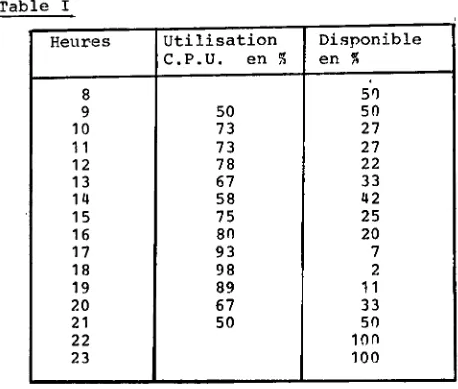
disque avait ete elimine et que par COnS~quent la liMitation a !'utilisation de l'unite centrale ne dependant,olus des unites peripheriques, nous avons utilise les menes releves rour d'une part obtenir la distribution de l'ntilic;ation globale de l'unite centrale et d'autre part verifier quel P.tait encore la disponibilite de cette ressource.Pour les heu~es intermediairec; (13.00 et 18.00) pour lec;quelles nous ne possedons pas de mesures directes nous nous sommes permis d'interpoller lineairement entre les heures voisines. La table I fournit pour chaque heure la moyenne des rf!leves journaliers. Nous trouvons que pour ces trois jours !'utilisation moyenne journaliere a ete 1e 9,5h soit au total 28.53 heures.
Le releve selon S.M.F. a
ete
de 22.55 heures nendant la Merneperiode.
L'utilisation du C.P.U. par l'O.s. peut done ;tre estime ~ 6.0 heures soit un 'over head' global de 21%.
L'utilisation en mode probleme se repartissait comme suit:
~1.'. s.o. Batch
2.75 heurec; 19.80 heures
lV•,lS avons profite de cette occasion pour verifier la regle
Dans le cas or~sent !'estimation nurait ~t~ de 28,3 heures qui
:o~pare aux ~8.5 hAures estimees par !'autre ~~thode donne un r•~sulti'lt d'une precision absolu111ent ine<mfrce.
Nnus pouvons en outre constater que ?. heures de C.P.U. restent disponihles le soir pour !'exploitation de tres gros programmes et 1ue 2 heures environ sont disponibles entre 1n.oo ~t 16.00, ~ous nmettons volontnire111ent le temps disponible avant 10 heures car nous savons qu'il est difficile oour les utilisateurs ayant pris cannaissance vers 8h30 des resultats de la veille de nous proposer d'autres problemes avant 10 heures.
Les 2 heures de C.P.U. disponibles pendant les heures normales de bureau ne peuvent etre exploitees pour la mise au point des tres gras program111es (500 K et plus) car la JlleJIIoire necessaire est pendant la 111ajeure partie de cette periode occupee par les systemes conversationnels (I.H.S, T.s.o. et ADABAS).
L'adjonction d'un quatri0me 111egabvte de meMoire centrale ~ue nous projettons pour lP. second se111estre 1979, per111ettera de lever cette restriction et d'uniformiser la reqle de priorite
a
l'ordinateur pour taUS les ~roqrammes (dans lP.S limites 100
a
1000 kilobytes),
Nous esperons que ces ~uelques informations auront pu interesser nos utilisateurs et que la derniere annonce satisfaira ceux d'entre eux qui par suite de la nature de leurs prohleMes sont actuellement limites
a
un seul passa~e journalier.Table I
Heures Utilisation Disponible C.P.U. en ~ en ~
8 5'l
9 50 50
10 73 27
11 73 27
12 78 22
13 67 33
14 58 42
15 75 25
16
an
2017 93 7
18 98 2
19 89 11
20 67 33
21 50 50
22 100
[image:12.413.49.278.304.499.2]Statistics of computing installation utilization. Report of computing installation exploitation for the month of 'larch 1979.
YEA~ 1978 VEAR 197q
General
Number of workiPq days
Work hours from 8.00 to 24.00 for Duration of scheduled maintenance Duration of unexpected maintenance Total m~intenance time
Total exploitation time CPU time in problem mode
Batch Processinq Number of jobs
Number of cards input Number of lines printed Number of cards punched CPU time
Nu~er of I/0 (Disk)
Number of I/O (Magnetic tape)
T.S.O
Number of LOGON's
Number of messaqes sent by terminals Number of messages received hv terminals CPU time
Number of I/O (Disk) Connect tiMe
IMS
Total time service is available CPU time
Number of I/O (Disk)
21 d 1fi.OOh 2fi.83h 31.47h 58.30h 281.20h 153.02h 93Q3 21210')0 27908000 156000 150.4711 2275400C 4'>37000 730 36215 154629 2.55h 5q1ooo 311.94h
22 d 16 .OOh 20.17h 19.83h 40.00h 312.00h 179. 72h 8976 181800G 30359000 136000 161.27h 23633000 43250()0 3114 179001) 848000 17.58h 2821000 1758.7011 289.37h
Utilisation of computer centre hy objectives and approori.~tion accounts for the ~onth of March 1979.
TBH 370/165
equivalent time in hours
1.20.2 General Services- Administration- Ispra 50.96
1.20.3 General Services- Technical- Ispra 0.95
1.30.3 Central Workshop 5.26
1.30.4 L.M.A.
1.90.0 ESSOR 17.83
1.92.0 Support to the CoJTIIT1i.ssi_on 9.73
2.10.1 Reactor Safety 189.76
2.10.2 Plutonium PuP.l and Actinide Research 12.09
2.10.3 Nuclear !!aterials 9.01)
2. 20. 1 Solar Energy 0. 17
2.20.2 Hydrogen 1 . 31
2.20.4 Design Studies on Thermonuclear Fusion 7.07 2. 30.0 Environment .:md Resources 23.50
2.40.0 'l.ETRE 8.33
2. 50. 1 Informatics 24~ 33
2.50.2 Traininq
2.50.3 Safeguards 8.56
TC1~AL 369.'i1
1.94.0 Services to Exte'::nal llsers 20.40
BATCH PROCESSING DISTRIBUTED BY REQUESTED CORE MEMORY SIZE
100 200 300 400 600
son
1000 1200 1400 >1400 No. of jobs 2331 2557 1812Elapsed time 66 203 213 CPU time 2.8 29.1 38.6 "Equiv" time 23 65 79 "Turn" time 0.7 2.5 3.5 I/O (disk) 2166 4789 5691 I/O (tape) 1740 931 291 NOTE.
All times are in hours. "Equiv" neans equivalent. "Turn" means turn around.
1323 324 81 258 70 36 49.0 17.0 11 •
n
qa
28 18 3.5 6.0 fi.2 6')02 1543 928 1190 123 8All I/O transfers are ~easured in 1000's.
PERCENTAI'~E OF ,TOBS FINISHED IN LESS THJl.N
19 106 9
6 42 2 1. 2 11 • 7 0.7 3 21 2
5.7 5.5 6.0 187 1354 141 1 I 14
-TH1E 15mn 30nn 1hr 2hrs 4hrs 8hrs 1day 2day 3day 6day %year 1978 31 46 62 76 89 98 99 99 100 100 J!year 1979 23 36 49 64 80 94199.8 11)0 100 100
-~- --'--- --- --~ISTOGRA~ o• T~Tqt_ EOLIIVALENT TIME'HR'll
<;QC ~so ~"" 3<;0 Jno :1<;1) 20Jl ISO 100 so
,...
ff.B""
'I"! 'IRY J"' IlL;all
~
~so 8
~nn
200
100
so
REFERENCES TO THE PERSONNEL/FUNCTIONS OF THE CO~PUTING CENTRE.
Hanager of The Computing Centre Responsible for User Registration
Operations Sector
Responsible for the Computer Room Substituted in case of abscence by: Responsible for Peripherals
Systems Group
Responsible for the groun
Substituted in case of abscence by: Responsible for TSO Registration
Informatics Support Sector Responsible for the Sector
Secretary
Responsible for User Support General Inf./Support Library
,T .Pire '1s. G. Rambs
'trs. P.Tomba A.Binda G.Nocera D.Koeniq P.A.Moinil C.D"'olio G.Gagqero G.Hudry ll.de Wolde rtrs. A.Cambon
(See Note 2) Advisory Service/List of Consultants(See Note 1)
A.Inzaghi A.A.Pollicini
H.I. de Wolde
R.Heelhuysen M.Dowell
Room Tele. 1874 787 1873 787 1883 1259 1871 730
1870 730
NOTE 1. The advisory service is available in the same room as the COmputing Support Library(room 1870). Exact details of the advisory service times for a specific week can be found at the head of any output listinq(for that week).
Any informatics problem may be raised. However, the service is not designed to help users Nith problems which are their sole responsibility. For example, debugging of the'logic of proqrams and requests for information \vhich can easily he retrieved from available documentation.
If necessary, other comp€'-~ent personnel from the informatics division may he contacted by the consultant but not directly by
the users. --
HOW TO BECOME A REGULAR READER OF THE NEWSLETTER,
Persons interested in receivinq regularly the "Computing Centre
Newsletter" are requested to fill in the following form and
send i t to
:-Ms. A. Cambon
Support To Computing
Building 36
Tel. 730.
NAME
,ADDRESS