City, University of London Institutional Repository
Citation
:
Shahegh, P., Dietz, T., Cukier, M., Algaith, A., Brozik, A. and Gashi, I. (2017).
AntiVirus and Malware Analysis Tool. In: 2017 IEEE 16th International Symposium on
Network Computing and Applications (NCA). . IEEE. ISBN 978-1-5386-1465-5
This is the accepted version of the paper.
This version of the publication may differ from the final published
version.
Permanent repository link:
http://openaccess.city.ac.uk/id/eprint/18334/
Link to published version
:
Copyright and reuse:
City Research Online aims to make research
outputs of City, University of London available to a wider audience.
Copyright and Moral Rights remain with the author(s) and/or copyright
holders. URLs from City Research Online may be freely distributed and
linked to.
City Research Online:
http://openaccess.city.ac.uk/
[email protected]
1
AVAMAT: AntiVirus and Malware Analysis Tool
Pasha Shahegh
1, Tommy Dietz
1, Michel Cukier
1, Areej Algaith
2, Attila Brozik
2, Ilir Gashi
21 University of Maryland, College Park, MD, USA 2 Centre for Software Reliability, City, University of London, UK
{pshahegh, tdietz3, mcukier}@umd.edu; {areej.algaith.1, attila.brozik.1, ilir.gashi.1}@city.ac.uk
Abstract— We present AVAMAT: AntiVirus and Malware Analysis Tool - a tool for analysing the malware detection capabilities of AntiVirus (AV) products running on different operating system (OS) platforms. Even though similar tools are available, such as VirusTotal and MetaDefender, they have several limitations, which motivated the creation of our own tool. With AVAMAT we are able to analyse not only whether an AV detects a malware, but also at what stage of inspection does it detect it and on what OS. AVAMAT enables experimental campaigns to answer various research questions, ranging from the detection capabilities of AVs on OSs, to optimal ways in which AVs could be combined to improve malware detection capabilities.
Keywords— security assessment; security tool; antivirus software; malware analysis;
I. INTRODUCTION
AntiVirus (AV) products are some of the most widely used security protection systems. They are usually deployed as the last line of defence on desktop, laptop, tablet and smartphone devices. Many studies compare their detection capabilities1.
There are two major platforms that allow for suspicious files to be uploaded for scanning by multiple AV products, namely VirusTotal and Metadefender2. VirusTotal is an online
service that hosts (at the time of writing) 56 signature-based detection engines from different AV vendors. It is a service that is widely used by both academia and industry to submit and inspect malware samples. It also provides an Application Programming Interface (API) through which multiple malware samples can be submitted. Metadefender provides a service similar to VirusTotal that hosts (at the time of writing) 42 signature-based detection engines.
Both of these services provide a valuable resource to malware researchers. But they have limitations for more in-depth analysis of AV detection capabilities:
- Both platforms run signature-based detection engines of these AV products, rather than the full capability products that would run on an end-point. Metadefender states the following on its “Statistics” page (metadefender.com/stats) “Please note that the detection data comes from Software Development Kit (SDK) and Command Line Interface (CLI) package versions of these anti-malware engines… so detection results may differ significantly from commercial endpoint performance.” VirusTotal states the following on its’ “About” page: “VirusTotal's antivirus engines are
1av-comparatives.org/, av-test.org/, virusbtn.com/index
2https://www.virustotal.com/en/, https://www.metadefender.com/
commandline versions, so depending on the product, they will not behave exactly the same as the desktop versions…”. - Both platforms are essentially “black box” testing platforms. In other words, the user submits a file, and gets a response on whether the file was detected as malicious, which AV products detected it as such, and the signature used for the detection. But they do not provide more detail about when the file was detected (e.g. “on entry” - before being downloaded on the endhost; after it was downloaded but without forcing a scan; only after a scan is performed), or on which operating system was the AV product running when it detected (or not) a file as malicious. This makes it more difficult to assess the potential damage that a file may cause on the end host before a malware is actually detected, or whether it would have caused any damage at all on a given operating system.
To overcome these limitationswe built the AntiVirus and Malware Analysis Tool (AVAMAT) for analysing different malware and AV product capabilities running on different operating systems. Currently AVAMAT supports eight full capability AV products (i.e. the full versions of AV products, rather than just signature based detection engines), namely: AVG, Comodo, F-Secure, Kaspersky, FProt, Trend, Avira and Emsisoft. These AV products are run, where available, on three versions of the Microsoft Windows operating systems: XP, 7 and 8. With AVAMAT, a researcher can:
- analyse the diversity of detection capabilities between
different AntiVirus software on different operating systems. Being able to analyse the same malware on machines with the same AV yet different operating system allows us to investigate the operating system’s effect on AV and malware behaviour. And analysing the detection capabilities of different AV products allows us to compare the benefits of combining multiple diverse AVs in a diverse defence-in-depth setup.
- analyse when does an AV product detect a malware it encounters. We classify the detection in four stages depending on when a malware is detected: on entry; after a short wait; on a full scan, or after malware execution. This allows us to, for example, better classify whether the malware will be detected and prevented from running on the end-host machine, or whether the malware would run first before being executed, hence potentially requiring a clean-up and full scan of the machine. Again we will analyse the diversity that exists in these classifications between different AV products and different OSs.
2 The paper is structured as follows: Section II outlines AVAMAT; Section III contains examples of initial results obtained with AVAMAT; Section IV contains related work on AV testing platforms; Section V outlines the main conclusions.
II. AVAMATARCHITECTURE
The AVAMAT architecture is built on top of open-source software and uses custom-developed scripts to allow us to test whether an AV a, running on a given OS o, detects a given malware m on a given date d, and, if it detects it, when does it do so. We will use the shorthand VM(a,o) to refer to a given virtual machine that runs an AV a on an OS o. There are four main components of AVAMAT:
- AV interfacing script (Skeleton): interfaces with
custom-developed scripts on each VM(a,o). The skeleton chooses the specific script on VM(a,o). Once selected, the skeleton uses the functions in the custom-developed script to perform an analysis on malware m;
- Updaters: at the start of each experimental campaign,
updates the OS and AV with the latest updates and patches available for each VM(a,o);
- Snapshot Manager: at the start of each experimental
campaign, takes a snapshot of each virtual machine
VM(a,o); after the virtual machine is finished inspecting a given malware m it reverts back to the last snapshot (ensuring that all malware in a given experimental campaign are executed by the same VM(a,o));
- Experiment Scheduler: the administrator of the
experiment can specify how many times should an experimental campaign be repeated. This may be useful to enable, for example, testing how long it takes for an AV product to detect a malware it has not detected in the past.
Figure 1 shows the AV products and OSs currently supported in AVAMAT.
FIG.1–THE AV PRODUCTS AND OSS CURRENTLY SUPPORTED IN AVAMAT. EACH BOX IS ONE VIRTUAL MACHINE (WE REFER TO A BOX AS VM(A,O)). AVIRA AND EMISOFT NO LONGER SUPPORT WINDOWS XP VERSIONS, HENCE
THEY ARE MISSING FROM THE FIGURE ABOVE.
A. AV Interfacing script (Skeleton)
At the core of AVAMAT’s infrastructure is the Cuckoo sandbox (cuckoosandbox.org). Cuckoo sandbox is an open source automated malware analysis system. AVAMAT uses a customized analysis package that puts the malware on a machine, and then runs the AV Interfacing script (Skeleton). The Skeleton is a Python script we have developed which coordinates the scanning and logging of all the malware m by an AV product a. A copy of the Skeleton resides on each of the guest virtual machines that runs an AV product a on an OS o. The guest virtual machines are created with KVM (linux-kvm.org). When the Skeleton finishes, the analysis package uploads the results file that the Skeleton generates back on to the host machine. The results include information about: the malware m that was just scanned, the OS o (name, version), the AV product a (name, version), the time and date d on which this test happened and the point at which the AV product a
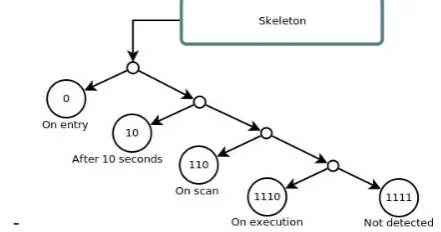
detected the malware m, if it did at all. An agent script running on the machine at start-up uploads malware to each machine. There are four stages at which the skeleton checks if the malware is found (Figure 2 illustrates this):
- on entry (the malware m is detected by VM(a,o) on
attempted download: the AV a detects the payload as malicious and stops it before it downloads);
- after a short wait (currently set to 10 seconds) (i.e. the
malware was not detected on entry to VM(a,o), but was detected by the AV product a less than 10 seconds after it was downloaded on OS o);
- on a scan (the malware was downloaded on VM(a,o), 10
seconds have passed, and a scan was initiated, and only then was the malware detected by the AV product a);
- after execution (the malware was not detected in any of the
aforementioned stages, but was detected when the file is executed);
- no detection – if no detection in any of the above four
stages.
Since the stages are sequential (e.g., we only do a scan if the malware was not detected in the previous stage(s)), the results give us information not only about whether an AV product detected a malware, but also when did it detect it. So, for example, 1110 means the malware was not detected in
VM(a,o) in three earlier stages (“on entry”, “after 10 seconds” and “on scan”), and only detected when the malware was executed.
-FIG.2.THE POSSIBLE RESULTS OBTAINED ON A VM(A,O).0 MEANS DETECTION
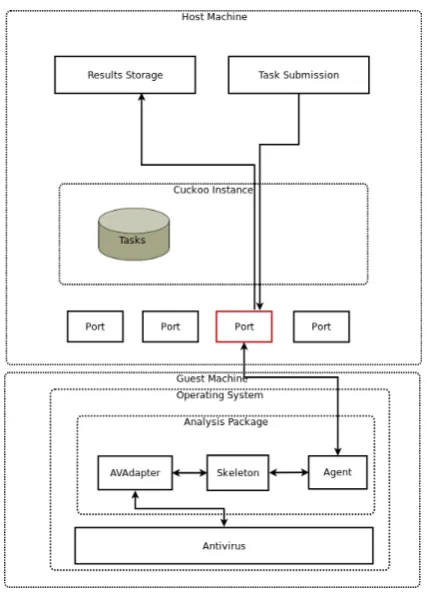
[image:3.595.80.242.468.651.2] [image:3.595.321.542.582.698.2]3 AVAMAT uses Cuckoo to: communicate between the host machine where the results are stored, and the guest machines where the AV products are running; submit malware samples from the repository of malware stored in the host machine to the guest machines; execute Cuckoo’s analysis package and upload the results to the host machine.
The host machine runs the virtualization software (KVM), from which the guest virtual machines VM (a,o) are run, stores the repository of malware, and an SQL database which stores the results of testing. The host machine is setup to have an instance of Cuckoo for every VM(a,o). Along with each instance of Cuckoo it also contains its own unique process, tasks database, and results server port. Each instance of Cuckoo has its own task database, hence allowing it to synchronize running different VM(a,o) instances at the same time.
Each guest machine VM(a,o) has three main components written in Python: an adapter interfacing script (Skeleton), an AV Adapter script and an Agent. Figure 3 depicts the high level architecture of the Skeleton, AV Adapters and Agents for one VM(a,o), and how it communicates with the host machine.
FIG.3-COMMUNICATION BETWEEN THE HOST MACHINE WHERE THE RESULTS ARE STORED AND ONE GUEST MACHINE VM(A,O)THERE IS ONE CUCKOO PORT
USED BY EACH VM(A,O).
The Agent is an element of Cuckoo that enables communication between the host operating system and the guest operating systems. It establishes a TCP connection with the host, allowing the host to send malware and the guest to upload the analysis results. The Skeleton mediates between the Agent and the AV Adapter functions, which gather the data on the guest machine. To determine the detection stage, the Skeleton calls on the AV Adapter’s functions. The Skeleton records in a results text file the stage at which the malware has
been found (if at all) and the signature with which a given AV product has detected the malware (if a signature is returned by the AV product). We have a customized AV Adapter for each
VM(a,o) that accounts for operating system and for the respective AV products. The AV Adapter implements functions the skeleton expects when performing analysis.
The multiple functions in the AV adapter get the program version, database version, engine version, malware signature, as well as running an antivirus scan (if applicable to the analysis).
B. Updaters, Snapshot Manager and Experiment Scheduler
Updaters: Before we start an experiment with AVAMAT
we ensure that all VM(a,o) have the latest updates applied. AVAMAT runs automated scripts that update each VM(a,o)
with the latest updates available for each AV a and OS o.
Snapshot Manager: AVAMAT allows for multiple
malware to be sent to a given VM(a,o) in succession. So, after we have retrieved the results from a given VM(a,o) when it analysed malware mi, AVAMAT restores the state of the
VM(a,o) to the state it was before sending it malware mi. This
ensure that when we send the next malware mi+1 to it the state
of VM(a,o) has not been contaminated by malware mi. For this
we use built-in machine management functionality of the cuckoo sandbox. Cuckoo has built-in libraries to revert to snapshots of different virtualization software.
Experiment Scheduler: AVAMAT allows a researcher to
configure and run an entire experimental campaign over a long period of time with limited supervision. For each repetition of the experiment:
- We run the Updaters once for each VM(a,o);
- We run the Snapshot manager once at the start of the experiment (i.e. before sending any malware to it). We then revert back to this clean snapshot of a given VM(a,o)
after each malware m is inspected by that VM(a,o); We run the Skeleton once after each malware m sent to a
VM(a,o).
III. RESULTS FROM USING AVAMAT
AVAMAT is currently in testing mode. In what follows we show examples of analysis using results obtained from testing with AVAMAT that are not possible to obtain with VirusTotal or Metadefender. The malware we used during testing have been collected from research honeypots that we have been running for several years.
[image:4.595.56.270.285.582.2]4 TABLE I. DETECTION STEPS (CF.FIG 2) FOR KASPERSKY AV ON TWO
MALWARE SAMPLES
Malware MD5 XP Win7Win8 VirusTotal MetaDefender
0859f181992bb4b113cdb94420347e721111 110 110 bit.ly/2mVozRY No report found
0e16e2c22d90fcfdf639279cb2478587 110 1111 110 bit.ly/2mn0dNMbit.ly/2mHK7RB
We ran a small experiment where we sent over 5000 malware samples to AVAMAT. Figure 4 is a 3D plot showing the stage of detection (z-axis) on different malware (y-axis) per dates of the experiment (x-axis; non-detection is step 1111) for Comodo on Windows 7. The malware in the y-axis have been ordered by average difficulty of detection by the AVs (from easiest – blue; to most difficult – red). This graph shows that there is diversity in malware detection, and stages of malware detection, even for the same AV on the same operating system on different dates. Most malware are either detected on scan (step 110) or not detected at all (step 1111) by Comodo on Windows 7.
The analysis shown here is not possible with either VirusTotal or Metadefender.
FIG.4-THE RATE OF MALWARE DETECTION (Z-AXIS) BY THE DIFFERENT
VM(A,O)(Y-AXIS;NOTE: AT THIS STAGE OF TESTING 21VMS WERE OPERATIONAL) PER STAGE OF DETECTION (X-AXIS; NON-DETECTION IS STEP
1111)
IV. LESSONS LEARNT,DISCUSSION AND CONCLUSION In this paper we presented a tool called AVAMAT (AntiVirus and Malware Analysis Tool). We built AVAMAT to overcome the limitation`s of existing malware testing platforms, such as VirusTotal and Metadefender, that do use multiple AV products, but only their command line interfaces that have limited functionality. These platforms also do not provide details on when an AV product actually detected the malware (on entry, on scan, once malware executes, etc.). AVAMAT enables researchers to analyse different malware and AV product capabilities running on different OSs. Currently AVAMAT supports eight full capability AV products that are run, where available, on three versions of the Microsoft Windows OS: XP, 7 and 8. We also showed some
initial results obtained with AVAMAT that highlight its advantages compared with VirusTotal or MetaDefender.
Using AVAMAT we plan to run experimental campaigns to help us answer some of the following research questions (the list is not exhaustive):
- What are the differences in the detection capabilities of different AV products? Are there differences in detection capabilities of AVs depending on the OS platform the AV product runs?
- Do the AV products continue to detect a malware over time, or are there cases of regressions in detection behaviour?
- Which combination of AV products and OS platforms give best detection capabilities against malware for a particular time period?
- What are the false positive rates of AV products when subjected to benign files? Are there differences in these rates: by OS platform? By type of file? Etc.
AVAMAT is currently being used within our Universities. This is to allow the functionality to be tested and debugged to improve the reliability of the tool and the results obtained from its use. We have two options of making the tool publically available for other researchers to use, once the testing stage is complete:
- Release the code so that users can build their own version of AVAMAT, with their own AV products and licenses in their own environments;
- Provide an API through which users can submit malware samples for analysis to AVAMAT (similar to how VirusTotal and Metadefender are used). But there are inevitable infrastructure costs for deploying a tool such as this, so the exact deployment and use model for AVAMAT remains to be decided.
Current work and future enhancement for AVAMAT include building support for more AV products and operating systems, and a frontend for data analysis.
ACKNOWLEDGMENT
This research is supported by NSF award #1223634, and the UK EPSRC project D3S (Diversity and defence in depth for security: a probabilistic approach).
REFERENCES
(Note: for additional references, see footnotes and URLs in the main text. All URLs last accessed on the 5-Oct-2017)
1. Oberheide, J., E. Cooke, and F. Jahanian. CloudAV: N-Version Antivirus in the Network Cloud. in Proc. of the 17th USENIX Security Symposium. 2008.