“
Ajax Security
is a remarkably rigorous and thorough examination
of an underexplored subject. Every Ajax engineer needs to have
the knowledge contained in this book—or be able to explain why
they don’t.”
Jesse James Garrett
“Finally, a book that collects and presents the various Ajax security
concerns in an understandable format! So many people have
hopped onto the Ajax bandwagon without considering the
secu-rity ramifications; now those people need to read this book and
revisit their applications to address the various security
short-comings pointed out by the authors.”
Jeff Forristal
“If you are writing or reviewing Ajax code, you need this book.
Billy and Bryan have done a stellar job in a nascent area of our
field, and deserve success. Go buy this book. I can’t wait for it to
come out.”
Andrew van der Stock, Executive Director, OWASP
“Web technologies like Ajax are creating new networked business
structures that remove the sources of friction in the new
econ-omy. Regrettably, hackers work to compromise this evolution by
capitalizing on the weaknesses in this technology and those who
develop it. Until now, few books told the whole Ajax security
story, educating those using or planning to use this technology.
This one does.”
Ajax Security
Billy Hoffman and Bryan Sullivan
Upper Saddle River, NJ • Boston• Indianapolis • San Francisco New York • Toronto •Montreal • London •Munich • Paris • Madrid
Many of the designations used by manufacturers and sellers to distinguish their products are claimed as trademarks. Where those designations appear in this book, and the publisher was aware of a trademark claim, the designations have been printed with initial capital letters or in all capitals.
The authors and publisher have taken care in the preparation of this book, but make no expressed or implied warranty of any kind and assume no responsibility for errors or omissions. No liability is assumed for incidental or consequential damages in connection with or arising out of the use of the information or programs contained herein.
The publisher offers excellent discounts on this book when ordered in quantity for bulk purchases or special sales, which may include electronic versions and/or custom covers and content particular to your business, training goals, marketing focus, and branding interests. For more information, please contact:
U.S. Corporate and Government Sales (800) 382-3419
For sales outside the United States please contact:
International Sales
Visit us on the Web: www.prenhallprofessional.com
Library of Congress Cataloging-in-Publication Data: Hoffman, Billy,
1980-Ajax security / Billy Hoffman and Bryan Sullivan.
p. cm.
ISBN 0-321-49193-9 (pbk. : alk. paper) 1. Ajax (Web site development technology) 2. Computer networks—Security measures. 3. Computer security. I. Sullivan, Bryan, 1974- II. Title.
TK5105.8885.A52H62 2007
005.8—dc22
2007037191
Copyright © 2008 Pearson Education, Inc.
All rights reserved. Printed in the United States of America. This publication is protected by copyright, and permission must be obtained from the publisher prior to any prohibited reproduction, storage in a retrieval system, or transmission in any form or by any means, electronic, mechanical, photocopying, recording, or likewise. For information regarding permissions, write to:
Pearson Education, Inc Rights and Contracts Department 501 Boylston Street, Suite 900 Boston, MA 02116 Fax (617) 671 3447
Editor-in-Chief Karen Gettman Acquisitions Editor Jessica Goldstein Development Editor Sheri Cain Managing Editor Gina Kanouse Project Editor Chelsey Marti Copy Editor Harrison Ridge Editorial Services Indexer Lisa Stumpf Proofreader Kathy Ruiz Technical Reviewers
This book is dedicated to my wife Jill. I am lucky beyond words to be married to such an intelligent, beautiful, and caring woman. Love you Sexy.
Preface xvii
Preface (The Real One) xvix
Chapter 1 Introduction to Ajax Security 1
An Ajax Primer 2
What Is Ajax? 2
Asynchronous 3
JavaScript 6
XML 11
Dynamic HTML (DHTML) 11
The Ajax Architecture Shift 11
Thick-Client Architecture 12
Thin-Client Architecture 13
Ajax: The Goldilocks of Architecture 15
A Security Perspective: Thick-Client Applications 16
A Security Perspective: Thin-Client Applications 17
A Security Perspective: Ajax Applications 18
A Perfect Storm of Vulnerabilities 19
Increased Complexity, Transparency, and Size 19
Sociological Issues 22
Ajax Applications: Attractive and Strategic Targets 23
Conclusions 24
Chapter 2 The Heist 25
Eve 25
Hacking HighTechVacations.net 26
CONTENTS
Hacking the Coupon System 26
Attacking Client-Side Data Binding 32
Attacking the Ajax API 36
A Theft in the Night 42
Chapter 3 Web Attacks 45
The Basic Attack Categories 45
Resource Enumeration 46
Parameter Manipulation 50
Other Attacks 75
Cross-Site Request Forgery (CSRF) 75
Phishing 76
Denial-of-Service (DoS) 77
Protecting Web Applications from Resource Enumeration and Parameter
Manipulation 77
Secure Sockets Layer 78
Conclusions 78
Chapter 4 Ajax Attack Surface 81
Understanding the Attack Surface 81
Traditional Web Application Attack Surface 83
Form Inputs 83
Cookies 84
Headers 85
Hidden Form Inputs 86
Query Parameters 86
Uploaded Files 89
Traditional Web Application Attacks: A Report Card 90
Web Service Attack Surface 92
Web Service Methods 92
Web Service Definitions 94
Ajax Application Attack Surface 94
The Origin of the Ajax Application Attack Surface 96
Best of Both Worlds—for the Hacker 98
Proper Input Validation 98
The Problem with Blacklisting and Other Specific Fixes 99
Treating the Symptoms Instead of the Disease 102
Regular Expressions 109
Additional Thoughts on Input Validation 109
Validating Rich User Input 111
Validating Markup Languages 111
Validating Binary Files 113
Validating JavaScript Source Code 114
Validating Serialized Data 120
The Myth of User-Supplied Content 122
Conclusion 123
Chapter 5 Ajax Code Complexity 125
Multiple Languages and Architectures 125
Array Indexing 126
String Operations 128
Code Comments 129
Someone Else’s Problem 130
JavaScript Quirks 132
Interpreted, Not Compiled 132
Weakly Typed 133
Asynchronicity 135
Race Conditions 135
Deadlocks and the Dining Philosophers Problem 139
Client-Side Synchronization 144
Be Careful Whose Advice You Take 144
Conclusions 145
Chapter 6 Transparency in Ajax Applications 147
Black Boxes Versus White Boxes 147
Example: MyLocalWeatherForecast.com 150
Example: MyLocalWeatherForecast.com “Ajaxified” 152
Comparison Conclusions 156
The Web Application as an API 156
Data Types and Method Signatures 158
Specific Security Mistakes 158
Improper Authorization 159
Overly Granular Server API 161
Session State Stored in JavaScript 164
Sensitive Data Revealed to Users 165
Comments and Documentation Included in Client-Side Code 166
Data Transformation Performed on the Client 167
Security through Obscurity 172
Obfuscation 173
Conclusions 174
Chapter 7 Hijacking Ajax Applications 175
Hijacking Ajax Frameworks 176
Accidental Function Clobbering 176
Function Clobbering for Fun and Profit 178
Hijacking On-Demand Ajax 184
Hijacking JSON APIs 190
Hijacking Object Literals 195
Root of JSON Hijacking 195
Defending Against JSON Hijacking 196
Conclusions 199
Chapter 8 Attacking Client-Side Storage 201
Overview of Client-Side Storage Systems 201
General Client-Side Storage Security 202
HTTP Cookies 204
Cookie Access Control Rules 206
Storage Capacity of HTTP Cookies 211
Lifetime of Cookies 215
Additional Cookie Storage Security Notes 216
Cookie Storage Summary 216
Flash Local Shared Objects 218
Flash Local Shared Objects Summary 225
DOM Storage 226
Session Storage 227
Global Storage 229
The Devilish Details of DOM Storage 231
DOM Storage Security 233
DOM Storage Summary 234
Internet Explorer userData 235
Security Summary 240
General Client-Side Storage Attacks and Defenses 240
Cross-Domain Attacks 241
Cross-Directory Attacks 242
Cross-Port Attacks 243
Conclusions 243
Chapter 9 Offline Ajax Applications 245
Offline Ajax Applications 245
Google Gears 247
Native Security Features and Shortcomings of Google Gears 248
Exploiting WorkerPool 251
LocalServer Data Disclosure and Poisoning 253
Directly Accessing the Google Gears Database 257
SQL Injection and Google Gears 258
How Dangerous Is Client-Side SQL Injection? 262
Dojo.Offline 264
Keeping the Key Safe 265
Keeping the Data Safe 266
Good Passwords Make for Good Keys 267
Client-Side Input Validation Becomes Relevant 268
Other Approaches to Offline Applications 270
Conclusions 270
Chapter 10 Request Origin Issues 273
Robots, Spiders, Browsers, and Other Creepy Crawlers 273
“Hello! My Name Is Firefox. I Enjoy Chunked Encoding, PDFs, and
Long Walks on the Beach.” 275
Request Origin Uncertainty and JavaScript 276
Ajax Requests from the Web Server’s Point of View 276
Yourself, or Someone Like You 280
Sending HTTP Requests with JavaScript 282
JavaScript HTTP Attacks in a Pre-Ajax World 284
Hunting Content with XMLHttpRequest 286
Combination XSS/XHR Attacks in Action 290
Defenses 292
Conclusions 294
Chapter 11 Web Mashups and Aggregators 295
Machine-Consumable Data on the Internet 296
Early 90’s: Dawn of the Human Web 296
Mid 90s: The Birth of the Machine Web 297
2000s: The Machine Web Matures 298
Publicly Available Web Services 299
Mashups: Frankenstein on the Web 301
ChicagoCrime.org 302
HousingMaps.com 303
Other Mashups 304
Constructing Mashups 304
Mashups and Ajax 306
Bridges, Proxies, and Gateways—Oh My! 308
Ajax Proxy Alternatives 309
Attacking Ajax Proxies 310
Et Tu, HousingMaps.com? 312
Input Validation in Mashups 314
Aggregate Sites 317
Degraded Security and Trust 324
Conclusions 327
Chapter 12 Attacking the Presentation Layer 329
A Pinch of Presentation Makes the Content Go Down 329
Attacking the Presentation Layer 333
Data Mining Cascading Style Sheets 334
Look and Feel Hacks 337
Advanced Look and Feel Hacks 341
Embedded Program Logic 345
Cascading Style Sheets Vectors 347
Modifying the Browser Cache 348
Preventing Presentation Layer Attacks 352
Conclusion 353
Chapter 13 JavaScript Worms 355
Overview of JavaScript Worms 355
Traditional Computer Viruses 356
JavaScript Worms 359
JavaScript Worm Construction 361
JavaScript Limitations 363
Propagating JavaScript Worms 364
JavaScript Worm Payloads 364
Putting It All Together 372
Case Study: Samy Worm 373
How It Worked 374
The Virus’ Payload 377
Conclusions About the Samy Worm 379
Case Study: Yamanner Worm (JS/Yamanner-A) 380
How It Worked 380
The Virus’ Payload 383
Conclusions About the Yamanner Worm 384
Lessons Learned from Real JavaScript Worms 387
Conclusions 389
Chapter 14 Testing Ajax Applications 391
Black Magic 391
Not Everyone Uses a Web Browser to Browse the Web 396
Catch-22 398
Security Testing Tools—or Why Real Life Is Not Like Hollywood 399
Site Cataloging 400
Vulnerability Detection 401
Analysis Tool: Sprajax 403
Analysis Tool: Paros Proxy 406
Analysis Tool: LAPSE (Lightweight Analysis for Program Security
in Eclipse) 408
Analysis Tool: WebInspect™ 409
Additional Thoughts on Security Testing 411
Chapter 15 Analysis of Ajax Frameworks 413
ASP.NET 413
ASP.NET AJAX (formerly Atlas) 414
ScriptService 417
Security Showdown: UpdatePanel Versus ScriptService 419
ASP.NET AJAX and WSDL 420
ValidateRequest 424
ViewStateUserKey 425
ASP.NET Configuration and Debugging 426
PHP 427
Sajax 427
Sajax and Cross-Site Request Forgery 430
Java EE 431
Direct Web Remoting (DWR) 432
JavaScript Frameworks 434
A Warning About Client-Side Code 435
Prototype 435
Conclusions 437
Appendix A Samy Source Code 439
Appendix B Source Code for Yamanner Worm 447
Index 453
Fire. The wheel. Electricity. All of these pale next to the monumental achievement that is Ajax. From the moment man first walked upright, he dreamed of, nay, lusted for the day that he would be able to make partial page refreshes in a Web application. Surely Jesse James Garrett was touched by the hand of God Himself the morning he stood in his shower and contemplated the word Ajax.
But like Cortés to the Aztecs, or the Star Wars prequels, what was at first received as a savior was later revealed to be an agent of ultimate destruction. As the staggering security vulnerabilities of Ajax reared their sinister heads, chaos erupted in the streets. Civilizations crumbled. Only two men could dare to confront the overwhelming horror of Ajax. To protect the innocent. To smite the wicked. To stave off the end of all life in the universe.
And we’re glad you’ve paid $49.99 for our book.
Ajax has completely changed the way we architect and deploy Web applications. Gone are the days of the Web browser as a simple dumb terminal for powerful applications running on Web servers. Today’s Ajax applications implement functionality inside a user’s Web browser to create responsive desktop-like applications that exist on both the client and the server. We are seeing excellent work from developers at companies like Google and Yahoo! as well the open source community pushing the bounds of what Ajax can do with new features like client-side storage, offline applications, and rich Web APIs. As Web programmers and security researchers, we rushed out and learned as much as we could about these cool new applications and technologies. While we were excited by all the possibilities Ajax seemed to offer, we were left with a nagging feeling: No one was talking about the security repercussions of this new application architecture. We saw prominent resources and experts in the Ajax field giving poor advice and code samples riddled with dangerous security vulnerabilities such as SQL Injection or Cross-Site Scripting.
Digging deeper, we found that not only were these traditional Web vulnerabilities ignored or relegated to passing mention in an appendix, but there were also larger secu-rity concerns with developing Ajax applications: overly granular Web services, applica-tion control flow tampering, insecure practices for developing mashups, and easily bypassed authentication mechanisms. Ajax may have the inherent usability strengths of both desktop and Web applications, but it also has both of their inherent security weak-nesses. Still, security seems to be an afterthought for most developers.
Preface
We hope to change that perspective.
We wrote this book for the Ajax developer who wants to implement the latest and greatest Ajax features in their applications, while still developing them securely to avoid falling prey to evil hackers looking to exploit the applications for personal and financial gain. Throughout the book, we focus not just on presenting you with potential security problems in your Ajax applications, but also on providing guidance on how you can overcome these problems and deliver tighter, more secure code. We also analyze com-mon Ajax frameworks like Prototype, DWR, and Microsoft’s ASP.NET AJAX to find out what security protections frameworks have built-in and what you, as a developer, are responsible to add.
We also wrote this book for the quality assurance engineer and the professional pene-tration tester. We have tried to provide information about common weaknesses and security defects found in Ajax applications. The book discusses the testing challenges you will face in auditing an Ajax application, such as discovering the application’s footprint and detecting defects. We review a few tools that aid you in completing these challenging tasks. Finally, we give details on new Ajax attack techniques such as JavaScript hijacking, persistent storage theft, and attacking mashups. We also provide fresh takes on familiar attacks, such as a simplified Ajax-based SQL Injection method, which requires only two requests to extract the entire backend database.
This is not a book for learning Ajax or Web programming—we expect you to have a pretty good handle on that already. Instead, we will focus on the mistakes and problems with the design and creation of Ajax applications that create security vulnerabilities and provide advice on how to develop Ajax applications securely. This book is not program language specific and does not force you to write the server-side of your application in any specific language. There are common components to all Ajax applications, including HTTP, HTML, CSS, and JavaScript. We focus our analysis on these components. When we do provide security advice with respect to your Web server code, we do so using tech-niques such as regular expressions or string operations that can be implemented using any language.
This book also contains a great deal of material that should benefit both the developer and the tester. Case studies of real-world Ajax applications and how they were hacked, such as MySpace’s Samy worm and Yahoo!’s Yamanner worm, are discussed. Sample applications and examples, such as an online travel booking site, provide guidance on how to secure an Ajax application for testers and developers alike.
While we do mean for the book to be read cover-to-cover, front-to-back, each chapter stands on its own. If there’s a particular topic you can’t wait to discover, such as the analysis of specific Ajax frameworks for security issues (which can be found in Chapter 15, “Analysis of Ajax Frameworks”), feel free to skip ahead or read out of order.
Ajax provides an exciting new philosophy for creating Web applications. This book is by no means an attempt to dismiss Ajax as silly or infeasible from a security perspective. Instead, we hope to provide a resource to help you develop powerful, feature-rich Ajax applications that are extremely useful, while at the same time robust and secure against malicious attackers.
Enjoy,
Billy and Bryan
J
OINTA
CKNOWLEDGMENTSThe names on the cover of this book are Billy Hoffman and Bryan Sullivan, but the truth is that there are many incredibly talented and dedicated people who made this book a reality. Without their help, the entire text of this book would read something like “Securing Ajax is hard.” We’ll never be able to thank them enough for the gifts of their time and expertise, but we’re going to try anyway.
First and foremost, we have to thank our lovely, intelligent, and compassionate wives, Jill and Amy, for their support over the last year. We can only imagine how difficult it was to tell us “Get back to work on the book!” when what you really wanted to say was “Forget the book and take me out to dinner!” You are amazing women and we don’t deserve you.
We want to thank our technical editors Trellum Technologies, Inc., Jeff Forristal, Joe Stagner, and Vinnie Liu. You made this book better than we ever hoped it could be. No, you weren’t too nitpicky. Yes, we can still be friends.
We also want to thank everyone at SPI for their contributions and their understand-ing. While there were many SPIs who pitched in with their help, we want to single out two people in particular. Caleb Sima, this book would not be possible without your infi-nite wisdom. You have built an amazing company and we are honored and humbled to be a part of it. Ashley Vandiver, you did more work on this book than we ever had the right to ask for. Thank you so much.
Special thanks go out to Samantha Black for her help with the “Web Attacks” and “Attacking the Presentation Layer” chapters.
Finally, we would like to acknowledge the amazing staff at Addison-Wesley
Professional and Pearson Education who helped bring Ajax Securityto life: Sheri Cain, Alan Clements, Romny French, Karen Gettman, Gina Kanouse, Jake McFarland, Kathy Ruiz, Lisa Stumpf, Michael Thurston, and Kristin Weinberger. We especially want to thank Marie McKinley for her marketing expertise (and the Black Hat flyers!); Linda Harrison for making us sound like professional writers instead of computer program-mers; and Chelsey Marti for her efforts with editing a document that was blocked by antivirus software. Rot-13 to the rescue! Last but certainly not least, thanks to our acqui-sitions editor Jessica Goldstein for believing in two novice authors and for keeping us moving forward throughout this adventure.
To think it all started with a short, curly-haired pregnant woman asking the innocent question “So have you thought about writing a book?” What a fun, strange ride this has been.
B
ILLY’
SA
CKNOWLEDGMENTSThanks to my wife Jill. She kept me motivated and focused when all I wanted to do was give up and this book simply would not have been completed without her.
Thanks to my parents, Mary and Billy, and my brother Jason. Without their unwaver-ing support and love in all my endeavors I wouldn’t be half the person I am today.
And of course, thanks to my co-author Bryan. Through long nights and crazy dead-lines we created something to be proud of all while becoming closer friends. I can’t think of anyone else I would have wanted to write this book with.
B
RYAN’
SA
CKNOWLEDGMENTSOnce again—and it’s still not enough—I have to thank my wife, Amy, for her love and support, not just during the writing of this book, but for every minute of the past 14 years.
Finally, I can’t think of anyone with whom I would rather have spent my nights and weekends guzzling Red Bull and debating the relative merits of various CSRF defense strategies than you, Billy. It may have taken a little more blood, sweat, and tears than we originally anticipated, but we’ll always be able to say that we saved an entire generation of programmers from the shame and embarrassment of PA.
Billy Hoffmanis the lead researcher for HP Security Labs of HP Software. At HP, Billy focuses on JavaScript source code analysis, automated discovery of Web application vul-nerabilities, and Web crawling technologies. He has worked in the security space since 2001 after he wrote an article on cracking software for 2600, “The Hacker Quarterly,” and learned that people would pay him to be curious. Over the years Billy has worked a vari-ety of projects including reverse engineering file formats, micro-controllers, JavaScript malware, and magstripes. He is the creator of Stripe Snoop, a suite of research tools that captures, modifies, validates, generates, analyzes, and shares data from magstripes. Billy’s work has been featured in Wired,Makemagazine, Slashdot, G4TechTV, and in various other journals and Web sites.
Billy is a regular presenter at hacker conferences including Toorcon, Shmoocon, Phreaknic, Summercon, and Outerz0ne and is active in the South East hacking scene. Occasionally the suits make him take off the black t-shirt and he speaks at more main-stream security events including RSA, Infosec, AJAXWorld, and Black Hat.
Billy graduated from the Georgia Institute of Technology in 2005 with a BS in
Computer Science with specializations in networking and embedded systems. He lives in Atlanta with his wife and two tubby and very spoiled cats.
Bryan Sullivan is a software development manager for the Application Security Center division of HP Software. He has been a professional software developer and development manager for over 12 years, with the last five years focused on the Internet security soft-ware industry. Prior to HP, Bryan was a security researcher for SPI Dynamics, a leading Web application security company acquired by HP in August 2007. While at SPI, he created the DevInspect product, which analyzes Web applications for security vulnerabil-ities during development.
Bryan is a frequent speaker at industry events, most recently AjaxWorld, Black Hat, and RSA. He was involved in the creation of the Application Vulnerability Description Language (AVDL) and has three patents on security assessment and remediation methodologies pending review. He is a graduate of the Georgia Institute of Technology with a BS in Applied Mathematics.
When he’s not trying to break the Internet, Bryan spends as much time as he can on the golf links. If any Augusta National members are reading this, Bryan would be exceed-ingly happy to tell you everything he knows about Ajax security over a round or two.
Myth: Ajax applications are just Web pages with extra bells and whistles.
Ajax—Asynchronous JavaScript and XML—is taking the World Wide Web by storm. It is not at all an overstatement to say that Ajax has the potential to revolutionize the way we use the Internet—and even computers in general. Ajax is a fundamental component of Web 2.0, a complete re-imagining of what the Web is and what it is capable of being. We are already seeing the emergence of Ajax-based versions of historically desktop-based applications, like email clients and word processors. It may not be long before the Ajax versions overtake the desktop versions in popularity. The day may even come when all software is Web- and Ajax-based, and locally installed desktop applications are looked at as something of an anachronism, like punch cards or floppy disks.
Why are we so optimistic about the future of Ajax? Ajax represents one of the holy grails of computing: the ability to write an application once and then deploy that same code on virtually any operating system or device. Even better, because you access the application from a central server, the application can be updated every day, or hundreds of times a day, without requiring a reinstallation on the client’s machine. “This is noth-ing new,” you say. “We’ve had this since the Web was invented in 1991!” That is true; but until the invention of Ajax, the necessity of Web pages to reload after every request lim-ited their usefulness as replacements for everyday desktop applications. A spreadsheet application that reloads the entire workspace every time a cell is edited would be unus-able. By updating only a portion of the page at a time, Ajax applications can overcome this limitation. The Web may allow us to write an application once and use it anywhere, but Ajax allows us to write a practical and effective application once and use it anywhere.
1
Unfortunately, there is one huge buzzing, stinging fly in the Ajax ointment: security. From a security perspective, Ajax applications are more difficult to design, develop, and test than traditional Web applications. Extra precautions must be taken at all stages of the development lifecycle in order to avoid security defects. Everyone involved in creat-ing your Ajax application must have a thorough understandcreat-ing of Ajax security issues or your project may be doomed to a very expensive and humiliating failure before it even gets off the ground. The purpose of this book is to arm you, whether you are a software programmer, architect, or tester, with the security knowledge you need to fend off the hackers’ attacks and create a truly secure and trustworthy Ajax application.
A
NA
JAXP
RIMERBefore we delve into the particulars of Ajax security, it is worthwhile for us to briefly review the basics of Ajax technology. If you’re confident that you have a solid grasp of Ajax fundamentals, feel free to proceed to the next section, “The Ajax Architecture Shift.”
W
HATI
SA
JAX?
Normally, when a browser makes a request to a server for a dynamic Web page, it makes a request for the complete page. The server application responds by creating HTML for the page and returning it to the browser. The browser completes the operation by dis-carding its current page and rendering the new HTML into the browser window through which the user can view and act on it.
This process is straightforward but also wasteful. Server processing power is often used to regenerate a new page for the client that is almost identical to the one that the client just discarded. Network bandwidth is strained as entire pages are needlessly sent across the wire. Users cannot use the application while their requests are being
processed. They are forced to sit and wait for the server to get back to them. When the server’s response finally gets back to the browser, the browser flickers while it re-renders the entire page.
It would be better for all parties if a Web client could request only a fragment of a page instead of having to request the entire page from the server. The server would be able to process the request more quickly, and less bandwidth would be needed to send the response. The client would have a more responsive interface because the round-trip time of the request would be shorter, and the irritating flicker caused by redrawing the entire page would be eliminated.
Ajax is a collection of technologies that steps up to the challenge and allows the client-side piece of a Web application to continuously update portions of itself from the Web server. The user never has to submit the Web form or even leave the current page. Client-side scripting code (usually JavaScript) makes asynchronous, or non-blocking, requests for fragments of Web pages. These fragments can be raw data that are then transformed into HTML on the client, or they can be HTML fragments that are ready to be inserted directly into the document. In either case, after the server fulfills the request and returns the fragment to the client, the script code then modifies the page document object model (DOM) to incorporate the new data. This methodology not only satisfies our need for quick, smooth updates, but because the requests are made asynchronously, the user can even continue to use the application while the requests are in progress.
ANAJAX PRIMER
1 Jesse James Garrett, who coined the term Ajax, claims that it is not an acronym. Pretty much everyone else in the world believes that it is.
WHATAJAX IS NOT
It is worth noting not just what Ajax is, but what it is not. Most people understand that Ajax is not a programming language in itself, but rather a collection of other technologies. What may be more surprising is that Ajax functionality is not some-thing that necessarily needs to be turned on by the server. It is client-side code that makes the requests and processes the responses. As we will see, client-side code can be easily manipulated by an attacker.
In October 2005, the Web site MySpace was hit with a Web virus. The Samy worm, as it came to be known, used Ajax techniques to replicate itself throughout the various pages of the site. What makes this remarkable is that MySpace was not using Ajax at the time! The Samy worm actually injected Ajax code into MySpace through a vulnerability in the MySpace code. A thorough case study of this ingen-ious attack can be found in Chapter 13, “JavaScript Worms.”
To understand how Ajax works, let’s start by breaking the word into the parts of its acronym1: asynchronous, JavaScript, and XML.
A
SYNCHRONOUSwill respond to a user’s action (like a button click) in microseconds. An average Web application takes much longer than that. Even the fastest Web sites operating under the best conditions will usually take at least a quarter of a second to respond when the time to redraw the page is factored in. Ajax applications like Live Search and Writely need to respond to frequently occurring events like mouse pointer movements and keyboard events. The latency involved in making a complete page postback for each sequential event makes postbacks completely impractical for real-time uses like these.
We can decrease the response time by making smaller requests; or more specifically, by making requests that have smaller responses. Generally, a larger response will take the server more time to assemble than a smaller one. Moreover, a larger response will always take more time to transfer across the network than a smaller one. So, by making frequent small requests rather than infrequent large requests, we can improve the responsiveness of the application. Unfortunately, this only gets us part of the way to where we want to go.
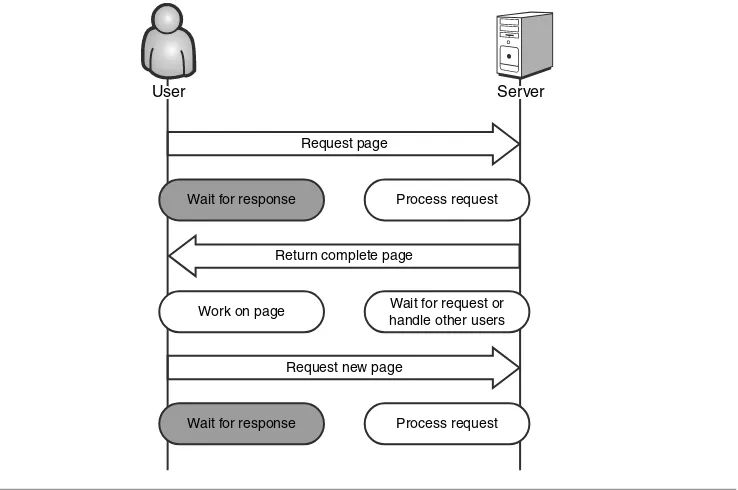
[image:31.462.58.427.320.565.2]The real problem with Web applications is not so much that it takes a long time for the application to respond to user input, but rather that the user is blocked from per-forming any useful action from the time he submits his request to the time the browser renders the response. The user basically has to simply sit and wait, as you can see in Figure 1-1.
CHAPTER1 INTRODUCTION TOAJAXSECURITY
User
User ServerServerServer
Request page
Return complete page
Request new page
Wait for response Process request
Work on page Wait for request or handle other users
Wait for response Process request
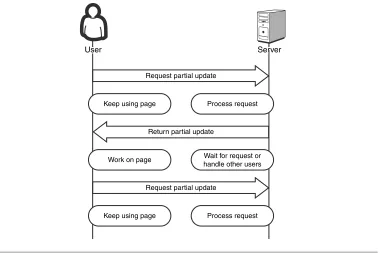
Unless we can get round-trip response times in the hundredths-of-seconds range (which with today’s technology is simply impossible to accomplish), the synchronous request model will not be as responsive as a locally installed desktop application. The solution is to abandon the synchronous request model in favor of an asynchronous one. Requests are made just as they were before, but instead of blocking any further activity until the response comes back from the server, the client simply registers a callback method. When the response does come back, the callback method is called to handle updating the page. Until then, the user is free to continue using the application, as illustrated in Figure 1-2. He can even queue up multiple requests at the same time.
ANAJAX PRIMER
User
User ServerServerServer
Request partial update
Return partial update
Request partial update
Keep using page Process request
Work on page Wait for request or handle other users
[image:32.462.49.436.205.458.2]Keep using page Process request
Figure 1-2 Asynchronous Ajax request/response model
J
AVAS
CRIPTClient-side scripting code (JavaScript in particular) is the glue that holds Ajax together. Without the ability to perform complex actions on the client tier, we would be relegated to developing strictly thin-client, traditional Web applications circa 1995. The other technology facets of Ajax—asynchronicity and XML—are useless without script code to command them. JavaScript is required to send an asynchronous request and to handle the response. JavaScript is also required to process XML or to manipulate the DOM without requiring a complete page refresh.
The JavaScript Standard
While it is possible to write the client-side script of Ajax applications in a language other than JavaScript, it is the de facto standard for the Web world. As such, we will refer to JavaScript, alone, throughout this chapter. However, it is important to note that the secu-rity risks detailed in this chapter are not specific to JavaScript; any scripting language would share the same threats. Switching to VBScript or any other language will not help you create a more secure application.
To demonstrate this, let’s look at a very simple example application before and after Ajax. This application displays the current time, along with a Refresh button.
If we look at the HTML source code for the page shown in Figure 1-3, we can see that there is really not that much to see.
CHAPTER1 INTRODUCTION TOAJAXSECURITY
<html> <head>
<title>What time is it?</title> </head>
<body>
<form action="currenttime.php" method="GET"> The current time is: 21:46:02
<input type="submit" value="Refresh"/> </form>
</body> </html>
Now, let’s look at the same application (see Figure 1-4) after it’s been “Ajaxified”:
ANAJAX PRIMER
Figure 1-4 An Ajax-enabled Web application that displays the current time
On the surface, the application looks exactly the same as its predecessor. Under the cov-ers, however, it is very different. Pressing the Refresh button no longer causes a complete page refresh. Instead, it simply calls back to the server to get the current time. When the response fragment is received from the server, the page updates only the time portion of the page text. While this may seem a little silly given the simplicity of the application, in a larger, real-world application, the usability improvements from this partial update could be very significant. So, let’s look at the HTML source code and see what has changed:
<title>What time is it?</title> <script type="text/javascript">
var httpRequest = getHttpRequest();
function getHttpRequest() { var httpRequest = null; if (window.XMLHttpRequest) {
httpRequest = new XMLHttpRequest(); } else if (window.ActiveXObject) {
httpRequest = new ActiveXObject("Microsoft.XMLHTTP"); }
return httpRequest; }
function getCurrentTime() {
httpRequest.open("GET", "getCurrentTime.php", true); httpRequest.onreadystatechange =
handleCurrentTimeChanged; httpRequest.send(null); }
function handleCurrentTimeChanged() { if (httpRequest.readyState == 4) {
var currentTimeSpan =
document.getElementById('currentTime'); if (currentTimeSpan.childNodes.length == 0) {
currentTimeSpan.appendChild( document.createTextNode
(httpRequest.responseText)); } else {
currentTimeSpan.childNodes[0].data = httpRequest.responseText;
} } }
</script> </head> <body>
The current time is: <span id="currentTime">18:34:44</span> <input type="button" value="Refresh"
onclick="getCurrentTime();"/> </body>
</html>
We can certainly see that the Ajax application is larger: There are four times as many lines of code for the Ajax version as there are for the non-Ajax version! Let’s dig a little deeper into the source code and find out what has been added.
The application workflow starts as soon as the page is loaded in the browser. The vari-able httpRequestis set by calling the method getHttpRequest. The getHttpRequest
method creates an XMLHttpRequestobject, which is the object that allows the page to make asynchronous requests to the server. If one class could be said to be the key to Ajax, it would be XMLHttpRequest(sometimes abbreviated as XHR). Some of the key proper-ties and methods of XHR are
open Specifies properties of the request, such as the HTTP method, to be used and the URL to which the request will be sent. It is worth noting that open does not actu-ally open a connection to a Web server; this is done when the send method is called.
send Sends the request.
onreadystatechange Specifies a callback function that will be called whenever the state of the request changes (for instance, from open to sent).
readyState The state of the request. A value of 4 indicates that a response has been received from the server. Note that this does not necessarily indicate that the request was successful.
responseText The text of the response received from the server.
The XHR object is first used when the user presses the Refresh button. Instead of sub-mitting a form back to the server as in the first sample, the Ajax sample executes the JavaScript method getCurrentTime. Thismethoduses XHR to send an asynchronous request to the page getCurrentTime.phpand registers the function
handleCurrentTimeChangedas a callback method (that is, the method that will be called when the request state changes). Because the request is asynchronous, the application does not block while it is waiting for the server’s response. The user is only blocked for the fraction of a second that getCurrentTimetakes to execute, which is so brief that the vast majority of users would not even notice.
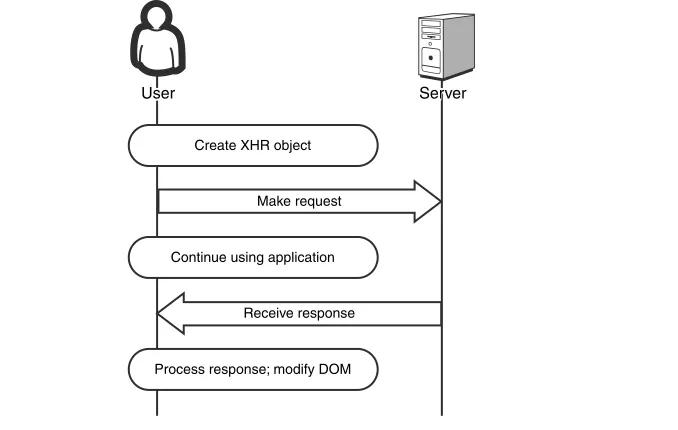
When a response is received from the server,handleCurrentTimeChangedtakes the response, which is simply a string representation of the current time, and alters the page DOM to reflect the new value. The user is only briefly blocked, as shown in Figure 1-5. None of this would be possible without JavaScript.
Figure 1-5 Ajax Application Workflow
Same Origin Policy
[image:37.462.81.420.77.292.2]The Same Origin Policy is the backbone of the JavaScript security model. In short, the JavaScript for any origin can only access or manipulate data from that same origin. An origin is defined by the triplet Domain + Protocol + Port. For example, JavaScript on a Web page from google.comcannot access the cookies for ebay.com. Table 1-1 shows what other pages can be accessed by JavaScript on the page http://www.site.com/page.html.
Table 1-1 Applying the Same Origin Policy against http://www.site.com/page.html
URL Access allowed? Reason
http://www.site.com/dir/page2.html Yes Same domain, protocol, and port
https://www.site.com/page.html No Different protocol
http://sub.site.com/page.html No Different host
http://site.com/page.html No Different host
http://www.site.com:8080/page.html No Different port
CHAPTER1 INTRODUCTION TOAJAXSECURITY
User
User ServerServerServer
Make request
Receive response Create XHR object
Continue using application
The Same Origin Policy also prevents JavaScript from opening XMLHttpRequeststo any server other than the same Web server that the user is currently visiting.
XML
XML is the last component of Ajax; and, to be perfectly honest, it is probably the least important component. JavaScript is the engine that makes the entire process of partial updates possible; and asynchronicity is a feature that makes partial updates worth doing; but, the use of XML is really just an optional way to build the requests and responses. Many Ajax frameworks use JavaScript Object Notation (JSON) in place of XML.
In our earlier example (the page that displayed the current time) the data was transferred across the network as plain, unencapsulated text that was then dropped directly into the page DOM.
D
YNAMICHTML (DHTML)
While dynamic HTML (DHTML) is not part of the Ajax “acronym” and XML is, client-side manipulation of the page content is a much more critical function of Ajax applica-tions than the parsing of XML responses. We can only assume that “Ajad” didn’t have the same ring to it that “Ajax” did. Once a response is received from the asynchronous request, the data or page fragment contained in the response has to be inserted back into the current page. This is accomplished by making modifications to the DOM.
In the time server example earlier in the chapter, the handleCurrentTimeChanged func-tion used the DOM interface method document.getElementByIdto find the HTML span in which the time was displayed. The handleCurrentTimeChangedmethod then called additional DOM methods to create a text node if necessary and then modify its contents. This is nothing new or revolutionary; but the fact that the dynamic content can be refreshed from the server and not be included with the initial response makes all the dif-ference. Even simple applications like stock tickers would be impossible without the abil-ity to fetch additional content from the server.
T
HEA
JAXA
RCHITECTURES
HIFTMost of the earliest Web applications to use Ajax were basically standard Web sites with some extra visual flair. We began to see Web pages with text boxes that automatically suggested values after the user typed a few characters or panels that automatically collapsed and expanded as the user hovered over them with her mouse. These sites
provided some interesting eye candy for the user, but they didn’t really provide a sub-stantially different experience from their predecessors. However, as Ajax matured we began to see some new applications that did take advantage of the unique new architec-ture to provide a vastly improved experience.
MapQuest (www.mapquest.com) is an excellent example of Ajax’s potential to provide a completely new type of Web application: a Web application that has the look and feel of a desktop application.
The Ajax-based MapQuest of 2007 is more than just a flashier version (no pun intended) of its older, non-Ajax incarnation. A MapQuest user can find her house, get directions from her house to her work, and get a list of pizza restaurants en route between the two, all on a single Web page. She never needs to wait for a complete refresh and redraw of the page as she would for a standard Web site. In the future, this type of application will define what we think of as an Ajax application much more than the Web site that just uses Ajax to makes its pages prettier. This is what we call the Ajax architec-ture shift.
In order to understand the security implications of this shift, we need to understand the differences between Ajax applications and other client/server applications such as traditional Web sites. Without being too simplistic, we can think of these client/server applications as belonging to one of two groups: either thick client or thin client. As we will see, Ajax applications straddle the line between these two groups, and it is exactly this property that makes the applications so difficult to properly secure.
T
HICK-C
LIENTA
RCHITECTUREThick-client applicationsperform the majority of their processing on the client machine. They are typically installed on a desktop computer and then configured to communicate with a remote server. The remote server maintains some set of resources that are shared among all clients, such as a database or file share. Some application logic may be performed on the server, for instance, a database server may call stored proce-dures to validate requests or maintain data integrity. But for the most part, the burden of processing falls on the client (see Figure 1-6).
Thick-client programs enjoy a number of advantages. The most important of these is a responsive user interface. When a user performs an action such as pressing a button or dragging and dropping a file, the time it takes the application to respond is usually meas-ured in microseconds. The thick-client program owes its excellent response time to the fact that it can process the user’s action locally, without having to make remote requests across a network. The logic required to handle the request is already present on the user’s machine. Some actions, such as reading or writing files, do take a longer time to process.
Figure 1-6 A sample thick-client architecture
A well-designed thick-client application will perform these time-consuming tasks asyn-chronously. The user is able to proceed with other actions while the long-running opera-tion continues in the background.
On the other hand, there are disadvantages to thick-client architecture as well. In gen-eral, it is difficult to make updates or changes to thick-client desktop applications. The user is usually required to shut down the application, completely uninstall it from his machine, reinstall the new version, then finally restart the newly upgraded application and pick up where he left off. If changes have been made to the server component as well, then it is likely that any user who has not yet upgraded his client will not be able to use the application. Coordinating simultaneous upgrades of server and client installa-tions across many users can be a nightmare for IT departments. There are some new technologies that are designed to ease the deployment of thick-client programs, like Java Web Start and .NET ClickOnce, but these, too, have limitations because they require other programs to be installed on the client (in this case, the Java 2 Runtime and the .NET Framework, respectively).
T
HIN-C
LIENTA
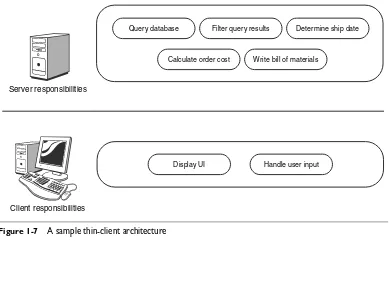
RCHITECTUREThin-client applicationsbehave in exactly the opposite way from thick-client applica-tions. The burden of processing falls mainly on the server, as illustrated in Figure 1-7. The job of the client module is simply to accept input from the user and display output
THEAJAXARCHITECTURESHIFT
Server responsibilities
Query database
Client responsibilities
Display UI
Calculate order cost
Filter query results
Write bill of materials
Handle user input
back to him. The dumb terminals and mainframe computers of the mid-twentieth century worked this way, as did early Web applications. The Web server processed all the business logic of the application, maintained any state required, constructed complete response messages for incoming requests, and sent them back to the user. The browser’s only role was to send requests to the Web server and render the returned HTML response so that a user could view it.
The thin-client architecture solved the update problem that had plagued the thick-client developers. A Web browser acts as a universal clientand doesn’t know or care what happens on the server side. The application can be modified on the server side every day, or ten times a day, and the users will just automatically pick up the changes. No reinstallations or reboots are required. It can even be changed while users are actively using it. This is a huge benefit to IT departments, who now do not need to coordinate extensive upgrade procedures for hundreds or thousands of users. Another great advan-tage of thin-client programs is found in the name itself: they’re thin. They don’t take up much space on the user’s machine. They don’t use much memory when they run. Most Web applications have azero-footprintinstall, meaning they don’t require any disk space on the client machine at all.
CHAPTER1 INTRODUCTION TOAJAXSECURITY
Server responsibilities
Display UI Handle user input
Client responsibilities
Query database
Calculate order cost
Filter query results
Write bill of materials
[image:41.462.38.427.307.596.2]Determine ship date
Users were thrilled with the advantages that thin-client Web applications provided, but eventually the novelty of the Web started to wear off. Users began to miss the robust user interfaces that they had come to expect in their desktop applications. Familiar methods of interaction, like dragging and dropping icons, were missing. Even worse, Web applica-tions were simply not as responsive as desktop programs. Every click of the mouse meant a delay while the request was sent, processed at a Web server possibly thousands of miles away, and returned as HTML, which the browser then used to completely replace the existing page. No matter how powerful the processors of the Web servers were, or how much memory they had, or how much bandwidth the network had, there really was no getting around the fact that using a Web browser as a dumb terminal did not provide a robust user experience.
The introduction of JavaScript and DHTML helped bring back some of the thick-client style user interface elements; but the functionality of the application was still lim-ited by the fact that the pages could not be asynchronously updated with new data from the server. Complete page postbacks were still required to fetch new data. This made it impractical to use DHTML for applications like map and direction applications, because too much data—potentially gigabytes worth—needed to be downloaded to the client. This also made it impossible to use DHTML for applications that need to be continu-ously updated with fresh data, like stock tickers. It was not until the invention of XHR and Ajax that applications like these could be developed.
A
JAX:T
HEG
OLDILOCKS OFA
RCHITECTURESo, where does Ajax fit into the architecture scheme? Is it a thick-client architecture or a thin-client architecture? Ajax applications function in a Web browser and are not installed on the user’s machine, which are traits of thin-client architectures. However, they also perform a significant amount of application logic processing on the client machine, which is a trait of thick-client architectures. They make calls to servers to retrieve specific pieces of data, much like rich-client applications call database servers or file sharing servers. The answer is that Ajax applications are really neither thick- nor thin-client applications. They are something new; they are evenly-balanced applications (see Figure 1-8).
In many ways, the Ajax framework is the best of both worlds: It has the rich user interface found in good desktop applications; and it has the zero-footprint install and ease of maintenance found in Web applications. For these reasons, many software indus-try analysts predict that Ajax will become a widely-adopted major technology. In terms of security, however, Ajax is actually the worst of both worlds. It has the inherent security vulnerabilities of both architectures.
Figure 1-8 A sample Ajax architecture: evenly balanced between the client and server
A S
ECURITYP
ERSPECTIVE:T
HICK-C
LIENTA
PPLICATIONSThe major security concern with thick-client applications is that so much of the applica-tion logic resides on the user’s machine—outside the effective control of the owner. Most software programs contain proprietary information to some extent. The ability of an application to perform a task differently and better than its competitors is what makes it worth buying. The creators of the programs, therefore, usually make an effort to keep their proprietary information a secret.
The problem with installing secrets (in this case, the logic of the application) on a remote machine is that a determined user can make sure they don’t remain secrets very long. Armed with decompilers and debuggers, the user can turn the installed application back into the source code from which it originated and then probe the source for any security weaknesses. He can also potentially change the program, perhaps in order to crack its licensing scheme. In short, the client machine is an uncontrollable, hostile envi-ronment and a poor location in which to store secret information. The security risks of thick-client applications are summarized in Table 1-2.
CHAPTER1 INTRODUCTION TOAJAXSECURITY
Server responsibilities
Display UI Handle user input Calculate order cost
Client responsibilities
Query database Filter query results
Write bill of materials
Table 1-2 Security risks of thick-client applications
Risk Applicable to thick-client applications?
Application logic is accessible on the client X
Messages between client and server are easily intercepted and understood
The application is generally accessible to anonymous public users
A S
ECURITYP
ERSPECTIVE:T
HIN-C
LIENTA
PPLICATIONSThin-client programs have a different set of security concerns (see Table 1-3). Most, if not all, of the valuable business logic of the application remains hidden from the user on the server side. Attackers cannot simply decompile the application to learn its inner workings. If the Web server is properly configured, attackers have no way to directly retrieve this programming logic. When a hacker attempts to break into a Web site, she has to perform a lot of reconnaissance work to try to gain information about the appli-cation. She will perform attacks that are designed not to gain unauthorized access to the server or to steal users’ personal data, but simply to learn a little more about the tech-nologies being used. The hacker may examine the raw HTTP responses from the server to determine what types and version numbers of operating systems and Web servers are being used. She may examine the HTML that is being returned to look for hidden com-ments. Often, programmers insert information (like authentication credentials used for testing) into HTML comments without realizing that the information can easily be read by an end user. Another trick attackers use is to intentionally generate an error message in the application, which can potentially reveal which databases or application servers are being used.
Because all this effort is required to reveal fragments of the logic of the thin-client application and thick-client applications can be easily decompiled and analyzed, it seems that thin-client applications are inherently more secure, right? Not exactly. Every round-trip between client and server provides an opportunity for an attacker to intercept or tamper with the message being sent. While this is true for all architectures, thin-client programs (especially Web applications) tend to make many more round-trips than thick-client programs. Furthermore, Web applications communicate in HTTP, a well-known, text-based protocol. If an attacker were to intercept an HTTP message, he could probably understand the contents. Thick-client programs often communicate in binary protocols, which are much more difficult for a third-party to interpret. Before, we ran
into security problems by leaving secrets on the user’s machine, outside of our control. Now, we run into security problems by sending secrets back and forth between the client and the server and pretending no one else can see them.
Another important security consideration for Web applications is that they are gener-ally freely accessible to any anonymous person who wants to use them. You don’t need an installation disk to use a Web site; you just need to know its URL. True, some Web sites do require users to be authenticated. You cannot gain access to classified military secrets just by pointing your browser to the U.S. Department of Defense (DoD) Web site. If there were such secrets available on the DoD site, certainly the site administrator would issue accounts only to those users permitted to view them. However, even in such a case, a hacker at least has a starting point from which to mount an attack. Compare this situation to attacking a thick-client application. In the thick-client case, even if the attacker manages to obtain the client portion of the application, it may be that the server portion of the application is only accessible on a certain internal network disconnected from the rest of the outside world. Our hacker may have to physically break into a particular office building in order to mount an attack against the server. That is orders of magnitude more dangerous then being able to crack it while sitting in a basement 1,000 miles away eating pizza and drinking Red Bull.
Table 1-3 Security risks of thin-client applications
Risk Applicable to thin-client applications?
Application logic is accessible on the client
Messages between client and server are easily X intercepted and understood
The application is generally accessible to X anonymous public users
A S
ECURITYP
ERSPECTIVE: A
JAXA
PPLICATIONSUnfortunately, while Ajax incorporates the best capabilities of both thick-client and thin-client architectures, it is also vulnerable to the same attacks that affect both types of applications. Earlier, we described thick-client applications as insecure because they could be decompiled and analyzed by an attacker. The same problem exists with Ajax applications, and, in fact, even more so, because in most cases the attacker does not even need to go to the effort of decompiling the program. JavaScript is what is known as an
interpreted language, rather than a compiled language. When a developer adds client-side JavaScript to his Web application, he actually adds the source code of the script to the Web page. When a Web browser executes the JavaScript embedded in that page, it is directly reading and interpreting that source code. If a user wanted to see that source code for himself, all he would have to do is to click the View Page Source command in his browser.
Furthermore, Ajax Web applications still use HTTP messages, which are easy to inter-cept, to communicate between the client and the server just like traditional Web applica-tions. And, they are still generally accessible to any anonymous user. So, Ajax
applications are subject to the security risks of both thick- and thin-client applications (see Table 1-4).
Table 1-4 Security risks of Ajax applications
Risk Applicable to Ajax applications?
Application logic is accessible on the client X
Messages between client and server are easily X intercepted and understood
The application is generally accessible to X anonymous public users
A P
ERFECTS
TORM OFV
ULNERABILITIESThe Ajax architecture shift has security ramifications beyond just incorporating the inherent dangers of both thin- and thick-client designs. It has actually created a perfect storm of potential vulnerabilities by impacting application security in three major ways:
•
Ajax applications are more complex.•
Ajax applications are more transparent.•
Ajax applications are larger.I
NCREASEDC
OMPLEXITY,T
RANSPARENCY,
ANDS
IZEThe increased complexity of Ajax applications comes from the fact that two completely separate systems—the Web server and the client’s browser—now have to work together
in unison (and asynchronously) in order to allow the application to function properly. There are extra considerations that need to be taken into account when designing an asynchronous system. Essentially you are creating a multithreaded application instead of a single-threaded one. The primary thread continues to handle user actions while a background thread processes the actions. This multithreaded aspect makes the applica-tion harder to design and opens the door to all kinds of synchronizaapplica-tion problems, including race conditions. Not only are these problems some of the hardest to reproduce and fix, but they can also cause serious security vulnerabilities. A race condition in a product order form might allow an attacker to alter the contents of her order without changing the corresponding order cost. For example, she might add a new plasma HDTV to her shopping cart and quickly submit the order before the order cost was updated to reflect the $2,500 addition.
When we say that Ajax applications are more transparent, what we mean is that more of the internal workings of the applications are exposed to the client. Traditional Web applications function as a sort of black box. Input goes in and output comes out, but no one outside of the development team knows how or why. The application logic is handled almost completely by the server. On the other hand, Ajax applications need to execute significant portions of their logic on the client. This means that code needs to be downloaded to the client machine, and any code downloaded to a client machine is susceptible to reverse engineering. Furthermore, as we just mentioned in the previous section, the most commonly used client-side languages (including JavaScript) are inter-preted languages rather than compiled languages. In other words, the client-side portion of the application is sent in raw source code form to the client, where anyone can read it. Additionally, in order for Ajax client code to communicate effectively with the corre-sponding server portion of the application, the server code needs to provide what is essentially an application programming interface (API) to allow clients to access it. The very existence of a server API increases the transparency of the server-side code. As the API becomes more granular (to improve the performance and responsiveness of the application), the transparency also increases. In short, the more “Ajax-y” the application, the more its inner workings are exposed. This is a problem because the server methods are accessible not just by the client-side code that the developers wrote, but by any out-side party as well. An attacker may choose to call your server-out-side code in a completely different manner than you originally intended. As an example, look at the following block of client-side JavaScript from an online music store.
function purchaseSong(username, password, songId) {
// first authenticate the user
if (checkCredentials(username, password) == false) {
alert('The username or password is incorrect.'); return;
}
// get the price of the song
var songPrice = getSongPrice(songId);
// make sure the user has enough money in his account if (getAccountBalance(username) < songPrice) {
alert('You do not have enough money in your account.'); return;
}
// debit the user's account debitAccount(username, songPrice);
// start downloading the song to the client machine downloadSong(songId);
}
In this example, the server API has exposed five methods:
1. checkCredentials 2. getSongPrice
3. getAccountBalance
4. debitAccount 5. downloadSong
The application programmers intended these methods to be called by the client in this exact order. First, the application would ensure that the user was logged in. Next, it would ensure that she had enough money in her account to purchase the song she requested. If so, then her account would be debited by the appropriate amount, and the song would be downloaded to her machine. This code will execute flawlessly on a legiti-mate user’s machine. However, a malicious user could twist this code in several nasty ways. He could
•
Omit the authentication, balance checking, and account debiting steps and simply call the downloadSongmethod directly. This gives him all the free music he wants!•
Change the price of the song by modifying the value of the songPricevariable. While it is true that he can already get songs for free simply by skipping over thedebitAccountfunction, he might check to see if the server accepts negative values for the songPriceparameter. If this worked, the store would actually be paying the hacker to take the music.
•
Obtain the current balance of any user’s account. Because the getAccountBalancefunction does not require a corresponding password parameter for the username parameter, that information is available just by knowing the username. Worse, the
debitAccountfunction works the same way. It would be possible to completely wipe out all of the money in any user’s account.
The existence of a server API also increases the attack surfaceof the application. An application’s attack surface is defined as all of the areas of the application that an attacker could potentially penetrate. The most commonly attacked portions of any Web applica-tion are its inputs. For tradiapplica-tional Web applicaapplica-tions, these inputs include any form inputs, the query string, the HTTP request cookies, and headers, among others. Ajax applications use of all of these inputs, and they add the server APIs. The addition of the API methods represents a potentially huge increase in the number of inputs that must be defended. In fact, not only should each method in an API be considered part of the application’s attack surface, but so should each parameter of each method in an API.
It can be very easy for a programmer to forget to apply proper validation techniques to individual parameters of server methods, especially because a parameter may not be vulnerable when accessed through the client-side code. The client-side code may con-strain the user to send only certain parameter values: 5-digit postal codes for example, or integers between 0 and 100. But as we saw earlier, attackers are not limited by the rules imposed on the client-side code. They can bypass the intended client-side code and call the server-side functions directly—and in unexpected ways. They might send 6 digits for the postal code field or alphabetic characters instead of integers. If the parameter value was being used as part of a SQL query filter in the server code, it is possible that an attacker might be able to inject SQL code of her choosing into the parameter. The mali-cious SQL code would then be executed on the server. This is a very common and dan-gerous attack known as SQL Injection, and it can result in the entire backend database being stolen or destroyed.
S
OCIOLOGICALI
SSUESBeyond just the technical issues involved with making Ajax a perfect storm for security vulnerabilities, there are also sociological issues that contribute to the problem.
Economics dictate that supply of a service will grow to fill demand for that service, even at the expense of overall quality. The demand for Ajax programmers has grown at an