Physicians frequently raise questions during patient visits and around half of those questions are not even pursued due to various reasons. These unanswered questions represent huge knowledge gap and could lead to negative treatment outcomes. Internet technologies have been developing rapidly. On one hand, Internet provides us numerous information resources. On the other hand, Internet brings us voluminous increase in information and knowledge needs. To make medical information more easily accessible and to facilitate physicians’ decision making process, we designed and developed a system that called the Clinical Knowledge Summaries (CKS) to automatically extract and synthesize relevant medical evidence from major resources including UpToDate and PubMed. We performed a usability study involving 10 physicians to evaluate the effectiveness, efficiency and satisfaction associated with the use of the system.
Physicians in general found CKS intuitive to use and the information delivered valuable in adding in their knowledge gaps.
Headings:
by Chunxi Zhang
A Master's paper submitted to the faculty of the School of Information and Library Science of the University of North Carolina at Chapel Hill
in partial fulfillment of the requirements for the degree of Master of Science in
Information Science.
Chapel Hill, North Carolina April, 2015
Approved by:
Table of Contents
Introduction ... 2
Literature Review... 4
Physicians’ Unmet Information Needs ... 4
Physicians’ Information Source and Seeking Behaviors ... 6
Clinical Decision Support System... 8
Usability Evaluation of Clinical Knowledge Summaries – A clinical Decision Support System ... 10
Project Background ... 10
System Introduction ... 11
Usability Methodology ... 15
Results and Discussion ... 18
Future Works ... 27
Bibliography ... 28
Appendix ... 31
Appendix A: POST_VIGNETTE QUESTIONAAIRE ... 31
I
NTRODUCTIONL
ITERATURER
EVIEWIn this section, I will review the literature in relevant areas. They include the following three areas: 1) physicians’ unmet information needs, 2) information seeking behavior, and 3) clinical decision support systems.
Physicians’ Unmet Information Needs
The first study about physicians information needs was a 1985 study by Covell et al, which reported that internal medicine physicians raised two questions for every three patients they saw in office practice [1]. In this study, 47 physicians were investigated during a half day of typical office practice. The physicians raised 269 questions, and most of them are about patient management. Only 30% of physicians' information needs were met during the patient visit usually by consulting another physician or a health
professional. Questions related to medical specialties were highly specific to the
pursued needs; satisfied needs [5]. He reviewed surveys conducted before. He concluded that previous surveys generally only concentrated on perceived needs and recognized needs. Furthermore, he stated that the type of information was limited to Medical
Knowledge and the surveys did not present the correct or complete information needs of physicians.
In 1999, a systematic review published by Richard Smith titled “What clinical information do doctors need?” gathered papers on the information needs of doctors by searching Medline[6]. Richard Smith expanded the sample size and included more types of information needs in the review. One key observation was that the current volume of scientific information was perceived as unmanageable, and about a third of the
participating physicians found the effort to acquire relevant information from the literature to be a major challenge.
More recently, a survey identified the clinical questions that health care professionals have at the point of care. They gathered questions from 28 clinicians. According to the survey, approximately two-thirds of questions could be classified into 5 broad competencies: selection of treatment, selection of test, prevention, prognosis, and determining the cause of a clinical finding [7]. The most common question types were “How should I treat finding/condition y given situation z?”, “Is drug x indicated in situation y or for condition y?”, and “What is the cause of symptom x?” In general, the vast majority of the questions are around professional healthcare. And it is the knowledge gap we need to fill.
professional healthcare information. These unmet information needs are due to a variety of reasons. Several surveys pointed out that a significant number of physicians still rely on asking other physicians to solve the question. Limited information source and inefficient information seeking behaviors are two main causes.
Physicians’ Information Source and Seeking Behaviors
In 1993, a study by Cheryl Dee was designed to describe the information needs and the information-seeking behavior of rural physicians. Data were collected from 12 rural physicians in Central Florida through face-to-face interviews and observation [8]. Based on a review of 144 patient charts, 48 produced unique, factual patient care questions, the leading sources of information for rural physicians in this study were, in order of
frequency: colleagues, medical meetings, journals, books, and libraries. The emphasis was similar among physicians with and without hospital library access. According to the observations, most of the physicians felt that their information needs were unmet. The main cause was the lack of time due to heavy workloads. Rural physicians need
immediate access to high-quality, synthesized answers to specific patient care questions during the time of patient contact. At the end of paper, the author suggested building up-to-date health information system and a database composed of selected textbooks with integrated keyword access. Both of these ideas have been incorporated into modern Electronic Health Records (EHR) systems, and they play important roles in today’s clinical decision support systems.
study, a total of 3,347 surveys were returned by physicians. Although journals were still the most important clinical information source due to the limited assess with Internet at 2004, 73.9% respondents found that the Internet was useful or extremely useful compared with other clinical information sources. According to the comparison between the data in 2001 with 2003 in the survey, accessing online journals increased from 45.3% in 2001 to 65.1% in 2003. The problem had attracted attention and was being solved. Another question proposed in the survey was the seeking behaviors of the physicians. More than half of the respondents were confident or very confident in their Internet search skills in seeking medical information. But most of them also mentioned that sometimes they were not able to find the information they need on the Internet. The top three barriers
physicians encountered were navigation or searching difficulties (59.4%), too much information to scan (50.8%), and specific information not available (47.4%). In other words, it was found that there was still a long way to leverage and utilize Internet effectively for physicians’ everyday information needs.
though they were full-text. Rather, users went to full-text journals, with Journals@Ovid being the most popular access point. The authors admitted that the high use of
Journals@Ovid could have been due to Ovid‘s MEDLINE interface linking directly to the full-text of articles identified by searches, making this a one-step effort. At the same time, 75% of survey respondents never used any of the other full-text databases that provided access to over 2,000 online journals.
Clinical Decision Support System
A clinical decision support system (CDSS) is a health information technology system that is designed to assist physicians and other health professionals with clinical decision-making [11]. Because of the high volume of physicians and the limited time, CDSS which may be able to help reduce the time spent in information seeking and improve the accuracy.
determine if the functions of the system fit the need and preference of physicians. A close cooperation between computer scientists and clinicians, therefore is necessary for a good CDSS.
Usability is crucial to promote acceptance of new information technologies. Usability testing is regarded as a major technique used by developers to improve the effectiveness and efficiency of information systems [13]. A study by Cheedy Jaja et al conducted a usability test with a clinical decision support system for diagnosis of prostate cancer. The targeted users were African American men who bore a disproportionate burden of prostate cancer morbidity and mortality. The participants had been taught how to how to use the CDSS on touch-screen notebook computers and had been encouraged to verbalize freely their thoughts via think-aloud method. Then, the researchers collected all the results categorized based on the types of usability issues. On the basis of the usability tests, the researchers were convinced that iterative evaluation studies would foster the development of a culturally appropriate decision support system that African American men could embrace.
In summary, with the permeation of electronic health records and CDSS, there has been a corresponding increase in studies describing these systems and variable
U
SABILITYE
VALUATION OFC
LINICALK
NOWLEDGES
UMMARIES–
A
CLINICALD
ECISIONS
UPPORTS
YSTEMProject Background
As presented in literature review, physicians frequently experience difficulties finding the right guideline at the right time, despite the quantity of information available. And
because of the limitation of time during patient visit, it is necessary for physicians to find the correct answers in a short period of time. However, in over 70% of the cases,
physicians were not able to answer those questions. The reasons can vary, including lack of time and lack of education about how to retrieve medical information efficiently. Physicians still prefer to consult other physicians to answer their questions. The
knowledge gap between physicians’ information needs and unanswered questions lead to suboptimal decisions, and lowering the quality of patient care. Within the rapid
development of medical area and an increasing number of clinical knowledge, the gap is more likely to be enlarged.
websites [14]. To summarize, significant barriers limit the use of these resources for patient care. First, lack of time. The visit time of patient encounter is limited. When patients have questions, they expect their physicians to answer them quickly. Although physicians know the answers are available in online knowledge resources, they are not able to check these resources one by one. Second, the online knowledge resources vary in formats and layout. Their variety causes difficulties for physicians. Nowadays, an
increasingly popular approach to lowering these barriers is to provide context-sensitive “Infobuttons” that anticipate physicians’ information needs and provided relevant links to knowledge.
A potential solution is a text summary tool for clinical knowledge to help clinicians find relevant, high quality knowledge efficiency and effectively. Our team developed a system called Clinical Knowledge Summaries (CKS) to support decision making of physicians. The purpose of CKS is to provide a clear and organized
information to support decision making during patient care.
System Introduction
1. Front end features.
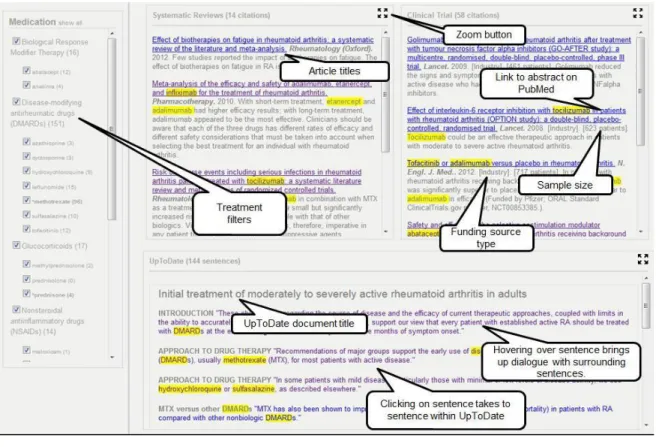
user read the context of this case vignette first, then is direct to a page which display knowledge summaries related to the disease (Figure 1).
Figure 1:CKS main screen
The knowledge summaries consist of three content boxes: UpToDate excerpts, systematic reviews and clinical trial. These three boxes include semantic fragments which provides small pieces of relevant texts to physicians’ information needs. The semantic fragments are extracted PubMed and UpToDate that are integrated based on the vignette the user selected. We expected that by presenting extracted semantic fragments instead of long paragraphs, it would improve convenience of access and improve relevance of content presented, therefore enhancing decision-making.
clinicians to easily get access drug reference information while prescribing or reviewing a patient’s medications.
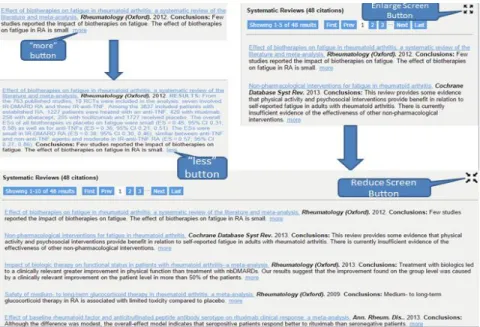
Similar to Infobuttons, CKS provides “more” buttons and buttons to enlarge or reduce screen size. To be specific, a smart blur is presented as the default citation in the systematic reviews and clinical trial windows. By clicking “more” button, the remaining information is unhidden (Figure 2, left). The enlarge or reduce screen button allow the user to enlarge systematic reviews section or clinical trial (Figure 2, right). These buttons allow the users to indicate the information they are interested in and hide the rest.
Figure 2:Detailed information presented on demand buttons.
2. Backend algorithm development
The algorithm and service which generates relevant sentences and knowledge were developed and published in a previous study by the team [15]. The backend system to generate knowledge summaries is built as a pipeline that combines the following natural language processing (NLP) tools and resources: Unified Medical Language System (UMLS) Metathesaurus for extracting concepts, SemRep for extracting semantic predications, and the TextRank algorithm for ranking the sentences that contain those semantice predications. A pipeline consists of four major steps: query processing,
information retrieval, information extraction, and sentence ranking. One important note is that the algorithm breaks down the abstract of articles from PubMed into individual sentences and information extraction is conducted at the sentence level. At the end, two case studies were used to evaluate the effectiveness of the system: depression and
Alzheimer's disease. The strength of the sentence retrieved by the system was rated based on four attributes: relevant, conclusive, comparative and contextually-constrained.
predications, and linguistic cues such as hedges. In that study, conlcusive sentences were located much closer to the end of the abstract than nonconclusive sentences. In addition, structured abstracts include a Conclusion section that is typically composed of conclusive sentences. Although only a small number of Medline citations contain a structured
abstract, the percentage of structured abstracts in Medline increased from 2.4% in 1992 to 20.3% in 2005. Finally, sentences with treatment and comparative predications may be more likely to be conclusive sentences. The knowledge and information revealed in the study were critical in designing the representation interface as well as in evaluating the testing the overall performance of the system.
Usability Methodology
The term ‘Usability’ means the ease with which a system can be learned and has been defined by the International Standards Organization (ISO) as: [The usability of a computer product is] the extent to which the product can be used by specified users to achieve specified goals with effectiveness, efficiency and satisfaction in a specified context of use (ISO 9241; 11: 1994).
1. Study Design
As designed, most of the sessions lasted approximately 40 minutes. A study script was designed to ensure the smoothness of the evaluation session. Hypercam 2 was used to capture the computer screen as well as audio during the study.
In general, our studies included three parts: warm up, post vignette questionnaires and pro test questionnaires. And post vignette questionnaires’ questions as well as pro-test questionnaires are attached in the appendix session of this paper. Below we describe the steps of our study.
The first step of our usability evaluation was the warm-up session. By opening CKS, we showed the physicians the clinical context designed for the selected disease. The context stimulates the clinical environment to provide the real-life testing
environment.
Second, one vignette case was presented to the participants to help them get familiar with the system. To make sure the participants follow the instructions, a series of some basic questions were asked, such as “what is the title of the article?”, “what is the resource?”, “which year did the article get published?” These participants were
encouraged to think aloud to answer the above questions. The participants were allowed to interact with the system for a limited time. We expected the participants to get familiar with CKS during this session.
The questionnaire include the following categories of questions: 1) what is the
physician’s prior experience regarding the vignette; 2) are they successful in locating the evidence that is needed to answer the treatment question in the vignette and if so what are those; 3) how helpful is the evidence/knowledge from different sources. Although the participants were not required to think aloud during post vignette questionnaires, these participants were asked to identify the beginning and end time for each post vignette
questionnaire in the test to help use record the time they spent. Finally, after the satisfactory questionnaire, the participants were requested to
provide feedbacks on each feature of the CKS and suggest ways to improve the CKS system based on a UI feature questionnaire (see Appendix B). To be specific, we included eight features we expected the users to benefit from: article title; study sample size; studying funding source; link to abstract on PubMed; treatment filters; zoom button; hovering over UpToDate sentence brigs up surrounding sentences; clicking on UpToDate sentence takes to sentence within UpToDate. The screenshot of CKS with labels of all the features on it was attached on the questionnaire as well. For each feature, the participants needed to find this specific on CKS and gave scores (from 1=Not useful to 5=very useful). If it appeared more than once, they were asked to find all of them. For instance, article titles under Systematic Review and UpToDate were all asked to locate.
2. Subject Recruitment
Physicians were recruited at the University of North Carolina at Chapel Hill and
University of Utah. Our study protocol was approved by the Institutional Review Borad (IRB) at both universities. The sample size was 10, with 6 from University of Utah and 4 from UNC-Chapel Hill. Recruitment strategies included direct contact, email recruiting and advertisement at medical conferences and meetings.
3. Data Analysis
As mentioned previously, the complete study session was screen-captured and audio-recorded by using Hypercam 2. Each audio-recorded video was studied extensively by all the team members to extract valuable input from the subjects. The team studied all the video records to explore important searching behavior and pattern and possible improvement points were extracted and implemented after each round of review session. The score provided by participants were analyzed to determine which feature was welcome, which feature was not satisfying.
Results and Discussion
features were also collected to see if CKS is easily accessible. The findings were presented and discussed below.
1. CKS received positive feedbacks in general
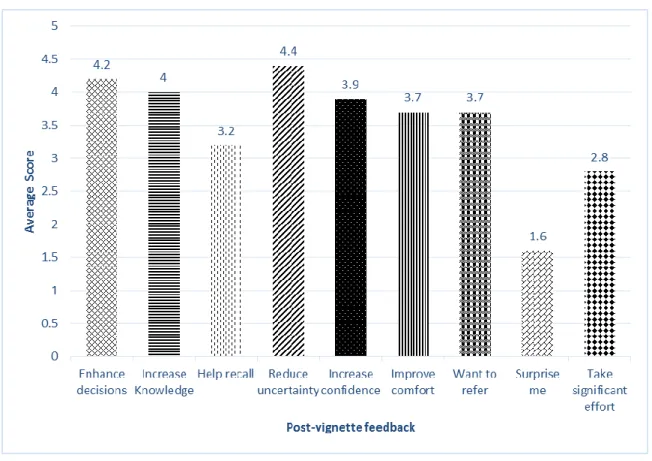
Overall, physicians were very quick in adjusting to the new interface and were able to navigate through the system with ease after the warm-up session. The following bar chart presents the average scores for Question 6 in the post vignette questionnaire. The score uses 5 level scale from 1(strongly disagree) to 5(strongly agree).
Figure 3: Scores on information I found was helpful
the CKS provided general knowledge which the physicians should have already known, instead of presenting rare information. For increasing knowledge, the average score was 4.0. One participant mentioned “Drug-drug interactions between Lisinopril, carvedilol, and the new treatment options were very helpful.”
2. Physicians prefer UpToDate compared with the other two content boxes in
CKS
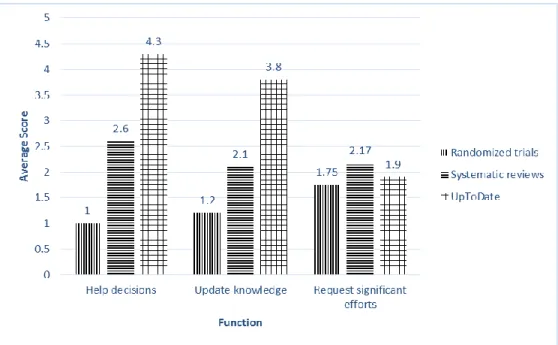
The main part of the CKS interface is a set of three content boxes: UpToDate, Randomized Clinical Trails and Systematic Reviews. These three content boxes are obvious enough for physicians to jump right into any content box they felt most iterested in. Based on the responses for Question 7, UpToDate received the highest score (see Figure 4), followed by Systematic Reviews. Randomized Clinical Trials received the lowest score. The score for “Requested signifiant efforts” among these 3 content boxes were fairly close. “Systematic review” took a lttle bit more significant effort compared with the other two content boxes.
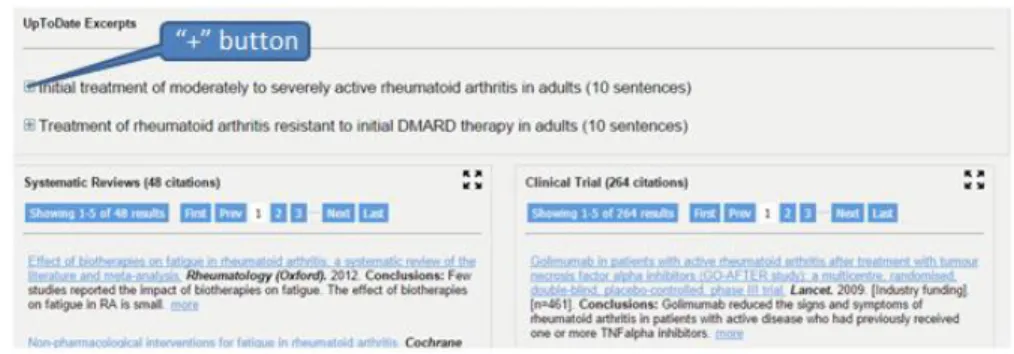
Subjects usually moved directly to UpToDate content box after exploring systematic review and clinical trial in the warm-up session, enlarged the box and started gathering information from there. Some physicians even suggested that we should only display UpToDate content box in the landing page while providing buttons to access the other content boxes. According to the feedbacks, we changed the position of UpToDate from the bottom to the top above the Systematic Reviews and Clinical Trial content boxes. We removed the enlarge screen button and added “+” button to avoid physicians only using one content boxes, hiding the other two content boxes. Figure 5 is the revised design on the basis of the feedbacks we received.
Figure 5: Revised interface after one prior UI evaluation phase
3. Infobuttons linked to UpToDate are highly defined
could not locate sample size by themselves. Besides, the sample size was not a critical feature for physicians to reach their final decisions.
Figure 6: Average scores for each type of information
4. The features under Systematic review and UpToDate were more accesable
During the post evalution questionnaire session, in addition to the above scores the physicians
gave to each types of information, we also recorded if the participants were able to locate them.
Specifically, there were nine different types of information in Systematic Review (i.e. tilte, date,
journal, more), four in Random Clinical Trial (i.e. sample size, funding source) and seven in
UpToDate (i.e. topic title, surrounding sentence, full text). The following bar chart shows the
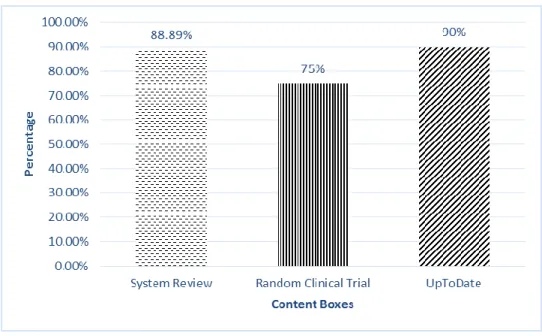
Figure 7: Success rate in locating different types of information
Arround 90% of information was successfully located by participants without any assistance in Systematic Review and UpToDate. However, only 75% of information was located
in Randomized Clinical Trial. Half of the participants were not able to locate “funding source”
and “sample size” in Randomized Clinical Trial before we gave hints. Even though UpToDate
had accuracy as high as 90%, there were still five participants who were not able to find
surrounding sentences. Based on the feedback, we concluded further interface refinement was
required.
5. Physicians prefer simple and intuitive interface which is easier to adapt
Figure 8: Score for significant efforts per participant
Six participants gave 6 or above when they were asked if CKS took significant efforts. In other words, they thought CKS was not fairly easy to use. And several physicians explicitly expressed the impact of simple interface design on more efficient information seeking at the point of care, with constrained time limit. The post evaluation questionnaire took a deeper look at the features of the interface.
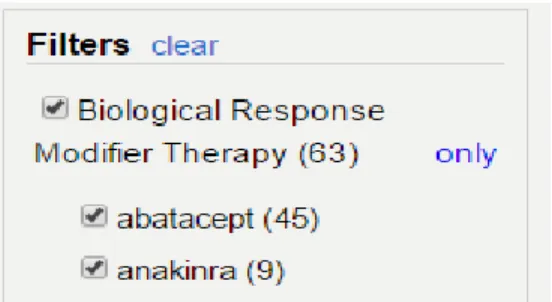
study, the title of the left panel was designed as “Medication” and physicians found it difficult to realize the connection between the medications and the content presented to the right. When asked about the possible consequences of clicking the medications, several physicians responded that they had no idea. One physician mentioned that when he used the filters he didn’t see any under the Ramdom Clinical Trials or Systematic Reviews that were relevant to the question. As a result, the team changed the title of the left panel to “Filters” to clarify the functionality [18]. After clicking on one of the filters, they were able to immediately notice the change that the reduced amount of contents displayed on the right and the highlighted features. These changes were relatively small, but they were critical for CKS to visualize information. Subsequently, physicians were able to see the effect of filtering on the content are displayed based on their selection of filters. Based on the post vignette evalation, we concluded that physicians were not familiar with filters. Most physicians were not even aware of some of the features embedded within the filtering box, such as “only” button within limit the selection only to the selected medication and exclude all the others. Similarily, they did not fully understand the functions of the “clear” button that uncheck all the medications in order for physicians to restart their search process (see Figure 9).
A barrier may have been the fact that physicians did not have confidence in filters. They prefered to trust themselves instead of using filters. Some physicians were not very familiar with the case vignette ramdomly assigned to them, so they started by scanning the three content boxes first and then made the decisions. All of our participants were physicians who have received high-level educations, so it only took small amount of time for them to know how the major features worked. After a small amount of time expended on self-education, they were able to locate and click the relevant piece of information which would lead them directly to the corresponding resources. Some partipants provided advices on filtering feature from the point of professional clinicians. One physician mentioned that it would be helpful to specify the medication information in more detail, such as which medications the patient is already on and what are the alternatives. This information would trigger physician’s desire of streamlining their information seeking process by first clicking on the medication the patient is already on and successively selecting various combinations of medications.
Furthermore, the numbers between the parenthesis are confusing to the physicians as they interact with the system. One physician suggested that we should consider adding the units after the number, such as articles or sentences. Furthermore, the numbers after the title of each content box were confusing to physicians as they overwhelmingly exceeded the actual number of articles/sentences displayed on the screen.
6. Physicians spend small amount of time in searching for information.
before they stopped, either because they have gathered sufficient evidence for decision-making or they were frustrated with the seeking process [18]. The short amount of seeking time calls for more efficient content delivery system, more clean and easy assessable interface. It was found that our algorithm was able to deliver highly relevant and actionable items, particularly to those with specialty related to case vignettes. But the interface could be improved to better fit the preference of physicians.
Future Work
The clinical decision support system, CKS aimed to provide a simple, straightforward, easy-to-use and yet highly accurate knowledge summary that could automatically extract relevant information from medical resources given physician’s searching criteria.
According to the results of usability evaluation, CKS was able to minimize the
B
IBLIOGRAPHY1. Guilherme Del Fiol; T. ElizabethWorkman; Paul N. Gorman. Clinical Questions Raised by Clinicians at the Point of Care A Systematic Review. JAMA Intern Med. 2014 May;174(5):710-8.
2. Michael L. Green, MD, MSc, Marc A. Ciampi, MD, Peter J. Ellis, MD, MPH. Residents’ Medical Information Needs in Clinic: Are They Being Met? Am J Med. 2000;10(3):218-23.
3. Davies K, Harrison J. The information-seeking behavior of doctors: a review of this evidence. Health Info Libr J. 2007;24(2):78-94.
4. Covell DG, Uman GC, Manning PR. Information needs in office practice: are they being met? Ann Intern Med. 1985;103(4):596-599.
5. Gorman, Paul N. Information Needs of Physicians. Journal of the American Society for Information Science. 1995; 46, 10; 729-736.
6. Richard Smith. What clinical information do doctors need? Information in Practice. 1999;319(7206):358-361.
7. Ebell MH1, Cervero R, Joaquin E. Questions asked by physicians as the basis for continuing education needs assessment. J Contin Educ Health Prof. 2011 Winter;31(1):3-14.
9. Nancy L. Bennett, Linda L. Casebeer, Robert E. Kristofco, and Sheryl M. Strasser. Physicians' Internet Information-Seeking Behaviors. The Journal of continuing Education in the Health Professions. 2004(24): 31-38.
10. De Groote, S. L., & Dorsch, J. L. Measuring use patterns of online journals and databases. Journal of the Medical Library Association. 2003;21(2), 231-240. 11. Wikipedia. http://en.wikipedia.org/wiki/Clinical_decision_support_system 12. Weller, Peter; Carson, Ewart; Fraccaro, Paolo and O'Sullivan, Dympna. Decision time for clinical decision support systems. Clinical medicine. 08/2014; 14(4): 338 – 341. 13. Kushiruk A, Patel V. Cognitive and usability engineering methods for the evaluation of clinical information systems. J Biomed Informat. 2004; 37: 56-76.
14. John Addison, Jo Whitcombe, Steven William Glove. How doctors make use of online, point-of-care clinical decision support systems: a case study of UpToDate. Health Information and Libraries Journal. 2012;30:13-22.
15. Siddhartha Reddy Jonnalagadda, Guilherme Del Fiol, Richard Medlin, Charlene Weir, Marcelo Fiszman, Javed Mostafa, Hongfang Liu. Automatically extracting sentences from Medline citations to support clinicians’ information needs. J Am Med Inform Assoc .2013;20:995–1000.
16. S. Jones, Graphical Interfaces for Knowledge Engineering: An overview of relevant literature, The Knowledge Engineering Review. 1998; 3(3): 221–247.
A
PPENDIXAPPENDIX A: POST_VIGNETTE QUESTIONAAIRE
1. What is your perceived complexity of the vignette? (1=least complex; 5=most complex)
2. What is your experience managing patients like the one in the vignette? (1=least experience; 5=most experience)
3. What is your final decision for this patient?
4. Could you please summarize in 1-2 sentences the gist of the evidence that guided your decision?
5. What other types of information could have helped you understand the gist?
6. The information I found 1=strongly disagree 5=strongly agree
1 2 3 4 5
Enhanced my decision-making
Increased my knowledge
Increased my level of uncertainty
Frustrated me with the information-seeking process
Increased my confidence in making the right decision
Improved my comfort in managing this patient
Made me more likely to refer this patient to a specialist
Surprised me
Took significant effort scanning / skimming information
7. Rate the following types of information found for this vignette (1=Not at all; 5=A great deal; NA = not applicable):
Helped with my decision
Updated my knowledge
Required significant effort scanning / skimming
trials
Systematic reviews
APPENDIX B: POST-EVALUATION QUESTIONAAIRE
1. How useful do you find each type of formation? 1=Not useful 5=Very useful
2. Do you have any other suggestions or comments regarding the knowledge summary [record the answer as opposed to writing]?
1 2 3 4 5
1. Article titles 2. Study sample size 3. Study funding source 4. Link to abstract on PubMed 5. Treatment filters
6. Zoom button
7. Hovering over UpToDate sentence brings sentences
up surrounding
8. Clicking on UpToDate sentence takes to UpToDate