GLOBAL JOURNAL OF ADVANCED ENGINEERING TECHNOLOGIES AND
SCIENCES
ANDROID TEST AUTOMATION FRAMEWORK BASED ON ROBOTIUM
Satinder Kaur*, Nidhi
*
Deptt. of CSE, Guru Nanak Dev University Regional Campus Sathiala
Deptt. of CSE, Guru Nanak Dev University Regional Campus Sathiala
ABSTRACT
The mobility provides the world with new limbs, which is mostly based on Android application. But these applications need cost-effective testing frameworks, as well as, testing techniques for their secure and high quality development [3]. Multiple techniques are applied by researchers towards the accomplishment of this objective. This paper also deals with the idea of “an application independent framework” for testing of mobile applications developed for the Android platform, and later on presents a technique for the development of such a framework. The framework would be responsible for automatically generating the test cases corresponding to the application to be tested. The framework used here for the generation of test cases is Robotium.
KEYWORDS: Android, Robotium, Application Independent Testing Framework.
INTRODUCTION
Today, the main challenge for researchers is to bridge the gap between desktop computers and hand-held mobile devices which are mostly android based. According to Andy Rubin, Guru for Google's Android, “There should be nothing that users can access on their desktop that they can’t access on their cell phone” [1]. If one needs android application testing which must be done on the different machines on same time, then automation of testing is the best solution. A testing framework or more specifically a testing automation framework is an execution environment for automated tests. It is the overall system in which the tests will be automated. It is defined as the set of assumptions, concepts, and practices that constitute a work platform or support for automated testing [4].
The Testing framework which is introduced in this paper is responsible for: Defining the format in which to express expectations
Creating a mechanism to hook into or drive the application under test Executing the tests
Reporting results
It has following properties also: It is application independent. It is easy to extend and maintain.
Need for a testing framework:
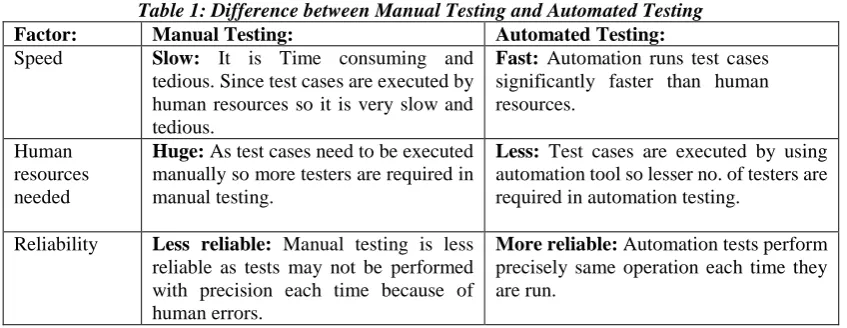
If we have a group of testers and suppose if each project implements a unique strategy then the time needed for the tester to become productive in the new environment will be quite long. To handle this, we cannot make changes to the automation environment for each newly developed application. So, a need of a testing framework arises that is application independent and has the capability to expand with the requirements of each application. This organized test framework also helps in avoiding duplication of test cases which are generated automatically to test the application. In short, an automated test framework helps the teams to organize their test suites and in turn improve the efficiency of testing. Testing can be done manually but table 1 shows why automate testing is preferred today.
Table 1: Difference between Manual Testing and Automated Testing Factor: Manual Testing: Automated Testing: Speed Slow: It is Time consuming and
tedious. Since test cases are executed by human resources so it is very slow and tedious.
Fast: Automation runs test cases significantly faster than human resources.
Human resources needed
Huge: As test cases need to be executed manually so more testers are required in manual testing.
Less: Test cases are executed by using automation tool so lesser no. of testers are required in automation testing.
Reliability Less reliable: Manual testing is less reliable as tests may not be performed with precision each time because of human errors.
Programming Non-programmable: No programming can be done to write sophisticated tests which fetch hidden information.
Programmable: Testers can program sophisticated tests to bring out hidden information.
Quality Low: It is considered as low quality testing
High: It is considered as high quality testing
Tool interaction
Not needed: It is done without interaction of any tool.
Required: It is always done using tools.
Accuracy Low: It gives low accuracy results. High: It gives high accuracy results.
Why depends on Robotium?
Standard android testing framework has some limitations [2]: It cannot handle numerous activities at one time The performance of execution of tests is slow Test cases are complex and hard to implement
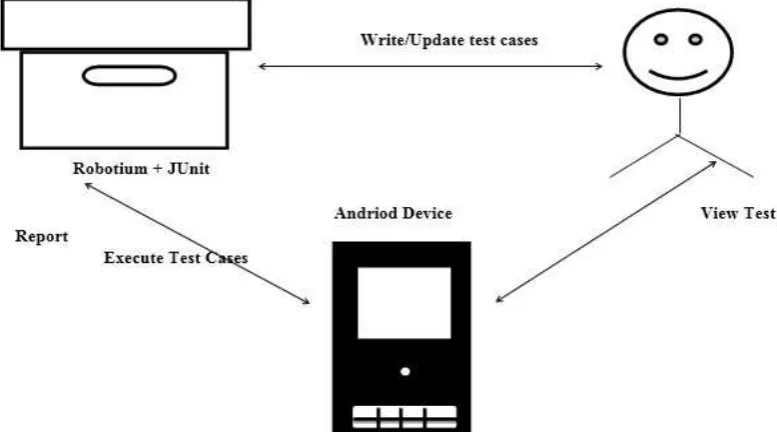
Automated testing using Robotium has many features and benefits. Fig 1 explains triangularization workflow between the user, Robotium, and the Android device.
Fig 1. Automated testing using Robotium
Robotium provides the following benefits:
Tests Android applications, both native and hybrid.
The framework handles multiple Android activities automatically. It need minimum time needed to write solid test cases.
Test cases are more robust due to the run-time binding to UI components. Fast test case execution.
MY METHODOLOGY
The proposed system framework is shown in Fig 2.
The functioning of this framework would involve 3 major steps:
The Framework will parse an application-based on an input given by the user (QA) using the excel sheet.
Then the UI elements on the given screen would be detected
Finally, the test cases would generate automatically which are ready for direct execution.
THE EXECUTION OF DEVELOPED APPLICATION
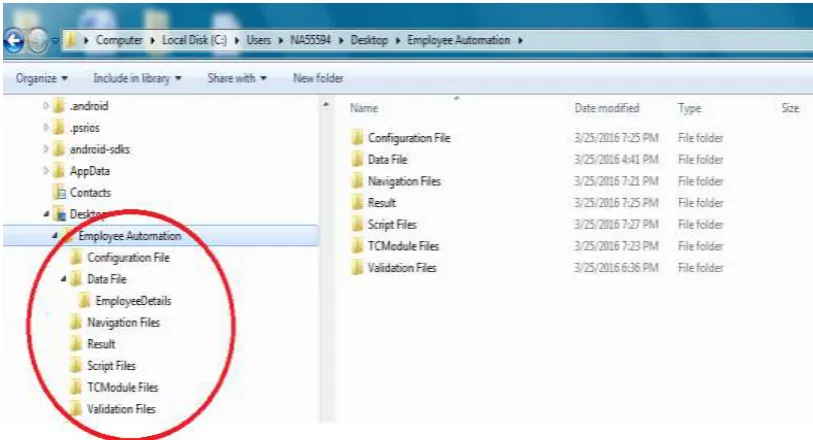
The execution algorithm for the framework is explained as shown below. It is as per the example application whose POC is shown in Fig 3 & Fig 4:
Step 1:Open the configuration File folder--->ConfigurationFile.xls.. From there we would get the name of the product(Employee App) and the name of the module(Employee Details). Trace the TCModule navigation path from ConfigurationFile.xls.
Step 2:Open the TCModule folder---> FillEmployeeDetails.xls --->Select the scenario (TC001_DisplayEmployeeDetails). Trace the script file path.
Step 3:Open the script file traced in step 3. The first task is to check for the navigation.. Open the NavigationFiles Folder---> DisplayEmpDetailsNavigation.xls (The path to navigation folder is traced from the configurationfile.xls) Check for the existence of Save button and click it.
Check for the existence of Load button and click it.
Step 4:The second thing is to validate the Employee details. For that we need to open the validationFiles---> EmployeeDetailsValidation.xls. (The path again is traced from the configurationfile.xls). Check for the existence of all the fields provided along with their types using the id’s of the attributes.
Fig 3. Algorithm Design
Step 5:The next task is to enter the data in the above fields. The data is provided in TestData.xls file. Open Data Files ---> EmployeeDetails ---> TestData.xls
Step 6:Click on Save. Check whether the expected result matches the actual result. Step 7:Click Load.
Step 9: Open the results folder and check for the results i.e. which tests have passed and which have failed.
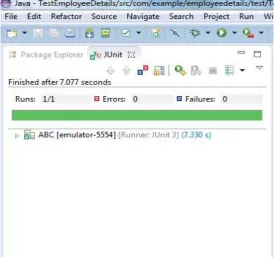
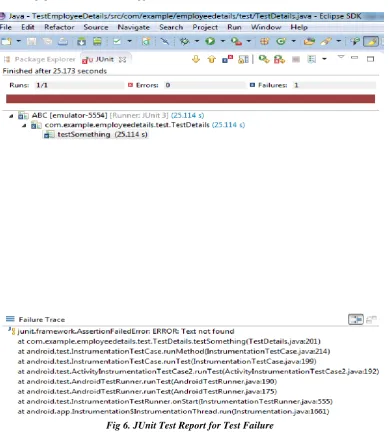
The Fig 5 is showing green bar which indicates the test over android application is succeeded whereas the Fig 6, an android application testing, the JUnit framework showing red signal indicates the test is failed with the android application. The details of the failure is also shown in left side panel of the JUnit.
Fig 4. The sample application for a POC
RESULTS
The results of the tests are reflected by two ways either by the default JUnit interface or by generating a suitable test report. In JUnit the interface showing red signals for failure of test case and green for passing all the tests successfully.
CONCLUSION
Building a test automation framework needs skills such as design, analytical, and a lot of foresight. While testers bring in a lot of value and insight into developing the framework, it is the designers and developers who eventually build it. Considering the development of framework as a typical development project goes a long way in getting the required ROI [5]. Build the best software engineering practices while developing a framework. Some of the critical aspects make the framework dependable and robust in the long run. Test automation involves all the phases/activities of application development and thus, the people involved in it must have sufficient exposure to software development. This is the fundamental change required at all levels, to ensure the success of test automation. This paper has tried a similar application.
Fig 6. JUnit Test Report for Test Failure
REFRENCES
[1] Domenico Amalfitano, Anna Rita Fasolino, Porfirio Tramontana; “A GUI Crawling based technique for android Mobile Application Testing” ICST - International Conference on Software Testing, Verification, and Validation 2011 IEEE Fourth International Conference
[2] Android Source Code, March 2012, http://source.android.com/.
[3] Geogy Manju, Dharani Andhe; “Customising Android Automated Testing Framework to Enable Native Hardware And Software Support” International Journal of Engineering Research & Technology (IJERT) Vol. 2 Issue 2, February- 2013