CBASIC CompilerTM (CB86™)
Language
Programmer's Guide
for the IBM® Personal Computer
CBASIC Compiler™( CB86
TM)
Language
Programmer's Guide
for the
IBM®personal Computer
Disk Operating System
Copyr ight
©
1983Digital Research
P.O. Box 579 160 Central Avenue Pacific Grove, CA 93950
(408) 649-3896 TWX 910 360 5001
COPYRIGHT
Copyright
©
1983 by Digital Research. All rights reserved. No part of this publication maybe reproduced, transmitted, transcribed, stored in a retrieval system, or translated into any language or computer language, in any form or by any means, electronic, mechanical, magnetic, optical, chemical, manual or otherwise, without the prior written permission of Digital Research, Post Office Box 579, Pacific Grove, California, 93950.This manual is, however, tutorial in nature. Thus, the reader is granted permission to include the example programs, either in whole or in part, in his or her own programs.
DISCLAIMER
Dig i tal Research makes no representations or warranties with respect to the contents hereof and specifically disclaims any implied warranties of merchantability or fitness for any particular purpose. Further, Dig i tal Research reserves the right to revise this publication and to make changes from time to time in the content hereof without obligation of Digital Research to notify any person of such revision or changes.
TRADEMARKS
CBASIC, CP/M, CP/M-86, and CP/NET are registered trademarks of Digital Research. CBASIC Compiler, CB80, CB86, Concurrent CP/M-86, LIB86, LINK86, MP/M, MP/M-86, PL/I-86, RASM-86, and SID-86 are trademarks of Digital Research. IBM is a registered trademark of International Business Machines. Intel is a registered trademark of Intel Corporation. Zilog and Z80 are registered trademarks of Zilog, Inc.
The CBASIC Compiler (CB86) Language Programmer's Guide for the IBM Personal Computer Disk Operating System was prepared using the Digital Research TEX Text Formatter and printed in the united States of America.
Foreword
CBASIC Compilerm is a compiler implementation of the CBASIC®
programming language. For the software developer interested in
maximizing the execution speed of commercial applications programs, CBASIC Compiler is an excellent choice.
Digital Research designed CBASIC Compiler for use under single-user, multi-single-user, and concurrent operating systems based on both 8080/8085 and 8086/8088 microprocessor families.
• The 8086/8088 CBASIC Compiler, CB86™ , runs under CP/M-86® , MP/M-86™ , Concurrent CP/M-86™ , CP/NET®, and the IBM® Personal Computer Disk Operating System based on.the Intel® 8086, 8088 family of microprocessors.
• The 8080/8085 CBASIC Compiler, CB80™ , runs under the CP/M® (version 2 or later), MP/MTM, and CP/NET® operating systems based on the Intel 8080, 8085, or Zilog® Z80® microprocessor.
The CBASIC Compiler (CB86) Language Proqrammer's Guide for the IBM Personal Computer Disk Operating System provides a short demonstration program to help you get your CBASIC Compiler system up
and running. The manual is divided into five sections.
• Section 1 is an introduction and demonstration program.
• Section 2 describes the compiler, CB86.
• Section 3 describes the linkage editor, LINK86™.
• Section 4 describes libraries and the librarian program, LIB86 ™ •
• Section 5 explains the machine-level environment of CBASIC Compiler.
Use this Programmer's Guide in conjunction with the CBASIC
Compiler Language Reference Manual. Together, the manuals provide
all the informatlon you need to use the CBASIC Compiler to its full potential.
Dig i tal Research is very interested in your comments on
programs and documentation. Please use the Software Performance
Table of Contents
1 Getting Started with CBASIC Compiler
1.1 Componen ts
1.2 A Demonstration •
2 The Compiler, CB86
2.1 Compiling Programs
2.1.1 CB86 Command Lines. 2.1.2 Compiler Errors
2.2 Compiler Directives • • • .
2.2.1 2.2.2
Source Code Compiler Directives CB86 Command Line Toggles
3 The Link Editor, LINK86
3.1
3.2
Linking Files
3.1.1 3.1. 2
LINK86 Command Lines . LINK86 Errors
LINK86 Command Line Options
3.2.1 3.2.2 3.2.3 3.2.4
3.2.5
Uninitialized Data •
Symbol File Options • • • • • MAP File Options • •
Library File Options •
Redirecting LINK86 File I/O . • • •
3.3 Producing Overlays
3.4 The Linking Operation •
4 The Library
4.1 CB86.L86
4.2 The Librarian Utility, LIB86
4.2.1 4.2.2 4.2.3 4.2.4
LIB86 Command Lines Creating a Library File Appending an Existing Library Replacing Library Modules
• 1-1
• 1-1
• 2-1
• 2-3 • 2-3
• 2-5
• • • 2-6 • 2-7
• • 3-1
• 3-2
• 3-3
• • 3-4
• • 3-5 • • • 3-6 • • • 3-6 • • • 3-7 • • • • . 3-7
• • • 3-8
• 3-9
• 4-1
• • • 4-2
• 4-2 • 4-4 • 4-4
4.2.5 4.2.6 4.2.7 4.2.8
Table of Contents
( continued)
Deleting Library Modules • • • . Selecting Modules • • • • • • • Displaying Library Information • Redirecting Library File I/O •
5 Machine-level Environment
5.1 Memory Allocation • • •
5.2 Run-time Organization • •
5.3 Internal Data Representation
5.4 Parameter Passing and Returning Values
Appendixes
A Implementation-dependent Values
B Compiler Error Messages
c
LINK86 Error MessagesD Execution Error Messages
E LIB86 Error Messages • •
F CBASIC to CBASIC Compiler Conversion Aid
• • 4-5 • • 4-6 • • 4-6 • • • 4-7
. • • 5-1
• 5-2
5-3
5-6
A-I
B-1
C-l
D-l
E-l
Tables and Figures
Tables
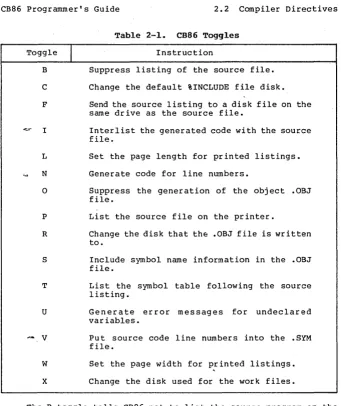
2-1. CB86 Toggles
3-1. LINK86 Command Line Options .
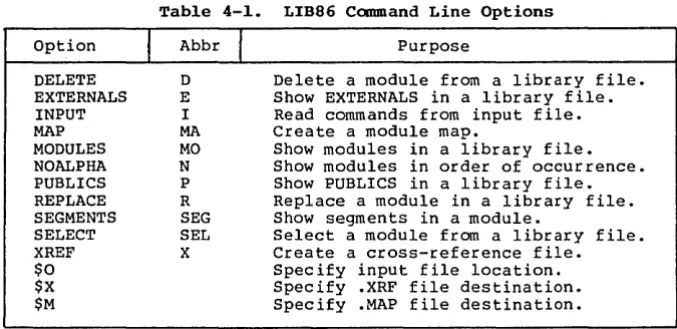
4-1. LIB86 Command Line Options
A-l. Implementation-dependent Values •
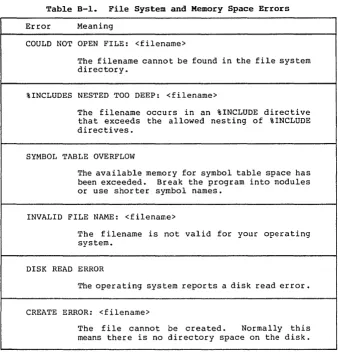
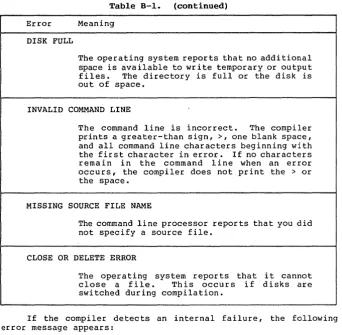
B-1. File System and Memory Space Errors • . B-2. Compilation Error Messages . . • •
C-l. LINK86 Error Messages
D-l. Execution Error Codes •
E-l. LIB86 Error Messages
Figures
5-1. 5-2. 5-3. 5-4. 5-5.
Memory Allocation • . • Run-time Organization • Real Number Storage Integer Storage • String Storage
2-8
3-4
4-3
A-l
B-1 B-3
C-l
D-l
E-l
Section 1
Getting Started with CBASIC Compiler
A compiler is a computer program that translates high-level programming language instructions into machine-executable code. The compiler takes as input a user-written source program and produces as output a machine-level object program. Some compilers translate a user-written source program into a program that a computer can execute directly. The CBASIC Compiler system, however, uses a link editor and a library in addition to the compiler. Together, the three components translate your CBASIC source-code file into a directly executable program. This approach uses your microcomputer's memory space as efficiently as possible. The system enables you to modularize programs for quick and easy maintenance. The result is a programming system that rivals the performance of systems based on much larger machines.
The pr imary advantage that compilers provide over other methods of translation is speed. Compiled applications programs execute faster than interpreted programs because the compiler creates a program that the computer can execute directly.
1.1 Components
The three components that make up the CBASIC Compiler system are contained on your CBASIC product disk •
• The compiler, CB86, translates CBASIC source code into relocatable machine code modules. Source programs defaul t to a .BAS filetype unless otherwise specified. CB86 generates .OBJ files. CB86 consists of an executable program and three overlays.
o The 1 ink ed i tor, LINK86, combines the relocatable obj ect modules that the compiler creates and routines from the indexed library into a directly executable program with optional overlays. LINK86 generates .EXE files •
• The indexed library, CB86.L86, provides routines that allocate and release memory, determine available memory space, and perform input/output processing. CBASIC Compiler provides a library manager utility program, LIB86.
1.2 A Demonstration
CB86 Programmer's Guide 1.2 A Demonstration
Make a back-up copy of your master CBASIC Compiler product disk. Place your operating system disk in drive A and a copy of your CBASIC Compiler disk in drive B.
1) Write the source program.
using your text editor, create a file named TEST.BAS on your CBASIC Compiler disk in drive B. Enter the following program into TEST.BAS exactly as it appears below:
FOR I%
=
1 TO 10PRINT I%; "TESTING CBASIC COMPILER!" NEXT I%
PRINT "FINISHED" END
2) Compile the program.
To start CB86, enter the following command. Be sure drive B is the default drive.
B>CB86 TEST
CB86 assumes a filetype of .BAS for the file you specify in the compiler command line unless otherwise specified. A sign-on message, a listing of your source program, and several diagnostic messages display on your terminal.
CB-86 CBASIC Compiler Serial No. CB6-0000-654321 Copyright (c) 1982,1983
version
x.x
All rights reserved Digital Research, Inc.end of pass 1 end of pass 2
1: OOOOh PRINT
2: OOOch FOR I%
=
1 TO 103: 0014h PRINT I%; "TESTING 4: 0021h NEXT I%
5: 002dh PRINT
6: 0030h PRINT "FINISHED" 7: 003ah END
end of compilation no errors detected
code area size: 57 0039h data area size: 45 002dh common area size: 0 OOOOh symbol table space remaining: 17797
CB86 Programmer's Guide 1.2 A Demonstration
The message no errors detected indicates a successful compilation. CB86 creates an object file for the TEST.BAS program. The directory for disk B should have the new file, TEST.OBJ. See Section 2.1 for more information about the various parts of the listing.
3) Link the program.
To start LINK86, enter the following command. drive B is the default drive.
Be sure
B>LINK86 TEST
LINK86 assumes a filetype of .OBJ for the file you specify in the linker command line. A sign-on message and several diagnostic messages display on your terminal.
LINK-86 Linkage Editor Serial No. XXXX-0000-654321 Gopyright (c) 1982,1983
CODE DATA
OlOEO
002C7
USE FACTOR: 09%
Version X.X All Rights Reserved Digital Research, Inc.
If you get no error messages, the program has been linked successfully. LINK86 creates a directly executable program. The directory for disk B should have the new file TEST.EXE.
4) Run the program.
To run the TEST.EXE program, enter the following command. Be sure drive B is the logged-in drive.
B>TEST
The following output should appear on your terminal:
1 TESTING CBASIC COMPILER! 2 TESTING CBASIC COMPILER! 3 TESTING CBASIC COMPILER! 4 TESTING CBASIC COMPILER! 5 TESTING CBASIC COMPILER! 6 TESTING CBASIC COMPILER! 7 TESTING CBASIC COMFILER! 8 TESTING CBASIC COMPILER! 9 TESTING CBASIC COMPILER! 10 TESTING CBASIC COMPILER!
FINISHED
Section 2
The Compiler, CB86
CB86 consists of an executable file and three overlays. Among the files on your CBASIC Compiler product disk are the following four compiler program files:
• CB86.EXE • CB86.0Rl • CB86.0R2 • CB86.0R3
When compiling a CBASIC program, all four files must be on the same logical disk drive. The drive must be the default drive. The source program file can be on any logical drive.
2.1 Compiling Programs
CB86 takes a CBASIC source program as input and generates a
relocatable obj ect file. Dur ing compilation, CB86 creates the
following temporary work files:
<filename>.$PA <filename>.$QC <filename>.$DA
Unless compilation is unsuccessful, you never see these temporary
files listed in a directory. CB86 erases the files automatically
when compilation is finished. CB86 also erases the temporary files if they are on disk before you start the compiler.
The size of the temporary files varies with the size of the
source program. The amount of temporary space required is
approximately equal to the amount of space the source program
occupies. If you do not have enough work space on disk for the
compiler, you can break up large programs into modules and compile each module separately.
CB86 Programmer's Guide 2.1 Compiling Programs'
The following example shows a CB86 listing:
CB-86 CBASIC Compiler Serial No. CB6-0000-65432l Copyright (c) 1982,1983
end of pass 1 end of pass 2
1: OOOOh PRINT
Version X.X All rights reserved Digital Research, Inc.
2: OOOch FOR I%
=
1 TO 103: 0014h PRINT I%: "TESTING THE CBASIC COMPILER!" 4: 002lh NEXT I%
5: 002dh PRINT
6: 0030h PRINT "FINISHED" 7: 003ah END
end of compilation no errors detected
code area size: 57 0039h data area size: 45 002dh common area size: 0 OOOOh symbol table space remaining: 17797
Certain phases of the compilation process are combined into a module called a pass. CB86 is a three-pass compiler. Following the sign-on message, CB86 indicates the completion of the first two passes with an end of pass message. The program listing includes the line numbers, relative addresses for the code that each line generates, and the actual source code lines.
In the preceding listing, 1: is an example of a line number. OOOOh is a relative address for the relocatable code that the first PRINT statement generates. CB86 prints the total number of compilation errors detected in the program following the message, end of compilation. However, the message, no errors detected, ind ica tes a successful compilation. The next three messages ind ica te the amount of space CB86 allocates for code and data segments of data. The last message indicates the amount of space remaining in the symbol table. If CB86 detects errors,' the relative addresses and the memory allocation messages do not display.
CB86 Programmer's Guide 2.1 Compiling Programs
2.1.1 CB86 Command Lines
The command line starts CB86, specifies the file to compile, and sends special information in the form of command line compiler directives. Refer to Section 2.2.1 for information on command line directives.
The following command line compiles the source program in a file named TEST. CB86 assumes a filetype of .BAS unless otherwise specified.
A>CB86 TEST
En ter a complete file specif ica tion to overr ide the • BAS filetype. The following command line compiles the source program in a file named TEST.PRI. Remember, source files cannot have an .OBJ or .EXE filetype.
A>CB86 TEST.PR1
Source files can be on any logical disk drive. The following command line compiles the source program TEST.PRI from drive D:
A>CB86 D:TEST.PR1
If you type an incorrect command line, CB86 responds with the appropriate error message.
2.1.2 C~pilcr Error5
CB86 reports three different types of compiler errors. The first type, file-system and memory-space errors, includes mistakes such as invalid command lines, read errors, and out-of-memory conditions. CB86 indicates file-systpm and memory-space errors with literal messages such as disk full and symbol table overflow. Refer to Appendix B, Table B-1, for a complete listing of file-system and memory-space error messages.
The second type, compilation errors, includes misuses of the CBASIC language such as invalid characters, improper data type specifications, and missing delimiters. CB86 prints a caret and a number in the compiler listing of the source program to indicate the occurrence of a compilation error. The number corresponds to an error description listed in Appendix B, Table B-2. The following example shows the compiler listing for a short program that contains one error. The program attempts to assign a string constant to an
CB86 Programrner1s Guide
CB-86 CBASIC Compiler Serial No. CB6-0000-654321 Copyright (c) 1982,1983
end of pass 1 end of pass 2
2.1 Compiling Programs
Version
x.x
All rights reserved Digital Research, Inc.1: 1%
=
"November 11, 1982"***
error A27END end of compilation 1 errors detected
symbol table space remaining: 14412
Notice that the caret points to the string constant. Error message 27 listed in Appendix B reads as follows:
27 Invalid mixed mode. The type of the expression is not permitted.
Depeno1ng on what you want the program to do, you can change 1% to a string variable or represent the date as an integer. Either change corrects the mistake.
CB86 identifies the errors in a program logically and accurately. However, CB86 cannot determine what your programming intentions are. Therefore, in some cases, CB86 reports error messages that identify mistakes according to what the compiler logically assumes the program is supposed to do, and not necessarily according to what you want the program to do. The following example shows the compiler listing for another program that contains one error. The keyword PRINT in the first line is misspelled. The compiler reports Compilation Errors 30, 51, 33, and 27.
CB-86 CBASIC Compiler Serial No. CB6-0000-654321 Copyright (c) 1982,1983
end of pass 1 end of pass 2
Version
x.x
All rights reserved Digital Research, Inc.1: PRNIT "TESTING CBASIC!"
***
***
***
error error error
A30 A51 A33
***
error A272: PRINT "FINISHED" 3: END
end of compilation 4 errors detected
CB86 Programmer's Guide 2.1 Compiling Programs
CB86 does not recognize PRNIT as a misspelled keyword, but as a
valid real variable name. At this point in the compilation, CB86
assumes that line 1 is an assignment statement. Therefore, CB86
reports Compilation Errors 30, 51, 33, and 27 with the carets all
pointing to the end of the line. If you recognize line 1 as an
improper assignment statement, as CB86 does, the four error messages are accurate. The four error messages listed in Appendix B read as follows:
30 Invalid symbol follows a variable, constant, or
function reference.
51 An equal sign was expected in assignment.
equal sign is inserted.
An
33 Invalid symbol encountered in an expression. The
symbol is ignored.
27 Invalid mixed mode. The type of the expression is
not perm it ted.
A group of error messages all pointing to one line in your program often indicates that CB86 does not recognize what you want
the program to do. Studying the line in error can often reveal a
simple solution. When you correct the misspelled keyword in the
preceding example and recompile the program, CB86 recognizes a valid PRINT statement and reports the message no errors detected.
The third type of compiler error, internal failures, should
never occur during your experience with the CBASIC Compiler. CB86
indicates an internal failure with the following message. The XXX
stands for a three-digit number. The ZZZZ stands for a
compiler-generated line number.
FATAL COMPILER ERROR XXX NEAR SOURCE LINE ZZZZ
In some cases, the second line of this message is not displayed. If the above error message occurs during compilation of your CBASIC program, contact the Digital Research Technical Support Center. Please report the three-digit number and the circumstances under which the error occurs.
2.2 Compiler Directives
Compiler directives are special instructions to CB86. There
CB86 Programmer's Guide 2.2 Compiler Directives
2.2.1 Source Code Compiler Directives
Source code compiler directives are special keywords that do not translate into executable code. All source code compiler directives begin with a percent sign. You cannot place blanks between the percent sign and the rest of the keyword. Only blanks and tab characters can precede a directive. Source code compiler directives cannot appear on the same line with CBASIC statements or functions. CB86 ignores all characters on the same line that are not part of the directive. A source code compiler directive cannot span more than one line. You cannot label source code compiler directives.
CBASIC Compiler has the following six source code compiler directives:
• %NOLIST • %LIST • %EJECT • %PAGE • %INCLUDE • %DEBUG
Normally, CB86 generates a listing of the source program dur ing compilation. The %NOLIST directive tells CB86 not to list anything that follows the %NOLIST in the program. The %LIST directive tells CB86 to resume the listing. You can use %LIST and %NOLIST any number of times in a program. Toggle B, descr ibed in Section 2.2.2, suppresses all listings regardless of any directives in the source code.
The %EJECT directive tells CB86 to continue the program listing at the top of the next page of paper. %EJECT works only when you direct the listing to a printer. CB86 ignores %EJECT if the %NOLIST directive is in effect, or if you direct the listing to the console or a disk file.
The %PAGE directive sets the page length for a listing directed to a pr inter. The page length you specify must be an unsigned integer placed after the %PAGE keyword, as shown in the following example:
%PAGE 40
The %INCLUDE directive tells CB86 to include the code from a specified.source file along with the original compiling program. The included source file is incorporated into the original program immediately following the %INCLUDE. Specify the filename, the filetype, and the drive that holds the file after the %INCLUDE keyword, as shown in the following examples. CB86 assumes the default drive and a .BAS filetype if not specified otherwise.
\
-1
r
M.J-
~t~
1\
~
~-t-8
-
f \ , I Il I\.CA5~
Jd;,\.
rJ
}I~
c ...
I ( r· ,1 { J2-6
CBB6 Programmer's Guide
%INCLUDE CONDEF %INCLUDE CONDEF.INC %INCLUDE D:CONDEF.INC
2.2 Compiler Directives
You can nest included files six deep. The maximum nesting depth depends on your particular implementation of the CBASIC Compiler. Refer to Appendix A for current implementation-dependent values.
The %DEBUG directive works with three command line toggles: the I, N, and V toggles. You can switch these three toggles on or off from within the program source code. To turn a toggle on, place the toggle letter after the %DEBUG keyword. To turn a toggle off, place the toggle letter preceded by a minus sign after the %DEBUG keyword. The following examples show variations of the %DEBUG directive:
%DEBUG I %DEBUG -I %DEBUG INV %DEBUG -I-N-V
2.2.2 CB86 Command Line Toggles
Command line toggles are single-letter compiler directives that you specify in the CBB6 command line instead of in the source program. Once a toggle is set, it normally remains set through the entire compilation process. The %DEBUG directive can change the I, N, and V toggles during compilation. Place letters within brackets following the file specification in a CBB6 command l'ine. Letters can be lower- or upper-case. If you enter conflicting toggles in a command line, the last one read from left to right takes effect. Certain toggles require an additional parameter enclosed in parentheses. The following examples show several ways to specify command line toggles:
A>CB86 TEST [B]
A>CBB6 TEST.BAS [B, P, S]
A>CB86 FILE.DAT [BPW(72)]
A>CB86 CALCS.PRG [N] [0] [P]
A>CB86 DATA.OVL [ pon ]
CB86 Programmer's Guide 2.2 Compiler Directives
Toggle
I
B
C
F
I
L
N
0
P
R
S
T
[image:21.469.55.396.28.433.2]U
...
VW
X
Table 2-1. CB86 Toggles
Instruction
Suppress listing of the source file.
Change the default %INCLUDE file disk.
Send the source listing to a disk file on the same drive as the source file.
Interlist the generated code with the source file.
Set the page length for printed listings.
Generate code for line numbers.
Suppress the generation of the object .OBJ file.
List the source file on the printer.
Change the disk that the .OBJ file is written to.
Include symbol name information in the .OBJ file.
List the symbol table following the source listing.
Generate error messages for undeclared variables.
Put source code line numbers into the .SYM file.
Set the page width for printed listings.
Change the disk used for the work files.
The B toggle tells CB86 not to list the source program on the
console screen. However, compiler errors and statistical data
CB86 Programmer's Guide 2.2 Compiler Directives
The C toggle specifies the default drive for an include file. Enclose the new drive specification in parentheses following the C. I f a dr ive has been specified in the %INCLUDE directive, the C toggle has no effect. The C toggle allows program development to be independent of your hardware configuration.
The F toggle tells CB86 to send the source listing to a disk file that is on the same drive as the source file. The new file has the same filename as the source file and has a .LST filetype.
The I toggle interlists compiler-generated code wi th the original source statements. Compiler-generated code uses standard 8086 mnemonics.
The L toggle changes the page length for a listing directed to a printer. Enclose the new length in parentheses following the L. The length must be an unsigned integer, as in the following e~ample:
A>CB86 TEST [L{SO»)
The N toggle generates code that saves the current line number for each physical line in a source program. The code enables the ERRL function to return the line number when an execution error occurs.
The 0 toggle tells CB86 not to generate the relocatable object file. If a compiler error occurs, CB86 does not generate the .OBJ file.
The P toggle prints the program listing on the printer. CB86 sends a carriage return and line-feed before printing the first page. CB86 prints the page number and the source filename at the top of each page.
The R toggle specifies which drive to place the .OBJ file on.
The S toggle places all information on program variables and line labels into the .OBJ file. The link editor uses the information to generate a .SYM file. You can use the .SYM file with the Digital Research Symbolic Instruction Debugger, SID-86™
The T toggle lists the symbol table immediately following the source program listing.
The U toggle generates an er ror message if a var iable name does not appear in an INTEGER, REAL, or STRING declaration. Use the U toggle to locate misspelled identifiers.
CB86 Programmer's Guide 2.2 Compiler Directives
The W toggle changes the page width for a listing directed to
the printer. Initially, the width is set to 80 columns. Enclose
the new width in parentheses following the
w.
The width must be anunsigned integer.
A>CB86 TEST [W(70)]
The X toggle specifies a drive for the temporary work files. Normally, CB86 places the work files on the same dr ive as the source file. Enclose the new drive specification in parentheses following
the X. The drive is specified by a single lower- or upper-case
letter.
A>CB86 TEST [X(D)]
CB86 evaluates toggles from left to right. This means a
subsequent directive can override any earlier one. In the following example, CB86 sends the listing to the printer.
A>CB86 TEST [BP]
In the following example, CB86 suppresses the listing.
A>CB86 TEST [PB]
Section 3
The Link Editor, L1NK86
LINK86 is a linkage editor that combines object files that CB86 generates with object modules from the Run-ti~e Subroutine Library, CB86. L86. LINK86 creates an executable program with optional overlays. You can use LINK86 with other Digital Research l6-bit language translators such as RASM-86 ™ and PL/I-86™', or wi th any translator that produces object files using a compatible subset of the Intel 8086 object file format. Your CBASIC Compiler product disk should contain the following two files:
• LINK86.EXE o CB86.L86
3.1 Linking Files
LINK86 accepts two types of object files as input. The first type has a filetype of .OBJ and contains a single object module. CB86 generates .OBJ files. The second type is library files. Library files have a filetype of .L86 and contain an indexed group of object modules. LINK86 can search library files and include any modules that a compiled program requires in the executable program. LIB86 is a librarian program that generates library files. Refer to Section 4.2 for information on LIB86.
Following the sign-on message, LINK86 displays the Use Factor. The Use Factor is a decimal percentage value indicating the amount of memory that LINK86 uses. The following example shows the console display during linking.
LINK-86 Linkage Editor Serial No. XXXX-0000-6S432l Copyright (c) 1982,1983
CODE DATA
OlOEO
002C7
USE FACTOR: 09%
Version
x.x
All Rights Reserved Digital Research, Inc.To complete the linking process, LINK86 generates three output files:
• the executable program file with filetype .EXE • a symbol table file with filetype .SYM
• an optional information file with filetype .MAP
All three files have the same filename as the first file listed in the command line. The .EXE file executes directly under DOS. You can use the .SYM file with the Digital Research symbolic debugging program, SID-86. The .MAP file contains information about
CBS6 Programmer's Guide 3.1 Linking Files
segments and groups. LINKS6 displays unresolved symbols at the console. Unresolved symbols are symbols referenced in a program but not defined within the files being linked. You must define all unresolved symbols for the program to run properly.
To halt LINKS6 during processing, press CTRL-Break. Under DOS Version I you can halt LINKS6 only during console output. LINKS6 immediately returns control to DOS. Under DOS Version 2, you can set break mode and halt LINKS6 at any time during processing.
3.1.1 LINK86 Command Lines
The command line starts LINKS6 and specifies the files to link. LINKS 6 automatically searches the Run-time Subroutine Library, CBS6.LS6, for any required routines. LINKS6 command lines use the following general format. Items enclosed in braces are optional.
LINKS6 {filespec =} filespecl {,filespec2 ••. ,filespecN}
The following example links the file named TEST.OBJ and generates an executable file named TEST.EXE and a symbol table file named TEST.SYM. LINKS6 assumes a filetype of .OBJ if not specified otherwise.
A>LINK86 TEST
You can rename the output files in the LINKS6 command line using an equal sign. The following command line links the file named TEST.OBJ but generates output files with the filename TESTPGM.
A>LINK86 TESTPGM=TEST
You can specify which drive holds the .OBJ file to link, and you can specify a drive for LINKS6 to write the output files to. The following command line produces the same output files as the previous example, but LINKS6 links the TEST.OBJ file from drive D and writes the TESTPGM output files to drive A.
A>LINK86 A:TESTPGM=D:TEST
You can specify a filetype other than .OBJ or .LS6 for files in a command line if the files are object files. LINKS6 aborts the linking process if any of the files are not proper object files. In the following example, LINKS6 assumes ONE.A, TWO.B, and THREE.C are object files and links them.
A>LINK86 TESTPGM=ONE.A, TWO.B, THREE.C
CB86 Programmer's Guide 3.1 Linking Files
LINK86 links -all four object files into one executable program named TEST.EXE.
A>LINK86, TEST, ONE, TWO, THREE
LINK86 can link any number of object files until the number of symbols contained in the files exhausts the space reserved for the symbol table. However, the length of a command line entered from the console cannot exceed 128 characters. In cases where a command line exceeds 128 characters, you can place the command line in a disk file and use the INPUT command line option. The command line disk file is also handy if you want to avoid having to type a long and complicated command line over and over.
Create command line disk files with a .INP filetype using any text editor. List each input file with options after the equal sign as you would in an ordinary command line. Do not include the characters LINK86 in the disk file. You can place tab characters, carriage returns, and line-feeds anywhere in a command line file. The following example shows the beginning of a command line file named NEWCOM.INP.
PROGNEW= FILE1, FILE2, FILE3, FILE4, FILES, FILE6, FILE?, FILE8, FILE9, FILElO, LIBl.L86,
FILEll[MAP], LIB2.L86[SEARCH],
To tell LINK86 to read the rest of its command line from the file NEWCOM.INP, use the following command. LINK86 assumes a .INP filetype.
A>LINK86 NEWCOM [INPUT)
3.1.2 LINK86 Errors
In case of a command line error, LINK86 echoes the command line tail up to the point where the error occurs and follows the error with a question mark. In the following example, LINK86 detects a misplaced semicolon where i t expects a comma:
A>LINK86 ONE, TWO, THREE; FOUR
LINK-86 Linkage Editor Serial No. XXXX-OOOO-654321 Copyright (c) 1982,1983
SYNTAX ERROR ONE, TWO, THREE;?
A>
CB86 Programmer's Guide 3.1 Linking Files
In the next example LINK86 detects a filename that exceeds the eight-character limit.
A>LINK86 TESTPROGRAM
LINK-86 Linkage Editor Serial No. XXXX-OOOO-6S4321 Copyright (c) 1982,1983
Version X.X All Rights Reserved Digital Research, Inc.
SYNTAX ERROR TESTPROGRAM?
A>
LINK86 reports errors that occur during linking with a literal message. Refer to Appendix C for a list of LINK86 error messages.
3.2 LINK86 Command Line Options
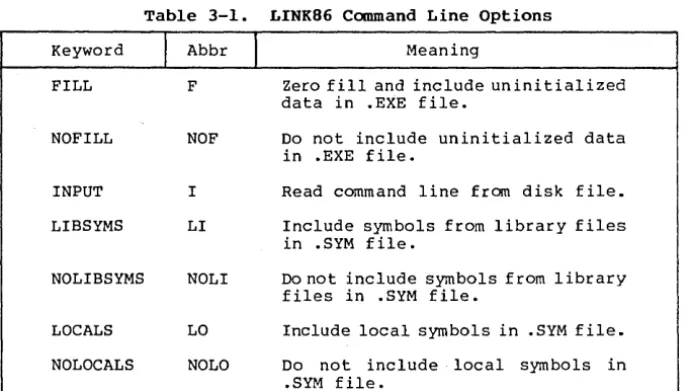
LINK86 has a number of command line options that you can use with compiled CBASIC programs. Options are keywords that send special instructions toLINK86. You specify options wi thin brackets in a LINK86 command line. The following table lists the options, a brief description of each, and a keyword abbreviation.
Keyword
FILL
NOFILL
INPUT
LIBSYMS
NOLIBSYMS
LOCALS
NOLOCALS
Table 3-1. LINK86 Command Line Options
I
AbbrI
F
NOF
I
LI
NOLI
LO
NOLO
Meaning
Zero fill and include uninitialized data in .EXE file.
Do not include uninitialized data in .EXE file.
Read command line from disk file.
Include symbols from library files in .SYM file.
Do not include symbols from library files in .SYM file.
Include local symbols in • SYM file.
[image:27.474.53.399.318.513.2]CB86 Programmer's Guide 3.2 LINK86 Options
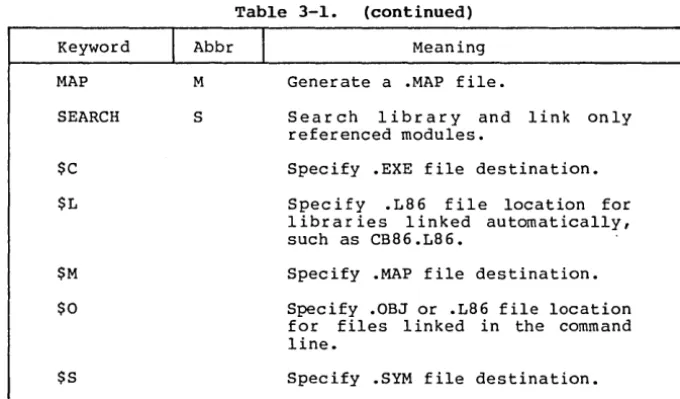
Table 3-1. (continued)
Keyword
MAP
SEARCH
$C
$L
$M
$0
$S
I
Abbr1
MS
Meaning
Generate a .MAP file.
Search library and link only referenced modules.
Specify .EXE file destination.
Specify .L86 file location for librar ies linked automatically, such as CB86.L86. .
Specify .MAP file destination.
Specify .OBJ or .L86 file location for files linked in the command line.
Specify .SYM file destination.
You can specify either the keyword or the abbreviation in a canmand line. Each option, except for INPUT and SEARCH, affects one of the LINK86 output files. Sections 3.2.1 through 3.2.5 explain the use of the LINK86 command line options in more detail. See Section 3.1.1 for information on INPUT.
3.2.1 Uninitia1ized Data
Uninitialized data often occurs at the end of a section of a .EXE file. The FILL option directs LINK86 to include uninitialized data in the .EXE file and fill it with zeros. The NOFILL option directs LINK86 to omit the uninitialized data from the .EXE file.
The FILL and NOFILL options do not affect uninitialized data that occur within a section of .EXE file. LINK86 always fills uninitialized data inside a section of a .EXE file with zeros. The following examples show the proper use of the FILL and NOFILL options. FILL is the default option.
A>LINK86 TESTPGM [FILL]
A>LINK86 TESTPGM [NOFILL]
[image:28.473.73.413.59.258.2]CB86 Programmer's Guide 3.2 LINK86 Options
3.2.2 Symbol File Options
The following command options affect the contents of the .SYM file that LINK86 creates:
• LOCALS / NOLOCALS • LIBSYMS / NOLIBSYMS
You must place the symbol file option keyword after the first file to which it applies. A symbol file option remains in effect until you change it. LINK86 processes the command line from left to right.
The LOCALS option directs LINK86 to place any local symbols from the obj ect files in the • SYM file. The NOLOCALS option directs LINK86 to ignore the local symbols in the object files. LINK86 defaul ts to the LOCALS option. The following command line creates a .SYM file containing local symbols from TEsrr2.0BJ and TEST3 .OBJ, but not from TESTI.OBJ.
A>LINK86 TESTI[NOLOCALS], TEST2[LOCALS], TEST3
The LIBSYMS option directs LINK86 to place symbols from library files into the .SYM file. The NOLIBSYMS option directs LINK86 not to include library symbols in the .SYM file. LINK86 defaults to the NOLIBSYMS option. The following command line creates a .SYM file containing symbols from LIB2.L86, but not from LIBl.L86 or LIB3.L86.
A>LINK86 LIBI.L86, LIB2.L86[LIBSYMS], LIB3.L86[NOLIBSYMS]
3.2.3 MAP File Options
The MAP option directs LINK86 to generate a .MAP file that contains information about the segments in a .EXE file. Five MAP option parameters control the amount of information that LINK86 puts into the .MAP file. Specify MAP option parameters enclosed in brackets after the keyword MAP.
• OBJMAP/NOOBJMAP • L86MAP/NOL86MAP • ALL
CB86 Programmer's Guide 3.2 LINK86 Options
Once you instruct LINK86 to create a .MAP, you can change the MAP option parameters at different points in the command line, as shown in the following example:
A>LINK86 TESTl[MAP[ALL]], TEST2, LIBl.L86 [S,MAP[NOL86MAP]]
If you specify the MAP option with no parameters, LINK86 uses OBJMAP and NOL86MAP as defaults.
3.2.4 Library File Options
The SEARCH option directs LINK86 to search a library file and include referenced modules in the .EXE file. Note that LINK86 does
not search .L86 files automatically. If you do not specify the
SEARCH option after a library file name, LINK86 includes all the
modules from the library file in the .EXE file. The following
command line combines TESTl.OBJ, TEST2.0BJ, and any modules from LIBl.L86 referenced in the object files:
A>LINK86 TESTl, TEST2, LIBl.L86 [SEARCH]
3.2.5 Redirecting LINK86 File I/O
LINK86 assumes all files specified in a command line are on the
default drive, unless you explicitly specify otherwise. Likewise,
LINK86 writes all output files 1:0 the default drive unless you
specify otherwise. The following command line shows how to specify different drives input and output files:
A>LINK86 E:NEWTEST
=
D:TESTl, D:TEST2, B:LIBl.L86In the preceding example, the files TESTI.OBJ and TEST2.0BJ are on
drive D and the LIB1.L86 file is on drive B. LINK86 writes the
output files to drive E.
Alternatively, you can use the I/O options $C, $L, $M, $0, and $S to override the default drive specifications.
• $C<drivespec> specifies the .EXE file destination.
• $L<drivespec> specifies the .L86 file location for files linked automatically.
• $M<drivespec> specifies the .MAP file destination.
• $O<drivespec> specifies the .OBJ or .L86 file location for files specified in the command line.
CBS6 Programmer's Guide 3.2 LINKS6 Options
The <drivespec> can be any letter from A to P corresponding to one of sixteen logical drives. You can also direct the .MAP or .SYM output files to the console. Enter an X after the option to direct the file to the console. You can enter a Z after the option to suppress the generation of an output file.
A given I/O option remains in effect, as LINKS6 processes a command line from left to right until i t encounters a change in that option. The following example shows how to use the I/O options:
A>LINK86 TESTI[$CDSZMXOB], TEST2, TEST3[$OA], LIBI.L86 [$LF]
The preceding example tells LINKS6 to read TESTI.OBJ and TEST2.0BJ from drive B, TEST3.0BJ from drive A, and LIBI.LS6 from drive F.
The command line tells LINKS6 to write the .EXE file to drive D, the .MAP file to the console, and to suppress generation of the .SYM file.
You must separate I/O options from other command line options with commas, as shown in this example:
A>LINK86 TESTI[NOLOCALS,$SB], TEST2, LIBI.L86 [SEARCH,$LC]
The preceding command line tells LINKS6 to include LIBI.LS6 referenced library modules from drive C and write the .SYM file without local symbols to drive B. LINKS6 reads the TESTI.OBJ and TEST2.0BJ files from the default drive.
3.3 Producing Overlays
LINKS6 can produce overlay files that a CBASIC CHAIN statement can execute. Overlay files have a .OVR filetype. The SOS6 version of CBASIC Compiler does not handle chaining and overlays like the 8080 version. In the 80S6 version, the root program always resides in memory. Once you chain from the root program to an overlay, you cannot effectively chain back to the root. Chaining back to the root causes the entire program to restart from the beginning. Certain data elements and the stack are reinitialized, and all COMMON data from the first execution is lost. Overlays can only chain effectively to other overlays.
To genera te an over lay, enclose the filename of the object file in parentheses wi thin the LINK86 command line. The following command line creates an executable file named TEST.EXE and one overlay named ONE.OVR:
A>LINK86 TEST(ONE)
CB86 Programmer's Guide 3.3 Producing Overlays
The following command line generates an executable program named TESTPGM.EXE and two overlays named ONE.OVR and TWO.OVR:
A>LINK86 TESTPGM=TEST(ONE) (TWO)
You can combine several object files into one overlay. The following command line generates an executable program named TEST.EXE and three overlays named A.OVR, C.OVR, and F.OVR:
A>LINK86 TEST (A,B) (C,n ,E) (F)
You can specify names for the overlay files in the command line. The following command line generates the TESTPGM.EXE program and two overlays named FIRST.OVR and SECOND.OVR:
A>LINK86 TESTPGM=TEST (FIRST=A) (SECOND=B,C)
3.4 The Linking Operation
This section provides a br ief introduction to how LINK86 works. For a more detailed description you can refer to the Digital Research Programmer's Utili ties Guide for 8086 machines. You should have a working knowledge of microprocessors and operating systems to understand the LINK86 system.
Obj ect files contain a number of segments that have four attributes: segment name, class name, align type, and combine type. The CBASIC Compiler automatically assigns the four attributes to various segments of a CBASIC program at compile time. You cannot manipulate CBASIC programs at the attribute level. You can use RASM-86 to write assembly language programs that maintain direct control over segmentation and grouping. RASM-86 is an assembler tha t uses a subset of Intel ASM-86 assembly language. RASM-86 generates object files compatible for linking with LINK86. RASM-86 is available from Digital Research.
• LINK86 uses the segment name to identify and combine all program parts that belong together in one segment.
• LINK86 uses the class name to position combined segments in the .EXE file.
• The align type indicates the type of boundary on which a segment begins. Align types are byte, word, and paragraph. LINK86 uses the align type with the segment name and class name to combine all program parts that belong together in one segment and to position segments in the .EXE file.
CB86 Programmer's Guide 3.4 The Linking Operation
The LINK86 process involves two distinct phases. In Phase 1, LINK86 collects all the program parts with the same segment name and class name. LINK86 then combines the segments according to the align and combine attributes. In Phase 2, LINK86 organizes the segments into the proper groups such as CGROUP (code) and DGROUP
(data) and assigns the grouped segments to a section of the .EXE file.
• Segments in the CGROUP are placed in the CODE section of the .EXE file.
• Segments in the DGROUP are placed in the DATA section of the .EXE file.
• Segments not part of the CGROUP or DGROUP are placed in the .EXE file according to class name.
LINK86 omits any segment that does not have sufficient positioning information.
Section 4
The
Library
A library file consists of one or more object modules. To
speed up the linking process, a library file contains an index. The index contains all the public symbols that are in each module, enabling LINK86 to determine which routines in CB86 .L86 are required
to create the executable program. CBASIC Compiler provides a
library file to use with LINK86 and a library manager utility
program to create your own library files. Your CBASIC Compiler
product disk should contain the following two files:
• CB86.L86 • LIB86.EXE
4.1 CB86.L86
The file CB86.L86 is a library file that contains modules to allocate and release memory, determine available memory space, and
perform arithmetic operations and input/output processing. All
library files have a .L86 filetype.
LINK86 first reads the object files you specify in the command
line. LINK86 then searches the index of CB86.L86 for any symbols
that remain unresolved. LINK86 links only those modules from
CB86.L86 that contain definitions of the unresolved symbols.
For example, if a module in one of your progr~ns requires the
square root subroutine, LINK86 searches the index of the CB86.L86 file for the symbol ?RSQR. Assuming that this symbol is not defined anywhere in your program, LINK86 links the module from CB86.L86 that
contains the definition of ?RSQR. LINK86 links any module from the
library that contains a required symbol definition.
The CBASIC Compiler indexed library file provides four routines for use in assembly modules that enable you to allocate and release memory, and to determine the amount of space that is available for allocation.
• The ?GETS routine allocates space. The routine requires that the number of bytes of memory to allocate pass in register BX. The maximum number of bytes the routine can allocate is 32,762. ?GETS returns a pointer to a contiguous block of memory in
register AX. There is no restriction on what the allocated
memory space can contain if the adjacent space at either end of the allocated area is not modified.
• The ?RELS routine releases previously allocated memory. The
routine requires that the address of the space to release
CB86 Programmer's Guide 4.1 CB86.L86
• The ?MFRE routine returns the size of the largest contiguous area available for allocation using the ?GETS routine. The value returned is an integer placed in in register AX.
• The ?IFRE routine returns the total amount of unallocated dynamic memory. The returned value is an integer placed in register AX. A negative value indicates a number larger than 32,767.
4.2 The Library Manager Utility, LIB86
LIB86 is a versatile library manager for developing library files to use with LINK86. LIB86 can perform the following six tasks:
• create a library file from a group of object files • append modules to an existing library file
• replace modules in an existing library file • delete modules from an existing library file • select specific modules from a library file • display library information
LIB86 processes each input file and generates output files according to instructions in the command line. Input files can have filetype .OBJ or .L86. .OBJ files contain only one module. .L86 files contain one or more modules. LIB86 assumes a .OBJ filetype if not specified otherwise. To conclude processing, LIB86 displays the total number of modules that i t processes and the Use Factor. The Use Factor is a decimal percentage value indicating the amount of memory that LIB86 uses.
To halt LIB86 during processing, press CTRL-Break. Under DOS Version 1, you can halt LIB86 only during console output. LIB86 immediately returns control to DOS. Under DOS Version 2, you can set break mode and halt LIB86 at any time during processing.
4.2.1 LIB86 Command Lines
The command line starts LIB86 and specifies the input files to process. A LIB86 command line uses the following general format:
A>LIB86 <newfilespec>=<filespec> {[options]} {,<filespec>}
LIB86 checks for errors and displays a literal message, as described in Appendix E.
CB86 Programmer's Guide 4.2 Librarian Utility
Table 4-1. LIB86 Command Line Options
Option DELETE EXTERNALS INPUT MAP MODULES NOALPHA PUBLICS REPLACE SEGMENTS SELECT XREF $0 $X $M
I
AbbrD E I MA MO N P R SEG SEL X
I
PurposeDelete a module from a library file. Show EXTERNALS in a library file. Read commands from input file. Create a module map.
Show modules in a library file. Show modules in order of occurrence. Show PUBLICS in a library file. Replace a module in a library file. Show segments in a module.
Select a module from a library file. Create a cross-reference file. Specify input file location. Specify .XRF file destination. Specify .MAP file destination.
You can specify either the keyword or the abbreviation in a
command line. Sections 4.2.2 through 4.2.8 explain the use of
command line options in more detail.
LIB86 can process any number of files. However, the length of
a command line cannot exceed 128 characters. In cases where a
command line exceeds 128 characters, you can either shorten filenames, or you can place the command line in a disk file and use the INPUT option.
Create command line disk files with a .INP filetype using any
text editor. Enter the new library name before an equal sign and
list each input file with options after the equal sign as you would in an ordinary command line. Do not include the characters LIB86 in the disk file. You can place tab characters, carriage returns, and line-feeds anywhere in a command line file. The following example shows the beginning of a command line file named LIBRARYl.INP:
LIBRARYI SUBTOT [XREF], ADD2, SUB45, MULT, DIV2,
NETl, NET2, NET3,
[image:36.470.75.414.72.237.2]CB86 Programmer's Guide 4.2 Librarian utility
To use the command line disk file and start LIB86, specify the .INP file as shown below. LIB86 assumes a .INP filetype.
A>LIB86 LIBRARYl [INPUT]
The preceding example specifies the INPUT option, telling LIB86 to read the rest of the command line from the LIBRARYl.INP disk file.
4.2.2 Creating a Library File
The following example creates a library named TEST.L86 from the input files ONE.OBJ, TWO.OBJ, and THREE.OBJ. Notice that you do not have to specify the .L86 filetype for the library name. LIB86 assumes a filetype of .OBJ for input files unless specified otherwise. Remember, .OBJ files contain only one module.
A>LIB86 TEST=ONE,TWO,THREE
You can create one large library file from several smaller library files. The following example creates a new large library file named TESTLIB.L86 from the the input files LIBl.L86 and LIB2.L86. Remember, .L86 files contain more than one module.
A>LIB86 TESTLIB=LIBl.L86,LIB2.L86
You can combine .OBJ and .L86 files in one command line to create a library, as in the following example:
A>LIB86 MATHLIB = SQRT, TRIGLIB.L86
The preceding example creates a library file named MATHLIB.L86 from the input files SQRT.OBJ, and TRIGLIB.L86.
4.2.3 Appending an Existing Library
To add a module to an existing library, specify the existing library filename on both sides of the equal sign. Then, list the input files that you want to append. You must include the .L86 filetype for the library filename on the right side of the equal sign. The following example appends the files ONE.OBJ and LIBl.L86 to the existing library file TESTLIB.L86:
A>LIB86 TESTLIB=TESTLIB.L86,ONE,LIBl.L86
You can rename an appended library file, as shown in the following example:
A>LIB86 NEWTEST=TESTLIB.L86,ONE,LIBl.L86
CB86 Programmer's Guide 4.2 Librarian utility
4.2.4 Replacing Library Modules
Use the REPLACE option to replace a module in an existing library file. The following command line replaces the module ONE with the file NEWONE.OBJ in the library file TESTtIB.L86. Notice
the proper use of brackets.
A>LIB86 TESTLIB=TESTLIB.L86 [REPLACE [ONE=NEWONE))
If you want to replace a module but maintain the same module name, specify the name only once after the REPLACE keyword. The following example replaces the module ONE with a new ONE.OBJ file in the library TESTLIB.L86 and renames the the library NEWLIB.L86:
A>LIB86 NEWLIB=TESTLIB.L86 [REPLACE [ONE))
You can replace sever al modules wi th one command line. Separate each REPLACE specification after the keyword REPLACE with commas, as shown in the following example:
A>LIB86 NEWLIB=TESTLIB.L86 [REPLACE [ONE=NEWl, TWO=NEW2))
You cannot use the command options DELETE and SELECT with REPLACE in the same command line.
LIB86 displays an error message if it cannot find a specified module in the library file.
4.2.5 Deleting Library Modules
Use the DELETE option to delete modules from an existing library file as shown below. The following example deletes the module TWO from the library file TESTLIB.L86. Notice the proper use of brackets.
A>LIB86 TESTLIB=TESTLIB.L86 [DELETE [TWO))
You can delete several modules with one command line. Separate modules after the keyword DELETE with commas. The following example deletes three modules to create a new library ,named NEWLIB.L86:
A>LIB86 NEWLIB=TESTLIB.L86 [DELETE [ONE, TWO, FIVE))
You can delete a group of contiguous library modules using a hyphen, as shown below:
A>LIB86 NEWLIB=TESTLIB.L86 [DELETE [ONE - FIVE]]
The preceding command line deletes all modules from module ONE through module FIVE.
CB86 Programmer's Guide 4.2 Librarian Utility
LIB86 displays an error message if it cannot find a specified module in a library file.
4.2.6 Selecting Modules
Use the SELECT option to select specific modules from an
existing library to create a new library. The following example
creates a new library named NEWLIB.L86 that consists of three
modules selected from OLDLIB.L86. Notice the proper use of
brackets.
A>LIB86 NEWLIB=OLDLIB.L86 [SELECT [TWO, FOUR, FIVE]]
You can select a group of contiguous library modules using a hyphen, as shown below. The following example creates a new library that consists of five modules selected from an existing library, assuming the modules ONE, TWO, THREE, FOUR, and FIVE are contiguous in the library file:
A>LIB86 NEWLIB=OLDLIB [SELECT [ONE - FIVE]]
You cannot use the command options DELETE and REPLACE with SELECT in one command line.
LIB86 displays an error message if it cannot find a specified module in a library file.
4.2.7 Displaying Library Information
LIB86 can produce two types of listing files: a cross-reference
file and a library module map. A cross-reference file contains an
alphabetized list of all public, external, and segment name symbols
in a library file. Following each symbol is a list of all modules
that contain the symbol. LIB86 marks the module or modules that
define the symbol with a pound sign, #. LIB86 encloses segment
names in slashes,
II.
For example, the segment CODE would appear as/CODE/.
You can use the XREF option to create a cross-reference listing
for a specified library file. The following example creates a
cross-reference file named TESTLIB.XRF for the TESTLIB.L86 library file:
A>LIB86 TESTLIB.L86 [XREF]
A module map contains an alphabetized list of all modules in a library file. Following each module name is a list of all segments
in the module and the length of each segment. A module map also
CB86 Programmer's Guide 4.2 Librarian Utility
Use the MAP option to create a module map for a specified
library file. The following example creates a module map named
TESTLIB.MAP for the TESTLIB.L86 library file:
A>LIB86 TESTLIB.L86 [~mP]
Normally, LIB86 alphabetizes the names of modules in a module
map listing. Use the NOALPHA option to produce a module map that
lists module names in order of occurrence as shown below:
A>LIB86 TESTLIB.L86 [MAP, NOALPHA]
You can use LIB86 to create partial library information maps
using the MODULES, SEGMENTS, PUBLICS, and EXTERNALS options. You
can use the four options in any combination. The following example creates a module map that contains only public and external symbols:
A>LIB86 TESTLIB [PUBLICS, EXTERNALS]
You can combine the SELECT command with any of the MAP options described above to generate partial library information maps as shown in the following examples:
A>LIB86 TESTLIB.L86 [XREF, [SELECT [ONE, TWO, THREE))
A>LIB86 MATHLIB.L86 [MAP, NOALPHA, SELECT [SQRT, LOG, TAN]]
A>LIB86 LIBRARYl.L86 [MODULES, SEGMENTS, SELECT [ONE - FIVE]
4.2.8 Redirecting Library File I/O
LIB86 assumes all files specified in a command line are on the default drive. Therefore, you must specify the drive for any input
file that is not on the default drive. Likewise, LIB86 writes all
output files to the default drive unless you specify otherwise. The following command line shows how to specify different drives for input and output library files.
A>LIB86 E:NEWLIBl
=
LIBRARYl.L86, D:ONE, D:TWO, B:THREEIn the preceding example, the existing library file is on the
default drive. LIB86 appends the files ONE.OBJ and TWO.OBJ from
drive D, and the file THREE.OBJ from drive B to LIBRARYl.L86. LIB86 writes the new library file, NEWLIBl.L86, to drive E.
Alternatively, you can use the I/O options $0, $X, and $M to override the default drive specifications •
CB86 Programmer's Guide 4.2 Librarian Utility
The $0 option remains in effect as LIB86 processes a command
line from left to right until it encounters another $0. This is a
useful feature if you want to create a library from several groups of files on different drives. The following example tells LIB86 to read the input files Al.OBJ, A2.0BJ, and A3.0BJ from drive C, and ,A4.0BJ, AS.OBJ, A6.0BJ, and A7.0BJ from drive D:
A>LIB86 NEWLIBI = Al [$OC], A2, A3, A4[$OD], AS, A6, A7 You can direct .XRF and .MAP files to the console or printer in
addition to any logical drive. Enter an X after the option to
direct the file to the console. Enter a Y after the option to
direct the file to the printer.
You can specify multiple I/O options in one command line as shown below:
A>LIB86 LIBRARYl.L86 [MAP, XREF, $OCXEMX]
The preceding example tells LIB86 to read the existing library file from drive C, write the .XRF file to drive E, and send the .MAP file to the console screen.
Section 5
Machine-level Environment
To understand the machine-level environment of CBASIC Compiler, you should have a working knowledge of DOS and a familiarity with 8086 microprocessor architecture. As you read this section, have your operating system manuals ready for quick reference.
5.1 Memory Allocation
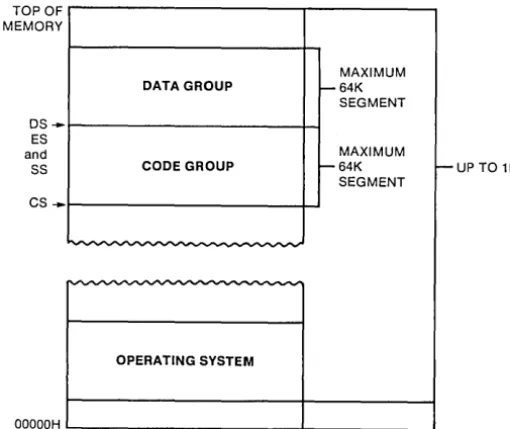
Figure 5-1 shows memory allocation for a CBASIC program loaded according to Intel's Small Memory Model. Notice that the CBASIC Compiler system supports program groups to the 64K addressable segment range. The limitation provides a great deal of program flexibility without having to reinitialize segment registers. LINK86 displays an error message when a program group for the resulting .EXE file exceeds the 64K limit.
TOPOF MEMORY
OS .... ES and SS CS ....
ooaaOH
MAXIMUM DATA GROUP 1-64K
SEGMENT MAXIMUM
CODE GROUP 1-64K f--UP TO 1M SEGMENT
OPERATING SYSTEM
Figure 5-1. Memory Allocation
[image:42.473.120.375.255.469.2]CB86 Programmer's Guide 5.2 Run-time Organization
5.2 Run-time Organization
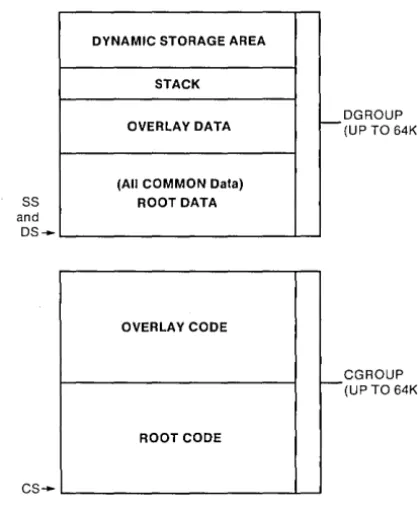
The l6-bi t CBASIC Compiler system generates directly executable command files with a filetype of .EXE. A CBASIC command file contains both a header record and the program memory image. The CBASIC Compiler system defines a separate DGROUP (data group) and CGROUP (code group) in the memory image portion of each command file. The operating system maintains a base page in the data area of the program.
Figure 5-2 roughly depicts memory allocation wi thin: the DGROUP and CGROUP for an executable root program and one overlay. Notice that CBASIC Compiler stores all COMMON data in the root and maintains its own stack just below the Dynamic Storage Area.
DYNAMIC STORAGE AREA STACK OVERLAY DATA
(All COMMON Data)
ss
ROOT DATA andos--OVERLA Y CODE
ROOT CODE
cs--
r-
t--OGROUP (UP TO 64K)
CGROUP (UP TO 64K)
[image:43.474.127.336.196.450.2]