c
International Journal of Research (IJR)
e-ISSN: 2348-6848, p- ISSN: 2348-795X Volume 2, Issue 12, December 2015Available at http://internationaljournalofresearch.org
Design & Analysis of Video Streaming and Content
sharing Using Android
V.Venkata satyanarayana & KVN satyanarayana
M.Tech Student, Dept.of ECE(VLS&ES), DJR College of Engineering & Technology, Andhra Pradesh, India Assoc Professor, Dept.of ECE(VLSI&ES), DJR College of Engineering & Technology, Andhra Pradesh, India
[email protected] ; [email protected]
ABSTRACT-
With the rising penetration of smart phones in the consumer market, mobile multimedia content is becoming the dominant form of information that people produce and consume on a daily basis. In this paper, wireless video streaming and content sharing application for mobile phones with the Android operating system is presented. Video Streaming and Content Sharing is a Peer to Peer technology in which the Android cell phone will be one peer and the PC will be the other peer of the network.
Video streaming application for mobile phones with the Android operating system allows sharing of live information that is being captured by mobile phone sensors (e.g., camera, microphone) with computers within the Wi-Fi communication range.
The live video is observable on the computer’s screen. The video streaming which is based on peer-to-peer communication between mobile phone and the PC is without the use of
video processing servers or network
infrastructure. Peer-to-peer video streaming from the cameras on smart phones to people nearby allows users to share what they see. Such streaming can be used in a variety of applications; in particular in various social
network applications including sharing
unforgettable moments with friends , cooperative fieldwork i.e., providing video sharing for teams distributed in a small area, example, teams of repairmen, and search and rescue teams in
disaster areas, and support for health impaired persons including the elderly.
Content sharing can be used for applications like seeing or browsing an image or text file on Android mobile phone which is stored in a computer. And also, image or text files stored in android mobile can be moved on to the computer available within Wi-Fi communication range.
Keyword: - Android; Peer-to-Peer; Video Streaming; Content Sharing
1. INTRODUCTION
With the rising penetration of smart phones in the consumer market, mobile multimedia content is becoming the dominant form of information that people produce and consume on a daily basis. The International Telecommunication Union’s (ITU) statistics on mobile subscriptions indicates five billion mobile subscriptions for 2010, with a 17% penetration of smart phones in 2009.
The rapid adoption of smart phones has created a unique opportunity for mobile multimedia services for mobile users. Currently a majority of smart phones are equipped with both hardware and wireless communication that supports real-time video processing [1] and other information exchange.
c
International Journal of Research (IJR)
e-ISSN: 2348-6848, p- ISSN: 2348-795X Volume 2, Issue 12, December 2015Available at http://internationaljournalofresearch.org
the video data or multimedia data before the entire file has been transmitted.
To achieve this, the bandwidth efficiency and flexibility between video servers and equipment of end-users are very important and challenging problems. In response to such challenges, a variety of video coding and streaming techniques have been proposed to provide video streaming services.
Fig -1: A Typical Video Streaming System
A typical video streaming system is shown in Fig 1, which consists of an encoder, a distribution server with video storage, a relay server and end-users that receive the video data. The distribution server stores the encoded video data and begins to distribute data for the client. Users can watch the video whenever and wherever by accessing the server over the networks. Encoding and distribution is carried out in real time in the case of live distribution and may not be performed in real time for on-demand type of applications [2].
Video streaming application for mobile phones with the Android operating system allows sharing of live information captured by mobile phone sensors (e.g., camera, microphone) with others. The video streaming is based on peer-to-peer communication between mobile phones, i.e. without the use of video processing servers or network infrastructure.
Peer-to-peer video streaming from the cameras on smart phones to people nearby allows users to share what they see.
Such streaming can be used in a variety of applications, in particular in various social
network applications including sharing
unforgettable moments with friends, cooperative fieldwork i.e., providing video sharing for teams distributed in a small area, example, teams of repairmen, and search and rescue teams in disaster areas, and support for health impaired persons including the elderly.
Content Sharing is a Peer to Peer technology in which the Mobile will be one peer of the network and the PC will be the other peer of the network. Many modern handheld devices feature functions of taking pictures, shooting video clips, or recording audio sounds.
However, such devices are usually equipped with small display panels and poor acoustic equipment. In order to achieve better user experience with high quality panel or audio stereo, users often need to transfer or copy digital media contents to external powerful devices, like personal computers and home theatre devices. Nevertheless, it can be difficult for users to follow up a series of operations of connection setup and media content transfer [3].
We can connect two discrete systems in a network and do a peer to peer networking. The information which is stored in the system can be viewed through the mobile by the users. This makes the users to know the information and the pictures in the mobile can also be transferred to the system if there is no enough space in the mobile. This system is used for applications like seeing or browsing a file which is there in a remote computer, storing images and text taken in the mobile to the home computer.
2. Related Work
c
International Journal of Research (IJR)
e-ISSN: 2348-6848, p- ISSN: 2348-795X Volume 2, Issue 12, December 2015Available at http://internationaljournalofresearch.org
and processing data at server, sending data to smart phone terminal via Web Services, it reaches the purpose of monitoring the target site anywhere and anytime under the coverage of wireless network and enhances the flexibility of streaming greatly. In the paper authored by Huifang Sun, Anthony Vetro and Jun Xin [3] proposed streaming techniques mainly from signal processing perspective. Here, scalable video coding techniques are reviewed and various video streaming methods are presented. Various network related issues for scalable video streaming are covered. Also, a specific method of scalable video streaming that is based on regions-of interest is discussed.
In [4], a wireless multi-hop video streaming application for the Android based mobile devices (including Android based tablet PCs) has been presented. This application allows users to capture live video using camera on mobile devices, and to share this video feed with people nearby using a free-of-charge wireless mesh network. Routing protocols can be installed to facilitate the multi-hop communication to go beyond a single hop. Here an example application scenario is depicted in which a person streams live video of a concert to friends nearby over the wireless mesh network of phones, without being caught by the expensive mobile phone bill. They evaluated the presented peer-to-peer video streaming application in a variety of experiments. In these experiments it is showed that feasibility of peer-to-peer video streaming for various generations of Android
phones and also evaluated performance of
various video encoding and decoding schemes. Chih-Lin Hu, Wei-Shun Liao and
Yen-Juhuang[5] proposed a design and the
development of a mobile media content sharing mechanism in UPnP-based home network environments. They integrated the WLAN technology into the UPnP middleware, and noticeably implement an interesting mobile
content sharing scenario on a specific mobile phone platform. In compliance with the DLNA interoperability guideline, a mobile media server which is able to discover, interconnect with, and transfer media files to other UPnP-/DLNA-compliable devices is developed.
Accordingly, the developed mobile
phones and home networked devices can communicate with each other through UPnP networking. Mobile phones can serve as “temporary” mobile content servers at any time they want to share stored media contents to be processed directly on external media player devices. As a result, users can conveniently and effectively share their favourite media contents anywhere and anytime, without need of unfriendly manual operations of connection setup and data file transfer, in a home network environment where the proposed mechanism is deployed.
In a work carried out by D. Shiny Irene [5], an Android Application which is kept in cloud, which deals with accessing the text files in the system and transferring the pictures to the system from anywhere in the world through the mobile without a centralized server is reported. The mobile will specify the filename and the system will search the directories for the specified filename, from which the contents can be viewed through the mobile. For this process, Android application should be developed in the mobile and cloud application has to be developed in the system. The connection between the mobile and the system is developed using Cloud and Android. The main requirement is that the system must be switched ON with internet connection enabled and the mobile should have GPRS connection.
3. SYSTEM ANALYSIS AND DESIGN
c
International Journal of Research (IJR)
e-ISSN: 2348-6848, p- ISSN: 2348-795X Volume 2, Issue 12, December 2015Available at http://internationaljournalofresearch.org
stream live video to centralized processing
servers using the available network
infrastructure. Video sharing is then done over the Internet, placing great dependency on the network infrastructure. Similarly, for content sharing, images, text and other files that need to be sent or received from the mobile or PC should be available in the centralized server and then need to be accessed.
Infrastructure based networks may not always be available or affordable and Internet Connectivity in Mobile Sharing is not a reality in
mobile Environments. Prior works have
examined that the messages can impact network congestion and power dissipation of small electronic devices.
3.1 Proposed System
In the proposed video streaming application, the
streaming is based on peer-to-peer
communication between mobile phone and PC, i.e. without the use of video processing servers or network infrastructure. This system also makes a person possible to get the contents of the text file as well as images stored in the system from anywhere within the Wi-Fi range through the mobile. Sometimes there may not be enough memory space in the mobile to save the pictures taken, at this point of time, the person can transfer the pictures to the system without a centralized server and carry on taking pictures and can share the text files as well. The system promotes easy accessibility. Easy accessibility is achieved because Android application processing is more secure.
Fig -2: System Architecture
The System architecture of the proposed system is as shown in the Fig 2, consisting of Android Mobile phone and PC connected together using Wi-Fi for the purpose of Video Streaming and Content Sharing.
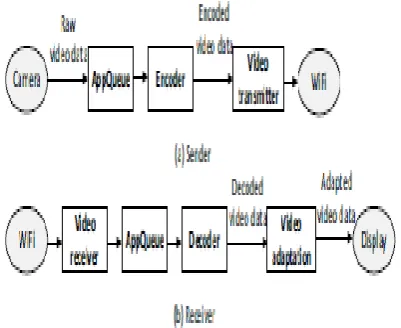
For the realization of Video Streaming, the various stages are as shown in the Fig 3. When starting the streaming application, it should go through various stages. Raw video data is retrieved from the camera and then passed to the encoder, which encodes the data using the selected codec and encoding technique. The encoded video is then transmitted over-the-air by the Wi-Fi module. At the receiver, when an encoded video is arrived, it is decoded and displayed.
c
International Journal of Research (IJR)
e-ISSN: 2348-6848, p- ISSN: 2348-795X Volume 2, Issue 12, December 2015Available at http://internationaljournalofresearch.org
4. SYSTEM IMPLEMENTATION AND RESULTS
In this section it is explained how the system is realized as a whole through the implementation of various modules. Implementation details of all the modules along with the obtained results are depicted in the following sub-sections.
4.1 Language Used
The proposed system is implemented using Java language. Java is a programming language originally developed by James Gosling at Sun Microsystems (which is now a subsidiary of Oracle Corporation) and released in 1995 as a core component of Sun Microsystems’ Java platform. The language derives much of its syntax from C and C++ but has a simpler object model and fewer low-level facilities. Java applications are typically compiled to byte
code (class file) that can run on any Java Virtual
Machine (JVM) regardless of computer
architecture. Java is a general-purpose,
concurrent, class-based, object-oriented language that is specifically designed to have as few implementation dependencies as possible. It is intended to let application developers "write once, run anywhere".
Java is currently one of the most popular programming languages in use, and is widely
used from application software to web
applications [7].
4.2 Main GUI of the Application
Once the application deployed on Android phone is opened, the user will get to see the following user interface as shown in Fig 5. By looking at the GUI, user can use the features implemented in the Application.
Fig- 4: Application User Interface 4.3 Video Streaming
Once the PC(s) are selected through the Register option, the user has to click the Streaming button of the user interface. When the Streaming button has been clicked, phone camera will start capturing the video. At the PC end java application should be running in order to receive the video stream. At this point, the screen shown in Fig 5 will be on PC window. This window indicates that the PC is ready to receive video. 4.4 Content Sharing
c
International Journal of Research (IJR)
e-ISSN: 2348-6848, p- ISSN: 2348-795X Volume 2, Issue 12, December 2015Available at http://internationaljournalofresearch.org
Fig- 5: Uploading of Files
Download feature is for transferring images or text files from PC to Android phone. The IP address has to be entered in order to specify from which PC within Wi-Fi, we wish to access the files. Having entered IP address and clicked Download button, the following screen Fig.9 will be seen on mobile phone. And, the user has to specify the filename to be downloaded from the PC and click upon Download button. On successful transfer, a status “File downloaded successfully” will be displayed on PC window as well as phone screen.
Fig- 6: Downloading files
4. CONCLUSIONS
Using the peer to peer technology text files and images are retrieved from the system through the mobile and also are transferred from the mobile to the system within Wi-Fi range. Streaming of the video, captured using mobile camera to the PCs located anywhere within Wi-Fi range is implemented through this system. And hence video streaming and content sharing is achieved. Thus the video streaming or content sharing does not rely on a traditional network infrastructure (such as the cellular), or any intermediate servers, hence making the system simpler and easy to use.
c
International Journal of Research (IJR)
e-ISSN: 2348-6848, p- ISSN: 2348-795X Volume 2, Issue 12, December 2015Available at http://internationaljournalofresearch.org
The mobile will specify the filename and the system will search the directories for the specified filename, from
which the contents can be viewed through the mobile. For this process, Android application should be developed in the mobile and cloud application has to be developed in the system. The connection between the mobile and the system is developed using Cloud and Android. The main requirement is that the system must be switched ON with internet connection enabled and the mobile should have GPRS connection.
5. FUTURE SCOPE
For future work it is possible to develop a richer user interface with additional features, such as implementing multicast over multiple hops and allowing users to record video contents on local SD cards while streaming or forwarding. If the captured video can be stored onto some back end database, then the application can be used as a Surveillance System as well.
REFERENCES
[1] ITU. Statistics on global mobile
subscriptions.http://www.itu.int/newsroom/press releases/2010/06.html.
[2] Abhishek Barve, Pragnesh shah, “Android based Remote Monitoring System” International Conference in Recent Trends in Information Technology and Computer Science (2007).
[3] Huifang Sun, Anthony Vetro, Jun Xin. “An Overview of Scalable Video Streaming”, Published in Wireless Communications and Mobile Computing Vol 7, Issue 2 (2007).
[4] Peizhao Hu, Nick Symons, Jadwiga Indulska, and Marius Portmann, “Share your view: wireless multi-hop video streaming using Android phones”, PerCom Workshop on
Pervasive Wireless Networking, IEEE
International Conference 782-787, Lugano
(2012).
[5] Chih-Lin Hu, Wei-Shun Liao and Yen-Ju Huang,“Mobile Media Content Sharing in
UPnP-Based Home Network Environment”,
International Symposium on Applications and the Internet Workshops, IEEE conference publications, 1753-1769, Hiroshima(2008).
[6] D. Shiny Irene, “Video surveillance system and content sharing between pc and Mobile using android”, International Journal of Computational Linguistics and Natural Language Processing Vol 1 Issue 5 (2012).
[7] Herbert Schildt, Java™: The Complete Reference, Seventh Edition.
FIRST AUTHOR’S:
V.VENKATA SATYANARAYANA received his B.Tech degree in Electronics and Communication engineering in the year 2012 and pursuing M.Tech degree in VLSI & EMBEDDED SYSTEMS from, DJR College of Engineering & Technology.
SECOND AUTHER’S: