A Virtual Learning Environment to Support
Learning and Teaching at Danum School
Daniel Watson
Computing
Session 2006/2007
The candidate confirms that the work submitted is their own and the appropriate credit has been given where reference has been made to the work of others.
I understand that failure to attribute material which is obtained from another source may be considered as plagiarism.
Summary
Within the United Kingdom secondary schools are being encouraged to use virutal learning environments such as Moodle, ATutor, Sharepoint etc. Danum School Technology College is one such school looking to implmement a virtual learning environment. This project primarily focuses on the development of a currently available open source virutal learning environment, by improving and adding new functionality defined by the schools requirements.
The project started by examining what virtual learning environment are, and what benefits and problems araise from a school making use of them. Next, a open source virtual learning environment was se-lected based on the functional requirement of Danum School. Once the environment was sese-lected extra functionality was addedd to the virtual learning environment, these changes took place over two project iterations and involved the processes of requirement gathering, design and implementation and testing. After two iterations, the final modified version of the virtual learning environment was deployed within the school.
Acknowledgements
First of all I would like to give thanks to my supervisor, Dr. Kevin McEvoy for his guidance and advise on how to tackle certain elements of the project, and for guiding me through the whole process.
Also I’d like to thank Mr. Ron Hale and Mr. Peter Hayton from Danum schools for giving up their valu-able time for attending the project interviews and demonstrations, without the support of both of them, this project would not have been possible.
I would like to thank my housemates and friends, all of whom gave me encouragement and support. Lastly I like to take this opportunity to thank my parents for their constant emotional and financial support throughout my time at university.
Contents
1 Introduction 1
1.1 Problem Statement . . . 1
1.2 Aims and Objectives . . . 2
1.3 Minimum Requirements and Possible Extensions . . . 2
1.4 Deliverables . . . 3
1.5 Project Schedule and Revisions to Schedule . . . 3
1.6 Relevance to Degree Programme . . . 4
2 Background Reading 5 2.1 Development Methodologies . . . 5
2.1.1 Introduction . . . 5
2.1.2 The Traditional Waterfall Model . . . 5
2.1.3 The Spiral Model . . . 6
2.1.4 The Unified Software Development Process . . . 7
2.1.5 Chosen Methodology . . . 8
2.2 Virtual Learning Environments . . . 9
2.2.1 Definition of a Virtual Learning Environment . . . 9
2.2.2 Features of Virtual Learning Environments . . . 10
2.2.3 Benefits and Drawbacks of Virtual Learning Environments . . . 11
2.3 Open Source Software . . . 13
2.3.1 What is Open Source Software . . . 13
2.3.2 Benefits of Using Open Source Software . . . 13
2.3.3 Drawbacks of Using Open Source Software . . . 13
3 Analysis 14 3.1 Introduction . . . 14
3.2.1 Technical Staff . . . 14
3.2.2 Teaching Staff . . . 15
3.2.3 Pupils . . . 15
3.3 IT Infrastructure and Current Systems . . . 15
3.4 Desire for Virtual Learning Environment . . . 17
4 Requirement Capture 18 4.1 Introduction . . . 18
4.2 Selection of Virtual Learning Environment . . . 18
4.3 Requirements for Iteration One . . . 21
4.4 Requirements for Iteration Two . . . 23
5 Design 25 5.1 Introduction . . . 25
5.2 Iteration One Designs . . . 26
5.3 Iteration Two Designs . . . 27
6 Implementation and Deployment 29 6.1 Introduction . . . 29
6.2 Iteration One Implementation and Testing . . . 29
6.2.1 Requirement 1.1 - Development of a Moodle Theme . . . 29
6.2.2 Requirement 1.2 - Changes to the categories and course pages . . . 31
6.2.3 Requirement 1.3 - Changes to the edit course setting page . . . 33
6.3 Iteration Two Implementation and Testing . . . 33
6.3.1 Requirement 2.1 - Minor Changes as a result of Iteration One . . . 33
6.3.2 Requirement 2.2 - Examination of User Privileges . . . 34
6.3.3 Requirement 2.3 - Development of E-Portfolios . . . 35
6.4 Deployment within the School . . . 38
7 Evaluation 39 7.1 Solution Evaluation . . . 39
7.1.1 Evaluation against User Requirements . . . 39
7.1.2 Evaluation against Moodle coding guidelines . . . 40
7.1.3 Usability Evaluation . . . 41
7.2 Project Evaluation . . . 42
7.2.2 Evaluation of chosen Methodology . . . 43 7.2.3 Suggestions for Further Work . . . 43
Bibliography 44
Appendix A - Reflection 46
Appendix B - Schedules 48
Appendix C - End User Interviews 51
Chapter 1
Introduction
1.1
Problem Statement
Within the United Kingdom secondary schools are being encouraged to make use of Virtual Learning Environments (Learning Platforms). In 2005 the Department for Education and Skills published the e-Strategy report, recommending that every student within secondary education should have access to an online learning space [12]. Danum School Technology College, Doncaster is one example of a Secondary school which is investigating making use of a Virtual Learning environment. The schools investigation into virtual learning environments is being carried out by Mr. Hale, the schools ICT Coordinator. He is very keen to implement one within Danum School after visiting several schools currently making use of them. The current dilemma facing Mr. Hale is whether to use a commercial Virtual Learning Environ-ment or to make use of available open source virtual learning environEnviron-ments.
The school itself is a mixed gender secondary school teacher students between the ages 11 and 18, with over 1,900 students and 270 plus staff made up of 130 teachers. The school is split site with key stage three teaching at the Leger Way site, and key stage four and sixth form studies at the Armthorpe Road site. Danum School was awarded specialist technology status in September 2002. The latest Ofstead report found the school to offer a satisfactory level of teaching during its inspection during 2006 [13].
1.2
Aims and Objectives
This project aims is to develop and implement a Virtual Learning Environment to aid learning and teach-ing at Danum School in Doncaster, to be used by both pupils and teachers.
The objectives of this project are to:
• Research a precise definition of a Virtual Learning Environment (VLE) and the potential benefits a VLE is expected to offer teaching staff and students within educational establishments.
• Identify and use a system development methodology to aid the development of the final virtual learning environment.
• Identify the end user requirements from interviewing relevant people at Danum School.
• Select a open source virtual learning environment based on the requirements of Danum School
• Identify with the help of the end users, any improvements or additional functionality needed by Danum School on the virtual learning environment.
• Involve the end user as much as possible during the all stages of the project.
• Implement the chosen system and help aid the deployment of the final Virtual Learning Environ-ment within Danum School.
• Develop documentation for use by both students, teachers and administrators.
• Evaluate the final virtual learning environment both individually against a set of evaluation criteria and carry out end user evaluation with the relevant end users.
1.3
Minimum Requirements and Possible Extensions
The minimum requirements are:
• A literary review on Virtual Learning Environments, looking what Virtual Learning Environments are currently available, assessing their advantages and downfalls.
• Detailed user requirement documentation, following consultation with the relevant people at Danum School.
Possible extensions are:
• Implement specific functionality required by Danum School discovered in the second iteration of the project (i.e. include non-core requirements)
• Generation of material to assist with the usage of the Virtual Learning environment for relevant end users.
1.4
Deliverables
The deliverables for the project are:
• Final Project report detailing what took place during the project,
• A working Virtual Learning Environment which mets the requirements identified within iteration one and two of project, which can be deployed within the school
• A User Guide for using the final system for both staffs and pupils.
1.5
Project Schedule and Revisions to Schedule
Figures 7.2 and 7.3 within Appendix A, show the original and revised project schedule. The first major change to the schedule was the increase from two project iterations to three. This extra iteration referred to at iteration zero, was required to include identify the schools general requirements for a virtual learn-ing environment, selectlearn-ing an open source virtual learnlearn-ing environment and included project analysis. Due to the need for iteration zero, this meant time on iteration one and two had to be reduced.
The original schedule also only allocated two weeks off within the Christmas period, due to time being needed for revision for January examination period, within the revised schedule this time off was in-creased to four weeks. As a result of this change the implementation phase of iteration one was pushed back until after the January exams, which ended up working out well due to a light work loads at the be-ginning of semester two, leaving time to concentrate on project work. The schedule of work for iteration one was also affected by the availability of Ron Hale and Peter Hayton.
The time allocated for iteration two was reduced from seven weeks to six weeks, this meant deployment still occurred on schedule, and implementation was completed ready for the progress meeting. The time requirements for iteration one and two where further reduced due to running unit testing along side the implementation phases, as this meant any error that where identified where quicker to fix.
1.6
Relevance to Degree Programme
Throughout the course of this project various skill gained from modules studied while attending univer-sity have been drawn upon. Firstly knowledge from IS11, IS33 and SE20 has been used when examining and selecting an appropriate development methodology. Due to the large scale and time constraints of the project, project management has also been very important, previous experience from SE24 and PD31 was drawn upon. Also due the fact that this project end system was to be a working virtual learning en-vironment with users of different abilities using it, usability was also important within the project, skills from GI11 where employed.
Due to the practical nature of the project, various programming skills where required. Due to the virtual learning environment being a web based system, knowledge of XHTML, CSS and JavaScript from SY23 proved vital. Although PHP was the main programming language for the project, because of studying the various programming modules at level one and two (SE14 and SE20), this meant the language was easily learnt and existing code could be easily understood. Experience with databases and specifically SQL from DB11 and DB21 also turn out very helpful, as much of the information used by the virtual learning environment was stored in database form.
Chapter 2
Background Reading
2.1
Development Methodologies
2.1.1 Introduction
Typically the use of a methodology is intended to help software developers in the development of an information system. Typically a number of phases are cycles though i.e. feasibility study to review and maintainance. A methodology also makes use of tools to help system analysts formulate requirements [3]. There are many advantages from using a development methodology. Firstly it is believed that the use of a methodology helps leads to better quality products i.e. in terms of user acceptability, and secondary help ensure the user requirements are met and in doing so help stop the system being classed as a failure [5]. In this section three different development methodologies are examined.
2.1.2 The Traditional Waterfall Model
The traditional waterfall model was developed in the late 1960s in an attempt to introduce a more system-atic engineering approach to software developments [5]. It outlines a series of predefined steps which must be followed in a sequential manor [6]. Figure 2.1 outlines the main stages within the waterfall model. The figure also shows the possible paths for feedback loops within the cycle.
There are numerous reasons why the waterfall model was popular with developers. Firstly at each stage of the cycle there are defined deliverables which can be used to monitor the project progress e.g. after the analysis is complete a requirement specification should have been produced [6]. Secondly by dividing the development into several smaller tasks and identifying milestones, this helps aid project management
[22].
Figure 2.1: The Traditional Waterfall Model [6]
However, there are numerous drawbacks to using the waterfall model as a methodology. Firstly due to is structured and disciplined approach, it is not very flexible. It requires all user requirements to be stated up front, if a user changes their requirements later on, the system requirements are not changed, and thus increasing the chance of the project failing. Secondary the waterfall does not reflect real software development practices, where phases may overlap and activities may have to be repeated [5]
2.1.3 The Spiral Model
The Spiral Model was proposed by Boehm in 1988 [7], and is an example of an iterative system develop-ment model. Beohm recognised that system developdevelop-ment projects tend to repeat the stages of analysis, design and coding due to its heavy use of of prototyping, making it closely related to Rapid Application Development (RAD). Also like RAD a review is possible after each iteration. Each spiral consists of four main activities which include planning, risk analysis, engineering and customer evaluation.
The Spiral model aims to overcome some of the problems associated with the waterfall model. By using iterations serious misunderstanding between project developers and end users are discovered early in the project, so are easily rectified [5]. The Spiral model also encourages user feedback, which means users are involved heavily and requirements that may not have been discovered during the analysis may be discovered. Lastly, the Spiral model encourages analysts, designers and programmers to work closely together, meaning that any inconsistences between the requirements, design and implement ion are de-tected early on in the development.
However there have been many criticisms of the spiral model, firstly many project managers argue that projects following the spiral model are difficult to control. The main issue is after how many iterations can a project be declared as finished [3]. Also unlike the waterfall model milestones are not present, so this could make a project difficult to monitor in terms of progress.
2.1.4 The Unified Software Development Process
Avison and Fitzgerald [3] describe The Unified Software Development Process (USDP) as a ”use case driven, architecture centre, iterative and incremental approach to software development”. It incorporates the use of the Uniform Modeling Language (UML) [5]. Figure 2.2 shows the phases and workflows that are common to USDP.
Figure 2.2: The Unified Software Development Process [5].
Within each phase of the development, one or more iteration’s may be carried out; each phase executed makes use of five core workflows, plus any other extra workflows that may be necessary. The number of iterations per phase depends on the size and complexity of the project. One major difference between the UDSP and other software development models is that USDP is a goalbased process rather than a deliverable process; however each phase ends with a milestone.
The main goal of the inception phase is to get the project of the ground, looking the projects feasibility, capture essential requirements to help discover the potential system scope. The elaboration phase aims to capture use cases to 80% of the functional requirements. Also detailed plans should be produced for use during the construction phase. This phase aims to establish what should be built, and to develop the
designs for any new system [5].
Once all requirements have been discovered, and designs are complete, the construction phase can begin, where the software is built and system testing takes place. The tranisation phase aims to deploy the newly developed software into the end user environment. Also during this phase system testing would also take place and any defects detected corrected. Also the creation of user manuals and other documentation should also be undertaken. Usually at the end of the project a post-project review would take place [1, 5].
Overall the USDP is a valid alternative to the waterfall model. By using an iterative approach this means all requirements should be discovered and any misunderstandings between the end users and developers can be resolved. Also USDP requires heavy user involvement, meaning that feedback can be given at each stage of the project and any issues raised can be addressed. This should lead to a better end product and a greater chance of user acceptance.
2.1.5 Chosen Methodology
For this project a mixture of the traditional waterfall model and the unified software development process methodologies will be used. Ideally only the unified software development process would be followed, however due time limitations it is not possible to carry out the number of iterations required. Due to the problems discussed in regards to the waterfall model, by integrating it with some of the ideas from the unified process, it is hoped these problems will be avoided.
The main stages in this project will be analysis, requirement gathering, design, implementation, testings and deployment within Danum school followed by evaluation and conclusion. However two iterations will be undertaken of requirement gathering, design and implementation. This is to make sure the final system developed will meet the requirements of the end user. Also by carrying out two iterations of key phases, end-user involvement is also increased, hopefully any problems discovered can be discovered and fixed. The project plan within Appendix B shows more detail of the planned work flow.
2.2
Virtual Learning Environments
Since computers appeared in schools and colleges, they have been used to aid learning and teaching. As well as using computers to learn ICT skills, specific subject programs have been developed to enable computers to assist with the teaching of non-computing subjects [27]. However in the last few years Virtual Learning Environments have become popular in use within secondary and higher education in-stitutions. System which can be referred to as a Virtual Learning Environment can often be referred to as Learning Management System (LMS), Course Management System (CMS), Managed Learning Envi-ronment (MLE) and Learning Platform. For this project the term Virtual Learning EnviEnvi-ronment shall be used. This section looks at what Virtual Learning Environments are, their main features and the benefits that come from making use of them.
2.2.1 Definition of a Virtual Learning Environment
The term Virtual Learning Environment (VLE) is used to refer to a web-based system that is designed to facilitate teachers with the administration and delivery of their particular course. Often these systems run on web-servers, which serve course material to students as html pages, teachers and heads of depart-ments are responsible for adding relevant content to their particular course area. The learning ”learning” aspect is driven by activity, with ”virtuality” referring to the technology that is brought in to support the learning [4]. They have emerged due to the due the rapid uptake of the Internet both within schools and the home, and increased reliance on distance learning [27]. VLEs are often thought of as a primary tool for distance learning, however they are more often used to supplement the face-to-face traditional teaching methods.
Virtual Learning Environments allows ”collaboration cooperation” [8]. This means that one person can publish a document, and other people may edit it until it is considered finished. VLEs are often designed to allow formal and informal communication between teachers and pupils, and between groups of pupils [18]. Depending on functionality, a VLE may also help teachers to track and monitor pupils performance. Lastly a VLE can act as a repository where learning materials can be made available for use [16].
It is very common to consider a VLE as part of a Managed Learning Environment (MLE). The term MLE can be used to describe the range of information systems and processes that appear in a school such as a VLE that can contribute directly or indirectly to learning and learning management. Figure 2.3 shows the place of a VLE within a MLE.
Figure 2.3: Managed Learning Environment [11]
2.2.2 Features of Virtual Learning Environments
A VLE offers a great number of functions including content delivery, communication facilities, assess-ment, student tracking and links to other systems. Most VLEs generally have a combination of some or all of the features listed below:
• Communication tools such as email, bullet boards and chat rooms
• Collaboration tools such as online forums, electronic diaries and calendars
• Tools to crate online content and courses
• Online assessment and marking
• Integration with school management information systems
• Controlled access to curriculum resources
• Student access to content and communications beyond the school [9]
All VLEs should provide secure access for staff and students, once logged in students should be taken to their own workspace or own web pages where they can post personal information about themselves, as well as having access to their own progress and tracking information. Ideally passwords for the VLE should be the same as the ones used within the institution. In regards to the curriculum, content should be organised into elements or modules which can be accessed by both students and teaching staff.
In regards to tracking student progress, this can be achieved from on-line assessment at the end of a lesson or unit of work, this could be done using on-line quizzes for example. For course administration the VLE should record basic information about students, including tracking information e.g. scores from assignments, or completed online quizzes. Also most VLEs allow system administrators to track indi-vidual students login times, and the length of time they where online.
Teachers and administrators should be able to manage and customise their courses from their web browser. Key elements include adding and removing students from courses, monitoring student progress, and the adding of new course materials. I tis is important that all these functions can be carried out without the need for knowledge of html. From the student point of view the VLE should offer simple navigation tools to help get to the desired content.
A VLE should also allow for a variety of assessment options. This includes multiple choice, or elec-tronic assignments. Where possible assessment should be automatically graded and allow instant feed-back. Marks from completed assessments should automatically be added to the students online record so teachers can monitor performance. Lastly in regards to assessment a VLE should allow for automatic chasing of students i.e. if a student does not complete an assessment or multi-choice. This can be done through teachers being able to see reports which show class lists detailing which students have completed relevant tests, from these reports individuals who have not completed set exercises can be identified.
The last important feature of a VLE is to improve communication between groups of students, and be-tween students and teachers. Most VLEs offer a number of features including Bullet Boards (threaded discussion) or online chat areas. These features allow teachers to post notice’s such as home work reminders, or lesson cancellations for example. Also teachers may start a post class discussion on a particular topic to see if pupils have understood the content covered. Also within these bulletin boards, pupils may post questions or queries, these can be answered by teaching staff or other pupils.
2.2.3 Benefits and Drawbacks of Virtual Learning Environments
Many authors in literature regarding Virtual Learning Environments argue that there are many benefits to both teachers and students from a school making use of a VLE. Firstly because VLE are accessible via standard browser such as Microsoft Internet Explorer, and in most cases can be accessed through the Internet, this offers greater flexibility in learning i.e. does not restrict a person to class room based learning [11].
From speaking with educators using VLEs they have also mentioned advantages not commonly men-tioned in current literature. Firstly as all resources for a particular are in a particular place, it can make cover lessons easier when the usual member of staff is not available to take the lesson. Also if a pupil misses a lesson due to illness for example, they can easily find out what they have missed from looking at the relevant section(s) of the VLE for their subject.
Tebb and Dee [27] also note that a hidden benefit that is often not consider by evaluators of VLEs ”is the acquisition of transferable IT skills by both students and staff”. It is quite common for companies to use their Intranet pages to hold training resources. As students have gained experience with VLEs, they would be better equipped to deal with the companies Intranet pages.
Because VLEs facilitate computer-medicated communication, this offers several advantages. Firstly from making use of notice boards and forum areas, this can enhance communication between students and staff. Also it has been noticed that quieter pupils are most inclined to use the forum areas, to post questions and join in discussion due to the conversation happening by text rather than face to face [20].
It is important to note that VLEs requires fundamental changes in the role of academic and technical staff within a school or college. From on-going experiences with VLEs, there is evidence of substantial transformations in the work carried out by teachers [4]. VLEs are often reported as a new technology, and can either be accepted or rejected by users. For a VLE to enhance learning and teaching within a school it must be accepted and used by both teachers and students. If a VLE is to be accepted, its users must experience perceived usefulness and easy of use [18]. This issue raised who is the importance of staff and students being trained so they can use the VLE effectively. If possible teachers should be shown the advantages of using the VLEs, and it is vitally important that continued use of a VLE takes place in order for the transition phase to be successful.
2.3
Open Source Software
2.3.1 What is Open Source SoftwareOver the past few years the number of people using open source software has increased dramatically. Well known example include office suites such as OpenOffice, web brwoser such as Mozilla Firefox etc. The main different between open source software and commerically available software is that the source code for open source project is available to download and individual users may modify this code. [24] In order for software to be classed as open source it must comply with the definition of open source provided by the Open Source Initiative (OSI) [15]. This definition specifies that software should be distributed freely, the source code of the software should be made available, the software should be made available to everyone and for any purpose.
2.3.2 Benefits of Using Open Source Software
Remy [24] states many advantages of using open source software. Firstly “users can modify the code to support what they need”, this means after they have download a open source project from the Internet such as Moodle, they are free to make any necessary changes to it, to increase or add new functionality as they desire. Potentially there is a “much larger development community”, for the example, there are many user around the world developing new library and modules for Moodle. Most organisation make use of open source software because it is called as having “zero cost” though this is not always true.
2.3.3 Drawbacks of Using Open Source Software
Although the advantages of using open source software are numerous, there are also several drawbacks to making use of it. Firstly documentation may be poor or nonexistent, because it would take a experience developer to be able to implement the software effectively. Also because no one ”in charge”’ of the software, as it has many contributers, there is no one for a users to blame if something goes wrong with the software. It must be remember that although the cost of acquiring open source software may be free, the software will more than likely cost more in the long run due implementation issues and support issues [24].
Chapter 3
Analysis
3.1
Introduction
This chapter provides details of key physical elements that play an important part in the project. They include the users that will use the virtual learning environment, the schools existing information tech-nology infrastructure and lastly looking at why the school is wanting to implement a virtual learning environment.
3.2
Potential Users
Within the school there are three potential user groups which include, the ICT technical staff, teaching staff and pupils. All these users groups have different information technology skill levels, and all poten-tially have different requirements for the virtual learning environment. From discussion with with Ron Hale, the schools ICT co-ordinator and Peter Hayton, head of the ICT department, it was decided the project would be limited to the schools IT technical staff, teachers within the ICT department and pupils studying GCE Applied Information Communication Technology at Advanced Subsidiary (AS) Level.
3.2.1 Technical Staff
The School currently employees seven IT technical staff, who are responsible for maintaining and run-ning the schools various computer systems and network. The technical staff are managed by Robert Sidebottom, with the day to day operation management being carried out by Nick Wells, who is also responsible for maintaining the schools Intranet system.
3.2.2 Teaching Staff
The ICT department currently has five fully time teaching staff and three non-teaching assistants respon-sible for delivering the various ICT courses between pupils in year seven to sixth form level. For this project three teacher will be involved, they include Ron Hale, Peter Hayton and Nigel Hopkinson all who teacher GCE Applied Information Communication Technology.
3.2.3 Pupils
Danum school currently has just over 1,900 pupils of all mixed ability. Due to the project being limited to the ICT department and pupils enrolled on GCE Applied ICT this limits the number of pupils to thirty one divided between two classes. All pupils are fairly computer literate, being able to use the main Microsoft Office tools plus various other tools such as Dreamweaver for example. However it is important to point out that no pupils have experience of using virtual learning environments.
3.3
IT Infrastructure and Current Systems
Over the last few years, Danum school was invested significantly in ICT equipment. Currently there are in excess of one thousand networked computers distributed between the various department over the Danum school two site. In total twelve servers are also used to the network management and storing var-ious user files. As well as a large number of networked computers, each teacher has also been allocated their own wireless laptop for use at home and at school.
On the Internet Danum school currently has it own website (see www.danum.org), provided information for current pupils and their parents, as well as information for potential new pupils. It is important to note that the website was originally created by an external company, Indigo Online. Due to the school not having a outward facing IP address, this means that the schools Internet site was to be hosted externally. Figure 3.1 shows Danum school current Internet website. The site was a consistant style both naviga-tional and colour wise. The site also makes use of several blocks which include naviganaviga-tional menus, calandar and search function.
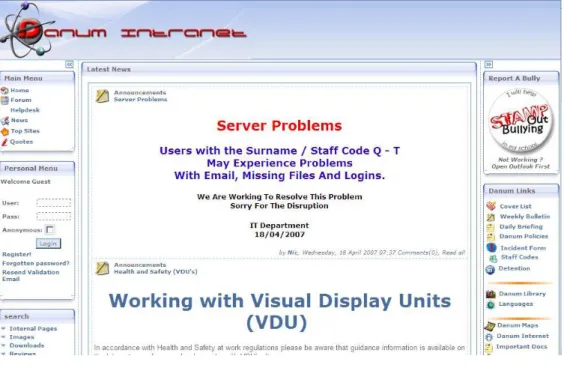
Figure 3.2: Screenshot of Danum School Intranet Site
As well as an external website, the Danum School also maintains and using a internal Intranet site, only available once a user as logged onto the schools network. Figure 3.2 shows an example screen shot of Danum schools Intranet site. The Intranet site was developed in house and made use of MKPortal. MKPortal describes itself as a Portal / Content Management System which has been integrated with the most popular forum software [19]. It is important to note that although MKPortal is free software, it is not an example of open source software.
Danum Intranet site currently runs on one server referred to as ”frank”. Due to MKProtal requiring PHP 4.1.0 or higher and MySQL 3.23.4 or higher the school runs WAMP5, which is a complete web server packages which includes Apache2 web server, PHP5 and MySQL5 all into one environment for quicker setup and management [26]. WAMP unlike MKPortal is open source software and is distributed under the General Public License (GNU).
It is also important to note that most teachers within the school have some experience with on-line system. Currently the school makes use of the SIMS.net package. SIMS.net is a school management packages designed to store individual pupils records, manage timetables for both staff and pupils. Lastly the SIMS.net package is used to monitor attendance, which a class register being completed each lesson using the on-line SIMS package.
3.4
Desire for Virtual Learning Environment
There are many reasons Danum school is looking to implement a virtual learning environment. Firstly both Mr. Ron Hale and Mr. Peter Hayton have seen virtual learning environments in use in other local schools, and believe they offer a chance to improve the delivery of courses within the ICT department and the schools.
It is also hoped that by making use of a virtual learning environment, it would allow pupils better ac-cess to subject resources and thus overall improve the level of attainment within the school. By using a virtual learning environment, better use of electronic assignments can be made, which teachers setting assigments, and pupils completing the work, and submitting their work electronically. This would make monitoring a lot easier, as most virtual learning environents allow report to be generated of which pupils have submitted work and which have yet to make a submission.
Lastly, it is commmon practice for a virtual learning environment to maintain a grade book for all courses and pupils. This would allow for better monitoring of pupils as all grades from assingments and exercises are recorded and can be checked by a teacher any time.
Chapter 4
Requirement Capture
4.1
Introduction
The main aim of this chapter is to document the requirements of the end users at Danum school which are been discovered through the course of this project. Iteration 0, the selection of which open source environment to use began by identifying the function and non-function requirements the end user had for a potential virtual learning environment. The requirement for iteration one and two include what changes and new functionality was required by the end users. To discover the end user requirement interviewing relevant user group was chosen as the most appropriate method.
4.2
Selection of Virtual Learning Environment
Before iteration one and two could be started, the virtual learning environment needed to be selected us-ing predefined criteria based on Danum schools requirements. The requirements for what functionality the virtual learning environment should have where discussed in the interview carried out on Wednesday 8th November, see Appendix C for further details. Three of the most popular open source virtual learning environments chosen for comparison, these included ATutor [2], Dokeos [10] and Moodle [21].
The first set of criteria looks at the user management side of the VLEs, i.e. how well it looks after users, how can user been authenticated to use the VLE, are there different user profiles with different privileges, and users be monitored by way of logs etc, and lastly can users be split into different groups. The second set of criteria focus on features such as forums, calendars, e-portfolios and whether the VLE support
teacher and course side of the VLE, focusing on how well the course material is displayed, can content teacher do not want pupils to view be hidden, can assignment be set with electronic submission, and exercises such as multiple choice etc. be set and automatically graded, and lastly can course grades from assignment, activity be placed in one viewable area to help teacher monitor pupils progress.
The results of the comparison between the chosen VLEs are shown in table 4.2. The results where cal-culated from viewing the VLEs documentation and using their demonstration sites. For each criteria a top mark of 4 (excellent) and the lowest mark of 0 (Not Present) could be awarded. Moodle scored the highest, which are score of 42 out of 56, which Dokeos coming next with a score of 30 out of 56.
Moodle achieved a better score because of the fact it allows multiple methods of user authentication whereas ATutor and Dokeos only allowed the uploading of a CSV file. Also both ATutor and Dokeos only have three types of users, teachers, pupils and administrator, Moolde has these plus other as well as allowing administrator to create there own user profiles. ATutor score was also affected because it did not allow teachers to hide course materials from pupils.
Criteria Total ATutor Dokoes Moodle
Management of Users 4 2 2 3
User Authentication 4 1 1 3
Management of User Privileges 4 1 1 4
Monitoring of Users 4 1 3 3
User Groups 4 2 2 3
Forums 4 3 3 3
Calendar and Events 4 1 2 4
E-Portfolios 4 0 0 0
Language Support 4 3 3 3
Displaying of Course Content 4 2 3 4
Hiding Content 4 0 3 3
Assignments 4 2 2 3
Exercises 4 1 3 4
Grade Viewing 4 0 2 3
Total 56 19 30 42
Table 4.1: Comparison popular open source VLE’s, using Danum School criteria
Due to the limited time allocated for examining the various VLEs it was decided to examine how other users had found using the selected VLEs. Kareal and Klema [17] examined several open source VLEs, scoring them on document publishing, calendar, chat & forums, grades & tests and surveys, their results can be seen in table 4.2. Again like the previous comparison Moodle came out with the highest score with 21 out of 25.
Maximum Score ATutor Dokoes Moodle Document publishing 5 3 4 3 Calendar 5 2 3 5 Chat / Forum 5 4 4 4 Grades / Tests 5 3 4 5 Surveys 5 4 2 4 Total 25 16 17 21
Table 4.2: Comparison popular open source VLE’s, adapted from [17]
Lastly to access ATutor, Dokeos and Moodle further, the results of Graf and List [14] research was used, who as well as looking at each environments communication tools, management of users, tests and displaying of course materials, also assessed each environments usability and adaption. These results can be seen in table 4.3. Unlike Kareal and Klema [17], Graf and List [14] used the qualitative weight and sum (QWS) approach which is based on the use of symbols. Table 4.3 uses the following symbols, * for extremely valuable, # for very valuable, + for valuable,|for marginally valuable and 0 for not valuable. For each symbol a numerical value was assigned i.e. * was equal to 4, # equal to 3 etc.
Subcategories Maximum Value ATutor Dokeos Moodle
Forum * | + *
Chat * # * *
Synchronous & asynch. tools * * * *
Tests * | * *
Learning material * * * *
Exercises # 0 0 #
Tracking * * + *
Statistics + + | |
Personal user profile # | | +
User-friendliness # + + # Support # | # # Documentation + + + + Adaptability * | | # Personalisation # # 0 + Adaptivity * | + | Standards # + + # Security * 0 0 + Scalability + 0 0 + User management # 0 # | Authorisation management * | 0 | Total Scores 65 31 35 52
Table 4.3: Evaluation scores of ATutor, Dokeos and Moodle, adapted from [14]
Again, like the previous two evaluation Moodle achieved the highest score, beating the other signifantly. Moodle also did well on the end user non-function requirements of usability, security, scalability and
this score of two may not be accurate, as more recently the Moodle developer have placed an emphasis on security. Moodle also achieved the top score for adaptability, which refers to the ”facilities to cus-tomise the platform for the educational institution’s needs” [14]. For user-friendliness Moodle scores the fully marks with three out of three, proving that the Moodle VLE has the best usability. Lastly available support for the chosen VLE was also very important to the end user, again Moodle scored highest in this criteria with three out of three.
As a result of the comparisons between ATutor, Dokeos and Moodle using the evaluation criteria, Moodle was selected as the appropriate virtual learning environment for Danum school to implement. As well as meeting the function requirement for the VLE, i.e. has forums, calendars etc. Moodle also meet the non-functional requirements of security, useability, adaptability and support.
4.3
Requirements for Iteration One
Once Moodle was selected as the virtual learning environment to be used, it was possible to start the next iteration of the project. This iteration involved examining Moodle along with the end user to identify any possible modifications or any extra functionality required. The requirements listed within this section are as a result of the end user interview carried out on the 12th December 2006, a full write up the interview can be found in appendix A. The requirements detailed within this section form the projects third minimum requirements.
Requirement 1.1 - Development of a Moodle Theme
One feature of the Moodle VLE selected was that different themes could be applied to the VLE to change the appearance of it. As default 14 themes are supplied within the Moolde installation, with the option to download more from Moodle’s official website [21]. It was decided during the requirement interview that a specific theme should be developed for Danum school and should follow the style and colour theme current used by the schools website (see figure 3.1 for example).
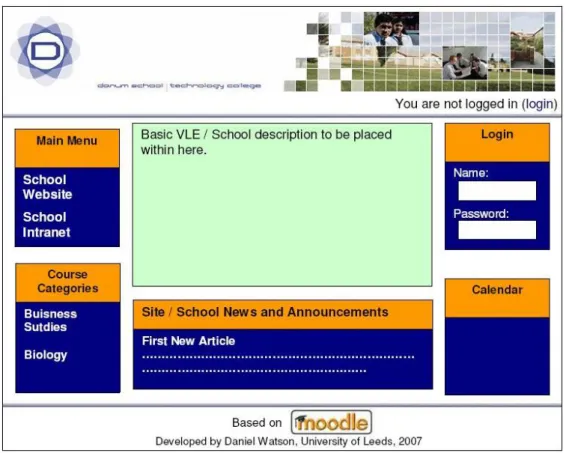
Also the appearance of the front page was also discussed, as the Mr Hale felt there needed to be more information present on the front page of the VLE rather than just the courses currently available. It was suggested that front page should include a main menu block so important links and resources may be placed within it, a general description of the vle within the middle of the page, a login block should also be presented to users to save the user navigating to the login page. Lastly site news should also be viewable on the front page, so that the administrators may make important announcements.
Requirement 1.2 - Changes to the categories and course pages
Firstly on the department page for a specific subject is was felt that a department description was required, this is something currently done on Danum schools website and would help personalise the Moodle VLE further. The description text should only be editable by administration or teaching staff and should not be able to be changed by pupils.
Also on both the department page and the categories page (this is page that lists all the department and the courses they offer) it was felt that the search functionality was not required. This was because Mr. Hale believed it would be getter for pupils to search for a specific course browsing through the department page, as they may come across other courses they should be enrolled on.
Requirement 1.3 - Changes to the edit course page
Currently when editing or adding a new course to the Moodle VLE, the user is presented with 24 different setting. For most normal user the vast majority of these are not required. It was purposed that only a few of the main option be presented to the user which the option of showing the rest of the settings as optional. Hiding the advanced options appear to be the best solution as it meant for more advanced user such as the system administrator etc. they may been to modify these advance setting. The main fields that should be presented to the user include, Course Full Name, Course Short Name, Summary and Format, all other options would be hidden which the option to view them if necessary.
4.4
Requirements for Iteration Two
Iteration one finished with a demonstration with the end users on the 21st of February, during this demon-stration requirements for iteration two of the project where also captured. All the requirements detailed within this section, form the first extension for the project.
Requirement 2.1 - Minor Changes as a result of Iteration One
As a result of the demonstration with the end users, several minor changes where suggested, these in-cluded:
• Possible change of colour of links on the Moodle blocks from black to white.
• Investigate whether Moodle can handle the uploading of Podcasts, and whether the maximum upload value will need looking at.
• When adding / editing a course, the number of topics should be shown, and all defaults need to be checked.
• Space between forum description and top navigational bar needs to be increased.
• On categories page, space between categories drop down menu and department description needs increasing.
Requirement 2.2 - Examination of User Privileges
Until now, there has been little attention paid to users. The main issue to be address is user privileges, some user need privileges cutting down to prevent misuse of the Moodle VLE. It has also been suggested that two types of pupil users be created, one with fewer privileges. The main issue identified is that pupils should be not be able to edit their own profile or change their own password.
Requirement 2.3 - Development of E-portfolios for Moodle
The development of electronic portfolios is an example of completely new functionality for Moolde. For the system there would be three main parts. The first and main part will be the actual pupils e-portfolio, where the pupils can store basic details about themselves, upload example documents they have produced to demonstrate skill acquired. It is important that user can edit their own e-portfolio over time as any e-portfolio may be used for several years. The second part of the system is first page a user would view, where they can either search for a specific user or browse a list of users who currently have a e-portfolio.
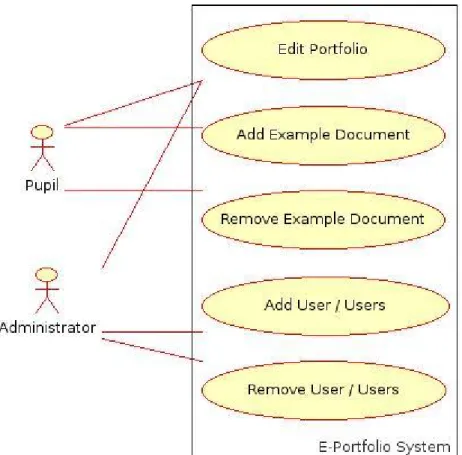
The third part to any e-portfolio system is the user management side. It is important that users can be added and removed fast and easily. Moodle currently makes extensive you of CSV files, it is vital that the e-portfolio system handle CSV files to automate the task of adding several users at once. One of the last requirement is that the administrator are able to edit any e-portfolio, to prevent misuse of the system. Figure 4.1 summaries the main requirements for the e-portfolio system.
Figure 4.1: User Case for E-portfolios
Requirement 2.4 - Deployment
Once all coding working as finished on Moodle VLE, tests must be carried out to make sure the virtual learning environment can be migrated from the testing platform to Danum Intranet server. All database tables required need to be created at the time of install. Also any blocks and activity modules currently install within Moodle that will not be required, be removed.
Chapter 5
Design
5.1
Introduction
This section of the report details the design work which was needed before implementation could pro-ceed. For iteration one, the design work concentrated on the development of theme for Moodle (re-quirement 1.1), the changes requested on the course categories page (re(re-quirement 1.2) and the hiding of advanced detals on the add / edit course page. For iteration two the only design work needed was for the electronic portfolio systems.
Because of the changes to existing pages and the development of new pages, it is important to consider useability issues. Nielsen and his colleagues devised ten usability principles, often referred to as heuris-tics (reproduced in [23]) which shall be adhere to within this project. For this project six heurisheuris-tics where selected to be focused on, they included:
• Rule 1 - Visibility of system status,
• Rule 2 - Match between sysstem and real world,
• Rule 4 - Consistency and standards,
• Rule 5 - Error prevention,
• Rule 6 - Recognition rather than recall,
5.2
Iteration One Designs
Figure 5.1 shows the design for the front page of the virtual learning environment. It also shows the main element of the theme (requirement 1.1). Firstly at the top of the figure is the header which contains the school logo and the user login information. This meets rule one and rule four of Hielson’s ten heuristics [23]. Because the header will be the same on all pages on the VLE this helps aid consistency and because login information is display, this is an example of displaying the system status.
Figure 5.1: Design for front page
At the bottom of the figure is the footer, this contains information related to copyright, and meets Moo-dle coding guidelines, as credit is given them for the original code, plus information is given on who has modified the system and when. Extra blocks have been added to the system, these include the login box, calendar, course categories. A area of text as also been added to the centre of the page to view an welcome message to user. By having the login and calendar block on the front page login to the system is speeded up, as before user would need to click login in the top right hand corner. Also these blocks also appear on the schools external website helping increasing familarity if the user has made us of the schools website.
given the option to edit the details. When this edit button is pressed the result is figure 7.5, presenting HTML Editor, in order to make the system easier to use. Once a user has updated the description they will given a confirmation message, and redirected to the previous page.
5.3
Iteration Two Designs
For iteration two, the only designs needing completed where for the new eportfolio system. Figure 5.2 shows the main view for eportfolio, it allow users to search for a specific e-portfolio or to browse a list of available e-portfolios. If an administration user is logged into the virtual learning environment, when they open the main page of e-portfolios, they are present with the option to jump to the admininstration pages for the e-portfolios system, if a user it not logged in, or it a pupils for example, they are not presented which this option. Both the header and footer are the same as the main virtual learning environment, again aiding consitency and showing the current login status of the users. A minimalist design as been adopted to prevent the user being overwhelmed with options and details thus meeting Nielsen ninth rule.
Figure 5.2: Main page to line all eportfolios
Figure 5.3 shows the view when a user view a pupils e-portfolio. If the pupils is logged onto the VLE and is viewing their own profile, they are present with the option to edit their portfolio. Again like the previous design, Nielsen ninth rule of minimalist design, only shows the details necessary, and not clutering the screen with unnecessary blocks. The navigation bar at the stop of the screen shows the user
the system status i.e. showing the user where the user currnetly is within the VLE.
Figure 5.3: Result of Viewing an Eportfolio for a pupil
An example of a e-portfolio in edit mode can be found in Appendix D, figure 7.7. Again the same layout as the normal e-portfolio is used to aid consitency. When changes are submitted the user are present completed messageg to show that the update as been applied successfully. If a problem occurs during the update of an e-portfolio an appropriate message is given, this helps the system comply with Nielson’s fifth rule in regards to error handling.
Also within Appendix D, figure 7.6 shows administration side of the e-portfolio system, aginst the design is minimal to comply wiht Nielson’s eighth rule and again the style of the page is exactly the same as any other page within the VLE to comply wiht Nielson’s forth rule. Once a user submits the required information, they are presented with the appropriate message to say whether or not the update was successful, this is an example of showing the system status (Nielson’s first rule) and example of error handling (Nielson’s fifth rule).
Chapter 6
Implementation and Deployment
6.1
Introduction
This chapter details the process by which the Moodle virtual learning environment was changed to meet the end user requirements. It is divided into three main section, details the changes that took place in iteration one, the changes that took place in iteration two, and finally detail about the final deployment within Danum School.
6.2
Iteration One Implementation and Testing
This section details hows the requirements from iteration one of the project where meet, it also shows that the project minimum requirements where also completed.
6.2.1 Requirement 1.1 - Development of a Moodle Theme
To get the right look and feel for Danum virtual learning environment, their own theme needed to be de-veloped. The designs for this theme can be seen with chapter 5, figure 5.1. The colour and layout chosen match Danum school current Internet website. To implement the theme, one of the existing theme needed to be copied and renamed, formal white theme was selected, copied and renamed to danum school.
Within the newly created folder are five important files that control the outcome of the theme, three of them are Cascading Style Sheets, one to control the colour (ds color.css), one to control lay-out (ds layout.css) and one more to control the fonts used (ds fonts.css). To other files relevant to the appear where header.html which control what appeared at the top of the screen when the
print header()function is called andfooter.htmlwhich control what appeared at the bottom whenprint footer()is called.
To control what appeared at the top and bottom of the Moodle virtual learning environment, the header and footer files where both modified. The contents within these files was fairly static, the main bit of dynamic content was the navigational bar. The current logo was replaced with Danum schools logo. The default for Moodle is to have two different headers, one when on the home page and another for when you are else where. It was decided that one header should be used through the virtual learning en-vironment in order to aid consistency. Once both files where updated the appear of the VLE was checked.
When browsing through the VLE is was noticed that the header bar was sometimes cut off, i.e. only half the logo was displayed. To solve this problem the sizes for the header within theds layout.cssfile had to be adjusted. The code below illustrated the new height for the header and shows the the header printed on the home page and all other pages are now the same. The sizes for the navigational bar where also adjusted accordingly.
#header-home { height:135px; border-width:0px; border-style:solid;} #header { height:135px; border-width:0px; border-style:solid;}
The next task was to assign the correct colour for the blocks, for the block header, the background colour of dark yellow (#FFC266) and for the body of the block dark blue (#5064A9), these colours match the colour scheme currently used by Danum Internet website. The appearance of the block was then tested, however the calendar block had not changed its style, further updation of the ds layout.csswas needed.
To achieve the final look for the front page of the VLE, site description needed to be added. Allow Moodle did allow this to be done formally, the description could only be place either the left or right hand columns and could not be placed within the middle. From reading an extract from William Rice book on Moodle [25] it was discovered that topics could be added to the middle of the page, where a site description or important information could be added.
Before appearance could be classed at finished and the first requirement fully meet, the removal of the jump to drop down menu within the navigation bar needed to be removed, it was felt it was not needed and added to user confusion when using the system, also there was a problem of the jump to menu covering up the login information, meaning users would have to use the back button if they wanted to view a page with their logo information and link to their profile. To prevent the jump to menu being present, all called to print header()had to be modified, the code below shows a example of the call before and after the change. In total around 20 files which called theprint header()function needed modification.
Original Call: print header(format string($forum->name), "", "$navigation" .format string($forum->name), "", "", true, $buttontext, navmenu($course, $cm);
New Call: print header(format string($forum->name), "", "$navigation" .format string($forum->name), "", "", true, $buttontext);
6.2.2 Requirement 1.2 - Changes to the categories and course pages
The main changes to the categories and course pages was the additional of department descriptions and the removal of the search options. The main files affected whereview.phpandcategory.php
which the course directory. Firstly to remove the search option from both pages theprint course search();
deleted where ever it occurred within the files.
For including department descriptions, only thecategory.phpwithin the course directory was affect, as this was the file responsible for printing individual category (departments) page. The first task was to investigate how the category details where stored, it was found all category details where stored in the tablemdl course categories. Within this table there was a column called description of type text, however it never gets updated when different categories are created.
If the page was being displaying in normal mode, then only the description should be printed. To do this a new function was written called lookupDes()taking a category id as it parameter. The function makes use of theget record()function with thedmlib.php. Theget record()function was used as it is more secure that writing PHP to carry out the query to the database. Once the description text is retrieved, it is checked to see if it is null and then return as a String by the function. The result of
function lookupDes($id) {
$resources = get_record(’course_categories’, ’id’, $id); $description = $resources->description;
if ($description == null) {
$description = ’Please Enter Some Text’; }
return $description; }
The next stage for this requirement was to enable a user to edit the department description, existing code to make use of the HTML Editor was used and copied into two new functions withinnewFunction.php. It was important that the HTML Editor with the description within was only shown in the page was in edit mode, the code below shows how this was achieved. The if statement details below use a page variable to check if an administrator user is editing the page, if they are the description is placed within a HTML Editor so it can be edited. If the$admineditingvariable was false, the normal description was printed. if ($adminediting) { printTextAreaTop($id); echo $description; printTextAreaBottom(); else {
echo ’<table align="center" width="80%" border="1">’; echo ’<tr><td>’;
echo $description;
echo ’</td></tr></table>’; }
The only thing left to do to satisfy this requirement was do save the updated description to the database, this was achieved using a new function in thenewFunctions.php()which took the category ID and end description as a parameter. To update a specific category’s description, theupdate record()
function was function, this required details of the table to be updated and a php class details what record to updated. The second to forth line of the code defines the php classed that can be used by theupdate record(), the relevant values are then assign to the class. The updated it then sent to the database and an appropriate message is printed if the updated was successful or failed.
function updateDes($id, $description) { class UpdateDes {
public $id;
public $description; } $update = new UpdateDes(); $update->id = $id;
echo ’<p> Description successfully updated!</p>’; } else {
echo ’<p>There was a problem updating the description, please contact your administrator</p>’; }
}
6.2.3 Requirement 1.3 - Changes to the edit course setting page
To toggles the visibility of the advanced options on the edit course setting page, a small javascript func-tion was written. This was placed incookies.jsas this is used by all files which contain the standard header. The code for the function is detailed below, the basic idea is it gets access to the document innerHTML, looking for a specific id for a piece of text and changing it visibility as necessary.
function toggle_visibility(id) { var e = document.getElementById(id); if(e.style.display == ’block’) e.style.display = ’none’; else e.style.display = ’block’; }
For the function to work,edit.html within the courses directed needed to be modified. A link was inserted at the top of the fields to be hidden and another link was placed after all the fields. When the link was clicked, the visibility for the fields would be updated. A newdivclass was created and given two properties, id and style. The id for the createddivwas created by the JavaScript function.
<a href="#" onclick="toggle_visibility(’advanced’);"> Show Advanced Options</a><br />
<div id="advanced" style=’display:none;’> Code for printing fields here
<a href="#" onclick="toggle_visibility(’advanced’);"> Hide Advanced Options</a><br /></div>
6.3
Iteration Two Implementation and Testing
6.3.1 Requirement 2.1 - Minor Changes as a result of Iteration One
One of the problem found during the first iteration of the project was that the link colour could not be turned to white, as although links on blocks would be visible, links on the normal page i.e. where the background was also white, meant the text was not visible. It was decided to leave the link colour as black. However after end of iteration one demonstration with the end user it was decided further
investi-The method chosen involved examining the code required for all the blocks within Moodle and imple-menting a new class of links. Firstly within theds color.cssa new class for hyperlink (<a>) was created and is detailed below.
a.white:link, a.white:visited, a.white:hover {
color:#FFFFFF }
The code belows gives an example of hows this new class for hyperlink was implemented to change the hyperlink within the blocks. You can now see when ever the<a>(hyperlink) markup is used, its call is allows set to’white’. If no class is set, the default link colour of black is used.
foreach ($categories as $category) {
$linkcss = $category->visible ? "" : " class=\"dimmed\" "; $this->content->items[]="<a class = ’white’ $linkcss
href=\"$CFG->wwwroot/course/category.php?id=$category->id\"> $category->name</a>";
$this->content->icons[]=$icon; }
For this issues regarding spacing break lines (<br />) where inserted where needed to help space out the affected pages. To test whether the VLE could handle the uploading of Podcasts, a Podcasts from Apple itunes was downloaded and uploaded onto the VLE. It all easily and not problem where present. The only issue that may occur is that if a Podcast file is over 16 megabytes in size.
6.3.2 Requirement 2.2 - Examination of User Privileges
For this project Moodle version 1.7 was used, new do this version of user privileges and that adminis-trator can create their own type of user groups, as well as using the defaults of guest, pupils, teacher, course creator and administrator. However there is still many issues that have not been fixed in regards to user privileges. One setting that could be alter is the “moodle/user:editprofile” which could be either allowed or prevented. To stop user from editing their own profile when not allowed, this setting had to be checked.
Minor changes where needed within view.phpin the users directory. To check whether a user has permission to perform a certain action the has capability()function can be called which return true is a user is allowed to do something, and false if they are not allowed. An example of how this was
$pc = get_context_instance(CONTEXT_USER, $user->id); $cm = get_context_instance(CONTEXT_SYSTEM, $user->id); if ((has_capability(’moodle/user:editprofile’, $cm))
or (has_capability(’moodle/user:editprofile’, $pc))) { if ($internalpassword ) {
echo ’<td><form action="$internalpassword" method="get">’; echo ’<input type="hidden" name="id" value=\$course->id\ />";
echo ’<input type="submit" value=".get_string("changepassword")."/>’; echo ’</form></td>’;
}
Before a given users privileges could be tested, the context needed to be found found. This means what role they have been assigned i.e. pupil, teacher, guest etc. There are three main areas within Moodle where users can have a role, they include on a specific course, a users own area, and at a site level. The code above find out what role a user has for both the user own areas and what level they are at a site level. Once these are know the capability and context can be passed to thehas capability()function. A similar if statement was also used when deciding if to show the edit profile tab. To make the system as secure as possible, an if statement also needed to be added toedit.phpwhich the user directory, this statement like the previous ones checks that a user is authorised to edit their own profile.
6.3.3 Requirement 2.3 - Development of E-Portfolios
To create the tables required for the e-portfolio system, setup.phpwas created which executes a se-ries of command to create the tables required. Once these tables where in places several instances of data where added to themdl eportfoliotable which was used for storing a users portfolio details. The first main page to be created as theindex.php, theprint header()andprint footer()
functions used within Moodle where used to generate the pages header footer.
To generate the of users that currently maintain an e-portfolio, their records where got usingget records
method to get all records from the e-portfolio table within the database. Originally extra details where passed to the method to generate the clause, so that only pupils who where allowed to maintain e-portfolios where shown, however the result set did not get all the relevant results. There all the records where first retrieved, then each record was tested to see if it was allowed to be viewed.
$results = get_records(’eportfolio’); $noIn = count($results);
while ($i <= $noIn) {
$userId = $results[$i]->user_id; $allowed = $results[$i]->Allowed; if ($allowed != 0) {
$first = $details->firstname; $last = $details->lastname;
echo "<a href = ’view.php?id=".$userId ."’>".$first ." ".$last."</a>"; }
$i++; }
The next stage was to generate the actual e-portfolios, this was done in view.phpwhich requires a portfolio id to be passed using the get method. A e-portfolio could either be in two mode, editing or normal. It was important that a pupil could only edit their own e-portfolio and could not edit any body else s. However an administrator user needed to be able to edit any e-portfolio. To achieve this the following code was used to check if a user was logged onto the system, and whether they where on their own e-portfolio or where an administrator.
if (($edit == 1) and (isloggedin())) {
if (($USER->id == $userID) or (isAdmin())){ // Print Editable Portfolio,
printEditPortfolio($details, $userID, $details->id); } else {
echo ’YOU ARE NOT AUTHORISED TO EDIT THIS PORTFOLIO’;} }
else {
if ((isloggedin()) and (($USER->id == $userID) or (isAdmin()))) { // Print Edit Button
// Print Normal Button printPortfolio($details);} else {
// Not allowed to edit, print portfolio normally printPortfolio($details);}
}
When displaying a person portfolio picture, the system needed to check whether the user had uploaded a picture or did not have one. If no picture had been uploaded, then the default picture would be printed. The basic idea behind the system that when a picture was uploaded, it was given a constant name. When the portfolio is viewed, this constant name is checked for which the user data directory, if it is present it is used, if it does not exist, the default picture is used.
$filename = ’./data/’.$Portfolio->id .’/pic.jpg’; if (file_exists($filename)) {
$filename = $filename; }
else {
![Figure 2.1: The Traditional Waterfall Model [6]](https://thumb-us.123doks.com/thumbv2/123dok_us/9562217.2832795/12.892.106.818.112.459/figure-the-traditional-waterfall-model.webp)
![Figure 2.2: The Unified Software Development Process [5].](https://thumb-us.123doks.com/thumbv2/123dok_us/9562217.2832795/13.892.151.746.423.790/figure-the-unified-software-development-process.webp)
![Figure 2.3: Managed Learning Environment [11]](https://thumb-us.123doks.com/thumbv2/123dok_us/9562217.2832795/16.892.153.733.106.444/figure-managed-learning-environment.webp)


![Table 4.3: Evaluation scores of ATutor, Dokeos and Moodle, adapted from [14]](https://thumb-us.123doks.com/thumbv2/123dok_us/9562217.2832795/26.892.177.714.550.1003/table-evaluation-scores-atutor-dokeos-moodle-adapted.webp)