VaultIME: Regaining User Control for Password
Managers through Auto-correction
H
Le Guan
1,∗, Sadegh Farhang
1, Yu Pu
1, Pinyao Guo
1, Jens Grossklags
2, Peng Liu
11Pennsylvania State University, State College, PA, USA 2Technical University of Munich, Munich, Germany
Abstract
Users are often educated to follow advices from security experts. For example, using a password manager is considered an effective way to maintain a unique and strong password for every website. However, user surveys reveal that most users are not willing to adopt this tool. They feel uncomfortable when they grant password managers the privilege to automate access to their digital accounts. We propose VaultIME to nudge more users towards the adoption of password managers by offering them a tangible benefit, while only slightly interfering with their current usage practices. Instead of filling” password fields, we propose to “auto-correct” passwords in case of minor typos. VaultIME integrates the functionality of a password manager into the input method editor. Running as an app on mobile phones, VaultIME remembers user passwords on a per-app basis, and corrects mistyped passwords within a typo-tolerant set. We show that VaultIME achieves high levels of usabilityandsecurity.
Receivedon 29 March 2018;acceptedon 11 April 2018;publishedon 15 May 2018 Keywords: Password manager, Auto-correction, IME, Usable security
Copyright© 2018 Le Guan etal.,licensedto EAI.ThisisanopenaccessarticledistributedunderthetermsoftheCreative Commons Attribution license (http://creativecommons.org/licenses/by/3.0/), which permits unlimited use, distributionandreproductioninanymediumsolongastheoriginalworkisproperlycited.
doi:10.4108/eai.15-5-2018.154772
1. Introduction
To keep their digital accounts safe, Internet users are advised to adopt strong passwords that are hard to crack and guess [1]. However, long and random passwords are also difficult for users to remember [2]. Further, the sizable number of online accounts users need to manage has introduced an additional burden [3]. Using a password manager
(e.g., 1password, lastpass and keepassdroid), which saves user credentials into a database, is a highly recommended approach by security experts. Contents in the credential database are encrypted for data protection, where the encryption/decryption key is generated from a master password only known to the user [3].
HThis manuscript is an extension of the conference version appearing inthe13thEAIInternationalConferenceonSecurityandPrivacyin Communication Networks (SecureComm ’17). This manuscript presents a more detailed description of the system design and discloses more experimental results.
∗
Corresponding author. Email:[email protected]
Unfortunately, adoption of password managers is behind expectations despite the benefits apparent to security experts: 1) enhancing convenience by “auto-filling” password fields on behalf of the user [1], and 2) improving security by allowing for long and complex passwords. In addition, a password manager would reduce the perceived need for insecure practices such as storing passwords in clear-text as a memory help etc. Nevertheless, surveys indicate adoption figures as low as 6% [4] and at most as high as 21% [5], which leave a lot to be desired. Further, since password manager adopters are generally more security-savvy [5], this leaves behind those users who would most benefit from the technology.
managers [6], and software vulnerabilities may lead to exposure of all user passwords to hackers [7].
Other impeding factors are more amendable to solution approaches. Specifically, the threat of a lost phone or merely unmonitored access to the phone may be perceived quite disconcerting if high value data and important services such as social networking and online banking are left more vulnerable due to the stored credentials in a password manager. In fact, otherwise trusted individuals such as family members are often the cause of such invasions [8]. According to a Javelin Research study, in 2014, there were 550,000 reports of identity theft caused by someone the victim knew [9]. Taking advantage of the bond of trust, individuals are able to more easily access family members’ digital accounts and use the stolen identities to gain financial benefits [8–10]. Further, trust is especially impeded when the provider stores the password file on the cloud [6], rather than on the user’s machine. In addition, empirical work shows that people prefer a high degree of control when completing form-fields with personal information over having the same done by auto-fill [11]; we anticipate that a similar finding could be made in the highly related context of passwords.
With our work, we want to provide a stepping stone to nudge people towards adopting a password manager by providing an easy-to-understand benefit, while limiting interference with their habituated usage practices. Further, we target adoption hesitation due to the aforementioned reasons by allowing for a higher degree of control by the user.
Concretely, we propose a mechanism toauto-correct
passwords in the presence of minor typo errors by utilizing a client-side password vault. While the user is still required to input a “near correct” password to activate the auto-correction feature, the approach allows users to apply longer and less trivial passwords. At the same time, user frustration can be substantially reduced by a tangible reduction of failed attempts. In this sense, our solution provides a potentially sensible middle-ground for the adoption of password managers by leaving full control over authentication in the hands of the user, and reducing the threat of stolen data when a mobile device is lost or individuals with access to the device betray the trust of the user.
While the first systematic work of password auto-correction appears in [12], it is implemented on the server-side with the purpose of increasing the password acceptance rate. The authors found that almost 10% of failed login attempts are caused by simple, easily correctable typos that should otherwise be accepted. Following this observation, the authors proposed an auto-correction framework that can be integrated into existing password-based authentication systems on the
server-side. In particular, a set of correctors1 are first defined, and a received password is adjusted by each of the correctors to generate a set of candidate passwords. The login attempt is granted provided that at least one of the candidate passwords results in a password hash value that matches the one stored on the authentication server. When it comes to the security of the typo-tolerant authentication scheme, the authors show that it does not downgrade the security of user passwords by offering a formal proof of a free correction theorem.
Different from previous server-side auto-correction, we aim to provide added convenience of password typing on the client-side to further enhance user con-trol. We propose VaultIME, a mobile-centric password manager granting users control of password input. VaultIME integrates the functionality of a password manager into an Input Method Editor (IME), which is an app that displays a software keyboard and enables users to enter text. In particular, VaultIME remembers a user password on a per-app basis. If a password input interface is detected, the auto-correction feature is acti-vated, which replaces a mistyped password (within an acceptable set) with the correct one.
The design goals of the new password manager are as follows. First, to meaningfully reduce user frustration, the auto-correction mechanism should cover a wide range of mistypes. Second, our mechanism should not downgrade password security even if an attacker has access to the phone and could perform a brute-force attack to stored passwords. To achieve the first goal, we conducted a mobile-centric password typing analysis. Based on it, we developed a new set of password correctors, which differ from the previous work [12] and cover 26.3% more typos. To achieve the second goal, we designed VaultIME to be compatible with the free auto-correction theory of [12], which states that with a certain filter policy, auto-correction introduces
zerosecurity loss. To measure the security loss, we ran simulation attacks to our auto-correction scheme. In the worst case, we show that the security loss is 0.43%, assuming that a brute-force attacker has 10 tries. When configured with the filter complying with the free auto-correction theory, VaultIME introduces zero security loss as expected. We have developed a proof-of-concept prototype of VaultIME. With reasonable optimization, the prototype results in no user-perceivable delay when auto-correcting passwords. However, interface features could be added to increase awareness of the benefits of auto-correction.
Contributions. Our work provides the following key contributions:
• We propose a design for password managers addressing user concerns substantiated in related work. Without losing control to the login process, our design ameliorates users’ concerns for using password manager in a “too open” way and maintains users’ habituated login process.
• To cover a maximum range of typos, while maintaining tight control over security, we analyze the nature of typos on a mobile platform in a systematic way. Based on the analysis results, we develop a new set of correctors, and run simulation attacks to measure the security loss introduced by VaultIME.
• We implement a prototype of VaultIME as a normal Android IME app. Therefore, VaultIME can be instantly deployed on existing mobile platforms.
2. Background
This section explains the concept and design of the input method framework in the Android mobile OS as well as password managers. We also present difficulties users face when entering passwords on a smartphone, and summarize related efforts the community has made to reduce typos.
Input Method Editor. Since API level 3.0, Android, the most popular mobile operating system, provides an extensible input-method framework. By extending
the InputMethodService class, developers are able
to implement a customized soft keyboard for better experience and capabilities. Besides, extending the
KeyboardView class allows for the rendering of
a personalized keyboard layout. These classes are packaged together to compose an Input Method Editor (IME) which provides user control to enable users to enter text.
When a user inputs text for an app, the default IME pops up. The framework allows an IME to completely control user input, including reading current input, and making arbitrary modifications. These functions are supported by operating on an InputConnection class. In particular, methodgetTextBeforeCursorand
getTextAfterCursor can be invoked to read input
before and after the current cursor, while an app ultimately receives an input string determined by the
commitTextmethods.
Password Managers. Memorizing passwords has become a significant challenge for users. Although difficult to crack by attackers, strong passwords that are sufficiently long and random are also hard for users to remember [2].
Using a password manager is one of the most recommended approaches that can free users from the duty of memorizing lots of complex passwords. Mainly developed as a plug-in for web browsers, or as stand-alone web/smartphone applications, password managers save user credentials into a database, and later automatically auto-complete requests for the credentials on behalf of users [1]. In order to ensure security of the credential database, a user controls access to the password manager database via a master password. Specifically, contents in a credential database are typically encrypted for data protection, where the encryption/decryption key is generated from a master password [3]. This mechanism makes it secure for password managers to store the password database on users’ mobile devices [13, 14], in the cloud [15], or even on USB sticks [16]. Due to its advantages in both security and usability, password managers, such as 1Password [13], LastPass [17], and plug-ins in Google Chrome [18] and Mozilla Firefox [19], have seen their popularity increase during the last decade.
Mobile Typos. A number of prior studies have demonstrated the difficulty of correctly entering user-chosen passwords on laptop or desktop computers [20, 21]. However, this error-prone process is exacerbated on mobile devices.
As opposed to a physical keyboard which is standard for traditional computers, most mobile devices have moved towards a virtual keyboard, implemented by the aforementioned IME. Due to the lack of tactile feedback and the small size of soft keys, virtual keyboards have been shown to negatively influence typing abilities [22, 23]. For example, Lee and Zhai [23] report that the error rate is 8% higher for typing on virtual keyboards than on physical ones.
In addition, typing numbers or special characters on most mobile devices requires navigation to a second or third keyboard page [24], which may raise typo possibilities; and frustration if the typing of a password has to be repeated due to a typo.
Furthermore, typing while walking is a common use case in a mobile environment. However, previous research indicates that users have more difficulties typing passwords on their mobile devices while walking, and hence experience a higher error rate [25].
and reduce errors, while the standard QWERTY keyboard could also be specifically improved for large touchscreens [28]. By dynamically adjusting the key size based on letters’ frequencies, the authors designed a promising “real-time” keyboard to improve typing accuracy and speed for future virtual keyboard designs [29]. In addition, providing feedback for each typing action (e.g., a vibration) is commonly implemented in commercial Android IMEs. While these efforts are indispensable for improving typing accuracy, our work focuses on increasing the password acceptance rate even when typos occur.
3. Server Side Typo-tolerant Checking Scheme
To allow for a direct comparison, our work follows the formalization of a password authentication system proposed in [12], and also applies the same model for evaluating security loss in the presence of a brute-force attacker. To begin with, we review some of the important concepts and notations.
3.1. System Model
Checking Passwords. Two phases are involved in a password authentication process. In the registration phase, a user registers his password, e.g., w, with the server, and the server stores another string,s, derived from a hash function mixing a random salt value and
w. In the checking phase, a user submits a password, ˜
w, to the authentication server, and the server verifies the request by calculating on ˜w and the stored value
s. The request is granted only if it returns true. In an
exact checker (ExChk), the checker returns true only if the typed password ˜wis exactly equal tow, i.e., ˜w=w.
Typo-tolerant Scheme. Contrary to an exact checker
ExChk, a typo-tolerant scheme runs a relaxed checker,
which may return a true value for multiple strings other than w. When a user submits ˜w, the authentication algorithm, instead of only examining ˜w, examines a set of strings neighboring ˜w. This set is represented by a ball of ˜w denoted by B( ˜w). If any element in the ball passes the exact checkerExChk, ˜wis accepted. Formally, the ball is derived by applying a set of correctors (or transformation functions)C={f0, f1, .., fc}to ˜w.
Brute-force Attacker and Security Loss. Before for-malizing a brute-force attacker, we first model the pass-word distribution and typo distribution. The theoretical analysis of security loss introduced by a brute-force attacker against a relaxed checker assumes an attacker with exact knowledge of these distributions.
We associate a distributionp to a set of all possible passwords. Therefore,p(w) is the probability that a user selects a stringwas a password. A user with password
w may type a password ˜w upon authentication. The probability of this event is represented by τw( ˜w). If w,w˜, a typo occurred. Furthermore, we say ˜w is a
neighbor ofwifτw( ˜w)>0.
Let {w1, w2, w3, ...} be a non-increasing sequence
of passwords ordered by their probabilities. λq=
Pq
i=1p(wi) is called theq-success rate. The success rate of an attacker A trying to guess a user’s password is denoted by Att(checker,A,q), in which checker is the checking algorithm, andqrepresents the maximum number of tries attacker A can make. For an exact checker, it is obvious that Att(ExChk,A,q) ≤λq. To
achieve λq, a brute-force attacker must choose the password with the highest probability in each round.
Regarding a relaxed checker, we define an optimal attacker to be able to achieve the maximum password guessing probability. Formally, the probability that an optimal attacker successfully guesses a password in q
time is denoted byλf uzzyq = max
A Att(Chk,A, q). Similar
to the case of an exact checker, where the attacker chooses the passwords with the highest probabilities, an optimal attacker against a relaxed checker tries to guess a password ˜w, so that the corresponding ballB( ˜w) has the highest aggregate probability in each round. The construction of such an optimal attacker is NP-hard. However, in [12], the authors proposed a greedy algorithm to realize this attacker in practice. As a result, the security loss caused by such a greedy attacker against a relaxed checker can be calculated by∆greedyq = λgreedyq −λq.
3.2. Secure Typo-tolerant Checker
The naïve relaxed checker downgrades the security of an authentication system in the presence of an optimal attacker, i.e., ∆q>0. However, there exists an optimal relaxed checker, OpChk, that avoids causing security degradation (free corrections), i.e., ∆q= 0 [12]. When a user submits a string ˜w as password, the relaxed checker creates a set of candidate passwords based on a set of correctors C, and thereby a candidate set
ˆ
B( ˜w) ={w0|w0=fi( ˜w), p(w0)τw0( ˜w)>0, f
i ∈C}. To guar-antee security, the optimal checkerOpChkfurther rules out some of the candidate passwords by solving an opti-mization problem with a brute-force algorithm.OpChk maximizes the password acceptance rate without losing security. For the detailed explanation of the algorithm see [12]; Section V.D.
3.3. Limitationsof Server-side Password
Auto-correction
more than the one correct password would significantly degrade security. However, as shown in the paper, the proposed scheme cannot handle proximity typos, which, however, are the most prevalent form of all typos (21.8%). Their occurrence is even more pronounced for mobile clients (29.6%). Proximity typos occur when a user accidentally hits a key adjacent to the intended one (e.g., hitting an ‘a’ instead of an ‘s’). The reason for this limitation is that correcting a proximity typo necessitates the coverage of a larger space of possible passwords, and running the hash-based authentication algorithm for each possible password requires considerable computational resources. For enterprises, this requires more infrastructure investments to enhance computing capability. For customers, the introduced latency can be unacceptable.
Drawing on the specific situational context of the mobile environment and ecosystem, we design VaultIME to overcome innate limitations of the previous work, and enable VaultIME to cover more typos. Specifically, implemented as a password manager on smartphones, VaultIME is aware of the correct password. Therefore, checking a candidate password is as simple as performing a string matching, as opposed to the complex hash calculations needed by previous work. Since computationally intensive hash computation is avoided, covering proximity typos becomes possible.
4. Empirical Study of Typos on Mobile Devices
Prior studies have shown that strong passwords are difficult to type [20,21,30]. For example, users could easily mistype a character by slipping to an adjacent position on the keyboard, or they may forget to switch off the caps lock status. These human problems are further exacerbated on mobile devices. In particular, the cramped, and less tactile virtual keypad, which is widely used on today’s mobile phones, has a negative influence on error-free typing [22, 23]. As a result, it has been reported that the error rate is 8% higher for text typed on virtual keypads than for physical keyboards [23].
To understand the most frequent types of typos on mobile devices, we need to analyze a sizable number of real-world password-typing observations. For this purpose, we work on publicly available password-typing datasets from the previous work [12], and particularly focus on the data collected on touchscreen mobile devices.2 In this section, we first briefly
introduce these datasets. Then, we present our analysis
2The dataset collected on touchscreen devices can be
down-loaded from https://www.cs.cornell.edu/~rahul/data/mturk15-touchonly.json.bz2.
results. Our results uncover several new findings, which guide us in designing new mobile-centric auto-correction schemes.
4.1. Password-typingDataset on Touchscreens
In [12], the authors carried out two experiments on the Amazon Mechanical Turk (MTurk) platform to collect typo records during the entering of passwords. One experiment collected data from either PC or mobile platforms, while the other only collected data from mobile devices with touchscreens. In collecting the latter dataset, human-intelligence tasks (HITs) were assigned to participants over the web, where each participant was required to type 10∼14 passwords in
an HTML password input box within 300 seconds. The participants could only use touchscreen mobile devices. The results were later verified by theuser-agentfield in the HTTP header of the workers’ browsers. The passwords were sourced from the RockYou password leak [31], one of the largest leaked password databases. In total, 24,000 password-typing records were collected by 1,987 HITs.
4.2. UnderstandingTypos on MobileDevices
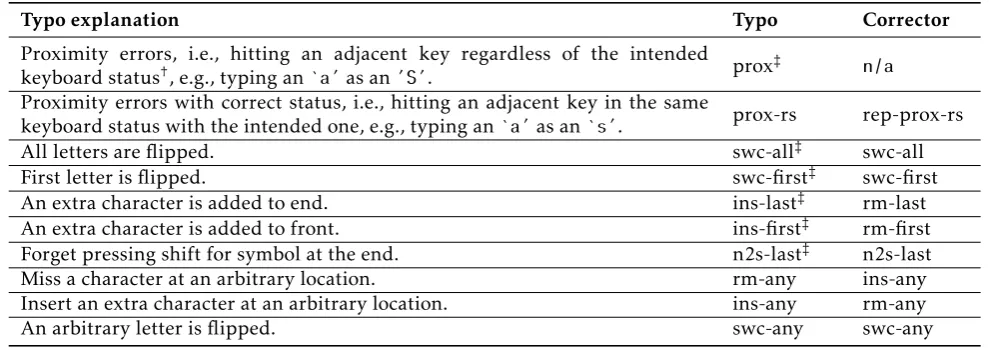
In this section, we explain our findings by analyzing the dataset mentioned above. We first list top typos and their corresponding correctors in Table1. A corrector is the reverse operation of the corresponding typo. It returns a set of passwords that could potentially contain the intended one. For example, corrector
rm-last removes the last character in the received
password, which effectively corrects typo ins-last. While the definitions of many correctors can be found in work [12], the newly introduced ones are quite self-explanatory. For example,rep-prox-rsmeans for each character, replace it with each of the adjacent ones in the correct keyboard status.
In Table2, we show top typos that occur in both the mobile and general datasets. Let us first have a look at the “any” row drawn directly from previous work [12]. Their solution can handle all typos except forproxand others, resulting in a coverage rate of 21.5%. However, prox alone contributes 21.8% of all typos, which the previous solution does not address. We have discussed the reason why previous work cannot handle proximity errors in Section3.3.
We independently conducted a typo distribution analysis on the mobile dataset, the results of which are shown in the “Mobile” row in Table2. Our study differs
from the previous work as we are more concerned with specifics in the mobile environment. We differentiate between a virtual keyboard and a physical one, and pay more attention to the respective influences on typing.
Table 1. Top typos and their correspondingcorrectors.
Typo explanation Typo Corrector
Proximity errors, i.e., hitting an adjacent key regardless of the intended
keyboard status†, e.g., typing an‘a’as an’S’. prox
‡ n/a
Proximity errors with correct status, i.e., hitting an adjacent key in the same
keyboard status with the intended one, e.g., typing an‘a’as an‘s’. prox-rs rep-prox-rs
All letters are flipped. swc-all‡ swc-all
First letter is flipped. swc-first‡ swc-first
An extra character is added to end. ins-last‡ rm-last
An extra character is added to front. ins-first‡ rm-first
Forget pressing shift for symbol at the end. n2s-last‡ n2s-last
Miss a character at an arbitrary location. rm-any ins-any
Insert an extra character at an arbitrary location. ins-any rm-any
An arbitrary letter is flipped. swc-any swc-any
†: The keyboard statuses are “normal”, “capitalized”, and “symbolized” in the AOSP keyboard. ‡: The definition of the typo is also used in [12].
Table 2. Top typos that occurin the mobiledataset and general dataset.
Environment Typo Percentages
Any prox swc-all ins-last swc-first ins-first n2s-last others
21.8 10.9 4.6 4.5 1.3 0.2 56.6
Mobile prox-rs rm-any ins-any swc-all swc-any ins-last others
21.4 20.4 10.8 8.0 7.6 1.2 32.6
1. The “Any” row covers the results drawn directly from [12]. The dataset is collected from participants with PC or mobile devices.
2. The “Mobile” row covers the results obtained from mobile devices only.
3. The sum of all items in the mobile environment is greater than 1. This is because our definitions of typos are not exclusive. For example,ins-lastis a special case of ins-any.
with incorrect keyboard status, such as typing ‘a’ as ‘S’. This can be explained by the combined effect of finger slipping and unnoticed caps status. However, mobile users seldom make such mistakes. The reason is that a virtual keyboard typically reflects the keyboard status directly on the display of each key, which a user is likely to notice. Therefore, we define a new mobile-centric proximity error, i.e., prox-rs. The difference to the generalproxis thatprox-rsonly considers proximity errors with correct caps and symbol status.3Therefore,
3In the default AOSP keyboard layout, there are three statuses
(“normal”, “capitalized”, and “symbolized”), which map the letter ‘a’ to ‘a’, ‘A’, and ‘@’ respectively.
typing ‘a’ as ‘S’ or ‘@’ is not considered as a proximity error in our analysis.4
Apart from proximity errors, we found that mobile users frequently miss (20.4%) or insert (10.8%) a character at arbitrary locations. In addition, they may also ignore capitalization, either completely (8.0%) or only for a single letter (7.6%). Compared with the “any” environment, where the users frequently add
an additional character, mobile users are more likely to miss a character. Indeed, unintentional extra key-strokes can happen due to inertia in high-speed input on physical keyboards. Among these typos, we found that correcting a missing character is challenging, i.e., a huge number of password candidates would need
4As a result, the results of the previous work exhibit a higher
proportion of proximity error (29.6%) than measured withprox-rs
to be examined. This number is roughly estimated as the number of all possible characters (over 100) multiplied by the length of a password. Therefore, we do not consider this kind of typo in this work. It is also interesting to mention that both of swc-all and swc-anycontribute substantially to mobile typos. While the previous work only handles swc-all, we argue that people are equally likely to flip only one letter, which has already been validated by our experiments. In the next section, we show how we auto-correct these typos. In total, our correctors can handle as many as 47.8% of the typos, which is the union of typos of typeprox-rs,
ins-any,swc-all, andswc-any.
5. Password Auto-correction for Mobile
VaultIME implements a password auto-correction scheme on the mobile client side. Instead of letting the authentication algorithm on the server judge whether a password should be accepted or not, VaultIME directly auto-corrects the passwords on the mobile client’s side if only minor typos occur. To achieve this, VaultIME, as a special IME, stores the correct password for users on a per-app basis, and runs a password checker as defined in Section 3. Before a typed password is fed to the corresponding app, the checker checks the received input. If the checker returns true, the stored correct password is forwarded to the app, otherwise, the received input is forwarded as is.
More specifically, after the user is done with password input, the checker in IME first checks the received password ˜w. If it matches with the correct password,w, recorded in the password vault, the IME leaves the password as is and returns. Otherwise, a ball B( ˜w) of candidate passwords is derived from a predefined transformation function set C={f1, ..., fc},
wherefi is a corrector defined in Section4. Then,wis compared with each element in the ball. If a match is found, ˜wis replaced byw; otherwise, ˜wis left as is.
This section first defines the used transformation function sets. Since we enlarge the ball size, more passwords are tested in each query. Therefore, we introduce how to apply checking policies to restrict the size of ball. It has been proven theoretically that after applying the optimal one, the security of the password is not degraded for a brute-force attacker. Then, we present how these functions influence the ball size under different checking policies. A checking policy is a filter applied to the candidate ball obtained by the naïve relaxed checker. A stricter filter leads to a reduced ball size, but retains more security of the password. Our results show that the optimal checker, OpChk, does not reduce the ball size significantly. SinceOpChk has been proven to lose zero security of a password, our system can achieve both high security and high usability. Finally, we also run simulation experiments to
Table 3. Average ball size for all RockYou passwords over
di˙erentcheckerpoliciesand transformationfunctionsets.
Ctop1 Ctop2 Ctop3 Ctop4
Chk-All 59.25 69.61 70.54 79.16
Chk-wBL 59.24 69.60 70.53 79.14
Chk-AOp 53.80 58.77 57.87 64.06
demonstrate that our scheme is secure against a greedy attacker.
5.1. TransformationFunctionSets
A transformation function is also called a corrector, which is the reverse operation of a typo, and can be used to recover the correct password. We have listed top-rated mobile correctors in Table 2. Based on their capabilities (i.e., coverage of typos) to correct typos, we define four transformation function sets. They are Ctop1={rep-prox-rs}, Ctop2=Ctop1∪ {rm-any}, Ctop3=Ctop2∪ {swc-all}, and Ctop4=Ctop3∪ {swc-any}, respectively.
5.2. Ball Size Estimation
In [12], three checking policies are discussed. In Chk-All, the algorithm tries all the derived passwords in the ball B( ˜w). In Chk-wBL, the ball is filtered by a predefined blacklist that is comprised of a set of frequently used passwords. In Chk-AOp, based on empirical distributions of passwords and typos (p, τ), a brute-force algorithm is executed to filter the ball. The algorithm maximizes the password acceptance rate without losing security against a greedy attacker who knows both the distribution (p, τ) and the algorithm of the checker.
To understand the effect of policies applied to the ball, we run a simulation to calculate the averaged ball size after filtering. As shown in Table 3, the ball size decreases when policies are applied (Chk-All can be viewed as an all-pass policy), and increases as more transformation functions are added to the set C. Each increase is a reflection of the added corrector. FromCtop1toCtop2, we observe an increment
of around 10, indicating that rm-any produces 10 password candidates, which conforms to the length of a password. FromCtop2toCtop3, only one new password is
produced. This is expected becauseswc-allis a one-to-one mapping. Lastly,swc-anyproduces less than 9 new passwords as there are around 9 letters in a password on average.
because more passwords are examined in each query. On the other hand, security could be degraded because an attacker gains more information about the real password in each query. Interestingly, from Chk-All
toChk-AOp, we do not observe an abrupt shrinkage of
the ball size. SinceChk-AOpleaks no more information about the real password than an unmodified exact checker leaks to an optimal brute-force attacker, this proves that our checker can achieve both a high auto-correction rate and a low security loss. In the next section, we show results from our simulation experiments. We emulate a greedy attacker who has complete knowledge about the implementation details of the used typo-tolerant checker.
5.3. Security Evaluation
We begin by clarifying the threats we consider in this work. Then, we show the measured security losses under a set of simulated attacks.
Threats in Scope. We consider an attacker who has physical access to an unlocked victim phone. This is particularly likely to happen considering an in-house betrayer. However, we do not consider a fully compromised mobile OS. In a compromised mobile OS, the attacker may retrieve user’s credential data (including all keystrokes) remotely.
We consider a brute-force attacker who is given q
chances to query the authentication system. Such an attacker has been formalized in Section3.1. Specifically, the attacker follows the greedy algorithm mentioned in Section3.1, and the security loss can be represented by ∆greedyq =λgreedyq −λq.
Results. In Figure 1, we show the security loss of each checker for different query numbers. We set the upper bound ofqto 10, because it is a reasonable upper bound for queries given observations in practice before a device is locked. Mobile devices often enforce a long waiting time if consecutive failed login attempts are detected. For example, in the default setting of Android,
q is equal to 5. After 5 unsuccessful tries, a user must wait for 30 seconds before the next screen-locking request can be processed [32]. The default policy of iOS devices is even stricter. The device will be disabled if six wrong passwords are entered in a row [33].
It is obvious that the security loss increases with
q. However, Chk-AOp remains zero throughout our experiments, because it is an optimal checker that suffers no security loss in theory. ForChk-Alland Chk-wBL shown in the figure, there is a clear gap between the transformation function setCtop1 and others. This
indicates that the security loss caused by applying
rep-prox-rs alone can be quite limited – as low as
0.085% (λgreedyq = 0.02937 andλq0.02852) in the worst case when q= 10 using checker Chk-All. This can be explained by the fact that a proximity typo often leads to low probability passwords, which do not increase the overall aggregate probability of the attacker’s ball. For example, when checking the password ‘password’,
rep-prox-rs will derive a huge ball containing candidate
passwords such as ‘oassword’ and ‘psssword’, which are rarely used by humans. On the other hand, applyingswc-allwill obtain ‘PASSWORD’, which is also a frequently used password. In the worst case, the security loss is 0.427% (λgreedyq = 0.03279 and λq= 0.02852) whenq= 10 and using checkerChk-Allunder the transformation function setCtop4.
Attacker with Incorrect Password Distribution. In practice, when calculating the trial passwords, a greedy attacker does not necessarily hold the same password distribution used by the checker. The password distribution used by the attacker is called an attacker distribution while the distribution used by the checker is called a challenge distribution. We ran the same experiment as above except that we used different attacker distributions (based on the phpBB [34] and Myspace [35] password leakage datasets).
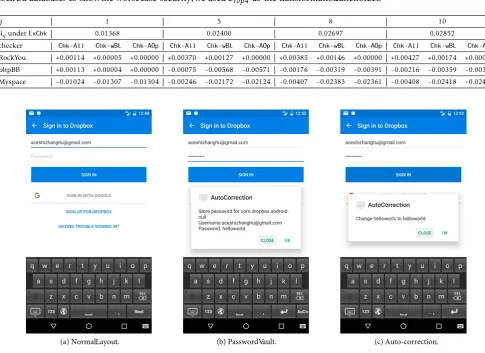
The security loss for attackers who use an estimated password distribution is shown in Table 4. The maximum success rate an attacker could reach under the exact checker ExChk is measured by calculating the aggregate possibility of the top q passwords in the RockYou password distribution, and is shown in the second row. These figures serve as the baseline for calculating security loss under different checkers and attackers. As shown in the table, when an attacker choses a different password distribution, he would gain negative security loss, meaning that he did even worse under a typo-tolerant checker than under an exact checker. This can be explained by the fact that the wrong password distribution may mislead the attacker to choose a suboptimal trial set.
6. Implementation and Evaluation
We have implemented a proof-of-concept prototype of VaultIME for the Android OS. A user is able to customize the transformation function set ranging from
Ctop1toCtop4, and the checking algorithms among
Chk-All,Chk-wBL, andChk-AOp.
The prototype uses the standard QWERTY US keyboard layout (Figure 2a). It automatically detects the attribute of the current TextView, and inserts an “AuCo” key in the bottom right of the keyboard for
the TYPE_TEXT_VARIATION_PASSWORD and TYPE_TEXT_
VARIATION_VISIBLE_PASSWORD input types. VaultIME
0 2 4 6 8 1 0 0 . 0 0 0
0 . 0 0 1 0 . 0 0 2 0 . 0 0 3 0 . 0 0 4 0 . 0 0 5
S
e
c
u
ri
ty
L
o
s
s
N u m b e r o f G u e s s e s ( q )
T o p 1 T o p 2 T o p 3 T o p 4
(a)Chk-All.
0 2 4 6 8 1 0
0 . 0 0 0 0 . 0 0 1 0 . 0 0 2 0 . 0 0 3 0 . 0 0 4 0 . 0 0 5
S
e
c
u
ri
ty
L
o
s
s
N u m b e r o f G u e s s e s ( q )
T o p 1 T o p 2 T o p 3 T o p 4
(b)Chk-wBL.
Figure 1. Security loss measuredfor di˙erentcheckersand query numbers.Note that the security loss forChk-AOp is zero, so we
omitit for the sake of fin typography.
Table 4. Security loss measuredagainst attackerswithestimatedpassworddistributions.The challengedistributionis fi ed to be the
RockYou database. To showthe worsecase security,we usedCtop4 as the transformationfunctionset.
q 1 5 8 10
λqunderExChk 0.01368 0.02400 0.02697 0.02852
checker Chk-All Chk-wBL Chk-AOp Chk-All Chk-wBL Chk-AOp Chk-All Chk-wBL Chk-AOp Chk-All Chk-wBL Chk-AOp
RockYou +0.00114 +0.00005 +0.00000 +0.00370 +0.00127 +0.00000 +0.00385 +0.00146 +0.00000 +0.00427 +0.00174 +0.00000 phpBB +0.00113 +0.00004 +0.00000 -0.00075 -0.00568 -0.00571 -0.00176 -0.00319 -0.00391 -0.00216 -0.00359 -0.00391 Myspace -0.01024 -0.01307 -0.01304 -0.00246 -0.02172 -0.02124 -0.00407 -0.02383 -0.02361 -0.00408 -0.02418 -0.02433
(a) NormalLayout. (b) PasswordVault. (c) Auto-correction.
Figure 2. Screen-shots of a Dropbox login process. The pop-updialogs are for the purposeof demonstration and do not appear in
Table 5. Normalizedtimeconsumptionfor each checker.
Ctop1 Ctop2 Ctop3 Ctop4
Chk-All 1.03 1.17 1.14 1.25
Chk-wBL 1.00 1.08 1.10 1.20
Chk-AOp 2.21 2.55 3.30 5.14
login app5 and the account information6 as the key to
index the password. Once a correct password has been recorded, subsequent login attempts will go through the typo-tolerant checker to auto-correct possible typos. As shown in Figure 2c, the corrector
rep-prox-rs successfully corrects the mistyped password
“helloworls” into “helloworld”. As with traditional password vaults, the file storing passwords is encrypted by a secure master key [36]. The master key is randomly generated, and managed by the Android KeyStore provider.
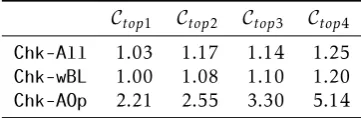
Performance Evaluation. We measured the average time needed to run each checker. In particular, 1000 password-typing records from the dataset mentioned in Section 4.1 are randomly chosen and tested. We normalized the results based on the time consumption
for Chk-wBL under Ctop1, because it is the most
efficient checker in our implementation. As shown in Table 5, Chk-All and Chk-wBL perform much better
thanChk-AOp. This is because runningChk-AOprequires
a brute-force calculation to obtain all the subsets of the ball, which is time consuming. In fact, data measured in Table 5 is the result of an optimized implementation of Chk-AOp, that is, only passwords with non-zero probability in the ball are considered. If there are still more than 20 passwords in the ball, running the brute-force algorithm for finding all subsets of the ball becomes impractical. In this case, we abort auto-correction. In our experiments, such a case rarely happened, because human passwords are sparely distributed. In all settings, no obvious delay can be observed.
Optimization. In the proof-of-concept implementa-tion, we ran the auto-correction algorithm for every login operation. However, many of the intermediate results are common in each run for the same app. Therefore, as a trade-off between time and storage, one potential optimization could be to calculate all the acceptable passwords for each app beforehand in the
5We obtain the name of the APP by querying the
Editor-Info.packageNameproperty.
6The account information is obtained based on the hypothesis that a
user usually inputs the account information just before inputting the password.
background. In particular, after obtaining the correct password w, VaultIME runs a reverse operation of each corrector in Ctopx(x= 1. . .4), which gets a set of
neighboring passwords ˜w that can be auto-corrected. Then, each ˜w is tested by the activated typo-tolerant checker. Only those that are accepted remain. With this precomputed acceptance set, performance can be further improved. Note since the acceptance set is cal-culated in the background (potentially during a low-intensity usage period), users likely will not perceive these computations as disturbing. Further optimization in the form of human-in-the-loop experimentation is left for future work.
7. Discussion and Future Work
In this section, we discuss the security issues of the proposed system, explain the advantage of our solution over traditional password managers, and propose potential interesting future work.
Vault Security. VaultIME is designed to defeat on-line brute-force attackers. No security can be given if the password file which stores user’s login credentials is leaked. For example, a careless developer may leave the password file in the unprotected shared SD card storage, which allows a physical attacker to easily access the plaintext content of the file. Fortunately, VaultIME can benefit from the success of existing password vault implementations such as 1Password [13], LastPass [17] and KeePassDroid [14].
In the current design, if the Android OS is compromised, the whole password vault is disclosed. To defeat an attacker with root privilege, we can leverage the Trusted Execution Environment (TEE) [37] technology available in most Android phones. TEE provides an isolated execution environment for the most critical services. With TEE support, VaultIME can be augmented to protect the password file from a compromised OS. The basic idea is that the auto-correction module is implemented as a trusted app (i.e., a trustlet) running inside the TEE. The ordinary Android OS forwards the received password to the trustlet, which runs the checker and directly responds to the Android OS with the processed password. In this way, the password vault is never exposed to the Android system. As major manufacturers implement their proprietary TEEs, integrating VaultIME with TEE requires collaboration with manufactures. We leave this aspect as future work, but note that manufacturers routinely customize their devices and may consider VaultIME as a user-friendly extension to enhance market appeal.
is an extreme usage of an auto-correction mechanism – when the vault is unlocked, it “auto-corrects” a null string of a password field into the correct password. That being said, misplacing a phone with an unlocked password vault may result in the loss of all stored user credentials. Indeed, identity theft, and privacy intrusions frequently happen in the circle of family and friends, i.e., people who have access to the phones [8– 10, 38]. Our system makes it much less likely that people can invade valuable resources on a phone because the password vault is not automatically giving access to them.
Future Work. In the future, we plan to conduct user studies to investigate the usability of the VaultIME app as well as adoption intentions in detail. Specifically, by empirically evaluating how users interact with our system, we aim to deliver a more usable and secure user experience for mobile phone users. Moreover, we are interested to learn to which degree users prefer our method to the traditional auto-fill password manager, whether users feel less threatened, have less frustration, and whether the correction process fits users’ habituated login process.
In evaluating the security loss imposed by VaultIME, we mainly focus on a brute-force attacker who attempts to maximize the possibility coverage in each guessing. However, given that some personal data is publicly available (e.g., user name, birthday, etc.), particularly to family members or close friends, a targeted guessing attack could be more efficient [39]. Building an attack model which incorporates personal information into the on-line guessing and designing a new free auto-correction schema specific to this model constitutes an interesting research topic.
8. Conclusion
In this paper, we present VaultIME, a new password auto-correction scheme for mobile platforms. Our work ameliorates concerns of password manager users that they lack control over the use of their credentials. We achieve this by requiring the user to type a “near correct” password, which is automatically replaced with the correct one.
In designing the auto-correction policies, we conduct a mobile-centric password typo analysis, and are able to categorize the observed typos occurring while using virtual keyboards. Based on these empirical observations, we are able to develop a customized set of password correctors, which can cover as much as 47.8% of the detected password typos on mobile systems. This substantial coverage is made possible through a client-side implementation of our password-correction scheme as an app which allows for the treatment of the most common typographical errors, i.e., proximity
typos. Moreover, the proposed auto-correction scheme is secure against a brute-force attacker under the formal model proposed in [12]. Our experimental results reveal that in the worst case, our scheme causes a security loss of 0.43%, indicating our auto-correction scheme has a high level of security robustness.
In order to measure the security loss associated with our auto-correction scheme, we conduct a series of simulated attacks. The results reveal that in the worst case, our scheme introduces a security loss of 0.43%, indicating our auto-correction scheme has a high level of security robustness. Moreover, VaultIME can also be implemented with a free auto-correction policy which introduces no security loss, but maintains a substantial coverage of password typos.
We have implemented a prototype of VaultIME as an Android IME app, and evaluated its performance. The app introduces no human-observable delay during the auto-correction process.
References
[1] Li, Z., He, W., Akhawe, D. and Song, D. (2014) The
emperor’s new password manager: Security analysis of web-based password managers. InUSENIX Security ’14. [2] Komanduri, S., Shay, R., Kelley, P., Mazurek, M., Bauer, L., Christin, N., Cranor, L. et al. (2011) Of
passwords and people: Measuring the effect of password-composition policies. InACM CHI ’11.
[3] Gasti, P.andRasmussen, K.(2012) On the security of
password manager database formats. InESORICS ’12. [4] Butler, R. and Butler, M. (2015) The password
practices applied by South African online consumers: Perception versus reality. South African Journal of Information Management17(1): 1–11.
[5] Fagan, M.andKhan, M.(2016) Why do they do what
they do?: A study of what motivates users to (not) follow computer security advice. InSOUPS ’16.
[6] Tabini, M. (2013), Review: Lastpass takes your
passwords to the cloud. http://www.macworld.com/ article/2032046/review-lastpass-takes-your-passwords-to-the-cloud.html.
[7] Gott, A. (2017), Important security updates for
our users. https://blog.lastpass.com/2017/03/ important-security-updates-for-our-users.html/. [8] Stroup, J. (2016), Who Commits Identity Theft?
https://www.thebalance.com/who-commits-identity-theft-1947637.
Acknowledgments
[12] Chatterjee, R., Athalye, A., Akhawe, D., Juels, A.
andRistenpart, T.(2016) pASSWORD tYPOS and how
to correct them securely. In IEEE Security and Privacy (S&P).
[13] AgileBits, Inc.1passwordhttps://1password.com/. [14] Pellin, B. KeePassDroid http://
www.keepassdroid.com/.
[15] KeePassDroid Dropbox and KeePassDroid http: //blog.keepassdroid.com/2010/06/dropbox-and-keepassdroid.html.
[16] Ltd, R.C. USB password manager: When your
password database is right where you need it
http://www.anypassword.com/password-database-in-usb-password-manager.html.
[17] LastPass Inc.LastPasshttps://lastpass.com/.
[18] Google Inc. Chrome https://www.google.com/ chrome/.
[19] Mozilla Firefox https://www.mozilla.org/en-US/
firefox.
[20] Keith, M.,Shao, B.andSteinbart, P.(2007) The usability
of passphrases for authentication: An empirical field study.International Journal of Human-Computer Studies 65(1): 17–28.
[21] Keith, M.,Shao, B.andSteinbart, P.(2009) A behavioral
analysis of passphrase design and effectiveness.Journal of the Association for Information Systems10(2): 63–89. [22] Park, Y., Han, S., Park, J. and Cho, Y. (2008) Touch
key design for target selection on a mobile phone. In MobileHCI ’08.
[23] Lee, S. andZhai, S. (2009) The performance of touch
screen soft buttons. InCHI ’09.
[24] Schaub, F.,Deyhle, R.andWeber, M.(2012) Password
entry usability and shoulder surfing susceptibility on different smartphone platforms. InMUM ’12.
[25] Maydebura, S.,Jeong, D.andYu, B.(2013)
Understand-ing environmental influences on performUnderstand-ing password-based mobile authentication. InIRI ’13.
[26] Owusu-Agyeman, P., Xie, W. and Yeboah, Y. (2016)
A robust alternative virtual key input scheme for virtual keyboard systems. Journal of Computer and Communications.
[27] Zhai, S., Hunter, M. and Smith, B.A. (2000) The
metropolis keyboard - An exploration of quantitative
techniques for virtual keyboard design. InUIST ’00. [28] Hakoda, H., Shizuki, B. and Tanaka, J. (2016) QAZ
keyboard: QWERTY based portrait soft keyboard. In International Conference of Design, User Experience, and Usability(Springer): 24–35.
[29] Gelormini, D. and Bishop, B. (2013) Optimizing the
android virtual keyboard: A study of user experience. InIEEE International Conference on Multimedia and Expo Workshops.
[30] Shay, R.,Komanduri, S.,Durity, A.,Huh, P.,Mazurek, M.,Segreti, S.,Ur, B.et al.(2014) Can long passwords
be secure and usable? InACM CHI ’14.
[31] Siegler, M. (2009) One of the 32 million with a
RockYou account? You may want to change all your passwords. Like now. TechCrunch, http://techcrunch. com/2009/12/14/rockyou-hacked.
[32] Changes on waiting time for wrong input on Galaxy S6.
http://gadgetguideonline.com/galaxys6/galaxy- s6-android-marshmallow-update-guide/changes- on-waiting-time-for-wrong-input-on-galaxy-s6-lock-screen-in-android-marshmallow-update/. [33] Apple Inc., If you forgot the passcode for your iPhone,
iPad, or iPod touch, or your device is disabled.https: //support.apple.com/en-us/HT204306.
[34] Graham, R. (2009), PHPBB password analysis,
http://www.darkreading.com/risk/phpbb-password-analysis/d/d-id/1130335.
[35] LeakedSource (2013), LeakedSource analysis of
MyS-pace.com hack. https://www.leakedsource.com/blog/ myspace.
[36] AgileBits, Inc., 1password security. https: //support.1password.com/1password-security/. [37] Google Inc., Trusty TEE. https://
source.android.com/security/trusty/.
[38] of the Fog, O. (2015), Top 100 traits of people
who suffer from personality disorders. http: //outofthefog.website/top-100-trait-blog/2015/ 11/4/domestic-theft.
[39] Wang, D., Zhang, Z., Wang, P., Yan, J. and Huang, X. (2016) Targeted online password guessing: An
underestimated threat. InACM CCS ’16. [9] Grant, K. (2015), Identity theft victims: You might
know the culprit. http://www.cnbc.com/2015/ 07/21/identity-theft-victims-may-know-the-culprit.html.
[10] Kossman, S. (2014), Familiar fraud: When
family and friends steal your identity. http: //www.creditcards.com/credit-card-news/
familiar_fraud-damage-1282.php.
[11] Knijnenburg, B.,Kobsa, A.andJin, H.(2013)