Educational Technology & Society 3(3) 2000 ISSN 1436-4522
e-Learning Innovation through the Implementation of an Internet
Supported Learning Environment
David Smith
Dean, Huddersfield University Business School, Queensgate Huddersfield, HD1 3DH, United Kingdom
Glenn Hardaker
Principal Lecturer, Huddersfield University Business School Queensgate, Huddersfield, HD1 3DH, United Kingdom
Tel: +44 1484 472417 Fax: +44 1484 472146
ABSTRACT
The paper provides an insight into the changing nature of the learning process through the adoption of interactive new media solutions into a traditional University Campus. The use of software from Blackboard Inc. has provided the foundations for building both a complex and dynamic learning community at Huddersfield University Business School. The specific focus of the research project is on student adoption and utilisation of a Web-based learning perspectives.
Key Words
Internet, Learning, Communities, Technology, University
Introduction
The main purpose of this paper is to considers data relating to student utilisation of, and feedback on, an electronic mode of delivery of an undergraduate module offered in addition to more traditional forms of delivery. This will provide an insight into the changing nature of the learning process through the adoption of interactive new media solutions into a traditional University Campus. The specific research objectives are:
! Develop a virtual learning typology
! To explore student experiences of learning within one of the perspectives identified in the learning typology
! To propose a conceptual model that can be used as an adaptive framework for enabling Internet based learning perspectives developed in the typology.
The creation of a virtual learning environment through the implementation of software from Blackboard Inc. provides the foundations for building both a complex and dynamic learning community. The emerging theoretical perspectives for Internet based learning are clearly creating new boundaries and structures for the learning process, both on and off campus. The design and implementation of an Internet supported collaborative learning environment at Huddersfield University Business School requires Web based applications software to follow both an open and flexible approach, allowing the transferability and integration of diverse software products. The software product CourseInfo, from Blackboard Inc, is providing tools to meet such a challenge. The primary differentiating features of implementing a Blackboard solution, for Huddersfield University Business School are scalability and ease of integration into a campus wide environment.
! knowledge webs complement teachers, texts, libraries, and archives as sources of information;
! interactions in virtual communities complement face-to-face relationships in classrooms;
! immersive experiences in shared Internet environments extend learning experiences in real world settings. Interactive multimedia technologies, especially the Internet, has the potential to present ideas in almost any mediated form that may offer very structured routes through the learning process or provide the opportunity for students to roam freely as a means of creating there own meaning and understanding. The potential of the Internet to provide an interactive infrastructure ideally suited towards student centered learning.
Huddersfield University Business School is currently in the process of implementing an Internet supported collaborative learning environment through adopting both an open and flexible approach. The business school is developing an Internet based learning environment that facilitates both collaboration and diversity in the learning process through developing on-line courses supporting different learning styles for students on and off campus.
Internet Supported Learning Innovation
Evaluation of the underlying pedagogy in virtual learning environment software products depends on broader theories of learning and cognition, which are defined in terms of one’s views on what knowledge is, how it is transferred, and what motivates us to learn. Resnick, Greeno, and Collins (1996) identify three distinct categories in this area and label them: behaviourist/empiricist, cognitive/rationalist, and situative/pragmatist.
The behaviourist/empiricist model emphasises ‘individualised’ environments in which information is presented in a clearly sequenced series of explicit instructions with feedback, reinforcement, and statistically valid and reliable tests (Resnick, Greeno, and Collins, 1996). The cognitive/rationalist model emphasises ‘interactivity’ as a way of developing a general and unified understanding of a domain and favours organising information to match the developmental stages of the learning process (Resnick, Greeno, and Collins, 1996). Assessment involves performance and is relative to the background and developmental stage of the learner. The situative/pragmatist model emphasises “environments of participation” in which the learner practices the patterns of enquiry and learning and the use of resources, as part of the preparation for membership in a particular community (Resnick, Greeno, and Collins, 1996). As part of the development of the learner’s identity, this area involves not only the assessment of the learner’s ability to participate in social practice, but also to participate in the assessment itself. In the context of this article, situative/pragmatist model is adapted to focus on ‘exploratory’ and ‘collaborative’ environments.
The theoretical perspectives and the pedagogical assumptions that evolve out of them map well against the components of courseware products, such as WebCT, LearningSpace and CourseInfo (Firdyiwek, 1999). The typical tools provided (for assessment, authoring and communications) and the design stance on the level of flexibility in the definition of roles (administrators, course builders, instructors, and students) broadly adopts one of the identified theoretical perspectives. The theoretical perspectives are not absolute and do overlap in the design of software applications but overall the major products do reflect significant differences in style and perspective adopted. By benchmarking theoretical perspectives against the learning based software provides the following fundamental outcomes:
! behaviourist/empiricist model reflects systems/software components that put emphasis on direct, skills-based, teaching and test based assessment
! cognitive/rationalist model focuses emphasis on authoring and interactive tools
! situative/pragmatist model adopts more of an emphasis on both flexibility and integration throughout the
system in the definition of roles and responsibilities.
The development of software applications focused on the creation of virtual learning environments provides the foundation for complexed and dynamic communities. Such communities can be viewed in a broader sense reflecting their own unique and individual norms and values. The underlying theoretical perspectives are clearly creating both boundaries and structures for the communication and social interaction process.
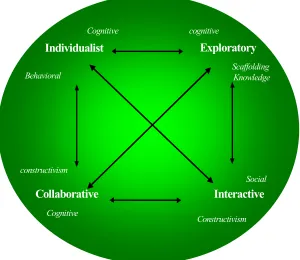
Figure 1. Internet Supported Collaborative Learning Perspective
Such perspectives clearly build on existing learning theories but emphasise in particular the relationships between the differing perspectives. Huddersfield University Business School accepts and actively promotes individuality in Internet supported learning. The Internet supported learning environment allows in principle greater transferability of learning techniques and methods. All users including academics and students are able to access all learning content as a member of the learning community. The dynamic and interactive nature of the Web is realising a shift in learning styles towards a more collaborative and interactive perspective
CourseInfo options from Blackboard Inc provide a suitable Internet Supported Learning Environment that is a relatively loose structure, accommodating diversity in instructional design and the use of supporting tools. The design and implementation of an Internet based learning environment, at the University of Huddersfield, requires web based and applications software to follow both an open and flexible approach, allowing the transferability and integration of diverse software products. The primary design of Blackboards core product, CourseInfo, is focused on:
! Organisation of on-line material
! Enabling transition between learning components
! Encouraging student participation ! Driving student-tutor collaboration ! Diversity in assessment tools
! Courses as a means of learning
! Cognitive behaviourism but flexibility to customise
CourseInfo was implemented at the Business school in August 1999 providing a computing infrastructure driven by a back-end database. CourseInfo is a scalable product and has been designed for large University campuses. The business school is currently in the process of content production for various courses at all levels and at a relatively early stage of implementation. The following sections provide an insight into our early success through the pilot of a module Business Management.
Design and Methodology
The population frame used for the investigation into the effectiveness of a specific learning style, in the context of the virtual learning environment, comprised a representative sample of undergraduates at Huddersfield University Business School. In selecting the sample for the investigation a number of pertinent factors had to be considered in order to define a sample frame. Business Management module was chosen primarily due the representative mix of students and secondly due to the module being a demonstration site for a specific mode of
Interactive
Constructivism
Individualist
Behavioral
Cognitive
Collaborative
CognitiveExploratory
cognitiveScaffolding Knowledge
constructivism
delivery. For instance the module is available in either a 10 credit or 20 credit format for students on a wide range of undergraduate programmes who do not study management as part of their mainstream syllabus. It is therefore studied by students majoring in subjects such as law, engineering, accountancy, design and computing. The module has been delivered successfully (in terms of numbers electing to study the module, formal student feedback and assessment results) to groups in excess of 100 for five years. Delivery has been based on a lecture per week and tutorials (groups of no more than twelve students) every fortnight with guided programmes of self-study in the intervening weeks. Assessment is based on a case self-study assignment and an individual learning diary.
The research project is providing analysis based primarily on behavioural data derived from the virtual learning environment. The frequency and percentage of usage is based on actual web page hits into the various areas within the learning environment over time. In addition at the completion of the learning experience qualitative data was collected from student comments in a series of electronic tutorials. Finally survey data was collected at the end of the learning experience as a means of feedback and evaluation.
The Internet supported collaborative learning perspectives outlined in the proposed typology are used as a means of developing virtual learning within the school. Demonstration sites are being developed as a means of illustrating how technology is changing the learning process and identifying natural avenues forward for academic development. A module Business Management has also been used as a method of analysis of one element of the typology. For the purpose of the paper Business Management was chosen in demonstrating the development of one particular learning perspective within the overall proposed typology (refer to Figure 1). The learning style adopted by Business Management module fits most closely into the ‘individualised’ learning perspective in the proposed typology.
Bascsich (1997) argues that when re-engineering the campus with web and related technology it is important to start with the learner. He suggests that they have many demands including better employment prospects, to be treated more as adults, cheap education and to be part of a real community. Incorporating the module in electronic format within CourseInfo is intended ultimately to meet many of these needs but particularly, as Bascsich emphasises, to enable students to undertake learning with fewer constraints in time and place on their programme of studies. The new forms of Internet based learning are being integrated directly with more traditional methods of teaching and learning. Before this integration can take place, however, it was considered essential to test delivery within the context of CourseInfo and to listen to student reactions to this form of delivery. Therefore in semester one of 1999/2000 students were offered the electronic version of the module in addition to the normal form of delivery described above. They were informed that the electronic mode of delivery was available to them as an additional resource to enhance their learning but that they could, if they chose to do so, satisfactorily complete the module based the traditional lectures, tutorials and reading.
In the design and implementation of the Business Management module various initiatives were undertaken in the creation of the learning experience based on the ‘individualised learning perspective. The basic, pragmatic design principles adopted were to: (a) avoid the use of extensive, detailed sections of text which could be better presented as part of the traditional reading programme; (b) divide topics up into short easily digested sections; (c) offer the facility at the end of each short section for students to interact with each other by using the chat room and electronic discussion boards available within CourseInfo; (d) provide embedded links to other commercial and educational internet sites relevant to the topics being studied; and (e) to present the material in as interactive a manner as possible. We attempted to provide interaction beyond the in-built communication facilities by using:
! interactive diagrams using Macromedia Flash and Director
! bullet points that build as a student works through a section using DHTML
! reflective questions at the end of each short section directly linked to the communications tools ! links to other web sites as a means of expanding the knowledge base
! pop-up examples, based on contemporary cases and organisations, to utilise the hypermedia advantages of the Web
Interaction with the Learning Components
As suggested earlier there were initial concerns that very few students would in fact use the Internet resource. The concern was reinforced when the practical orientation sessions in PC laboratories, arranged in the week before formal teaching was scheduled to start (this week is devoted to enrolment, administrative matters and counselling) were attended by less than a third of the students enrolled for the module. Various explanations can be identified including inappropriate times for these sessions or that students had insufficient incentive to attend. However, during the first lecture some of the material was illustrated on-line and this, along with word of mouth recommendations from those who had attended the orientation sessions, resulted in 110 out of 135 eventually registering to use the electronic version of the module during the first semester.
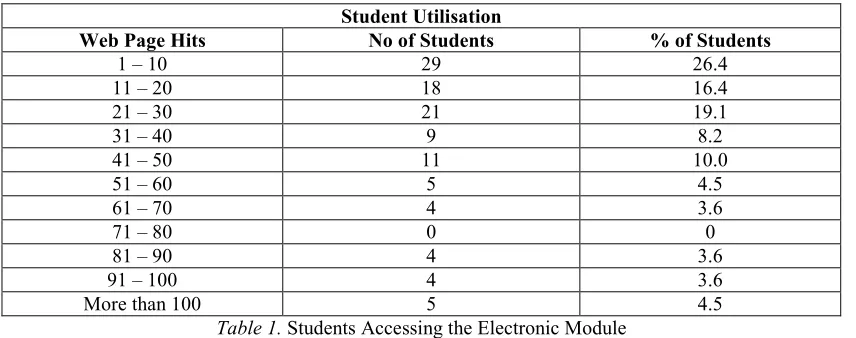
Student Utilisation
Web Page Hits No of Students % of Students
1 – 10 29 26.4
11 – 20 18 16.4
21 – 30 21 19.1
31 – 40 9 8.2
41 – 50 11 10.0
51 – 60 5 4.5
61 – 70 4 3.6
71 – 80 0 0
81 – 90 4 3.6
91 – 100 4 3.6
[image:5.595.87.515.198.367.2]More than 100 5 4.5
Table 1. Students Accessing the Electronic Module
(Note: the percentages are to one decimal place and the total is therefore approximately 100%)
From Table 1 it can be seen that just over a quarter of our registered users recorded 10 or less hits. These are minimalist users accessing the site on average less than once per week, although their actual pattern may be clustered into a relatively short period of time. The remaining three-quarters of users have recorded more hits with some 15 percent achieving over 60 hits during the semester, which equates with an average of 6 or more hits per week. The highest user recorded 152 hits. At the most basic level, the usage patterns by students accessing the electronic material are very pleasing given the absence of any compulsion or requirement to do so.
One of the key reasons for seeking to implement this kind of learning environment was to explore how students might be able to study with fewer constraints on time and place. In this trial run there were still the constraints of traditional lectures and tutorials, but students could access the electronic module at any time and, if they had the facilities off-campus, from wherever they chose.
The findings in Table Two and Three indicate the days and times when students did access the material. The overwhelming majority of access occurred during the normal working days of the week, although there were actually two students who accessed the site on Christmas Day! Weekend access accounted for only 3.8% of all usage. However, the pattern of usage continued to develop well beyond the end of the twelve-week teaching period as students used the electronic module as a revision aid. More flexibility is shown in Table Three when the hour of day is recorded. Most students are accessing the learning environment between 9.00am and 5.00pm but not insignificant numbers are taking advantage of the ability to use more non-standard times to access the material.
Internet Mediated Communications for Directed Learning
Table 2. Student Usage by Day of the Week
Table 3. Student Usage by Hour of the Day
The electronic tutorials were directed in terms of discussion and students were guided to a Cornell University web site through appropriate use of web links as a means of preparing. One academic member of staff undertook the role of tutor in his own office whilst another member of staff provided technical assistance if required in the PC laboratory and acted as observer. Neither members of staff had any previous experience, beyond test runs in CourseInfo, of running electronic tutorials via Chat rooms software tools.
Computing facilities to permit access by 20 students had been booked in one of the university’s PC laboratories for each electronic focus group. Students were also made aware that they could use other PC facilities within the university, such as those in the library or their own off-campus PC facilities. It eventually transpired that the vast majority of those participating took advantage of the pre-booked PC laboratories.
0
500
1000
1500
2000
2500
3000
Student use
Day of the Week
N
u
m
ber
of
Us
er
A
cc
ess
es
Su
nday
Tuesda
y
Mo
n
d
ay
W
ednesda
y
Thursda
y
Fr
id
ay
Saturda
y
0
200
400
600
800
1000
1200
1am
4am
7am
10am
1pm
4pm
7pm
10p
m
Student use
By Hour of the Day
Num
be
r
of
Us
er
A
cce
ss
[image:6.595.120.454.347.586.2]Students could attend any electronic tutorial and would then be required to log in using a pseudonym, which enabled them to take part in subsequent discussions anonymously. The tutor simply logged in as ‘tutor’. Only three students logged in for the first discussion. None of those in the first group had been aware of the need to read the preparatory material, but the observer in the PC showed them how to open the relevant web pages and to switch between this and the electronic discussion. In this way it was possible to have a reasonable discussion of the topic with the tutor offering significant guidance and prompts. Unlike a traditional tutorial in these circumstances, the students were very ready to air their views and admit their ignorance. Indeed at the end of the session when they were asked their comments on participating in this type of discussion they responded by stating “it has been fun and a good learning experience” and that “it is easier to state your points in this way”. The transcript of the discussion was five pages representing quite detailed discussion.
The second discussion also only attracted three students but they were prepared for the electronic tutorial. As a result the content of the discussion was more challenging in this on-line discussion. It became clear during the discussion that at least one of the students was not a native English speaker although she (logged in as Linda) clearly was very competent and had a good knowledge of the topic. She stopped one of the other participants on three occasions, because he tended to use complex sentences and terminology, and pointed out how difficult it was to follow him and asked him to clarify what he meant. Again this is not usual practice in face-to-face communications, and two unanticipated benefits to those operating in a second language are: they have a written record on the screen of what is being said and this gives them more time to interpret comments; and their anonymity makes it easier to ask for more clarity or explanation.
After these first two tutorials the positive outcomes were that everyone learned how to use the communication software very easily, the discussions were open and inclusive, and the feedback indicated the students had found the experience enjoyable. The negative outcome was the low numbers who had participated. At this stage critics of electronic discussions could probably quite rightly point out they could obtain similar outcomes if they only had to deal with groups of three students.
The third electronic tutorial attracted eleven students and with this size of group it soon became clear that students were very willing to engage in discussion with each other independently of the tutor. Most of the discussion was relevant to the topic and was constructive. However, in this type of situation it is also very easy for participants to discuss their own personal agendas, which may have no relevance at all to the formal topic. It was quite unexpected for the ‘electronic tutor’ to realise he can do very little to control this. When the discussion was felt to be wandering too far off the point the students themselves would attempt to bring it back often by asking for guidance from the tutor. In this tutorial there was one incident that was very disruptive when a particular student, who was not in the PC laboratory, started to use foul language and disruptive tactics such as making very disparaging comments about contributions by other students. This would have been relatively easy to prevent or deal with in a traditional tutorial but was difficult to respond to in this electronic format. The disruptive student did log off. Despite the disruption the other students did at the end comment very favourably on the experience and the transcript ran to six pages.
For the fourth electronic tutorial nine students logged in. It is worth noting that in all the electronic discussions, apart from the first two sessions, late arrivals were a feature of the exercise. This can create difficulties because the late comers can not see the text of the discussions that have preceded their arrival (exactly as is the case in a traditional tutorial) and have to be brought up to speed by those already in the group. Once again the tutor’s traditional controlling role, this time in terms of deterring late arrival, is virtually non-existent. The discussion in this group was very extensive (final transcript of eight pages) and focused on the formal topic. Students also started to point out to each other where on the web site, or indeed on other web sites, they could follow up points being discussed.
In the fifth electronic tutorial there were eight students and in this instance a playful but supportive atmosphere quickly developed in which humour and encouragement served to move discussion of the formal topic along very productively indeed. This was partly a function of the group members, but also probably that the tutor was becoming better at operating in electronic mode. In this case the final transcript of the discussions ran to eleven pages.
was between students rather than through the tutor, and this is a positive outcome that many academics complain is very difficult indeed to achieve in a face-to-face tutorial. The discussion was “messy” in the sense that it included some personal exchanges and “chit-chat”, but on the whole in this group this informal communication served to provide a foundation for effective discussion of the formal topic (an eleven page final transcript). It was quite demanding for the tutor to keep track of the discussion and to decide when it was and was not appropriate to provide further guidance.
At the end of each session students were asked to comment on the experience of taking part in an electronic tutorial, which none of them had in fact experienced before. A basic summary of their comments is provided below:
Positive Comments Negative Comments
Would not get discussions like this in tutorials Big group (20) can be confusing
Interesting and good fun I find it difficult to get my message across
without speaking one-to-one
Good to be anonymous Would be better with more people (11 in group)
but sensible ones Other peoples’ views are important and it
gives you the opportunity to find them out (without looking thick)
Slow. Need face-to-face for deep
Good and remarkably fast discussion Fun and a good learning experience Let’s have more of these
You certainly learn from it.
The comments were overwhelmingly positive towards the use of the communications tools and this was also re-inforced through students voluntary use of the communications facilities. It is important to accept the adoption of specific on-line learning styles will have a specific influence on such outcomes in the future. This will be tested in the next phase of implementation by building in electronic tutorials as part of the programme.
Feedback and Re-inforcement through Skills based Assessment
In addition to the request for comments at the end of the electronic tutorials, those students who had taken part were requested to fill in an evaluation form constructed using the in-built features of CourseInfo. The evaluation form consisted of twenty closed-response questions, which are automatically summarised by the software using the ‘Online Gradebook’ facility. Thirty-eight completed evaluation forms were submitted which represents 70.4% of the students who participated in the electronic discussions. The responses directly relevant to delivery through the medium of CourseInfo will now be presented.
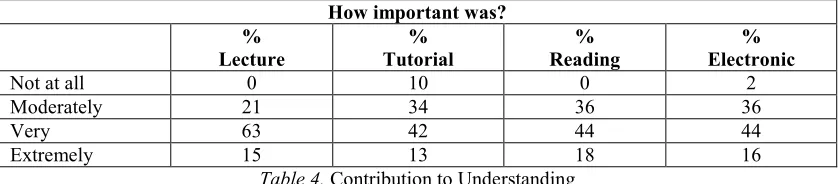
The evaluation form asked the question “how important did you find the module in helping you to understand the topics covered?” in relation to the lectures, tutorials, reading materials and the electronic module. The responses summarised below in Table Four provide an indication of the relative importance of each element.
How important was? %
Lecture Tutorial % Reading % Electronic %
Not at all 0 10 0 2
Moderately 21 34 36 36
Very 63 42 44 44
[image:8.595.89.508.584.676.2]Extremely 15 13 18 16
Table 4. Contribution to Understanding
(Note: the percentages are to one decimal place and the total is therefore approximately 100%)
develop the lecture material further through the electronic module. The data on usage provided further confirmation to the finding that most of the students did find the electronic material helpful for their learning. A series of questions were asked about how easy or difficult students found it to find, navigate, and read material in the electronic learning environment. The responses indicated that the student group had no significant difficulties undertaking these basic activities.
Feedback was also sought on the experience of taking part in the electronic tutorial and the results are summarised in Table Five. Three students did not think the experimental use of an electronic tutorial had been at all successful, whereas three others were of the opinion it had been extremely successful. The remainder (83%) attributed some success to the electronic tutorial in enabling them to greater understanding of the required topic.
Success of e-tutorial
No %
Not at all 3 7
Moderately 18 47
Very 14 36
[image:9.595.91.509.198.287.2]Extremely 3 7
Table 5. Response to Electronic Tutorial
(Note: the percentages are to one decimal place and the total is therefore approximately 100%)
The findings here are tentative but suggest certain types of students may be resistant to this form of electronic discussion. More research is needed to establish more definitively the size and characteristics of this group. At the same time it is important to point out that the vast majority of respondents in this study, and in the informal comments at the end of each electronic tutorial, did seem receptive to and enthusiastic about electronic discussions.
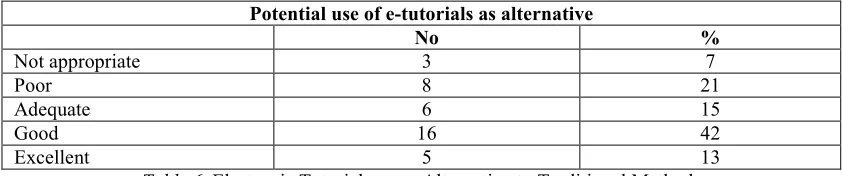
The issue of the value of electronic discussions was pursued further by asking students to express their opinion on the potential use of electronic tutorials as an alternative to the traditional classroom tutorial. The responses are summarised in Table Six and, although they do indicate a fairly wide divergence of views on this issue, they perhaps surprisingly show a majority of respondents see electronic tutorials as an excellent or at least good alternative to classroom tutorials. Again much more evidence is needed, both in terms of larger data samples providing improved reliability of analysis and actually trying electronic tutorials as an alternative to more traditional ones, before firm conclusions can be drawn.
Potential use of e-tutorials as alternative
No %
Not appropriate 3 7
Poor 8 21
Adequate 6 15
Good 16 42
Excellent 5 13
Table 6. Electronic Tutorials as an Alternative to Traditional Methods
(Note: the percentages are to one decimal place and the total is therefore approximately 100%)
Concluding Comments
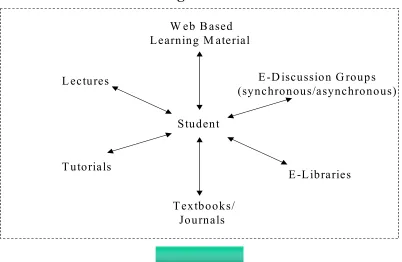
[image:9.595.87.508.465.553.2]Academic members of staff will clearly need to adapt and develop new skills to move with the changes taking place through electronic delivery, for example new skills are required to undertake the role of tutor and lecturer in Internet based learning environments. Huddersfield University Business School is proactively adopting the new technology and currently in the process of integration with existing educational learning process. The student centred e-learning framework below (see Figure 2) is a move towards the development of a conceptual model that can be used as an adaptive framework for enabling the proposed Internet based learning perspectives in Figure 1.
Figure 2. e-Learning Framework
The effective implementation of this framework raises many issues that are beyond the immediate scope of this paper. However, we believe that these issues will challenge much of the conventional wisdom about how universities are organised and their relationships with students. If the focus of e-learning is for students, typically postgraduates, off-campus the effects of such changes can be localised and controlled. On the other hand, if universities are seeking to integrate e-learning with traditional forms of teaching and learning on-campus the effects are likely to be more extensive and pose even greater problems of effective implementation. The real challenges, however, are now in the areas of developing wider appreciation of the significance of the potential changes involved in e-learning and facilitating the implementation of the many changes required to effectively embed it into various educational courses.
The next stage of our research is intended to investigate e-learning innovation based on other perspectives within the learning typology (refer Figure 1). This will enable further insights and as a consequence developments into the e-learning framework.
References
Bascsich (1997). Re-engineering the Campus with Web and related technology for the Virtual University. Paper presented at the Annual Conference on Flexible Learning on the Information SuperHighway, May 19-21, Sheffield Hallam University.
W eb B ased
Learning M aterial
T extbooks/
Journals
E-D iscussion G roups
(synchronous/asynchronous)
E -L ibraries
T utorials
L ectures
Student
Firdyiwek, Y. (1999). Web-Based Courseware Tools: Where is the Pedagogy? Educational Technology, Jan-Feb, 29-34.
Gilbert, L. & Moore, D. R. (1998). Building Interactivity into Web Courses: Tools for Social and Instructional Interaction. Educational Technology, May-June, 29-35.
Lally, V. & Barrett, E. (1999). Building a Learning Community on-Line: towards Socio-academic Interaction.
Education, 14 (2), 147-163.