Implementation of Android Application to
Search nearby Places with GPS Navigation
Technology
Priyank.S.Patil1, Dr. S. K. Shah2
PG Student [VLSI and Embedded Systems], Dept. of E and TC, Smt. Kashibai Navale College of Engineering- Pune,
Maharashtra, India1
Professor and HOD, Dept. of E and TC, Smt. Kashibai Navale College of Engineering- Pune, Maharashtra, India2
ABSTRACT: Android Mobile became an important part of day to day life. People depend on mobile application for searching places like hotels, hospital and shopping things. There are many applications in market which serves these purposes. On the behalf of these applications there are many applications for different different purposes. To reduce such complexity and memory required for each separate application a new application is needed. The application such as integrated all in one. This project proposed such application which satisfies our day to day needs. In this application all data is link through Google. So there is no need to maintain separate data base. This data base is redirect as per user requirement. The complex algorithm and programming is done by using eclipse software. Java scripting is a main coding language is used. In this application flash screen and other screen is designed through Photoshop and other screen viewer software. This application is facilities to find required nearest places from your GPS location. This application can be scaled in 1 to 50Km range to find out required places. Whats here places application is also integrated with customer reviews to bases on stars. This review is useful to first time trying people.
KEYWORDS: Linuxkernel, Androidsystem, Java Programming Language, Mobile Handset ,eclipse Android Software.
I.INTRODUCTION
Google launched Androids in 2007, to advance open standards for mobile devices. Androids is an Apache free software platform with an open source license for mobile devices based on Linux. Its software stack for mobile devices includes an operating system, middleware, and key applications. Application framework defined the common structure of programs in the specific domain. The Android software development kit (SDK) supports authoring applications with rich functionality. Like the iPhone, it can handle touch screens, accelerometers, 3D graphics, and GPS as well as collaboration among applications like email, messaging, calendars, social networking, and location-based services. Essentially, a framework is a component that can be reused; it set the architecture of applications and incorporated as a set of abstract classes and the cooperation of their instances. [1]
Android offers a fresh take on the way mobile applications interact with users, along with the technical underpinnings to make it possible. But the best part of Android is the software that you are going to write for it.
Android is running on the Linux kernel and its applications are written by Java programming language, so Android applications are running on a Java virtual machine named Dalvik virtual machine. Dalvik virtual machine has been redesigned and optimized by Google for the hardware features of mobile devices. In Android system, there is a tool named dx, included in the Android SDK, transforms the Java Class files (which compiled by a regular Java compiler) into the .dex format. The .dex format files integrate all Java class files and delete redundant information in every Java class files.
This project presents Google map implementation and client review facilities. This application is mostly used for consumer who is travelling to another city or new place. The application finds the relative place’s distance from consumer’s current position and generates the Google map.
II. RELATED WORK
A detailed description of Androidapplication framework from the prospective of developers is introduced in theAndroid platform and application. Asimple music player is provided as instance to illustrate thebasic working processes of Android application components.Guidance to understanding theoperation mechanism of Android applications and todeveloping applications on Android platform is provided [1]. An innovative researchapproach to design and develop mobile consumer applicationsacross communication network is presented in which the design involves mobile clientthat receives services provided by the base station serverconnected to database server. Target consumer applicationsimplemented were Electronic Health Record (EHR) and Utilitybilling application which tested for correctnessand analyzed for performance with varying input data type andsize. The applications are also verified and validated by portingon a mobile device that runs Android operating system [3]. Theproposed research finds use in upcoming mobile based consumerapplications for achieving increased cost-effectiveness, scalabilityand ease of useInitially mobile phones were developed only for voice communication but now days the scenario haschanged, voice communication is just one aspect of a mobile phone. Two such major factors are web browser and GPS services. Both of thesefunctionalities are already implemented but are only in the hands of manufacturers not in the handsof users because of proprietary issues, the system does not allow the user to access the mobilehardware directly. But now, after the release of android based open source mobile phone a user canaccess the hardware directly and design customized native applications to develop Web and GPSenabled services and can program the other hardware components like camera etc.The LBS application can help user to find hospitals, school, gas filling station or any other facility ofinterest indicated by user within certain range. Just like a GPS device its location will also beupdated as soon as user changes his/her position [3].
III. SYSTEM ARCHITECTURE
Andoid application development is a new trade in market. Here an application is developed when users requirement. To develop an andoid application different steps and protocal are need to follow. This chapter consist of block diagram & overview of android application. Also this gives breif introtion of android GPS based android application.
1. Proposed Block Diagram
Architecture incorporates component blocks for services extended to the clients provided by the server that interacts with database storage unit as shown in Fig 1.
Fig. 1 Architecture of android application 2. Functional overview:
A core feature of Android is that one application could use component element that belong to another application (if the component is permitted using). In order to achieve such functions, Android system must launch the application while any part of the application is asked and instantiate Java objects that being asked. Unlike most operating system, there is no single point that the system can enter in an Android application (for example, there no main ( ) function in an Android application). Instead, each component is a different point through which the system can enter an application and instantiate component object independently. [2] [4] [6].
There are four different types of application components. Each type serves a distinct purpose and has a distinct lifecycle that defines how the component is created and destroyed.
a. Activity
An activity represents a single screen with a user interface. The activities in an application work together to form a cohesive user experience, but each one is independent of the others. As such, a different application can start any one of these activities. An activity is implemented as subclass of Activity. The particular form that an activity show users and the amount of activities in an application depend on how the developer design the application. In a multiple activities application, typically, one activity is specified as the "main" activity, which is presented to the user when launching the application for the first time. Each activity can then start another activity in order to perform different actions. Each time a new activity starts, the previous activity is stopped, but the system preserves the activity in a stack (the "back stack"). [2][5][6].
b. Service
A service is an Android component that runs in the background to perform long-running operations or to perform work for remote processes and does not provide a user interface. An activity can connect or bind a service that is running. (if the service is not running, launch it). When connected to a service, the activity can communicate with the service through the interface that the service exposed. Like other application components, service components alwaysrunning in the main thread of an application by default. So for the intensive or blocking operating a service performs (may slow down activity performance), it is usually start anew thread inside the service.[2].
c. Content providers
Content providers provide data share mechanism among applications. The data that be shared could in the file system, a
Client- Side Software
Computation Role- Based Transaction
Application and User Interface
User Interface
Application Management layer
Database Transaction API
these methods by an object named Content Resolver. Content Resolver can communicate with every Content Provider. Content Resolver cooperated with Content Provider to manger IPC (inter process communication) while sharing data.
d. Broadcast Receivers /
Broadcast Receivers is in charge of the reception of system wide broadcast and take response aiming at the information that a broadcast transmitted. Many broadcasts originate from the system—for example, a broadcast announcing that the screen has turned off, the battery is low. Applications can also initiate broadcasts. There could be any number of Broadcast Receivers in an application and each Broadcast Receiver implemented as a sub class of Broadcast Receiver. Although broadcast receivers don't display a user interface, they may create a status bar notification to alert the user when a broadcast event occurs. More commonly, though, a broadcast receiver is just a "gateway" to other components and is intended to do a very minimal amount of work. [2].
e. Intent:
Three of the four component types—activities, services, and broadcast receivers—are activated by an asynchronous message named intent. Intents bind individual components to each other at runtime no matter the component belongs to the same application. Intent can create with an Intent object, which defines the messages by which can activate either a specific component or a specific type of component. For activities and services, intent defines the action to perform and may specify the URI of the data to action. For broadcast receivers, the intent simply defines the announcement being broadcast. The other component type, content provider, is not activated by intents. Rather, it is activated when targeted by a request from a Content Resolver. [2]
IV. LOGIC FLOW
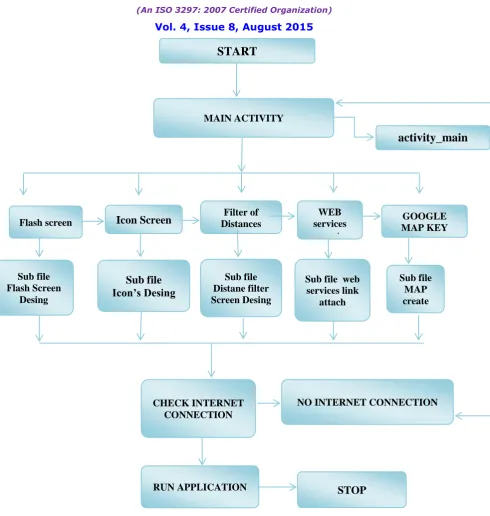
1. This flow chart working out the splash screen pop in the application that you start the application there work in the Main activity file.
2. This file is the main file of the working application created class and main part of the application. 3. Main activity file is called to this sub file design the screen of splash screen in the activity_main 4. The application Main Screen is subdivided into search bar along with grid logo and setting option. 5. Search Bar helps the user to find nearby places by typing the query string in the search bar option.
6. Grid logo displays the list of nearby places which user has searched in the grid format for improving the readability.
7. Setting option will enable the user to have customized settings for current location, range within which places to be searched and map location settings.
8. It sets the current location by accessing the GPS facility, also user can set the range of 1 to 50 km within which various places can be searched and it also helps to generate the map of the searched places.
9. If user wants to search customized option which is available on the grid menu screen then click on the option logo available on menu screen for example hospital.
10. After clicking on the logo, list of nearby locations is displayed with detailed information. 11. It opens the current location to map nearby places.
12. Information regarding distance, timing and address of the nearby places is also displayed on the android device screen.
Figure 2:Logic Flow For Application Development
V. RESULTS AND DISCUSSIONS
This chapter highlights the results of the project & the snapshots for each of the activities are shown along with the discussion of each activity describing its working. Each snapshot describes every single step of the WhatsHerePlaces Application. Seven main activities as well as the options provided to the users in each activity such as menu options and the activities which are created on the click. Result information table is shown below.
CHECK INTERNET CONNECTION
NO INTERNET CONNECTION Flash screen
Icon Screen
Filter of Distances
WEB services
create
ding
GOOGLE MAP KEY
Sub file Flash Screen
Desing
Sub file
Icon’s Desing
Sub file Distane filter Screen Desing
Sub file web services link
attach
Sub file MAP create
START
MAIN ACTIVITY
activity_main
layout
Feature Setting Advance
Range 1-50Km Accuracy 0.02km.
Google map Sink information Generate map
Filters Hotels, hospital ,etc. Based on stars
Reviews Consumer review Place Information
Table 1. Result Information
VI.CONCLUSION
The proposed Android as a full, open and free mobile device platform, with its powerful function and good user experience, rapidly developed into the most popular mobile operating system. A detailed introduction of Android application framework and the working principal of Android applications finally, a near place on the android platform was put forward to illustrate this mechanism.The research work presented in this involves new service based design approach for implementing two of the popular consumer applications on Android system. One of them is utility search places application for client and it is implemented for large collection data form Google.
ACKNOWLEDGMENT
We would like to thank Mr. Pawan Jadhav for his encou-ragement and support. I gratefully acknowledge him for
im-parting me valuable basic knowledge Android application. We are also thankful to the Vijay web solution, Nashik for
giving us moral support and infrastructure facilities.
REFERENCES
[1] OL.GoogleAndroidDevelopers,AndroidDevelopGuide,http://developer.android.com/guide/topics/fundamentals.html
[2] J. Dongjiu Geng, Yue Suo, Yu Chen, Jun Wen, Yongqing Lu, Remote Access and Control System Based on Android MobilePhone. Journal of Computer Applications, 2011,�vol.2 pp. 560-562
[3] M. Fengsheng Yang, Android Application Development Revelation, China Machine Press, 2010,1
[4] J. Li Lin, Changwei Zou, Research on Cloud Computing Based on Android Platform, Software Guide, 2010, vol.11pp.137-139 [5] M. Zhengguo Hu, Jian Wu, Zhenggong Deng, Programming Methodology, National Defence Industry Press, 2008,6
[6] M. Junmin Ye, Software Engineering, Tsinghua University Press, 2006,6
[7] Gartner Indentifies the top 10 consumer mobile applications for2012‖, Stamford, Conn., Gartner Inc., November 18, 2009.
[8] Dimitris Tychalas and Athanasios Kakarountas, ―Planning and Development of an Electronic Health Record Client based on the Android Platform‖, 14th Panhellenic conference on Informatics, pp. 3– 6, 2010.
[9] Chao-Tung Yang, Yen-Yu Chu and Shyh-Chang Tsaur, ―Implementation of a Medical Information Service on Android Mobile Devices‖, International Conference on New Trends in Information Science and Service Science (NISS), pp.72 – 77, 2010.
[10] Rob Rimbold, Scott Wilson and Steve Wilson, ―Accessing Medical Records on Mobile Devices Part I: Android™‖, Accusoft Pegasus, 2012.
[11] R.D. Blumofe, C.F. Joerg, B.C. Kuszmaul, C.E. Leiserson, K.H. Randall, and Y. Zhou, ªCilk: An Efficient Multithreaded Runtime System,º Proc. Fifth ACM SIGPLAN Symp. Principles and Practice of Parallel Programming, pp. 207±216, July1995.
BIOGRAPHY
Sanjeevani K. Shah obtained her PhD (E and TC) from university of Pune in 2012. Worked in Philips India Ltd. for three Years. Thereafter has twenty seven years of teaching experience. Presently working as Head of Post graduate department E and TC in STES’s Smt. KashibaiNavale College of Engineering – Pune. Published books on Industrial Electronics, Communication, and Applied Electronics and has published over 40 papers in different journals and conferences.