Optimizing Text To Speech Converter
Dr. T Senthil Kumaran1, Banti Rani Gupta2
Associate Professor, Dept. of CSE, ACSCE, Bengaluru, Karnataka, India
M Tech Student, Dept. of CSE, ACSCE, Bengaluru, Karnataka, India
ABSTRACT:A text to speech converter system is window based application which will let the individual do all tasks with respect to the text to speech functions. This will take in input text to convert it into speech form. It way to say reading by ears concept. So that it fastens the message transfer giving user friendly approach. This also gives an option of saving the voice for the further use. It is an interface with programming based constraints and is used by lay man also. Even a person who has no knowledge of programming in it or who does not have reading ability can use it to convert text to voice easily. It removes all possible flaws in the outputted voice.
KEYWORDS: Speech synthesizer, Text to Speech system, Wave form generation
I. INTRODUCTION
Speech Fusion is a way of imitation for human verbal expression. We transform the availabletext from the normal language intocertainvoice in any of the system involving text to voice transformation. This aims in vocalizing the content in the text with a particular authentic and original voice to bring in more grasp in the meaning. This is generally saved for further usages. This will ease the people who have difficulty in reading the content by provision of the listening assistance. If it’s a standalone application it will not be requiring web facility, but it can also be integrated with the web available. The use of this kind of text to voice converter is huge. It can be combined with applications to ease the process like e-book reader, social chat, news paper reading, navigation system, and so on.
A Text to Speech system can run in two parts. One part is the part of system which user interacts and other one is the intended back end. The user interaction will be with two chief assignments. One is the assignment which transform the unrefined printed work and accommodate ideogram same as numeral. The other one is the abbreviation which is put into the identical of draw up terms.
This practice of normalization is the foremost confront of Text to Speech to be dealt. Here, numbers and abbreviation are obligatory to be expanded according to phonic rendering. There are frequent spellings which are particular based on their context wherever they are being worn. The frontal end will then allot transcript which are voiced to particular individual and to every word. This has divide and impression process to the text into units of matrices unit, like idiom, article, and determination. Phonetic transcription and speech statistics both together make up the delegate linguistic presentation that is achievement by front end. The back end or synthesizers then convert the representation semantics rendering into sound. In definite structure, the part involves the calculation of the goal speech, which is then inflict on the accomplishment speech.
II.RELATED WORK
The authors anandthanuja Satish and few others opines that construct a speech system what is more required is the productions of the phonemics, conforming to the relevant inputted text. They debate on the issues with the mapping of font to Akshara, implied rules ofpronunciation given for Aksharas, text normalization involved in the process of building text to speech systems involving Indian languages.[1]
Text to speech converter system is again a computer based methodology. It will read input from the system which is either scanned or inputted by an operator and this is put into optical character recognition. The authors tells on this optical character recognition which as embedded speech synthesis methodology. This is done to yield cost effective and more user friendly image to speech converter system with the application built on MATLAB.[3]
III.PROPOSED ALGORITHM
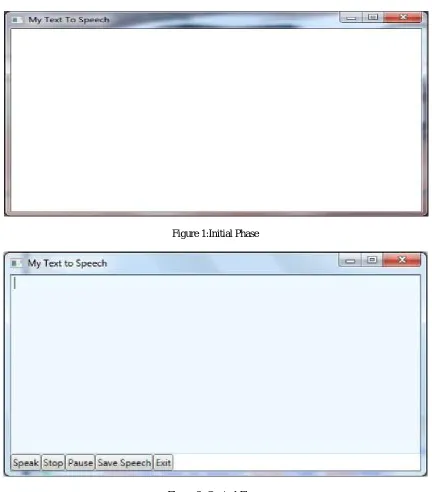
The input is fed as text that which an user enters in the textbox. This can also be done by just copying some text to the text box. Also the user can browse the word file containing the text. The text in the textbox is the text for the speech is to be generated. Once the input is fed the user need to press the play button to hearing the output voice.The voice can also be saved using the option of pressing on the save button. This will initially, convert the provided text to speech and then if required save the wav file. On the other hand, if in case when nothing is been provided as text for input and then the play button is pressed there will be no actionoccuring. First the words are converted into the speech then the especial symbols including special symbols of punctuations like semicolon, brackets, etc. are converted into speech. There by the speech for the entire text is obtained which will be moved to a wav file.
The wav file is then either played which will make us hear the speech or is simply saved in the system to listen in the near future. These options are according to the choice opted by the user.
The text stream will be moved to the application module. There the consequent speech application is got with the help of systemspeech application programming interface. This interface acquires the text stream as input and provides the audio stream as output from and to the application module. In the system speech API, the methods of the class speech.Synthesizer like SpeakSync(), pause(), resume(),SpeakAsyncCancelAll(), etc. help to achieve such conversion. As the wav file containing the speech is generated it moves as output to the user, who receives the output speech in the form of audio stream or as an audio file.
Figure: Text to speech converter
The application will generate an audio file for any inputted text. This input text can either be entered manually or is picked up from a file. The application gives a wave file format with an audio clip. This audio has a pre determined size and quality. In a way, it can further improvised by putting additional settings to give multiple audio formats. These formats are according to choice of the user using it. The given fileformats could be any of the type like wave file, mp3 file or any other audio file format.
IV.EXPERIMENTAL OBSERVATIONS
Figure 1:Initial Phase
Figure 2: Control Phase
Figure 3: Browsing of input file
V.CONCLUSION AND FUTURE WORK
The proposed system of "Text to Speech" is a highly efficient GUI based component. TheText to Speech application accomplishespleasingly and will be meeting all requirements of its user and system. It can be improved a lot by adding new variety of features and ideas so that they become evident in the usage of the application.
The project gave clearer view of how an application can be developed when it is starting from conceptualization, analysisand design and coding. The application is thendeveloped with expected level of accuracy, focusing majorly on user friendly approach. It is meant tobe more interactive and rich with respect to the content. The project is tested to work during every stage of itsdevelopment.
The developed application is for reading by ears. This means reading text by listening which is quick, easy, efficient and user-friendly way. By the use of thisapplication various users can perform basic text to speech functions. The applicationis to manage the establishmentof alucid speech for the text entered, throwing away thepossibility of flaws that occurs in pronounce ability.
The system being more generic, it is to be used as in offline mode with great ease. It could either be applied or even sometimes embedded with other kinds of systems like E-Bookreader, GPRS, Social Chat Application, etc. leading to great importance ofthe system in real world applications.The application can be improvised by further additional features. Those features which reads the text out aloud. Now thecount with respect to the types of voices to be made use of, are less when compared to the countof voices that which exist or is already pre-installed in the given version of Microsoft windows. But itcan be definitely increased by introducing new voice or speech types by even being ableto use customized voice settings.
The other future scope of research in order to improve the application can be in thenumber and types of the different formats for the files that are expected to be converted tospeech or read out aloud. More numberof files formats can be incorporated into the application so that it iscompatible with these formats and allow these files to be converted into speech.
It can further be improved by allowing the user to manually choose the expected size andquality of the generated audio file like whether it should run at 92kbps, 128kbps or 320kbps. More features could be incorporated into the developed application which isofinterest for future research.
ACKNOWLEDGEMENT
I thank my guide for his full support throughout my paper work. I would thank my parents who were my support in every walk of life
REFERENCES
[1] Anand Arokia Raj, Tanuja Sarkar, Satish Chandra Pammi, Santhosh Yuvaraj, Mohit Bansal, Kishore Prahalladi, Alan W Black,”Text Processing for Text-to-SpeechSystemsin Indian Languages”,6th ISCA Workshop on Speech Synthesis, Bonn, Germany, August 22-24, 2007
[2] Kaladharan N,”An English Text to Speech Conversion System”,Volume 5, Issue 10, October-2015, International Journal of Advanced Research inComputer Science and Software Engineering
[3] Chaw Su Thu Thu, Theingi Zin, “Implementation of Text to Speech Conversion”,Vol. 3 Issue 3, March - 2014, International Journal of Engineering Research & Technology
[4] Hunt A J and Black A W, “Unit Selection in a concatenative speech synthesis system for a large speech database”, in preceedings of IEEE int. conf. acoust., speech and signal processing”, Honolulu, USA, 2007
[5] Garg H., Overcoming the Font and ScriptBarriers Among Indian Languages, MS dissertation,InternationalInstitute of InformationTechnology, Hyderabad,India, 2004
[6] GanapathirajuM., BalakrishnanM., BalakrishnanN., and Reddy R., “Om: One tool for many (Indian) languages,” Journal of Zhejiang University Science, vol. 6A, no. 11, pp. 1348–1353,2005.
[7] Choudhury M., “Rule-based grapheme to phoneme mapping for hindi speech synthesis,” in 90th Indian Science Congress of the InternationalSpeech CommunicationAssociation (ISCA), Bangalore, India, 2003
[9] S. Chandra Pammi and Prahallad K., “POS tagging and chunkingusing decisionforests,” in Proceedingsof Workshop on Shallow Parsing in South Asian Languages, IJCAI, Hyderabad,India, 2007.
[10] Zen H., Nose T., YamagishiJ., Sako S., Masuko T., Black A.W., and Tokuda K., “The hmm-based speech synthesis system version 2.0,” in Proc. of ISCA SSW6, Bonn, Germany, 2007.
[11] Black A.W., Zen H., and Tokuda K., “Statisticalparametric speech synthesis,” in Proceedings of IEEE Int. Conf. Acoust., Speech, and Signal Processing, Honolulu, USA, 2007.
[12] Black A.W., Zen H., and Tokuda K., “Statisticalparametric speech synthesis,” in Proceedings of IEEE Int. Conf. Acoust., Speech, and Signal Processing, Honolulu, USA, 2007
BIOGRAPHY
Dr. T Senthil Kumaranis an Associate professor, Dept. Of CSE, ACSCEandBanti Rani Gupta, is a M tech student in