ISSN: 1992-8645 www.jatit.org E-ISSN: 1817-3195
TEST CASE PRIORITIZATION ON REAL TIME
APPLICATIONS
1SNEHA PASALA, 2PRASAD MSR, 3 RAMA KRISHNA V
1
M-Tech, Department of Computer Science Engineering, K L University, India
2
Prof., Department of Computer Science Engineering, K L University, India
3
Prof., Department of Computer Science Engineering, K L University, India E-mail: [email protected], [email protected], [email protected]
ABSTRACT
Even though test case prioritization is known for its efficiency in detecting faults early by making use of prioritized test suits, it isn't used in real time applications as it needs faults to be known beforehand. ‘Average Percentage of Faults Detected’ determines the effectiveness of test suite orders either it may be prioritized/non -prioritized. It effectively chooses the suite orders such that the faults are detected at an early stage and with less number of test cases. Thus for measuring this certainty, APFD is chosen due to its effective results in our work. By making use of APFD metric, test case suites are prioritized. APFD values for various builds of a HR application are calculated to prove the efficiency of test case prioritization in real-time applications and projects.
Keywords: HR application, real time analysis, Prioritization criteria, component based criteria, module
based criteria, Faults, APFD.
1. INTRODUCTION
In this paper, we are going to see how test prioritization can be applied, in actual applications. Even though the test prioritization is flawless when it comes to finding faults, with respect to regression testing, it isn't being used in the current industry. This paper proves the effectiveness of test prioritization, as it is applied on a real application after the first dev1 build. We performed the test case prioritization, for a Human Resource management application (HR application).
1.1 HR application: HR application is used to manage all the employees, events, time management, leave management and on boarding. Everything with respect to employees can be managed using this application. Gamification is introduced to induce morality among the employees. Responsive nature and a dedicated mobile app is developed to cover the requests from mobile browsers. Requiredjs is used to minimize the time of the each request by loading only the required script files beforehand. Email notifications and calendar events modification with minimum is effort is introduced in this application. Finance
management, client management is made easy in this application by dynamic graphs and charts.
Client side validation using angularjs and server side validation using data annotations is induced in this application. Community interaction is made easy by using dynamic content and hierarchical structure.
1.2 Prioritization Strategies:
Strategies help us in doing the test case prioritization effectively and in a systematic way. There are many strategies, that helps us choose certain criteria and based on that criteria, we prioritize the test cases. Some of these criteria generally include:
Frequency-based Interaction-based Count based-based
ISSN: 1992-8645 www.jatit.org E-ISSN: 1817-3195
* MFPS * APS
* Weighted-Freq
- MFPS (Most Frequently Present Sequence of windows) determines the number of times each sequence appears in the test suite. MFPS gives importance to a particular window sequence.
- APS (All Present Sequence of windows) accommodates all sequences during prioritization. MFPS gives importance only to the frequency of occurrence of a single most frequently present sequence .There is the possibility of losing important information about other frequently present sequences which are not included. So, APS checks frequency of occurrence of all sequences to order the test suite. APS s elects test cases based on only one sequence.
- Weighted Sequence of windows (Weighted-freq) assigns each test case a weighted value based on all the window sequence it contains and the importance of the window sequence. Initially, frequency of appearance of each unique sequence of windows in the test suite is identified. And then weighted matrix is built for each unique window sequence. Prioritization criteria imp rove the rate of fault detection of the test cases over random orderings of tests. All these three criteria’s are briefly mentioned here. Apart from these criteria’s we have proposed a new criterion namely “Transaction based criteria”.
Interaction –based criteria: Test case depends on parameters and values provided for the execution. It has two types:
* 1-way parameter * 2-way parameter
1-way and 2-way parameter -value interaction coverage techniques select tests to systematically cover PV-interactions between windows. 1 -way criterion selects the test which does not appear in previous tests. It covers the new Parameter-Value (PV), but not the one which is already covered. In the second type, 2-way PV interactions are present. It chooses new PV which is uncovered.
Count-based criteria: It is based on count of number of windows, actions, parameter-values covered.[1][3]. Here there are 3 categories:
* Unique-window coverage
* Action-count based * PZV-count based
- Unique window coverage gives preference to those test cases that cover the most unique windows which are not covered in previous tests. Here it is hypothesized that faults will be exposed when windows are visited and that windows should be visited as -soon-as possible.
- Action-count based criteria prioritizes the number of actions in each test (duplicates are also included).Here preference is given to those that includes maximum number of actions. It can be divided into Action-StoL and Action-LtoS.
* Action-StoL (s ma l l to large) gives priority to test cases with smallest number of actions.
* Action-LtoS (large to s mall) gives priori y to test cases with smallest number of actions
-In Parameter Value count based tests are prioritized by the number of parameters that are set to values in a test case. Duplicates are also included here.
2. COMPONENT BASED
PRIORITIZATION STRATEGY
In large applications, it is difficult to implement fault detection strategies at random. So, we are going for the component based strategies where the strategies are applied for components. In the HR application we have four main components and we have applied test prioritization at each build. Here each request to the component is considered as a test case.
The requests are used to detect the faults for the following components of the HR application.
• Admin Module
• Leave Management Module
• Time Management Module
• On boarding Module
ISSN: 1992-8645 www.jatit.org E-ISSN: 1817-3195
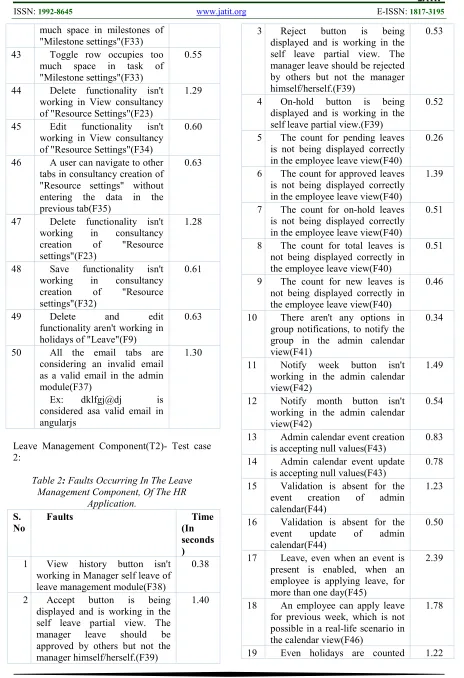
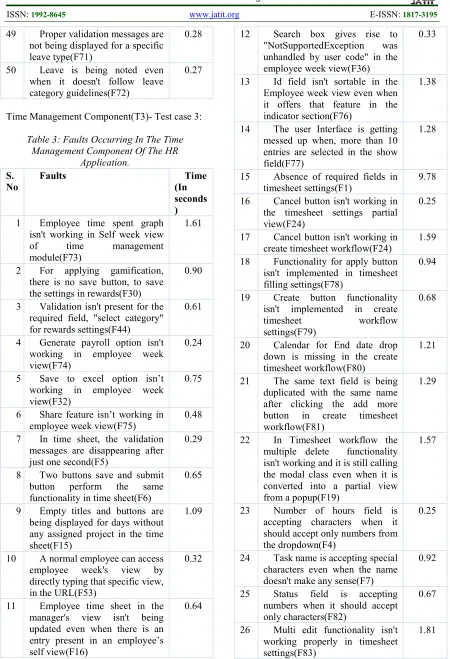
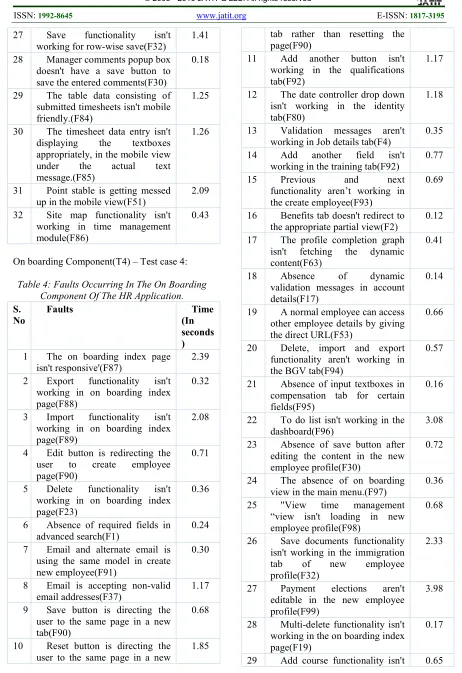
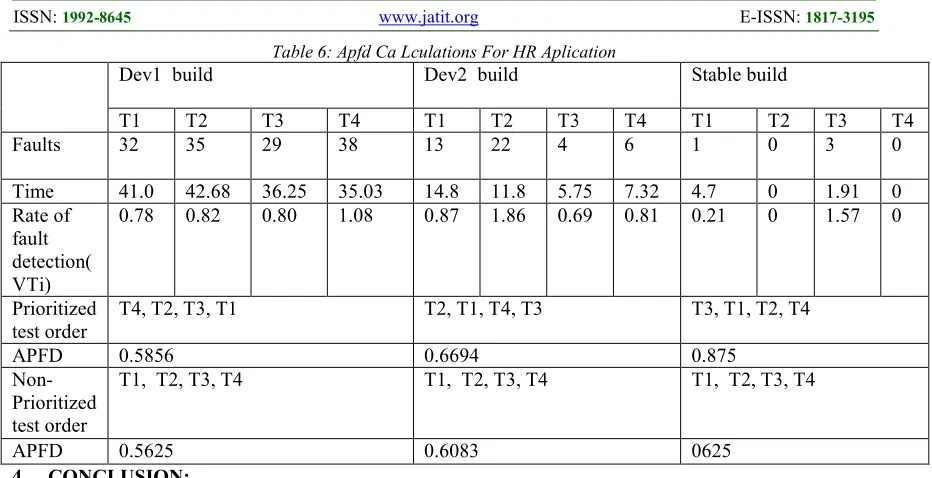
also discovered during deployment are also seeded in the application. Faults help in extending functionality and its development. Faults also help in stabilizing the application and to avoid ambiguous nature in the near future. High value for faults means that each test case in the suite is detecting a large number of the faults [1],[4],[5],[6] Low value for faults indicates that each test case detects only a small number of the faults . Here, in our paper faults in each component of the HR application are found out manually at each build. We have found out faults up to the maximum extent by taking everything into consideration. Faults disrupt the user from doing the desired work. Some faults in the application are repetitive in nature and some faults are unique. Even the same faults found in some other component may or may not have different fault time and page load time. Faults observed at each component of the HR application at different builds are gives in the below tables.
Time: Here faults are found out with respect to time. Time taken for a particular fault to occur is calculated in seconds .[4] Time taken for a specific fault to occur differs from one build to another build as modifications like implementing the requirejs to prevent the loading of unnecessary script files. Time is unique for all the faults. Time changes for each and every fault in a test case of the HR application. As some faults are repetitive in nature, some have the same fault time where as some other component may have different fault time for the same fault. All these conditions may vary based on following factors:
* Entry Of Authenticated Data * Fault Type
* Internet Speed
Following 1 to 4 shows the faults occurred and its relative time for three builds of the HR application.
Admin Component (T1)- Test case 1:
Table 1: Faults Occurring In The Admin Component Of The HR Application. S.N
o
Faults Time(I
n seconds)
1 Required field absence in the "add company documents"(F1)
3.58
2 Doesn't link to the corresponding partial view for
1.51
"Sub organization" link(F2) 3 User Interface mess up after
adding validation in "Pay settings"(F3)
3.06
4 Improper validation for document category in "adding documents"(F4)
1.38
5 Improper validation forCreate grade level in "Grade levels"(F4)
1.42
6 Improper validation for create job shift in "Job Shift" where number of working hours field is accepting characters(F4)
1.25
7 Create date field in view cost is accepting characters(F7)
1.34
8 Only one field has proper validation on create timesheet workflow of "Timesheet Approval workflow"(F8)
1.71
9 Delete as well as edit functionality aren't working properly in Questionnaires Home of "Requisition"(F9)
1.81
10 Null values are inserted after displaying error messages for an instant in "Bulk Email Template" of "Requisition"(F10)
1.47
11 Display of error messages after inserting the correct information in "Bulk email List" of "Requisition"(F11)
1.42
12 User Interface mess up in add members of "Requisition"(F12)
1.53
13 Absence of validation for create job description of "Requisition"(F13)
1.49
14 "EntityCommandExecution Exception was unhandled by user code "in AdminRepository for "Job Title"(F14)
1.47
15 Absence of proper validation and saving the data in the rewards of "Gamification Settings"(F13)
1.43
16 Messed up user interface in edit general settings of "Global settings"(F12)
ISSN: 1992-8645 www.jatit.org E-ISSN: 1817-3195
17 Absence of dynamic error messages in edit prefix settings of "Global settings"(F17)
1.77
18 Doesn't link to the corresponding partial view for "Schedule Notifications" link(F18)
0.78
19 Multiple delete functionality isn't working in organization of the "Company"(F19)
1.45
20 Multi-select and multi-delete functionality aren't working in view company documents of "Company"(F20)
0.81
21 Cancel button is still trying to close the modal(A modal was used before converting it into a partial-view)when it should be redirecting the user to the mentors view in the mentor of "Employee".(F21)
1.08
22 HttpException was unhandled by user codeInjectableControllerFacto ry for Tax Settings in "Tax"(F22)
1.29
23 Delete functionality isn't working in organization of the "company"(F23)
0.78
24 Cancel functionality isn't working in mentor of "Employee
configuration"(F24)
1.32
25 Validations aren't working correctly in in addtrainer partial view of "Employee configuration"(F4)
1.43
26 Cancel functionality isn't working in orientation of "Employee
configuration"(F24)
`1.28
27 The ng-showfunctionalityofangularjs isn't working correctly in, to do list of "Employee configuration"(F25)
0.64
28 The isvalid bit isn't working correctly in news of "Employee
configuration"(F26)
0.65
29 Cancel functionality isn't 0.61
working in work station of "Employee
configuration"(F24)
30 Delete functionality isn't working in view vendors of "Resource settings"(F23)
1.32
31 Cancel button is not working as it should in Wizard configuration of "Global settings"(F24)
0.64
32 Configure button is not working as it should in Wizard configuration of "Global settings"(F27)
0.57
33 Reset button is not working as it should in Wizard configuration of "Global settings"(F28)
1.26
34 Multiple select functionality isn't working in roles and permissions of "Global settings"(F29)
0.64
35 Absence of save button to save the changes in edit roles of "Global settings"(F30)
0.23
36 Delete functionality isn't working in roles and permissions of "Global settings"(F23)
1.28
37 Starting value which should accept only numbers is accepting a string of characters which ends with a number in prefix settings of "Global settings"(F31)
0.67
38 Save functionality isn't working correctly on view company documents of "Company" where we can add more company documents.(F32)
1.30
39 Cancel functionality isn't working correctly on view company documents of "Company" as it should redirect the user to the appropriate view.(F24)
0.60
40 Displaying error messages, multiple times in milestones of "Milestone settings"(F25)
14.4
41 Delete functionality isn't working in milestones of "Milestone Settings"(F23)
0.71
ISSN: 1992-8645 www.jatit.org E-ISSN: 1817-3195
much space in milestones of "Milestone settings"(F33) 43 Toggle row occupies too
much space in task of "Milestone settings"(F33)
0.55
44 Delete functionality isn't working in View consultancy of "Resource Settings"(F23)
1.29
45 Edit functionality isn't working in View consultancy of "Resource Settings"(F34)
0.60
46 A user can navigate to other tabs in consultancy creation of "Resource settings" without entering the data in the previous tab(F35)
0.63
47 Delete functionality isn't working in consultancy creation of "Resource settings"(F23)
1.28
48 Save functionality isn't working in consultancy creation of "Resource settings"(F32)
0.61
49 Delete and edit functionality aren't working in holidays of "Leave"(F9)
0.63
50 All the email tabs are considering an invalid email as a valid email in the admin module(F37)
Ex: dklfgj@dj is considered asa valid email in angularjs
1.30
[image:5.612.77.541.70.748.2]Leave Management Component(T2)- Test case 2:
Table 2: Faults Occurring In The Leave
Management Component, Of The HR Application.
S. No
Faults Time
(In seconds )
1 View history button isn't working in Manager self leave of leave management module(F38)
0.38
2 Accept button is being displayed and is working in the self leave partial view. The manager leave should be approved by others but not the manager himself/herself.(F39)
1.40
3 Reject button is being displayed and is working in the self leave partial view. The manager leave should be rejected by others but not the manager himself/herself.(F39)
0.53
4 On-hold button is being displayed and is working in the self leave partial view.(F39)
0.52
5 The count for pending leaves is not being displayed correctly in the employee leave view(F40)
0.26
6 The count for approved leaves is not being displayed correctly in the employee leave view(F40)
1.39
7 The count for on-hold leaves is not being displayed correctly in the employee leave view(F40)
0.51
8 The count for total leaves is not being displayed correctly in the employee leave view(F40)
0.51
9 The count for new leaves is not being displayed correctly in the employee leave view(F40)
0.46
10 There aren't any options in group notifications, to notify the group in the admin calendar view(F41)
0.34
11 Notify week button isn't working in the admin calendar view(F42)
1.49
12 Notify month button isn't working in the admin calendar view(F42)
0.54
13 Admin calendar event creation is accepting null values(F43)
0.83
14 Admin calendar event update is accepting null values(F43)
0.78
15 Validation is absent for the event creation of admin calendar(F44)
1.23
16 Validation is absent for the event update of admin calendar(F44)
0.50
17 Leave, even when an event is present is enabled, when an employee is applying leave, for more than one day(F45)
2.39
18 An employee can apply leave for previous week, which is not possible in a real-life scenario in the calendar view(F46)
1.78
ISSN: 1992-8645 www.jatit.org E-ISSN: 1817-3195
when an employee is applying leave for more than one day(F47) 20 During the update, the select field isn't fetching the type like webinar, meeting etc. in configuration of the admin calendar(F48)
5.82
21 Duplicate events with the same content can be created without even selecting the type in configuration of the admin calendar(F49)
1.55
22 My leaves aren't connected to the right partial views from the dashboard(F50)
0.51
23 User Interface for mobile view is getting messed up for the admin calendar view(F51)
1.03
24 When an employee applied a leave for more than one day, it isn't being displayed in the mobile view except for a digit "+1" which isn't clickable as of now.(F52)
0.35
25 Self link isn't clickable in mobile view of the admin calendar(F52)
0.50
26 Employee leave link isn't clickable in mobile view of the admin calendar(F52)
1.01
27 Even the manager can access the admin settings as of now, by giving the direct URL to those views(F53)
2.03
28 The Employee link for the pop-up isn't working in the Employee leave view(F54)
0.70
29 After approving a leave the refreshed content is not being displayed.(F55)
1.75
30 The pop-ups need manual action of pressing the close button. If they are not closed, then they are being displayed in other partial views(F56)
1.41
31 Type field of admin calendar in mobile view, isn't visible(F57)
0.56
32 Title field of admin calendar in mobile view, isn't visible(F57)
1.89
33 Description field of admin calendar in mobile view, isn't visible(F57)
0.83
34 My leaves in the main menu is 0.33
linking to the employee leave dashboard(F58)
35 Events information and description aren't available in self view of the employee as they are not clickable in the calendar(F59)
2.06
36 Holidays, meetings, webinars and events doesn't have a default color as specified in the boxes(F60)
0.36
37 Employee using the manual apply button can select the previous day and dates which are not possible in a real-life scenario(F46)
0.49
38 The number of days of leave that are computed by the computer are inconsistent(F61)
1.04
39 On-hold option is available for an on-hold employee leave(F62)
1.27
40 The header which specifies the month is getting messed up in mobile view of self leave(F51)
0.72
41 Static data is being displayed in the popup for applying leave, for recent leaves instead of dynamic data(F63)
1.86
42 Color changes for the type of leaves, aren't being displayed without using the refresh button(F64)
0.35
43 Deleting an event, meeting, webinar, holidays are not possible in the admin calendar configuration(F65)
0.88
44 Event type is not available in the list of options, even though it is specified above the calendar, to distinguish the type of the event in the calendar view(F66)
0.55
45 The same event is getting duplicated when an admin tries to add more than one event for the same time(F67)
1.25
46 We can apply leave to the same date in the self leave(F68)
3.73
47 Navigation for month isn't working properly as it displaying another month for a single click(F69)
5.13
48 The data is not being displayed in IE9(F70)
ISSN: 1992-8645 www.jatit.org E-ISSN: 1817-3195
49 Proper validation messages are not being displayed for a specific leave type(F71)
0.28
50 Leave is being noted even when it doesn't follow leave category guidelines(F72)
0.27
[image:7.612.84.534.67.726.2]Time Management Component(T3)- Test case 3:
Table 3: Faults Occurring In The Time Management Component Of The HR
Application. S.
No
Faults Time
(In seconds )
1 Employee time spent graph isn't working in Self week view of time management module(F73)
1.61
2 For applying gamification, there is no save button, to save the settings in rewards(F30)
0.90
3 Validation isn't present for the required field, "select category" for rewards settings(F44)
0.61
4 Generate payroll option isn't working in employee week view(F74)
0.24
5 Save to excel option isn’t working in employee week view(F32)
0.75
6 Share feature isn’t working in employee week view(F75)
0.48
7 In time sheet, the validation messages are disappearing after just one second(F5)
0.29
8 Two buttons save and submit button perform the same functionality in time sheet(F6)
0.65
9 Empty titles and buttons are being displayed for days without any assigned project in the time sheet(F15)
1.09
10 A normal employee can access employee week's view by directly typing that specific view, in the URL(F53)
0.32
11 Employee time sheet in the manager's view isn't being updated even when there is an entry present in an employee’s self view(F16)
0.64
12 Search box gives rise to "NotSupportedException was unhandled by user code" in the employee week view(F36)
0.33
13 Id field isn't sortable in the Employee week view even when it offers that feature in the indicator section(F76)
1.38
14 The user Interface is getting messed up when, more than 10 entries are selected in the show field(F77)
1.28
15 Absence of required fields in timesheet settings(F1)
9.78
16 Cancel button isn't working in the timesheet settings partial view(F24)
0.25
17 Cancel button isn't working in create timesheet workflow(F24)
1.59
18 Functionality for apply button isn't implemented in timesheet filling settings(F78)
0.94
19 Create button functionality isn't implemented in create timesheet workflow settings(F79)
0.68
20 Calendar for End date drop down is missing in the create timesheet workflow(F80)
1.21
21 The same text field is being duplicated with the same name after clicking the add more button in create timesheet workflow(F81)
1.29
22 In Timesheet workflow the multiple delete functionality isn't working and it is still calling the modal class even when it is converted into a partial view from a popup(F19)
1.57
23 Number of hours field is accepting characters when it should accept only numbers from the dropdown(F4)
0.25
24 Task name is accepting special characters even when the name doesn't make any sense(F7)
0.92
25 Status field is accepting numbers when it should accept only characters(F82)
0.67
26 Multi edit functionality isn't working properly in timesheet settings(F83)
ISSN: 1992-8645 www.jatit.org E-ISSN: 1817-3195
27 Save functionality isn't working for row-wise save(F32)
1.41
28 Manager comments popup box doesn't have a save button to save the entered comments(F30)
0.18
29 The table data consisting of submitted timesheets isn't mobile friendly.(F84)
1.25
30 The timesheet data entry isn't displaying the textboxes appropriately, in the mobile view under the actual text message.(F85)
1.26
31 Point stable is getting messed up in the mobile view(F51)
2.09
32 Site map functionality isn't working in time management module(F86)
0.43
[image:8.612.77.539.66.739.2]On boarding Component(T4) – Test case 4:
Table 4: Faults Occurring In The On Boarding Component Of The HR Application. S.
No
Faults Time
(In seconds )
1 The on boarding index page isn't responsive'(F87)
2.39
2 Export functionality isn't working in on boarding index page(F88)
0.32
3 Import functionality isn't working in on boarding index page(F89)
2.08
4 Edit button is redirecting the user to create employee page(F90)
0.71
5 Delete functionality isn't working in on boarding index page(F23)
0.36
6 Absence of required fields in advanced search(F1)
0.24
7 Email and alternate email is using the same model in create new employee(F91)
0.30
8 Email is accepting non-valid email addresses(F37)
1.17
9 Save button is directing the user to the same page in a new tab(F90)
0.68
10 Reset button is directing the user to the same page in a new
1.85
tab rather than resetting the page(F90)
11 Add another button isn't working in the qualifications tab(F92)
1.17
12 The date controller drop down isn't working in the identity tab(F80)
1.18
13 Validation messages aren't working in Job details tab(F4)
0.35
14 Add another field isn't working in the training tab(F92)
0.77
15 Previous and next functionality aren’t working in the create employee(F93)
0.69
16 Benefits tab doesn't redirect to the appropriate partial view(F2)
0.12
17 The profile completion graph isn't fetching the dynamic content(F63)
0.41
18 Absence of dynamic validation messages in account details(F17)
0.14
19 A normal employee can access other employee details by giving the direct URL(F53)
0.66
20 Delete, import and export functionality aren't working in the BGV tab(F94)
0.57
21 Absence of input textboxes in compensation tab for certain fields(F95)
0.16
22 To do list isn't working in the dashboard(F96)
3.08
23 Absence of save button after editing the content in the new employee profile(F30)
0.72
24 The absence of on boarding view in the main menu.(F97)
0.36
25 "View time management “view isn't loading in new employee profile(F98)
0.68
26 Save documents functionality isn't working in the immigration tab of new employee profile(F32)
2.33
27 Payment elections aren't editable in the new employee profile(F99)
3.98
28 Multi-delete functionality isn't working in the on boarding index page(F19)
0.17
ISSN: 1992-8645 www.jatit.org E-ISSN: 1817-3195
working in the orientation(F100) 30 External and training event
description are using the same modal which is leading to inconsistency in the data, in orientation(F101)
2.77
31 Validations aren't working in trainer information(F4)
4.28
32 Tinymce plug-in isn't responsive in the orientation tab(F87)
0.34
33 Employee training in orientation isn't responsive in mobile view(F87)
2.11
34 Edit functionality isn't working for assigning mentor in mentor tab(F34)
2.25
35 Multiple select functionality isn't working for assigning mentor in mentor tab(F29)
1.16
36 The same menu which consists of all the links to various important modules are being displayed in a normal employee's profile(F102)
0.61
37 Advanced search isn't working in the on boarding index page(F103)
0.20
38 The names in the new joiners list are directing the user to the create employee profile page(F104)
0.39
39 Training tab isn't responsive in the create employee profile(F87)
1.04
40 BGV tab isn't responsive in the create employee profile(F87)
0.17
41 Add another field in workstation is redirecting the user to the same page(F92)
0.55
42 Add another field in device is redirecting the user to the same page(F92)
0.15
43 Even after selecting the field "same as the above address", the validation messages are being displayed after clicking the save button in the create new employee profile(F105)
2.08
44 Scheduled date is taking comments rather than a date in training tab of create new
0.18
employee profile(F7)
45 Date picker for disabled textboxes are clickable(F106)
0.77
46 Presence of an excess field named "Employee name" which is out of place in compensation tab of create new employee profile(F107)
0.84
47 The date picker control isn't disappearing automatically when another date picker is clicked(F108)
0.67
48 The same model is used for all the date pickers present in the total compensation tab causing inconsistencies in the data(F101)
1.42
49 ZIP fields are accepting special characters, as long as there is at least one number present in the textbox(F31)
2.06
50 Date fields are accepting normal strings instead of dates, causing inconsistency in the data(F7)
11.4
Thus these tables show the faults occurred during those particular requests of each component requesting for a particular service. We can see that there are totally 108 faults in the entire HM application consisting of four major components. The numbering in the brackets (F1,F2,F3,….) are given for the convenient purpose of our understanding, which represents that it is the first fault, second fault and so on till one hundred and eighth fault. In this way, faults are found out with time for all the test cases of the builds (Dev1 build, Dev2 build and stable build).
Fault Matrix: Based on these faults and fault time obtained previously from the above tables “Fault Matrix” is constructed.
Table 5: Fault Matrix
T1 T2 T3 T4
F1 * * *
F2 * *
F3 *
F4 * * *
F5 *
F6 *
F7 * * *
F8 *
F9 *
ISSN: 1992-8645 www.jatit.org E-ISSN: 1817-3195
F11 *
F12 *
F13 *
F14 *
F15 *
F16 *
F17 * *
F18 *
F19 * * *
F20 *
F21 *
F22 *
F23 * *
F24 * *
F25 *
F26 *
F27 *
F28 *
F29 * *
F30 * * *
F31 * *
F32 * * *
F33 *
F34 * *
F35 *
F36 *
F37 * *
F38 *
F39 *
F40 *
F41 *
F42 *
F43 *
F44 * *
F45 *
F46 *
F47 *
F48 *
F49 *
F50 *
F51 * *
F52 *
F53 * * *
F54 *
F55 *
F56 *
F57 *
F58 *
F59 *
F60 *
F61 *
F62 *
F63 * *
F64 *
F65 *
F66 *
F67 *
F68 *
F69 *
F70 *
F71 *
F72 *
F73 *
F74 *
F75 *
F76 *
F77 *
F78 *
F79 *
F80 * *
F81 *
F82 *
F83 *
F84 *
F85 *
F86 *
F87 *
F88 *
F89 *
F90 *
F91 *
F92 *
F93 *
F94 *
F95 *
F96 *
F97 *
F98 *
F99 *
F100 *
F101 *
F102 *
F103 *
F104 *
F105 *
F106 *
F107 *
ISSN: 1992-8645 www.jatit.org E-ISSN: 1817-3195
No. of faults
32 35 29 38
Time( in seconds) 41. 0 42 .68 36 .25 35 .03
F1, F2, F3… F108: Total number of faults T1, T2, T3, T4: Test cases
*: Fault occurring in a specific test case.
E. Rate of Fault Detection (VTi): Faults are detected for each test case in the test suite. [4][5][6] Total time taken for each test case is presumed. VTi is the rate of the fault detection. It is calculated using the following formula: VTi = fault / time Equation 1
As we have found out fault and time initially, now we must calculate VTi.
VT1=32/41 =0.78 VT2=35/42.68=0.82 VT3=29/36.25=0.80 VT4=38/35.03=1.08
Based upon these VTi values, test cases will be prioritized in decreasing order:
T4, T2, T3, T1
APFD: APFD is a metric. Rate of fault detection of the prioritization criteria is measured using “Average Percentage of Faults Detected” metric also known as APFD metric [4][7]. APFD evaluates effectiveness of prioritized test suite order. The priority is taken in such a way that the faults are detected with less number of test cases which ultimately saves time and resources. APFD is calculated by taking the weighted average of the number of faults detected during the execution of the test suite. APFD is only possible when faults are available. It is not possible to prioritize test case suites without the availability of faults. So, in most of the cases it is used in regression testing to detect faults easily. Faults are used for the evaluation.
APFD = 1 – ((TF1+ TF2+TF3 + ….+ TFM )/(m*n)) + (1/(2*n)) Equation 2
TFI: position of the firs t test case “t” in T m: number of faults detected in the HR application
n: number of test cases(number in the test suite) F: fault detected
T: test suite
By making use of the above formula in equation 2, APFD is calculated. Before calculating that, we will have to get TF values. To find out the TF values, we make use of the faults and the order of test case suites. In the above fault matrix, we can see that fault F1 is firs t given by test cases T1, T3 and T4 (according to priority order T4,
T2, T3, T1). Now check the position of T1, T3 and T4 in the prioritized sequence, which is firs t. Thus, value of TF1 is 1 as it is present in the T4 which is in the first order in the prioritized test case suite. Similarly from TF2 to TF108 values are taken such that by making use of the order and assigning the appropriate number to it. TF1=1 TF2=1 TF3=4 TF4=1 TF5=3 TF6=3 TF7=1 TF8=4 TF9=4 TF10=
4 TF11=
4
TF12= 4
TF13=4 TF14= 4 TF15= 3 TF16= 3 TF17= 1
TF18=4 TF19= 1 TF20= 4 TF21= 4 TF22= 4
TF23=1 TF24= 3 TF25= 4 TF26= 4 TF27= 4
TF28=4 TF29= 1 TF30= 1 TF31= 1 TF32= 1
TF33=4 TF34= 1 TF35= 4 TF36= 3 TF37= 1
TF38=2 TF39= 2 TF40= 2 TF41= 2 TF42= 2
TF43=2 TF44= 2 TF45= 2 TF46= 2 TF47= 2
TF48=2 TF49= 2 TF50= 2 TF51= 2 TF52= 2
TF53=1 TF54= 2 TF55= 2 TF56= 2 TF57= 2
TF58=2 TF59= 2 TF60= 2 TF61= 2 TF62= 2
TF63=1 TF64= 2 TF65= 2 TF66= 2 TF67= 2
TF68=2 TF69= 2 TF70= 2 TF71= 2 TF72= 2
TF73=3 TF74= 3 TF75= 3 TF76= 3 TF77= 3
TF78=3 TF79= 3 TF80= 1 TF81= 3 TF82= 3
TF83=3 TF84= 3 TF85= 3 TF86= 3 TF87= 1
TF88=1 TF89= 1 TF90= 1 TF91= 1 TF92= 1
TF93=1 TF94= 1 TF95= 1 TF96= 1 TF97= 1
TF98=1 TF99= 1 TF100 =1 TF101 =1 TF102 =1
TF103=1 TF104 =1 TF105 =1 TF106 =1 TF107 =1 TF108=1
ISSN: 1992-8645 www.jatit.org E-ISSN: 1817-3195
+2 +2 +2 +2 +2 +2 +2 +2 +2 +2 +1 +2 +2 +2 +2 +2 +2 +2 +2 +2 +1 +2 +2 +2 +2 +2 +2 +2 +2 +2 +3 +3 +3 +3 +3 +3 +3 +1 +3 +3 +3 +3 +3 +3 +1 +1 +1 +1 +1 +1 +1 +1 +1 +1 +1 +1 +1 +1 +1 +1 +1 +1 +1 +1 +1 +1)/(4*108))+(1/4*2)
=1-(233/432) + (1/8) = 0.5856
0.56 is the obtained APFD value for prioritized test order. Now, APFD for non-prioritized test-order is calculated in the same manner. Non-prioritized order: T1, T2, T3, T4
APFD=1-((1 +1 +1 +1 +3 +3 +1 +1 +1 +1 +1 +1 +1 +1 +3 +3 +1 +1 +1 +1 +1 +1 +1 +1 +1 +1 +1 +1 +1 +1 +1 +1 +1 +1 +1 +3 +1 +2 +2 +2 +2 +2 +2 +2 +2 +2 +2 +2 +2 +2 +2 +2 +2 +2 +2 +2 +2 +2 +2 +2 +2 +2 +2 +2 +2 +2 +2 +2 +2 +2 +2 +2 +3 +3 +3 +3 +3 +3 +3 +3 +3 +3 +3 +3 +3 +3 +4 +4 +4 +4 +3 +4 +4 +4 +4 +3 +4 +4 +4 +4 +3 +4 +4 +4 +4 +3 +4 +4)/ (4*108)) + (1/4*2)
= 0.5625
In this case, after calculations we can clearly observe that APFD value is high for prioritized sequence (0.5856>0.5625). Thus the first dev1 build, has higher value for prioritized test suite order. In this way, APFD calculations are done for all the builds. They are summarized in table 5.
3. EXPERIMENTATION AND ANALYSIS
We have tested three builds by taking four Test case suites for four major components, for each build. Total number of faults occurring within those test cases is discovered by manual seeding. Even though we are finding the faults manually, we have taken the help of page load time extension of Google chrome to get accurate results. Time is measured in seconds and we have also considered the milliseconds for accuracy. After finding out the faults in all the major components by making use of the test case
suites fault matrix is constructed with the taken faults and obtained time. From this matrix, fault rates are detected i.e., VTi using the above mentioned APFD formula.
Now, we implement test case prioritization. As we have already discussed previously in section 1.2 of this paper about the three criteria’s which are used to identify faults in an application or software (interaction -based, count-based and frequency-
based). In this work, prioritization criteria will be component based fault rate or module based fault rate detection using the APFD metric. ‘Average Percentage of Faults Detected’ determines the effectiveness of test suite orders either it may be prioritized/non -prioritized. It effectively chooses the suite orders such that the faults are detected at an early stage and with less number of test cases. Thus for measuring this certainty, APFD is chosen due to its effective results. So, in our work we have done this calculation for both the prioritized and non - prioritized test orders of the HR application to compare the results.
In the table.4, we can observe that we have taken results for each build. Even thought the faults still persist even in the third build, the basic functionality of the Application was stabilized at third build. As the HP application is a very big project which deals with finance, employee management, event management and such, it is difficult to rectify all the faults that are found after the first build. By making use of test case prioritization, we have improved the fault detection of the HP application when compared to other parallel projects. As we can see in the table 4, each build has different sets of faults and with different fault times. For each build all the four test case suites are taken and the total time varies
significantly. For some faults it is just 0. 14 seconds and for some it’s around 5. 5 seconds (which implies that it is taking more time for processing /completing the task or in simple terms we can say that it’s consuming user’s time making him/her sit in idle state which isn't a good thing in a real-time scenario). The fault which takes less time is relatively much better than other faults with more time. So, from our calculations we found out that the dev 1(development 1) build has least APFD value
ISSN: 1992-8645 www.jatit.org E-ISSN: 1817-3195 Table 6: Apfd Ca Lculations For HR Aplication
Dev1 build Dev2 build Stable build
T1 T2 T3 T4 T1 T2 T3 T4 T1 T2 T3 T4 Faults 32 35 29 38 13 22 4 6 1 0 3 0
Time 41.0 42.68 36.25 35.03 14.8 11.8 5.75 7.32 4.7 0 1.91 0 Rate of
fault detection( VTi)
0.78 0.82 0.80 1.08 0.87 1.86 0.69 0.81 0.21 0 1.57 0
Prioritized test order
T4, T2, T3, T1 T2, T1, T4, T3 T3, T1, T2, T4
APFD 0.5856 0.6694 0.875
Non-Prioritized test order
T1, T2, T3, T4 T1, T2, T3, T4 T1, T2, T3, T4
APFD 0.5625 0.6083 0625
4. CONCLUSION:
In previous papers many criteria’s are used for prioritizing the test cases. Interaction -based criteria used unique parameter-values and such.
Count-based criteria consider maximum number of actions and unique windows. And frequency -based criteria consider the most frequently present window, weighted values, etc. These criteria’s produced test suite orders for Web Applications. So, as a part of this, we proposed a new criterion ‘Component based or module based’ for test case prioritization which can be applied to real time applications to detect faults at an early stage, in order to improve efficiency of testing. Component based or module based criteria takes builds of the HR application, prioritizes the test cases and tests the data for faults. These faults percentage is ascertained by APFD metric as it is known for its efficiency. Our testing on the builds of the HR application implies that prioritization is important for executing test suites and detects faults effectively at an early stage with less number of test cases. Prioritization improves the efficiency of testing with respect to the three builds and prioritized test cases are more effective in detecting these faults. Even though the test case prioritization is effective, as it needs faults, it isn't currently implemented in the real time applications. Here we have implemented that in the HR application that we have developed and it's clear that by using the test case prioritization, faults can be detected at an early stage by prioritizing the test case suites as per the APFD metric. In future, we are planning to implement the test case prioritization in different real time applications, so that the faults can be detected efficiently.
REFRENCES:
[1] Renee. C. Bryce, Sreedevi Sampath and Atif. M. Memon, “Developing a Single Model and Test Prioritization Strategies for Event-Driven Software,” in IEEE Trans. On Software Engineering, vol.X, no. X, J an. 2011
[2] M. Grindal, J. Offutt, and S. Andler, “Combination testing strategies: a survey,” Software Testing, Verification, and Reliability, vol. 15, pp. 167–199, Mar. 2005.
[3] J. Lee and X. He, “A methodology for tests election,” Journal of Systems and Software, vol. 13, no. 3, pp. 177–185, Nov. 1990.
[4] Praveen Ranjan Srivastava, “Test Case Prioritization,” in Journal of Theoretical and Applied Information Technology, 2005-2008 JATIT
[5] J. C. Munson and T. M. Khoshgoftaar, ” The Detection of Fault -Prone Programs ,” IEEE Trans. On Software Engineering, vol.18, no.5,pp. 423-433,1992.
[6] D.R.Kuhn, D.R.Wallace, and A. M. Gallo, “Software fault interactions and implications for software testing,” IEEE Trans. on Software Engineering, vol. 30, no. 6, pp. 418 –421, Oct. 2004.