Part No. 118360-A Rev. A September 1997
Marketing Version Number 5.1
All rights reserved. Printed in the USA. September 1997.
The information in this document is subject to change without notice. The statements, configurations, technical data, and recommendations in this document are believed to be accurate and reliable, but are presented without express or implied warranty. Users must take full responsibility for their applications of any products specified in this document. The information in this document is proprietary to Bay Networks, Inc.
The software described in this document is furnished under a license agreement and may only be used in accordance with the terms of that license. A summary of the Software License is included in this document.
Trademarks
Bay Networks is a registered trademark and Remote Annex, BayStack,
Quick2Config, System 5000, Bay Networks Press, and the Bay Networks logo are trademarks of Bay Networks, Inc.
Microsoft, MS, MS-DOS, Win32, Windows, and Windows NT are registered trademarks of Microsoft Corporation.
All other trademarks and registered trademarks are the property of their respective owners.
Restricted Rights Legend
Use, duplication, or disclosure by the United States Government is subject to restrictions as set forth in subparagraph (c)(1)(ii) of the Rights in Technical Data and Computer Software clause at DFARS 252.227-7013.
Notwithstanding any other license agreement that may pertain to, or accompany the delivery of, this computer software, the rights of the United States Government regarding its use, reproduction, and disclosure are as set forth in the Commercial Computer Software-Restricted Rights clause at FAR 52.227-19.
Statement of Conditions
In the interest of improving internal design, operational function, and/or reliability, Bay Networks, Inc. reserves the right to make changes to the products described in this document without notice.
Bay Networks, Inc. does not assume any liability that may occur due to the use or application of the product(s) or circuit layout(s) described herein.
CONDITIONS OF THIS LICENSE AGREEMENT. THE TERMS EXPRESSED IN THIS AGREEMENT ARE THE ONLY TERMS UNDER WHICH BAY NETWORKS WILL PERMIT YOU TO USE THE SOFTWARE. If you do not accept these terms and conditions, return the product, unused and in the original shipping container, within 30 days of purchase to obtain a credit for the full purchase price
1. License Grant. Bay Networks, Inc. (“Bay Networks”) grants the end user of the Software (“Licensee”) a personal, nonexclusive, nontransferable license: a) to use the Software either on a single computer or, if applicable, on a single authorized device identified by host ID, for which it was originally acquired; b) to copy the Software solely for backup purposes in support of authorized use of the Software; and c) to use and copy the associated user manual solely in support of authorized use of the Software by Licensee. This license applies to the Software only and does not extend to Bay Networks Agent software or other Bay Networks software products. Bay Networks Agent software or other Bay Networks software products are licensed for use under the terms of the applicable Bay Networks, Inc. Software License Agreement that accompanies such software and upon payment by the end user of the applicable license fees for such software.
2. Restrictions on use; reservation of rights. The Software and user manuals are protected under copyright laws. Bay Networks and/or its licensors retain all title and ownership in both the Software and user manuals, including any revisions made by Bay Networks or its licensors. The copyright notice must be reproduced and included with any copy of any portion of the Software or user manuals. Licensee may not modify, translate, decompile, disassemble, use for any competitive analysis, reverse engineer, distribute, or create derivative works from the Software or user manuals or any copy, in whole or in part. Except as expressly provided in this Agreement, Licensee may not copy or transfer the Software or user manuals, in whole or in part. The Software and user manuals embody Bay Networks’ and its licensors’ confidential and proprietary intellectual property. Licensee shall not sublicense, assign, or otherwise disclose to any third party the Software, or any information about the operation, design, performance, or implementation of the Software and user manuals that is confidential to Bay Networks and its licensors; however, Licensee may grant permission to its consultants, subcontractors, and agents to use the Software at Licensee’s facility, provided they have agreed to use the Software only in accordance with the terms of this license.
period along with proof of the date of shipment. This warranty does not apply if the media has been damaged as a result of accident, misuse, or abuse. The Licensee assumes all responsibility for selection of the Software to achieve Licensee’s intended results and for the installation, use, and results obtained from the Software. Bay Networks does not warrant a) that the functions contained in the software will meet the Licensee’s requirements, b) that the Software will operate in the hardware or software combinations that the Licensee may select, c) that the operation of the Software will be uninterrupted or error free, or d) that all defects in the operation of the Software will be corrected. Bay Networks is not obligated to remedy any Software defect that cannot be reproduced with the latest Software release. These warranties do not apply to the Software if it has been (i) altered, except by Bay Networks or in accordance with its instructions; (ii) used in conjunction with another vendor’s product, resulting in the defect; or (iii) damaged by improper environment, abuse, misuse, accident, or negligence. THE
FOREGOING WARRANTIES AND LIMITATIONS ARE EXCLUSIVE REMEDIES AND ARE IN LIEU OF ALL OTHER WARRANTIES EXPRESS OR IMPLIED, INCLUDING WITHOUT LIMITATION ANY WARRANTY OF MERCHANTABILITY OR FITNESS FOR A PARTICULAR PURPOSE. Licensee is responsible for the security of its own data and information and for maintaining adequate procedures apart from the Software to reconstruct lost or altered files, data, or programs.
4. Limitation of liability. IN NO EVENT WILL BAY NETWORKS OR ITS LICENSORS BE LIABLE FOR ANY COST OF SUBSTITUTE
PROCUREMENT; SPECIAL, INDIRECT, INCIDENTAL, OR
CONSEQUENTIAL DAMAGES; OR ANY DAMAGES RESULTING FROM INACCURATE OR LOST DATA OR LOSS OF USE OR PROFITS ARISING OUT OF OR IN CONNECTION WITH THE PERFORMANCE OF THE SOFTWARE, EVEN IF BAY NETWORKS HAS BEEN ADVISED OF THE POSSIBILITY OF SUCH DAMAGES. IN NO EVENT SHALL THE LIABILITY OF BAY NETWORKS RELATING TO THE SOFTWARE OR THIS
AGREEMENT EXCEED THE PRICE PAID TO BAY NETWORKS FOR THE SOFTWARE LICENSE.
5. Government Licensees. This provision applies to all Software and
documentation acquired directly or indirectly by or on behalf of the United States Government. The Software and documentation are commercial products, licensed on the open market at market prices, and were developed entirely at private expense and without the use of any U.S. Government funds. The license to the U.S. Government is granted only with restricted rights, and use, duplication, or disclosure by the U.S. Government is subject to the restrictions set forth in subparagraph (c)(1) of the Commercial Computer Software––Restricted Rights clause of FAR 52.227-19 and the limitations set out in this license for civilian agencies, and subparagraph (c)(1)(ii) of the Rights in Technical Data and Computer Software clause of DFARS 252.227-7013, for agencies of the Department of Defense or their successors, whichever is applicable.
7. Term and termination. This license is effective until terminated; however, all of the restrictions with respect to Bay Networks’ copyright in the Software and user manuals will cease being effective at the date of expiration of the Bay Networks copyright; those restrictions relating to use and disclosure of Bay Networks’ confidential information shall continue in effect. Licensee may terminate this license at any time. The license will automatically terminate if Licensee fails to comply with any of the terms and conditions of the license. Upon termination for any reason, Licensee will immediately destroy or return to Bay Networks the Software, user manuals, and all copies. Bay Networks is not liable to Licensee for damages in any form solely by reason of the termination of this license.
8. Export and Re-export. Licensee agrees not to export, directly or indirectly, the Software or related technical data or information without first obtaining any required export licenses or other governmental approvals. Without limiting the foregoing, Licensee, on behalf of itself and its subsidiaries and affiliates, agrees that it will not, without first obtaining all export licenses and approvals required by the U.S. Government: (i) export, re-export, transfer, or divert any such Software or technical data, or any direct product thereof, to any country to which such exports or re-exports are restricted or embargoed under United States export control laws and regulations, or to any national or resident of such restricted or embargoed countries; or (ii) provide the Software or related technical data or information to any military end user or for any military end use, including the design,
development, or production of any chemical, nuclear, or biological weapons. 9. General. If any provision of this Agreement is held to be invalid or
unenforceable by a court of competent jurisdiction, the remainder of the provisions of this Agreement shall remain in full force and effect. This Agreement will be governed by the laws of the state of California.
Should you have any questions concerning this Agreement, contact Bay Networks, Inc., 4401 Great America Parkway, P.O. Box 58185, Santa Clara, California 95054-8185.
If you are responsible for configuring and/or managing a Model 8000 or Model 5399 Remote Access Concentrator (RAC), you need to read this guide.
Before You Begin
Before using this document, you must complete the following procedures. For a new RAC:
• Order your WAN (PRI or CAS) lines from your telco. Order information is provided in the Bay Networks publication Provisioning WAN Lines for Remote Access Concentrators. • When ordering your WAN lines, keep a record of the service
options the telco provides you with, so that you can set WAN parameters on the RAC accordingly.
If you want to Go to
Use the RAC Command Line Interface (CLI) commands to connect to hosts, manage jobs, display and modify
parameters (via the admin command), and display network information
Chapter 1
Display and modify parameters using the host-based na utility (which is more comprehensive than the admin command)
Chapter 2
Use the RAC configuration parameters Chapter 3 Obtain information about the expedited remote procedure
(erpcd), which accesses host files, dumps RAC images, and implements the RAC host-based Access Control Protocol used for security
• Install the RAC and boot it, as described in the appropriate hardware installation manual (for example, for the Model 8000 RAC, this is the Bay Networks publication Installing the Model 8000 Remote Access Concentrator).
• Do not physically connect cables to the WAN interface ports; wait until you have at least performed a minimal configuration. An alarm from an improperly configured interface could cause the telco to drop the line.
Conventions
special type In examples, special type indicates system output.
special type Bold special type indicates user input.
<cr> In command examples, this notation indicates that pressing the Return key enters the default value. lowercase bold Lowercase bold indicates commands, pathnames, or
filenames that must be entered as displayed. lowercase italics In the context of commands and command syntax,
lowercase italics indicate variables for which the user supplies a value.
[ ] In command dialogue, square brackets indicate default values. Pressing the Return key selects this value. Square brackets appearing in command syntax indicate optional arguments.
| In command syntax, a vertical line (|) separates the different options available for a parameter.
CTRL-X This notation indicates a two-character sequence for control characters. To enter the control character, hold down the Control key (often labeledCTRL) and press the character specified byX.
Acronyms
ACP Access Control Protocol
AUI Attachment Unit Interface
BFS Block File Server
BootP Bootstrap Protocol
BRI Basic Rate Interface
CAS Channel Associated Signalling
CCITT International Telegraph and Telephone Consultative Committee (now ITU-T)
CSMA/CD Carrier Sense Multiple Access with Collision Detection DLCMI Data Link Control Management Interface
erpcd expedited remote procedure call daemon
FTP File Transfer Protocol
Notes provide important information.
Warnings inform you about conditions that can have adverse effects on processing.
ISO International Organization for Standardization ITU-T International Telecommunications Union–
Telecommunications (formerly CCITT)
LAN local area network
MAC media access control
MAU media access unit
MMP Multisystem Multilink PPP
MP Multilink PPP
MDI-X media-dependent interface with crossover NBMA nonbroadcast multi-access
OSI Open Systems Interconnection
PPP Point-to-Point Protocol
PRI Primary Rate ISDN
RIP Routing Information Protocol
RAC Bay Networks Remote Access Concentrator RADIUS Remote Authentication Dial In User Service SMDS Switched Multimegabit Data Service SNMP Simple Network Management Protocol
TCP/IP Transmission Control Protocol/Internet Protocol Telnet Telecommunication Network
TFTP Trivial File Transfer Protocol
TPE twisted-pair Ethernet
UDP User Datagram Protocol
Ordering Bay Networks Publications
To purchase additional copies of this document or other Bay Networks publications, order by part number from Bay Networks Press™ at the following numbers:
• Phone--U.S./Canada: 888-422-9773 • Phone--International: 510-490-4752
• FAX--U.S./Canada and International: 510-498-2609
The Bay Networks Press catalog is available on the World Wide Web at support.baynetworks.com/Library/GenMisc. Bay Networks publications are available on the World Wide Web at support.baynetworks.com/Library/tpubs.
Bay Networks Customer Service
You can purchase a support contract from your Bay Networks distributor or authorized reseller, or directly from Bay Networks Services. For information about, or to purchase a Bay Networks service contract, either call your local Bay Networks field sales office or one of the following numbers:
Region Telephone number Fax number
United States and Canada
800-2LANWAN; then enter Express Routing Code (ERC) 290, when prompted, to purchase or renew a service contract
508-916-8880 (direct)
508-916-3514
Europe 33-4-92-96-69-66 33-4-92-96-69-96
Asia/Pacific 61-2-9927-8888 61-2-9927-8899
How to Get Help
If you purchased a service contract for your Bay Networks product from a distributor or authorized reseller, contact the technical support staff for that distributor or reseller for assistance.
If you purchased a Bay Networks service program, call one of the following Bay Networks Technical Solutions Centers:
Technical Solutions Center Telephone number Fax number
Billerica, MA 800-2LANWAN 508-916-3514
Santa Clara, CA 800-2LANWAN 408-495-1188
Valbonne, France 33-4-92-96-69-68 33-4-92-96-69-98
Sydney, Australia 61-2-9927-8800 61-2-9927-8811
Concentrator Software Reference
About This Guide
Before You Begin . . . ix
Conventions . . . x
Acronyms . . . xi
Ordering Bay Networks Publications . . . xiii
Bay Networks Customer Service . . . xiii
How to Get Help . . . xiv Contents
Figures
Tables
Chapter 1 CLI Commands
passwd . . . 1-58 ping . . . 1-58 ppp . . . 1-67 procs . . . 1-68 queue . . . 1-72 rlogin . . . 1-73 rm . . . 1-74 route . . . 1-74 services. . . 1-76 slip . . . 1-79 stats . . . 1-80 stats -c . . . 1-83 stats -T . . . 1-83 stty . . . 1-88 su . . . 1-97 tap . . . 1-97 telnet . . . 1-100 tn3270 . . . 1-107 wan . . . 1-123 who . . . 1-125 write . . . 1-127 Chapter 2
na Utility
Subcommand Notation . . . 2-2 Subcommands . . . 2-4 annex . . . 2-5 boot . . . 2-7 broadcast . . . 2-9 copy . . . 2-10 dumpboot . . . 2-11 echo . . . 2-13 help . . . 2-13 interface . . . 2-15 password . . . 2-16 quit . . . 2-16 read. . . 2-17 set . . . 2-22 show . . . 2-23 wan . . . 2-24 write . . . 2-25 Chapter 3
Configuration Parameters
vcli_security . . . 3-103 zone . . . 3-103 Chapter 4
erpcd
T
he Command Line Interpreter (CLI) is the command interface that runs on the RAC. At the CLI, you enter commands that connect to hosts, manage jobs, display and modify parameters, and display RAC and network information.The CLI provides two groups of commands, user and superuser. You use superuser commands for RAC administration. To access superuser commands, issue the su command at the CLI user prompt and enter the RAC’s administrative (su) password (see su on page 1-97).
The default user-level prompt is a colon; the default superuser prompt is a # symbol:
annex: su Password: annex#
A CLI command can take a maximum of ten arguments.
Command Syntax
CLI Command Descriptions
actcall
The superuser actcall command lists the active calls on a given RAC. Specifying a device type (internal port type) with this command displays a summary of all active calls for that particular device type. The command syntax is:
actcall [device_type[number]]
For device_type, specify asy (the default), syn, or ta. You can also specify a device type and number, such as ta10, for detailed call information. If you specify a number alone, it is assumed to be an asy device. For example, entering 10 produces the same result as entering asy10.
admin
The superuser admin command is installed and operates on the RAC, acting as a local substitute for the host-resident na command. Like na, admin provides subcommands for configuring and managing the RAC. These subcommands are a subset of those provided by na.
The admin syntax is:
admin [subcommand [arguments]]
admin Subcommand Summary
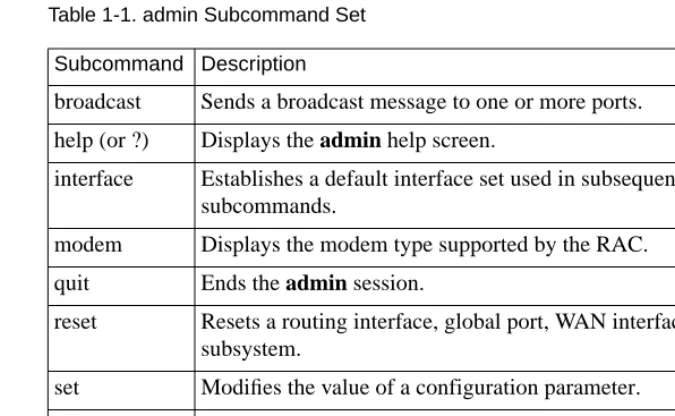
Table 1-1summarizes the CLI admin subcommand set.
Table 1-1. admin Subcommand Set Subcommand Description
broadcast Sends a broadcast message to one or more ports. help (or ?) Displays the admin help screen.
interface Establishes a default interface set used in subsequent subcommands.
modem Displays the modem type supported by the RAC.
quit Ends the admin session.
reset Resets a routing interface, global port, WAN interface, or subsystem.
set Modifies the value of a configuration parameter. show Displays the current value of a configuration parameter.
Differences Between admin and na
The CLI admin subcommands function like their na counterparts, with the following exceptions:
• admin subcommands function only on the local RAC.
• The help subcommand provides a help summary for the CLI
admin subcommand set only. Entering help subcommand_name
displays the subcommand’s syntax.
• The reset subcommand does not reset the connection from which the reset is issued. To reset your port or connection, return to the CLI and issue hangup.
• Any subcommand issued without arguments, except reset, responds with an error or usage message; the commands do not prompt for missing arguments.
• The show subcommand displays the annex or wan parameter values for the local RAC. If there are more than 24 lines of information to display, a more prompt appears after the last line. Pressing q (for quit) returns to the admin prompt; the attention character terminates the admin session; pressing any other key continues the display.
Specifying Parameters with admin Subcommands
Arguments for the admin set, show, and reset subcommands take parameters as arguments. With these subcommands, the parameter class is the first argument you specify. Parameter classes are annex, interface, port, and wan. With interface and wan, do one of the following:
• Define a default interface or wan set to which the set, show, or
reset subcommand will apply. To do this, use the admin interface or wan subcommand.
• Define the interface or wan set within the subcommand. To do this, use the syntax:
set parameter_class={interface_set | wan_set} parameter_value Two examples follow. The first one sets two parameters for the global port interface. The second sets two parameters for WAN interface 1. Table 1-2 shows valid values for the interface and wan sets.
Table 1-2. interface and wan Sets
Set Value
interface_set port, to specify the global port (which includes all
channels on both WAN interfaces), or en0, to specify the RAC’s Ethernet interface, or all, to specify both en0 and the global port.
wan_set The number of a WAN interface (1 or 2), or 1,2, or
admin Subcommands
The following describes the admin subcommands in alphabetical order.
broadcast The broadcast subcommand sends a message to modem users on specified internal asynchronous ports. The syntax is:
broadcast[=async_port_set | target] message
Table 1-3 describes the arguments.
Table 1-3. Arguments for the broadcast Subcommand
Argument Description
async_port_set Indicates the numbers of the internal asynchronous ports to which the message is to be broadcast. For example, a port set of 1, 2, 3 specifies internal ports asy1, asy2, and asy3.
target If set to all, broadcasts to all asynchronous modem ports and all virtual connections.
If set to virtual, broadcasts to all virtual CLI
connections. (You cannot broadcast to a single virtual CLI connection.)
help The help (or ?) subcommand displays a help summary for the CLI admin subcommand set. Entering help subcommand_name displays the subcommand syntax.
interface The interface subcommand establishes a default routing interface_set that will be used in subsequent admin subcommands until another interface_set is specified. Grouping interfaces using an interface_set allows you to issue one admin subcommand to examine or change the parameter values for multiple interfaces. The syntax is:
interface interface_set
For interface_set, enter one of the following:
• port, to specify the global port (which includes all channels on
both WAN interfaces)
• en0, to specify the RAC’s Ethernet interface
• all, to specify both en0 and the global port
quit The quit subcommand terminates the admin program and returns to the superuser CLI. The syntax is:
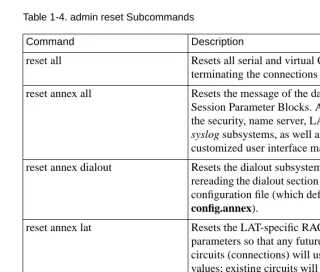
reset The reset subcommand enables changes you have made to the RAC. Until you use reset, changes you make (using the set subcommand) usually become effective only after a reboot. Parameter changes to internal ports go into effect for all calls received after the reset, but do not affect current calls.Table 1-4 describes the reset subcommands.
Table 1-4. admin reset Subcommands
(continued on next page)
Resetting a VPN (virtual private network) device or an internal (ta, asy, syn, or virtual CLI) port or modem terminates the connection on that device, port, or modem.
Command Description
reset all Resets all serial and virtual CLI ports, terminating the connections on them. reset annex all Resets the message of the day and the
Session Parameter Blocks. Also resets the security, name server, LAT, and syslog subsystems, as well as the customized user interface macros.
reset annex dialout Resets the dialout subsystem by rereading the dialout section of the RAC configuration file (which defaults to
config.annex).
reset annex lat Resets the LAT-specific RAC parameters so that any future LAT circuits (connections) will use the new values; existing circuits will continue to use the old values. This keyword will not terminate existing LAT circuits.
Table 1-4. admin reset Subcommands (continued)
Command Description
reset annex modem Rereads the modem section of the RAC configuration file (default is
config.annex) and downloads the
modem code from the load host.
reset annex motd Rereads the message-of-the-day.
reset annex nameserver Resets the name server parameters and flushes the RAC’s host table.
reset annex security Resets the security parameters and reconnects to the security host.
reset annex session Rereads the Session Parameter Blocks from the configuration file. Existing calls are not reset. No new calls are answered while the reset is in progress.
reset annex syslog Resets the syslog subsystem. The syslog subsystem does not use any changes made to the syslog_port parameter.
reset async_port_list
reset async[=async_port_list]
Terminates asynchronous
connections on the specified ports. For async_port_list, specify an individual asynchronous port number, multiple port numbers separated by commas (for example,
1,2,3), or a range of port numbers.
Separate the end points of a range with a hyphen, such as 1-10.
Table 1-4. admin reset Subcommands (continued)
(continued on next page)
Command Description
reset interface[=interface_set] Resets the interface parameters for the specified routing interfaces: en0,
port (for the global port), or all.
reset int_modem [modem_list]\ [hard | soft]
Resets the hardware for each modem in the modem list, whether or not a call is active on the modem. If you specify hard, the modem is reset immediately, which terminates the call. If you specify soft (the default), the modem is reset when the call (if any) on it hangs up.
For modem_list, specify an individual modem number, multiple modem numbers separated by commas, or a range of numbers from 1 through the total number of installed modems. Separate the ends of a range with a hyphen, for example, 1-23.
reset serial Terminates all asynchronous
connections.
reset sync=sync_port_list Terminates synchronous connections on the specified ports. For
sync_port_list, specify an individual synchronous port number, multiple port numbers separated by commas (for example, 1,2,3), or a range of port numbers. Separate the ends of a range with a hyphen, such as 1-10.
Table 1-4. admin reset Subcommands (continued)
Command Description
reset ta=ta_port_list Terminates ta (V.120) connections on specified ports. For ta_port_list, specify an individual port number, multiple port numbers separated by commas (such as 1,2,3), or a range of port numbers. Separate the end points of a range with a hyphen (for example, 1-10).
Parameter changes will be in effect only for calls received after the reset. Current calls (that have not been terminated) are not affected.
reset virtual Resets and terminates all virtual CLI connections.
reset vpn=vpn_port_list Terminates VPN connections on specified ports, tearing down the L2TP tunnel calls that established them. For vpn_port_list, specify an individual VPN port number, multiple port numbers separated by commas (for example, 1,2,3), or a range of port numbers. Separate the end points of a range with a hyphen (for example, 1-10).
Parameter changes will be in effect only for VPN calls received after the reset. Current calls (that have not been terminated) are not affected.
set The set subcommand modifies configuration parameters:
The syntax is:
set annex annex_parameters
set interface [=interface_set] interface_parameters
set port port_parameters
set wan[=wan_set] |wan_parameters
set wan[=wan_set]b[=channel_range] wan_b _parameters
set wan[=wan_set]ds0[=channel_range] wan_ ds0_parameters
interface_set and wan_set must be included in the set subcommand or defined in an earlier interface or wan subcommand.
For interface_set, enter one of the following:
• port, to specify the global port (which includes all channels on
both WAN interfaces)
• en0, to specify the RAC’s Ethernet interface
• all, to specify both en0 and the global port
set annex Modifies RAC parameters. set interface Modifies interface parameters. set port Modifies global port parameters. set wan Modifies WAN parameters.
For wan_set, enter one of the following:
• the number of the WAN interface: 1 or 2 • 1,2 or all to indicate both interfaces
When specifying parameters, use a parameter name and a value separated by a space. You can enter more than one parameter with each command; separate the parameter-value pairs with a space. If you are entering multiple parameters that require a new line, precede the new line with the backslash (\) character. Changes made to parameters take effect after booting or resetting the RAC or resetting the port, routing interface, or WAN interface.
Sample command lines for setting parameters are:
admin: set port mode cli
admin: set wan=1 switch_type at9 framing ESF
show The show subcommand displays current parameter values:
The syntax is:
show annex keyword | annex_parameters
show interface[=interface_set] [keyword | interface_parameters]
show port [keyword | port_parameter_names]
show wan[=wan_set] [keyword | wan_parameters] show annex Displays RAC parameters. show interface Displays interface parameters. show port Displays the global port parameters. show wan Displays WAN parameters.
interface_set and wan_set must be included in the set subcommand or defined in an earlier interface or wan subcommand.
For interface_set, enter one of the following:
• port, to specify the global port (which includes all channels on
both WAN interfaces)
• en0, to specify the RAC’s Ethernet interface
• all, to specify both en0 and the global port
For wan_set, enter one of the following:
• the number of the WAN interface, 1 or 2
• 1,2 or all to indicate both interfaces
Each keyword in a show subcommand displays a subset of parameters. See Parameters Listed by Type on page 3-5.
arap
The arap command converts a CLI session into an AppleTalk Remote Access Protocol (ARAP) session. Resetting the port returns the CLI to its original mode. The syntax is:
arap
The command display looks like this:
annex: arap
arp
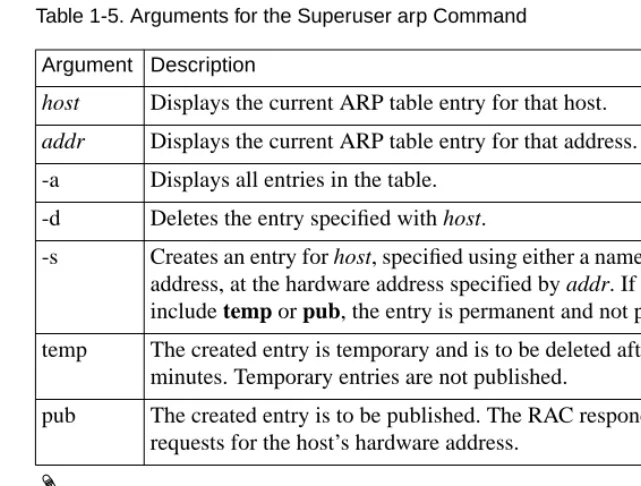
The superuser arp command displays and, optionally, modifies the IP-to-hardware address translation table used by the Address Resolution Protocol (ARP). Because the RAC builds the ARP table dynamically, you rarely need to modify it.Table 1-5 defines the arguments for this command. The syntax is:
arp [-ads] [host] [addr] [temp | pub]
Using either the host or the -a argument, arp displays a host name, if known, or a ? in place of the host name, the Internet and Ethernet addresses, and the time to live (TTL) field for each entry. An example follows.
annex# arp -a
Table 1-5. Arguments for the Superuser arp Command
The arp command shows AppleTalk information but does not allow you to change this information. Because arp interprets all addresses as IP addresses, if you try to delete an AppleTalk address such as 1.123 using arp -d, the ARP table entry 1.0.0.123 is deleted. Argument Description
host Displays the current ARP table entry for that host. addr Displays the current ARP table entry for that address. -a Displays all entries in the table.
-d Deletes the entry specified with host.
-s Creates an entry for host, specified using either a name or Internet address, at the hardware address specified by addr. If you do not include temp or pub, the entry is permanent and not published.
temp The created entry is temporary and is to be deleted after 20 minutes. Temporary entries are not published.
bg
The bg (background) command puts a job into the background and displays the job number, the CLI command that created it, and an ampersand (&) to indicate that the job is in the background.
The RAC forwards output generated by the background job to the terminal, if another job is active. If another job is not active, the output is held until you bring a job back into the foreground by issuing the fg command.Table 1-6 describes the arguments for bg. The syntax is:
bg [-d] [%] [%, +, -, n, hostname]
Table 1-6. Arguments for the bg Command
You can omit bg from the command entry when you use one of the arguments beginning with %.
Argument Description
-d Discards output from the background job to the terminal screen until the job is terminated or brought to the foreground.
%, %%, %+ Puts the most recent job (+) into the background. %- Puts the previous job (-) into the background.
n, %n Puts job n into the background.
Entering bg with no arguments is the same as entering bg%; it puts the most recent job into the background. The bg command display looks like this:
annex: bg
2 telnet secondhost &
boot
The superuser boot command reboots the RAC and, optionally, produces a dump of the RAC’s operational code. You can set a time at which the boot is to take place. The boot command also sends a warning message to users attached to the RAC.Table 1-7 describes the arguments for boot. The syntax is:
boot [-adhlqr] [time] [filename] [warning]
Table 1-7. Arguments for the boot Command
(continued on next page) Argument Description
-a Aborts any boots that are pending. Sends an abort message to all users.
-d Causes a dump before rebooting. -h Causes a diagnostics boot.
-l Boots the operational image and stores it onto local media; for use with the stand-alone file system. Only ROMs that have the self-boot option loaded support -l.
-q Performs a boot without sending a warning message.
Table 1-7. Arguments for the boot Command (continued)
The following command line directs the RAC to reboot an hour and fifteen minutes from the time of entry:
annex# boot +1:15 bootfile: <cr>
warning: Shutting down for PM
The RAC can request its boot file from a defined preferred load host. If that host is not defined, or does not respond, the RAC broadcasts its request and boots from the first load host to respond (assuming the load_broadcast parameter is set to Y).
Booting the RAC with a image file that does not exist causes the unit to hang as it searches for the image. Pressing the Reset switch recovers from this condition.
Argument Description
time Defines the time to shut down as either an offset +MM or
+HH:MM, or a clock time HH:MM.
filename Identifies the name of the file in which the RAC’s image is maintained. If you do not enter a file name, the RAC prompts for one. If you enter a blank line, the RAC boots the image defined by the image_name parameter. Pressing the Return key at the prompt directs the RAC to boot the default file. warning Allows an optional message (up to 249 characters) to be sent to
compact
The superuser compact command consolidates all valid (in-use) records to the beginning of the nonvolatile memory (EEPROM). The RAC stores configuration parameters and file system records in this memory. When the amount of free space nears depletion, the RAC logs a syslog warning message, and the admin set command may fail.The syntax is:
compact [-s]
The -s argument displays the total space and free space (in bytes) in EEPROM. The amount of free space is determined by the amount of unused space at the end of EEPROM.
connect
The connect command uses the LAT protocol to connect to an advertised LAT service. This command is available only if you have enabled LAT by setting the lat_key parameter correctly. The syntax is:
connect service [hostname [port]]
If you enter the command without arguments, the connect command returns a missing service name error. If the service to which you are connecting requires a password, you are prompted for one. If you enter connect with only the service name, the command connects to the highest-rated service with that name. If you enter both the service name and the hostname, connect tries to establish a connection to that service on that host. Entering connect with service, hostname, and port causes the RAC to attempt to connect to the specified service on the port and host.
control
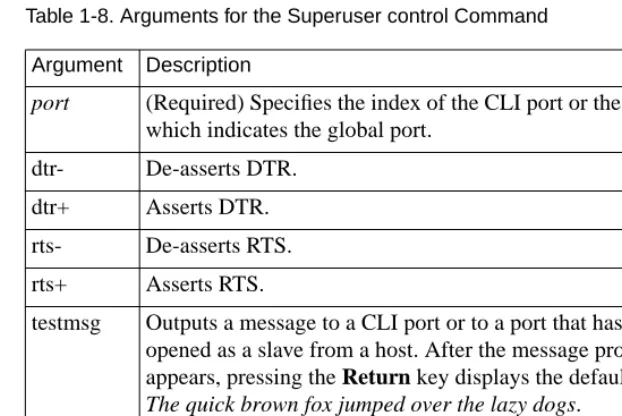
The superuser control command is a diagnostic tool that allows you to reset DTR and RTS or to output a short test message for a CLI port or the global port.Table 1-8 describes the arguments for control. The syntax is:
control port [dtr- | dtr+ | rts- | rts+] | port testmsg [times | forever]
The following command displays the default message 10 times on CLI port 14:
annex# control 14 testmsg 10
If the port is not a CLI port, the command displays Device must be in use.
Table 1-8. Arguments for the Superuser control Command
cp
The superuser cp command copies a file in the local file system. The syntax is:
cp source_filename destination_filename
The source_filename is the file to be copied; the destination_filename is the new file. The RAC overwrites the destination file if it exists; it reports an error if the source file does not exist.
Argument Description
port (Required) Specifies the index of the CLI port or the word port, which indicates the global port.
dtr- De-asserts DTR. dtr+ Asserts DTR.
rts- De-asserts RTS. rts+ Asserts RTS.
testmsg Outputs a message to a CLI port or to a port that has been opened as a slave from a host. After the message prompt appears, pressing the Return key displays the default message The quick brown fox jumped over the lazy dogs.
times Specifies the number of times the message is output.
dialout
The superuser dialout command displays each dialout route, along with all of the defined parameters and chat scripts for each route. The syntax is: dialout [do route_number]
The dialout do route_number command displays only the specified route and the chat scripts that it references.
The dialout command display looks like this: annex# dialout
Route do44:
mode: ppp local_address: 132.245.88.12 remote_address: 132.245.44.12net_inactivity: 10
phone_number: "92030401" do_compression: Y
allow_compression: Y net_inactivity_units: minutes subnet_mask: 255.255.255.0 ppp_ncp: ipcp
rip_sub_advertise: Y rip_sub_accept: Y rip_advertise: all rip_accept: all advertise: Y
ports: 13-16
Route do131:
mode: ppp local_address: 132.245.88.12 remote_address: 131.110.0.13 net_inactivity: 10
phone_number: "92050111" do_compression: Y
allow_compression: Y net_inactivity_units: minutes subnet_mask: 255.255.255.248 ppp_ncp: ipcp
rip_sub_advertise: Y rip_sub_accept: Y rip_advertise: all rip_accept: all advertise: Y
ports: 1-2
filter: in exclu proto udp src_port router netact filter:out exclu proto udp src_port router netact
The dialout do route_number command display is as follows: annex# dialout do44
Route do44:
mode: ppp local_address: 132.245.88.12 remote_address: 132.245.44.12net_inactivity: 10 phone_number: "92030401"do_compression: Y
allow_compression: Y net_inactivity_units: minutes subnet_mask: 255.255.255.0ppp_ncp: ipcp
rip_sub_advertise: Y rip_sub_accept: Y rip_advertise: all rip_accept: all advertise: Y
ports: 13-16
filter: in exclu proto udp src_port router netact filter: out exclu proto udp src_port router netact
edit
The superuser edit command allows you to edit any local RAC file. It provides a full screen editor that supports a small set of terminal types: vt100, wy75, and wy85 (set the term_var parameter to the appropriate terminal type). The syntax is:
edit filename
fg
The fg (foreground) command resumes a job that has been suspended or placed in the background. If the RAC saved any output from the host while the job was interrupted, the output appears on the terminal immediately after you put the job in the foreground. Otherwise, nothing appears until you enter a carriage return.Table 1-9 describes the arguments for fg. The syntax is:
fg [-q] [%] [%, +, -, n, hostname]
Entering the fg command with no arguments puts the most recent job into the foreground. The command display looks like this:
annex: fg
2 telnet secondhost
Entering % is the same as entering fg% and returns you to the most recent job. You can omit fg from the command entry when you use one of the arguments beginning with %; the following example uses %- to bring the previous job to the foreground:
annex:
%-1 rlogin firsthost
Table 1-9. Arguments for the fg Command Argument Description
-q Prevents a one-line message from appearing on the terminal screen when bringing a session to the foreground.
%, %%, %+ Brings the most recent job (+) to foreground.
%- Brings the previous job (-) to foreground. n, %n Brings job n to the foreground.
filter
The superuser filter command allows you to filter the traffic that crosses the RAC. It affects both the currently running configuration and the configuration stored in EEPROM. The filter command has eight subcommands: add, list, enable, disable, delete, help, usage, and quit. The syntax is:
filter [subcommand]
If you use the filter command without a subcommand, the RAC enters the filtering subsystem and displays the filter prompt. At this prompt, you can execute any of the eight subcommands. You return to the CLI prompt from the subsystem by executing the quit subcommand.
If you use the filter command with a subcommand, you can issue filtering subcommands directly at the superuser CLI prompt. When the
subcommand completes, you are still at superuser CLI level.
The filter command display looks like this: annex# filter
filter:
The filter list command display looks like this:
annex# filter list
Num Stat Ifname Dir Scope Family Actions/Parameters
Filters are applied to a particular physical interface on a RAC or to all RAC interfaces and can affect incoming or outgoing packets. An interface is the Ethernet port (specified as en0 in commands) or the global port.
Filters are complicated and can interact in ways you might not anticipate; use them with great care.
Filters can cause performance to deteriorate significantly.
Syslogging common occurrences can flood the syslog file. Syslogging syslogs can cause infinite loops.
Be careful when creating filters that discard packets on the Ethernet interface; filters of this type can hang the RAC.
You need superuser privileges not only to configure the RAC for filtering but also to create or modify filters.
Filter Numbers
When you add a filter, the RAC assigns it a number that remains associated with it until you delete the filter. The filter subcommand list displays this number, and you specify the number when you delete, enable, or disable a filter (seeFilter Lists below for permissible ways to specify filters).
Filter Lists
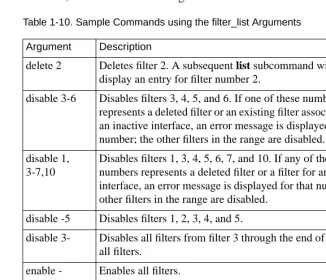
Specifying an asterisk (*), the word all, or a dash (-) by itself for a filter list indicates all filters.Table 1-10 shows sample subcommands using filter lists.
[image:54.612.159.486.276.556.2]When you delete filters, their numbers remain unused until you add another filter; the added filter is then assigned the lowest unused number. If you invoke a subcommand with a range that includes unused numbers, the subcommand operates on the assigned filters but displays an error message for each unused number. This does not happen when you specify a group of filters by entering a number with a leading or trailing dash; in this case, unused numbers are ignored.
Table 1-10. Sample Commands using the filter_list Arguments Argument Description
delete 2 Deletes filter 2. A subsequent list subcommand will not display an entry for filter number 2.
disable 3-6 Disables filters 3, 4, 5, and 6. If one of these numbers represents a deleted filter or an existing filter associated with an inactive interface, an error message is displayed for that number; the other filters in the range are disabled.
disable 1, 3-7,10
Disables filters 1, 3, 4, 5, 6, 7, and 10. If any of these numbers represents a deleted filter or a filter for an inactive interface, an error message is displayed for that number; the other filters in the range are disabled.
disable -5 Disables filters 1, 2, 3, 4, and 5.
disable 3- Disables all filters from filter 3 through the end of the list of all filters.
enable - Enables all filters. enable * Enables all filters.
enable all Enables all filters.
Filter Subcommands
This section describes the subcommands in alphabetical order.
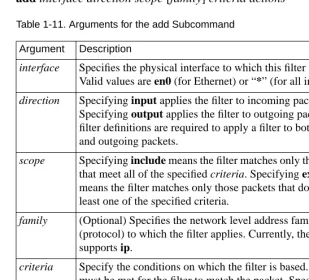
add The add subcommand adds new filter(s) and enables them in both the currently running system and EEPROM; the RAC need not be rebooted for the added filters to take effect.Table 1-11 describes the arguments for add. The syntax is:
[image:55.612.186.496.242.523.2]add interface direction scope [family] criteria actions
Table 1-11. Arguments for the add Subcommand
(continued on next page) Argument Description
interface Specifies the physical interface to which this filter applies. Valid values are en0 (for Ethernet) or “*” (for all interfaces).
direction Specifying input applies the filter to incoming packets. Specifying output applies the filter to outgoing packets. Two filter definitions are required to apply a filter to both incoming and outgoing packets.
scope Specifying include means the filter matches only those packets that meet all of the specified criteria. Specifying exclude means the filter matches only those packets that do not meet at least one of the specified criteria.
family (Optional) Specifies the network level address family
(protocol) to which the filter applies. Currently, the RAC only supports ip.
criteria Specify the conditions on which the filter is based. All criteria must be met for the filter to match the packet. Specify criteria in the form: keyword value).
Table 1-11. Arguments for the add Subcommand (continued)
Filters that cause multiple syslog, icmp, and netact actions for the same interface are reduced to a single syslog, icmp, or netact action.
To add a dynamic dial-out filter, configure the dialout section of the RAC configuration file; you cannot add the filter using the filter command (see the document Managing Remote Access Concentrators Using Command Line Interfaces).
Table 1-12 lists valid keywords and values for the add subcommand’s criteria argument. The syntax is:
keyword value
discard Discards the packet. Discarding is done after any syslog, icmp, or netact actions are taken.
icmp Discards the packet and sends an ICMP destination unreachable message.
netact Customizes the definition of activity for a SLIP or PPP dynamic dial-out line. If one or more filters containing this action are enabled on one of these lines, only the traffic matching the filters constitutes activity.
Table 1-12. Keywords for the add criteria Argument
(continued on next page)
Keyword Value Explanation
dst_address {ip_addr[/n] | * | -1} Matches the packet’s
destination IP address. To test only the non-host portion of the address, enter /n after the address, where n is the number of bits in the non-host portion of the subnet mask for this address. For example,
132.245.33.0/24 denotes a
mask of 255.255.255.0, which matches destination addresses on network 132.245.33.0. (If you list the filter, 132.245.33.0/ 24 appears as the destination address.)
To match all addresses, enter -1 or “*” instead of an address. dst_port {pnum | sname |* | -1} Matches the TCP or UDP
destination port. Specify the port as a decimal number (pnum) from 1 through 65535 or as a standard service name (sname), such as finger, ftp,
nfs, rlogin, smtp, telnet, or tftp. Specifying -1 or “*”
Table 1-12. Keywords for the add criteria Argument (continued)
(continued on next page)
Keyword Value Explanation
src_port {pnum | sname | * | -1} Matches the TCP or UDP source port number. Specify the port as a decimal number (pnum) from 1 through 65535 or as a standard service name (sname), such as finger, ftp,
nfs, rlogin, smtp, telnet, or tftp. Specifying -1 or “*”
matches all port numbers. For a list of service names and their corresponding port numbers, seeTable 1-13.
src_address {ip_addr[/n] | * | -1} Matches the packet’s source IP address. To match only the non-host portion of the address, enter /n after the address, where n is the number of bits in the non-host portion of the subnet mask for this address. For example,
132.245.33.0/24 denotes a
mask of 255.255.255.0, which matches destination addresses on network 132.245.33.0. (If you list the filter,
132.245.33.0/24 appears as the destination address.)
To match all addresses, enter
Table 1-12 Keywords for the add criteria Argument (continued)
(continued on next page)
address_pair {ip_addr1[/n] | * | -1}
{ip_addr2[/n] | * | -1} (Enter both addresses on the same line; separate them with a space)
Matches packets passing in either direction between two specified IP addresses. To match only the non-host portion of an address, enter /n after the address, where n is the number of bits in the non-host portion of the subnet mask for this address. For example,
132.245.33.0/24 denotes a
mask of 255.255.255.0, which matches destination addresses on network 132.245.33.0. (If you list the filter,
132.245.33.0/24 appears as the destination address.)
To match all packets to or from a given address, enter one ip_addr and then specify * or
-1 for the other. For example, * 132.254.33.2 and
132.254.33.2 -1 match all
packets to or from 132.254.33.2.
Restriction: if you use the
address_pair keyword, you
cannot use the keyword
Table 1-12. Keywords for the add criteria Argument (continued)
port_pair {p1 p2| s1 s2 |*|-1} Matches packets passing in either direction between the two specified TCP or UDP port numbers (p1 and p2) or standard service names (s1 and s2), such as finger, ftp, nfs,
rlogin, smtp, telnet, or tftp.
Use a space to separate the port numbers or names.
To match all packets to or from a given port number, enter one port number or service name and specify -1 or * for the other. For a list of service names and their corresponding port numbers, seeTable 1-13. Restriction: if you use the
port_pair keyword, you
cannot use the dst_port or
src_port keyword.
protocol {protonum|protoname} Matches the transport protocol in the packet. Valid protocol numbers range from 1 to 255. Or, specify a protocol name, such as tcp, udp, or icmp. If no protocol is given but a port is specified (dst_port,
src_port, or port_pair), the
port specification applies to both TCP and UDP packets.
Warning: A command such as
the following can cause infinite loops:
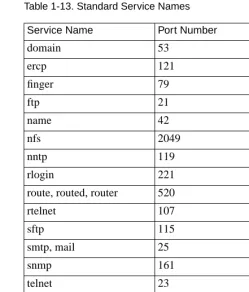
Table 1-13 shows the standard service names you can supply for name s1 and s2 inTable 1-12.
Table 1-13. Standard Service Names
Multiple service names shown on the same line inTable 1-13 are synonyms. Using any one of them in a filter implies using the other. However, when you list the filter using the list subcommand, you will see only the first service name.
Service Name Port Number
domain 53
ercp 121
finger 79
ftp 21
name 42
nfs 2049
nntp 119
rlogin 221
route, routed, router 520
rtelnet 107
sftp 115
smtp, mail 25
snmp 161
telnet 23
tftp 69
time 37
Add Subcommand Examples
Because the NFS and TFTP protocols do not support password protection, you may want to use filtering to prevent hosts on an external network from using those protocols to access files on your internal network. To do this, pick a RAC to act as a firewall between the local and external network and create filters on it to block NFS and TFTP traffic. For example, you could create the following two filters, which prevent TFTP or NFS packets from crossing RAC interface en0:
annex# filter
filter: add en0 input include protocol udp port_pair\
> nfs * icmp
filter: add en0 input include protocol udp port_pair\
> tftp * icmp
Note the following about the preceding sample filters:
• Both filters apply only to packets arriving on RAC interface en0. To apply a filter to another interface, specify a second filter for that interface, or specify * instead of en0, thereby blocking the protocol on all interfaces.
• Both filters match packets whose network protocol family is IP. Because the family argument is optional (IP is assumed), the examples omit it.
• Both filters specify protocol as UDP because UDP is the transport-level protocol on which NFS and TFTP operate. • The port_pair argument in each filter specifies that the filter
applies to any UDP packet that contains NFS or TFTP in its source or destination protocol field.
• When one of these filters matches a packet, the RAC discards the packet and sends the ICMP message destination
The following example creates a filter that logs the arrival of every IP packet on the Ethernet interface (en0). The example omits the network protocol family because it is optional; IP is assumed.
filter: add en0 input include src_addr * syslog
Logging events requires configuration (see the document Managing Remote Access Concentrators Using Command Line Interfaces for more information).
The following example allows packets to and from 132.254.100.2 and 132.254.100.3 to be forwarded over interface en0; all other packets are discarded.
filter: add en0 input exclude address_pair 132.254.100.2\
> * discard
filter: add en0 input exclude address_pair 132.254.100.3\
> * discard
The following example allows UDP and ICMP packets to and from 132.254.100.2 and 132.254.100.3 to be forwarded over interface en0; all other packets are discarded.
filter: add en0 input exclude address_pair 132.254.100.2 *\
> protocol icmp discard
filter: add en0 input exclude address_pair 132.254.100.3 *\
> protocol icmp discard
filter: add en0 input exclude address_pair 132.254.100.2 *\
> protocol udp discard
filter: add en0 input exclude address_pair 132.254.100.3 *\
> protocol udp discard
delete The delete subcommand deletes filters from both the currently running system and nonvolatile memory. The syntax is:
delete filter_list
See Filter Lists on page 1-27 for an explanation of the filter_list argument.
disable The disable subcommand disables enabled filters in the currently running system. The filters remain defined in nonvolatile memory, but packets are not matched against them. When you reboot your RAC, the disabled filters are re-enabled. The syntax is:
disable filter_list
The following example disables filters 2 through 4: annex# filter
filter: disable 2-4 filter 2 disabled filter 3 disabled filter 4 disabled
See Filter Lists on page 1-27 for an explanation of the filter_list argument.
Dial-out filters can be disabled but will be re-enabled after a reboot of the RAC or a reset of the dial-out subsystem.
enable The enable subcommand immediately enables disabled filters in the currently running system. Otherwise, disabled filters are not enabled until the RAC reboots or until the port resets. A filter can be disabled only by the disable command. The syntax is:
enable filter_list
See Filter Lists on page 1-27 for an explanation of the filter_list argument.
The following example enables filters 2 through 4:
help The help subcommand displays information about one or more filter subcommands. Entering help with no arguments displays information about all of the subcommands. Entering help and the name of a subcommand displays an explanation of that subcommand. For a one-line syntax, see usage on page 1-40.
list The list subcommand displays the defined filters, along with their status (enabled or disabled) and assigned number (used by enable, disable, and delete).Table 1-14 describes the arguments for list. The syntax is:
list [-eia]
Table 1-14. Arguments for the list Command
If you do not specify -e, list displays only filters that are associated with active interfaces or that were acquired from acp_dialup. Argument Description
-e Lists the filters stored in nonvolatile memory instead of the filters in the currently running system. Using list -e eliminates the status column from the display because the enabled/disabled status is not saved in nonvolatile memory.
-i Sorts the output by interface name, instead of sorting by filter number.
quit The quit subcommand exits the filtering subsystem and returns control to the CLI.
usage The usage subcommand displays the syntax for one or more filter subcommands. Entering usage with no arguments prints syntaxes for all the subcommands. Entering usage and the name of a subcommand prints the syntax for that subcommand.
For more detailed information about one or more subcommands, see help on page 1-39.
Using Include and Exclude in a Filter
You configure a RAC filter to either include or exclude particular types of packets, based on whether or not the packet types match specified criteria. Including certain types means the filter does not affect any other packet type; excluding certain types means only other types are affected by the filter. The actual effect a filter has depends on the actions you specify for it, such as discard.
The criteria of a single include or exclude filter are logically ANDed. For an include filter, this means that a packet must match all the filter’s criteria in order for the filter’s actions to be taken. For an exclude filter, it means a packet must match all of the criteria for the actions not to be taken.
Multiple exclude filters for the same interface that specify the same actions are logically ANDed. For example, if one exclude filter for asy2 specifies IP address 132.254.45.1 and discard, and another exclude filter for asy2 specifies IP address 132.254.55.2 and discard, then any packet whose destination address does not match 132.254.45.1 and does not match 132.254.55.2 is discarded; that is, only packets addressed to either 132.254.45.1 or 132.254.55.2 are accepted on interface asy2.
In general, use include filters to perform an action (such as discard) on only a few types of packets. Use exclude filters to exempt only a few types of packets from a particular action.
If both include and exclude filters are defined for the same interface, the exclude filters take precedence. However, mixing include and exclude filters on the same interface is strongly discouraged, because the interactions are subtle and can be confusing even for a networking expert.
hangup
The hangup command terminates all of your jobs, resets the CLI for the port, and drops the modem control signal DTR; it restores the default terminal characteristics defined for the port. Also, entering the hangup command at the CLI prompt disconnects a virtual connection to another RAC. The syntax is:
If you have any open jobs on the CLI, the hangup command lists them and prompts for permission to terminate each job before completing the command. For example:
annex: hangup
Following background job(s) will be terminated: -1 telnet mouse
+2 telnet 132.245.6.35
Do you still wish to hangup (y/n)[n]: y
Terminating jobs, resetting line and disconnecting.
If you are using a modem, configure it to respond when the DTR signal is dropped.
histcall
The superuser histcall command displays the call history summary. The syntax is:
histcall [index]
The call history statistics are maintained in first-in, first-out (FIFO) order. Using the command without specifying an index displays a summary of the call history table. Specifying an index number with this command displays a detailed record of a call’s history.
help
The help or ? command provides online help. The syntax is: help [command]
? [command]
help -m
The superuser help -m command displays a list of all macros and their assigned port_set for the current RAC. The syntax is:
help -m [macro_name]
The help -m command display looks like this: annex01# help -m
Name Assigned Ports Description
========================================================== 1 1,12 :Menu 1
2 1-16,v :Read EMAIL 3 1-16,v :Command disabled 4 1-16,v :Another who command ========================================================== init_cli 7 :Set stty commands
init_cli 2,4,6,8,10,12,14,v :Another who command init_cli 1,3,5,16 :Dedicated port macro init_psr 2,4,6,10 :Port 10 information annex01#
The help -m [macro_name] display looks like this:
annex01# help -m menu2
Macro Name: menu2 Description: Menu 2
Command List (command access restrictions apply): bg, boot, fg hangup, help, hosts, jobs, menu, pg, procs, rlogin, telnet, who
Assigned Ports: 1,12 Functional Text: (No available data)
In the previous sample display, the Command List field applies to menus only: it lists the commands available from the menu. The following conditions may restrict command access:
hosts (User Level)
The hosts command displays the names and addresses of hosts and other RACs listed in the RAC host table (known hosts). The command also displays any status information that a host broadcasts.Table 1-15 describes the arguments for hosts;Table 1-16 describes the status field in the hosts command display. The syntax is:
hosts [-qns] [host][ip_address]
The hosts command display looks like this: annex: hosts
Table 1-15. Arguments for the hosts Command
Host Name Status Users Load Internet Addr
alpha -- -- -- 132.245.6.65
neon up 12 0.40 132.245.6.30
calvin down 16 3.55 132.245.6.128 hobbes down ? 8 2.01 132.245.6.1
Argument Description
-q Displays only the names of known hosts.
-n Displays data from the RAC’s list of name server hosts, rather than the list of all hosts, as well as the default domain and domain search list contents.
-s Displays the name and Internet address of the currently connected security host.
host Displays information for host. Specify host as a name or an IP address.
Table 1-16. Status Field Definitions
hosts (Superuser Level)
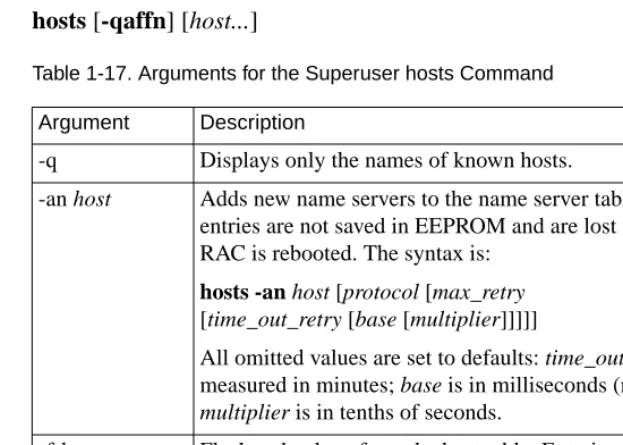
The superuser hosts command provides information about hosts and name servers.Table 1-17 describes the arguments for hosts. The syntax is:
hosts [-qaffn] [host...]
Table 1-17. Arguments for the Superuser hosts Command Field Definition
-- The host does not broadcast status information. up The host broadcasted within the last several minutes. down? Six minutes have elapsed since the host’s last broadcast. down More than 12 minutes have elapsed since the host’s last
broadcast.
Argument Description
-q Displays only the names of known hosts.
-an host Adds new name servers to the name server table; these entries are not saved in EEPROM and are lost when the RAC is rebooted. The syntax is:
hosts -an host [protocol [max_retry
[time_out_retry [base [multiplier]]]]]
All omitted values are set to defaults: time_out_retry is measured in minutes; base is in milliseconds (ms); and multiplier is in tenths of seconds.
-f host Flushes that host from the host table. Entering the command without host flushes all entries except the RAC’s own entry.
Table 1-17. Arguments for the Superuser hosts Command (continued)
ipx
The ipx command configures a CLI port for IPX usage, while leaving the port mode set to cli. This command allows IPX administrators to take full advantage of security features such as SecurID and Enigma. When a Fastlink II user in terminal mode logs into a RAC CLI port, the RAC authenticates the user according to the value of the cli_security parameter and the configuration of RAC security parameters.
Although ipx is a user-level command, only the superuser help command displays information about it.
jobs
The jobs command displays information about all current jobs (or sessions). The syntax is:
jobs
Argument Description
-fn Flushes all name servers.
-fn ip_address Flushes all name servers of the given IP address. -n Lists all name servers.
host Displays information for host. Specify host as a name or an IP address.
The jobs command displays the CLI command used to create the job. A plus sign (+) displayed with the job indicates the most recently active job; a minus sign (-) indicates the previously active. The jobs command display looks like this:
annex: jobs
-1 telnet firsthost +2 rlogin secondhost 3 telnet thirdhost
kill
The kill command terminates a connection and ends a job. The RAC accepts up to four arguments to kill multiple jobs.Table 1-18 describes the arguments for kill. The syntax is:
kill [%] [%, +, -, n, hostname] ...
Entering the kill command without arguments kills the most recent job and displays the job number and the CLI command that created it:
annex: kill
2 [terminated] rlogin secondhost
Table 1-18. Arguments for the kill Command Argument Description
%, %%, %+ Kills the most recent job (+). %- Kills the previous job (-).
n, %n <