ABSTRACT: In this paper we will present a few techniques for processing medical digital images using an open sourced software program for processing and analyzing images – ImageJ.
KEYWORDS: image processing, medical imaging, histogram, analizyng images.
1. INTRODUCTION
Until a few years ago the image processing community consisted of a small group of people, fortunately, the situation has drastically improved today, when most programming languages (C, C++, Java) all come with libraries for processing images or other types of media.
The digital image is a numeric replica of its optical counterpart. The process of capturing the image is quite laborious, with millions of optical sensors converting light into electrical impulses, which are further converted into bits. All this plus the optics of the camera lead to image distortions, and the introduction of artifacts such as digital noise.
To fix these issues the images are modified in diverse ways, getting them ready for further image processing techniques.
In this paper we will present a few techniques for processing medical digital images using an open sourced software program for processing and analyzing images – ImageJ.
2. IMAGEJ PROCESSING PROGRAM
ImageJ is and open sourced image processing program, developed in Java by the National Institute of Health [SRE12]. ImageJ was conceived as open sourced software, thus offering numerous ways of extending its functionality using Java plugins and registered macros [GV04]. This architecture that supports plugins and macros has made ImageJ very popular in image processing. While the ImageJ API makes using the program very straightforward, its underlying base – the programming level – is very complex and includes a lot of libraries, some of them unique to ImageJ, while others are standard Java
libraries (AWT) or derived from standard libraries [BB08].
ImageJ can be used online in the form of an applet, or as a standalone application, only requiring that a java virtual machine version 5 or later to be installed on the computer.
3. IMAGE PROCESSING OPERATIONS
To enhance images you make use of a wide range of tools and functions whose purpose is to improve the detection of image components. In the following paragraphs we will describe a few image processing operations:
3.1 Making a grayscale image
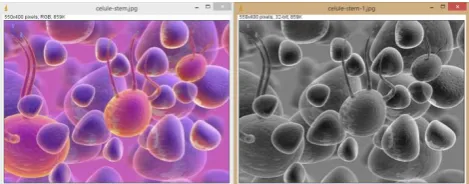
When color is irrelevant to the end result of our image processing (in determining the contours of objects for example), you can transform the original color image into its grayscale counterpart (the image thus becoming simpler, with less information contained in it, and with more processing options available after the transformation).
In ImageJ the following steps are necessary: Image / Type / 32-bit.
Figure 1. Transforming a color image into grayscale
3.2 Adjusting the tonal distributio n
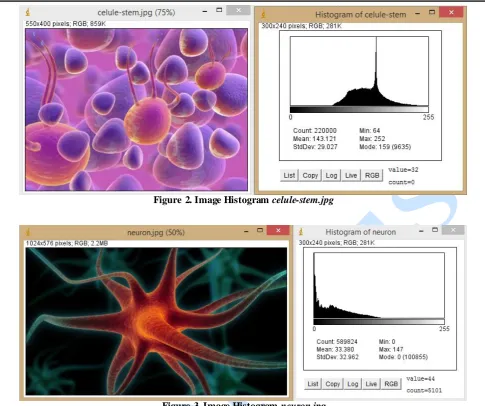
Figure 2. Image Histogram celule-stem.jpg
Figure 3. Image Histogram neuron.jpg
The brightness and contrast of an image can be modified thus: Image / Adjust / Brightness-Contrast:
Figure 4. Adjusting the tonal distribution
3.3 Image filtering
Some images contain a lot of digital noise. Digital noise is the result of errors that manifest when the original image is captured. The errors come in the form of wrong tonal values for some pixels that do not reflect the actual image. Digital noise can appear
Figure 6. Applying a median filter with a radius of 2px
In the process of creating the grayscale image some Gaussian noise with a standard deviation of 15 appeared in the image, after which a median filter was applied.
Figure 7. Median filter
3.4 Morphologic operations
Morphologic processing of images is a technique used for extracting or modifying information specific to the shape and structure of object from the image. Morphologic operators (dilation, erosion), are generally used in analyzing binary images, but can also be used to ana lyze color or gra yscale images. In the case of erosion, every pixel that belongs to the object and touches the background becomes a pixel of the background. In the case of dilation, every pixel that belongs to the background and touches an object, becomes a pixel of the object. The border is established with the help of neighboring pixels. Using ImageJ you can erode an image by : Process/Filters/Minimum, while you can dilate an image by: Process/Filters/Maximum.
Figure 9. The operation of Dilation
The two morphologic operators can be used together resulting in morphologic closing when using dilation – erosion, and morphologic opening when using erosion – dilation.
Figure 10. Morphological closing (dilation-erosion)
Figure 11. Morphological opening (erosion-dilation)
3.5 Image segmentation
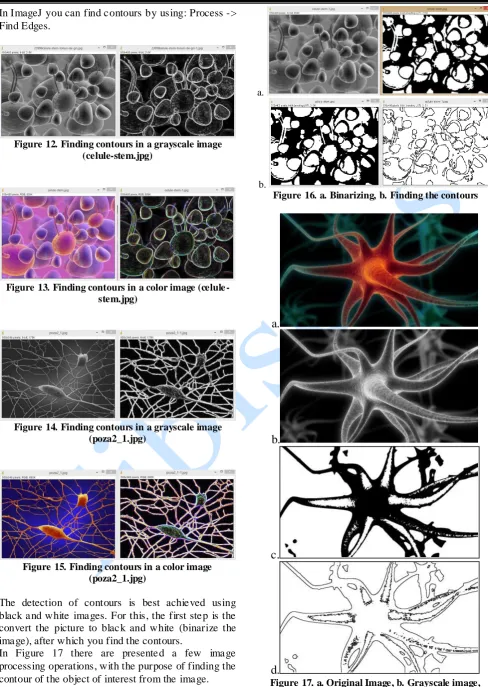
In ImageJ you can find contours by using: Process -> Find Edges.
Figure 12. Finding contours in a grayscale image (celule-stem.jpg)
Figure 13. Finding contours in a color image (celule -stem.jpg)
Figure 14. Finding contours in a grayscale image (poza2_1.jpg)
Figure 15. Finding contours in a color image (poza2_1.jpg)
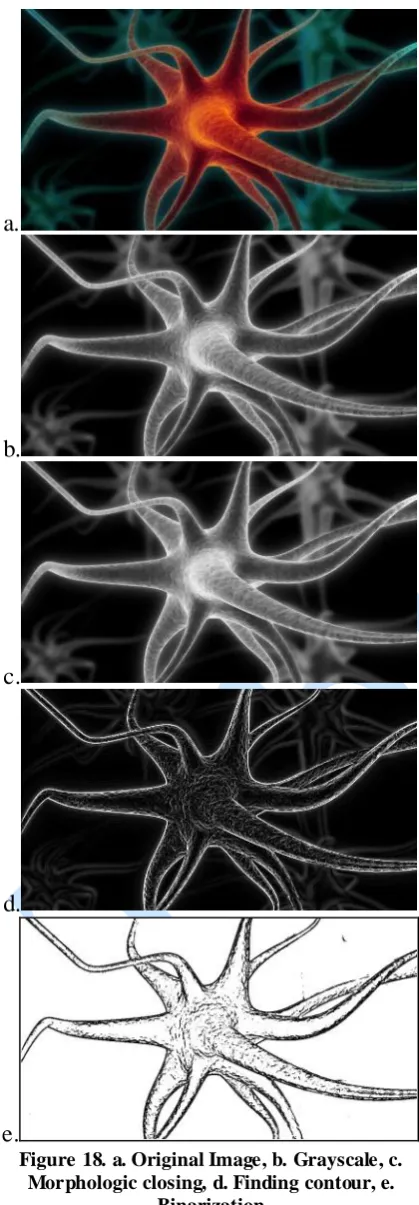
The detection of contours is best achieved using black and white images. For this, the first step is the convert the picture to black and white (binarize the image), after which you find the contours.
In Figure 17 there are presented a few image processing operations, with the purpose of finding the contour of the object of interest from the image.
a.
b.
Figure 16. a. Binarizing, b. Finding the contours
a.
b.
c.
d.
a.
b.
c.
d.
e.
Figure 18. a. Original Image, b. Grayscale, c. Morphologic closing, d. Finding contour, e.
Binarization
a.
b.
c.
Figure 19. a. Original Image, b. Display measurements for whole image, c. Display measurements for selection only
CONCLUSIONS
ImageJ is a tool used with success both in the academic and research spheres, for processing (segmenting and binarization) biological as well as medical images.
ImageJ has a unique position, not only because it is open sourced (the source code is available for anyone and it is free), but it can also run on any operating system. What makes it attractive is the ease of use, it can perform a complete set of image processing operations and it have a large community of users. Thus it can be easily used in schools, high schools, universities, with very little financial cost.
REFERENCES
[AMR04] M. D. Abràmoff, P. J. Magalhães, S. J. Ram - Image processing with ImageJ. Biophotonics international, 11(7), pp. 36-43, 2004
[Bra03] R. Brad - Procesarea Imaginilor şi Elemente de Computer Vision, Editura Universităţii Lucian Blaga din Sibiu, 2003.
[BB08] W. Burger, M. J. Burge - Digital Image Processing - An Algorithmic Approach using Java, Springer-Verlag New York, ISBN 978-1-84628-379-6, 2008
[GV04] V. Girish, A. Vijayalakshmi - Affordable image analysis using NIH Image/ImageJ, Indian J Cancer 41 (1): 47, PMID 15105580, 2004
[SRE12] C. A. Schneider, W. S. Rasband, K. W. Eliceiri - NIH Image to ImageJ: 25 years of image analysis, Nat Methods 9
(7): pp. 671–675.