ISSN: 2334-2366 (Print), 2334-2374 (Online) Copyright © The Author(s). All Rights Reserved. Published by American Research Institute for Policy Development DOI: 10.15640/jcsit.v4n2a1 URL: https://doi.org/10.15640/jcsit.v4n2a1
Facial Recognition and Its Applications in Distance Learning
Environment
Weidong Liao & Chad Vanorsdale1
Abstract
As cameras have become an integral component in modern computers and mobile devices, and the capability of these cameras in computers and mobile devices are ever increasing, facial recognition is becoming an easily accessible functionality for many computer applications. Another area that has benefited from the fast advancement of technology, including capabilities of computers as well as the speed and bandwidth of the Internet, is distance learning. Online education and training are nowadays an emerging and prosperous area of business. More and more traditional higher educational institutes are offering online classes, joining their pure online counterparts and competitors. In this paper, we first discuss common algorithms and methods used in facial recognition. We then present approaches to integrating facial recognition into Web applications and explore how facial recognition may be employed in distance learning environment to improve the effectiveness and efficiency of distance learning. At last we describe practical methods to integrate facial recognition modules into contemporary learning management systems.
Keywords: Facial Recognition, Biometrics, Distance Learning, Learning
Management Systems
I.Introduction
Facial recognition is becoming a more and more popular and accessible
biometric method to enhance computer applications.
1 Department of Computer Science, Mathematics and Engineering, School of Natural Sciences and
Government agencies and banks have been actively integrating facial
recognition into their systems. The TSA is working on a Registered Traveler program
using biometrics in order to conduct security screenings in a quicker fashion [1].
Several banks nationwide are looking for ways to implement facial recognition into
ATMs [2].
Another area that has been through a fast growing due to advancement in
technologies is distance learning. According to the 13th annual report of the state of
online learning in US Higher education, an online report titled Tracking Online
Education in the United States, there were in total of 5.8 million distance learning
students in the US in Fall 2014, among which 2.85 million were taking all courses
online and the other 2.97 million were taking part of their course load online [3].
In this paper, we strive to research and explore methodologies to implement
facial recognition systems and examine how to effectively deploy facial recognition in
a distance learning environment or learning management systems. We first investigate
how facial recognition is implemented, in theory and in practice. Then we focus on
Web applications and explore how contemporary Web technologies have evolved to
enable the integration of facial recognition into modern Web applications. At last we
describe several facial recognition components that could be used in distance learning
environment, and discuss practical methods to integrate facial recognition modules
into popular learning management systems.
2. Methods of Facial Recognition
There are essentially four main facial recognition methods in use today:
feature analysis, neural network, eigenfaces and automatic face processing [4]. In the
first method, feature analysis, each individual has unique facial characteristics that can
These characteristics include, but not be limited to, shape, spacing, texture,
length and width. Each human face has approximately 80+ of these unique features
named nodal points. These nodal points create a numerical code called a face print.
The Face print can be used to extract a matching image template from a database [5].
The second method, the neural network based method, works in a similar
fashion to the way neurons work in the brain. The neural network is broken down
into input and output nodes, with nodes in between allowing for paths of
communication. A particular node path is chosen based on an algorithm. The neural
network is deployed in facial recognition through the use of the whole facial region.
This contrasts with feature analysis that only uses nodal points. The neural network
uses two techniques to recognize a facial image. First, all faces have differing shapes,
features and dimensions.
Principle component analysis narrows the range of images a face will be
compared against by ruling out a particular group of images due to differing features
or dimensions. In the second phase, Back Propagation Neural Network will perform
the actual recognition of an image to the face [6].
The third facial recognition method in use is eigenfaces. The advantage of the
eigenface method over other methods is its speed in the facial recognition process.
Eigenfaces can be simply described as a blurred facial image. The blurred image still
allows for the recognition of prominent facial features. These features include the
nose, eyes and mouth. Eigenfaces are generated mathematically through probability
theory using matrices and vectors. The disadvantage of this method is its dependency
on the same lighting and level views in order to recognize faces against images
accurately. The use of Eigenfeatures has been developed to overcome this
Eigenfeatures measure the distance between facial features, and then compare
distances against one another [7].
The fourth facial recognition method is automatic facial processing. This
method, like Eigenfaces, is dependent on the same lighting and facial positions.
However, this issue can be remedied as well, making automatic facial recognition
highly accurate. A set of images for one individual is stored within the system. These
sets of images differ in facial expression, direction and position of the face, lighting
and so on. Each individual image is called a probe image. From here, each probe
image is molded together to create an average image. The average image is used for
the facial comparison and can therefore increase accuracy by nearly fifty percent [8].
Newer facial recognition methods have also has been made available in recent
years. In the past, facial recognition methods were limited to 2D images, which were
sensitive to insufficient data points due to low lighting, partial images, indirect images
etc..Newer methods have been introduced based on 3-dimensional images to address
these issues and provide better accuracy. Another progress in facial recognition
algorithm and techniques is from deep learning. According to [19], the recent progress
in facial recognition is mainly due to two factors: 1). end to end learning using CNN
(Convolutional Neural Networks); 2). large scale of training datasets available now
due to the increasing use of facial recognition based applications. Recent complete
survey on facial recognition methods can be seen in [9][10][11][19][20].
3. Acquiring the Facial Images
No matter what facial recognition method is used in your application, the face
images have to be acquired through a type of cameras. Fortunately, digital cameras
have become widely accessible due to advancement in technology and, especially,
In the circumstance of distance learning, the focus is how live face images
may be acquired through Web browsers, or in other words that are more concerned
for Web developers, how to acquire face images through Web APIs. In history, the
techniques to obtain the face images through Web technologies have varied. A
common approach would have been using web based plug-in like Flash or Silver light
in order to obtain the face images and then perform face detection, comparison and
recognition. Fortunately, the situation has changed and the techniques have been
through standardization due to HTML5. With HTML5 and JavaScript, developers
can obtain face images with pure web code without any plug-in. This provides less
dependency and better integration with other technologies such as facial recognition
for Web application development.
One method to achieve a screenshot from the web camera in HTML is
through a modified input element. The syntax for this input tag may look like below.
<input type="file" accept="image/*; capture=camera">.
The above input element will tie an image screenshot from your web camera
into a file input tag to be uploaded to the Web server site. Support for this method is
currently mobile centric and all mobile browsers have certain amounts of support for
this method. However, only Chrome having support for it on desktop, which makes
this method unsuitable for a typical distance learning environment as desktop
computers are very common in distance learning environment. The more suitable
approach, and the one used in our applications is using the get User Media () API
built into JavaScript. The advantage of this approach, as well as the previous
approach when supported, is that it does not require a plug-in to be used so anyone
with a modern browser will be able to use your Web application and perform facial
Using this approach, the Web application will first do a feature check to see if
get User Media () API is available to the browser environment. In the first release of
get User Media () API, the get User Media () method belongs to JavaScript object
window. Navigator. The JavaScript code for doing this checking would be similar to
the code below.
Figure 1: Check gets User Media Support with window. Navigator Object
The revised get User Media() API makes use of navigator. Media Devices
object [12]. When invoked, the Media Devices. Get User Media () method would prompt
user for permission to use video and/or audio devices. A Promise object may be
returned depending on the user’s response. The JavaScript code may look like below
in which my Constraints is a Media Stream Constraints object in get User Media ()
API. This object specifies the types of media of request and requirements for each
type.
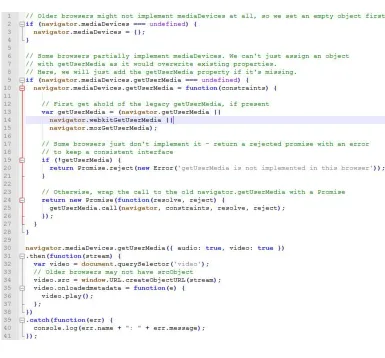
Since support for get User Media() varies from browser to browser, we adopt
the JavaScript code as shown in [12] to provide flexibility so that both older and
current browsers are supported. The JavaScript code as adopted from [12] is shown in
Figure 3.
Figure 3: Resolving Cross-Browser Compatibility
In the HTML5 code, the canvas and video tags are used to display the feed of
the web camera as well as to manipulate the images from the frames. To obtain the
image we would put an empty image tag with a button below it that reads “Take
<video autoplay style="display: none"></video>
<canvas style="display: none;"></canvas>
<imgsrc="" id="screenshot" >
When the user clicks on the button, a hidden video tag will be activated based
on JavaScript event listeners that are attached to the button to process this. The
frames from this video tag will be passed to a canvas tag that can manipulate each
frame as an image to add effects or to save the image and use it elsewhere on the
page. In our application, the first frame is taken as a picture and passed from the
canvas element to the image element. The user can then decide to use it for facial
recognition or retake another screenshot. The selected picture would then be
processed by the server to detect the face and to authenticate or deny the user.
4. Detecting and Recognizing Faces
The Facial Recognition API from Lambda Labs is used in our application for
the facial identification and recognition component. This API may be used for free
with a limitation number of detects and recognitions of face, which is appropriate for
our prototype application modules. In addition to being able to perform face
detection and recognition, this API may also perform facial feature extraction, (of the
eyes, nose and mouth) and gender classification.
The downloaded client library can be used in languages such as Python,
Objective C, PHP and Java. The API uses an album which can be filled with a limited
number of pictures for recognition and another limited set of pictures for detection.
The album has to be trained to recognize one label with multiple pictures associated
to it. Pictures placed into the album can be either URLs or files. Each picture has to
be tagged, labeling whom the image represents. The more pictures are in the album
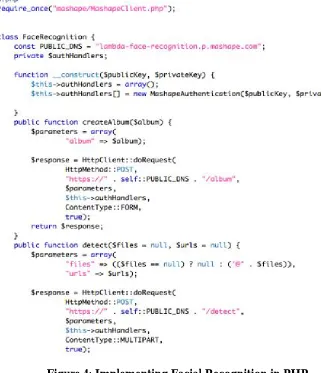
PHP was adopted as the programming language to develop our facial
detection and recognition module, with Lambda Labs Face Recognition and
Detection API as its supporting package. The facial recognition is used to verify that
the picture the user uploads matches a person’s stored template. Part of the PHP code
is shown in Figure 4.
5. Facial Recognition and Distance Learning
In this section we present and describe how our facial recognition module is
employed in distance learning and integrated into online learning management
systems.
5.1. Using Facial Recognition in Distance Learning
The facial detection and recognition were used in two aspects of distance
learning environment. The first one is face based remote-login Web app, in which a
user can log in the distance learning based classroom using her/his face and a 4-digit
pin code. The pin code greatly speeds up the login process because the facial
recognition component now doesn’t have to scan the entire face template database.
The second application is an online proctor application. Cheating has always
been an issue in educational environment. An effective mechanism to ensure
academic integrity in distance learning environment is even more challenging because
it is commonly assumed that cheating over quizzes and tests is easier online than in a
physical classroom [14]. We therefore developed a facial recognition based online
proctor and auditing system that may be integrated into distance learning
environment. The proctor and auditing system has the following features:
The student, as the end user, will initially prompt a login system using her/his
face and pin number.
The verified student will be shown a message that the test is virtually
proctored through a camera and remote monitor.
The student will also be promoted that a randomly chosen image/video
The proctor system can be configured to take pictures or video clips after
fixed period of time or randomly from time to time. The teacher will be able
to use these footprint photos or video clips as necessary.
The student may put the system in Break Mode for emergency, and the
proctor system will lock the screen and record the break information.
5.2. Facial Recognition in Learning Management Systems: An Ongoing Effort
Distance learning is normally managed by learning management systems
(LMS). It is therefore highly beneficial and important to have a feasible method to
integrate our facial recognition experimental systems into existing learning
management systems. Our university is using Sakai [16] learning management system
on daily basis. As a result, our ongoing investigation and experiments focus on Sakai.
As a Java based open source learning management system, Sakai provides a
development environment that Java developers can be used to smoothly integratetheir
Java programs into Sakai core systems. However, our facial recognition prototype was
implemented in PHP. In our experiments, we therefore would have to adopt an
alternative approach without rewriting our facial recognition modules in Java.
Fortunately, Sakai supports IMS Learning Tools Interoperability (LTI) (17), a
standardized way to integrate learning management systems and other software
utilities. Both LTI v1.0 and v2.0 are supported by the latest edition of Sakai. In our
ongoing experiments, we wrapped our facial recognition code following LTI v1.0
specification because the Sakai system we have installed on our test server is an older
In addition to Sakai, many other learning management systems are available
and being used by schools, colleges and universities, such as Blackboard, Moodle, and
Dokeos. There are different mechanisms to integrate external software modules into
these learning management systems [18]. However, dominant learning management
systems are more and more adopting LTI to allow integration with third party
software modules. As a result, our ongoing facial recognition/LMS integration
method shall work for other LTI-compatible learning management systems.
6. Conclusion
Face identification and recognition have become much more accessible
application component as mobile devices and computers are equipped with cameras.
It is becoming a natural and secure biometrics feature for user authentication. The
new HTML5 and get User Media () API from W3 consortium have empowered Web
applications to request permission from users and to use their Web cameras, which
therefore can employ facial recognition based services.
In this paper, we first survey generic methods and algorithm for facial
recognition. Then we describe our practice and experiments in integrating facial
recognition service into a Web based distance learning environment, which make use
of a combination of techniques such as HTML5 features, get User Media() JavaScript
API, and Face Detection and Recognition API from Lambda Labs. We also describe
how facial recognition modules and tools may be integrated into contemporary
learning management systems using open and standardized programming paradigm
Acknowledgements
The research as presented here was supported in part by NASA WV Space
Consortium Research Enhancement Award program and in part by WV EPSCoR
Summer Undergraduate Research Experience Grant. We thank both funding sources
for their generous financial support.
References
21st Century Wire (2015), REVEALED: The TSA’s New Computerized ‘Facial and Emotional’ Recognition System.
http://21stcenturywire.com/2015/01/29/revealed-the-tsas-new-computerized-facial-and-emotional-recognition-system/. (Nov. 1, 2016) Suzanne Lucas (2013). Bank Moving to Face Recognition Technology.
http://www.sagenews.com/article.asp?id=3020. (Nov. 1, 2016)
Online Learning Consortium (2015).Online Report Card – Tracking Online Education in the United States (2015).
http://onlinelearningconsortium.org/read/online-report-card-tracking-online-education-united-states-2015/. (October 15, 2016)
Find Biometrics (2015).Facial Recognition.
http://www.findbiometrics.com/facial-recognition/. (Nov. 1, 2016)
Kevin B., Johnson R. (2015), How Facial Recognition Systems Work. http://electronics.howstuffworks.com/gadgets/high-tech-gadgets/facial-recognition.htm. (July 10, 2015)
Latha, P., Ganesan, L., & Annadurai, S. (2009). Face recognition using neural networks. Signal Processing: An International Journal (SPIJ), 3(5), 153-160. Turk, M. A., &Pentland, A. P. (1991, June). Face recognition using eigenfaces. In
Computer Vision and Pattern Recognition, 1991. Proceedings CVPR'91., IEEE Computer Society Conference on (pp. 586-591).
Jenkins, R., & Burton, A. M. (2008).100% accuracy in automatic face recognition. Science, 319(5862), 435-435.
Jafri, R., & Arabnia, H. R. (2009). A Survey of Face Recognition Techniques. Jips, 5(2), 41-68.
Zhao, W., Chellappa, R., Phillips, P. J., & Rosenfeld, A. (2003). Face recognition: A literature survey. ACM computing surveys (CSUR), 35(4), 399-458.
Media Devices.get User Media().
https://developer.mozilla.org/en-US/docs/Web/API/MediaDevices/getUserMedia. (Nov. 18, 2016). Lambda Labs (2015).The Lambda Face Recognition API.
https://lambdal.com/face-recognition-api. (July 15, 2015)
Heberling, M. (2002).Maintaining academic integrity in online education. Online Journal of Distance Learning Administration, 5(2).
Bradski, G., & Kaehler, A. (2008). Learning Open CV: Computer vision with the Open CV library." O'Reilly Media, Inc.".
Farmer, J., & Dolphin, I. (2005). Sakai: eLearning and more. EUNIS 2005-Leadership and Strategy in a Cyber-Infrastructure World.
IMS Global Learning Consortium (2016). Learning Tools Interoperability, https://www.imsglobal.org/activity/learning-tools-interoperability.(Nov. 30, 2016).
Huertas, F., & Navarro, A. (2013).Integration mechanisms in e-learning platforms. International Journal of Computer Information Systems and Industrial Management Applications, 5, 714-721.
LeCun, Y., Bengio, Y., & Hinton, G. (2015).Deep learning. Nature, 521(7553), 436-444.