Juliet Shackell
2.0
1. Copyright Notice ... 1
2. Overview of tc Server Administration ... 3
3. Configuring and Monitoring tc Runtime Instances Using Hyperic HQ ... 5
3.1. User Permissions Required to Use the tc Server HQ Plugin Features ... 5
3.2. Managing tc Runtime-Related HQ Alerts ... 6
3.3. Securing the HQ Server ... 11
4. Configuring a tc Runtime Instance Manually ... 15
4.1. Configuration Files and Templates ... 15
4.2. Simple tc Runtime Configuration ... 16
4.3. Setting Up a High-Concurrency JDBC Datasource ... 20
4.4. Configuring SSL ... 28
4.5. Using the Apache Portable Runtime (APR) ... 31
4.6. Configuring Logging for tc Runtime ... 33
4.7. Obfuscating Passwords in tc Runtime Configuration Files ... 42
4.8. Configuring an Oracle DataSource With Proxied Usernames ... 48
4.9. Reporting Status for a Deployed Application, Host, or Engine ... 50
4.10. Enabling Thread Diagnostics ... 53
5. The tc Server Command-Line Interface ... 57
5.1. Overview of tcsadmin ... 57
5.2. HQ API Command-Line Interface (hqapi.sh) ... 58
5.3. Tips for Windows Users ... 58
5.4. Downloading the tcsadmin Command-Line Interface ... 59
5.5. General Syntax of the tcsadmin Command-Line Interface ... 59
5.6. List of Commands ... 60
5.7. Connection Parameters ... 62
5.8. Using Special Characters as Parameter Values ... 64
5.9. Group Command Behavior ... 64
5.10. Exit Codes ... 65
5.11. Getting Help ... 65
5.12. Inventory Commands ... 66
5.13. Application Management Commands ... 72
5.14. tc Runtime and Group Configuration Commands ... 89
5.15. tc Runtime and Group Control Commands: Reference ... 97
6. Configuring Load Balancing Using the ERS httpd Server ... 103
7. Enabling Clustering for High Availability ... 109
7.1. Additional Cluster Documentation from Apache ... 109
7.2. High-Level Steps for Creating and Using tc Runtime Clusters ... 110
7.3. Configuring a Simple tc Runtime Cluster ... 112
7.4. Advanced Cluster Configuration Options ... 113
1. Copyright Notice
Copyright © 2010 VMware Inc. All rights reserved. VMware Web Site Legal Notice
2. Overview of tc Server Administration
This guide describes how to perform the most common tc Server administration tasks:
• Configuring and Monitoring tc Runtime Using HQ. Use the HQ user interface to update the configuration of a tc Runtime instance and to monitor its health and performance.
• Configuring a tc Runtime Instance Manually. Configure a single tc Runtime instance by manually updating its configuration files, such asserver.xml.
• The tc Server Command Line Interface. Use thetcsadmincommand-line interface and a command script to manage and configure a tc Runtime instance or group.
• Enabling Clustering for High Availability. Create a cluster of tc Runtime instances so as to enable session replication, cluster-wide deployment, and context replication. This section also describes how to enable load balancing.
In procedures that describe how to configure individual tc Runtime instances, it is assumed that you already have created at least one instance and that you now want to change the default configuration to take advantage of tc Server features as well as standard Apache Tomcat
features. If you have not created a tc Runtime instance, seeCreating a New tc Runtime Instance.
Note
The tc Server runtime component, tc Runtime, is an enterprise version of Apache Tomcat that is hardened for enterprise use, coupled with key operational capabilities and advanced diagnostics, and backed by mission-critical support.
3. Configuring and Monitoring tc Runtime
Instances Using Hyperic HQ
Hyperic HQ is a comprehensive enterprise application management tool. It manages and monitors all instances of tc Runtime on any computer, all Spring-powered applications, and a variety of other non-SpringSource platforms and application servers such as Apache Tomcat. HQ provides a single console with powerful dashboards from which you can easily check the health of your applications. With Hyperic HQ, you can:
• Manage the lifecycle of tc Runtime instances by starting, stopping, and restarting a local or remote instances.
• Similarly manage the lifecycle of a group of tc Runtime instances that are distributed over a network of computers.
• Configure a single instance of tc Runtime. Configuration options include the various port numbers to which the tc Runtime instance listens, JVM options such as heap size and enabling debugging, default server values for JSPs and static content, JDBC datasources, various tc Runtime connectors, and so on.
• Deploy a Web application from an accessible file system, either local or remote. You can deploy to both a single tc Runtime instance or to a predefined group of servers.
• Manage the lifecycle of applications deployed to a single tc Runtime instance or group of instances. Application lifecycle operations include start, stop, redeploy, undeploy, and reload. In addition to the preceding tc Runtime-related actions, Hyperic HQ performs these standard tasks:
• Inventories the resources on your network. • Monitors your resources.
• Alerts you to problems with resources. • Controls the resources.
Getting Started with tc Serverdescribes how to install and use Hyperic and provides a tutorial that demonstrates the most common tasks.
When using the HQ user interface, click on the Help link at the top of most pages for detailed online-help. You can also browse theHQ Documentationfor additional information.
3.1 User Permissions Required to Use the tc Server
HQ Plugin Features
For simplicity, it is often assumed in this documentation that you log in to the HQ user interface as the HQ super-user (hqadmin) when you want to manage a tc Runtime instance. This is not required, of course. You can also log in as a non-super user and still use the tc Server HQ plugin features, as long as the user has the correct permissions.
In HQ, users are assigned roles, which in turn are assigned permissions, such as View and
Control. For general information about what each permission means with respect to server
resources (such as a tc Runtime instance) in HQ, seePermissions to Serversin the Hyperic documentation. For general information about the default users in HQ and creating new ones, see User Accounts in Hyperic HQ.
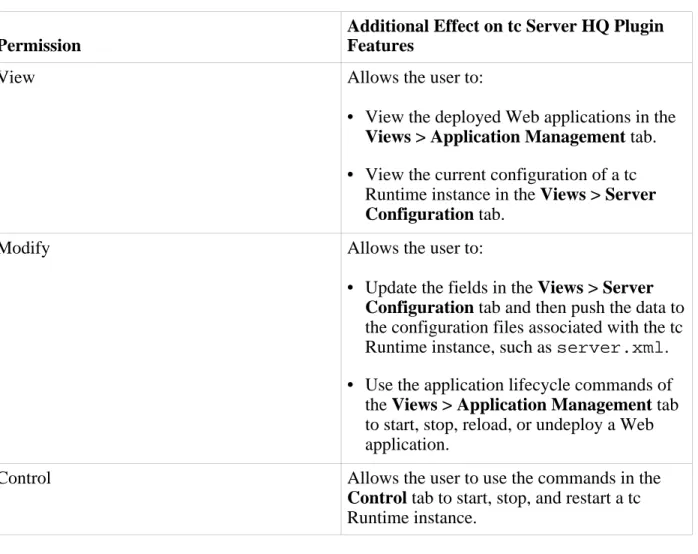
The following table describes the additional effects that some of the HQ permissions have on the tc Server HQ plugin features. Use this table to determine which role you should assign a user that will be managing tc Runtime instances.
Table 3.1. HQ Permission Effects on tc Server HQ Plugin Features
Permission
Additional Effect on tc Server HQ Plugin Features
View Allows the user to:
• View the deployed Web applications in the
Views > Application Management tab.
• View the current configuration of a tc Runtime instance in the Views > Server
Configuration tab.
Modify Allows the user to:
• Update the fields in the Views > Server
Configuration tab and then push the data to
the configuration files associated with the tc Runtime instance, such asserver.xml. • Use the application lifecycle commands of
the Views > Application Management tab to start, stop, reload, or undeploy a Web application.
Control Allows the user to use the commands in the
Control tab to start, stop, and restart a tc
Runtime instance.
SpringSource tc Server includes a full set of diagnostic features that make it easy for you to troubleshoot problems with tc Runtime instances and the applications that you deploy to them. For each diagnostic feature, the tc Server HQ plug-in has one or more corresponding
preconfigured alerts.
After HQ triggers an alert associated with a diagnostic feature (because the associated condition has been met), HQ disables the alert until an administrator marks it as Fixed. You can use HQ to further configure this alert with additional control actions or even disable it, as described in the following sections:
• Viewing and Changing the Preconfigured Alerts • Viewing and Changing the Metric Collection Interval • Deadlock Detection
• Excessive Time in Garbage Collection • Slow or Failed Requests
• JDBC Connection Monitoring
Viewing and Changing the Preconfigured Alerts
The preconfigured HQ alerts associated to the diagnostic features of tc Runtime work on one of two HQ resources: either the tc Runtime instance itself, or with a service of the tc Runtime instance. This information is important for you to know because it determines how you view, and optionally change, a particular alert.
The following table lists each preconfigured alert and the HQ resource type to which it is associated. The resource typeSpringSource tc Runtime 6.0refers to the tc Runtime instance itself; the resource typeSpringSource tc Runtime 6.0 Service, such as
SpringSource tc Runtime 6.0 Thread Diagnostics, refers to a service of the tc Runtime instance.
Note: The tc Runtime version (6.0) is associated with the core version of Tomcat on which the runtime is based, rather than the version of the tc Server bundle.
The third column in the table indicates whether the alert is triggered by a metric condition or an event/log level condition. If the former, the name of the metric is displayed; if the latter, the specific string in the log (if any) that triggers the alert is displayed.
Table 3.2. preconfigured tc Runtime Alerts
Alert Name
Associated HQ Resource Type
Metric or Events/Log Level Based?
Deadlocks Detected SpringSource tc Runtime 6.0 Metric (Deadlocks Detected)
Alert Name
Associated HQ Resource Type
Metric or Events/Log Level Based?
Excessive Time Spent in Garbage Collection
SpringSource tc Runtime 6.0 Metric (Percent Up Time in Garbage Collection)
Slow or Failed Request SpringSource tc Runtime 6.0 Thread Diagnostics
Events/Logs Level. JDBC Connection Abandoned SpringSource tc Runtime 6.0
Tomcat JDBC Connection Pool Global
Events/Logs Level (CONNECTION ABANDONED) JDBC Connection Failed SpringSource tc Runtime 6.0
Tomcat JDBC Connection Pool Global
Events/Logs Level
(CONNECTION FAILED) JDBC Query Failed SpringSource tc Runtime 6.0
Tomcat JDBC Connection Pool Global
Events/Logs Level (FAILED QUERY)
Slow JDBC Query SpringSource tc Runtime 6.0 Tomcat JDBC Connection Pool Global
Events/Logs Level (SLOW QUERY)
The following procedure summarizes how to view and change preconfigured alerts. For a detailed tutorial that shows how to view and change the Deadlocks Detected alert, seeTutorial: Using HQ to Configure and Manage tc Runtime Instances.
1. Browse to the resource to which the alert is associated, as described in the preceding table. SeeGetting Started with the HQ User Interfacefor information about browsing to HQ resources.
2. Click the Alert tab.
3. Click the Configure button. A table of alerts currently configured for the resource is displayed.
4. Click the name of the alert. The Alert Definition page for the alert is displayed.
The definition page has three sections: the top Alert Properties section provides general properties of the alert; the middle Condition Set section describes the conditions that trigger the alert; and a series of tabs at the bottom enable you to configure the particular control action that occurs if the alert is triggered, the escalation scheme, who should be notified if the alert is triggered, and so on.
5. If you want to change the general properties, conditions, control actions, and so on of the alert, click the appropriate EDIT... button, make your changes, then click OK.
checking the box to the left of its name, then selectNofor the Set Active drop-down list and click the arrow to the right.
The remainder of this chapter describes each alert in more detail, including any special instructions to enable the alert.
Viewing and Changing the Metric Collection Interval
As shown in thePreconfigured tc Runtime Alertstable, the two alerts associated with the tc Runtime instance itself use metrics in their condition to determine whether the alert should be triggered. The following procedure describes how you can view, and optionally change, the collection interval for Deadlock Detection and Excessive Time in Garbage Collection. 1. Click the Administration tab at the top of the HQ user interface.
2. In the HQ Server Settings section, click the Monitoring Defaults link.
3. Scroll down until you find theSpringSource tc Runtime 6.0entry in the Server Types table, and then click the EDIT TEMPLATE METRIC link to the right.
A page shows all metrics associated with the tc Runtime instance. For example, under Utilization you will find the Deadlocks Detected metric. By default, the Collection Interval column shows that HQ Server collects information about this metric every 2 minutes.
4. To change the collection interval for a specific metric, select it by clicking the box to the left of its name.
5. Enter the new collection interval at the bottom of the page in the Collection Interval for Selected field, specify whether it is in minutes or hours, then click the arrow to the right.
Deadlock Detection
The tc Runtime automatically detects whether a thread deadlock occurs in a tc Runtime instance or an application deployed to the instance.
The out-of-the-box HQ alert is triggered if the Deadlocks Detected metric exceeds 0. HQ checks the metric every two minutes to see whether the condition is met. HQ applies this alert to all auto-discovered tc Runtime instances and enables it by default. This alert is associated with the tc Runtime instance itself.
For a detailed tutorial that shows how to view and change the Deadlocks Detected alert, see Tutorial: Using HQ to Configure and Manage tc Runtime Instances.
Excessive Time in Garbage Collection
An HQ metric represents the percentage of process up time (0 -100) that the tc Runtime instance
has spent in garbage collection.
The alert is triggered when the total garbage collection time is excessive (by default, 40% of process up time.) HQ checks this metric every 5 minutes to see if the condition has been met. HQ applies this alert to all auto-discovered tc Runtime instances and enables it by default.
Enabling the Slow or Failed Request Alert
When clients begin connecting and using a Web application deployed to a tc Runtime instance, they may encounter slow or failed requests. Although the tc Runtime instance logs these errors in the log files by default, it is often difficult to pinpoint the exact origin of the error and how to go about fixing it. By enabling thread diagnostics, tc Runtime provides additional information to help you troubleshoot the problem.
A failed request is one that simply did not execute; a slow request is a request that takes longer than a certain threshold. The default threshold is 500 milliseconds.
When you enable thread diagnostics, you can view the following contextual information about a slow or failed client request:
• Time and date of the slow or failed request.
• Exact URL invoked by the client that resulted in a slow or failed request. • Exact error returned by the request.
• Database queries that were executed as part of the request and how long each one took. • Whether any database connection failed or succeeded.
• Whether the database had any other connectivity problems. • Whether the database connection pool ran out of connections.
• Whether any garbage collection occurred during the request, and if so, how long it took. The associated HQ alert is triggered if a client request to tc Runtime is slow (over a configured threshold) or if it failed.
This alert is not enabled by default. Explicitly enable it as follows:
1. Browse to the Views > Server Configuration console page for the tc Runtime instance. 2. Click the Services tab.
3. In the table, click the service you want to configure; the default tc Runtime service is called
4. In the Thread Diagnostics section, check the Enable Thread Diagnostics property. 5. At the bottom of the page, click Save.
6. Click the necessary links and buttons to push configuration changes to the tc Runtime instance and restart the instance.
Enabling JDBC Connection Monitoring
HQ includes a new service calledSpringSource tc Runtime 6.0 Tomcat JDBC Connection Pool Globalthat represents any high-concurrency Tomcat JDBC
datasources you might have configured for your tc Runtime instance. This service monitors the health of the datasource, such as whether its connection to the database has failed or was abandoned, and whether the JDBC queries that clients execute are taking too long. HQ creates this service when you create a new Tomcat JDBC datasource; one instance of a service exists per datasource.
Four HQ alerts are associated with this diagnostic feature; they are triggered as follows: • JDBC Connection Failed: A particular high-concurrency JDBC connection that uses a
configured datasource fails.
• JDBC Connection Abandoned: A particular high-concurrency JDBC connection that uses a configured datasource is abandoned by the database server.
• JDBC Query Failed: A high-concurrency JDBC query fails.
• Slow JDBC Query: A high-concurrency JDBC query takes too long to execute.
To receive monitoring information for the preceding JDBC alerts, enable log tracking for this service:
1. Browse to theSpringSource tc Runtime 6.0 Tomcat JDBC Connection Pool Globalservice associated with your JDBC datasource.
2. Click the Inventory tab.
3. In the Configuration Properties section, be sure that the service.log_track.enable property is checked. Checking this box subscribes HQ to JMX notifications sent from the tc Runtime instance, which then get displayed in HQ as log events.
3.3 Securing the HQ Server
The HQ Server includes a default self-signed SSL certificate in its keystore; the same certificate is shipped with every HQ Server. Because this certificate is so readily available, anyone who
connects to your particular HQ Server (assuming an out-of-the-box configuration) using HTTPS cannot in reality trust the certificate. Although this is adequate in the testing phase of your
application, in production you typically want to configure HQ Server more securely. This section describes the basics steps for securing the HQ Server when connecting to it over HTTPS.
Note
It is assumed that you understand basic SSL concepts such as certificates, public and private keys, keystores, and truststores. It is also assumed that you know how to get a certificate from a trusted certificate authority or how to generate your own. The main focus in this section is how to update the HQ Server configuration so that the server uses your certificate.
1. Obtain a certificate from a trusted certificate authority (CA) such as Verisign or create your own.
Use thekeytoolcommand-line tool, provided in the Sun JDK, to generate a certificate. The
keytoollink also tells you how to get a certificate from a CA.
2. Install the certificate into the HQ Server keystore. When you first install HQ Server, this keystore contains a self-signed certificate; replace the default certificate with your own certificate that you got from a CA or that you generated with a tool such askeytool. Update the HQ Server's default keystore file:
• Keystore name:hyperic.keystore
• Keystore location:
INSTALL_DIR/server-4.2.X.X-EE/hq-engine/server/default/conf directory, whereINSTALL_DIRrefers to the directory in which you installed HQ Server, such as/home/hyperic
• Keystore password:hyperic.
As with generating your own certification, you can also use thekeytoolcommand-line tool to update a keystore.
3. Optional Step: Change the default HQ Server keystore and truststore filename, location, and password by updating
INSTALL_DIR/server-4.2.X.X-EE/hq-engine/server/default/deploy/jbossweb-web.deployer/server.xml. This step is unnecessary if you simply install your certificate in the default HQ Server
keystore file, as described in the preceding step.
In theserver.xmlfile, edit the<Connector>element that corresponds to port 7443, which is the port that HQ Server uses for HTTPS. The following snippet shows the default
<Connector>configuration; the attributes shown in bold correspond to the location of the keystore and truststore files, their names and passwords:
maxThreads="500" strategy="ms" maxHttpHeaderSize="8192"
emptySessionPath="true"
scheme="https" secure="true" clientAuth="false"
keystoreFile="${jboss.server.home.dir}/conf/hyperic.keystore"
keystorePass="hyperic"
truststoreFile="${jboss.server.home.dir}/conf/hyperic.keystore"
truststorePass="hyperic"
sslProtocol = "TLS" />
In the preceding snippet, the variable${jboss.server.home.dir}points to the INSTALL_DIR/server-4.2.X.X-EE/hq-engine/server/defaultdirectory. 4. Restart the HQ Server for the changes to take effect.
The HQ Server henceforth uses your certificate rather than the unsecure out-of-the-box certificate installed with HQ Server.
When you next use a browser to invoke the HQ user interface, the browser automatically trusts a certificate from a certificate authority (CA) such as Verisign, or it asks whether you want to trust an unrecognized certificate, and automatically updates its internal trust store accordingly.
If you are using thetcsadmincommand-line interface to access the HQ Server, you need to update the truststore only on the corresponding client computer if the signing authority is not already trusted. If you do need to update the truststore, add the public key of the new certificate that you previously installed in the HQ Server's keystore. You do this by updating the default truststore in the client's JVM (either theJAVA_HOME/lib/security/jssecacertsor JAVA_HOME/lib/security/cacertsfile) or by creating a new truststore and pointing to it using thejavax.net.ssl.trustStoresystem property. For more information, see Customizing the Default Key and Trust Stores, Store Types, and Store Passwords.
4. Configuring a tc Runtime Instance
Manually
When you first install tc Runtime, theserver.xmlfile contains typical server configuration values that get you up and running immediately. However, as you use tc Runtime and go into production, you might require additional configuration. This chapter describes typical and additional configuration use cases.
4.1 Configuration Files and Templates
The tc Runtime configuration files are located in theCATALINA_BASE/confdirectory, where CATALINA_BASErefers to the directory in which you have installed a tc Runtime instance. The main configuration files are:
• server.xml. Main configuration file for a tc Runtime instance. It configures the behavior of the servlet/JSP container. By default, theserver.xmlfile for a tc Runtime instance uses variable substitution for configuration properties such as HTTP and JMX port numbers that must be unique across multiple server instances on the same computer. These variables take the form${var}. For example, the variable for the HTTP port that the tc Runtime instance listens to is${http.port}. The specific values for these variables for a particular server instance are stored in thecatalina.properties file, in the same directory as the server.xml file.
• catalina.properties. Properties file that contains the server instance-specific values for variables in theserver.xmlfile.
Theconfdirectory also contains the following two files that configure common properties for
all Web applications deployed to the tc Runtime instance:
• web.xml. Defines default values for all Web applications.
• context.xml. The contents of this file will be loaded for each Web application. The tc Runtime installation also includes a set of configuration templates in the
INSTALL-DIR/springsource-tc-server-edition/templatesdirectory, where editionrefers to the edition of tc Server that you are using, whethernode,developer, or
standard. You can use these templates when you create a new tc Runtime instance to
automatically enable certain configuration features, such as SSL or clustering. Each template is a directory that contains modified files that thetcruntime-instancescript uses to overwrite the default tc Runtime instance files. Most of the templates change the defaultserver.xml
file, so you can also simply look at theserver.xmlfiles in the various template directories for examples of configuring an existing tc Runtime instance. Some of these templates are further discussed in this guide.
For details about the templates provided by tc Runtime, seeCreating a tc Runtime Instance
Using a Template.
4.2 Simple tc Runtime Configuration
The following sampleserver.xmlfile shows a basic out-of-the-box configuration for a default tc Runtime instance included in tc Runtime. This configuration file uses typical values for a standard set of XML elements. Sampleserver.xmlfiles in later sections of this documentation build on this file.
Thisserver.xmlfile uses variable substitution for configuration properties, such as HTTP and JMX port numbers, that must be unique across multiple server instances on one computer. These variables take the form${var}. For example, the variable for the HTTP port that the tc Runtime instance listens to is${http.port}. The specific values for these variables for a particular server instance are stored in thecatalina.propertiesfile, located in the same directory as theserver.xmlfile. A snippet of the defaultcatalina.propertiesfile is shown after the sampleserver.xmlfile; the snippet shows specific values of variables such as the HTTP port.
SeeDescription of the Basic server.xml Filefor information about the elements and attributes in this sample configuration file in case you need to change them to suit your own environment.
<?xml version='1.0' encoding='utf-8'?>
<Server port="${shutdown.port}" shutdown="SHUTDOWN">
<Listener className="org.apache.catalina.core.JasperListener" />
<Listener className="org.apache.catalina.mbeans.ServerLifecycleListener" />
<Listener className="org.apache.catalina.mbeans.GlobalResourcesLifecycleListener" /> <Listener className="com.springsource.tcserver.serviceability.rmi.JmxSocketListener"
port="${jmx.port}" bind="127.0.0.1" useSSL="false" passwordFile="${catalina.base}/conf/jmxremote.password" accessFile="${catalina.base}/conf/jmxremote.access" authenticate="true"/>
<Listener className="com.springsource.tcserver.serviceability.deploy.TcContainerDeployer" /> <GlobalNamingResources>
<Resource name="UserDatabase" auth="Container"
type="org.apache.catalina.UserDatabase"
description="User database that can be updated and saved"
factory="org.apache.catalina.users.MemoryUserDatabaseFactory"
pathname="conf/tomcat-users.xml" /> </GlobalNamingResources>
<Service name="Catalina">
<Executor name="tomcatThreadPool" namePrefix="tomcat-http--" maxThreads="300" minSpareThreads="50"/> <Connector executor="tomcatThreadPool" port="${http.port}" protocol="HTTP/1.1" connectionTimeout="20000" redirectPort="8443" acceptCount="100" maxKeepAliveRequests="15"/>
<Engine name="Catalina" defaultHost="localhost">
<Realm className="org.apache.catalina.realm.UserDatabaseRealm"
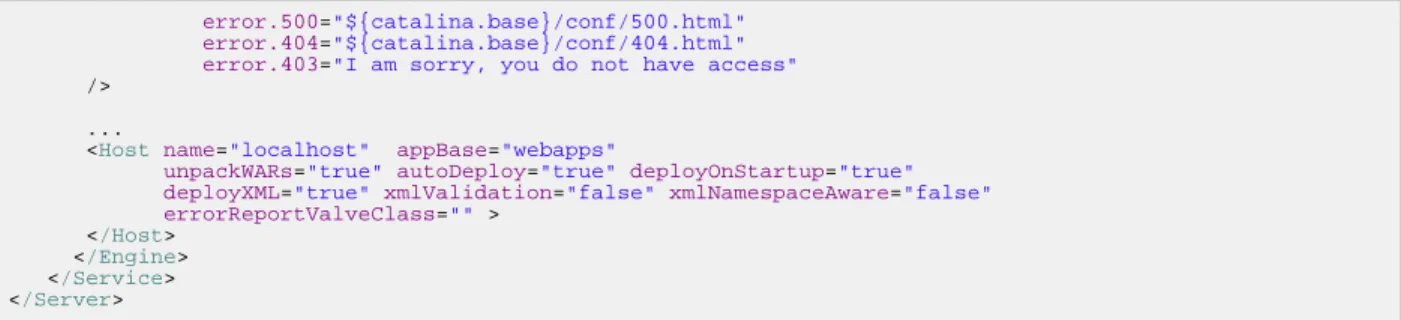
resourceName="UserDatabase"/> <Host name="localhost" appBase="webapps"
unpackWARs="true" autoDeploy="true" deployOnStartup="true" deployXML="true"
xmlValidation="false" xmlNamespaceAware="false"> </Host>
</Engine> </Service>
</Server>
The following snippet ofcatalina.propertiesshows how to set values for the variables used in the precedingserver.xmlfile.
tcserver.node=tcServer shutdown.port=-1 http.port=8080 jmx.port=6969 ajp.port=8009
Description of the Basic server.xml File
Note the following components of the preceding sampleserver.xml:
• <Server>. Root element of theserver.xmlfile. Its attributes represent the characteristics of the entire tc Runtime servlet container. Theshutdownattribute specifies the command string that the shutdown port number receives through a TCP/IP connection in order to shut down the tc Runtime instance. Theportattribute is the TCP/IP port number that listens for a shutdown message for this tc Runtime instance; note that in thisserver.xmlfile the variable is${shutdown.port}. By default, thecatalina.propertiesfile substitutes a value of-1, which disables the shutdown via TCP connection. Thus the only way to stop the tc Runtime instance is to issue akillcommand on the process ID (PID) of the tc Runtime instance. This is what thetcruntime-ctl.shcommand does when you use it to stop a running tc Runtime instance.
• <Listener>. List of lifecycle listeners that monitor and manage the tc Runtime instance. Each listener listens to a specific component of the tc Runtime instance and has been programmed to do something at certain lifecycle events of the component, such as before starting up, after stopping, and so on.
The first three<Listener>elements configure standard Tomcat lifecycle listeners. You can insert a
com.springsource.tcserver.properties.SystemPropertieslistener before these standard listeners to set properties from external properties files. SeeAdding a System Properties Listener.
The listener implemented by the
com.springsource.tcserver.serviceability.rmi.JmxSocketListener
class is specific to tc Server. This listener enables JMX management of tc Runtime; in
particular, this is the JMX configuration that the HQ user interface uses to monitor tc Runtime instances. Theportattribute specifies the port of the JMX server that monitoring products, such as Hyperic HQ, connect to. The variable${jmx.port}is set to6969in the default
catalina.propertiesfile. Thebindattribute specifies the host of the JMX server; by default, this attribute is set to the localhost (127.0.0.1.)
Warning: The value of thebindattribute ofJmxSocketListeneroverrides the value of thejava.rmi.server.hostnameJava system property. This directly affects how names are bound in the RMI registries; by default, the names will be bound to localhost
127.0.0.1.) This in turn means that RMI clients running on a different host from the one hosting the tc Runtime instance will be unable to access the RMI objects because, from their perspective, the host name is incorrect. This is because, the host should be the name or IP address of the tc Runtime computer rather thanlocalhost. When the tc Runtime instance starts, if it finds that the value of thebindattribute is different from or incompatible with the
java.rmi.server.hostnameJava system property, the instance will log a warning but will startup anyway and override the system property as described. If this causes problems in your particular environment, then you should change the value of thebindattribute to
specify the actual hostname on which the tc Runtime runs rather than the default127.0.0.1
value.
The monitoring application (such as Hyperic) that connects to the tc Runtime instance via JMX must specify a user and password to actually gain access. You configure these in the files pointed to by theaccessFileandpasswordFileattributes of the Listener. By default, the JMX user isadminwith passwordspringsource.
By default, SSL is disabled; if you enable it by updating theuseSSLattribute, you must then configure HQ with the trustStore and trustStorePassword. To set these values, add the
following to theagent.javaOptsentry in each HQ Agent'sagent.propertiesfile:
agent.javaOpts=-Xmx128m -Djava.net.preferIPv4Stack=true -Dsun.net.inetaddr.ttl=60 \
-Djavax.net.ssl.trustStore=${full path to truststore} -Djavax.net.ssl.trustStorePassword=${password}
• <GlobalNamingResources>. Groups the global JNDI resources for this server instance that Web applications deployed to the server can use. In the preceding example, the
<Resource>element defines the database used to load the users and roles from the CATALINA_BASE/conf/tomcat-users.xmlfile into an in-memory data structure. This resource is later referenced by the<Engine>XML element so that Web applications deployed to tc Runtime instances can query the database for the list of users and the roles to which the users are mapped, as well as update the file.
• <Service>. Groups one or more connectors, one or more executors, and a single engine. Connectors define a transport mechanism, such as HTTP, that clients use to send and receive messages to and from the associated service. A client can use many transports, which is why a
<Service>element can have many<Connector>elements. The executors define thread pools that can be shared between components, such as connectors. The engine then defines how these requests and responses that the connector receives and sends are in turn handled by the tc Runtime instance; you can define only a single<Engine>element for any given
<Service>element.
The sampleserver.xmlfile above includes a single<Connector>for the HTTP
transport, a single<Executor>that configures the thread pool used by the connector, and a single<Engine>as required.
• tomcatThreadPool. As defined by the<Executor>XML element, allows a maximum of 300 active threads. The minimum number of threads that are always kept alive is 50. • <Connector>. Listens for HTTP requests at the 8080 TCP/IP port (as set by the
pool defined by thetomcatThreadPoolexecutor and ignores all other thread attributes. After accepting a connection from a client, the connector waits a maximum of 20000 milliseconds for a request URI, after which it times out. If this connector receives a request from the client that requires the SSL transport, the tc Runtime instance automatically redirects the request to port 8443. If the tc Runtime instance receives a connection request at a moment in time when all possible request processing threads are in use, the server puts the request on a queue; theacceptCountattribute specifies the maximum length of this queue (100) after which the server refuses all connection requests. Finally, the maximum number of HTTP requests that can be pipelined until the connection is closed by the server is 15, as specified by themaxKeepAliveRequestsattribute.
• Catalina. Logical name of the engine. This name appears in all log and error messages so you can easily identify problems. The value of thedefaultHostattribute is the name of a
<Host>child element of<Engine>; this host processes requests directed to host names on this server.
The<Realm>child element of<Engine>represents a database of users, passwords, and mapped roles used for authentication in this service. In the preceding sample, the realm simply references theUserDatabaseresource, defined by the<Resource>child element of
<GlobalNamingResources>.
The<Host>child element represents a virtual host, which is an association of a network name for a server (such aswww.mycompany.com) with the particular server on which Catalina is running. tc Runtime automatically deploys Web applications that are copied to the CATALINA_BASE/webappsdirectory while the tc Runtime instance is running and
automatically deploys them when the server starts. The tc Runtime instance unpacks the Web applications into a directory hierarchy if they are deployed as WAR files. SpringSource tc Runtime parses anycontext.xmlfile contained in theMETA-INFdirectory of deployed applications. ThexmlValidationattribute specifies that the tc Runtime instance does not validate XML files when parsing them, or in other words, it accepts invalid XML. The
xmlNamespaceAwareattribute specifies that tc Runtime does not take namespaces into account when reading XML files.
The preceding sampleserver.xmlfile contains typical elements and attribute values for a simple out-of-the-box tc Runtime configuration. However, you can configure many more elements and attributes in this file. For complete elements documentation about the tc Runtime
server.xmlfile, seeApache Tomcat Configuration Reference.
Adding a System Properties Listener
tc Server includes a useful feature that allows you to configure tc Server and Java system properties through external properties files. Properties that you set using this method can be use to as replacement values inserver.xml. The external properties files are also useful for setting application properties, instead of modifying thesetenv.shscript to set them on the
javacommand line with the-Dflag. The properties are available to applications through
java.lang.System.getProperties().
The listener should be the first child of theServerelement in theserver.xmlfile, since XML is processed in the order it appears and properties must be set before they are referenced. The following example specifies four properties files to be processed in sequence.
<Listener class="com.springsource.tcserver.properties.SystemProperties" file.1="${catalina.base}/conf/base.properties" file.3="${catalina.base}/conf/qa.properties" file.2="${catalina.base}/conf/dev.properties" file.4="${catalina.base}/conf/prod.properties" immutable="false" trigger="now"/>
There can be up to one hundred files, and they are processed in sequence by the numeric extension, not in the order they appear. In the example above, thedev.propertiesfile is processed before theqa.propertiesfile, even though they are not listed in that order.
Theimmutableattribute,falseby default, determines if properties can be overridden. When
false, the property value is set each time the key is encountered. Ifimmutableistrue, once a value is associated with a key it cannot be changed; later occurrences of the property are ignored. Whetherimmutableis set totrueorfalse, a debug message is logged when an existing property is encountered.
If you specify a properties file that does not exist, a message is logged, but processing continues. This allows you to set upsystem.xmlfor different runtime environments by supplying only the appropriate properties files. In the example above, for example, if theprod.properties
file is missing, the properties in thebase.properties,dev.properties, and
qa.propertiesfiles are processed, with any properties overridden inqa.properties
taking precedence.
The presence of thetriggerattribute causes the properties to be applied before parsing the remainder of theserver.xmlfile. The value of thetriggerattribute is ignored.
4.3 Setting Up a High-Concurrency JDBC Datasource
A datasource defines a pool of JDBC connections which in turn connect to a specific database using a specified URL, username, and so on. JDBC datasources make it easy for a user to access data in a database server.
Comparing the DBCP Datasource and the tc Runtime Datasource
In a tc Runtime instance, you can create the following two types of JDBC datasources: • Database connection pool (DBCP) datasource
• tc Runtime datasource
The DBCP datasource is the standard datasource provided by tc Runtime; it uses the
applications, it is single-threaded, which means that in order to be thread-safe, the tc Runtime instance must lock the entire pool, even during query validation. Thus it is not suitable for highly concurrent environments. Additionally, it can be slow, which in turn can negatively affect the performance of Web applications.
The tc Runtime datasource includes all the functionality of the DBCP datasource, but adds additional features to support highly-concurrent environments and multiple core/cpu systems. The tc Runtime datasource typically performs much better than the DBCP datasource. Additional features include:
• Dynamic implementation of the interfaces, which means that the datasource supports the
java.sqlandjavax.sqlinterfaces for your runtime environment (as long as your JDBC driver supports it), even when compiled with a lower version of the JDK.
• Validation intervals so that tc Runtime doesn't have to validate every single time the application uses the connection, which improves performance.
• Run-Once query, which is a configurable query that tc Runtime runs only once when the connection to the database is established. This is very useful to set up session settings that you want to exist during the entire time the connection is established.
• Ability to configure custom interceptors to enhance the functionality of the datasource. You can use interceptors to gather query stats, cache session states, reconnect the connection upon failures, retry queries, cache query results, and so on. The interceptors are dynamic and not tied to a JDK version of ajava.sql/javax.sqlinterface.
• Asynchronous connection retrieval - you can queue your request for a connection and receive a Future<Connection> back.
Configuring the tc Runtime High-Concurrency JDBC Datasource
As with any tc Runtime resource, you configure the high-concurrency datasource (that is, the tc Runtime datasource) using a<Resource>child element of<GlobalNamingResource>. Most attributes are common to the standard DBCP and the tc Runtime datasources; however, the following new attributes apply only to the new tc Runtime datasource.
• initSQL • jdbcInterceptors • validationInterval • jmxEnabled • fairQueue • useEquals
Use thefactoryattribute of the<Resource>element to specify the type of datasource:
• Set thefactoryattribute to
org.apache.tomcat.jdbc.pool.DataSourceFactoryto use the tc Runtime high-concurrency datasource. This is also the default value of thefactoryattribute for tc Runtime, so you will automatically use the high-concurrency datasource if you do not specify this attribute at all, as shown in the example below.
• Set thefactoryattribute to
org.apache.tomcat.dbcp.dbcp.BasicDataSourceFactoryto use the standard DBCP datasource.
IBM JVM USERS ONLY: If you are using an IBM JVM, seeuseEqualsfor important information.
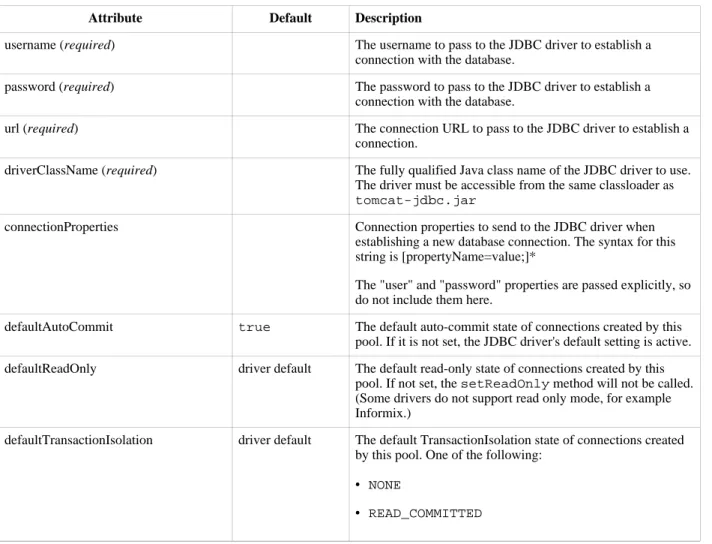
The following table lists the attributes for configuring either the high-concurrency datasource or the standard DBCP datasource. Most attributes are valid for both of the datasources, but some are only valid for one datasource. These exceptions are noted in the table. The default values shown are for the high-concurrency datasource, which is the default datasource for tc Server. Default values for the DBCP datasource may be different. See the Apache DBCP documentation for details.
Table 4.1. Connection Pool Configuration Attributes
Attribute Default Description
username (required) The username to pass to the JDBC driver to establish a connection with the database.
password (required) The password to pass to the JDBC driver to establish a connection with the database.
url (required) The connection URL to pass to the JDBC driver to establish a connection.
driverClassName (required) The fully qualified Java class name of the JDBC driver to use. The driver must be accessible from the same classloader as
tomcat-jdbc.jar
connectionProperties Connection properties to send to the JDBC driver when establishing a new database connection. The syntax for this string is [propertyName=value;]*
The "user" and "password" properties are passed explicitly, so do not include them here.
defaultAutoCommit true The default auto-commit state of connections created by this pool. If it is not set, the JDBC driver's default setting is active. defaultReadOnly driver default The default read-only state of connections created by this
pool. If not set, thesetReadOnlymethod will not be called. (Some drivers do not support read only mode, for example Informix.)
defaultTransactionIsolation driver default The default TransactionIsolation state of connections created by this pool. One of the following:
• NONE
Attribute Default Description
• READ_UNCOMMITTED
• REPEATABLE_READ
• SERIALIZABLE
(see Javadoc). If not set, the default is the JDBC driver's default.
defaultCatalog The default catalog of connections created by this pool. initialSize 10 The initial number of connections to create when the pool is
started.
maxActive 100 The maximum number of active connections that can be
allocated from this pool at the same time, or negative for no limit.
maxIdle maxActive
(100)
The maximum number of connections that should be kept in the pool at all times. Idle connections are checked periodically (if enabled) and connections that have been idle for longer thanminEvictableIdleTimeMillisare released. See alsotestWhileIdle.
minIdle 10 The minimum number of established connections that should
be kept in the pool at all times. The connection pool can shrink below this number if validation queries fail. The default value is derived frominitialSize.
maxWait 30000 The maximum milliseconds a pool with no available
connections will wait for a connection to be returned before throwing an exception, or-1to wait indefinitely.
validationQuery The SQL query to use to validate connections from this pool before returning them to the caller. If specified, the query must be an SQL SELECT statement that returns at least one row. testOnBorrow false Indicates whether objects are validated before borrowed from
the pool. If the object fails to validate, it is dropped from the pool, and an attempt is made to borrow another.
Atruevalue has no effect unless thevalidationQuery
parameter is set to a non-null string.
testOnReturn false Indicates if objects are validated before they are returned to the pool.
A true value has no effect unless thevalidationQuery
parameter is set to a non-null string.
testWhileIdle false Indicates whether objects are validated by the idle object evictor (if any). If an object fails to validate, it is dropped from the pool.
Atruevalue has no effect unless thevalidationQuery
parameter is set to a non-null string. This parameter must be set to activate the pool test/cleaner thread.
timeBetweenEvictionRunsMillis 5000 The number of milliseconds to sleep between runs of the idle object evictor thread. The thread checks for idle, abandoned connections and validates idle connections. The value should not be set below 1 second (1000).
numTestsPerEvictionRun Not used by the Tomcat JDBC pool. The number of objects to examine during each run of the idle object evictor thread, if any.
Attribute Default Description
minEvictableIdleTimeMillis 60000 The minimum amount of time an object may sit idle in the pool before it is eligible for eviction by the idle object evictor, if any.
connectionInitSqls null A Collection of SQL statements used to initialize physical connections when they are first created. These statements are executed only once, when the connection factory creates the connection.
DBCP Versions 1.3 and 1.4 of incorrectly use
"initConnectionSqls" as the name of this property for JNDI object factory configuration. Until 1.3.1/1.4.1 are released, "initConnectionSqls" must be used as the name for this property when using BasicDataSourceFactory to create BasicDataSource instances via JNDI.
poolPreparedStatements false This property is not used.
maxOpenPreparedStatements This property is not used.
accessToUnderlyingConnectionAllowed Not used. Access can be achieved by callingunwrapon the pooled connection. Seejavax.sql.DataSource
interface, or callgetConnectionthrough reflection, or cast the object asjavax.sql.PooledConnection. removeAbandoned false Set totrueto remove abandoned connections if they exceed
theremoveAbandonedTimeout. Setting this totruecan recover database connections from poorly written applications that fail to close a connection. A connection is considered abandoned and eligible for removal if it has been idle longer than theremoveAbandonedTimeout.
removeAbandonedTimeout 60 Timeout in seconds before an abandoned connection can be removed. The value should be set to the longest running query your applications might have.
logAbandoned false Set totrueto log stack traces for application code that abandons a Connection. Logging an abandoned Connection adds overhead for every Connection open because a stack trace has to be generated.
initSQL (high concurrency JDBC
datasource only)
Initial SQL statement that is run only when a connection is first created. Use this feature to set up session settings that should exist during the entire time the connection is established.
jdbcInterceptors (high concurrency
JDBC datasource only)
null Semicolon-separated list of classnames extending
org.apache.tomcat.jdbc.pool.JdbcInterceptor. tc Runtime inserts interceptors in the chain of operations on thejava.sql.Connectionobject.
Warning: Be sure you do not include any white space (such
as spaces or tabs) in the value of this attribute, or the classes will not be found.
Predefined interceptors:
• org.apache.tomcat.jdbc.pool.interceptor.ConnectionState
- keeps track of auto commit, read only, catalog and transaction isolation level.
• org.apache.tomcat.jdbc.pool.interceptor.StatementFinalizer
- keeps track of opened statements, and closes them when the connection is returned to the pool.
Attribute Default Description
validationInterval (high concurrency
JDBC datasource only)
30000(30 seconds)
Number of milliseconds tc Runtime waits before running a validation check to ensure that the JDBC connection is still valid. A connection that has been validated within this interval is not revalidated. Running validation checks too frequently can slow performance.
jmxEnabled (high concurrency JDBC
datasource only)
true Specifies whether the connection pool is registered with the JMX server.
fairQueue (high concurrency JDBC
datasource only)
true Specifies whether calls togetConnection()should be treated fairly in a true FIFO (first in, first out) fashion. This ensures that threads receive connections in the order they arrive. It uses theorg.apache.tomcat.jdbc.pool. FairBlockingQueueimplementation to manage the list of idle connections. This feature must be enabled (that is, set the attribute totrue) to use the asynchronous connection retrieval feature, which is the ability to queue your connection request.
Note: WhenfairQueue=trueand the operating system is Linux, there is a very large performance difference in how locks and lock waiting is implemented. To disable this Linux-specific behavior and still use the fair queue, add the propertyorg.apache.tomcat.jdbc.pool.
FairBlockingQueue.ignoreOS=trueto your system properties before the connection pool classes are loaded. abandonWhenPercentageFull 0 Connections that have been abandoned (timed out) are not
closed and reported up unless the number of connections in use is above the percentage defined by this parameter. The value should be between 0 and 100. The default value is 0, which implies that connections are eligible for closure as soon asremoveAbandonedTimeouthas been reached.
maxAge 0 Time in milliseconds to keep this connection. When a
connection is returned to the pool, the pool checks to see if the
now -time-when-connected > maxAgehas been reached, and if so, it closes the connection rather than returning it to the pool. The default value is 0, which implies that connections are left open and no age check is done upon returning the connection to the pool.
useEquals (high concurrency JDBC
datasource only)
false Specifies whether the ProxyConnection class should use String.equals() instead of "==" when comparing method names. Does not apply to added interceptors as those are configured individually.
NOTE FOR IBM JVM USERS: If you are running tc
Runtime on a platform that uses the IBM JVM (such as AIX), always set theuseEqualsattribute totrueif you want a high-concurrency connection pool to work correctly. IBM JVMs do not use String literal pools for method names, which means you always want to useString.equals()when comparing method names in this case.
suspectTimeout 0 Timeout value in seconds. Similar to
removeAbandonedTimeoutbut instead of treating the connection as abandoned and potentially closing the connection, this simply logs the warning iflogAbandoned
is set to true. If this value is equal or less than 0, no suspect checking will be performed. Suspect checking only takes place if the timeout value is larger than 0 and the connection was not abandoned or if abandon check is disabled. If a connection is suspect a WARN message is logged and a JMX notification is sent once.
Attribute Default Description
alternateUsernameAllowed false For performance reasons, by default the JDBC pool ignores the
DataSource.getConnection(username,password)
call and returns a previously pooled connection established using the globally configured propertiesusernameand
password. The pool can, however, be used with different credentials each time a connection is used. If you request a connection with the credentials user1/password1 and the connection was previously connected using user2/password2, the connection is closed, and reopened with the requested credentials. This way, the pool size is still managed on a global level, and not on a per schema level. To enable the functionality described in
DataSource.getConnection(username,password), set the propertyalternateUsernameAllowedtotrue.
The followingserver.xmlsnippet shows how to configure the high-concurrency JDBC datasource for your tc Runtime instance. For an explanation of the following example, see Description of the High Concurrency JDBC Datasource.
<?xml version='1.0' encoding='utf-8'?> <Server port="-1" shutdown="SHUTDOWN">
...
<GlobalNamingResources> <Resource name="jdbc/TestDB"
auth="Container" type="javax.sql.DataSource" username="root" password="password" driverClassName="com.mysql.jdbc.Driver" url="jdbc:mysql://localhost:3306/mysql?autoReconnect=true" testWhileIdle="true" testOnBorrow="true" testOnReturn="false" validationQuery="SELECT 1" validationInterval="30000" timeBetweenEvictionRunsMillis="5000" maxActive="100" minIdle="10" maxWait="10000" initialSize="10" removeAbandonedTimeout="60" removeAbandoned="true" logAbandoned="true" minEvictableIdleTimeMillis="30000" jmxEnabled="true" jdbcInterceptors="org.apache.tomcat.jdbc.pool.interceptor.ConnectionState; org.apache.tomcat.jdbc.pool.interceptor.StatementFinalizer; org.apache.tomcat.jdbc.pool.interceptor.SlowQueryReportJmx(threshold=10000)"/> </GlobalNamingResources> ...
<Service name="Catalina"> ...
</Service> </Server>
Description of the High Concurrency JDBC Datasource
In the preceding sampleserver.xml, the<Resource>element does not include a
factoryattribute, which means that the resource is using the default value
tc Runtime high-concurrency datasource. The<Resource>element attributes in the example function as follows:
• name. JNDI name of this JDBC resource isjdbc/TestDB.
• auth. The container signs on to the resource manager on behalf of the application. • type. This resource is a JDBC datasource.
• username, password. Name and password of the database user who connects to the database.
• driverClassName. tc Runtime should use thecom.mysql.jdbc.DriverJDBC driver to connect to the database, in this case a MySQL database.
• url. URL that the JDBC driver uses to connect to a MySQL database. The format of this URL is specified by JDBC.
• testXXXattributes. tc Runtime validates objects before it borrows them from the
connection pool and those objects are validated by the idle object evictor, but that tc Runtime does not validate objects when it returns them to the pool.
• validationQuery. tc Runtime runs the very simple SQL querySELECT 1when it validates connections from the pool before returning a connection to a user upon request. Because this query should always return a value, if it returns an exception then tc Runtime knows there is a problem with the connection.
• validationInterval. tc Runtime waits at least 30 seconds before running a validation query.
• timeBetweenEvictionRunsMillis. tc Runtime sleeps 5000 milliseconds between runs of the idle connection validation/cleaner thread.
• maxActive. tc Runtime allocates a maximum of 100 active connections from this pool at the same time
• minIdle. tc Runtime keeps a minimum of 10 established connections in the pool at all times. • maxWait. Where no connections are available, tc Runtime waits a maximum of 10,000
milliseconds for a connection to be returned before throwing an exception.
• initialSize. tc Runtime creates 10 connections when it initially starts the connection pool.
• removeAbandonedTimeout. tc Runtime waits 60 seconds before it removes an abandoned, but still in use, connection.
• removeAbandoned. tc Runtime removes abandoned connections after they have been idle for theremoveAbandonedTimeoutamount of time.
• logAbandoned. tc Runtime flags to log stack traces for application code that abandoned a Connection.
• minEvictableIdleTimeMillis. Minimum amount of time an object may sit idle in the pool before it is eligible for eviction on this tc Runtime is 30,000 milliseconds.
• jmxEnabled. This tc Runtime can be monitored using JMX. You must set this attribute to true if you want HQ to monitor the resource.
• jdbcInterceptors. List of interceptor classes associated with this datasource.
For complete documentation about the tc Runtimeserver.xmlfile and all the possible XML elements you can include, seeApache Tomcat Configuration Reference.
4.4 Configuring SSL
When you configure SSL (secure socket layer) for tc Runtime, use one of the following frameworks:
• The SSL framework provided by Java SE Security (JSSE), which is automatically included in the JDK and thus is always available to you by default.
• OpenSSL, which is what tc Runtime uses when you use the Apache Portable Runtime (APR) library. APR libraries provide a predictable and consistent interface to underlying
platform-specific implementations . Use of APR provides superior scalability, performance, and better integration with native server technologies. The APR libraries are usually installed by default on Unix versions of tc Runtime; you must download the libraries for other
platforms.
The following snippet of a sampleserver.xmlfile builds on thesimple out-of-the-box configuration fileby adding SSL capabilities to tc Runtime so that users can make a secure connection to deployed applications over HTTPS. Add SSL to tc Runtime by adding a
<Connector>child XML element of the<Service>element, alongside the existing
connector that configures the non-SSL-enabled HTTP port. This new connector is configured for a different TCP/IP port than the regular non-SSL port; users who specify the SSL port enable SSL handshake, encryption, and decryption during their connection.
SeeDescription of the SSL Connectorfor detailed information about this new<Connector>
element. This XML snippet uses the SSL framework provided by JSSE; for an example of a connector that uses APR, seeUsing an APR Connector to Configure SSL.
<Connector executor="tomcatThreadPool" port="8443" protocol="HTTP/1.1" connectionTimeout="20000" redirectPort="8443" acceptCount="100" maxKeepAliveRequests="15" keystoreFile="${catalina.base}/conf/tcserver.keystore" keystorePass="changeme" keyAlias="tcserver" SSLEnabled="true"
scheme="https"
secure="true"/>
Description of the SSL Connector
The preceding snippet ofserver.xmldescribes a new SSL-enabled<Connector>that uses the JSSE libraries included in the JDK. The attribute values in the example function as follows: • executor,protocol,connectionTimeout , maxKeepAliveRequests,
acceptCount. Same attributes as those of thebasic HTTP connector. Although this connector is used for HTTPS connections, you still set protocol toHTTP/1.1; other attributes specify an SSL-enabled connection.
• port. The TCP/IP port that users specify as the secure connection port is 8443. Set the value of theredirectPortattribute of your non-SSL connectors to this value to ensure that users who require a secure connection are redirected to the secure port, even if they initially start at the non-secure port.
• SSLEnabled. Specifies that SSL is enabled for this connector.
• secure. If set totrue, ensures that a call torequest.isSecure()from the connecting client always returnstrue. Default isfalse.
• scheme. If set tohttps, ensures that a call torequest.getScheme()from the
connecting client always returnshttpswhen clients use this connector. The default value of this attribute ishttp.
• keystoreFile. Name of the file that contains the server's private key and public certificate used in the SSL handshake, encryption, and decryption. You use an alias and password to access this information. In the example, this file is calledtcserver.keystoreand is located in the same directory as the standard tc Runtime configuration files:
CATALINA_BASE/conf.
SeeCreating a Simple Keystore Filefor information about creating they keystore file.
• keyAliasandkeystorePass. Alias and password to access the keystore specified by the
keystoreFileattribute. In the example, the alias istcserverand the password is
changeme.
For complete documentation about configuring SSL for tc Runtime servers, seeSSL Configuration HOW-TO.
For general documentation about the tc Runtimeserver.xmlfile and all the possible XML elements you can include, seeApache Tomcat Configuration Reference.
Using an APR Connector to Configure SSL
When you use an APR connector to specify a secure tc Runtime port, tc Runtime automatically
uses the OpenSSL framework, meaning that you will be using an SSL engine native to your platform rather than the one included in JSSE.
Before configuring the connector, add the APR listener to yourserver.xmlfile in the
<Listener>element:
<Listener className="org.apache.catalina.core.AprLifecycleListener" SSLEngine="on" />
The preceding element initializes the native SSL engine, then enables the use of this engine in the connector with theSSLEnabledattribute, as shown in the following sample
<Connector>: <Connector executor="tomcatThreadPool" port="8443" protocol="org.apache.coyote.http11.Http11AprProtocol" connectionTimeout="20000" redirectPort="8443" acceptCount="100" maxKeepAliveRequests="15" SSLCertificateFile="${catalina.base}/conf/tcserver.crt" SSLCertificateKeyFile="${catalina.base}/conf/tcserver.key" SSLPassword="changeme" SSLEnabled="true" scheme="https" secure="true"/>
This connector configuration is similar to the one that uses the JSSE SSL libraries, as described inDescription of the SSL Connector, but with the following differences, mostly having to do with the configuration of OpenSSL:
• The value of theprotocolattribute is
org.apache.coyote.http11.Http11AprProtocol, rather thanHTTP/1.1, to indicate that the connector is using the APR libraries.
• TheSSLCertificateFileattribute specifies the name of the file that contains the server certificate. The format is PEM-encoded. In the example, this file is calledtcserver.crt, and is located in the conf directory under theCATALINA_BASEdirectory in which your tc Runtime instance is installed.
• TheSSLCertificateKeyFileattribute specifies the name of the file that contains the server private key. The format is PEM-encoded. In the example, the file is called
tcserver.key and is located in the same directory as the certificate file.
• TheSSLPasswordattribute specifies the password for the encrypted private key in the file pointed to by theSSLCertificateKeyFileattribute.
• The preceding attributes are used instead of thekeystoreFile,keystorePass, and
keyAliasattributes of the JSSE secure connector.
SeeApache Portable Runtime (APR) based native library for Tomcatfor additional information about APR and how to configure an APR HTTPS connector.
Configuring SSL or OpenSSL for tc Runtime requires a keystore that contains certificates and public keys. The certificate identifies the company and verifies the public key. Clients that connect to tc Runtime use the public key to encrypt and decrypt data transferred over the wire.
Warning: The tc Server installation includes sample keystores, key files, and certificates. Note
that they are provided only to aid testing and debugging; they are not for production use. You must replace them with your own generated keystores and certificates before moving to a production system.
Your keystore can use self-signed certificates that, although they do not guarantee authenticity, can be used by both the clients and server to encrypt and decrypt data. Use thekeytoolJDK tool to create a keystore that contains self-signed certificates, as shown below. If you require an authentic, verified certificate, purchase one from a well-known Certificate Authority such as VeriSign. Then use thekeytooltool to import the certificate into your keystore.
For complete documentation about creating keystores, in particular how to import a fully authentic certificate into an existing keystore, seeSSL Configuration HOW-TO.
To use thekeytooltool to create a keystore that contains self-signed certificates:
prompt> $JAVA_HOME/bin/keytool -genkey -alias alias -keyalg RSA -keystore keystore
Be sure that the value of the-aliasoption matches the value of thekeyAliasattribute of the secure Connector you configured in theserver.xmlfile, as described in the preceding section. Similarly, the value of the-keystoreoption should match the name
keystoreFileattribute. For example:
prompt> $JAVA_HOME/bin/keytool -genkey -alias tcserver -keyalg RSA -keystore /apache/tomcat6/conf/tcserver.keystore
In the example,CATALINA_BASEis assumed to be/apache/tomcat6.
A message asks for a keystore password; this password must match thekeystorePass
attribute of the<Connector>element that configures the secure port, as described in the preceding section. After prompts for information about your company, a message requests the password for the keystore alias; set this to the same value as the keystore password.
4.5 Using the Apache Portable Runtime (APR)
The Apache Portable Runtime (APR) is a set of libraries and APIs that map directly to your underlying operating system. tc Runtime can use APR to provide additional scalability and performance because of high-quality integration with native server technologies. APR provides access to advanced IO functionality (such as sendfile, epoll and OpenSSL), OS level
functionality (random number generation, system status, etc), and native process handling (shared memory, NT pipes and Unix sockets).
The APR libraries are automatically installed in most Unix platforms, although you need to compile the Java Native Interface (JNI) wrappers. For other platforms, such as Windows, you must download and install the libraries. SeeApache Portable Runtime (APR) Native Library for
Tomcat.
Add the APR libraries to theLD_LIBRARY_PATH(Unix) orPATH(Windows) environment variable used by the tc Runtime process so that tc Runtime can access the libraries when it runs. The following sampleserver.xmlfile shows how to configure tc Runtime to use APR. The file builds on the simple out-of-the-box configuration described inSimple tc Runtime
Configuration.
SeeComparing the APR-Enabled server.xml File with Out-of-the-Box server.xmlfor information about how the two files differ.
<?xml version='1.0' encoding='utf-8'?> <Server port="-1" shutdown="SHUTDOWN">
<Listener className="org.apache.catalina.core.AprLifecycleListener" SSLEngine="on" /> <Listener className="org.apache.catalina.core.JasperListener" />
<Listener className="org.apache.catalina.mbeans.ServerLifecycleListener" />
<Listener className="org.apache.catalina.mbeans.GlobalResourcesLifecycleListener" /> <GlobalNamingResources>
<Resource name="UserDatabase" auth="Container"
type="org.apache.catalina.UserDatabase"
description="User database that can be updated and saved"
factory="org.apache.catalina.users.MemoryUserDatabaseFactory"
pathname="conf/tomcat-users.xml" /> </GlobalNamingResources>
<Service name="Catalina">
<Executor name="tomcatThreadPool" namePrefix="tomcat-http--" maxThreads="300" minSpareThreads="50"/> <Connector executor="tomcatThreadPool" port="8080" protocol="org.apache.coyote.http11.Http11AprProtocol" connectionTimeout="20000" redirectPort="8443" acceptCount="100" maxKeepAliveRequests="15"/> <Connector executor="tomcatThreadPool" port="8443" protocol="org.apache.coyote.http11.Http11AprProtocol" connectionTimeout="20000" redirectPort="8443" acceptCount="100" maxKeepAliveRequests="15" SSLCertificateFile="${catalina.base}/conf/tcserver.crt" SSLCertificateKeyFile="${catalina.base}/conf/tcserver.key" SSLPassword="changeme" SSLEnabled="true" scheme="https" secure="true"/>
<Engine name="Catalina" defaultHost="localhost">
<Realm className="org.apache.catalina.realm.UserDatabaseRealm"
resourceName="UserDatabase"/> <Host name="localhost" appBase="webapps"
unpackWARs="true" autoDeploy="true" deployOnStartup="true" deployXML="true"
xmlValidation="false" xmlNamespaceAware="false"> </Host>
</Engine> </Service> </Server>
Comparing the APR-Enabled server.xml File with Out-of-the-Box
server.xml
enabledserver.xmlfile except for the following:
• The precedingserver.xmlfile includes an additional APR-specific listener, implemented by theorg.apache.catalina.core.AprLifecycleListenerclass. The
SSLEngine="on"attribute enables the native SSL engine, rather than the JSEE engine provided by the JDK.
• Theprotocol="org.apache.coyote.http11.Http11AprProtocol"attribute of the<Connector> elements specify that the two HTTP connectors (with and without SSL enabled) both use the native HTTP protocol implementation.
SeeConfiguring SSLfor details about configuring the native SSL connector.
For complete documentation about the tc Runtimeserver.xmlfile and all the possible XML elements you can include, seeApache Tomcat Configuration Reference.
4.6 Configuring Logging for tc Runtime
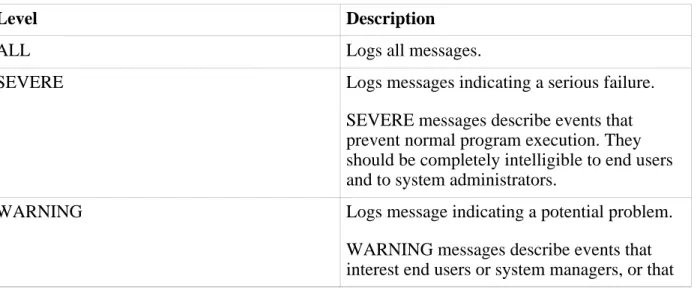
As with standard Apache Tomcat, SpringSource tc Runtime usesCommons Loggingthroughout its internal code which in turn allows you to choose a logging configuration that suits your needs, such asjava.util.logging(configured by default) orlog4j. Commons Logging
provides tc Runtime with the ability to log hierarchically across various log levels without needing to rely on a particular logging implementation.
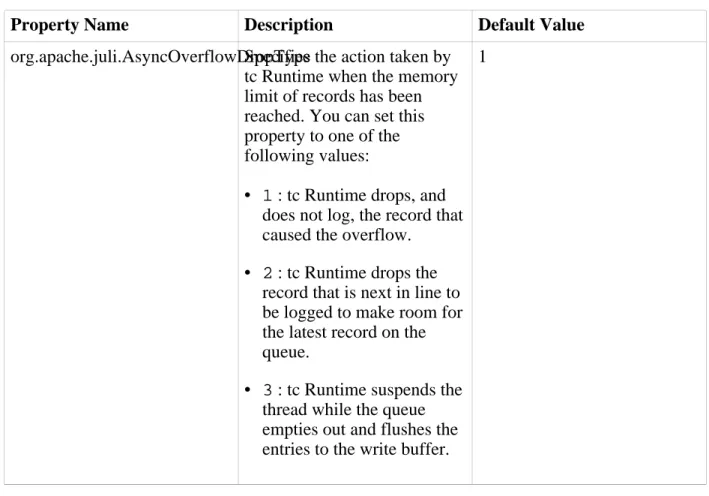
The sections that follow summarize the basic information in the standard Apache Tomcat logging documentation (seeLogging in Tomcat.) These sections also describe the additional logging features of tc Runtime as compared to the default logging in Apache Tomcat, such as asynchronous logging.
• Configuring the JULI Implementation of java.util.logging • Configuring Asynchronous Logging
• Configuring log4j
Configuring the JULI Implementation of java.util.logging
SpringSource tc Runtime provides its own implementation ofjava.util.loggingcalled JULI that addresses a major limitation of the JDK implementation: the inability to configure per-Web application logging. The JULI implementation is the default logging framework in tc Runtime.
Note: It is assumed that you are already familiar with the basicjava.util.loggingfacility provided by the JDK. If you are not, see:
• Java Logging Overview