Using the Touch-Screen Images for
Password-based Authentication of Illiterates
Dr. Y Raghavender Rao
Associate Professor
Department of Electronics & Communication Engineering JNTUHCEJ Jagityal
Abstract
The paper aims at a system for secure access illiterate; who are not able to remember passwords is to develop very useful. Password using the touch screen interface image for illiterates based authentication is a security system based on the images, where the poultry houses are illiterate forms and on all types of domestic and industrial applications can be installed. This system is a way for users to interact with the image to facilitate access provides a user-friendly environment. Here we stand instead of the characters use images as passwords; it’s easy to remember the elderly and may be illiterate. The device is based on a system that makes things even easier, the sensor uses the touch screen graphic LCD. How efficiently the project for us to interact with devices in their practical lives using touch-screen technology gives exposure. It can be operated by hand very easily, so it can also be used by the elderly and the illiterate can.
Keywords: Processor; Touch Screen; Module; Effective; Technologies
________________________________________________________________________________________________________
I. INTRODUCTION
Project Safe Access illiterate, able to remember the password is not very useful to develop a system. A password protection system that houses all kinds of poultry and domestic and industrial applications, forms-based authentication on touch screen interfaces for illiterate images images can be installed. The main objective of this project is to develop a security system for the illiterate. Those kind of system image environment that provides a user-friendly interaction. Here are some images of the series do not need to use a password; It can be easy to remember for the illiterate. This device is a touch-screen sensor makes things even easier to use. How to efficiently use technology to interact with the touch screen devices in their practical life is the risk of the project. It can be operated by hand very easily, so it can be used by the elderly and the illiterate.
Touch screen, without interfering with the text of all types of digital media, providing instant access. For better service can be a fast entry. A touch interface effectively operator accuracy, reduce training time and improve overall operational efficiency to keep costs down, a well-designed touch interface can improve the accuracy of each operator increases. Touch screen automation, touch screen technology, which has become even easier with the practical. Mouse, touch screen system owners familiar with the use of the automation system are easy to appreciate.
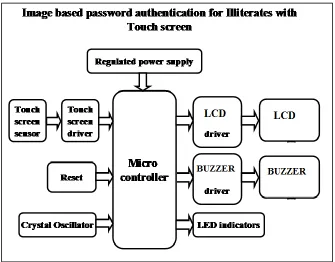
In this project we have several input and output ports that have access to the onboard computer. The onboard computer also called as microcontroller. All input and output modules are interconnected with the control unit. Processed by the image input and touch screen controller user password are correct.
II. OVERVIEW OF PROJECT
An integrated system is dedicated to the task is a combination of software and hardware. Some of the main tools used in the integrated products are microprocessors and microcontrollers.
Typically microprocessors, known as general purpose processors since inputs, the process can accept and output. In contrast, not only as a microcontroller accepts data information, but also multiple data devices, the control interfaces with data handling and therefore the results.
Block diagram
Fig. 2.1: Block Diagram
The main blocks of the project are: 1) Microcontroller (16F72) 2) Crystal Oscillator
3) The regulated power supply (RPS) 4) Touch Screen
5) Reset button 6) LED indicators
Pin Description
It has a total of 28 pin PIC16F72. DIP28 most often in the case of a type, but it also can be found in SMD is smaller than in the case of a dip. Is an abbreviation for the package in a double dip. SMD, suggesting that when the pin hole mounted components are not necessary for this type of welding is an abbreviation for surface mount devices.
Touchscreen Technology
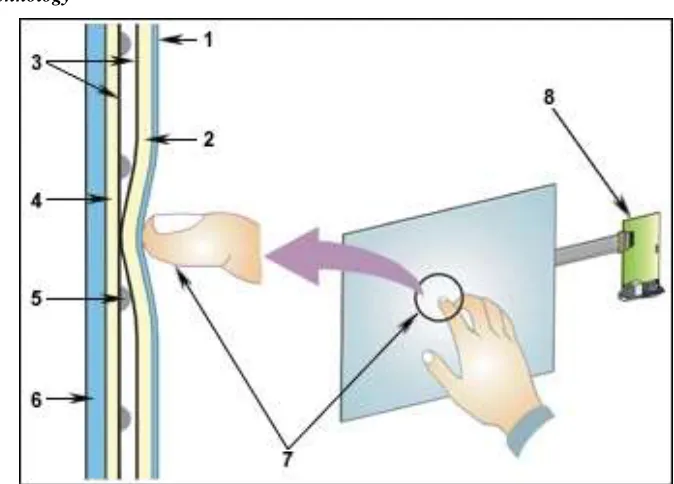
Fig. 2.3: Imagetouch Screen Operation Diagram
1) Polyester Film
2) The top layer circuit resistance
3) The conductive ITO (transparent metal coating). 4) Low-layer resistive circuit
5) Insulating points 6) Support Glass / Acrylic
7) Upper circuit resistant surface coating layer (2) contact by touching the active area of the lower layer of the resistive circuit (4) creation of a circuit breaker.
8) The touch screen controller (7) between two layers of circuit voltages turn and converts them into digital X and Y coordinates of the selected area.
Software’s used
After the project is implemented using software: PCB - Circuit Design
PIC C compiler - compile
Proteus 7 (Embedded C) - Simulation parts
Working
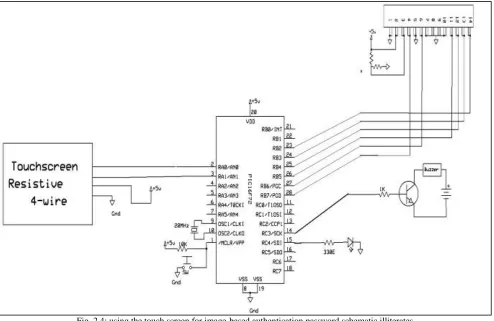
Fig. 2.4: using the touch screen for image-based authentication password schematic illiterates
Schematic diagram of the image based on password authentication scheme for illiterate section using microcontroller and touch screen with touch screen interface explains each component. and crystal oscillator connected to the microcontroller pins 9 and 10 are connected to the microcontroller and LED regulated power supply is connected to the microcontroller through resistance.
Using the touch screen is placed on the touch screen with images as a password input via the touch screen interface of the characters in a password-based authentication to project images illiterate. Password download microcontroller input values taken by resistive touch screen microcontroller by using the program registered in the action. If the password is incorrect, the buzzer sounds and you have to restart. Therefore, this project is done in many areas are illiterate.
III. ADVANTAGES AND DISADVANTAGES
Advantages:
1) User-friendly interface with touch screen. 2) The basic needs can be served by a gentle touch. 3) Low power consumption.
4) Very effective and efficient design.
5) For the use of wireless technology (ZigBee). 6) Can be used with any language.
7) Quick response. 8) Life is more
9) Is also very useful for illiterate. 10) 10 fast and secure transmission of data. 11) Easy to use and easy to install.
12) Overseas useful to express the needs of the user. 13) Deaf people can communicate with others. 14) Can be used with any language.
Disadvantages:
IV. APPLICATIONS
The project security based applications can be applied in real time. It is difficult to remember passwords illiterate character, image-based passwords to help them remember the password easily. Therefore, the project's poultry farms, farms, etc., finds their applications in the illiterates are concerned.
V. RESULT
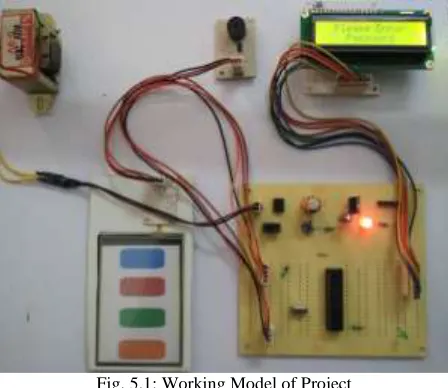
The images on the touch screen module project “Using the touch-screen images for password-based authentication illiterates “was designed to provide a security system. This system is a kind of interaction with the image, the illiterate users with an easy to remember, easy to use environment, it provides can be.
Fig. 5.1: Working Model of Project
VI. CONCLUSION
All hardware components used to facilitate integration developed. Each module is explained by the presence of mind and the Commission is contributing to the better functioning of the unit. Secondly, the increasing use of technology with the help of highly advanced IC.The project has been successfully implemented. Therefore, the project has been designed and successfully tested.
VII. FUTURE SCOPE
Our project "touch screen sensors using password-based authentication for illiterate’s images" primarily a sensor with a soft touch by using the touch screen is intended to design a security system for the illiterate.
4 Wire touch screen resistive touch screen is used here. Stability and durability of the chosen resistive touch screen than other touch screen. Response time is also significantly reduced. Resistant and not very sensitive to bright light than other technologies, but accepts only one touch at a time. So if you have such a surface acoustic wave, infrared or other techniques to further improve the project can be used, because more than one touch at a time, can accept. But the touch screen is very sensitive and low light, for example, are resistant. And that cannot produce correct results, as they are sensitive to changes in the environment.
The main drawback of the system is arranged such that the wiring ZigBee, RF, IR, GSM, etc. that can be extended using the wireless device uses
From anywhere in the world using GSM modem for mobile can be expanded to receive the warning message.
REFERENCES
[1] G. E. Blonder, "Graphical passwords," in Lucent Technologies,Inc., Murray Hill, NJ,U.S. Patent,Ed. UnitedStates, 1996. [2] Rachna , Dhameja , Adrian perrig ” Deja Vu: A User Study Using Images for Authentication “ .
[3] ALSULAIMAN, F. A. & EL SADDIK, A., 2008, „Three-Dimensional Password for More Secure Authentication‟, IEEE Transactions on Instrumentation and Measurement, vol.57, pp.1929-1938.
[4] W. Jansen, "Authenticating Mobile Device User through Image Selection," in Data Security, 2004.
[5] S. Man, D. Hong, and M. Mathews, "A shoulder surfing resistant graphical password scheme," in Proceedings of International conference on security and management. Las Vegas, NV, 2003.
[6] X. Suo, Y. Zhu and G. Owen, “Graphical Passwords: A Survey”. In Proc. ACSAC'05.
[7] Z. Zheng, X. Liu, L. Yin, Z. Liu “A Hybrid password authentication scheme based on shape and text” Journal of Computers, vol.5, no.5 May 2010. [8] Sonia Chiasson1, Alain Forget1, Elizabeth Stobert2, P.C. Van Oorschot1, Robert Biddle1 “Multiple Password Interference in Text Passwords and
[9] A.Jermyn,”The design and analysis of Graphical passwords”, Proceedings of the 8th USENX security symposium, August, Washington.D.C,USA,1999. [10] M.Boroditsky, Passlogix password schemes.
[11] E.Shephard, “Recognition memory for words,sentences and pictures”, Journal of Verbal Learning and Verbal Behaviour, 6,pp.156-163,1967. [12] R.Biddle,”Graphical Passwords: Learning from the First Twelve Years”, ACM Computing Survey, issue 44(4),2011.
[13] Walker, Geoff (August 2012). "A review of technologies for sensing contact location on the surface of a display". Journal of the Society for Information Display. 20 (8): 413–440. doi:10.1002/jsid.100.