AudioFile: A Network-Transparent System for
Distributed Audio Applications
Thomas M. Levergood, Andrew C. Payne,
James Gettys, G. Winfield Treese, and Lawrence C. Stewart
Digital Equipment Corporation Cambridge Research Lab
Paris; and the Cambridge Research Laboratory, in Cambridge, Massachusetts.
The Cambridge laboratory became operational in 1988 and is located at One Kendall Square,
near MIT. CRL engages in computing research to extend the state of the computing art in areas
likely to be important to Digital and its customers in future years. CRL’s main focus is
applications technology; that is, the creation of knowledge and tools useful for the preparation of
important classes of applications.
CRL Technical Reports can be ordered by electronic mail. To receive instructions, send a
mes-sage to one of the following addresses, with the word
helpin the Subject line:
On Digital’s EASYnet:
CRL::TECHREPORTS
On the Internet:
[email protected]
This work may not be copied or reproduced for any commercial purpose. Permission to copy without payment is granted for non-profit educational and research purposes provided all such copies include a notice that such copy-ing is by permission of the Cambridge Research Lab of Digital Equipment Corporation, an acknowledgment of the authors to the work, and all applicable portions of the copyright notice.
The Digital logo is a trademark of Digital Equipment Corporation.
Cambridge Research Laboratory
One Kendall Square
Cambridge, Massachusetts 02139
AudioFile: A Network-Transparent System for
Distributed Audio Applications
Thomas M. Levergood, Andrew C. Payne,
James Gettys, G. Winfield Treese1, and Lawrence C. Stewart2
Digital Equipment Corporation Cambridge Research Lab
CRL 93/8 June 11, 1993
Abstract
AudioFile is a portable, device-independent, network-transparent system for computer audio systems. Similar to the X Window System, it provides an abstract interface with a simple network protocol to support a variety of audio hardware and multiple simultaneous clients. This report describes our approach to digital audio, the AudioFile protocol, the client library, the audio server, and some client applications. It also discusses the performance of the system and our experience with using standard network protocols for audio. A source code distribution is available for anonymous FTP.
Keywords: audio, client-server, multimedia, speech
c Digital Equipment Corporation 1993. All rights reserved.
1Also with MIT Laboratory for Computer Science. 2The authors are listed in random order.
An overview of the material in this report will appear in the Proceedings of the Summer
i
Touch-Tone is a trademark of AT&T.
SPARC and SunOS are trademarks of Sun Microsystems, Inc. Macintosh is a trademark of Apple Computer, Inc.
Indigo is a trademark of Silicon Graphics, Inc. UNIX is a trademark of Unix Systems Laboratories.
X Window System is a trademark of Massachusetts Institute of Technology. The following are trademarks of Digital Equipment Corporation: Alpha AXP, DEC, DECaudio, DECstation, DECtalk, TURBOchannel, ULTRIX, XMedia, and the DIGITAL logo.
CONTENTS iii
Contents
1 Introduction 1
1.1 Design Goals: : : : : : : : : : : : : : : : : : : : : : : : : : : : 2 1.2 Fundamental Principles : : : : : : : : : : : : : : : : : : : : : : 3 1.3 Implementation : : : : : : : : : : : : : : : : : : : : : : : : : : 4
2 Audio Abstractions 5
2.1 Time : : : : : : : : : : : : : : : : : : : : : : : : : : : : : : : : 5 2.2 Output Model : : : : : : : : : : : : : : : : : : : : : : : : : : : 10 2.3 Input Model : : : : : : : : : : : : : : : : : : : : : : : : : : : : 11 2.4 Events : : : : : : : : : : : : : : : : : : : : : : : : : : : : : : : 12
3 Background 13
3.1 Signal Processing : : : : : : : : : : : : : : : : : : : : : : : : : 13 3.2 Etherphone : : : : : : : : : : : : : : : : : : : : : : : : : : : : : 13 3.3 Firefly : : : : : : : : : : : : : : : : : : : : : : : : : : : : : : : 14 3.4 VOX : : : : : : : : : : : : : : : : : : : : : : : : : : : : : : : : 14 3.5 Related Work : : : : : : : : : : : : : : : : : : : : : : : : : : : 14
4 Audio Hardware 15
4.1 LoFi : : : : : : : : : : : : : : : : : : : : : : : : : : : : : : : : 15 4.2 JVideo : : : : : : : : : : : : : : : : : : : : : : : : : : : : : : : 16 4.3 Integral Workstation Audio Devices : : : : : : : : : : : : : : : : 16 4.4 LineServer : : : : : : : : : : : : : : : : : : : : : : : : : : : : : 16 4.5 SGI Indigo : : : : : : : : : : : : : : : : : : : : : : : : : : : : : 16
5 Protocol Description 17
6 Client Libraries 23 6.1 Core Library : : : : : : : : : : : : : : : : : : : : : : : : : : : : 23 6.1.1 Connection Management : : : : : : : : : : : : : : : : : 23 6.1.2 Error Handling: : : : : : : : : : : : : : : : : : : : : : : 24 6.1.3 Synchronization : : : : : : : : : : : : : : : : : : : : : : 24 6.1.4 Events : : : : : : : : : : : : : : : : : : : : : : : : : : : 24 6.1.5 Audio Handling : : : : : : : : : : : : : : : : : : : : : : 25 6.2 Client Utility Library: : : : : : : : : : : : : : : : : : : : : : : : 27 6.2.1 Utility Tables : : : : : : : : : : : : : : : : : : : : : : : 27 6.2.2 Utility Procedures : : : : : : : : : : : : : : : : : : : : : 28
7 Server Design 34
7.1 Implementation Considerations : : : : : : : : : : : : : : : : : : 34 7.2 Buffering: : : : : : : : : : : : : : : : : : : : : : : : : : : : : : 34 7.3 Server Implementation : : : : : : : : : : : : : : : : : : : : : : : 37 7.3.1 Device-Independent Audio Server : : : : : : : : : : : : : 37 7.3.2 Device-Independent and Dependent Server Interfaces : : : 39 7.4 Device-Dependent Server Examples : : : : : : : : : : : : : : : : 45 7.4.1 Alofi : : : : : : : : : : : : : : : : : : : : : : : : : : : : 45 7.4.2 Aaxp and Asparc : : : : : : : : : : : : : : : : : : : : : 49 7.4.3 Als: : : : : : : : : : : : : : : : : : : : : : : : : : : : : 49
8 AudioFile Clients 51
CONTENTS v
9 Contributed Clients 68
9.1 abob — A Tk Demonstration : : : : : : : : : : : : : : : : : : : 69 9.2 adial — A Screen-based Telephone Dialer : : : : : : : : : : : : : 69 9.3 Device Control : : : : : : : : : : : : : : : : : : : : : : : : : : : 70 9.4 xpow — Display Signal Power: : : : : : : : : : : : : : : : : : : 70 9.5 afft — A Real-time Spectrogram Displayer : : : : : : : : : : : : 70 9.6 Miscellaneous Contributed Clients : : : : : : : : : : : : : : : : : 73 9.7 Other AudioFile Applications : : : : : : : : : : : : : : : : : : : 73 9.7.1 Speech Synthesis : : : : : : : : : : : : : : : : : : : : : 74 9.7.2 DECspin : : : : : : : : : : : : : : : : : : : : : : : : : : 74 9.7.3 ARGOSEE: : : : : : : : : : : : : : : : : : : : : : : : : 74 9.7.4 VAT : : : : : : : : : : : : : : : : : : : : : : : : : : : : 74
10 Performance Results 75
10.1 Server and Client Performance : : : : : : : : : : : : : : : : : : : 75 10.1.1 Basic Latency : : : : : : : : : : : : : : : : : : : : : : : 75 10.1.2 Play and Record : : : : : : : : : : : : : : : : : : : : : : 76 10.1.3 Preempt Play vs Mix Play : : : : : : : : : : : : : : : : : 78 10.1.4 Open Loop Record/Play : : : : : : : : : : : : : : : : : : 79 10.2 CPU Usage: : : : : : : : : : : : : : : : : : : : : : : : : : : : : 82 10.3 Data Transport : : : : : : : : : : : : : : : : : : : : : : : : : : : 84
11 Summary 85
11.1 Areas for Further Work : : : : : : : : : : : : : : : : : : : : : : 85 11.2 Conclusions : : : : : : : : : : : : : : : : : : : : : : : : : : : : 86 11.3 How to Get AudioFile : : : : : : : : : : : : : : : : : : : : : : : 87 11.4 Acknowledgments : : : : : : : : : : : : : : : : : : : : : : : : : 88
12 Glossary 90
References 94
1
1
Introduction
Audio hardware is becoming increasingly common on desktop computers, such as workstations, PCs, and Macintoshes. In 1990, the authors began a project at Digital’s Cambridge Research Laboratory to explore desktop audio.1 One of us (Levergood) designed a TURBOchannel2I/O module called LoFi, with capabilities for telephony and both low and high-fidelity audio. Once that hardware was available, we began work on software. The result of our efforts is the AudioFile System.
It was clear from the outset that audio on the desktop should have the same flexibility that users have come to expect of the display. Similar to the X Win-dow System[14], AudioFile was designed to allow multiple clients, to support a variety of underlying hardware, and to permit transparent access through the net-work. Since its original implementation, AudioFile has been used for a variety of applications and experiments with desktop audio. These applications include au-dio recording, playback, video teleconferencing, answering machines, voice mail, telephone control, speech recognition, and speech synthesis. AudioFile supports multiple audio data types and sample rates, from 8 KHz telephone quality through 48 KHz high-fidelity stereo.
Currently, AudioFile runs on Digital’s RISC DECstations under ULTRIX, Digital’s Alpha AXP systems under DEC OSF/1 for Alpha AXP, Sun SPARC systems under SunOS, and Silicon Graphics Indigo workstations under IRIX. A source code distribution is available by anonymous FTP over the Internet.
Like the X Window System, AudioFile has four main components:
The Protocol. The AudioFile System defines a wire protocol that links the server with client applications over a variety of local and network commu-nication channels. The semantics of the protocol commands and responses define what servers are expected to do and what services clients can expect.
Client Library and API. The AudioFile client library and applications gramming interface (API) provide a means for applications to generate pro-tocol requests and to communicate with the server using a procedural instead of a message-passing interface.
The Server. The AudioFile server contains all code specific to individual
1
And video, but that is another story.
2
devices and operating systems. It mediates access to audio hardware devices and exports the device-independent interface to clients.
Clients. The AudioFile distribution includes several out-of-the-box appli-cations which make the system immediately usable and which serve as illustrations for more complex applications.
This report begins with a discussion of the design goals and the fundamental principles of AudioFile. We then place this work into the historical context of earlier desktop audio efforts and other more recent audio work. Following a discussion of some of the hardware used for desktop audio, we discuss the network protocol, the client library, and the server implementation in some detail. Then we describe a sampling of applications that use AudioFile, followed by an analysis of AudioFile’s performance. We conclude with a brief discussion of plans for future work and explain how to get the software.
1.1 Design Goals
AudioFile was designed with several goals in mind. These include:
Network transparency. Applications can run on machines scattered through-out the network. This property is desirable for several reasons: an application may be licensed to run only on a specific machine, or it may require comput-ing resources not available on every desktop. Network transparency allows such constrained applications to run anywhere but still interact with the user. Another quite different benefit of network transparency is that it enables applications to use audio on several systems at once. Teleconferencing is such an application; it must communicate with multiple audio servers.
Device-independence. Applications need not be rewritten to run on new au-dio hardware. The Auau-dioFile System provides a common abstract interface to the real hardware, insulating applications from the messy details. Fur-thermore, as we will describe in Section 8, some applications can operate on generic audio, without worrying about details such as sampling rate, number of channels, or encoding.
1.2 Fundamental Principles 3
running on a single computer should behave just like those same applications running on separate computers in the same room.3
Support a wide range of clients. It should be possible to implement applica-tions ranging from audiobiff4to multiuser teleconferencing. We have chosen to implement a few very general-purpose mechanisms that permit a wide va-riety of applications, including both aggressively real-time applications and those which are more easygoing.
Simplicity. Adding simple audio to an application should be easy. Simple play and record clients should require very little code. Complex applications should be possible, but one should not burden simple clients with massive mechanism.
Quick time to implement. We wanted to start building applications quickly. We chose to leverage as much existing mechanism as we could, and we tried to put as little as possible into the operating system kernel. Although debugging kernel device drivers is possible, it is neither a rewarding nor a time-efficient process.
1.2 Fundamental Principles
In addition to our goals, we designed AudioFile with a few fundamental principles in mind. These include:
Computers are fast. Modern machines are fast enough to handle a variety of signal processing and real-time problems. There is no need to be frightened by a requirement that the computer look at every audio sample. Unnecessary copies of data are to be avoided, but it is frequently better to copy data than to corrupt the structure of an application. We assume an ADC/DAC model for the audio hardware device and do not depend on intelligent controllers.
Client control of time. Clients are responsible for specifying the exact timing of recording and playback. This puts a minor additional load on the clients, but greatly simplifies the server and makes the AudioFile System capable of handling applications requiring a wide range of real-time behavior. Explicit
3We do think that there is room for something like an “audio window manager” which would
impose a policy on multiple applications, but so far we have not found it necessary to implement one. In any case, we think the core system should “provide mechanism, not policy”.
4biff
control of time also makes it very easy to construct applications requiring synchronization of multiple activities.
No rocket science. AudioFile does not require specialized low-level network protocols or multithreaded environments. These facilities were not necessary to achieve our goals and using special protocols or threads would impede the portability of the system. Consequently, the AudioFile server is single threaded, we use standard TCP/IP, and no operating system support more complex than theselect()system call is required. 5
Simple applications should be simple. Complicated applications should be possible. In other words, simple applications should not have to pay a price in complexity when they need only simple functionality.6
1.3 Implementation
The parts of the implementation of AudioFile that are not specific to audio, such as client/server communications, are based on X11 Release 4. The code was freely available and provided a well-understood communications infrastructure.7 While we considered several languages for the implementation of AudioFile, starting with the MIT X11R4 source code tipped the scales in favor of the C language.
Of course, traveling this route caused us to carry extra baggage. For example, the original MIT source code is written with C preprocessor commands, mostly used by the client library, that conditionally build code with or without function prototypes. At least one well known vendor of big-endian computers does not support function prototypes with their stock C compiler. Function prototypes have proven to be quite useful for developing large portable systems in C. Unfortunately, “portable” sometimes means “lowest common denominator” — so our code is also cluttered with left-justified chicken scratches [19].8
We should emphasize the fact that AudioFile is not an addition to an X Window System server. The AudioFile server is a separate entity which borrowed some
5It seems likely that a multithreaded server would permit a slightly cleaner implementation in the
server, but we felt the performance and portability risks did not justify it.
6This is really important — notice that simplicity is both a goal and an abiding principle. Our
thinking is that if one gets the core functionality right, then an explosion of complexity can be avoided.
7
Why start from a clean sheet of paper? For more information on how to steal code, consult Spencer[15].
8
5
common source code to build the implementation. Contrary to others, we believe that audio services should be separate from graphics.
2
Audio Abstractions
This section describes the fundamental abstractions used by AudioFile. These provide the view of audio available to clients and guided the design of the protocol, client library, and audio server. We model an audio device as an entity that produces and consumes sampled data at a regular rate known as the sampling frequency. The sample data is one of several predefined types and consists of one or more channels. The actual hardware is based on Analog to Digital (ADC) and Digital to Analog (DAC) converters. The important abstractions discussed here are time, the audio input and output models, and events.
2.1 Time
The concept of audio device time is critical to understanding the design of all AudioFile components. We expose audio device time in the protocol and at the client library API. It is also fundamental to the correct operation of the audio server. All audio recording and playback operations in the AudioFile System are tagged with time values that are directly associated with the relevant audio hardware.
This section discusses our decision to use device time, the time abstraction, and how to calculate with audio device times, then finishes with a brief discussion of alternative approaches.
In multimedia systems, exact timing is necessary to synchronize the different aspects of a presentation or to relate the occurrence of multiple events. AudioFile permits clients to express the precise timing of individual digital audio samples.
Why device time?
Each computer system in a network has its own clocks. There are network proto-cols, such as NTP[8], which keep the time-of-day clocks approximately synchro-nized, but no existing systems we are aware of keep interval timers, display, or audio clocks synchronized. Each of these many clocks has a nominal rate at which “ticks” occur, and if these rates were exact, then one could easily convert from time as shown by one clock to time as shown by another. Unfortunately, all these clocks vary from their nominal rates, and the exact rates are subject to change with the age of the equipment, temperature, and other environmental factors.
In principle, it is possible to use any clock for audio synchronization. However we wanted to be able to specify audio down to the individual sample, so we chose to use audio device time. When a server supports multiple audio devices, it traffics in device time for each device separately. AudioFile does not provide a complete infrastructure for synchronization; rather, it supplies low-level timing information to its clients. Client applications can build conversion mechanisms suitable to their own needs for synchronizing multimedia streams, relating events to the real world, or simultaneously communicating with multiple audio devices.
We envision adding standard client library and server mechanisms for synchroniz-ing multiple clocks and for providsynchroniz-ing clock conversion services to clients, but we have not yet encountered a compelling need to do so.
The device time abstraction
The underlying implementation of the audio device clock is the oscillator that controls the hardware sample rate. This clock may be directly accessible to the audio server, or only indirectly as the running total of audio samples generated or accepted by the hardware. In either case, the server maintains a representation of the clock in a “time register” for scheduling all audio events for the particular device.
Converting time values
There is no absolute reference value for a device time; the value is set to 0 when the server is initialized and advances thereafter. This is in contrast to the usual computer method of handling time-of-day, in which the binary representation is something like the number of seconds since January 1, 1900. The AudioFile time can not be algorithmically converted to a calendar date and time.
One can establish a correspondence between two clocks. Given clocks A and B, and a pair of values(T
a T
b) of the two clocks that occurred “at the same time,” and the rates of advance of the two clocksR
aand R
2.1 Time 7
clock A, sayt
a, one can compute the corresponding value t
b according to clock B:
t b
=T b
+R b
((t a
;T a
)=R a
)
Although there is no exact relationship between device time and time measured by the system real-time clock or to time shown by the clock on the office wall, because the rates are not known to infinite precision, there is an approximate relationship which is good enough to permit reasonably accurate conversions between different clocks. The audio device sampling rate is used to move between time in sample ticks and time in seconds. For example, at 8 KHz, four seconds in the future maps to the current device time plus 32000 ticks. This is sufficiently accurate for most purposes, even though the exact sampling rate might be 7999.96 Hz rather than 8000.00.
Representation
Audio device time is represented by a 32-bit (finite length) unsigned integer that increments once per sample period and wraps on overflow. These time values are specific to a particular audio device.
"Before"
"After"
t
[image:17.612.215.352.395.527.2]q
Figure 1: Circular representation of audio time
It is convenient to map this representation of time onto a circle, as shown in Figure 1. In this diagram, the timetis marked with the clock hand that sweeps out clockwise. The circumference of the circle is the range of the time counter, or 232 samples.
possible time values into the equally sized past and future regions. The division pointq(equal tot+2
31) is marked on Figure 1. Any time from
tclockwise toq is considered to be aftert, and any time fromq clockwise totis considered to be beforet.
Time comparisons are easy to implement. Given two time values,aandb, compute their 32-bit two’s complement difference a;b. The most significant bit of the result gives the result of the comparison. If it is set, thenbis in the future relative toa. Otherwise,bis in the past. This computation is easily made by casting the difference to a signed data type. The following example is for a device running at 8000 samples per second.
if ((int) (b - a) > 0) /* time b is later than time a. */ if ((int) (b - a) < 0) /* time b is earlier than time a. */ if ((int) (b - a) == 8000) /* time b is one second later than time a */
There is a problem, of course, when the difference approaches 231. A time in the distant past may suddenly switch over to the distant future as time advances. Programs that deal with time must be careful not to make comparisons between widely separated time values. However, this is usually not a problem since even at a 48 KHz sampling rate, 231samples represents about 12 hours of audio. At 8000
samples per second, this period is about 3 days.
Usually, an audio device supports both input and output. However, AudioFile supports only one time register for each audio device. This means that if the actual hardware uses different sampling rates for input and output, then the server will present distinct unidirectional audio devices for input and output.
Client use of explicit time
Each play and record request carries with it an exact timestamp. The implemen-tation of this abstraction is accomplished by buffering future playback and recent record data in the server. Continuous recording or playback is accomplished by advancing the requested device time for a request by the duration of the previous request.
Explicit control of time provides the mechanism needed for real-time applications. As long as playback requests reach the server before their requested start times, playback will be continuous. A leisurely application will schedule playback for well in the future, while an aggressive real-time application will schedule playback requests for the very near future. The server will buffer requests up to four seconds in the future.9 Both applications must supply audio at the same rate, but the
real-9
2.1 Time 9
time application must assure a much lower variance in latency. For example, if an application is scheduling audio for one second in the future, any individual block can be delayed for up to one second without disturbing the playback. In contrast, an application scheduling audio for 50 milliseconds in the future has to assure that blocks cannot be delayed for more than 50 milliseconds.
The fact that the server buffers audio for future playback also allows clients to schedule playback asynchronously. This permits single threaded clients to handle audio in addition to their other activities.
Recording is a much easier problem than playback. The server buffers all device input, typically for the past four seconds. Therefore, unless a record request fails to reach the server until four seconds after its requested start time, no data will be lost. Of course an application making real-time use of the record data must make record requests close enough to current time to satisfy its real-time constraints.
Because the server buffers all device input, clients can request recording at times “in the past” and deliver the appearance of instantaneous response. For example, consider an application that displays a “Record” button. There is some delay between the time that the user presses the button and when the record request reaches the audio device. By recording from the recent “past,” the application can begin recording at the instant the button was hit. This is a more natural interaction than requiring the user to wait for some indication, such as a visual display or audible beep, that recording has begun.
Alternate designs
In contrast to AudioFile’s design, the usual way to handle sequential data such as audio in computers is as a stream, just a sequence of values. The stream is a very simple abstraction, but for audio work, it fails three crucial tests:
Streams do not permit synchronization. It is usually necessary to employ complex out-of-band mechanisms to find out how much data is buffered in a stream or to find out if a stream is running or blocked. Consequently, an application using a stream mechanism will have difficulty establishing the moment a particular sound will emerge from the loudspeaker or the moment a particular sample was recorded.
Streams do not solve real-time problems. Streams tend to obscure issues of bandwidth and latency that are critical to real-time applications. The idea is good: the application merely writes audio data into the stream, and the
sound will emerge from the speaker without gaps. In fact, the application must still keep up, but it has no way of telling how much margin there is.
Streams do not deliver any additional simplicity to the application. In the abstract, audio is just an unending sequence of samples and might seem to be a good match for streams, but in practice, applications deal with the data in blocks anyway, so all streams do is force applications and services to continually create and discard the blocking information.
Instead of dealing with streams of audio samples, the fundamental operations in AudioFile are block-oriented, and specify exact times at which the blocks are to be recorded or played.10
2.2 Output Model
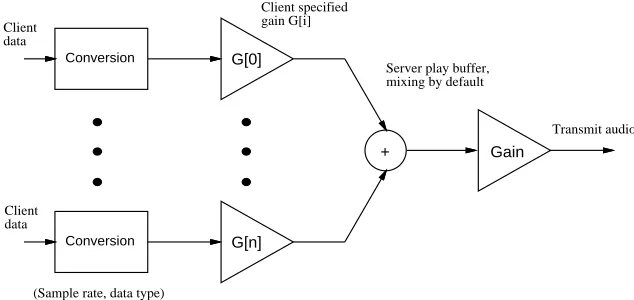
The output model we use for an audio device is shown in Figure 2. In general, clients can schedule playback at any time from the present to four seconds into the future. Playback data that falls in the past is silently discarded. Playback data that falls in the future is buffered unless it also falls beyond four seconds in the future. Playback requests that fall beyond the four-second buffer are suspended until time advances to within four seconds.
+ G[0]
G[n]
Server play buffer, mixing by default
Transmit audio Conversion
Conversion Client
data
Client data
Client specified gain G[i]
(Sample rate, data type)
[image:20.612.164.481.428.578.2]Gain
Figure 2: AudioFile server output model
After a playback request is received by the server several stages of processing take place. The sample data will be one of the several sample types supported by the
10
2.3 Input Model 11
abstract device, but possibly different than the data type supported by the actual hardware. The data is first passed through a conversion module that translates the data type received by the server to the data type supported by the audio hardware. Frequently, the client data type is the same as the audio hardware data type and this conversion stage is not necessary. The server support for conversion modules will also be used to handle compressed audio data types. In designing AudioFile we envisioned this module handling sample rate conversion as well, but the design for resampling is not complete.11
Once the data is in the form required by the audio hardware, it is adjusted by a client specified gain value before being mixed into a common server buffer. The client gain is stored in an audio context (see Section 7) and defaults to 0 dB. The mixed data stays in the server buffer until its scheduled playback time approaches. As the sample data is drawn from the output buffer and sent to the hardware, a final gain stage is applied. This master gain acts as a volume control for the mixed version of all client data sources. Frequently, this volume control is implemented by the audio hardware.
The server is responsible for ensuring that the samples in the output buffer are sent to the DAC at their corresponding values of the time register. Since time is exposed at the client library API, client applications are able to manipulate data at arbitrary sample boundaries within the server.
The output model specifies that silence is emitted during periods of time in which no client data has been written to the output buffer. This means that applications need not transport “silent” data from client to server. Instead, a client simply advances its playback time accross the silent interval before resuming playback. This mechanism can reduce network bandwidth requirements.
2.3 Input Model
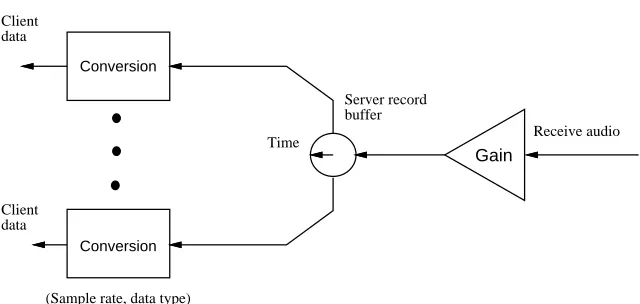
The input model for an audio device is shown in Figure 3. Like the output model, the input model buffers four seconds of sample data. However, the input model is conceptually simpler since there are no dependencies between clients such as those introduced by the mixing stage for playback.
As shown in Figure 3, the recorded data is modified by an input gain which is often implemented by the hardware. The data is placed into a server buffer indexed by
11
Conversion
Conversion
Client data
Client data
Receive audio
(Sample rate, data type)
Server record buffer Time
[image:22.612.165.485.134.286.2]Gain
Figure 3: AudioFile server input model
the current value of time.
Clients requesting input data older than four seconds in the past are given silence. Record requests within the past four seconds return the buffered data. Record requests in the future cause the client connection to block until time advances far enough to service the request.
The system also supports a non-blocking record interface. If the client chooses not to block, the server will reply with as much data as it can supply immediately. With either blocking or non-blocking recording, the client application can record consecutive blocks by advancing the requested record time by the duration of the previous block.
The input model also supports a module which converts the native audio hardware data type to a client requested data type.
We did not include a per-client gain modification on recording since the data will always be replayed through a path where gain modification is supported.
2.4 Events
13
or a change in a property used for inter-client communications. Protocol events are discussed in Section 5.2; the way the client library handles events is described in Section 6.1.
3
Background
Computer handling of digital audio is not new. The important historical points of reference are those of signal processing, telephone integration, device-independence, and network-transparency.
3.1 Signal Processing
Research groups have used analog-to-digital (A/D) and digital-to-analog (D/A) converters for computer recording and playback of speech and audio for many years. For the most part, this “data acquisition” has been accomplished with ex-pensive and specialized hardware and software intended for the laboratory instru-mentation market, rather than for general use. We would categorize these systems as device-dependent and standalone (not networked). However, essentially all existing technology for audio signal processing was developed this way.
3.2 Etherphone
3.3 Firefly
In the mid 1980’s, the Firefly multiprocessor workstation[18], developed at Dig-ital’s Systems Research Center, had simple telephone-quality audio. An audio server on the Firefly buffered the previous four seconds of recorded data and the next four seconds of playback data; it exported a simple remote procedure call (RPC) interface to applications. The Firefly audio system was primarily used for applications such as teleconferencing and multimedia presentations. The Firefly audio capability was primarily used for applications such as teleconferencing and multimedia presentations.
We would categorize this system as network-transparent, but it was still device-dependent. The Firefly audio system pioneered explicit client control of time.
3.4 VOX
In the mid to late 1980’s, the MIT Media Lab and the Olivetti Research Lab in Palo Alto collaborated on a project called VOX[4]. VOX was an audio server based on a model in which essentially all audio related functions were included in the server, with the client mainly handling control those functions. The VOX server was responsible both for record and playback functions and for establishing direct connections between disparate devices.
VOX was partly constrained by a view that audio would be primarily sourced and sunk by external devices, possibly with direct connections between them. In addition, the view was that audio was such a real-time compute intensive data type that clients could not manage the load. Instead, all details of audio handling were subsumed into the server.
We would categorize this system as device-independent, but not network-transparent.
3.5 Related Work
Other projects similar to AudioFile were underway at about the same time.
15
resulting performance is quite good.
Terek and Pasquale at UCSD developed an audio conferencing system based on a modified X server [17]. In contrast, we chose not to incorporate audio into the X server. Our approach has several advantages: AudioFile is independent of X and can be used when X is not, server implementors need not understand the intricacies of the X server, and clients do not suffer because of the scheduling decisions that the X server makes in servicing graphics requests and input events. If synchronization between audio and graphics is necessary, it can be performed by the clients or by using the X synchronization extension.
Sonix[12] is a network-transparent sound server developed at Bellcore. It was also inspired by X and is similar to XMedia in design, with “patchcords” to internally connect audio devices or to bypass the Sonix server itself. AudioFile takes a different view of time and emphasizes doing work in clients, rather than manipulating the flow of audio data within the server. Sonix includes minimal support for synchronization.
4
Audio Hardware
This section describes the audio hardware currently supported by AudioFile.
4.1 LoFi
In 1990, as part of the Cambridge Research Lab’s overall goals of exploring net-worked audio and video, one of us (Levergood) designed a TURBOchannel audio module called LoFi[7]. 12 Later, Digital’s Multimedia Engineering organization released the design as the product DECaudio. The research “LoFi” and the product “DECaudio” are substantially identical; we will use “LoFi” to refer to this device in the rest of this document.
LoFi supports two 8 KHz telephone quality CODECs, one connecting to a telephone line and one connecting to local audio devices. LoFi also contains a Motorola 56001 DSP chip with 32K 24-bit words of memory shared with the host processor. The 56001 serial port supports a 44.1 KHz stereo DAC and can also be used with
12We called it LoFi primarily becauseit wasn’t. LoFi always included high fidelity audio capability,
external DSP port devices including stereo A/D and D/A converters operating at sample rates up to 48 KHz.
The telephone interface on LoFi enables applications such as voice mail and remote information access. We see no difficulty in adding AudioFile support for other kinds of telephone interfaces, such as ISDN or PhoneStation [20].
4.2 JVideo
JVideo is a TURBOchannel module developed at Digital Equipment Corporation for experiments in desktop video. Like LoFi, JVideo has a Motorola 56001 DSP processor with shared memory, but JVideo also has stereo ADC and DAC hardware that is capable of variable sample rates. However, JVideo has neither telephony capability nor an external DSP port.
4.3 Integral Workstation Audio Devices
The Personal DECstation series, the Alpha AXP-based DEC 3000/300, 3000/400 and 3000/500, and the Sun SPARCstation-2 all include 8 KHz CODEC devices on their system modules.
4.4 LineServer
The LineServer is an Ethernet peripheral. It is a Motorola 68302 microcomputer system with 128K ROM and 64K RAM, an Ethernet controller, high speed V.35 serial line interface, and an 8 KHz ISDN CODEC. We use LineServer within Digital’s research labs for remote Ethernet bridging and IP network routing over both dedicated digital circuits and dial-up ISDN circuits.
The LineServer version of the AudioFile server is interesting because the server runs on a nearby Ethernet host, not on the LineServer itself. The audio server exchanges low-level device-specific network messages with the LineServer.
4.5 SGI Indigo
17
5
Protocol Description
The AudioFile protocol is designed on the same basic principles as the X Window System protocol. Control and audio data are multiplexed over a single byte-stream connection between client and server. A single connection can carry more than one audio stream. Multiple clients, potentially running on multiple machines of different architectures, can use the same server at the same time.
5.1 Data Transport
AudioFile is intended to be used over almost any transport protocol, though their behavior may affect real-time audio performance (see Section 11 for some perfor-mance analysis).
As in X, the AudioFile protocol presumes that the data transport between the client to the server is reliable and does not reorder or duplicate data. Any transport mechanism fulfilling these criteria could be used. AudioFile takes advantage of streaming when possible, though we believe this is less common than in the X case. The current version of AudioFile supports TCP/IP and UNIX-domain sockets.
We believe that the programming model AudioFile presents may reduce the number of audio applications needing low-latency communications, because clients can control exactly when audio will appear or when it was recorded.
5.2 Events
As in X, events have a fixed size. Only five event types are currently defined: four for telephone control and one for interclient communications. Some details of the telephone events are discussed below in Section 5.5.
All device events contain both the audio device time of the device and the clock time of the host of the server. The host clock time may be needed when synchronizing with other media on the same host (for example, video being displayed by the window system).
5.3 Protocol Requests
possible request is therefore four bytes long. The length field limits the longest request to 262144 bytes, though in practice AudioFile’s longest request is substan-tially shorter. All data in the requests are kept naturally aligned inside the request header; requests that use additional data are padded to a 32-bit boundary.
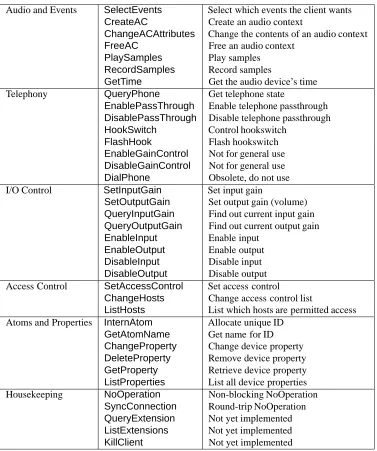
There are 37 requests in the AudioFile protocol. Most of these are related to audio, although only two deal with audio data. The remaining requests are used for housekeeping purposes, such as access control, inter-client communications, and extensions (although no extensions are implemented today). In comparison, the X Window System has 119 requests in the core protocol.
At connection setup, the client and server exchange version information and clients provide the server authentication information, exactly as in the X Window System. Table 1 summarizes AudioFile’s protocol requests.
5.4 Audio Device Attributes
An abstract audio device has several attributes that are visible to clients. The sampling rate, sample data type, and buffer size have been discussed in previous sections. This and other information is returned for each device at connection setup time. The additional information includes the number of channels for record and playback and whether a channel is connected to a telephone device.
An audio device may have multiple inputs or outputs. For example, some devices may have both line-in and microphone-in connectors which share a single ADC, and line-out and speaker-out connectors driven from a common DAC. The abstract audio device encodes these capabilities of the audio hardware in two quantities indicating the number of inputs and outputs and two masks indicating which inputs and outputs are connected to a telephone line interface.
5.4 Audio Device Attributes 19
Audio and Events SelectEvents Select which events the client wants
CreateAC Create an audio context
ChangeACAttributes Change the contents of an audio context
FreeAC Free an audio context
PlaySamples Play samples
RecordSamples Record samples
GetTime Get the audio device’s time
Telephony QueryPhone Get telephone state
EnablePassThrough Enable telephone passthrough
DisablePassThrough Disable telephone passthrough
HookSwitch Control hookswitch
FlashHook Flash hookswitch
EnableGainControl Not for general use
DisableGainControl Not for general use
DialPhone Obsolete, do not use
I/O Control SetInputGain Set input gain
SetOutputGain Set output gain (volume)
QueryInputGain Find out current input gain
QueryOutputGain Find out current output gain
EnableInput Enable input
EnableOutput Enable output
DisableInput Disable input
DisableOutput Disable output
Access Control SetAccessControl Set access control
ChangeHosts Change access control list
ListHosts List which hosts are permitted access
Atoms and Properties InternAtom Allocate unique ID
GetAtomName Get name for ID
ChangeProperty Change device property
DeleteProperty Remove device property
GetProperty Retrieve device property
ListProperties List all device properties
Housekeeping NoOperation Non-blocking NoOperation
SyncConnection Round-trip NoOperation
QueryExtension Not yet implemented
ListExtensions Not yet implemented
[image:29.612.108.485.161.612.2]KillClient Not yet implemented
5.5 Telephony
While we have evolved the design of AudioFile and added support for several devices, LoFi is still the only device supported by AudioFile that has an analog telephone line interface.
LoFi’s telephone line interface includes a line jack, a set jack, hookswitch relay, ring detection circuitry, loop current detection circuitry, Dual Tone Multi-Frequency (Touch-Tone) decoding circuitry, and output power limiting circuitry. With suitable software this hardware allows applications to originate calls using DTMF or pulse dialing, receive calls, receive DTMF events, monitor the extension phone status (on-hook or off-hook), and source and sink audio to/from the telephone line for applications such as voice mail and remote information access.
While the current protocol includes a DialPhonerequest, it is not used, because we found it difficult to meet FCC timing requirements for dialing by using our internal tasking system in the server. Instead, the client library implements client side tone dialing by generating appropriate tones and using device time to play them at exactly the right time. We do not support pulse dialing, though the LoFi hardware could in principle do so.
Client applications can learn of state changes in the telephone line interface by monitoring the telephone events. DTMF detect, loop current detect, hookswitch, and ring detect events can be generated by the server each time there is a change in state. DTMF detection can be used to receive information from a remote caller. Loop current detection (PhoneLoop) can be used to indicate if the extension phone is on-hook or off-hook. Loop current detection together with DTMF detection can be used to track numbers dialed manually on the extension phone. Hookswitch events (HookSwitch) can be used to determine if the telephone line interface is on-hook or off-on-hook. Finally, ring detect events (PhoneRing) can be used to determine whether there is an incoming call.
Other than the support for events and device control, there are no special audio arrangements for supporting telephony in the AudioFile design.
5.6 Audio Contexts
5.7 GetTime, Play, and Record 21
number of channels, sample type, and byte order. ACs simplify the programming interfaces for play and record considerably.
5.7 GetTime, Play, and Record
GetTimeis the protocol request which returns the audio device time. PlaySamples
andRecordSamplesrequests also return the device time as a convenience to the application programmer.
ThePlaySamples andRecordSamples protocol requests are almost symmetric.
Both pass the start time for the play or record to begin, the number of samples to use, the number of channels in the data, and the data type, with a flag bit to indicate the byte order of the data. An audio context specifies the device, gain parameters, and in thePlaySamplescase, a preemption flag that controls mixing. In addition,PlaySamplesuses a flag to specify whether the server should suppress the usual time reply, because the client library does not need intermediate replies during a series of contiguous play requests. RecordSamplesuses another flag to control whether the server should block the client if not all the requested data can be returned immediately.
At the client library interface, long play and record requests are “chunked” into 8K byte pieces, so that no single request will take very long for the server to process.
5.8 Input and Output Gain, and I/O Control
Each audio device may have multiple input or outputs. AudioFile provides requests to select inputs and to enable or disable outputs. In addition, the gain can be controlled for each input or output device for use as end user volume control.
5.9 Inter-Client Communications
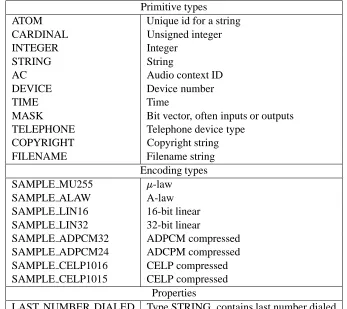
atoms. Clients can register to be notified by event when properties are changed by other clients.
Primitive types
ATOM Unique id for a string
CARDINAL Unsigned integer
INTEGER Integer
STRING String
AC Audio context ID
DEVICE Device number
TIME Time
MASK Bit vector, often inputs or outputs
TELEPHONE Telephone device type
COPYRIGHT Copyright string
FILENAME Filename string
Encoding types
SAMPLE MU255 -law
SAMPLE ALAW A-law
SAMPLE LIN16 16-bit linear
SAMPLE LIN32 32-bit linear
SAMPLE ADPCM32 ADPCM compressed
SAMPLE ADPCM24 ADCPM compressed
SAMPLE CELP1016 CELP compressed
SAMPLE CELP1015 CELP compressed
Properties
[image:32.612.151.498.171.480.2]LAST NUMBER DIALED Type STRING, contains last number dialed
Table 2: AudioFile built-in atoms
For example, the property LAST NUMBER DIALED can be used by cooperating applications for storing the last telephone number dialed. It would have type STRING and its name would be LAST NUMBER DIALED, with the convention that any client dialing the telephone should update the value of this property. Other clients interested in tracking telephone activity would register for notification of changes. In this way, a directory of recently used numbers could acquire all numbers dialed by all telephone applications.
23
6
Client Libraries
We have developed two libraries for use by clients of AudioFile. The first is a “core” library that provides the standard interface to an AudioFile server. The second is a utility library that includes common functions required by many clients.
The client libraries perform two functions. The first is as the sole interface to the protocol. These functions include connection management, local maintenance of data structures such as the client-side copy of the audio context and device data, translation of client requests into protocol requests, demultiplexing of the reply/event stream, and buffer management of the communications channel. The second main function of the client libraries is to provide language bindings of the requests, events, and functions suitable for a particular client programming environment. We currently supply bindings only for C language and semantics, but other languages could be added.
6.1 Core Library
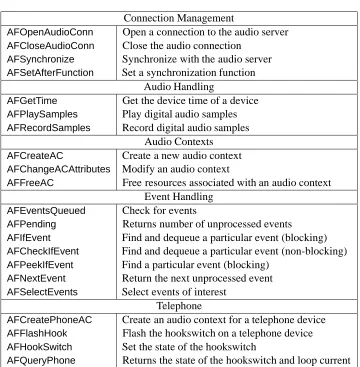
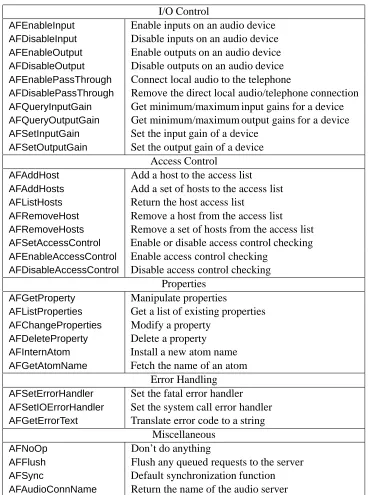
The core client library is the standard interface for AudioFile clients. Some of its functions provide interfaces to the AudioFile protocol; others provide an interface to the library’s internal data structures. Tables 3 and 4 summarize the library functions. The header file AFlib.hcontains the necessary definitions and declarations while the librarylibAF.acontains the implementation.
6.1.1 Connection Management
AFOpenConnection()opens a connection to the audio server. The user can specify which server to use in the following ways: explicit argument on the command line, the AUDIOFILE environment variable, or the DISPLAY13environment variable. DISPLAY is used as a convenient fallback, since the user’s workstation usually has both audio and graphics systems. AFAudioConnName() returns the name of the connection as used byAFOpenConnection().
AudioFile provides a simple access control scheme based on host network address. The access control functions allow programmers to add or remove hosts from the access list and to enable or disable access control entirely.
13
6.1.2 Error Handling
Several functions modify the behavior of library functions when errors occur. The default action is to exit the application.AFSetErrorHandler()can be used to specify an application-specific error handler instead. An application can handle system call errors by supplying a new handler withAFSetIOErrorHandler(). AFGetErrorText()
translates a protocol error code into a string. This is commonly used to provide useful error messages to the user.
6.1.3 Synchronization
Some of the library functions, such asAFGetTime(), require an immediate response from the server; others, such asAFCreateAC(), do not. In the former case, the library blocks until a reply is received. When a response is not needed right away, the library may delay sending the request to the server and put it on an outgoing request queue. In these cases, the library function will return to the client immediately. Certain operations, including the synchronous functions, flush the outgoing request queue; these are noted below.
Sometimes it is necessary to force synchronous operation for all protocol requests, particularly when debugging. AFSynchronize()is used to enable or disable syn-chronous operation with the server. If synsyn-chronous operation is enabled, every library function that normally generates an asynchronous protocol request calls
AFSync()before returning.AFSync()flushes all output to the server and uses a syn-chronous protocol request to wait for the server’s reply. If an application requires a different synchronization procedure, it can specify one usingAFSetAfterFunction().
AFFlush()flushes the output buffer. Most client applications will not need to call this, because the output buffer is flushed as needed by calls toAFPending()and
AFNextEvent(). Any events generated by the server are put onto the library’s event queue.
6.1.4 Events
The library filters events out of the data stream from the server and keeps them on a private queue. This allows events to be interspersed on the audio connection with other traffic from server to client.
6.1 Core Library 25
queue. If the queue is empty, it will flush the output buffer and block until an event arrives. AFEventsQueued() checks the queue for pending events. Depending upon its arguments, it may check only previously read events, unread but available events, or it may flush the output buffer and try to read new events. AFPending()
is similar, but it returns only the number of pending events that have been received but not yet processed.
Occasionally a client may wish to block until a specific event occurs. To do this, the client callsAFIfEvent()with a predicate procedure. AFIfEvent()blocks until the predicate returnsTruefor an event in the queue. The matching event is removed from the queue and copied into a client-suppliedAEventstructure. If the client does not wish to block when checking for a specific event, it can use
AFCheckIfEvent(), which removes a matching event (if there is one) from the queue and copies it into a client suppliedAEventstructure. As an alternative, a client can callAFPeekIfEvent(), which is likeAFCheckIfEvent(), but it does not remove the event from the queue.
6.1.5 Audio Handling
AFPlaySamples()is used by an application to play back digital audio. The block of samples in the given buffer is played back starting at the specified time.
ATime AFPlaySamples(AC ac, ATime startTime, int nbytes, unsigned char *buf)
A client can use thestartTimeparameter of a call toAFPlaySamples()to schedule samples to be played at any time in the near future. The time parameter specifies when the initial sample of the request is to be played. The precise behavior of the server depends upon the requested time:
Past. If part or all of the request is scheduled for the past , the server discards that part of the request and plays any remaining samples beginning with the current time.
Near future. If any part of the request is scheduled for the interval between “now” and four seconds in the future, the server copies that part of the request directly to the appropriate location in the playback buffer.
rest of the request can be safely copied into the playback buffer. This is the only case in whichAFPlaySamples()will not immediately return control to the client application.14
The client is also allowed to modify any scheduled playback material right up until the moment the samples have been played. If no client request is received for a given time interval, the server plays silence.
AFPlaySamples()returns the current AudioFile device time, as would be returned by a call toAFGetTime(). This is done as a convenience to programmers. We noticed that many applications would alternately callAFPlaySamples()and AFGet-Time(). Adding the return value makes application programming easier and reduces client/server communications.
AFRecordSamples() is used by an application to capture sound in digital form.
A block of samples beginning at the time specified is filled into the given buffer.
AFRecordSamples()also returns the current device time.
ATime AFRecordSamples(AC ac, ATime startTime, int nbytes, unsigned char *buf, ABool block)
A client may useAFRecordSamples()to request samples from either the past or the future. IfblockisABlock, thenAFRecordSamples()blocks until all of the requested data is available. Ifblock isANoBlock, it returns whatever data is immediately available; the returned time can be used to compute how many samples were actually returned. The precise behavior of the server depends upon the requested time:
Distant past. If part or all of the request is for samples from more than four seconds in the past, that part of the request is filled by samples representing silence. This is data no longer retained by the server.
Recent past. If part or all of the request is for samples from the interval between four seconds ago and the present, that part of the request is filled by the appropriate samples from the record buffer. If the entire request is in this interval, the call toAFRecordSamples()will return without blocking.
14The server should probably return an error indication for the “distant” future, because such
6.2 Client Utility Library 27
Future. If part of the request is for samples from the future,
AFRecordSam-ples()will block until the data is available, but will return as soon as the last requested sample becomes available.15
6.2 Client Utility Library
The AudioFile distribution also includes a utility librarylibAFUtil.a, whose contents are described in the header fileAFUtils.h.
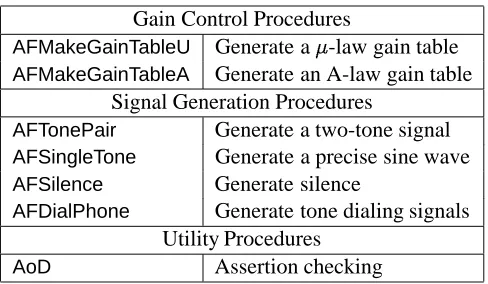
The utility library provides a number of facilities that are used by several clients. Two kinds of facilities are provided: tables and subroutines. Table 5 summarizes the library tables and Table 6 summarizes the library subroutines.
6.2.1 Utility Tables
The AudioFile System handles a variety of digital audio data formats, particularly
-law and A-law, the eight-bit-per-sample companded formats used in the US and European telephone industries, respectively. These formats are described by CCITT recommendation G.711. They are similar logarithmically companded formats resembling 8-bit floating point numbers. The -law (A-law) format is roughly equivalent to a linearly encoded format of 14 (13) bits. For mixing and gain control, the AudioFile server and some clients need to convert these formats to and from linear encoding. It is possible but time consuming to do this algorithmically; fortunately, it is very easy to do the necessary conversions by table lookup. Conversion from-law or A-law to linear requires tables containing 256 16-bit entries. Gain control for a specific gain requires only a 256 byte table. Tables for conversion from linear to-law or A-law requires 16,384 bytes.
Another frequent operation is the computation of the signal power of a block of samples. The utlity library provides tablesAF power uf and AF power afto translate-law and A-law values to the square of the corresponding linear value.
As discussed further below, table lookup is a very powerful method of generating sine waves or other wave shapes at various frequencies. The library provides integer and floating point sine wave tables,AF sine intandAF sine float, for this purpose. Finally, the library makes a first attempt to describe various encoding formats that AudioFile supports today or may support in the future. The tableAF sample sizes
is an array ofAFSampleTypesstructure indexed by AEncodeType, which is an
15
enumerated type describing various digital audio encodings.
struct AFSampleTypes {
unsigned int bits_per_samp; unsigned int bytes_per_unit; unsigned int samps_per_unit; char *name;
};
Many encoding types do not have integral numbers of bytes per sample, so AF-SampleTypeshas two fields forbytes per unitandsamps per unit. Together these fields can describe any fixed-length encoding format. (The fieldbits per sampis only a hint).
6.2.2 Utility Procedures
The AudioFile utility library gathers together a number of useful subroutines. With the exception ofAFDialPhone(), these procedures do not directly interact with the AudioFile protocol.
Two procedures, AFMakeGainTableU() and AFMakeGainTableA(), are supplied to compute on-the-fly translation tables for gain modification of-law and A-law encoded samples. Applications may find it more convenient to use the precomputed tables (AF gain table uandAF gain table a), but the procedures are provided for those situations calling for gain values outside the range -30 dB to +30 dB or for clients without enough memory to store all 61 tables.
Two procedures, AFTonePair() and AFSingleTone(), are supplied for generating tones or tone pairs. These procedures use the technique of direct digital synthesis, where sample values are produced by stepping through a wave table at a rate proportional to the requested frequency. The requested frequency is divided by the sample rate to produce a phase increment value. The phase increment is added to a phase accumulator, and the fractional value is used to index the wave table.
AFSingleTone()is used to generate a floating point tone into a buffer, with a given peak value. AFSingleTone() accepts an initial phase and returns the final phase, allowing multiple calls toAFSingleTone()to produce a signal that is continuous at block boundaries.
6.2 Client Utility Library 29
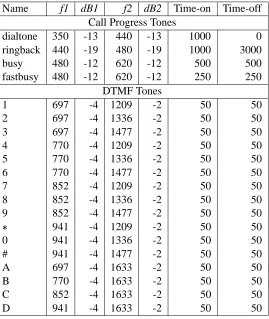
AFTonePair()is used to generate a-law tone pair into a buffer. The two frequencies are individually specified, with individual power levels relative to the “digital milliwatt”, which in turn is 3.16 dB down from digital clipping level. A special parameter,gainramp, controls how the tones will ramp up to full volume and ramp down at the end. This reduces the frequency splatter associated with switching the signal on and off. Two-tone signals are frequently used in telephony, for Touch-Tone, ringback, busy, and dialtone sounds. Table 7 shows some of the telephony related signals represented by tone pairs. The table shows the frequencies in Hertz and power levels in dB relative to the digital milliwatt of the two tones, and the on- and off- times in milliseconds. An off-time of 0 represents a continuous tone.
void AFTonePair(double f1, double dBgain1, double f2, double dBgain2, int gainramp,
unsigned char *buffer, int length);
AoD()stands for “Assert Or Die”. A common idiom in programming is to check
a condition and exit with an error message if the condition does not hold. AoD()
simply captures this idiom into a library procedure. The first argument is a boolean expression. If the expression is true,AoD()returns right away. If the expression is false, the rest of the arguments are interpreted as a format string and arguments for
fprintf(stderr,...)after whichAoD()callsexit(1).16
void AoD(int bool, char *errmsg, ...);
Finally,AFDialPhone()encapsulates the operations necessary to generate Touch-Tone dialing sequences on a telephone device.
16
Connection Management
AFOpenAudioConn Open a connection to the audio server
AFCloseAudioConn Close the audio connection
AFSynchronize Synchronize with the audio server
AFSetAfterFunction Set a synchronization function
Audio Handling
AFGetTime Get the device time of a device
AFPlaySamples Play digital audio samples
AFRecordSamples Record digital audio samples
Audio Contexts
AFCreateAC Create a new audio context
AFChangeACAttributes Modify an audio context
AFFreeAC Free resources associated with an audio context
Event Handling
AFEventsQueued Check for events
AFPending Returns number of unprocessed events
AFIfEvent Find and dequeue a particular event (blocking)
AFCheckIfEvent Find and dequeue a particular event (non-blocking)
AFPeekIfEvent Find a particular event (blocking)
AFNextEvent Return the next unprocessed event
AFSelectEvents Select events of interest
Telephone
AFCreatePhoneAC Create an audio context for a telephone device
AFFlashHook Flash the hookswitch on a telephone device
AFHookSwitch Set the state of the hookswitch
[image:40.612.146.506.198.565.2]AFQueryPhone Returns the state of the hookswitch and loop current
6.2 Client Utility Library 31
I/O Control
AFEnableInput Enable inputs on an audio device
AFDisableInput Disable inputs on an audio device
AFEnableOutput Enable outputs on an audio device
AFDisableOutput Disable outputs on an audio device
AFEnablePassThrough Connect local audio to the telephone
AFDisablePassThrough Remove the direct local audio/telephone connection
AFQueryInputGain Get minimum/maximum input gains for a device
AFQueryOutputGain Get minimum/maximum output gains for a device
AFSetInputGain Set the input gain of a device
AFSetOutputGain Set the output gain of a device
Access Control
AFAddHost Add a host to the access list
AFAddHosts Add a set of hosts to the access list
AFListHosts Return the host access list
AFRemoveHost Remove a host from the access list
AFRemoveHosts Remove a set of hosts from the access list
AFSetAccessControl Enable or disable access control checking
AFEnableAccessControl Enable access control checking
AFDisableAccessControl Disable access control checking
Properties
AFGetProperty Manipulate properties
AFListProperties Get a list of existing properties
AFChangeProperties Modify a property
AFDeleteProperty Delete a property
AFInternAtom Install a new atom name
AFGetAtomName Fetch the name of an atom
Error Handling
AFSetErrorHandler Set the fatal error handler
AFSetIOErrorHandler Set the system call error handler
AFGetErrorText Translate error code to a string
Miscellaneous
AFNoOp Don’t do anything
AFFlush Flush any queued requests to the server
AFSync Default synchronization function
[image:41.612.105.473.137.632.2]AFAudioConnName Return the name of the audio server
Conversion Tables
AF comp u 13-bit linear to-law
AF comp a 13-bit linear to A-law
AF exp u -law to 13-bit linear
AF exp a A-law to 13-bit linear
AF cvt u2s -law to 16-bit linear
AF cvt u2a A-law to 16-bit linear
AF cvt u2f -law to floating point
AF cvt a2f A-law to floating point
AF cvt u2a -law to A-law
AF cvt a2u A-law to-law
Mixing Tables
AF mix u Mix two-law samples
AF mix a Mix two A-law samples
Gain Tables
AF gain table u -law gain
AF gain table a A-law gain
Sine Wave Tables
AF sine int 1024 entry 16-bit integer sine wave
AF sine float 1024 entry floating point sine wave
Encoding Information Tables
AF sample sizes Datatype information
Table 5: AudioFile client utility library tables
Gain Control Procedures
AFMakeGainTableU Generate a-law gain table
AFMakeGainTableA Generate an A-law gain table
Signal Generation Procedures
AFTonePair Generate a two-tone signal
AFSingleTone Generate a precise sine wave
AFSilence Generate silence
AFDialPhone Generate tone dialing signals
Utility Procedures
[image:42.612.204.448.490.632.2]AoD Assertion checking
6.2 Client Utility Library 33
Name f1 dB1 f2 dB2 Time-on Time-off
Call Progress Tones
dialtone 350 -13 440 -13 1000 0
ringback 440 -19 480 -19 1000 3000
busy 480 -12 620 -12 500 500
fastbusy 480 -12 620 -12 250 250
DTMF Tones
1 697 -4 1209 -2 50 50
2 697 -4 1336 -2 50 50
3 697 -4 1477 -2 50 50
4 770 -4 1209 -2 50 50
5 770 -4 1336 -2 50 50
6 770 -4 1477 -2 50 50
7 852 -4 1209 -2 50 50
8 852 -4 1336 -2 50 50
9 852 -4 1477 -2 50 50
941 -4 1209 -2 50 50
0 941 -4 1336 -2 50 50
# 941 -4 1477 -2 50 50
A 697 -4 1633 -2 50 50
B 770 -4 1633 -2 50 50
C 852 -4 1633 -2 50 50
[image:43.612.155.424.229.548.2]D 941 -4 1633 -2 50 50
7
Server Design
The AudioFile server is responsible for managing the audio hardware and present-ing abstract device interfaces to clients via the AudioFile protocol. This section discusses some of the important issues in the server’s design, the implementation of buffering to provide the audio device abstraction, and some other details of the server’s implementation.
7.1 Implementation Considerations
Performance was our primary concern for the implementation of an AudioFile server. We wanted the server to run continuously in the background, so we felt that the quiescent server should present a negligible CPU load. Further, load due to the server with a few clients running should leave most of the CPU available for applications. Otherwise, users would not be inclined to use audio-based applications because they would not get any work done. While server performance was a primary focus, we realized the overall design must be kept in balance so that an efficient server was not compromised by an inefficient client or client library.
We considered using threads to implement the server, but were apprehensive about the performance and portability of existing thread packages. Although the internal structure of the server might be slightly cleaner with threads, we took the safer route and designed the server as a single-threaded process.
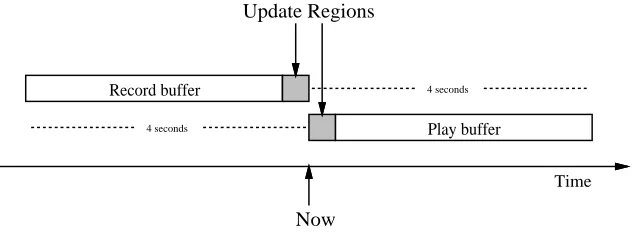
The server must be fair in its processing of client requests, in order to meet the real-time constraints of the applications. To satisfy our fairness goal, the server is designed such that one client cannot dominate the processing time within the server and preclude the server from getting work done on the behalf of other clients. The server attempts to achieve fairness by servicing active client connections in a round-robin fashion and by breaking large requests into smaller chunks.
7.2 Buffering