this print for content only—size & color not accurate
spine = 0.784" 336 page count
Pro Ajax and Java
Dear Reader,
If you are a professional Java developer and you want to know how best to go about adding Ajax functionality to your web applications to enrich your users’ experience, then Pro Ajax and Javais the right book for you. Ajax allows us to build highly interactive, desktop-like web applications that can be deployed through any modern web browser without the need for special plug-ins. Though Ajax is server-side agnostic, it certainly plays well within the rich Java ecosystem. This book teaches you what you need to know by using tightly focused exam-ples that aren’t cluttered with extraneous details, putting you on the fast track to using Ajax in your own Java applications. You already know how to develop web applications, so this book focuses on teaching the killer techniques you’ll need to bring your applications to life with Ajax, including autocomplete, form vali-dation, dynamic visual effects, and much, much more.
We start off by providing a brief summary of the subject area, followed by a guide to creating the perfect development environment for developing Ajax in Java, including code editing and formatting, DOM inspection, debugging, testing, and logging tools.
Next, we look in depth at the most popular Ajax libraries and toolkits avail-able, and what they can do to simplify and speed up our Ajax development— Prototype, script.aculo.us, Dojo, DWR, AjaxTags, and Taconite. In the final section, we explore Ajax development within four of the most popular Java frameworks—Spring, Struts, Tapestry, and JSF.
Thanks for picking up this book. We hope you’ll have as much fun reading it as we had writing it!
Nate Schutta and Ryan Asleson Nathaniel T. Schutta,
coauthor of Foundations of Ajax
US $49.99 Shelve in Java Programming User level: Intermediate–Advanced
Pro Ajax
and
Ja
va
Sc
hutta,
Asleson
THE EXPERT’S VOICE
IN WEB DEVELOPMENT
Nathaniel T. Schutta
and
Ryan Asleson
Pro Ajax
and
Java
ISBN 1-59059-677-3
9 781590 596777
5 4 9 9 9
6 89253 59677 7
www.apress.com
SOURCE CODE ONLINE
Companion eBook
See last page for details on $10 eBook version
forums.apress.com
FOR PROFESSIONALS BY PROFESSIONALS™ Join online discussions:
Covers everything Java developers need
to know to add Ajax to their websites!
Ryan Asleson, coauthor of Foundations of Ajax
THE APRESS PRO AJAX AND JAVA ROADMAP
Foundations of Ajax Pro JavaScript
Techniques
Pro JSF and Ajax: Building Rich Internet Components
Pro Ajax and Java
Ajax Patterns and Best Practices
Beginning CSS Web Development From Novice to Professional
Beginning JavaScript with DOM Scripting and Ajax: From Novice to Professional
Beginning POJOs
Companion eBook Available
Pro Ajax and Java
■ ■ ■
Pro Ajax and Java
Copyright © 2006 by Nathaniel T. Schutta and Ryan Asleson
All rights reserved. No part of this work may be reproduced or transmitted in any form or by any means, electronic or mechanical, including photocopying, recording, or by any information storage or retrieval system, without the prior written permission of the copyright owner and the publisher.
ISBN-13 (pbk): 978-1-59059-677-7 ISBN-10 (pbk): 1-59059-677-3
Printed and bound in the United States of America 9 8 7 6 5 4 3 2 1
Trademarked names may appear in this book. Rather than use a trademark symbol with every occurrence of a trademarked name, we use the names only in an editorial fashion and to the benefit of the trademark owner, with no intention of infringement of the trademark.
Lead Editor: Chris Mills
Technical Reviewer: John R. Fallows
Editorial Board: Steve Anglin, Ewan Buckingham, Gary Cornell, Jason Gilmore, Jonathan Gennick, Jonathan Hassell, James Huddleston, Chris Mills, Matthew Moodie, Dominic Shakeshaft, Jim Sumser, Keir Thomas, Matt Wade
Project Manager: Richard Dal Porto Copy Edit Manager: Nicole LeClerc Copy Editor: Hastings Hart
Assistant Production Director: Kari Brooks-Copony Production Editor: Laura Esterman
Compositor: Susan Glinert Proofreader: April Eddy Indexer: Lucie Haskins Artist: Susan Glinert Cover Designer: Kurt Krames
Manufacturing Director: Tom Debolski
Distributed to the book trade worldwide by Springer-Verlag New York, Inc., 233 Spring Street, 6th Floor, New York, NY 10013. Phone 1-800-SPRINGER, fax 201-348-4505, e-mail [email protected], or visit http://www.springeronline.com.
For information on translations, please contact Apress directly at 2560 Ninth Street, Suite 219, Berkeley, CA 94710. Phone 510-549-5930, fax 510-549-5939, e-mail [email protected], or visit http://www.apress.com. The information in this book is distributed on an “as is” basis, without warranty. Although every precaution has been taken in the preparation of this work, neither the author(s) nor Apress shall have any liability to any person or entity with respect to any loss or damage caused or alleged to be caused directly or indirectly by the information contained in this work.
To Christine, for always believing. —Nathaniel T. Schutta
v
Contents at a Glance
About the Authors
. . . xiAbout the Technical Reviewer
. . . xiiiAcknowledgments
. . . xvIntroduction
. . . xviiPART 1
■ ■ ■
Introducing Ajax
■
CHAPTER 1
What Is Ajax?
. . . 3■
CHAPTER 2
Development Tools
. . . 27PART 2
■ ■ ■
Libraries and Toolkits
■
CHAPTER 3
Java-Agnostic Toolkits
. . . 75■
CHAPTER 4
Java-Specific Frameworks
. . . 117PART 3
■ ■ ■
Web Frameworks
■
CHAPTER 5
Struts and Ajax
. . . 153■
CHAPTER 6
Tapestry
. . . 183■
CHAPTER 7
Spring and Ajax
. . . 219■
CHAPTER 8
JavaServer Faces
. . . 263vii
Contents
About the Authors
. . . xiAbout the Technical Reviewer
. . . xiiiAcknowledgments
. . . xvIntroduction
. . . xviiPART 1
■ ■ ■
Introducing Ajax
■
CHAPTER 1
What Is Ajax?
. . . 3The Rise of the Web Application
. . . 3And Then There Was Ajax
. . . 5The XMLHttpRequest Object
. . . 9Methods and Properties
. . . 12An Example Interaction
. . . 13Avoiding Common Gotchas
. . . 16Ajax Patterns
. . . 20The Fade Anything Technique (FAT)
. . . 21Auto Refresh
. . . 22Partial Page Paint
. . . 22Draggable DOM
. . . 23Summary
. . . 25■
CHAPTER 2
Development Tools
. . . 27JavaScript Source Code Editor
. . . 27JSEclipse
. . . 28NetBeans JavaScript Plug-in
. . . 32JavaScript Compression and Obfuscation
. . . 35The Dojo Toolkit’s JavaScript Compressor
. . . 37Inspecting a DOM Structure
. . . 38Mouseover DOM Inspector
. . . 39Debugging Ajax Requests
. . . 40NetBeans HTTP Monitor
. . . 41Firefox FireBug Extension
. . . 43JavaScript Logging
. . . 45Log4JS
. . . 46Lumberjack
. . . 49JavaScript Debugging Tools
. . . 52Using Venkman
. . . 52Testing Tools
. . . 56JsUnit
. . . 57Selenium
. . . 58Summary
. . . 71PART 2
■ ■ ■
Libraries and Toolkits
■
CHAPTER 3
Java-Agnostic Toolkits
. . . 75Prototype
. . . 75$()
. . . 76Working with Forms
. . . 77Manipulating the DOM
. . . 78Try: Simplified Browser Detection
. . . 84Ajax Support
. . . 86script.aculo.us
. . . 90Effect
. . . 90Autocomplete
. . . 98Dojo Toolkit
. . . 102Animations
. . . 103Effects
. . . 105dojo.io.bind
. . . 107Taconite
. . . 110Taconite on the Client Side
. . . 111Taconite on the Server
. . . 112Getting Started with Taconite
. . . 113Summary
. . . 116■
CHAPTER 4
Java-Specific Frameworks
. . . 117DWR
. . . 117Installation
. . . 118Installation Verification
. . . 120AjaxTags
. . . 141The Ajax “Killer Application”
. . . 142AjaxTags Autocomplete Component
. . . 142Other Options
. . . 149Summary
. . . 149PART 3
■ ■ ■
Web Frameworks
■
CHAPTER 5
Struts and Ajax
. . . 153Struts Design
. . . 153Ajax Validation
. . . 155Struts Validation
. . . 156Struts and Ajax Integration
. . . 157Ajax-Powered Validation
. . . 161Implementing Struts
. . . 163Struts and Ajax Design Considerations
. . . 179The Future of Struts
. . . 180Struts 1.3 and Beyond
. . . 181Struts Shale
. . . 181Struts Ti
. . . 182Summary
. . . 182■
CHAPTER 6
Tapestry
. . . 183What Is Tapestry?
. . . 183Getting Started
. . . 185Calling the Server
. . . 188Tapestry Forms
. . . 193Tapestry Exceptions
. . . 203Tapestry and Ajax
. . . 204Tacos Components
. . . 205Setting Up Tacos
. . . 206Using a Component
. . . 206Enabling Debug Information
. . . 211Modifying the Form Example
. . . 212■
CHAPTER 7
Spring and Ajax
. . . 219What Is Spring?
. . . 219Just Another Framework?
. . . 220Aspect-Oriented Programming and Dependency Injection
. . . 220Getting Started with Spring
. . . 225Ajax and Spring
. . . 234The Inventory Control Application
. . . 234Summary
. . . 261■
CHAPTER 8
JavaServer Faces
. . . 263What Is JSF?
. . . 263Getting Started with JSF
. . . 264Dynamic Navigation
. . . 269JSF Taglibs
. . . 270Validating and Converting
. . . 274Developing JSF Applications with an IDE
. . . 280Other JSF Technologies
. . . 282Apache Tomahawk
. . . 282Facelets
. . . 282Shale
. . . 283Seam
. . . 283The JSF Life Cycle
. . . 283Restore View
. . . 284Apply Request Values
. . . 284Process Validation
. . . 285Update Model
. . . 285Invoke Application
. . . 285Render Response
. . . 285JSF and Ajax
. . . 285JSF Ajax Components
. . . 292Summary
. . . 295xi
About the Authors
■NATHANIEL T. SCHUTTAis a senior software engineer and author in the Twin Cities area of Minnesota with extensive experience developing Java Enterprise Edition–based web applications. He has a degree in Computer Science from St. John’s University (MN) and a master’s of science degree in software engineering from the University of Minnesota. For the last several years, Nathaniel has focused on user interface design, contributed to corporate interface guidelines, and consulted on a variety of web-based applications. A longtime member of the Association for Computing Machinery’s Computer-Human Interaction Special Interest Group and a Sun-certified web component developer, Nathaniel believes that if the user can’t figure out your application, then you’ve done something wrong. Along with his user interface work, Nathaniel is the cocreator of the open-source Taconite framework (http://taconite.sf.net), and has contributed to two corporate Java frameworks, developed training material, and led several study groups. During the brief moments of warm weather found in his home state of Minnesota, he spends as much time on the golf course as his wife will tolerate. He’s currently exploring Ruby, Rails, and Mac OS X. For more of his random thoughts, check out his blog at
www.ntschutta.com/jat.
xiii
About the Technical Reviewer
■JOHN R. FALLOWS is a Java architect at TXE Systems. Originally from Northern Ireland, John graduated from Cambridge University in the United Kingdom and has worked in the soft-ware industry for more than ten years.
Prior to joining TXE Systems, John worked as a JavaServer Faces technology architect at Oracle. John played a leading role in the Oracle ADF Faces team to influence the architecture of the JavaServer Faces standard and to extend the standard to provide Ajax functionality in the ADF Faces project.
John is a popular speaker at international conferences such as JavaOne and JavaPolis, and he has written numerous articles for leading IT magazines such as Java Developer’s
Journal.
John is the author of the recently published book Pro JSF and Ajax: Building Rich
xv
Acknowledgments
A
huge thanks to the team at Apress for providing us with another opportunity to express our passion about Ajax! Thanks to Chris Mills for helping us refine our rough ideas into the finished product you see before you. Hats off to Richard Dal Porto for keeping us focused and on schedule. Gregg Bollinger and John Fallows provided valuable feedback that helped make this a better book. Hastings Hart had the misfortune of fixing our multiple spelling and grammatical mistakes, and for this we are forever grateful. We thank Laura Esterman for guiding us through the final production process, and we were thrilled to see our work transformed from words in a word processor to a formatted book. We appreciate the support that our agent, Laura Lewin, and the staff at Studio B gave us throughout this adventure.Nathaniel T. Schutta and Ryan Asleson
First and foremost to my coauthor, Ryan—I can’t thank you enough for your tireless effort on this book; I don’t know how you did it! I’m proud and honored to have you as a friend and partner. Thanks to Sara and Adam for your support in this adventure, it was good of you to share Ryan (again). I can’t thank my wife enough for putting up with me throughout this book. I couldn’t have done it without your love and patience. During this entire experience you’ve never lost your head (even when I did), and your faith in me kept me grounded. Often life only makes sense backwards—but for that one project, I’d have never met Nathan Good, who gave me the inspiration to write in the first place.
I owe a huge debt to my parents, one that can never be repaid. Without their foresight, I probably wouldn’t even be in this field. Thanks for seeing the future and making sure I had the latest hardware. You fueled a passion for reading that has evolved into this new adventure of writing. Thanks, Mom and Dad—I don’t say it enough! A big thanks to Brent Ashley for all his support and advice over the last year; his counsel means a lot to me. Special thanks to Jeff Jensen of the Twin Cities Java User Group, John Collins of the University of Minnesota, Kasi Periyasamy of the University of Wisconsin at La Crosse, Jim Schnepf and Mike Heroux of St. John’s University, and Aleh Matus of OTUG for providing us forums to spread the word on Ajax. We are deeply appreciative for all your help. I know I’ve left some very deserving people off this list and for that my heartfelt apologies—I only have so much space! Thanks again to everyone mentioned here and all those who I keep in my heart.
I have to thank my friend and coauthor, Nate, for making the authoring process as enjoy-able as it has been. I can’t thank you enough! I couldn’t ask for a better teammate. Thank you for your hard work and unmatched dedication to this book. Christine, thanks for letting Nate work with me on another project.
Words cannot describe the love and appreciation I have for my wife, Sara, who has graciously supported me during the sometimes grueling authoring process. I could not have done it without your unwavering support and understanding. My son, Adam, provided me with hours and hours of much needed fun and joy away from the computer.
I also extend my thanks to those important people in my life who helped shape me into the person I am today. I can’t list all of those people here, but certainly you know who you are! Finally, I thank Mom and Dad for everything they have done for me over the years; without their love and encouragement, none of this would be possible.
xvii
Introduction
W
e thought we had found the Holy Grail of software development when we started building web applications several years ago. Previously we had been developing thick client applications that required a lengthy installation process every time a new version of the company’s application was released. The application was deployed to several hundred users scattered across the country, and much to our dismay we had to watch as the complex and error-prone installation process continually caused headaches and angst for developers and users alike.Deploying an application through a browser seemed like a much more palatable option because it would eliminate the need to install software on the client computer. So, like many others, our organization moved swiftly to deploying applications to the web.
Despite the relative ease of deployment, web applications still had their share of issues. Most notable from a user’s perspective was the significant loss of rich interactivity provided by the user interface. Web applications were constrained to the basic set of widgets provided by HTML. Worse yet, interacting with the server required a complete refresh of the page, which was disconcerting to users who were familiar with rich client/server applications.
We always considered this constant need to refresh the page a serious liability of web applications and often experimented with ways to avoid a page refresh whenever possible. We even at one point considered writing a Java applet that would handle the communica-tion between the browser and the server. However, it soon became apparent that as more web applications were deployed, users simply got used to the constant page refreshes, and our zeal for finding alternatives slowly faded.
An Overview of This Book
Pro Ajax and Java is written to give you, the Java developer, all the tools you need to add
Ajax techniques to your existing or future applications. Our motto while writing this book was, “Everything you need to know; nothing you don’t.” We assume that as a reader of this book, you are already an experienced web application developer. Because of this, we focus on the topics that are most likely new to you: Ajax and its associated tools and techniques. Chapter 1 is a whirlwind tour of Ajax. We cover the basics of the XMLHttpRequest object along with some of the common gotchas of Ajax development. We also cover some of the common patterns you’ll see in Ajax development.
Chapter 2 provides an overview of the tools that will make developing Ajax applications easier. We touch on JavaScript editors, formatters, and obfuscators. Debugging can be a real pain, which is why we’ve shown you a wealth of tools that treat JavaScript like the first-class citizen that it is. For starters, we’ll show you how to log without using alerts. Of course you’ll also want to test your code, which is why we review JsUnit and Selenium, proving that testing isn’t just for server-side code.
Although Ajax certainly isn’t rocket science, that doesn’t mean you want to do all the heavy lifting yourself. In Chapter 3 we take a look at a variety of frameworks and toolkits that you’ll want to leverage to make developing Ajax applications a snap. We’ll review Dojo, Prototype, script.aculo.us, Taconite, and the Yahoo! library.
Chapter 4 continues our look at libraries, focusing on those that are of particular interest to the Java developer. We’ll review DWR and AjaxTags, giving you an idea of the strengths of each library.
The second half of the book shows you how to integrate Ajax techniques into four of the leading Java frameworks. Chapter 5 discusses the wildly popular Struts framework. We’ll show you how to take advantage of Struts validation, and we also discuss design consider-ations with Struts and Ajax.
Chapter 6 covers the component-based Tapestry framework. After an overview of Tapestry, we show you how to leverage the Ajaxified Tacos components to spiff up your applications.
You can hardly turn around these days without running into a Spring-based application, and in Chapter 7, we show you how to leverage Ajax in the Spring space. We show you how using DWR makes developing Ajaxified Spring applications a snap.
Obtaining This Book’s Source Code
All the examples in this book are freely available from the Source Code section of the Apress website. Point your browser to www.apress.com, click the Source Code link, and find
Pro Ajax and Java in the list. From this book’s home page you can download the source
code as a ZIP file. The source code is organized by chapter.
Obtaining Updates for This Book
Despite our best efforts, you may find an occasional error or two scattered throughout the book—although we hope not! We apologize for any errors that may be present in the text or source code. A current errata list is available from this book’s home page on the Apress website (www.apress.com) along with information about how to notify us of any errors you may find.
Contacting Us
We value your questions and comments regarding this book’s content and source code examples. Please direct all questions and comments to [email protected]. We’ll reply to your inquiries as soon as we can; please remember, we (like you!) may not be able to respond immediately.
Thank you for buying this book! We hope you find it a valuable resource and enjoy reading it as much as we enjoyed writing it.
Best regards,
■ ■ ■
P A R T 1
Introducing Ajax
In the recent past, the word “Ajax” conjured up a popular cleaner, an Amsterdam football
club, perhaps even a Greek hero. Today “Ajax” has taken on yet another meaning—it is
one of the most talked-about technologies on the web. Google Maps, Basecamp, ESPN—
all of these sites take advantage of Ajax techniques to improve their user experiences, and
although the first uses of Ajax may have originated at leading technology companies, by
the time you finish reading this book, your users will have encountered an Ajaxified
website. In case you haven’t noticed, their expectations for a web application are rising.
Despite what some contend, Ajax is not rocket science; in fact, most of you probably
already know more than enough to take advantage of this mix of technologies. In this
section, we’ll give you a refresher on the basics of Ajax and discuss some tools that will
3
■ ■ ■
What Is Ajax?
T
he Internet as we know it is a very different beast than when it began. Although many find it second nature to buy the latest DVD or plan their next vacation online, in the begin-ning there was only text; today we have video podcasts and can easily share photos of the cats with anyone in the world. What began as a mechanism to enable greater collaboration in the research community has morphed into not only a significant sales channel but also one of the primary delivery mechanisms for modern applications.The Rise of the Web Application
In the early days, web pages were simple static text, which worked fine for posting your latest paper or a class schedule. However, it didn’t take long for people to want a dynamic experience. As the web browser became a nearly ubiquitous aspect of everyone’s operating system, people started developing web-based applications. Considering the rather poor user experience possible within early browsers, this may have seemed like an odd choice, but there are three major benefits to the thin client, at least for the developers.
The ubiquity of the browser is closely related to a lower barrier of entry. Unlike most installed applications, a web application will work on any operating system that has a browser written for it. Although this issue is largely mitigated in the Java space, just ask the folks maintaining the Standard Widget Toolkit (SWT) how much fun it is to work with five code bases. A browser-based application allows developers to reach an extremely large audience.
Compared to thick clients, a web app is much easier to maintain. If you’ve ever worked on a traditional thick app, you know how much fun it is to manage dependencies. Maybe your latest upgrade relies on version 1.2.3 of Spiffy Library but your user only has the 1.2 model. Sure, you can update that as part of your install, but what happens when their other critical application relies on 1.2 and just can’t seem to function right with 1.2.3? Of course your users get the rich experience that an installed application provides, but the cost of managing upgrades can be huge. With a browser-based application, we control the servers, so rolling out a fix is (usually) easy. If we need a newer library, we can just add it because we control the deployment environment. This also allows us to make changes more frequently— just push the new code to the servers, and your customers get the latest version.
Despite the advantages, the web has a major downside as an application medium. First, no one would confuse the average web application with Word or Quicken. Sure, if you’re moving from the mainframe to the browser, you might not mind, but if your previous app had all the power of the thick client, they might be a tad upset when you take that rich experience away from them. Still, the pros usually outweigh the cons, and a good number of software engineers have spent the last several years building web applications. Still, users weren’t entirely satisfied with the thin client. We may have convinced them to just accept it, but truth be told, the differences between the average web app and a dumb terminal connected to the mainframe are mostly cosmetic.1 Over the years, we’ve
evolved from using CGI bin scripts to JSPs, and more recently, we have a host of XML-based languages such as XML User Interface Language (XUL) and Extensible Application Markup Language (XAML) that aim to provide a near desktop–like look and feel. Of course Flash has been used to create some fantastic interfaces, but it requires expensive tools and browser plug-ins.
But to reach the widest possible audience, we’ve been forced to stick pretty close to the browser, meaning that our applications have been tied directly to the synchronous nature of the request/response underpinnings of the Internet. Although request/response makes perfect sense for publishing an article, repainting the entire page even if only a couple of things have changed is not the most usable (or performant) approach. If only we could send a request asynchronously and update just what changed….
And Then There Was Ajax
Today we have another tool to create truly rich browser-based applications: Ajax. Before you ask, Ajax is more of a technique than a specific technology, though JavaScript is a primary component. We know you’re saying, “JavaScript is not worth it,” but application and testing frameworks are easing the burden on developers because of the resurgent interest in the language because of Ajax and better tool support. With the introduction of Atlas, Microsoft is throwing its weight firmly behind Ajax, and the infamous Rails web framework comes prebuilt with outstanding Ajax support. In the Java space, Sun has added several Ajax components to its BluePrints Solutions Catalog, and any web frame-work worth its salt has announced at least minimal support for Ajax.
To be honest though, Ajax isn’t anything new. In fact, the “newest” technology related to the term—the XMLHttpRequest object (XHR)—has been around since Internet Explorer 5 (released in the spring of 1999) as an ActiveX control. What is new is the level of browser support. Originally, the XMLHttpRequest object was supported in only Internet Explorer (thus limiting its use), but starting with Mozilla/Firefox 1.0, Opera 7.6, and Safari 1.2, support is widespread. The little-used object and the basic concepts are even covered in a W3C standard: the DOM Level 3 Load and Save Specification. At this point, especially as applications such as Google Maps, Google Suggest, Gmail, Flickr, Netflix, and A9 proliferate, XHR is becoming a de facto standard.
Unlike many of the approaches used before, Ajax works in most modern browsers and doesn’t require any proprietary software or hardware. In fact, one of the real strengths of this approach is that developers don’t need to learn some new language or scrap their existing investment in server-side technology. Ajax is a client-side approach and can interact with J2EE, .NET, PHP, Ruby, and CGI scripts—it really is server-agnostic. Short of a few minor security restrictions, you can start using Ajax right now, leveraging what you already know.
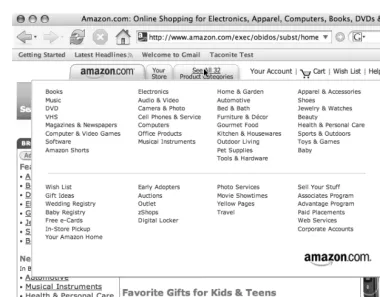
Figure 1-1. Amazon’s product categories
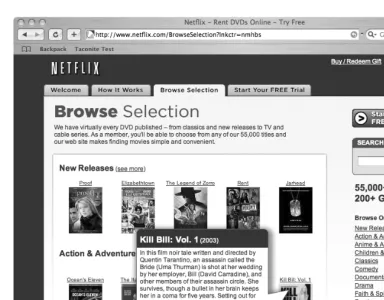
Figure 1-2. The Netflix browse feature
We want to stress that Ajax isn’t limited to “dot-com” darlings; corporate developers are starting to scratch the surface as well, with many using Ajax to solve particularly ugly validation situations or to retrieve data on the fly. Heck, one of our local papers, the Star
Tribune (www.startribune.com) recently added a useful Ajax feature. Although most news
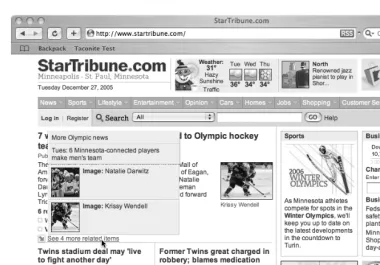
sites show related articles, there is only so much real estate that can be taken up with these links. Rather than deny their readers these other links, the Star Tribune site shows addi-tional related links when a user hovers their mouse over a “See more related items” link (see Figure 1-3).
Figure 1-3. StarTribune’s related items
Although it isn’t exactly new, the approach that is the meat of Ajax is an important shift in the Internet’s default request/response paradigm. Web application developers are now free to interact with the server asynchronously, meaning they can perform many tasks that before were limited to thick clients. For example, when a user enters a ZIP code, you can validate it and populate other parts of the form with the city and state; or, when they select “United States”, you can populate a state drop-down list. We’ve been able to mimic these approaches before, but it’s much simpler to do with Ajax.
We can hear you saying, “So what’s the big deal?” Well, using XHR and the fact that you can now work asynchronously with the server lets you create web applications that are far more dynamic. For example, say you have a drop-down list that is filled based on the input in some other field or drop-down list. Ordinarily, you would have to send all the data down to the client when the page first loaded and use JavaScript to populate your drop-down list based on the input. It’s not hard to do, but it does bloat the size of your page, and depending on just how dynamic that drop-down list is, size could be an issue. With Ajax, when the trigger field changes or the focus is lost, you can make a simple request to the server for only the information you need to update your drop-down list.
Imagine the possibilities for validation alone. How many times have you written some JavaScript validation logic? Although the edit might be simple in Java or C#, the lack of decent debuggers, combined with JavaScript’s weak typing, can make writing them in JavaScript a real pain and error prone to boot. How often do these client-side validation rules duplicate edits on the server? Using XHR, you can make a call to the server and fire
one set of validation rules. These rules can be far richer and more complex than anything
you would write in client-side JavaScript, and you have the full power of debuggers and integrated development environments.
We can hear some of you now saying, “I’ve been doing that for years with IFRAMES or hidden frames. We’ve even used this particular technique as a way to post or refresh parts of a page instead of the entire browser, and truth be told, it works.” A fair point possibly, but many would consider this approach a hack to get around XHR’s original lack of cross-browser support. The XHR object that is the heart of Ajax is truly designed to allow asynchronous retrieval of arbitrary data from the server.
As we’ve discussed, traditional web applications follow a request/response paradigm. Without Ajax, the entire page (or with IFRAMEs, parts of the page) is reloaded with each request. The previously viewed page is reflected in the browser’s history stack (though if IFRAMEs are used, clicking the Back button doesn’t always result in what the user expects). However, requests made with XHR are not recorded in the browser’s history. This too can pose an issue if your users are used to using the Back button to navigate within your web application.
The XMLHttpRequest Object
Although Ajax is more of a technique than a technology, without widespread support for
XMLHttpRequest was originally implemented in Internet Explorer 5 as an ActiveX component, meaning that most developers shied away from using XMLHttpRequest until its recent adoption as a de facto standard in Mozilla 1.0 and Safari 1.2. It’s important to note that XMLHttpRequest is not a W3C standard, though much of the functionality is covered in a new proposal: the Document Object Model (DOM) Level 3 Load and Save
Specification (www.w3.org/TR/2004/REC-DOM-Level-3-LS-20040407). Because it is not a
standard, its behavior may differ slightly from browser to browser, though most methods and properties are widely supported. Currently, Firefox, Safari, Opera, Konqueror, and Internet Explorer all implement the behavior of the XMLHttpRequest object similarly.
That said, if a significant number of your users still access your site or application with older browsers, you will need to consider your options. If you are going to use Ajax tech-niques, you will need to either develop an alternative site or allow your application to degrade gracefully. With most usage statistics2 indicating that only a small fraction of
browsers in use today lack XMLHttpRequest support, the chances of this being a problem are slim. However, you will need to check your web logs and determine what clients your customers are using to access your sites.
You must first create an XMLHttpRequest object using JavaScript before you can use it to send requests and process responses. Since XMLHttpRequest is not a W3C standard, creating an instance of XMLHttpRequest object requires a browser check. Internet Explorer imple-ments XMLHttpRequest as an ActiveX object,3 and other browsers such as Firefox, Safari, and Opera implement it as a native JavaScript object. Because of these differences, the JavaScript code must contain logic to create an instance of XMLHttpRequest using the ActiveX technique or using the native JavaScript object technique.
The previous statement might send shivers down the spines of those who remember the days when the implementation of JavaScript and the DOM varied widely among browsers. Fortunately, in this case you don’t need elaborate code to identify the browser type to know how to create an instance of the XMLHttpRequest object. All you need to do is check the browser’s support of ActiveX objects. If the browser supports ActiveX objects, then you create the XMLHttpRequest object using ActiveX. Otherwise, you create it using the native JavaScript object technique. Listing 1-1 demonstrates the simplicity of creating cross-browser JavaScript code that creates an instance of the XMLHttpRequest object.
2. www.w3schools.com/browsers/browsers_stats.asp
Listing 1-1. Creating an Instance of the XMLHttpRequest Object
var xmlHttp;
function createXMLHttpRequest() { if (window.ActiveXObject) {
xmlHttp = new ActiveXObject("Microsoft.XMLHTTP"); }
else if (window.XMLHttpRequest) { xmlHttp = new XMLHttpRequest(); }
}
As you can see, creating the XMLHttpRequest object is rather trivial. First, you create a globally scoped variable named xmlHttp to hold the reference to the object. The
createXMLHttpRequest method does the work of actually creating an instance of
XMLHttpRequest. The method contains simple branching logic that determines how to go about creating the object. The call to window.ActiveXObject will return an object or null, which is evaluated by the if statement as true or false, thus indicating whether the browser supports ActiveX controls and thus is Internet Explorer. If so, then the XMLHttpRequest
object is created by instantiating a new instance of ActiveXObject, passing a string indicating the type of ActiveX object you want to create. In this instance, you provide
Microsoft.XMLHTTP to the constructor, indicating your desire to create an instance of
XMLHttpRequest.
If the call to window.ActiveXObject fails, then the JavaScript branches to the else state-ment, which determines whether the browser implements XMLHttpRequest as a native JavaScript object. If window.XMLHttpRequest exists, then an instance of XMLHttpRequest is created, and on the off chance that your user isn’t using a modern browser, well, the vari-able will be undefined.
Thanks to JavaScript’s dynamically typed nature and to the fact that XMLHttpRequest
Methods and Properties
Table 1-1 shows some typical methods on the XMLHttpRequest object. Don’t worry; we’ll talk about these methods in greater detail shortly.
Let’s take a closer look at these methods.
void open(string method, string url, boolean asynch, string username, string password): This method sets up your call to the server. This method is meant to be the script-only method of initializing a request. It has two required arguments and three optional arguments. You are required to supply the specific method you are invoking (GET, POST, or PUT) and the URL of the resource you are calling. You may optionally pass a Boolean indicating whether this call is meant to be asynchronous. The default is true, which means the request is asynchronous in nature. If you pass a false, processing waits until the response returns from the server. Since making calls asyn-chronously is one of the main benefits of using Ajax, setting this parameter to false
somewhat defeats the purpose of using the XMLHttpRequest object. That said, you may find it useful in certain circumstances such as validating user input before allowing the page to be persisted. The last two parameters are self-explanatory, allowing you to include a specific username and password.
void send(content): This method actually makes the request to the server. If the request was declared as asynchronous, this method returns immediately, otherwise it waits until the response is received. The optional argument can be an instance of a DOM object, an input stream, or a string. The content passed to this method is sent as part of the request body.
Table 1-1. Standard XMLHttpRequest Operations
Method Description
abort() Stops the current request.
getAllResponseHeaders() Returns all the response headers for the HTTP request as key/value pairs.
getResponseHeader("header") Returns the string value of the specified header.
open("method", "url") Sets the stage for a call to the server. The method argument can be GET, POST, or PUT. The url
argument can be relative or absolute. This method includes three optional arguments.
send(content) Sends the request to the server.
setRequestHeader("header", "value") Sets the specified header to the supplied value. open
void setRequestHeader(string header, string value): This method sets a value for a given header value in the HTTP request. It takes a string representing the header to set and a string representing the value to place in the header. Note that it must be called after a call to open(…).
void abort(): This method is really quite self-explanatory; it stops the request.
string getAllResponseHeaders(): The core functionality of this method should be familiar to web application developers. It returns a string containing response headers from the HTTP request. Headers include Content-Length, Date, and URI.
string getResponseHeader(string header): This method is a companion to
getAllResponseHeaders() except it takes an argument representing the specific header value you want, returning this value as a string.
Of all these methods, the two you will use the most are open(…) and send(…). The
XMLHttpRequest object has a number of properties that prove themselves quite useful while designing Ajax interactions.
In addition to these standard methods, the XMLHttpRequest object exposes the properties listed in Table 1-2. You’ll use these properties extensively when working with XMLHttpRequest.
An Example Interaction
At this point, you might be wondering what a typical Ajax interaction looks like. Figure 1-4 shows the standard interaction paradigm in an Ajax application.
Table 1-2. Standard XMLHttpRequest Properties
Property Description
onreadystatechange The event handler that fires at every state change (every time the
readyState attribute changes); typically a call to a JavaScript function
readyState The state of the request. The five possible values are 0 = uninitialized, 1 = loading, 2 = loaded, 3 = interactive, and 4 = complete
responseText The response from the server as a string
responseXML The response from the server as XML; can be parsed and examined as a DOM object
status The HTTP status code from the server (200 for OK, 404 for Not Found, etc.)
Figure 1-4. Standard Ajax interaction
Unlike the standard request/response approach found in a standard web client, an Ajax application does things a little bit differently.
1. A client-side event triggers an Ajax event. Any number of things can trigger this, from a simple onchange event to some specific user action. You might have code like this:
<input type="text" d="email" name="email" onblur="validateEmail()";>
2. An instance of the XMLHttpRequest object is created. Using the open method, the call is set up. The URL is set along with the desired HTTP method, typically GET or POST. The request is actually triggered via a call to the send method. This code might look something like this:
var xmlHttp;
function validateEmail() {
var email = document.getElementById("email"); var url = "validate?email=" + escape(email.value); if (window.ActiveXObject) {
xmlHttp = new ActiveXObject("Microsoft.XMLHTTP"); }
else if (window.XMLHttpRequest) { xmlHttp = new XMLHttpRequest(); }
xmlHttp.open("GET", url);
xmlHttp.onreadystatechange = callback; xmlHttp.send(null);
3. A request is made to the server. This might be a call to a servlet, a CGI script, or any server-side script (written in, say, PHP or ASP.NET).
4. The server can do anything you can think of, including access a data store or even another system (say, the billing system or the HR system).
5. The request is returned to the browser. The Content-Type is set to “text/xml”—the
XMLHttpRequest object can process results only of the “text/html” type. In more complex instances, the response might be quite involved and include JavaScript, DOM manipulation, or other related technologies. Note that you also need to set the headers so that the browser will not cache the results locally. You do this with the following code:
response.setHeader("Cache-Control", "no-cache"); response.setHeader("Pragma", "no-cache");4
6. In this example, you configure the XMLHttpRequest object to call the function
callback() when the processing returns. This function checks the readyState
property on the XMLHttpRequest object and then looks at the status code returned from the server. Provided everything is as expected, the callback() function does something interesting on the client. A typical callback method looks something like this:
function callback() {
if (xmlHttp.readyState == 4) { if (xmlHttp.status == 200) { //do something interesting here }
} }
As you can see, this is different from the normal request/response paradigm but not in a way that is foreign to web developers. Obviously, you have a bit more going on when you create and set up an XMLHttpRequest object and when the “callback” has some checks for states and statuses. Typically, you will wrap these standard calls into a library that you will use throughout your application, or you will use one that is available on the web. This arena is new, but a considerable amount of activity is happening in the open source community.
In general, the various frameworks and toolkits available on the web take care of the basic wiring and the browser abstractions, but others add user interface components. Some are purely client-based; others require work on the server. Many of these frameworks
have just begun development or are in the early phases of release; the landscape is constantly changing, with new libraries and versions coming out regularly. As the field matures, the best ones will become apparent. Some of the more mature libraries include Prototype, script.aculo.us, Dojo Toolkit, Direct Web Remoting (DWR), Taconite, and Rico. This is a dynamic space, so keep your RSS aggregator tuned to those sites dedicated to posting about all things Ajax!
WILL AJAX MAKE MY APPLICATION WEB 2.0?
Since Tim O’Reilly5 first coined the term, some people have been trying to rebrand their web applications
as Web 2.0. What it means to be Web 2.0 is somewhat fluid though. In general, it signals applications that encourage a different style of user participation than those of the past. Web 2.0 is characterized by applications such as Wikipedia and Flickr and activities such as blogging and tagging.
Not everyone is convinced that Web 2.0 is a valuable concept, and some pundits have gone so far as to promise to never use the word again.6 Although some of the criticism is valid (and some of the hype reminiscent of the late 1990s), many current web applications have characteristics that distinguish them from their older brethren. Many modern applications are more open and participative—note the many mashups (combining web services to create something new) that have been created off of Google Maps such as HousingMaps.7 In fact, the Google Maps Mania8 blog has sprung up to track the various appli-cations built on top of Google Maps.
Many of these new-breed applications do indeed use Ajax to some extent, and it is an important component of Web 2.0; however, simply adding some fancy UI widgets doesn’t necessarily equate to a Web 2.0 app. Although the boundaries are fuzzy, Web 2.0 is distinguished by using the intelligence in crowds (like Amazon’s suggest functionality), software as service (such as Google and Salesforce.com), lightweight development (think deploying daily … or more frequently), along with similar characteristics. Although Ajax is certainly a key component of delivering a richer user experience, it alone is not Web 2.0.
Avoiding Common Gotchas
Ajax really does have the ability to drastically improve the user experience. However, there are a few gotchas that you need to look out for. You may not run into more than a couple of these issues, but before you start using Ajax everywhere, you should keep the following in mind:
5. www.oreillynet.com/pub/a/oreilly/tim/news/2005/09/30/what-is-web-20.html 6. www.joelonsoftware.com/items/2005/10/21.html
7. www.housingmaps.com/
Unlinkable pages: You may have noticed that in most of the figures we’ve shown
you, the address bar doesn’t change even when the page does. When you use the
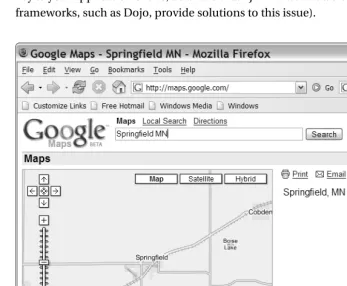
XMLHttpRequest object to communicate with the server, you never need to modify the URL displayed in the address bar. Although this may actually be a plus in some web applications, it also means your users cannot bookmark your page or send the URL to their friends (think about maps or driving directions). This isn’t insurmountable; in fact, Google Maps now includes a “Link to this page” link (see Figure 1-5). If links are key to your application or site, be aware that Ajax makes this a bit of a challenge (some frameworks, such as Dojo, provide solutions to this issue).
Asynchronous changes: Talking to the server asynchronously is one of the real steps
forward with Ajax; however, it isn’t without its issues. We’ve talked about this a few times, but it’s worth discussing again: users have been trained to expect the entire page to be repainted anytime things change, so they may not notice when you update just parts of the page. Just because you can reload parts of the page doesn’t mean this is the right approach for your entire application—use this approach judiciously. Be careful too that you don’t have multiple overlapping asynchronous requests to the server. If you haven’t properly coded your client, you may get some pretty odd responses if the server response isn’t exactly what you expect (or got during testing).
Lack of visual cues: Since the entire page doesn’t repaint, users may not perceive that
anything has changed. Ultimately, this is why the Fade Anything Technique (FAT, discussed later in this chapter) was created, but you do have other options. For instance, Gmail uses a “Loading” icon to indicate that it is doing some work (see Figure 1-6). Depending on your application, you may have to add some sort of indication so your users know what is happening.
Figure 1-6. Gmail’s “Loading” icon
The broken Back button: Some web applications deliberately disable the browser’s
Back button, but few websites do. Of course, with Ajax, clicking the Back button isn’t going to do much of anything. If your users are expecting the Back button to work and you’re using Ajax to manipulate parts of the page, you may have some problems to solve. (Once again, frameworks such as Dojo provide relief for this issue.)
Code bloat: Never forget that the JavaScript that powers Ajax applications runs locally
on your client. Although many developers have powerful machines with reams of random access memory (RAM), some users still have older machines that just don’t offer this horsepower. If you put too much JavaScript into your application, you may find sluggish response times on the client side. Even if the JavaScript runs fine, more JavaScript means larger and larger pages, which means longer download times. Until we all have broadband and dual-processor computers, keep JavaScript to a minimum.
Death by a thousand cuts: With the ease of making asynchronous calls, Ajax
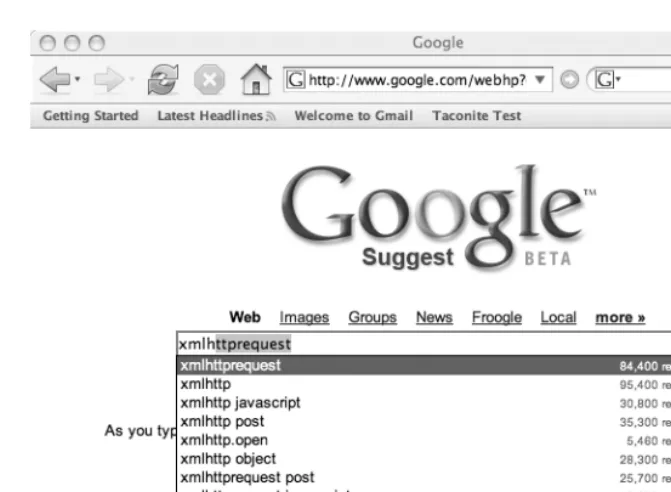
Figure 1-7. Google Suggest is an example of autocomplete.
Exposing the business layer: Never forget that your JavaScript is transmitted to the
client, and although you can certainly obfuscate the code, if someone really wants to see what you did, they will. With that in mind, be very careful with what you show in your JavaScript. Exposing details about how your server works can open you up to those with ill intent.
Forgetting about security: Despite some arguments to the contrary, Ajax doesn’t
present any new security vulnerabilities. However, that doesn’t mean you can just forget about it. All the standard security issues present in a regular web application still exist in an Ajaxified application.
Breaking established UI conventions: Ajax lets developers create far richer web
Figure 1-8. The Netflix queue9
How will you know if you’ve run afoul of any of these gotchas? We can’t stress this enough: test your design with representative users. Before you roll out some snappy new Ajax feature, do some paper mock-ups, and run them by a few users before you spend the time and effort developing it. An hour or two of testing can save you from dealing with larger issues later.
Ajax Patterns
Like any good technology, Ajax already has a slew of patterns. For a detailed look at Ajax patterns, please take a look at Ajax Patterns and Best Practices by Christian Gross (Apress, 2006) and the website Ajax Patterns (http://ajaxpatterns.org/wiki/index. php?title=Main_Page).
The Fade Anything Technique (FAT)
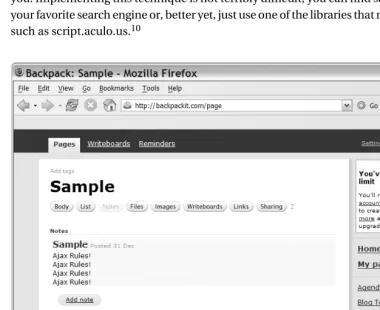
One of the really slick things about Ajax is that you can modify just part of a web page. Rather than repaint the entire view, you can update just the part that changes. Although this is a handy technique, it may confuse users who are expecting a full-page refresh. With this in mind, 37signals uses the Yellow Fade Technique (YFT) in its products like Basecamp (www.basecamphq.com) and Backpack (www.backpackit.com) as a way of subtly indicating to the user what has changed. YFT does just what it suggests: the part of the page that changed is repainted in yellow, and it slowly fades back to the original background color (see Figure 1-9).
The Fade Anything Technique (FAT) pattern is similar in nature. In essence, the only real change is the color you use to fade; after all, yellow might not be the best option for you. Implementing this technique is not terribly difficult; you can find sample code using your favorite search engine or, better yet, just use one of the libraries that makes this simple, such as script.aculo.us.10
Figure 1-9. Yellow Fade Technique as seen in 37signals’ Backpack
Auto Refresh
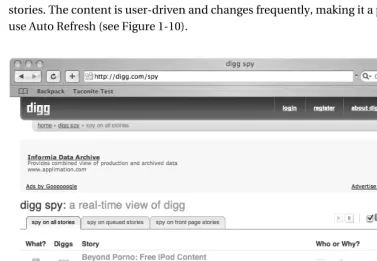
Being able to refresh parts of the page automatically is useful. With weather, news, or other information streams that change over time, repainting just the parts that change makes a lot more sense than refreshing the entire page for a few minor changes. Of course, this might not be terribly obvious to users who are trained to click the Refresh button, which is why the Auto Refresh pattern is so often paired with FAT.
Auto Refresh offers a significant benefit beyond less work for your user: it also reduces the load on your server. Rather than having thousands of users constantly clicking the Refresh button, you can set a specific polling period that should spread out the requests more evenly. Digg (www.digg.com) is a news site catering to the technology community that uses social bookmarking and community editorial control to publicize interesting stories. The content is user-driven and changes frequently, making it a perfect place to use Auto Refresh (see Figure 1-10).
Figure 1-10. Auto Refresh at work—new stories appear on the site while you watch!
Partial Page Paint
Clearly, you can use this in conjunction with FAT or Auto Refresh. In fact, this can be helpful for web applications.
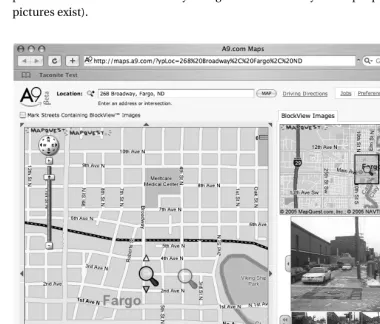
Many of the existing frameworks will help you modify part of the page, and thanks to solid DOM support in modern browsers, this approach is much easier than you think. Figure 1-11 shows A9’s BlockView (http://maps.a9.com) feature, an example of the Partial Page Paint pattern. When you select a different part of the map on the left, the corresponding pictures of the street automatically change to reflect where your map is pointing (assuming pictures exist).
Figure 1-11. A9’s BlockView feature
Draggable DOM
corporate intranets never really took off, but at least part of the reason had to do with clumsy interfaces for adding new sections and moving existing ones. Typically, you had to go to a separate administration page to make your changes (a full-page refresh), save your changes, and return to your home page (another page refresh). Although this approach worked, it certainly wasn’t ideal.
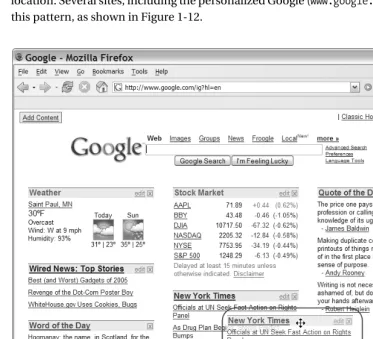
Portals are given a new life with Ajax, especially using the Draggable DOM pattern. With this approach, the individual sections are editable right on the main page, and to customize the page, you simply grab them with your mouse and drag them to their new location. Several sites, including the personalized Google (www.google.com/ig), have used this pattern, as shown in Figure 1-12.
Summary
The Internet has certainly evolved from its early origins as a way for researchers to connect and share information. Though the Internet began with simple textual browsers and static pages, it is now hard to find a company that doesn’t have a polished website. In its early days, who could have possibly imagined that people would one day flock to the Internet to research that new car or buy the latest Stephen King novel?
Developers fed up with the difficulty of deploying thick client applications to thousands of users looked to the web to ease their burden. Several web application technologies have been developed over the years, some proprietary, others requiring significant program-ming abilities. Though some provided a richer user experience than others, no one would confuse a thin client application with its desktop-based cousin. Still, the ease of deploy-ment, the ability to reach a wider customer base, and the lower cost of maintenance means that despite the limitations of browsers, they are still the target platform of choice for many applications.
27
■ ■ ■
Development Tools
I
t’s no secret: developing software can be rather difficult. Unlike other disciplines, software development doesn’t produce a concrete, three-dimensional product that we can hold, touch, and inspect. Regardless of how much time we may spend drawing class diagrams or designing flowcharts, ultimately we’re expected to write code. Reams and reams of source code are necessary to produce today’s software systems. Even though we may have designed the software ourselves, and in most cases even written the source code ourselves, it doesn’t take long before the amount of source code simply becomes overwhelming. Let’s face it: we need help.Fortunately, improving development tools are greatly easing the life of the software developer. Source code editors, debugging tools, and others are making it easier to build and debug today’s large-scale software systems.
In this chapter we’ll investigate some of the tools that can make Ajax development easier. Fortunately we’ll be able to leverage a lot of the tools and techniques that you may already use in your normal day-to-day Java development.
JavaScript Source Code Editor
Many of us use some type of integrated development environment (IDE) to write Java. Yes, it is possible to write Java using a simple text editor and the command-line compiler. However, most of us benefit from the productivity gains afforded by today’s modern IDEs.
If you’re reading this book, you obviously write web applications using Java. Java-based web applications are made up of more than just Java source code files. Web applications built using the Java EE platform are made up of Java source code files, HTML and XHTML files, XML files, and even plain text files. Modern IDEs are capable of managing all of these files, which reduces the number of applications we need to use (and learn!) to build Java EE applications.
Object-oriented development would be nearly impossible without today’s modern IDEs. Imagine the scenario where you’re writing a class that exists within an object hier-archy. You want to write a method, but you’re not sure whether any of the parent classes have already defined such a method. How do you find out? The most time-consuming option is to open the source file for the parent class. You may find that the method you have in mind doesn’t exist in the parent class. But does it exist in the parent class’s parent? You could continually open the source files for each class in the object hierarchy. This is tedious and time-consuming.
Worse yet, what if you don’t have the source code to all the classes in the object hierarchy? Suddenly you can’t just browse the source code files. How about checking the Javadocs? Browsing Javadocs can be slow, too, and that’s assuming that Javadocs are available.
The single greatest productivity improvement in the history of software development is arguably the intelligent code completion that is standard on nearly every Java IDE avail-able today. If you don’t know what methods or properties are availavail-able on a class, simply invoke the IDE’s code-completion feature, and a list of the available methods and properties will pop up, allowing you to choose the desired one. Better yet, many editors even provide a list of all available objects and classes as part of the code completion list. Not only does this intelligent code completion reduce the amount of time spent searching through source code, but it also reduces the amount of typing we do, which in turn reduces the number of typing mistakes you’re likely to make, which in turns reduces the number of failed compilations.
So why all this talk about Java IDEs? The truth is that you have likely experienced large gains in productivity by using an intelligent IDE for editing Java source code. Now that Ajax is becoming a part of your developer’s toolbox, you’ll likely be writing more JavaScript than you have in the past. This, of course, begs the question: are there intelligent code editors available for JavaScript?
In short, the answer is yes. JavaScript editors are not as advanced as Java editors, although they will continue to get better as Ajax and JavaScript development matures. Many editors already offer simple features like reserved word highlighting.
Today’s most popular Java IDEs—Eclipse, NetBeans, and IntelliJ IDEA—all offer support for editing JavaScript source code files. At the time of this writing, IDEA supports JavaScript source files right out of the box, although JavaScript support is available as plug-ins for Eclipse and NetBeans. In this section you’ll see how to install and configure the JavaScript plug-ins for Eclipse and NetBeans.
JSEclipse
Installing JSEclipse is easy thanks to Eclipse’s plug-in architecture. Open Eclipse’s plug-in installation wizard by selecting Help ➤ Software Updates ➤ Find and Install. Select “Search for new features to install” and click Next.
The Install window should now be showing. Click the New Remote Site button and enter “InterAKT Online” into the Name field and “http://www.interaktonline.com/” into the URL field, then click OK. At this point the Install window should look something like Figure 2-1, with InterAKT Online appearing in the list.
Figure 2-1. Eclipse’s Install window after adding InterAKT Online as a remote site
Note that JSEclipse requires Java 1.5 or later. Click through the rest of the installation to finish installing JSEclipse. Restart Eclipse to ensure that the plug-in is installed completely.
With JSEclipse installed, you can now start writing JavaScript. JSEclipse identifies all files with the .js extension as JavaScript source files. Create a new JavaScript source file by choosing File ➤ New ➤ File and enter a file name that ends with the .js extension. With a new JavaScript source file now created, you’re ready to start writing JavaScript.
Figure 2-2 shows a JavaScript source file open in JSEclipse. There are two JavaScript files in the project named Department.js and Employee.js. The Employee.js file is opened in the source editor. The JavaScript files have their own icons in the Navigator panel on the left side of the window, and the outline of the currently opened source file is displayed in the Outline panel on the right side of the window.
Figure 2-2. The JSEclipse source code editor
That’s not all that JSEclipse will do. As discussed earlier, one of the greatest productivity tools of all time is intelligent code completion. JSEclipse provides intelligent code completion for user-defined JavaScript objects. Figure 2-3 demonstrates the code-completion function-ality. A simple function in the Department.js file creates an instance of an Employee object. Then, the object’s methods are accessed via dot notation. JSEclipse automatically shows the code completion window when the dot is typed.
JSEclipse also provides code completion for built-in JavaScript objects such as Date,
Figure 2-3. JSEclipse provides code completion for JavaScript objects.
JSEclipse also provides a way to extend the native code-completion functionality. You can write a simple XML file that defines the code-completion list that should appear for objects of a certain type. In fact, the default JSEclipse distribution defines the code completion for built-in JavaScript objects using XML files. Listing 2-1 lists the contents of the object.xml file, which defines the code completion for a base JavaScript object.
Listing 2-1. object.xml Defines the Code Completion for a Basic JavaScript Object
<?xml version="1.0" encoding="UTF-8"?> <completion prefix="Object">
<item repl="constructor" display="constructor Function" /> <item repl="prototype" display="prototype" />
<item repl="eval()" display="eval(String expresion)" /> <item repl="toSource()" display="toSource() String" /> <item repl="toString()" display="toString() String" /> <item repl="unwatch()" display="unwatch(String prop)" /> <item repl="valueOf()" display="valueOf() #primitive value#" /> <item repl="watch()" display="watch(String prop, Function handler)" /> </completion>
Help menu and searching for the “JSEclipse extending the code completion” section and selecting the appropriate result.
JSEclipse is a powerful JavaScript editor that is sure to simplify your JavaScript develop-ment tasks. Developdevelop-ment tools will continue to improve as Ajax and JavaScript usage become more mainstream, but for now, JSEclipse is a fine choice for your JavaScript editor.
NetBeans JavaScript Plug-in
At the time of this writing the current version of NetBeans, version 5.0, does not provide native support for JavaScript source files. However, NetBeans user and contributor Nicolas Désy built a plug-in for NetBeans that supports editing of JavaScript source files.
The plug-in’s home page is www.liguorien.com/jseditor. From here you can read more about the plug-in’s features and download the plug-in itself.
Nicolas warns that this plug-in is only meant to be a stopgap remedy until NetBeans natively supports JavaScript source files and that there will be no further development on this plug-in. Nevertheless, this plug-in provides a nice set of features for those who work in the NetBeans environment.
Installation
There are two ways to install the NetBeans JavaScript plug-in. The first way is to register the plug-in home page as a NetBeans update center and install the plug-in from there. The second way is to manually download and install the plug-in module. The two methods are similar, and here we’ll demonstrate the installation using the manually downloaded files. Visit the plug-in home page and click on the link that points to the NetBeans JavaScript Editor binaries. This will initiate the download of the plug-in module, which has a .nbm file extension.
After you download the plug-in module, open NetBeans and select the Update Center menu option from the Tools menu. This opens the Update Center Wizard that will guide you through the process of installing the plug-in. Select the Install Manually Downloaded Modules radio button and click Next. In the following window, click the Add button and navigate to and select the .nbm file you downloaded. Click the Next button.
The next window, shown in Figure 2-4, shows the modules that will be installed. The JavaScript editor should already be selected as shown in Figure 2-4.
Figure 2-4. Installing the NetBeans JavaScript Edtior plug-in
Features and Usage
The NetBeans JavaScript Editor recognizes all files with a .js file extension as JavaScript source code files. You can create a new JavaScript source file by selecting New File item from the File menu and then selecting the JavaScript category. The editor provides syntax highlighting for all JavaScript keywords, highlighting of matching opening and closing curly braces and parentheses, and basic code completion for the standard DOM objects such as
document and window. Code completion can be invoked with the Ctrl+Space key combination. One of the nicest features of the JavaScript editor is that it will format JavaScript source files. How many times have you inherited a lengthy JavaScript source code file that was difficult to read due to incredibly poor formatting and indentation? With the NetBeans JavaScript Editor you can reformat an entire JavaScript source file using the Ctrl+Shift+F key combination.
Figure 2-5. Poorly formatted JavaScript is difficult to read and maintain.
Figure 2-6. Nicely formatted JavaScript, thanks to the NetBeans JavaScript Editor
JavaScript Compression and Obfuscation
We all know that JavaScript is an interpreted language that executes within the client’s browser. JavaScript is downloaded as plain text to the browser, which then executes the JavaScript code as needed.
The size of JavaScript files can become an issue as JavaScript usage grows in Ajax-based applications. Because it is an interpreted language, JavaScript is never compiled to machine-level binary code, which is a more efficient storage format for executable code. A large number of JavaScript files can slow an application down as it needs to download the source from the server to the browser before it can be executed. In addition, a large set of JavaScript code will only become larger if the code is heavily commented.
We can see that there are