Enhancing Computational Thinking with Spreadsheet
and Fractal Geometry: Part 1
K.P Soman, Manu Unni V.G, Praveen Krishnan, V. Sowmya
Centre for excellence in Computational Engineering and Networking (CEN), Amrita Vishwa Vidyapeetham, Coimbatore, Tamil Nadu, India
ABSTRACT
For most primary and high school level students, computer is a game-playing tool. They might have taught word processing and PowerPoint presentation tool and very basic spreadsheet usage for computing, but, one of the essential skill required for survival in modern technological society is “Computational thinking” that combines power of human intelligence and computing agents for solving complex problems facing the society. It is found that this skill is not imparted to the primary and high school level students. In this context, the concept of computational thinking, its need and the attempts that are being made world over to impart this skill at various levels of education is discussed in the part -1 (out of four) of this article. It is proposed that concept of fractal and its implementation in spreadsheet can be one of the starting points at high school level to induce students into computational thinking. Also it is shown how to create various kinds of fractals in spreadsheets without using any programming. Different fractals require different computational strategies to implement in a spreadsheet. It is hypothesized that practice in the development of such strategies improve the ‘abstraction’ and computational thinking capabilities of the students.
Keywords
— Computational Thinking, Fractal Geometry,
Iterative thinking, Chaos game
1. INTRODUCTION
Whether one like it or not, computers overwhelmingly control, regulate and govern our lives in the 21 Century. Computer softwares and services like Google search, GPS, Smart phone, digital media, Skype, are revolutionizing the way to obtain and process information. Even in the kitchen a meal is cooked in a modern steamer with a computer program to control the operation. The automatic information processing is taking place increasingly in the background. With so-called embedded systems, the computer has become invisible – often we are not even aware that computer science is involved. It is working from behind to make most of the devices and services work. A relook of school curricula is thought to have a must in this context [1]. It is definitely not enough to teach our children to use computers. For understanding the world of today teaching of fundamentals of computing science to everybody as we do with mathematics is needed. Mathematics is not taught just to produce more mathematicians but because of the conviction that mathematics is important for the development of our mind and the technological development of our society. The same applies to the fundamentals of computing science. Computational thinking should become an integral part of modern education.
1.1 What is Computational Thinking
When a person uses computer to solve his or her problem, the thinking involved in mapping the problem so that computer could solve it is called Computational Thinking .
It requires a specially developed skill set. The term “Computational Thinking” is coined by Jeannette M. Wing, President's Professor of Computer Science, Carnegie Mellon University, USAin 2006, [2].
According to Jeannette, Computational thinking will be a fundamental skill used by everyone in the world in 21st century: Therefore, in addition to traditional ‘Reading, Writing, and Arithmetic’, current educational system must be prepared to add computational thinking’ to every child's analytical ability. She defined Computational thinking as “the thought processes involved in formulating problems and their solutions so that the solutions are represented in a form that can be effectively carried out by an information-processing agent “ [3].
Informally, computational thinking describes the mental activity in formulating a problem to admit a computational solution. The solution can be carried out by a human or machine, or more generally, by combinations of humans and machines. Specific computational thinking techniques include: problem decomposition, pattern recognition, pattern generalization to define abstractions or models, algorithm design, and data analysis and visualization [15].
Recently, “The International Society for Technology in Education” (ISTE) and the “Computer Science Teachers Association” (CSTA) has also come up with an operational definition [16].
1.2 Benefits of Computational Thinking
Computational thinking enables one to bend computation to his/her needs. It is becoming the new literacy of the 21st century. Why should everyone learn a little computational thinking?. Cuny, Snyder and Jeannette advocate many benefits [3]. Computational thinking for everyone means being able to:
Find out different aspects of a problem that are amenable to computation,
Evaluate computational tools and techniques that can solve the problem,
Making an assessment of the limitations and power of computational tools and techniques,
Apply or adapt a computational tool or technique to a new use,
Apply computational strategies such as divide and conquer in any domain.
Computational thinking for scientists, engineers, and other professionals further means being able to:
Apply new computational methods to their problems, Reformulate problems to be amenable to computational
strategies,
Discover new science through analysis of large data, Ask new questions that were not thought of or dared to
ask because of scale, but which are easily addressed computationally, and
Explain problems and solutions in computational terms.
Scientists arrive at computational solutions to a problem by studying the nature of problem that is being tackled. Many times the solutions are arrived at after properly framing and defining the problem so that it can be clearly explained to another person. Usually a discussion with similar minded people brings different aspect of the problem to the limelight. Therefore computational thinking skill-set includes some obviously important skills like creativity, ability to explain and team work. It also consists of some very specific problem solving skills such as the ability to think logically, algorithmically and recursively.
Computational Science is unique in the way it brings all these diverse skills together.
There are some mental dispositions that support and enhance Computational Thinking . According to [16], these traits include confidence in dealing with complexity, persistence in working with difficult problems, tolerance for ambiguity, the ability to deal with open ended problems and the ability to communicate and work with others to achieve a common goal or solution.
1.3 How do we begin with?
What parts of computational thinking process are appropriate to introduce at the level of middle-school ?. . How do we teach these abilities ?. How should we measure them ?. These questions are getting addressed in various forums at international level [3]. In August 2010, the Royal Society—the U.K.’s equivalent of the U.S.’s National Academy of Sciences— announced that it is leading an 18-month project to look “at the way that computing is taught in schools, with support from 24 organizations from across the computing community including professional bodies, universities and industry.” (See www.royalsociety.org/education-policy/projects/.) One organization that has already taken up the challenge in the U.K. is “Computing At School”, which is a coalition run by the British Computing Society and supported by Microsoft Research and other industry partners. Computer Science Unplugged (www.csunplugged.org), created by Tim Bell, Mike Fellows and Ian Witten, teaches computer science without the use of a computer. It is especially appropriate for elementary and middle school children. Several dozen people working in many countries, including New Zealand, Sweden, Australia, China, Korea, Taiwan and Canada, as well as in the United States, contribute to this extremely popular website.
In October 2010, Google launched the “Exploring Computational
thinking), which has a wealth of links to further web resources, including lesson plans for K-12 teachers in science and mathematics. The US National Academies’ Computer Science and Telecommunications Board held a series of workshops on “Computational Thinking for Everyone” with a focus on identifying the fundamental concepts of computer science that can be taught to K-12 students. The first workshop report [4] provides multiple perspectives on computational thinking.
The University of California, San Diego and San Diego State University have teamed up to deliver an exciting new curriculum in San Diego county: the Computing Principles for All Students’ Success (ComPASS) Project [12]. ComPASS will build local capacity for teaching the proposed new Advanced Placement CS Principles (CSP) course. ComPASS will create novel curricula and methodology content for teacher profession development. ComPASS fosters the implementation of broad based, inclusive, and motivational education in computing foundations and computational thinking for all students, regardless of their eventual career path. The growing worldwide focus on computational thinking means that resources are becoming available for educators, parents, students and everyone else
interested in the topic.
A number of the articles point to new directions ways to implement at various levels of education [5,6,7,8,9,10].
1.4 The Role of simulation
To encourage computational thinking in the classroom teachers need to be prepared themselves to ask different questions related to problem solving and the use of computing technology [11]. They must prepare the students to make an assessment of :
• the power and limitations of human and computer intelligence? • the difficulty level the problem?
Teachers should also ask for • Possible solution methodologies
• The way to apply technology to the problem • Computational strategies that can be employed
Because simulations can encourage students to think about data and ideas, and about using and combining data and ideas to solve problems, simulations are helpful to engage students in computational thinking. Simulations that encourage students to think computationally often require a mathematical representation of the problem– like a story problem, and mental modelling with the symbols and processes of other disciplines.
The purpose of this series of articles is to show how to develop computational thinking using Electronic Spreadsheets. Spreadsheets are readily accessible and the interface is quite intuitive. Logical, and algorithmic thinking which are essential ingredients for Computational thinking is introduced through the use of fractal geometry. Fractal geometry inherently is recursive in nature and its implementation in excel without the need of using any program help novice students to get a firm grip on the concept of recursion another ingredient of computational thinking. Further, beautiful pictures created by the algorithm is so captivating that the students are likely to try more and more computational experiments for creating complex fractals.
choosing a colour for a point in the plane. This is something humanly impossible but easy for the computer. Again, the famous chaos game method [13] of creating “Sierpinski triangle” and many other interesting and colourful fractals requires tossing a die repeatedly and plotting points according the result of the toss. How do one simulate the event “ Tossing a die” in spreadsheet. This is where the concept of ‘abstraction’ comes into picture. Simulating the results of tossing a die in spreadsheet and linking it to the plotting of points need some level of abstract thinking. The students need to know the capabilities and limitations of spreadsheet and accordingly devise the strategies to implement steps for creating different types of fractals. Like this, advanced experiments in fractal geometry with spreadsheet open the door to computational thinking. Fractal is chosen because its output is captivating at the same time it offers challenging problems to all levels of students starting from primary schools to research.
Different fractals require different strategies for implementing in Excel. By the time one creates all types of fractals in spreadsheet he/she will become an expert in using spreadsheet as a computational tool. The methods used will enable the students to try experiments in other areas like probability theory and calculus. Once students learn spreadsheet programming, the possibilities for exploration are infinite.
1.5 Power of iteration and thinking for
iteration
Chaos game is a simple mathematical experiment which opens up a door to the concept of fractals and chaos theory. These are two very interesting and widely researched areas in mathematics. Applications are abundant and can be found in every branches of Science. To play the chaos game, one can start with three points that outline a triangle.
(a)
(b)
Fig. 1. (a) Triangle acting as the playing board for the game. (b) Die showing the three faces
Denote the vertices of triangle as V1, V2, V3 and respective
coordinates be (0,0) ,(0.5,1) and (1,0) . This is the playing-board for the game. A die whose two faces are marked as 1, another two faces with 2 and third pair with 3 is assumed to have with the player in the game. Player pick a point at random from the plane of the triangle. This point can be within the triangle , or outside of it. Roll the die. If the outcome is 1, move halfway towards vertex V1 from the current point and plot the point
reached. Similarly, if the outcome is 2 , move halfway towards vertex V2 and plot the point, else move halfway towards V3 and
plot the point.
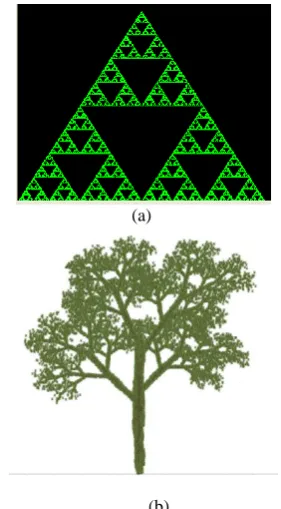
After plotting the first point, again throw the die and decide where to move and plot. Repeat this process 10,000 times and erase the first few points (this number is arbitrary, one may take it as 50) the figure look like the one given in Figure 2.a. This is famous Sierpinsky triangle.
(a)
(b)
Fig. 2. (a) Sierpinsky triangle (b) IFS Tree
There are a variety of pictures which can be drawn by this principle. Since these are drawn through an iterative process, the set of rules used to create such pictures are known as “Iterative Function Systems’. See figure. 3 for more pictures created using the same technique.
[image:3.595.352.493.246.501.2] [image:3.595.312.539.587.708.2]
(c)
Fig. 3. (a) Fern Leaf (b) Maple Leaf (c) Castle Wall
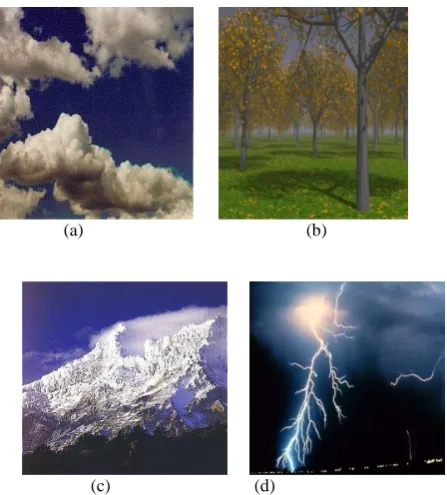
Iterative process pervades everywhere - in nature as well as in man-made social and economic systems. Almost all natural processes are iterative in nature. It does not mean that it is a deterministic process. Randomness is built into it. Weather is a typical example. Long term and precise prediction of weather is impossible. Natural events and scenes are result of an ongoing iterative process. Thus study of iterative processes and their properties are of paramount importance for human kind.
(a) (b)
(c) (d)
Fig. 4. Iterative process in Nature. (a) Cloud forming is iterative (b) Tree growth is iterative (c) Snow capped mountain (d) Charge separation and lightening
All the natural scenes shown in Figure.4 are result of some iterative process happening in nature.
[image:4.595.302.546.77.194.2]Sierpinsky Triangle can be produced through another iterative process. First consider a solid plane triangle. See Figure-5. Join the midpoints of each side and cut out the middle portion. Do the process on the resulting three solid triangles. Repeat the process for ever. Figure 5a shows a few stages of the iteration and the output of each of those iterations.
Fig. 5. a New iterative method for creating Sierpinski triangle
[image:4.595.56.280.307.555.2]Note that the resulting figure is not really the usual triangle. There are many interesting properties to this triangle. The first striking feature is that it is self-similar. A figure is self-similar if a part of the figure contains on a smaller scale an exact copy of the figure itself. If we were to choose a portion of the figure, and blow it up to the same size as the figure, you would see an exact copy.
Fig. 5 b. Sierpinsky Triangle is self-similar.
Second property is that its perimeter is infinite. Figure 6 shows that as the iteration number increases, its perimeter increases geometrically.
Fig. 6. Perimeter of Sierpinsky Triangle is infinite.
[image:4.595.314.536.440.527.2]Third property is that enclosed area is zero. Every iteration removes some area from the triangle. Final figure is a set of points without having any area enclosed.
Fig. 7. Area of Sierpinsky Triangle is zero.
[image:4.595.311.527.595.686.2]Fig. 8. A segment replacing element for creating Sierpinsky Triangle.
[image:5.595.320.534.78.227.2]Replacement can be placed inward or outward. In every iteration if one replace consecutive segments inward and outward direction alternately the resulting figure is a Sierpinsky triangle. See the figure 9 for more clarity.
Fig. 9. Different stages of creation of Sierpinski triangle by repeated segment replacement method.
2. CHAOS GAME EXPERIMENT IN
EXCEL
To draw the figure in spreadsheet like Excel, the computational aspect of the problem needs to be mapped into Excel’s capabilities. Throwing of die can be mapped into excel by the use of rand ( ) function. The aim is to create integers 1, 2, 3 randomly. This is achieved by = int (rand ( )*3) +1. One can generate these numbers in a column and number in each cell can be thought to represent outcome of the throw of die. The initial x and y coordinates of the starting point can also be generated randomly using rand ( ) function. These may be generated in two separate cells. The next step is to find subsequent x, y coordinates. The required updating rule is found out as follows.
Fig. 10. Mathematical rule creation in Chaos game experiment.
If random number is 1, the point moves halfway towards vertex V1. Since coordinate of V1 is (0, 0), the coordinate of the centre
point is obtained as
Xnew = Xold /2, Ynew = Yold/2 (1)
If random number is 2, the point moves halfway towards vertex V2. Since coordinate of V2 is (0.5, 1), the coordinate of the
centre point is obtained as
Xnew=(Xold+0.5)/2,Ynew=(Yold+1)/2 (2)
If random number is 3, the point moves halfway towards vertex V3. Since coordinate of V2 is (1, 0), the coordinate of the centre
point is obtained as
Xnew=(Xold+1)/2,Ynew=Yold/2 (3)
Implementation of this logic requires the help of ‘IF’ function in excel. Excel provides nested ‘IF’ function. To find new x-coordinate based on random integer generated, our logic in pseudo code is
If (rand_no_generated is 1) then Xnew = Xold /2
Else if ( rand_no_generated is 2) then Xnew = ( Xold +0.5)/2
Else Xnew = ( Xold +1)/2
Endif
To Implement in excel assume cell A2 contains integer random number and cell B1 contain old value (previous point’s x-value). In cell B2 find new x-coordinate based on random number in cell A2. The formula to be written in cell B2 is
= if(A2=1, B1/2, if(A2=2, (B1+0.5)/2, (B1+1)/2))
This reads as
If (A2=1) , content of cell B2 is B1/2
Else if (A2=2) , content of cell B2 is (B1+0.5)/2 Else content of cell B2 is (B1+1)/2
Endif
[image:5.595.69.279.205.545.2]2.1 Cell updating Strategy in picture
[image:6.595.312.534.155.381.2]Fig. 11. Layout of the cells and variables to do chaos experiment in spreadsheet.
Figure 11 shows pictorial representation of implementation with dependency of cells shown in lines with arrow mark.
2.2 Contractive mapping and Sierpinsky
Triangle
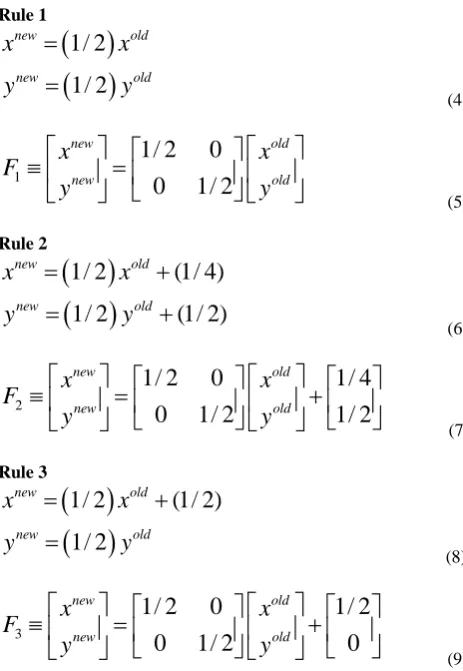
The mathematics behind Sierpinski triangle can be better understood with the help of matrix notation. The three updating rules in matrix form can be written as follows
Rule 1
1/ 2
1/ 2
new old
new old
x
x
y
y
(4)
1
1/ 2
0
0
1/ 2
new old
new old
x
x
F
y
y
(5)Rule 2
1/ 2
(1/ 4)
1/ 2
(1/ 2)
new old
new old
x
x
y
y
(6)
2
1/ 2
0
1/ 4
0
1/ 2
1/ 2
new old
new old
x
x
F
y
y
(7)Rule 3
1/ 2
(1/ 2)
1/ 2
new old
new old
x
x
y
y
(8)
3
1/ 2
0
1/ 2
0
1/ 2
0
new old
new old
x
x
F
y
y
(9)These three rules
F F F
1,
2,
3are now onwards viewed as mapping (a function which maps one vector to another vector)since every rule maps point
x
old,
y
old
to
x
new,
y
new
.With this mathematical notation, a link can be established
between the chaos game and the mathematics of contractive mapping.
Consider all the points inside Triangle ABC. Of course there are infinite points inside any triangle. Let us try to find where this point is mapped if we apply the first transformation (Rule 1). One need not try all the points inside triangle. Try it on the co-ordinates of vertices A, B, C
(a) (b)
[image:6.595.55.287.346.682.2](c)
Fig. 12. Result of three contractive mapping applied on original solid triangle ABC
It is easy to see that A maps to A1 , B Maps B itself and C maps to C1. See Figure 12 for clarity. F1 maps triangle ABC to
Triangle A1BC1 . Similarly F2 and F3 maps triangle ABC to triangles shown in dark in the figure 12. The union of these three triangular region shown in figure 13.
Fig. 13. Union of result of three contractive mapping applied on original solid triangle ABC.
Mathematically
Let F
F
1F
2F
3
1 2 3
(
)
F
ABC
F
F
F
ABC
Fig. 14. The result of two iteration of contractive mapping F.
Mathematically figure 14 is
2
(
)
F F
ABC
F
ABC
Suppose one repeat this process forever.
n
n
Limit F
ABC
converges to a set of points calledSierpinsky triangle. On these set, if one apply again F , he/she will get the same figure. Note that each mapping is a contracting mapping since on applying a transformation on a triangle , one obtain a smaller version of the same triangle. When applied these set of mapping infinite number of time, one find that it converges on a set of points. These set of points are called ‘Strange attractors’. The process started with a triangle and
finally obtained a Sierpinsky triangle. But a theorem called “Collage” theorem says that even if one start from any figure (shape) in the plane, finally it ends up in the same Sierpinsky triangle. It is as if there is a strange set of points lurking in the space. More interestingly, one can start with any point in the plane and apply the individual rules randomly , he/he again will end up in moving along the strange attractor. That is, after applying the rule randomly, at certain iteration, the points fall on one of the points on the attractor and there onwards it will be moving along the strange attractor (Sierpinsky triangle) only.
That is the reason why the chaos game always produces Sierpinsky triangle. In general , contractive mapping is written as
new old
i new old
a
b
e
x
x
F
c
d
f
y
y
(11)Thus each mapping consists of 6 numbers a, b, c, d, e, f
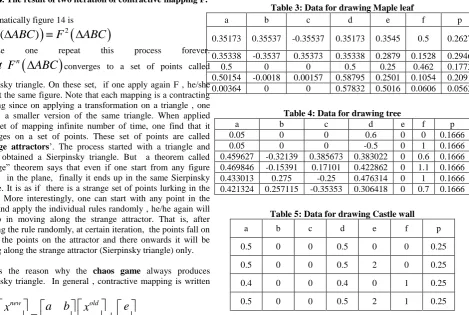
[image:7.595.80.550.192.507.2]These numbers may be tabulated. For example, for Sierpinsky triangle, all transformation are prescribed as in Table 1.
Table 1: Transformation data for creating Sierpinski triangle
a b c d e f p
F1 0.5 0 0 0.5 0 0 1/3
F2 0.5 0 0 0.5 0.25 0.5 1/3
F3 0.5 0 0 0.5 0.5 0 1/3
The last column contains a probability measure. This prescribes with what probability one should apply the rules. Even if one change the probability, it will not affect the final result. It only affects the speed with which the iterations cover different parts of the strange attractor.
Michael Barnsly [13] has found out a set of mapping whose strange attractor is a fern leaf. This mapping is given in Table 2.
Table 2: Data for drawing Fern
a b c d e f p
0 0 0 0.16 0 0 0.01
0.2 -0.26 0.23 0.22 0 0.2 0.07
-0.15 0.28 0.26 0.24 0 0.2 0.07
0.85 0.04 -0.04 0.85 0 0.2 0.85
Following Tables (Table 3,4,5) gives mappings for Maple leaf, Castle wall and a Tree
Table 3: Data for drawing Maple leaf
a b c d e f p
0.35173 0.35537 -0.35537 0.35173 0.3545 0.5 0.2627
0.35338 -0.3537 0.35373 0.35338 0.2879 0.1528 0.2946
0.5 0 0 0.5 0.25 0.462 0.1773
0.50154 -0.0018 0.00157 0.58795 0.2501 0.1054 0.2091 0.00364 0 0 0.57832 0.5016 0.0606 0.0563
Table 4: Data for drawing tree
a b c d e f p
0.05 0 0 0.6 0 0 0.1666
0.05 0 0 -0.5 0 1 0.1666
0.459627 -0.32139 0.385673 0.383022 0 0.6 0.1666 0.469846 -0.15391 0.17101 0.422862 0 1.1 0.1666 0.433013 0.275 -0.25 0.476314 0 1 0.1666 0.421324 0.257115 -0.35353 0.306418 0 0.7 0.1666
Table 5: Data for drawing Castle wall
a b c d e f p
0.5 0 0 0.5 0 0 0.25
0.5 0 0 0.5 2 0 0.25
0.4 0 0 0.4 0 1 0.25
0.5 0 0 0.5 2 1 0.25
The question that hovering in the readers mind now may be
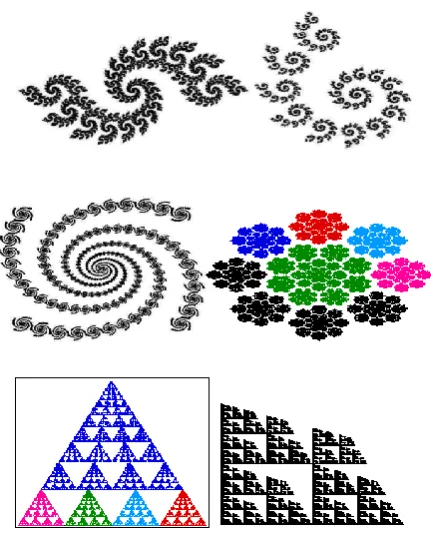
“how to find the mapping for a given picture with some self similarity?. This is an inverse problem but simple. You may visit Yale university website [14]. Fractals in Figure 3 are produced based on the same principle. All of this can be produced in spreadsheet without any difficulty. The authors did the experiments in Microsoft Excel and in Open office spreadsheet package. These files are downloadable at http://cen.amritafoss.org . Figure 15 shows some of the fractals drawn using Iterated Function system. Number of this types of fractals that can be created are infinite.3. SUMMARY
[image:7.595.57.223.489.529.2]
Fig. 15. Different Iterated Function system fractals
4. REFERENCES
[1] Gander,W.(2011),public lecture,
www.math.hkbu.edu.hk/PL/photo/12May11/, www.inf.ethz.ch/personal/gander/talks/compthink.pdf. Accessed 22 July 2012.
[2] Jeannette, M.,(2006), Wing, “Computational Thinking”, Communications of the ACM, Vol. 49, No. 3, pp.33–35.
[3] Cuny,J., Snyder, L., and Jeannette M. Wing, “Demystifying Computational Thinking for Non-Computer Scientists”, work in progress (2010)
[4] “Report of a Workshop on the Scope and Nature of Computational Thinking”, National Research Council, 2010 (www8.nationalacademies.org/cp/projectview.aspx?key=48 969
[5] Barr, V., and Stephenson, C., “Bringing Computational Thinking T o K-12: What is Involved and What is the Role of the Computer Science Education Community?” http://csta.acm.org/Curriculum/sub/CurrFiles/LLCTArticle. pdf. Accessed 20 July 2012
[6] “CT Implementation Matrix” , downloadable athttp://csta.acm.org/Curriculum/sub/CurrFiles/CTMatrix.p df. Accessed 20July 2012.
[7] Good, J., Romero, P., Boulay, B, du, Reid, H., Howland, K., Robertson, J., “An Embodied Interface for Teaching Computational Thinking”, In Proceedings of the International Conference on Intelligent User Interfaces, Canary Islands, Spain, 2008
[8] Basawapatna, A., Koh, K., H., (2011), Alexander Repenning, “Recognizing Computational Thinking Patterns”, SIGCSE '11 Proceedings of the 42nd ACM
technical symposium on Computer science education, Dallas, TX USA .
[9] Repenning, A., Webb, D., Ioannidou, A., “Scalable Game Design and the Development of a Checklist for Getting Computational Thinking into Public Schools”, SIGCSE '10 Proceedings of the 41st ACM technical symposium on Computer science education , Milwaukee, WI USA, 2010.
[10] “Computational thinking across the curriculum: A
conceptual Framework”,
compthink.cs.depaul.edu/Framework.pdf. Accessed 25july 2012.
[11] Phillips, P., “Computational Thinking : A Problem-Solving Tool for Every Class room” , available at http://eucation.sdsc.edu/resources/CompThinking.pdf. Accessed 23 July 2012
[12] “ComPASS: Computing Principles for All Students success”
http://education.sdsc.edu/ compass.html. Accessed on 25 july 2012
[13] Barnsley, M, F., “ Fractals Everywhere” , Academic ‘Press Professional, Inc. San Diego, USA, 1988
[14]http://classes.yale.edu/fractals/IntroToFrac/InvProb/InvProb Exa mples.html. Accessed 26 July 2012.
[15] www.google.com/edu/computational-thinking, Accessed 26 July 2012
[16] http://www.iste.org/learn/computational-
thinking/computational-thinking_toolkit.aspx, Accessed 26 July 2012.
Appendix
[1] Miscellaneous websites [1] A computational science authoring tool:
scalablegamedesign.cs.colorado.edu
[2] Computer science for fun: www.cs4fn.org/
[3] Teach computational concepts without a computer:
www.ncwit.org/unplugged
[4] The primary resource for all CS teachers: csta.acm.org/
[5] Computer science Unplugged: csunplugged.com/
[6] Easy to learn programming for children: scratch.mit.edu/
[7] Galileo ’s Experiments: www.pbs.org/wgbh/nova/galileo/
[8] Geology Labs and Earth quake Simulations: nemo.sciencecourseware.org/
[9] US National Computational Science Institute Resources for teachers and students computationalscience.org
[10] Understanding Science through Computing. A Web site from the U.S. Department of Energy : ascr-iscovery.science.doe.gov/
[11] Science Animations , Movies , and Interactive Tutorials . An
extensive list from dozens of
sources:nhscience.lonestar.edu/biol/animatio.htm