Article
umx: Twin and Path-Based Structural Equation Modeling in R
Timothy C. Bates1, Hermine Maes2and Michael C. Neale2
1Department of Psychology, University of Edinburgh, Edinburgh, UK and2Virginia Institute of Psychiatric and Behavioral Genetics, Virginia Commonwealth University, Richmond, VA, USA
Abstract
Structural equation modeling (SEM) is an important research tool, both for path-based model specification (common in the social sciences) and also for matrix-based models (in heavy use in behavior genetics). We developedumxto give more immediate access, relatively concise syntax and helpful defaults for users in these two broad disciplines.umxsupports development, modification and comparison of models, as well as both graphical and tabular outputs. The second major focus ofumx, behavior genetic models, is supported via functions implementing standard multigroup twin models. These functions support raw and covariance data, including joint ordinal data, and give solutions for ACE models, including support for covariates, common- and independent-pathway models, and gene×environment interaction models. A tutorial site and question forum are also available.
Keywords:OpenMx; path models; R; structural equation modeling; twin models
(Received 19 November 2018; accepted 20 November 2018)
Structural equation modeling (SEM; Jöreskog, 1969) enables modeling with latent and measured variables, and allows researchers to realize the power of causal modeling (Pearl,2009). It has grown substantially in importance (Hershberger,2003). Despite its utility, learning, implementing and interpreting, these techniques have remained a bottleneck for many researchers, especially for more complex multiple-group models common in advanced fields such as behavior genetics. The advent of modular software such as OpenMx has provided tools for software solutions in this field (Boker et al.,2011; Neale et al., 2016). The present article describes umx, a package designed to give more immediate access, concise syntax and helpful defaults for path-based SEM, together with a set of high-level functions implementing matrix-based, multigroup twin model-ing. Practical examples of umx usage are given. Users interested only in learning about twin modeling in umx may wish to skip to the section with that name.
Existing SEM Packages
While a number of closed-source commercial applications exist (e.g., Mplus; Muthén & Muthén,1998–2016), SAS proc calis (SAS Institute Inc.,2003), SPSS Amos (IBM Corp,2013) and GLAMM in STATA (Stata Corp LP,2016), there are now three open-source R packages for performing SEM: sem (Fox et al., 2014); lavaan (Rosseel,2012); andOpenMx(Boker et al.,2011; Neale et al.,2016). As is common in R, these interoperate with an ecosystem of packages, such assemTools (semTools Contributors,2016), Onyx
(von Oertzen et al.,2015),ctsem,EasyMx,ifaTools,lvnet,metaSEM andsemtree, to provide additional features.
semincludes functions for fitting general linear structural equation models, including both observed and latent variables, using the RAM (McArdle & Boker, 1990) approach. It also allows fitting structural equations in observed-variable models by two-stage least squares. Models are input using an‘arrow specification’with paths described in an intuitively straightforward notation encompassing regression coefficients (‘A -> B’), variances (‘A <-> A’) and covariances (‘A<->B’). Models can be optimized against a maxi-mum-likelihood objective assuming multivariate normality as well as multivariate-normal full-information maximum likelihood (FIML) in the presence of missing data, with alternative objectives including generalized least squares or user-specified objective functions. Thesempackage also implements multigroup models. lavaan implements a similar string-based syntax for model description, comparable multigroup capability and a range of estimators including robust ML and variants of Weighted Least Squares (WLS). It outputs standard errors (SEs) including robust and bootstrap SEs, along with standard fit indices and statistics such as Satorra-Bentler, Satterthwaite and Bollen-Stine bootstrap. lavaancan handle missing data via FIML estimation. It allows the use of linear and nonlinear equality (and inequality) constraints via a string syntax; for example, to equate model parameters‘a1’and ‘a2’, the user includes the following in their model statement: ‘a1=a2’. More complex statements are supported; for instance, ‘a1þa2þa3=3’. As of version 0.5,lavaansupports models with mixtures of binary, ordinal and continuous observed variables. Exogenous categorical variables are supported via dummy varia-bles, with additional variables being created to represent the levels of nominal measures with more than two levels. Modeling of Author for correspondence:Timothy C. Bates, Email:[email protected]
Cite this article:Bates TC, Maes H, and Neale MC. (2019) umx: Twin and Path-Based Structural Equation Modeling in R.Twin Research and Human Genetics22: 27–41,https:// doi.org/10.1017/thg.2019.2
© The Author(s) 2019. This is an Open Access article, distributed under the terms of the Creative Commons Attribution licence (http://creativecommons.org/licenses/by/4.0/), which permits unrestricted re-use, distribution, and reproduction in any medium, provided the original work is properly cited.
binary and ordinal endogenous categorical variables (but not nominal) is supported by a three-stage WLS approach.lavaan out-puts results in a format familiar to users of Mplus and EQS. It is also possible to translate Mplus code intolavaanformat via the functionmplus2lavaan.
OpenMx provides a sophisticated kit of basic objects for building structural equation models, including modeling via arbitrary matri-ces, algebras, constraints and fit-functions. It also supports RAM (McArdle & Boker,1990) and LISREL (Jöreskog,1969) path-based models. It accepts both summary and raw data and arbitrary mixtures of continuous, ordinal and binary data. FIML analysis with missing data is supported, as is WLS. With raw data, models may include row-specific values (definition variables). Multiple-group models are supported, and constraints and equalities may be implemented via label-based equating and algebra-based linear and nonlinear con-straint specification. TheOpenMxpackage includes two open-source optimization packages—CSOLNP and SLSQP—and can use the closed-source NPSOL optimizer. OpenMxhas developed a strong following among geneticists and twin researchers, reflected in several hundred citations in published projects, many of which rely on testing complex models, often with constraints, using data compris-ing mixtures of binary, ordinal and continuous data, with misscompris-ing- missing-ness, and wide-format data comprising multiple genetically related groups (in particular, identical and fraternal twins, siblings, parents, grand-parents, offspring and adoptive parents), with data nested in these family structures.
Accessible Modeling with Concise Syntax and Helpful Defaults
Theumxpackage evolved over the last 7 years in response to mod-eling demands experienced in practical path-based modmod-eling and matrix-based behavior genetics structural modeling and in teach-ing SEM. Its concise syntax aids in time-constrained lessons and affords researchers the ability to rapidly implement and modify new models, while high-level implementations of complex models increase the speed and reliability of behavior genetics modeling. Attention was paid to smart defaults — for instance, setting start values and automatically labeling paths—as well as ensuring functions handle a wide range of inputs, so that users can offer up a wide range of data and get the results they expect. For instance, models can accept not only continuous data, but mixtures of ordinal and continuous data, with the umx functions handling the error-prone process of setting up threshold matrices and inte-grating these with latent variables. To aid learning and help users correct coding mistakes, help files contain substantial, well-com-mented practical code examples oriented toward being used directly in class instruction or self-directed learning.umxfunctions include significant error checking. Errors and warnings are written to explain both why a problem occurred and how to fix it. Where possible, what was expected as input and what the user offered up are succinctly summarized. In addition, example code likely to fix the problem is included in the warning.
Finally,umxprovides methods for generating graphical and tabu-lar output suitable for publication (e.g.,Table 2). Function names and parameters have been refined based on feedback and a drive for consistency and memorability. Where appropriate, these are implemented as S3 methods well known to R users: for instance, plot()andresiduals(). A number of papers using the package have been published (Archontaki et al., 2013; Ritchie & Bates, 2013) andumxis under active development—with updates on CRAN
every month or two, and a road-map of future extensions of the twin modeling functions including use of WLS objectives, 5-group twin models, direct variance (rather than Cholesky) based models, bivariate G× E models, simplex models, as well as multivariate sex-limitation models using correlated factors rather than Cholesky factorization approach (Maes et al.,2004).
In total, the package includes approximately 140 high- and low-level helpers for such tasks as data processing, creating and editing data structures, updating model parameters and reporting. The functions provided byumxmay be grouped under three headings:
1. Model building and reporting functions.
2. Functions implementing behavior genetic models.
3. Wrappers and helpers to simplify or enhance model building and data wrangling.
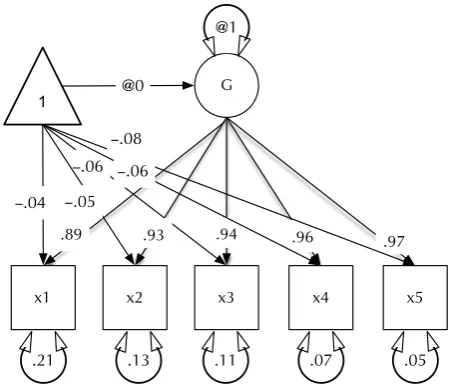
In the next section,umx’spath-based functions are introduced in the context of practical models, such as that shown inFigure 1. The second major section covers behavior genetic modeling in umx. Not detailed here, we briefly note some of the additional helper functions available inumx. While the numerous wrapper and helper functions make little claim to innovation, they offer increased speed of coding, reduced errors and more readable code. For instance,umxMatrixis a wrapper formxMatrixthat places the matrix name as the first parameter (increasing readability) and automatically adds labels in a standard format. Other helpers sim-plify repetitive tasks, such as generating lists of twin variables from base names, and residualizing family-based data.
Installing the Package
umx can be installed using the standard R-code to access the CRAN version of the package.
install.packages("umx")
The library is loaded as usual with
library("umx")
This document assumes umx version 1.8.0 or higher. The current package version can be shown with:
umxVersion("umx")
This gives a compact summary integrating information available via sessionInfo(), but also showing the optimizer used and other information.
Current developer betas are available on www.github.com. These may have new features or respond to user requests between CRAN releases. They are installed using:
install_github("tbates/umx")
umx also aids installing custom versions of OpenMx via the install. OpenMx() function. These include versions with propri-etary optimizers or nightly builds.
Path-Based Models in umx
Path-Based Models Using umxRAM and umxPath
In umx, a path-based structural model consists of a model con-tainer, some data and a collection of paths. The model container is the umxRAM function. This specifies the data, a name for the model, options such as autoRun, and, importantly, a collection ofumxPathsspecifying the paths that make up the model. As cod-ing is often best learned by docod-ing, we introduce these functions via building the Confirmatory Factor Analysis (CFA) model shown in Figure 1. To build this CFA model, we will specify three things:
1. An arbitrary name—‘CFA’
2. The data (in this case a built-in datasetdemoOneFactor con-taining five correlated variables x1:x5). In keeping with famil-iar R functions such as ‘lm’, the data to be modeled are provided via the data parameter. The umxRAM function can accept a data frame, covariance matrix ormxDataas data. 3. The paths of which the model is composed. The paths required in this model are those needed to create a latent variable‘G’ with mean of 0 and variance of 1, the five manifest variables x1:x5, each with freely estimated mean and variance, and single-headed paths from G to each of the five manifest variables.
Building, running and saving this model in its run state for pos-sible modification or comparison, along with producing summary data and a plot, can be done in a few lines (excluding comments, loading the library and data) of model code shown below as‘CFA Code’. This five-line example might be two lines inlavaan, high-lighting the choice inumxto assume fewer defaults.
CFA Code
# Load the umx library (this is assumed in subsequent examples)
library("umx")
# Load demo data consisting of 5 correlated variables, x1:x5
data(demoOneFactor)
# Create a list of the manifest variables for use in specifying the model manifests
manifests=paste0("x", 1:5)#‘x1’,‘x2’, : : :’x5’
# Create model cfa1, with name‘CFA’, data demoOneFactor, and the CFA paths.
cfa1<- umxRAM("CFA", data=demoOneFactor,
# Create latent variable‘G’, with fixed variance of 1 and mean of 0
umxPath(v1m0="G"),
# Create manifest variables, x1:x5, with free variance and mean
umxPath(v.m.=manifests),
# Create 1-headed paths from G to each of the manifests
umxPath("G", to=manifests)
)
This code block builds the model, echoing to the console which latent and manifest variables were created. By default,umxRAM also runs the model, plots it graphically and prints a brief fit sta-tistic summary:
2 5ð Þ ¼7:4;p¼:193; CFI¼0:999; TLI¼0:999; RMSEA ¼0:031
Two aspects of this code are noteworthy. First, we did not explicitly specify a list of manifest and latent variables contained in the model. Instead, umxRAM maps these from the data provided. Any variable name not found in the data is assumed to be a latent variable. As withlm, unused variables are excluded from the model automatically. Second, we did not need to specify starting values for the parameters.umxgenerates feasible start values. Currently, manifest variable means are set to the observed means, residual variances are set to 80% of the observed variance of each variable and single-headed paths are set to a positive starting value. The start-value strategy is subject to improvement and will be documented in the help forumxRAM.
umxPath in Detail
umxPathcreates paths in a model using a compact syntax, describ-ing a full range of path types and settdescrib-ings. A complete list of umxPath keywords is set out inTable 1.
For example, to create a two-headed path allowing a variable‘a’ to covary with variable‘b’, with the covariance fixed at the value 1, the user would add a call to
umxPath("a", with="b", fixedAt=1).
To specify a mean for a manifest or latent variable, say the var-iable‘b’, theumxPathcode would be umxPath(means=“b”). As specifying the mean and variance of variables is such a common task, umxPath supports doing both in one line with the v1m0 and v.m. parameters we saw used in the above CFA model to specify normalized (fixed mean=0, variance=1) or freely esti-mated variables, respectively.
Parameter Labels
One-headed paths are labeled ‘Var1_to_Var2’. Thus the path umxPath(“IQ”, to = “earnings”) would be labeled ‘IQ_to_earnings’. For two-headed paths, ‘_to_’ is replaced with ‘_with_’. This is consistent with Onyx (von Oertzen et al.,
2015). Future versions of umx may extend the labeling scheme to encode more information in each label, for instance, the extra information captured in LISREL-type models.
For matrix-style models (such as the behavior genetic twin models described below), umx uses a more general labeling scheme, in which labels are a concatenation of the matrix name, an underscore, the letter ‘r’ for row, the row number, followed by the letter‘c’for ‘column’and, finally, the column number of the matrix cell. The following code returns the $labels slot of a matrix‘means’to show an example of this labeling scheme:
x=umxLabel(mxMatrix(name="means","Full", ncol=2, nrow=2))
x$labels
[,1] [,2]
[1,]"means_r1c1" "means_r1c2"
[2,]"means_r2c1" "means_r2c2"
Controlling Graphical and Summary Output
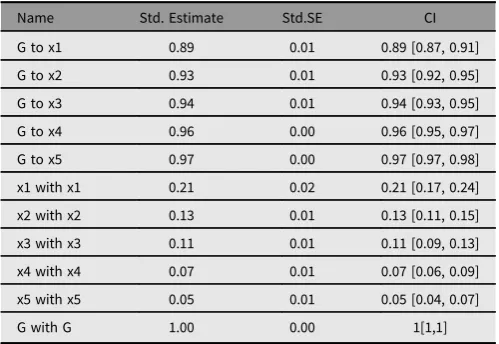
A parameter table (seeTable 2) can be requested fromumxRAMby setting the showEstimates parameter to ‘std’. More control and creation of summary output tables and plots is possible, however, usingumxSummaryon the model returned fromumxRAM.
umxSummary
Output fromumxSummarycan be as little as a line of fit informa-tion (the default) or a table of standardized or raw estimates (requested with show=“std”or show=“raw”). Example output fromumxSummary(cfa1, show="std") is shown inTable 2.
This report is customizable, with parameters to filter non-significant (‘NS’) or significant (‘SIG’) parameters and to show or hideSEandRMSEA_CIcolumns. The summary table can also be directed to different outputs. By default, the table is composed in markdown, and this is written to the console. Alternative formats are possible, for instance, LATEX. Table format can be set usingumx_set_table_format.Markdownis easy to read in the console or to include in a reproducible document. If the format is html, a file is opened in the user’s browser. This is useful for copying the formatted table into a word processor.
Plot
umxincludes S3 plot methods for RAM and twin models. These rely on the dot language, invented at Bell Laboratories (as was S: the ancestor of R) to specify graphs in a text-based format of edges and vertices, analogous to the way that the LATEX system separates content from layout. Plots fromumxare displayed in the user’s browser courtesy of theDiagrammRpackage.
The defaults for diagrams encourage users to produce math-ematically complete diagrams. This is important for communica-tion and scientific replicacommunica-tion, and so we encourage it. By default, in addition to free paths,plotdisplays paths fixed at non-zero values (e.g. the unit variance of‘G’inFigure 1). This can be changed using the‘fixed=‘ option. Similarly, by default,plot draws the means model (paths from the‘one’triangle). This can be toggled using the‘means=’parameter.plotcan also standardize the model using ‘std = TRUE’, and control numeric precision (with the digits parameter). Other options include control over how residuals Table 1.Table ofumxPathoptions
umxPath syntax Result
umxPath(means=‘b’) Add means expectation for
variable b.
umxPath(var=c(‘a’,‘b’)) Variance for“a”and for“b”. Value free.
umxPath(‘a’, with=‘b’) Covariance of“a”with“b”. Value free.
umxPath(‘a’, with=‘b’, fixedAt=1) 2-headed path a↔b. Value fixed at 1.
umxPath(‘a’, with=‘b’, freeAt=1) 2-headed path a↔b. Value free, but started at 1.
umxPath(‘a’, to=vars, firstAt=1) Path from‘a’to vars, with first path fixed at 1, remainder free.
umxPath(v1m0=‘g’)=‘g’) Fix variance of“g”at 1, mean at 0.
umxPath(v.m0=c(‘wt’,‘mpg’)) Free variance, mean fixed at 0
umxPath(v.m.=c(‘wt’,‘mpg’)) Estimated variance and mean.
umxPath(v0m0=c(‘wt’,‘mpg’)) Variance and mean fixed at zero.
umxPath(c(‘a’,‘b’,‘c’), forms=‘A’) Define a formative latent variable (“A”) with incoming paths from a, b and c to A, variances for a, b and c, and covariances among them.
umxPath(unique.pairs=c(‘A’,‘B’)) Create paths A→A, B→B, A→B
umxPath(unique.bivariate=c(‘A’,‘B’,‘C’)) Create paths A↔B, B↔C, A↔C
umxPath(fromEach=c(‘A’,‘B’)) Create A→B, B→A
umxPath(Cholesky=c(‘A’,‘B’), to=c(‘a’,‘b’))
Create the lower-triangle (Cholesky) paths: A→a, A→b, B→b
umxPath(defn=‘A’, label=‘age’) Create path A, value=data.age
Table 2.Example output table fromumxSummary
Name Std. Estimate Std.SE CI
G to x1 0.89 0.01 0.89 [0.87, 0.91]
G to x2 0.93 0.01 0.93 [0.92, 0.95]
G to x3 0.94 0.01 0.94 [0.93, 0.95]
G to x4 0.96 0.00 0.96 [0.95, 0.97]
G to x5 0.97 0.00 0.97 [0.97, 0.98]
x1 with x1 0.21 0.02 0.21 [0.17, 0.24]
x2 with x2 0.13 0.01 0.13 [0.11, 0.15]
x3 with x3 0.11 0.01 0.11 [0.09, 0.13]
x4 with x4 0.07 0.01 0.07 [0.06, 0.09]
x5 with x5 0.05 0.01 0.05 [0.04, 0.07]
are drawn. By default, these appear as conventional circles with double-headed arrows.
Plotting is useful not only to display final models, but also may be used during model construction to verify or test what the code build to date is specifying. To make this easier when the user is “sketching out” ideas, requiring the data implied by the model paths, the user can simply offer up a list of variable names expected to be encountered as manifests and write the model they wish to visualize. For instance, to explore the unique.pairs construction of umxPath, the following model could be plotted:
m1=umxRAM("play", data=c("A","B","C"),
umxPath(unique.pairs=c("A","B","C"))
)
For publication purposes, further processing of the diagram is often desirable. This is done by editing the file created by plot. The graph is written to a text file, by default‘model_name.gv’. This can be overridden by setting thefile=parameter to the desired file name. This file can be edited using either open-source graph visualization software available at http://www.graphviz.org, or closed software such as Omnigraffle
®
, or Visio®
.Inspecting Model Parameters and Residuals
Often, we wish to see a subset of estimates in a model. As shown above, umxSummary can filter the output according to whether parameters are significant or not, that is, umxSummary(cfa1, show=“std”, filter=“SIG”). The genericcoeffunction can return a list of model coefficients.umxprovides the convenience function param-eters, which adds support for filtering bynameandvalueand returns the parameters and estimates of a model as a neatly formatted table; for example, this snippet will show the parameters of model cfa1 esti-mated as greater than 0.5, and whoselabelcontains the string‘x2’:
parameters(cfa1,"above", .5, pattern="x2")
name Estimate
G_to_x2 0.5
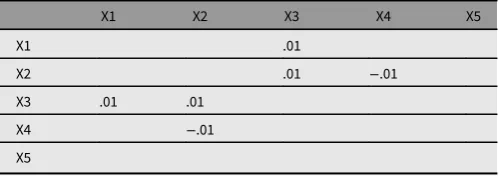
Another common need in modeling is to inspect the residuals, that is, the observed — expected statistics. umx implements a residualmethod.Table 3shows these for the cfa1 model. The user can zoom in on specific values with thesuppressparameter. For instance, this call will hide residuals<.005:
residuals(cfa1, suppress=.005)
Modifying and Comparing Models
Model comparison and modification is a key modeling task (MacCallum, 2003). Here, we introduce theumxfunctions ena-bling these tasks in the context of a classic example, modified from Duncan et al. (1968); (seeFigure 2). This is a moderately complex model, often used in teaching because of the range of structural model elements it displays.
The code this model is shown in Code block 1 (see next page). This model introduces some new features and reinforces others already discussed. It is presented in three parts. First, reading in data. This uses a helper function included inumxfor converting lower matrices to symmetrical, full matrices. There are many help-ers such as this included in umx, and readers who adopt the
Fig. 2.A model of aspiration (modified from Duncan et al.,1968).
Table 3. Result of the residuals function on model‘cfa1’
X1 X2 X3 X4 X5
X1 .01
X2 .01 −.01
X3 .01 .01
X4 −.01
package in their work will find these documented in the help for the package, where they are conveniently grouped in functional families:
# Variable names in the Duncan data
dimnames=c("RespOccAsp","RespEduAsp", "RespParAsp","RespIQ","RespSES",
"FrndOccAsp","FrndEduAsp","FrndParAsp", "FrndIQ","FrndSES")
# lower-triangle of correlations among these variables
tmp=c(
0.6247,
0.2137, 0.2742,
0.4105, 0.4043, 0.1839,
0.3240, 0.4047, 0.0489, 0.2220,
0.3269, 0.3669, 0.1124, 0.2903, 0.3054,
0.4216, 0.3275, 0.0839, 0.2598, 0.2786, 0.6404,
0.0760, 0.0702, 0.1147, 0.1021, 0.0931, 0.2784, 0.1988,
0.2995, 0.2863, 0.0782, 0.3355, 0.2302, 0.5191, 0.5007, 0.2087,
0.2930, 0.2407, 0.0186, 0.1861, 0.2707, 0.4105, 0.3607, -0.0438, 0.2950
)
# Use the umx_lower2full function to create a full correlation matrix
duncanCov=umx_lower2full(tmp, diag=FALSE, dimnames=dimnames)
# Turn the duncan data into an mxData object for the model
duncanCov=mxData(duncanCov, type="cov", numObs=300)
Next, we make some useful lists of variables to use when creat-ing paths. These will help reduce errors and increase the readability of code:
respondentFormants=c("RespSES","FrndSES", "RespIQ","RespParAsp")
friendFormants=c("FrndSES","RespSES", "FrndIQ","FrndParAsp")
latentAspiration=c("RespLatentAsp", "FrndLatentAsp")
respondentOutcomeAsp=c("RespOccAsp", "RespEduAsp")
friendOutcomeAsp=c("FrndOccAsp", "FrndEduAsp")
Finally, we build the model using the data and variable lists created above:
duncan1=umxRAM("Duncan", data=duncanCov,
# Working from the left of the model, as laid out in the figure, to right: : :
# 1. Add all distinct paths between variables to allow the
# exogenous manifests to covary with each other.
umxPath(unique.bivariate=
c(friendFormants, respondentFormants)),
# 2. Add variances for the exogenous manifests,
# Assumed to be error-free, and are fixed at their known value).
umxPath(var=c(friendFormants, respondentFormants), fixedAt=1),
# 3. Paths from IQ, SES, and parent aspiration to latent aspiration
umxPath(respondentFormants, to="RespLatentAsp"),
# Same for friends
umxPath(friendFormants, to="FrndLatentAsp"),
# 4. Add residual variance for the two aspiration latent traits.
umxPath(var=latentAspiration),
# 5. Allow the latent traits to influence each other.
# This is done using fromEach, and the values arebounded to improve stability.
# note: Using one-label would equate these 2 influences
umxPath(fromEach=latentAspiration, lbound=0, ubound=1),
# 6. Allow aspiration to affect respondent’s occupational & educational aspiration.
# note: firstAt=1 provides scale to the latent variables.
umxPath("RespLatentAsp",
to=respondentOutcomeAsp, firstAt=1),
# And their friends
umxPath("FrndLatentAsp",
to=friendOutcomeAsp, firstAt=1),
# 7. Finally, we add residual variance for the endogenous manifests.
umxPath(var=c(respondentOutcomeAsp, friendOutcomeAsp))
Modifying Models
The model fits well, χ2(22) = 24.59, p = .317; CFI = 0.997; TLI=0.993; RMSEA=0.02. However, for theoretically interest-ing models, the user will typically wish to test different versions of the model, dropping or adding paths corresponding to alternative hypotheses. TheumxModifyfunction supports this task, updat-ing the model, givupdat-ing the model a new name, runnupdat-ing the new model and printing a table comparing fits of the old and new models.
In its simplest use, paths to be dropped are passed in as a vector or labels to the update parameter. The following code snippet will run a modified version of our example CFA, with the paths‘RespLatentAsp to FrndLatentAsp’ and ‘FrndLatentAsp to RespLatentAsp’dropped (fixed at zero). The new model is renamed to reflect this, and fit-comparison table printed (SeeTable 4):
# List the paths to drop
pathList=c(
"RespLatentAsp_to_FrndLatentAsp", "FrndLatentAsp_to_RespLatentAsp")
# Modify duncan1 model, requesting a comparison table
duncan2=umxModify(duncan1, update= pathList,
name="No_influence", comparison=TRUE)
By default, updated paths are fixed at zero, but any value is pos-sible via the values argument. Regular expressions can be used to pick out parameters that match a given pattern. A regular expres-sion is a search pattern with powerful features greatly exceeding normal wildcards. While regular expressions are somewhat com-plex to learn, they repay the user in a wide range of computing applications and allow more compact syntax.
As an instance of using regular expressions in updating a model, consider a user who wants to test the effect of dropping all paths from‘G’in the cfa1 model. By label, these all begin with the string ‘G_to_’, followed by a variable name; for example, ‘G_to_x1’. Rather than listing each label in the update parameter, a regular expression that matches all instances could be used. Something as simple as‘G_to_.*’would work in this case (i.e., any character (‘.’) repeated any number of times‘*’, matching any characters following“G_to_”). For more explicit safety, the regular expression anchor character (‘^’) could be used to ensure the match starts at the first character of the label, whereas ‘G_to_.*’ would match labels such as ‘notG_to_x1’, the carat (‘^’) prevents this by anchoring the expression at the first character. An example inRcode would be:
cfa2=umxModify(cfa1, regex="^G_to.*")
umxModifycan also be used to add or replace objects in models, for instance, if a umxPath is passed in to the‘update’parameter, the path will be added to the model.
Equating Model Parameters
In addition to modifying a model by dropping or adding parameters, a second common task in modeling is to equate param-eters — setting two or more paths to have the same value. These parameters are picked out via their labels and setting two or more parameters to have the same value is accomplished by set-ting one set of parameters to have the same label(s) as a master set of parameters, thus constraining them to take the same value during model fitting.
This can be done usingumxModify, which is useful for one-step modifications. This is done using the master parameter to set a master label or labels, for example, master=‘G_toX1’, andupdate to set the additional label(s) which are to be equated (take the same value as) the master label. Because the process of equating parameters often occurs when building models (rather than modi-fying an already-run model),umxprovides a dedicated function, umxEquate, which is useful when model building as by default, it does not run the new model.
As an example of using umxEquate, based on the duncan1 model, we might test if the effect of IQ on aspiration levels can be equated for respondent and friend. This is done by making a new model in which they are equated and comparing the two mod-els as follows (Table 5):
# Use parameters to quickly search the model and find the paths to equate.
parameters(duncan1, pattern="IQ_to_")
# name Estimate
# RespIQ_to_RespLatentAsp 0.25
# FrndIQ_to_FrndLatentAsp 0.35
# Modify duncan1 model, request a comparison table
duncan3=umxEquate(duncan1, name="Equate IQ effect",
master="RespIQ_to_RespLatentAsp",
slave="FrndIQ_to_FrndLatentAsp"
) Table 4. Comparison of effect of dropping reciprocal influence from the duncan model
Model EP Δ-2lnL Δdf p AIC Compare with
Duncan 33 −19.411
No influence 31 19.509 2 <.001 −3.902 Duncan
Table 5. Comparison of equating IQ effects in respondents and friends
Model EP Δ-2lnL Δdf p AIC Compare with
Duncan 33 −19.41
# Equivalently, with autoRun and plot by default
duncan3=umxModify(duncan1, name="Equate IQ effect", comparison=TRUE,
master="RespIQ_to_RespLatentAsp",
update="FrndIQ_to_FrndLatentAsp"
)
Comparing Models
The table of model comparison output fromumxModifyis shown in Table 4. This comparison table can be generated directly using theumxComparefunction.umxComparetakes one or more base models and one or more comparison models and prints a table of model comparisons. This includes a column directing the reader to the base model used for each comparison. The table is formatted with control over precision via the standard digitsparameter. It can report the results to the console, or else open a browser table for pasting into a word processor. Printing to console is by default in markdown style (change this with umx_set_table_formatset to one of latex, html, markdown, pan-doc or rst). Ifreport = “inline”is selected, umxCompare also reports the output in one or more sentences to help the user describe the results in text form. An example of using this function is given below: it will print a plain English description (the new model name is used to describe what was done and will need some editing). An example of this format is:
umxCompare(duncan1, duncan2, report= "inline")
The output from the above code snippet is‘The hypothesis that no reciprocal influence was tested by dropping no reciprocal influence from Duncan. This caused a significant loss of fit,
χ2(2)=19.51,p≤.001: AIC=−3.902’.
To open the output as an html table in a browser, say:
umxCompare(duncan1, duncan2, report="html")
There are numerous additional functions in theumx library facilitating model interrogation; some are discussed at the end of this paper. For a complete listing, however, we direct the reader to the package help“?umx”and to the tutorial site forumx:http:// tbates.github.ioNext, we turn to twin modeling.
Behavior Genetic Twin Modeling
A major goal of umx was to provide support for common twin models, including Cholesky, Common-Pathway (CP), Independent-Pathway (IP) and gene×environment moderation models, with full support for tables and graphical output suitable for publication, as well as support for model comparison and modification. These functions are outlined below, beginning with a brief introduction to a common twin model (seeFigure 3).
Twin Models and Matrix-Based Modeling
Twin and family modeling takes advantage of classes of genetic and environmental covariance present in nature. For example,‘ identi-cal’or monozygotic (MZ) twins who share 100% of their genes, and fraternal (DZ: dizygotic) twins who share, on average, half of their genes, siblings, who also share 50% of their genes, but differ in year
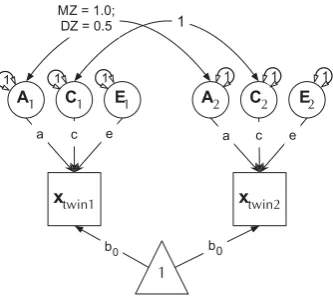
of birth, adoptees who are unrelated genetically to their rearing family, but who share that family environment. These classes of relatedness allow researchers to specify proposed structural and measurement models of their phenotype(s) of interest and to model many types of relatedness using multiple-group models that are fitted simultaneously to arrive at estimates of genetic and envi-ronmental variance consistent with the covariances found among the variables in the different groups of relatedness (Knopik et al., 2016; Neale & Maes,1996; Yong-Kyu,2009). A classic approach to modeling data such as these is shown inFigure 3. This shows the decomposition of variance in behavior‘x’measured in two related individuals—either MZ twins or DZ twins—into additive genetic (A), shared environmental (C) and unique environmental (E) components. There are two groups in the model, one for each of the data sets. The correlation between A1 and A2 is fixed at 1 (all variable genes shared) in the MZ group, and at .5 for the DZ group (reflecting their 50% sharing of variable genes).umx implements this ACE model as a function—umxACE—and it is described in more detail below.
The ACE model decomposes phenotypic variance into additive genetic (A), unique environ- mental (E), and one of either shared environment (C) or non-additive genetic effects (D). This latter restriction emerges due to confounding of C and D when data are available from only MZ and DZ twin pairs reared together. The Cholesky or lower-triangle decomposition allows a model that is both sure to be solvable and it provides a saturated model against which models with fewer parameters can be compared. This model creates as many latent A, C and E variables as there are phenotypes, and, moving from left to right, decomposes the variance in each component into successively restricted factors (seeFigure 4).
For efficiency, twin models inumxare implemented using a matrix-based approach (rather than the path approach used in Section 2). Each of the A, C and E components are modeled using square matrices, with the same number of rows and columns as there are variables under analysis. These in turn are formed from the product of lower-triangle matrices a, c and e respectively, multiplied by their transpose to form the variance component matrices (e.g.,A=aa0). The utility of the Cholesky factorization is the product of a lower-triangular matrix and its transpose; for example,aa0is guaranteed to be positive definite. The total phe-notypic (observed) covariance is modeled as the sum of these three components:Vp=AþCþE.
instance, the value of the path fromA2tovar2appears in cell A[2,
2] of matrixA.
The ACE Cholesky Model
The multivariate ACE or Cholesky model (Neale & Maes,1996) is implemented in the functionumxACE(seeFigure 4). This function can be used to fit an ACE model to a single variable to decompose its variance as shown in the example below. It can also be applied to two (bivariate) or more (multivariate) models, decomposing not only the variance, but also the covariance of the traits. We should note here that some of the text and images in this and other sec-tions are used also in the package documentation ofumx. This flow has been in both directions, with text written for this paper, and improved by helpful comments from reviewers and the editors flowing intoumxdocumentation updates.
TheumxACEfunction accepts either raw or summary (covari-ance) data, offering up suitable covariance matrices tomzDataand dzDataand entering the number of subjects in each vianumObsDZ andnumObsMZ. In an important capability, the model transpar-ently handles ordinal (binary or multi-level ordered factor data) inputs and can handle mixtures of continuous, binary and ordinal data in any combination. This involves setting up threshold matri-ces for binary and ordinal data, which are modeled as thresholds applied to underlying latent variables.
It is often desirable to include covariates within twin models. We currently support ACE models with fixed covariates (covariates included in the means model) for continuous variables, and as ran-dom effects (i.e., modeled in the covariance matrix, allowed to covary with the main variables of interest (Neale & Martin,1989). In the next major version ofumx, this functionality will be enhanced to allow modeling covariates in ordinal and mixed data across all twin models. Weighting of individual data rows is supported inumxACE. In this case, the model is estimated for each row individually, the like-lihood of each row is multiplied by its weight and the logarithm is taken. These weighted log-likelihoods are then summed to form the model log- likelihood, which is to be maximized (by minimiz-ing the-2ln(Likelihood)). In addition,umxACEsupports varying the DZ genetic association (defaulting to .5) to allow exploring assortative mating effects, as well as varying the DZ‘C’factor from 1 (the default for modeling family-level effects shared 100% by twins in a pair), to .25 to model dominance effects. This weighting feature is used in Section Window-based G×E section.
When it comes to interpretation and graphing, models built by umxACE can be plotted and summarized using plot and umxSummary methods. umxSummary can report summary A, C and E multivariate path coefficients, along with model fit indices and genetic correlations. Theumxpackage provides custom plot methods to handle graphical reporting of twin models, including ACE models, and other models discussed below. This provides out-put as seen inFigure 4.
ACE Examples
We first set up data for a summary-data ACE analysis of weight data (using a built-in example data set from the Australian twin sample of Professor Nick Martin (Martin & Jardine,1986; Martin et al.,1986):
require(umx);
# Open the built in dataset.
data("twinData")
selDVs=c("wt")
dz=twinData[twinData$zygosity=="DZFF",]
mz=twinData[twinData$zygosity=="MZFF",]
The next code block uses umxACE to build and run the model.
ACE1=umxACE(selDVs=selDVs, dzData=dz, mzData=mz, sep=" ")
umxACEprints feedback to the console, noting that the varia-bles are continuous and that the data have been treated as raw. It then prints the fit
2logðLikelihoodÞ ¼12186:28ðdf¼4Þ
and outputs a plot of the fitted model (seeFigure 5) and a table of the fitted parameters (Table 6). By default, the report table is written to the console in the format set byumx_set_table_format. The tabular output can also be requested at any time with umxSummary. Among other options, the user can request the genetic and environmental correlations withshowRg =TRUE. If confidence intervals have been computed, these can be displayed with CIs = TRUE. The user can control output precision using the digits parameter. The following snippet creates a tabular sum-mary of the unstandardized model (note, by default it will also plot the model. This can be controlled withumx_set_auto_plot(FALSE)). The function help (?umxACE) gives extensive examples, including for binary, ordinal and joint-ordinal cases:
# An example using more control features of umxSummary
# This would print a table of raw parameters to the console in markdown,
# open the table in the browser, set rounding to 3-digits,
# and print a table showing the comparative fit of ACE1 and ACE2
ACE2=umxModify(ACE1, update="c_r1c1", name="dropC")
umxSummary(ACE1, std=FALSE, report=‘html’, digits=3, comparison=ACE2)
Using Labels to Drop Paths in Twin Models
We noted above how labels can be used to update a model. For twin models, such model reduction by dropping paths is routine. For instance, to examine the effects of shared or family-level environ-ment, we may wish to update this model by dropping the C (shared environment) paths. The matrix-based model labeling scheme (used in all the twin models) follows a systematic pattern, with the path coefficients underlying the A, C and E factors stored in matrices named a, c and e. We can view the c parameters with a call to parameters:
# Show free parameters in model ACE1
parameters(ACE1)
This reveals the following 4-parameter labels (and their current (unstandardized) estimated values) (SeeTable 7). It shows the four matrices for free parameters—a, c, e and expMean—each with 1 row and 1 column as this is a univariate model.
These labels take the form: matrix name,‘_r’followed by a row number, then‘c’followed by the column number of the matrix cell containing the parameter; for example, matrix a row 1 column 2 would be labeled‘a_r1c2’.
A straightforward way to drop the shared environment paths we wish to test is using the update option ofumxModify. For example, this code snippet will test the effect of dropping the first latent C trait on the second variable in the model:
ACE2=umxModify(ACE1, update="c_r2c1", name="dropC", comparison=TRUE)
As shown in the resulting table of fit comparison table (Table 8), this parameter could be dropped without significant loss of fit. We next discuss a nested model, the CP model.
CP Model
The CP model provides a powerful tool for theory-based decom-position of genetic and environmental differences (Neale & Maes,
1996). This allows one to test, for instance, if genes and environ-ment work through a common latent personality trait (Lewis & Bates,2014), or to test claims regarding the specificity or generality of a theorized latent psychological or other construct (Lewis & Bates,2010).umxCPsupports CP modeling for pairs of MZ and DZ twins reared together to model the genetic and environmental structure of multiple phenotypes according to one or more CPs. As can be seen at the bottom ofFigure 6, each phenotype also has A, C and E influences specific to that phenotype.
Like the ACE model, the CP model decomposes phenotypic variance into additive genetic (A), unique environmental (E) and, optionally, either common or shared environment (C) or non-additive genetic effects (D). Unlike the Cholesky, however, Fig. 5.Output from plot(m1) for univariate ACE model of weight, rendered as default in DiagrammR(left) and after editing inOmnigraffle(right graphic).
Note: For simplicity, the unit variance of A, C and E are assumed, and not drawn in this figure.
Table 6. Standardized path loadings for ACE model
a1 c1 e1
Weight 0.92 . 0.39
Table 7. Free paths loadings for ACE model
Name Estimate
expMean_r1c1 58.80
a_r1c1 8.19
c_r1c1 0.00
e_r1c1 4.55
Table 8. Fit comparison of full ACE model and AE model
EP Δ−2LL Δdf p AIC
4 19,515.23
3 0 1 1.00 19,513.23
these factors do not act directly on the phenotype. Instead, latent A, C and E impact on latent factors (by default 1) which then account for variance in the phenotypes (seeFigure 5). Often researchers use only a single CP. Such models seldom provide a good fit to multi-variate data, andumxCPsupports the more theoretically plausible situation of multiple CPs simply by setting the nFacparameter from its default (1) to the desired number of CPs to be modeled. As withumxACE,umxCPcan transparently handle mixtures of continuous and ordinal (binary or multi-level ordered factor data) inputs. Similar options are available for controlling parameters such as the DZ genetic correlation, and plotand umxSummary implement comprehensive model reporting and graphical output. Note, for comparison of this CP model with the IP model to be discussed next, one should set the number of common factors to 3 usingnFac=3.
We endeavored to keep the matrix names used in the behavior genetic models memorable (e.g., expMean, a, c and e in the umxACE model). For the CP model, the loadings of a, c and e, on the CP factors are stored in matrices a_cp, c_cpand e_cp, and the specific loadings in the diagonals of matricesas,csand
es, respectively. The loadings of the common factors onto the manifest variables are stored in the cp loadings matrix. Thus, when the researcher wishes to drop paths, it is in these matrices that they would find the labels to set to zero. For instance, to drop the specific shared environmental effect for variable 2 in a CP model, the user would modify the model, updating the parameter labeled‘cs_r2c2’ to be fixed at zero.
Example CP Model
In this example CP model, we first set up the data for an analysis of height and weight using the built-intwinDatadata.frame:
# load twin data built into umx
data("twinData")
# Selecting the‘ht’and‘wt’variables
selDVs=c("ht","wt")
# create dataset consisting of MZ and DZ female twins respectively.
mzData=subset(twinData, zygosity== "MZFF",)
dzData=subset(twinData, zygosity== "DZFF",)
The next section shows howumxCPallows the user to build the CP model in one line. By default, this will callumxSummaryand plot. The output from these shows the fit and parameter estimates (see Tables9–12) and a graphical plot (Figure 7).
The following code will build and run a CP model:
# Run and report a common pathway model
CP1=umxCP(selDVs=selDVs, dzData=dzData, mzData=mzData, suffix="")
A straightforward way to test dropping all the shared environ-ment paths from this model is shown below, with the comparative fit shown inTable 13:
# make a list of paths to drop
paths=c("c_cp_r1c1","cs_r1c1","cs_r2c2")
CP2=umxModify(CP1, update=paths, name= "dropC", comparison=TRUE)
For users who understand the syntax of regular expression, we can select the same subset of labels using a pattern match:
CP2=umxModify(CP1, regex= "(^cs_)|(^c_cp_)", name="dropC")
umxSummary(CP2, comparison=CP1)
IP Model
The basic IP model is nested within the three-factor CP model (it is a CP model with each of A, C and E acting on only one factor). The IP models are created usingumxIP. In this model, one or more latent A, C and E factors are proposed, each influencing all man-ifests. In addition, each manifest (phenotype) has A, C and E influences specific to itself (seeFigure 8).
Data input and additional control parameters forumxIPclosely reflect those available forumxCPandumxACE, making it easier to move between these functions. Likewise plotand umxSummary transparently handle model reporting and graphical output func-tionality identically to how it is implemented for other models, again lowering the learning curve and increasing productivity. Users can of course implement ACE, CP and IP models, then Table 9. CP model common factor path loadings
A C E
Common factor 1 0.98 . 0.21
Table 10. CP model common factor path loadings for each trait
CP1
Height 0.85
Weight 0.55
Table 11. CP model standardized specific factor loadings
As1 As2 Cs1 Cs2 Es1 Es2
ht1 −0.44 . . . −0.29 .
wt1 . 0.75 . . . 0.37
Table 12. CP model genetic and environmental correlations
rA1 rA2 rC1 rC2 rE1 rE2
Height 1.00 0.51 1.00 0.93 1.00 0.16
submit these as nested comparisons using umxCompareto test which of these models is preferred.
Gene×Environment Models
umxGxEimplements the (Purcell,2002) gene–environment inter-action single-phenotype model. In this model, a standard ACE model is modified to include a moderator variable, measured for
each subject. This moderator (known as a definition variable because it is defined for each subject) is represented on the path diagram as a diamond (or, in this case, we write the path formula on the path, including the definition-variable moderator, rather than drawing paths from a diamond). In G×E models, the mod-erator is included in the means model, removing any heritable effects it has on the DV of interest, and also moderates the A, C and E path values (SeeFigure 9). A common application of this type of model has been to examine changes in heritability (and environmentality) across a range of values of a moderator such as, in human twin research, developmental stress or parental socio-economic status (Bates et al.,2016,2013).
As with allumxfunctions, examples of this type of analysis are included in the help documents linked to each function. As the moderator is crucial to the estimated model, all rows must have the moderator present, and rows with NA in the moderator are excluded (umxGxEwill do this for the user if necessary, reporting the quantity of data loss).
Example Gene×Environment Model
As usual, we first set up the input data. Because G×E models use definition variables (variables with a value for each subject in the data), rows must not contain NA for any definition variable used in the model.umxGxE takes care of this by removing these rows (reporting explicitly to the user what it has done for MZ and DZ data separately):
data("twinData")
# create age variables for twin 1 and twin 2
twinData$age1=twinData$age2=twinData$age
# Define the DV and definition variables
selDVs=c("bmi1","bmi2")
selDefs=c("age1","age2")
selVars=c(selDVs, selDefs)
Fig. 8.IP model with a single independent general factor for each of A, C or D and E loadings on all phenotypes (Var 1–Var 5), and showing the ACE structure of residual variance specific to each phenotype (drawn for variables 1 and 5 only for clarity).
Fig. 9.Univariate gene×measured shared environment twin model.
Fig. 7.CP model for height and weight plot.
Note: In practice, more than two phenotypes would be measured.
Table 13. Fit comparison dropping shared environment effects from CP model CP1
Model EP Δ-2lnL Δdf p AIC Compare with model
CP 13 −751.012
# Create datasets
mzData=subset(twinData, zygosity=="MZFF")
dzData=subset(twinData, zygosity=="DZFF")
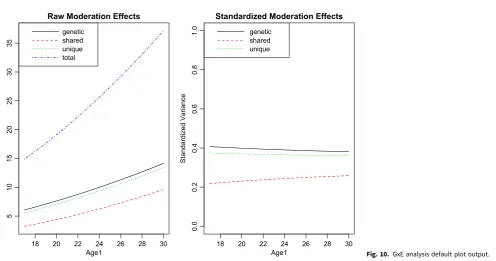
With setup out of the way, what remains is to call umxGxE, allowing the model to auto-run. The user can request a custom umxSummaryif desired. In this case, the summary is reported as a plot, which may be either the raw or standardized output, in two side-by-side plots, or in separate plots (see Figure 10):
# Build, run and report the GxE model using selected DV and moderator
# umxGxE will remove and report rows with missing data in definition variables.
GE1=umxGxE(selDVs=selDVs, selDefs= selDefs,
dzData=dzData, mzData=mzData, dropMissingDef=TRUE)
# Shift the legend to the top right
umxSummary(GE1, location="topright")
# Plot standardized and raw output in separate graphs
umxSummary(GE1, separateGraphs=TRUE)
Fig. 10.GxE analysis default plot output.
Table 14. Model reduction table generated for the example G×E model using umxReduce
Model EP Δ-2lnL Δdf p AIC Compare with model
G×E 9 1000958.352
No lin mean 8 −44684.14 1 1.000 956272.216 G by E
No quad mean 8 −999320.62 1 1.000 1635.730 G by E
No means moderation 7 −999097.00 2 1.000 1857.350 G by E
DropA 8 149404.86 1 <.001 1150361.208 G by E
DropC 8 15192.63 1 <.001 1016148.987 G by E
No mod on A 8 692656.81 1 <.001 1693613.165 G by E
No mod on C 8 520231.54 1 <.001 1521187.896 G by E
No mod on E 8 286226.09 1 <.001 1287182.445 G by E
No moderation 6 −999259.71 3 1.000 1692.639 G by E
No A no mod on A 7 732979.50 2 <.001 1733933.851 G by E
No C no mod on C 7 520664.23 2 <.001 1521618.585 G by E
No c no ce mod 6 1325976.22 3 <.001 2326928.580 G by E
As with all umx functions, all parameters are consistently labeled, and umxModifycan be used to, for instance, drop the moderated additive genetic path by label and request a test of change in likelihood for significance:
GE2=umxModify(GE1, update="am_r1c1", comparison=TRUE)
umxReduce
In order to facilitate theory-driven model reduction,umx imple-ments theumxReducefunction which, if it knows about the type of model input, can intelligently reduce the model, outputting a table of model comparisons. In the case ofumxGxEmodels, there is a standard set of comparisons, and these have been implemented inumxReduce. Functionality continues to improve for other model types. This is shown for the example G×E model inTable 14:
# Reduce the model and output a comparison table
umxReduce(GE1)
Window-Based G×E
umxGxE_window(Briley et al.,2015) also implements a gene– environment interaction model. It does this not by imposing a particular function (linear or otherwise) on the interaction, but by estimating the model sequentially on windows of the data. In this way, it generates a spline-style interaction function that can take arbitrary forms (seeFigure 11). The function linking genetic influence and context is not necessarily linear, but may react more steeply at extremes of the moderator, take the form of known growth functions of age, or take other, unknown forms. To avoid obscuring the underlying shape of the interaction effect, local structural equation modeling (LOSEM) may be used, andumxGxE_window implements this model. LOSEM is non-parametric, estimating latent interaction effects across the range of a measured moderator using a windowing function which is walked along the context dimension,
and which weights subjects near the center of the window highly relative to subjects far above or below the window center. This allows detecting and visualizing arbitrary G×E (or C×E or E×E) interaction forms.
Example G×E Windowed Analysis
We first need to set up the data correctly for the analysis. umxGxE_window takes a data.frame consisting of a moderator and two DV columns: one for each twin. The model also assumes two groups: MZ and DZ. Moderator cannot be missing, so to be explicit, we delete cases with missing moderator prior to analysis. The first three lines open the data set and define the name of the moderator column in the data set (‘age’in this case), along with the DV (‘bmi’):
require(umx);
data("twinData")
mod="age"
selDVs=c("bmi1","bmi2")
We next pull out the younger cohort from the data, remove rows where the moderator is missing and generate the MZ and DZ subsets of the data:
# select the younger cohort of twins
tmpTwin=twinData[twinData$cohort== "younger",]
# Drop twins with missing moderator
tmpTwin=tmpTwin[!is.na(tmpTwin[mod]),]
mzData=subset(tmpTwin, zygosity=="MZFF", c(selDVs, mod))
dzData=subset(tmpTwin, zygosity=="DZFF", c(selDVs, mod))
Next, we run the analysis:
# toggle auto-plot off, so we don’t plot every
# level of the moderator
umx_set_auto_plot(FALSE)
# Run the GxE analyses across all the windows
umxGxE_window(selDVs=selDVs, moderator=mod,
mzData=mzData, dzData=dzData)
umx_set_auto_plot(TRUE)
at only a single level or chosen range of moderator values, and of course the model results may be subjected to additional tests (Briley et al.,2015).
Summary
umxoffers a variety of functions for rapid path-based modeling, a growing set of twin models, and helpful plotting and reporting rou-tines. It makes available a set of data-processing functions, espe-cially suitable for twin or wide-format data. Helping to lower the learning curve, a tutorial blog site operates athttp://tbates.github. io. In addition, a help forum for users of the package is provided at theOpenMxwebsitehttp://openmx.ssri.psu.edu/forums.
It is hoped that the package is useful not only to those learning and undertaking behavior genetics but also to the wider set of users seeking to utilize the power of structural modeling in their work and who seek approachable but powerful open-source solutions for this need.
Note:All example code in this paper available in the umx package as ?umxExamples.
References
Archontaki, D., Lewis, G. J., & Bates, T. C.(2013). Genetic influences on
psychological well-being: A nationally representative twin study.Journal
of Personality,81, 221–230.
Bates, T. C., Hansell, N. K., Martin, N. G., & Wright, M. J.(2016). When does socioeconomic status (SES) moderate the heritability of IQ? No evidence
for g×SES interaction for IQ in a representative sample of 1176 Australian
adolescent twin pairs.Intelligence,56, 10–15.
Bates, T. C., Lewis, G. J., & Weiss, A.(2013). Childhood socioeconomic status amplifies genetic effects on adult intelligence.Psychological Science,24, 2111–2116.
Boker, S., Neale, M., Maes, H., Wilde, M., Spiegel, M., Brick, T.,: : :Fox, J. (2011). OpenMx: An open source extended structural equation modeling framework.Psychometrika,76, 306–317.
Briley, D. A., Harden, K. P., Bates, T. C., & Tucker-Drob, E. M.(2015). Nonparametric estimates of gene x environment interaction using local
structural equation modeling.Behavior Genetics,45, 581–596.
Duncan, O. D., Haller, A. O., & Portes, A.(1968). Peer influences on aspira-tions: A reinterpretation.American Journal of Sociology,74, 119–137. Fox, J., Nie, Z., & Byrnes, J.(2014). sem: Structural equation models (Version
3.1–5). Retrieved fromhttp://CRAN.R-project.org/package=sem
Hershberger, S. L. (2003). The growth of structural equation modeling:
1994–2001.Structural Equation Modeling: A Multidisciplinary Journal,10,
35–46.
IBM Corp. (2013).IBM SPSS Statistics for Macintosh, Version 22.0. Armonk, NY: Author.
Jöreskog, K. G.(1969). A general method for analysis of covariance structures.
Biometrics,57, 239–251.
Knopik, V. S., Neiderhiser, J. M., DeFries, J. C., & Plomin, R. (2016).
Behavioral genetics(7th ed.). London: Worth Publishers.
Lewis, G. J., & Bates, T. C.(2010). Genetic evidence for multiple biological
mechanisms underlying ingroup favoritism. Psychological Science, 21,
1623–1628.
Lewis, G. J., & Bates, T. C. (2014). Common heritable effects underpin concerns over norm maintenance and in-group favoritism: Evidence from genetic analyses of right-wing authoritarianism and traditionalism.
Journal of Personality,82, 297–309.
MacCallum, R. C.(2003). 2001 Presidential address: Working with imperfect
models.Multivariate Behavioral Research,38, 113–139.
Maes, H. H., Sullivan, P. F., Bulik, C. M., Neale, M. C., Prescott, C. A., Eaves, L. J., & Kendler, K. S.(2004). A twin study of genetic and environmental influences on tobacco initiation, regular tobacco use and nicotine
depend-ence.Psychological Medicine,34, 1251–1261.
Martin, N. G., Eaves, L. J., Heath, A. C., Jardine, R., Feingold, L. M., & Eysenck, H. J. (1986). Transmission of social attitudes. Proceedings of the National Academy of Sciences of the United States of America,83, 4364–4368.
Martin, N. G., & Jardine, R.(1986). Eysenck’s contributions to behaviour
genetics. In S. Modgil &C. Modgil (Eds.), Hans Eysenck: Consensus and
controversy(pp. 13–47). Philadelpia, PA: Falmer Press.
McArdle, J. J., & Boker, S. M.(1990).RAMpath. Hillsdale, NJ: Lawrence Erlbaum.
Muthén, L. K., & Muthén, B. O.(1998–2016).Mplus user’s guide(7th ed.). Los Angeles, CA: Muthén & Muthén.
Neale, M. C., Hunter, M. D., Pritikin, J. N., Zahery, M., Brick, T. R., Kirkpatrick, R. M., : : :Boker, S. M.(2016). OpenMx 2.0: Extended
struc-tural equation and statistical modeling.Psychometrika,81, 535–549.
Neale, M. C., & Maes, H. H.(1996).Methodology for genetics studies of twins and families(6th ed.). Dordrecht, The Netherlands: Kluwer.
Neale, M. C., & Martin, N. G.(1989). The effects of age, sex, and genotype on
self-report drunkenness following a challenge dose of alcohol. Behavior
Genetics,19, 63–78.
Pearl, J.(2009).Causality: Models, reasoning and inference(2nd ed.). New York, NY: Cambridge University Press.
Purcell, S.(2002). Variance components models for gene-environment
inter-action in twin analysis.Twin Research,5, 554–571.
Ritchie, S. J., & Bates, T. C.(2013). Enduring links from childhood
mathemat-ics and reading achievement to adult socioeconomic status. Psychological
Science,24, 1301–1308.
Rosseel, Y.(2012). Lavaan: An R package for structural equation modeling.
Journal of Statistical Software,48, 1–36.
SAS Institute Inc. (2003).SAS/STAT Software, Version 9.1. Cary, NC: SAS Institute.
semTools Contributors. (2016). semTools: Useful tools for structural equation
modeling. R package version 0.4–11. Retrieved from
https://CRAN.R-project.org/package=semTools
Stata Corp LP. (2016).Stata statistical software: Release 14. College Station, TX: Stata Corp LP.
von Oertzen, T., Brandmaier, A. M., & Tsang, S.(2015). Structural equation
modeling with Ωnyx. Structural Equation Modeling: A Multidisciplinary
Journal,22, 148–161.