ABSTRACT
ZHI, RUI. Design and Evaluation of Instructional Supports for Novice Programming Environments. (Under the direction of Dr. Tiffany Barnes and Dr. Thomas Price).
Students often find programming difficult to learn. Traditionally, computer science courses expect students to learn programming by writing code to solve practice programming problems. However, prior studies in many educational domains show that novices can learn more effectively with alternative instructional supports, such as worked examples, erroneous worked examples, or self-explanation prompts. In intelligent tutoring systems and gamified educational environments, these instructional supports have been shown to improve student learning efficiency. However, less work has explored how and when these supports are effective in the domain of programming, and how they compare to problem solving (writing code from scratch). Therefore, this work investigates how different types of instructional support impact novices’ outcomes when learning to program in block-based programming environments. I also devised a framework to explain the observed differences in student outcomes when using different instructional supports, based on cognitive science and educational psychology. I focus on block-based programming environments because they are commonly used in introductory programming courses, but little work has been done to understand how the effects of instructional supports can be generalized to those environments. This work contributes to the design and incorporation of effective instructional supports into novice programming environments, which has the potential to impact many novice learners.
study, I present a design of Parsons problems in a novice programming environment and a study where I evaluated the Parsons problems in a classroom setting. The results show Parsons problems saved students 15 to 17 minutes (43.6% to 65.2% of total time) on 30-minute lab assignments and they performed just as well on subsequent assignments compared to writing code. Furthermore, the results show that the effectiveness of Parsons problems maybe because Parsons problems dramatically reduce the programming solution space, let students focus on solving the problem rather than having to solve the combined problem of devising a solution, searching for needed components, and composing them together.
To promote our goal of the automatic creation of adaptive instructional supports for novices solving open-ended problems, in my fourth study, I developed an algorithm to automatically gener-ate data-driven, adaptive example-based feedback, which helps a student complete one meaningful step of a solution. Based on the evaluation from experts, the algorithm can generate more relevant examples than examples derived naively from students data, and the example quality may be im-proved further by leveraging interactivity with students. The results suggest that the data-driven approach could be used to generate adaptive, example-based feedback to help struggling students by leveraging student data.
In summary, my work provides promising results that effective instructional supports can be designed to help students learning programming more efficiently than writing code from scratch. I situate these results in a new framework that explains differences in learning efficiency across supports based on the ICAP activity engagement framework and Cognitive Load Theory. Specifically, my results suggest that there are large challenges to implementing effective worked examples in the domain of programming, and that students may benefit from erroneous worked examples, incomplete worked examples with self-explanation prompts, and Parsons problems. As evaluated by experts, students may also benefit from the adaptive, data-driven example-based feedback. The instructional support design in programming should consider student engagement with the activity by designing instructional supports that strike a balance between the lower cognitive load of worked examples and the higher activity engagement of problem solving.
© Copyright 2019 by Rui Zhi
Design and Evaluation of Instructional Supports for Novice Programming Environments
by Rui Zhi
A dissertation submitted to the Graduate Faculty of North Carolina State University
in partial fulfillment of the requirements for the Degree of
Doctor of Philosophy
Computer Science
Raleigh, North Carolina
2019
APPROVED BY:
Dr. Min Chi Dr. Eric Wiebe
Dr. Tiffany Barnes Co-chair of Advisory Committee
Dr. Thomas Price
DEDICATION
BIOGRAPHY
Rui Zhi was born in Liupanshui, known as “The Cool City" in China. Rui started playing video games since five years old. His curiosity about video games encourages him to study Computer Science a decade later.
ACKNOWLEDGEMENTS
I cannot finish this work without the help and support from other talented people, especially my advisors, Dr. Tiffany Barnes and Dr. Thomas Price. Thank you for guiding me on research and encouraging me to overcome obstacles in life.
Dr. Tiffany Barnes is an excellent advisor and role model. Dr.Barnes not only has a knowledgeable mind but also a caring heart for us. She is generous with words with kindness and encourages me a lot when I faced difficulties in research and life.The most valuable lessons I learned from her are her communication skills and attitudes towards students and working. She can describe complicated ideas in a way that a novice can understand. Dr.Barnes also organizes social activities frequently to bring and connect lab members together. I am very thankful for Dr.Barnes’ research guidance, emotional support, and encouragement.
Dr. Price is not only an advisor but also a friend to me. He is a brilliant and responsible mentor. The way he does research serves as a “worked example” and I learned a lot from him. Dr.Price also provides me with concrete suggestions on improving my work. I really appreciate the opportunity to study and work with him. I am grateful to Dr.Price who offers me hands-on research experience, believes my ability to do research, and shares his wisdom about doing good research.
I would also like to thank Dr. Min Chi and Dr. Eric Wiebe for their encouragement and construc-tive feedback for my research.
Additionally, I am grateful to the co-authors who helped on this work: Yihuan Dong, Nicholas Lytle, Samiha Marwan, and Alexandra Milliken. I would also like to thank ToniAnn Marini and Rusty Martin, who helped conduct my research experiment in a classroom. I am thankful to work with other colleagues on their research as well: Ye Mao, Dr. Andrew Hicks, Dr. Zhongxiu (Aurora) Peddycord-Liu, and Dr. Veronica Cateté.
My thanks also go to other colleagues in the Game2Learn lab and the HINTS lab: Dr. Behrooz Mostafavi, Christa Cody, Rachel Harred, David Warren, Mehak Maniktala, Amy Isvik, Preya Shabrina, Michael Suggs, and Wengran Wang.
Special thanks go to my mother, father, sister, and brother, who supported me to chase my dream.
TABLE OF CONTENTS
LIST OF TABLES . . . ix
LIST OF FIGURES. . . x
Chapter 1 Introduction. . . 1
1.1 Motivation . . . 1
1.2 Research Questions . . . 4
1.3 Contributions . . . 4
1.4 Dissertation Overview . . . 5
Chapter 2 BACKGROUND AND RELATED WORK . . . 6
2.1 Novice Programming Environments . . . 6
2.1.1 Scratch . . . 7
2.1.2 BOTS . . . 8
2.1.3 Gidget . . . 8
2.1.4 Alice . . . 9
2.1.5 Looking Glass . . . 10
2.1.6 Snap!and iSnap . . . 11
2.2 Learning Theories . . . 14
2.2.1 Cognitive Load Theory . . . 14
2.2.2 Cognitive Theory of Multimedia Learning . . . 16
2.2.3 The ICAP Framework . . . 18
2.3 Instructional Supports . . . 21
2.3.1 Instructional Text . . . 21
2.3.2 Worked Examples . . . 21
2.3.3 Self Explanation . . . 23
2.3.4 Parsons Problems . . . 24
2.3.5 Example-based Feedback . . . 26
Chapter 3 Study 1 : Instructional Text, Worked Examples, and Erroneous Worked Exam-ples In Novice Programming Environment . . . 28
3.1 Introduction . . . 29
3.2 Methods . . . 30
3.2.1 Instructional Support Design . . . 30
3.2.2 Content Design . . . 32
3.3 Results . . . 33
3.4 Discussion . . . 35
3.5 Conclusion . . . 37
Chapter 4 Study 2: Design and Evaluation of Incomplete Worked Examples with Self-explanation Prompts in Snap!. . . 39
4.1 Introduction and Background . . . 40
4.2.1 The Peer Code Helper . . . 41
4.3 Results . . . 43
4.3.1 RQ1: Assessments Analysis . . . 44
4.3.2 RQ2: Cognitive Load Analysis . . . 44
4.3.3 RQ3: Programming Efficiency . . . 45
4.3.4 Post-survey Feedback . . . 48
4.4 Discussion . . . 49
4.5 Conclusion . . . 50
Chapter 5 Study 3: Design and Evaluation of Parsons Problems in Snap! . . . 51
5.1 Introduction . . . 52
5.2 Method . . . 53
5.2.1 Parsons Problems Design . . . 53
5.2.2 Participants . . . 55
5.2.3 Study Design . . . 56
5.3 Results . . . 57
5.3.1 Time on Task . . . 57
5.3.2 Effectiveness . . . 58
5.3.3 Log Analysis . . . 59
5.4 Discussion . . . 64
5.5 Conclusion . . . 66
Chapter 6 Study 4: Toward Data-Driven Example-based Feedback for Novice Program-ming. . . 67
6.1 Introduction & Background . . . 68
6.2 Method . . . 70
6.2.1 Dataset . . . 71
6.2.2 Data-driven Example-based Feedback Generation . . . 71
6.2.3 Expert Evaluation . . . 76
6.3 Results . . . 79
6.3.1 Feature Coverage . . . 79
6.3.2 Expert Ratings . . . 80
6.3.3 Inspection of Examples . . . 81
6.4 Discussion . . . 83
6.5 Conclusion . . . 86
Chapter 7 Engagement, Cognitive Load, and Extent of Programming (ECLEP) Framework 87 7.1 ECLEP Framework . . . 87
7.2 Study Summaries . . . 89
7.2.1 Study 1: Instructional Text, Worked Examples, and Erroneous Worked Exam-ples in BOTS . . . 91
7.2.2 Study 2: Snap!Incomplete Worked Examples With Self-Explanation Prompts 94 7.2.3 Study 3: Snap!Parsons Problems . . . 96
7.2.4 Study 4: Snap!Example-based Feedback . . . 97
Chapter 8 CONCLUSION. . . .100
8.1 Research Questions . . . 100
8.1.1 Research Question 1 . . . 100
8.1.2 Research Question 2 . . . 102
8.1.3 Research Question 3 . . . 102
8.2 Contributions . . . 102
8.3 Future Work . . . 103
BIBLIOGRAPHY . . . .105
APPENDICES . . . .116
Appendix A Assignments . . . 117
A.1 Incomplete Worked Example with Self-explanation Prompts Study Assignments117 A.1.1 Daisy Design . . . 117
A.1.2 Spiral Polygon . . . 119
A.1.3 Brick Wall . . . 122
A.2 iSnap Assignments . . . 123
A.2.1 Polygon Maker . . . 124
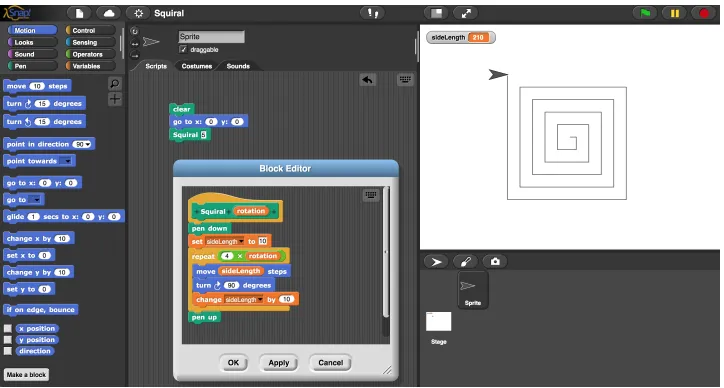
A.2.2 Squiral . . . 124
A.2.3 Guessing Game 1 . . . 125
A.2.4 Guessing Game 2 . . . 125
A.2.5 Pong 1 . . . 125
A.2.6 Pong 2 . . . 126
LIST OF TABLES
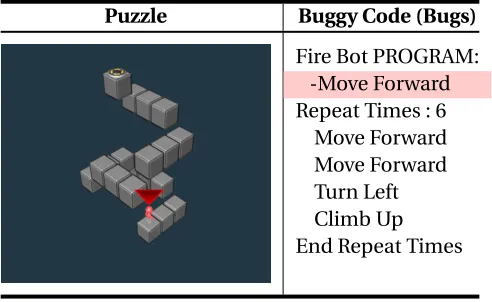
Table 3.1 Interfaces for the Instructional Supports . . . 31 Table 3.2 Experimental Puzzle example with buggy code (buggy codes are highlighted
and should be deleted.) . . . 33 Table 3.3 Mean (SD) and median total experimental puzzle completion time in minutes 34
Table 4.1 Study Outline . . . 43 Table 4.2 Mean (SD) pre-test, post-test1, and post-test2 scores . . . 44 Table 4.3 Mean (SD) factor score of cognitive load (IL - Intrinsic Load, EL - Extraneous
Load, GL - Germane Load) . . . 45 Table 4.4 The first-quartile (Q1) and median (Med) time (in minutes) taken by the WE
and non-WE groups to complete 1, 2 and 3 additional objectives after the WE objectives, as well as the proportion that Comp. each objective . . . 48
Table 5.1 Average time (with Standard Deviation) for accomplishing the assignment in different semesters. . . 59 Table 5.2 Average class grades (with Standard Deviation) for each assignment in different
semesters. . . 60 Table 5.3 Average hint requests (with Standard Deviation) of students for homeworks.
The percentage of students who request hints are shown with %. . . 60
Table 6.1 Expert Features and Corresponding Data-Driven Features, as derived in[Zhi18b]. 73 Table 6.2 Total number of generated example pairs, corresponding average snapshot
coverage and hint coverage in the expert-defined feature space. . . 80 Table 6.3 Mean attribute ratings (with standard deviation) for example pairs in from
each approach. . . 80
LIST OF FIGURES
Figure 2.1 BOTS game interface. Players drag and drop commands to program a robot to navigate a puzzle. . . 9 Figure 2.2 Gidget interface (Source: http://www.helpgidget.org/). Students write code
to help a robot called gidget accomplish certain tasks. . . 10 Figure 2.3 Looking Glass completion programming puzzle interface[Har15]. Students
need to use the available commands (A) to write correct programs (B) to create correct animation (C). If students get stuck, they can get feedback (F) by comparing the correct animation with theirs (D). . . 11 Figure 2.4 Snap!interface (Source: https://snap.berkeley.edu/). Students can drag and
drop blocks from the code palette (left) into a scripting edit area (center) to program. The visual output will be shown on the stage (top-right). . . 12 Figure 2.5 An example of hint suggestion in iSnap. When a student requests help, the
suggested next-step code will be shown in a popup window. . . 12 Figure 2.6 An example of hint suggestion in iSnap. When a student requests help, the
magenta highlighted block needs to be removed, and the yellow highlighted blocks are not in the correct position and need to be moved. . . 13 Figure 2.7 A cognitive theory of multimedia learning[May02]. . . 17 Figure 2.8 The four aspects of the ICAP Framework[CW14]. . . 19
Figure 3.1 Boxplots of completion time (y-axis) on the first three assessment puzzles (x-axis) for each condition (color). . . 35 Figure 3.2 Boxplots of solution code length for each condition for the first three
assess-ment puzzles. . . 36
Figure 4.1 Peer Code Helper Interface. Students can run the example code (1), reflect on the output (3), and explain the code (2). Examples are shown side by side. Fill-in-blanks answer choices are marked correct in green or incorrect in red. 42 Figure 4.2 The average number of objectives completed by each group over time, with
shading indicating±1 standard error. . . 46
Figure 5.1 Parsons problem interface in Snap!. Available code blocks are shown in the code palette. . . 55 Figure 5.2 A hint example: yellow highlights misplaced blocks or variables, blue shows
input that needs a variable. . . 55 Figure 5.3 A 2D visualization of the similarity between students’ snapshots at
differ-ent points in time, across semesters, for PolygonMaker and Squiral. Color indicates the snapshot’s semester, and black borders indicated a submitted solution. . . 64
Figure 6.1 Example-based feedback prototype in iSnap. . . 69 Figure 6.2 Squiral pseudocode, Snap!code and output[Zhi18b]. . . 71 Figure 6.3 DDF-IS and Expert examples for one snapshot (red/green indicate changed
CHAPTER
1
INTRODUCTION
1.1
Motivation
Learning programming is a complex task and can be very difficult for beginners. As Mason et al. argued[Mas16], “computer programming as a content domain has a high level of element interactivity1, and is thus difficult to learn.” Similarly, as Robins et al. pointed out, learning to program is hard and novices often perceive programming courses as difficult[Rob03]. Researchers have put decades of effort into understanding how people learn programming[May81; PK84; BS85; Kur86; Pea87; Ich17]and improving how students learn programming[Res09; Lee13; Har15; Eri17]. The ability to code, or to program, has become an important skill for ensuring computational literacy and workforce readiness. According to the projected growth of computer and information technology occupations, which is faster than the average job growth, there are expected to be about 557,100 new computing jobs in the United States by 2026[BLS18].
To facilitate novice learning and lower the barrier to learning programming, novice programming environments (NPEs) have been developed and incorporated into introductory Computer Science (CS) curricula such as CS Principles2[AB12]and Exploring CS3[Goo12]. Most NPEs provide a block-based programming interface (e.g. Scratch[Res09], Snap![Gar15], Looking Glass[Har15]), which allows novices to construct program by dragging and dropping instead of typing, to avoid syntax
1i.e. Students need to consider multiple components simultaneously to understand a concept. 2http://www.csprinciples.org
errors. The block-based feature of NPEs has been shown to improve programming efficiency[PB15] and learning[WW17]. Additionally, as Bau et al. point out, novices can build complex and delightful creations rapidly within block-based programming environments[Bau17]. Even though students may perceive block-based programming to be easier than traditional text-based programming [WW15a], students may still struggle to learn programming. For example, Ichinco et al. showed that novices struggle to use examples to solve block-based programming problems[Ich17]. An international survey about learning programming conducted by Lahtinen et al. show that students perceived programming to be difficult not only because of its abstract concepts, but also because of the issues related to program construction such as program design, decomposition, and debugging [Lah05]. The inherent difficulties of program construction are unlikely to be lessened by the block-based programming environment alone. Additionally, informed by the results from cognitive science and educational psychology, Guzdial questioned whether starting novice programmers off by writing programs is the best way for them to learn such a complex skill[Guz15].
instructional supports in novice programming environments (e.g.[Har15],[Ich17]). Additionally, it is still unclear which instructional supports are effective for novice programmers, and how different instructional supports compare to writing code in novice programming environments.
Both CLT and CTML operate under the assumption that learners are cognitively engaged with the learning material (i.e. the active processing assumption in CTML[May02]and the assumption for germane load in CLT[Swe10a]), but this assumption may not hold if the instructional support is not designed properly to encourage learners to engage. Fortunately, we can use the Interactive-Constructive-Active-Passive (ICAP) framework to further guide the instructional support design. The ICAP framework defines cognitive engagement activities based on student overt behaviors during a learning activity[CW14]. The engagement activities are orthogonal to instructional tasks and can be categorised into one of four modes: Interactive, Constructive, Active, and Passive. The degree of positive learning outcomes from the activity are predicted by the framework in this order: Interactive >Constructive>Active>Passive. However, based on CLT, a learning activity that overloads student cognitive capacity would impede learning. Therefore, we combine the insights of ICAP and CLT to consider both the learning outcome order of ICAP framework and student cognitive capacity. Therefore, the ideal instructional support is engaging and would increase students’ mental effort on digesting the learning material (called germane load in CLT) without overloading their cognitive capacity. As Sanders et al. suggest[San17], we can design better techniques to “demand thinking.” Informed by the ICAP framework, and by integrating it with CLT and CTML, I believe we can design instructional supports to help novices learn programming more efficiently than writing code from scratch.
1.2
Research Questions
The goal of my research is to develop insights into designing effective, theoretically-grounded instructional supports in the novice programming environment. To reach my research goal, in this work, I am interested in investigating the three high-level research questions:
• RQ1: How do different types of worked examples compare to problem solving in novice programming environments?
• RQ2: How do Parsons problems compare to problem solving in novice programming environ-ments?
• RQ3: How can we use data to provide high-quality example-based feedback automatically? RQ1is addressed in Chapters 3 and 4, which discuss the design and evaluation of worked example and its variants in two different NPEs.RQ2is addressed in Chapter 5, which presents a novel design of block-based Parsons problems and discusses how Parsons problems can save students time compared to writing code. Chapter 6 also addressedRQ3, which presents a novel method to generate based feedback from student data and discusses the quality of example-based feedback generated from different approaches example-based on expert evaluation and how to improve my algorithm. Overall, I designed and evaluated different instructional supports to gain a better understanding and insights on how to use theories to inform the instructional support design.
1.3
Contributions
This dissertation offers the following primary contributions:
1. The design and evaluation of instructional text, worked examples, anderroneousworked examples in a novice programming environment. From this study, I identified the tradeoffs in the design of instructional supports in terms of engagement, learning, and time spent on the learning activities.
2. The evaluation and design of incomplete worked example with self-explanation prompts in a novice programming environment. This study shows a promising direction for balancing the reduced cognitive load of worked examples with the increased activity engagement of problem solving in instructional support design.
4. A comparison of the impact of block-based Parsons problems and problem solving on student learning efficiency. This study showed that Parsons problems can improve student learn-ing efficiency by reduclearn-ing the programmlearn-ing solution space and preventlearn-ing unproductive behaviors.
5. A novel method for generating data-driven example-based feedback, which enables adaptive example-based feedback for students. This study demonstrates the potential for providing relevant, adaptive and high-quality example-based feedback to students.
6. A new framework that integrates the ICAP activity engagement framework with Cognitive Load Theory to explain the differences among instructional supports based on how well they promote engagement and effort while reducing cognitive load.
1.4
Dissertation Overview
CHAPTER
2
BACKGROUND AND RELATED WORK
In this work, I designed and evaluated different instructional supports in novice programming environments and used data to automatically generate a new, adaptive instructional support for problem solving. Therefore, in this chapter, I review previous work on novice programming envi-ronments and their empirical support. Then I present the theories from educational psychology and cognitive science that can inform designers about the potential impacts of different types of instructional supports. Afterwards, I review how these theories relate to instructional supports and how they may impact learning in different domains, especially in programming. To my knowledge, only a few existing novice programming environments have instructional support features, and only a few studies have explored the impact of instructional supports compared to problem solving in novice programming environments.
2.1
Novice Programming Environments
instead of typing. As Bau et al. point out, “Blocks environments improve learnability for novices by using direct manipulation of blocks to prevent errors and enhance understanding of program structure.”[Bau17]. Empirical studies have also shown that the block-based feature of NPEs can improve programming efficiency[PB15]and learning[WW17]. Price and Barnes compared the textual and block interfaces with middle school students in a block-based programming environment called Tiled Grace. They found students using the block interface completed more objectives of a programming assignment in less time than students using the textual interface[PB15]. Similarly, Weintrop and Wilensky conducted a quasi-experimental study to compare the impact of block-based and text-based programming environments in a high school programming class. The results of their study show that students using the block-based programming environment have greater learning gains and are more interested in future computing courses than students using the text-based programming environment[WW17].
2.1.1 Scratch
Scratch is a popular block-based programming language to teach children programming, with the goal to “nurture a new generation of creative, systematic thinkers comfortable using programming to express their ideas.”[Res09]. It is similar to the idea of the LOGO programming language, which was designed by Papert et al. to teach novices programming[Log15]. LOGO is a simplified programming language where students can write a program to control a turtle to draw things from lines and squares to complex patterns like spirals. Compared to other programming environments, Scratch is designed to be “more tinkerable, more meaningful, and more social”[Res09]. It also benefits students more than LOGO. A comparison study conducted by Lewis shows that students using Scratch perceived less difficulty in learning boolean logic ‘AND’ and learned conditionals better than students using LOGO[Lew10]. In Scratch, students can program by dragging and dropping commands into a script window, eliminating the need for them to learn programming syntax. Scratch also provides colored commands, animations, and a library of cartoon-like sprites, which allows students to make games, create animations, and draw colorful patterns by programming.
self-efficacy in a CS0 course[Riz11]. In addition to classroom settings, Scratch has been evaluated in informal settings. Maloney et al. analyzed 536 Scratch programs created by students in an urban after-school center, they found those novice programmers prefer to use Scratch than other media-creation software such as Adobe Photoshop and their created programs cover concepts such as loops, conditionals, boolean logic, and variables[Mal08].
2.1.2 BOTS
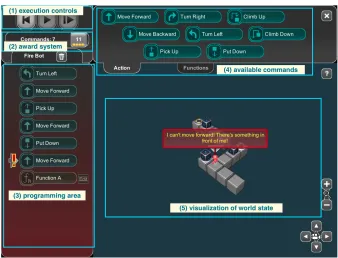
BOTS[Hic14; Liu17]is a web-based educational game that teaches 6-12th grade students problem-solving and basic programming concepts including loops and functions (shown in Figure 2.1). In this work, I investigated the effect of instructional text, worked examples, and erroneous worked examples in BOTS (more details in Chapter 3). Novices in both BOTS and LOGO learn programming by writing code to navigate a robot (in BOTS) or a turtle (in LOGO), and immediately receive visual feedback by seeing its movement. In BOTS, players must solve each puzzle by placing the robot or boxes on yellow target switches (Figure 2.1(5)). Players drag and drop commands including movements, loops, and functions (Figure 2.1(4)) to the programming area (Figure 2.1(3)) to control the robot. Players can execute their programs via clicking the ‘Play’ button or the ‘Step’ button (Figure 2.1(1)). If there are errors in the code, a message in red will pop up to explain the error (Figure 2.1(5)). When a level is completed, players earn either a platinum, gold, silver or bronze medals, based off of how few commands they used, with fewer commands earning higher level medals. The reward system (Figure 2.1(2)) shows the best score (least commands needed, shown as 11 with four stars in Figure 2.1(2)) in this puzzle and the player’s current score (current number of commands used, shown as 7 in Figure 2.1(2)). Most BOTS puzzles have repetitive patterns, which encourage players to use loops and/or functions to shorten their code to earn a better medal. BOTS has a leaderboard to engage competitive players[Hic14].
2.1.3 Gidget
Figure 2.1BOTS game interface. Players drag and drop commands to program a robot to navigate a puz-zle.
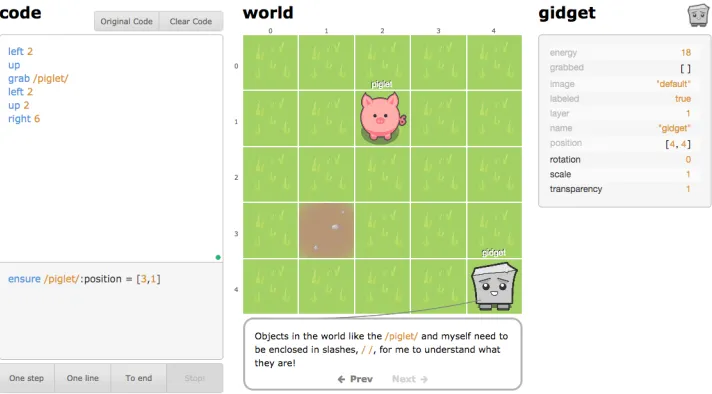
Lee et al.[Lee14]found that Gidget helps middle school students learn programming concepts, including conditionals and loops, within 5 hours. Similarly, another study conducted by Lee and Ko shows that students playing through the Gidget game learned similar concepts more efficiently than students learning from an online Python course[LK15a]. However, students who create their own puzzles in Gidget did not learn much, as indicated by the lack of learning gains from pre-test to post-test scores. This is one indication that the design of instructional support within a novice programming environment is critical in promoting learning.
2.1.4 Alice
Figure 2.2Gidget interface (Source: http://www.helpgidget.org/). Students write code to help a robot
called gidget accomplish certain tasks.
course is effective in improving students’ grades, retention rate, and attitudes towards computing in CS1, compared with students in a traditional CS1 class. Similarly, in a quasi-experimental classroom study with 30 undergraduate students, Biju found that introduce Alice along with C++is more effective in teaching programming than using C++alone, as indicated by significantly higher quiz scores from students who also learned Alice than students who just learned C++ [Bij13]. In addition to effectiveness, Alice has also been found to be motivating and engaging. In an 8-day summer camp study, Adams taught middle school students Alice, covering concepts including variables, functions, lists, loops, conditionals, and events[Ada07]. The survey results indicate that students enjoyed and felt highly motivated to create animations using Alice. Similarly, Bishop-Clark et al. investigate the effect of Alice in an introductory computing class and they found that students enjoyed programming more, were more confident in programming, and understood programming concepts better (i.e. had significant learning gain from conceptual pre-test to poest-test) after studying Alice[BC07].
2.1.5 Looking Glass
that the programming puzzles is more effective in teaching novices than a step-by-step tutorial [Har15], as I discuss in more detail in Section 2.3.4 of this Chapter.
Figure 2.3Looking Glass completion programming puzzle interface[Har15]. Students need to use the available commands (A) to write correct programs (B) to create correct animation (C). If students get stuck, they can get feedback (F) by comparing the correct animation with theirs (D).
2.1.6 Snap!and iSnap
Snap!is a block-based programming environment, which is used extensively in the Beauty and Joy of Computing (BJC) AP Computer Science Principles curriculum[Gar15]. Similar to other environments, students can construct code to control movement of one or more Sprites. Students can also create animations, games, simulations or drawings. A unique and advanced feature of Snap! is that it allows students to create their own blocks (functions and procedures).
iSnap[Pri17d]is an augmented version of Snap!with detailed logging and on-demand, data-driven hint. It logs student interactions with the system such as code edits and click events (e.g. clicking a button or selecting an item from a menu), and students’ complete code snapshots after each edit. The on-demand hint in iSnap are generated from previous students’ solutions based on the current student’s code[Pri16]. In iSnap, when students request help, if there are available hints near a block, a hint bubble will be shown near the block. After clicking the hint bubble, a popup window will be shown including students’ current code and a next-step suggested code highlighted in green (as shown in Figure 2.5) .
Except for suggesting adding new blocks, the iSnap also provides another type of hint such as deletion or modification. For example, in Figure 2.6, the student probably need to remove the magenta highlighted block, and put the yellow highlighted blocks in the correct position.
Figure 2.4Snap!interface (Source: https://snap.berkeley.edu/). Students can drag and drop blocks from
the code palette (left) into a scripting edit area (center) to program. The visual output will be shown on the stage (top-right).
Figure 2.6An example of hint suggestion in iSnap. When a student requests help, the magenta highlighted block needs to be removed, and the yellow highlighted blocks are not in the correct position and need to be moved.
over half (33/62) students request at least one hint, and nearly half (49.4%) of the hints were followed by students[Pri17d]and those hints did help student complete the assignment objectives. However, the pilot study also indicates that many students do not request hint at all. Another classroom study investigated this phenomenon and Price et al. found that the quality of first few hints is positively correlated with future hint use[Pri17c]. Even the hint is beneficial to students, they may deter to request help after receiving poor quality hints[Pri17c]. To further explore the hint quality, Price et al. found that the data-driven hints can suggest code edits almost as frequently as another human tutor, but it may also suggest many code edits that are not supported by human tutors[Pri17a]. Further, they evaluated the quality of data-driven hints with expert evaluation and found that the quality of hints generated by student data outperforms a single expert solution but not as good as a comprehensive set of expert solutions[Pri18]. Interestingly, with more student data, the hint quality may decrease. Except for investigating the quality of hints, to understand how and why student seek and avoid help, Price et al. did a qualitative study with 15 undergraduates and they found student have different expectations of human and computer tutors[Pri17b]. Their analysis suggests that computer tutor is more accessible and less threatening to students’ perceived independence than a human tutor. However, computer tutor is less trustworthy, interpretable, and perceptive than a human tutor[Pri17b].
this research.
2.2
Learning Theories
This section introduces the theoretical foundations of this work, including Cognitive Load Theory [Swe98; Swe11a], Cognitive Theory of Multimedia Learning[May02], and the Interactive-Constructive-Active-Passive (ICAP) framework for activity engagement[CW14].
2.2.1 Cognitive Load Theory
Cognitive Load Theory (CLT) proposes a framework to describe how mental effort, or “cognitive load,” is utilized when processing information and problem solving, and how the distribution and amount of this load impacts learning[Swe98; Swe11a; Swe11b]. CLT assumes humans have limited processing capacity (working memory) and an unlimited information store (long-term memory) for schemas. A schema can consist of any knowledge or information that can be learned and stored in long-term memory. As our knowledge expands and skills develops, we can construct more complex, high-level schemas by combining many low-level schemas. A schema can be treated as a single element in working memory, no matter how complex it is and how much information it contains. What differentiates novices and experts is the amount of sophisticated domain-specific schemas in long-term memory. Compared to novices, experts have much more complex schemas in long-term memory that can be retrieved as a single element, allowing them to do more complex work that novices are not able to do. To construct schemas, students need to finish an important step named schema automation, which requires a lot of practice. With enough practice, students can retrieve a schema unconsciously and thus reduce the working memory load. For example, experts may understand a chunk of code snippets without consciously paying attention to the details such as syntax, while novices may need to consciously process the type of variables and the function of each code structures. The goal of learning is to construct complex domain-specific schemas which can be retrieved automatically.
that the elements can be learned independently, such as learning the meaning of a word. Whilehigh element interactivitymeans the elements are highly interactive and cannot be learned in isolation. For example, when learning a for-loop in Java programming language, students need to process variables, arithmetic operators, assignments, and terminating conditions simultaneously. The level of interactivity is determined by the number of interacting elements which depends on both the nature of the information and knowledge of learners. The level of intrinsic load is assumed to be determined by the element interactivity of the learning material. The extraneous load depends on whether reducing the element interactivity would alter the learning content. The distinction between intrinsic load and extraneous load depends on “whether the element interactivity is essential to the task or whether it is a functional of instructional procedures.”[Swe10a]. Because the total cognitive load is determined by the intrinsic load and extraneous load, instructional designers are advised to design activities that minimize extraneous load to allow for germane load[Swe11c].
students lose learning due to the lack of time for processing it or linking it with new information. The collective working memory effect means that students learn better by studying collaboratively than studying alone.
Based on CLT, many instructional supports have been designed with the intent to improve learn-ing. Empirical studies have shown the effectiveness of applying CLT to the design of instructional supports to help novices learn complex cognitive tasks using worked examples[SC85; McL14]. My review of the literature showed that instructional text, worked examples, and erroneous examples were some of the more common support methods, and I discuss these in more detail in Section 2.3. I also discuss self-explanation prompts, which commonly accompany worked examples, and Parsons problems, an additional form of instructional support, which are specific to programming problems. Additionally, I introduce example-based feedback, which has elements both from worked examples and problem solving.
2.2.2 Cognitive Theory of Multimedia Learning
Figure 2.7A cognitive theory of multimedia learning[May02].
Based on the CTML, there are three types of cognitive demands, which can be mapped to the three kinds of cognitive load in CLT. Essential processing is similar to germane load, which re-quires learners to cognitively process the learning material. Incidental processing corresponds to extraneous load, which comes from the design or presentation of the learning material. Representa-tional holding is similar to intrinsic load, which indicates the cognitive process that learners use to hold the mental representation of the learning material in working memory over time. Due to the limited capacity of both the verbal and visual channels, the cognitive demands may overload these capacities and thus impede learning. Mayer proposed nine ways to reduce cognitive load in multimedia learning based on five cognitive overload scenarios[MM03]. The nine suggestions include off-loading, segmenting, pretaining, weeding, signaling, aligning, eliminating redundancy, synchronizing, and individualizing. Each suggestion leads to an instructional effect, which is de-scribed later. Off-loading suggests that when essential processing overload the visual channel, instruction designer to move some instructions from visual channel to auditory channel, which leads to the modality effect. Segmenting recommends instruction to be designed into segments and allow students to process each segment in their pace. Pretraining indicates having students to learn each component of instructions beforehand, which corresponds to the pretaining effect. Weeding suggests removing extraneous material that is not essential to learning, leading to the coherence effect. Signaling recommends adding cues to guide students attention on processing the learning material, which corresponds to the signaling effect. Aligning suggests to integrate pictures and words together to reduce incidental processing, which leads to the spatial contiguity effect. Eliminating redundancy advises avoiding presenting both on-screen and spoken text, leading to the redundancy effect. Synchronizing suggests presenting animation and narration at the same time, which corresponds to the temporal contiguity effect. Individualizing recommends to ensure learners are able to hold mental representations in memory, which maps to the spatial ability effect.
contiguity effect, coherence effect, modality effect, redundancy effect, pretraining effect, signaling effect, personalization effect, and spatial ability effect. The multimedia effect indicates that explain-ing the instructions in both words and pictures can improve students’ learnexplain-ing than presentexplain-ing the instructions via words alone. The spatial contiguity effect is the same as the split-attention effect in CLT, showing that students learn better from learning materials that integrate pictures and words together rather than from those that separate pictures and words. The temporal contiguity effect shows that students benefit more from the instructions that present animations and narration simultaneously rather than successively. The coherence effect indicates that students learn more deeply from a concise presentation of learning materials rather than from an expanded presentation that includes non-essential information for learning. The modality effect is the same as the CLT modality effect, which implies that students learn better from a learning material which presents the animation along with narration rather than along with on-screen text. The redundancy effect is the same as CLT redundancy effect, both show that students benefit more from narrated animations that do not have redundant on-screen text. The pretraining effect indicates that students learn better when they have been trained to learn each component of the learning material than those who do not have such training. The signaling effect occurs when students learn more deeply from instructions that have signal cues to guide students’ cognitive processing during learning rather than from instructions that have no signals. The personalization effect indicates that students learn better from multimedia instruction that conveys the text in personalized conversational style rather than a formal textbook-like style. The spatial ability effect means that students with high spatial ability learn better from well-designed instruction than those with low spatial ability.
This work takes suggestions (e.g. segmenting, signaling) from CTML while designing the instruc-tional support, as described in detail whenever the design of each instrucinstruc-tional support is presented later in this thesis.
2.2.3 The ICAP Framework
This section introduces the Interactive-Constructive-Active-Passive (ICAP) framework, shown in Figure 2.8. The ICAP framework defines cognitive engagement activities based on student overt be-haviors and categorizes the engagement activities into one of four modes: Interactive, Constructive, Active, and Passive[CW14].
Figure 2.8The four aspects of the ICAP Framework[CW14].
reading a text. The Constructive mode is defined as students generating additional outputs or products beyond the learning material, such as self-explaining the concepts, or taking notes in their own words while reading a text. The Interactive mode is defined as dialogues that meet two criteria: (1) that both partners are primarily in constructive mode, and (2) that both partners should take turns sufficiently. For example, a student and a partner read a text and discuss comprehension questions.
requires that both students are already in Constructive mode. The intermode boundary assumption means that the boundaries between two modes are not rigid. For example, problem solving is hard to classify and can fall on the boundary between two modes, depending on students’ cognitive processes.
The ICAP framework postulates four types of knowledge-change processes underlying each mode of engagement, and each process produces different changes in knowledge. The knowledge-change processes and their corresponding modes are: storing (Passive), integrating (Active), inferring (Constructive), and co-inferring (Interactive). Storing means students store the new information in an isolated way. Integrating indicates that students’ prior knowledge gets activated by the new information and the new information is integrated to prior knowledge while storing. Inferring means that not only are students’ prior knowledge and new information integrated, but also the integrated knowledge infers new knowledge. Co-inferring indicates that each student infers new knowledge from the integrated knowledge and also from the new information they gain by talking with partners. In addition to the assumption that each mode has a specific type of knowledge-change process, the knowledge-change process has three other assumptions including: distinct from learning process, same set of change process, and cognitive outcomes resulting from the knowledge-change process. The distinct from learning process assumption requires that the knowledge-knowledge-change processes to be distinct from the cognitive processes of learning of a specific instruction or task. The same set of knowledge-change process assumes that the same mode of engagement contains the same underlying knowledge-change processes, even though students’ overt behaviors may be different. The cognitive outcomes resulting from the knowledge-change process assumes that different knowledge-change processes lead to different cognitive outcomes such as being able to recall, apply, transfer, and co-create. Recall indicates that students can verbatim recall the knowledge in an identical context. For example, students can reuse the same procedure for solving identical problems. Apply means that students can apply the knowledge to similar but different contexts (i.e. similar problems or concepts). Transfer implies that students can apply the knowledge to a novel context or distant problem. Co-create indicates that students can invent new explanations, procedures, ideas, and products from successful dialogue with partners.
Both CLT and CTML assume that learners are cognitively engaged with the learning material (i.e. the active processing assumption in CTML[May02]and the assumption for germane load in CLT [Swe10a]). However, this assumption may not hold if the instructional support is not designed prop-erly to encourage learners to engage. Therefore, to further guide the instructional support design, this work integrates the ICAP framework and Cognitive Load Theory to derive a new framework, as described in Chapter 7.
2.3
Instructional Supports
In this work,I embed instructional supports in the novice programming environment instead of separating them from the environment. Prior studies suggest that interleaving worked examples and problem solving is more beneficial to students than only solving equivalent problems (as described in more detail below)[TR93]. Additionally, separating the instructional supports and the programming environment may introduce split-attention effect, which may impose extraneous cognitive load and impair the effect of instructional supports since students need to split their attention between multiple sources of information and need to mentally integrated them[Swe11a]. Furthermore, Sweller et al. argued that it should be beneficial to assist novices by scaffolding during problem solving[Swe11a]. It is also unlikely that students will leave the programming environment to attend to examples or other instructional supports and then to return to the environment.
2.3.1 Instructional Text
Instructional text, also called instructional explanation, provides basic knowledge to solve a prob-lem. For example, in Looking Glass [Har15], when a student first works in a tutorial condition, instructional text with videos of each step appear in a popup window to teach new code statement and guide the students to solve a puzzle. Similarly, Gidget[Lee13]provides an in-game guide and instructions to inform new players of the game mechanics. In an overview of the effectiveness of instructional text in worked examples, Witter and Renkl[WR10]found that instructional text along with worked examples are more beneficial for acquiring conceptual knowledge than procedural knowledge. According to the personalization effect in CTML, the instructional text are suggested to be designed in personalized conversational style.
2.3.2 Worked Examples
Empirical studies have shown that WEs are more beneficial to novice learners compared with traditional problem solving in learning algebra[SC85]. Sweller and Cooper found that students who were presented with WE problems later solved similar problems quicker and with fewer errors than students who solved the same problems themselves[SC85]. McLaren et al. compared four different instructional designs in a stoichiometry tutor. They found that students in the WE condition performed similarly in the posttest but were more efficient in finishing intervention problems and with less cognitive load, compared to students in other conditions including problem solving, erroneous worked examples, and tutored problem solving[McL14]. In an intelligent tutoring system for teaching and practicing propositional logic problems in discrete math, Liu et al.’s[Liu16]work shows that WEs are beneficial to undergraduate students in the first few problems they solve but less beneficial for later problems in the students’ homework set.
Alternatively, empirical studies have shown that “modular WEs” can also be designed to reduce intrinsiccognitive load. While WEs traditionally present the entire solution to a problem,modular WEs, “break down complex solutions into meaningful solution elements"[Ger06]. Gerjets et al. explored the effectiveness of modular examples in teaching probability and showed that modular WEs are more efficient and effective than traditional WEs and impose less intrinsic cognitive load on learners[Ger04].
2.3.2.1 Worked Examples in programming
Worked examples have also been studied in the domain of programming. Some studies suggest using worked examples in programming for teaching novices. Pirolli and Anderson investigated how three novices learn recursive functions and found that they relied heavily on examples while writing new programs[PA85]. Informed by the results from cognitive science and educational psychology, Caspersen and Bennedsen proposed a model which treats WEs as one of the fundamental principles of programming education[CB07]. Vihavainen et al. extended Caspersen and Bennedsen’s work and proposed a model, which also suggests using WEs in study materials and lectures[Vih11].
not apply to novice programming environment.
In novice programming environment, Ichinco et al. showed that novices struggle to use WEs to solve block-based programming problems[Ich17]. For example, they found that novices have difficulty in understanding the examples and finding relevant blocks to finish the programming task. Merriënboer and Croock found thatincompleteWEs, in which students are given part of a WE and asked to complete the rest, improved novice’s programming performance and post-test scores, compared with those who only had the WEs as a reference[VMDC92].
2.3.2.2 Erroneous Worked Examples
Erroneous worked examples are similar to worked examples but they include incorrect steps and require students to understand the information provided by the example, find the errors, and then fix them. Adams et al. explored the effect of erroneous worked examples in helping middle school students learn decimals via a computer-based tutor[Ada12]. They found no significant difference in students’ immediate posttest performance between those in the erroneous worked examples and problem solving condition, but students in the former condition performed better on a delayed posttest. Some researchers have explored the effect of combining worked examples and erroneous worked examples. Große and Renkl’s explored the efficacy of erroneous worked examples in helping students solve probability problems and they found that a mixture of worked examples and erroneous worked examples are more beneficial to students who have prior knowledge, compared to worked examples only[GR07]. In programming, erroneous worked examples are similar to debugging almost-correct code with small errors. The potential effectiveness of Parson’s Programming Puzzles[PH06]and the success of Gidget[Lee13]shows that debugging may be a good way for teaching novice programming.
2.3.3 Self Explanation
prompts along with worked examples in Snap!to guide students to reflect on example code. In this work, Chapter 3 introduces the design and evaluation of instructional text, worked examples, and erroneous worked examples in BOTS. Chapter 4 presents the design and evaluation of incomplete worked examples along with self-explanation prompts in Snap!.
2.3.4 Parsons Problems
Based on Cognitive Load Theory, instructional designers are advised to design activities that mini-mize extraneous load, extra elements that distract from the important learning material to allow for germane load[Swe98]. Merriënboer and Croock found that incomplete computer programs, in which students are given part of a correct program and asked to complete the rest, improved novice’s programming performance and post-test scores, compared with those who write code with examples as a reference[VMDC92].
Parsons problems are code-completion problems, in which students re-arrange mixed up code blocks into the correct order. Ericson et al. argued that Parsons problems have a more constrained problem space, and would impose lower cognitive load than programming from scratch[Eri17; Eri18]. In their original implementation, Parsons and Haden presented students with problem descriptions and a set of drag-and-drop code fragments[PH06]. Each code fragment comprises single or multiple lines and the code fragments may have incorrect code. Students select the correct code segments and put them in the right order to solve a puzzle. Parson and Haden argued that Parsons problems are more engaging than writing code, and their initial evaluation showed that the majority of students (14/17) thought this kind of problem is useful or very useful for learning Pascal [PH06]. Fabic et al. found Parsons problems are only effective for novices, and they would be more effective for supporting learning with self-explanation prompts[Fab17]. Some studies have shown that Parsons problems are engaging[Gar07; Eri15; Eri16]. Garner’s semester-long study with eight students revealed that students were generally engaged with Parsons problems[Gar07]. Ericson et al. integrated Parsons problems into an ebook and found that Parsons problems were engaging, as evidenced by more students attempted Parsons problems than multiple choice questions[Eri15], and were more frequently mentioned by teachers as being valuable than other questions[Eri16].
incorrect code with syntax or semantic errors, designed to highlight common errors that novices make. For example, a distractor might use an undefined variable called ‘Total’ but the defined variable is ‘total’. Parsons problems are harder with distractors[Gar07; Den08; Har16]. Parson and Haden’s pilot study showing students perceived Parsons problem with distractors are helpful[PH06]. However, Harms et al. found that Parsons problems with distractors decrease learning efficiency compared to Parsons problem without distractors in a block-based programming environment [Har16]. Therefore, I did not incorporate any distractor in Parsons problems used in this study.
Moreover, Parsons problems have been studied as assessments. Studies have shown that solv-ing Parsons problems correlates with writsolv-ing code[Den08; CH17]. Denny el al. explored Parsons problems as CS1 exam questions and they found a moderate correlation (ρ=0.53) between scores on Parsons problems and writing code[Den08]. Similarly, Cheng and Harrington found a strong correlation (ρ=0.65) between the students’ score on the writing code problem and the Parsons problems[CH17]. Morrison et al.’s study shows that the Parsons problems can be more sensitive for assessing students’ learning gains than writing code[Mor16]. They found that Parsons problems, which allows students to show their understanding of the meaning and sequence of programs, can measure students’ knowledge that cannot be measured by writing code alone.
While it is hypothesized that solving Parsons problems is more efficient and effective than traditional problem solving, only a few studies have explored the effectiveness for Parsons problem compared to writing code in teaching programming[Eri17; Eri18; Har15]. Ericson et al. did a study that interleaved worked examples with Parsons problems, writing equivalent code, or fixing buggy code separately, and they found that when interleaving with worked examples, Parsons problems are more efficient in helping novices learn programming than writing equivalent code or fixing buggy code[Eri17]. Compared with writing code or fixing buggy code, Parsons problems save students time by providing the code and limiting students’ solution space. Similarly, Harms et al. showed that Parsons problems are more efficient and effective in helping middle school students learn block-based programming independently than a tutorial[Har15]. The tutorial provides students video and textual instructions, which requires students to read and follow the instructions by finding and putting the exact code blocks into the programming area. Then students can run the code and see the animation generated by their code. In Harms et al.’s study, students using Parsons problems spent 23% less time on training and performed 26% better on transfer tasks, while they had higher cognitive load than students in the tutorial condition[Har15].
compared to writing blocks-based code.
2.3.5 Example-based Feedback
While instructional support can provide helpful alternatives to traditional problem solving, pro-gramming practice problems still comprise the majority of student work in many propro-gramming classes. Therefore, another challenge is to adapt instructional supports for use while students are programming. Example-based feedback builds on the idea of a worked example, showing a correct piece of code to help students learn to program[Gro14b], but it is shown during problem solving, similar to a high-level on-demand hint, and may contain only a partial solution. As Gross et al. argue, showing relevant partial solution could impose less cognitive load to novices than showing a full solution[Gro14b]. Additionally, the partial solution may make it easier to present than an entire solution for complex programming problems. Research has shown that example code can improve student code solutions[Gro14b; HB11]. The international survey conducted by Lahtinen et al. also shows that both students and teachers think example programs are the most helpful materials to help learn programming[Lah05]. Additionally, Keuning et al. argue for the need for such feedback in their review on automated feedback generation for programming, saying “the very low percentage of tools that give code examples based on the student’s actions is unfortunate, because studying examples has proven to be an effective way of learning”[Keu18]. However, existing example-based feedback systems may rely on a library of expert examples[HB17; IK15; Coe17], which can be costly to maintain, as instructors are unlikely to create new examples[HB11]. Additionally, the example code usually shows a related problem[HB17]that requires students to transfer knowledge to solve their current problem, which may be challenging for weaker students who need more help.
Brusilovsky proposed a system called WebEx[Bru01], which can provide programming example code with explanations for students. WebEx allows teachers to add explanations for each line of example code and students can select to view these available explanations while learning from the example code. Later Yudelson and Brusilovsky improved the WebEx by adding adaptive navigation features, and they evaluated the system in a classroom setting and they found the system increases student motivation to learn non-mandatory materials[YB05]. Hsiao et al. built a new system called AnnotEx, which is based on the WebEx and allows students to annotate code examples line by line [HB11]. They found by incorporating community feedback into the system, weaker students will be benefit from the peer reviews, as evidenced by increase in quality of annotations[HB11]. However, those example-based feedback systems may rely on a library of expert examples[HB17; IK15; Coe17], which can be costly to maintain, as instructors are unlikely to create new examples[HB11].
they may have trouble in finding the code blocks or having misconception about using the code blocks correctly. Recently, they did a follow-up study confirmed that novices may have trouble understanding the example, finding code blocks or having misconceptions in using the example code in block-based programming environment[Ich17].
Gross et al. proposed a data-driven algorithm to provide example-based feedback based on structured solution spaces and their pilot study shows the feedback is helpful to students and can improve students’ code overtime[Gro14a]. In another work, they proposed different strategies to select example-based feedback from either expert-authored examples or student solutions[Gro14b]. They found the examples derived from expert solutions were better than examples derived from student solutions. More specifically, compared to those derived from student solutions, students rated expert-authored examples as more helpful and made more solution improvements using examples derived from expert-authored solutions.
CHAPTER
3
STUDY 1 : INSTRUCTIONAL TEXT,
WORKED EXAMPLES, AND ERRONEOUS
WORKED EXAMPLES IN NOVICE
PROGRAMMING ENVIRONMENT
This chapter was adapted from: Zhi, R. et al. “Exploring Instructional Support Design in an Educa-tional Game for K-12 Computing Education.”Proceedings of the 49th ACM Technical Symposium on Computer Science Education.2018.[Zhi18a]
The original text has been modified as follows: the Related Work section has been removed and integrated into Section 2.3 of Chapter 2, and the section describing BOTS has been removed, since this is covered in Section 2.1.2 of Chapter 2. Some design descriptions and study results are updated to support discussion of the ECLEP framework later in Chapter 7.
Abstract
Instructional supports (Supports) help students learn more effectively in intelligent tutoring systems and gamified educational environments. However, the implementation and success of Supports vary by environment. We explored Support design in an educational programming game, BOTS, implementing three different strategies: instructional text (Text), worked examples (Examples) and buggy code (Bugs). These strategies are adapted from promising Supports in other domains and motivated by established educational theory. We evaluated our Supports through a pilot study with middle school students. Our results suggest Bugs may be a promising strategy, as demonstrated by the lower completion time and solution code length in assessment puzzles. We end reflecting on our design decisions providing recommendations for future iterations. Our motivations, design process, and study’s results provide insight into the design of Supports for programming games.
3.1
Introduction
Educational games are an effective way to engage students in learning to program. Gee argues that games can be used to teach skills and enhance learning[Gee03], and empirical evidence shows that educational games can teach programming concepts[LK15b], and improve motivation and promote knowledge in topics like computer memory[Pap09]. However, as Clark and colleagues note, educational games research must move beyond efficacy studies to “explor[e]how theoretically driven design decisions influence situated learning outcomes”[Cla16]. In this work, we explore how Cognitive Load Theory[Swe98]can inform the design of instructional support strategies for a programming game.
Sweller’s Cognitive Load Theory (CLT)[Swe98]suggests that when a student’s cognitive resources are overloaded, learning becomes difficult. To address this, educators create instructional supports (Supports): pedagogical resources and activities that scaffold the learning process and help reduce cognitive load[Paa03]. Many educational games use tutorials with instructional text to help players learn the core game mechanics. However, in other educational domains, researchers have designed effective alternatives. For instance, a worked example shows a solution and explains how to solve a problem step-by-step. Prior work shows that worked examples improve students’ learning efficiency in a variety of domains[SC85; McL14]. Similarly, erroneous worked examples show problems with minor errors in the solution and require students to fix these problems[Ada12].
performance under each Support by their puzzle completion time and solution code length. Based on previous results in comparing Supports[McL14], we hypothesize that (1) our Examples condition will complete the learning activities faster and (2) there will be no significant difference in final performance evaluations between conditions. We reflect on the results and our design decisions and recommend future design directions.
3.2
Methods
We designed three instructional supports (Supports) for a programming game called BOTS: in-structional text (Text), worked examples (Examples), and buggy code (Bugs). We based our designs on how each Support was implemented in other domains, and adapted it to work in BOTS. We developed a series of levels and a change to our loop command to teach loops and functions using our Supports.
BOTS has three types of commands: action commands that control the movement of the robot similar to other LOGO-like environments, control commands like conditions and loops, and function commands that allow players to define custom functions. In previous version of BOTS, a loop was similar to the for-loop in Java. Players had to set a variable, create a condition check, and increase the variable by some number to form a loop, each mapping to a different command. This design requires students to understand all three commands and their interactions. Liu et al. found that students struggle to use loops in this implementation of BOTS[Liu17], which may be due to the high cognitive load induced by these separate loop components. We designed a new loop command, “Repeat Times”, which only uses one command. Students can input the amount of times that they want to run the body of the loop without needing to understand variables or incrementing them.
3.2.1 Instructional Support Design
Table 3.1Interfaces for the Instructional Supports
Instructional Text (Text) Worked Examples (Examples) Buggy Code (Bugs)
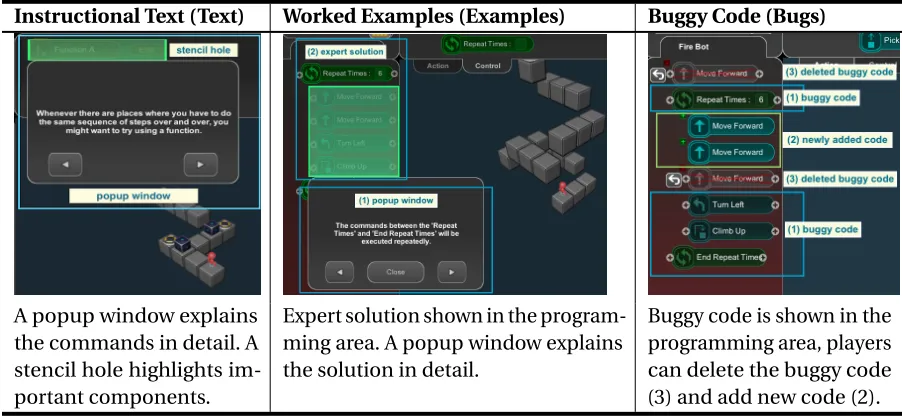
A popup window explains the commands in detail. A stencil hole highlights im-portant components.
Expert solution shown in the program-ming area. A popup window explains the solution in detail.
Buggy code is shown in the programming area, players can delete the buggy code (3) and add new code (2).
follow the instructions and apply the commands introduced to solve the puzzle. While the Text condition used these messages to convey all instructional content, all three conditions used them to explain instructions at the start of a level. In both the Examples and Bugs conditions, the explanatory text explains the game mechanics and covers the same material (explanation for the loop and function commands) as in the Text condition. As each of the three conditions use explanatory text, we treat the Text condition as our control.
Examples, one of the most common Supports, teach students to solve a problem by presenting the solution. Some previous work suggests interweaving Examples with traditional problem solving for best results[SC85; Paa92], though more recent work suggests that Examples and Examples with problem solving may be equally effective[VG11]. We chose to explore the effects of Examples only, without interleaved problem solving. In the Examples condition, we give students an expert solution, which is an optimal program to solve the puzzle. Similar to the Text interface, we used a popup window with Stencils to guide students and explain the optimal solution. The Examples program is visible in the programming area and is not editable. The system walks through the code explaining it at a high level. After running the code, a question related to the puzzle is presented (e.g. “Can you write down how many boxes I need to pick up in this level?”). We include these questions to check whether players understand the Example, since if no questions are presented, many students may skip through the Example without paying attention[Bak08].
them to fix the code to complete the puzzle. A previous study shows that students enjoy debugging in BOTS[Liu17]. In the Bugs condition, code with errors will show up in the programming area with a window explaining the debugging mechanics and the puzzle’s code. Players can debug the program using five actions: delete buggy code (Table 3.1-Bugs-(3)), undelete buggy code, add new code (Table 3.1-Bugs-(2)), remove new code, and run code. The new code inserted by students is highlighted (Table 3.1-Bugs-(2)) to differentiate it from the original code. When the student deletes an original command, it is shown as being crossed out, but if a student removes some of their own new commands, those disappear. The design distinguishes the students’ code from the original code, which makes it easier for them to see the changes they have made. We intended to help students focus on solving the problem in the original buggy code rather than building a new solution themselves.
3.2.2 Content Design
We designed 4 sets of puzzles: 4 tutorial, 1 pretest, 5 experimental and 6 assessment puzzles (APs). The tutorial puzzles teach students the basic game mechanics of BOTS. The pretest puzzle evaluates students’ prior knowledge of loops or functions. Experimental puzzles teach loops and functions using one of the three Supports. The final APs are similar to the experimental puzzles, and test player’s ability to use loops and functions without Supports.
We designed 4 tutorial puzzles that teach players the basic game mechanics for moving the robot and interacting with blocks. We designed these puzzles using suggestions from prior work on building tutorials for learning systems by Shannon et al.[Sha13]and Mayer and Moreno[MM03]. Specifically, we used the segmenting suggestion from Mayer and Moreno[MM03], as described in Section 2.2.2 of Chapter 2. We did this through segmenting the concepts and disabling unnecessary commands (thereby reducing player’s extraneous cognitive load) and teaching one or two concepts (in this case, commands) at a time. We also designed puzzles that review commands learned in previous puzzles and praised effort on puzzle completion. We also adapted the Stencil technique into the tutorial[KP05].
We designed 5 experimental puzzles to teach loops, functions and their combinations. All participants were given the same puzzles with a different Support (Text, Examples, or Bugs). Table 3.2 shows one experimental puzzle with the Bugs Support.
To teach loops and functions, we included multiple types of errors in the Bugs condition. This includes placing action commands which are suppose to be in the loop body before the loop, adding extra action commands within the function command, and removing necessary action commands.
![Figure 2.3 Looking Glass completion programming puzzle interface [Har15]. Students need to use theavailable commands (A) to write correct programs (B) to create correct animation (C)](https://thumb-us.123doks.com/thumbv2/123dok_us/1325285.1165434/24.612.136.490.135.276/looking-completion-programming-interface-students-theavailable-programs-animation.webp)
![Figure 2.7 A cognitive theory of multimedia learning [May02].](https://thumb-us.123doks.com/thumbv2/123dok_us/1325285.1165434/30.612.109.519.77.189/figure-cognitive-theory-multimedia-learning-may.webp)
![Figure 2.8 The four aspects of the ICAP Framework [CW14].](https://thumb-us.123doks.com/thumbv2/123dok_us/1325285.1165434/32.612.150.481.81.256/figure-aspects-icap-framework-cw.webp)