Java 2EE and
XML Development
KURT A. GABRICK
DAVID B. WEISS
Special Sales Department Manning Publications Co.
209 Bruce Park Avenue Fax: (203) 661-9018 Greenwich, CT 06830 email: [email protected]
©2002 by Manning Publications Co. All rights reserved.
No part of this publication may be reproduced, stored in a retrieval system, or transmitted, in any form or by means electronic, mechanical, photocopying, or otherwise, without prior written permission of the publisher.
Many of the designations used by manufacturers and sellers to distinguish their products are claimed as trademarks. Where those designations appear in the book, and Manning Publications was aware of a trademark claim, the designations have been printed in initial caps or all caps.
Recognizing the importance of preserving what has been written, it is Manning’s policy to have the books they publish printed on acid-free paper, and we exert our best efforts to that end.
Manning Publications Co. Copyeditor: Maarten Reilingh 209 Bruce Park Avenue Typesetter: Dottie Marsico Greenwich, CT 06830 Cover designer: Leslie Haimes
ISBN 1-930110-30-8
Printed in the United States of America
KAG
To My Family—
You have given me an unlimited amount of support and strength. Thank you foreverything.
vii preface xi
acknowledgments xii about this book xiii about the authors xvii
about the cover illustration xix author online xxi
1
Getting started
1
1.1 Distributed systems overview 2
Distributed systems concepts 3 ■ N-tier application architecture 12 ■ Overcoming common
challenges 14
1.2 The J2EE development process 22 J2EE and development methodologies 22 J2EE development tools 24
1.3 Testing and deployment in J2EE 29 Testing J2EE applications 29 Deploying J2EE applications 33
2
XML and Java
37
2.1 XML and its uses 38XML validation technologies 41 ■ XML parsing technologies 44 ■ XML translation technologies 46 Messaging technologies 48 ■ Data manipulation and retrieval technologies 51 ■ Data storage technologies 54
2.2 The Java APIs for XML 55
JAXP 57 ■ JDOM 66 ■ JAXB 69
Long Term JavaBeans Persistence 74
JAXM 76 ■ JAX-RPC 77 ■ JAXR 78
2.3 Summary 78
3
Application development
81
3.1 XML component interfaces 82
Using value objects 84 ■ Implementing XML value objects 87 ■ When not to use XML interfaces 95 3.2 XML and persistent data 96
Querying XML data 97 ■ Storing XML data 103 When not to use XML persistence 110
3.3 Summary 110
4
Application integration
113
4.1 Integrating J2EE applications 114Traditional approaches to systems integration 114 XML-based systems integration 122
4.2 A web services scenario 125 4.3 J2EE and SOAP 125
4.4 Building web services in J2EE 138
What is a web service? 139 ■ Providing web services in J2EE 140 ■ Implementing our example web
services 142 ■ Consuming web services in J2EE 153 J2EE web services and Microsoft .NET 153
4.5 Summary 154
5
User interface development
157
5.1 Creating a thin-client user interface 158
Serving different types of devices 159 ■ Serving multiple locales 159 ■ An example to work through 160
5.2 The pure J2EE approach 162 The J2EE presentation tool kit 163 Issues in J2EE MVC architecture 164 Building our example in J2EE 166 Analyzing the results 177
5.3 The J2EE/XML approach 177
Adding XSLT to the web process flow 177 Analyzing the results 185
Extending to binary formats 186 5.4 XML web publishing frameworks 195
Introduction to Cocoon architecture 196 Using Cocoon to render the watch list page 197 Analyzing the results 200
5.5 A word about client-side XSLT 201 5.6 Summary 201
6
Case study
203
6.3 The analysis phase 207
Services and data layer analysis 207 ■ Data storage analysis 208 ■ Other necessary components 208 6.4 The design phase 210
Designing the application logic layer 210 Designing the user interface 212
6.5 Validating our design 213 6.6 The implementation phase 215
Building the controller servlet 215 ■ Building the ApplicationMenu component 217 ■ Building the ComponentLocator 218 ■ Building the
BugAccessorBean 221 ■ Building the XSLTFilter 223
6.7 Structuring application data 224 6.8 The Amaya web service 225 6.9 Running the application 229
Installation 229 ■ Viewing the main menu 230 Viewing common system problems 231 ■ Viewing and updating the Amaya problem list 231 ■ Inspecting the web services SOAP messages 232
6.10 Summary 233
appendix A Design patterns for J2EE and XML 235 appendix B Distributed application security 243 appendix C The Ant build tool 249
xi
Enterprise Java development and XML are two of the hottest topics in technol-ogy today. Both riddled with acronyms and buzzwords, they are also two of the most poorly understood and abused technologies around. The potential to build platform-neutral, vendor-independent systems has created a flurry of develop-ment and a host of new standards. It seems the list of APIs and specifications grows longer and more complex every day.
In early 2000, we decided the time was right to write a book about using XML technology in enterprise Java applications. It occurred to us that many books had been written on either XML or J2EE, but none of them really addressed the subjects together. We also recognized a failing in the content of existing books, which focus heavily on API details and “Hello, world!” examples while skirting the more complex issues of architecture, design tradeoffs, and effective techniques for developing distributed systems.
xii
There are a number of people without whom this book would not be possible. We specifically acknowledge:
Our clients past and present, for entrusting their enterprise development efforts to our care and affording us the opportunity to road test the technologies and techniques discussed in this book. There is no substitute for experience in software development, and we thank you for the opportunity.
The developers of the technologies and standards covered in this book, for creating a wealth of patterns and tools to make distributed application develop-ment and integration easier for all of us. We especially acknowledge those devel-opers who dedicate their time and energy to open source development efforts that benefit us all.
Our publisher, Marjan Bace, for giving us the opportunity to write a unique book on a complex subject, and our editors and reviewers, for their guidance and encouragement along the way. The editorial and production staff at Man-ning included Ted Kennedy, Alex Garrett, Maarten Reilingh, Syd Brown, Dot-tie Marisco, and Mary Piergies. Our reviewers included Randy Akl, Russell Gold, Owen Green, Berndt Hamboeck, Carson Hager, Lee Harding, Allen Hogan, Evan Ireland, Andrew Stevens, David Tillotson, and Jason Weiss. Spe-cial thanks to Scott Johnston who reviewed the book for technical accuracy shortly before it went to press.
xiii
This book is about building better applications with Java 2, Enterprise Edition (J2EE) and XML technology. It teaches you how, where, and when to use XML in your J2EE system. It categorizes and explains many recent Java and XML technology developments and suggests ways in which a J2EE application can uti-lize them.
J2EE and XML are each substantial technologies in their own right. Applica-tions that use them together can realize the benefits of both. J2EE enables the creation of robust and flexible application logic. XML enables powerful data storage, manipulation, and messaging. A J2EE application that makes proper use of XML is one of the most robust component-based systems that you can build.
Beyond identifying areas where XML can play a role in a J2EE application, this book also discusses important tradeoffs to be considered when choosing to build a J2EE application with XML over pure J2EE. The potential drawbacks of using each proposed XML technology are compared with its benefits, allowing you to make an informed decision about its use.
You probably already own a book or two on the topics of J2EE and XML. There are numerous books available to teach you the low level intricacies of J2EE development. There are at least as many on XML and related technologies. There are even a few on the subject of using Java and XML together. Why then should you read this book?
reference on XML either. It is a targeted guide that builds on your existing knowledge of J2EE application development and shows you how to enhance your applications with XML. It will help you build distributed systems that are more robust, manageable, and secure.
The ultimate goal of this book is to arm you with relevant knowledge about the state of J2EE and XML technology and the ways in which they are best put to use. By the end of the book, you should have an excellent idea about which XML technologies you want to use, how you plan to use them, and where to go to learn more about them.
Who should read this book
This is an intermediate-level book and is not a primer on Java, XML, or J2EE. Its primary audience is the distributed application developer. It assumes that you have some practical experience with J2EE and an understanding of XML at the conceptual level. Some basic concepts are briefly introduced as context for detailed discussions, but this book should by no means be your first exposure to either J2EE development or XML. The focus of this book is on the identifica-tion, classificaidentifica-tion, and practical use of important XML-related Java technolo-gies. Getting the most out of this book therefore requires some prior knowledge of J2EE and XML basics.
If you are an application development professional looking for proven approaches to solving complicated problems with J2EE and XML technology, this book is for you. It is a guide to help you make better decisions when design-ing and builddesign-ing your applications. It presents technical alternatives, provides examples of their implementation, and explains the tradeoffs between them. Dis-cussions are limited to the most relevant topics in each area to maximize the ben-efits of reading the book and managing its overall length.
How this book is organized
J2EE/XML application. The case study illustrates the general approach to J2EE/XML development problems, identifies critical analysis and design deci-sions, and discusses the benefits and drawbacks associated with those decisions.
Chapter 1: Getting started
This first chapter introduces important concepts, tools, and techniques for build-ing J2EE and XML applications. As a distributed application developer, you face a broad range of challenges as you begin each new project. These challenges range from architectural and design issues to tool selection and development process management.
To overcome these challenges, you require both an appreciation for distrib-uted systems development issues and knowledge of specific tools you can use in a J2EE environment. This chapter summarizes the common challenges to be over-come at each stage of a J2EE and XML project and describes the tools and tech-niques you need to be successful.
Chapter 2: The Java APIs for XML
In recent months, there has been a flurry of Java community development activ-ity in the area of XML. The result has been the creation of a complex set of closely related XML APIs, each of which is either in specification or develop-ment. These APIs include the JAX family, as well as other popular emerging stan-dards like JDOM.
This chapter untangles the web of Java APIs for XML, identifying and classi-fying each in terms of its functionality, intended use, and maturity. Where possi-ble, we provide usage examples for each new API and describe how it might be best used in your J2EE system. We also identify areas in which the APIs overlap and suggest which ones are likely to be combined or eliminated in the future. Subsequent chapters build upon your understanding of these APIs by providing more specific examples of their implementation.
Chapter 3: Application development
Making changes to J2EE application logic and data structures can be costly and time-consuming. Initial development of a flexible and robust application logic layer is therefore critical to the longevity of your system. This chapter demon-strates how XML technology can help you achieve that goal.
Technologies discussed include JAXB, JDOM, XQuery, PDOM, and XQL. Design tradeoffs are considered, and the maturity of each technology is examined.
Chapter 4: Application integration
A J2EE application that is not integrated with its environment cannot do much. This chapter is about integrating your J2EE application with other applications and services using the Java APIs for XML. Proven approaches to J2EE systems integration and architectural patterns are presented. Traditional J2EE technical approaches to systems integration are compared to the new, XML-based approach. This chapter details the creation and consumption of web services in J2EE, including discussions and examples of SOAP, UDDI, and WSDL. Producing, registering, and consuming web services in J2EE is demonstrated using the Java APIs for XML. This chapter also discusses possible integration issues with non-Java web service implementations, specifically Microsoft .NET.
Chapter 5: User interface development
This chapter discusses user interface development for a J2EE and XML applica-tion. The pure J2EE approach to user interface development has a number of limitations, including the mixture of presentation elements with application code and the inability to centrally manage application views in some circumstances. Recent developments in XML technology, including XSLT processing and web publishing frameworks have the potential to overcome these limitations.
In this chapter, we describe these two alternative XML presentation layer architectures and compare them to the pure J2EE approach. Detailed examples using XSLT and web publishing frameworks demonstrate how you might imple-ment a multidevice, multilingual presentation layer for your J2EE application using XML technology to dynamically create user interfaces in various formats.
Chapter 6: Case study
This final chapter illustrates the use of the tools and techniques presented in pre-vious chapters in the context of a simple, yet complete, case study. By providing an end-to-end example of a J2EE and XML solution, we further illustrate the feasibility and desirability of using XML in J2EE solutions.
You are guided through a brief development cycle from requirements and analysis to design and implementation. Along the way, the challenges faced are highlighted, and reasons behind key design decisions are articulated.
At the back
book. Appendix B contains a tutorial on distributed system security concepts you should know before developing any J2EE solution. Appendix C provides a tuto-rial on the popular Ant build tool from the Apache Software Foundation.
Also at the back, you will find a helpful resources section, containing recom-mended books and web sites for learning more about the tools and standards dis-cussed throughout the book.
Source code
The source code for all examples called out as listings in this book is freely avail-able from the publisher’s web site, http://www.manning.com/gabrick. The complete source code for the case study in chapter 6 is also available at the same address. Should errors be discovered after publication, all code updates will be made available via the Web.
Code conventions
Courier typeface is used to denote code, filenames, variables, Java classes, and
other identifiers. BoldCourier typeface is used in some code listings to highlight important sections.
Code annotations accompany many segments of code. Certain annotations are marked with chronologically ordered bullets such as
B
. These annotationsxviii
KURT GABRICK is a software architect and developer specializing in server-side Java technologies and distributed systems. He has designed and developed numerous systems using J2EE and XML technology for a diverse group of For-tune 1000 clients. Kurt has led various engineering efforts for software develop-ment and professional services firms. He currently resides in the Phoenix, AZ area, where he continues to code for fun and profit.
xix
The figure on the cover of Java 2EE and XML Development is a man from a vil-lage in Abyssinia, today called Ethiopia. The illustration is taken from a Spanish compendium of regional dress customs first published in Madrid in 1799. The book’s title page states:
Coleccion general de los Trages que usan actualmente todas las Nacionas del Mundo desubier to, dibujados y grabados con la mayor exactitud por R.M.V.A.R. Obra muy util y en special para los que tienen la del viajero uni-versal
Which we translate, as literally as possible, thus:
General collection of costumes currently used in the nations of the known world, designed and printed with great exactitude by R.M.V.A.R. This work is very useful especially for those who hold themselves to be universal travelers
Dress codes have changed since then and the diversity by region, so rich at the time, has faded away. It is now often hard to tell the inhabitant of one conti-nent from another. Perhaps, trying to view it optimistically, we have traded a cul-tural and visual diversity for a more varied personal life. Or a more varied and interesting intellectual and technical life.
xxi
One of the advantages of buying a book published by Manning, is that you can participate in the Author Online forum. So, if you have a moment to spare, please visit us at http://www.manning.com/gabrick. There you can download the book’s source code, communicate with the author, vent your criticism, share your ideas, or just hang out.
Manning’s commitment to its readers is to provide a venue where a meaning-ful dialog between individual readers and between readers and the author can take place. It is not a commitment to any specific amount of participation on the part of the author, whose contribution to the AO remains voluntary (and unpaid). We suggest you try asking the author some challenging questions lest his interest stray!
1
This chapter
■ Describes important distributed systems
concepts
■ Discusses J2EE and formal development
methodologies
■ Identifies J2EE development tools and best
practices
■ Recommends J2EE testing and deployment
This introductory chapter covers important concepts, tools, and techniques for building J2EE and XML applications. As a distributed application devel-oper, you face a broad range of challenges as you begin each new project. These challenges range from architectural and design issues to tool selection and management of the development process. To overcome these challenges, you require both an appreciation for distributed systems development issues and knowledge of the specific tools that you can use in J2EE development.
Section 1.1 describes the aspects of distributed application development that you need to understand to make effective use of J2EE and XML. In that section we present the n-tier application architecture under which most enter-prise Java systems are constructed today. We define the logical layers of these applications and describe the types of components and challenges associated with each layer. We also identify the specific types of challenges you are likely to face when designing your application and present alternatives for dealing with those challenges.
In section 1.1, we also cover the often-misunderstood area of distributed application security. Without the ability to secure your distributed application properly, its usefulness can quickly be negated. We summarize your options for securing communication channels and application components in this section. Sections 1.2 and 1.3 describe the tools and techniques you need to have success with the J2EE platform. These range from defining an overall develop-ment process to choosing your design, developdevelop-ment, and configuration man-agement tools. We suggest popular open source tools, which are available for many aspects of development. We also suggest strategies for testing and deploying your J2EE and XML application.
1.1
Distributed systems overview
DEFINITION A distributed computing system is a collection of independent com-puter processes that communicate with one another by passing messages.
By the definition, every application or service you develop using J2EE and
XML will be part of a distributed system. To build the best J2EE and XML
solutions possible, understanding general distributed system concepts and design challenges is essential.
summarizing an entire branch of computer science in only a few pages, we strongly recommend the resources listed in the bibliography as further reading.
1.1.1 Distributed systems concepts
In the days of mainframe computing, processing was a centralized, closed, and expensive endeavor. Information was processed by large, costly machines and manipulated from the dreaded green-screen terminals that gave new meaning to the word dumb. Corporate, scientific, and governmental information was locked away in individual computing silos and replicated in various forms across all kinds of computer systems.
Mainframe computing is not all bad. The centralized model has enabled the construction of many high-performance, mission-critical applications. Those applications have usually been much easier to understand and implement than their distributed equivalents. They typically contain a single security domain to monitor, do not require a shared or public network to operate, and make any system crashes immediately obvious to both users and administrators.
Conversely, distributed applications are far more difficult to implement, manage, and secure. They exist for two primary reasons: to reduce operating costs and to enable information exchange. Distributed systems allow all types of organizations to share resources, integrate processes, and find new ways to generate revenue and reduce costs. For example, a supply chain application can automate and standardize the relationship between several organizations, thereby reducing interaction costs, decreasing processing time, and increasing throughput capacity.
In economic terms, distributed systems allow companies to achieve greater economies of scale and focus division of labor across industries. In business terms, companies can integrate entire supply chains and share valuable infor-mation with business partners at vastly reduced costs. In scientific terms, researchers can leverage one another’s experience and collaborate like never before. And in technical terms, you have a lot of work to do.
distributed system therefore requires a methodical approach and appreciation of the challenges to be overcome along the way.
Distributed system components
At the highest level, a distributed system consists of four types of components, as depicted in figure 1.1.
■ Platforms—Platforms are the individual computing environments in
which programs execute. These can be heterogeneous hardware compo-nents, operating systems, and device drivers that system architects and developers must integrate into a seamless system.
■ Processes—Processes are independent software components that
collabo-rate with one another over channels. The terms client, server, peer, and service are often substituted for the term process, and each has a more specific meaning, as we discuss later in this section. Process can mean different things depending on the granularity with which one uses it. A process can represent an individual software object with a remote inter-face, a client or server that implements a particular protocol, some pro-prietary business application, or many other things.
■ Communication channels—Communication channels are pipelines between
processes that enable them to interact. The term usually refers to the com-puter network(s) that logically connect processes and physically connect platforms. Communication channels have both physical and logical aspects that are accounted for in any distributed system design.
■ Messages—Messages are the data sent from one process to another over
a communication channel. How these data flow between processes in a
Process A Process B
Platform A Platform B
Messages
Communication Channel
reliable and secure manner is a question that requires much thought in the analysis and design stages of your development cycle. XML can facil-itate defining both the semantics and processing of messages between systems, as we discuss in detail throughout the book.
The four types of distributed system components identified above are typically arranged in one of three distinct architectures, based on the ways in which individ-ual processes interact with one another. These models are summarized in table 1.1.
DEFINITION Distributed system architecture is the arrangement of the software, hardware, and networking components of a distributed system in the most optimal manner possible. Creating distributed system ar-chitecture is a partly-science, mostly-art activity.
J2EE supports all the architectural models listed in table 1.1 to some extent, but is heavily focused on client/server architectures. Let us briefly examine each of these models.Table 1.1.
The client/server model
Client/server is the architectural model of the World Wide Web, and the one with which you are probably most familiar. The client/server model is a dis-tributed computing paradigm in which one process, often at the behest of an end user, makes a request of another process to perform some task. The pro-cess making the request is referred to as the client, and the propro-cess responding to the request is known as the server. The client sends a message to the server requesting some action. The server performs the requested action and returns a response message to the client, containing the processing results or provid-ing the requested information. This is depicted in figure 1.2. This request-reply mechanism is a synchronous interaction model and is the basis of a fam-ily of higher-level interaction paradigms. For example, remote procedure calls Table 1.1 Distributed system types
System architecture Description
Client/server A distributed interaction model in which processes do things for one another
Peer processing A distributed interaction model in which processes do things together
(RPC) and the Hypertext Transfer Protocol (HTTP) used on the World Wide Web both employ the client/server mechanism, but are quite different from each other at the application level.
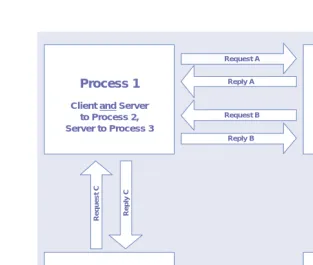
Client/server is a role-based model. The labels client and server only refer to a process’s role in a specific interaction. In practice, one process may act as a cli-ent toward one process and as a server toward another. Two processes may also be servers to one another in different situations. Some of the possibilities for these relationships are illustrated in figure 1.3. The J2EE specification is cur-rently focused on the server-side of this relationship through its endorsement of servlet, Java Server Pages (JSP), and Enterprise Java Beans (EJB) specifications.
Another important concept in client/server computing is service architec-ture. Servers usually provide a set of related functions and make them available to clients through standard interfaces and protocols. A common example is a Web server, which allows clients to send and receive resources in a variety of ways over the Internet via the HTTP protocol. While service architectures have been implemented in the past for things such as Web, mail, and DNS services, they are just beginning to take hold in business applications. In chapter 4, we discuss something called the web services architecture, the latest incarnation of the services architecture concept.
A set of related functions provided by a single server is a service. By encap-sulating a set of related server functions into a service with a standard inter-face, the manner in which the service is implemented becomes irrelevant to the client. Multiple server processes are then dedicated to performing the same service for clients transparently. This is an essential technique employed commonly to provide fault tolerance, hide implementation details, and enhance performance in distributed systems. This is depicted in figure 1.4.
Client Process
Server Process
Request Message
Reply Message
Process 1 Process 2
Request A
Reply A
Reply B Request B
Process 3 Process 4
Client and Server to Process 1, Client to Process 4
Server to Process 2 Client to Process 1
Client and Server to Process 2, Server to Process 3
Repl
y D
Request D
Repl
y C
Request C
Figure 1.3 Role Playing in client/server systems
Remote Clients
Service Interface
Server 1 Server 2
Server N
Figure 1.4
J2EE is heavily focused on server-side, Web-enabled applications. This does not mean that other types of applications cannot be built using the J2EE plat-form, but does make creating Web-based, thin-client applications the most logical choice for most J2EE developers.
In chapter 3, we examine the client/server interactions that occur locally, inside your application. Chapter 4 describes client/server interactions between your application and other systems, including web services architecture. Finally, in chapter 5, we examine the client/server capabilities of J2EE in terms of user interfaces
The peer model
In this architectural model, independent processes collaborate to perform some task in a coordinated fashion. The peer approach is common in situa-tions where either a lot of computing power is needed to perform an intense calculation or where independent systems need to guarantee that synchro-nized states are maintained. Any system that is transactional makes use of this model for at least part of its functionality.
The peer model treats all processes as equals, although it often requires one of them to act as a group coordinator. An example of a peer processing situa-tion in scientific applicasitua-tions is gene sequencing; a business processing example is executing a distributed purchasing transaction. In these situations, each pro-cess calculates part of some result and contributes it to the whole. For example, as a customer places an order, a pricing process calculates a specific customer’s price for each item on an order and adds those prices to the order information.
J2EE supports peer processing via the Java Transaction Architecture (JTA)
API. Using this API, your components can interact in a scoped, coordinated way with each other and with external systems. JTA is one of the many J2EE APIs available to you, and transactional support is one of the key features of any J2EEEJB container.
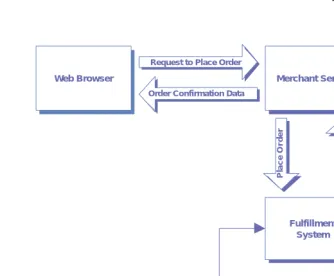
Merging the client/server and peer models
order and generate a confirmation number. This number and other order data are then sent back to the original client process via the merchant server.
The hybrid model demonstrated here is used frequently in business appli-cation development. Chances are good that you will use it in your J2EE
development projects rather than using either client/server or peer process-ing exclusively.
Distributed system software layers
Client/server and peer processing architectures rely heavily on the layered approach to software development depicted in figure 1.6. All processes, whether acting as server, client, or peer, must execute on a computer some-where. Each computer consists of a specific operating system and a set of device drivers, all of which come in numerous varieties. Since it would be fool-ish to try to predict every operating environment in which a process may be required to run in overtime, a mechanism is needed to divorce the process from its execution environment. And so was born a new class of software product, called middleware.
Web Browser Merchant Server
Fulfillment System
Pricing System Inventory
System Peer
Processing Order Confirmation Data
Request to Place Order
Pl
a
c
e
Or
d
e
r
Co
n
fi
rm
Or
d
e
r
Middleware, such as the J2EE products discussed in this book, exists to over-come the differences between different computing platforms. It exposes a common set of services across platforms and provides a homogeneous com-puting environment in which distributed applications can be built. Software that relies solely on its middleware environment can be deployed on any plat-form to which the middleware has been ported. And since distributed systems must grow incrementally over a period of time in different financial, political, and business environments, the ability to run on a wide variety of platforms is crucial to the longevity of most systems. Middleware is an essential ingredient in distributed systems development.
One of the most powerful aspects of J2EE is the broad range of middleware services it provides to developers. The set of service APIs that are currently a part of the J2EE specification is summarized in table 1.2. As you see, J2EE
provides built-in support for publishing and locating resources, asynchronous messaging, transactions, and a host of other services. If you have worked with
J2EE in the past, you are probably familiar with many of these. One API that is of particular interest to us in this book is JAXP, which we discuss in detail in the next chapter. You will also see XML as middleware for your data through-out the remaining chapters.
Computing Platform
(Operating System, Device Drivers, etc.)
Middleware
Distributed Applications and Services
At the top of the distributed software stack are distributed applications and services. These fall in the realm of the business application developer, and are probably the part of distributed systems development in which you are most interested. The distinction between applications and ser vices made in figure 1.6 illustrates that not everything built in a distributed environment may be a full-fledged application.
DEFINITION An application is a logically complete set of functions that may make use of a number of services to automate some business or other hu-man process.
To illustrate this point, an e-commerce shopping site can be seen as an applica-tion with various features, such as searching, purchasing, and order history retrieval. A server implementing the file transfer protocol (FTP) is just a service that allows users to upload and download arbitrary files.
Table 1.2 J2EE middleware services
Enterprise Java API Application in J2EE
Java Naming and Directory Services (JNDI)
Provides a standard mechanism for locating resources, including remote objects, environment properties, and directory services.
Java Database Connectivity (JDBC)
Provides vendor-neutral access to enterprise relational database management systems.
Java Message Service (JMS)
Provides reliable point-to-point and publish/subscribe messaging for J2EE components.
Java Transaction API (JTA)
Provides mechanisms for declaring, accessing, and coordinating transactional processing.
JavaMail Provides support for sending Internet email from J2EE applications.
Java Activation Framework (JAF)
A mechanism of inspecting arbitrary data and instantiating objects to process it, required by the JavaMail API.
Java API for XML Parsing (JAXP)
Provides basic support for XML access from Java and a service pro-vider interface for parsers and transformers.
J2EE Connector Architecture
An architectural framework for plugging vendor-supplied resource drivers into the J2EE environment.
Java Authentication and Authorization
Service (JAAS)
Whether you are building a service or an application has a dramatic effect on the activities you undertake and the considerations you need to make dur-ing analysis and design. However, distributed services and applications do share enough characteristics that we usually discuss their properties together. The distinction between the two becomes important in chapter 4, where we look at integrating external services into your applications.
DEFINITION A service is a general set of functions that can be used in various ways by specialized applications. Services usually only have one pri-mary function, like locating resources or printing documents.
1.1.2 N-tier application architecture
Many distributed application architects find it useful to group their develop-ment tasks in terms of logical layers, or tiers.
DEFINITION An application layer is a logical grouping of system components by the functionality they provide to users and other application sub-systems.
In general, every distributed application does similar things. It operates on its own data, interacts with external systems, and provides an interface to its users. This general pattern gives rise to the n-tier architecture depicted in figure 1.7.
Presentation Layer
Application Logic Layer
Services
Layer
Application Data Layer
"Tier 1" "Tier 2"
"Tier 3"
"Tiers 4-N"
Figure 1.7
The presentation layer
The presentation layer refers to those components responsible for creating and managing an application’s interface(s) with its users. Technologies employed here include web servers, dynamic template processing engines, and network-aware client applications such as web browsers. In J2EE, presentation layer components include servlets and Java Server Pages (JSP) running in the J2EE
web container.
The primary challenge at this layer of the architecture is the creation and management of different, synchronized views of the application for different users, based on access rights, client-side rendering capabilities, and other fac-tors. Building a presentation layer that is robust and manageable is not easy. We take a detailed look at how this can be done using a combination of J2EE
and XML technologies in chapter 5.
The application logic layer
The application logic layer (known as the business logic layer to business appli-cation developers) refers to the components responsible for implementing the functionality of an application. These components must manage the application’s data and state while performing the specific operations sup-ported by the application. In J2EE, application logic is usually implemented by Enterprise JavaBeans (EJB) running in the J2EE EJB container. Compo-nents at this layer implement the resource-intensive, often transactional por-tion of your applicapor-tion.
Challenges at this layer involve ensuring correct behavior and data integ-rity, interactions between system components, error handling, and perfor-mance optimization. Building a flexible, high perforperfor-mance application logic layer is quite challenging. We examine the ways in which XML might help
J2EE developers do this in chapter 3.
The application data layer
Challenges at this layer include effective use of system resources, database connection pooling, and performance optimization. The EJB container and
JDBC driver classes handle most of this for you in J2EE, but an RDBMS may not be the right place to store your data in some circumstances. We examine such situations in our discussion of XML at the J2EE application layer in chapter 3.
The services layer
The services layer refers to an application’s external environment, with which it collaborates in a variety of ways. A distributed application that does not touch external systems is rarely useful. The services layer accounts for tiers four through n of an n-tier application, since services can use other services and there is no theoretical limit to the number or variety of relationships between systems.
As the developer of a specific application, the challenge at this layer is how to interact with the environment in the most effective way. Chapter 4 discusses this layer in detail and provides useful architectural patterns and techniques for integrating remote services into your J2EE-XML application. It explains your application integration options and covers the latest developments in this area from a J2EE and XML developer’s perspective.
1.1.3 Overcoming common challenges
Since all distributed systems share some basic characteristics, they also have some challenges in common. In this section, we examine common issues faced by every distributed system architect, as well as the strategies and design goals frequently employed to overcome them.
Heterogeneity of system components
Computer hardware and software comes in seemingly infinite varieties, and you never find two components from different vendors that are exactly alike. This is true for computers, networks, and software products, as well as the applications built on top of them. The nature of a distributed system prevents us from making bold predictions about when and how various services and applications are going to be implemented, where they will need to run, or how they will need to be extended. After all, a key benefit of the distributed model is that the system can grow incrementally over time.
different environments over time. Your ability to move code and processes from one location to another is limited only by the capabilities of your middle-ware and the platforms it supports.
The second strategy is to abstract differences in communication channels and data representations through use of standards and protocols. For instance, the Internet is a collection of disparate computers and networks that are able to collaborate only because they speak the same languages. Separating the application-level and transport-level communication aspects is the key. To do this, protocols and data formats must be agreed to and, in the case of the Internet, widely accepted.
Evidence of this strategy’s success can be seen in many Internet services, including the World Wide Web and Internet email. This concept is currently being extended to standardize business communication over the Internet using XML technology. We discuss this topic in detail in chapter 4.
Flexibility and extensibility
Shortsighted is the architect who believes he can predict the future requirements placed on his or her system. The migration path from a closed e-commerce site to an integrated supply chain is far shorter in the business world than it is in the technical one. A key design goal for all distributed systems is to maximize system flexibility and make extending functionality as painless as possible. Unfortu-nately, it is difficult to mandate the ways in which this is accomplished.
One way to face this challenge is to do a good object-oriented analysis of your functional requirements. Study each requirement intently and try to abstract it into a more general class of problem. Then, by building functional-ity that addresses the more general class of problem, your system will be better prepared to handle modifications and extensions to its capabilities in the future. When functionality needs to be changed or extended, you will be able to reuse existing components rather than building from scratch.
For example, just because your company repairs vacuum cleaners does not mean that you build a vacuum cleaner tracking system. You build a workflow engine that can track the states of things, send notifications, and route mes-sages. Then you apply your engine to the task of tracking vacuum cleaner repair jobs. And next month, when your company expands into toasters and microwave ovens, you go on vacation to reflect on your genius.
This book discusses numerous strategies you can implement with J2EE and
environment. In chapter 5, we take a general approach to serving views of your J2EE application over the Web.
Vendor independence
Your system does not exist in a vacuum. Hardware, operating systems, middle-ware, and networking products all play a role both in enabling and limiting the capabilities of your system. A well-designed system is one that operates in the context of hardware and software vendor implementations, but is not tied to it.
DEFINITION An open system is one in which components can be implemented in different ways and executed in a variety of environments.
If your system is really open, the decisions made by your product vendors are much less of a threat to it over time. This can be essential to the longevity of your system and your reputation as its creator.
Addressing the issue of vendor independence is a two-step process. First, you must find vendors who conform to industry-supported standards when-ever possible. Is it safer in the long-term to implement a web site in a propri-etary scripting language provided by one vendor, or to implement it in Java Server Pages? Since you are reading this book, we hope the answer is obvious. The second step is far more crucial. You should make proprietary exten-sions to standard mechanisms only when absolutely necessary. In such cases, going with a vendor’s solution is probably better than inventing your own, because, you hope and expect, they did a lot of thinking about it first. For example, J2EE does not currently address logging requirements, although it will soon. To implement logging in your components, you can either use an existing logging API or create your own. It is probably more expeditious to use what is already available. However, you should always wrap any vendor-specific code in a helper class and access it via a generic interface. That way, changing from the proprietary mechanism to the standard one will be much easier in the future. The Façade design pattern is a useful approach. See the bibliography for a list of references on design patterns if you are unfamiliar with this pattern.
Scalability and performance
Most system stakeholders want to believe that system use will grow exponen-tially over time as more business relationships are solidified and users begin to see the subtle genius of the concept. Whether this is true is irrelevant. The danger is that it could be true. And as demand for system resources increases, supply must also increase without negatively impacting performance. Your solution must be scalable.
DEFINITION Scalability is a measure of the extent to which system usage can in-crease without negatively impacting its performance.
Every system must deal with the good-and-evil struggle between functionality and performance. The more functionality the system provides, the more time and resources are needed to provide it. The slower the system is, the less likely it is to be used.
There are several ways to deal with performance concerns. One way is to eliminate functionality. If your boss will let you do this, please email us so we can come work with you! Another way is to streamline functionality wherever possible. For example, make communication between processes asynchronous whenever possible, so execution threads do not block while interacting with remote systems. Ensuring that your distributed algorithms are streamlined and that time-sensitive processing has few external dependencies can be half the battle in performance tuning.
Assuming your system is fine-tuned, throughput can be enhanced using replication, load balancing, proxying, and caching.
DEFINITION Replication is the dedication of additional hardware and software to a given activity in order to provide more processing capability.
Combining replication and load balancing is sometimes referred to as server clustering. Setting up proxies and caching data can be even better than replicat-ing functionality and balancreplicat-ing loads.
DEFINITION Caching is the technique of storing processed data so your servers will not need to regenerate a set of data that has not changed since the last time it was requested.
Caching proxy servers can be used to intercept requests for resources, validate them before passing them on, and often even returned cached data to clients themselves. Unfortunately, caching and proxying can’t be used in update requests, which limits their use to the retrieval of existing data.
The leading J2EE server providers offer scalability in different ways, but all provide some level of server clustering and load balancing. If your provider cannot make your J2EE environment scale, change providers. Scalability and other nonfunctional enhancements are severely lacking in J2EE, but most enterprise-level vendors have found ways to pick up the slack for now.
Concurrency and correctness
Providing reliability is not just a matter of ensuring that the system does not crash. An equal measurement of your system’s reliability is the extent to which it operates consistently. Regardless of load, time of day, and other factors, your system must always keep itself in a valid state and behave in a predictable way. The integrity of your system’s data is not hard to achieve in most distributed applications, because they rely at some point on a database management sys-tem (DBMS) that guarantees such integrity. The state and behavior of a run-ning application, however, is the responsibility of its designer and developers.
Ensuring that any logic-intensive application will run correctly in all situa-tions is a complicated task. In a distributed system, it is even more so. This is because servers in distributed systems must provide access to shared resources to various clients, often concurrently. It is the responsibility of each service implementer to ensure that information updates are coordinated and synchro-nized across all client invocations. To address this, each distributed compo-nent should have a detailed state model and be tested thoroughly. Assume nothing works properly until proven otherwise. You will thank yourself when your system goes live and you still have your weekends.
Error handling
Dealing with error conditions in distributed systems is a real challenge. This is because the failures that occur do not crash the entire system. A part of the system fails, and it is up to the other components to detect the failure and take appropriate action. And since certain types of failures can’t be detected easily or at all, individual components need to be overly suspicious of errors when interacting with each other.
There are various types of distributed system failures, which can be grouped as follows:
■ Process failures—These are failures of individual processes. They can be
further classified, based on whether or not the failure can be detected by other processes when it occurs.
■ Omission failures—These are failures in communications, and include
par-tial message transmissions and corruption of messages during transport.
■ Arbitrary failures—These are random failures or unpredictable
behav-ior. This is the worst kind of failure, and the hardest to predict and guard against.
Once an error has been detected, there are a couple of ways to try to recover from it. In the case of a communication problem, a dropped or corrupted message can be resent. This is the technique employed by the Simple Mail Transport Protocol (SMTP) used by email systems on the Internet. To deal with a processing failure, the original service request can be redirected to another server. This technique is known as fail-over and can be initiated explicitly by the client or by the service.
Fault tolerance is a key measure of system reliability. This term refers to the degree to which your system can detect and recover from the independent fail-ures of its components. This is accomplished by fault-masking techniques as described above. Fault masking simply means hiding errors from system clients. Your J2EE provider should provide some fail-over mechanism as part of its server clustering functionality. Still, it will be the responsibility of your applica-tion components to detect any applicaapplica-tion-level failures and recover from them (by masking them) whenever possible. Try to be specific in terms of exception throwing and handling in your code. It is easier to recover from an exception if you know specifically what it is and how it happened when you catch it. We have seen many components that feature epic try blocks and only catch
Transparency
Transparency in its many forms is a design goal that can make your system eas-ier to use and more flexible. The principle is that the distributed nature of the system should be transparent to its users as well as to developers of individual applications. This is done to maximize the scalability and flexibility of the sys-tem. There are various types of transparency, as summarized in table 1.3.
Using naming services to locate resources and leveraging remote object archi-tectures are two ways in which you can enable network and mobility transpar-ency in your application. The Java Naming and Directory Interface (JNDI) and Remote Method Invocation (RMI) support this type of transparency in
J2EE. Your J2EE server provider usually provides location transparency as part of server clustering. As noted in the previous section, you must share responsi-bility for failure transparency with your server vendor.
System security
Distributed systems exist to share valuable resources among specific parties. Take pains to ensure that these resources are not shared with or modified by anyone else. Finding ways to share information securely over communication channels is the primary challenge of security. There are two main aspects to security in distributed systems. One involves verifying the identity and access rights of each user. We will discuss that topic here. The other involves the broader topic of protecting the application from hackers and other would-be users who should not have any access to the system. More information on that topic can be found in appendix B.
The first critical step in securing your system is having a reliable authentica-tion and authorizaauthentica-tion system for its intended users.
Table 1.3 Transparency types in distributed systems
Transparency type Description
Network transparency All resources are accessed in the same manner, regardless of their actual location on the network.
Location transparency The amount of hardware and software resources dedicated to an activity can be increased without affecting clients. This enables the system to scale more easily.
Failure transparency Through fault handling techniques, the system allows clients to com-plete their tasks despite hardware and software failures.
DEFINITION Authentication is the process of verifying that someone is who he or she purports to be.
J2EE addresses authentication and authorization via the Java Authentication and Authorization Service (JAAS). This is an implementation of the Pluggable Authentication Module (PAM) security architecture, in which various security provider implementations can be plugged in to your J2EE environment. Each of these providers might implement authentication and authorization in dif-ferent ways, but your components are shielded from the details and always access security information through a standard interface.
DEFINITION Authorization is the process of ensuring that each authenticated user can only access the resources that he or she has the right to access.
JAAS is soon to become a part of the base Java platform, in version 1.4. Using
JAAS may seem like an obvious way to go with J2EE security requirements. The devil can be found in the details, as usual. There are currently two major drawbacks to using JAAS. The first is that you must declare your application security policy in deployment descriptors and configuration files rather than within the application itself. This can be error-prone and inconvenient, espe-cially in the case of web applications. It is often impractical to rely on your
J2EE container to authenticate and authorize users, especially when they regis-ter and self-adminisregis-ter their accounts via the Web. If your security policy must be updated dynamically at runtime, using JAAS can be impractical. Your appli-cation security model must also fit well with such JAAS concepts as authoriza-tion realms and principals.
The second drawback is the naive simplicity of many JAAS provider imple-mentations. The out-of-the-box JAAS provider usually consists of authoriza-tion realm and credential informaauthoriza-tion being stored in a plain text file or unencrypted database fields. This means that, even if you find a way to dele-gate your application security to the container, the manner in which your application is secured is very suspect.
1.2
The J2EE development process
Implementing a complex software system is all about managing complexity, eliminating redundant efforts, and utilizing development resources effectively. This is especially true in the J2EE environment, where you are building an n-tier, distributed system. Determining what process you will follow to complete your application on time and on budget is the first critical step on the path to success. You must then determine which tools to use and how to use them to support your development process. Because these decisions are so critical, this section provides an overview of some of the most popular development meth-odologies and tools used on J2EE projects.
1.2.1 J2EE and development methodologies
Numerous development methodologies exist for object-oriented projects, and choosing one to adopt can be difficult.
DEFINITION A development methodology defines a process for building software, including the steps to be taken and the roles to be played by project team members.
For component-based development with J2EE and XML, finding one that exactly fits your needs is even more challenging. This is true because most development methodologies are robust project management frameworks, generically designed to aid in the development of software systems from the ground up. J2EE development is about implementing applications in an exist-ing middleware environment, and the detailed, complicated processes pre-scribed by most methodologies can be partly inapplicable or simply too cumbersome to be useful on J2EE projects.
system over a longer timeframe, RUP may be right for you. You can get infor-mation on RUP at http://www.rational.com.
While some methodologies are too thick for J2EE, others can be too thin. A methodology that does not produce enough relevant artifacts (such as a design) can be easily abused and its usefulness invalidated. The best, recent example of this is eXtreme Programming(XP), a lightweight methodology championed by many industry luminaries of late. XP is the ultimate method-ology for hackers. It is extremely fluid and revolves almost exclusively around code. The XP process goes from requirements gathering to coding test cases to coding functionality. The number of user stories (in XP par-lance) implemented and the percentage of test cases running successfully at the moment are the measure of success. You can get more information on XP
at http://www.extremeprogramming.org.
XP is a lightweight, dynamic methodology, easily abused and often not appropriate for large development projects. One concern with XP is that it does not produce sufficient analysis and design documentation, which can be essential in the ongoing maintenance of a system, including training activities.
J2EE development projects usually consist of small teams building functional-ity in the context of rapidly changing requirements. XP can provide benefits in the areas of quality assurance and risk mitigation under such circumstances. However, be cognizant of potential longer-term issues surrounding the archi-tecture of your system and the lack of design documentation over time.
The trick to reaping the benefits of a methodology in J2EE is finding the right mix of tools and techniques that will enable your team to execute with more predictable results and higher quality. Methodology is only useful to the extent that it makes your product better. So, rather than choosing an existing, formal methodology, you may choose to roll your own, using the principles upon which most modern methodologies are based. These common principles are summarized in table 1.4.
Table 1.4 Common object-oriented development methodology principles
Principle Description
User driven design Software should be developed to satisfy the concrete requirements of its users. It should function in the way users would like to use it. Poten-tial future requirements should be analyzed, but functionality that does not satisfy a known requirement need not be developed just in case.
1.2.2 J2EE development tools
Choosing the right set of analysis, design, and development tools can greatly enhance the productivity of your team and the effectiveness of your pro-cesses. The ideal set of tools you should have for a J2EE build can be summa-rized as follows:
■ Analysis and design tool—A visual drawing environment in which you
can model your system, developing various UML diagrams that describe aspects of it.
■ Development tool—Also known as an integrated development
environ-ment (IDE). While not required, an IDE can speed development time greatly. This is especially true when developing thick-client applications.
■ Build tool—A utility to manage your development configuration and enable
autodeployment of your components to the J2EE environment. Certain
IDE products perform this function for certain server environments.
■ Source code control tool—A shared repository for your code base in
vari-ous versions of development.
■ Testing tool(s)—Utilities to perform various types of testing on your
components. We examine the complicated area of testing in section 1.3.
■ Problem tracking tool—An often-missing component that integrates
with your source code control environment to track problems from identification to resolution.
We present some common choices for each of these tool groups, along with their respective strengths and weaknesses, in the remainder of this section.
Iterative, incremental development
A software development release should be accomplished using several iterations of the development process. Each iteration cycle should be short and small in scope, building upon any previous iteration by an increment. This enables the modification/clarification of requirements, enhancement to the design, and code refactoring during the develop-ment phase.
Risk mitigation The most technically risky aspects of the system should be developed first, providing validation of the overall architecture and finding prob-lems as quickly as possible.
Quality assurance Testing must be an integral part of the development process, and a problem tracking/resolution process must be used and managed. Table 1.4 Common object-oriented development methodology principles (continued)
Analysis and design tools
Two of the most common choices in this area are Rational Rose by Rational Software and Together Control Center by TogetherSoft Corporation. Ratio-nal Rose is the old-timer of the two, written in native code for Windows. Together Control Center is a Java-based newcomer that is taking the industry by storm. Discovering which tool is right for you will depend on how you plan to model your system and translate that model into code.
Being a Windows application, Rational Rose’s user interface is quite intui-tive and does things like drag-and-drop operations quite well. Rose is an excel-lent tool for diagramming at both the conceptual (analysis) and design levels. It is not a real-time modeling environment, meaning that you must explicitly choose to generate code from your diagrams when desired. This is a good thing when working at the conceptual level, when the classes you create do not necessarily map to the implementation classes you will build. Also, the code generated from Rose is notoriously bloated with generated symbols in comments. Rose can be quite unforgiving when its generated tags have been modified and you attempt to do round-trip engineering.
Together Control Center, on the other hand, is a Java-based tool that still suffers from symptoms of the Java GUI libraries. It is not as intuitive to dia-gram with, requires a healthy chunk of memory, and can have some repainting issues from time to time. On the other hand, it is a real-time design and devel-opment environment. As you change a class diagram, the underlying source files are updated automatically. The reverse is also true. This makes the prod-uct a wonderful tool for low-level modeling and can even be a complete devel-opment environment when properly configured. For conceptual modeling it is less effective, since it assumes that any class you represent must be represented in code.
So the selection criteria between these tools is about the level(s) at which you intend to model, to what extent you plan to do round-trip or real-time engineering, and of course the price you are willing to pay. Both products are abhorrently expensive in our opinion, but that is all we will say on the matter. There are other UML tools around with smaller feature sets and user bases that you should explore if pricing makes either of these two impractical for your project.
Development tools
automating deployment tasks? Second, does your team share expertise in a particular IDE already? Third, are you doing any thick-client development that requires a visual environment? The answers to these questions should point you in the direction of a particular IDE.
Three of the most common commercial IDEs used on J2EE projects are WebGain Studio (which includes Visual Caf), Borland’s JBuilder, and IBM’s Visual Age. WebGain Studio is a complete J2EE development environment that integrates best with BEA System’s WebLogic application server. Visual Age is the obvious choice for development on IBM’s WebSphere platform. If you have already decided on a commercial J2EE vendor, the best IDE to use is usually quite obvious. If you are using an open source server like JBoss or Enhydra, the most important feature of an IDE may be its ability to integrate with the Ant build tool described in the next section. Ant integration is cur-rently available for Visual Age, JBuilder, and the NetBeansopen source IDE.
Build tools
Whether or not you choose to use an IDE, your project is likely to benefit from an automated build utility. Deploying J2EE components into their run-time environment involves compiling the components and their related classes, cre-ating deployment descriptors, and packaging the components into JAR, WAR, or EAR files. All these files must have very specific structures and contents and be placed in a location accessible to the server. This whole packaging and deployment process is a complicated configuration task that lends itself to the use of a build tool. The build tool can be configured once and automate the build and deployment process for the lifetime of the component(s).
The most significant and recent development in this area is the Antbuild tool, part of the Apache Software Foundation’s Jakarta open source effort. Ant is a platform-independent “make” utility that uses an XML configuration file to execute tasks and build targets. Ant has a set of built-in tasks that per-form common functions, such as compiling source files, invoking the JAR util-ity, and moving files. There are also a number of custom tasks available that extend Ant to provide specific types of functionality, such as creating EJB
home and remote interfaces from an implementation source file and validating
XML documents. One of the nicest things about Ant is its portability between operating systems. Your properly defined project will build on Windows and
UNIX systems with very minor, if any, modifications to it.
Source code control tools
J2EE applications are almost always developed in a team environment. Team development requires a source code repository and versioning system to man-age the shared code base during development. The Concurrent Versioning System (CVS) is an open source versioning system used widely throughout the industry. It is available for UNIX and Windows environments, and provides enough functionality to meet the needs of most J2EE development teams. More information about CVS can be found at http://www.cvshome.org.
Teams needing tools that have vendor support or which are integrated into a particular IDE or methodology could choose a commercial tool instead. Such leading tools include Rational Software’s Clear Case and Microsoft’s Visual Source Safe. Another consideration in choosing a source control tool may be how you plan to implement problem tracking and integrate it with the management of your code base. More important than which tool you imple-ment is the mere fact that you have one and use it.
Testing tools
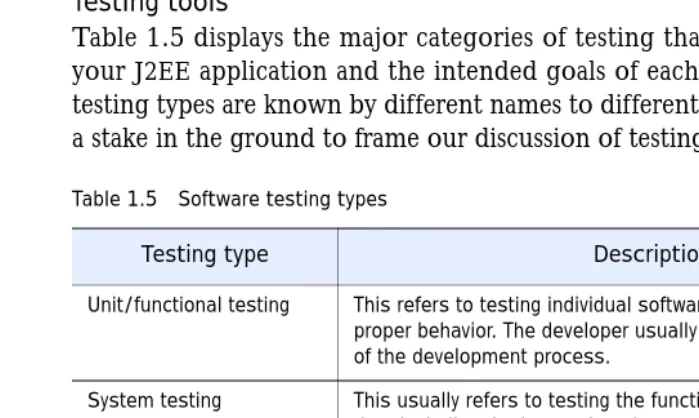
Table 1.5 displays the major categories of testing that can be performed on your J2EE application and the intended goals of each. Note that the various testing types are known by different names to different people. This list is only a stake in the ground to frame our discussion of testing in section 1.3.
Table 1.5 Software testing types
Testing type Description
Unit/functional testing This refers to testing individual software components to ensure proper behavior. The developer usually performs this activity as part of the development process.
System testing This usually refers to testing the functionality of the entire applica-tion, including the interactions between components and sub-systems. Often, external integration points are simulated using test harnesses to control the tests.
I