78:1 (2016) 79–84 | www.jurnalteknologi.utm.my | eISSN 2180–3722 |
Jurnal
Teknologi
Full Paper
E
XTRACTION
T
RANSFORMATION
L
OAD
(ETL)
S
OLUTION
FOR
D
ATA
I
NTEGRATION
:
A
C
ASE
S
TUDY OF
R
UBBER
I
MPORT AND
E
XPORT
I
NFORMATION
Mimi Safinaz Jamaluddin
*, Nurulhuda Firdaus Mohd Azmi
Advanced Informatics School (AIS), Universiti Teknologi Malaysia,
Kuala Lumpur, Malaysia
Article history Received 8 February 2015 Received in revised form
15 April 2015 Accepted 15 December 2015
*Corresponding author
[email protected]
Graphical abstract
Abstract
Data integration is important in consolidating all the data in the organization or outside the organization to provide a unified view of the organization's information. Extraction Transformation Load (ETL) solution is the back-end process of data integration which involves collecting data from various data sources, preparing and transforming the data according to business requirements and loading them into a Data Warehouse (DW). This paper explains the integration of the rubber import and export data between Malaysian Rubber Board (MRB) and Royal Malaysian Customs Department (Customs) using the ETL solution. Microsoft SQL Server Integration Services (SSIS) and Microsoft SQL Server Agent Jobs have been used as the ETL tool and ETL scheduling.
Keywords: Data integration, ETL, MicrosoftSSIS, ETL scheduling
Abstrak
Integrasi data adalah penting dalam mengumpulkan semua data dari dalam atau luar sesebuah organisasi bagi menyediakan satu maklumat bersepadu untuk organisasi tersebut. Extraction, Transformation and Load (ETL) merupakan tulang belakang bagi proses integrasi data, di mana ia melibatkan pengumpulan data dari pelbagai sumber data, penyusunan dan pengubahan data berdasarkan keperluan sistem dan seterusnya di muatkan ke dalam gudang data. Kertas ini menerangkan integrasi data import dan eksport di antara LGM dan Kastam menggunakan penyelesaian ETL Microsoft SQL Server Integration Services (SSIS) dan Microsoft SQL Server Agent Jobs telah digunakan sebagai alat ETL dan penjadualan ETL.
Kata kunci: Integrasi data, ETL, Microsoft SSIS, penjadualan ETL
© 2016 Penerbit UTM Press. All rights reserved
1.0
INTRODUCTION
Malaysian Rubber Board (MRB) is the custodian of the rubber industry in Malaysia and is responsible for developing the rubber policies and strategies for the country. These policies and strategies are framed based on the global industry outlook, supply and demand trend and the rubber market situation. MRB shall produce a market report on monthly basis that includes statistical data for Malaysia’s import and export of rubber. In order to obtain a comprehensive import and export data of rubber, MRB has formed a
collaboration with the Royal Malaysian Customs Department (Customs). In general, all imported and exported goods must be declared using K1 and K2 form. K1 form is for declaration of goods to be imported while K2 form is for declaration of goods to be exported. The data from K1 and K2 forms are the data that MRB need to extract, transform and load to provide comprehensive information that would be useful for MRB.
With the implementation of Extraction
Transformation Load (ETL) solution, the import and export data integration between MRB and Customs,
Data Source
Extract
Transform Load
DB tables Text files
Excel files XML XML files
will be done automatically on daily basis. MRB personnel will no longer have to travel to Putrajaya for the sole purpose of collecting the CD containing the import and export data from the Customs office. This will save time, cost and resources. Also, MRB’s IT officers will no longer have to process the data manually and additionally, the integration software will not be dependent only on a single notebook, as per previous practice. All these processes will be scheduled to run daily from the server.
Data integration is important in consolidating all the data in the organization or outside the organization to provide a unified view of the organization's information. According to [1], data integration aims to collect different data from various sources, formats and characteristic in spatial data logic or physics. Its objective is to construct a seamless connection to a dataset. Data integration gradually becomes more important in consolidating all the data in the organization to provide a unified view of the organization's information. Data integration is generally implemented in several areas namely data migration, enterprise application and master data management. Building an enterprise’s data warehouse (DW) is a well-known implementation of data integration. DW is a collection of all database data, it can be seen as a super-database [2].
ETL solution is the back-end process of data integration which involves collecting data from various data sources, preparing and transforming the data according to business requirements and loading them into a DW.
This paper describes the use of ETL solution to extract the import and export data from Customs office, transforms it into the required format and numerical value and finally, load it into MRB’s DW. Section 2 in this paper explains the details of ETL solution which includes ETL phases, ETL metadata, logical data map and ETL tools. Section 3 discusses on how the ETL solution has been implemented to extract, transform and load the import and export information and how the ETL can be scheduled. This paper ends with the conclusion of ETL solution.
2.0 ETL SOLUTION
ETL solution is one of the most important processes in the DW. Based on [3] study, ETL is the foundation for any DW. A properly designed ETL, extracts data from various sources, enforces data quality and consistency and finally deliver data in a presentation ready format which can assist the end users in swift decision making process. Billions of dollars have been spent by companies in getting clean, unambiguous data in their DW [4].
Based on study by Kimball and Caserta [5], it is estimated that 70% of the effort and time building a DW goes into this extracting, cleaning, conforming, transforming and loading of data. The purpose of using ETL solution is to save time and make the whole process of building a DW more reliable. The ETL solution
can be customized to provide the functionality to meet the enterprise requirements [6]. According to Pethalakshmi [7], the benefits of an ETL tool are shown as follows:
a. Simplify the process of migrating data b. Standardize the method of data migration c. Store all data transformation logic or rules as
metadata
d. Reduce cost and effort associated with building interfaces
According to Eckerson and White [8], ETL is the heart and soul of business intelligence (BI). BI is a variety of tools and techniques, for transforming the raw data into useful information and visualize it in the form of report or dashboard for business analysis purposes. By now, the development of BI is relatively mature in foreign countries and BI has been widely applied in government, finance, insurance, retail and manufacturing industries [9]. ETL solution extracts and combines data from multiple data sources into a DW, enabling all users to work in a single, centralized and integrated set of data.
2.1 ETL Phases
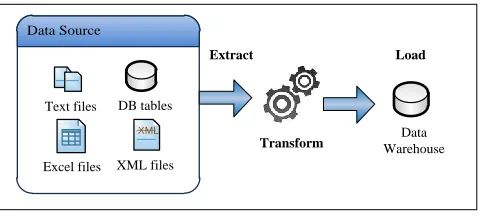
ETL is not a one-time event as new data are added into DW periodically in monthly, daily or hourly basis. Since ETL solution is an ongoing, integral and recurring part of DW, it should be automated, well documented and easily changeable. An ETL solution consists of three consecutive phases as shown in
Figure 1 and is explained in the following sub sections.
Figure 1 ETL Phases
2.1.1 Extraction
The purpose of the data extraction process is to collect useful data from multiple heterogeneous data sources [10]. The complexity of data extraction is usually determined by the complexity of the data source. The most commonly data source formats are flat files and Database Management Systems (DBMS) [11]. Flat files are used in legacy systems. The data in the flat files have no structured relationship. They are stored using delimiters and data retrieval is critical and it needs additional processing if data collection is large. Another widely used rich data format are Relational Database Management System (RDBMS), Extensible
Data Source
Extract
Transform
Load
DB tables Text files
Excel files
XML
XML files
Markup Language (XML) files and Excel spreadsheet [12].
Nithin Vijayendra [13] points out that data source could range from one to many in number and similar or completely disparate in nature. Sometimes, these data sources could be different in terms of geographic location, data format and can be incompatible with the organization’s data store. Once the data are extracted they should be checked for validity and consistency using the data validation rules.
2.1.2 Transformation
The next phase of ETL is the transformation. The transformation is the process to make some cleaning and conforming of the incoming data to gain accurate data which is correct, complete, consistent, and unambiguous [14]. It involves application of business rules to source data before it is loaded into DW. In transformation phase, the extracted data are cleansed and transformed based on the business requirements.
There can be one or many transformation operations such as conditional split, lookup, union, merge and remerge data that can be applied during the transformation phase. These could lead to changes in data value, data type or data structure by addition, modification or deletion of data. Data can also be validated, cleansed and rejected using specific transformation rules.
2.1.3 Load
The last process in ETL which is the loading phase, is responsible to load the data processed by the above two phases into DW. According to Sun and Lan [10], there are two main methods to load data namely refreshing and updating. The refreshing method is mainly used to load the data into database during creating a DW, while the updating method is used to maintain the DW.
2.2 ETL Metadata
Based on Nayem, Jessica [15] and Jian and Bihua [16], metadata is data about data which is very important to ETL. Metadata in DW mainly comprise of description, definition and standard of business data, rules of data extraction and transformation as well as the information of data source and target DW. Ying Pei and Wang [17] generally consider the metadata as the command center of ETL and ETL solution should refer to metadata maximally.
2.3 Logical Data Map
Logical data map is needed before the physical data can be transformed. The logical data map describes the metadata relationship between the starting points (source) and the ending points (target) of the ETL. This logical data map is necessary for ETL developer as a blueprint of exactly what is expected during the ETL
process. Logical data map contains details of source, target and transformation rules as shows in Table 1.
Table 1 Logical Data Map
Source Target Transformation Rules
Table Name
Column Name
Data Type
Table Name
Column Name
Data Type
2.4 ETL Tools
In the early days of ETL tools, the idea of being able to “move anything from anywhere to anywhere else” was nothing more than a pipe dream [18]. Over the years, ETL tools have evolved rapidly to being able to offer the real business needs by accomplishing tasks such as recognizing metadata, retrieving very large data swiftly, exploratory complex data source, and providing a user friendly graphical development environment. ETL tools can be categorized into two broad categories as explain in the next sub sections.
2.4.1 Hand-Coded
In early 1990s, most organizations developed custom code to extract and transform data from operational systems and load it into data warehouses. Normally ETL tools were developed in house using COBOL, Perl, C and PL/SQL. In order to accomplish the ETL task, ETL developer has to use different programming languages such as COBOL to extract the data from the data source and performing transformations, while PL/SQL Bulk procedures were used to load the data into the target DW.
However, hand-coded tools have its drawbacks. Hand-coded ETL are normally slow in execution as they are single threaded whereas the modern tool-based tools are multiple threaded and run on high speed hardware [19].
2.4.2 Tool-Based
Due to the limitation of the hand-coded tools and to reduce the labor-intensive process of writing custom ETL programs, many vendors have developed these tools to be purchased by the organizations. These tools support multiple inputs or outputs database or flat files, provide transformation and extraction features and multi-dimensional designs. These tools also provide user friendly graphic user interface (GUI) which aid the developer to use it without having to attend any formal training. Pall and Khaira [19] classified the tool-based ETL further to four subcategories as follows:
a. Pure ETL Tools
These products are independent of the database and the BI tool with which it will be used
b. Database Integrated
ETL capabilities are embedded with DBMS c. BI Integrated
d. Niche Product
These are the products that do not fit well into any of the above mentioned groups, but still have considerable ETL functionality in them
3.0 RESULTS AND DISCUSSION
3.1 Data Integration Software
McDI or MRB-Customs Data Integration software is the software that has been developed using the ETL solution. Ms Business Intelligence Development Studio (BIDS) 2005 has been used as integrated development environment (IDE) while Ms SQL Server Integration Services (SSIS) has been used as a tool to construct ETL solution for McDI software. BIDS 2005 and SSIS are the database integrated ETL tools that bundle with MRB’s existing database software which is Ms SQL Server 2005. There are three color indicator in Microsoft SSIS during the debugging mode whereby green indicate the success task, red indicate the error task while yellow indicate the in-process task.
McDI software has been deployed as a server side application and VB.net was used as the programming language. This McDI software has been divided into three SSIS packages as explains in the following sub sections.
3.1.1 ExtractData
This ExtractData package is for extracting the K1 and K2 text files from Customs Office and store the physical text files in MRB’s server at MRB Office. Once the text files are successfully stored, the text files at Customs server will be deleted.
After the ExtractData package has successfully extracted the K1 and K2 text files as shown in Figure 2, an email will be sent to system admin to inform the total and also the list of K1 and K2 text files.
Figure 2 SSIS Package for ExtractData
3.1.2 TransformData
This TransformData package is for transforming the K1 and K2 data to the required format and numerical data and stored it in the staging database. This
transformation process is based on predefined logical data map.
In the event that the TransformData package not able to be transformed as shown in Figure 3, the transaction will be rolled back. The detail of the unsuccessful transaction will be captured in the LogFile_Error table.
Figure 3 SSIS Package for TransformData
3.1.3 LoadData
Figure 4 shows the last McDI SSIS package which is the LoadData. This LoadData package is for loading the transformed K1 and K2 data from the staging database into the production database. After the LoadData package has successfully loaded all the data the transaction will be committed. An email will be sent to system admin to inform the detail of the successful transaction.
3.2 ETL Scheduling
The primary way to schedule packages in SSIS is by using the SQL Server Agent Jobs, which ships together with the SQL Server database engine. This SQL Server Agent Jobs schedule the McDI software to automatically run at 1.00am daily. In order to schedule the McDI software, the configuration file for the SSIS
package of ExtractData, TransformData and
LoadData need to be created earlier. Then all these SSIS package must be deployed. The detail description on McDI configuration, McDI deployment and McDI scheduling are discussed in the following sub section.
3.2.1 McDI Configuration
A configuration is a property or value that can be configured to the completed package. Package configurations are a flexible method of dynamically configuring a package at runtime. It allows a high degree of flexibility in the execution of McDI software. There are many types of package configuration such as XML configuration files, registry entry and SQL Server table. In McDI software, XML configuration files is used to configure the ExtractData, TransformData and LoadData package properties to be exported to the configuration file. The example of XML configuration file for ExtractData package is shown in Figure 5.
Figure 5 Example of XML Configuration File
3.2.2 McDI Deployment
After creating the XML configuration files for all the SSIS packages, these packages need to be deployed to the production server. Microsoft SSIS has a feature to create a deployment utility. When the deployment utility is created all the files that are necessary to install the McDI software are copied into a centralized directory and a *.SSISDeploymentManifest file is created for the installer to run, which opens the Package Installation Wizard.
When all the packages are successfully deployed to the production server, it can be viewed by opening the Microsoft SSIS at production server using windows authentication.
Figure 6 shows the successfully deployed packages at Microsoft SSIS.
Figure 6 Successfully Deployed Packages
3.2.3 McDI Scheduling
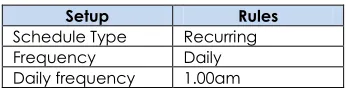
Once all SSIS packages are successfully deployed to the production server, the prerequisite to setting up the scheduling for McDI software is satisfied. The scheduling for McDI software is based on the predefined rules that are stated in Table 2.
Table 2 Scheduling Rules
Setup Rules
Schedule Type Recurring
Frequency Daily
Daily frequency 1.00am
SQL Server Agent is used to automate the McDI software to run daily at 1.00am. The steps required to set up the McDI scheduling are as follows:
a. Create a “New Job” b. Specify the job name
c. Specify the setting for ExtractData, TransformData and LoadData d. Create new and set the schedule e. Monitor the job activity
4.0 CONCLUSION
This paper presents a case study of rubber import and export information using ETL solution for data integration. McDI software that has been developed using Microsoft SSIS extract the import and export data, transform it and finally load it into MRB’s DW. In order to automate the McDI software, Microsoft SQL Server Agent Job has been configured to run daily at 1.00am. The McDI software has benefit the MRB’s Management in which they could get the latest and swift information on the market trend and the performance of rubber import and export. This will indirectly assist them in the decision making process. On the other hand, a structured import and export
<?xml version="1.0" ?> <DTSConfiguration> <DTSConfigurationHeading>
<DTSConfigurationFileInfo GeneratedBy="MRB\mimi" GeneratedFromPackageName
="ExtractK1nK2"GeneratedFromPackageID="{98DA8CD4-F346-4434-ACA7- A842D5}"
GeneratedDate="11/10/2014 9:35:18 AM" /> </DTSConfigurationHeading>
<Configuration ConfiguredType="Property" Path="\Package.Connections[FTP
MRB-Customs Connection Manager].Properties[ServerName]" ValueType="String">
<ConfiguredValue>XXX</ConfiguredValue>
</Configuration>
<Configuration ConfiguredType="Property" Path="\Package.Connections[FTP
MRB-Customs Connection Manager].Properties[ServerPassword]" ValueType="String">
<ConfiguredValue>XXX</ConfiguredValue>
data will assist MRB in conducting a more accurate and comprehensive analysis based on the previous day import and export rubber data. It is envisaged that through implementation of McDI software, it shall benefit MRB as a whole hence, lift the standard of MRB’s information system to a new height.
Acknowledgement
The author would like to thank the Malaysian Rubber Board and Royal Malaysian Customs Department for the commitments and support in this project.
References
[1] Lingli, Z., et al. 2009. The Research and Design of Data
Integration System for Urbanization. 831-834.
[2] Chowdhury, J. L. a. S. 2004. Best Practices in Data
Warehousing to Support Business Initiatives and Needs.
[3] Mrunalini, M., T. V. S. Kumar, and K. R. Kanth. 2009.
Simulating Secure Data Extraction in Extraction
Transformation Loading (ETL) Processes. 142-147.
[4] Ghosh, S., S. Goswami, and A. Chakrabarti. 2011. Outlier
detection from ETL Execution Trace. 343-347.
[5] Kimball, R. and J. Caserta. 2009. The Data Warehouse ETL Toolkit: Practical Techniques for Extracting, Cleaning,
Conforming, and Delivering Data.
[6] Alkis Simitsis, K. W. and M. C. Umeshwar Dayal. 2010.
Optimizing ETL Workflows for Fault-Tolerance. 385-396.
[7] Pethalakshmi, A. P. a. D. A. 2013. Novel Approach in ETL. 429-434.
[8] Eckerson, W. and C. White. 2003. Evaluating ETL and Data
Integration Platforms.
[9] Jun, T., et al. 2009: The Research & Application of ETL Tool in
Business Intelligence Project. 620-623.
[10] Sun, K. and Y. Lan. 2012. SETL: A Scalable And High
Performance ETL System. 6-9.
[11] P.Muthukumar, et al. 2012. A Realistic Approach for the Deployment of National Knowledge Repositories by
Leveraging ETL Tools. 542-547.
[12] Xishui Pan, H. S., Runshun Zhang and T. Z. Xuezhong Zhou. 2012. Enhanced Data Extraction, Transforming and Loading Processing for Traditional Chinese Medicine Clinical Data
Warehouse. 57-61.
[13] Nithin Vijayendra, a. M. L. 2013. A Web-based ETL Tool for Data Integration Process. IEEE Conference Publications. 434-438.
[14] Anand, N. and M. Kumar. 2013. Modeling and Optimization of Extraction-Transformation-Loading (ETL) processes in Data
Warehouse: An Overview. 1-5.
[15] Nayem, R., M. Jessica, and A. Shameem. 2012. An ETL Metadata Model for Data Warehousing. Journal of
Computing and Information Technology. 20(2).
[16] Jian, L. and X. Bihua. 2010. ETL Tool Research and Implementation Based on Drilling Data Warehouse.Seventh International Conference on Fuzzy Systems and Knowledge
Discovery. 2567-2569.
[17] Ying Pei, J. X. and Q. Wang. 2010. One CWM-based Data
Transformation Method in ETL Process. 1-4.
[18] Henn, S. and S. Hoon. 2005. Engineering Trade Study:
Extract, Transform, Load Tools For Data Migration. 1-8.
[19] Pall, A. S. and D. J. S. Khaira. 2013. A comparative Review of Extraction, Transformation and Loading Tools. Database