Vision System via USB for Object Recognition and
Manipulation with Scorbot-ER 4U
Alejandra Cruz Bernal
Department Robotic Engineering Polytechnic University of GuanajuatoCortazar, Guanajuato, México
Gilberto Moreno Aguilar
Department Mechatronic Engineering Technology University of HuejotzingoHuejotzingo, Puebla, México
ABSTRACT
Through this paper presents the development of a controller for a Scorbot Er-4u didactic manipulator, using a vision system communicating via the USB port. Considerate that nowadays, robotics is an essential element for the automatization in manufacturing process. As particular advantage over other systems, failure to use interfaces that involves development of additional hardware controller itself. Also, should the question arise, of improve a new form of generate trajectories through Minimum Euclidian Distance (MED). This results yielded handling objects, plus the ability to perceive the environment through the artificial vision system using image processing and MED, in order to generate information elements surrounding the manipulator, allowing the robot classify objects in your workspace, establishing a fine line between reachable and skilful.
General Terms
Object Recognition, Manipulator Robot, Vision System.
Keywords
Vision System, USB Port, Image Processing, Minimum Euclidian Distance (MED).
1.
INTRODUCTION
In recent decades robot manipulators have been used primarily for repetitive operations and hazardous environments. In industrial systems, the computer vision system is part of an automated control system, or an inspection system (basically on-off). Hence, trajectories programming industrial robots (industrial manipulators), focuses on the performance of specific tasks, but when you take them with a stage in which the manipulator involves decision making, this gives a certain degree of autonomy to the manipulator. This contributes to better programming the trajectory of the manipulator, which in turn reduces the time in production lines.
When establishing communication to perform control actions between the manipulator and the vision system that acts as a controller, via USB, allows, all takes place under the same communication protocol, enabling real-time action thus avoiding a double programming to perform the same action.
1.1
Workspace Geometry
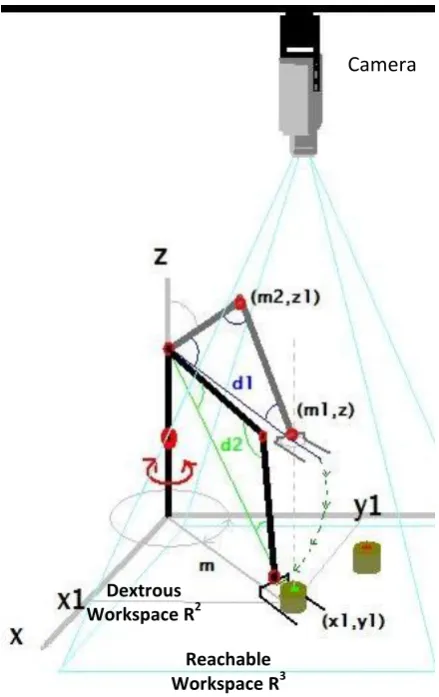
The workspace of a manipulator is defined as the volume of space the end effector can reach [1]. Therefore, are specified two types of workspace: reachable workspace and dextrous workspace. In the first, is considerate to the volume of space within which every point can be reach by the effector in at least one orientation. While, in the dextrous workspace is the
volume of space within which every point can be reached by the effector in all possible orientations.
1.2
Scorbot-Er 4u Educational
Manipulator
The Scorbot-Er 4u robot is a versatile and reliable system for educational use, it have a mechanical structure, vertically articulated, open frame with five rotational axes and gripper [2]. Therefore, the mechanical transmission system of this robot consists on gear, timing belts, and lead screws principal.
1.2.1
MITS (Matlab Toolbox for Inteliteck
Scorbot)
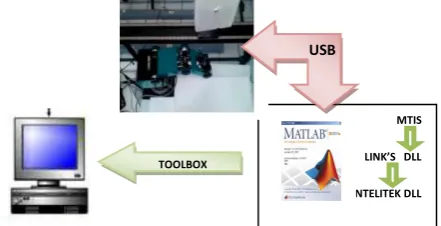
Users can only control the arm using Scorbase - Intelitek's proprietary, stand alone programming environment (Scorbase is the operation software and robotic programming).The Scorbot-Er 4u version uses a USB interface and conceals the API. With [3] Toolbox, provides a set of libraries (DLLs and M-files) that let you control the robot directly using Matlab (see figure 1).
[image:1.595.327.548.467.580.2]
Fig 1: Control Structure MITS via USB.
1.3
System Vision
Machine vision techniques have matured rapidly in the past twenty years, changing both hardware and software [4]. But how currently defined vision and artificial elements include a vision system? Defined as part of artificial intelligence and is the set of techniques and models to process, analyze and explain that spatial (3D) obtained from a digital image (2D). The elements of a vision system are camera and optics, lighting, positioning sensor, video capture card, computer vision software and inputs and outputs of the network configuration.
In all vision system should address the following parameters:
Field of vision: It is the area of the object that will be MTIS
LINK’S DLL
INTELITEK DLL TOOLBOX
catch for the sensor.
Resolution: It is a measure of the capacitance of the vision system to reproduce the details of one object.
Distance of work: It is the measured distance from the lens of the camera until the object.
Depth of field: It’s the area opposite and behind the object that is studying and remains focused for the lens, also it’s named the focusing tolerance.
Size of the sensor.
Distortion: It’s the change unwanted in the form of a present object in the field of vision.
These parameters are indispensable for the development of vision software.
2.
REVIEW
Several projects that involves the control of the Scorbot by means of the use of Matlab Software or incorporating a system of vision, we found, a project called cut laser [5] that his authors describe, the robot will has a conduct like a printing machine in whose final effector will has a laser and it will draw or in his defect will cut metal. The game tic tac toc, whose end is that the robot by means of a system of vision can select someone of the recorded poses to follow the game [6], The selection of nuts, screw and keys is other project [7] that uses system of vision for give instructions to the robot of as classifies they, is to say, incorporate an algorithm of take of decisions, the system of dynamic guide for Scorbot-Er IX robot arm by means of artificial vision [8], is a project that involves the inverse kinematics for obtain the desired displacement.
These and other projects have some in common, the communication that it settles between computer and controller is through the serial port, due to the model of the Scorbot, moreover, most movements of the robot are pre-engraved, with exception of the projected system of dynamic guide, in our case, the model with the works is the Scorbot-Er 4u, it has the series interface, but according to the manual of the manufacturer it has been limited this port for security, so the unique middle of communication a hundred by the hundreds functional between the computer and the controller is by means of USB port.
Recent projects used the USB communication of the Scorbot but, controlled using Bat files, they contain information of routes of access to the programs or positions previously burned of the Scorbase, which cause limitations if has not this software.
We have a few information of the use and employ of the MTIS, being planned with system vision; however your use facilitates the communication of the computer to the controller by means of the employment of the Matlab Software. In [9] the kinematics problem is defined as the transformation from the Cartesian space to the joint space and vice-versa. The solution is through model of representation Denavit-Harbenterg. The workspace density function is described with both planar revolute and variable-geometry-truss manipulators [10]. A focus reaching subtask, with which involves computing trajectory for arm manipulator, integrated approach to kinematic inverse and path planning [11].
3.
METODOLOGY
The vision system uses a web FUJ-cam 100, whose resolution of 352x288, a PC running XP SP3, the MITS software and Matlab ® 2010.
Before entering the software development environment, should be set the following parameter:
Working distance = 43.3 in.
Then the camera is calibrated [12] to determine actual measurements of distances and objects to be displayed, this is done by placing a grid monochromatic, whose pictures are 5cm (as can be varied and is only used as a reference to determine relationship between pixel and cm), and by imaqhwinfo function and a few lines of code, is obtained by connecting the camera Matlab (Figure 2).
% Update handles structure start(handles.vidobj); guidata(hObject, handles); vidRes = get(handles.vidobj, 'VideoResolution');
nBands = get(handles.vidobj, 'NumberOfBands');
hImage = image(zeros(vidRes(2),
vidRes(1), nBands), 'Parent',...
handles.axes7);
preview(handles.vidobj,hImage);
catch
msgbox('Camera Out')
hImage = image(imread('sin.jpg'), 'Parent',handles.axes7);
end end
axes(handles.axes1) background = imread(''); axis off;
imshow(background);
Fig 2: Code for Webcam-Matlab Connection
Once captured the image processing is performed in the same, to have a binary image, to this, you can count the number of pixels for each frame, and using the linear relationship of magnitudes or "rule of three" have the inches each pixel, equation (1).
Pixcm = (mR*1)(pxC) -1 (1) Where:
Pixcm = Actual centimeters by Pixel mR= Measure actual box cm (length) pxC =Number of pixels counted
(a) (b)
(c) (d)
[image:3.595.55.299.85.316.2]Fig 3: a) Image Original b) Code Cut Out-Image c) Binary image original d) Reachable workspace.
Fig 4: Representing the coordinates in R2of the object and its distance from the origin.
deuc=|| p – qi||2=[Σi=1n(p – q(x,y))2 ]1/2 (2)
Where:
hi(p, Q) = minq{deuc (p, qi), qiє Q } (3) else
hi(p, Q) = 0. (Out-Range). (4)
For the distances from the origin (Scorbot) to the objects we will use the MED formula (3 and 4) in R2, using the coordinates of the centers of each objects (Figure 4).
3.1
Control of Scorbot-Er 4u with MTIS
3.1.1
Functions MITS
Experimenting with Toolbox functions, we found a feature that allows the positioning of the base degrees, shoulder, elbow tilt and swivel claw through of:
1 ScorJtMove(BSEPR) 2 ScorInit
3 ScorHome
4 ScorSetSpeed 5 ScorSetGripper(cm) 6 ScorGetJt
The function "ScorJtMove" requires five input angle values, the angle base, shoulder, elbow, tilt and rotation of the grip, so you can call the dll USB driver.
3.1.2
Optimal Inverse Kinematic.
The workspace is project of R3 R2 and subsequently characterizing these projections. Therefore, used the geometrical method, where have been a translation before a rotation, first at origin and posteriori point q. This point is necessary belongs to space R2.
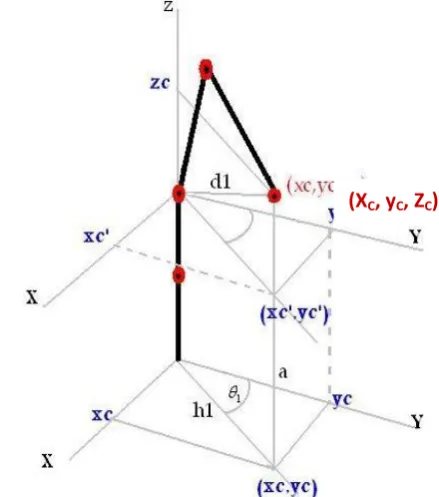
The procedure is based on finding a sufficient number of geometric relationships which will involve the end of the finish element (or effector) coordinates, their coordinate’s joint and physical dimensions of the elements (see Figure 4 and 5).
Fig 5: Representing the coordinates in R2of the effector.
Therefore the function values are obtained under the MTIS this relationship, and with the implementation of the trigonometry’s laws. Moreover this ratio must be limited according to the measures of the robot, the maximum radius reached by the Scorbot-Er 4u is 24 in and therefore the distance h1 or d1 must be less than the maximum radius in R2 contained in dextrous workspace (m in Figure 6).
Elbow, Shoulder and object distance (h1 or d1, see figure 4 and 5) form a triangle, the internal angles can be obtained using the law of sine and cosines, obtain the representation of displacement of effector (see Figure 6).
% Function Cutout-Image
function cut= cut(image)
[y,x]=size(image); cut=imagen(45:y,20:x)
Origin (xc,yc)
Obj 1 (x1,y1)
Obj 2 (x2,y2)
Obj 3 (x3,y3)
h1 h2
h3
x
y
[image:3.595.312.532.344.593.2] [image:3.595.90.246.357.485.2]Fig 6: Displacement Representation Effector.
.
% Displaccementfor yu=1:Ne3if mindist>=44.1 && mindist<=58 bolean=gripper(-1);
[an02 an03
pinz01]=parallel(minidistancia);
bolean=robot_l(angle,an02,an03,pinz01 );% Primer movimiento
[an2 an3 pinz]=objeto(mindist);
bolean=robot_l(angle,an2,an3,pinz);%S egundo moviento bajar
bolean=gripper(0); cm=mide_garra; if cm>=1
Grad([10 64 -20 -72 0]);% Posicion Camara
l_camara; preview(veo) pause(5)
color24= getsnapshot(veo); %closepreview ;
%imshow(color24);
valor =pieza1(color24); %Function of determinate piece...
if valor==1
Grad([-10 120 -110 -60 0]); Grad([-65 1 -50 -20 0]); bolean=gripper(-1);
end
if valor==2
Grad([-10 120 -110 -60 0]); Grad([40 120 -110 -60 0]); Grad([40 -1 -50 -20 0]); bolean=gripper(-1);
end
if valor==3
Grad([-10 120 -110 -60 0]); Grad([-70 10 -100 20 0]); bolean=gripper(-1);
end
else
Grad([40 120 -110 -60 0]);
end
[image:4.595.55.275.73.422.2]end
Fig 7: Function that calculates the displacement angles of the robot.
Based on these principles will create a function to calculate the internal angles are generated by changing the distance of the object (see Figure 7), so that each time the object is a new distance function returns the new angles.
4.
RESULTS
Respecting the parameters (table 1), working distance and field of view, they test for the algorithm created, with the following results:
The rotation of the base has a margin of error + -4 degrees, which is offset in the algorithm.
If the object it´s inside range of robot, with a margin of error of ± 0.25in.
The surface should be matte, because the robot is in constant illumination variation, which in a reflective surface may cause the algorithm to detect objects ghosts.
To take the first object makes the robot pose with the distance the two, and thereafter tends to decrease, which causes an arc of the initial portion to the end, see figure 6.
If the object is less than 7.87 in, the robot was located just above it, without pick, with gripper perpendicular to the surface, because the algorithm is not yet described the pose that must acquire if it happens.
Placing multiple objects in the workspace, only the object that is closest to the origin the robot will be the object that will take the Scorbot.
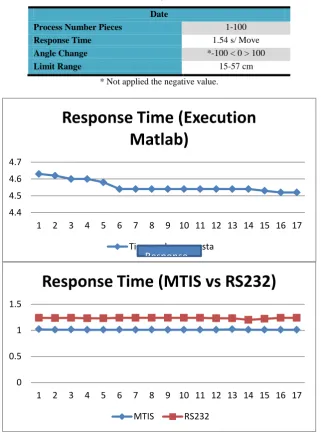
On the use of MTIS not present problems of communication, worked perfectly on XP, for other versions of Windows still in compatibility testing and communication (see figure 8).
Camera
Reachable Workspace R3 Dextrous
Table 1.Sumary Parameters.
Date
Process Number Pieces 1-100 Response Time 1.54 s/ Move Angle Change *-100 < 0 > 100
Limit Range 15-57 cm
[image:5.595.107.494.546.687.2]* Not applied the negative value.
Fig 8: The Average Response Time is 1.01.
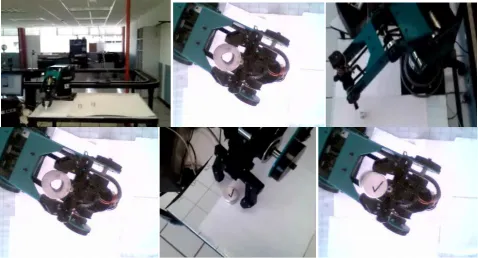
Fig 9: Scorbot-Er-4u in your Reachable Workspace and Detection Objects to Recognition. 4.4
4.5 4.6 4.7
1 2 3 4 5 6 7 8 9 10 11 12 13 14 15 16 17
Response Time (Execution
Matlab)
Tiempo de respuesta
Response
0 0.5 1 1.5
1 2 3 4 5 6 7 8 9 10 11 12 13 14 15 16 17
Response Time (MTIS vs RS232)
Fig 10: Sequence of Scorbot-Er 4u in your trajectory calculated through of MED, also the selection and classification of objects.
5.
CONCLUSION
The longitude of manipulator in the Dextrous Workspace, calculated through of MED, allowed smoothing curve in the trajectory in the effector. Accordingly, to considerate a new origin in the center of point (or coordinate of object take), is generated a new trajectory with a efficient response time in the execution of program, in real-time working with a parallel process, thank to communication via USB.
6.
REFERENCES
[1] Tsai, L.W., “Robot analysis: the mechanics of serial and parallel manipulators” Wiley Interscience, John Wiley & Sons, Inc. pp. 21–109, 1999.
[2] Intelitek ®, “Scorbot-Er 4u, User Manual”, Copyright ©2001 Intelitek ® Inc.Catalog #100343 Rev.B. September 2001.
[3] The MATLAB Toolbox for the Intelitek Scorbot (MTIS), http://www.usna.edu/Users/weapsys/esposito/scorbot.Ma tlab/
[4] Sezeleski. R., “Computer Vision, Algorithms and Applications”, ©2010 Springer, http://szeliski.org/Book/ [5] Galnares, J.,
http://www.prototipando.es/proyectos/73-cortadora-laser-scorbot?showall=&start=2.
[6] Almanza, O. D., “Implementación de la estrategia de juego Tic-Tac-Toe para la interacción con un brazo robótico”, Avances en Inteligencia Artificial, ISSN: 1870-4069, IPN.
[7] Sobrado, M. E., “Sistema de visión artificial para el reconocimiento y manipulación de objetos utilizando un
brazo robot” .Tesis PUCP.
http://tesis.pucp.edu.pe/repositorio/bitstream/handle/1234 56789/68/sobrado_eddie_vision_artificial_brazo_robot.p df?sequence=2.
[8] Soto, M. C.E, “sistema de guía dinámico para brazo
robot Scorbot Er-IX mediante
visionartificial”,http://cybertesis.ubiobio.cl/tesis/2006/sot o_c/html/index-frames.html.
[9] Verma, A., Vivek, A.D., “End-effector Position Analysis of SCORBOT-ER V plus Robot”, International Journal of Smart Home, Vol.5,No.1, January 2011.
[10]Suthakon, J., Chirikjan G.S., “A new inverse kinematics algorithm for binarymanipulator with a many actuators”, Advance Robotics, Vol. 15, No. 2. Pp.225-244 (2001). [11]Bertram, D., Kuffner, J., Dillmann. R., and Asfour, T.,
“A integrated approach to kinematic inverse and path planning for redundant manipulators”, Proceedings of the 2006International Conference in Robotics and Automation, Orlando, Florida, (2006), pp. 1874-1878. [12]The Camera Calibration Toolbox,