OBJECT-ORIENTED PROGRAMMING GUIDE
5AA
Turbo Pascal5,5®
Object-Oriented Programming
Guide
COPYRIGHT © 1989. ALL RIGHTS RESERVED
This manual was produced with Sprint@: The Professional Word Processor
Rl
All Borland products are trademarks or registered trademarks of Borland International, Inc. Other brand and product names are trademarks or registered trademarks of their respective holders.
c
o
N
T
Introduction 1
About this manual 0 0 0 0 0 0 0 0 0 0 0 0 0 0 0 0 0 0 0 1 Installation .... 0 • 0 • • • • 0 • • 0 0 • 0 • • • • • • • 2 Special Notes 0 0 • • 0 0 • 0 • • 0 • • • • • • • • • • 3 Online help . 0 • • • 0 • • 0 • 0 • • • • • • • 0 • 0 • • • • 4
How to contact Borland ... 4
Chapter 1 All about OOP 7 Objects? 0 • • • • • • • • • 0 • 0 • • • 0 • • • • • • • • • • • 8 Inheritance ... 0 • • • 0 • • • 0 0 • • • • • • • • 0 9 Objects: records that inherit ... 10
Instances of object types . 0 • • • • • • • • • 13 An object's fields ... 0 0 • • • • • • 0 • • • 13 Good practice and bad practice
0....
13Methods ... 0 . 0 • • • • • • • 0 • • • • • • 14 Code and data together. 0 • • • • • • • • • • 16 Defining methods ... 0 • • 0 • • • • • • 16 Method scope and the Self parameter ... 0 • • • • • • • • • 17 Object data fields and method formal parameters ... 19
Objects exported by units . . . .. 19
Programming in the active voice . . .. 22
Encapsulation ... 23
Methods: no downside ... 24
Extending objects ... 25
Inheriting static methods ... 27
Virtual methods and polymorphism . 29 Early binding vs. late binding ... 30
Object type compatibility ... 31
Polymorphic objects ... 33
Virtual methods ... . . . .. 35
Range checking virtual method calls ... 0 • • • • • • • 37 Once virtual, always virtual ... 37
An example of late binding ... 38
E
N
T
s
Procedure or method? ... 39Object extensibility ... 46
Sta tic or virtual methods ... 48
Dynamic objects ... 49
Allocation and initialization with New ... 50
Disposing dynamic objects ... 51
Destructors ... 52
An example of dynamic object allocation ... 54
Disposing of a complex data structure on the heap ... 0 0 o • • • • • 0 • • • • 0 • • • 0 5 5 Where to now? 0 • • • 0 • • 0 • • • • • • • • • • • • • 0 60 Conclusion ... 0 • • • • • • • • • • • • • • 61 Chapter 2 Object-oriented debugging 63 Object-oriented debugging in the IDE .. 63
Stepping and tracing method calls ... 63
Objects in the Evaluate window ... 64
Objects in the Watch window ... 64
Expressions in the Find Procedure command ... o • • • • • • • • • • • • • • 64 TurboDebugger ... 65
Stepping and tracing method calls ... 65
SCope ... o • • • 0 • • • • • • • • • • 65 Evaluate Window ... 66
Calling methods in the Evaluate window ... 67
Watch window ... 67
The Object Hierarchy window ... 67
The object type list pane ... 68
The local menu ... 68
The hierarchy tree pane ... 68
The Object Type Inspector window .. 69
Object Instance Inspector window .. 70
Local menus ... 71
New error messages ... 72
Chapter 3 Turbo Pascal 5.5 language
definition
73 New reserved words . . . .. 73Object types ... 73
Assignment compatibility ... 78
Object component designators. . . .. 78
Dynamic object type variables . . . .. 79
Instance initialization ... 79
Object type constants. . . .. .. .. 80
@ with a method ... 80
Function calls ... 81
Assignment statements . . . .. 81
Procedure statements ... 81
Case statements ... 82
With statements ... . . . .. 82
Method declarations ... 83
Constructors and destructors . . . .. 84
Variable parameters ... 85
Extensions to New and Dispose ... 86
Compiler directive conditional symbols ... 87
ii
Chapter 4 Overlays
89
Overlay buffer management ...89
Variables ... 91
OvrTrapCount ... 91
OvrLoadCount. ... 92
OvrFileMode ... 92
OvrReadBuf ... 92
Procedures and functions ... 94
OvrSetRetry ... 94
OvrGetRetry ... 95
Overlays in .EXE files ... 95
Chapter 5 Inside Turbo Pascal
97 Internal data format of objects ... 97Virtual method tables ...
98
The SizeOf standard function ...
100
The TypeOf standard function ... 101
Virtual method calls ...
101
Method calling conventions ... 102
Constructors and destructors ... 102
Assembly language methods ... 103
Constructor error recovery ... 106
Appendix A New and modified error
messages
111
F
G
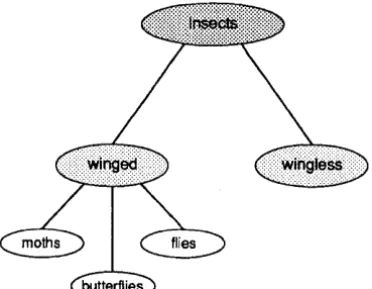
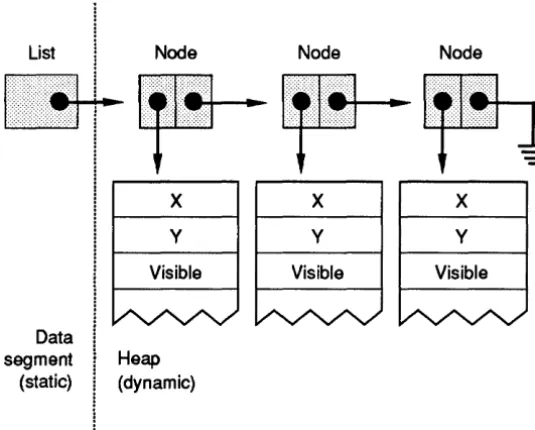
1.1: A partial taxonomy chart of insects .. 9 1.2: Layout of program ListDemo's data
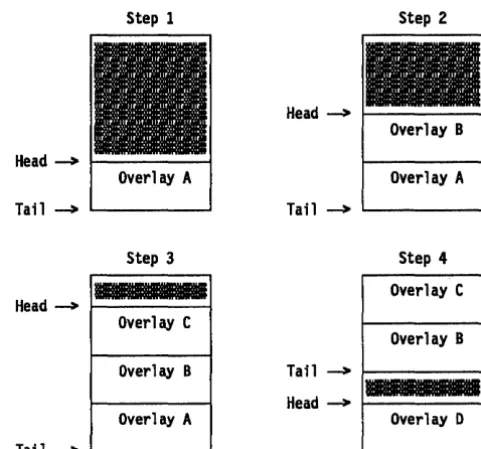
stru.ctures ... 55 4.1: Loading and disposing overlays .... 90
u
III
R
E
s
N T R
o
Du
c
To
NTurbo Pascal 5.5 gives you the power and efficiency of object-oriented programming at turbo speed. In addition to the Turbo Pascal features you have come to rely on, this new version offers you the programming techniques of the future:
• both static objects for maximum efficiency and dynamic objects for maximum run-time flexibility
• both static and virtual methods
• constructors and destructors that create and deallocate objects (which saves programming time and improves readability of your code)
• object constants-static object data is initialized automatically • greater speed-Turbo Pascal 5.5 compiles even faster
• an improved overlay manager (which lets overlays run faster, with less disk I/O)
• enhanced help screens that let you cut and paste examples into your code
• an online tutorial to introduce you to Turbo Pasca1's integrated development environment
The object-oriented extensions in Turbo Pascal 5.5 were inspired by Larry Tesler's "Object Pascal Report" (Apple, 1985) and Bjarne Stroustrup's "The C++ Programming Language" (1986, Addison-Wesley).
About this manual
Introduction
Installation
2
Here's a breakdown of the chapters and appendixes in this volume:
• Chapter 1: All about OOP introduces you to the main concepts of object-oriented programming-how objects differ from records, the advantages of encapsulated data and code, inheritance, polymorphism, static versus dynamic object instances-and uses practical examples to demonstrate the principles of object-oriented programming.
• Chapter 2: Object-oriented debugging covers modifications to Turbo Debugger to support Turbo Pascal 5.5, including Object Inspectors and the Object Hierarchy window.
• Chapter 3: Turbo Pascal 5.5 language definition contains the formal definition of all object-oriented extensions to Turbo Pascal.
• Chapter 4: Overlays discusses improvements to the Turbo Pascal overlay manager.
• Chapter 5: Inside Turbo Pascal explains the implementation of the object-oriented features of Turbo Pascal 5.5.
• Appendix A: New and modified error messages lists new compiler error messages and warnings specific to object-oriented Turbo Pascal.
The first thing you'll want to do is install Turbo Pascal on your system. Your Turbo Pascal package includes all the files and pro-grams necessary to run·both the integrated environment and command-line versions of the compiler. The INSTALL program sets up Turbo Pascal on your system, and it works on both hard-disk and floppy-based systems.
INSTALL walks you through the installation process. All you have to do is follow the instructions that appear on screen at each step.
Please read them carefully.
If you're installing onto floppies, rather than onto a hard disk,-be sure to have at least four blank, formatted 360K disks on hand.To run INSTALL:
1. Insert the distribution disk labeled Installation Disk in Drive
A.
1111..,
Special Notes
Introduction
2. Type A: and press Enter.
3. Type INSTALL and press Enter.
From this point on, just follow the instructions that INSTALL displays onscreen.
As soon as INSTALL is finished running, you are ready to start using Turbo Pascal.
After you've tried out the Turbo Pascal integrated development environment, you may want to customize some of the options. To do that, use the program TINST, which is discussed in Appendix D of the User's Guide.
• If you use INSTALL's Upgrade option, version 5.5 files will overwrite any version 5.0 files that have the same names.
• If you install the graphics files into a separate subdirectory (C:\ TP\BGI, for example), remember to specify the full path to the driver and font files when you call InitGraph. For example,
InitGraph(Driver, Mode, 'C:\TP\BGI');
• If GRAPH.TPU is not in the current directory, you'll need to add its location to the unit directories with'the Options/Direc-tories/Unit Directories command (or with the / U option in the command-line compiler) in order to compile a BGI program.
• If you have difficulty reading the text displayed by the
INSTALL or TINST programs, they will both accept an optional command-line parameter that forces them to use black-and-white colors:
..
• A:INSTALL /B • A:TINST /B
Forces INSTALL into BW80 mode Forces TINST into BWBO mode You may need to specify the /B parameter if you are using an LCD screen or a system that has a color graphics adapter and a monochrome or composite monitor. To find out how to
permanently force the integrated environment to use black-and-white colors with your LCD screen (or eGA and mono-chrome/ composite monitor combination), see the note on page 26 of the User's Guide.
Online help
You can get online help about both the integrated environment and language-specific items. To bring up help when you're on a menu item or within a window, press F1; to bring up the main index to the help system, press F1 again.
Language-specific help is available only when you're in the Edit window by pressing Ctrl-F1. You can get help about the syntax of Pascal reserved words or the usage and parameters of a particular procedure or function, cut and paste examples into your file, or find out about compiler switches, and more.
For language help, position your cursor on the item in the Edit window you want to know more about and then press Ctrl-F1.
To cut and paste from help, follow these easy steps:
1. Once you've brought up the help screen you want to copy from, press C. This activates the cursor so you can position it anywhere on the help screen.
2. After you've placed the cursor at the beginning of the text you want to copy, press Bto begin. Then use the
t,
-1.,~, and ~ arrow keys to move to the end of your block (highlighting the text you're copying at the same time). Pressing B again resets the beginning of the block to the cursor position.3. To end cut-and-paste and to place the text in your edit file, press Enter.
4. The text is pasted into the editor and is marked as a block, which allows you to easily move the pasted block.
How to contact Borland
4
If, after reading this manual and using Turbo Pascal, you'd like to contact Borland with comments for technical support, we suggest the following procedures:
• The best way is to log on to Borland's forum on CompuServe: Type GO BPROGA at the main CompuServe menu and follow the menus to section 2. Leave your questions or comments here for the support staff to process .
• If you prefer, write a letter and send it to
Introduction
Technical Support Department Borland International
P.O. Box 660001 1800 Green Hills Road Scotts Valley, CA 95066-0001
Note! 1111" If you include a program example in your letter, it must be limited to 100 lines or less. We request that you submit it on disk, include all the necessary support files on that disk, and provide step-by-step instructions on how to reproduce the problem. Before you decide to get technical support, try to duplicate the problem with the code contained on the floppy disk, just to be sure we can duplicate the problem using the disk you provide us .
• You can also telephone our Technical Support department at (408) 438-5300. To help us handle your problem as quickly as possible, have these items handy before you call:
• product name and version number • product serial number
• computer make and model number • operating system and version number
c
HChapter 7, All about OOP
A p T E R
1
All about
OOP
Object-oriented programming is a method of programming that closely mimics the way all of us get things done. It is a natural evolution from earlier innovations to programming language design: It is more structured than previous attempts at structured programming; and it is more modular and abstract than previous attempts at data abstraction and detail hiding. Three main
properties characterize an object-oriented programming languag~:
• Encapsulation:
Combining a record with the procedures and functions that manipulate it to form a new data type: an object.• Inheritance:
Defining an object and then using it to build a hierarchy of descendant objects, with each descendant inheriting access to all its ancestors' code and data.• Polymorphism:
Giving an action one name that is shared up and down an object hierarchy, with each object in the hierarchy implementing the action in a way appropriate to itself.Turbo Pasca15.5's language extensions give you the full power of object-oriented programming: more structure and modularity, more abstraction, and reusability built right into the language. All these features add up to code that is more structured, extensible, and easy to maintain.
The challenge of object-oriented programming (OOP) is that it sometimes requires you to set aside habits and ways of thinking about programming that have.been considered standard for many years. Once that is done, however, OOP is simple,
Objects?
Objects keep al/ their characteristics and behavior together.
8
forward, and superior for solving many of the problems that plague traditional software programs.
A note to you who have done object-oriented programming in other
languages:
Put aside your previous impressions of OOP and learn Turbo Pascal 5.5's object-oriented features on their own terms. OOP is not one single way; it is a continuum of ideas. In its object philosophy, Turbo Pascal 5.5 is more like C++ than Smalltalk. Smalltalk is an interpreter, while from the beginning, Turbo Pascal has been a pure native code compiler. Native code compilers do things differently (and far more quickly) than interpreters. Turbo Pascal was designed to be a production development tool, not a research tool.And a note to you who haven't any notion at all what OOP is about:
That's just as well. Too much hype, too much confusion, and too many people talking about something they don't understand have greatly muddied the waters in the last year or so. Strive to forget what people have told you about OOP. The best way (in fact, the
only
way) to learn anything useful about OOP is to do what you're about to do: Sit down and try it yourself.Yes, objects. Look around you ... there's one: the apple you brought in for lunch. Suppose you were going to describe an apple in soft-ware terms. The first thing you might be tempted to do is pull it
apart: Let S represent the area of the skin; let
J
represent the fluid volume of juice it contains; let F represent the weight of fruit inside; let D represent the number of seeds ....Don't think that way. Think like a painter. You see an apple, and you paint an apple. The picture of an apple is not an apple; it's just a symbol on a flat surface. But it hasn't been abstracted into seven numbers, all standing alone and independent in a data segment somewhere. Its components remain together, in their essential relationships to one another.
Objects model the characteristics and behavior of the elements of the world we live in. They are the ultimate data abstraction (so far).
An apple can be pulled apart, but once it's been pulled apart it's not an apple anymore. The relationships of the parts to the whole and to one another are plainer when everything is kept together
Inheritance
Figure 1.1 A partial taxonomy chart of
insects
Chapter 7, All about OOP
in one wrapper. This is called
encapsulation,
and it's very important. We'll return to encapsulation in a little while. Of equal importance is the fact that objects caninherit
characteristics and behavior from what we call
ancestor objects.
This is an intuitive leap; inheritance is perhaps the single biggest difference between object-oriented Pascal and Turbo Pascal pro-gramming today.
The goal of science is to describe the workings of the universe. Much of the work of science, in furthering that goal, is simply the creation of family trees. When entomologists return from the Amazon with a previously unknown insect in a jar, their funda-mental concern is working out where that insect fits into the giant chart upon which the scientific names of all other insects are gathered. There are similar charts of plants, fish, mammals, rep-tiles, chemical elements, subatomic particles, and external galaxies. They all look like family trees: a single overall category at the top, with an increasing number of categories beneath that single category, fanning out to the limits of diversity.
Within the category
insect,
for example, there are two divisions: insects with visible wings, and insects with hidden wings or no wings at all. Under winged insects is a larger number of cate-gories: moths, butterflies, flies, and so on. Each category has numerous subcategories, and beneath those subcategOries are even more subcategories (see Figure 1.1). [image:16.490.156.342.439.583.2]This classification process is called taxonomy. It's a good starting metaphor for the inheritance mechanism of object-oriented programming.
The questions that a scientist asks in trying to classify some new animal or object are these: How is it similar to the others of its general class? How is it different? Each different class has a set of behaviors and characteristics that define it. A scientist begins at the top of a specimen's family tree and starts descending the branches, asking those questions along the way. The highest levels are the most general, and the questions the simplest: Wings or no wings? Each level is more specific than the one before it, and less general. Eventually the scientist gets to the point of counting hairs on the third segment of the insect's hind legs-specific indeed. (And a good reason, perhaps, not to be an entomologist.)
The important point to remember is that once a characteristic is defined, all the categories beneath that definition include that char-acteristic. So once you identify an insect as a member of the order
diptera (flies), you needn't make the point again that a fly has one pair of wings. The species of insect we call
flies
inherits that characteristic from its order.As you'llieam shortly, object-oriented programming is very much the process of building family trees for data structures. One of the important things object-oriented programming adds to traditional languages like Pascal is a mechanism for data types to inherit characteristics from simpler, more general types. This mechanism is inheritance.
Objects: records that inherit
10
In Pascal terms, an object is very much like a record, which is a wrapper for joining several related elements of data together under one name. In a graphics environment, we might gather together the X and Y coordinates of a position on the graphics screen and call it a record type named Location:
Location = record X, Y : Integer;
end;
Location here is a record type; that is, it's a template that the com-piler uses to create record variables. A variable of type Location is an instance of type Location. The term instance is used now and
Chapter 1, All about OOP
then in Pascal circles, but it is used all the time by OOP people, and you'll do well to start thinking in terms of types and instances of those types.
With type Location you have it both ways: When you need to think of the X and Y coordinates separately, you can think of them separately as fields X and Y of the record. On the other hand, when you need to think of the X and Y coordinates working together to pin down a place on the screen, you can think of them collectively as Location.
Suppose you wanted to display a point of light at a position described on the screen by a Location record. In Pascal you might add a Boolean field indicating whether there is an illuminated pixel at a given location, and make it a new record type:
Point = record X, Y : Integer; Visible : Boolean;
end;
You might also be a little more clever and retain record type
Location by creating a field of type Location within type Point:
Point = record Position : Location; Visible : Boolean;
end;
This works, and Pascal programmers do it all the time. One thing this method doesn't do is force you to think about the nature of what you're manipulating in your software. You need to ask questions like, IIHow does a point on the screen differ from a location on the screen?" The answer is this: A point is a location that lights up. Think back on the first part of that statement: A point is a location ....
There you have it!
Implicit in the definition of a point is a location for that point. (Pixels exist only on the screen, after all.) In object-oriented pro-gramming, we recognize that special relationship. Because all points must contain a location, we say that type Point is a descen-dant type of type Location. Point inherits everything that Location
has, and adds whatever is new about Point to make Point what it must be.
This process by which one type inherits the characteristics of another type is called inheritance. The inheritor is called a
Note the use of parentheses here to denote Inheritance.
12
dant type;
the type that the descendant type inherits from is anancestor type.
The familiar Pascal record types cannot inherit. Turbo Pascal 5.5, however, extends the Pascal language to support inheritance. One of these extensions is a new category of data structure, related to records but far more powerful. Data types in this new category are defined with a new reserved word: object. An object type can be defined as a complete, stand-alone type in the fashion of Pascal records, or it can be defined as a descendant of an existing object type, by placing the name of the ancestor type in parentheses after the reserved word object.
In the graphics example you just looked at, the two related object types would be defined this way:
type
Location = object
X, Y : Integer;
end;
Point = object(Location) Visible : Boolean;
end;
Here,
Location
is the ancestor type, andPoint
is the descendant type. As you'll see a little later, the process can continue indefinitely: You can define descendants of typePoint,
and de-scendants ofPoint's
descendant type, and so on. A large part of designing an object-oriented application lies in building thisobject
hierarchy
expressing the family tree of the objects in theapplication.
All the eventual types inheriting from
Location
are calledLocation's
descendant types, but
Point
is one ofLocation's immediate
descen-dants.
Conversely,Location
isPoinrs immediate ancestor.
An object type (just like a DOS subdirectory) can have any number of immediate descendants, but only one immediate ancestor. Objects are closely related to records, as these definitions show. The new reserved word object is the most obvious difference, but there are numerous other differences, some of them quite subtle, as you'll see la ter.For example, the X and Y fields of
Location
are not explicitly writ-ten into typePoint,
butPoint
has them anyway, by virtue ofInstances of
object types
An object/s fields
Don't forget: An object's Inherited fields are not treated specially simply because they are inherited.
Good practice
and bad practice
Chapter 7, All about OOP
itance. You can speak about Point's X value, just as you can speak
about Location's X value.
Instances of object types are declared just as any variables are declared in Pascal, either as static variables or as pointer referents allocated on the heap:
type
PointPtr = APoint;
var
Stat Point : Point; { Ready to go! }
DynaPoint : PointPtr; {Must allocate with New before use }
You access an object's data fields just as you access the fields of an ordinary record, either through the with statement or by dotting.
For example,
MyPoint.Visible := False; with MyPoint do
begin
X := 341;
Y := 42; end;
You will just have to remember at first (it will eventually come naturally) that inherited fields are just as accessible as fields declared within a given object type. For example, even though X and Yare not part of Point's declaration (they are inherited from
type Location), you can specify them just as though they were
declared within Point:
MyPoint.X := 17;
Even though you can access an object's fields directly, it's not an especially good idea to do so. Object-oriented programming principles require that an object's fields be left alone as much as possible. This restriction might seem arbitrary and rigid at first, but it's part of the big picture of OOP that we're building in this chapter. In time you'll see the sense behind this new definition of good programming practice, though there's some ground to cover
An object's data fields are what an object knows: its methods are what on object does.
Methods
14
before it all comes together. For now, take it on faith: Avoid accessing object data fields directly.
So-how are object fields accessed? What sets them and reads them?
The answer is that an object's methods should be used to access an object's data fields whenever possible. A method is a procedure or function declared within an object and tightly bonded to that object.
Methods are one of object-oriented programming's most striking attributes, and they take some getting used to. Start by harkening back to that fond old necessity of structured programming, initializing data structures. Consider the task of initializing a record with this definition:
Location = record X, Y : Integer;
end;
Most programmers would use a with statement to assign initial values to the X and y fields:
var
MyLocation : Location;
with MyLocation do begin
X := 17; Y := 42;
end;
This works well, but it's tightly bound to one specific record instance, MyLocation. If more than one Location record needs to be initialized, you'll need more with statements that do essentially the same thing. The natural next step is to build an initialization procedure that generalizes the with statement to encompass any instance of a Location type passed as a parameter:
procedure InitLocation(var Target: Location; NewX, NewY : Integer); begin
with Target do
begin
X := NewX; Y := NewY;
end; end;
This does the job, all right-but if you're getting the feeling that it's a little more fooling around than it ought to be, you're feeling the same thing that object-oriented programming's early
proponents feIt.
It's a feeling that implies that, well, you've designed procedure
InitLocation specifically to serve type Location. Why, then, must you keep specifying what record type and instance InitLocation
acts upon? There should be some way of welding together the record type and the code that serves it into one seamless whole. Now there is. It's called a method. A method is a procedure or function welded so tightly to a given type that the method is surrounded by an invisible with statement, making instances of that type accessible from within the method. The type definition includes the header of the method. The full definition of the me-thod is qualified with the name of the type. Object type and object method are the two faces of this new species of structure called an object:
type
Location = object X, Y : Integer;
procedure Init(NewX, NewY : Integer);
end;
procedure Location. Init (NewX, NewY : Integer);
begin
X := NewX; { The X field of a Location object } Y := NewY; { The Y field of a Location object }
end;
Now, to initialize an instance of type Location, you simply call its method as though the method were a field of a record, which in one very real sense it is:
var
MyLocation : Location;
MyLocation.Init(17, 42); {Easy, no? }
Code and data
together
One of the most important tenets of object-oriented programmingis that the programmer should think of code and data
together
during program design. Neither code nor data exists in a vacuum. Data directs the flow of code, and code manipulates the shape and values of data.
When your data and code are separate entities, there's always the danger of calling the right procedure with the wrong data or the wrong procedure with the right data. Matching the two is the pro-grammer's job, and while Pascal's strong typing does help, at best it can only say what
doesn't
go together.Pascal says nothing, anywhere, about what
does
go together. If it's not in a comment or in your head, you take your chances.By bundling code and data declarations together, an object helps keep them in sync. Typically, to get the value of one of an object's fields, you call a method belonging to that object that returns the value of the desired field. To set the value of a field, you call a method that assigns a new value to that field.
Turbo Pascal 5.5 does not enforce this, however. Like structured programming, object-oriented programming is a discipline you must enforce upon yourself, using tools provided by the language. Turbo Pascal
allows
you to read and write an object's fields directly from outside the object-but itencourages
you to follow good OOP practice and create methods to manipulate an object's fields from within the object.Defining methods
16
The process of defining an object's methods is reminiscent of Turbo Pascal units. Inside an object, a method is defined by the header of the function or procedure acting as a method:
type
Location = object X, Y : Integer;
procedure Init(InitX, InitY : Integer); function GetX : Integer;
function GetY : Integer; end;
All data fields must be declared before the first method declaration.
Method scope
and the Self
parameter
Chapter 7 I All about OOP
As with procedure and function declarations in a unit's interface section, method declarations within an object tell
what
a method does, but nothow.
The
how
is definedoutside
the object definition, in a separate procedure or function declaration. When methods are fully de-fined outside the object, the method name must be preceded by the name of the object type that owns the method, followed by a period:procedure Location. Init (InitX, InitY : Integer); begin
X := InitX; Y := InitY;
end;
function Location.GetX : Integer; begin
GetX := X;
end;
function Location.GetY : Integer; begin
GetY := Y; end;
Method definition follows the intuitive dotting method of specifying a field of a record. In addition to having a definition of
Location.GetX,
it would be completely legal to define a procedure namedGetX
without the identifierLocation
preceding it. However, the "outside"GetX
would have no connection to the object typeLocation
and would probably confuse the sense of the program as well.Notice that nowhere in the previous methods is there an explicit
with object do ... construct. The data fields of an object are freely available to that object's methods. Although separated in the source code, the method bodies and the object's data fields really share the same scope.
This is why one of
Location's
methods can contain the statementGet Y : = Y without any qualifier to Y. It's because Y
belongs to the
object that called the method.
When an object calls a method, there is an implicit statement to the effect with myself do method linking the object and its method in scope.This example Is not fully correct syntactically: it's here simply to give you a fuller appreciation for the special link between an object and its methods.
Explicit use of Self is legal. but you should avoid situations that require it.
Methods implemented as externals in assembly language must take Self into account when they access method parameters on the
stack. For more details on
method call stack frames, see page 102.
18
This implicit with statement is accomplished by the passing of an invisible parameter to the method each time any method is called. This parameter is called Self, and is actually a full 32-bit pointer to the object instance making the method call. The GetY method belonging to Location is roughly equivalent to the following:
function Location.GetY(var Self: Location) : Integer; begin
GetY := SelLY; end;
Is it important for you to be aware of Self? Ordinarily, no. Turbo Pascal's generated code handles it all automatically in virtually all cases. There are a few circumstances, however, when you might have to intervene inside a method and make explicit use of the
Self parameter.
Self is actually an automatically declared identifier, and if you happen to find yourself in the midst of an identifier conflict within a method, you can resolve it by using the Self identifier as a qualifier to any data field belonging to the method's object:
type
MouseStat = record Active: Boolean; X, Y : Integer;
LButton, RButton : Boolean; Visible : Boolean;
end;
procedure Location.GoToMouse(MousePos : MouseStat); begin
Hide;
with MousePos do begin
Self.X := X;
SelL Y := Y;
end;
Show; end;
This example is necessarily simple, and the use of Self could be avoided simply by abandoning the use of the with statement inside Location.GoToMouse. You might find yourself in a situation inside a complex method where the use of with statements sim-plHies the logic enough to make Self worthwhile. The Self param-eter is part of the physical stack frame for all method calls.
Object data fields
and method
formal
parameters
Objects exported
by units
Exported means • defined within the Interface section ofa unit."
Chapter 7, All about OOP
One consequence of the fact that methods and their objects share the same scope is that a method's formal parameters cannot be identical to any of the object's data fields. This is not some new restriction imposed by object-oriented programming, but rather the same old scoping rules that Pascal has always had. It's the same as not allowing the formal parameters of a procedure to be identical to the procedure's local variables:
procedure Crunch It (Crunchee : MyDataRec,
Crunchby, ErrorCode : Integer);
var
A, B : Char;
ErrorCode : Integer; { This declaration will cause an error! }
begin
A procedure's local variables and its formal parameters share the same scope and thus cannot be identical. You'll get "Error 4: Duplicate identifier" if you try to compile something like this; the same error occurs if you attempt to give a method a formal parameter identical to any field in the object that owns the method.
The circumstances are a little different, since having procedure headers inside a data structure is a wrinkle new to Turbo Pascal
5.5, but the guiding principles of Pascal scoping have not changed at all.
It makes good sense to define objects in units, with the object type
declaration in the interface section of the unit and the procedure bodies of the object type's methods defined in the implementation section of the unit. No special syntactic considerations are
necessary to define objects within a unit.
Units can have their own private object type definitions within the implementation section, and such types are subject to the same restrictions as any types defined in a unit implementation section. An object type defined in the interface section of a unit can have descendant object types defined in the implementation section of the unit. In a case where unit B uses unit A, unit B can also define descendant types of any object type exported by unit A.
20
The object types and methods described earlier can be defined within a unit in this way:
unit Points; interface ulel Graph; type
Location = object
X, Y : Integer;
procedure Init(InitX, InitY Integer);
function GetX Integer;
function GetY : Integer; end;
Point
=
object(Location) Visible : Boolean;procedure Init(InitX, InitY Integer);
procedure Show; procedure Hide;
function IsVisible : Boolean;
procedure MoveTo(NewX, NewY : Integer); end;
implautation
{---I
{ Location's method implementations: }
{---I
procedure Location. Init (InitX, InitY : Integer); begin
X := InitX; Y := InitY;
end;
function Location.GetX Integer;
begin
GetX := X;
end;
function Location.GetY Integer;
begin
GetY := Y;
end;
{---I
{ Points's method implementations: }
{---I
procedure Point.Init(InitX, InitY : Integer);
beqin
Location. Init (InitX, InitY); Visible := False;
end;
procedure Point.Show;
begin
Visible := True;
PutPixel(X, Y, GetColor);
end;
procedure Point. Hide;
begin
Visible := False;
PutPixel(X, Y, GetBkColor);
end;
function Point.IsVisible : Boolean;
begin
IsVisible := Visible;
end;
procedure Point.MoveTo(NewX, NewY Integer);
beqin
Hide; X := NewXi Y := NewY; Show;
end; end.
To make use of the object types and methods defined in unit
Points, you simply use the unit in your own program, and declare an instance of type Point in the var section of your program:
program MakePoints;
uses Graph, Points;
var
APoint : Point;
To create and show the point represented by APoint, you simply call APoint's methods using the dot syntax:
APoint.Init(151, 82); { Initial X,Y at 151,82 APoint.Show; { APoint turns itself on } APoint.MoveTo(163, 101); {APoint moves to 163,101 } APoint.Hide; { APoint turns itself off}
Objects can also be typed Objects, being very similar to records, can also be used inside
constants; see page 80. with statements. In that case, naming the object that owns the
Programming in
the active voice
Object-oriented languages were once called -actor languages' with this
metaphor In mind.
22
method isn't necessary:
with APoint do
begin
Init (151, 82); Show;
MoveTo(163, 101); Hide;
end;
{ Initial X,Y at 151,82 } { APoint turns itself on } { APoint moves to 163,101 } { APoint turns itself off }
Just as with records, objects can be passed to procedures as parameters and (as you'll see later on) be allocated on the heap.
Most of what's been said about objects so far has been from a comfortable, Turbo Pascal-ish perspective, since that's most likely where you are coming from. This is about to change, as we move into OOP concepts with fewer precedents in standard Pascal pro-gramming. Object-oriented programming has its own particular mindset, due in part to OOP's origins in the (somewhat insular) research community, but also simply because the concept is truly and radically different.
One often amusing outgrowth of this is that OOP fanatics anthropomorphize their objects. Data structures are no longer passive buckets for you to toss values in. In the new view of things, an object is looked upon as an actor on a stage, with a set of lines (methods) memorized. When you (the director) give the word, the actor recites from the script.
It can be helpful to think of the statement APoint.MoveTo(242,118)
as giving an order to object APoint, saying "Move yourself to location 242,118." The object is the central concept here. Both the list of methods and the list of data fields contained by the object serve the object. Neither code nor data is boss.
Objects aren't being described as actors on a stage just to be cute. The object-oriented programming paradigm tries very hard to model the components of a problem as components, and not as logical abstractions. The odds and ends that fill our lives, from toasters to telephones to terry towels, all have characteristics (data) and behaviors (methods). A toaster's characteristics might include the voltage it requires, the number of slices it can toast at
Encapsulation
Chapter 71 All about OOP
once, the setting of the light/dark lever, its color, its brand, and so on. Its behaviors include accepting slices of bread, toasting slices of bread, and popping toasted slices back up again.
If we wanted to write a kitchen simulation program, what better way to do it than to model the various appliances as objects, with their characteristics and behaviors encoded into data fields and methods? It's been done, in fact; the very first object-oriented language (Simula-67) was created as a language for writing such simulations.
This is the reason that object-oriented programming is so firmly linked in conventional wisdom to graphics-oriented environ-ments. Objects should be simulations, and what better way to simulate an object than to draw a picture of it? Objects in Turbo PascalS.S should model components of the problem you're trying to solve. Keep that in mind as you further explore Turbo Pascal's new object-oriented extensions.
The welding of code and data together into objects is called
encapsulation. If you're thorough, you can provide enough methods so that a user of the object never has to access its fields directly. Some other object-oriented languages like Smalltalk enforce encapsulation, but in Turbo PascalS.5 you have the choice, and good object-oriented programming practice is very much your responsibility.
Location and Point are written such that it is completely unnecessary to access any of their internal data fields directly:
type
Location = object
x,
Y : Integer;procedure Init(InitX, InitY : Integer); function GetX : Integer;
function GetY : Integer;
end;
Point = object(Location) Visible : Boolean;
procedure Init(InitX, InitY : Integer);
procedure Show;
procedure Hide;
function IsVisible : Boolean;
procedure MoveTo(NewX, NewY : Integer);
end;
24
Methods: no
downside
A note about data abstraction 1111.,
There are only three data fields here: X, Y, and Visible. The MoveTo method loads new values into X and Y, and the GetX and GetY methods return the values of X and Y. This leaves no further
need to access X or Y directly. Show and Hide toggle the Boolean Visible between True and False, and the Is Visible function returns Visible's current state.
Assuming an instance of type Point called APoint, you would use
this suite of methods to manipulate APoint's data fields indirectly,
like this:
with APoint do begin
Init (0, 0); Show;
end;
{ Init new point at 0,0 } { Make the point visible }
Note that the object's fields are not accessed at all except by the object's methods.
Adding these methods bulks up Point a little in source form, but
the Turbo Pascal smart linker strips out any method code that is never called in a program. You therefore shouldn't hang back from giving an object type a method that might or might not be
used in every program that uses the object type. Unused methods cost you nothing in performance or .EXE file size-if they're not used, they're simply not there.
There are powerful advantages to being able to completely decouple Point from global references. If nothing outside the object "knows" the representation of its internal data, the programmer who controls the object can alter the details of the internal data representation-as long as the method headers remain the same.
Within some object, data might be represented as an array, but later on (perhaps as the scope of the application grows and its data volume expands), a binary tree might be recognized as a more efficient representation. If the object is completelyencapsu-lated, a change in data representation from an array to a binary tree will not alter the object's use at all. The interface to the object
remains completely the same, allowing the programmer to fine-tune an object's performance without breaking any code that uses the object.
Extending objects
Chapter 1, All about OOP
People who first encounter Pascal often take for granted the flexibility of the standard procedure WriteLn, which allows a single procedure to handle parameters of many different types:
WriteLn(CharVar)i WriteLn(IntegerVar)i WriteLn(RealVar);
{ Outputs a character value } { Outputs an integer value } { Outputs a floating-point value
Unfortunately, standard Pascal has no provision for letting you create equally flexible procedures of your own.
Object-oriented programming solves this problem through inheritance: When a descendant type is defined, the methods of the ancestor type are inherited, but they can also be overridden if
desired. To override an inherited method, simply define a new method with the same name as the inherited method, but with a different body and (if necessary) a different set of parameters. A simple example should make both the process and the implications clear. Let's define a descendant type to Point that draws a circle instead of a point on the screen:
type
Circle = Object(Point) Radius : Integer;
procedure Init(InitX, InitY : Integer; InitRadius : Integer); procedure Show;
procedure Hide;
procedure Expand(ExpandBy : Integer); procedure MoveTo(NewX, NewY : Integer); procedure Contract (ContractBy : Integer);
and;
procedure Circle.Init(InitX, InitY : Integer; InitRadius : Integer); Point.Init(InitX, InitY);
Radius := InitRadius;
and;
procedure Circle. Show; begin
Visible := True;
Graph.Circle(X, Y, Radius);
and;
26
procedure Circle. Hide; var
TempColor : Word; begin
TempColor := Graph.GetColor; Graph.SetColor(GetBkColor); Visible := False;
Graph.Circle(X, Y, Radius); Graph.SetColor(TempColor);
end;
procedure Circle.Expand(ExpandBy Integer); begin
Hide;
Radius := Radius + ExpandBy;
if Radius < 0 then Radius := 0; Show;
end;
procedure Circle. Contract (ContractBy : Integer); begin
Expand(-ContractBy);
end;
procedure Circle.MoveTo(NewX, NewY Integer); begin
Hide; X := NewX; Y := NewY; Show;
end;
A circle, in a sense, is a fat point: It has everything a point has (an X,¥ location, a visible/invisible state) plus a radius. Object type
Circle appears to have only the single field Radius, but don't forget
about all the fields that Circle inherits by being a descendant type
of Point. Circle has X, ¥, and Visible as well, even if you don't see them in the type definition for Circle.
Since Circle defines a new field, Radius, initializing it requires a new Init method that initializes Radius as well as the inherited
fields. Rather than directly assigning values to inherited fields like X, Yand Visible, why not reuse Point's initialization method
(illustrated by Circle.Init's first statement). The syntax for calling
an inherited method is Ancestor.Method, where Ancestor is the type
identifier of an ancestral object type and Method is a method
identifier of that type.
Note that calling the method you override is not merely good style; it's entirely possible that Point.lnit (or Location.Init for that
Important!
1111.
Inheriting static
methods
Chapter 7 I All about OOP
matter) performs some important, hidden initialization. By calling the overridden method, you ensure that the descendant object type includes its ancestor's functionality. In addition, any changes made to the ancestor's method automatically affects all its
descendants.
After calling Point.Init, Circle.Init can then perform its own
initialization, which in this case consists only of assigning Radius
the value passed in InitRadius.
Instead of drawing and hiding your circle point by point, you can make use of the BGI Circle procedure. If you do, Circle will also
need new Show and Hide methods that override those of Point.
These rewritten Show and Hide methods appear in the example on
page 25.
Dotting resolves the potential problems stemming from the name of the object type being the same as that of the BGI routine that draws the object type on the screen. Graph.Circle is a completely
unambiguous way of telling Turbo Pascal that you're referencing the Circle routine in GRAPH.1PU and not the Circle object type.
Whereas methods can be overridden, data fields cannot. Once you define a data field in an object hierarchy, no descendant type can define a data field with precisely the same identifier.
One additional Point method is overridden in the earlier
definition of Circle: MoveTo. If you're sharp, you might be looking at MoveTo and wondering why MoveTo doesn't use the Radius
field, and why it doesn't make any BGI or other library calls specific to drawing circles. After all, the GetX and GetY methods
are inherited all the way from Location without modification. Also, Circle.MoveTo is completely identical to Point.MoveTo. Nothing
was changed other than to copy the routine and give it Circle's
qualifier in front of the MoveTo identifier.
This example demonstrates a problem with objects and methods set up in this fashion. All the methods shown so far in connection with the Location, Point, and Circle object types are static methods.
(The term static was chosen to describe methods that are not virtual, a term we will introduce shortly. Virtual methods are in
fact the solution to this problem, but in order to understand the solution you must first understand the problem.)
28
The symptoms of the problem are these: Unless a copy of the
MoveTo method is placed in Circle's scope to override Point's MoveTo, the method will not work correctly when it is called from
an object of type Circle. If Circle invokes Poinrs MoveTo method,
what is moved on the screen is a point rather than a circle. Only when Circle calls a copy of the MoveTo method defined in its own
scope will circles be hidden and drawn by the nested calls to Show
and Hide.
Why so? It has to do with the way the compiler resolves method calls. When the compiler compiles Point's methods, it first en-counters Point. Show and Point.Hide and compiles code for both
into the code segment. A little later down the file it encounters
Point.MoveTo, which calls both Point.Show and Point.Hide. As with
any procedure call, the compiler replaces the source code
references to Point. Show and Point.Hide with the addresses of their
generated code in the code segment. Thus, when the code for
Point.MoveTo is called, it in turn calls the code for Point.Show and Point.Hide and everything'S in phase.
So far, this scenario is all classic Turbo Pascal, and would have been true (except for the nomenclature> since version 1.0. Things change, however, when you get into inheritance. When Circle
in-herits a method from Point, Circle uses the method exactly as it
was compiled.
Look again at what Circle would inherit if it inherited
Point.MoveTo:
procedure Point.MoveTo(NewX, NewY : Integer); begin
Hide; { Calls Point.Hide } X := NewX;
Y := NewY;
Show; { Calls Point.Show }
end;
The comments were added to drive home the fact that when Circle
calls Point.MoveTo, it also calls Point.Show and Point.Hide, not Circle. Show and Circle.Hide. Point. Show draws a point, not a circle.
As long as Point.MoveTo calls Point.Show and Point.Hide,
Point.MoveTo can't be inherited. Instead, it must be overridden by a second copy of itself that calls the copies of Show and Hide
defined within its scope; that is, Circle. Show and Circle.Hide.
The compiler's logic in resolving method calls works like this: When a method is called, the compiler first looks for a method of
Virtual methods
and
polymorphism
that name defined within the object type. The Circle type defines
methods named lnit, Show, Hide, Expand, Contract, and MoveTo. If
a Circle method were to call one of those five methods, the
compiler would replace the call with the address of one of Circle's
own methods.
If no method by a name is defined within an object type, the compiler goes up to the immediate ancestor type, and looks within that type for a method of the name called. If a method by that name is found, the address of the ancestor's method replaces the name in the descendant's method's source code. If no method by that name is found, the compiler continues up to the next ancestor, looking for the named method. If the compiler hits the very first (top) object type, it issues an error message indicating that no such method is defined.
But when a static inherited method is found and used, you must remember that the method called is the method exactly as it was defined and compiled for the ancestor type. If the ancestor's method calls other methods, the methods called will be the ancestor's methods, even if the descendant has methods that override the ancestor's methods.
The methods discussed so far are static methods. They are static for the same reason that static variables are static: The compiler allocates them and resolves all references to them at compile time.
As you've seen, objects and static methods can be powerful tools for organizing a program's complexity.
Sometimes, however, they are not the best way to handle methods.
Problems like the one described in the previous section are due to the compile-time resolution of method references. The way out is to be dynamic-and resolve such references at run time. Certain special mechanisms must be in place for this to be possible, but Turbo Pascal provides those mechanisms in its support of virtual methods.
IMPORTANT! 1111., Virtual methods implement an extremely powerful tool for generalization called polymorphism. Polymorphism is Greek for
"many shapes," and it is just that: A way of giving an action one name that is shared up and down an object hierarchy, with each
30
Early binding vs.
late binding
object in the hierarchy implementing the action in a wayappro-priate to itself.
The simple hierarchy of graphic figures already described provide a good example of polymorphism in action, implemented through virtual methods.
Each object type in our hierarchy represents a different type of figure on the screen: a point or a circle. It certainly makes sense to say that you can show a point on the screen, or show a circle. Later on, if you were to define objects to represent other figures such as lines, squares, arcs, and so on, you could write a method for each that would display that object on the screen. In the new way of object-oriented thinking, you could say that all these graphic figure types had the ability to show themselves on the screen. That much they all have in common.
What is different for each object type is the
way
it must show itself to the screen. A point is drawn with a point-plotting routine that needs nothing more than an X, Y location and perhaps a color value. A circle needs an entirely separate graphics routine to display itself, taking into account not only X and Y, but a radius as well. Still further, an arc needs a start angle and an end angle, and a more complex drawing algorithm to take them into account.Any graphic figure can be shown, but the mechanism by which each is shown is specific to each figure. One word, "Show," is used to show (literally) many shapes.
That's a good example of what polymorphism is, and virtual methods are how it is done in Turbo Pascal 5.5.
The difference between a static method call and a virtual method call is the difference between a decision made now and a decision delayed. When you code a static method call, you are in essence telling the compiler, "You know what I want. Go call it." Making a virtual method call, on the other hand, is like telling the
compiler, "You don't know what I want-yet. When the time comes, ask the instance."
Think of this metaphor in terms of the MoveTo problem mentioned in the previous section. A call to Circle.MoveTo can only go to one place: the closest implementation of MoveTo up the object hierarchy. In that case, Circle.MoveTo would still call Point's
Object type
definition of MoveTo, since Point is the closest up the hierarchy
from Circle. Assuming that no descendent type defined its own MoveTo to override Point's MoveTo, any descendent type of Point
would still call the same implementation of MoveTo. The decision
can be made at compile time and that's all that needs to be done. When MoveTo calls Show, however, it's a different story. Every
figure type has its own implementation of Show, so which
imple-mentation of Show is called by MoveTo should depend entirely on
what object instance originally called MoveTo. This is why the call
to the Show method within the implementation of MoveTo must be
a delayed decision: When compiling the code for MoveTo, no
decision as to which Show to call can be made. The information
isn't available at compile time, so the decision has to be deferred until run time, when the object instance calling MoveTo can be
queried.
The process by which static method calls are resolved un-ambiguously to a single method by the compiler at compile time is early binding. In early binding, the caller and the callee are
connected (bound) at the earliest opportunity, that is, at compile time. With late binding, the caller and the callee cannot be bound
at compile time, so a mechanism is put into place to bind the two later on, when the call is actually made.
The nature of the mechanism is interesting and subtle, and you'll see how it works a little later.
compatibility
Inheritance somewhat changes Turbo Pascal's type compatibilityrules. In addition to everything else, a descendant type inherits type compatibility with all its ancestor types. This extended type compatibility takes three forms:
Chapter 7, All about OOP
• between object instances
• between pointers to object instances • between formal and actual parameters
In all three forms, however, it is critical to remember that type compatibility extends only from descendant to ancestor. In other
words, descendant types can be freely used in place of ancestor types, but not vice versa.
An ancestor object can be
assigned an Instance of any of Its descendant types.
32
Consider these declarations:
type
LocationPtr = ALocation; PointPtr = APoint; CirclePtr = ACircle;
var
ALocation : Location; APoint : Point; ACircle : Circle; PLocation : LocationPtr; PPoint : PointPtr; PCircle : CirclePtr;
With these declarations, the following assignments are legal:
ALocation := APoint; APoint := ACircle; ALocation := ACircle;
The reverse assignments are not legal.
This is a concept new to Pascal, and it might be a little hard to remember, at first, which way the type compatibility goes. Think of it this way: The source must be able to completely fill the destination.
Descendant types contain everything their ancestor types contain by virtue Qf inheritance. Therefore a descendant type is either exactly the same size or (usually) larger than its ancestors, but never smaller. Assigning an ancestor object to a descendant object could leave some of the descendant's fields undefined after the assignment, which is dangerous and therefore illegal.
In an assignment statement, only the fields that the two types have in common will be copied from the source to the destination. In the assignment statement
ALocation := ACircle;
only the X and Y fields of A Circle will be copied to ALocation,
since X and Yare all that types Circle and Location have in common.
Type compatibility also operates between pointers to object types, under the same general rules as with instances of object types: Pointers to descendants can be assigned to pointers to ancestors. Again, given the earlier definitions, these pointer assignments are legal:
PPoint := PCircle;
PLocation := PPoint; PLocation := PCircle;
Remember, the reverse assignments are not legal.
A formal parameter (either value or var) of a given object type can take as an actual parameter an object of its own, or any descen-dant type. Given this procedure header,
procedure Draglt(Target : Point);
actual parameters could legally be of type
Point
orCircle,
but not typeLocation. Target
could also be a var parameter; the same type compatibility rules apply.Warning! 1111" However, keep in mind that there's a drastic difference between a value parameter and a var parameter: A var parameter is a
pointer to the actual object passed as a parameter, whereas a value parameter is only a
copy
of the actual parameter. That copy, moreover, only includes the fields and methods included in the formal value parameter's type. This means the actual parameter is literally translated to the type of the formal parameter. A var parameter is more similar to a typecast, in that the actual parameter remains unaltered.Polymorphic
objects
Chapter 7, All about OOP
Similarly, if a formal parameter is a pointer to an object type, the actual parameter can be a pointer to that object type or a pointer to any of that object's descendant types. Given this procedure header,
procedure Figure.Add(NewFigure : PointPtr)i
actual parameters could legally be of type
PointPtr
orCirclePtr,
but not type
LocationPtr.
In reading the previous section, you might have asked yourself: If
any descendant type of a parameter's type can be passed in the parameter, how does the user of the parameter know which object type it is receiving? In fact, the user does not know, not directly. The exact type of the actual parameter is unknown at compile time. It could be anyone of the object types descended from the var parameter type, an~ is thus called a
polymorphic object.
Now, exactly what are polymorphic objects good for? Primarily, this:
Polymorphic objects allow the processing of objects whose type is
not known at compile time.
This whole notion is so new to the Pascal34
way of thinking that an example might not occur to you immediately. (You'll be surprised, in time, at how natural it begins to seem. That's when you'll truly be an object-oriented programmer.)
Suppose you've written a graphics drawing toolbox that supports numerous types of figures: points, circles, squares, rectangles, curves, and so on. As part of the toolbox, you want to write a routine that will drag a graphics figure around the screen with the mouse pointer.
The old way would have been to write a separate drag procedure for each type of graphics figure supported by the toolbox. You would have had to write DragCircle, DragSquare, DragRectangle,
and so on. Even if the strong typing of Pascal allowed it (and don't forget, there are always ways to circumvent strong typing), the differences between the types of graphics figures would seem to prevent a truly general dragging routine from being written.
After all, a circle has a radius but no sides, a square has one length of side, a rectangle two different lengths of side, and curves, arrgh ....
At this point, clever Turbo Pascal hackers will step forth and say, do it this way: Pass the graphics figure record to procedure DragIt
as the referent of a generic pointer. Inside DragIt, examine a tag field at a fixed offset inside the graphics figure record to deter-mine what sort of figure it is, and then branch using a case statement:
ca •• FigureIDTag of Point : DragPoint; Circle : DragCircle; Square : DragSquare; Rectangle : DragRectanglei Curve : DragCurvei
Well, placing seventeen small suitcases inside one enormous suit-case is a slight step forward, but what's the real problem with this way of doing things?
What if the user of the toolbox defines some new graphics figure type?
What indeed? 'Alhat if the user designs traffic signs and wants to work with octagons for stop signs? The toolbox does not have an Octagon type, so DragIt would not have an Octagon label in its
Virtual methods
case statement, and would therefore refuse to drag the new Octagon figure. If it were presented to
Draglt,
Octagon would fall out in the case statement's else clause as an "unrecognized figure."Plainly, building a toolbox of routines for sale without source code suffers from this problem: The toolbox can only work on data types that it "knows," that is, that are defined by the design-ers of the toolbox. The user of the toolbox is powerless to extend the function of the toolbox in directions unanticipated by the toolbox designers. What the user buys is what the user gets. Period.
The way out is to use Turbo Pascal's extended type compatibility rules for objects and design your application to use polymorphic objects and virtual methods. If a toolbox
DragIt
procedure is set up to work with polymorphic objects, it will work with any objects defined within the toolbox-and any descendant objects that you define yourself. If the toolbox object types use virtual methods, the toolbox objects and routines can work with your custom graphics figureson the figures' own terms.
A virtual method you define today is callable by a toolbox .TPU unit file that was written and compiled a year ago. Object-oriented programming makes it possible, and virtual methods are the key.Understanding how virtual methods make such polymorphic method calls possible requires a little background on how virtual methods are declared and used.
A method is made virtual by following its declaration in the object type with the new reserved word virtual. Remember that if
you declare a method in an ancestor type virtual, all methods of the same name in any descendant must also be declared virtual to a void a compiler error.
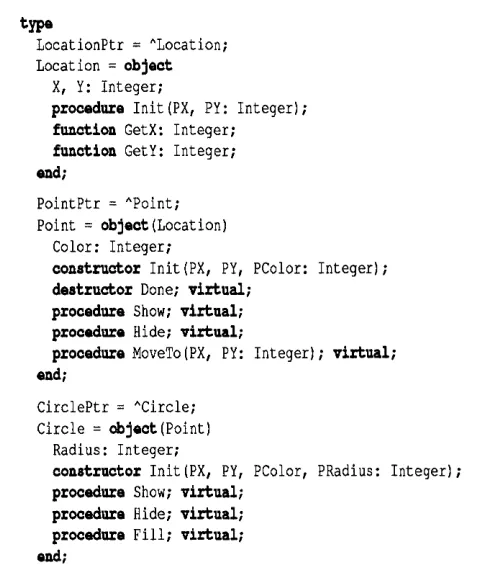
Here are the graphics shape objects you've been seeing, properly virtualized:
type
Location = object X, Y : Integer;
procedu