Network+
™
Study Guide
Third Edition
Associate Publisher: Neil Edde
Acquisitions and Developmental Editor: Elizabeth Hurley Editors: Donna Crossman, Susan Berge
Production Editor: Mae Lum
Technical Editors: Andre Paree-Huff, Louis DiPaola Book Designer: Bill Gibson
Graphic Illustrator: Tony Jonick
Electronic Publishing Specialists: Stacey Loomis, Jim Link of Interactive Composition Corporation
Proofreaders: Emily Hsuan, Yariv Rabinovitch, Laurie O’Connell, David Nash, Nancy Riddiough, Amey Garber Indexer: Ted Laux
CD Coordinator: Christine Detlefs CD Technician: Kevin Ly Cover Designer: Archer Design Cover Photographer: Natural Selection
Copyright © 2002 SYBEX Inc., 1151 Marina Village Parkway, Alameda, CA 94501. World rights reserved. No part of this publication may be stored in a retrieval system, transmitted, or reproduced in any way, including but not limited to photo-copy, photograph, magnetic, or other record, without the prior agreement and written permission of the publisher.
First edition copyright © 1999, SYBEX Inc.
Second edition copyright © 2001, SYBEX Inc. Library of Congress Card Number: 2001094587
ISBN: 0-7821-4014-9
SYBEX and the SYBEX logo are either registered trademarks or trademarks of SYBEX Inc. in the United States and/or other countries.
Screen reproductions produced with Collage Complete. Collage Complete is a trademark of Inner Media Inc.
Screen reproductions of Mac OS X courtesy of Apple Computer, Inc.
The CD interface was created using Macromedia Director, COPYRIGHT 1994, 1997–1999 Macromedia Inc. For more information on Macromedia and Macromedia Director, visit http://www.macromedia.com.
Internet screen shot(s) using Microsoft Internet Explorer 5 reprinted by permission from Microsoft Corporation.
The logo of the CompTIA Authorized Quality Curriculum Program and the status of this or other training material as “Authorized” under the CompTIA Authorized Curriculum Program signifies that, in CompTIA’s opinion, such training material covers the content of the CompTIA’s related certification exam. CompTIA has not reviewed or approved the accuracy of the contents of this training material and specifically disclaims any warranties of merchantability or fitness for a particular purpose. CompTIA makes no guarantee concerning the success of persons using any such “Authorized” or other training material in order to prepare for any CompTIA certification exam.
How to Become CompTIA Certified:
This training material can help you prepare for and pass a related CompTIA certification exam or exams. In order to achieve CompTIA certification, you must register for and pass a CompTIA certification exam or exams.
In order to become CompTIA certified, you must:
• Select a certification exam provider. For more information, please visit http://www.comptia.org/certification/ test_locations.htm.
• Register for and schedule a time to take the CompTIA certification exam(s) at a convenient location.
• Read and sign the Candidate Agreement, which will be presented at the time of the exam(s). The text of the Candidate Agreement can be found at www.comptia.org/certification.
• Take and pass the CompTIA certification exam(s).
For more information about CompTIA’s certifications, such as their industry acceptance, benefits, or program news, please visit www.comptia.org/certification.
CompTIA is a non-profit information technology (IT) trade association. CompTIA’s certifications are designed by subject matter experts from across the IT industry. Each CompTIA certification is vendor-neutral, covers multiple technologies, and requires demonstration of skills and knowledge widely sought after by the IT industry.
To contact CompTIA with any questions or comments:
Please call + 1 630 268 1818
TRADEMARKS: SYBEX has attempted throughout this book to distinguish proprietary trademarks from descriptive terms by following the capitalization style used by the manufacturer.
The author and publisher have made their best efforts to prepare this book, and the content is based upon final release soft-ware whenever possible. Portions of the manuscript may be based upon pre-release versions supplied by softsoft-ware manu-facturer(s). The author and the publisher make no representation or warranties of any kind with regard to the completeness or accuracy of the contents herein and accept no liability of any kind including but not limited to performance, merchant-ability, fitness for any particular purpose, or any losses or damages of any kind caused or alleged to be caused directly or indirectly from this book.
Manufactured in the United States of America
Software License Agreement: Terms and Conditions
The media and/or any online materials accompanying this book that are available now or in the future contain pro-grams and/or text files (the “Software”) to be used in connec-tion with the book. SYBEX hereby grants to you a license to use the Software, subject to the terms that follow. Your pur-chase, acceptance, or use of the Software will constitute your acceptance of such terms.
The Software compilation is the property of SYBEX unless otherwise indicated and is protected by copyright to SYBEX or other copyright owner(s) as indicated in the media files (the “Owner(s)”). You are hereby granted a single-user license to use the Software for your personal, noncommercial use only. You may not reproduce, sell, distribute, publish, circulate, or commercially exploit the Software, or any por-tion thereof, without the written consent of SYBEX and the specific copyright owner(s) of any component software included on this media.
In the event that the Software or components include specific license requirements or end-user agreements, statements of condition, disclaimers, limitations or warranties (“End-User License”), those End-User Licenses supersede the terms and conditions herein as to that particular Software component. Your purchase, acceptance, or use of the Software will con-stitute your acceptance of such End-User Licenses. By purchase, use or acceptance of the Software you further agree to comply with all export laws and regulations of the United States as such laws and regulations may exist from time to time.
Software Support
Components of the supplemental Software and any offers associated with them may be supported by the specific Owner(s) of that material, but they are not supported by SYBEX. Information regarding any available support may be obtained from the Owner(s) using the information provided in the appropriate read.me files or listed elsewhere on the media.
Should the manufacturer(s) or other Owner(s) cease to offer support or decline to honor any offer, SYBEX bears no responsibility. This notice concerning support for the Soft-ware is provided for your information only. SYBEX is not the agent or principal of the Owner(s), and SYBEX is in no way responsible for providing any support for the Software, nor is it liable or responsible for any support provided, or not pro-vided, by the Owner(s).
Warranty
SYBEX warrants the enclosed media to be free of physical defects for a period of ninety (90) days after purchase. The Software is not available from SYBEX in any other
www.sybex.com. If you discover a defect in the media dur-ing this warranty period, you may obtain a replacement of identical format at no charge by sending the defective media, postage prepaid, with proof of purchase to:
SYBEX Inc.
Product Support Department 1151 Marina Village Parkway Alameda, CA 94501 Web: http://www.sybex.com
After the 90-day period, you can obtain replacement media of identical format by sending us the defective disk, proof of purchase, and a check or money order for $10, payable to SYBEX.
Disclaimer
SYBEX makes no warranty or representation, either expressed or implied, with respect to the Software or its con-tents, quality, performance, merchantability, or fitness for a particular purpose. In no event will SYBEX, its distributors, or dealers be liable to you or any other party for direct, indi-rect, special, incidental, consequential, or other damages arising out of the use of or inability to use the Software or its contents even if advised of the possibility of such damage. In the event that the Software includes an online update feature, SYBEX further disclaims any obligation to provide this fea-ture for any specific duration other than the initial posting. The exclusion of implied warranties is not permitted by some states. Therefore, the above exclusion may not apply to you. This warranty provides you with specific legal rights; there may be other rights that you may have that vary from state to state. The pricing of the book with the Software by SYBEX reflects the allocation of risk and limitations on liability con-tained in this agreement of Terms and Conditions.
Shareware Distribution
This Software may contain various programs that are distrib-uted as shareware. Copyright laws apply to both shareware and ordinary commercial software, and the copyright Owner(s) retains all rights. If you try a shareware program and continue using it, you are expected to register it. Individ-ual programs differ on details of trial periods, registration, and payment. Please observe the requirements stated in appropriate files.
Copy Protection
To Our Valued Readers:
CompTIA’s Network+ certification program has established itself as the premier general networking certification in the IT industry. Sybex is proud to have helped thousands of Network+ candidates prepare for their exam, and we are excited about the opportunity to continue to provide people with the skills they’ll need to succeed in the highly competitive IT industry.
CompTIA recently revised the Network+ exam, updating the objectives set, expanding the question pool, and adding select-and-place questions formats, all in an effort to prevent the dreaded paper-certification syndrome, one in which individuals obtain a paper-certification without a thorough under-standing of the technology. Sybex supports this philosophy, as we have always advocated a compre-hensive instructional approach to certification courseware. It has always been Sybex’s mission to teach exam candidates how new technologies work in the real world, not to simply feed them answers to test questions.
We’re especially excited about this third edition of our best-selling Network+ Study Guide, as it now sports the new CompTIA Authorized Quality Curriculum (CAQC) logo on the cover. CompTIA developed the CAQC program to help exam candidates make better decisions about which training materials to use, and has established rigorous standards that courseware developers must meet in order to display the CAQC logo. The book you hold in your hands went through a review process that checked for exam objective correlation and instructional design integrity, and we are happy to say that we passed with flying colors! We’re confident that this book will help you, the Network+ exam candidate, succeed in your endeavors.
Good luck in pursuit of your Network+ certification!
Neil Edde
To my wonderful book team members. Thanks for your help in making our book a success.
Acknowledgments
I
t takes many people to put a book together. This will be the third edition of this book, so I can safely say that these people know what they’re doing and that I can count on working with talented people.This book would not exist if it weren’t for my acquisitions and develop-mental editor, Elizabeth Hurley. Thank you for all of your encouragement, support, and continued friendship. I appreciate all of the hard work you con-tribute to each one of my book projects. Additionally, many thanks go to Mae Lum, our book team’s tireless production editor. Kudos to you for jug-gling all sorts of deadlines spanning many projects, for organizing new schedules around new beta release dates, and for basically keeping your eye on the ball for me all of the time. Kudos should also go to Donna Crossman, editor extraordinaire. Thank you for wading through various versions of these chapters each time objectives were changed, added, or eliminated. Additionally, many thanks should go to ICC’s Stacey Loomis and Jim Link, our electronic publishing specialists, for laying out the very pages you see before you. Finally, one last cheer for the proofreaders who checked every last detail before sending the pages to the printer: Emily Hsuan, Laurie O’Connell, David Nash, Nancy Riddiough, Amey Garber and Yariv Rabinovitch.
I must also take a moment to recognize the unwavering good work of this book’s technical editor, Andre Paree-Huff. He has faithfully watched over this book from its first edition and is responsible for maintaining its accu-racy. For each edition, including this one, a pool of top-notch technical edi-tors helped out Andre by completing a second full technical edit just before the book was sent to the printer. Bob Gradante, Jutta VanStean, and Louis DiPaola should also be gratefully acknowledged for their fine expertise.
I would also like to recognize my wife, family, and friends. My wife, Linda, tirelessly wrote and edited the appendices and kept me on the right track. She was a real trooper because she managed to do that while watching our daughter, Alison, who can be a handful. Thank you to my family and friends who understood when I couldn’t go out or help them with projects because I had to work on the book. I really appreciate that.
Contents at a Glance
Introduction xx
Assessment Test xxxiii
Chapter 1 Network Fundamentals 1
Chapter 2 The OSI Model 51
Chapter 3 TCP/IP Fundamentals 105
Chapter 4 TCP/IP Utilities 163
Chapter 5 Major Network Operating Systems 207
Chapter 6 Network Installation and Upgrades 251
Chapter 7 WAN and Remote Access Technologies 315
Chapter 8 Network Access and Security 347
Chapter 9 Fault Tolerance and Disaster Recovery 405
Chapter 10 Network Troubleshooting 455
Glossary 511
Introduction
I
f you are like the rest of the networking community, you probably have many certifications. Certification is one of the best things you can do for your career in the computer or networking field. It proves that you know what you’re talking about when it comes to the area in which you are certified.In this book, you’ll find out what the Network+ exam is all about. Each chapter covers a part of the exam. At the end of each chapter, there are review questions to help you prepare for the exam.
What Is the Network+ Certification?
N
etwork+ is a certification developed by the Computing Technology Industry Association (CompTIA). This organization exists to provide resources and education for the computer and technology community. This is the same body that developed the A+ exam for computer technicians. Back in 1995, they convened to develop a new certification that tests skills for Information Technology (IT). To ensure industry-wide support, it was sponsored by many IT industry leaders, including:Compaq Computers
Digital Equipment Corporation (a part of Compaq) IBM
Lotus Microsoft Novell TSS
U.S. Robotics US West
Introduction xxi
The Network+ exam was designed to test the skills of network technicians with 18 to 24 months of experience in the field. It tests areas of networking technologies such as the definition of a protocol, the OSI (Open Systems Interconnect) model and its layers, and the concepts of network design and implementation—such as which items are required for a network and the prerequisites for installation. In addition, it covers troubleshooting concepts and how-tos.
Why Become Network+ Certified?
T
he Network+ certification is a relatively new certification, but it is the next certification in a line of CompTIA certifications starting with the A+ certification. Because CompTIA is a well-respected developer of vendor-neutral industry certifications, getting Network+ certified indicates that you are competent in the specific areas tested by Network+.Three major benefits are associated with becoming Network+ certified:
Proof of professional achievement Opportunity for advancement Fulfillment of training requirements
Proof of Professional Achievement
Networking professionals are competing these days to see who can get the most certifications. And because the Network+ certification is broad and it covers the entire field of networking, technicians want this certification rather than only Microsoft or only Novell, for example. Thus, it can be a challenge to prepare for the Network+ exam. Passing the exam, however, certifies that you have achieved a certain level of knowledge about vendor-independent networking-related subjects.
Opportunity for Advancement
xxii Introduction
Network+, because of its wide-reaching industry support, is recognized as a baseline of networking information. Some companies specify that Net-work+ certification will result in a pay raise at review time. And some com-panies specify that Network+ certification, in conjunction with A+
certification, is required either before an employee’s next review or as a con-dition of employment.
Fulfillment of Training Requirements
A training requirement can be mandated by your employer, as just men-tioned, or it can be required as part of another certification. There has been talk of using the Network+ certification as a prerequisite to, or as part of, other vendors’ certifications. And I think it’s a natural fit. For example, training for both the Novell and the Microsoft certification programs (CNE and MCSE) includes a course in the essential networking technologies. Because the Network+ exam covers network fundamentals and is vendor neutral, it may be a good replacement for the Microsoft or the Novell exam.
How to Become Network+ Certified
T
he simplest way to find out how to become Network+ certified is to take the exam. It is administered by Prometric, with which most of you are familiar if you have taken other computer certification exams, and it is administered by computer. To register to take the exam, call Prometric (not the testing center) at 888-895-6116. You must pay for the exam at registra-tion time with a major credit card (for example, Visa or MasterCard). The standard cost is $185; check CompTIA’s website, as prices may vary.You can also register on the Internet through Prometric at www.prometric.com
or www.2test.com.
Introduction xxiii
Who Should Buy This Book?
I
f you are one of the many people who want to pass the Network+ exam, and pass it confidently, then you should buy this book and use it to study for the exam. The Network+ exam is designed to measure the technical knowledge of networking professionals with 18–24 months of experience in the IT industry. This book was written with one goal in mind: not to just pre-pare you for passing the Network+ exam, but to prepre-pare to you for the chal-lenges of the real IT world. This study guide will do that by describing in detail the concepts on which you’ll be tested.How to Use This Book and CD
T
his book includes several features that will make studying for the Network+ exam easier. At the beginning of the book (right after this introduction, in fact) is an assessment test that you can use to check your readiness for the actual exam. Take this exam before you start reading the book. It will help you to determine the areas you may need to “brush up” on. You can then focus on these areas while reading the book. The answers to this test appear on a separate page after the last question. Each answer also includes an explanation and a note telling you in which chapter this material appears.In addition, there are review questions at the end of each chapter. As you finish each chapter, answer the questions and then check your answers, which appear on the page after the last question. You can go back and reread the section in the chapter that deals with each question you got wrong to ensure that you know your stuff.
On the CD-ROM that is included with this book, there are several “extras” you can use to bolster your exam readiness:
Electronic “Flashcards” You can use these 150 flashcard-style ques-tions to review your knowledge of Network+ concepts not only on your PC, but also on your handheld devices. You can download the questions right into your Palm device for quick and convenient reviewing anytime, anywhere, without your PC!
intro-xxiv Introduction
book questions will appear similarly to the way they did in the book, and they will also be randomized. The randomized test will allow you to pick a certain number of questions, and it will simulate the actual exam. Combined, these test engine elements will allow you to test your readiness for the real Network+ exam.
Full Text of the Book in PDF If you are going to travel but still need to study for the Network+ exam—and you have a laptop with a CD-ROM drive—you can take this entire book with you on the CD-ROM. This book is in PDF (Adobe Acrobat) format so it can be easily read on any computer.
Exam Objectives
I
n this section, we are going to look at the objectives that the Network+ exam is designed to test. These objectives were developed by a group of networking-industry professionals through the use of an industry-wide job task analysis. CompTIA asked groups of IT professionals to fill out a survey rating the skills they felt were important in their job. The results were grouped into objectives for the exam. Each of these objectives is divided into four domains. The following table indicates the extent to which they are represented in the actual examination.This section includes the outline of the exam objectives for the Network+ exam and the weighting of each objective category.
The objectives and weighting percentages given in this section can change at any time. Check CompTIA’s website at www.comptia.org for a list of the most
Network+ Certification Domain Areas % of Examination 1.0 Media & Topologies 20%
2.0 Protocols & Standards 25% 3.0 Network Implementation 23% 4.0 Network Support 32%
Introduction xxv
Domain 1.0 Media and Topologies (20%)
The objectives for this domain are as follows:
1.1 Recognize the following logical or physical network topologies given a schematic diagram or description (3%):
Star/hierarchical Bus
Mesh Ring Wireless
1.2 Specify the main features of 802.2 (LLC), 802.3 (Ethernet), 802.5 (Token Ring), 802.11b (wireless), and FDDI networking technologies, including (3%):
Speed Access Method Topology Media
1.3 Specify the characteristics (e.g., speed, length, topology, cable type, etc.) of the following (3%):
802.3 (Ethernet) standards 10BaseT
100BaseTX 10Base2 10Base5 100BaseFX Gigabit Ethernet
1.4 Recognize the following media connectors and/or describe their uses (3%):
xxvi Introduction
AUI BNC ST SC
1.5 Choose the appropriate media type and connectors to add a client to an existing network. (3%)
1.6 Identify the purpose, features, and functions of the following network components (5%):
Hubs Switches Bridges Routers Gateways CSU/DSU
Network interface cards/ISDN adapters/system area network
cards
Wireless access points Modems
Domain 2.0 Protocols and Standards (25%)
The objectives for this domain are as follows:
2.1 Given an example, identify a MAC address. (1%)
2.2 Identify the seven layers of the OSI model and their functions. (2%)
2.3 Differentiate between the following network protocols in terms of routing, addressing schemes, interoperability, and naming conven-tions (2%):
Introduction xxvii
NetBEUI AppleTalk
2.4 Identify the OSI layers at which the following network compo-nents operate (2%):
Hubs Switches Bridges Routers
Network interface cards
2.5 Define the purpose, function and/or use of the following protocols within TCP/IP (2%):
IP TCP UDP FTP TFTP
SMTP
HTTP
HTTPS POP3/IMAP4 Telnet ICMP ARP NTP
2.6 Define the function of TCP/UDP ports. Identify well-known ports. (2%)
xxviii Introduction
2.8 Identify IP addresses (Ipv4, Ipv6) and their default subnet masks. (2%)
2.9 Identify the purpose of subnetting and default gateways. (2%) 2.10 Identify the differences between public vs. private networks. (2%)
2.11 Identify the basic characteristics (e.g., speed, capacity, media) of the following WAN technologies. (2%)
Packet switching vs. circuit switching ISDN
FDDI
ATM
Frame relay SONET/SDH T1/E1 T3/E3 Oc-x
2.12 Define the function of the following remote access protocols and services (2%):
RAS PPP PPTP ICA
2.13 Identify the following security protocols and describe their purpose and function (2%):
Domain 3.0 Network Implementation (24%)
The objectives for this domain are as follows:
3.1 Identify the basic capabilities (i.e. client support, interoperability, authentication, file and print services, application support, and security) of the following server operating systems (4%):
Unix/Linux NetWare Windows Macintosh
3.2 Identify the basic capabilities of client workstations (i.e., client connectivity, local security mechanisms, and authentication). 3.3 Identify the main characteristics of VLANs. (2%)
3.4 Identify the main characteristics of network attached storage. (2%)
3.5 Identify the purpose and characteristics of fault tolerance. (2%) 3.6 Identify the purpose and characteristics of disaster recovery. (2%) 3.7 Given a remote connectivity scenario (e.g., IP, IPX, dial-up, PPPoE, authentication, physical connectivity, etc.), configure the connection. (2%)
3.8 Identify the purpose, benefits, and characteristics of using a firewall. (2%)
3.9 Identify the purpose, benefits, and characteristics of using a proxy. (2%)
3.10 Given a scenario, predict the impact of a particular security implementation on network functionality (e.g., blocking port numbers, encryption, etc.). (2%)
xxx Introduction
Domain 4.0 Network Support (32%)
The objectives for this domain are as follows:
4.1 Given a troubleshooting scenario, select the appropriate TCP/IP utility from among the following (3%):
Tracert Ping ARP Netstat Nbstat
Ipconfig/Ifconfig Winipcfg Nslookup
4.2 Given a troubleshooting scenario involving a small office/home office network failure (e.g., xDSL, cable, home satellite, wireless, POTS), identify the cause of the failure. (2%)
4.3 Given a troubleshooting scenario involving a remote connectivity problem (e.g., authentication failure, protocol configuration, physical connectivity), identify the cause of the problem. (2%)
4.4 Given specific parameters, configure a client to connect to the following servers (2%):
Unix/Linux NetWare Windows Macintosh
4.6 Given a network scenario, interpret visual indicators (e.g., link lights, collision lights, etc.) to determine the nature of the problem. (2%)
4.7 Given output from a diagnostic utility (e.g., tracert, ping, ipconfig, etc.), identify the utility and interpret the output. (2%)
4.8 Given a scenario, predict the impact of modifying, adding, or removing network services (e.g., DHCP, DNS, WINS, etc.) on network resources and users. (2%)
4.9 Given a network problem scenario, select an appropriate course of action based on a general troubleshooting strategy. This strategy includes the following steps (4%):
1. Establish the symptoms.
2. Identify the affected area.
3. Establish what has changed.
4. Select the most probable cause.
5. Implement a solution.
6. Test the result.
7. Recognize the potential effects of the solution.
8. Document the solution.
4.10 Given a troubleshooting scenario involving a network with a par-ticular physical topology (i.e., bus, star/hierarchical, mesh, ring, and wireless) and including a network diagram, identify the network area affected and the cause of the problem. (3%)
4.11 Given a network troubleshooting scenario involving a client con-nectivity problem (e.g., incorrect protocol/client software/authentica-tion configurasoftware/authentica-tion, or insufficient rights/permission), identify the cause of the problem. (5%)
xxxii Introduction
Good Luck!
H
ere are a few things to remember when taking your test:Get a good night’s sleep before the exam.
Bring two forms of ID with you. One form must be a photo ID, such
as a driver’s license. The other can be a major credit card or a passport. Both forms must have a signature.
Take your time on each question. Don’t rush.
Arrive at the testing center a few minutes early so that you can review
your notes.
Answer all questions, even if you don’t know the answer. Unanswered
or blank questions are considered wrong. On-screen help allows you to mark a question for answering later or reviewing a previous question.
There will be questions with multiple correct responses. When there
are multiple correct answers, a message at the bottom of the screen will prompt you to “choose all that apply.” Be sure to read the messages.
Read the question twice and make sure you understand it.
1. Which TCP/IP utility can tell you which server is the mail server for the domain foo.com?
A. FTP
B. nslookup
C. tracert
D. Telnet
2. A user we’ll call Bob is experiencing what he calls “weird problems.” The computer is constantly crashing and performs very slowly. In addition, people are sending Bob e-mails asking him to stop sending them e-mails when, in fact, he hasn’t sent them any in months. What is the most likely cause of this problem?
A. Corrupt operating system
B. Corrupt application software
C. Virus infection
D. Network bottlenecks
3. RSA is a type of which of the following?
A. Data encryption
B. Network protocol
C. Purchase agreement
D. Firewall
4. What is the proper name for the device that connects a PC to an ISDN network?
A. Hub
B. Modem
C. Switch
xxxiv Assessment Test for Network+ Exam
5. Which utility does not come with Windows 98?
A. winipcfg
B. tracert
C. Ping
D. ipconfig
6. VLANs are a feature primarily of which type of network device?
A. Hubs
B. Switches
C. NICs
D. Cable
7. Firewalls provide what primary benefit?
A. Increased network performance
B. Elimination of user training
C. Protection from threats on the Internet
D. Complete network security
8. Which part of a network interface card (NIC) identifies whether or not there is basic connectivity from the station to a hub or a switch?
A. Link light
B. Collision light
C. Port
D. Jumper
9. What is the name of the distance vector routing protocol for AppleTalk?
A. RIP
B. OSPF
10. Which version is the most current Windows server operating system?
A. Windows NT 3.51
B. Windows NT 4.0
C. Windows 2000
D. Windows NT 6
11. You are the network administrator for a small company. You come to work one morning and find that the server fails to boot. When it does boot, it has all kinds of configuration errors and data corruption. It was fine yesterday when you left work. You remember that there was a short power failure last night. What device would have prevented these problems?
A. Router
B. Switch
C. NIC
D. UPS
12. IP version 6 (IPv6) uses how many bits in its addressing scheme?
A. 16
B. 32
C. 64
D. 128
13. Which of the following network operating systems support(s) the most varied types of client operating systems? (Choose all that apply.)
A. NetWare
B. Unix
C. Windows NT
xxxvi Assessment Test for Network+ Exam
14. Which network installation tool can be used to connect UTP cable to a 110 block?
A. Cable tester
B. Wire crimper
C. Media installer
D. Punchdown tool
15. Which remote access protocol is used to allow remote application execution?
A. PPP
B. PPTP
C. ICA
D. RAS
16. Which network device is used to connect dissimilar network technol-ogies at any level of the OSI model?
A. Bridge
B. Router
C. Switch
D. Gateway
17. At which level of the OSI model does routing occur?
A. Application
B. Network
C. Data Link
D. Physical
18. Which of the following is an example of an IPv6 address?
A. ::000F:ABCD:0003
19. You are the administrator for a 10-station peer-to-peer network that is connected to the Internet. All of the workstations are running TCP/IP, and the server is running IPX/SPX. Unfortunately, your network is having a problem: None of the users can connect to the server. The server can see itself on the network. What do you suspect is the problem?
A. A hacker has changed addresses on the server.
B. The clients’ NICs are configured incorrectly.
C. The server’s protocol is configured incorrectly.
D. The Internet connection is configured incorrectly.
20. The process of grouping computers for fault tolerance and load bal-ancing is known as ___________________.
A. Grouping
B. Clustering
C. Loading
D. Parceling
21. What additional item is required to connect a PC to a DSL modem?
A. NIC
B. Modem
C. Terminal Adapter
D. Switch
22. Which port number is used for DNS?
A. TCP port 10
B. UDP port 23
C. TCP port 29
xxxviii Assessment Test for Network+ Exam
23. Which Windows operating system(s) has/have local filesystem secu-rity? (Choose all that apply.)
A. Windows 9x B. Windows NT
C. Windows 2000
D. Windows 3.1
24. An ISDN B channel typically carries how much data?
A. 4Kbps
B. 16Kbps
C. 32Kbps
D. 64Kbps
25. Which network security implementation will decrease the apparent speed of Internet access?
A. Password requirement
B. Firewall
C. Proxy server
D. Blocking the ICMP port
26. Which network setting in Windows 9x configures a workstation for DHCP?
A. “Obtain IP address automatically”
B. “DHCP enable”
C. “Use DHCP for address”
27. Of those listed, which Internet connection type has the most bandwidth?
A. OC-3
B. ISDN
C. T1
D. POTS
28. Which protocol is primarily used to provide TCP/IP over dial-up Inter-net connections?
A. PPP
B. ICA
C. RAS
D. SONET
29. Windows 2000 Server has support for which of the following clients? Choose all that apply.
A. Windows 9x B. Macintosh
C. Linux
D. All of the above
30. An HTTP proxy cache server will increase the apparent performance of what activity?
A. Bank transactions
B. Web browsing
C. Network login
Answers to Assessment Test for
Network+ Exam
1. B. The only utility listed that can tell which server is acting as the mail exchanger for a domain is the nslookup utility. This is done by setting the query type to MX (mail exchanger). Nslookup will then return the name and IP address of the mail exchanger for the domain foo.com. Please see Chapter 4 for more information.
2. C. Many viruses can wreak havoc with a computer system. Many viruses exhibit the behavior described, especially sending e-mails automatically to many people in the infectee’s address book. Please see Chapter 9 for more information.
3. A. RSA is a type of data encryption used to encrypt data before trans-mission. Please see Chapter 8 for more information.
4. D. Because ISDN is an all-digital network, they don’t use modems, but instead use Terminal Adapters, because they adapt the digital signal from one form to another. Please see Chapter 1 for more information.
5. D. The ipconfig utility does not come with Windows 98, but is instead the IP configuration utility for Windows NT. All the other utilities come as part of Windows 98. Please see Chapter 4 for more information.
6. B. Virtual LANs are primarily a feature of network switches. Because most true hubs cannot perform segmentation based on MAC addresses, they cannot do VLANs. Although NICs are required in order to use a VLAN, VLANs are not a primary feature of them. And individual cables do not have VLAN features. Please see Chapter 3 for more information.
8. A. The link light, when lit, indicates that there is a basic communi-cation between a NIC and a hub or switch (it would also light if two NICs in two different PCs were connected with a crossover cable). If the cable is severed or wired incorrectly, the link light may not light. Please see Chapter 10 for more information.
9. D. AppleTalk uses the Routing Table Maintenance Protocol (RTMP), which is a distance vector routing protocol. RIP is the distance vector protocol for both IP and IPX; OSPF is the link state protocol for TCP/IP; and NLSP is the link state routing protocol for IPX/SPX. Please see Chapter 2 for more information.
10. C. Windows 2000 is the most current version of a Windows server operating system. Please see Chapter 5 for more information.
11. D. The problems are due to the power outage. An Uninterruptible Power Supply (UPS) maintains power to a device that is plugged into it during a power outage. Since the outage was short, it is very likely that a UPS could have maintained power to the server during the out-age. If not, it could have at least performed an orderly shutdown of the server. Please see Chapter 9 for more information.
12. D. Because one of the main motivations behind the creation of the IPv6 addressing scheme was the lack of available addresses in IPv4, the length of the address was increased from 32 bits in IPv4 to 128 bits in IPv6. Please see Chapter 3 for more information.
13. A, C. Although all of the NOSes listed can support different client OSes, NetWare and Windows NT support the widest variety of client OSes. Please see Chapter 5 for more information.
14. D. A 110 block is also known as a punchdown block because of its method of installation. Thus, the tool used to install one is a punchdown tool with a 110 blade. Please see Chapter 6 for more information.
xlii Answers to Assessment Test for Network+ Exam
16. D. Gateways operate at all levels of the OSI model and connect dis-similar network technologies. While some of the other devices listed may connect dissimilar network technologies, they all operate at only the lower four layers of the OSI model. Please see Chapter 6 for more information.
17. B. The responsibilities of the Network layer include logical network addressing and routing. The Application, Data Link, and Physical layers do not provide any routing functionality. Please see Chapter 2 for more information.
18. A. The only address that is correct is ::000F:ABCD:0003. Option C is an IPv4 address and the other two are bogus addresses. Please see Chapter 3 for more information.
19. C. The server is configured to run only IPX/SPX, but the clients are using only TCP/IP. Changing the protocol to TCP/IP on the server would solve the problem. Please see Chapter 10 for more information.
20. B. Clustering is the method by which multiple copies of a server run together. The load is balanced across all of them. If one should happen to fail, the others continue to run as if nothing happens. Please see Chapter 9 for more information.
21. A. Because DSL operates at speeds higher than typical serial port speeds, a NIC is required in order for the PC to communicate with the DSL modem. None of the other items are required. Please see Chapter 1 for more information.
22. D. UDP (not TCP) port 53 is used for DNS. All others, while possibly valid port numbers, are not used for DNS. Please see Chapter 3 for more information.
23. B, C. Because Windows NT and 2000 use the NTFS that has local security properties, they have those properties as well. Please see Chapter 5 for more information.
24. D. An ISDN B channel, or Bearer channel, typically carries 64Kbps. Please see Chapter 7 for more information.
26. A. Although all of these answers are saying similar things, the only setting that exists in Windows 9x is “Obtain IP address automati-cally.” Please see Chapter 6 for more information.
27. A. OC-3 has a potential bandwidth of 155Mbps; T1 has a through-put of 1.544Mbps; ISDN is 1.544Mbps; and POTS has 53Kbps. Please see Chapter 7 for more information.
28. A. Of the protocols listed, only the Point-to-Point Protocol (PPP) provides TCP/IP Internet connections over dial-up (modem) connec-tions. Please see Chapter 7 for more information.
29. D. Windows 2000 Server supports many different types of clients, including Windows, Macintosh, and Linux-based clients. Please see Chapter 5 for more information.
Chapter
1
Network Fundamentals
THE FOLLOWING NETWORK+ EXAM
OBJECTIVES ARE COVERED
IN THIS CHAPTER:
1.1 Recognize the following logical or physical network topologies given a schematic diagram or description:
star/hierarchical bus
mesh ring wireless
1.3 Specify the characteristics (e.g., speed, length, topology, cable type, etc.) of the following:
802.3 (Ethernet) standards 10BASE-T
100BASE-TX 10BASE2 10BASE5 100BASE-FX Gigabit Ethernet
1.4 Recognize the following media connectors and/or describe their uses:
1.6 Identify the purpose, features, and functions of the following network components:
hubs switches bridges routers gateways CSU/DSU
network interface cards/ISDN adapters/system area network
cards
wireless access points
modems
B
y themselves, computers are powerful tools. When they are connected in a network, they become even more powerful because the functions and tools that each computer provides can be shared with other computers. Networks exist for one major reason: to share information and resources.Networks can be very simple, such as a small group of computers that share information, or they can be very complex, spanning large geographical areas. Regardless of the type of network, a certain amount of maintenance is always required. Because each network is different and probably utilizes many diverse technologies, it is important to understand the fundamentals of networking and how networking components interact. This chapter will introduce the components of a network and help you establish a base of knowledge that you can use throughout your networking studies, as well as help you prepare for the Network+ certification exam.
Network Elements
4 Chapter 1 Network Fundamentals
Local Area Network
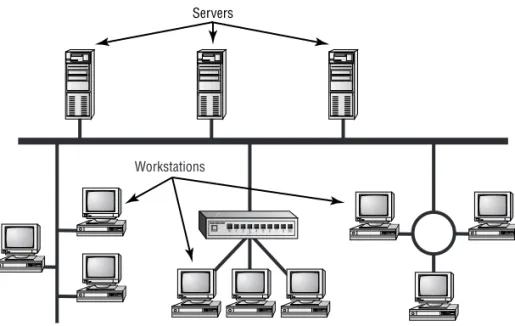
By definition, a local area network (LAN) is limited to a specific area, usually an office, and cannot extend beyond the boundaries of a single building. The first LANs were limited to a range (from a central point to the most distant computer) of 185 meters (about 600 feet) and no more than 30 computers. Today’s technology allows a larger LAN, but practical administration limi-tations require dividing it into small, logical areas called workgroups. A workgroup is a collection of individuals (a sales department, for example) who share the same files and databases over the LAN. Figure 1.1 shows an example of a small LAN and its workgroups.
F I G U R E 1 . 1 A small LAN
Wide Area Network
Chances are, you are an experienced wide area network (WAN) user and didn’t know it. If you have ever connected to the Internet, you have used the largest WAN on the planet. A WAN is any network that crosses metropoli-tan, regional, or national boundaries. Most networking professionals define a WAN as any network that uses routers and public network links. The Internet fits both definitions.
WANs differ from LANs in the following ways:
WANs cover greater distances.
Network Elements 5
WANs can be connected on demand or permanently connected; LANs
have permanent connections between stations.
WANs can use public or private network transports; LANs primarily
use private network transports.
WANs can use either full- or half-duplex communications. LANs
typically use half-duplex communications, although most local area networks today use full-duplex communications (see the sidebar “Full-Duplex vs. Half-Duplex Communications”).
The Internet is actually a specific type of WAN. The Internet is a collec-tion of networks that are interconnected and, therefore, is technically an internetwork (Internet is short for the word internetwork).
A WAN can be centralized or distributed. A centralized WAN consists of a central computer (at a central site) to which other computers and dumb terminals connect. The Internet, on the other hand, consists of many inter-connected computers in many locations. Thus, it is a distributed WAN.
Host, Workstation, and Server
For the Network+ exam, you need a good understanding of the three primary components of a network: workstations, servers, and hosts. Each one of these items can be found on most networks.
Full-Duplex vs. Half-Duplex Communications
All network communications (including LAN and WAN communications) can be categorized as half-duplex or full-duplex. With half-duplex, commu-nications happen in both directions, but in only one direction at a time. When two computers communicate using half-duplex, one computer sends a signal and the other receives; then they switch sending and receiving roles. Chances are that you are familiar with half-duplex communications. If you ever use a CB radio, you are communicating via half-duplex: One person talks, and then the other person talks.
6 Chapter 1 Network Fundamentals
Understanding Workstations
In the classic sense, a workstation is a powerful computer used for drafting or other math-intensive applications. The term is also applied to a computer that has multiple central processing units (CPUs) available to users. In the network environment, the term workstation normally refers to any computer connected to the network that is used by an individual to do work. Workstation can also refer to software, as in Windows NT Work-station. It is important to distinguish between workstations and clients. A client is any network entity that can request resources from the network; a workstation is a computer that can request resources. Workstations can be clients, but not all clients are workstations. For example, a printer can request resources from the network, but it is a client, not a workstation.
Understanding Servers
In the truest sense, a server does exactly what the name implies: It provides resources to the clients on the network (“serves” them, in other words). Servers are typically powerful computers that run the software that controls and maintains the network. This software is known as the network operat-ing system, and we’ll discuss this topic in detail in Chapter 3, “TCP/IP Fundamentals.”
Servers are often specialized for a single purpose. This is not to say that a single server can’t do many jobs, but, more often than not, you’ll get better performance if you dedicate a server to a single task. Here are some examples of servers that are dedicated to a single task:
File Server Holds and distributes files.
Print Server Controls and manages one or more printers for the network.
Proxy Server Performs a function on behalf of other computers (proxy means “on behalf of”).
Application Server Hosts a network application.
Web Server Holds and delivers web pages and other web content using the Hypertext Transfer Protocol (HTTP).
Mail Server Hosts and delivers e-mail. It’s the electronic equivalent of a post office.
Network Elements 7
Remote Access Server Hosts modems for inbound requests to connect to the network. Remote access servers provide remote users (working at home or on the road) with a connection to the network.
Telephony Server Functions as a “smart” answering machine for the network. It can also perform call center and call-routing functions.
Notice that each server type’s name consists of the type of service the server provides (remote access, for example) followed by the word “server,” which, as you remember, means to serve.
Regardless of the specific role (or roles) these servers play, they should all have the following in common:
Hardware and/or software for data integrity (such as backup
hardware and software)
The capability to support a large number of clients
Figure 1.1, earlier in this chapter, shows a sample network. Physical resources, such as hard-drive space and memory, must be greater in a server than in a workstation because the server needs to provide services to many clients. Also, a server should be located in a physically secure area. Figure 1.2 shows a sample network that includes both workstations and servers. Note that there are more workstations than servers because a few servers can serve network resources to hundreds of users simultaneously.
8 Chapter 1 Network Fundamentals
If the physical access to a server is not controlled, you don’t have security. Use this guideline: If anybody can touch it, it isn’t secure. The value of the com-pany data far exceeds the investment in computer hardware and software. We’ll look at network security in detail in Chapter 8, “Network Access and Security.”
Understanding Hosts
The term host is most commonly used when discussing TCP/IP related ser-vices and functions. Ahost, in TCP/IP terms, is any network device that has a TCP/IP network address. Workstations, servers, and any other network device (as long as it has TCP/IP addresses) can all be considered hosts. In con-versation, you may also hear the word “host” used to describe any minicom-puter or server. For the Network+ exam, however, you should stick to the classic definition used here.
Peer-to-Peer vs. Client/Server Architecture
As you learned earlier in this chapter, the purpose of networking is to share resources. How this is accomplished depends on the architecture of the network operating system software. The two most common network types are peer-to-peer and client/server.
If you were to look at an illustration of a group of computers in a LAN, it would be impossible to determine if the network was a peer-to-peer or a client/server environment. Even a videotape of this same LAN during a typical workday would reveal few clues as to whether it is peer-to-peer or client/server. Yet, the differences are huge. Since you can’t see the differences, you might guess correctly that they are not physical but logical.
Peer-to-Peer Network
Network Elements 9
Each computer in a peer-to-peer network can be both a client that requests resources and a server that provides resources. This is a great arrangement, provided the following conditions are met:
Each user is responsible for local backup.
Security considerations are minimal.
A limited number of computers are involved.
Networks that run Windows 95/98 as their network operating system or networks using Windows NT in a workgroup are considered peer-to-peer networks. Figure 1.3 shows an example of a peer-to-peer-to-peer-to-peer network. Peer-to-peer networks present some challenges. For example, backing up company data becomes an iffy proposition. Also, it can be difficult to remember where you stored a file. Finally, because security is not central-ized, users and passwords must be maintained separately on each machine, as you can see in Figure 1.3. Passwords may be different for the same users on different machines.
Client/Server Network
In contrast to a peer-to-peer network, a client/server network uses a network operating system designed to manage the entire network from a centralized point, which is the server. Clients make requests of the server, and the server responds with the information or access to a resource.
Client/server networks have some definite advantages over peer-to-peer networks. For one thing, the network is much more organized. It is easier to find files and resources because they are stored on the server. Also, client/server networks generally have much tighter security. All usernames and passwords are stored in the same database (on the server), and individual users can’t use the server as a workstation. Finally, client/server networks have better performance and can scale almost infinitely. It is not uncommon to see client/server networks with tens of thousands of workstations. Figure 1.4 shows a sample client/server network. Note that the server now holds the database of user accounts, passwords, and access rights.
F I G U R E 1 . 4 A client/server network
Network Attached Storage
Physical Topologies 11
and programs to be shared. Additionally, these servers cost several thousand dollars.
In the last few years, however, it has become very attractive to network administrators to replace these file servers with a new breed of device known as network attached storage. Network attached storage, such as the Quantum® SNAP! Server, is basically a small network device, or “black box,” with a network card and a large hard disk. The network attached storage device usually runs a special proprietary operating system that allows the box to function as a file server.
The major reason these devices are so attractive to network administra-tors is that they are very inexpensive compared to traditional file servers. For example, a typical Pentium II Server with 256MB of RAM might cost a few thousand dollars. On the other hand, a 20GB network attached storage device might cost only a few hundred dollars.
Another advantage to these devices is that they are very easy to adminis-trate. Usually, security and access are set up by connecting to the device with a web browser and making changes using a web interface.
The final advantage to these devices is their ease and speed of setup. It would take most network technicians about three hours to add another server to a network. Quantum, however, expresses setup times for its network attached storage devices in minutes and seconds. Basically, all an administrator has to do is plug in the power, plug in the network cable, turn the device on, and set up security and access, and the device will be ready to use.
Physical Topologies
The cables or connections in a physical topology are often referred to as network media (or physical media). Choosing how computers will be connected in a company’s network is critical. A wrong decision in the physical topology makes the media difficult to correct, because it is costly and disruptive to change an entire installation once it is in place. The typical organization changes the physical layout and physical media of a network only once about every 10 years, so it is important to choose a configuration that you can live with and that allows for growth.
In the next section, we’ll look at physical media. In this section, we’ll look at the five most common topologies:
Bus
Ring
Star
Mesh
Wireless
Bus
In a bus topology, all computers are attached to a single continuous cable that is terminated at both ends, which is the simplest way to create a physical network. Originally, computers were attached to the cable with wire taps. This did not prove practical, so drop cables are now used to attach comput-ers to the main cable. Figure 1.5 shows an example of a bus network. Notice how the cable runs from computer to computer with several bends and twists.
Physical Topologies 13
When communicating on a network that uses a bus topology, all com-puters see the data on the wire. This does not create chaos, though, because the only computer that actually accepts the data is the one to which it is addressed. You can think of a bus network as a small party. David is already there, along with 10 other people. David would like to tell Joe something. David yells out, “Joe! Will you grab me a cup of coffee, please?” Everyone in the party can hear David, but only Joe will respond. A star network with a hub, which you’ll read about later in this section, also operates in this manner.
As with most things, there are pros and cons to a bus topology. On the pro side, a bus topology:
Is simple to install
Is relatively inexpensive
Uses less cable than other topologies
On the con side, a bus topology:
A bus sounds good, but . . .
Despite the simplicity of the bus topology, there are some inherent disad-vantages to this design. For example, what happens if the wire breaks or is disconnected? Neither side can communicate with the other, and signal bounce occurs on both sides. The result is that the entire network is down. For this reason, bus topologies are considered to have very little fault tolerance.
Has little fault tolerance (a single fault can bring down the entire
network)
Is difficult to troubleshoot
Star
Unlike those in a bus topology, each computer in a star topology is con-nected to a central point by a separate cable. The central point is a device known as a hub. Although this setup uses more cable than a bus, a star topology is much more fault tolerant than a bus topology. This means that if a failure occurs along one of the cables connecting to the hub, only that portion of the network is affected, not the entire network. It also means that you can add new stations just by running a single new cable. Figure 1.6 shows a typical star topology.
F I G U R E 1 . 6 A typical star topology with a hub
The design of a star topology resembles an old wagon wheel with the wooden spokes extending from the center point. The center point of the wagon wheel would be considered the hub. Like the wagon wheel, the network’s most vulnerable point is the hub. If it fails, the whole system collapses. Fortunately, hub failures are extremely rare.
As with the bus topology, the star topology has advantages and disadvan-tages. The increasing popularity of the star topology is mainly due to the large number of advantages, which include the following:
New stations can be added easily and quickly.
A single cable failure won’t bring down the entire network.
Physical Topologies 15
The disadvantages of a star topology include the following:
Total installation cost can be higher because of the larger number
of cables, but prices are constantly becoming more and more competitive.
It has a single point of failure, the hub.
Ring
In the ring topology, each computer is connected directly to two other com-puters in the network. Data moves down a one-way path from one computer to another, as shown in Figure 1.7. The good news about laying out cable in a ring is that the cable design is simple. The bad news is that, as with bus topology, any break, such as adding or removing a computer, disrupts the entire network. Also, because you have to “break” the ring in order to add another station, it is very difficult to reconfigure without bringing down the whole network. For this reason, the physical ring topology is seldom used.
F I G U R E 1 . 7 A typical ring topology
Although its name suggests a relationship, Token Ring does not use a physical ring topology. It instead uses a physical star, logical ring topology. You will learn more about logical topologies later in this chapter.
On the con side, a ring topology is:
Expensive, because multiple cables are needed for each workstation.
Difficult to reconfigure.
Not fault tolerant. A single cable fault can bring down the entire
network.
Mesh
In a mesh topology (as shown in Figure 1.8), a path exists from each station to every other station in the network. While not usually seen in LANs, a variation on this type of topology—the hybrid mesh—is used on the Internet and other WANs in a limited fashion. Hybrid mesh topology networks can have multiple connections between some locations, but this is done only for redundancy. Also, it is not a true mesh because there is not a connection between each and every node, just a few for backup purposes. Notice in Figure 1.8 how complex the network becomes with four connections.
F I G U R E 1 . 8 A typical mesh topology
As you can see in Figure 1.8, a mesh topology can become quite complex as wiring and connections increase exponentially. For every n stations, you will have n(n–1)/2 connections. For example, in a network of 4 computers, you will have 4(4–1)/2 connections, or 6 connections. If your network grows to only 10 computers, you will have 45 connections to manage! Given this impossible overhead, only small systems can be connected this way. The payoff for all this work is a more fail-safe, or fault-tolerant, network, at least as far as cabling is concerned.
Physical Topologies 17
or network devices can switch between these multiple, redundant connec-tions if the need arises. On the con side, the mesh topology is expensive and, as you have seen, quickly becomes too complex.
Wireless
Radio frequency (RF) systems are being used all over corporate America. The RF networking hardware that is available today makes it easy for people to connect wirelessly to their corporate network as well as to the Internet.
The most popular example of an RF network today is what is known as an ad hoc RF network. These networks are created when two or more entities with RF transceivers that support ad hoc networking are brought within range of each other. The two entities will send out radio waves to each other, and they will both recognize that there is another RF device close by that they can communicate with. These ad hoc networks allow people with laptops or handheld devices to create their own networks on the fly and transfer data. Figure 1.9 shows an example of an ad hoc network between three notebooks. All of these notebooks have the same RF devices that support ad hoc and have been configured to talk to each other.
The other example of an RF network is a multipoint RF network. This type of RF network has many stations, each with an RF transmitter and receiver, and each station communicates with a central device known as a wireless bridge. A wireless bridge (known as a wireless access point, or WAP, in RF systems) is a device that provides a transparent connection to the host LAN via an Ethernet or Token Ring connection and uses some wireless method (e.g., infrared, RF, or microwave) to connect to the individual nodes. This type of network is mainly used for two applications: office “cubicle farms” and metropolitan-area wireless Internet access. Each of these appli-cations requires that the wireless bridge be installed at some central point and the stations that are going to access the network be within the operating range of the bridge device. Figure 1.10 shows an example of this type of net-work. Note that the workstations at the top of the figure can communicate wirelessly to the server and printer connected to the same network as the bridge device.
F I G U R E 1 . 1 0 An example of an RF multipoint network
Laser printer
Physical Topologies 19
There are many different brands, makes, and models of RF LAN equip-ment. This used to be a source of difficulty with LAN installers. In the infancy of RF wireless networking, every company used different frequen-cies, different encoding schemes, different antennas, and different wireless protocols. The marketplace was screaming for a standard to be proposed. For this reason, the IEEE 802.11 standard was developed. 802.11 is a net-working standard that specifies various protocols for wireless netnet-working. It does in fact specify that either infrared or RF can be used for the wireless network, but most RF systems are the only ones advertising IEEE 802.11 compliance.
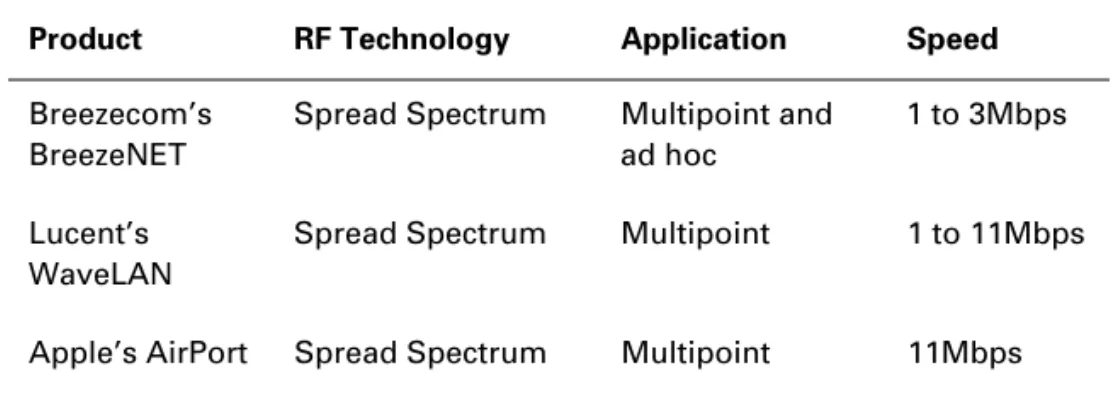
Table 1.1 shows some examples of the RF wireless networking products available at the time of writing this book. This table shows which RF tech-nology each product uses as well as its primary application.
Backbones and Segments
With complex networks, we must have a way of intelligently identifying which part of the network we are discussing. For this reason, we commonly break networks into backbones and segments. Figure 1.11 shows a sample network and identifies the backbones and segments. You should refer to this figure when necessary as you read about backbones and segments.
Understanding the Backbone
A backbone is the part of the network to which all segments and servers con-nect. A backbone provides the structure for a network and is considered the main part of any network. It usually uses a high-speed communications
T A B L E 1 . 1 Available RF Wireless Networking Product Examples
Product RF Technology Application Speed
Breezecom’s BreezeNET
Spread Spectrum Multipoint and ad hoc
1 to 3Mbps
Lucent’s WaveLAN
Spread Spectrum Multipoint 1 to 11Mbps
F I G U R E 1 . 1 1 Backbone and segments on a sample network
technology of some kind, such as FDDI (Fiber Distributed Data Interface) or 100-Megabit Ethernet (Fast Ethernet). All servers and all network segments typically connect directly to the backbone so that any segment is only one segment away from any server on that backbone. Because all segments are close to the servers, the network is more efficient. Notice in Figure 1.11 that the three servers and three segments connect to the backbone.
Understanding Segments
Segment is a general term for any short section of the network that is not part of the backbone. Just as servers connect to the backbone, workstations con-nect to segments. Segments are concon-nected to the backbone to allow the workstations on them access to the rest of the network. Figure 1.11 shows three segments.
Selecting the Right Topology
Physical Media 21
to install. Larger environments are usually wired in a star because moves, adds, and changes to the network are performed more efficiently with a physical star than with any of the other topologies.
If you need uptime to the definition of fault resistant (that is, 99-percent uptime or less than 8 hours total downtime per year), you should seriously consider a partial mesh layout. While you are thinking about how fault tol-erant a mesh network is, let the word “maintenance” enter your thoughts. Remember that you will have n(n–1)/2 connections to maintain, which will quickly become a nightmare and could exceed your maintenance budget.
Generally speaking, you should balance the following considerations when choosing a physical topology for your network:
Cost
Ease of installation
Ease of maintenance
Cable fault tolerance
Physical Media
A
lthough it is possible to use several forms of wireless networking, such as radio and infrared, most networks communicate via some sort of cable. In this section, we’ll look at three types of cables:Coaxial
Twisted-pair
Fiber-optic
Coaxial Cable
more expensive but may be mandated by electrical code whenever cable is hidden in walls or ceilings. Plenum rating applies to all types of cabling.
Coaxial cable is available in different specifications that are rated accord-ing to the RG Type system. Different cables have different specifications and, therefore, different RG grading designations (according to the U.S. military specification MIL-C-17). Distance and cost are also considerations when selecting coax cable. The thicker the copper, the farther a signal can travel— and with that comes higher costs and a less flexible cable.
Using Thick Ethernet
The original Ethernet cable is known as Thick Ethernet cable, or Thicknet. It is also called 10Base5 and is graded as RG-8. To the folks who installed the cable, it was more commonly called a “frozen garden hose” because of its 1/
2" diameter.
With