ISSN(Online): 2320-9801
ISSN (Print) : 2320-9798
I
nternational
J
ournal of
I
nnovative
R
esearch in
C
omputer
and
C
ommunication
E
ngineering
(An ISO 3297: 2007 Certified Organization)
Vol. 4, Issue 6, June 2016
Live Audio and Video Transmission System
Using Raspberry Pi
Vaibhav A.Vyavahare
Student, Dept. of E & TC Engineering, GHRCOEM, Chas, Ahmednagar, Maharashtra, India
ABSTRACT:The real-time voice transmission over wireless medium is being exploited by various newset of applications to abate the growing need of a secured, low-cost and compact embedded device. Real time Audio & Video conferencing is nothing but to perform the live chat with respect to the two or persons with the real time audio & video transmission over the wired & wireless network. In this project a newfully-functional embedded system has been proposed which is able to transmit voice in real-time over WI-FIwith an acceptable video facility. The credit-card- sized single-board and low price, Raspberry Pi model is the most appropriate as a portable device for live audio and video transmission. In this project, theRaspberry Pi is intended to have capability of gathering audio from an USB microphone connected to it and image is captured via camera connected to USB port. Transmission of Audio and Video has been carried out with the help of VOIP and SIP Protocol in real time from one raspberry pi module to another raspberry pi module. Open source Linux based OS is used in this project to keep the cost low.
KEYWORDS: Raspberry Pi, HDMI, Audio, Video, VOIP, SIP
I. INTRODUCTION
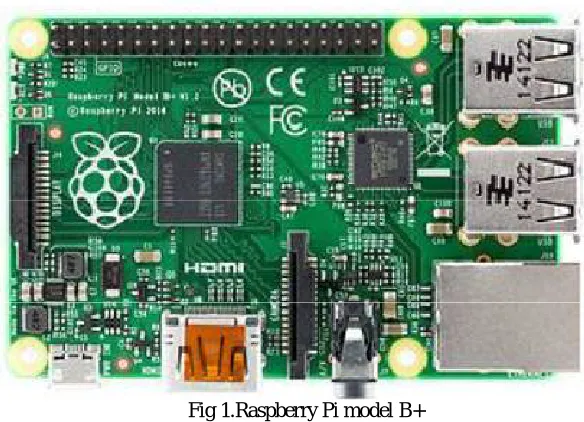
The Raspberry Pi platform has gained wide popularity in the last few years because of its wide availability, ease to use and having excellent support and documentation, along with its low cost. The Raspberry Pi have mostly useful in the development of educational projects. It is capable of doing all those things such a PC can do, right from browsing the internet and playing high definition video, to make spreadsheets, word-processing. The processor of a Raspberry Pi system is a Broadcom BCM2835 system-on-chip (SoC) multimedia processor. But it does not have internal memory so that the SD card is used for booting and storage . This uses Linux and Debian based operating systems. We are using
”Raspbian Wheezy‟. The model we are going to use is Raspberry Pi B+ model which has 4 USB ports, and HDMI port
and a 10/100 Ethernet controller. It requires 5V, 1.2 Amp power supply with micro-USB connector.
Taking the advantages of all features of raspberry pi live transmission of audio and video has been carried out with the help of VOIP protocol. Live chat on the raspberry pi nothing but to perform the audio & video transmission based on the ARM 11 Raspberry Pi platform. Raspberry pi capable to perform the live audio & video streaming by using the gstreamer&gst-launch libraries. Live video streaming is done by connecting webcam to both the system & audio transmission by connecting headphone or the microphone to the system. Along with one keyboard & one mouse to both the system.It acts as the standalone system for the live audio & video data transmission without PC.
Fig 1.Raspberry Pi model B+
II.HARDWAREREQUIREMENT
1) Keyboard and Mouse: These are used for write a code and handle the Raspberry Pi module.
2) Headphones: Easily regular available headphones are used for audio purpose.
3) USB camera: Easily available USB port camera is used for capturing image.
4) IEEE 802.11 - This is IEEE standard used for the wireless Wi-Fi Network.
III.IMPLEMENTATIONMETHODOLOGY
Raspberry pi does not have in built memory for storing operating system and software packages, so it is necessary to boot a SD with raspbian operating system. raspbian wheezy OS is downloaded from official website of Raspberry pi foundation. For transmission of audio and video from one raspberry pi to another raspberry pi configuration of USB headphone, USB camera, Wi-Fi network and GUI is desired.
A) Installation of the “Raspbian Wheezy” Operating System:
Raspbian is a Debian-derived free OS optimizing specially for the Raspberry Pi hardware. Raspbian mostlyuses a Linux kernel also popular as the Debian GNU/Linux distribution. It comes along with over 35,000 packages and pre-compiled software bundled in a format that is easy for installation on the Raspberry Pi. The “wheezy-raspbian.Zip”OS
file can be directly downloaded from Raspberry Pi‟s official website. After downloading this ZIP file it is necessary to
extract the OS image file into the SD memory card, for that purpose an image writer application “win32diskimager-v0.9-binary”[2] can be used. This software is used to write a raw disk image to a removable memory device. It is a free of cost and the program for it is open source. It is useful for any embedded development because of the source code can be branched and modified as per the requirement. After writing to SD card is finished, it is put in the SD card slot of Raspberry Pi and switch it on so that initial booting of raspberry pi can start.[1]
B) Configuration of Headphone:
ISSN(Online): 2320-9801
ISSN (Print) : 2320-9798
I
nternational
J
ournal of
I
nnovative
R
esearch in
C
omputer
and
C
ommunication
E
ngineering
(An ISO 3297: 2007 Certified Organization)
Vol. 4, Issue 6, June 2016
C) Wi-Fi configuration of Raspberry Pi:
The Raspberry Pi’s network interface settings are configured according to desired Wi-Fi network.Wi-Fi connection
with router present in the network.Mostly enterprise area and home networks connect to Wi-Fi network through
gateway (router). These networks have certain settings and to connect them the Raspberry Pi must be configured accordingly. All the interfaces( local loop, Ethernet, Wi-Fi interfaces) are defined inside the network directory.
The static IP address assigned to the eachRraspberry Pi, the following configuration are used for matching the IP, Netmask and Gateway of the network.
allow-hotplug wlan0 iface wlan0 inet manual address<desired static IP>
netmask<netmask used for that network> gateway<router IP address of that network>
wpa-roam /etc/wpa_supplicant/wpa_supplicant.conf.
D) Installing Motion Software & Configuration of Webcam:
A very good (and free open-source) motion detection/surveillance software with many configuration options is motion. We now need to install it using the command line (log in to your raspberry as user "pi"):
sudo apt-get install motion
Some packages will be installed in the installation process; just type "y" to proceed with the installation.
As the current version of motion does not (yet) support the Raspberry camera module, we need to download and install a special build with support for this camera module. After downloading we need to unpack the downloaded file to the /tmp directory by using following connamd:
tarzxvf motion-mmal.tar.gz
After this unzipping, you now need to update your installed motion with the downloaded build: sudo mv motion /usr/bin/motion
sudo mv motion-mmalcam.conf /etc/motion.conf
You also need to enable the motion daemon so that motion will always run: sudonano /etc/default/motion
It also having facility of changing height and width of image according to our requirement by using following command:
sudonano /etc/motion.conf
Finally we can start the motion by using command: Sudo service motion start
IV.PROGRAMMINGUSINGPYTHON
Python is a high-level language. This means that Python code is written in largely recognizable English, providing the Pi with commands in a manner that is quick to learn and easy to follow. This is in marked contrast to low-level
languages, like assembler, which are closer to how the computer ―thinks but almost impossible for a human to follow
without experience. The high-level nature and clear syntax of Python make it a valuable tool for anyone who wants to learn to program. It is also the language that is recommended by the Raspberry Pi Foundation for those looking to progress from the simple Scratch to more hands-on programming. Python is published under an open-source license, and is freely available for Linux, OS X and Windows computer systems. This cross-platform support means that software written using Python on the Pi can be used on computers running almost any other operating system as well except where the program makes use of Pi-specific hardware such as the GPIO Port.
We can configure all external devices by using python languages also change their setting as per our requirement. A) Python Syntax:
Fig.2.Python Idle from desktop
IDLE gives you a REPL (Read-Evaluate-Print-Loop) which is a prompt you can enter Python commands in to. As it's a REPL you even get the output of commands printed to the screen without using print.Note two versions of Python are available: Python 2 and Python 3. Python 3 is the newest version and is recommended, however Python 2 is available
for legacy applications which do not support Python 3 yet. For the examples on this page you can use Python 2 or 3
.
B
)
Executing Python files from the command line:You can write a Python file in a standardeditor like Vim, Nano or LeafPad, and run it as a Python script from the command line. Just navigate to the directory the file is saved (use cd and ls for guidance) and run with python, e.g. python hello.py
V. INTRODUCTION TO VOIP
VOIP is a family of transmission technologies for delivery of voice communications over packet switched networks, such as the Internet and other IP networks. For the reason that VOIP makes good use of the Internet technologies and the extensive web linked environment, it is able to offer much more versatile services with lower, or even no cost. Due to the inherent capacity limitation of the embedded hardware and the real-time requirement on voice communication, an embedded VOIP system has to take many factors into the design consideration and carefully weigh among the protocols and compression algorithms for the ones suit best. The VOIP system in this paper sets the hardware foundation on ARM11 embedded platform, adopts SIP and RTP as the basis of Internet protocol and employs CELP compression algorithms to ensure the low-latency and high-quality communication. In addition, UDA1341 sound codec and ALSA sound driver are used to guarantee the performance of the speech recording and processing. A) Basic Principles of VOIP:
ISSN(Online): 2320-9801
ISSN (Print) : 2320-9798
I
nternational
J
ournal of
I
nnovative
R
esearch in
C
omputer
and
C
ommunication
E
ngineering
(An ISO 3297: 2007 Certified Organization)
Vol. 4, Issue 6, June 2016
concerns to the voice QoS and real-time response, so it is of vital importance that a VOIP system must put higher priority on choosing the adequate protocols and voice compression methods to meet the user's top needs, even if the cost may sometimes be a sacrifice of network reliability.
VI. SIP PROTOCOL
SIP is an application layer signaling protocol widely used for creating, modifying and terminating multimedia communication sessions. Therefore VOIP systems using SIP as the session initialize usually have a superior real-time communication in most situation. Furthermore, SIP is a distributed control protocol. That means SIP is free of central servers for network management and is easy to deploy. All these positive qualities make the SIP very easy-to-use and perfectly appropriate for embedded terminal network.
1) Pattern Layout of SIP Server:
The SIP server section is consisted of three parts:
1.1).User Agent: Though structurally speaking, The User Agent belongs to the client software section and its actual function is to act as an extension of the SIP server to cope with all SIP requests and responses.
1.2).Register/Location server: When serving as a register server, Register/Location server dynamically establishes the
mapping relationship between user’s logical and physical addresses. The mapping relationship can be further used to support call routing devices and subscriber mobility. When receiving a location request from a user, the server can also
find and return the needed user IP according to the mapping list it contains
.
1.3). Proxy/Redirect Server: In most circumstances the proxy server awaits the incoming requests from client-sides and
relays those messages to the specified resource server according to the visiting strategy. After the resource server responds, the required contents will then be sent back to the source clients. If a user registers in the server moves to a new position or changes its IP address, the redirection function of SIP will be activated. The server will redirect and return the user's new IP address by tracing and consulting the relevant servers.
2)Messaging System of SIP Servers:
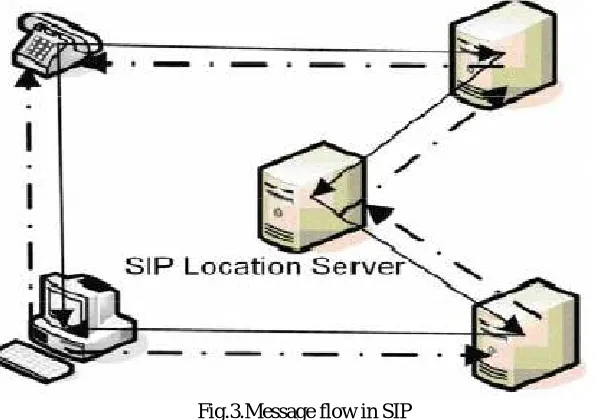
Fig.3.Message flow in SIP
Figure 3 shows the messaging system in the SIP servers, the full lines and the dash lines represent the SIP requests and
acknowledgements respectively
.
in the session finally finish swapping their IPAddresses and the communication environment is ready for the upcoming voice transmission.[4]
VII.PROCEDUREFORLINPHONESETUP
Linphone is a general purpose SIP softphone that isn't bound to any operator. Because it is compatible with SIP, it can work withany VoIP operator using SIP (most of them use SIP, the most notable exception being Skype). Linphone.org is not affiliated nor recommends a VoIP operator in particular. We invite you to select a VoIP provider in your country by browsing the web, and compare rates etc…
Note that you might have a SIP account included with your internet line subscription: it is the case in France for clients of the free.fr internet provider, who is powering the freephonie.net VoIP network.
Once we are SIP account then Go to the settings page of Linphone. On Raspberry Pi it is accessible through the "menu" button. You'll have to enter at least three things:
Username
Domain
Password
All this information should be provided to you by your VoIP operator during signup process. For your information, username and domain form your SIP identity when grouped together like an email address:
sip:my_username@my_voip_provider.
Sometimes, VoIP providers might require to setup also the "Proxy" field. This happens when the domain is different from the proxy.
1. Direct SIP calls in local network:
Just enter sip:<hostname or IP address> in the SIP url bar of linphone to place a call to another linphone running in your network. This works also on the public internet provided that the two machines have public IP addresses or appropriate firewall rules.
2.Internet calls through a SIP proxy:
On the public internet, because of dynamic IP addresses, mobility, firewalls, direct calls are not really usable. That's why the concept of SIP proxy exists: the proxy is responsible for routing calls whatever the IP address of end-users is. VoIP Operators Company is deploying SIP proxies on the internet to get SIP calls routed for their subscribers.In a first step, the user has to subscribe for the service by choosing a username (sometimes a number) and password. Your public sip identity is then sip:<your username>@<your voip provider>, this is the address that other people can use to reach you using SIP. Then, by configuring the client (such as Linphone) to go through the proxy, you get a public sip address on the internet, in the same way you have an email address. Other people subscribed to this operator can be reached
simply by typing their username or phone number. The routing of pure internet calls is a service that is often free
.
VIII.RESULT
1) After establishment of proper set up of user 1 and user 2, firstly we have to check IP address of each raspberry Pi.This can be done by using the command
Ifconfig
ISSN(Online): 2320-9801
ISSN (Print) : 2320-9798
I
nternational
J
ournal of
I
nnovative
R
esearch in
C
omputer
and
C
ommunication
E
ngineering
(An ISO 3297: 2007 Certified Organization)
Vol. 4, Issue 6, June 2016
Fig.4.IP address of Raspberry Pi of user 1
2)Next step is we have to establish the link between user 1 and user 2 by using linphone.Command used for that is Linphone - - no – video
VOIP connection is get established between user 1 and user 2,and SIP window is get pop up on desktop of each raspberry Pi.
Fig.5.Linphone window
Fig.6.IP address of Raspberry Pi of user 2
5) Link is getting established and VOIP call is get established between user 1 and user 2.
Fig.7. Link Establishment between user 1 and user 2
ISSN(Online): 2320-9801
ISSN (Print) : 2320-9798
I
nternational
J
ournal of
I
nnovative
R
esearch in
C
omputer
and
C
ommunication
E
ngineering
(An ISO 3297: 2007 Certified Organization)
Vol. 4, Issue 6, June 2016
Fig.8. Live Video and Audio chat between user 1 and user 2
IX. CONCLUSION
In this phase of the project, a secure connection, with the help of VOIP and SIP protocol, was established between two Raspberry Pi devices with a Wi-Fi connection. With the help of this connection, voice was recorded, played and streamed on and from one Raspberry Pi to another raspberry pi module using a Python based GUI successfully. The attempt to live video and audio transmission between two raspberry pi modules was successfully achieved through VOIP server/client implementation maintaining operation of Raspberry Pi as a headless embedded system. The usage of open source, freeware programs and OS kept the project cost low.
REFERENCES
[1] RajeebLochan Dash, Mrs. A. RuhanBevi,” Real-time Transmission of Voice over 802.11 Wireless Networks Using Raspberry Pi” IJEDR 2014. [2] Available [online]: http: // www. raspberrypi. org /downloads
[3] Available [online]: http://sourceforge.net/projects/win32diskimager/
[4] Bhushan R Jichkar., "Proposed System for Placing Free Call over Wi-Fi Network Using VoIP and SIP", Int. Journal of Engineering Research and Applications, ISSN:2248-9622, Vol.4, Issue 1( Version 3), pp.132-135, January 2014.
[5] S.Sundar D.C.E, M. Krishna Kumar, P.Selvinpremkumar, M.Chinnadurai,“Voice Over Ip Via Bluetooth/Wi-Fi Peer To Peer”, IEEE Paper, March 30, 31, 2013.
[6] Matt Richardson, Shawn Wallace, "Getting Started with Raspberry”, Brian Jepson, O'Reilly Media Inc., United States of America, first edition, pp.10-31,December 2012
[7] Diptijavale, Bharti dixit ,Pankajjavale, “Performance Evaluation Of Wireless Transmission Using Embedded System”, IEEE Paper, November 26 , 2009.
[8] G.SaiPrasanna, S.Karunakar, “Implementation of VoIP Communication on Embedded Systems”, IJRCCT, Jan2013.
BIOGRAPHY