ROBOTIC ARM MANIPULATION USING LEAP
MOTION CONTROLLER
L.Vani
1, R.Anirudh Reddy
2 1PG Student,
2Asst.Professor, B.V Raju Institute of Technology, Narsapur, Medak
ABSTRACT
Robotics provides an efficient approach in the development of assistive devices, due to their enhanced
functionality. Statistics predict that by 2015, half of the population in our country is going to be older than fifty,
every third person even over 60. These ageing societies face numerous challenges in performing simple tasks in
Activities of Daily Living “ADLs”. Increasingly, a lot of research is being focused on Ambient Assisted Living “AAL” which presents a new approach that promises to address the needs of elderly people. An important goal
of AAL is to contribute to the quality of life of the elderly and handicapped people and help them to maintain an
independent lifestyle. The introduction of robotics and technology-supported environments will play a huge role
in allowing elderly and physically impaired people to keep living a self-determined, independent life in their
familiar surroundings. In this paper, the implementation of a novel intuitive and manipulation scheme is
proposed, by developing a human-machine communication interface between the Leap Motion controller and
the robotic arm.
In this we are having two sections: as User end and Receiver end. For two sections we are using two different
Software tools. One is Python idle shell and Arduino IDE tool. Here, the data is transmitted through zigbee.
Keywords:LEAP Motion Controller, Robotic Arm, SDK Tool, ATMEGA 2560 Board, Pc/Laptop
I.INTRODUCTION
Impaired or aged individuals require novel approaches for placing mechatronics and robotic assisted services in
their living environments. The development of such systems should be focused on cost effectiveness, ease of
control, and safe operation, in order to enhance the autonomy and independence of such individuals, minimizing
at the same time the necessity for a caregiver. Ageing society faces numerous challenges in performing simple
tasks in Activities of Daily Living (ADLs). ADLs represent the everyday tasks people usually need to be able to
independently accomplish. Nowadays caring of elderly people becomes more and more important. Individuals
with upper limb impairments, also face difficulties to perform ADLs, especially in cases where the impairments
have resulted from spinal cord injuries, neuromuscular diseases, etc. Many technical aids have been developed
to assist in impairments in the home environment. However these assistive devices provide limited functionality
and cannot address in efficient way independence.
sensors is: the Nintendo Wii and the Microsoft's Xbox Kinect. Each of the two examples has its own operating
principle. The Wii operates by means of a remote which the user has to keep holding during the entire operation
time. The Kinect was initially developed to allow the user to interact with the Xbox without any controllers;
however it was used further as a vision platform in many different applications. An analysis of the Kinect
controller showed that it has an approximately 1.5 cm standard deviation in depth accuracy.
The Leap Motion Controller is considered a breakthrough device in the field of hand gesture controlled human
computer interface. The new, consumer-grade controller introduces a new novel gesture and position tracking
system with sub-millimeter accuracy. The controller operation is based on infrared optics and cameras instead of
depth sensors. Its motion sensing precision is unmatched by any depth camera currently available, to the best of
the author’s knowledge so far. It can track all 10 of the human fingers simultaneously. As stated by the
manufacturer, the accuracy in the detection of each fingertip position is approximately 0.01mm, with a frame rate
of up to 300 fps.
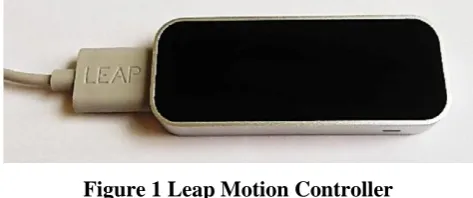
Figure 1 Leap Motion Controller
The controller is considered to be an optical tracking system based on stereo vision. Within its surface area of 24
cm², the controller has three IR (Infrared Light) emitters and two IR cameras. The field of view of the controller
is very wide, up to 150°, which gives the user the opportunity to move his hand in 3D, just like in real world.The
Software Development Kit (SDK) supplied by the manufacturer delivers information about Cartesian space of
predefined objects such as the finger tips, pen tip, hand palm position, etc. Also, information about the rotations
of the hand (e.g. Roll, Pitch, and Yaw) is available as well. All delivered positions are relative to the Leap
Motion Controller’s center point, which lies between the two IR cameras, just above the second IR emitter.
III. IMPLEMENTATION
3.1Block Diagram
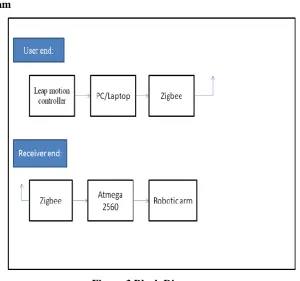
Figure 3 Block Diagram
In the above block diagram we are having two sections. As:
At the user end
At the receiver end
Here, for two sections we are using two different software tools and languages. At the user end am interfacing
the Leap Motion controller with SDK tool. SDK tool supports four languages. In that am using PYTHON idle
shell for interfacing the Leap Motion controller.
At the receiver end am using the controller named as ATMEGA 2560 MC. For interfacing the robotic arm is
using the arduino software IDE tool. And the data is transmitted through zigbee module.
3.2 Flow Chart
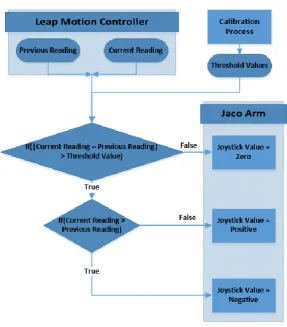
The algorithm represented in Figure 4 is developed to control each motion type of the Jaco arm i.e. Cartesian
motion (X, Y, and Z), and Angular motion (roll, pitch, and yaw). Every time a new frame is received from the
Leap Motion controller, the algorithm compares the reading with the previous one (which is saved from the
previous frame), and accordingly decides on the next steps that need to be followed. If the absolute difference
between the two readings is higher than a threshold value (calculated in advance for each user during the
calibration process), this means that the arm will react moving either in the positive or negative direction
Figure 4 The Mapping Algorithm
3.3 Calibration Process
During this period all readings from the Leap Motion controller are stored in data arrays, to be later processed
by the calibration algorithm. By applying a conventional filtering technique (the moving average filter) to the
readings, the extreme noisy signals are filtered out, hand tremor patterns can be recognized and threshold
values can be set accordingly. Threshold values ensure that hand tremor is not reflected to the robotic arm
movement.
3.4 Gesture Classifications
3.5 Connection with Arduino Micro-Controller
To enhance the functionality of the system, an interface is established between the developed software and the
Arduino ATMEGA 2560 micro-controller. This connection allows for the possibility of interfacing any
additional sensors, actuators, and display systems (e.g. LEDs, push buttons, display systems, etc.).
3.5.1 Initialization
Plug the Leap Motion Controller into your computer’s USB slot.
Be sure you have installed the latest Leap Motion Controller software. We recommend to use the lastest
version. You can find the latest software on Leap Motion’s Developer Portal:
https://developer.leapmotion.com/downloads/skeletal-beta
Check the Leap Motion Controller state icon in Kolor Eyes.
To change the Leap Motion Controller settings for Kolor Eyes, click on “Menu / Leap Motion”.
3.5.2 Camera Control
Finger: Place your hand above the Leap Motion Controller and point at the screen with your index finger to
make a cursor appear. Move the cursor towards the borders of the screen to move the camera.
Hand: Place your hand, palm down, above the Leap Motion Controller and move your hand to adjust the
camera. You can also transform the video projection to a little planet using two hands (cf. Utilization).
3.6 Gesture Recognization with Leap Motion Controller
Leap Motion API has a direction vector for the swipe gesture, i.e., a gesture completely recognized is associate
with a 3D direction vector. This vector has values ranging from -1.0 to +1.0. As shown on Fig. 1, the Leap
Motion “sees” the 3D space as a standard Cartesian coordinate system, also known as right-handed orientation
coordinate system. The origin of the coordinate system is centered at the top of the device, being the front of the
device the side with the green light . The x-axis is placed horizontally along the device, with positive values
increasing from left to right. The z-axis is placed also on the horizontal plane, perpendicular with x-axis and
with values increasing towards the user (the front side of the device). The y-axis is placed in the vertical, with
positive values increasing upwards. As different types of swipe gesture exist we needed to detect and
differentiate them. Recent Advances in Computer Science The interface was designed to react to six different
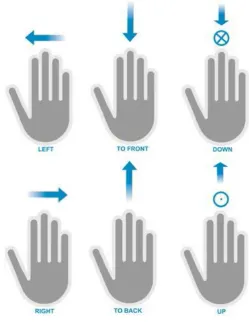
independent types of swipe gestures as shown three of them, are the opposite of the other three:
Select and deselect is realized by a top to bottom swipe or a bottom to top swipe respectively(Y-axis).
Select different floors of a house is realized by a front to back and back to front Swipes , to select lower and
upper floors respectively (z-axis).
Selecting the next and previous item/object is done by a left to right or right to left swipe Respectively
(x-axis).
In the first case (i), of a top to bottom and bottom to top swipe, the movement depends mainly on the y-axis. If
the direction vector has an upward direction (y ≈ +1) then a “deselect” action has occurred. Otherwise, if the
vector has a downward direction (y ≈ -1), then it is considered a “select” action. Since it is almost impossible to
do a swipe gesture with a vector direction component of exactly,
x = 0 ∧y = ±1 ∧z = 0, (1)
Figure 6 Six Types of Swipes for the Application
y ≤ -0.5 ∧|x| ≤ 0.5 ∧|z| ≤ 0.5, (2)
is considered a downward swipe. Contrariwise, if a swipe direction agrees with the condition
y ≥ 0.5 ∧|x| ≤ 0.5 ∧|z| ≤ 0.5, (3)
Then it is considered as an upward swipe. In the second case, (ii), we needed to analyze mainly the
z-axis.
A vector with direction in z, who has a value approximately 1, is considered to be a back to front swipe.
Otherwise, it is considered as a front to back swipe. Similar to (i), any swipe direction that agrees with
the condition
z ≤ -0.5 ∧|x|≤ 0.5 ∧|y| ≤ 0.5(4)
Then it is considered as a front to back swipe. Contrariwise, if a swipe direction agrees with the
condition.
z ≥ 0.5 ∧|x| ≤ 0.5 ∧|y| ≤ 0.5, (5)
Then it is considered a back to front swipe. The last case, (iii), where x-axis is the main axis, is again
similar to (i) and (ii). Any swipe direction that agrees with the condition
x ≤ -0.5 ∧|z| ≤ 0.5 ∧|y| ≤ 0.5, (6)
Then it is considered as a right to left swipe. Contrariwise, if a swipe direction agrees with the
condition
x ≥ 0.5 ∧|z| ≤ 0.5 ∧|y| ≤ 0.5, (7)
Then it is considered as a right to left swipe. These swipes are mutually independent, i.e., for every
3.7 Recordings Model
While data obtained from Leap Motion Controller are being processed, they are stored using specially created
classes representing the data. The most important class is Gesture Frame, which represents a single frame
captured from device. All gathered data is stored in a vector containing elements of Gesture Frame type. Gesture
Frame holds the following information:
_ Timestamp,
_ list of data of detected hands in the frame, stored in a vector containing elements of Gesture Hand type.
Gesture Hand stores parameters of hand performing a gesture. In one instance of Gestur Frame many instances
of Gesture Hand can be stored. Gesture Hand holds the following information:
_ Hand ID,
_ Plam position,
_ Stabilized palm position,
_ Palm normal vector,
_ Palm direction vector,
_ List of fingers of particular hand, stored in a vector containing elements Gesture Finger type,
_ Ordered value, obtained during hand sorting.
Gesture Finger stores parameters of one finger. In one instance of Gesture Hand many instances of Gesture
Finger can be stored. Gesture Finger contains:
_ Finger ID,
_ Tip position,
_ Stabilized tip position,
_ Finger direction vector,
_ Finger length,
IV. RESULTS
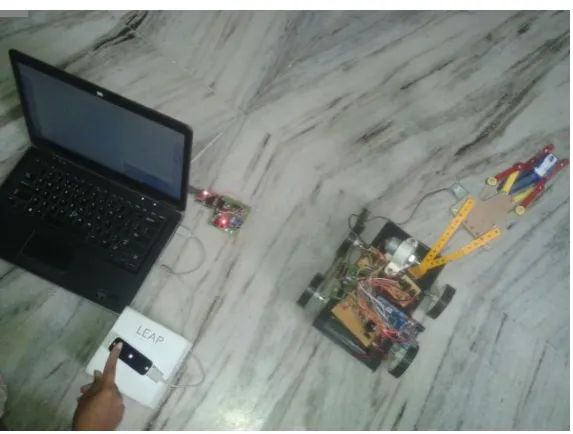
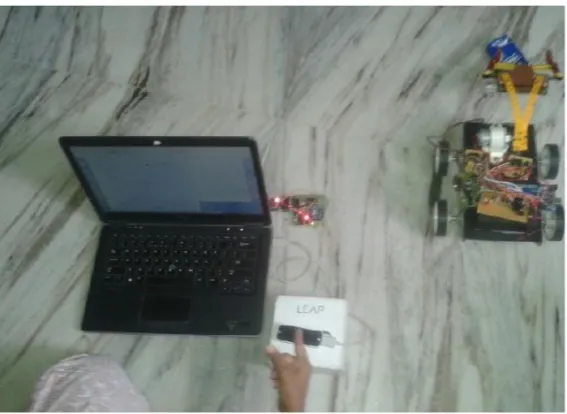
Figure 8 Robotic Arm Releasing the Object According to the Hand Gestures Given by the User
V. CONCLUSION
Human machine interface is proposed dealing with the intuitive manipulation of a robotic arm for
implementing ADLs, using a new gesture and position tracking system with sub-millimeter accuracy. The
main objective of this study is to introduce a simple robotic arm manipulation. in order to enable the
incorporation of robotic systems into the home environment, to enhance the independence and autonomy of
individuals with severe mobility impairments, and to allow at the same the monitoring and prevention of
abnormal disorders such as hand tremor patterns.
So we can believe that the Leap Motion Controller technology would be undoubtedly benefit and enable the
realization of various human-machine interaction application in the field of AAL and ADLs, due to its compact
size, enhanced precision, and low purchase cost.
VII. FUTURE SCOPE
The future scope is by using the same technology we can also develop the virtual instruments. Generally now a
day’s many people interested about playing virtual instruments. It’s a passion for this generation youth. So it is
helpful for those people .Means instead of buying all the virtual instruments we can learn without buying them
using Leap Motion Controller. And it also very helpful for the impaired people who doesn’t want to depend on
others.
REFERENCES
[1] Wiener, J.M., Hanley, R.J., Clark, R., Van Nostra JF, Measuring the activities of daily living: comparisons
across national surveys, Journal of Gerontology, Social Sciences, 46 (1990) 229-237.
[2] Atkins M.S., et al., Mobile arm supports: evidence based benefits and criteria for use, Journal of Spinal
[3] Romer, G.R.B.E., et al., Cost-savings and economic benefits due to the assistive robotic manipulator
(ARM), Proceedings of the 9th International Conference on Rehabilitation Robotics, 2005, pp. 201-204.
[4] Stanger, C.A., et al., Devices for assisting manipulation: a summary of user task priorities, IEEE
Transactions on Rehabilitation Engineering, 2 (1994) 256265.
[5] Routhier F., Archambault, P. S., Usability of a wheelchair-mounted six degree-of-freedom robotic
manipulator, RESNA 2010.
[6] Khoshelham, K., Elberink, S.O., Accuracy and resolution of kinect depth data for indoor mapping
applications, Sensors, 12 (2012) 1437–1454.
[7] Biswas, K.K., Basu, S., Gesture Recognition using Microsoft Kinect, Proceedings of the IEEE
International Conference on Automation, Robotics and Applications (ICARA), Delhi, India, 6–8
December 2011.
[8] Weichert, F., Bachmann, D., Rudak, B., Fisseler, D., Analysis of the accuracy and robustness of the leap
motion controller, Sensors, 13(5) (2013) 6380–6393.
[9] Wachs, J.P., Kölsch, M., Stern, H., Edan, Y., VisionBased Hand-Gesture Applications. Communications
of the acm, 54 (2) (2011) 60-71.
[10] Leap Motion | Mac & PC Motion Controller for Games, Design, & More. 2014. Available at:
http://www.leapmotion.com. [Accessed January 2014].
[11] Salarian, A. , Russmann, H., Vingerhoets, F.J.G.P., Burkhard, R., Blanc, Y., Dehollain, C., An
Ambulatory System to Quantify Bradykinesia and
Tremor in Parkinson’s Disease, Proceedings of the IEEE Conference on Information Technology
Applications in Biomedicine, 2003, pp. 35–38.
[12] Jankovic, J., Schwartz, K.S., Ondo, W., Reemergent tremor of Parkinson’s diesease, Journal of Neurol
Neurosurg Psychiatry, 67 (1999) 646–650.
[13] Georgoulas, C., Linner, T., Kasatkin, A., Bock, T., An AmI Environment Implementation: Embedding
TurtleBot into a novel Robotic Service Wall, Proceedings of the 7th German Conference on Robotics
(ROBOTIK 2012), Munich, Germany, May 2012, pp. 117-122.
[14] Kinova | Reach your potential. 2014. Available at: http://www.kinovarobotics.com. [Accessed December