© 2018, IRJET | Impact Factor value: 6.171 | ISO 9001:2008 Certified Journal | Page 1873
Comparative analysis of different graphical password techniques for
security
Manasi Shah
1, Radhika Naik
2, Sheetal Mullakodi
3, Sangita Chaudhari
41,2,3
Students, Dept. of Computer Engineering, Vidyavardhini’s College of Engineering and Technology, Maharashtra,
India.
4
Professor,Dept. of Computer Engineering, Vidyavardhini’s College of Engineering and Technology, Maharashtra,
India.
---***---Abstract -
There are different schemes proposed forshoulder surfing resistant graphical password but most of the users are familiar with a textual password than graphical password. As textual passwords are liable to many security problems, text-based graphical password has been proposed but unfortunately even it has proved to be both unsecure and inefficient. This scheme is proposed in order to make the login system easy and efficient. We also manifest the resistance of the proposed technique to shoulder surfing and accidental login thereby analyzing its security and usability. Supporting the users in selecting passwords of higher security is the main objective of knowledge-based authentication systems, in the sense of being from an expanded effective security space.
Key Words: shoulder surfing, security, usability, authentication.
1. INTRODUCTION
Shoulder surfing is an effective way to get information in crowded places and see the people entering their passwords for authentication at a site. Conventional password schemes are unprotected to shoulder surfing[1]. To overcome these vulnerabilities of textual methods, graphical password techniques are used. In this Project we are dealing with different graphical password systems which have an upper hand in security with respect to textual passwords as they are resistant to shoulder surfing, dictionary attacks, brute force attacks to much greater extent as compared to textual passwords[2]. The following are the techniques:
1. Hybrid textual Authentication Scheme
2. Shuffling
3. Hybrid Shuffling
4. Huebox
The scheme has features as a secure system for authentication, immune to shoulder surfing, hidden camera and brute force attacks. This system can be applied to more than just authentication mechanism. This is applicable where more sensitive data like ATM pins, Account passwords and Social Security numbers are to be entered. Data can be transferred without it leaking.
2. EXISTING SOLUTIONS
2.1. Hybrid Textual Authentication Technique
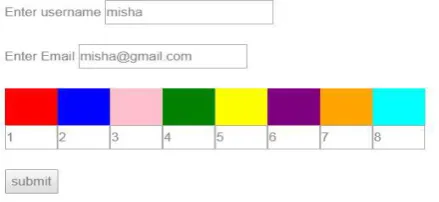
This also consists of registration, login and verification phases. In registration phase, user has to first enter a username and afterwards has to rate colors from 1 to 8 randomly as shown in Figure-2.1(a) and can remember it as “RBGYKGOP”. During login phase, after entering a correct username the login interface based on colors selected by users is displayed as shown in Figure-2.1(b). It consists of grid (strip of colors) and number grid of size 8×8. The grid consists of 4 pairs of colors. Each pair represents the row and column for the number grid. It means first represents the row and second represents the column of the number grid. In number grid the numbers from 1-8 are randomly placed on the grid. According to the pair, the number in the intersection of the row and column of the number grid is the part of session password. For example, consider the ratings in Figure-2.1(a) and login interface in Figure-2.1(b). The first pair that system has generated are red and yellow colors. The rating for red is 1 and rating is 3 for yellow. So the first number in session password is the intersection of 1st row and 3rd column that is 3. The same method is repeated for all other pairs. So here for login interface shown in Figure-2.1(b) the password is “3573”. Here also authentication server verifies the password entered by user and if it is correct then user is allowed to enter into the system. In this, also at every login both the grid and number grid varies and so session password changes for every session and thus, it is also resistant to brute force, shoulder surfing and guessing attack[3][4][5].
[image:1.595.324.544.623.724.2]© 2018, IRJET | Impact Factor value: 6.171 | ISO 9001:2008 Certified Journal | Page 1874 Figure -2.1(b): Login interface
2.2. Color shuffling technique
We will see a simple and efficient shoulder surfing resistant graphical password scheme based on texts and colors in this section. The characters used in this proposed scheme is a total of 64, including 26 lower case letters, 26 upper case letters, 10 decimal digits, and symbols “.” and “/” as shown in the Figure-2.2.2. This proposed scheme include two phases, one is registration phase and second is login phase[6].
2.2.1. Registration phase
[image:2.595.53.270.82.274.2] [image:2.595.345.513.345.547.2]The user has to set his textual password K of length L(8≤L≤15) characters, and choose one as his pass from 8 colors assigned by the system as shown in the Figure-2.2.1. The remaining 7 colors which are not chosen by the user are called decoy colors. If the user wants to re-enable his disabled account, the user has to register an e-mail address for the same. The registration phase should be progressed further in an environment free of shoulder surfing. Additionally, during the registration phase a secure channel should be established between the system and the user by using SSL/TLS or any other secure transmission mechanism. The system stores the user’s textual password in the user’s entered password table, which should be encrypted by the system[6].
Figure -2.2.1: Registration Phase for color shuffling
2.2.2. Login Phase
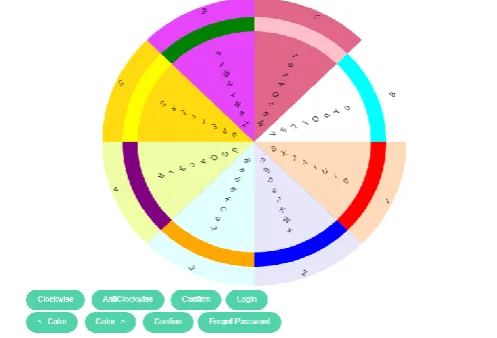
When user requests to login the system, then the system displays a circle composed of 8 equally sized sectors. That is our project login screen. In that login screen colors of the arcs of the 8 sectors are different, and each sector is identified by the of its arc, example- the blue sector is the sector of blue arc. Initially, 64 characters including uppercase, lowercase alphabets, numbers and special characters are placed among these sectors randomly to form a session password every time the user logins. The displayed characters can be concurrently rotated into either the adjacent sector clockwise by clicking the clockwise button once or the adjacent sector anticlockwise by clicking the anticlockwise button once according to the proximity of the character in the sector to reach the color mentioned during the registration phase. The login screen of this technique can be illustrated by an example shown in Figure-2.2.2. To login the system, the user has to finish the following steps[6][7]:
Step 1: The user requests to login the system.
Figure -2.2.2: Color wheel for login
Step 2: The button for rotating clockwise, the button for rotating anticlockwise, the “Confirm” button, and the “Login” button are also displayed on the login screen. For each login session, two wheels are generated, inner wheel of random characters and outer wheel consisting of colors. A 8X8 matrix is used to store the characters and numbers randomly and during each session it will produce characters in each sector randomly using random generation function. The rotate buttons will perform transformation operation on matrix to rotate the sectors clockwise or anti-clockwise. Let I= 1.
[image:2.595.79.199.633.730.2]© 2018, IRJET | Impact Factor value: 6.171 | ISO 9001:2008 Certified Journal | Page 1875 Step 4: If i < L, the system random Permuted all the 64
displayed characters, and then goto`s step 3. Otherwise, the user has to click the “Login” button to complete the login process.
If for three consecutive times the user could not login into the account or if the user’s account is not authenticated then the user’s registered password is sent to the user’s registered email-address so that the legitimate user can access the login system. The user has to rotate the sector containing Ki into his pass- sector.
AlgorithmsRandom Number Generation
Input: 64 character a to z=26, A to Z=26,0 to 9=10,and ". /"=2 Output: Random Printing
Algorithm:
1. To generate the matrix with row and column 8*8. 2. Put 0 to 63 numbers into matrix.
3. Select one random number from 0 to 63.
4. For putting number into matrix system check number is already present or not.
5. If number is present then perform step3. If not present then put into a matrix and go to setp3.
6. Do step 5 repeatedly upto 0 to 63 inserted into matrix. 7. Print the matrix.
8. Now get string which have 64 character "a to z=26, A to Z=26, 0 to 9=10, and . /=2".
9. Get number present into matrix sequentially [0][0] to [8][8] i.e., total 64 characters .
10. Select index of string from 64 characters put into that current location.
11. Do step 9 and 10 repeatedly upto [8][8] number. 12. Print current matrix with string char.
13. Display a matrix with random printing. 14. Stop[8].
3. PROPOSED SCHEME
3.1. Hybrid Color Shuffling Technique
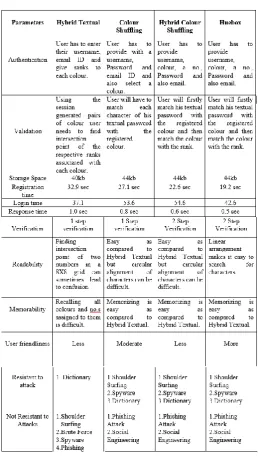
Our proposed scheme i.e. Hybrid Shuffling and Huebox both have proved to be the most efficient technique amongst the four graphical password techniques using the following parameters: Usability, user friendliness, time complexity, space complexity, login time, response time, types of possible attacks, user interface, etc as shown in Figure-4. A 8X8 matrix is used to store the characters and numbers randomly and during each session the system will produce characters in each box randomly using random generation function.
3.1.1. Registration Phase
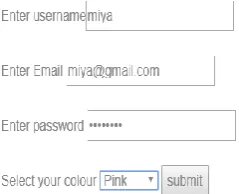
[image:3.595.309.558.445.614.2]User will enter a username and textual password. User will also enter a color of their preference and give a rank to it. Registration phase of Hybrid Color Shuffling is shown in Figure-3.1.1.
Figure -3.1.1: Registration phase for Hybrid Color Shuffling.
3.1.2. Login Phase
Each login session, three wheels are generated, inner wheel of random characters and second wheel of colors and outermost of rank as shown in Figure-3.1.2. A 8X8 matrix is used to store the characters and numbers randomly and during each session will produce characters in each sector randomly after using random generation function. The rotate buttons will perform transformation operation on matrix to rotate the sectors clockwise or anti-clockwise.
Figure -3.1.2: Color and rank wheel for login
3.2. Huebox
3.2.1. Registration Phase
© 2018, IRJET | Impact Factor value: 6.171 | ISO 9001:2008 Certified Journal | Page 1876 the username and password, the user is also asked to enter a
valid email address in case of forgotten password.
3.2.2. Login Phase
[image:4.595.308.567.71.529.2]Once the user clicks on the login button, the system displays a tabular representation of hybrid color shuffling technique. It includes first row consisting of numbers, second row consisting of colors and the last row consisting of characters that are randomly placed. The numbers in the first row are static whereas the other two rows can be shuffled clicking the buttons as shown in Figure-3.2.2. The user will first bring the color under the user specified rank which is static using color left shift and color right shift button and click on confirm button. Thus, we can say that first authentication is done. Now, the user brings the characters under the specified (which the user has entered) using text left shift button and text right shift button and confirm after each character of the password is brought under the . Finally, the user clicks on Login button. For each login, session password is generated. If the user fails to recollect his password, the password will be sent to the user’s registered email address. The third scheme allows the user for two-way authentication providing more secure, efficient and friendly technique as well.
Figure -3.2.2: Tabular representation of colors and ranks for login
4. CONCLUSION
[image:4.595.39.294.381.500.2]Thus, project “Comparative Analysis of Different Graphical Password Techniques for Security”, would ease the traditional way of securing, processing and retrieving the users data. Our system is a web service which can be beneficial to many websites or systems that use authentication. The success of this project would be providing secure login to the user using the interactive GUI of this system thus making it complex for the attacker who intends to tamper with the crucial information of the user.
Figure -4: Comparative analysis of different graphical password techniques
ACKNOWLEDGEMENT
We have taken efforts in this project. However, it would not have been possible without the kind support and help of many individuals and organizations. We would like to extend our sincere thanks to all of them.
© 2018, IRJET | Impact Factor value: 6.171 | ISO 9001:2008 Certified Journal | Page 1877 REFERENCES
[1] Vishal Janjalkar, Shekhar Mulik, Archana Nanade,
"Authentication Scheme For Session Password Using Play-Fair Cipher", IJARCET, Volume 5 Issue 3, March 2016.
[2] Priyanka S. Kedar , Vrunda Bhusari ,"Using PBKDF2 Pair
& Hybrid technique for Authentication", IJERMT (Volume-3, Issue-5),May 2014.
[3] Rohit Jagtap, Vaibhav Ahirrao, Vinayak Kadam, Nilesh
Aher, "Authentication schemes for session password using and special characters" , IJIACS, Volume 3, Issue 2, April 2014.
[4] M Sreelatha, M Shashi, M Anirudh, MD Sultan Ahamer, V
Manoj Kumar, "Authentication Schemes for Session Passwords using and Images", IJNSA, Vol.3, No.3, May 2011.
[5] Miss.Swati Tidke, Miss Nagama Khan, Miss.Swati
Balpande, "Password Authentication Using Text and Colors", IJSRET, ISSN Volume 4, Issue 3, March 2015.
[6] Sumit H. Wagh, Aarti G. Ambekar, "Shoulder Surfing
Resistant Text-based Graphical Password Scheme", IJCA, ICCT 2015.
[7] Mrs. Nagamani K, Bhange Yogita, Bhoir Dhanashree,
Dalavi Rani, "A Simple Text-Based Shoulder Surfing Resistant Graphical Password Scheme", IJARCCE, Vol. 6, Issue 3, March 2017.
[8] Aayush Dilipkumar Jain, Ramkrishna Khetan,